INTERNATIONAL CONFERENCE ON ENGINEERING DESIGN, ICED’07
28 - 31 AUGUST 2007, CITE DES SCIENCES ET DE L'INDUSTRIE, PARIS, FRANCE
A TOOL FOR SUPPORTING PROTOCOL ANALYSIS
Prabir Sarkar1, Amaresh Chakrabarti21, 2 Centre for Product Design and Manufacturing, Indian Institute of Science, Bangalore, India
ABSTRACT
Protocol analysis is extensively used for detailed empirical studies of design processes, both for understanding designing ‘as is’ and for evaluating design support in detail. Protocol analysis involves manual transcription of videos of design sessions where a think-aloud protocol is often used by participant designers.
In this paper we discuss the need for protocol analysis, identify the requirements for support required, review available aids, and propose a new aid for transcribing video protocols. The requirement list for such a support is developed using feedback from experienced design researchers who had completed many hours of transcription and coding in the past. A tool called ‘Idea-Transcribe’ has been developed with this set of requirements. The tool has been extensively used by many design researchers in Indian Institute of Science, Bangalore, who found it useful. The tool was able to reduce transcription time by half, and provide many essential facilities which were opted by the researchers, such as automatic time stamping and integrated typing environment.
Keywords: Novelty, usefulness, creativity, creativity measures
1 INTRODUCTION
A major aim of design research is to understand the process of designing, which is a prerequisite for developing effective support for designers. Protocol analysis is used extensively for detailed empirical studies of the design process, both for understanding designing ‘as is’ and for evaluating design support in detail. Protocol analysis involves manual transcription of videos of design sessions where a think-aloud protocol is often used by participant designers. There is a substantial increase in the amount of detail of behaviour that can be observed when a designer performs a task while thinking aloud as compared to working silently [1]. Transcribing involves extensive human intervention and is highly time consuming. This paper reports design and development of a transcription aid for supporting design researchers in analyzing protocols.
2 OBJECTIVES The objectives are to:
1. Identify requirements for developing a transcription tool. 2. Review currently available tools.
3. Develop a tool for aiding transcription. 4. Evaluate tool.
3 IMPORTANCE
Design is an engineering activity that affects almost all areas of human life, uses the laws and insights of science, builds upon special experience and provides the prerequisites for the physical realization of solution ideas [2]. It is a purposeful activity concerned with developing suggestions for changing the physical world. Engineering design is a central part of product development, requiring creativity for synthesizing novel products [3]. It is also regarded as a thinking process by which problems are analyzed, objectives are defined and adjusted, proposals for solutions are developed and the quality of solutions are assessed [4] . Engineering design is a demanding process [5, 6] requiring a multi disciplinary approach [4] and it is the main area of design research [3].
Product development projects face a situation often characterized by shrinking margins, short product life cycles and introduction of new technologies [7]. ‘Increasing competition in the world market place has forced companies to look for new ideas of improving the quality of products, decreasing production costs and reducing the time taken to introduce new products’ [8]. New products account to a substantial part for the future turnover of a business organization; thus, companies should introduce them on regular a basis in order to sustain in this competitive market in a way to make profit [4]. These call for support development to enable designers design better products quickly.
To develop any support for enhancing the process of designing, understanding the process of designing is essential. One of the most important research methods used in understanding designing is protocol analysis - where the activities involved in a design process are captured using video cameras and then transcribed (utterances of designers are typed) before analysis of the utterances for meaning patterns. Typically, designers are asked to verbally make explicit (called ‘thinking aloud’) their thoughts so that these can be captured for analysis in order to understand the process of designing in depth. The understanding is meant to be used to develop an effective support later in order to enable better process and outcome of designing. When designers work a group, this ‘thinking aloud’ might be natural anyway, as they normally would communicate with each other verbally in the course of design. Protocol analysis came into the analysis of designing in the late 1980’s [9-11]. The number and variety of studies of design activity that can be studied using protocol analysis is enormous [1], like engineering problem solving, architectural problem solving, software design and others [12-13]. Over the years protocol analysis has become an essential tool for a design researcher, even though there are certain drawbacks of ‘thinking aloud’ when a solo designers is using it, e.g., possible change of subject’s behaviour, sometime stating incomplete accounts and possibility of providing irrelevant information [1]. However, in the absence of any fundamental limitations, this method remains a popular method for single subject studies in design [11, 14].
Most video recorded protocols need to be transcribed, by typing each utterance made by a designer during the course of design observed. Transcribing is a tedious process requiring many hours of manual work. On an average, it takes a researcher 7-8 hours of valuable time in transcribing an hour of video protocol [15,16]. Generally, a researcher has to transcribe many hours of video protocols of designing where designers, working individually or in group, solve a given design problem. Thus, an aid for transcribing video protocols is required.
4 IDENTIFYING REQUIREMENTS FOR DEVELOPMENT OF A
TRANSCRIBING TOOL
To understand the problems faced by design researchers while transcribing video protocols, a survey is conducted in which seven design researchers, which an average of 2 years transcribing experience, are asked to explain the problems that they face while transcribing. These designers mainly use Microsoft ExcelTM for typing the utterances and Microsoft Windows Media playerTM in the background for viewing and listening to the video. One requires frequent pausing and shifting between these two pieces of software in order to transcribe each phrase of an utterance. Some these researchers have also used available transcribing tools such as TransScriberTM, Dragon Naturally SpeakingTM or the language bar of Microsoft word 2003TM.
In this survey with design researchers, in order to identify the requirements of an ideal transcription tool, the researchers expressed that the ideal tool should enable them to continuously transcribe the video while allowing viewing of the video continuously so as to enable capture of non-verbal expressions. The problems involved with transcribing identified by them are – (i) it is time consuming (ii) there can be errors in typing (iii) shifting from one software to the other is difficult (iv) no repeat function (from one particular place of video to another) (v) entering the exact time is difficult and (vi) there is a problem related to simultaneous pressing of multiple keys. A requirements list (see Table 1, first column) is prepared.
5 ANALYSING CURRENTLY AVAILABLE TOOLS
In the ideal case, a video could in future be automatically (using a voice recognition software) transcribed without any human intervention. Voice recognition software like Dragon Naturally SpeakingTM and the language bar of Microsoft word 2003TM and even the latest transcription AIDTM from Speech Recognition WareTM cannot automatically transcribe protocols for designers working in a group. Even with one designer, for effective automated transcription these pieces of software require extensive training as the accent and the rate at which the words are spoken vary from person to person. Also, these pieces of software cannot capture non-verbal information from the video that design researchers might be interested in understanding, like explanation using hand-motions, sketching etc. Thus, manual transcription is the next best option.
Currently there are a number of tools available to aid manual transcription, but most of them have limited advantages, such as Sony® transcription machine, Sanyo® Micro Cassette Transcriber or the transcription kit from Philips® (having provision for additional foot pedal – which is expensive, given that this additional foot pedal only controls the playing of the video), or software such as Transcribe® (ability to slow down the video rate- it has been noticed that slowing the video often reduces clarity of the utterances and transcribing gets difficult). Also, many of them are customized for medical and legal transcriptions.
6 DEVELOP A TOOL FOR AIDING TRANSCRIPTION
We have developed a transcription aid that will support transcription of think-aloud protocols. The tool developed has many features such as automatic playing of a certain length of the video and pausing for a length of time as specified by the user. This enables the users to continuously transcribe at a speed that matches with their typing speed. The portion last heard can be repeated easily, with the click of a button. A word processing interface has been integrated with ‘automatic time insert’ and ‘spell check’ facility, with many single key short cuts.
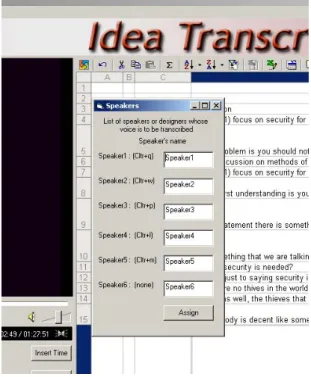
The software developed by us provides an integrated transcribing environment for design researchers. On one hand one can listen to the audio and view the video to be transcribed, and on the other hand a spreadsheet is provided for transcribing the video. This enables the user to continuously transcribe at such a speed that matches with their typing speed. Both the video and the spreadsheet are controlled by many buttons and shortcut keys. Depending upon ones’ speed of typing and the rate at which the designers speak, the video can be played or paused for specific period of time automatically. For temporarily pausing and for continuously repeating the last utterance, provisions such as 'hold' and 'repeat' has been provided. Suitable short cut keys have also been provided. In case, one has transcribed till a certain portion of the video, and would like to start from exactly that point after a break, a ‘go to’ button has been provided. For the spreadsheet, there are many options such as automatic time stamping, shortcut keys for who is speaking (which can also be used as shortcut key for codes), automatic transfer to Microsoft Excel and others, see Fig. 1 for user interface and Fig. 2 for interface for assigning speaker or codes. An extensive help has been provided with the software explaining each of its features (see Appedix.1). The tool also displays the time at which the researcher started transcribing, enabling one to calculate the rate of transcription.
7 EVALUATE TOOL
On an average, an hour of video requires 7-8 hours to transcribe [15,16]. Observation on transcription performance suing the proposed tool reduces this time to about 4 hours. The tool has been evaluated by several in-house design researchers. Evaluation reveals that the tool is effective, user-friendly and reduces manual strain while transcribing. The tool effectiveness has been assessed by comparing it with other available tools. Currently, the tool is used on a regular basis for transcribing videos of problem solving sessions by in-house design researchers in Ideas Lab for their own research. About 30-50 hours of video has already been transcribed using this tool by four researchers; each hour of video taking about 4 hours to transcribe.
Researchers has used this tool to understand how designers searchers new idea and how ideas gets generated. Presently, a researcher is using this tool to understand how designers design collaboratively.
Fig.1 GUI of ‘Idea Transcribe’
Fig. 2 Assigning speakers and codes
addressed in the tool.
Requirements and difficulty How the tool has addressed this
1 Transcribing is time consuming Integrated typing environment with many features is able to reduce the required time for transcribing from 7-8 hours to 4 hours.
2 Entering the exact time is difficult
Automatic time stamping – which essentially assigns the current position of the video, in a cell of the spreadsheet.
3 A-B repeat of variable length is required as typing speed vary from one researcher to the other and the rate of speaking of the designers in the video is also changes
The researcher can variably assign the amount of time the video/ audio to be played and the amount of time to pause, so that the researcher can type the
utterances. This shifting between play and pause takes place automatically.
4 Provision to view the video always - to understanding who is speaking and to capture non-verbal expressions
Integrated viewing of the video and provision for typing provides this functionality.
5 Difficulty when more than one speaker is speaking
‘Hold’, ‘repeat’, ‘continue’ and possibility of increasing and decreasing the sound level has been provided for this.
6 Problem related to shifting from one software to the other while transcribing (e.g. from MS media player to MS word)
Integrated viewing the video and typing provides this functionality where researchers do not require shifting from one piece of software to another. 7 Sometime clarity of voice is low
- many times we need to repeat
‘Hold’, ‘repeat’, ‘continue’ and possibility of increasing and decreasing the sound level has been provided for this.
8 Help required for context understanding
An extensive help has been provided with the tool. 9 Difficulty in typing different
designers name when the designers are speaking together.
Assignable shortcuts keys have been provided that the researcher can initially assign according the designers who are going to speak in the video. Pressing the assigned key will make automatically print the name of the designer in the cell of the spreadsheet. 10 Difficult to transcribe the entire
protocol in a single setting
An hour of transcription will take about 4 hour of transcribing and practically it is difficult to finish the entire transcription in one setting. Transcribers can close the tool and start from exactly the same space by using the ‘Go To’ command.
11 Typing verbal and non-verbal codes at a time
Assignable shortcuts keys have been provided that the researcher can initially assign as codes that are required to be put while transcribing, so that
transcription and coding can be done simultaneously, saving time for coding which requires reading the transcription again.
12 Help required for coding -Same as above-
13 One sentence at a time This requires pausing the video automatically after an entire sentence has been uttered by a designer. Initially we thought to develop such a feature using sound peak identification algorithm. Later we found that designers do not utter an entire a sentence and pause. Thus such an algorithm will automatically pause only after a long period of time, which will le less use to the researcher as there is a limitation of
remembering of such sentences. Again the algorithm would find difficulty in identifying the designers when they are working in group.
14 There can be errors in typing A button has been provided that will directly take the spreadsheet to Microsoft Excel where apart from spell check one can do necessary calculation, correlation formula insertion.
15 Problem related to multiple key pressing simultaneously
Most short cuts keys are functional keys (like F5, F6 etc) while others combination of two keys whose contents are assigned by the researcher.
8 CONCLUSION
Transcription of protocols is an essential part of analysing design activity. Today’s design researchers face many problems while transcribing design videos. An aid in the form of a tool has been developed to support the process of transcription. The tool consists of an integrated transcription environment, and many features as listed down by design researchers as their essential transcription requirement. The tool has been evaluated by many design researchers. Using this tool the researchers are able to reduce the time taken for transcribing to half and the features helped them transcribe using less effort. 9 ACKNOWLEDGEMENT
We acknowledge the help of the evaluators for evaluating the tool. References
[1] Cross Nigel, Christiaans Henri and Dorst Kees. Introduction: the delft protocol workshop, in Cross Nigel, Christiaans Henri and Dorst Kees (Eds.) Analysing design activity, 1996 (John Willey and Sons).
[2] Pahl, G. and Beitz, W. Engineering design, a systematic approach, 1999 (Springer Verlag London).
[3] Chakrabarti, A. Engineering Design Synthesis Understanding Approaches and Tools (Eds.), 2002 (Springer Verlag London Limited).
[4] Roozenburg, N. F. M. and Eekels, J. Product Design: Fundamentals and methods, 1991 (John Wiley and sons), ISBN no.471 94351 7.
[5] Sullivan, O. B. A. Constraint Aided Conceptual Design. PhD thesis, Department of computer Science, National University of Ireland, Department of computer Science, National University of Ireland, University College Cork, 1999.
[6] Gero, J. S. Design prototypes: a knowledge representation schema for design. AI magazine, 1990,11(4):6–36.
[7] Potter, S., Culley, J. S., Darlington, J. M., and Chawdhry, K. Automatic conceptual design using experience driven heuristic, Research in Engineering design, 2003,14:131– 144.
[8] Arturo, M., Ahmed, A. A. H., Timothy, E. I., Robert, Y. I., and Robert, B. A review of computer aided simultaneous engineering systems. Research in Engineering Design, Springer Verlag, 1995,7:38–63.
[9] Ullman, D G, Dietterich T.G and Stauffer LA. A model for mechanical design process based on empirical data, Artificial Engineering in Engineering Design and Manufacturing, 2(1), 1988,33-52.
[10] Adelson B. Cognitive research: uncovering how designers design, Research I Engineering Design 1(1), 1998, 35-42.
[11] Whitefield A and Warren C. A blackboard framework for modelling designers’ behaviour, Design Studies, 10(3), 1998, 179-187.
[12] Ennis, C.W. and S.W. Gyeszly. Protocol analysis of engineering design. Research in Engineering Design, 3(1), 1991, 15-22.
[13] Ehrlenspiel, K and N. Dylla. Experimental investigation of designers’ thinking methods and design procedures, Journal of Engineering design 4(3), 1993, 201-212.
[14] Baya Vinod and Leifer J Larry. Understanding information management in conceptual design in Cross Nigel, Christiaans Henri and Dorst Kees (Eds.) Analysing design activity, 1996 (John Willey and Sons).
[15] Ahmed Saeema. Understanding the use and reuse of experience in engineering design, Ph.D. thesis, Engineering department, 2000, Cambridge University.
[16] Nidamarthi S. Doctor of Philosophy thesis, Engineering department, Cambridge University, 1999.
APPENDIX. 1: HOW TO USE ‘IDEA TRANSCRIBE’ Open file
1. Open a video file: First open a video file that you would like to transcribe. The file can be of any video or audio file like .dat, .avi or .mp3 that can be opened using a media player.
2. Open a transcription file: If you have already completed a transcription or part of you may open it using the excel file open command. If you have saved a file using MS excel than please open it separately and resave it as XML spreadsheet, then try opening.
Saving file
You will be prompted for ‘save as’ when you will try to save the file. The file can be saved as a spreadsheet that can be opened using this program later or can also be opened using MS excel.
You can also use F12 key for quick saving which will not only resave the file as the destination specified by you but also for safety reason will put a duplicate file bearing the name ‘s1.xls’ in the same folder of the .exe file.
Using the software 1. First open the video file
2. Then decide for what amount of time (in sec.) you want the software to play the video and for what amount to pause; change the values accordingly.
3. Next press start.
4. Go to the spread sheet and start typing what ever you are hearing from your speakers. OTHER OPTIONS
Automatic time insertion
You can insert the time of the video in the spreadsheet by pressing ‘F4’. Assigning speakers
In the video there may be more than one speaker or designer, their individual names can be assigned a shortcut key and then when ever that speaker is speaking you can use this key to automatically put the name in the spreadsheet
Hold, Repeat and Continue
In case you want to pause the video- press ‘hold’. If you want to re-listen, the last portion press ‘repeat’; the amount of time as mentioned in the ‘play’ box will be repeated continuously as long as the ‘continue’ button is not pressed. To continue form the ‘hold’ condition or from the ‘repeat’ condition press ‘continue.
Go to specific place
Imagine that transcribed part of the video and have taken a break. Now when you run the program the video will not start from exactly the place you have finished. Use ‘go to ‘ option for it. ‘Go to’ option is used to move the current position of the video to a specified place.
Export to excel
The spreadsheet GUI is very simple and pleasing but if you want to use the powerful option of MS excel just press ‘export to Microsoft Excel’ from the menu bar of the spreadsheet. You can use the option buttons also for options related to spreadsheet.
The software has certain inbuilt shortcuts and some assigned shortcuts.
In-built shortcut keys
F1= Help, Crtl +E – Export to Excel, Other standard keys like Ctrl+a, c,v,x,z Assigned shortcut keys
F12- spreadsheet quicksave, F5- Hold, F6- Repeat, F7- Continue, Ctlr-q- speaker1, Ctlr-w- speaker2,
Ctlr-p- speaker3, Ctlr-l- speaker4, Ctlr-m- speaker5, F4- Insert time
For any doubt please contact Ideas Lab, CPDM (www.ideaslab.cpdm.iisc.ernet.in)
Corresponding author:
Amaresh Chakrabarti, Innovation Design Study and Sustainability Laboratory, Centre for Product Design and Manufacturing, Indian Institute of Science, Bangalore – 560012.India. Tel: 091-80-22932922, E-mail: [email protected] , URL: http://cpdm.iisc.ernet.in/ac.htm