Conditioned-safe Ceremonies and a User Study of an Application to Web
Authentication
Chris Karlof
J.D. Tygar
David Wagner
{
ckarlof, tygar, daw
}
@cs.berkeley.edu
University of California, Berkeley
Abstract
We introduce the notion of a conditioned-safe ceremony. A “ceremony” is similar to the conventional notion of a pro-tocol, except that a ceremony explicitly includes human par-ticipants. Our formulation of a conditioned-safe ceremony draws on several ideas and lessons learned from the human factors and human reliability community: forcing functions, defense in depth, and the use of human tendencies, such as rule-based decision making. We propose design principles for building conditioned-safe ceremonies and apply these principles to develop a registration ceremony for machine authentication based on email. We evaluated our email reg-istration ceremony with a user study of 200 participants. We designed our study to be as ecologically valid as possible: we employed deception, did not use a laboratory environ-ment, and attempted to create an experience of risk. We simulated attacks against the users and found that email registration was significantly more secure than challenge question based registration. We also found evidence that conditioning helped email registration users resist attacks, but contributed towards making challenge question users more vulnerable.
1
Introduction
We live in a complicated environment, and like many an-imals, we tend to develop automatic responses to situations we encounter more than once. Our brains tend to classify stimuli according to a few key features, and if one or more features match stimuli we have encountered in the past, we often respond mindlessly with the action that we learned was most appropriate. Psychologist Robert Cialdini calls theseclick-whirr responses [9]. Cialdini compares these automatic responses to pre-recorded tapes in our head, and uses “click-whirr” to evoke the sound a tape machine makes after pressing “play”. As the world becomes more intricate and variable, we increasingly rely on click-whirr responses. Without click-whirr responses, we would spend most of our
time appraising and analyzing mundane situations in our daily lives. Philosopher Alfred North Whitehead recog-nized this when he asserted “civilization advances by the extending the number of operations we can perform with-out thinking abwith-out them [55].”
As we become more dependent on click-whirr responses to navigate our daily lives, some have learned to exploit this behavior. Salesman, fund raisers, and con men can create situations containing the stimuli necessary to trigger the de-sired click-whirr response, even though less visible features may differ substantially from past situations. For example, people tend to obey a person in a uniform, regardless of whether that person has any real authority.
The designers of many current Web authentication mech-anisms, such as passwords, have all but ignored this funda-mental psychological phenomenon. Social engineering at-tacks on the Internet, such as phishing, have largely been successful because the Web is fertile ground for mimicry, and password authentication can condition users to fall for these attacks. Many users have developed a click-whirr re-sponse to login forms and will automatically enter their lo-gin credentials on any Web page that mimics a trusted site and on the surface, appears legitimate.
In response to these social engineering threats, many in-stitutions usemachine authentication, which authenticates a user’scomputer, in addition to password authentication, which authenticates the user herself. Since a user may use more than one computer, machine authentication systems must have aregistrationprocedure to authorize and set au-thentication cookies on multiple machines. Many machine authentication systems currently deployed by financial Web sites usechallenge questionbased registration [7, 27, 49]. A challenge question is a user-specific question to which an adversary is unlikely to be able to guess an answer, e.g., “What is the name of your favorite teacher?” [18, 32]. Registration based on challenge questions is vulnerable to man-in-the-middle (MITM) attacks [46, 61]. Since these at-tacks exploit similar click-whirr responses as atat-tacks against passwords, the security benefits of challenge questions over passwords alone may be minimal.
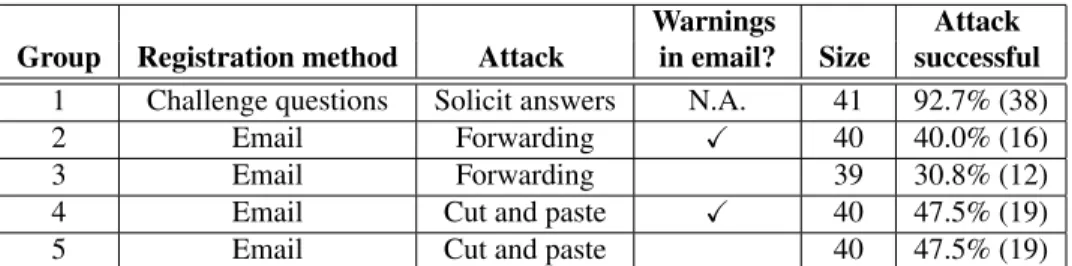
Warnings Attack Group Registration method Attack in email? Size successful
1 Challenge questions Solicit answers N.A. 41 92.7% (38)
2 Email Forwarding X 40 40.0% (16)
3 Email Forwarding 39 30.8% (12)
4 Email Cut and paste X 40 47.5% (19)
5 Email Cut and paste 40 47.5% (19)
Table 1. Success rates of our simulated attacks against registration procedures in our user study. Users in groups 2 and 4 received contextual warnings in registration emails against our simulated attacks, but users in groups 3 and 5 did not.
1.1
Contributions
Since human click-whirr responses seem to be an un-avoidable fact of life, we argue that authentication mecha-nisms for humans should be designed such that click-whirr responses reinforce their security. Towards realizing this goal, we make two contributions:
Conditioned-safe ceremonies. Aceremonyis similar to the conventional notion of a network protocol, except that a ceremony explicitly includes human participants as nodes in the network, distinct from the computers and devices they use [17].1 In this paper, we introduce the notion of
aconditioned-safe ceremony. A conditioned-safe ceremony is one that deliberately conditions users to reflexively act in ways that protect them from attacks. Our formulation of a conditioned-safe ceremony draws on several ideas and lessons learned from the human factors and human relia-bility community: forcing functions, defense in depth, and the use of human tendencies, such as rule-based decision making. In Section 4, we propose design principles for conditioned-safe ceremonies.
A user study of an email based registration ceremony. We apply our design principles for conditioned-safe cere-monies to develop a registration ceremony for machine au-thentication based on email (Section 5). To evaluate our email based registration ceremony, we conducted a user study with 200 participants to compare the security of email registration to the security of registration based on chal-lenge questions (Section 6). We simulated social engineer-ing attacks against the users and found email based reg-istration was significantly more secure against our attacks (Table 1). Our simulated attacks succeeded against 93% of 1The term ceremony was first coined for this purpose by Jesse Walker [17]. Communications between human nodes and other nodes in the ceremony are usually not via network connections, but instead through user interfaces, face-to-face interactions, or peripheral devices. Exam-ples of ceremonies include password authentication and registration pro-cedures.
challenge question users, but succeeded against only 41% of email users. We also found evidence that conditioning helped email registration users resist our simulated attacks, but contributed towards making challenge question users more vulnerable. We asked users to complete an exit sur-vey after they finished the study, and we analyze the results in Sections 7 and 8.
2
Why users are vulnerable
Over the last decade, the success of phishing and other social engineering attacks has created a multi-million dollar underground economy [20, 47]. Although it is tempting to blame the success of these attacks on the ignorance of users, researchers have offered an alternative explanation: com-puter security mechanisms such as passwords and browser security indicators are poorly suited for human use. Psy-chologists and security researchers have identified several ways in which many security mechanisms and ceremonies disregard human tendencies and condition users to make in-secure decisions [1, 12, 13, 14, 24, 44, 53]:
Click-whirr responses and rule-based decision making are exploitable. Click-whirr responses are an example of more general human tendency to vastly prefer rule-based decision making over more tedious analytical ap-proaches [40, 41]. The theory of rule-based decision mak-ing is based on psychological studies that suggest humans tend to learn and aggressively apply problem-solving rules of the form “if (situation) then (action)” for frequently en-countered situations. When a user encounters a problem in a task, she matches the most prominent cues in the environ-ment with the calling conditions of previously learned rules to find most appropriate one to apply.
Although rule-based decision making helps us navigate the minutia of our daily lives and reserve our time and en-ergy for tasks requiring more detailed analysis, adversaries can exploit rule-based decision making in social engineer-ing attacks [9]. Human reliability expert James Reason
ob-served that frequently used rules, i.e., strong rules, may be “misapplied in environment conditions that share some common features with the appropriate states, but also pos-sess elements demanding a different set of actions [41].” In other words, a rule which has been frequently useful in the past can become astrong-but-wrong rule when the situa-tional cues change subtly. This helps explains why phishing attacks have been so successful. Since a wide range of Web sites require a user to log in before she can do something interesting, many users have developed a rule of the form “if (login form) then (enter username/password)” and will aggressively apply it when they encounter login prompts on Web pages which on the surface appear familiar, legitimate, or trustworthy.
Browser security mechanisms condition users to satis-fice. A frequently recommended defense against phishing attacks is for a user to verify a Web page’s domain and SSL certificate before entering her password on that page; oth-erwise, she might inadvertently reveal her credentials to an attacker. However, research has shown that users often omit these checks [13, 14, 26, 29, 44, 54, 58]. Although some users ignore these indicators because they do not understand them, a more fundamental problem is that browser security indicators condition users tosatisfice.
Satisficing is a decision-making strategy which means “to accept a choice or judgment as one that is good enough”, i.e., one that both satisfies and suffices [42]. Checking se-curity indicators is easy to skip because it distracts the user from her primary focus, and there are rarely any immediate visible consequences for skipping these checks or rewards for making them. Since the vast majority of a user’s lo-gin attempts are probably not under attack (or at least do not obviously appear to be under attack), routinely skipping security checks and ignoring warnings seems deceivingly acceptable. Over time, users learn to quickly and instinc-tively perform a security task’s required actions (e.g., enter-ing their passwords) and optimize out the optional actions (e.g., checking security indicators, responding to security warnings). Once a user has become conditioned into a sat-isficed behavior, psychologists have found it is difficult for her to change it, even if she recognizes overwhelming evi-dence that her behavior is wrong [9].
Users are not good at recognizing attacks. Accidents and successful social engineering attacks share similar key characteristics: they have a similar precondition, i.e., a risky situation, and similar trigger, i.e., human error. A recur-ring theme in the field of human reliability and error is that users often have difficulty in recognizing risky or danger-ous situations, and as a result, users may be less vigilant of their choices in these situations than they should. For ex-ample, in a review of 100 maritime shipping accidents,
Wa-genaar and Groeneweg concluded: “Accidents do not occur because people gamble and lose, they occur because people do not believe that the accident that is about to occur is at all possible [50].” Also, decades of buggy software have condi-tioned users to expect errors, failures, and other incompre-hensible system behavior, particularly with hastily devel-oped and continually updated Web applications. Users rou-tinely encounter warnings and errors messages, but rarely experience any immediate negative consequences for dis-missing them, even during a real attack. This creates the (accurate) impression that false positives are the norm, and actual attacks are rare. These tendencies suggest that we cannot rely on users’ abilities to detect social engineering attacks and respond appropriately, and we must design de-fenses accordingly.
3
Machine authentication to the rescue?
In response to the precipitous rise in social engineering attacks on the Internet, many institutions have implemented authentication ceremonies that supplement password based authentication withmachine authentication, which authen-ticates a user’s computer as opposed to the user herself. For example, one widely used approach for machine au-thentication is to set a persistent cookie; since the user’s browser will send that cookie every time the user returns to the Web site from that computer, the Web site can recognize the user’s computer. To successfully log in, the user must provide her password and the user’s browser must present a valid cookie. The intention is to take the human “out of the loop” and reduce the system’s dependency on humans’ abil-ities to detect attacks. Web sites currently using machine au-thentication include Bank of America [7], ING Direct [27] and Vanguard [49].The registration problem. Since users may use more than one computer, machine authentication systems must have aregistrationceremony to authorize and set authen-tication cookies on multiple machines. Unfortunately, this additional functionality brings the human back “in the loop” and exposes machine authentication systems to an alterna-tive attack vector. Instead of trying to steal authentication cookies directly from a user’s machine, an attacker can try to subvert the registration ceremony in a way that grants the attacker a valid cookie for the user’s account. Consequently, registration ceremonies must resist these kinds of bootstrap-ping attacks; otherwise, the security benefits of machine au-thentication may be minimal.
Challenge questions. Many machine authentication sys-tems currently deployed by financial Web sites use chal-lenge questionsin their registration ceremony [7, 27, 49].
When a user creates her account, she provides the answers to one or more challenge questions, and when she attempts to log in from an unregistered computer, the site prompts her to answer these questions. If the answers are correct, then the site sets a persistent authentication cookie on the user’s computer. For future logins from that computer, the user only needs to enter her password.
Challenge questions are vulnerable to an active man-in-the-middle (MITM) attacker spoofing the login page of the target Web site [46, 61]. When the user attempts to login via the spoofed page, the attacker forwards the user’s login credentials to the legitimate Web site. Since the attacker is indistinguishable from the actual user logging from an un-registered machine, the Web site responds with challenge questions for the user. The attacker displays these questions to the user. After the user provides her answers, the attacker forwards them to the Web site and receives an authentica-tion cookie for the user’s account.
Challenge question based registration is vulnerable be-cause, like password authentication, it disregards human tendencies and conditions users to fall for attacks. A user is most likely to resist an attack against her challenge ques-tions if she recognizes the threat and refrains from the click-whirr response of providing her answers. However, since the attacker’s registration request is indistinguishable from the Web site’s legitimate registration requests, detecting at-tacks is non-trivial for many users. Users must actively and carefully check browser security indicators, e.g., the URL bar and SSL certificate, to detect spoofing attacks. Many users misinterpret these indicators, and satisficing users of-ten ignore them.
Registration based on challenge questions threatens to undermine the promise of machine authentication. Since users who are vulnerable to phishing attacks against their passwords will probably also be vulnerable to phishing at-tacks against their challenge questions, a registration cere-mony using challenge questions is hardly more secure than using passwords alone. We need better registration cere-monies to realize the benefits of machine authentication.
4
Conditioned-safe ceremonies
One natural response to the weaknesses of challenge questions and passwords is to design ceremonies which try to eliminate user conditioning, click-whirr responses, and rule-based decision making. This approach is problematic. Rule-based decision making is fundamental to human be-havior: it helps us complete routine tasks quickly and easily. Users may be willing to invest extra time and effort to learn a new security mechanism, but if they cannot learn how to use it efficiently, they will become frustrated and disable or circumvent the offending mechanism [22, 24, 60]. Some
degree of conditioning may be necessary for the psycholog-ical acceptance of security mechanisms by users.
Since users will tend to adopt rules for completing a cer-emony that minimize conscious effort, we should not fight users’ tendencies to use rule-based decision making, but take advantage of these tendencies to help users resist so-cial engineering attacks. We should prudently design cer-emonies to condition rules that benefit security rather than undermine it. Towards achieving this goal, we introduce the notion of asafe ceremony. A conditioned-safe ceremony is one that deliberately conditions users to reflexively act in ways that protect them from attacks. We propose two design principles for building conditioned-safe ceremonies:
• Conditioned-safe ceremonies should only condition saferules, i.e., rules that are harmless to apply in the presence of an adversary.
• Conditioned-safe ceremonies should condition at least oneimmunizingrule, i.e., a rule which when applied during an attack causes the attack to fail. We discuss immunizing rules further in Section 4.1.
These principles also have important consequences on what conditioned-safe ceremonies shouldnotdo:
• Conditioned-safe ceremonies should not condition rules that require users to decide whether it is safe to apply them. Since many users are unreliable at recog-nizing risky situations, users should not need to refrain from conditioned behavior to resist attacks.
• Conditioned-safe ceremonies should not assume users will reliably perform actions that: 1) the ceremony has not conditioned her to perform, or 2) are voluntary. Satisficing users will learn to omit optional and volun-tary actions, so ceremonies should not rely upon users to perform such actions.
For example, a ceremony should not condition the rule “if (legitimate looking login form) then (enter user-name/password)” because it causes a security failure when applied in the presence of an adversary. To determine if it is safe to apply this rule, a user must first verify the URL bar, the site’s SSL certificate, and other security indicators. Burdening users with these decisions is unsatisfactory. Ide-ally, in a conditioned-safe ceremony, a user should be able to resist an attack even if she has no idea she is at risk and performs the same actions as she usually performs under benign conditions.
However, user behavior is unpredictable and an adver-sary may try to trick users into deviating from their normal, conditioned behavior in a way that causes a security fail-ure. Conditioned-safe ceremonies need safeguards to resist these attacks. In the human reliability community, designers often introduce constraints calledforcing functionsto help
prevent errors in safety-critical environments. We argue that forcing functions can also be useful for conditioned-safe ceremonies, and we discuss them further in the next section.
4.1
Forcing functions
A forcing function is a type of behavior-shaping con-straint designed to prevent human error [38]. Forcing func-tions usually work by preventing a user from progressing in her task until she performs a particular action whose omis-sion would result in a failure or accident. Because users must take this action during every instance of the task, the forcing function conditions users to always perform this ac-tion. With an effective forcing function, after a user per-forms the function’s associated action, many mistakes be-come difficult or impossible to make. For example, con-sider the error of locking your keys in your residence. A potential forcing function in this situation is a door that can only be locked from the outside, keys in hand. This trains you to take your keys with you whenever you leave home, making it less likely you will be locked out in the future.
Forcing functions often have two benefits: 1) they help preventerrors of omission, where a user skips an important, protective step in a task, and 2) they condition correct, safe behavior, since users cannot normally proceed otherwise. To be effective, the cognitive and physical effort required to comply with a forcing function must be less than the effort required to circumvent it. Otherwise, users may routinely attempt to circumvent the forcing function, diminishing its benefits.
Since forcing functions have been useful for prevent-ing errors in safety-critical environments, we hypothesize they can also help prevent errors during social engineering attacks. However, designing forcing functions that resist social engineering attacks is challenging. In conventional safety-critical environments, the risk elements rarely try to intentionally subvert protection mechanisms and cause er-rors. Designing electrical safety equipment would be a much trickier business if electricity had malicious intent. Also, deployability considerations for many ceremonies, e.g., no custom hardware, often require forcing functions to be implemented entirely in software. Software environ-ments afford attackers many opportunities for mimicry.
One previous application of software-based forcing functions in computer security is the concept of a secure attention key (SAK). A SAK is a mandatory special key combination users must type before they can take a security-critical action, e.g., submitting their password. On Window NT systems, users must type Control-Alt-Delete to get a login prompt. The SAK diverts control to the OS kernel, foiling any user-level spoofed login prompts. Since typing the SAK is mandatory, the hope is that users will learn to always enter the SAK before submitting their password.
Unfortunately, a simple attack against many SAKs is to induce an error of omission. On Windows NT systems, an adversary can display a spoofed login prompt and hope users skip the SAK before entering their passwords. This attack creates a conflict between two click-whirr responses: SAK systems condition users to first type the SAK, but all password systems condition users to enter their passwords when they see a login form. Whether the attack succeeds depends on which click-whirr response is stronger in a par-ticular user.
Since social engineering attacks can often misrepresent the state of a system and create the illusion that a forcing function has already been activated or disabled, ceremonies which fail solely due to errors of omission are suboptimal. Errors of omission are easy to make and hard to detect, even during routine tasks. Research suggests that users fre-quently do not notice when they have omitted routine pro-cedural steps [3], and omission errors represent one of the most common causes of human performance problems [39]. To resist social engineering attacks, we argue that conditioned-safe ceremonies need defense in depth. De-signers should build conditioned-safe ceremonies that have two levels of protection: an attack should fail unless a user both omits the conditioned action required by a forcing function and makes anerror of commission. We consider an error of commission to be an anomalous user action not normally used in the ceremony. If the user omits the action required by the forcing function, but does not otherwise de-viate from the ceremony, an attack should fail. Likewise, if the user performs the required action, but then makes an error of commission, the attack should also fail. With this approach, the action conditioned by the forcing function ac-quires an immunizingquality, since after a user performs this action, subsequent errors of commission will not com-promise the ceremony.
We emphasize that the conditioned action required by the forcing function must be easy for users to perform; in particular, it should easier to perform than any unsafe er-ror of commission. Since humans have been conditioned to work around buggy software, a user may willingly make an effortless error of commission if she feels it will complete the security task and allow her to continue with her primary task.
4.2
Analysis and discussion
Although a designer can choose the rules conditioned by a ceremony, an attacker can affect which rules a user chooses to apply by manipulating the environmental stim-uli. Research by psychologists and human reliability spe-cialists suggests that users mainly rely on two processes to determine the most appropriate rule to apply in a given sit-uation: similarity-matchingandfrequency-gambling [41].
With similarity-matching, a user compares the situation’s environmental cues against cues contained in the calling conditions of previously learned rules. If she finds a unique match, she performs the associated action. If the environ-mental cues are underspecified and partially match several rules, she will tend to “gamble” in favor of the useful, high frequency candidates, i.e., the “good” rules which have been most frequently been applied in the past.
These tendencies suggest that conditioned-safe cere-monies will better resist the currently successful attack strategy of blatantly initiating a ceremony with the victim and presenting familiar environmental cues, e.g., spoofing a trusted Web site. Since a forcing function requires a user to perform the immunizing action every time (whether under attack or not), the forcing function will condition a high-frequency, “good” rule (namely, perform the immunizing action) that is likely to be routinely applied in the future – even when under attack. Mimicking a conditioned-safe ceremony becomes less advantageous to an adversary; if a user recognizes she is participating in the ceremony, she will tend to perform the conditioned, immunizing action, which thwarts attacks. This presents an attacker two op-tions: 1) obviously initiate the ceremony and try to induce an error of commission before the user performs the im-munizing action, or 2) surreptitiously initiate the ceremony and try to induce an error of commission without the user realizing she is participating in the ceremony.
If attackers resort to the first option, adversaries must prevent the human tendency to use rule-based decision mak-ing, rather than encourage it, as current attacks do. This creates a disadvantage for adversaries; preventing human tendencies is often difficult. If attackers resort to the sec-ond option, we hope adversaries will need to present un-familiar situations to prevent users from recognizing the ceremony. Otherwise, users will tend to react with con-ditioned responses, i.e., apply safe rules and perform im-munizing actions. This approach also disadvantages adver-saries. Unfamiliar situations require additional cognitive ef-fort to analyze and may cause feelings of suspicion and dis-comfort. User often reject unfamiliar experiences in favor of more familiar ones. For example, studies suggest that some users distrust phishing warnings because the familiar experience presented by the adversary appears more trust-worthy [16, 58]. Conditioned-safe ceremonies turn the ta-bles and force adversaries to be the ones required to present an awkward and unfamiliar experience.
Limitations. We acknowledge conditioned-safe cere-monies have their limits. Adversaries may try to convince users to disable protective mechanisms or take actions out-side the scope of a ceremony which violate certain security assumptions. For example, with the configuration of many current computer systems, if a user chooses to install
mal-ware at any point, most ceremonies will be compromised. However, if we can design ceremonies that are so unpro-ductive to attack directly that adversaries must resort to con-vincing users to install malware, it would be a tremendous step forward.
5
A conditioned-safe registration ceremony
using email
In this section, we describe a conditioned-safe regis-tration ceremony for machine authentication using email. When a user attempts to log in from an unregistered com-puter, the Web site sends her an email containing a single-use HTTPS URL with an unpredictable component, for ex-ample:
https://www.xyz.com/reg.php?url_id=r
whereris a 160 bit random number generated by the Web
site.2 We call this URL aregistration link. The email
in-cludes instructions to click on the link. The Web site stores
rin a database, along with the associated user ID, an
ex-piration time, and validity bit. When the user clicks on the registration link, ifris still valid and has not expired, the
Web site sets a persistent authentication cookie on the user’s computer and invalidatesr. A user only needs to complete this ceremony once at each computer. For subsequent lo-gins, she only needs to complete any supplementary login procedures, e.g., enter her username and password. Several researchers have proposed using email in a similar way to help initialize authentication credentials [2, 6, 21, 23, 48]. Security analysis. Consider the threat model of a phisher, an adversary which lures unsuspecting Internet users to a Web site posing as a trustworthy business with which the users have a relationship [4]. We assume a phisher has the following capabilities: 1) complete control of a Web server with a public IP address; 2) ability to send communications such as emails and instant messages to potential victims; and 3) ability to mount application-layer man-in-the-middle attacks [5, 36, 51, 52], representing a legitimate server to the victim and proxying input from the victim to the real server as needed.
Against the phishing threat model, we argue email reg-istration follows the principles of a conditioned-safe cer-emony we propose in Section 4. The phisher can solicit the user’s login name and password, but since the phisher’s computer is unregistered, the site will not allow it to access the user’s account without submitting a valid registration link. The attacker can trick the Web site to send the user 2We assume the user has previously given the Web site her email ad-dress, e.g., during the account creation process.
a registration link, but to compromise the ceremony, an at-tacker must steal and use a registration link before the user submits it herself.3
The registration link acts as forcing function. Under nor-mal conditions, a user must click on the link to proceed. Although there may be other ways of submitting the link, e.g., by copying and pasting it in the URL bar, clicking gen-erally requires less effort, and sites can embed the URL of the link in an HTML element to make the alternatives more difficult. Also, clicking on the registration link is an immu-nizing action; after the Web site invalidates the link, it is useless to an attacker.
Email based registration has defense in depth. To com-promise the ceremony an attacker must 1) prevent the user from clicking on the link (i.e., omit the forcing function action), and 2) trick the user into revealing the link (i.e., make an error of commission). One possible attack strat-egy would be to inform the user that she must register her computer, but due to “technical problems” she should not click on the link and instead give the link to the attacker. We identify two compelling and straightforward attacks of this kind: 1) ask the user to copy and paste the registration link into a text box, or 2) ask the user to forward the regis-tration email to an address with a similar domain name as the target site. If a user does not notice the attacker’s in-structions and believes she is participating in the “normal” registration ceremony, we hypothesize she will likely resist these attacks. Email registration conditions users to click on the registration link, and if she clicks the link, she will resist the attack.
Alternatively, if the user notices the attacker’s instruc-tions to deviate from the ceremony, she will be safe as long as she clicks on the link before doing anything else. Since: 1) the Web site has conditioned the user to click on the reg-istration link; 2) the credible repercussions of clicking on link are probably limited; and 3) clicking on the registra-tion link is arguably at least as easy as complying with the instructions, the theory of rule-based decision making sug-gests that users will first tend to try clicking on the regis-tration link before complying with the adversary’s instruc-tions.
The key question is the strength of users’ tendencies to click the registration link rather than comply with the adver-sary’s instructions. To help answer this question, we con-ducted a user study to estimate how well email registration helps users resist social engineering attacks against it. In the next section, we describe this study.
3We do not consider attacks which enable adversaries to steal users’ authentication cookies after they have been set, e.g., cross-site scripting attacks or malware. This problem is orthogonal to registration and requires a different solution.
6
A user study of email registration
In this section, we describe a user study we conducted to compare the security of email registration to the security of registration using challenge questions. Our study simu-lated man-in-the-middle (MITM) social engineering attacks against users of each of the ceremonies. Our hypothe-sis is that email registration is significantly more rehypothe-sistant to MITM social engineering attacks than registration us-ing challenge questions. We previously published a work-shop paper describing the design of our study, but it did not present any results [33].
6.1
Study overview
Ecological validity is crucial: our study must realisti-cally simulate experiences users have in the real world. This raises a number of challenges, including:
• Simulating the experience of risk for users without crossing ethical boundaries [31].
• Limiting the effect of demand characteristics, where users try to guess the study’s purpose and change their behavior, perhaps unintentionally.
• Minimizing the impact of perceived authority figures during the study [25, 37].
• Determining an appropriate physical location for the experiment which minimizes any unrealistic influences on users.
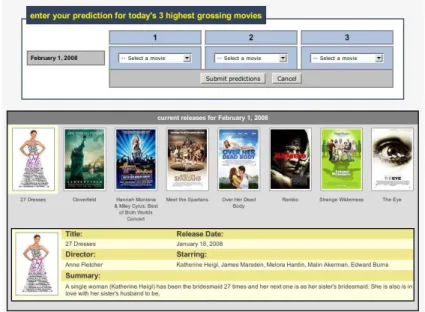
Our study addressed these issues in two ways: 1) we did not use a laboratory, and 2) we employed deception to hide the study’s true purpose. We recruited users remotely, and during the consent process, we told users that our experi-ment aimed to determine how well individuals can predict high grossing movies. We told each user she will log in to our Web site over a seven day period and make a prediction of what she thinks will be the top three highest grossing movies each day. Each user logged in from her “natural habitat”: from her own computer, from anywhere, and at any time she wished. We show a screenshot of our interface in Figure 1.
Each user received $20 as base compensation, and we rewarded her up to an additional $3 per prediction depend-ing on the accuracy of her predictions. We told each user that she must make seven predictions to complete the ex-periment, so the total maximum a user could receive is $41. We simulated the experience of risk by giving users password-protected accounts at our Web site and creating an illusion that money they “win” during the study was “banked” in these accounts. We paid users at the end of the study via PayPal and solicited each user’s PayPal email
Figure 1. User interface for making predictions at our study Web site.
address at the beginning of the study.4 To help suggest that
there was a risk that the user’s compensation could be stolen if her account was hijacked, we provided an “account man-agement” page which allowed the user to change the PayPal email address associated with her account.
Although we told users they must make seven predic-tions to complete the study, after each user made her fifth prediction, we simulated a MITM social engineering at-tack against her the next time she logged in. After she en-tered her username and password, we redirected her to an “attack” server. We discuss the simulated attacks in Sec-tion 6.4. After the simulated attack, we debriefed each user about the true purpose of the study and requested her recon-sent for the use of her data.
6.2
Recruitment
We recruited users through the Experimental Social Sci-ence Laboratory (Xlab) at UC Berkeley. The Xlab is an in-terdisciplinary facility that supports UC Berkeley investiga-tors in running behavioral and social science experiments. Members of the UC Berkeley community (i.e., students, staff, etc.) register with the Xlab over the Web and receive solicitations to participate in experiments via email. One limitation of this recruitment method is that our user pool was primarily composed of university students and staff and may not be representative of the general population. Our ex-periment used only native English speakers, and the subject pool included approximately 1950 eligible users.
4Although we did not verify each user’s PayPal account was valid at the start of the study, each user explicitly acknowledged she either had an account or was willing to get one.
We contacted 225 randomly selected users in April 2008 through the Xlab. Interested users signed up through the Xlab’s system and received instructions to visit our study Web site. We did meet any of the users in person. 208 users signed up for our study, and we assigned them round-robin to 5 study groups. One group used challenge questions for registration and the other four groups used different variants of email registration links. We discuss the email registration groups further in Section 6.4.2. We excluded the results of 8 users and give details in Section 7.1. We show a summary of the user groups and their sizes in Table 2.
6.3
Registration procedures
Each user created an account at our site, with a username and password. We also asked for the user’s email address and PayPal email address, if different. After a user entered her username and password on her first login, we redirected her to a page that informed her that she must register her computer before she could use it to access her account. If the user chose to register her computer, we redirected her to the registration page. If she was in the challenge question group, we prompted her to set up her challenge questions. She selected two questions and provided answers. After confirming the answers, she entered her account and pro-ceeded with her first prediction.
If she was part of an email registration group, then she saw a page informing her that she had been sent a regis-tration email and must click on the link labeled “Click on this secure link to register your computer”. After clicking on the link, she entered her account and made a predic-tion. We sent registration emails in HTML format, but also
Group Size Registration method Attack description Warnings in email?
1 41 Challenge questions Solicit answers N.A.
2 40 Email Forward email to attacker X
3 39 Email Forward email to attacker
4 40 Email Copy and paste link into text box X
5 40 Email Copy and paste link into text box Table 2. Summary of study groups.
included a plain text alternative (using themultipart/ alternativecontent type) for users who had HTML viewing disabled in their email clients. We embedded the same registration link in both parts, but included a distin-guishing parameter in the link to record whether the user was presented with the HTML or plain text version of the email. We discuss how we used this information in Sec-tion 6.4.2. Screenshots of registraSec-tion emails are shown in Figures 3(a) and 3(b).
Both registration procedures set an HTTP cookie and a Flash Local Shared Object on the user’s computer to indi-cate the computer is registered. For subsequent login at-tempts, we first prompted the user for her username and password. If the username and password were valid, our server checked if the user’s computer was registered for that username. If she was logging in from a registered computer, then we redirected her to her account. If she was logging in from a computer we didn’t recognize, then we prompted her to answer her challenge questions (Figure 2(a)) or sent her a new registration link to click on, depending on the user’s group.
6.4
Simulated attacks
6.4.1 Challenge questions: Group 1
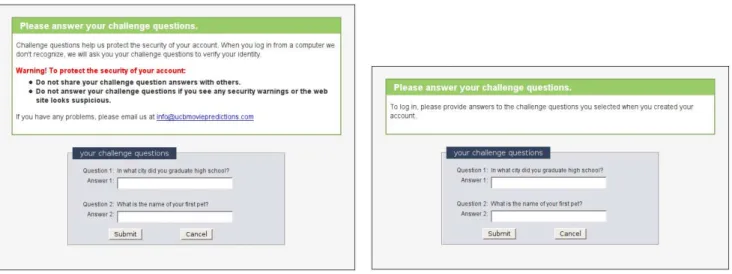
For the challenge question group, the attack attempted to convince users to answer their challenge questions by pre-senting the page shown in Figure 2(b). This is essentially the same page users saw when they answered their chal-lenge questions under “normal” conditions, but with the warning and informative text removed.5 This attack: 1)
is straightforward, 2) closely mimics the legitimate regis-tration process, and 3) was previously disclosed in the se-curity community as a major weakness of challenge ques-tions [46, 61].
6.4.2 Email: Groups 2-5
For the email groups, we simulated the two attacks we iden-tified in Section 5: the copy and paste attack and the for-5Even if users select their challenge questions from a pool of possible questions, an attacker can easily determine a particular user’s questions by relaying communications between the legitimate site and the user [46, 61].
warding attack. The copy and paste attack asked the user to copy the registration link into a text box, and the forwarding attack asked the user to forward the registration email to an address with a similar domain name as our study site. We simulated the forwarding attack against groups 2 and 3, and simulated the cut and paste attack against groups 4 and 5.
We chose these attacks because we believed they are the most compelling and straightforward attacks that we could ethically implement. Another potentially effective attack would be to try to hijack each user’s email account, but we did not believe this attack was ethical. We leave other at-tacks as a subject for future work.
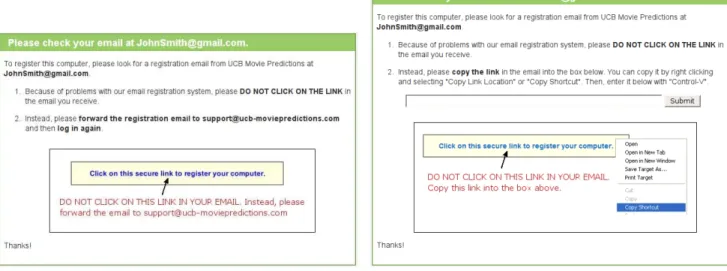
For both attacks, the attack page first told the user that “because of problems with our email registration system” she should not click on the link in the email she received. For the copy and paste attack, the attack page presented a text box with a “submit” button and instructed the user to copy and paste the registration link into the box. For the forwarding attack, it instructed the user to forward the email to the attacker’s email address. We show screenshots of the attack pages in Figures 4(a) and 4(b).
These attacks also presented pictorial versions of the in-structions, with a screenshot of how the registration link appears in the email. To maximize the effectiveness of this picture, we gave the attacker the advantage of knowing the distribution of HTML and plain text registration emails previously viewed by the user during the study (see Sec-tion 6.3). The attack displayed the pictorial instrucSec-tions cor-responding to the majority; in case of a tie we displayed a screenshot of the HTML version.
6.4.3 Warnings
Some Web sites warn users about safe security practices, e.g., how to resist phishing attacks against challenge ques-tions. Although these warnings are sometimes useful, they will likely be absent during an attack, when a user needs them the most. Email registration has the advantage of being able to include advisory information and contextual warnings in each registration email. To measure the ef-fectiveness of these kinds of warnings, we subdivided the email groups into two groups: those who received warnings in registration emails (groups 2 and 4) and those who did not (groups 3 and 5). Everyone saw these warnings on
le-(a) User interface for answering challenge questions. (b) Screenshot of the attack against challenge questions.
Figure 2. Normal challenge questions interface vs. simulated attack instructions.
(a) HTML registration email with warnings. (b) HTML registration email without warnings.
Figure 3. Registration emails.
gitimate registration pages. A screenshot of these warnings is shown in Figure 3(a).6Group 1 users also received
warn-ings about safe practices when answering their challenge questions, but we only showed group 1 users these warn-ings during legitimate registrations. Group 1 users never received warnings in email.
6.4.4 Attack success metrics
If a group 1 user answered her challenge questions correctly on the attack page, we considered the attack a success and ended the experiment. We assumed an attacker could dis-6These warnings specifically warned against the attacks we simulated. Although in the real world it may not be feasible to concisely warn users against all the possible attacks, a site can certainly warn users against the most successful or common attacks they have observed in the past.
tinguish between correct and incorrect answers (e.g., by re-laying the user’s responses in real time to the legitimate site), so if a user entered an incorrect answer, the attacker prompted her again.
If a group 2-5 user clicked on the registration link first, then we considered the attack a failure.7 If the user
for-warded the email or submitted the link first, then we con-sidered the attack a success. Either way, we ended the ex-periment for the user.
7These attacks actually simulated network level MITM attacks. Such attackers might be able to intercept registration links and steal any regis-tration tokens stored on the user’s computer. There are various proposals that can help protect registration links and cookies against stronger adver-saries [10, 28, 34], but we do not discuss the details here. Regardless, the results of this study are applicable to a wide variety of social engineering attacks, including phishing.
(a) Screenshot of the forwarding attack against email registration. (b) Screenshot of the cut and paste attack against email registration.
Figure 4. Our simulated attacks against email registration.
For all users, attempts to navigate to other parts of the site redirected the user back to the attack page. If the user resisted the attack for 30 minutes, then on her next login, the experiment ended and we considered the attack a fail-ure. The attack pages for groups 1, 4, and 5 contained a Javascript key logger, in case a user began to answer her challenge questions or entered the link, but then changed her mind and did not submit. If our key logger detected this, we considered the attack a success.
6.5
Debriefing and exit survey
After a user completed the study, we redirected her to a page that debriefed her about the true purpose of the exper-iment and explained the reasons for deception. The debrief-ing page explained the concept of machine authentication and the different ways of registering computers. We then obtained reconsent from each user. If a user reconsented, we redirected her to an exit survey.
Our exit survey started with general demographic ques-tions such as gender, age range, and occupational area. The second section of the survey collected information on the user’s general computing background, attitudes, and habits. The final section asked more specific questions about the user’s experiences during the study. We discuss these ques-tions in Section 7.
6.6
Ethics
Our simulated attacks were ethical. The risk to users during the attacks was minimal. We only used data from
users who explicitly reconsented after a debriefing on the true nature of the study. The study protocol described here was approved by the UC Berkeley’s Institutional Review Board on human experimentation.
To protect users’ privacy, all connections to our web site used SSL. We purchased a certificate for our domain which is accepted by major Web browsers. In a real world attack, an attacker would most likely not be able to obtain a valid certificate for the target site. To avoid certificate warnings, an attacker would probably use HTTP rather than HTTPS to host the attack page. However, to protect users’ privacy, our simulated attack page used SSL. Since our hypothesis is that email registration is more secure than challenge questions, we had to ensure that our imperfect simulation did not bias the results against challenge questions. Our solution was to maximize the benefits of SSL for the challenge question users and minimize the benefits of SSL for the email regis-tration users. In particular, we conservatively assumed that our simulated adversary attacking email registration had ob-tained a valid certificate for the target domain while our sim-ulated adversary attacking challenge question based regis-tration had not obtained a valid certificate. Group 2-5 users did not see certificate warnings during the attack, but group 1 users did. We implemented this by redirecting group 1 users to a different Apache instance (at port 8090) with a self-signed certificate, while group 2-5 users continued to use the original Apache instance in “attack mode”. This im-plies the “attack” domain shown in the URL bar for group 1 users included a port number, but the “attack” domain for group 2-5 users did not.
7
Study results
7.1
User demographics
One email registration user did not complete the study, and one email registration user did not reconsent. Due to a misconfiguration, our server did not send registration emails to 6 users during the simulated attack. We excluded these users’ data from our results, leaving 200 users total.
56% of users self-reported themselves as female, 41% reported themselves as male, and 3% did not respond. Our users were mostly young: 91% reported themselves as 18-25 years old and 89% reported themselves as undergraduate students. Among students, the mix of major areas was di-verse. The largest group was physical sciences (i.e., chem-istry, physics, biology, etc.), accounting for 25% of users, and the second largest was economics and business, ac-counting for 20% of users. Computer science and engineer-ing accounted for 1.5% and 7.5% of users, respectively.
Most users reported using Windows (69%) and Mac OS (25%) as their primary operating systems, and most users reported using Firefox (70%), Internet Explorer (11%), and Safari (10%) as their primary Web browsers. This differs significantly from recent statistics, which report Windows as having 91% market share and Internet Explorer as having 72% market share [8].
78% of users reported using a Web browser at least 10 hours a week, and 70% of users reported they have con-ducted financial transactions online for at least a year. Types of online transactions reported include PayPal (55%), bank-ing (80%), investbank-ing (12%), auctions (42%), and shoppbank-ing (80%).
7.2
Success of simulated attacks
We summarize our results by group number in Table 1. Our attack succeeded against 92.7% of challenge question users and 41.5% of email users. This difference is statisti-cally significant (p < 0.001, Fisher’s exact test). The cut and paste attack was slightly more effective than the for-warding attack (47% vs. 40% with warnings, and 47% vs. 31% without warnings), but we did not find this difference significant (p= 0.65with warnings, andp= 0.17without warnings; Fisher’s exact test). We found no significant cor-relations between attack success and the demographics we reported in Section 7.1. In particular, we found no evidence that frequent browser use, previous experience with online financial transactions, or a technical undergraduate major area helped users resist our attacks.
7.3
Efficacy of our warnings
We found no evidence that including warnings in reg-istration emails helped users resist our attack. To
evalu-ate the effectiveness of our contextual email warnings, we compared the attack success rates of group 2 vs. group 3 (forwarding attacks, with and without warnings, resp.), and group 4 vs. group 5 (cut and paste attacks, with and without warnings, resp.). For the forwarding attack, 40% of group 2 users were vulnerable, and 31% of group 3 users were vul-nerable (p = 0.48for Fisher’s exact test). For the cut and paste attack, 47% of users in both group 4 and group 5 were vulnerable (p= 1for Fisher’s exact test).
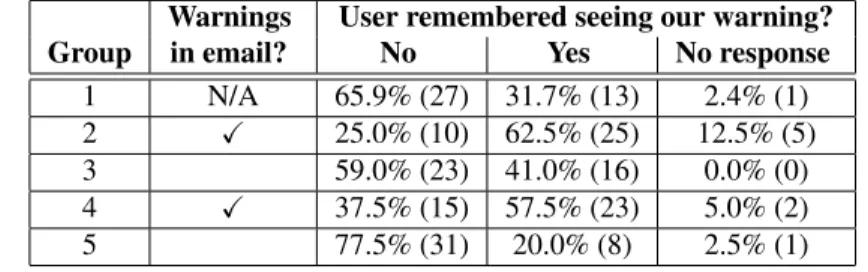
During the exit survey, we showed each user a screen-shot of the warning corresponding to her study group (Sec-tion 6.4.3) and asked her “Do you remember seeing the above warning at any point during the study?”, and if yes, “describe how it affected your decisions (if at all) while interacting with the study Web site.” Table 3 summarizes the number of yes/no responses. For group 2 and 4 users, who received warnings in registration emails, 31% reported that they did not remember the warning. Among group 3 and 5 users, who only received warnings on the study Web page, 68% did not remember the warning. This difference is statistically significant (p <0.001for Fisher’s exact test). 66% of challenge question users also did not remember the warning.
We found no evidence that users who recalled seeing our warnings were more likely to resist our attack. Of the 191 users responding to the warning recall question, 85 remembered seeing our warning and 106 did not (see Ta-ble 4). Among the users who remembered seeing our warn-ing, 45% were vulnerable, and among the users who did not remember seeing our warning, 56% were vulnerable. This different is not statistically significant (p=.147for Fisher’s exact test). We found no statistically significant difference within groups, either.
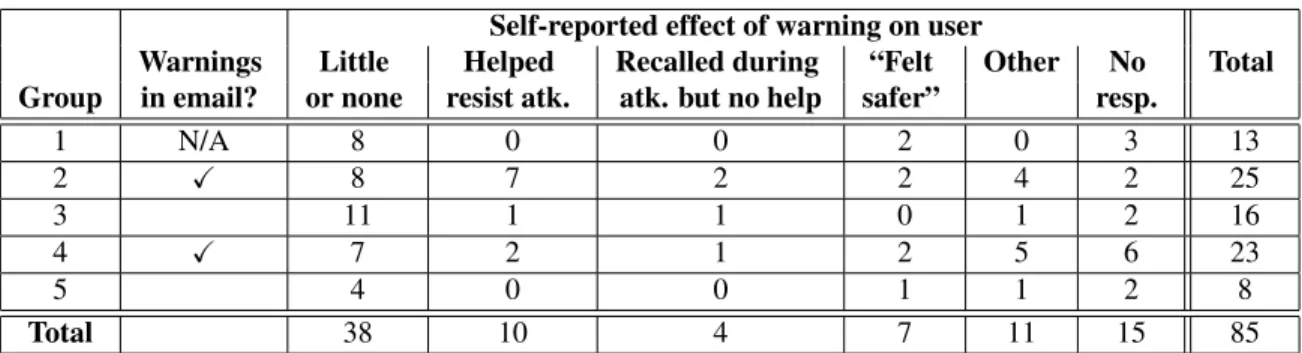
Among the users who remembered seeing the warning, Table 5 summarizes the self-reported effects that the warn-ings had on those users. Of the 85 users who remembered our warnings, only 10 users’ responses (12%) indicated that our warnings helped them resist our attack. 38 of these users (45%) indicated that the warnings had little or no impact on their decisions. 4 users (5%) indicated that the warning slightly influenced their decision making during the attack, but they ultimately followed the attack instructions. 7 users (8%) mentioned that the warnings made them “feel safer” at our site or be more careful in general. The responses of 11 users were inconclusive or did not clearly fit in one of these categories.
7.4
User suspicion of our attacks
To gauge users’ suspicion during our simulated attack, we asked users “During your interactions with UCB Movie Predictions, did you ever see something which looked sus-picious or dangerous?” and “describe what your reaction
Warnings User remembered seeing our warning? Group in email? No Yes No response 1 N/A 65.9% (27) 31.7% (13) 2.4% (1) 2 X 25.0% (10) 62.5% (25) 12.5% (5)
3 59.0% (23) 41.0% (16) 0.0% (0)
4 X 37.5% (15) 57.5% (23) 5.0% (2)
5 77.5% (31) 20.0% (8) 2.5% (1)
Table 3. Number of users who reported remembering seeing our warnings.
Safe Vulnerable Total Users who remembered seeing our warnings 55.3% (47) 44.7% (38) 85 Users who did not remember seeing our warnings 44.3% (47) 55.7% (59) 106
Table 4. Effect of warning recall on resisting our simulated attacks. Of the 200 users in our study, 9 users did not respond to this question.
was and if you did anything, what you did.” Overall, only 6 (15%) challenge questions users and 13 (8%) email users reported seeing anything suspicious during the study. Four of the challenge question users reported that the certificate warning caused their suspicion, but only 1 of those users re-sisted the attack.8One challenge question user reported that
the fact that the attack required her to re-register her ma-chine made her suspicious. The 13 suspicious email users reported the attack instructions as the cause of their suspi-cion, but only 6 of those users resisted the attack.
7.5
User reasoning during our attacks
To help understand users’ thought processes during the simulated attack, we showed each user a screenshot of the attack instructions corresponding to her group and asked her: “If you followed the above instructions, explain why. If you chose not follow the instructions, explain why not. If you don’t remember this page or what you did, tell us what you don’t remember.” We did not explicitly identify this as the “attack”.
Challenge question users. Among the 38 vulnerable users in the challenge question group, 22 users (58%) said that they complied with the attack instructions because they thought it was what they needed to do to log in. Rep-resentative responses include: “Those were my challenge 8Most browsers show certificate warnings in popup windows. Firefox 3 and Internet Explorer 7 present full screen interstitial warning pages, but Firefox 3 was not officially released until after we completed our study. Among the 41 challenge question users (who were the only users who saw certificate warnings – see Section 6.6), twenty five used Firefox 1 or 2, two used IE 6, six used IE 7, seven used Safari, and one used Epiphany. Among the 4 users who reported the certificate warning as the cause of their suspicion, three used Firefox 2 and one used IE 7.
questions, so I answered them” and “I thought it was proce-dure to answer these questions.” 10 vulnerable users (26%) viewed the attack as an error that they should try to fix, e.g., “I thought the site’s cookie may have been erased which is why it wasn’t recognizing my computer, so I answered.” 4 vulnerable users (11%) trusted the Web site or indicated that since the site was associated with UC-Berkeley, it should be safe. Of the 3 challenge question users who resisted the at-tack, one user noticed the certificate warning and stopped, and the other two users did not respond to this question.
Email users. Among the 66 vulnerable email users, 26 users (39%) complied with the attack instructions because they thought it was what they needed to do to log in. A representative response is “I copy and pasted the link be-cause it said in bold to do so. It seemed like that was what I was supposed to do.” 11 vulnerable users (17%) viewed the attack as an error that they should fix, e.g., “I figured some-thing was wrong with your registration system and thus fol-lowed instructions.” 20 vulnerable users (30%) trusted the Web site or indicated that since the site was associated with UC-Berkeley, it should be safe. 8 vulnerable users (12%) indicated that they complied with our attack instructions be-cause they did not associate much risk with our Web site.
Among the 93 email users who resisted the attack, the responses of 37 users (40%) indicated that although they may have recognized the instructions were different from previous registrations, they decided to click the registration link first, despite instructions to the contrary, or did not read the attack instructions carefully. Representative responses include: “I did not follow the instructions because it was easier to just click” and “Usually, in a verification email, you are supposed to click the link.”
Self-reported effect of warning on user
Warnings Little Helped Recalled during “Felt Other No Total Group in email? or none resist atk. atk. but no help safer” resp.
1 N/A 8 0 0 2 0 3 13 2 X 8 7 2 2 4 2 25 3 11 1 1 0 1 2 16 4 X 7 2 1 2 5 6 23 5 4 0 0 1 1 2 8 Total 38 10 4 7 11 15 85
Table 5. Self-reported effects of our warnings on users who remembered seeing them.
17 resisting users (18%) indicated that they did not no-tice the attack instructions. For example, “I never saw these instructions.” All except two of these users clicked on the registration link; the other two users timed out the attack.
10 users (11%) cited our warnings as helping them re-sist the attack, e.g., “The website and the email I received were telling me contradicting things so I just went with what the email told me” and “I didn’t follow the instructions be-cause they were contradictory to the warnings in the previ-ous email.”
We found evidence that 15 users (16%) initially consid-ered the attack instructions, but eventually gave up because they found them too difficult, decided it was not worth the hassle, or made a mistake in following them. 5 users ex-plicitly indicated this in their responses, e.g., “I did not be-cause it was too much of a hassle” and “I figured I would see if the site would be on track later.” The remaining 10 users attempted to follow the attack instructions, but made a “mistake”, e.g., they forwarded our welcome email or copy and pasted a previously used registration link. Although we count these users as resisting our attack, they may be more likely to fall for future attacks than other users who resisted. The responses of 3 resisting users (3%) were hard to in-terpret. They stated that they followed the attack instruc-tions, but we have no evidence that they attempted to do so; they all clicked on the link quickly. One possible explana-tion is that they did not actually notice the attack instruc-tions, but attempted to please us during the survey or avoid appearing as if they disregarded our instructions.
7.6
Ecological validity
To evaluate the ecological validity of our study, we sought to determine how much risk users perceived while using our site. Since risk is subjective, we asked each user to tell us the biggest security concerns she has while brows-ing the World Wide Web and the precautions she takes to protect herself when logging into Web sites. Then, we asked her to rank how often and thoroughly she applies those precautions when logging into the following types of
Web sites: banking, shopping, PayPal, Web email, social networking, and our study site. The answer choices were: “rarely”, “sometimes”, “usually”, “always”, and “I don’t use this type of Web site”. We summarize the responses in Table 6. Users reported that they did not take the same level of precautions on our site as they do with other sites which handle money. Over 64% of users reported that they at least “usually” take security precautions at those sites, but only 27% of users said they at least “usually” took precautions at our study Web site. Users more closely associated the risks at our study Web site with a Web email site or social networking site.
In users’ responses to other questions, 2 users explic-itly mentioned that they took precautions because we had their PayPal email address, e.g., “I wanted to stay secure so that people couldn’t come in and take my PayPal account.” However, 14 users explicitly mentioned that they consid-ered our study site to be low risk because they felt they had little to lose, e.g., “even if someone had hacked the site, what had I to lose? An experiment account? I was not par-ticularly worried.”
8
Analysis and discussion
Our warnings were ineffective. Our results suggest that our warnings had little impact users’ decisions, even when users had the opportunity to see warnings during the sim-ulated attacks. We found no evidence that including warn-ings in registration emails helped users resist our attacks. Many users did not remember our warnings or indicated they had little impact on their decisions during the study. Although including contextual warnings in email seemed to improve the likelihood that a user would recall seeing them, we found no evidence that users who recalled seeing our warnings were more likely to resist our attack. Our results are consistent with a recent study by Egelman et al. which suggests that passive warnings such as ours are ineffective in helping users resist attacks [16].
Site type Rarely Sometimes Usually Always Don’t use No resp. Banking 10.5% (21) 8.5% (17) 15.5% (31) 55.5% (110) 3.5% (7) 7.0% (14) Shopping 13.0% (26) 12.5% (25) 26.5% (53) 37.5% (75) 3.0% (6) 7.5% (15) PayPal 14.0% (28) 9.0% (18) 23.0% (46) 44.0% (88) 3.5% (7) 6.5% (13) Email 34.0% (68) 16.5% (33) 18.5% (37) 22.0% (44) 2.0% (4) 7.0% (14) Social networking 34.5% (69) 21.5% (43) 16.0% (32) 20.0% (40) 1.0% (2) 7.0% (14) Our study Web site 46.0% (92) 18.5% (37) 12.5% (25) 14.5% (29) 1.5% (3) 7.0% (14) Table 6. Risk ratings. This table summarizes how thoroughly and often the users reported applying security precautions when logging into various types of Web sites.
Research from the warning sciences community sug-gests that if a warning does not sufficiently stimulate users, or if users cannot meaningfully process and apply a warn-ing’s message, it will have limited effect [57]. Some re-sponses from email users suggested that we failed to both get their attention and communicate a meaningful message. They assumed our warnings were similar to other “stan-dard” warnings, or our warnings just made them feel our site was generally more secure. For example:
• “I figured it was just standard stuff.”
• “It looked like a standard confidentiality issue, so I didn’t think of it as anything particularly special.” • “I just chalked it up to general security advice and
more or less forgot about it.”
• “It made me feel that the website was more secure.” • “This bit of information made me feel like the site was
trying to protect my privacy.”
• “It did not affect my decisions much, but it did help the validity of the survey.”
Lack of user suspicion. Our attacks raised suspicion in only small percentage of users. Many of the other users had alternative interpretations. Some users saw the attack as the result of an error with the Web site, her browser, her computer, or the network, e.g., “I thought that the link was broken.” Some users did not view that complying with the attack instructions might be risky, but rather thought it was necessary for their own safety. For example,
• “I followed the instructions because it was for my own safety.”
• “I did because I wanted to stay secure so that people couldn’t come in and take my PayPal account.” • “The site is verifying I am who I say I am; I never
thought of it in terms of me questioning the site’s iden-tity.”
Some users indicated they did not have a clear understand-ing of how the registration procedure works and its purpose, and when they would be required to participate in the regis-tration ceremony. For example,
• “I figured that because I switched connections, as I was using Berkeley’s wireless as opposed to my dor-mitory’s ethernet Internet, they needed to re-verify my account.”
• “I followed the instructions because I assumed my password was wrong so the alternate method of login was by answering the security questions.”
• “I figured it had been too many days since I’d signed in.”
• “I answered them because I couldn’t remember if you guys said that we will randomly be asked to answer them in place of our password and login name.” • “I remembered this page, and I followed the
instruc-tions because they are often used to verify a user if a username seems unsafe or has been tampered with.” • “The link in the email contains a data string that, when
clicked, changes account details to confirm that that was a valid email address. Security benefits to the user may be minimal.”
• “I think it prevents hackers from just creating accounts and using them but they would have to go to the extra step of doing the email registrations.”
• “I actually didn’t think it had anything to do with the security of my money/identity.”
These results are consistent with previous work which sug-gests that users have a limited understanding of web secu-rity mechanisms, Internet social engineering attacks, and effective defense strategies [13, 14, 26, 58]. This evi-dence supports our design principle for conditioned-safe ceremonies that argues designers should not assume users will be able to detect attacks, or sufficiently understand cer-emonies to know when they should refrain from participat-ing or perform voluntary defensive actions.
The power of user conditioning and forcing functions. Challenge question based registration conditions users to provide their answers when they are asked their challenge questions. The responses of 58% of the vulnerable chal-lenge question users indicated that conditioning was the
pri-mary influence on their decision to comply with the simu-lated attack’s request for their answers. User responses of this type include:
• “I answered the questions because I thought I was be-ing asked to identify myself.”
• “I answered it because it was required in order to log in.”
• “I wanted to log in, so I answered the challenge ques-tions.”
This supports our hypothesis that challenge questions con-dition users to answer their challenge questions whenever prompted.
In contrast, the responses of 56% of email users who re-sisted the simulated attack suggested that conditioning was a factor in their resistance. The responses of 40% of re-sisting email users suggested they may have noticed the at-tack was somewhat different from a normal registration, but either chose to ignore the attack instructions and click the link, or did not read the attack instructions carefully. User responses of this type include:
• “I didn’t follow the instructions because I didn’t pay attention to this page (I just followed the usual proce-dures to register my computer).”
• “I didn’t follow the directions because it sounded sketchy and I wanted to see what happened.”
• “I must have glossed over the instructions to not click the registration email link, I didn’t think there would be two opposing instructions so I just went with the one that was more obvious.”
• “I didn’t read it carefully, and instinctively clicked on the link in the email.”
The responses of 16% of resisting email users suggested that they probably did not notice any differences between our simulated attack and a normal registration, and pro-ceeded to click on the registration link in the email sent to them. User responses of this type include:
• “I don’t remember ever seeing this page, but I think what I might have seen was simply that I thought this page was giving me the same instructions as the first time when I had to register my computer.”
• “I don’t remember because it has been a hectic week. I just didn’t notice.”
• “I don’t really remember this or I misread it.”
• “It’s currently 2:20am and I just got back from 5 hours of dance practice. Honestly, I didn’t even see the in-structions!!! How scary!”
These results suggest that conditioning played a significant role in a large fraction of users’ decision making processes
during our simulated attacks – to the benefit of email reg-istration, but to the detriment of challenge question based registration.
One factor our study did not control is to what degree challenge questions and clicking on email links had con-ditioned users prior to participating in our study. Several sites currently implement challenge question based registra-tion [7, 27, 49], and many use challenge quesregistra-tions for pass-word reset. Although we do not know of any sites which implement email registration for machine authentication, many Web sites send an email link to reset a user’s password or validate her email address [21]. We did not screen users based on previous exposure to these mechanisms, but we did ask users whether they had previously used them. 80% of challenge question users and 70% of email users reported having used the respective mechanisms prior to participat-ing in our study. However, we found no significant corre-lation between previous exposure to these mechanisms and attack success rate. We leave better understanding of this issue as a subject of future work.
Ecological validity. We asked users to give feedback about their impressions of the study, and their responses suggested that predicting popular movies can be fun and engaging. Some users expressed disappointment that we ended the study before they had the opportunity to make all 7 predictions. Some users admitted they had no idea as to the true purpose of the study, and no user claimed to have figured out that the study was security related. Based on this evidence, we argue the effects of demand characteris-tics were sharply diminished in our study.
Our study created an experience of risk for some users, but many users indicated that the risk level they associated to our site was roughly equivalent to Web email or social networking sites, and below financial-related sites such as banking or shopping. Some users explicitly stated in their comments that they did not experience much risk during our study, e.g., “And even if someone had hacked the site, what had I to lose? An experiment account? I was not particu-larly worried.” Some users suggested that they felt safer at our site because it was associated with Berkeley, e.g., “I fig-ured that since this was a Berkeley research affiliated web-site, it would be safe.” Creating a significant experience of risk in studies like ours remains a challenge.
Our design attempted to limit the effect of authority fig-ures during the study by conducting it in users’ “natural habitats”. One concern we had was that users would inter-pret the attack as instructions from us, the researchers. Al-though this is similar to the problem users face during a real phishing attack, academic researchers might appear more as an authority figure to a user than, say, a bank. There was ev-idence that this may have been an issue for some users, e.g., “I followed the instructions because I thought it was a