A Secure Password Manager
Chaitanya Rahalkar
Savitribai Phule Pune UniversityH-404, Ruturang Society Aranyeshwar Road, Pune
Dhaval Gujar
Savitribai Phule Pune University’Rajas Garden’ Aparments Model Colony, Pune
ABSTRACT
Internet has grown exponentially over the past decade, and as a consequence, the amount of data generated is increasing day by day. Online services are growing and to keep online services per-sonalised and organised, online accounts are being created by users. Over the past few years, incidents of data breaches have surfaced over the Internet, and there are some which are not even pub-lic knowledge. [8] Account passwords and personal information leaked from these data breaches are then misused or sold on the Internet. Cracking hashed passwords is not too difficult if the pass-words among commonly used ones. [14] A Google / Harris Poll conducted in February 2019 concluded that 52% people use the same password for multiple accounts. [6] Hence, even if one of them is compromised, all of their accounts are consequently com-promised. To solve this problem, password managers were intro-duced. A password manager uses a master password that is the key to an encrypted vault. This vault contains critical data and pass-words to various accounts. [10] It also generates secure passpass-words that ensure the security of one’s account. The advantage that these password managers hold is that the user is required to remember just a single master password, instead of multiple passwords for different accounts. A single password can decrypt the encrypted vault allowing the user to access the password required for a par-ticular account. They typically operate in either an offline or an online manner. Both require the use of a master password to unlock the rest of the passwords. [11] Both the approaches suffer from their own set of problems. The offline version requires that the file containing the encrypted passwords be transported everywhere and syncing the same file across many devices requires additional ef-fort from the user, and if the file is lost, so are the passwords. The online version solves the sync and loss of file problem but an active Internet connection requirement is added, alongside the possibility of a security breach. Also, confidential and private data is stored on remote locations, which may produce a feeling of mistrust, if the underlying architectural details of the algorithms used and se-curity of servers is kept hidden from the users. Data breaches may even occur on these servers. Thus, we propose an offline password manager, that does not store passwords anywhere. These passwords are not even stored on the device of the user, but are generated on-the-fly using the algorithm, by providing the master password.
General Terms
Password Security, Security, Cryptography
Keywords
Password Manager, Key Derviation Functions, Hash Functions, Se-curity, Master Password
1. INTRODUCTION
The dependency on online services is increasing day by day, and thus large amount of confidential data like credit card num-bers, bank account details, account passwords are being stored on servers, always under the threat of getting stolen in a data breach in-cident. People tend to keep easy to remember passwords, and this is what hackers take advantage of. Passwords containing names, phone numbers etc. are easily guessable or can be cracked easily with a wordlist. A secure password must contain arbitrary num-bers, characters and special characters and must be at least 8 char-acters long. Brute forcing these passwords would seem infeasible if they are long enough, containing arbitrary characters and numbers. Keeping secure, non-guessable passwords should be the highest priority when creating an online account, keeping in mind the con-sequences of not doing so. Using arbitrary passwords is the safest way to secure an online account. The state-less master password al-gorithm was initially proposed by Maarten Billemont [3], and this algorithm is a modified and a more secure version of his proposal with support for encrypted file sharing. The master password man-ager can be implemented as a Web App, Phone App or Desktop application using standard cryptographic libraries, thereby making it available on all platforms.
2. RELATED WORK
Password managers are not a new concept. They have been in exis-tence for a decade now, but have almost always been stateful. Com-panies like 1Password [5], LastPass [1] and open source password managers like KeePass [2] have been used predominantly. These password managers usually come as a bundle of three features
-(1) A random and secure password generator (which generates se-cure random strings to be used as passwords)
(2) An encrypted storage vault to store all the passwords (3) A two-factor authentication code generator.
a computer via the USB port, the password is entered on behalf of the user. All the passwords are stored on the hardware device. These hardware device manufacturers claim to have military grade security on these hardware password managers. [4]
3. PROBLEMS
Using password managers that use a single master password to en-crypt all your account password and information require a central authority that stores the encrypted data on a server. Retrieving these passwords from the server requires an active Internet connection. To tackle this, the password managers tend to store the encrypted vault on the user’s personal device. If the device is stolen / lost, or if the master password is not strong enough, all the data may be compromised. [9] Storing private data on central servers may often produce a feeling of mistrust since there is always a chance of data getting breached. Even though hardware password managers are secure, it involves carrying the hardware device everywhere, and if the device is lost, since no online backups are kept, all the password data is lost. Some password managers are local-storage based, but use a web interface to interact with the user. These password man-agers are vulnerable to JavaScript code injection. [12]
A small flaw in the algorithm design may break the complete sys-tem. Also, one has to ensure that the data from the server is synced with multiple instances of the app on various platforms like mo-bile, computers, smart watches etc. If they are not in sync, a newly added password to the vault, may not be accessible from a different or new device. A personal device on which the password manager app is stored is always needed in order to access the passwords.
4. PROPOSAL
The master password generator algorithm is an algorithm that doesn’t store passwords anywhere. The setting up stage starts with the user selecting a master password. Then, the user enters the web-site for which he / she wants a password. Then the user selects the type of password - numeric, alphanumeric, character only, or a passphrase. The algorithm generates a new, secure and unique password for the website. The user then sets this generated pass-word as the passpass-word for the website. This algorithm ensures that every time you enter the master password and the website name correctly, it will produce the same password as generated initially. Thus, passwords are generated on-the-fly. The only inconvenience involved in this method is changing the existing insecure website passwords to these newly generated passwords, which is to be done just once. After the initial setup phase, the algorithm will always generate the desired password, provided that the master password, website name and password type are the same. This algorithm does not restrict itself to generating arbitrary passwords, it can also gen-erate pin numbers, pass-phrases (A pass-phrase is a set of arbitrary but meaningful words used together as a password. They are easy to remember due to usage of common words) uniquely produced by the master password. The major advantage of this password man-ager is that there is no way of breaching any sort of data. Also there is no way for the attacker to know whether his/her guess of the master password is correct or not, since the master password algo-rithm will always have a unique set of passwords associated with the master password.
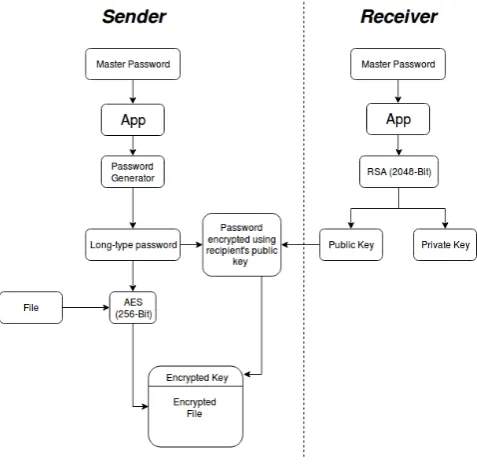
[image:2.595.317.556.67.299.2]The algorithm can be implemented as a web, mobile or a standalone desktop application, with the same algorithm implemented on all platforms. This will ensure that a password generated on a web app
Fig. 1. File Encryption Approach Similar to PGP
can be regenerated on-the-fly on the mobile or desktop application without the need of any synchronisation mechanism.
An additional feature implemented with this algorithm is that a key generated from the master password can be used to encrypt files. The file encryption scheme follows a similar approach to PGP. The file is encrypted using a symmetric key with AES-256 bit encryp-tion. This is explained in Fig.1.
This symmetric key is generated from the master password and then encrypted with the RSA 2048-bit public key of the recipient. The decryption is exactly the reverse process, where the RSA decryp-tion is done using the 2048-bit private key of the recipient in order to recover the symmetric key which is then used to decrypt the AES-256 bit encrypted file.
5. ALGORITHM
Deriving a password for a website from the master password in-volves three stages:
(1) Generation of a secret key from the master password. The se-cret key generation process uses a key derivation function. A key derivation function (KDF) derives one or more secret keys from a secret value such as a master key, a password, or a passphrase using a pseudorandom function. KDFs are deliber-ately made slow to compute so as to make brute-force attacks or dictionary attacks more strenuous. The proposed algorithm uses Argon2 as the KDF. Specifically, it uses Argon2d (one of the versions of Argon). The main advantage of using Ar-gon2d, is that it maximises resistance to GPU cracking attacks. Till date, no public cryptanalysis methods have been published which are applicable to Argon2d.
Algorithm 1Argon2d Function Prototype 0: Argon2d
(P assword, Salt, c, HashLen, M emory, P)
P assword=Master Password
Salt =“master-password-manager”
c =Number of Iterations (8)
HashLen =Length of output hash (64 Bytes)
M emory =Computation Memory218KiB
P = Number of threads to be used
The intensity of computation can be controlled with the cost factor (c) (Number of iterations) in the algorithm. Greater the number of iterations, more is the compute time required for de-riving the key. Such KDF algorithms are widely used in cryp-tocurrencies as Proof-of-Work algorithms. [13] Hash cracking speeds can be intensified by using specially designed hardware called ASICs (Application Specific Integrated Circuits). How-ever, Argon2d is resistant to such attacks, since it is a memory hard function that maximizes the ASIC implementation costs. The output of this function is a 64-bit key called as the derived key.
(2) A key unique to every site is generated from the previously generated derived key. The second stage uses HMAC (Hash-based Message Authentication Codes) with the hashing algo-rithm being SHA-256, to generate a unique site-key. This site key is 256-bits or 32-bytes in output. The message is a string concatenation of the length of site-name string, the site-name and a counter. The counter is a third parameter introduced to completely minimize the chances of brute-forcing the pass-word. The user decides on a counter value which can be any integer value from 1 to 264. The counter value is set to 1
by default if the user doesn’t provide one. Thus, from an at-tacker’s perspective, getting to the correct password would in-volve guessing the master password, the website name and the counter value, all of them correctly.
Site−Key=HMAC-SHA-256 (message, key) where:
message=length(sitename)·sitename·counter key =Secret−Key
(3) A template is selected depending upon the type of password to be generated. The user can choose from the following pass-word types:
Maximum security password - This password is a combi-nation of special characters, numbers and alphabets. It is 21 characters in length.
Long Password - It may contain letters, numbers and spe-cial characters having lesser frequency as compared to the maximum security type. It is 15 characters in length. Medium Password - It may contain letters, numbers and only a single special character. It is 9 characters in length. Basic Password - It consists of only letters and numbers. It is 9 characters in length.
Short Password - It is a very small password containing of just 4 characters out of which one is a number. These passwords can be used for phone pins or application pass-words on phones.
[image:3.595.329.548.57.431.2]Pin Password - It is a 4 digit numeric pin. This pin can be used for mobile passwords, ATM pins etc.
Table 1. Password Templates Sr No. Password Type Template
1 Maximum Length
anoxxxxxxxxxxxxxxxxx axxxxxxxxxxxxxxxxxno xoxxxxxxxxxxxxxxxxxo
2 Long
CvcvnoCvcvCvcv CvcvCvcvnoCvcv, CvcvCvcvCvcvno CvccnoCvcvCvcv CvccCvcvnoCvcv CvccCvcvCvcvno CvcvnoCvccCvcv CvcvCvccnoCvcv CvcvCvccCvcvno CvcvnoCvcvCvcc CvcvCvcvnoCvcc CvcvCvcvCvccno CvccnoCvccCvcv CvccCvccnoCvcv CvccCvccCvcvno CvcvnoCvccCvcc CvcvCvccnoCvcc CvcvCvccCvccno CvccnoCvcvCvcc CvccCvcvnoCvcc CvccCvcvCvccno
3 Medium CvcnoCvc CvcCvcno
4 Basic
aaanaaan aannaaan aaannaaa
5 Short Cvcn
6 Pin nnnn
7 Short (Characters Only) cvccvcvcv
Pass-phrase - A pass phrase consists of valid dictionary words, instead of arbitrary characters. A pass-phrase is easy to remember due to the presence of actual words. These words are selected by the algorithm from a list of 10000 English words to form a phrase. The phrase may or may not have any meaning. It is a combination of pro-nounceable, valid English words.
Symmetric Key - This is a special type of password de-rived from the master password which is used to encrypt files with AES-256 bit encryption.
The master password algorithm uses a template scheme to generate passwords.The different templates used are shown in Table 1.
where
C=BCDFGHJKLMNPQRSTVWXYZ (Capital cased consonants)
v =aeiou (Small cased vowels)
V =AEIOU (Capital cased vowels)
c =bcdfghjklmnpqrstvwxyz (Small cased consonants)
n =0123456789 (Numbers)
o = @&%?,= []:−+$#!0; ()/.(Special characters)
x =(Special characters + Numbers + Small and capital letters)
a =(Small and capital letters)
-Algorithm 2Password Generation Procedure
sum←0 fori in 0..len()do
ifi%2 = 0then
sum←sum+ [i]
template←templates[(sum)%len(templates)] end if
fori in 0..len(template)do
passChars←templateChars[template[i]]
password[i]←passChars[[i+ 1]%len(passChars)] end for
end for
For generating a passphrase a template is not used. Words are selected from a dictionary of pronounceable English words. The pseudo-code is different.
Algorithm 3Passphrase Generation Procedure
phrase←“”
array[]←array of words in dictionary
l←Number of desired words in the passphrase fori in 0..ldo
phrase←phrase+array[seed[i+ 1]%array.length] end for
Brief explanation of the pseudo-code:
i. The output string that is generated is in hexadecimal. Hexadec-imal sum of even bits of the site-key is calculated.
ii. A template is chosen from the list of templates for the specified password type, by performing simple modulus operation with the total number of templates available for the password type. The modular property will ensure that a template within the specified list is selected.
iii. Now on the similar lines, depending upon the type of character observed in the template selected, a character from that list is selected by performing modulus operation with the total num-ber of characters available in the type.
iv. A site password is generated as per the selected type.
6. CONCLUSION
Our paper throws light on the problems faced by traditional pass-word managers and highlights why it is necessary to move on to state-less password managers and presents an algorithm for the same.
Our approach uses state-of-the-art cryptography techniques to de-liver a safe, secure, yet uncompromising password management ap-plication that is:
i. Fast
ii. Generates secure passwords of varied types iii. State-less (No database of any kind)
iv. Portable
v. Does not need any synchronisation
vi. Can be used by multiple people on the same device
7. FUTURE SCOPE
The algorithm can be deployed as a complete password manager application, running cross-platform. An extension to this can be to creation of a browser plugin / extension that can be used to auto-fill passwords on websites. [15]
The password generation algorithm is not restricted to a particular programming language. The accessibility of the password manager is crucial and hence it should be implementable on a variety of platforms which includes websites, phone applications and desktop applications.
It may also be possible to create a stand-alone hardware device that will have a biometric sensor, USB HID (Human Interface Device) capability and buttons for site selection. This device can be plugged into any host device that accepts USB keyboards, and the generated passwords can then be entered, driver-lessly. However, for such a hardware to exist, algorithms that can produce a hash based on fin-gerprint minutiae [16] must be studied and carefully applied. Such a hardware device will be cost effective to construct, would work for any person (no storage and no vendor lock-in) and on any device which accepts USB HID keyboard input.
If device manufacturers deem fit, all upcoming devices can imple-ment this functionality by default, virtually eliminating the need to ever remember passwords or use weak ones.
8. REFERENCES
[1] #1 Password Manager & Vault App, Enterprise SSO & MFA |LastPass.https://www.lastpass.com/.
[2] keypass.info.https://keepass.info/.
[3] Master Password: Home. http://
www.masterpasswordapp.com/.
[4] OnlyKey Hardware Password Manager|One PIN to
remem-ber.https://onlykey.io/.
[5] Password Manager for Families, Businesses, Teams.http:
//1password.com/.
[6] Password Practices Still Poor, Google Says | Security-Week.Com.https://www.securityweek.
com/password-practices-still-poor-google-says.
[7] Portable password manager. https://
patents.google.com/patent/US20040193925A1/en,
March 2004.
[8] Information is Beautiful. World’s Biggest Data Breaches & Hacks. https://informationisbeautiful.net/
visualizations/worlds-biggest-data-breaches-hacks/.
[9] Paolo Gasti and Kasper B. Rasmussen. On the Security of Password Manager Database Formats. In Sara Foresti, Moti Yung, and Fabio Martinelli, editors,Computer Security - ES-ORICS 2012, Lecture Notes in Computer Science, pages 770– 787. Springer Berlin Heidelberg, 2012.
[10] Alexa Huth, Michael Orlando, and Linda Pesante. Password security, protection, and management. 2012.
[12] Zhiwei Li, Warren He, Devdatta Akhawe, and Dawn Song. The Emperor’s New Password Manager: Security Analysis of Web-based Password Managers. pages 465–479, 2014. [13] Colin Percival and Simon Josefsson. The scrypt
password-based key derivation function. 2016.
[14] Steve Ragan. Thousands of gamers’ passwords easily cracked in 3 minutes. https://www.csoonline.com/article/
3025628/ignore-the-worlds-worst-passwords-look-at-how-theyre-created-instead.html, January
2016.
[15] David Silver, Suman Jana, Dan Boneh, Eric Chen, and Collin Jackson. Password Managers: Attacks and Defenses. pages 449–464, 2014.