UNIVERSITY OF CALIFORNIA RIVERSIDE
Fighting Spam, Phishing and Email Fraud
A Thesis submitted in partial satisfaction of the requirements for the degree of
Master of Science in
Computer Science by
Shalendra Chhabra December 2005
Thesis Committee:
Professor Dimitrios Gunopulos, Chairperson Professor Vana Kalogeraki
The Thesis of Shalendra Chhabra is approved:
Acknowledgements
Dreaming big with a drive to excel requires immense motivation and a positive attitude. It takes a lot of courage to follow one’s heart and chase one’s dreams. Great things are never done without hard work and sacrifice.
I am grateful to my parents for teaching me to dream big, for blessing me with the courage to follow my heart, for inspiring me to work hard, and for instilling the spirit of sportsman-ship in me. They brought me up in a very optimistic environment, giving me a remarkable ability to judge good from bad. I am grateful to my sisters for being the best sisters in the world. Every success in life would not have been possible without their sacrifice, help, and encouragement. They taught me that winners don’t do different things but they do things differently. I am grateful to my grandparents, my uncle, my aunt, my cousins, and other members of my family for their love, affection, and support during difficult times.
I am grateful to all my friends, teachers, and roommates for enriching my life.
I am highly indebted to members of the Graduate Division at the University of California, Riverside (UCR), for providing me with an opportunity to pursue graduate studies at this temple of education.
intern-Many people have contributed to this thesis directly or indirectly. It’s an honor to have come across so many wonderful people.
I am highly indebted to my advisor, Professor Dimitrios Gunopulos, for motivating, guid-ing, and helping me channel my creative energy at times when I was unable to focus. This thesis would not have been possible without his encouragement, wisdom, feedback, and sup-port. His counselling kept me pointed in the right direction, and his periodic feedback pro-tected me from pitfalls.
I am highly grateful to members of my thesis committee—Professor Vana Kalogeraki and Professor Eamonn Keogh for providing guidance, encouragement, and valuable insight. Communication with them has always brought cheerful spirits and inspiration in me.
I am highly indebted to Dr. William “Bill” S. Yerazunis (Captain Crash of Junkyard Wars) from MERL for being an amazing mentor and an incredible collaborator during 2004
and 2005. He is the smartest person I have ever come across. Working with him has added tremendous value to my life. Words are not enough to thank Bill for the role he has played in my successive successes.
I am grateful to Dean Dallas L. Rabenstein for approving continued support for my Mas-ter’s Degree at UCR.
I am thankful to Professor Stefano Lonardi for cheering me with his wonderful smile. Fruitful discussions, and communication with him add more confidence in my life.
I am thankful to Professor Harry C. Hsieh for being my academic advisor in the early days at UCR; to Professors Chinya V. Ravishankar, Satish Tripathi, Michalis Faloutsos, Christian R. Shelton, and Jun Yang for very enlightening discussions, and to Department Chair Professor Thomas Payne for providing valuable teaching tips and resources. Many
thanks to members of the Data Mining Lab—Sharmila Subramaniam, Mirella Moro, Zo-grafoula Vagena, Song Lin, Petko Bakalov, Marios Hadjielefthrelou, Dimitris Papadopoulos,
Demetrios Z. Yazti, and Christina Charalambidou for their help and a good time. Many thanks to the department’s administrative and management staff—Terri Phonharath, Kathy Vu, Lilian Kang, Mimi Trinh, Tiffany Arakai, Nicole Smidt, Dulce Shipley, Janice Leslie, and Emily Papavero. Many thanks to Kelly Hinosowa, Harrison Leong and Tatiana Rakic for being the best international advisors. Many thanks to members of the systems group— Victor Hill, Benjamin Arai, Conley Read, Craig Boucher, Jacob Lewallen, Benjamin Arai,
I am highly grateful to Dr. Bhiksha Raj from MERL for being an incredible mentor and a great friend. His guidance and wisdom brought a smile to my face every day during the summers of 2004 and 2005. His inspirational notes crystallized my conviction to excel in constraints. This thesis would not have been in its present form without his constant support, motivation, and guidance.
I am grateful to Paul Graham for playing a major role in my success, for inspirational communication, for writing wonderful essays, for organizing the MIT Spam Conference, and for hosting dinners for anti-spam experts every year. It was because of the MIT Spam Conference of 2004 that I eventually met Bill Yerazunis.
I am thankful to Joe Marks, Bent Schmidt-Nielsen, and others from MERL; to Rita Singh from Haikya Corporation for great advice, and to Christian Siefkes (Freie Universit¨at, Berlin) and Fidelis Assis (Embratel) for being great collaborators.
conver-I am grateful to Jim Fenton for introducing me to the Network and Spam Solutions Team at Cisco Systems and for great discussions. Many thanks to Shamim Pirzada, Sanjay Pol, Michael Thomas, and others from Cisco Systems for their time and fruitful conversations.
Many thanks to Michael Ripley, Gary Graunke, Michael Andre, Don Whiteside, Gary Mittelstaedt, Keith Shippy, and Janie C. Mason from Intel and to Charles Haynes, Kristin Kassaei, and members of the Gmail team from Google for their time and very fruitful
face-to-face discussions.
Many thanks to lawyers Matthew Prince (Unspam Technologies), Jon Praed (Internet Law Group), and Aaron Kornblum (Microsoft) for motivation, guidance, transcripts and rel-evant resources for legal actions against spam.
Many thanks to Jonathan Zdziarski (DSPAM) and Richard Jowsey (Death2Spam) for reviewing draft versions of this thesis. Many thanks to Eric S. Johansson (CAMRAM) for providing information and feedback on CAMRAM, and to Matt Blumberg and Andy Sautins (Return Path) for feedback on the Bonded Sender section. Many thanks to Erik Brown for
designing the logo for the thesis. Many thanks to Shawn R. Lesniak and Amir Friedlander¨
for making proofreading super-fun.
Abraham Artuz (UCR); Larry Reeker (NIST); Jonathan Oliver, Chad West, Leon Hilton (MailFrontier); Daniel Quinlan (IronPort Systems); Gordon Cormack (University of
Water-loo); Mike Linksvayer (Creative Commons); and Rebecca Wetzel for very fruitful discussions. I am grateful to my previous mentors, members of the security group at the University of Milan—- Professors Pierangela Samarati, Sabrina De Capitani, Stefano Paraboschi, Ernesto Damiani; Professor Jean Goubault Larrecq at the Laboratoire Specification et V´ erification,´
Ecole Normale Superieure De Cachan, France; Dr. N. Raja at the Tata Institute of Funda-mental Research, India, and Professor S. C. Gupta at the Institute of Technology, Banaras
Hindu University, India, for exposing me to research during my undergraduate studies. I am thankful to all my friends for standing by me during the worst times. To express my gratitude for my friends would require far more pages than those occupied by the contents of this thesis. My movie, The BackBenchers, may prove to be a better medium for this task, provided it is ever finished.
I am thankful to my former roommate Casey Christine Hoover (UCR) for being the best roommate in the world. Without the encouragement of this precious person, I would never have discussed and conducted anti-spam measures with the Computing and Communications (C&C) group at UCR. Her good words—“uniqueness is a virtue, lead by example, actions
speak louder than words, good leaders know how to ask for help, and you will be fine”—
Finally I am thankful to God for showering His love and affection, for bringing wonderful people into my life, and for everything I have achieved to this day.
ABSTRACT OF THE THESIS
Fighting Spam, Phishing and Email Fraud
by
Shalendra Chhabra
Master of Science, Graduate Program in Computer Science University of California, Riverside, December 2005
Professor Dimitrios Gunopulos, Chairperson
Spamming in the electronic communications medium is the action of sending unsolicited commercial messages in bulk without the explicit permission or desire of the recipients. The most common form of spam is email spam. Phishing is a particular type of spam character-ized by attempts to masquerade as a reputed business. The objective is to trick recipients into divulging sensitive information such as bank account numbers, passwords, and credit card details. Spam and phishing cause billions of dollars’ worth of losses to businesses.
We will present a comprehensive description of technical initiatives to fight spam which include server-side and client-side filtering (using statistical and collaborative techniques); lists (blacklist, whitelist, greylist and brownlist (in CAMRAM)); email authentication stan-dards such as Identified Internet Mail (IIM) from Cisco Systems, Domain Keys (DK) from Yahoo!, Domain Keys Identified Mail (DKIM), Sender Policy Framework (SPF) from Pobox, Sender ID Framework (SIDF) from Microsoft Corporation; and emerging sender reputation and accreditation services (from Habeas, Return Path, IronPort Systems, and CipherTrust).
We will touch upon specific anti-spam techniques used in the popular spam-filtering ap-pliances such as IronMail Connection Control from CiphterTrust, MailHurdle (RazorGate) from Mirapoint, Mail Security 8160 from Symantec, and MailGate Edge from Tumbleweed Communications.
We will investigate various tricks that spammers use to fool spam filters, and will also analyze a spammer’s to do list by looking through Jeremy Jaynes’s court transcripts. Jaynes was the world’s eighth most prolific spammer until he was convicted and sentenced to nine years in prison under Virginia statute. We will illustrate malicious stages in a phishing attack lifecycle. We will also discuss the anatomy of a phishing email and various other tricks that fraudsters use in the spoofed web sites.
We will focus on a special class of Human Interactive Proofs (HIPs) known as Com-pletely Automatic Public Turing test to tell Computers and Humans Apart (CAPTCHA). CAPTCHAs are used by Hotmail, Yahoo!, Google, and other companies to prevent auto-matic registration of email accounts by bots and to prevent bulk mailing by the spammers.
We will explain a mechanism for throttling Internet resource abuse based on the crypto-graphic technique Proof of Work (PoW) known as Hashcash. We will then describe in detail a hybrid sender-pays email system based on Hashcash, known as the Campaign for Real Mail or CAMRAM.
We will highlight some problems with the current spam-fighting techniques. We conclude that with the combination of better spam-fighting techniques, legal actions, awareness among Internet users, and cooperation within the industry, the spammers’ business model can be disrupted in the next few years.
In addition to work at the Department of Computer Science and Engineering, University of California Riverside, this thesis is a product of collaborative work at the Mitsubishi Elec-tric Research Laboratories, Cambridge, MA (MERL), and enlightening interactions with the MSN Safety Team of Microsoft Corporation, Network and Spam Solutions Team of Cisco Systems, Gmail Team of Google, and Anti-Spam Team of Yahoo!. Preliminary results of this thesis have appeared on Slashdot and presentations at the MIT Spam Conference (2005, 2004, 2003); Cisco Systems (2005); Second Conference on Email and Anti-Spam (CEAS 2005), Stanford University; The Fourth IEEE International Conference on Data Mining, Brighton,
UK (ICDM04); 8th European Conference on Principles and Practice of Knowledge Discov-ery in Databases, Pisa, Italy (PKDD 2004) and 1st International Workshop on Peer2Peer
Table of Contents
List of Tables xxvi
List of Figures xxx
1 Introduction 1
1.1 Contributions . . . 1
1.2 Papers . . . 2
1.3 Presentations . . . 3
1.4 Postings on Slashdot . . . 3
1.5 Slashdot Book Reviews . . . 3
1.6 Articles . . . 4
1.7 Volunteer Work . . . 4
1.8 Surveys . . . 4
2 Background 9
2.1 Email, Spam and Phishing . . . 9
2.1.1 Email . . . 9
2.1.2 Spam . . . 10
2.1.3 Phishing . . . 16
2.2 Internet Email Agents . . . 18
2.2.1 Email Address . . . 18
2.2.2 Mail User Agent (MUA) . . . 18
2.2.3 Mail Transfer Agent (MTA) . . . 18
2.2.4 Mail Delivery Agent (MDA) . . . 19
2.3 Internet Email Flow . . . 19
2.4 Internet Email Format . . . 23
2.5 Details of the Simple Mail Transfer Protocol (SMTP) . . . 24
2.5.1 SMTP - Objective and Model . . . 24
2.5.2 Mail Object: Envelope and Content . . . 25
2.5.3 Message Transfer . . . 25
2.5.4 SMTP Commands . . . 26
2.5.7 SMTP Mail Transaction . . . 30
2.5.8 Difference between Envelope Sender and From Address . . . 32
2.5.9 Open Mail Relays . . . 33
2.6 Spam - Origin, Categories, False Claims and Exploits . . . 33
2.6.1 Geographical Origins of Email and Spam . . . 33
2.6.2 Categories of Spam . . . 35
2.6.3 False Claims in Spam . . . 35
2.6.4 Trends in Spam Products and Exploits . . . 41
2.7 Phishing - Attack Taxonomy, Lifecycle and Anatomy . . . 44
2.7.1 Phishing Attack Taxonomy and Lifecycle . . . 44
2.7.2 Anatomy of a Phishing Email . . . 46
2.7.3 Tricks Used in Fraudulent Web Sites . . . 51
2.8 Spam and the Law . . . 52
2.8.1 CAN-SPAM Act of 2003 . . . 53
2.8.2 Jeremy Jaynes Sentence . . . 54
2.9 People and Spam . . . 58
3 Related Work 60
3.1 Whitelist, Blacklist and Greylist . . . 61
3.1.1 Whitelist . . . 61
3.1.2 Blacklist . . . 61
3.1.3 Greylist . . . 63
3.2 Email Authentication . . . 64
3.2.1 Sender Policy Framework (SPF) . . . 65
3.2.2 Sender ID Framework (SIDF) from Microsoft Corporation . . . 66
3.2.3 Email Authentication Score Card . . . 69
3.2.4 Identified Internet Mail (IIM) from Cisco Systems, Inc. . . 71
3.2.5 Domain Keys (DK) from Yahoo!, Inc. . . 75
3.3 Machine Learning Approach . . . 77
3.4 Sender Pays/Sender Verification/Sender Compute . . . 79
3.4.1 Challenge Response . . . 79
3.4.2 Human Interactive Proofs (HIP) (CAPTCHA) . . . 81
3.4.3 Proof of Work (PoW) . . . 85
3.4.4 Micropayments . . . 88
3.10 Accreditation and Reputation Services . . . 93
3.10.1 AOL’s Enhanced Whitelisting . . . 93
3.10.2 Habeas SafeList Program . . . 93
3.10.3 Return Path’s Bonded Sender Program . . . 94
3.10.4 CipherTrust’s TrustedSource Reputation Service . . . 96
3.10.5 IronPort’s SenderBase Reputation Service . . . 96
3.11 Anti-Spam Appliances . . . 97
4 A Unified Model of Spam Filtration 98 4.1 Introduction . . . 98
4.2 The Filtering Pipeline . . . 99
4.2.1 Initial Transformation . . . 101
4.2.2 Feature Extraction . . . 103
4.2.3 Feature Weighting . . . 108
4.2.4 Weight Combination . . . 111
4.2.5 Final Thresholding . . . 113
4.3 Emulation of Other Filtering Methods . . . 113
4.3.1 Emulating Whitelists and Blacklists in the Generalized Model . . . . 114
4.3.2 Emulation of Heuristic Filters in the Generalized Model . . . 115
5 The CRM114 Discriminator Framework 122
5.1 Introduction . . . 122 5.2 CRM114 Discriminator and the Text Retrieval Conference (TREC) 2005 . . . 124 5.3 Implementing CRM114 at Mailservers . . . 126 5.4 A Generalized Configuration Mode for Implementing CRM114 at Mailservers 126 5.5 CRM114 Configuration Mode for Large Scale Enterprises . . . 130
6 The CAMRAM System 134
6.1 Introduction . . . 134 6.2 Architecture of the CAMRAM System . . . 135 6.3 CAMRAM Inbound Filter . . . 135 6.4 CAMRAM Outbound Filter . . . 140 6.5 CAMRAM User Interface . . . 142 6.6 Snapshots of CAMRAM Interfaces . . . 143
7 Spam Filtering Using a Markov Random Field Model 152
7.6 Training and Prediction using CRM114 . . . 161 7.6.1 Testing Procedure . . . 161 7.6.2 Models Tested . . . 162 7.6.3 Test Results . . . 165 7.6.4 Discussion . . . 166 7.7 Conclusion and Future Work . . . 167
8 Combining Winnow and Orthogonal Sparse Bigrams for Incremental Spam
Fil-tering 168
8.5 Experimental Results . . . 178 8.5.1 Testing Procedure . . . 178 8.5.2 Parameter Tuning . . . 179 8.5.3 Feature Store Size and Comparison With SBPH . . . 180 8.5.4 Unigram Inclusion . . . 181 8.5.5 Window Sizes . . . 181 8.5.6 Preprocessing and Tokenization . . . 182 8.5.7 Comparison with CRM114 and Na¨ive Bayes . . . 183 8.5.8 Speed of Learning . . . 184 8.6 Related Work . . . 184 8.7 Conclusion and Future Work . . . 186
9 Reputation Systems 187
9.4 Reputation Computation Engines . . . 193 9.4.1 Summation/Average of Votes . . . 193 9.4.2 Bayesian Systems . . . 193 9.4.3 Discrete Trust Models . . . 194 9.4.4 Flow Models . . . 194
10 Conclusion 195
List of Tables
2.1 Headers and values used in the Internet email format. From, To, Subject and Date are the mandatory headers. . . 24
2.2 SMTP commands and arguments. . . 29 2.3 A partial list of SMTP reply codes with meanings. . . 29 2.4 SMTP mail transaction betweensending-machine.netandreceiving-machine.org 31 2.5 Table showing difference between Envelope Sender and From Address. Upon
delivery of the email Envelope Sender is added as Return-Path: header which is [email protected] while the From: Address is [email protected]. . . 32 2.6 Types of offers made via spam in a random sample of 1000 spam messages.
2.8 Falsity in “Subject” line in a random sample of 1000 spam messages. Source: “False Claims In Spam,” FTC Division of Marketing Practices (April 2003). . 38 2.9 Trends in categories of spam in random 2004 and 2003 spam samples. Source:
“Trends in Spam Products and Methods,” Microsoft Corporation. . . 42 2.10 Trends in exploits in spam in random 2004 and 2003 spam samples. Source:
“Trends in Spam Products and Methods,” Microsoft Corporation. . . 43 2.11 Trends in number of exploits per message in random 2004 and 2003 spam
samples. Source: “Trends in Spam Products and Methods,”Microsoft Corpo-ration. . . 43 2.12 Different reply address and claimed sender found in a phishing sample. Source:
“Anatomy of a Phishing Email,” MailFrontier, Inc. . . 47 2.13 A statement demanding quick response found in a phishing sample. Source:
“Anatomy of a Phishing Email,” MailFrontier, Inc. . . 47 2.14 A statement assuring security found in a phishing sample. Source: “Anatomy
of a Phishing Email,” MailFrontier, Inc. . . 48 2.15 Use of HTML forms in emails found in a phishing sample. Source: “Anatomy
of a Phishing Email,” MailFrontier, Inc. . . 48 2.16 A phishing email using a look-a-like domain name as eBay. Source: “Anatomy
2.18 URL obscuring with IP address and hexadecimal characters found in a phish-ing email. Source: “Anatomy of a Phishphish-ing Email,” MailFrontier, Inc. . . 50
3.1 Domain sampling authentication study by MarkMonitor. Source: Email Au-thentication Scorecard, David Silver, MarkMonitor. Email AuAu-thentication Implementation Summit, NYC, July 12, 2005. Table reproduced with per-mission from David Silver, MarkMonitor. . . 69 3.2 Domain sampling authentication study by VeriSign. Source: Email
Authenti-cation Score Card, David Silver, MarkMonitor. Email AuthentiAuthenti-cation Imple-mentation Summit, NYC, July 12, 2005. Table reproduced with permission from David Silver, MarkMonitor. . . 70 3.3 Some look-a-like domains of reputed brands having SPF records. Source:
Email Authentication Score Card, David Silver, MarkMonitor. Email Au-thentication Implementation Summit, NYC, July 12, 2005. Table reproduced with permission from David Silver, MarkMonitor. . . 70 3.4 Anti-spam appliances from some vendors. Source: “Next-Gen Appliances
Put SPAMMERS in the Crosshairs” by Logan G. Harbaugh, INFOWORLD, 08/29/2005. . . 97
7.3 A summary of tested models with their weighting sequences. . . 163 7.4 Example subphrases and relative weights with the models tested. . . 165 7.5 Errors and accuracy (% A) per 5000 test messages with varying window sizes
(Win). . . 166
List of Figures
2.1 Different types of spam in the media. . . 11 2.2 A snapshot of spam messages in my junk folder. Note the different subject
lines. Most of them try to attract attention by including “Re:” in the subject line. . . 12 2.3 A spam message with a picture attachment offering university diplomas. . . . 13 2.4 A spam message offering low mortgage rates. . . 14 2.5 An example of Nigerian scam (419 Fraud). . . 15 2.6 A phishing attempt to masquerade the sender as eBay. Note that the URL at
the bottom redirects the recipient to the website http://awcg1dln.com and not http://www.ebay.com. Source: Phishing IQ Test, MailFrontier, Inc. . . 16
2.9 Model for SMTP usage as illustrated in RFC 821. Note that in RFC 821 terms Sender-SMTP and Receiver-SMTP are used while in RFC 2821 terms Client-SMTP and Server-SMTP are used. . . 25 2.10 Geographical origins of email and spam derived from a corpus of 2 million
hand-classified email messages obtained through Hotmail Feedback Loop during April and June 2003. Western Europe, Japan, and New England sent more good mail than spam to Hotmail users. Asia, the Middle East, and Africa sent more spam than good mail to Hotmail users. Source - “Filter-ing Spam Email on a Global Scale”. Figure provided by Joshua Goodman, Microsoft Research. . . 34 2.11 Types of offers made via spam in a random sample of 1000 spam messages.
Source:“False Claims In Spam,” FTC Division of Marketing Practices (April 2003). . . 36 2.12 Percentage of spam with false “From” line in a random sample of 1000 spam
messages. 33% percent of spam analyzed contained false information in the “From” line. Source: “False Claims In Spam,” FTC Division of Marketing Practices April 2003. . . 39 2.13 Percentage of spam with false “Subject” line in a random sample of 1000
2.14 Percentage of spam with false “Text” line in a random sample of 1000 spam messages. 40% percent of spam analyzed contained false information in the body of the message. Source: “False Claims In Spam,” FTC Division of Marketing Practices (April 2003). . . 40 2.15 66% of spam in a random sample of 1000 messages contained false
infor-mation in “From” lines, “Subject” lines or “Message text”. Source: “False Claims In Spam,” FTC Division of Marketing Practices (April 2003). . . 40 2.16 2% of spam in a random sample of 1000 messages contained the “ADV” label
in the subject line, which is required by several state laws. Source: “False Claims In Spam,” FTC Division of Marketing Practices (April 2003). . . 41 2.17 Phishing attack taxonomy and lifecycle. Source: “Tackling Phishing” by
Re-becca Wetzel, Business Communications Review, Feb 2005. Figure redrawn with inputs from Rebecca Wetzel. . . 45 2.18 Jeremy Jaynes to do list 1 recovered during his arrest and then redacted by
the court. Note: get tons of ips, figure out filtering, change ips and update robomails. . . 55
2.21 Effect of spam on people derived through responses of the spam survey con-ducted by John Graham-Cumming on Slashdot in 2004. Figure redrawn with permission from John Graham-Cumming. . . 59
3.1 Current technical initiatives for tackling spam and phishing. . . 60 3.2 Sender ID Framework (SIDF) from Microsoft Corporation. . . 68 3.3 Identified Internet Mail (IIM) from Cisco Systems. . . 74 3.4 DomainKeys (DK) from Yahoo!. . . 77 3.5 Modern-day reading based Human Interactive Proofs (HIPs) used by MSN/
Hotmail, Register.com, Yahoo!, Ticketmaster and Google. HIPs are also known as Completely Automated Public Turing tests to tell Computers and Humans Apart (CAPTCHA). Figure provided by Kumar Chellapilla, Mi-crosoft Research. . . 84 3.6 Project Honey Pot - special license restrictions for non human visitors such
as bots. Figure provided by Matthew Prince, Unspam Technologies. . . 92 3.7 Habeas’ SafeList program. . . 94 3.8 Return Path’s Bonded Sender program. . . 95
4.1 A generalized model for spam filtering pipelines. . . 100
5.2 CRM114 configuration mode for filtering more than one million client email accounts used by a large ISP. Figure drawn in collaboration with Ronald Johnson, William S. Yerazunis from Mitsubishi Electric Research Laborato-ries (MERL), and Fidelis Assis from Embratel. . . 133
6.1 CAMRAM inbound filter. Note that the inbound filter chain is composed of first stage CAMRAM filters and four filters—Hashcash stamp filter, friends list filter, header keyword filter and CRM114 filter. . . . 139 6.2 CAMRAM outbound filter. . . 141 6.3 CAMRAM user interface. . . 144 6.4 CAMRAM user interface displaying configuration settings. Source: Eric S.
Johansson, CAMRAM. . . 145 6.5 CAMRAM user interface displaying a mechanism for adding friends. Source:
Eric S. Johansson, CAMRAM. . . 146 6.6 CAMRAM user interface displaying a mechanism for adding keywords present
in the headers. Source: Eric S. Johansson, CAMRAM. . . 147 6.7 CAMRAM user interface displaying the sorting mechanism - 1. Source: Eric
6.10 CAMRAM user interface displaying the recovery mechanism - 2. Source: Eric S. Johansson, CAMRAM. . . 151 6.11 CAMRAM user interface - key to history. Source: Eric S. Johansson,
CAM-RAM. . . 151
7.1 Comparison of errors in the tested models with variable neighborhood win-dows. . . 167
8.1 Learning curve for the best setting (Winnow1.23,0.83,5% with 1,600,000
fea-tures, OSB-5, X tokenization). . . 185
Chapter 1
Introduction
1.1
Contributions
The main contributions from the author of this thesis are:
• The author presents an in-depth study of the problem of spam and phishing.
• The author presents redacted court transcripts of Jeremy Jaynes, the world’s eight
most prolific spammer.
• The author presents an in-depth description of current initiatives for fighting spam.
• The author presents different configuration modes for implementing CRM114 at
mailservers.
• The author presents the internals of a hybrid sender-pays system known as
CAM-RAM.
• The author presents a reputation system built on the top of Gnutella known as SupRep.
1.2
Papers
The author, in collaboration with others, published the following papers during the course of his graduate studies:
1. A Unified Model of Spam Filtration. In MIT Spam Conference 2005, MIT, Cambridge.
2. Spam Filtering using a Markov Random Field Model with Variable Weighting Schemas. In Proceedings of the Fourth IEEE International Conference on Data Mining (ICDM ’04), Brighton, UK.
1.3
Presentations
The author gave the following presentations:
1. Netizen, Authentication and Reputation, Second Conference on Email and Anti-Spam (CEAS 2005), Stanford University.
2. Its About You, Me and Every Netizen Because We’ve Got Spam and Phish, Cisco Sys-tems, April 18, 2005.
3. A Unified Model of Spam Filtration, MIT Spam Conference, MIT, Cambridge, January 21, 2005.
4. Spam Filtering using a Markov Random Field Model with Variable Weighting Schemas, ICDM04, Brighton, UK.
1.4
Postings on Slashdot
The author’s post, titled Microsoft Researchers on Stopping Spam appeared on Slashdot on April 11, 2005.
1.6
Articles
The author’s article, titled A Quick Note on Yahoo! Mail SpamGuard, was cited on Slashdot on April 11, 2005.
1.7
Volunteer Work
The author was a volunteer at the Email Authenication Implementation Summit, New York City, 2005 and the Second Conference on Email and Anti-Spam (CEAS 2005), Stanford Uni-versity.
1.8
Surveys
The author submitted a human subjects protocol, HS-05-037, entitled Spam Survey at UCR: Collecting Useful Information about Spam (Unsolicited Commercial Email) Received by
UCR Population for Providing Effective Guidelines for Design and Development of Effec-tive Spam Filtering Solutions at UCR Mailservers to Curb Spam and Prevent Email Fraud to
the Office of Research Integrity at the University of California, Riverside. The protocol was approved, and an online survey about spam received by email users at the University
of California, Riverside was conducted in May 2005. We received 1721 responses, around
1.9
Thesis Structure
The thesis titled Fighting Spam, Phishing and Email Fraud, is divided into ten chapters: Introduction; Background; Related Work; A Unified Model of Spam Filtration; The CRM114
Discriminator Framework; The CAMRAM System; Spam Filtering Using a Markov Random Field Model; Combining Winnow and Orthogonal Sparse Bigrams for Incremental Spam
Filtering; Reputation Systems; and Conclusion.
Conclusion is followed by the Bibliography, which is followed by the Vita of the author.
spam-Chapter 3 is the related work section. We discuss blacklist, whitelist and greylist. We describe email authentication proposals such as Sender Policy Framework (SPF) from Pobox, Sender ID Framework (SIDF) from Microsoft Corporation, DomainKeys (DK) from Yahoo!, Identified Internet Mail (IIM) from Cisco Systems, Domain Keys Identified Mail (DKIM), a
combined proposal from Yahoo! and Cisco Systems. We present Email Authentication Score Card, a study conducted independently by MarkMonitor and VeriSign. We also discuss the methodology of statistical filters based on the machine learning approach.
We first explain sender-pays model for email and then describe The Penny Black Project, a challenge-response system with bankable tokens developed by Microsoft Researchers. We then discuss a special class of Human Interactive Proofs (HIPs) known as Completely Auto-matic Public Turing test to tell Computers and Humans Apart (CAPTCHA). CAPTCHAs are used by Hotmail, Yahoo!, Google, and other companies to prevent automatic registration of email accounts and to prevent automatic signing of email accounts by bots and bulk mailing by the spammers. We then explain a mechanism for throttling Internet resource abuse based on the cryptographic technique Proof of Work (PoW) known as Hashcash.
In Chapter 4, we discuss a unified model of spam filtration. A large number of spam filters and other mail communication systems have been proposed and implemented in the past. We describe a possible unification of these filters, allowing their technology and behaviour to be described in a uniform way. In particular, describing these filters reveals a large commonality of designs and explains their similar performance. A preliminary version of this chapter appeared at the MIT Spam Conference 2005.
In Chapter 5, we describe the open source spam filter Controllable Regex Mutilator, con-cept #114 (CRM114) Discriminator Framework. We illustrate its usage in a shared mode for more than one million client email accounts used by a large ISP company.
In Chapter 6, we describe the internals of a sender-pays system using Hashcash known as the Campaign for Real Mail or CAMRAM.
win-A preliminary version of Chapter 7 appeared at The Fourth IEEE International Confer-ence on Data Mining (ICDM04), Brighton, UK.
In Chapter 8, we describe a statistical but non-probabilistic classifier based on the Win-now algorithm. We introduce the concept of Orthogonal Sparse Bigrams (OSB). This model is also integrated into the CRM114 Discriminator Framework.
A preliminary version of this chapter appeared at the 8th European Conference on Prin-ciples and Practice of Knowledge Discovery in Databases (PKDD) 2004, Pisa, Italy.
In Chapter 9, we describe reputation models in other realms of computer science. These reputation models should be well studied in order to propose reputation systems for email communication and web services in the future.
Chapter 2
Background
2.1
Email, Spam and Phishing
In this section we explain the email system and the problem of spam and phishing.
2.1.1
2.1.2
Spam
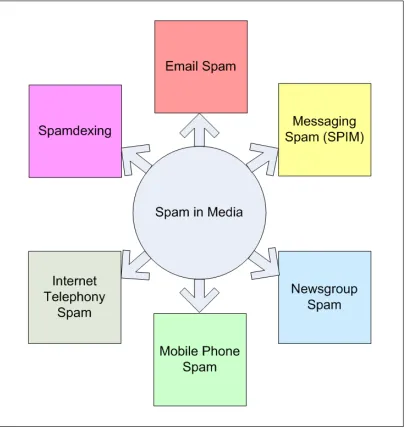
Spamming in the electronic communications medium is the action of sending unsolicited commercial messages in bulk without the explicit permission or desire of the recipients. Figure 2.1 depicts different types of spam such as email spam, instant messaging spam (spim), Usenet newsgroup spam, web search engines spam, weblogs spam and mobile phone messaging spam. A person engaged in spamming is called spammer.
In this thesis, spam refers to email “spam” and “ham” refers to legitimate email.
2.1.3
Phishing
Phishing is a particular type of spam which reflects social engineering. Phishing frauds are characterized by attempts to masquerade as a trustworthy person or emulate an established, reputed business in an electronic communication such as email. The objective is to trick recipients into divulging sensitive information such as bank account numbers, passwords, and credit card details. A person engaged in phishing activities is called a phisher.
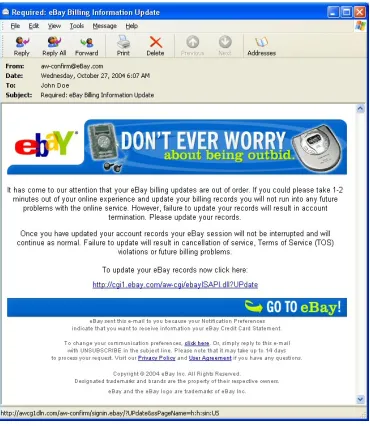
Two phishing attempts taken from MailFrontier’s “Phishing IQ Test”[76] are shown in Figure 2.6 and Figure 2.7. The emails appearing to have originated from eBay and PayPal instead redirect recipients to fraudulent websites:
[image:51.612.237.422.408.621.2]http://awcg1dln.com and http://www.signupaccount.com, respectively.
2.2
Internet Email Agents
We will now describe various Internet email agents.
2.2.1
Email Address
An Internet email address is a string of the form [email protected]. Ray Tomlinson[126] first initiated the use of the @ sign to separate the names of the user and the machine in 1971.
2.2.2
Mail User Agent (MUA)
A Mail User Agent (MUA), also known as email client, is a program that is used to send and read email. Example email clients include Eudora from Qualcomm, KMail from KDE, Mail from Apple Computer, Outlook Express from Microsoft and Thunderbird from Mozilla Foundation. In addition, there are based email programs and services (known as web-mail) such as SquirrelMail, AIM Mail from America Online, Yahoo!Mail from Yahoo!, Gmail from Google, and Hotmail from Microsoft.
2.2.3
Mail Transfer Agent (MTA)
2.2.4
Mail Delivery Agent (MDA)
A Mail Delivery Agent (MDA) is a program responsible for delivering incoming email mes-sages to recipients’ individual mailboxes. Example MDAs include Procmail and Maildrop.
2.3
Internet Email Flow
We will now describe email communication flow between Sender Alice and Recipient Bob over the Internet using various agents described in Section 2.2. The email communication flow between Sender Alice and Recipient Bob is illustrated in Figure 2.8.
1. Sender Composes Message and MUA Transfers the Message to Local MTA
2. Sending MTA Performs Lookup for the Mail Exchanger Records (MX) of the Recipient Domain through the Domain Name System (DNS)
The sending MTA smtp.a.org determines the recipient domain through the recipient email address. The recipient email address is [email protected] and therefore the username is bob and the recipient domain is b.org. The sending MTA smtp.a.org makes a query requesting the Mail Exchanger records (MX) for the domain b.org through the Domain Name System (DNS)[117]. The MX records of the DNS entry of a particular domain have information about the mail exchange servers (MTAs) responsible for accepting messages for this particular domain[74]. This is shown in step 2 in Figure 2.8.
As illustrated in step 3 in Figure 2.8, the DNS server for the the recipient domain b.org is ns.b.org. The DNS server ns.b.org responds to the DNS query from the sending MTA smtp.a.org with the MX records listing the mail exchange servers for the b.org domain.
Domains usually have several mail exchange servers. The MX records are prioritized with a preference number which indicates the order in which these mail servers should be contacted for delivery. The MX record with the smallest preference number has the highest priority and is the first server to be tried.
3. SMTP Connection between Sender/Forwarding MTA and the Recipient MTA
Sender/Forwarding MTA smtp.a.org uses SMTP to send the message to the recipient’s MTA (i.e. to mx.b.org). This is shown in step 4 in Figure 2.8. The recipient MTA delivers the message to the recipient’s (i.e Bob’s) email box using its MDA
4. Recipient Retrieves Email Using MUA
2.4
Internet Email Format
The format of the Internet email messages is defined in RFC 822[114] and RFC 2822[64]. An Internet email message has two components: Headers and the Body. These components are described below.
1. Headers
The headers form a collection of field/value pairs. Headers contain information about the sender, receiver, and the message. Each header has a name and a value and starts in the first character of a line, followed by a colon, followed by the value. Header names and values are restricted to 7-bit ASCII characters. Non-ASCII values are represented by using the Multipurpose Internet Mail Extensions (MIME) encoding[83]. From, To, Subject and Date are the mandatory headers in the email messages. Table 2.1 lists
mandatory headers as well as some others commonly used in email messages. It is important to note that these headers have common uses but are completely up to the sender (i.e. values in these header fields can be easily spoofed).
2. Body
Header Value Field
From contains the email address, and optionally name, of the sender of the message
To contains the email addresses, and optionally names, of the receivers of the message
Subject contains a brief summary about the contents of the message
Date contains the local time and date when the message was originally sent
CC denotes Carbon Copy
BCC denotes Blind Carbon Copy
Received prepended by each mailserver which has just handled a particular message
Content-Type contains information about the message format
Table 2.1: Headers and values used in the Internet email format. From, To, Subject and Date are the mandatory headers.
2.5
Details of the Simple Mail Transfer Protocol (SMTP)
The Simple Mail Transfer Protocol (SMTP) is the standard protocol used to exchange Internet mail. We will now describe the objective, design, commands, and a typical mail transaction in the Simple Mail Transfer Protocol (SMTP).
2.5.1
SMTP - Objective and Model
Figure 2.9: Model for SMTP usage as illustrated in RFC 821. Note that in RFC 821 terms Sender-SMTP and Receiver-SMTP are used while in RFC 2821 terms Client-SMTP and Server-SMTP are used.
2.5.2
Mail Object: Envelope and Content
SMTP transports a mail object. A mail object contains an envelope and content as described below.
• The envelope consists of an originator address (to which error reports should be di-rected), one or more recipient addresses, and optional protocol extension material.
• The SMTP content has two parts, headers and the body.
The headers form a collection of field/value pairs as described in the RFC 2822[64] and the body is described according to MIME[82]. This is explained previously in Section 2.4.
1. The Ultimate Destination
2. Intermediate Relay (i.e. SMTP server adds trace information, acts as SMTP client, and transmits the message to another SMTP server for further relaying or for delivery)
3. Gateway (i.e. it may further transport the message using some protocol other than SMTP).
SMTP follows a command response protocol. SMTP commands are generated by the sending SMTP client and sent to the receiving SMTP server. The receiving SMTP server generates SMTP replies in response to these commands.
2.5.4
SMTP Commands
All SMTP commands begin with a command verb. SMTP commands are character strings terminated by the the space character (<SP>) if parameters follow or by the Carriage Return Line Feed (<CRLF>) character sequence.
A typical SMTP mail transaction involves several data objects. These data objects are communicated as arguments to different commands. SMTP commands are described below.
1. Extended HELLO (EHLO) or HELLO (HELO)
2. MAIL (MAIL)
The MAIL command is used to initiate a mail transaction between a SMTP client and a SMTP server. Upon successful delivery of the mail data, the SMTP server may, in turn, deliver it to one or more mailboxes or pass it on to another system (possibly using SMTP), thus acting as a relay. The argument field contains a reverse-path (sender mailbox).
3. RECIPIENT (RCPT)
The RCPT command is used to identify an individual recipient of the mail data. SMTP supports specifying multiple recipients by multiple use of this command. The argument field contains a forward-path (destination mailbox).
4. DATA (DATA)
The DATA command causes the mail data to be appended to the mail data buffer. The mail data is terminated by the character sequence<CRLF>.<CRLF>
5. RESET (RSET)
The RSET command specifies that the current mail transaction will be aborted.
6. VERIFY (VRFY)
7. EXPAND (EXPN)
The EXPN command asks the receiver to confirm that the argument identifies a mailing list, and, if true, returns the membership of the list.
Spammers exploit VRFY and EXPN to learn about the accounts on the system. For this reason, these two commands are often disabled in the current SMTP servers.
8. HELP (HELP)
The HELP command causes the server to send helpful information to the client.
9. NOOP (NOOP)
The NOOP command has no effect on any parameters or previously entered com-mands. It specifies no action other than that the receiver sends an OK reply.
10. QUIT (QUIT)
QUIT command specifies that the receiver MUST send an OK reply and then close the transmission channel.
2.5.5
SMTP Commands and Arguments
As mentioned previously in Section 2.5.4, a typical SMTP mail transaction involves several data objects and these data objects are communicated as arguments to different commands. For example: the reverse-path is the argument of the MAIL command, the forward-path is the argument of the RCPT command, and the mail data is the argument of the DATA command. These commands and arguments are shown in Table 2.2.
MAIL FROM:<reverse-path>[SP <mail-parameters>] <CRLF> RCPT TO :<forward-path>[SP <rcpt-parameters>] <CRLF> DATA <CRLF>
Table 2.2: SMTP commands and arguments.
2.5.6
SMTP Reply Codes
During the process of SMTP mail transaction, SMTP replies maintain synchronization of requests-actions (i.e. they convey state of the SMTP server to the SMTP client). Every
SMTP command generates exactly one reply. All SMTP replies begin with a three-digit numeric code. Some SMTP reply codes with their meanings are described in Table 2.3.
Reply Code Meaning
220 < domain >service ready
221 < domain >service closing transmission channel
250 requested mail action okay, completed
2.5.7
SMTP Mail Transaction
Sending Machine Receiving Machine
220receiving-machine.com
Simple Mail Transfer Service
Ready HELOsending-machine.net
250receiving-machine.org
MAIL FROM:< snd@sending−machine.net >
250 OK(Sender OK)
RCPT TO:< rpt@receiving−machine.org >
250 OK(Recipient OK) DATA
354 Start mail input;
end with <CRLF>.<CRLF>
From:[email protected] To: [email protected] Subject: Hi
Hi,
How are you? Thomas. .
250 OK(Message Accepted)
QUIT
221receiving-machine.org
Service closing
Transmission Channel
2.5.8
Difference between Envelope Sender and From Address
Envelope Sender is the email address provided by the sending email server in the MAIL
FROM command. It is added as a Return-Path: header upon delivery of the email while the From Address is the email address listed in the From: line.
In the protocol flow described in Table 2.4, the Envelope Sender is [email protected]
while the email address listed in the From: header is [email protected].
The difference between the two as visible from the recipient’s view upon delivery of the email is illustrated in Table 2.5.
Return-Path:< snd@sending−machine.org > other headers
From:[email protected] To: [email protected] Subject: Hi
Hi,
How are you? Thomas. .
Table 2.5: Table showing difference between Envelope Sender and From Address. Upon de-livery of the email Envelope Sender is added as Return-Path: header which is [email protected] while the From: Address is thomas@[email protected].
2.5.9
Open Mail Relays
An open mail relay is a SMTP mailserver configured in such a way that anyone (not just a local user) can send/relay/forward email through it. Spammers exploit this mechanism for sending spam. These days, a huge amount of spam is relayed, and therefore many MTAs are configured to reject email messages and connections from open mail relays.
2.6
Spam - Origin, Categories, False Claims and Exploits
We will now describe the results of a study on geographical origins of email and spam con-ducted by the Microsoft Corporation in 2004. We will then present the results of a study on false claims in spam conducted by the Federal Trade Commission’s (FTC) Division of Marketing Practices in 2003. This is followed by the results of a study on trends in spam products and exploits analyzed through the Hotmail Feedback Loop conducted by the MSN Safety Team at Microsoft.
2.6.1
Geographical Origins of Email and Spam
In their setup, each message collected through the feedback loop was tagged with the IP address of the computer that connected to Hotmail to deliver the message. The two million email messages in the corpus came from 214,000 distinct IP addresses, allocated to 157 different countries.
The geographical origins of email and spam obtained through this corpus are illustrated in Figure 2.10. Their results indicate that 30% of the spam in their data set was domestic;
32% semi-domestic (i.e. from nearby countries such as Canada, Mexico etc.) and 38% international - implying that 70% of the spam could be from international locations (and
thus avoid U.S. legislation). 16% of the spam in their dataset contained advertising for pornographic web sites.
2.6.2
Categories of Spam
Spam is Unsolicited Commercial Email (UCE) and, because of its very nature, keeps mu-tating. Spammers continue to evolve spam text and invent exploits in order to bypass spam filters.
The FTC’s Division of Marketing Practices conducted an extensive study on spam in 2003. They present their results about categories and falsity in spam in their report “False Claims in Spam[49]”. Their results are based on the review of a random sample of 1,000 pieces of UCE (spam) drawn from a pool of over 11,000,000 spam messages. The random sample of 1,000 spam messages was derived from three sources—the UCE Database, which consists of spam forwarded to the FTC by members of the public (450 random samples cho-sen from a total of 11,184,139 messages); the Harvest Database, which consists of messages received by undercover FTC email boxes seeded on Internet web pages and chat rooms (450 sample messages of 3651 messages); and spam received in official FTC inboxes (100 mes-sages).
Their analysis of random spam text categorizes spam in eight general categories: Invest-ment/Business Opportunity, Adult, Finance, Products/Services, Health, Computers/Internet,
Type of Offer Description
Investment/Business Opportunity work-at-home, franchise, chain letters, etc.
Adult pornography, dating services, etc.
Finance credit cards, refinancing, insurance, foreign money offers, etc.
Products/Services products and services, other than those coded with greater specificity etc.
Health dietary supplements, disease prevention,
organ enlargement, etc.
Computers/Internet web hosting, domain name registration, email marketing, etc.
Leisure/Travel vacation properties, etc
Education diplomas, job training, etc.
Other catch-all for types of offers not
captured by specific categories listed above.
Table 2.6: Types of offers made via spam in a random sample of 1000 spam messages. Source:“False Claims In Spam,” FTC Division of Marketing Practices (April 2003).
2.6.3
False Claims in Spam
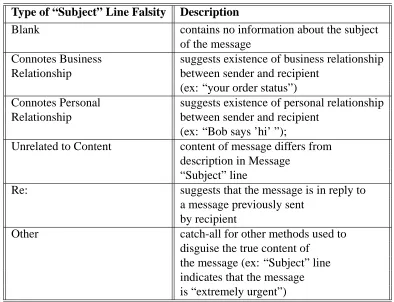
Spam is characterized by false information in the header and body. For example, “From” lines often obscure the true identity of the sender; “Subject” lines are often blank, connote a relationship (business or personal), or suggest that the message is in reply to a message previously sent by the recipient (for example, by including Re: in the Subject line). Out of 1000 random sample messages, FTC’s analysis of falsity in From and Subject lines is presented in Table 2.7 and Table 2.8, respectively. Their relative occurrence is illustrated in Figure 2.12, Figure 2.13, Figure 2.14, and Figure 2.15, respectively. Relative occurrence of spam containing the “ADV” label required by several state laws is illustrated in Figure 2.16.
Type of Falsity in
the “From” Line Description
Blank sender’s identity has been stripped from the “From” line
Connotes Business name of sender suggests a business relationship Relationship between sender and recipient
(ex: “[email protected]”)
Connotes Personal name of sender suggests a personal relationship Relationship between sender and recipient (ex: use of a first name
only, which may suggest that the message is from someone in the recipient’s address book.)
Message from sender’s identifying information has been stripped Recipient from message and replaced with recipient’s
email address
Type of “Subject” Line Falsity Description
Blank contains no information about the subject
of the message
Connotes Business suggests existence of business relationship Relationship between sender and recipient
(ex: “your order status”)
Connotes Personal suggests existence of personal relationship Relationship between sender and recipient
(ex: “Bob says ’hi’ ”);
Unrelated to Content content of message differs from description in Message
“Subject” line
Re: suggests that the message is in reply to
a message previously sent by recipient
Other catch-all for other methods used to
[image:73.612.131.525.96.398.2]disguise the true content of the message (ex: “Subject” line indicates that the message is “extremely urgent”)
Figure 2.12: Percentage of spam with false “From” line in a random sample of 1000 spam messages. 33% percent of spam analyzed contained false information in the “From” line. Source: “False Claims In Spam,” FTC Division of Marketing Practices April 2003.
Figure 2.14: Percentage of spam with false “Text” line in a random sample of 1000 spam messages. 40% percent of spam analyzed contained false information in the body of the message. Source: “False Claims In Spam,” FTC Division of Marketing Practices (April 2003).
Figure 2.15: 66% of spam in a random sample of 1000 messages contained false information in “From” lines, “Subject” lines or “Message text”. Source: “False Claims In Spam,” FTC Division of Marketing Practices (April 2003).
2.6.4
Trends in Spam Products and Exploits
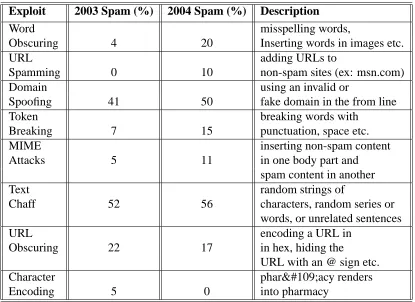
The MSN Safety Team at Microsoft Corporation conducted a study of trends in spam prod-ucts and exploits from the corpus obtained through the Hotmail Feedback Loop in 2003 and 2004[61]. Their analysis confirms that spammers continue to evolve spam by tricks such as word obscuring, url obscuring, domain spoofing, token breaking and character encoding, etc.
Product 2003 2004 Description Spam (%) Spam (%)
Porn/Sex enhancers with sexual
Non-Graphic 17 34 connotation, links to porn
health, dental, life, home
Insurance 1 4 auto insurance
cheap drugs or
Rx/Herbal 8 10 herbal supplements
refinancing, get out
-Financial 12 13 - of debt, financial advice
Travel/ selling airlines tickets, hotel
Casino 2 3 reservations, rental car
Internet casino and other gaming sites
Scams 8 6 get rich quick, Phisher scams etc.
any newsletter that
Newsletters 9 6 is not selling something
everything else
Other Spam 13 8 that appears to be spam
anything that contains
Porn/Sex Graphic 13 7 pornographic images
Dubious pirated software
Products 20 10 diplomas etc.
Exploit 2003 Spam (%) 2004 Spam (%) Description
Word misspelling words,
Obscuring 4 20 Inserting words in images etc.
URL adding URLs to
Spamming 0 10 non-spam sites (ex: msn.com)
Domain using an invalid or
Spoofing 41 50 fake domain in the from line
Token breaking words with
Breaking 7 15 punctuation, space etc.
MIME inserting non-spam content
Attacks 5 11 in one body part and
spam content in another
Text random strings of
Chaff 52 56 characters, random series or
words, or unrelated sentences
URL encoding a URL in
Obscuring 22 17 in hex, hiding the
URL with an @ sign etc.
Character pharmacy renders
Encoding 5 0 into pharmacy
Table 2.10: Trends in exploits in spam in random 2004 and 2003 spam samples. Source: “Trends in Spam Products and Methods,” Microsoft Corporation.
Category 2003 Spam 2004 Spam
Scams 1.07 1.89
Financial 1.26 1.88
Porn/Sex Non-Graphic 1.85 2.44
Travel/ Casino 0.75 0.98
Other Spam 0.76 0.79
Insurance 1.50 1.52
Newsletters 0.00 0.00
Rx/Herbal 2.13 2.12
Dubious Products 1.20 1.15
[image:78.612.122.537.97.399.2]2.7
Phishing - Attack Taxonomy, Lifecycle and Anatomy
The objective of phishing fraud is to acquire sensitive information such as passwords and credit card details. Phishing is a dangerous threat and causes billions of dollars’ worth of losses to businesses. We now present phishing attack taxonomy, the lifecycle, and the anatomy of a phishing email.
2.7.1
Phishing Attack Taxonomy and Lifecycle
2.7.2
Anatomy of a Phishing Email
John Graham-Cumming has very elegantly presented tricks exploited by spammers in his pa-per “The Spammers Compendium”[55]. Drake etal. from MailFroniter[75] have extensively described key features present in phishing emails and tricks used in fraudulent web sites in their paper “The Anatomy of a Phishing Email”[43]. Below is their analysis of phishing emails and fraudulent web sites from the phishing samples forwarded to MailFrontier from its customers. We use phishing samples from their paper.
1. An Attempt to Spoof Reputable Companies Using Convincing Strategies
Phishers try to spoof or emulate reputable companies like eBay, PayPal, Citibank etc. They often use the following tricks:
• Use of the legitimate company’s image, logo, icon and similar font schemes
• Links to the legitimate websites/services
• Spoofing headers to provide a look-a-like appearance of reputable companies
such as @eBay.com, @paypal.com etc.
2. Claimed Sender has a Reputable Name but a Different Reply Address
From : Citibank
Reply To: [email protected]
Table 2.12: Different reply address and claimed sender found in a phishing sample. Source: “Anatomy of a Phishing Email,” MailFrontier, Inc.
3. Offering Valuable Proposition
Such fraudulent emails try to convince recipients to reveal sensitive information by claiming that the recipient’s account information is outdated, that a credit card has expired etc.
4. Reflect Urgency Demanding Quick Response
Scammers try to convince recipients to respond quickly. An example of an urgent request is presented in Table 2.13:
If you don’t respond within 24 hours after receiving this email your account will be deactivated and
removed from the server
Table 2.13: A statement demanding quick response found in a phishing sample. Source: “Anatomy of a Phishing Email,” MailFrontier, Inc.
5. Assurance of Secure Transaction
Your information is submitted via a secure server
Table 2.14: A statement assuring security found in a phishing sample. Source: “Anatomy of a Phishing Email,” MailFrontier, Inc.
6. Use of HTML Forms in the Email
Phishers have also used HTML forms in the body of the email message to collect information from the recipients. One such example from [43] in what appeared to be an email from eBay is presented in Table 2.15.
<FORM action=http://www.christmas−offer.com/ sendmail.php method=get target= blank>
Table 2.15: Use of HTML forms in emails found in a phishing sample. Source: “Anatomy of a Phishing Email,” MailFrontier, Inc.
7. Look-A-Like Domain Names
Fraudsters register domain names that are very similar to the domain names of rep-utable companies. A fraudulent email from eBay used the link shown in the Table 2.16. Fraudsters are also early adopters of the email authentication standards. A re-cent study conducted by MarkMonitor revealed that more than 90% of the Fortune 100 companies have look-a-like domains with a published Sender Policy Framework (SPF) record for the email authentication. This study is presented in the next chapter.
http://ebay−securitycheck.easy.dk3.com
8. Mismatch between Link Text in the Email and the actual Link Destination
In phishing emails, the link text seen in the email is usually different from the ac-tual link destination. In the example below, the email that appears to send the user to http://account.earthlink.com instead takes the user to http://memberupdating.com. The HTML code is presented in Table 2.17.
<a class= “m1”target= “ blank”title= “Update”
href= “http://www.memberupdating.com”> http://account.earthlink.com< /a>
Table 2.17: Different link text and link destination found in a phishing email. Source: “Anatomy of a Phishing Email,” MailFrontier, Inc.
9. Using JavaScript Event Handlers to Display False Information
Some fraudsters use the JavaScript event handler “OnMouseOver” to show a false URL in the status bar of the user’s email application. Drake etal.[43] present an example of a fraudulent PayPal email in which, when the user puts the mouse over the link, the status bar will display:
https://www.paypal.com/cgi-bin/webscr?cmd= login-run However, the link actually takes the user to:
http://leasurelandscapes.com/snow/webscr.dll
11. Using a Reputable Entity or Word along with @ Symbol in a URL to Confuse Recipients An Internet email address is of the form username@hostaddress. Whenever a http or https request with the above format is made, the part before the @ symbol is ignored and the browser is directed to the hostaddress. Spammers often use this format and reputable names before the @ character to trick recipients into thinking that the fetched destination web site belongs to the reputable business. Sometimes, fraudsters also substitute @ with %40 (the hexadecimal character representation of the @ character).
In the example presented in Figure 2.18, the link appears to be going to eBay however the text before the @ symbol is ignored and the link sends the user to “210.93.131.250” which is the fraudulent web site’s IP address.
http://cgi1.ebay.com.aw−cgiebayISAPI.dll
%[email protected]/my/index.htm
Table 2.18: URL obscuring with IP address and hexadecimal characters found in a phishing email. Source: “Anatomy of a Phishing Email,” MailFrontier, Inc.
12. Abusing Redirection Services
13. Using Ports Other than 80
Fraudsters occasionally use ports other than 80 (http) to hide their location. A port can be specified with a colon (:) and a port number following the URL.
2.7.3
Tricks Used in Fraudulent Web Sites
Once the na¨ive users are on fraudulent web sites, fraudsters then use various other tricks to continue emulating the legitimate reputable business. Some of these tricks used in these sites are described below.
1. Continuous Attempts to Emulate the Legitimate Reputable Company
Phishers continue to emulate the legitimate company by using their images, logos, fonts and color schemes.
2. Use of Secure Socket Layer (SSL) Certificates
As aforementioned, phishers have demonstrated the use of Secure Socket Layer (SSL) protocol. These phishing sites often have URL beginning with “https://” to indicate that information is being transmitted over a secure channel and that the company has obtained a Secure Sockets Layer (SSL) certificate from a certifying authority
4. Other Tricks:
Scammers and phishers often make use of various other tricks such as displaying a fake address bar, using pop-ups, and disabling the right-click button of a mouse to prevent the user from viewing and saving source code. They have also demonstrated the use of trojan horses and viruses for phishing.
2.8
Spam and the Law
Several legal initiatives are underway for tackling spam and phishing. In December 2003, President George W. Bush signed legislation to help fight spam. The bill is known as
Con-trolling the Assault of Non-Solicited Pornography and Marketing Act of 2003
(CAN-SPAM Act of 2003). Microsoft, Yahoo!, American Online, and Earthlink have filed lawsuits against individuals and companies who have spammed their customers. A Virginia court re-cently sentenced a prolific spammer, Jeremy Jaynes, to nine years in prison[15]; a Nigerian court sentenced a woman to two and a half years for phishing[16]. Michigan and Utah have both passed laws creating “do-not-contact” registries in July/August 2005, covering email addresses, instant messaging addresses and telephone numbers[86]. Microsoft Corporation recently won a seven-million dollar settlement from spammer Scott Richter[17].
2.8.1
CAN-SPAM Act of 2003
CAN-SPAM defines spam as “any electronic mail message the primary purpose of which is the commercial advertisement or promotion of a commercial product or service (including content on an Internet website operated for a commercial purpose).”
The bill permits sending Unsolicited Commercial Email (UCE) provided it satisfies all of the requirements listed below.
1. It contains an opt-out mechanism.
2. It contains a valid subject line and header (routing) information.
3. It contains the legitimate physical address of the mailer.
4. It contains a label if the content is adult.
If a user opts out, the sender must remove his address within ten days.
2.8.2
Jeremy Jaynes Sentence
2.9
People and Spam
John Graham-Cumming conducted a spam survey on Slashdot in 2004[56] to understand the effect of spam on people. His survey had 4,691 participants, of which 94.5% were men, 4% were women and 1.5% were other. 50% of the participants were email users with more than five years’ experience. Two respondents identified themselves as spammers. 80% of the respondents were between the ages of 18 and 45.
An analysis from the responses to the survey indicated that 76% participants believe that the spam problem will never go away, 9% believe that spam-filtering makes the spam problem worse, and, on an average 85% are using an anti-spam tool. 98.5% users receive spam. 1% of respondents claimed that they have bought from spam. The average user (both men and women) spends around 9 minutes a day dealing with spam. Figure 2.21 illustrates the effect of spam on the respondents of the Slashdot spam survey.
2.10
Spam Survey at University of California, Riverside
Chapter 3
Related Work
3.1
Whitelist, Blacklist and Greylist
3.1.1
Whitelist
A whitelist in the context of spam-filtering is a list of trusted senders (i.e. email received from the addresses in the whitelist are always delivered to the recipient’s email inbox). The person maintaining the whitelist may have initiated communication with whitelisted senders in the past. All modern Mail Transfer Agents (MTAs) support whitelisting technique. It is a common practice to mirror one’s address book as the whitelist.
3.1.2
Blacklist
When a mailserver implementing DNS blacklist filtering receives a connection from a sender, it queries the DNSBL server for the client IP address. If the sender is listed in DNSBL, the mailserver can reject or flag messages from that client.
The DNSBL system is built on top of the Domain Name System (DNS). In the DNS, the address record A assigns an IP address to a domain name, MX record provides mail exchanger for that domain and PTR record (reverse record) associates an IP address with a canonical name. This is done by reversing the four IP octets followed by IN-ADDR.ARPA. For example for IP addres