Challenges
Data at Risk
Online file sharing (OFS) solutions (also called “file sync and share”) have become very popular for corporate as well as personal data. While NAS solutions have been the primary vehicle for corporate file sharing, products like Box and Dropbox are easier to set up, simple to use, provide access from any location or mobile device, and offer a certain amount of free storage. This is an appealing set of qualities, particular in a world in which the desktop PC is no longer the only computing platform. Unfortunately, many employees leverage these public-cloud solutions for corporate data without the knowledge or permission of corporate IT departments. As a result, petabytes of corporate data are at risk, residing in cloud solutions without the protection and monitoring of corporate IT, and often violating industry
compliance or governance regulations—which can result in hefty fines. When ESG asked potential corporate OFS account adopters about their top concerns, their three most popular responses were security, employees continuing to use their own solutions, and integration with existing IT tools and applications.1
Lack of IT Control
Most organizations today want to bring control of their data back in house, but that is unlikely to happen unless they can provide their users a solution for storing data that includes the same levels of mobile device access, ease of use, and sync/share capabilities as public cloud OFS products. The genie is out of the bottle, and employees simply won’t stop “going rogue” unless there is a solution that is better than standard NAS. Traditional file servers and NAS systems provide IT control, but remote access is limited to particular machines and often requires VPN access, which can add a level of complexity. In addition, once they access their data, they must navigate a shared drive system set up by IT, rather than their own directory structure.
Duplicate Data
Organizations are storing significant amounts of duplicate data in NAS systems, as they make copies of files for sharing, collaboration, and to use on other devices. This is driving up storage and management costs.
Data Protection and Security
Data protection and security are significant issues with public cloud solutions. Users generally have no idea where cloud providers actually store data and how they protect it. Corporate IT has no control over backup and recovery since this data is not within their backup schema. Should there be a cyber-attack on the cloud provider, the data is at risk. In addition, should the employee leave the company, IT has no idea what corporate data is stored online and cannot ensure that it is managed properly. Similarly, should an employee’s laptop be lost or stolen, IT has no access to prevent a data leak into unknown hands.
1
Source: ESG Research Report: Online File Sharing and Collaboration Deployment Model Trends, February 2014.
ESG Lab Test Drive
Hitachi Content Platform Anywhere 2.0
Date: March 2015 Author: Kerry Dolan, Lab Analyst and Vinny Choinski, Sr. Lab AnalystAbstract: This report documents the results of an ESG Lab Test Drive of the HCP Anywhere private file sync and share appliance from Hitachi Data Systems.
Hitachi Content Platform (HCP) Anywhere
HCP Anywhere is an on-premise solution designed for secure file sharing and content distribution that can improve end-user productivity while maintaining corporate control, management, and protection of data.
HCP Anywhere software can run as a VMware virtual machine or as an appliance. Files are stored deduplicated and compressed to minimize storage and bandwidth needs. Security is maintained with encryption, a choice of
authentication services, and with user-defined passwords on shared content. Complete version history enables content restore to any point in time; backups are not needed.
Other parts of the corporate infrastructure can be integrated with HCP Anywhere, including Active Directory servers for user authentication and permissions, DNS servers, mobile device management (MDM), mobile application management MAM), virus scanning, etc. These features enable content distribution and file sharing to benefit from full IT governance and management.
HCP Anywhere is easy to deploy, use, and manage, and works with existing IT processes. Deployment requires the HCP Anywhere and HCP software, both of which can also be delivered as appliances.
Users can access files via the HCP Anywhere desktop application (Windows or
Macintosh), Web browser, and native applications for Apple iOS, Google Android, and Windows mobile devices. Users share files or folders using hyperlinks instead of sending copies that can clog networks, email systems, tape backups, and storage arrays. HCP Anywhere includes enterprise-class
features that are not the norm for most file sync and share solutions. These include:
Mobilization of NAS data
Protection of persistently open files, such as Outlook .pst archives
Integration with MobileIron MDM
User authentication using Microsoft Active Directory, SAML/ADFS
Ability to share links to folders as well as files
Selective sync on shared folders, enabling users to select which data to share with which users, and also select only particular data for offline sync.
Incremental sync, so that only the changed data blocks in a file syncs, minimizing bandwidth usage
Full portal branding capability
Automation of client distribution and desktop client upgrades
Granular-level policy configuration
Support for VMware vMotion and Distributed Resource Scheduler
2TB maximum file size
While the features are enterprise-class, HCP Anywhere customer ranges from very large enterprises to hosted service providers to small- and medium-sized business.
ESG Lab Test Drive
ESG Lab tested HCP Anywhere at the Hitachi Data Systems offices in Waltham, MA. Testing included both user and administrative perspectives. Testing began by uploading four folders of test files (esg_fs01 through esg_fs04), including various office documents, spreadsheets, presentations, and PDFs, to a previously deployed HCP Anywhere environment.
The User Experience
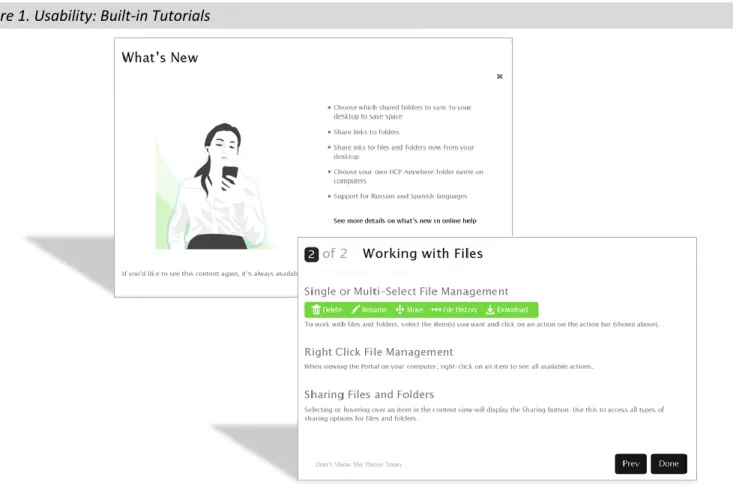
User access is delivered through a desktop folder, mobile device, or web browser. HCP Anywhere users save files to the Anywhere folder on their desktops, where files are automatically synchronized according to policy. When using the desktop application, documents reside in the local Anywhere folder for fast access and real-time sync. As a result, a network failure won’t impact document access. All files in the local Anywhere folders are protected; compressed and single-instanced for storage and network efficiency; encrypted for security; and replicated for continuity of access. HCP Anywhere includes numerous usability features, such as User Account and Activity tabs in the desktop application, the ability to share links by simply right-clicking on a file or directory, and context-driven product/feature tours. Figure 1 shows the What’s New screen that appears when a new user logs in, as well as a screen from the feature tour for Working with Files. These provide tutorials and help for new users, and can be disabled by the user.
Figure 1. Usability: Built-in Tutorials
As documents are edited, multiple versions are retained and time-stamped. They are available through the File History menu for easy restore by the user.
ESG Lab tested synchronization by selecting a document from the folder esg_fs01 and adding text to page 5. A pop-up box indicated that it was synchronizing.
Modifying Documents
With the desktop client, when two users modify a document at the same time, each user’s local cache retains that user’s changes. The first user to save the document retains the original file name, while the other document file name is modified to indicate a conflict. This ensures that all changes made by both users are saved, while informing users that other edits are in process. When documents are synchronizing, a pop-up box displays the name of the file that is
the master copy. Should a user then want to restore a previous version he can simply select an earlier version to restore. When a mobile device or Web browser is used, simultaneous editing results in multiple versions of the file being saved, with no file conflict.
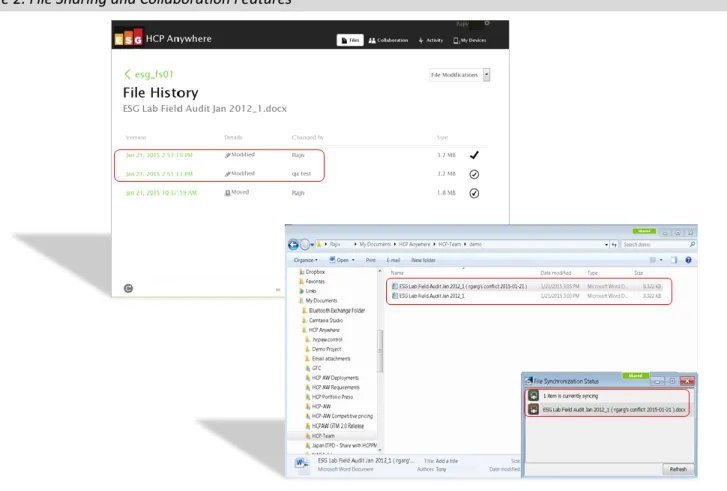
In ESG Lab testing, two users (Rajiv and qa test) modified the same ESG Lab Field Audit document at the same time. Both documents were saved and synced to HCP Anywhere. The File History screen at the top of Figure 2 shows three time-stamped versions: the original, and (in the red box) versions modified by each user. The bottom screen of Figure 2 shows the saved versions in the Windows Explorer view, with one file name indicating the conflict and the timestamp; in addition, the synchronization pop-up box indicates the conflict in red.
Figure 2. File Sharing and Collaboration Features
Sharing
Users can share files or folders using the Collaboration tab, where they can create various folders to share with others. This area also displays folders that other users have shared. Files and folders are shared via hyperlinks that can be password-protected. When links are shared with internal users, the recipients need to authenticate using their Active Directory or single-sign-on credentials.
For link sharing, the filename can be used as a hyperlink rather than the URL, providing more information to the receiver. Links can be set to expire in a certain number of days (with a maximum number of days defined by the administrator), and can be shared with internal or external users (based on administrator-defined policy). Security is provided with access codes, which are sent in separate e-mails. Sharing via folders and hyperlinks eliminates the need to send document copies or revisions, since the link always points to the latest version of a file, saving on both network and storage resources.
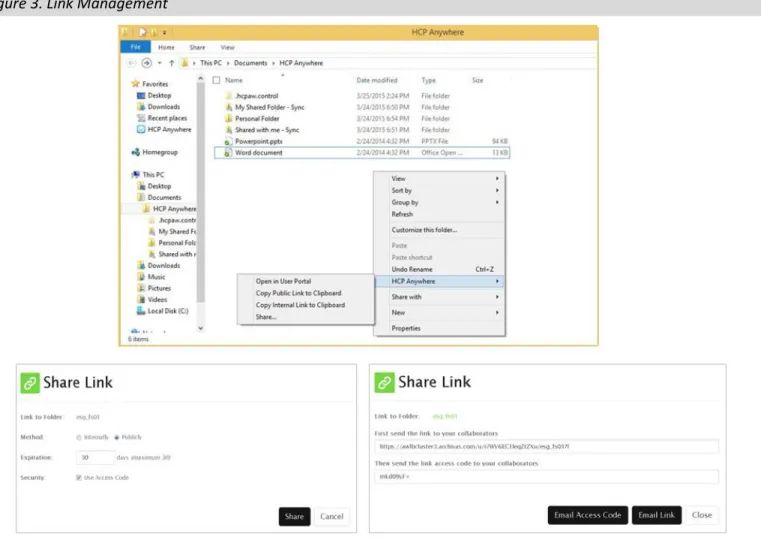
Users can also share by right-clicking on a file or directory structure, which brings up the HCP Anywhere menu. From that menu the user can copy a public or internal link to the clipboard. Right-clicking also provides access to file history for self-restore and access to advanced options via the User Portal
The right-click menu for sharing a link is shown at the top of Figure 3. The bottom of Figure 3 shows configuration screens for sharing links. Links can be designated as internal or pubic, with or without an expiration date and access codes for security. ESG Lab created a link to the folder esg-fs01, and from a single screen we were able to configure the link to be sent to a recipient, with an access code sent by separate e-mail.
Figure 3. Link Management
Mobile clients
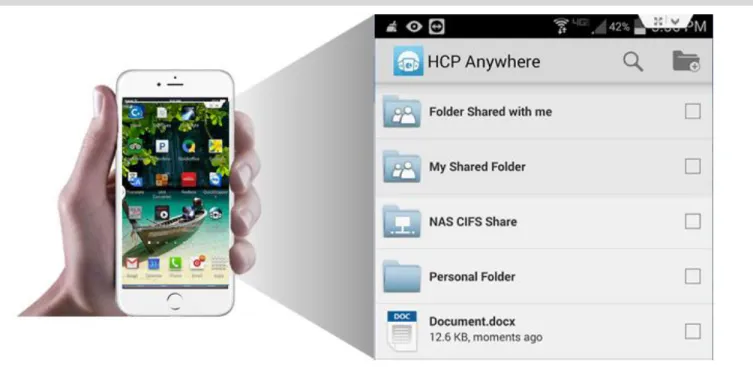
HCP Anywhere provides access to files and folders from smartphones and tablets via native applications for the Apple iOS, Google Android, and Windows mobile platforms. These mobile applications support file downloading and uploading to HCP Anywhere, with performance depending on network speed. From the mobile applications users can also create links, mark files as favorites (for offline access), bookmark files for quick access, manage their settings, access help, delete files, and create folders in both file sync and share and mobilized NAS environments. Figure 4 shows an iPhone with the HCP Anywhere mobile application on the left, and the file structure within that application on the right, including personal files/folders, shared folders, and NAS folders.
Figure 4. Mobile Access
The Administrator’s Perspective
The administrative interface provides in-depth monitoring and management. Figure 5 shows the System tab with the high-level dashboard displaying hardware, system, and feature status. The event log displays a timeline of major events. Administrators can track system usage, capacity, administrative and user activities, etc. Graphic displays can be used to monitor key details such as namespace usage, operations, connections, and data transferred.
From the Access tab administrators can configure authentication, user profiles, and registered users, including configuring Active Directory and SAML/ADFS authentication. The File Sync and Share tab enables tasks such as
configuration of policies and capacity quotas; desktop client upgrades and notifications; device policies such as sharing and expiration dates; mobile device password requirements; virus scanning; NAS mobilization; branding; and more. Administrators can configure policy by user(s) or by group(s).
Advanced Features
HCP Anywhere includes enterprise-class administrative features that simplify management and enable customer tailoring. Client distribution can be automated and incorporated into system management frameworks, simplifying deployment. Separate administrative and audit roles can be configured, and policies can be applied at a granular level. Other advanced features include:
MDM integration with MobileIron. HCP Anywhere can be a corporate application in a MobileIron
environment, enabling organizations to apply the same data privileges such as sharing, printing, and copying to mobile devices with Anywhere as they do with other applications. The key benefit is that organizations can separate corporate mobile data from personal data and manage it by policy.
Full branding. Corporations and service providers can brand the browser view from the Branding screen in the File Sync and Share tab. This makes it extremely easy to edit and upload graphic logo files, for example. Administrators can change the name, logo, and description of the product; the “Powered By” name and logo; the license agreement and help-message link; and even the links to mobile applications for users to download from the Anywhere portal. In addition, custom branding for desktop and mobile clients is now available as a service.
Enhanced data protection. Figure 6 shows a configuration screen for managing file versions. IT can choose how many versions of a file to save; once that number has been reached, the oldest ones will be deleted automatically when new versions are created. Automatic deletion can also be configured after a certain time period to prevent files from consuming unlimited amounts of storage indefinitely. In addition, a number of daily, weekly, and monthly versions can be retained for various periods of time to ensure that data is fully protected and available, but enabling IT to optimally manage storage capacity. These versions can eliminate the need to do backups for data protection.
Why This Matters
File sharing and collaboration solutions can improve productivity for users, and the demand for it is not going away. Users have become accustomed to easy access from any device and the ability to easily share with internal and external users. But using public cloud-based solutions can leave data vulnerable, and
organizations are anxious to bring control of end user data back in house. In a recent survey, ESG asked IT professionals what factors were driving their interest in retaining file data on-premises. More than half of both current public cloud model OFS users and potential hybrid or on-premises model OFS adopters indicated they wanted flexibility and control over where data is stored.2
ESG Lab validated the superior experience that the on-premise HCP Anywhere solution provides for both users and administrators. For users, the synchronization, mobility, versioning, and collaboration features are
enhanced with features that go the extra mile, such as folder sharing, right-click access to Anywhere
functionality, easy-to-configure link sharing with password protection, synchronization alerts that include file names, and even built-in tutorials to enhance the experience. And the 2TB file size is a huge help to users who continue to be frustrated with other solutions when they need to share a large file.
On the administrative side, HCP Anywhere delivers in-depth monitoring and management features including automation that simplifies client distribution and updating in large environments. But beyond what is
expected, HCP Anywhere provides MDM integration, support for federated AD domains, ease-to-configure yet extensive branding, and versioning designed to maximize protection without compromising efficiency. On all fronts, ESG Lab found that HDS has gone out of their way to deliver maximum functionary with HCP Anywhere.
2
Differentiating Features
Enterprise Architecture
One feature that separates HCP Anywhere from other solutions is its enterprise-class architecture. The back-end HCP is a robust, massively scalable, secure, object-storage platform that can be carved up as needed to serve content for
different parts of an organization and/or varying service levels. It is built for scale, long term retention, and data protection. It stores data with compression and single instancing to minimize capacity needs; can automatically apply retention and disposition policies, including deleting expired content to reclaim storage; includes monitoring, reporting, and audit capabilities; is protected with RAID-6 erasure coding and data integrity checking; and supports content protection and replication for disaster recovery if needed.3
Figure 7 outlines the key features of the architecture. On the left are the access points, including laptops, browsers, desktops, and mobile devices. These connect via the secure HTTPS protocol to a firewall-protected DMZ with load balancing, and then to HCP Anywhere, which is built with redundant servers (physical or virtual) for availability. HCP Anywhere is connected via LAN to storage, infrastructure servers, and Active Directory. The back-end storage supporting HCP can be replicated off site to protect from a site failure.
Figure 7. Distributed Architecture
3
For a look at the complete Hitachi Content Platform portfolio, please see the ESG Lab Validation Report: Hitachi Data Systems Content Platform Portfolio, February 2015.
NAS Mobilization
Typically, users access shared NAS drives through a VPN. They mount the drive on the desktop and make changes to a file; data is sent back to the shared drive as changes are made, keeping the document locked and unavailable while it is being modified. The VPN can make data access much more complex, and a network failure will prevent document access altogether.
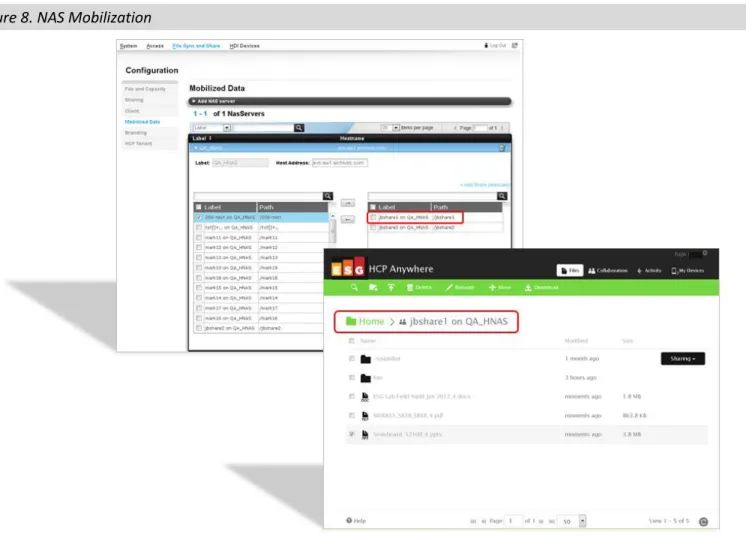
With HCP Anywhere 2.0, organizations can mobilize the data in their NAS environments including Hitachi NAS (HNAS) and Hitachi Data Ingestor (HDI) domains using HCP Anywhere. Users can create, read, update, and delete NAS files through the Anywhere application. ESG Lab tested this functionality by mobilizing a file share on HNAS, selecting a share to be mobilized (Figure 8, top) and then displaying that share within the HCP Anywhere domain (Figure 8 bottom).
Why This Matters
As mentioned earlier, in a recent ESG research survey the top concerns mentioned by potential adopters of corporate OFS accounts were security, employees continuing to use their own solutions, and integration with existing IT tools and applications. HCP Anywhere answers all of these challenges and more with its robust, well thought out enterprise architecture. It was designed to ensure that file data is fully secure and protected, that it is managed according to IT processes, and that employees enjoy in a private-cloud environment all the usability features they expect, plus add-ons that are likely to keep them from looking outside of IT.
ESG Lab was impressed with the scale and scope of the HCP Anywhere solution. The enterprise architecture and HCP back-end demonstrate the advantage of building on a robust, rock-solid, fully integrated, highly scalable solution. The pedigree of a well-proven IT solution vendor such as HDS makes possible the depth of availability, protection, security, and management features for users and IT.
The ability to mobilize NAS data extends file access capabilities to a new level. How can you give users better access to NAS data when you already have a full-blown home directory infrastructure that would be a huge and costly undertaking to migrate? By enabling access to this data, HCP Anywhere lets users choose which NAS files they want mobile access to, without having to upgrade or migrate all the NAS data already in place. Users get the functionality they want while IT maintains the return on their NAS infrastructure investment.
The Bigger Truth
File sync and share products solve a real world user need for working anywhere, on any device, and collaborate with others. They also reduce the hardware and management costs of multiple data copies residing in too many siloes and clogging up networks. But when users resort to public-cloud OFS solutions that are, by definition, outside of IT’s purview, there is potential for data loss and leakage. What IT doesn’t know about, IT cannot manage or protect. As a result, the balance between IT-managed data services and user mobility may be tipping dangerously in the wrong direction.
The answer for some organizations has been to forbid employees to use any solution outside of the corporate domain, enforcing their edict by IP address blocks and employee punishment. This can solve the problem when users are within any corporate network, but achieves nothing when they use home or mobile networks. And, it erodes employee good will without providing them services that they clearly want, and in most cases truly need.
A better answer is to deliver the services they need within the corporate environment. That’s what HPC Anywhere does: it eliminates the compromise.
HCP Anywhere is a single, cloud-based repository with the Hitachi Content platform at the center, ensuring data protection and security while delivering user access from any device. Data is compressed and single instanced for efficiency; storage growth is also controlled by eliminating a lot of data copies. Users get the access, mobility, sync, and collaboration features they need, and even data stored in your NAS infrastructure can be mobilized through HPA Anywhere. And they are not stopping there—the HCP Anywhere roadmap has some interesting additions on the horizon.
What makes HCP Anywhere different is the enterprise architecture, scalability, and security that organizations are looking for. But that doesn’t mean you need to be enterprise-scale to take advantage of it. Both HCP Anywhere pods and the back-end HCP servers can be virtualized, and deployment is not overly complicated.
ESG Lab believes that HCP Anywhere is a top-of-the-line, private-cloud, file sync and share solution. The end-user features are extensive, designed for maximum usability, collaboration, and data access. The administrative features are equally extensive, designed to maximize value for corporate and service provider customers. Organizations looking to get back control of their file data can leverage HCP Anywhere to deliver on the needs of users and IT.
This ESG Lab Test Drive was sponsored by Hitachi Data Systems. All trademark names are property of their respective companies. Information contained in this publication has been obtained by sources The Enterprise Strategy Group (ESG) considers to be reliable but is not warranted by ESG. This publication may contain opinions of ESG, which are subject to change from time to time. This publication is copyrighted by The Enterprise Strategy Group, Inc. Any reproduction or redistribution of this publication, in whole or in part, whether in hard-copy format,
electronically, or otherwise to persons not authorized to receive it, without the express consent of The Enterprise Strategy Group, Inc., is in violation of U.S. copyright law and will be subject to an action for civil damages and, if applicable, criminal prosecution. Should you have any questions, please contact ESG Client Relations at 508.482.0188.