ActionProgram Manager Plus
Streamlines Processes,
Optimizes Resources,
and Relieves the Burdens of
MS Project and Clarity
.
With Remedy-Based ActionProgram Manager Plus,
You Can Manage All Projects Better
and Streamline Processes, Optimize Resources,
Manage the Whole Project Life-Cycle,
and More
.
A White Paper from Project Remedies Inc.
Table of Contents
Abstract ... 3
Executive Summary ... 3
1.0. Measuring User Performance. ... 4
2.0. The Easiest, Fastest and Least Expensive Approach. ... 5
3.0. ERP for IT and the Demand Management Framework. ... 7
4.0. Optimizing Resources. ... 9
5.0. Summary. ... 12
Project Remedies, PRI and the PRI logo are the exclusive properties of Project Remedies Inc., are pending registration with the U.S. Patent and Trademark Office, and may be registered or pending registration in other countries. All other trademarks or registered trademarks are the property of their respective owners.
© Copyright 2013 Project Remedies, Inc. ITIL® is a registered trademark, and a registered community trademark of the Office of Government Commerce.
Abstract
In this era of ever-smaller IT budgets and sequestration, managing projects well is essential,. but streamlining processes and optimizing resources is the only way to yield significant cost savings and improved execution across the enterprise.
Many well-intentioned senior managers look to tools like MS Project or Clarity as a panacea for all components of project management. However, neither MS Project nor Clarity provide sufficient reporting capabilities or integration into your existing IT Service Management tool set. More than a decade into the 21st century, no one should wait on batch jobs to run standard reports.
Project Remedies Action Manager Plus (APM Plus) is “a better mousetrap.” APM Plus is Remedy-based so it leverages your existing investment in Remedy. No additional hardware or software is necessary. APM Plus quickly allows managers at all levels to not only manage projects, programs, portfolios and the whole project life-cycle, but also to streamline
processes and optimize resources.
APM Plus gives you the performance metrics necessary to report results to management, to answer the question: “How do you know?” It is one thing to say that processes are
streamlined and resources optimized, but it is another thing to show the metrics. APM Plus gives you better visibility and more transparency. It is the low-cost, low-risk alternative.
APM Plus does all these functions well, but MS Project and Clarity do not. They do not have the necessary functionality, so if you dictate MS Project or Clarity as your enterprise project management system, you are also saying that your team will not be focusing on streamlining processes and optimizing resources.
Executive Summary
In this difficult time of sequestration and ever smaller IT budgets, focusing on streamlining processes and optimizing limited resources is the best management strategy. IT is far too often seen as an insatiable cost center, when with the right tools, such as APM Plus, ’our enterprise approach will lower effective cost, improve operational efficiency, and improve the reputation of IT within your organization. Why? While MS Project Server and Clarity and other similar products do manage projects, they do not have the functionality needed to streamline processes and optimize resource. Despite these vendors’ best efforts to convince us that a one-size-fits-all-solution is best, key components remain absent:
What is needed?
1. A robust work template capability that connects to your service catalog. When a request for a complex service is made, using workflow and the work
template, the application turns the work template into a project task plan at network speed. Similarly, for larger requests, the proposed project life-cycle will be launched. Request fulfillment starts with a request in your Service
Catalog so interfacing with the Service Catalog is critical. This linkage insures that nothing will fall through the cracks. With work templates, processes become repeatable, consistent project plans. Tasks can be tracked and performance metrics generated.
2. A single repository of resources who can be assigned to all tasks, i.e. incidents, problems, changes, events and project tasks. Having all work
touch-points in a single system eliminates excuses and gives management the visibility they need to see if each department in the enterprise is staffed
correctly.
3. Time-at-task tracking and duration tracking against all tasks. These are the metrics that needed to pinpoint opportunities for efficiency and cost savings. Measuring performance is necessary to report to your management that you are taking their stated goals of lowering cost while improving service levels seriously.
So, standardizing on MS Project or Clarity (with the best of intentions) often inhibits Service Catalog Integration, negatively effects collection and assessment of metrics, and limits resource optimization… And in an environment of near-constant change with lower IT budgets, with APM Plus, the organization will have the flexibility to adapt quickly to shifts in services and application workloads that these other products do not give you.
Repeatable processes and cleaner metrics. While 5-10% of your projects are unique and may have a large number of tasks, the vast majority of projects, approximately 90% – 95%, have a small number of tasks. They are the most common requests and should be performed the same way, i.e. using standard, repeatable processes. One result is cleaner metrics. Another is increasing the confidence of the whole organization because they will see that IT is more organized, working the same type of request the same way.
Knowing how each performing organization performs each type of task, i.e. duration, quality and cost, are the metrics you need to improve quality, lower cost, optimize resources, and at the same time, create a culture of accountability. Focusing on improving these processes will improve execution and lower cost.
1.0. Measuring User Performance.
A Remedy developer was at a Remedy user conference watching our APM Plus demonstration so intently that his eyes were getting wider and wider. After the demo, I asked him what he saw. He said:
“My company has just spent the last year and a half documenting all of our processes. We wrote them all down, copied them and put them in 3-ring binders, trained all of the users on them. At the end of the training, all of the users said “Yes, sir” and “Yes ma’am” and walked
out and we realized that we had no idea what they were actually going to do. And with your system, we would.”
Exactly. When you store a process in a template and then use the template to generate a project plan, the tasks in the plan represent the process. The need for user training is eliminated because all the users have to do is work the tasks in the plan.
Another benefit is flexibility. If you need to change the plan, just change the
template. This takes a few seconds or minutes. The people working the tasks do not have to be re-trained each time the process changes.
Another benefit is ease-of-use. We realized that no organization can have enough trained project managers to manage all of the projects. The smaller, repetitive projects are managed by team leaders, not trained project managers. So we designed APM Plus to be easy enough for team leaders to use.
APM Plus can be used for creating a consolidated master schedule, and includes Gantt charts, multi-projects Gantt charts, complex dependencies and inter-project dependencies. It is a robust yet easy to use project, program and portfolio
management system designed to be used by team leaders as well as trained project managers.
2.0. The Easiest, Fastest and Least Expensive Approach.
Project Remedies Inc.’s ActionProgram Manager Plus (APM Plus) is hard to categorize. Some people think of it as a Remedy-based Program Management Portal. Others think of it as an Integrated IT Process and Life-Cycle Management System. Someone called it a “Swiss Army Knife” and someone else called the integrated solution “Nirvana.” All agree that it is the easiest, fastest and least expensive way to manage projects and streamline processes, optimize critical resources, manage project portfolios as well as service portfolios, and more. APM Plus includes process, project, program, portfolio, governance, resource, risk, and cost management functionality. When APM Plus is integrated with BMC
Software’s Remedy IT Service Management Suite, it turns the IT Service
Management Suite into a Demand Management System. This means that all work touch-points are in the same system. Adding APM Plus to your existing Remedy ITSM suite environment is the easiest, fastest, and least expensive way to get to an integrated Demand Management System, i.e. to manage all work touch-points within one system. And you have 2/3rds of it in place already. Why is this important?
• You will have the flexibility needed to respond faster and more cost effectively as changes occur. With the needed performance metrics, you will be able to report to management the good job that you and your organization is doing.
• Projects will be driven by requests that come in through your Service Catalog and won’t fall through the cracks.
• The metrics needed to streamline processes and optimize resources will be captured at every work touch-point.
• Using APM Plus’s robust work template and approval template capability as well as its robust resource management capability will result in more
repeatable processes. Focusing on improving these processes enterprise-wide will lower cost and improve ITs reputation within the organization. • Standard process patterns will result in cleaner metrics.
• Processes will be implemented faster because there is no need for training on each process. People just have to do the tasks that are assigned to them. • Resource teams will work more efficiently and effectively. You will have the
metrics needed to improve quality, which lowers effective cost and improves customer service.
• Downstream services are spawned without needing to know that those
services even exist. This frees up the Line of Business or Product Owner from needing to know or understand the intricacies of the IT and Project Services areas.
When you implement MS Project Server or these other applications, you hope that your projects will be managed more effectively and more will finish time and on-budget. But when you implement APM Plus, you know that:
• Your projects will be managed more effectively and more will finish, and finish on-time and on-budget.
• Service requests and cyber events and their remediation life-cycle will be managed more effectively.
• Standard process patterns, i.e. repeatable processes will be implemented, they will be more efficient and will continue to improve over time.
• Resource teams will work more effectively and efficiently because of the repeatable processes, because there is no training involved, and because you are collecting the metrics you need to improve quality at every work touch-point.
• Staffing within IT will better align with the demand coming in through the Service Catalog.
• Costs will decrease and customer service levels will improve.
• Your governance processes will be more effective and enable management to make more informed decisions faster.
• Senior Management will be able to look in one place to see where any project is in the Project Life-Cycle and answer questions about any request, because all of the data is in the same system.
• A “culture of accountability” will be supported.
• Silos within IT will be reduced.
3.0. ERP for IT and the Demand Management Framework.
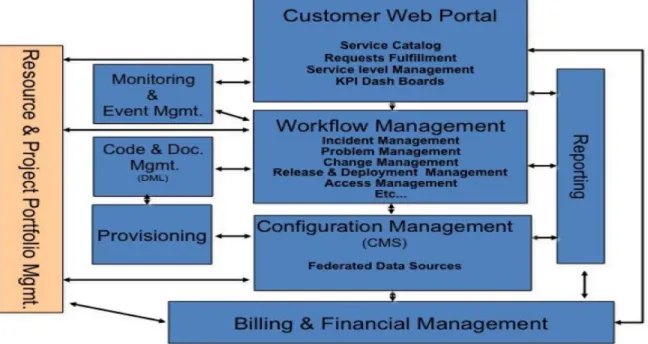
The chart below was in a recent Pink Elephant report. Pink Elephant is the leading ITIL consulting firm. When I talked with one of the co-authors and asked him about this chart, he said: “We call that “ERP for IT.”
Figure 1 – Pink Elephant’s ERP for IT vision.
This is what we are talking about, on the Remedy platform.
The chart below, in Figure 2, is a high-level process diagram that shows this same functionality, but as integrated life-cycles.
9
Demand Management Framework
Administrative Tasks Project Plan Created Other Tasks
Universal Time Sheet
Project Completed Tasks Worked Project Plan Reviewed and Approved Tasks Worked Process Completed Task Worked Resources Assigned Multi Task Process Spawned Problem / Single Task Created Requests Reviewed and Approved All IT Requests, Incidents Changes, Projects Data to Financial System Reports Assets PRI's ActionProgram Mgr. Plus
BMC IT Service Management Suite
Proposed Project Gate Process
Portfolio
Figure 2 – PRI's Portfolio Management Suite Configured with Remedy's ITSM Suite.
As you can see from this diagram, APM Plus (Yellow) complements BMC’s IT Service Management suite (Blue).
With all work related data in one place, the Remedy database tables, generating reports such as the one below, in Figure 3, becomes simple and fast.
The same time-at-task tracking capability is used for all tasks: incidents, problems, changes, events and project tasks. As you can see in Figure 4 below, each person can enter time spent against each work touch-point (incidents, problems, changes, project tasks and other tasks not related to requests) the same way.
Figure 4 – PRI's Universal Time Sheet. Used to enter time against all Remedy work records.
How do you do that with MS Project Server or Clarity? (Of course, the answer is with the $5 million - $7 million integration project. Licensing APM Plus eliminates the need for this integration project and also eliminates any possible data integrity issues resulting from trying to integrate different products developed by different people.)
4.0. Optimizing Resources.
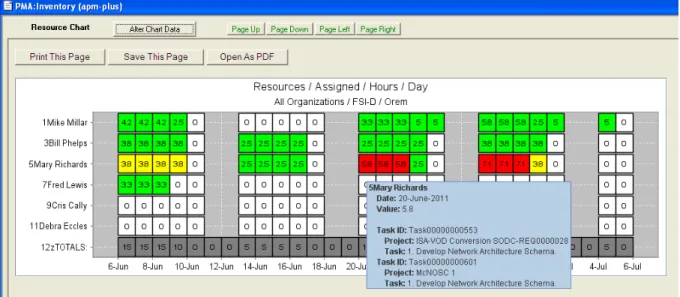
Seeing how busy people are at specific points in time starts with a project plan. A project plan calculates when each task is supposed to be performed. Then, when people are assigned to each task, you can see how busy they are at that time because they have, hopefully, also been assigned to other tasks on other projects. How else can you know? Please see figure 5 below.
The example shows the “daily” view. There is also a weekly and a monthly view. For each person:
• If the box is white, not time has been assigned.
• If the box is yellow, the person is 81% – 100% assigned.
• If the box is red, the person is over-assigned.
Figure 5 – Resource Management Chart Example: Daily View.
Someone once looked at this chart and said: “If this were real data, do you know what it would show? It would show that 3 of the people have NOTHING ASSIGNED TO THEM FOR A MONTH.” In this time of reduced budgets, shouldn’t a manager be asking each team leader if his or her team can do what it does with fewer people? If this example was real data, the team leader would say that my team can do what it does with 2/3rd fewer people. Similarly, if it was all red, you would want to put more people on that team.
By putting your cursor on a cell, you can see which projects and tasks make up the hours on any particular day.
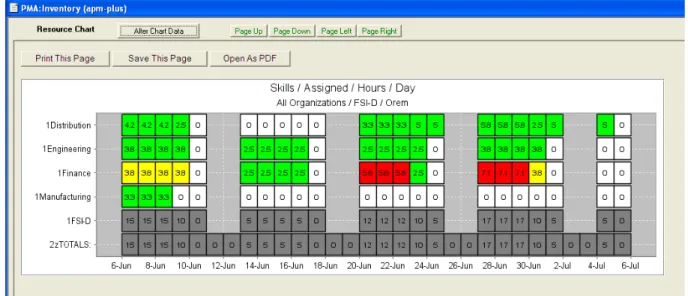
Another view of the same chart shows this data sorted Organization within Skill. See figure 7 below. Because APM Plus connects to your Service Catalog, this chart reflects how busy each organization is based on the demand coming into your organization through the Service Catalog. As demand changes and the services offered change, this chart will tell you if your staffing is still balanced properly based on the demand or if there is room for additional savings.
Figure 7 – Resource Management Chart Example: Organization within Skill View.
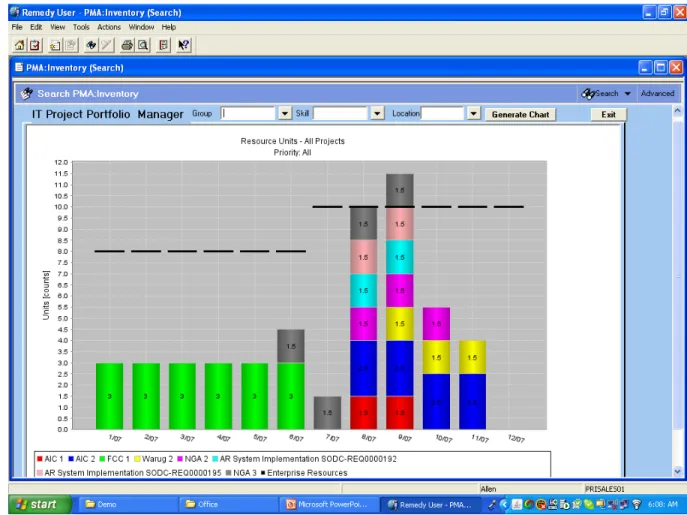
Another resource management capability within APM Plus takes planning data from the proposed project portion of the project life-cycle. In that part of the life-cycle, the department defining the project estimates at a high level how many people with a particular skill in a particular location and organization will be needed by month to complete the project. Please see figure 8 below.
The data is summed for all of the projects chosen to be on the chart for each month, showing the number of people needed each month. Each bar represents a month, and each color represents a different project. The line going across shows the number of people you have or will have. Comparing with the number of people you have with the number of people you need answers the questions often asked: do we have enough people to do the projects we want to do?
The first chart shows all the resources. Then you can see specific charts for any combination of skill, location and organization which helps you answer the show if you are staffed correctly at those levels.
Figure 8 – Resource Chart Example: Projects by Month – All Resources View.
5.0. Summary.
ActionProgram Manager Plus is a Remedy-based Program Management Portal and IT Process and Life-Cycle Management System. Unlike the major project and portfolio management systems, APM Plus includes the functionality necessary to manage projects as well as to streamline processes, optimize resources and more. Because it includes all of this functionality, it is a unique and superior solution to more traditional and dated management tools. APM Plus offers more functionality and runs on the Remedy platform leveraging your investment in Remedy. APM Plus
eliminates the need for the major integration project.
For more information about APM Plus and how Project Remedies can help you implement a seamless service desk-to-project response capability, improve quality, increase operational efficiencies, reduce costs and create a culture of accountability, please contact Stanley Feinstein, President, at 310-230-1722 or by email at