Encryption in SAS
®
9.4
Fifth Edition
The correct bibliographic citation for this manual is as follows: SAS Institute Inc. 2015. Encryption in SAS® 9.4, Fifth Edition. Cary, NC: SAS Institute Inc.
Encryption in SAS® 9.4, Fifth Edition
Copyright © 2015, SAS Institute Inc., Cary, NC, USA All rights reserved. Produced in the United States of America.
For a hard-copy book: No part of this publication may be reproduced, stored in a retrieval system, or transmitted, in any form or by any means, electronic, mechanical, photocopying, or otherwise, without the prior written permission of the publisher, SAS Institute Inc.
For a web download or e-book: Your use of this publication shall be governed by the terms established by the vendor at the time you acquire this publication.
The scanning, uploading, and distribution of this book via the Internet or any other means without the permission of the publisher is illegal and punishable by law. Please purchase only authorized electronic editions and do not participate in or encourage electronic piracy of copyrighted materials. Your support of others' rights is appreciated.
U.S. Government License Rights; Restricted Rights: The Software and its documentation is commercial computer software developed at private expense and is provided with RESTRICTED RIGHTS to the United States Government. Use, duplication or disclosure of the Software by the United States Government is subject to the license terms of this Agreement pursuant to, as applicable, FAR 12.212, DFAR 227.7202-1(a), DFAR 227.7202-3(a) and DFAR 227.7202-4 and, to the extent required under U.S. federal law, the minimum restricted rights as set out in FAR 52.227-19 (DEC 2007). If FAR 52.227-19 is applicable, this provision serves as notice under clause (c) thereof and no other notice is required to be affixed to the Software or documentation. The Government's rights in Software and documentation shall be only those set forth in this Agreement.
SAS Institute Inc., SAS Campus Drive, Cary, North Carolina 27513-2414. July 2015
SAS® and all other SAS Institute Inc. product or service names are registered trademarks or trademarks of SAS Institute Inc. in the USA and other countries. ® indicates USA registration.
Contents
About This Book . . . v
What's New in Encryption in SAS 9.4 . . . xi
Accessibility . . . xv
PART 1
Encryption in SAS 9.4
1 Chapter 1 • Technologies for Encryption . . . 3Overview of Encryption . . . 3
FIPS 140-2 Standards Compliance . . . 5
Providers of Encryption . . . 6
Encryption Algorithms . . . 17
Comparison of Encryption Technologies . . . 19
Encryption: Implementation . . . 19
Encryption: SAS Logging Facility . . . 20
Encrypting ODS Generated PDF Files . . . 21
Chapter 2 • SAS System Options for Encryption . . . 23
Dictionary . . . 23
Chapter 3 • SAS Environment Variables for Encryption . . . 41
Overview of Environment Variables . . . 41
Dictionary . . . 41
Chapter 4 • PWENCODE Procedure . . . 51
Overview: PWENCODE Procedure . . . 51
Concepts: PWENCODE Procedure . . . 51
Syntax: PWENCODE Procedure . . . 52
Examples: PWENCODE Procedure . . . 54
Chapter 5 • Encryption Technologies: Examples . . . 59
SAS Proprietary Encryption for SAS/SHARE: Example . . . 60
SAS/SECURE for SAS/CONNECT: Example . . . 60
TLS for a SAS/CONNECT UNIX Spawner: Example . . . 61
TLS for a SAS/CONNECT Windows Spawner: Example . . . 63
TLS on a z/OS Spawner on a SAS/CONNECT Server: Example . . . 65
TLS for SAS/SHARE on UNIX: Example . . . 67
TLS for SAS/SHARE on Windows: Examples . . . 69
TLS for SAS/SHARE on z/OS: Example . . . 70
SSH Tunnel for SAS/CONNECT: Example . . . 71
SSH Tunnel for SAS/SHARE: Example . . . 72
PART 2
Installing and Configuring TLS and Certificates
Chapter 6 • Certificates Explained . . . 77
About Certificates . . . 77
Certificate File Formats . . . 78
Overview of SDM Management of Certificates . . . 79
Certificate Implementation: How TLS Client and Servers Negotiate . . . 80
How SAS Validates Certificates between Clients and Servers . . . 80
Chapter 7 • Installing and Configuring TLS and Certificates on UNIX . . . 83
TLS on UNIX: System and Software Requirements . . . 83
Certificate Locations . . . 84
Preparation for Setting Up Digital Certificates . . . 85
Setting up Digital Certificates Using OpenSSL . . . 85
Convert between PEM and DER File Formats Using OpenSSL . . . 92
Use the SDM to Manage Certificates in the Trusted CA Bundle . . . 92
How Clients and Servers Validate Certificates . . . 97
TLS on UNIX: Building FIPS 140-2 Capable OpenSSL . . . 98
Chapter 8 • Installing and Configuring TLS and Certificates on Windows . . . 101
TLS on Windows: System and Software Requirements . . . 101
TLS on Windows: Setting Up Digital Certificates . . . 102
TLS on Windows: Converting between PEM and DER File Formats for TLS . . . 105
Use the SDM to Manage Certificates in the Trusted CA Bundle . . . 105
TLS on Windows: Validating Certificates between Clients and Servers . . . 106
TLS on Windows: FIPS 140-2 Capable OpenSSL . . . 106
Chapter 9 • Installing and Configuring TLS and Certificates on z/OS . . . 109
TLS on z/OS: System and Software Requirements . . . 109
TLS on z/OS: Setting Up Digital Certificates . . . 109
Use the SDM to Manage Certificates in the Trusted CA Bundle . . . 114
Chapter 10 • Troubleshooting . . . 115 Troubleshooting TLS . . . 115 Recommended Reading . . . 117 Glossary . . . 119 Index . . . 123 iv Contents
About This Book
Syntax Conventions for the SAS Language
Overview of Syntax Conventions for the SAS Language
SAS uses standard conventions in the documentation of syntax for SAS language elements. These conventions enable you to easily identify the components of SAS syntax. The conventions can be divided into these parts:
• syntax components • style conventions • special characters
• references to SAS libraries and external files
Syntax Components
The components of the syntax for most language elements include a keyword and arguments. For some language elements, only a keyword is necessary. For other language elements, the keyword is followed by an equal sign (=). The syntax for arguments has multiple forms in order to demonstrate the syntax of multiple arguments, with and without punctuation.
keyword
specifies the name of the SAS language element that you use when you write your program. Keyword is a literal that is usually the first word in the syntax. In a CALL routine, the first two words are keywords.
In these examples of SAS syntax, the keywords are bold:
CHAR (string, position) CALL RANBIN (seed, n, p, x); ALTER (alter-password) BEST w.
REMOVE <data-set-name>
In this example, the first two words of the CALL routine are the keywords:
CALL RANBIN(seed, n, p, x)
The syntax of some SAS statements consists of a single keyword without arguments: v
DO;
... SAS code ...
END;
Some system options require that one of two keyword values be specified:
DUPLEX | NODUPLEX
Some procedure statements have multiple keywords throughout the statement syntax:
CREATE <UNIQUE> INDEX index-name ON table-name (column-1 <, column-2, …>)
argument
specifies a numeric or character constant, variable, or expression. Arguments follow the keyword or an equal sign after the keyword. The arguments are used by SAS to process the language element. Arguments can be required or optional. In the syntax, optional arguments are enclosed in angle brackets ( < > ).
In this example, string and position follow the keyword CHAR. These arguments are required arguments for the CHAR function:
CHAR (string, position)
Each argument has a value. In this example of SAS code, the argument string has a value of 'summer', and the argument position has a value of 4:
x=char('summer', 4);
In this example, string and substring are required arguments, whereas modifiers and startpos are optional.
FIND(string, substring <, modifiers> <, startpos>
argument(s)
specifies that one argument is required and that multiple arguments are allowed. Separate arguments with a space. Punctuation, such as a comma ( , ) is not required between arguments.
The MISSING statement is an example of this form of multiple arguments:
MISSING character(s);
<LITERAL_ARGUMENT> argument-1 <<LITERAL_ARGUMENT> argument-2 ... > specifies that one argument is required and that a literal argument can be associated with the argument. You can specify multiple literals and argument pairs. No punctuation is required between the literal and argument pairs. The ellipsis (...) indicates that additional literals and arguments are allowed.
The BY statement is an example of this argument:
BY <DESCENDING> variable-1 <<DESCENDING> variable-2 …>;
argument-1 <option(s)> <argument-2 <option(s)> ...>
specifies that one argument is required and that one or more options can be associated with the argument. You can specify multiple arguments and associated options. No punctuation is required between the argument and the option. The ellipsis (...) indicates that additional arguments with an associated option are allowed.
The FORMAT procedure PICTURE statement is an example of this form of multiple arguments:
PICTURE name <(format-option(s))>
<value-range-set-1 <(picture-1-option(s))> <value-range-set-2 <(picture-2-option(s))> …>>; vi About This Book
argument-1=value-1 <argument-2=value-2 ...>
specifies that the argument must be assigned a value and that you can specify multiple arguments. The ellipsis (...) indicates that additional arguments are allowed. No punctuation is required between arguments.
The LABEL statement is an example of this form of multiple arguments:
LABEL variable-1=label-1 <variable-2=label-2 …>;
argument-1 <, argument-2, ...>
specifies that one argument is required and that you can specify multiple arguments that are separated by a comma or other punctuation. The ellipsis (...) indicates a continuation of the arguments, separated by a comma. Both forms are used in the SAS documentation.
Here are examples of this form of multiple arguments:
AUTHPROVIDERDOMAIN (provider-1:domain-1 <, provider-2:domain-2, …> INTO :macro-variable-specification-1 <, :macro-variable-specification-2, …>
Note: In most cases, example code in SAS documentation is written in lowercase with a monospace font. You can use uppercase, lowercase, or mixed case in the code that you write.
Style Conventions
The style conventions that are used in documenting SAS syntax include uppercase bold, uppercase, and italic:
UPPERCASE BOLD
identifies SAS keywords such as the names of functions or statements. In this example, the keyword ERROR is written in uppercase bold:
ERROR <message>;
UPPERCASE
identifies arguments that are literals.
In this example of the CMPMODEL= system option, the literals include BOTH, CATALOG, and XML:
CMPMODEL=BOTH | CATALOG | XML |
italic
identifies arguments or values that you supply. Items in italic represent user-supplied values that are either one of the following:
• nonliteral arguments. In this example of the LINK statement, the argument label is a user-supplied value and therefore appears in italic:
LINK label;
• nonliteral values that are assigned to an argument.
In this example of the FORMAT statement, the argument DEFAULT is assigned the variable default-format:
FORMAT variable(s) <format > <DEFAULT = default-format>;
Special Characters
The syntax of SAS language elements can contain the following special characters: Syntax Conventions for the SAS Language vii
=
an equal sign identifies a value for a literal in some language elements such as system options.
In this example of the MAPS system option, the equal sign sets the value of MAPS:
MAPS=location-of-maps
< >
angle brackets identify optional arguments. A required argument is not enclosed in angle brackets.
In this example of the CAT function, at least one item is required:
CAT (item-1 <, item-2, …>)
|
a vertical bar indicates that you can choose one value from a group of values. Values that are separated by the vertical bar are mutually exclusive.
In this example of the CMPMODEL= system option, you can choose only one of the arguments:
CMPMODEL=BOTH | CATALOG | XML
...
an ellipsis indicates that the argument can be repeated. If an argument and the ellipsis are enclosed in angle brackets, then the argument is optional. The repeated argument must contain punctuation if it appears before or after the argument.
In this example of the CAT function, multiple item arguments are allowed, and they must be separated by a comma:
CAT (item-1 <, item-2, …>)
'value' or "value"
indicates that an argument that is enclosed in single or double quotation marks must have a value that is also enclosed in single or double quotation marks.
In this example of the FOOTNOTE statement, the argument text is enclosed in quotation marks:
FOOTNOTE <n> <ods-format-options 'text' | "text">;
;
a semicolon indicates the end of a statement or CALL routine. In this example, each statement ends with a semicolon: data namegame;
length color name $8; color = 'black'; name = 'jack';
game = trim(color) || name; run;
References to SAS Libraries and External Files
Many SAS statements and other language elements refer to SAS libraries and external files. You can choose whether to make the reference through a logical name (a libref or fileref) or use the physical filename enclosed in quotation marks. If you use a logical name, you typically have a choice of using a SAS statement (LIBNAME or
FILENAME) or the operating environment's control language to make the reference. viii About This Book
Several methods of referring to SAS libraries and external files are available, and some of these methods depend on your operating environment.
In the examples that use external files, SAS documentation uses the italicized phrase file-specification. In the examples that use SAS libraries, SAS documentation uses the italicized phrase SAS-library enclosed in quotation marks:
infile file-specification obs = 100; libname libref 'SAS-library';
What's New in Encryption in SAS
9.4
Overview
Encryption in SAS is affected by the following changes and enhancements in SAS: • SAS/SECURE is included with Base SAS, instead of being licensed and ordered
separately.
• The new encryption type SAS004 (AES encryption with 64-bit salt) provides increased security for stored passwords.
• Increased security is provided for SAS data on disk.
• Enhanced logging features are introduced for encryption. These enhancements include new loggers and better debugging and traceback features that are now part of the SAS Logging Facility.
• Digital certificates can be imported to a central location on a Windows client or server.
• OpenSSL version 1.0.1 supports TLS versions 1.0, 1.1, and 1.2 on UNIX and z/OS. Earlier versions of SSL are no longer supported by OpenSSL 1.0.1. Windows versions of SAS support whatever Windows supports. Therefore, earlier versions of SAS on Windows could support TLS 1.0 through 1.2.
Note: For some maintenance releases of SAS 9.4, updated versions of OpenSSL are provided through hot fixes.
• OpenSSL 0.9.8 libraries have been updated in SAS 9.4 on UNIX and z/OS.
Note: For some maintenance releases of SAS 9.4, updated versions of OpenSSL are provided through hot fixes.
• In the first maintenance release for SAS 9.4, the default location for the Certificate Authority (CA) trust list has changed for the UNIX and z/OS foundation servers. This default location is specified by the SSLCALISTLOC= option.
• New environment variables SSL_CERT_DIR and SSLCACERTDIR can also be used to point to the location of certificates. These environment variables are supported on UNIX and support logging. The default location is specified by the SSLCALISTLOC= system option.
Note: These environment variables are available through hot fixes in some maintenance releases.
• Starting in the first maintenance release for SAS 9.4, Subject Alternative Names (SAN) in TLS certificates are supported. Server Name Indications (SNI) in the TLS handshake between clients and servers are also supported. These are supported on UNIX and z/OS clients and servers.
• In the third maintenance release of SAS 9.4, CA certificates are now located in the trustedcerts.pem file for UNIX and z/OS. The SSLCALISTLOC= option on UNIX and z/OS now points to the trustedcerts.pem file by default.
• The SAS_SSL_MIN_PROTOCOL environment variable supported on UNIX, Windows, and z/OS, and the SAS_SSL_CIPHER_LIST environment variable supported on UNIX and z/OS have been added.
• In the third maintenance release of SAS 9.4, the SAS Deployment Manager (SDM) is used to automate the process of updating the CA certificates on all hosts at SAS installation. The SDM is used to manage the trusted Mozilla CA bundle (provided by SAS) for all hosts. After SAS installation, you can use the SDM to add your own trusted certificates to this list.
• In the third maintenance release of SAS 9.4, information about setting up a FIPS-2 environment has been updated in the SAS Deployment Wizard (SDW).
General Enhancements
• For software delivery purposes, SAS/SECURE is a product within the SAS System. In SAS 9.4, SAS/SECURE is included with the Base SAS software. In prior releases, SAS/SECURE was an add-on product that was licensed separately. This change makes strong encryption available in all deployments (except where prohibited by import restrictions).
• If you use SAS/SECURE, you can use a new encryption type for stored passwords, SAS004 (AES encryption with 64-bit salt). The salt size was increased to 64 bits to comply with the minimum recommended salt size for PKCS #5 v2.0: Password-Based Cryptography Standard, http://www.rsa.com/rsalabs/node.asp?id=2127. See Chapter 1, “Technologies for Encryption,” on page 3 and Chapter 4,
“PWENCODE Procedure,” on page 51.
• If you use SAS/SECURE, you can use an industry standard algorithm (AES) to encrypt SAS data on disk. For more information, see “ENCRYPT= Data Set Option” in SAS Data Set Options: Reference and “SAS Data File Encryption” in SAS
Language Reference: Concepts.
• The SAS Logging Facility now supports full logging and debugging of the
SAS/CONNECT spawner operations. See “LOGCONFIGLOC= System Option” in SAS Logging: Configuration and Programming Reference for detailed information. • The SAS Logging Facility now supports full logging and debugging of encryption activity. See “LOGCONFIGLOC= System Option” in SAS Logging: Configuration and Programming Reference for system option information. For information about security loggers, see “Encryption: SAS Logging Facility” on page 20.
• OpenSSL version 1.0.1 supports TLS versions 1.0, 1.1, and 1.2 on UNIX and z/OS. Earlier versions of SSL are no longer supported by OpenSSL 1.0.1. Windows versions of SAS support what Windows supports. Therefore, earlier versions of SAS on Windows might support TLS 1.0 through 1.2.
Note: For the SAS 9.4 release and all maintenance release of SAS 9.4, updated versions of OpenSSL are provided through hot fixes.
For information, see “TLS System Requirements” on page 11.
• OpenSSL 0.9.8 libraries have been updated in SAS 9.4 on UNIX and z/OS. Earlier versions of SSL are no longer supported by OpenSSL 0.9.8. Windows versions of xii What's New in Encryption in SAS 9.4
SAS support whatever Windows supports. Therefore, earlier versions of SAS on Windows could support TLS 1.0 through 1.2.
Note: For the SAS 9.4 release and all maintenance release of SAS 9.4, updated versions of OpenSSL are provided through hot fixes.
For information, see “TLS Software Availability” on page 12.
• In the first maintenance release and the second maintenance release for SAS 9.4, for TLS encryption, SAS sets the default location of the Certificate Authority (CA) trust list to SAS-configuration-directory/levn/certs/cacert.pem for UNIX and z/OS foundation servers. This default location is specified by the SSLCALISTLOC= option in configuration files. For more information, see “SSLCALISTLOC= System Option” on page 30.
• In the third maintenance release of SAS 9.4, trusted certificates are now located in the trustedcerts.pem file. The SSLCALISTLOC= system option now points to the trustedcerts.pem file by default. This file is now located in <SASHome>/
SASSecurityCertificateFramework/1.1/cacerts/. The
SSLCALISTLOC= system option and new location are automatically added at SAS installation.
• New environment variables SSL_CERT_DIR and SSLCACERTDIR can also be used to point to the location of certificates. These environment variables are supported on UNIX and z/OS and support logging.
Note: These environment variables are available through hot fixes in some maintenance releases.
For information, see “SSLCACERTDIR Environment Variable” on page 45 and “SSL_CERT_DIR Environment Variable” on page 47.
• Starting in the first maintenance release for SAS 9.4, UNIX and z/OS clients and servers now support Server Name Indication (SNI) and Subject Alternative Names (SAN) in TLS. The client uses SNI in the TLS handshake to tell the server which server name it is trying to connect to. SANs are used in TLS certificates. For information, see “SSL_USE_SNI Environment Variable” on page 49.
• In the third maintenance release of SAS 9.4, two new environment variables are available: SAS_SSL_MIN_PROTOCOL, supported on UNIX, Windows, and z/OS, and SAS_SSL_CIPHER_LIST, supported on UNIX and z/OS. For more information, see “SAS_SSL_MIN_PROTOCOL Environment Variable” on page 41 and
“SAS_SSL_CIPHER_LIST Environment Variable” on page 43.
• On a Windows server or client, the user can import digital certificates to a Machine Store as well as to a Personal Store. See “TLS on Windows: Setting Up Digital Certificates ” on page 102.
• In the third maintenance release of SAS 9.4, the SAS Deployment Manager (SDM) can be used to automate the process of updating the list of trusted CA Certificates. At installation, a list of trusted CA certificates that are distributed by Mozilla is installed and SAS products are automatically configured to use this. The SDM is used to manage the trusted CA bundle (provided by SAS) for all hosts. The trustedcerts.pem and trustedcerts.jks files are both updated. On Windows, the SDM tasks manage the Java version of the trusted CA bundle, on UNIX, the SDM task updates the
trustedcerts.pem and the trustedcerts.jks files, and on z/OS, the SDM tasks update the trustedcerts.pem file.
For an overview of the SDM tasks, see “Use the SDM to Manage Certificates in the Trusted CA Bundle” on page 92. For the specific details about these SDM tasks, see the SAS® Deployment Wizard and SAS® Deployment Manager 9.4: User's Guide.
• In the third maintenance release for SAS 9.4, information has been added about setting the FIPS security settings on a Windows server. See “TLS on Windows: FIPS 140-2 Capable OpenSSL ” on page 106.
• In the third maintenance release of SAS 9.4, information about setting up a FIPS-2 environment on UNIX has been updated in the SAS Deployment Wizard (SDW). For specific SDW information, see SAS® Deployment Wizard and SAS® Deployment Manager 9.4: User's Guide. For information about FIPS in this document, see “FIPS 140-2 Standards Compliance” on page 5, “TLS: FIPS 140-2 Compliant
Installation and Configuration” on page 14, and “TLS on UNIX: Building FIPS 140-2 Capable OpenSSL ” on page 98.
Accessibility
For information about the accessibility of this product, see Accessibility Features of the Windowing Environment for SAS 9.4 at support.sas.com.
Part 1
Encryption in SAS 9.4
Chapter 1
Technologies for Encryption . . . 3
Chapter 2
SAS System Options for Encryption . . . 23
Chapter 3
SAS Environment Variables for Encryption . . . 41
Chapter 4
PWENCODE Procedure . . . 51
Chapter 5
Encryption Technologies: Examples . . . 59
Chapter 1
Technologies for Encryption
Overview of Encryption . . . 3
Security Concepts . . . 3
Two Classes of Encryption Strength . . . 4
Two Contexts for Encryption Coverage . . . 4
FIPS 140-2 Standards Compliance . . . 5
Overview . . . 5
How SAS Implements FIPS . . . 5
Providers of Encryption . . . 6
SAS Proprietary Encryption . . . 6
SAS/SECURE . . . 8
Transport Layer Security (TLS) . . . 11
SSH (Secure Shell) . . . 15
Encryption Algorithms . . . 17
Comparison of Encryption Technologies . . . 19
Encryption: Implementation . . . 19
Encryption: SAS Logging Facility . . . 20
Encrypting ODS Generated PDF Files . . . 21
Overview of Encryption
Security Concepts
SAS provides products and third-party strategies for protecting data and credentials (user IDs and passwords) that are exchanged in a networked environment. Various security strategies are used to maintain data usability and data confidentiality, as well as to validate the integrity of content. Various encryption, hashing, and encoding algorithms are used by SAS to protect your data in transit or at rest.
encoding
Encoding transforms data into another format using a scheme that is publicly available so that it can easily be reversed. It does not require a key. The only thing required to decode it is the algorithm that was used to encode it. Examples are SAS002 encoding and SAS Proprietary 32-bit fixed key encoding.
encryption
The process of protecting data is called encryption. Encryption transforms data into another format in such a way that only specific individual(s) can reverse the
transformation. It uses a key that is kept secret, in conjunction with the plaintext and the algorithm, in order to perform the encryption operation. As such, the ciphertext, algorithm, and key are all required to return to the plaintext. Example encryption algorithms are AES and RSA.
hashing
Hashes are commonly used to store passwords to prevent them from being viewed. Hash algorithms are one way functions. They turn any amount of data into a fixed-length "fingerprint" that cannot be reversed. If the input changes by even a tiny bit, the resulting hash is completely different. When passwords are hashed, only the hash is kept. To verify a password, you hash the password and check to see whether the password matches the stored hash.
Examples are SHA-256 and MD5 hashing algorithms. salting
Salt is data used as an additional input to the algorithm that encrypts a password. When the salt is being used, the first eight bytes of the encrypted data are reserved for the salt. The salt value is generated at random when encrypting a file and read from the encrypted file when it is decrypted.
Examples are AES with 16-bit salt (SAS003) and AES with 64-bit salt (SAS004).
Two Classes of Encryption Strength
Two classes of encryption strength are available:
• In a medium security environment, use SAS Proprietary Encryption and MD5 hashing. These methods are available in all deployments, are appropriate for preventing accidental exposure of information, and have minimal impact on performance.
• In a higher security environment, use industry-standard encryption and hashing algorithms. These methods provide stronger protection and are available in all deployments, except where prohibited by import restrictions. Industry-standard encryption and hashing algorithms are provided by SAS/SECURE.
Two Contexts for Encryption Coverage
SAS provides encryption in two contexts:
• On-disk encryption protects data at rest. The emphasis is on protection of passwords in configuration files and in the metadata repository. You can also choose to encrypt SAS data sets.
• Over-the-wire encryption protects data in transit. The emphasis is on protection of passwords in transit. You can also choose to protect all traffic in transit among SAS servers and SAS desktop clients.
Note: To ensure that only FIPS-validated encryption algorithms are used, set the ENCRYPTFIPS system option. See “ENCRYPTFIPS System Option” on page 23.
FIPS 140-2 Standards Compliance
Overview
Starting in SAS 9.3, FIPS 140-2 standards are supported for SAS/SECURE and
Transport Layer Security (TLS) encryption technologies. FIPS 140-2 is not a technology, but a definition of what security mechanisms should do. FIPS 140-2 is the current version of the Federal Information Processing Standardization 140 (FIPS 140) publication. FIPS 140-2 is a standard that describes US Federal government
requirements that IT products should meet for Sensitive, but Unclassified (SBU) use. The standard defines the security requirements that must be satisfied by a cryptographic module used in a security system protecting unclassified information within IT systems. FIPS 140-2 requires organizations that do business with a government agency or department that requires the exchange of sensitive information, to ensure that they meet the FIPS 140-2 security standards. In addition, the financial community increasingly specifies FIPS 140-2 as a procurement requirement.
The National Institute of Standards and Technology (NIST) issued the FIPS 140 Publication Series to coordinate the requirements and standards for cryptography modules that include both hardware and software components. Federal agencies and departments can validate that the module in use is covered by an existing FIPS 140-1 or FIPS 140-2 certificate. The certificate specifies the exact module name, hardware, software, firmware, and applet version numbers. For more information, see FIPS PUB 140-2 SECURITY REQUIREMENTS FOR CRYPTOGRAPHIC MODULES.
There are four levels of security: from Level 1 (lowest) to Level 4 (highest). The security requirements cover areas related to the secure design and implementation of a
cryptographic module. These areas include basic design and documentation, module interfaces, authorized roles and services, physical security, software security, operating system security, key management, cryptographic algorithms, electromagnetic
interference or electromagnetic compatibility (EMI/EMC), and self-testing.
For installation and configuration details about FIPS 140-2, see “SAS/SECURE FIPS 140-2 Compliant Installation and Configuration” on page 10, “TLS: FIPS 140-2 Compliant Installation and Configuration” on page 14, and “ENCRYPTFIPS System Option” on page 23.
How SAS Implements FIPS
The ENCRYPTFIPS option is provided by SAS primarily as a mechanism to help ensure that your SAS system is configured to leverage the encryption algorithms and cipher suites specified by the FIPS 140-2 standard and that libraries will be validated for compliance when loaded. With this option enabled, SAS verifies that all of your SAS servers have been configured to use the FIPS approved Advanced Encryption Standard (AES) libraries or the SSL protocol. ENCRYPTFIPS makes sure IOM uses AES and that SAS/CONNECT uses AES or SSL.
However, turning off the SAS system option ENCRYPTFIPS does not impact the ability of SAS to use FIPS approved encryption algorithms available with SAS/SECURE, such as the Advanced Encryption Standard (AES), nor does it prevent SAS from leveraging strong FIPS approved cipher suites when acting as an SSL client.
If the ENCRYPTFIPS option is turned on, then SAS server-based TLS clients will attempt to load a special subset of OpenSSL libraries, contained as part of the OpenSSL FIPS Object Module. These libraries are not present by default and would need to be downloaded and compiled in accordance with the specific instructions specified by the FIPS standard. Therefore, turning on this option is not generally recommended, unless absolutely required by a customer’s policy. See “TLS on UNIX: Building FIPS 140-2 Capable OpenSSL ” on page 98 for additional information.
Standard OpenSSL libraries are capable of providing strong AES level encryption. However, only the FIPS OpenSSL Object Module libraries meet the FIPS standard. If the ENCRYPTFIPS option is enabled and the libraries are not present, then the SAS system produces an error when a SAS server needs to act as a TLS client and communicate over HTTPS protocol.
Note: When the ENCRYPTFIPS option is turned on, SAS Internal Passwords are stored using the SHA-256 hashing algorithm.
Providers of Encryption
SAS Proprietary Encryption
SAS Proprietary Encryption Overview
SAS Proprietary Encryption is licensed with Base SAS software and is available in all deployments. It requires no additional SAS product licenses. The SAS Proprietary algorithm is strong enough to protect your data from casual viewing. SAS/SECURE and TLS provide a higher level of security.
There are two types of SAS Proprietary Encryption algorithms.
• A 32-bit rolling-key encryption algorithm that is used for SAS data set encryption with passwords.
This encryption technique uses parts of the passwords that are stored in the SAS data set as part of the 32-bit rolling key encoding of the data. This encryption provides a medium level of security. Users must supply the appropriate passwords to authorize their access to the data, but with the speed of today’s computers, it could be subjected to a brute force attack on the 2,563,160,682,591 possible combinations of valid password values, many of which must produce the same 32-bit key.
Note: SAS/SECURE and data set support of AES, which is also shipped with Base SAS software, provides a higher level of security.
For detailed information, see “SAS Data File Encryption” in SAS Language Reference: Concepts.
• A 32-bit fixed-key encoding used to protect passwords used for communications in configuration files, passwords for login objects, login passwords, internal account passwords, and so on.
This SAS Proprietary algorithm is strong enough to protect your data from casual viewing. It provides a medium level of security. SAS/SECURE and TLS provide a higher level of security.
Over-the-wire passwords that use SAS Proprietary encoding are passwords in transit in a logon attempt and general traffic between clients and servers. Login passwords on-disk in the metadata and passwords in configuration files are stored using 6 Chapter 1 • Technologies for Encryption
SAS002 (SAS Proprietary) encryption. Internal account passwords stored in the metadata repository for internal accounts are stored using MD5 hashing.
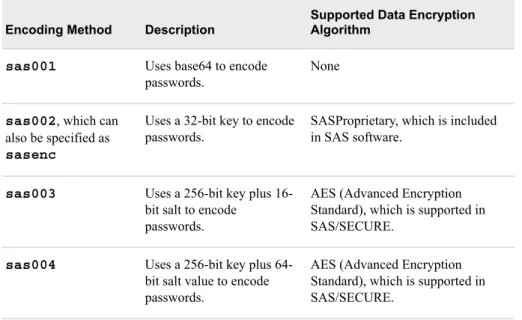
Note: Configuration file passwords can be upgraded to AES (SAS003 or SAS004). SAS003 uses a 256-bit key plus 16-bit salt to encode passwords. SAS004 uses a 256-bit key plus 64-bit salt value to encode passwords.
SAS Proprietary Encryption System Requirements
SAS supports SAS Proprietary Encryption under these operating environments: • UNIX
• Windows • z/OS
SAS Proprietary Encryption Software Availability
SAS Proprietary Encryption is licensed with Base SAS software and is available in all deployments. It requires no additional SAS product licenses.
SAS Proprietary Encryption Installation and Configuration
SAS Proprietary Encryption is part of Base SAS. Separate installation is not required. Configure SAS Proprietary Encryption as follows:
• SAS Proprietary Encryption for SAS data sets is implemented with the ENCRYPT= data set option set to YES. You can use the ENCRYPT= data set option only when you are creating a SAS data file. You must also assign a password when encrypting a data file with SAS Proprietary Encryption. At a minimum, you must specify the READ= data set option or the PW= data set option at the same time you specify ENCRYPT=YES. Because passwords are used in this encryption technique, you cannot change any password on an encrypted data set without re-creating the data set.
Note: Beginning with the first maintenance release of 9.4, a metadata-bound library administrator can require that all data files in the bound library be encrypted with either AES or SAS Proprietary encryption. For more information, see “Requiring Encryption for Metadata-Bound Data Sets” in Base SAS Procedures Guide and SAS Guide to Metadata-Bound Libraries.
For detailed information, see “SAS Data File Encryption” in SAS Language Reference: Concepts.
• SAS Proprietary Encryption for communications and networking is implemented by setting system option NETENCRYPTALGORITHM=SASPROPRIETARY. The NETENCRYPTALGORITHM= option must be set before the LIBNAME statement establishes the connection to the server. On the server, you set the NETENCRYPT option to specify that encryption is required by any client that accesses this server. The NETENCRYPTALGORITHM= option specifies that the SASProprietary algorithm be used for encryption of all data that is exchanged with connecting clients.
For detailed information, see “NETENCRYPT System Option” on page 26 and “NETENCRYPTALGORITHM System Option” on page 26.
For an example of configuring and using SAS Proprietary Encryption in your environment, see “SAS Proprietary Encryption for SAS/SHARE: Example ” on page 60. For an example of configuring SAS Data File encryption using the SASProprietary algorithm, see “SAS Data File Encryption” in SAS Language Reference: Concepts.
SAS/SECURE
SAS/SECURE Overview
SAS/SECURE software provides industry standard encryption capabilities in addition to the SASProprietary algorithm.
On UNIX, Windows, and z/OS, SAS/SECURE supports the following encryption algorithms: • SASProprietary • RC2 • RC4 • DES • TripleDES • AES • SSL
Note: The algorithms listed above are supported by SAS/SECURE on Windows by using the Microsoft Cryptographic API libraries that are included with the operating system.
Refer to “Encryption Algorithms” on page 17 for more information about encryption algorithms supported for use with SAS/SECURE.
SAS/SECURE provides encryption for the following: • data in transit
SAS/SECURE enables you to provide stronger protection for data in transit than is provided by SAS Proprietary Encryption. This affects communications among SAS servers and between SAS servers, SAS desktop clients, and SAS web applications. Refer to “NETENCRYPT System Option” on page 26 and
“NETENCRYPTALGORITHM System Option” on page 26 for details. • stored login passwords
SAS/SECURE also enables you to provide stronger protection for stored login passwords than is provided by SAS Proprietary encoding. By default, the stored login passwords are stored using SAS002 encoding. With SAS/SECURE, you can use SAS003 or SAS004, which are the industry-standard algorithms for stored passwords. SAS003 is AES with 16-bit salt, and SAS004 is AES with 64-bit salt. You can use the PWENCODE procedure (specify the METHOD= option) to upgrade to stronger encryption, AES (SAS003 or SAS004).
Refer to Chapter 4, “PWENCODE Procedure,” on page 51 for details. • internal account passwords stored in the metadata repository
SAS/SECURE also enables you to provide stronger protection for internal account passwords stored in the metadata repository. You can upgrade from MD5 to SHA-256 hashing.
CAUTION:
Passwords that are stored in SAS003 format, SAS004 format, or SHA-256 hashing become unusable and inaccessible if SAS/SECURE is unavailable. If you choose to discontinue use of SAS/SECURE, you must revert stored
passwords to the less secure format before you discontinue using the software.
• services that are part of the Federal Information Processing Standard (FIPS) 140-2 standard
Starting in SAS 9.3, you can instruct SAS/SECURE to use only services that are part of the Federal Information Processing Standard (FIPS) 140-2 standard. When SAS system option ENCRYPTFIPS is configured, SAS/SECURE uses only FIPS 140-2 validated encryption and hashing algorithms from libraries that are validated when loaded. AES is the encryption algorithm and SAS003 is the encoding format (for stored passwords) used with FIPS 140-2 enabled SAS/SECURE software. The SHA-256 hashing algorithm is used with FIPS 140-2 enabled software for stored internal account passwords in the metadata server.
Refer to “How SAS Implements FIPS” on page 5.“ENCRYPTFIPS System Option” on page 23Also see and “SAS/SECURE FIPS 140-2 Compliant Installation and Configuration” on page 10 for details.
• AES Encryption on Data Sets
AES encryption on SAS Data Files is available in SAS 9.4. AES produces a stronger encryption by using a key value that can be up to 64 characters long. You specify ENCRYPT=AES when creating a data set. Instead of passwords that are stored in the data set (SAS Proprietary Encryption), AES uses a key value that is not stored in the data set. You must use the ENCRYPTKEY= data set option when creating or accessing an AES encrypted data set unless the metadata-bound library administrator has securely recorded the encryption key in metadata to which the data set is bound. You cannot change the ENCRYPTKEY= key value on an AES encrypted data set without re-creating the data set.
Note: Beginning with the first maintenance release of 9.4, a metadata-bound library administrator can require that all data files in the bound library be encrypted with either AES or SAS Proprietary encryption. For more information, see “Requiring Encryption for Metadata-Bound Data Sets” in Base SAS Procedures Guide and SAS Guide to Metadata-Bound Libraries.
For detailed information about AES Encryption on SAS Data Files, see “AES Encryption” in SAS Language Reference: Concepts.
SAS/SECURE System Requirements
SAS supports SAS/SECURE under these operating environments: • UNIX
• Windows • z/OS
SAS/SECURE Software Availability
For software delivery purposes, SAS/SECURE is a product within the SAS System. In SAS 9.4, SAS/SECURE is included with the Base SAS software. In prior releases, SAS/SECURE was an add-on product that was licensed separately. This change makes strong encryption available in all deployments (except where prohibited by import restrictions).
SAS/SECURE Export Restrictions
For U.S. export purposes, SAS designates each product based on the encryption algorithms and the product's functional capability. SAS/SECURE is available to most
commercial and government users inside and outside the U.S. However, some countries (for example, Russia, China, and France) have import restrictions on products that contain encryption, and the U.S. prohibits the export of encryption software to specific embargoed or restricted destinations.
SAS/SECURE for UNIX, Windows, and z/OS includes the following encryption algorithms:
• RC2 using up to 128-bit keys • RC4 using up to 128-bit keys • DES using up to 56-bit keys • TripleDES using up to 168-bit keys • AES using 256-bit keys
SAS/SECURE for Windows uses the encryption algorithms that are available in Microsoft CryptoAPI. The level of the SAS/SECURE encryption algorithms under Windows depends on the level of the encryption support in Microsoft CryptoAPI under Windows.
Note: For AES, SAS does not use Windows libraries by default. It tries to use the RSA libraries that are FIPS certified.
SAS/SECURE Installation and Configuration
SAS/SECURE is now installed and delivered on every installation. Whether SAS/SECURE is used depends on the options that are set.
In SAS 9.4, SAS/SECURE is installed with the Base SAS software. However, the default encryption is now SAS Proprietary Encryption.
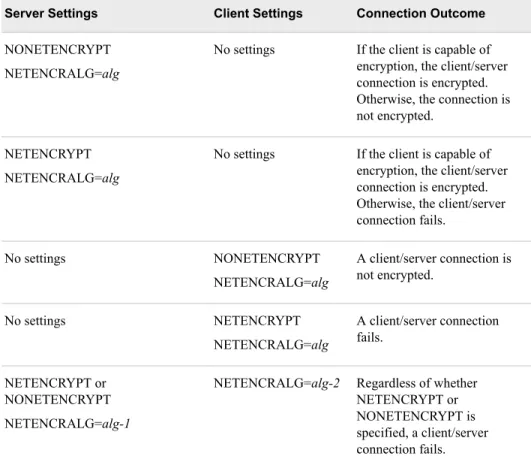
To use the higher form of encryption provided by SAS/SECURE for communications and networking, specify the NETENCRYPT system option and set the NETENCRALG= system option to a value of RC2, RC4, DES, TRIPLEDES, AES, or SSL. Refer to “NETENCRYPT System Option” on page 26 and “NETENCRYPTALGORITHM System Option” on page 26.
For examples of configuring and using SAS/SECURE with SAS/CONNECT and SAS/SHARE, see Chapter 5, “Encryption Technologies: Examples,” on page 59. For detailed information about AES Encryption on SAS Data Files, see “AES Encryption” in SAS Language Reference: Concepts.
SAS/SECURE FIPS 140-2 Compliant Installation and Configuration To configure a FIPS 140-2 compliant system, you must use SAS/SECURE or TLS. When using SAS/SECURE, specify SAS system options ENCRYPTFIPS and
NETENCRALG= (set to AES) for UNIX, z/OS, or Windows. When using TLS, specify SAS system options ENCRYPTFIPS and NETENCRALG= (set to AES or SSL) for UNIX, z/OS, or Windows. Therefore, you can connect only servers and clients that are also configured with AES or SSL. Errors are generated when other encryption
algorithms are specified.
When ENCRYPTFIPS is specified, an INFO message is written at server start-up to indicate that FIPS encryption is enabled.
In the FIPS 140-2 compliant mode, the SHA-256 hashing algorithm is used for stored password protection. The data transferred between servers and clients prior to SAS 9.3 use hashing passwords that are not FIPS 140-2 compliant. Therefore, you can connect only servers and clients that are enabled for FIPS 140-2.
CAUTION:
In SAS 9.2, the password hash list was created using the MD5 hash algorithm. If you are moving from SAS 9.2 to a higher version of SAS and configuring your system to be FIPS 140-2 compliant, you need to clear all previously stored passwords. When you reset the passwords, they use the SHA-256 hashing algorithm.
See the following information for details about FIPS. • “ENCRYPTFIPS System Option” on page 23
• “NETENCRYPTALGORITHM System Option” on page 26 • “FIPS 140-2 Standards Compliance” on page 5
• “TLS: FIPS 140-2 Compliant Installation and Configuration” on page 14
Transport Layer Security (TLS)
Transport Layer Security (TLS) Overview
Transport Layer Security (TLS) and its predecessor, Secure Sockets Layer (SSL), are cryptographic protocols that are designed to provide communication security . TLS and SSL are protocols that provide network data privacy, data integrity, and authentication. Note: All discussion of TLS is also applicable to the predecessor protocol, Secure
Sockets Layer (SSL).
TLS uses X.509 certificates and hence asymmetric cryptography to assure the party with whom they are communicating, and to exchange a symmetric key. As a consequence of choosing X.509 certificates, certificate authorities and a public key infrastructure are necessary to verify the relation between a certificate and its owner, as well as to generate, sign, and administer the validity of certificates. For more information about client and server negotiations using certificates, refer to “Certificate Implementation: How TLS Client and Servers Negotiate” on page 80.
In addition to providing encryption services, TLS performs client and server authentication, and it uses message authentication codes to ensure data integrity. The client requests a certificate from the server, which it validates against the public certificate of the certificate authority used to sign the server certificate. The client then verifies the identity of the server and negotiates with the server to select a cipher (encryption method). The cipher that is selected is the first match between the ciphers that are supported on both the client and the server. All subsequent data transfers for the current request are then encrypted with the selected encryption method.
TLS uses encryption algorithms that include RC2, RC4, DES, TripleDES, and AES. TLS System Requirements
SAS supports TLS under these operating environments: • UNIX
• Windows • z/OS
Note: The TLS software is included in the SAS installation software only for countries that allow the importation of encryption software.
TLS Software Availability
Starting in the second maintenance release of SAS 9.4, SAS supports TLS on the Windows, UNIX, and z/OS platforms for the following versions of TLS:
• TLS 1.0 • TLS 1.1 • TLS 1.2
In the third maintenance release of SAS 9.4, the default minimum protocol for OpenSSL is TLS 1.0. OpenSSL libraries 1.0.0 can use SSL 3.0, TLS 1.0, TLS 1.1, and TLS 1.2. However, it is highly recommended that TLS 1.0 and higher be used.
Note: If you need to override the default protocol, you can set the
SAS_SSL_MIN_PROTOCOL= environment variable. Protocols supported for the environment variable are SSL 3.0, TLS 1.0, TLS 1.1, and TLS 1.2. For information, see “SAS_SSL_MIN_PROTOCOL Environment Variable” on page 41.
OpenSSL is shipped with Base SAS for UNIX and z/OS.
TLS is provided on Windows, UNIX, and z/OS platforms differently for each platform. • For Windows, SAS uses the SChannel library that comes with the Windows
operating system.
• SAS provides the libraries needed to run TLS on UNIX. To find the OpenSSL code base version that is used to build the TLS libraries provided by SAS for each release, see Mapping Between SAS Version and OpenSSL Version.
Note: Different operating systems require the use of different library file extensions. For example, HPUX, Linux, and Solaris use libcrypto.so.1.0.0 and libssl.so.1.0.0. AIX uses libcrypto.so and libssl.so. Refer to your operating system vendor documentation when using the vendor’s OpenSSL libraries. There might be additional procedures that need to be followed to make the libraries work properly in your environment.
• SAS provides the libraries needed to run TLS on z/OS. FIPS 140-2 is supported as follows:
• Windows is FIPS 140-2 compliant.
• The OpenSSL version shipped with SAS for UNIX is not FIPS 140-2 compliant. However, you can compile a FIPS 140-2 compliant version of OpenSSL and install it. For more information, see “TLS: FIPS 140-2 Compliant Installation and Configuration” on page 14.
• The TLS version shipped with z/OS is not FIPS compliant. SAS does not support FIPS on z/OS.
TLS Concepts
The following concepts are fundamental to understanding TLS: Certificate Authorities (CAs)
Cryptography products provide security services by using digital certificates, public-key cryptography, private-public-key cryptography, and digital signatures. Certificate authorities (CAs) create and maintain digital certificates, which also help preserve confidentiality.
Various commercial CAs, such as VeriSign and Thawte, provide competitive services for the e-commerce market. You can also develop your own CA by using products from companies such as RSA Security and Microsoft or from the Open-Source Toolkit OpenSSL.
Note: z/OS provides the PACDCERT command and PKI Services for implementing a CA.
Digital Signatures
A digital signature affixed to an electronic document or to a network data packet is like a personal signature that concludes a hand-written letter or that validates a credit card transaction. Digital signatures are a safeguard against fraud. A unique digital signature results from using a private key to encrypt a message digest. A document that contains a digital signature enables the receiver of the document to verify the source of the document. Electronic documents are said to be verified if the receiver knows where the document came from, who sent it, and when it was sent.
Another form of verification comes from Message Authentication Codes (MAC), which ensure that a signed document has not been changed. A MAC is attached to a document to indicate the document's authenticity. A document that contains a MAC enables the receiver of the document (who also has the secret key) to know that the document is authentic.
Digital Certificates
Digital certificates are electronic documents that ensure the binding of a public key to an individual or an organization. Digital certificates provide protection from fraud. Usually, a digital certificate contains a public key, a user's name, and an expiration date. It also contains the name of the Certificate Authority (CA) that issued the digital certificate and a digital signature that is generated by the CA. The CA's validation of an individual or an organization allows that individual or organization to be accepted at sites that trust the CA.
Public and Private Keys
Public-key cryptography uses a public and a private key pair. The public key can be known by anyone, so anyone can send a confidential message. The private key is confidential and known only to the owner of the key pair, so only the owner can read the encrypted message. The public key is used primarily for encryption, but it can also be used to verify digital signatures. The private key is used primarily for decryption, but it can also be used to generate a digital signature.
Symmetric Key
In symmetric key encryption, the same key is used to encrypt and decrypt the message. If two parties want to exchange encrypted messages securely, they must both have a copy of the same symmetric key. Symmetric key cryptography is often used for encrypting large amounts of data because it is computationally faster than asymmetric cryptography. Typical algorithms include DES, TripleDES, RC2, RC4, and AES.
Asymmetric Key
Asymmetric or public key encryption uses a pair of keys that have been derived together through a complex mathematical process. One of the keys is made public, typically by asking a CA to publish the public key in a certificate for the certificate-holder (also called the subject). The private key is kept secret by the subject and never revealed to anyone. The keys work together where one is used to perform the inverse operation of the other: If the public key is used to encrypt data, only the private key of the pair can decrypt it. If the private key is used to encrypt, the public key must be used to decrypt. This relationship allows a public key encryption scheme where anyone can obtain the public key for a subject and use it to encrypt data that only the user with the private key can decrypt. This scheme also specifies that when a subject encrypts data using its private key, anyone can decrypt the data by using the corresponding public key. This scheme is the foundation for digital signatures.
TLS Installation and Configuration
TLS for UNIX, z/OS, and Windows is shipped with Base SAS. No additional software installation is required.
In the third maintenance release of SAS 9.4, the SAS Deployment Manager (SDM) is used to automate the process of adding and removing existing intermediate, root, or self-signed CA certificates. At installation, a list of CA certificates that are distributed by Mozilla software products is installed in the cacerts.pem and trustedcerts.pem files. The SDM is then used to add existing certificates to the Trusted CA Bundle and to remove digital certificates from the Trusted CA Bundle.
In the third maintenance release of SAS 9.4, this new trusted certificate list is a file in X. 509 Base-64 encoded format and is named trustedcerts.pem. System option
SSLCALISTLOC= points to the location of this file, which is now <SASHome>/ SASSecurityCertificateFramework/1.1/cacerts/trustedcerts.pem. The instructions that you use to configure TLS at your site depend on whether you use UNIX, Windows, or z/OS. See the appropriate details:
• Chapter 7, “Installing and Configuring TLS and Certificates on UNIX,” on page 83 • Chapter 8, “Installing and Configuring TLS and Certificates on Windows,” on page
101
• Chapter 9, “Installing and Configuring TLS and Certificates on z/OS,” on page 109 For examples of configuring and using TLS in your environment, see Chapter 5, “Encryption Technologies: Examples,” on page 59.
TLS: FIPS 140-2 Compliant Installation and Configuration
Starting in SAS 9.3, you can configure TLS to run in FIPS 140-2 compliant mode. The libraries supplied by Windows are FIPS 140-2 compliant. The OpenSSL libraries shipped with SAS for UNIX are not FIPS 140-2 compliant. However, you can compile a FIPS 140-2 compliant version of OpenSSL and install it. For more information, see “TLS on UNIX: Building FIPS 140-2 Capable OpenSSL ” on page 98 and “TLS on Windows: FIPS 140-2 Capable OpenSSL ” on page 106.
After compiling the FIPS compliant libraries, you will need to specify the
NETENCRALG= (set to AES or SSL) system option. You will then be able to run in FIPS compliant mode and connect only servers and clients that are also configured with FIPS.
CAUTION:
Turning on the ENCRYPTFIPS option is not generally recommended for TLS, unless absolutely required by your site’s policy. If the ENCRYPTFIPS option is turned on, the SAS server-based TLS clients will attempt to load a special subset of OpenSSL libraries, contained as part of the OpenSSL FIPS Object Module. Because these libraries are not present by default, you must follow the process described in “TLS on UNIX: Building FIPS 140-2 Capable OpenSSL ” on page 98.
When ENCRYPTFIPS is specified, an INFO message is written at server start-up to indicate that FIPS encryption is enabled.
Note: The TLS version shipped with SAS for z/OS is not FIPS 140-2 compliant. However, you can use SAS/SECURE with AES to provide FIPS on z/OS. See the following for more information about FIPS.
• “How SAS Implements FIPS” on page 5
• “NETENCRYPTALGORITHM System Option” on page 26 14 Chapter 1 • Technologies for Encryption
• “ENCRYPTFIPS System Option” on page 23
SSH (Secure Shell)
SSH (Secure Shell) Overview
SSH is an abbreviation for Secure Shell. SSH is a protocol that enables users to access a remote computer via a secure connection. SSH is available through various commercial products and as freeware. OpenSSH is a free version of the SSH protocol suite of network connectivity tools.
Although SAS software does not directly support SSH functionality, you can use the tunneling feature of SSH to enable data to flow between a SAS client and a SAS server. Port forwarding is another term for tunneling. The SSH client and SSH server act as agents between the SAS client and the SAS server, tunneling information via the SAS client's port to the SAS server's port.
Only Windows and UNIX operating systems can access an OpenSSH server on another UNIX system. To access an OpenSSH server, UNIX systems require OpenSSH software. Windows systems require PuTTY software.
Currently, SAS supports the OpenSSH client and server that supports protocol level SSH-2 in UNIX environments. Other third-party applications that support the SSH-2 protocol currently are untested. Therefore, SAS does not support these applications. SAS also supports SSH on z/OS. The IBM Ported Tools for z/OS Program Product must be installed for OpenSSH support. See IBM Ported Tools for z/OS - OpenSSH.
To understand the configuration options that are required for the OpenSSH and PuTTY clients and the OpenSSH server, it is recommended that you have a copy of the book SSH, The Secure Shell: The Definitive Guide by Daniel J. Barrett, Richard E. Silverman, and Robert G. Byrnes. This book is an invaluable resource when you are configuring the SSH applications, and it describes in detail topics that include public key authentication, SSH agents, and SSHD host keys.
SSH System Requirements
SAS supports SSH in these operating environments: • UNIX
• Windows • z/OS
SSH Software Availability
OpenSSH supports SSH protocol versions 1.3, 1.5, and 2.0. To build the OpenSSL software, refer to the following resources: • www.openssh.com
• www.ssh.com
• SSH UNIX manual page
• IBM Ported Tools for z/OS - OpenSSH • PuTTY Download Page
• Barrett, Daniel J., Richard E. Silverman, and Robert G. Byrnes. 2005. SSH, the Secure Shell: The Definitive Guide. Sebastopol, CA: O'Reilly
• Configuring SSH Client Software in UNIX and Windows Environments for Use with the SFTP Access Method in SAS 9.2, SAS 9.3, and SAS 9.4
SSH Tunneling Process
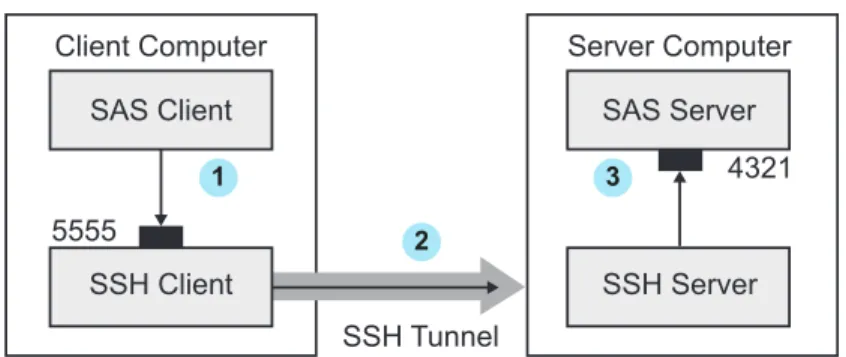
An inbound request from a SAS client to a SAS server is shown as follows: Figure 1.1 SSH Tunneling Process
SAS Client SAS Server
SSH Server 4321 5555
Client Computer Server Computer
SSH Tunnel SSH Client
1 3
2
1. The SAS client passes its request to the SSH client's port 5555.
2. The SSH client forwards the SAS client's request to the SSH server via an encrypted tunnel.
3. The SSH server forwards the SAS client's request to the SAS server via port 4321. Outbound, the SAS server's reply to the SAS client's request flows from the SAS server to the SSH server. The SSH server forwards the reply to the SSH client, which passes it to the SAS client.
SSH Tunneling: Process for Installation and Setup
SSH software must be installed on the client and server computers. Exact details about installing SSH software at the client and the server depend on the particular brand and version of the software that is used. See the installation instructions for your SSH software.
The process for setting up an SSH tunnel consists of the following steps:
1. SSH tunneling software is installed on the client and server computers. Details about tunnel configuration depend on the specific SSH product that is used.
• On UNIX, you use OpenSSH software to access your UNIX OpenSSH server. • On Windows, you use PuTTY software to access your UNIX OpenSSH server. • On z/OS, the IBM Ported Tools for z/OS Program Product must be installed for
OpenSSH support.
2. The SSH client is started as an agent between the SAS client and the SAS server. 3. The components of the tunnel are set up. The components are a listen port, a
destination computer, and a destination port. The SAS client accesses the listen port, which is forwarded to the destination port on the destination computer. SSH establishes an encrypted tunnel that indirectly connects the SAS client to the SAS server.
For examples of setting up and using a tunnel, see “SSH Tunnel for SAS/CONNECT: Example ” on page 71 and “SSH Tunnel for SAS/SHARE: Example ” on page 72. 16 Chapter 1 • Technologies for Encryption
Encryption Algorithms
The following encryption algorithms are provided with Base SAS: SAS Proprietary for SAS data set encryption with passwords
is a cipher that uses parts of the passwords that are stored in the SAS data set as part of the 32-bit rolling key encoding of the data. This encryption provides a medium level of security. With the speed of today’s computers, it could be subjected to a brute force attack on the 2,563,160,682,591 possible combinations of valid password values, many of which must produce the same 32-bit key.
Note: This algorithm is not FIPS 140-2 compliant. SAS Proprietary Encryption for communications
is a cipher that provides basic fixed encoding services under all operating
environments that are supported by SAS. The algorithm expands a single message to approximately one-third by using 32-bit fixed encoding. This encoding is used for passwords in configuration files, login passwords, internal account passwords, and so on.
Note: This algorithm is not FIPS 140-2 compliant. RC2
is a block cipher that encrypts data in blocks of 64 bits. A block cipher is an encryption algorithm that divides a message into blocks and encrypts each block. The RC2 key size ranges from 8 to 256 bits. SAS/SECURE uses a configurable key size of 40 or 128 bits. (The NETENCRYPTKEYLEN system option is used to configure the key length.) The RC2 algorithm expands a single message by a maximum of 8 bytes. RC2 is an algorithm developed by RSA Data Security, Inc. Note: This algorithm is not FIPS 140-2 compliant.
RC4
is a stream cipher. A stream cipher is an encryption algorithm that encrypts data one byte at a time. The RC4 key size ranges from 8 to 2048 bits. SAS/SECURE uses a configurable key size of 40 or 128 bits. (The NETENCRYPTKEYLEN system option is used to configure the key length.) RC4 is an algorithm developed by RSA Data Security, Inc.
Note: This algorithm is not FIPS 140-2 compliant. DES (Data Encryption Standard)
is a block cipher that encrypts data in blocks of 64 bits by using a 56-bit key. The algorithm expands a single message by a maximum of 8 bytes. DES was originally developed by IBM but is now published as a U.S. Government Federal Information Processing Standard (FIPS 46-3).
Note: This algorithm is not FIPS 140-2 compliant. TripleDES
is a block cipher that encrypts data in blocks of 64 bits. TripleDES executes the DES algorithm on a data block three times in succession by using a single 56-bit key. This has the effect of encrypting the data by using a 168-bit key. TripleDES expands a single message by a maximum of 8 bytes. TripleDES is defined in the American National Standards Institute (ANSI) X9.52 specification.
Note: TripleDES is a FIPS 140-2 compliant encryption algorithm.
AES (Advanced Encryption Standard)
is a block cipher that encrypts data in blocks of 128 bits by using a 256-bit key. AES expands a single message by a maximum of 16 bytes. Based on its DES predecessor, AES has been adopted as the encryption standard by the U.S. Government. AES is one of the most popular algorithms used in symmetric key cryptography. AES is published as a U.S. Government Federal Information Processing Standard (FIPS 197).
Note: AES is a FIPS 140-2 compliant encryption algorithm. RSA (Rivest-Shamir-Adleman)
RSA is a public-key (or assymetric-key) cryptography algorithm and is widely used for secure data transmission. It is used for both encryption and authentication. Encryption and decryption are carried out using two different keys, the public key and the private key. A public-key system means the algorithm for encrypting a message is publicly known but the algorithm to decrypt the message is only privately known. In RSA, the public key is a large number that is a product of two primes, plus a smaller number. The private key is a related number.
Note: RSA is a FIPS 140-2 compliant signing algorithm. DSA (Digital Signature Algorithm)
The Digital Signature Algorithm (DSA) is a public-key (or assymetric-key) cryptography algorithm. A digital signature is a mathematical scheme for
demonstrating the authenticity of a digital message or document. A DSA algorithm is used to compute and verify digital signatures. Essentially, the DSA helps verify that data has not been changed after it is signed, thus providing message integrity. In 1994, the National Institute of Standards and Technology (NIST) issued a Federal Information Processing Standard for digital signatures, known as the DSA or DSS. This was adopted as FIPS 186 in 1993.
Note: DSA is a FIPS 140-2 compliant signing algorithm. MD5 (Message Digest)
is a series of byte-oriented algorithms that produce a 128-bit hash value from an arbitrary-length message. It is an algorithm used for hashing. It was developed by Rivest.
Note: This algorithm is not FIPS 140-2 compliant. SHA-1 (Secure Hash Algorithm)
produces a 160-bit (20-byte) hash value. A SHA-1 hash value is typically rendered as a hexadecimal number, 40 digits long. This algorithm was developed by the U.S. National Security Agency (NSA) and published in 2001 by the NIST as a U.S. Federal Information Processing Standard (FIPS) PUB 180-1.
Note: SHA-1 is a FIPS 140-2 compliant hashing algorithm. SHA-256 (Secure Hash Algorithm)
is essentially a 256-bit block cipher algorithm that encrypts the intermediate hash value using the message block as key. SHA stands for Secure Hash Algorithm. This algorithm was developed by the U.S. National Security Agency (NSA) and published in 2001 by the NIST as a U.S. Federal Information Processing Standard (FIPS) PUB 180-4.
Note: SHA-256 is a FIPS 140-2 compliant hashing algorithm. 18 Chapter 1 • Technologies for Encryption
Comparison of Encryption Technologies
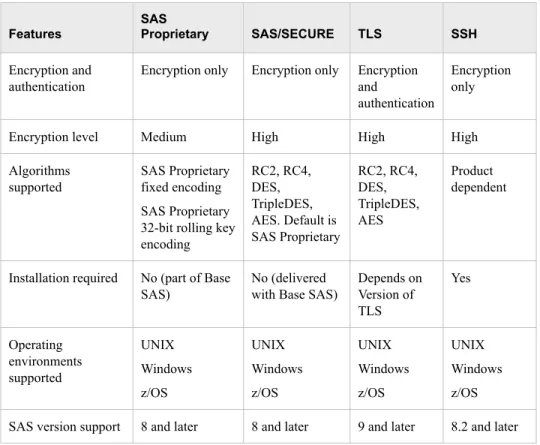
The following table compares the features of encryption technologies: Table 1.1 Summary of SAS Proprietary, SAS/SECURE, TLS, and SSH Features
Features
SAS
Proprietary SAS/SECURE TLS SSH
Encryption and authentication
Encryption only Encryption only Encryption and
authentication
Encryption only
Encryption level Medium High High High Algorithms
supported
SAS Proprietary fixed encoding SAS Proprietary 32-bit rolling key encoding RC2, RC4, DES, TripleDES, AES. Default is SAS Proprietary RC2, RC4, DES, TripleDES, AES Product dependent
Installation required No (part of Base SAS)
No (delivered with Base SAS)
Depends on Version of TLS Yes Operating environments supported UNIX Windows z/OS UNIX Windows z/OS UNIX Windows z/OS UNIX Windows z/OS SAS version support 8 and later 8 and later 9 and later 8.2 and later
Encryption: Implementation
The implementation of the installed encryption technology depends on the environment that you work in. If you work in a SAS enterprise intelligence infrastructure, encryption might be transparent to you because it has already been configured into your site's overall security plan. After the encryption technology has been installed, the site system administrator configures the encryption method (level of encryption) to be used in all client/server data exchanges. All enterprise activity uses the chosen level of encryption, by default.
If you work in a SAS session on a client computer that exchanges data with a SAS server, specify SAS system options that implement encryption for the duration of the SAS session. If you connect a SAS/CONNECT client to a spawner, specify encryption options in the spawner start-up command. For details about SAS system options, see Chapter 2, “SAS System Options for Encryption,” on page 23. For examples, see Chapter 5, “Encryption Technologies: Examples,” on page 59.