Fedora 17
FreeIPA: Identity/
Policy Management
Managing Identity and Authorization
Policies for Linux-Based Infrastructures
Fedora 17 FreeIPA: Identity/Policy Management
Managing Identity and Authorization Policies for Linux-Based
Infrastructures
Edition 2.2.0
Author Ella Deon Lackey [email protected]
Copyright © 2012 Red Hat.
The text of and illustrations in this document are licensed by Red Hat under a Creative Commons Attribution–Share Alike 3.0 Unported license ("CC-BY-SA"). An explanation of CC-BY-SA is available at http://creativecommons.org/licenses/by-sa/3.0/. The original authors of this document, and Red Hat, designate the Fedora Project as the "Attribution Party" for purposes of CC-BY-SA. In accordance with CC-BY-SA, if you distribute this document or an adaptation of it, you must provide the URL for the original version.
Red Hat, as the licensor of this document, waives the right to enforce, and agrees not to assert, Section 4d of CC-BY-SA to the fullest extent permitted by applicable law.
Red Hat, Red Hat Enterprise Linux, the Shadowman logo, JBoss, MetaMatrix, Fedora, the Infinity Logo, and RHCE are trademarks of Red Hat, Inc., registered in the United States and other countries. For guidelines on the permitted uses of the Fedora trademarks, refer to https://fedoraproject.org/wiki/ Legal:Trademark_guidelines.
Linux® is the registered trademark of Linus Torvalds in the United States and other countries.
Java® is a registered trademark of Oracle and/or its affiliates.
XFS® is a trademark of Silicon Graphics International Corp. or its subsidiaries in the United States
and/or other countries.
All other trademarks are the property of their respective owners.
Identity and policy management — for both users and machines — is a core function for almost any enterprise environment. IPA provides a way to create an identity domain that allows machines to enroll to a domain and immediately access identity information required for single sign-on and authentication services, as well as policy settings that govern authorization and access. This manual covers all aspects of installing, configuring, and managing IPA domains, including both servers and clients. This guide is intended for IT and systems administrators.
Preface xi
1. Audience and Purpose ... xi
2. Examples and Formatting ... xi
2.1. Brackets ... xi
2.2. Client Tool Information ... xi
2.3. Text Formatting and Styles ... xii
3. Giving Feedback ... xii
4. Document Change History ... xiii
1. Introduction to FreeIPA 1
1.1. FreeIPA v. LDAP: A More Focused Type of Service ... 1
1.1.1. A Working Definition for FreeIPA ... 1
1.1.2. Contrasting FreeIPA with a Standard LDAP Directory ... 2
1.2. Bringing Linux Services Together ... 3
1.2.1. Authentication: Kerberos KDC ... 4
1.2.2. Data Storage: 389 Directory Server ... 5
1.2.3. Authentication: Dogtag Certificate System ... 5
1.2.4. Server/Client Discovery: DNS ... 5
1.2.5. Management: NTP ... 5
1.3. Relationships Between Servers and Clients ... 6
1.3.1. About FreeIPA Servers and Replicas ... 6
1.3.2. About FreeIPA Clients ... 7
2. Installing a FreeIPA Server 11
2.1. Preparing to Install the FreeIPA Server ... 11
2.1.1. Hardware Recommendations ... 11
2.1.2. Software Requirements ... 11
2.1.3. Supported Web Browsers ... 11
2.1.4. System Prerequisites ... 12
2.1.5. Networking ... 14
2.2. Installing the FreeIPA Server Packages ... 14
2.3. Creating a FreeIPA Server Instance ... 15
2.3.1. About ipa-server-install ... 15
2.3.2. Setting up a FreeIPA Server: Basic Interactive Installation ... 17
2.3.3. Examples of Creating the FreeIPA Server ... 19
2.3.4. Troubleshooting Installation Problems ... 22
2.4. Setting up FreeIPA Replicas ... 23
2.4.1. Prepping and Installing the Replica Server ... 23
2.4.2. Creating the Replica ... 24
2.4.3. Troubleshooting Replica Installation ... 27
2.5. Uninstalling FreeIPA Servers and Replicas ... 28
2.6. Upgrading from FreeIPA 2.1 to 2.2 ... 28
2.6.1. Upgrading Packages ... 28
2.6.2. Removing Browser Configuration for Ticket Delegation ... 29
2.6.3. Testing Before Upgrading the FreeIPA Server ... 30
3. Setting up Systems as FreeIPA Clients 33
3.1. What Happens in Client Setup ... 33
3.2. Supported Platforms for FreeIPA Clients ... 34
3.3. System Ports ... 34
3.4. Configuring a Fedora System as a FreeIPA Client ... 35
3.5. Manually Configuring a Linux Client ... 38
3.6. Setting up a Linux Client Through Kickstart ... 43
3.7. Configuring a Microsoft Windows System to Join the FreeIPA Realm ... 44
3.8.1. Configuring Solaris 10 ... 45
3.8.2. Configuring Solaris 9 ... 49
3.9. Configuring an HP-UX System as a FreeIPA Client ... 50
3.9.1. Configuring NTP ... 50
3.9.2. Configuring LDAP Authentication ... 50
3.9.3. Configuring Kerberos ... 52
3.9.4. Configuring PAM ... 52
3.9.5. Configuring SSH ... 55
3.9.6. Configuring Access Control ... 55
3.9.7. Testing the Configuration ... 56
3.10. Configuring an AIX System as a FreeIPA Client ... 57
3.10.1. Prerequisites ... 57
3.10.2. Configuring the AIX Client ... 57
3.11. Troubleshooting Client Installations ... 60
3.11.1. The client can't resolve reverse hostnames when using an external DNS. ... 61
3.11.2. The client is not added to the DNS zone. ... 61
3.12. Uninstalling a FreeIPA Client ... 61
4. Basic Usage 63
4.1. About the FreeIPA Client Tools ... 63
4.1.1. About the FreeIPA Command-Line Tools ... 63
4.1.2. Looking at the FreeIPA UI ... 67
4.2. Logging into FreeIPA ... 73
4.2.1. Logging into FreeIPA ... 73
4.2.2. Logging in When an FreeIPA User Is Different Than the System User ... 74
4.2.3. Checking the Current Logged in User ... 74
4.2.4. Caching User Kerberos Tickets ... 74
4.3. Using the FreeIPA Web UI ... 75
4.3.1. Supported Web Browsers ... 75
4.3.2. Opening the FreeIPA Web UI ... 75
4.3.3. Configuring the Browser ... 75
4.3.4. Using a Browser on Another System ... 78
4.3.5. Logging in with Simple Username/Password Credentials ... 79
4.3.6. Using the UI with Proxy Servers ... 81
4.3.7. Troubleshooting UI Connection Problems ... 81
4.4. Understanding Search Limits and Settings ... 82
4.4.1. Types of Search Limits and Where They Apply ... 82
4.4.2. Setting FreeIPA Search Limits ... 83
4.4.3. Overriding the Search Defaults ... 85
4.4.4. Setting Search Attributes ... 85
4.4.5. Attributes Returned in Search Results ... 89
5. Identity: Managing Users and User Groups 91
5.1. Setting up User Home Directories ... 91
5.1.1. About Home Directories ... 91
5.1.2. Enabling the PAM Home Directory Module ... 92
5.1.3. Manually Mounting Home Directories ... 93
5.2. Managing User Entries ... 93
5.2.1. About Username Formats ... 93
5.2.2. Adding Users ... 94
5.2.3. Editing Users ... 97
5.2.4. Activating and Deactivating User Accounts ... 100
5.2.5. Deleting Users ... 102
5.3. Managing Public SSH Keys for Users ... 104
5.4.1. From the Web UI ... 105
5.4.2. From the Command Line ... 107
5.5. Unlocking User Accounts After Password Failures ... 108
5.6. Managing User Private Groups ... 108
5.6.1. Disabling Private Groups for a Specific User ... 108
5.6.2. Disabling Private Groups Globally ... 108
5.7. Managing Unique UID and GID Number Assignments ... 109
5.7.1. About ID Range Assignments During Installation ... 109
5.7.2. Adding New Ranges ... 110
5.8. Managing User and Group Schema ... 110
5.8.1. About Changing the Default User and Group Schema ... 112
5.8.2. Applying Custom Object Classes to New User Entries ... 112
5.8.3. Applying Custom Object Classes to New Group Entries ... 115
5.9. Managing User Groups ... 117
5.9.1. Creating User Groups ... 118
5.9.2. Adding Group Members ... 121
5.9.3. Deleting User Groups ... 128
5.10. Searching for Users and Groups ... 130
5.10.1. With the UI ... 130
5.10.2. With the Command Line ... 130
5.11. Specifying Default User and Group Settings ... 132
5.11.1. Viewing Settings from the Web UI ... 133
5.11.2. Viewing Settings from the Command Line ... 134
6. Identity: Managing Hosts and Services 137
6.1. About Hosts, Services, and Machine Identity and Authentication ... 137
6.2. Adding Host Entries ... 138
6.2.1. Adding Host Entries from the Web UI ... 138
6.2.2. Adding Host Entries from the Command Line ... 141
6.3. Enrolling Clients Manually ... 142
6.3.1. Performing a Split Enrollment ... 142
6.4. Manually Unconfiguring Client Machines ... 143
6.5. Managing Services ... 144
6.5.1. Adding and Editing Service Entries and Keytabs ... 144
6.5.2. Adding Services and Certificates for Services ... 148
6.5.3. Storing Certificates in NSS Databases ... 152
6.5.4. Configuring Clustered Services ... 152
6.5.5. Using the Same Service Principal for Multiple Services ... 153
6.6. Disabling and Re-enabling Host and Service Entries ... 153
6.6.1. Disabling Host and Service Entries ... 154
6.6.2. Re-enabling Hosts and Services ... 154
6.7. Extending Access Permissions over Other Hosts and Services ... 154
6.7.1. Delegating Service Management ... 155
6.7.2. Delegating Host Management ... 156
6.7.3. Delegating Host or Service Management in the Web UI ... 156
6.7.4. Accessing Delegated Services ... 158
6.8. Managing Public SSH Keys for Hosts ... 159
6.8.1. About FreeIPA Clients and OpenSSH ... 159
6.8.2. Adding Host Keys ... 160
6.8.3. Removing Host Keys ... 160
6.9. Renaming Machines and Reconfiguring FreeIPA Client Configuration ... 161
6.10. Managing Host Groups ... 162
6.10.1. Creating Host Groups ... 162
6.11. Troubleshooting Host Problems ... 167
6.11.1. Certificate Not Found/Serial Number Not Found Errors ... 167
6.11.2. Debugging Client Connection Problems ... 167
7. Identity: Integrating with NIS Domains and Netgroups 169
7.1. About NIS and FreeIPA ... 169
7.2. Setting the NIS Port for FreeIPA ... 170
7.3. Creating Netgroups ... 171
7.3.1. Adding Netgroups ... 171
7.3.2. Adding Netgroup Members ... 174
7.4. Exposing Automount Maps to NIS Clients ... 177
7.5. Migrating from NIS to FreeIPA ... 177
7.5.1. Preparing Netgroup Entries in FreeIPA ... 177
7.5.2. Enabling the NIS Listener in FreeIPA ... 178
7.5.3. Setting Weak Password Encryption for NIS User Authentication to FreeIPA ... 178
8. Identity: Integrating with Microsoft Active Directory 181
8.1. About Active Directory and FreeIPA ... 181
8.2. About Synchronized Attributes ... 182
8.2.1. User Attribute Synchronization ... 182
8.2.2. Group Attribute Synchronization ... 186
8.3. Setting up Active Directory for Synchronization ... 187
8.4. Managing Synchronization Agreements ... 187
8.4.1. Trusting the Active Directory and FreeIPA CA Certificates ... 187
8.4.2. Creating Synchronization Agreements ... 190
8.4.3. Changing the Behavior for Syncing User Account Attributes ... 191
8.4.4. Changing the Synchronized Windows Subtree ... 194
8.4.5. Configuring Uni-Directional Sync ... 194
8.4.6. Deleting Synchronization Agreements ... 195
8.4.7. Winsync Agreement Failures ... 195
8.5. Managing Password Synchronization ... 196
8.5.1. Setting up the Windows Server for Password Synchronization ... 196
8.5.2. Setting up Password Synchronization ... 198
8.5.3. Exempting Active Directory Users from Password Synchronization ... 200
9. Identity: Managing DNS 201
9.1. About DNS in FreeIPA ... 201
9.2. The FreeIPA-Generated DNS File ... 201
9.3. Setting up DNS After FreeIPA Server Installation ... 202
9.4. Managing DNS Zone Entries ... 203
9.4.1. Adding DNS Zones ... 203
9.4.2. Modifying DNS Zones ... 206
9.4.3. Enabling and Disabling Zones ... 210
9.5. Managing DNS Record Entries ... 212
9.5.1. Adding Records to DNS Zones ... 212
9.5.2. Deleting Records from DNS Zones ... 218
9.6. Configuring the bind-dyndb-ldap Plug-in ... 222
9.6.1. Changing the DNS Cache Setting ... 223
9.6.2. Enabling Zone Refreshes and Persistent Searches ... 223
9.7. Changing Recursive Queries Against Forwarders ... 224
9.8. Enabling Dynamic DNS Updates ... 225
9.8.1. Enabling Dynamic DNS Updates in the Web UI ... 225
9.8.2. Enabling Dynamic DNS Updates in the Command Line ... 227
9.9. Configuring Forwarders and Forward Policy ... 227
9.9.2. Configuring Zone Forwarders ... 227
9.9.3. Configuring Forwarder Policy for a Zone ... 227
9.10. Enabling Zone Transfers ... 228
9.11. Defining DNS Queries ... 228
9.12. Synchronizing Forward and Reverse Zone Entries ... 229
9.13. Setting DNS Access Policies ... 229
9.14. Resolving Hostnames in the FreeIPA Domain ... 230
9.15. Changing Load Balancing for FreeIPA Servers and Replicas ... 230
10. Policy: Using Automount 231
10.1. About Automount and FreeIPA ... 231
10.2. Configuring Automount ... 232
10.2.1. Configuring autofs on Fedora ... 232
10.2.2. Configuring Automount on Solaris ... 234
10.3. Setting up a Kerberized NFS Server ... 235
10.3.1. Setting up a Kerberized NFS Server ... 235
10.3.2. Setting up a Kerberized NFS Client ... 237
10.4. Configuring Kerberized CIFS ... 239
10.4.1. Setting up Samba Groups in FreeIPA ... 239
10.4.2. Configuring the CIFS Client ... 241
10.5. Configuring Locations ... 241
10.5.1. Configuring Locations through the Web UI ... 242
10.5.2. Configuring Locations through the Command Line ... 243
10.6. Configuring Maps ... 243
10.6.1. Configuring Direct Maps ... 244
10.6.2. Configuring Indirect Maps ... 247
10.6.3. Importing Automount Maps ... 250
11. Policy: Defining Password Policies 251
11.1. About Password Policies and Policy Attributes ... 251
11.2. Viewing Password Policies ... 253
11.2.1. Viewing the Global Password Policy ... 253
11.2.2. Viewing Group-Level Password Policies ... 256
11.2.3. Viewing the Password Policy in Effect for a User ... 258
11.3. Creating and Editing Password Policies ... 258
11.3.1. Creating Password Policies in the Web UI ... 258
11.3.2. Creating Password Policies with the Command Line ... 261
11.3.3. Editing Password Policies with the Command Line ... 261
11.4. Managing Password Expirations ... 261
11.5. Changing the Priority of Group Password Policies ... 262
11.6. Setting Account Lockout Policies ... 263
11.6.1. In the UI ... 263
11.6.2. In the CLI ... 265
11.7. Enabling a Password Change Dialog ... 266
12. Policy: Managing the Kerberos Domain 267
12.1. About Kerberos ... 267
12.1.1. About Principal Names ... 267
12.1.2. About Protecting Keytabs ... 268
12.2. Setting Kerberos Ticket Policies ... 268
12.2.1. Setting Global Ticket Policies ... 268
12.2.2. Setting User-Level Ticket Policies ... 270
12.3. Refreshing Kerberos Tickets ... 270
12.4. Caching Kerberos Passwords ... 272
12.6. Troubleshooting Kerberos Errors ... 273
13. Policy: Using sudo 275
13.1. About sudo and IPA ... 275
13.1.1. General sudo Configuration in FreeIPA ... 275
13.1.2. sudo and Netgroups ... 275
13.1.3. Supported sudo Clients ... 276
13.2. Setting up sudo Commands and Command Groups ... 276
13.2.1. Adding sudo Commands ... 276
13.2.2. Adding sudo Command Groups ... 277
13.3. Defining sudo Rules ... 281
13.3.1. About External Users and Hosts ... 281
13.3.2. About sudo Options Format ... 282
13.3.3. Defining sudo Rules in the Web UI ... 283
13.3.4. Defining sudo Rules in the Command Line ... 291
13.4. An Example of Configuring sudo ... 294
13.4.1. Server Configuration for sudo Rules ... 294
13.4.2. Client Configuration for sudo Rules ... 295
14. Policy: Configuring Host-Based Access Control 297
14.1. About Host-Based Access Control ... 297
14.2. Creating Host-Based Access Control Entries for Services and Service Groups ... 298
14.2.1. Adding HBAC Services ... 299
14.2.2. Adding Service Groups ... 300
14.3. Defining Host-Based Access Control Rules ... 304
14.3.1. Setting Host-Based Access Control Rules in the Web UI ... 304
14.3.2. Setting Host-Based Access Control Rules in the Command Line ... 311
14.4. Testing Host-Based Access Control Rules ... 314
14.4.1. The Limits of Host-Based Access Control Configuration ... 314
14.4.2. Test Scenarios for Host-Based Access Control (CLI-Based) ... 315
14.4.3. Testing Host-Based Access Control Rules in the UI ... 316
15. Policy: Defining SELinux User Maps 319
15.1. About FreeIPA, SELinux, and Mapping Users ... 319
15.2. Configuring SELinux Users in FreeIPA ... 322
15.2.1. In the Web UI ... 322
15.2.2. In the CLI ... 323
15.3. Mapping SELinux Users and FreeIPA Users ... 324
15.3.1. In the Web UI ... 325
15.3.2. In the CLI ... 328
15.4. Troubleshooting SELinux Login Problems ... 330
16. Policy: Defining Automatic Group Membership for Users and Hosts 331
16.1. About Automembership ... 331
16.2. Defining Automembership Rules (Basic Procedure) ... 332
16.2.1. From the Web UI ... 332
16.2.2. From the CLI ... 335
16.3. Examples of Using Automember Groups ... 336
16.3.1. Setting an All Users/Hosts Rule ... 337
16.3.2. Defining Default Automembership Groups ... 337
16.3.3. Using Automembership Groups with Windows Users ... 338
17. Configuration: Defining Access Control within FreeIPA 339
17.1. About Access Controls for FreeIPA Entries ... 339
17.1.1. A Brief Look at Access Control Concepts ... 339
17.2. Defining Self-Service Settings ... 340
17.2.1. Creating Self-Service Rules from the Web UI ... 341
17.2.2. Creating Self-Service Rules from the Command Line ... 342
17.2.3. Editing Self-Service Rules ... 342
17.3. Delegating Permissions over Users ... 344
17.3.1. Delegating Access to User Groups in the Web UI ... 344
17.3.2. Delegating Access to User Groups in the Command Line ... 345
17.4. Defining Role-Based Access Controls ... 346
17.4.1. Creating Roles ... 349
17.4.2. Creating New Permissions ... 352
17.4.3. Creating New Privileges ... 356
18. Configuration: Configuring the FreeIPA Server 361
18.1. FreeIPA Files and Logs ... 361
18.1.1. A Reference of FreeIPA Server Configuration Files and Directories ... 361
18.1.2. About default.conf and Context Configuration Files ... 363
18.1.3. Checking FreeIPA Server Logs ... 364
18.2. Disabling Anonymous Binds ... 368
18.3. Configuring Alternate Certificate Authorities ... 369
18.4. Configuring CRLs and OCSP Responders ... 370
18.4.1. Using an OSCP Responder with SELinux ... 370
18.4.2. Changing the CRL Update Interval ... 371
18.4.3. Changing the OCSP Responder Location ... 371
18.5. Setting a FreeIPA Server as an Apache Virtual Host ... 372
18.6. Setting DNS Entries for Multi-Homed Servers ... 373
18.7. Managing Replication Agreements Between FreeIPA Servers ... 373
18.7.1. Listing Replication Agreements ... 374
18.7.2. Creating and Removing Replication Agreements ... 375
18.7.3. Forcing Replication ... 375
18.7.4. Reinitializing FreeIPA Servers ... 375
18.7.5. Resolving Replication Conflicts ... 376
18.8. Moving CRL Generation from the Master (Original) Server to Another Replica ... 378
18.8.1. About the Master Server, Replicas, and Generating CRLs ... 378
18.8.2. Promoting a Replica ... 379
18.9. Removing a Replica ... 380
18.10. Troubleshooting ... 380
18.10.1. Starting FreeIPA with Expired Certificates ... 380
18.10.2. There are SASL, GSS-API, and Kerberos errors in the 389 Directory Server logs when the replica starts. ... 381
19. Migrating from an LDAP Directory to FreeIPA 383
19.1. An Overview of LDAP to FreeIPA Migration ... 383
19.1.1. Planning the Client Configuration ... 383
19.1.2. Planning Password Migration ... 386
19.1.3. Migration Considerations and Requirements ... 388
19.2. Examples for Using migrate-ds ... 389
19.2.1. Migrating Specific Subtrees ... 390
19.2.2. Specifically Including or Excluding Entries ... 390
19.2.3. Excluding Entry Attributes ... 391
19.2.4. Setting the Schema to Use ... 392
19.3. Scenario 1: Using SSSD as Part of Migration ... 392
19.4. Scenario 2: Migrating an LDAP Server Directly to FreeIPA ... 394
A. Frequently Asked Questions 397
B. Working with certmonger 399
B.1. Requesting a Certificate with certmonger ... 399
B.2. Storing Certificates in NSS Databases ... 400
B.3. Tracking Certificates with certmonger ... 400
C. FreeIPA Tools Reference 401
C.1. Using Special Characters with FreeIPA Tools ... 401
C.2. ipa ... 401
C.2.1. Location ... 401
C.2.2. Syntax ... 401
C.2.3. Help Topics ... 403
C.2.4. Global Options ... 404
C.2.5. Managing Attributes with --setattr, --addattr, and --delattr ... 405
C.2.6. Return Codes ... 406
C.2.7. Commands ... 406
C.3. ipa DNS Commands ... 407
C.3.1. ipa dnszone-add ... 407
C.3.2. ipa dnsrecord-add ... 408
C.4. ipa Host Commands ... 415
C.4.1. ipa host-add ... 415
C.5. Server Scripts ... 416
C.5.1. A Quick Summary of Configuration Scripts ... 416
C.5.2. ipa-replica-install ... 418 C.5.3. ipa-replica-prepare ... 420 C.5.4. ipa-server-install ... 421 C.6. Client Scripts ... 426 C.6.1. ipa-client-install ... 426 Glossary 431 Index 445
Preface
FreeIPA is a Fedora-based way to create a security, identity, and authentication domain. The different security and authentication protocols available to Linux and Unix systems (like Kerberos, NIS, DNS, PAM, and sudo) are complex, unrelated, and difficult to manage coherently, especially when combined with different identity stores.
FreeIPA provides a layer that unifies all of these disparate services and simplifies the administrative tasks for managing users, systems, and security. FreeIPA breaks management down into two categories: identity and policy. It centralizes the functions of managing the users and entities within your IT environment (identity) and then provides a framework to define authentication and authorization for a global security framework and user-friendly tools like single sign-on (policy).
1. Audience and Purpose
With FreeIPA, a Fedora system can easily become the center of an identity/authentication domain and even provide access to the domain for clients of other operating systems. FreeIPA is an integrated system, that builds on existing and reliable technologies like LDAP and certificate protocols, with a robust yet straightforward set of tools (including a web-based UI). The key to identity/policy management with FreeIPA is simplicity and flexibility:
• Centralized identity stores for authentication and single sign-on using both integrated LDAP services (with 389 Directory Server) and, optionally, NIS services
• Clear and manageable administrative control over system services like PAM, NTP, and sudo • Simplified DNS domains and maintenance
• Scalable Kerberos realms and cross-realms which clients can easily join
This guide is written for systems administrators and IT staff who will manage FreeIPA domains, user systems, and servers. This assumes a moderate knowledge of Linux-based systems administration and familiarity with important concepts like access control, LDAP, and Kerberos.
This guide covers every aspect of using FreeIPA, including preparation and installation processes, administrative tasks, and the FreeIPA tools. This guide also explains the major concepts behind both identity and policy management, generally, and FreeIPA features specifically. Administrative tasks in this guide are categorized as either Identity or Policy in the chapter title to help characterize the administrative functions.
2. Examples and Formatting
Each of the examples used in this guide, such as file locations and commands, have certain defined conventions.
2.1. Brackets
Square brackets ([]) are used to indicate an alternative element in a name. For example, if a tool is available in /usr/lib on 32-bit systems and in /usr/lib64 on 64-bit systems, then the tool location may be represented as /usr/lib[64].
2.2. Client Tool Information
The LDAP tools used to edit the FreeIPA directory services, such as ldapmodify and ldapsearch, are from OpenLDAP. OpenLDAP tools use SASL connections by default. To perform a simple bind using a username and password, use the -x argument to disable SASL.
2.3. Text Formatting and Styles
Certain words are represented in different fonts, styles, and weights. Different character formatting is used to indicate the function or purpose of the phrase being highlighted.
Formatting Style Purpose
Monospace with a background This type of formatting is used for anything
entered or returned in a command prompt. Italicized text Any text which is italicized is a variable, such as
instance_name or hostname. Occasionally, this is also used to emphasize a new term or other phrase.
Bolded text Most phrases which are in bold are application
names, such as Cygwin, or are fields or options in a user interface, such as a User Name Here: field or Save button. This can also indicate a file, package, or directory name, such as /usr/ sbin.
Other formatting styles draw attention to important text.
NOTE
A note provides additional information that can help illustrate the behavior of the system or provide more detail for a specific issue.
IMPORTANT
Important information is necessary, but possibly unexpected, such as a configuration change that will not persist after a reboot.
WARNING
A warning indicates potential data loss, as may happen when tuning hardware for maximum performance.
3. Giving Feedback
Document Change History
bugzilla. Make the bug report as specific as possible, so we can be more effective in correcting any issues:
1. Select the Community group and the freeIPA product. 2. Set the component to Documentation.
3. Set the version number to 2.2.
4. For errors, give the page number (for the PDF) or URL (for the HTML), and give a succinct description of the problem, such as incorrect procedure or typo.
For enhancements, put in what information needs to be added and why.
5. Give a clear title for the bug. For example, "Incorrect command example for setup script options" is better than "Bad example".
We appreciate receiving any feedback — requests for new sections, corrections, improvements, enhancements, even new ways of delivering the documentation or new styles of docs. You are welcome to contact the Fedora docs team at [email protected]1
.
4. Document Change History
Revision
2.1.0-2 July 22, 2011 Ella Deon Lackey [email protected]
Completing first round of content revisions on the chapters for server installation, client installation, DNS, basic usage, managing clients, and the preface.
Beginning content revisions on the chapters for users, Kerberos, automount, and managing servers.
Bare initial draft of a tools appendix.
Bugzilla work: 646226, 646240, 646257, 646267, 68173, 693843, 701465, 709385, 714603, 715015
FreeIPA.org tickets: 1183, 1359, 1449, 1058, 1335, 1107, 1355, 1430, 803, 991, 615, 969, 594, 593
freeipa-guide trac tickets: 18, 19, 16, 17
Revision
2.1.0-1 May 10, 2011 Ella Deon Lackey [email protected]
Beginning draft for the Fedora docs project.
Chapter 1.
Introduction to FreeIPA
Fedora FreeIPA is a way to create identity stores, centralized authentication, domain control for Kerberos and DNS services, and authorization policies — all on Linux systems, using native Linux tools. While centralized identity/policy/authorization software is hardly new, FreeIPA is one of the only options that supports Linux/Unix domains.
FreeIPA provides a unifying skin for standards-defined, common network services, including PAM, LDAP, Kerberos, DNS, NTP, and certificate services, and it allows Fedora systems to serve as the domain controllers.
FreeIPA defines a domain, with servers and clients who share centrally-managed services, like Kerberos and DNS. This chapter first explains what FreeIPA is. This chapter also covers how all of these services work together within the domain and how servers and clients work with each other.
1.1. FreeIPA v. LDAP: A More Focused Type of Service
At the most basic level, FreeIPA is a domain controller for Linux and Unix machines. FreeIPA defines the domain, using controlling servers and enrolled client machines. This provides centralized structure that has previously been unavailable to Linux/Unix environments, and it does it using native Linux applications and protocols.
1.1.1. A Working Definition for FreeIPA
Security information frequently relates to identities of users, machines, and services. Once the identity is verified, then access to services and resources can be controlled.
For efficiency, risk management, and ease of administration, IT administrators try to manage identities as centrally as possible and to unite identity management with authentication and authorization policies. Historically, Linux environments have had a very difficult time establishing this centralized management. There are a number of different protocols (such as NIS and Kerberos) which define domains, while other applications store data (such as LDAP) and still others manage access (such as sudo). None of these applications talk to each other or use the same management tools. Every application had to be administered separately and it had to be managed locally. The only way to get a consistent identity policy was to copy configuration files around manually or to try to develop a proprietary application to manage identities and policies.
The goal of FreeIPA is to simplify that administrative overhead. Users, machines, services, and polices are all configured in one place, using the same tools. Because FreeIPA creates a domain, multiple machines can all use the same configuration and the same resources simply by joining the domain. Users only have to sign into services once, and administrators only have to manage a single user account.
FreeIPA does three things:
• Create a Linux-based and Linux-controlled domain. Both FreeIPA servers and FreeIPA clients are Linux or Unix machines. While FreeIPA can synchronize data with an Active Directory domain to allow integration with Windows servers, it is not an administrative tools for Windows machines and it does not support Windows clients. FreeIPA is a management tool for Linux domains.
• Centralize identity management and identity policies.
• Build on existing, native Linux applications and protocols. While FreeIPA has its own processes and configuration, its underlying technologies are familiar and trusted by Linux administrators and are well established on Linux systems.
In a sense, FreeIPA isn't making administrators do something new; it is helping them do it better. There are a few ways to illustrate that.
On one extreme is the low control environment. Little Example Corp. has several Linux and Unix servers, but each one is administered separately. All passwords are kept on the local machine, so there is no central identity or authentication process. Tim the IT Guy just has to manage users on every machine, set authentication and authorization policies separately, and maintain local passwords. With FreeIPA, things come to order. There is a simple way to have central user, password, and policy stores, so Tim the IT Guy only has to maintain the identities on one machine (the FreeIPA server) and users and policies are uniformly applied to all machines. Using host-based access control, delegation, and other rules, he can even set different access levels for laptops and remote users.
In the middle is the medium control environment. Mid-Example Corp. has several Linux and Unix servers, but Bill the IT Guy has tried to maintain a greater degree of control by creating a NIS domain for machines, an LDAP directory for users, and Kerberos for authentication. While his environment is well under control, every application has to be maintained separately, using different tools. He also has to update all of the services manually whenever a new machine is added to his infrastructure or when one is taken offline. In this situation, FreeIPA greatly reduces his administrative overhead because it integrates all of the different applications together seamlessly, using a single and simplified tool set. It also makes it possible for him to implement single sign-on services for all of the machines in his domain.
On the other extreme is the absent control environment. At Big Example Corp., most of the systems are Windows based and are managed in a tightly-knit Active Directory forest. However, development, production, and other teams have many Linux and Unix systems — which are basically excluded from the Windows controlled environment. FreeIPA brings native control to the Linux/Unix servers, using their native tools and applications — something that is not possible in an Active Directory forest. Additionally, because FreeIPA is Windows-aware, data can be synchronized between Active Directory and FreeIPA, preserving a centralized user store.
FreeIPA provides a very simple solution to a very common, very specific problem: identity management.
1.1.2. Contrasting FreeIPA with a Standard LDAP Directory
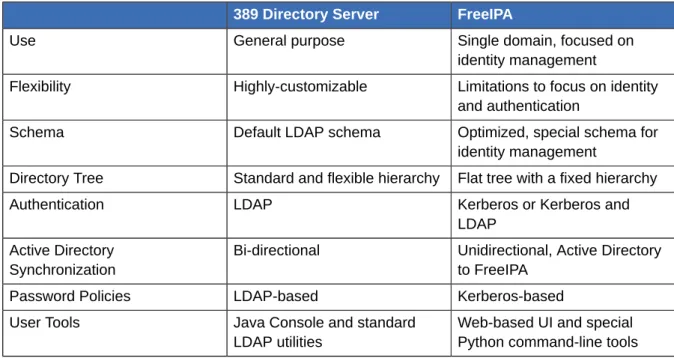
The closest relative to FreeIPA is a standard LDAP directory like 389 Directory Server, but there are some intrinsic differences between what they do and what they're intended to do.
First, it helps to understand what a directory service is. A directory service is a collection of software, hardware, and processes that stores information. While directory services can be highly specific (for example, DNS is a directory service because it stores information on hostnames), a generic directory service can store and retrieve any kind of information. LDAP directories like 389 Directory Server are generic directories. They have a flexible schema that supports entries for users, machines, network entities, physical equipment, and buildings, and that schema can be customized to define entries of almost anything. Because of its extensibility, LDAP servers like 389 Directory Server are frequently used as backends that store data for other applications. 389 Directory Server not only contains information, it organizes information. LDAP directories uses a hierarchical structure, a directory tree, that organize entries into root entries (suffixes), intermediate or container entries (subtrees or branches), and leaf entries (the actual data). Directory trees can be very complex, with a lot of branch points, or very simple (flat) with few branch points.
The primary feature of an LDAP directory is its generality. It can be made to fit into a variety of applications.
FreeIPA, on the other hand, has a very specific purpose and fits a very specific application. It is not a general LDAP directory, it is not a backend, and it is not a general policy server. It is not generic.
Bringing Linux Services Together FreeIPA focuses on identities (user and machine) and policies that relate to those identities and their interactions. While it uses an LDAP backend to store its data, FreeIPA has a highly-customized and specific set of schema that defines a particular set of identity-related entries and defines them in detail. It has a relatively flat and simple directory tree because it has only a handful of entry types and relationships that are relevant to its purpose. It has rules and limitations on how the FreeIPA server can be deployed because it can only be deployed for a specific purpose: managing identities. The restrictions on FreeIPA also give it a great deal of administrative simplicity. It has a simple installation process, a unified set of commands, and a clearly defined role in the overall IT infrastructure. A FreeIPA domain is easy to configure, easy to join, and easy to manage, and the functions that it serves — particularly identity/authentication tasks like enterprise-wide single sign-on — are also easier to do with FreeIPA than with a more general-purpose directory service.
Table 1.1. FreeIPA Compared to 389 Directory Server
389 Directory Server FreeIPA
Use General purpose Single domain, focused on
identity management
Flexibility Highly-customizable Limitations to focus on identity and authentication
Schema Default LDAP schema Optimized, special schema for
identity management
Directory Tree Standard and flexible hierarchy Flat tree with a fixed hierarchy
Authentication LDAP Kerberos or Kerberos and
LDAP Active Directory
Synchronization
Bi-directional Unidirectional, Active Directory to FreeIPA
Password Policies LDAP-based Kerberos-based
User Tools Java Console and standard
LDAP utilities
Web-based UI and special Python command-line tools LDAP directories like 389 Directory Server have flexibility and adaptability which makes them a perfect backend to any number of applications. Its primary purpose is to store and retrieve data efficiently. FreeIPA fills a very different niche. It is optimized to perform a single task very effectively. It stores user information and authentication and authorization policies, as well as other information related to access, like host information. Its single purpose is to manage identities.
1.2. Bringing Linux Services Together
FreeIPA unifies disparate yet related Linux services into a single management environment. From there, it establishes a simple, easy way to bring host machines into the domain of those services. A FreeIPA server is, at its core, an identity and authentication server. The primary FreeIPA server, essentially a domain controller, uses a Kerberos server and KDC for authentication. An LDAP backend contains all of the domain information, including users, client machines, and domain configuration.
Figure 1.1. The FreeIPA Server: Unifying Services
Other services are included to provide support for the core identity/authentication functions. DNS is used for machine discovery and for connecting to other clients in the domain. NTP is used to synchronize all domain clocks so that logging, certificates, and operations can occur as expected. A certificate service provides certificates for Kerberos-aware services. All of these additional services work together under the control of the FreeIPA server.
The FreeIPA server also has a set of tools which are used to manage all of the FreeIPA-associated services. Rather than managing the LDAP server, KDC, or DNS settings individually, using different tools on local machines, FreeIPA has a single management toolset (CLI and web UI) that allows centralized and cohesive administration of the domain.
1.2.1. Authentication: Kerberos KDC
Kerberos is an authentication protocol. Kerberos uses symmetric key cryptography to generate tickets to users. Kerberos-aware services check the ticket cache (a keytab) and authenticate users with valid tickets.
Kerberos authentication is significantly safer than normal password-based authentication because passwords are never sent over the network — even when services are accessed on other machines. In FreeIPA, the Kerberos administration server is set up on the FreeIPA domain controller, and all of the Kerberos data are stored in FreeIPA's backend Directory Server. The Directory Server instance defines and enforces access controls for the Kerberos data.
Data Storage: 389 Directory Server
NOTE
The FreeIPA Kerberos server is managed through FreeIPA tools instead of Kerberos tools because all of its data are stored in the Directory Server instance. The KDC is unaware of the Directory Server, so managing the KDC with Kerberos tools does not effect the FreeIPA configuration.
1.2.2. Data Storage: 389 Directory Server
FreeIPA contains an internal 389 Directory Server instance. All of the Kerberos information, user accounts, groups, services, policy information, DNS zone and host entries, and all other information in FreeIPA is stored in this 389 Directory Server instance.
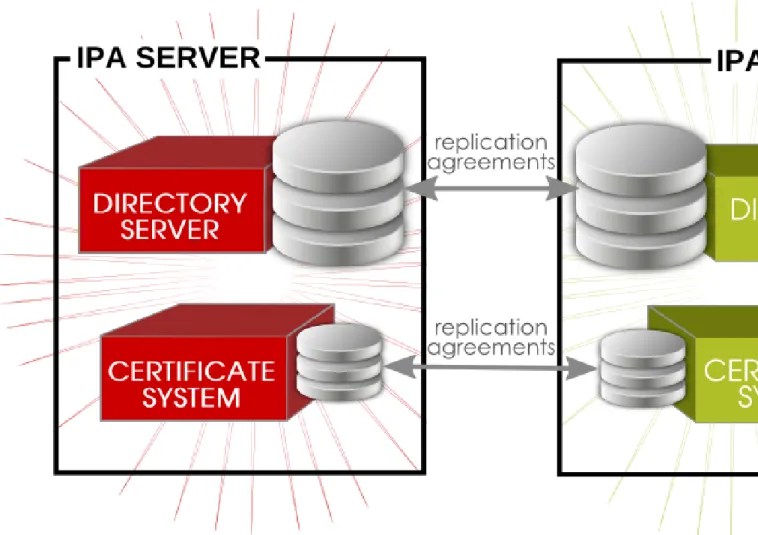
When multiple servers are configured, they can talk to each other because 389 Directory Server supports multi-master replication. Agreements are automatically configured between the initial server and any additional replicas which are added to the domain.
1.2.3. Authentication: Dogtag Certificate System
Kerberos can use certificates along with keytabs for authentication, and some services require certificates for secure communication. FreeIPA includes a certificate authority, through Dogtag Certificate System, with the server. This CA issues certificates to the server, replicas, and hosts and services within the FreeIPA domain.
The CA can be a root CA or it can have its policies defined by another, external CA (so that it is subordinate to that CA). Whether the CA is a root or subordinate CA is determined when the FreeIPA server is set up.
1.2.4. Server/Client Discovery: DNS
FreeIPA defines a domain — multiple machines with different users and services, each accessing shared resources and using shared identity, authentication, and policy configuration. The clients need to be able to contact each other, as FreeIPA servers. Additionally, services like Kerberos depend on hostnames to identify their principal identities.
Hostnames are associated with IP address using the Domain Name Service (DNS). DNS maps hostnames to IP addresses and IP addresses to hostnames, providing a resource that clients can use when they need to look up a host. From the time a client is enrolled in the FreeIPA domain, it uses DNS to locate the FreeIPA server and then all of the services and clients within the domain. Multiple DNS servers are usually configured, each one working as an authoritative resource for machines within a specific domain. Having the FreeIPA server also be a DNS server is optional, but it is strongly recommended. When the FreeIPA server also manages DNS, there is tight integration between the DNS zones and the FreeIPA clients and the DNS configuration can be managed using native FreeIPA tools. Even if a FreeIPA server is a DNS server, other external DNS servers can still be used.
1.2.5. Management: NTP
Many services require that servers and clients have the same system time, within a certain variance. For example, Kerberos tickets use time stamps to determine their validity. If the times between the server and client skew outside the allowed range, then any Kerberos tickets are invalidated.
Clocks are synchronized over a network using Network Time Protocol (NTP). A central server acts as an authoritative clock and all of the clients which reference that NTP server sync their times to match. When the FreeIPA server is the NTP server for the domain, all times and dates are synchronized before any other operations are performed. This allows all of the date-related services — including password expirations, ticket and certificate expirations, account lockout settings, and entry create dates — to function as expected.
The FreeIPA server, by default, works as the NTP server for the domain. Other NTP servers can also be used for the hosts.
1.3. Relationships Between Servers and Clients
FreeIPA itself defines a domain, a group of machines that have shared configuration, policies, and identity stores. This shared configuration allows the machines (and users) within the domain to be aware of each other and operate together. This awareness can be used to enable cross-platform compatibility, like unifying Windows and Linux systems, or to enable infrastructure-wide single sign-on.
1.3.1. About FreeIPA Servers and Replicas
FreeIPA works by having identified servers which are the master stores of information for user and machine identities and domain-wide policies. These servers host domain-related services such as certificate authorities, NTP, Kerberos, SSH, and DNS. The server also acts as a central repository of identity and policy information.
Clients interact indirectly with FreeIPA servers when they attempt to access domain resources, such as fileshares, services, remote machines, or authentication (through SSSD and Kerberos).
As said, a FreeIPA server is a controller for a lot of associated services. While a number of those services are support, most of them are not required. For example, a server may have a CA, a DNS server, or an NTP server — or it can be installed without those services.
Once a FreeIPA server is set up, its configuration can be copied and used as the basis for another FreeIPA server. When a FreeIPA server is copied, that copy is called a replica.
NOTE
The only real different between a FreeIPA server and a FreeIPA replica is that a server is a new installation and a replica is based on an existing server. Once the instance is configured, servers and replicas are basically identical in functionality and behavior within the FreeIPA domain.
There is a good deal of flexibility in the FreeIPA server (and replica) topology. For example, Server A can be installed with a CA and DNS services, while Replica A can be based on Server A's configuration but not host either DNS or CA services. Server B can be added to the domain, also without CA or DNS services. At any time in the future, a CA or DNS service can be created and configured on Replica A or Server B.
Servers and replicas both use underlying LDAP directories to store user and host entries, configuration data, policy configuration, and keytabs, certificates, and keys. Servers and replicas propagate data among each other through multi-master replication agreements. Both servers and replicas are masters in the replication topology.
About FreeIPA Clients
Figure 1.2. Server and Replica Interactions
TIP
The replication topology essentially creates a cloud of FreeIPA servers. One benefit of a server domain is automatic load balancing, using the SRV records in DNS. The SRV record priority sets the order that servers and replicas are contacted, while weight distributed the load between servers/replicas with the same priority. The server and replica DNS entries can be edited to change the load balancing, which is covered in Example 9.4, “SRV Record” and Section 9.15, “Changing Load Balancing for FreeIPA Servers and Replicas”.
1.3.2. About FreeIPA Clients
A client is simply any machine which is configured to operate within the FreeIPA domain, using its Kerberos and DNS services, NTP settings, and certificate services. That's an important distinction: a client does not require a daemon or (necessarily) an installed product. It requires only system configurations which direct it to use FreeIPA services.
For Fedora systems, a certain number of platform tools are available for FreeIPA to use, such as SSSD. These are FreeIPA-enabled platform applications, which is simply a way of saying that they are aspects of the underlying platform that work with FreeIPA services. Other tools, like certain PAM and NSS modules and FreeIPA command-line utilities, are provided as FreeIPA-specific packages that must be installed on the machine. These are FreeIPA-related components.
Figure 1.3. Server and Client Interactions
FreeIPA uses the local storage (cache) on a client to improve performance in a few ways: • Store FreeIPA information when the machine is offline.
• Keep information active beyond its normal timeout period if the client cannot access the central server. The cache is persistent even after rebooting the machine.
• Reduce the round-trip time of requests by checking information locally before looking at the server. Information is stored either in an LDB database (similar to LDAP) or the local filesystem (as XML files), depending on the type of information.
• Identity information (about users, machines, and groups) is stored in the LDB database, which uses the same syntax as an LDAP directory. This identity information is originally stored in the FreeIPA server's 389 Directory Server instance. Because this information changes frequently and is referenced frequently, it is important to be able to call the more current information quickly, which is possible using an LDB database on the client and the Directory Server on the server.
• Policy information is more static than identity information, and it can include configuration for SELinux or sudo. These policies are set globally on the server and then are propagated to the clients. On the client, the policy information is stored in the filesystem in XML files which can be downloaded and converted into a native file for whatever service is being managed.
A specific set of services on the FreeIPA server interact with a subset of services and modules on the FreeIPA client. A client is any machine (a host) which can retrieve a keytab or certificates from the FreeIPA domain.
About FreeIPA Clients
Figure 1.4, “Interactions Between FreeIPA Services” shows that Fedora uses two native daemons to interact with the FreeIPA server:
• SSSD provides the user authentication for the machine and enforces host-based access control rules.
• certmonger monitors and renews the certificates on the client. It can request new certificates for the services on the system, including virtual machines.
When a Fedora client is added to the domain (enrolled), its SSSD and certmonger are configured to connect to the FreeIPA server and the required Kerberos keytab and host certificates are created. (The host certificate is not used directly by FreeIPA; it may be used by other services, such as a web server.)
Chapter 2.
Installing a FreeIPA Server
The FreeIPA domain is defined and managed by a FreeIPA server which is essentially a domain controller. There can be multiple domain controllers within a domain for load-balancing and failover tolerance. These additional servers are called replicas of the master FreeIPA server.
Both FreeIPA servers and replicas only run on Fedora systems. For both servers and replicas, the necessary packages must be installed and then the FreeIPA server or replica itself is configured through setup scripts, which configure all of the requisite services.
2.1. Preparing to Install the FreeIPA Server
Before you install FreeIPA, ensure that the installation environment is suitably configured. You also need to provide certain information during the installation and configuration procedures, including realm names and certain usernames and passwords. This section describes the information that you need to provide.
2.1.1. Hardware Recommendations
A basic user entry is about 1 KB in size, as is a simple host entry with a certificate. The most important hardware feature to size properly is RAM. While all deployments are different, depending on the number of users and groups and the type of data stored, there is a rule of thumb to use to help determine how much RAM to use:
• For 10,000 users and 100 groups, have at least 2GB of RAM and 1GB swap space.
• For 100,000 users and 50,000 groups, have at least 16GB of RAM and 4GB of swap space.
TIP
For larger deployments, it is more effective to increase the RAM than to increase disk space because much of the data are stored in cache.
The underlying Directory Server instance used by the FreeIPA server can be tuned to increase performance. For tuning information, see the Directory Server documentation at http://
docs.redhat.com/docs/en-US/Red_Hat_Directory_Server/8.2/html/Performance_Tuning_Guide/ system-tuning.html.
2.1.2. Software Requirements
Most of the packages that a FreeIPA server depends on are installed as dependencies when the FreeIPA packages are installed. There are some packages, however, which are required before installing the FreeIPA packages:
• Kerberos 1.9
• The named and bind-dyndb-ldap packages for DNS
2.1.3. Supported Web Browsers
2.1.4. System Prerequisites
The FreeIPA server is set up using a configuration script, and this script makes certain assumption about the host system. If the system does not meet these prerequisites, then server configuration may fail.
2.1.4.1. Hostname and IP Address Requirements
Regardless of whether the DNS is within the FreeIPA server or external, the server host must have DNS properly configured:
• The hostname must be a fully-qualified domain name. For example, ipaserver.example.com.
IMPORTANT
This must be a valid DNS name, which means only numbers, alphabetic characters, and hyphens (-) are allowed. Other characters, like underscores, in the hostname will cause DNS failures.
• The hostname must be all lower-case.
• The server's A record must be set and resolve to its public IP address.
The fully-qualified domain name cannot resolve to the loopback address. It must resolve to the machine's public IP address, not to 127.0.0.1. The output of the hostname command cannot be localhost or localhost6.
• The server's hostname and IP address must be in its own /etc/hosts file.
• It is recommended that a separate DNS domain be allocated for the FreeIPA server. While not required (clients from other domains can still be enrolled in the FreeIPA domain), this is a convenience for overall DNS management.
TIP
If the FreeIPA server is configured to host its own DNS server, any previous existing DNS ignored. A records and PTR records do not need to match for the FreeIPA server machine, and the machine can have any configured IP address.
2.1.4.2. Directory Server
There must not be any instances of 389 Directory Server installed on the host machine.
2.1.4.3. System Files
The server script overwrites system files to set up the FreeIPA domain. The system should be clean, without custom configuration for services like DNS and Kerberos, before configuring the FreeIPA server.
System Prerequisites
2.1.4.4. System Ports
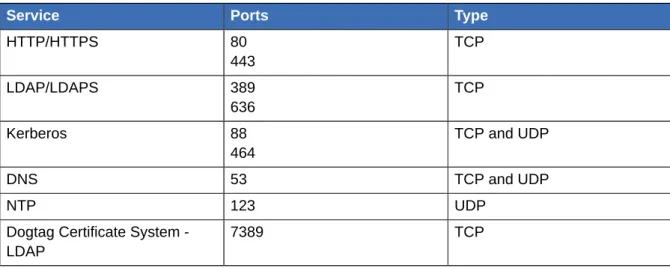
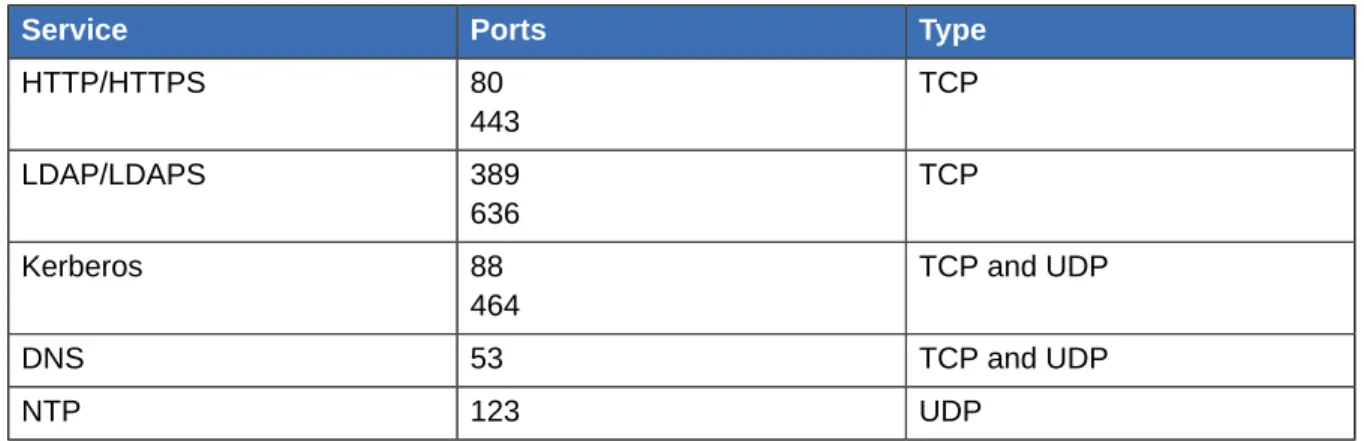
FreeIPA uses a number of ports to communicate with its services. These ports, listed in Table 2.1, “FreeIPA Ports”, must be open and available for FreeIPA to work. They cannot be in use by another service or blocked by a firewall. To make sure that these ports are available, try iptables to list the available ports or nc, telnet, or nmap to connect to a port or run a port scan.
To open a port:
[root@server ~]# iptables -A INPUT -p tcp --dport 389 -j ACCEPT
The iptables man page has more information on opening and closing ports on a system.
Table 2.1. FreeIPA Ports
Service Ports Type
HTTP/HTTPS 80 443 TCP LDAP/LDAPS 389 636 TCP Kerberos 88 464 TCP and UDP DNS 53 TCP and UDP NTP 123 UDP
Dogtag Certificate System -LDAP
7389 TCP
2.1.4.5. NTP
If a server is being installed on a virtual machine, that server should not run an NTP server. To disable NTP for FreeIPA, use the --no-ntp option.
2.1.4.6. NSCD
It is strongly recommended that you avoid or restrict the use of nscd in a FreeIPA deployment. The nscd service is extremely useful for reducing the load on the server, and for making clients more responsive, but there can be problems when a system is also using SSSD, which performs its own caching.
nscd caches authentication and identity information for all services that perform queries through nsswitch, including getent. Because nscd performs both positive and negative caching, if a request determines that a specific FreeIPA user does not exist, it marks this as a negative cache. Values stored in the cache remain until the cache expires, regardless of any changes that may occur on the server. The results of such caching is that new users and memberships may not be visible, and users and memberships that have been removed may still be visible.
Avoid clashes with SSSD caches and to prevent locking out users, avoid using nscd altogether. Alternatively, use a shorter cache time by resetting the time-to-live caching values in the /etc/ nscd.conf file:
positive-time-to-live group 3600 negative-time-to-live group 60 positive-time-to-live hosts 3600 negative-time-to-live hosts 20
2.1.5. Networking
2.1.5.1. Configuring Networking Services
The default networking service used by Fedora is NetworkManager, and due to the way this service works, it can cause problems with FreeIPA and the KDC. Consequently, it is highly recommended that you use the network service to manage the networking requirements in a FreeIPA environment and disable the NetworkManager service.
1. Boot the machine into single-user mode and run the following commands:
[root@server ~]# chkconfig NetworkManager off; service NetworkManager stop
2. If NetworkManagerDispatcher is installed, ensure that it is stopped and disabled:
[root@server ~]# chkconfig NetworkManagerDispatcher off; service NetworkManagerDispatcher stop
3. Then, make sure that the network service is properly started.
[root@server ~]# chkconfig network on; service network start
4. Ensure that static networking is correctly configured. 5. Restart the system.
2.1.5.2. Configuring the /etc/hosts File
You need to ensure that your /etc/hosts file is configured correctly. A misconfigured file can prevent the FreeIPA command-line tools from functioning correctly and can prevent the FreeIPA web interface from connecting to the FreeIPA server.
Configure the /etc/hosts file to list the FQDN for the FreeIPA server before any aliases. Also
ensure that the hostname is not part of the localhost entry. The following is an example of a valid hosts file:
127.0.0.1 localhost.localdomain localhost ::1 localhost6.localdomain6 localhost6 192.168.1.1 ipaserver.example.com ipaserver
Important
Do not omit the IPv4 entry in the /etc/hosts file. This entry is required by the FreeIPA web service.
2.2. Installing the FreeIPA Server Packages
Installing only the FreeIPA server requires a single package, freeipa-server. If the FreeIPA server will also manage a DNS server, then it requires two additional packages to set up the DNS.
Creating a FreeIPA Server Instance
[root@server ~]# yum install freeipa-server bind bind-dyndb-ldap
Installing the freeipa-server also installs a large number of dependencies, such as 389-ds-base for the LDAP service and krb5-server for the Kerberos service, along with FreeIPA tools.
After the packages are installed, the server instance must be created using the ipa-server-install command. The options for configuring the new server instance are described in Section 2.3, “Creating a FreeIPA Server Instance”.
2.3. Creating a FreeIPA Server Instance
The FreeIPA setup script creates a server instance, which includes configuring all of the required services for the FreeIPA domain:
• The network time daemon (ntpd) • A 389 Directory Server instance
• A Kerberos key distribution center (KDC) • Apache (httpd)
• An updated SELinux targeted policy • The Active Directory WinSync plug-in • A certificate authority
• Optional. A domain name service (DNS) server
The FreeIPA setup process can be minimal, where the administrator only supplies some required information, or it can be very specific, with user-defined settings for many parts of the FreeIPA services. The configuration is passed using arguments with the ipa-install-server script.
NOTE
The port numbers and directory locations used by FreeIPA are all defined automatically, as defined in Section 2.1.4.4, “System Ports” and . These ports and directories cannot be changed or customized.
2.3.1. About ipa-server-install
A FreeIPA server instance is created by running the ipa-server-install script. This script can accept user-defined settings for services, like DNS and Kerberos, that are used by the FreeIPA instance, or it can supply predefined values for minimal input from the administrator.
While ipa-server-install can be run without any options, so that it prompts for the required information, it has numerous arguments which allow the configuration process to be easily scripted or to supply additional information which is not requested during an interactive installation.
Table 2.2, “ipa-server-install Options” lists some common arguments with ipa-server-install, while Section 2.3.3, “Examples of Creating the FreeIPA Server” has examples of some common installation scenarios. The full list of options are in Section C.5.4, “ipa-server-install”. In real life, the
ipa-server-install options are versatile enough to be customized to the specific deployment environment.
Table 2.2. ipa-server-install Options
Argument Description
-a ipa_admin_password The password for the FreeIPA administrator. This is used for the admin user to authenticate to the Kerberos realm.
--hostname=hostname The fully-qualified domain name of the FreeIPA server machine.
IMPORTANT
This must be a valid DNS name, which means only numbers, alphabetic characters, and hyphens (-) are allowed. Other
characters, like underscores, in the hostname will cause DNS failures. Additionally, the hostname must all be lower-case. No capital letters are allowed.
-n domain_name The name of the LDAP server domain to use for
the FreeIPA domain. This is usually based on the FreeIPA server's hostname.
-p directory_manager_password The password for the superuser, cn=Directory Manager, for the LDAP service.
-r realm_name The name of the Kerberos realm to create for the
FreeIPA domain.
--subject=subject_DN Sets the base element for the subject DN of the issued certificates. This defaults to O=realm.
--forwarder=forwarder Gives a DNS forwarder to use with the DNS service. To specify more than one forwarder, use this option multiple times.
--no-forwarders Uses root servers with the DNS service instead of forwarders.
--no-reverse Does not create a reverse DNS zone when the
DNS domain is set up. (If a reverse DNS zone is already configured, then that existing reverse DNS zone is used.) If this option is not used, then the default value is true, which assumes that reverse DNS should be configured by the installation script.
--setup-dns Tells the installation script to set up a DNS
service within the FreeIPA domain. Using an integrated DNS service is optional, so if this
Setting up a FreeIPA Server: Basic Interactive Installation
Argument Description
option is not passed with the installation script, then no DNS is configured.
--idmax=number Sets the upper bound for IDs which can be
assigned by the FreeIPA server. The default value is the ID start value plus 199999. --idstart=number Sets the lower bound (starting value) for IDs
which can be assigned by the FreeIPA server. The default value is randomly selected.
2.3.2. Setting up a FreeIPA Server: Basic Interactive Installation
All that is required to set up a FreeIPA server is to run the ipa-server-install script. This launches the script interactively, which prompts for the required information to set up a server, but without more advanced configuration like DNS and CA options.
1. Run the ipa-server-install script.
[root@server ~]# ipa-server-install
2. Enter the hostname. This is determined automatically using reverse DNS.
Server host name [ipaserver.example.com]:
3. Enter the domain name. This is determined automatically based on the hostname.
Please confirm the domain name [example.com]:
4. The script then reprints the hostname, IP address, and domain name.
The IPA Master Server will be configured with Hostname: ipaserver.example.com
IP address: 192.168.1.1 Domain name: example.com
5. Enter the new Kerberos realm name. This is usually based on the domain name.
Please provide a realm name [EXAMPLE.COM]:
6. Enter the password for the Directory Server superuser, cn=Directory Manager. There are password strength requirements for this password, including a minimum password length.
Directory Manager password: Password (confirm):
7. Enter the password for the FreeIPA system user account, admin. This user is created on the machine.
IPA admin password: Password (confirm):
8. After that, the script configures all of the associated services for FreeIPA, with task counts and progress bars. Configuring ntpd [1/4]: stopping ntpd ... done configuring ntpd.
Configuring directory server for the CA: Estimated time 30 seconds [1/3]: creating directory server user
...
done configuring pkids.
Configuring certificate server: Estimated time 6 minutes [1/17]: creating certificate server user
....
done configuring pki-cad.
Configuring directory server: Estimated time 1 minute [1/32]: creating directory server user
...
done configuring dirsrv.
Configuring Kerberos KDC: Estimated time 30 seconds [1/14]: setting KDC account password
...
done configuring krb5kdc. Configuring ipa_kpasswd [1/2]: starting ipa_kpasswd
[2/2]: configuring ipa_kpasswd to start on boot done configuring ipa_kpasswd.
Configuring the web interface: Estimated time 1 minute [1/12]: disabling mod_ssl in httpd
...
done configuring httpd.
Setting the certificate subject base restarting certificate server Applying LDAP updates
Restarting the directory server Restarting the KDC
Restarting the web server
Sample zone file for bind has been created in /tmp/sample.zone.ygzij5.db ============================================================================== Setup complete
9. Restart the SSH service to retrieve the Kerberos principal and to refresh the name server switch (NSS) configuration file:
[root@server ~]# service sshd restart
10. Authenticate to the Kerberos realm using the admin user's credentials to ensure that the user is properly configured and the Kerberos realm is accessible.
[root@server ~]# kinit admin Password for [email protected]:
11. Test the FreeIPA configuration by running a command like ipa user-find. For example:
Examples of Creating the FreeIPA Server
1 user matched User login: admin
Last name: Administrator Home directory: /home/admin Login shell: /bin/bash Account disabled: False Member of groups: admins Number of entries returned 1
---2.3.3. Examples of Creating the FreeIPA Server
The way that a FreeIPA server is installed can be different depending on the network environment, security requirements within the organization, and the desired topology. These example illustrate some common options when installing the server. These examples are not mutually exclusive; it is entirely possible to use CA options, DNS options, and FreeIPA configuration options in the same server invocation. These are called out separately simply to make it more clear what each configuration area requires.
2.3.3.1. Non-Interactive Basic Installation
As shown in Section 2.3.2, “Setting up a FreeIPA Server: Basic Interactive Installation”, only a few pieces of information are required to configured a FreeIPA server. While the setup script can prompt for this information in interactive mode, this information can also be passed with the setup command to allow automated and unattended configuration:
• Passwords for the FreeIPA administrative user and the Directory Server super user (Directory Manager)
• The server hostname • The Kerberos realm name • The DNS domain name
This information can be passed with the ipa-server-install, along with the -U to force it to run without requiring user interaction.
Example 2.1. Basic Installation without Interaction
[root@server ~]# ipa-server-install -a secret12 --hostname=ipaserver.example.com -r EXAMPLE.COM -p secret12 -n example.com -U
The script then prints the submitted values:
To accept the default shown in brackets, press the Enter key. The IPA Master Server will be configured with
Hostname: ipaserver.example.com IP address: 192.168.1.1
Domain name: example.com
The server name must be a valid DNS name, which means only numbers, alphabetic characters, and hyphens (-) are allowed. Other characters, like underscores, in the hostname will cause DNS failures. Additionally, the hostname must all be lower-case. No capital letters are allowed.