M
Mo
od
de
ell 5
56
64
4T
T
➤
O
Ow
wn
ne
err’’ss G
Gu
uiid
de
e
H
lliim
miitte
ed
d lliiffe
ettiim
me
e c
co
on
nssu
um
me
err w
wa
arrrra
an
nttyy
For a period of one calendar year from the date of purchase of this auto-security device, Directed Electronics, Inc. promises to the ORIGINAL PURCHASER to repair or replace (with a comparable reconditioned model), free of cost, any electronic control module which proves to be defective in workmanship or material under normal use, SO LONG AS THE SYSTEM WAS SOLD, INSTALLED, AND SERVICED BY A PROFES-SIONAL AUTO INSTALLER, AND REMAINS IN THE CAR IN WHICH THE SYS-TEM WAS ORIGINALLY INSTALLED. If warranty service is necessary you must have a clear copy of your sales receipt containing all of the information shown on the follow-ing page.After the first calendar year, from the date of purchase of this auto-security device, Directed Electronics, Inc., promises to the ORIGINAL PURCHASER to repair or replace (with a comparable reconditioned model) any electronic control module which proves to be defective in workmanship or material under normal use FOR A CHARGE OF $45.00, SO LONG AS THE SYSTEM WAS SOLD, INSTALLED, AND SERVICED BY A PROFESSIONAL AUTO INSTALLER, AND REMAINS IN THE CAR IN WHICH THE SYSTEM WAS ORIGINALLY INSTALLED. If warranty service is necessary you must have a clear copy of your sales receipt containing all of the information shown on the following page.
This warranty contains the entire agreement relating to warranty and supersedes all pre-vious and contemporaneous representations or understandings, whether written or oral. IN ANY EVENT, DIRECTED ELECTRONICS, INC. IS NOT LIABLE FOR THE THEFT OF THE VEHICLE AND/OR ITS CONTENTS.
This warranty is void if the product has been damaged by accident, unreasonable use, neglect, improper service or other causes not arising out of defects in materials or con-struction. This warranty is nontransferable and does not apply to any unit that has been modified or used in a manner contrary to its intended purpose and does not cover bat-teries. The unit in question must be returned to the manufacturer, postage prepaid. This warranty does not cover labor costs for the removal, diagnosis, troubleshooting or rein-stallation of the unit. For service on an out-of-warranty product a flat rate fee by model is charged. Contact your authorized dealer to obtain the service charge for your unit. These systems are a deterrent against possible theft. Directed Electronics, Inc. is not offer-ing a guarantee or insuroffer-ing against the theft of the automobile or its contents and dis-claims any liability for the theft of the vehicle and/or its contents. Directed Electronics does not authorize any person to create for it any other obligation or liability in connec-tion with this security system.
TO THE MAXIMUM EXTENT ALLOWED BY LAW, ANY AND ALL WAR-RANTIES ARE EXCLUDED BY THE MANUFACTURER AND EACH ENTITY PARTICIPATING IN THE STREAM OF COMMERCE THEREWITH. THIS EXCLUSION INCLUDES BUT IS NOT LIMITED TO THE EXCLUSION OF ANY AND ALL WARRANTY OF MERCHANTABILITY AND/OR ANY AND ALL WAR-RANTY OF FITNESS FOR A PARTICULAR PURPOSE AND/OR ANY AND ALL WARRANTY OF NON-INFRINGEMENT OF PATENTS, IN THE UNITED STATES OF AMERICA AND/OR ABROAD. NEITHER THE MANUFACTURER OR ANY ENTITIES CONNECTED THEREWITH SHALL BE RESPONSIBLE OR LIABLE FOR ANY DAMAGES WHATSOEVER, INCLUDING BUT NOT LIMIT-ED TO ANY CONSEQUENTIAL DAMAGES, INCIDENTAL DAMAGES, TOW-ING, REPAIR, REPLACEMENT, DAMAGES FOR LOSS OF TIME, LOSS OF EARNINGS, COMMERCIAL LOSS, LOSS OF ECONOMIC OPPORTUNITY AND THE LIKE. NOTWITHSTANDING THE ABOVE, MANUFACTURER DOES OFFER A LIMITED WARRANTY TO REPLACE OR REPAIR THE CON-TROL MODULE AS DESCRIBED ABOVE. Some states do not allow limitations on how long an implied warranty will last or the exclusion or limitation of incidental or con-sequential damages. This warranty gives you specific legal rights, and you may also have other rights which vary from state to state.
IIMMPPOORRTTAANNTT NNOOTTEE::
This product warranty is automatically void if its date code or serial number is defaced, missing, or altered. This warranty will not be valid unless you have completed the war-ranty card and mailed it to Directed Electronics, Inc. within 10 days after purchase to the address listed on the warranty registration card.
Make sure you have all of the following information from your dealer: A clear copy of the sales receipt, showing the following:
➤ Date of purchase
➤ Your full name and address
➤ Authorized dealer's company name and address
➤ Type of alarm installed
➤ Year, make, model and color of the automobile
➤ Automobile license number
➤ Vehicle identification number
➤ All security options installed on automobile
tta
ab
blle
e o
off c
co
on
ntte
en
nttss
lliimmiitteedd lliiffeettiimmee ccoonnssuummeerr wwaarrrraannttyy.. .. .. .. .. .. .. .. .. .. .. .. .. .. .. .. .. .. .. .. .. .. .. .. .. .. .. .. .. .. .. .. .. .. .. .. .. .. .. .. ii
rreemmoottee ccoonnffiigguurraattiioonnss .. .. .. .. .. .. .. .. .. .. .. .. .. .. .. .. .. .. .. .. .. .. .. .. .. .. .. .. .. .. .. .. .. .. .. .. .. .. .. .. .. .. .. .. .. .. .. .. .. 33 LCD 2-way configuration . . . 3
standard 4-button configuration . . . 5
w whhaatt iiss iinncclluuddeedd .. .. .. .. .. .. .. .. .. .. .. .. .. .. .. .. .. .. .. .. .. .. .. .. .. .. .. .. .. .. .. .. .. .. .. .. .. .. .. .. .. .. .. .. .. .. .. .. .. .. .. .. .. .. 66 iimmppoorrttaanntt iinnffoorrmmaattiioonn .. .. .. .. .. .. .. .. .. .. .. .. .. .. .. .. .. .. .. .. .. .. .. .. .. .. .. .. .. .. .. .. .. .. .. .. .. .. .. .. .. .. .. .. .. .. .. .. .. 66 system maintenance . . . 7
your warranty . . . 8
fcc/id notice . . . 8
caution . . . 9
rreemmoottee ffuunnccttiioonnss .. .. .. .. .. .. .. .. .. .. .. .. .. .. .. .. .. .. .. .. .. .. .. .. .. .. .. .. .. .. .. .. .. .. .. .. .. .. .. .. .. .. .. .. .. .. .. .. .. .. .. .. 1100 LCD 2-way remote standard configuration. . . 10
Standard LCD 2-way icon configuration . . . 12
4-button remote standard configuration . . . 18
L LCCDD 22--wwaayy rreemmoottee ooppeerraattiioonn .. .. .. .. .. .. .. .. .. .. .. .. .. .. .. .. .. .. .. .. .. .. .. .. .. .. .. .. .. .. .. .. .. .. .. .. .. .. .. .. .. .. 1199 system signal paging features . . . 19
u ussiinngg yyoouurr ssyysstteemm .. .. .. .. .. .. .. .. .. .. .. .. .. .. .. .. .. .. .. .. .. .. .. .. .. .. .. .. .. .. .. .. .. .. .. .. .. .. .. .. .. .. .. .. .. .. .. .. .. .. .. 2200 warning! safety first . . . 20
active arming. . . 22
passive arming. . . 23
warn away® response description . . . 24
triggered response description . . . 25
multi-level security arming . . . 26
arming while driving . . . 27
disarming . . . 28
disarming while driving. . . 28
high security disarm . . . 28
disarming without a remote . . . 29
silent mode . . . 30 panic mode . . . 30 valet® mode . . . 31 remote start. . . 32 valet® take-over . . . 34 short-run/turbo . . . 35
setting the clock . . . 35
temperature check mode . . . 36
timer mode . . . 36
ssaaffeettyy ffeeaattuurreess.. .. .. .. .. .. .. .. .. .. .. .. .. .. .. .. .. .. .. .. .. .. .. .. .. .. .. .. .. .. .. .. .. .. .. .. .. .. .. .. .. .. .. .. .. .. .. .. .. .. .. .. .. .. .. 3377 starter anti-grind circuitry . . . 37
over and under rev protection . . . 38
shut down inputs . . . 38
nuisance prevention circuitry . . . 39
2 244--hhoouurr ttiimmeerr mmooddee .. .. .. .. .. .. .. .. .. .. .. .. .. .. .. .. .. .. .. .. .. .. .. .. .. .. .. .. .. .. .. .. .. .. .. .. .. .. .. .. .. .. .. .. .. .. .. .. .. 4400 d diiaaggnnoossttiiccss .. .. .. .. .. .. .. .. .. .. .. .. .. .. .. .. .. .. .. .. .. .. .. .. .. .. .. .. .. .. .. .. .. .. .. .. .. .. .. .. .. .. .. .. .. .. .. .. .. .. .. .. .. .. .. .. .. 4400 arming diagnostics . . . 41
disarming diagnostics . . . 41
system status chirps . . . 42
table of zones . . . 42
interpreting zone diagnostics . . . 43 ccooddee hhooppppiinngg .. .. .. .. .. .. .. .. .. .. .. .. .. .. .. .. .. .. .. .. .. .. .. .. .. .. .. .. .. .. .. .. .. .. .. .. .. .. .. .. .. .. .. .. .. .. .. .. .. .. .. .. .. .. .. 4444 h
hiigghh ffrreeqquueennccyy .. .. .. .. .. .. .. .. .. .. .. .. .. .. .. .. .. .. .. .. .. .. .. .. .. .. .. .. .. .. .. .. .. .. .. .. .. .. .. .. .. .. .. .. .. .. .. .. .. .. .. .. .. .. 4444 oowwnneerr rreeccooggnniittiioonn .. .. .. .. .. .. .. .. .. .. .. .. .. .. .. .. .. .. .. .. .. .. .. .. .. .. .. .. .. .. .. .. .. .. .. .. .. .. .. .. .. .. .. .. .. .. .. .. .. .. .. 4455 rraappiidd rreessuummee llooggiicc .. .. .. .. .. .. .. .. .. .. .. .. .. .. .. .. .. .. .. .. .. .. .. .. .. .. .. .. .. .. .. .. .. .. .. .. .. .. .. .. .. .. .. .. .. .. .. .. .. .. .. 4455 p
poowweerr ssaavveerr mmooddee .. .. .. .. .. .. .. .. .. .. .. .. .. .. .. .. .. .. .. .. .. .. .. .. .. .. .. .. .. .. .. .. .. .. .. .. .. .. .. .. .. .. .. .. .. .. .. .. .. .. .. 4466 p
prrooggrraammmmiinngg ooppttiioonnss .. .. .. .. .. .. .. .. .. .. .. .. .. .. .. .. .. .. .. .. .. .. .. .. .. .. .. .. .. .. .. .. .. .. .. .. .. .. .. .. .. .. .. .. .. .. .. .. 4466 sseeccuurriittyy && ccoonnvveenniieennccee eexxppaannssiioonnss .. .. .. .. .. .. .. .. .. .. .. .. .. .. .. .. .. .. .. .. .. .. .. .. .. .. .. .. .. .. .. .. .. .. .. .. .. .. 4499 gglloossssaarryy ooff tteerrmmss .. .. .. .. .. .. .. .. .. .. .. .. .. .. .. .. .. .. .. .. .. .. .. .. .. .. .. .. .. .. .. .. .. .. .. .. .. .. .. .. .. .. .. .. .. .. .. .. .. .. .. .. 5511
rre
em
mo
otte
e c
co
on
nffiig
gu
urra
attiio
on
nss
LCD 2-way configuration
1 2 3 4 5 6 7 8 9 10 11 12 13 14 15 16 17 18 19 20 21 22 23 24 25 26 27 28 29 30 31➜
1 Vehicle Interior Temperature Indicator
2 Numeric Display
3 AM/PM Indicator
4 Alarm Clock Mode Indicator 5 Timer Function Indicator 6 Transmit Range Indicator 7 Transmission Indication 8 Vibrate/Beep Mode Indicator 9 Power Saver Mode Indicator 10 Remote Start Timer Mode Indicator
11 No Function
12 Vehicle Page Mode Indicator 13 Full Trigger Shock Sensor Indicator 14 Hood/Trunk Open or Trigger Indicator 15 Parking Light Indicator
16 Door Open or Trigger Indicator
17 Arm/Lock Button
18 Disarm/Unlock Button 19 Remote Start Indicator
20 Hood/Trunk Open or Trigger Indicator 21 Remote Start Button
22 Valet®Mode Indicator
23 Remote Start Safety Shutdown Indicator 24 Battery Level Indicator
25 Auxiliary Button
26 Temperature-Controlled Remote Start Indicator 27 Silent Arm/Disarm Mode Indicator
28 Full Trigger Alert Indicator 29 Arm/Disarm Indicator
30 Function Button
standard 4-button configuration
controls the AArrmm and PPaanniicc On/Off function.
controls the DDiissaarrmm and PPaanniicc Off function.
controls SSiilleenntt MMooddee™™ and AAuuxxiilliiaarryy channel 22 output.
controls the RReemmoottee SSttaarrtt function.
and pressed together control the TTiimmeerr mode.
and pressed together control TTuurrbboo//SShhoorrtt RRuunn.
and pressed together control channel 44 output.
and pressed together control channel 55 output
w
wh
ha
att iiss iin
nc
cllu
ud
de
ed
d
➤ Control module
➤ ASK transceiver/antenna
➤ One 4-button remote
➤ One 2-way LCD remote
➤ Stinger™ DoubleGuard®2-stage shock sensor
➤ Revenger™ Soft Chirp™ 6-tone programmable siren
➤ Status LED indicator light ➤ Push-button Valet®switch
➤ Your warranty registration
➤ Shut-down toggle switch
iim
mp
po
orrtta
an
ntt iin
nffo
orrm
ma
attiio
on
n
Congratulations on the purchase of your combination remote start alarm system. Due to the complexity of this system, it must be installed by an authorized dealer only. Installation of this product by anyone other than an authorized dealer voids the warranty. All dealers are provided with a preprinted dealer certif-icate to verify authorization.
By carefully reading this Owner's Guide prior to using your system, you will maximize the use of this system and its features. You can print additional or replacement copies of this manual by accessing our web site at www.directed.com.
system maintenance
The system requires no specific maintenance other than battery replacement for the remotes.
LCD 2-Way Remote Battery Replacement
The 2-way remote is powered by a 1.5V AAA battery. The Battery Level indicator has three level indicators that serve as a visual indication of battery charge. When the battery reaches a low charge level that requires replacement, the transceiver will generate a single notification chirp, and the Battery Level indi-cator will flash continuously.
To replace the battery, gently pull the battery cover release tab, then slide the door down to expose the battery and remove the expired battery. Place the new battery into the transceiver observing the correct polarity. When power is returned the transceiver will light all icons in the LCD and generate all beeper tones once.
4-Button Remote Battery Replacement
Your remote is powered by a small, lightweight 3-volt lithium battery (CR2032) that will last approximately one year under normal use. When the battery begins to weaken, operating range will be reduced and the LED on the remote will dim.
your warranty
Your warranty registration must be completely filled out and returned within 10 days of purchase. Your product warranty will not be validated if your warranty registration is not returned. Make sure you receive the warranty registration from your dealer. It is also necessary to keep your proof of purchase, which reflects that the product was installed by an authorized dealer.
fcc/id notice
This device complies with Part 15 of FCC rules. Operation is subject to the following two conditions: (1) This device may not cause harmful interference, and (2) This device must accept any interference received, including interference that may cause undesirable operation.
Tested to Comply
with FCC Standards
Directed Electronics, Inc. 477T Series
Tested to Comply
with FCC Standards
Directed Electronics, Inc. 544 Series
➜
➜
Changes or modifications not expressly approved by the party responsible for compliance could void the user's authority to operate this device.
caution
This product is designed for fuel injected, automatic transmission vehicles only. Use of this product in a standard transmission vehicle is dangerous and contrary the product's intended use.
➜
Tested to Comply
with FCC Standards
rre
em
mo
otte
e ffu
un
nc
cttiio
on
nss
The remote buttons are used to send commands to the system. The descriptions below reflect the standard configuration for this system. The buttons can be custom configured for the user’s specific needs by the installer.
LCD 2-way remote standard configuration
LCD 2-way button configuration Button
The System Arm/Lock and Multi-Level Security Arming func-tions are controlled by pressing this button.
Button
The System Disarm/Unlock and High Security Disarm functions are controlled by pressing this button.
Button
Channel 2 output is controlled by pressing and holding this button for two seconds.
Button
The panic feature is controlled by pressing and holding this button for three seconds. Press again to disable panic mode.
Button
The LCD backlighting will turn on when pressed for less than one second; when held for more than five seconds the transceiver will enter adjustment mode allowing the setting of the clock, timer mode, and audible melody selection. For more information, please refer to the Function Button Configurations section of this guide.
Button
The remote start function of the system is controlled by pressing this button for one second. To stop the remote start press this button twice. Also, stepping on the brake pedal will cancel the remote start.
Button
When pressed and held this button activates the second unlock or other accessory.
and Buttons
When pressed simultaneously these buttons activate remote start timer mode, engaging the remote start function every 24 hours.
, and Buttons
When pressed simultaneously these buttons display the internal temperature of the vehicle on the LCD.
and Buttons
When pressed simultaneously with the system armed, the system enters temperature auto start mode and automatically remote starts the vehicle if the temperature inside the vehicle drops below 0 degrees Fahrenheit.
and Buttons
The numeric display toggles between the time of the day and the alarm clock when these buttons are pressed simultaneously.
note:Disarming the system while in temperature auto start mode will cause the system to exit this mode.
and Buttons
Press these buttons simultaneously to activate the parking timer. Each additional press will toggle through the available options (10 min., 20 min., 30 min., 1 hour, 1.5 hours, 2 hours, and off ).
and Buttons
When pressed simultaneously these buttons toggle between beep notification and vibrate notification.
and Buttons
When pressed simultaneously these buttons activate battery saver mode, which will drop power consumption on the trans-ceiver battery to zero when the alarm is inactive or disarmed.
Standard LCD 2-way icon configuration
Icon
The vehicle interior temperature icon displays the temperature of the inside of the vehicle when prompted.
Icon
The numeric display icon will show the hours and minutes. Icon
The AM/PM icon indicates the time before or after noon. Icon
The alarm clock mode icon indicates that the alarm clock mode is active.
Icon
The timer function icon flashes during timed functions including parking timer.
Icon
The transmit range indicator icon stays visible as long as the system is within operating range.
Icon
The remote transmission indicator icon displays when the trans-ceiver is transmitting a signal.
Icon
The vibrate/beep mode icon appears when the transceiver is set to vibrate mode.
Icon
The power saver mode can be turned on or off with the trans-ceiver. This icon displays the status.
Icon
The remote start timer mode icon indicates the 24-hour autostart feature is active and automatically remote starts 24 hours from the time activated.
Icon
The VRS mode icon has no function. Icon
The vehicle page mode icon displays when the alarm module is paging the transceiver.
Icon
The full trigger shock sensor icon indicates that the shock sensor has been triggered by a hard shock.
and Icons
The hood/trunk open or trigger icon illuminates when the hood or trunk trigger has been activated or the hood or trunk is open, and bypasses those zones until it is closed.
Icon
The parking light icon will flash twice when armed or disarmed. The icon also flashes during WarnAway and at the beginning and end of remote start cycles.
Icon
The door open or trigger icon illuminates when the door trigger has been activated or the door is open, and bypasses that zone until it is closed.
Icon
The remote start icon indicates when the vehicle is remotely started.
Icon
The Valet®mode icon appears when the system is in Valet®mode. Icon
The remote start safety shut down icon indicates the vehicle may be in gear or other unsafe condition inhibiting remote start operation.
Icon
The battery level icon indicates the level of power remaining in the battery.
Icon
The temperature-controlled remote start icon indicates that the system has entered the temperature remote start mode and auto-matically starts the vehicle if the temperature of the vehicle drops below 0 degrees Fahrenheit.
Icon
The silent arm/disarm icon appears when the system has been armed or disarmed in the silent mode.
Icon
The full trigger alert icon illuminates when the security system has been triggered by a heavy impact, door trigger violation, optional sensor violation, or a hood/trunk trigger.
Icon
The arm icon appears when the vehicle is armed and locked. The disarm icon appears when the vehicle is disarmed and unlocked.
Icon
Celsius/Fahrenheit icon indicates the current mode of the displayed temperature either in Celsius or Fahrenheit.
Standard LCD 2-way button functions
A Auuddiibbllee F
Fuunnccttiioonn BBuuttttoonn IIccoonn IInnddiiccaattiioonn
Lamp On (10 sec)
Power-Saver Mode* + Melody
Beep/Vibrate Mode + 4 Vibrations/ 1 Beep Time Adjust for 5 Seconds 2 Beeps Mode (hour)**
Time Adjust 1 Time*** Mode (min)**
Alarm Clock 2 Times*** Set Mode (hour)**
Alarm Clock 3 Times*** Set Mode (min)**
Alarm Clock Music 4 Times*** 5 Selections
or Power on Music 1/2/3/4/5
Selection**
Alarm Clock Adjust 5 Times*** Mode (on/off )**
Timer Count Down 6 Times*** Adjust Mode
(hour)**
Timer Count Down 7 Times*** Adjust Mode
(min)**
Timer Count 8 Times*** 5 Selections
Down Ending Melody 1/2/3/4/5
Selection 1**
RS Timer Count 9 Times*** Down Mode (on/off )*
Remote Start On 10 times*** 5 Selections
Melody Selection 2 1/2/3/4/5
10 Min Parking + 1 Time Melody Count Down Mode
20 Min Parking + 2 Times Melody Count Down Mode
30 Min Parking + 3 Times Melody Count Down Mode
60 Min Parking + 4 Times Melody Count Down Mode
90 Min Parking + 5 Times Melody Count Down Mode
120 Min Parking + 6 Times Melody Count Down Mode
Parking Count Down + 7 Times Melody Off Mode
Alarm Clock Mode + Melody
On/Off****
Celsius/Fahrenheit + + or Melody Select Mode
* This function will operate in the disarmed state only.
** The button will advance the selection upward. The but-ton will advance the selection downward or select the off setting. *** Be sure to hold down for five seconds prior to entering timer clock adjust mode operation.
**** Press once to have the alarm clock on. Press twice to have the alarm clock off.
The remote will revert to normal operation from the set mode when 15-seconds has elapsed without a button entry.
4-button remote standard configuration
Button
The arming is controlled by pressing this button. The panic alarm is triggered by pressing and holding this button. Press this button again to cancel the panic alarm.
Button
The disarming function is controlled by pressing this button. Button
Silent Mode™ and an optional auxiliary function are controlled by this button. (Silent Mode works by pressing this button for less than one second before arming or disarming. An optional auxiliary function, such as trunk release, can be controlled by pressing and holding this button for 1.5 seconds.)
The auxiliary output controls __________________________.
Button
The remote start function of your system is controlled by pressing this button.
and Buttons
An optional auxiliary convenience or expansion function that you have added to your system can be activated by pressing these buttons simultaneously.
The auxiliary output controls __________________________.
and Buttons
An optional auxiliary convenience or expansion function that you have added to your system can be activated by pressing these buttons simultaneously.
The auxiliary output controls __________________________. and Buttons
The remote start timer mode is controlled by pressing these buttons simultaneously.
and Buttons
The short-run turbo mode is activated when these buttons are pressed simultaneously.
L
LC
CD
D 2
2--w
wa
ayy rre
em
mo
otte
e o
op
pe
erra
attiio
on
n
The remote start system operates at 434 MHz and incorporates Directed’s proprietary A.S.K. out-board two-way transceiver. The high frequency combined with Binary Data communication achieves superior range with two-way communication.
system signal paging features
A page is the signal the control module sends to the transceiver as confirmation of receipt of a command or alarm system status. When the transceiver receives a page it will generate a page notifi-cation to the user (notifinotifi-cations are audible beeps or the remote vibrates) and the LCD icons will display the current system status.
Command Page
When a command (arm/disarm, remote start, or auxiliary channel) from the transceiver is sent and received, the system will send a command page back to confirm receipt.
Page Recognition Mode
The transceiver will leave a zone icon illuminated when it has received a triggered response and will wait for violation recogni-tion. Press any button on the transceiver, the LCD information and alarm page alerts will be cleared.
u
ussiin
ng
g yyo
ou
urr ssyysstte
em
m
warning! safety first
The following safety warnings must be observed at all times: ➤ Due to the complexity of this system, installation of this
product must only be performed by an authorized Directed dealer.
➤ When properly installed, this system can start the vehicle via a command signal from the remote control. Therefore, never operate the system in an enclosed area or partially enclosed area without ventilation (such as a garage). When parking in an enclosed or partially enclosed area or when having the
➜
note:The transceiver buttons will not send a command to the system until the alarm page is cleared.
vehicle serviced, the remote start system must be disabled using the installed toggle switch. It is the user's sole respon-sibility to properly handle and keep out of reach from chil-dren all remote controls to assure that the system does not unintentionally remote start the vehicle. TTHHEE UUSSEERR MMUUSSTT IINNSSTTAALLLL AA CCAARRBBOONN MMOONNOOXXIIDDEE DDEETTEECCTTOORR IINN O
ORR AABBOOUUTT TTHHEE LLIIVVIINNGG AARREEAA AADDJJAACCEENNTT TTOO TTHHEE V
VEEHHIICCLLEE.. AALLLL DDOOOORRSS LLEEAADDIINNGG FFRROOMM AADDJJAACCEENNTT L
LIIVVIINNGG AARREEAASS TTOO TTHHEE EENNCCLLOOSSEEDD OORR PPAARRTTIIAALLLLYY E
ENNCCLLOOSSEEDD VVEEHHIICCLLEE SSTTOORRAAGGEE AARREEAA MMUUSSTT AATT A
ALLLL TTIIMMEESS RREEMMAAIINN CCLLOOSSEEDD.. These precautions are the sole responsibility of the user.
➤ Use of this product in a manner contrary to its intended
mode of operation may result in property damage, personal injury, or death. (1) Never remotely start the vehicle with the vehicle in gear, and (2) Never remotely start the vehicle with the keys in the ignition. The user must also have the neutral safety feature of the vehicle periodically checked, wherein the vehicle must not remotely start while the car is in gear. This testing should be performed by an authorized Directed dealer in accordance with the Safety Check outlined in the product installation guide. If the vehicle starts in gear, cease remote start operation immediately and consult with the authorized Directed dealer to fix the problem.
➤ After the remote start module has been installed, contact
your authorized dealer to have him or her test the remote start module by performing the Safety Check outlined in the
product installation guide. If the vehicle starts when performing the Neutral Safety Shutdown Circuit test, the remote start unit has not been properly installed. The remote start module must be removed or the installer must properly reinstall the remote start system so that the vehicle does not start in gear. All installations must be performed by an autho-rized Directed dealer. OOPPEERRAATTIIOONN OOFF TTHHEE RREEMMOOTTEE SSTTAARRTT MMOODDUULLEE IIFF TTHHEE VVEEHHIICCLLEE SSTTAARRTTSS IINN GGEEAARR IISS CCOONNTTRRAARRYY TTOO IITTSS IINNTTEENNDDEEDD MMOODDEE OOFF OOPPEER R--A
ATTIIOONN.. OOPPEERRAATTIINNGG TTHHEE RREEMMOOTTEE SSTTAARRTT SSYYSSTTEEMM U
UNNDDEERR TTHHEESSEE CCOONNDDIITTIIOONNSS MMAAYY RREESSUULLTT IINN P
PRROOPPEERRTTYY DDAAMMAAGGEE OORR PPEERRSSOONNAALL IINNJJUURRYY.. YYOOUU M
MUUSSTT IIMMMMEEDDIIAATTEELLYY CCEEAASSEE TTHHEE UUSSEE OOFF TTHHEE U
UNNIITT AANNDD SSEEEEKK TTHHEE AASSSSIISSTTAANNCCEE OOFF AANN AAUUTTHHO O--R
RIIZZEEDD DDIIRREECCTTEEDD DDEEAALLEERR TTOO RREEPPAAIIRR OORR D
DIISSCCOONNNNEECCTT TTHHEE IINNSSTTAALLLLEEDD RREEMMOOTTEE SSTTAARRTT M
MOODDUULLEE.. DDIIRREECCTTEEDD WWIILLLL NNOOTT BBEE HHEELLDD R
REESSPPOONNSSIIBBLLEE OORR PPAAYY FFOORR IINNSSTTAALLLLAATTIIOONN OORR R
REEIINNSSTTAALLLLAATTIIOONN CCOOSSTTSS..
active arming
You can arm the system by pressing of your remote for one
second. When the system arms, you will hear a short siren sound, or chirp, and see the parking lights flash once. If the power door locks are controlled by the system, the doors will also lock. While the system is armed, the status LED will flash approximately once per second, indicating that the system is actively protecting your
status LED is flashing in groups, see the Diagnostics Section of this guide. This extra chirp is called Bypass Notification, which indicates that a security sensor or switch has been bypassed and the system is not monitoring that area (zone) of the vehicle.
passive arming
The system can be programmed to arm itself automatically (called passive arming). If the system is programmed for passive arming, it will automatically arm 30 seconds after the ignition is turned off and the system detects that you have left the vehicle by opening and closing a door. Whenever the system is in its 30-second passive arming countdown, the status LED will flash twice as fast as it does when the system is armed. At the 20-second point of the count-down, the siren will chirp to indicate that the system is about to arm. At the 30-second point, the parking lights will flash to indicate that the system is armed.
When armed your vehicle is protected as follows:
➤ Light impacts trigger the Warn Away®signal. When triggered, the siren chirps and the parking lights flash for a few seconds.
➤ Heavy impacts trip a Triggered Sequence. The sequence
consists of the siren sounding continuously and the parking lights flashing for a pre-programmed period, which can range in duration from 1 to 180 seconds.
note: If any protected entry point (such as a door or a switch-protected trunk or hood) is open, the system will not passively arm (unless forced passive arming is pro-grammed on. See Programming Options section.) Addi-tionally, each time a sensor is triggered during the arming countdown, the 30-second countdown starts over.
➜
➤ If a door is opened, the system will immediately start chirping the siren and flashing the parking lights. Three seconds later, the siren output changes to a continuous blast. This progressive response gives you time to disarm the system with your remote if you inadvertently open the door while the system is armed, while still providing instant response (even if the door is immediately closed).
➤ Turning on the ignition key will trip the same progressive re-sponse as opening a door.
➤ The optional starter kill prevents the vehicle’s starter from cranking.
warn away
®response description
A Warn Away®Response consists of an alarm page along with the responses described below.
➤ SShhoocckk SSeennssoorr - Light impacts to the vehicle will flash the vehicle lights and chirp the siren for a few seconds.
➤ RReemmoottee CCoonnttrrooll NNoottiiffiiccaattiioonn - Ten quick beeps (or one vibration).
➤ RReemmoottee CCoonnttrrooll LLCCDD - The full trigger alert icon (28) will dimly illuminate for two seconds
➤ The transceiver will enter Page Recognition Mode and
operate alarm page alerts.
note:Icons 13 and 14 represent alarm system zone inputs. For more information about icons and the zones they represent refer to the Standard Remote Configurations section.
triggered response description
A Triggered Response can be activated by any of the triggers listed below and consists of an alarm page along with the response described for each trigger. The default Triggered Response dura-tion is 30 seconds but can be programmed from 1-180 seconds by your installer with the Directed Bitwriter®.
➤ SSeennssoorr TTrriiggggeerr - Heavy impacts to the vehicle will instantly sound the siren and flash the lights for the programmed duration and report Zone 2.
➤ DDoooorr TTrriiggggeerr - If a door is opened the siren will chirp for three seconds, then the siren will sound and the lights will flash for the programmed duration and report Zone 3. The three seconds allow the user time to disarm the system with a minimum of noise should a door be opened inadvertently while the system is armed.
➤ HHoooodd TTrriiggggeerr - Opening the hood will sound the siren, flash the lights for the programmed duration, and report Zone 1. ➤ TTrruunnkk TTrriiggggeerr - Opening the trunk (if connected) will
instantly sound the siren and flash the lights for the programmed duration and report Zone 4.
➤ IIggnniittiioonn TTrriiggggeerr - If the ignition is turned on the siren will chirp for three seconds, then the siren will sound and the lights will flash for the programmed duration and report Zone 5. When a Triggered Response is activated the transceiver will:
➤ Repeat four quick beeps (or vibrate) for 15 seconds. ➤ The full trigger alert icon (28) will turn on for 15 seconds.
➤ The zone icons will turn on and remain on until a transceiver button is pressed, clearing the page alert.
➤ The transceiver will enter page recognition mode and
generate alarm page alerts.
multi-level security arming
Multi-Level Security Arming allows you to select which of the system's inputs or sensors will be active and which will be bypassed when the system is armed. (See Table of Zones section
of this guide.) Pressing (only in Standard Configuration)
again within five seconds of arming the system will activate the Multi-Level Security feature. Each time is pressed again, a different security level is selected. The different security levels are selected as follows:
➤ Press once: The siren chirps once. The system is armed.
➤ Press a second time within five seconds: The siren chirps twice followed by a long chirp. Zone 2 is now bypassed.
➤ Press a third time within five seconds: The siren chirps
three times followed by a long chirp. Zone 4 is now bypassed. ➤ Press a fourth time within five seconds: The siren chirps four times followed by a long chirp. Zones 2 and 4 are now bypassed.
➜
note:Icons 13, 14, 16, and 20 represent alarm system triggered sequence zone inputs. For more information about icons and the zones they represent refer to the Standard Remote Configurations section.
➤ Press a fifth time within five seconds: The siren chirps five times followed by a long chirp. All input zones, except the ignition, are now bypassed.
arming while driving
Your security system can be armed while driving the vehicle!
Simply press on the remote for two seconds while the
vehicle is running. The siren will chirp once to indicate that the security system is armed, and then once more to indicate that the ignition is on. The system will not respond to any input except the door triggers, and the starter kill relay (if installed) will not be activated. Once you have arrived at your destination, the system will disarm when the ignition is turned off. The siren will chirp twice and the LED will then stop flashing. The system can also be disarmed at any time by pressing .
The LCD 2-way remote will beep once (or vibrate), and the arm icon (29) will be displayed on the LCD.
note:If the transceiver received a Warn Away®or triggered
response page while armed, the first press of the unlock button will clear the page alert. A second press will turn the siren off, and a third press will disarm the system.
➜
note:Multi-Level Security Arming only applies to a sin-gle arming cycle. Once the system is disarmed and then re-armed, all the zones will be active again.
disarming
To disarm the security system, press . You will hear two
chirps, and the parking lights will flash twice. If the power locks are controlled by the system, the doors will also unlock. The siren chirping either four or five times when disarming indicates Tamper Alert, which is described in the Diagnostics Section of this guide.
disarming while driving
Press on the remote or simply turn off the ignition to
disarm the system. The lights will flash twice, the doors will unlock, the siren will chirp twice, and the status LED will turn off. The 2-way remote will beep twice (or vibrate). The disarm icon (29) will be displayed on the LCD.
high security disarm
This security system offers High Security Disarm. High Security Disarm is a feature that makes it possible to silence and reset the system while it is triggering, without disarming the system. If the system is triggered and the siren has been sounding for longer
than six seconds, pressing on the remote will stop the
trigger and return the unit to the armed state. The system will not disarm, but rather reset. This prevents you from disabling the system should you wish to disarm it without visually checking the vehicle. Pressing after resetting the system will disarm the system; pressing this button during the first six
➜
➜
➜
seconds of the triggered sequence will disarm the security system immediately. The six second timer is provided for your conve-nience, in case the system is accidentally triggered.
disarming without a remote
If your remote is lost or damaged, you can manually disarm your vehicle security system. To disarm the system without a remote, you must have the vehicle's ignition key and know where the Valet® button is located. Be sure to check with your installer at the time of installation for both the location and the preset response (1-5 presses) of the Valet®button.
To disarm the security system, turn the ignition to the ON posi-tion. Press the Valet® button the preset number of times (one to five times) within 15 seconds. After five seconds, the system will disarm. If the system does not disarm, you may have waited too long; turn the ignition off and on and try again.
Location of Valet®Button_________________________________
Number of Presses_____________________________________
important! The Valet® button can be programmed to
respond to 1-5 presses for the disarm function. You must check with the installer to verify the programming for your individual unit.
DRW-35
➜
silent mode
To temporarily turn off the arm or disarm chirps, use Silent
Mode™. Simply press for less than one second before
arming or disarming, and the confirmation chirp(s) will be elim-inated for that one operation only. If you want the arm/disarm chirps turned off permanently, your dealer can do this for you.
panic mode
If you are threatened in or near your vehicle, you can attract attention by triggering the system with your remote. Just press for two seconds, and you will enter Panic Mode. The siren will sound and the parking lights will flash for the programmed
siren duration. To stop Panic Mode at any time, press on
the remote again.
The LCD 2-way remote will beep (or vibrate) continuously when the system enters panic mode. The 2-way remote will not generate a page notification when panic mode is exited.
note:Once panic mode has been entered, the siren will sound for the programmed duration.
➜
note: The Warn Away® response to lighter impacts is
bypassed if the system is armed using Silent Mode. This ensures that no chirps will be emitted by the siren in an area you want chirp-free. The system is still fully capable of triggering. Only the Warn Away®response is bypassed.
valet
®mode
You can prevent your security system from automatically arming and triggering by using Valet® Mode. This is very useful when washing the vehicle or having it serviced. In Valet® Mode, the security system will not arm, even with the remote, but all convenience functions (door locks, trunk release, etc.) will continue to work normally.
To enter or exit Valet®Mode:
1. Turn the ignition on. 2. Turn the ignition off.
3. Press and release the Valet®
button within 10 seconds.
The status LED will light solidly if you are entering Valet® Mode, and it will go out if you are exiting Valet®Mode.
To enter or exit Valet®Mode using the remote:
Steps 2 through 3 must be quickly and smoothly completed. 1. Open any vehicle door.
2. Press . 3. Press . 4. Press again.
The status LED will light solidly if you are entering Valet® Mode, and it will go out if you are exiting Valet®Mode.
DRW-35
remote start
This feature allows you to remotely start and run your vehicle for a programmable period of time. This makes it possible to warm up the engine, as well as adjust the interior temperature of the vehicle with the climate control system. If interior heating or cooling is desired, the climate controls must be preset, and the fan blower must be set to the desired level prior to remote starting the vehicle.
To remote start the vehicle:
1. Press on the remote twice within 3 seconds.
2. The parking lights will flash to confirm that the vehicle will attempt to start.
3. A remote start page notification with a unique melody (or vibration) will be generated and the LCD will display the remote start (19) icon as long as the vehicle is running.
4. In gasoline vehicles, the engine will start 4 seconds after the parking lights flash. In diesel vehicles, the engine will start when the WAIT-TO-START indicator on the vehicle's dash
note: The 2-way remote will generate a Page Notification with a different unique two-tone beep (or vibrate) and the remote start (19) icon will turn off when the remote start shuts down.
iimmppoorrttaanntt!! (1) Never remote start your vehicle when the keys are in the ignition, except when performing Valet®
Take-Over, and (2) Never start the vehicle if it is not in either PARK or NEUTRAL.
5. Once the vehicle has started, it will run for the pre-program-med period of time (either 12, 24, or 60 minutes - see Programming Options section of this guide) or until a shut-down input is triggered.
When you are ready to drive the vehicle:
1. Insert the ignition key and turn it to the ON (not START) po-sition.
2. Press the brake pedal.
While the vehicle is running during remote start operation, the system will monitor the vehicle and will automatically shut down the engine if the system receives any of the following shut-down inputs:
➤ The brake pedal is pressed.
➤ The hood is opened.
➤ The shutdown toggle switch is put into the OFF position.
➤ The pre-programmed run time (12, 24, or 60 minutes) has
elapsed.
➤ Remote button is pressed twice within 3 seconds.
The LCD 2-way remote will generate a page notification with a note:If the brake pedal is pressed before the key is in the ON position, the engine will shut down.
iimmppoorrttaanntt!! It is unsafe to operate a vehicle’s motor in a garage or other closed off area. Breathing the exhaust from the vehicle is hazardous to your health. Never acti-vate the remote start in an enclosed space.
unique melody (or vibrate) and the remote start icon (19) will turn off when the remote start shuts down.
valet
®take-over
The Valet® Take-Over feature allows the vehicle to remain
running after the key has been removed from the ignition. This feature is useful for occasions when you wish to exit and lock the vehicle for short periods of time, but would like to leave the motor running and the climate controls on.
To perform Valet®Take-Over:
1. Before turning off the engine, press and release twice
within 3-seconds on the remote (or press and release the optional momentary switch). Then wait five seconds. A remote start page notification with a unique melody (or vibration) will be generated and the LCD 2-way remote will display the remote start icon (19) as long as the vehicle is running. Then wait three seconds.
2. Turn the ignition key to the OFF position. (The engine will stay running.)
3. The engine will run until the pre-programmed time elapses or a shut-down input is received. (See the previous Remote Start section for a complete list of shut-down inputs.)
note: This feature will not work if the brake pedal is being pressed.
short-run/turbo
Short run turbo mode keeps the engine running after arriving at you destination for a programmable period of 1, 3, 5 or 10 minutes. This allows the system’s timer to conveniently cool down the turbo after you have left the vehicle.
To activate:
1. Park the vehicle and set parking brake.
2. Remove your foot from the brake pedal and leave the
engine running.
3. Press and release the and buttons at the same
time.
4. The lights will flash to indicate the remote start has entered short run turbo mode.
5. Turn off the key, the engine will keep running. 6. Exit and secure the vehicle.
7. The engine will turn off after the programmed run time.
setting the clock
To set the clock press and hold for five seconds, the trans-ceiver will chirp twice and the hour selection will start flashing.
Immediately press to advance the hour selection or to
reverse the hour selection. Once the correct hour is displayed
press again and the minute selection will start flashing.
➜
➜
Then press to advance the minute selection or to reverse the minute selection. Once the correct time is displayed simply stop pressing any buttons for 15 seconds and the trans-ceiver will automatically exit the clock mode.
temperature check mode
This system will report the interior temperature of your vehicle with the press of three buttons. To activate the temperature
display press , and simultaneously and then
release. You will hear a melody and the interior temperature will appear on the LCD screen for five seconds.
timer mode
By pressing the remote and buttons the parking
lights will flash 4 times and then start the vehicle and run for the set duration. The remote start can be shut off by the remote by
pressing the remote start button and remain in timer
mode, but if any other shut down zones or the ignition becomes active the timer mode will cancel.
1. Press Timer mode buttons.
2. The vehicle will confirm with 4 parking light flashes. 3. A 1-second delay will start.
➜
note:If the ignition is on, the temperature check will not work.
4. The system will start the car and will run for the specified
duration, unless shut down by the remote start button . If
shut down with the remote start button the system will
remain in timer mode.
5. The system will start every 3 hours until canceled by the brake, hood, or neutral safety shut-down wires.
To exit timer mode, turn the ignition switch on any time the engine is running. The parking lights will flash 4 times, indi-cating timer mode has been exited.
ssa
affe
ettyy ffe
ea
attu
urre
ess
This system has several important safety features to ensure proper operation of the motor and prevent accidental damage to the engine or its components.
starter anti-grind circuitry
Whenever the vehicle is remote started, advanced anti-grind circuitry prevents the starter from engaging, even if the key is turned to the start position. This prevents damage to the starter motor if the key is turned to the start position during remote start operation.
➜
important!! Timer Mode should be used only in open areas. Never start and run the vehicle in an enclosed space such as a garage or carport.
disabling the remote start system
This feature allows your system's remote start unit to be temporarily disabled to prevent the vehicle from being remote started accidentally. This feature is useful if the vehicle is being serviced or stored in an enclosed area. To disable the remote start, move the shutdown toggle switch to the OFF position. The switch can be installed in a location of your choice. Check with your installer for recommended locations.
Location of Shutdown Switch____________________________
over and under rev protection
The system monitors the engine speed and will automatically shut the engine off if the RPMs rise above or fall below the programmed levels. This feature prevents damage to the motor due to fuel delivery system failures or other problems which may cause the engine to race.
shut down inputs
This security system uses several inputs to shut down the remote start operation of the motor or prevent remote start if certain inputs are active. The two most important are hood and brake inputs. The hood input will prevent the motor from starting, as well as shut it down, any time the hood is opened. The brake
➜
note:The system uses an input from the vehicle to sense engine speed. This wire must be connected in order for over and under rev protection to work.
➜
➜
pedal will shut down the motor at any time during remote start operation, as well as preventing the remote start from activating while it is being pressed.
nuisance prevention circuitry
Your system has Directed’s Nuisance Prevention Circuitry™
(NPC™). It prevents annoying repetitive trigger sequences due to faulty door pin switches or environmental conditions such as thunder, jackhammers, airport noise, etc.
Example
If the alarm triggers three times within a 60-minute period and each time the same sensor or switch triggers the alarm, NPC™ will interpret those triggers as false alarms. After the third trigger, NPC™ignores, or bypasses, that sensor or switch (along with any other sensors or switches sharing the same zone) for 60 minutes. If the bypassed sensor tries to trigger the security system while it is being bypassed, the 60-minute bypass period will start over. This ensures that a sensor that is continually being triggered will remain bypassed.
The vehicle doors are protected by NPC™ differently. If your security system is triggered by an open door for three full cycles, the system will bypass the doors until the trigger ceases.
2
24
4--h
ho
ou
urr ttiim
me
err m
mo
od
de
e
To enter timer mode, press and simultaneously. The
2-way remote will produce a melody and the clock indicator will appear on the remote’s LCD. Once in Timer Mode, the system will remote start every 24 hours. Repeat this procedure to turn Timer Mode off.
d
diia
ag
gn
no
ossttiic
css
The microprocessor at the heart of your system is constantly monitoring all of the switches and sensors connected to it. It is designed to detect any faulty switches and sensors and prevents them from disabling the entire system. The microprocessor will also record and report any triggers that occurred during your absence. Refer to the System Status Chirps and Table of Zones sections of this guide for diagnostic information.
note: Arming and disarming the system does not reset this function! The only ways to reset a bypassed zone are for it to not trigger for 60 minutes, or to turn on the igni-tion. If testing your system, it is important to remember that the NPC™ programming can cause zones to be
bypassed and appear to stop working. If five chirps are heard when disarming, NPC™has been engaged. If you
arming diagnostics
If the security system is armed at the same time that an input is active (such as a door opening or sensor triggering), you will hear one siren chirp to indicate arming and a second siren chirp to indi-cate Bypass Notification. A Bypass Notification chirp means that the security system ignores the input that was active when the system was armed, until that input ceases. Three seconds after that input ceases, the security system will resume normal monitoring. For example, if your vehicle has an interior light exit delay and you arm your security system before the interior light turns off, you may hear a second Bypass Notification chirp. Once the light turns off, however, the security system resumes normal monitoring.
disarming diagnostics
Extra chirps that are heard when disarming the system are the Tamper Alert. If four chirps are heard when disarming the system, then the security system was triggered in your absence. If five chirps are heard when disarming the system, a zone was trig-gered so many times that the Nuisance Protection Circuitry™has bypassed that zone. In either case, the status LED will indicate which zone was involved (see Table of Zones section). The secu-rity system will retain this information in its memory and chirp four or five times each time it is disarmed, until the next time that the ignition is turned on.
➜
note: Bypass Notification does not occur when the sys-tem is in Silent Mode or if the notification chirps have been programmed off by the installer.
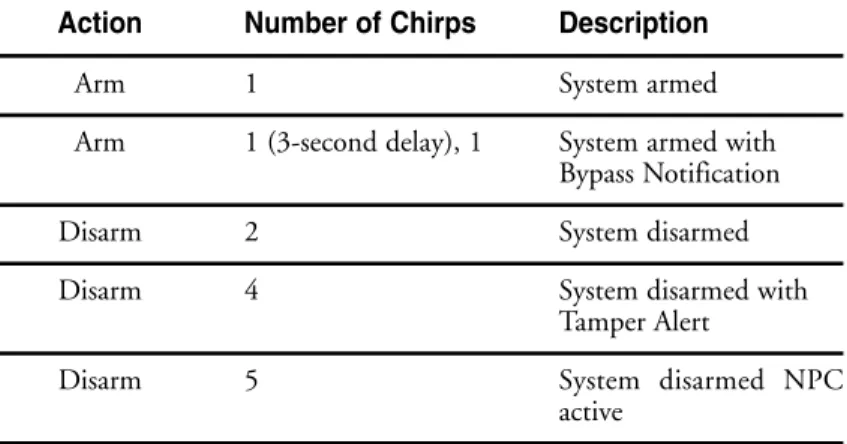
system status chirps
The siren will chirp when arming/disarming the system. The pattern of chirps will audibly report the system’s status as described below.
table of zones
A zone is represented by the number of LED flashes used by the system to identify a particular type of input. Standard input assignments are listed in the following table, along with spaces to write in any optional sensors or switches that have been installed.
➜
Action Number of Chirps Description
Arm 1 System armed
Arm 1 (3-second delay), 1 System armed with Bypass Notification Disarm 2 System disarmed Disarm 4 System disarmed with
Tamper Alert
Disarm 5 System disarmed NPC active
ZONE
(Number of DEALER-INSTALLED
LED Flashes) DESCRIPTION OPTIONS
1
1 Trunk Pin 2
2 Instant trigger - a heavier impact detected by the shock sensor 3
3 Door switch trigger 4
4 Instant trigger - for optional sensors
5
5 Ignition trigger 6
6 Hood Pin
interpreting zone diagnostics
Warn Away responses are not reported by arming or disarming diagnostics. If you receive a Bypass notification when arming or a Tamper Alert notification when disarming, look at the LED. Active or triggered zones will be indicated by a pattern of blinks by the LED.
Example
If zone 3 was active or triggered, the LED will blink three times with a two-second pause. Then it will blink three times again, and repeat until the ignition is turned on.
note: Your system stores the last two triggered zones in memory. If your system has been triggered but the LED has been reset by turning on the ignition, your dealer can still recall the last two zones that were triggered. Contact your dealer for details.
c
co
od
de
e h
ho
op
pp
piin
ng
g
The receiver and remotes use a mathematical formula called an algorithm to change their code each time the remote is used. This technology has been developed to increase the security of the unit. The control unit knows what the next codes should be. This helps to keep the remote “in sync” with the control unit even if you use the remote control out of range of the vehicle. However, if the remote has been pressed many times out of range of the vehicle, or the battery has been removed, it may fall out of sync with the control unit and fail to operate the system. To
re-sync the remote simply press several times within range of
the vehicle. The alarm will automatically re-sync and respond to the remote normally.
h
hiig
gh
h ffrre
eq
qu
ue
en
nc
cyy
Your system transmits and receives at 434 MHz. This provides a cleaner spectrum with less interference and a more stable signal. Enjoy a phenomenal increase in range, even in areas with high radio interference.
o
ow
wn
ne
err rre
ec
co
og
gn
niittiio
on
n
Owner Recognition is a revolutionary new feature available only from Directed. Using a Directed Bitwriter, hand-held program-ming tool, your dealer can program many of the system settings. The programmer makes it possible to program different settings for each remote that is used with the system. Then, whenever a specific remote is used, the system will recall the settings assigned to that remote. Owner Recognition lets up to four users of the system have different settings that meet their specific needs. It is almost like having four separate alarms in your vehicle, one for each user.
rra
ap
piid
d rre
essu
um
me
e llo
og
giic
c
This Directed system will store its current state to non-volatile memory. If power is lost and then reconnected the system will recall the stored state from memory. This means if the unit is in Valet®Mode and the battery is disconnected for any reason, such as servicing the car, when the battery is reconnected the unit will still be in Valet® Mode. This applies to all states of the system including arm, disarm, and Valet®Mode.
note:Owner Recognition cannot be programmed with-out a Bitwriter and the necessary software. Check with your dealer for more information.
p
po
ow
we
err ssa
avve
err m
mo
od
de
e
Your system will automatically enter Power Saver Mode while armed or in Valet® Mode, after a period of time in which no operation has been performed. This lowers the current draw on the vehicle's battery. Power Saver Mode takes over under the following conditions:
➤ Power Saver when the system is armed: After the system has been armed for 24 hours the LED will flash at half its normal rate, decreasing the system's current draw.
➤ Power Saver in Valet®Mode: When the system enters Valet® Mode the LED illuminates steadily. If the vehicle is not used (ignition is not turned on) for a one hour period while the system is in Valet®Mode, the LED will shut off. If the system remains in Valet®Mode, the LED will come back on the next time the ignition is turned on and then back off.
p
prro
og
grra
am
mm
miin
ng
g o
op
pttiio
on
nss
Programming options control your system's normal, operational set-up. Most options do not require additional parts, but some may require installation labor.
The following is a list of the programmable options, with the factory settings in Bold.
➤ AAccttiivvee arming (from remote only) or passive arming (auto-matic arming 30 seconds after the last door has been closed).
➤ The ignition controlled door lock feature oonn or off: When this feature is programmed on, the doors will lock three seconds after the ignition is turned on, and unlock when the ignition is turned off. If your installer is programming the security system with the Directed Bitwriter, ignition lock and unlock are independent features that can be programmed separately. ➤ Passive door locking (with passive arming) or aaccttiivvee ddoooorr
lloocckkiinngg (only when arming with the remote). Passive locking allows the vehicle's doors to lock when the security system passively arms (after the 30-second countdown). This feature only works if passive arming has been programmed. ➤ Panic mode eennaabblleedd/disabled when the ignition is turned on.
(Some states have laws against sirens sounding in moving cars.)
➤ Forced passive arming oonn or off. If your security system is programmed for passive arming and the forced passive arming feature has been programmed on, the system will passively arm after one hour, even if a protected entry has been left open. Forced passive arming ensures that the system will be armed if a door has accidentally been left ajar when leaving the vehicle.
note:When the system passively arms after one hour, the entry point that has been left open, and anything con-nected to the same zone, is bypassed and cannot trigger the system. However, the remaining inputs to the system are fully operational.
➤ Full trigger response 3300 or 60 seconds: This determines how long the full triggered sequence lasts. Some states have laws regulating how long a security system can sound before it is considered a nuisance. If your installer is programming the security system with the Directed Bitwriter, the full triggered response can be programmed for any duration ranging from 1 to 180 seconds.
➤ Automatic Engine Disable (AED) on or ooffff. The purpose of this feature is to protect the vehicle from being stolen at all times, regardless of whether or not the alarm is armed. If AED is programmed on, the starter of the vehicle will be disabled 30 seconds after the ignition is turned off. Once the key is turned off, the LED will flash slowly (one-half its normal armed rate) to indicate the AED arming cycle. Thirty seconds later, the starter will be disabled. To start the car, it will be necessary to disarm the system with the remote. It is also possible to disarm the AED feature by turning the ignition key to the RUN position and pressing the Valet®button the programmed number of times. AED is also disabled when the system is in Valet®mode.
➤ Siren tones and chirp volume. The output of the Revenger™
Soft Chirp™ siren consists of six different tones in sequence.
Any of these tones can be eliminated by a dealer, resulting in a unique, easily identifiable siren sound. The chirps can be either full volume or 66 ddeecciibbeellss qquuiieetteerr than the full alarm blast.
note: This feature will only function if the FailSafe®
➤ The engine can be programmed to run for any duration ranging from 1 to 60 minutes. 1122 mmiinnuutteess is the default. After the programmed run time, the engine will shut down and will not restart, unless in Timer Mode.
➤ While the remote start system is running the engine, the
parking lights of the vehicle can ffllaasshh oonn aanndd ooffff or come on and light steadily.
sse
ec
cu
urriittyy &
& c
co
on
nvve
en
niie
en
nc
ce
e e
exxp
pa
an
nssiio
on
nss
Listed below are some of the many expansion options available. Please consult your dealer for a complete explanation of all the options available to you.
Audio Sensor: Metal on glass, glass cracking, and breaking
glass produce distinctive acoustic signatures. The 506T audio sensor uses a microphone to pick up sounds, then analyzes them with proprietary acoustic software to determine if the glass has been struck.
Backup Battery:The 520T keeps the system armed, triggers the
alarm and keeps the starter interrupt active if main battery is dis-connected.
Hood Lock: Prevents the vehicle’s hood from being opened
without a key, keeping thieves away from the system’s siren, the battery connections, and other components under the hood.
Field Disturbance Sensor:An invisible dome of coverage is
react to any intrusions into this field with the full triggered sequence.
Power Locks: This system offers lock outputs that can control
some manufacturers' power door lock systems. For other systems, additional parts may be required.
Power Trunk Release:The accessory output of the system can
op-erate a factory power release for the vehicle’s trunk or hatch. Although the on-board relay can control most power trunk re-leases, sometimes an optional relay is required. If the factory release is not power-activated, Directed®'s 522T trunk release solenoid can often be added.
Power Window Control: Automatic power window control is
pro-vided with the 529T and 530T systems. These can operate power windows, and can roll them up automatically when the system is armed, roll them down, or both up and down.
Mobile Video: This system is compatible with Directed Video’s
MCB1000 Multi-Channel Controller, featuring on-screen secu-rity system programming and zone trigger information.
g
gllo
ossssa
arryy o
off tte
errm
mss
Control Unit:The “brain” of your system. Usually hidden
under-neath the dash area of the vehicle. The control unit houses the microprocessor which monitors your vehicle and controls all system functions.
Fault-Proof Starter Interrupt:An automatic switch controlled by
your system that prevents the vehicle’s starter from cranking whenever the system is armed. The vehicle is never prevented from cranking when the system is disarmed, in Valet®mode, or if the starter interrupt switch itself fails. Your system has feature-ready circuitry for the starter interrupt, however installation may require additional labor.
Input:A physical connection to the system. An input can be
provided by a sensor, pinswitch or by existing systems in the vehicle, such as ignition or courtesy lights.
LED:A red light mounted at a discretionary location inside the vehicle. It is used to indicate the status of your system.
Shock Sensor: This system has a dual zone shock sensor. This
sensor is mounted in the vehicle and designed to pick up impacts to the vehicle or glass.
LCD 2-Way Remote:A hand-held, transceiver which operates and
Trigger or Triggered Sequence: This is what happens when the alarm “goes off ” or “trips.” The triggered sequence of your system consists of the siren sounding and parking lights flashing for the programmed duration.
Valet®Button:A small push-button switch mounted at a
discre-tionary location inside the vehicle. It is used to override the starter interrupt when a remote is lost or damaged, or to enter or exit Valet®Mode.
Warning Zone Response: Lighter impacts to the vehicle will
generate the Warning Zone response. It consists of several seconds of siren chirps and parking light flashes.
Zone:A zone is a separate input that the alarm can recognize as
unique. Each input to the system is connected to a particular zone. Often two or more inputs may share the same zone.