026-1203 Rev 0 09-FEB-2011
XR35CX Digital Controller for Medium
Temperature Refrigeration Applications
Installation and Operation Manual
Retail Solutions 3240 Town Point Drive NW Suite 100 Kennesaw, GA 30144 Phone: 770-425-2724 Fax: 770-425-9319
ALL RIGHTS RESERVED.
The information contained in this manual has been carefully checked and is believed to be accurate. However, Com-puter Process Controls, Inc. assumes no responsibility for any inaccuracies that may be contained herein. In no event will Computer Process Controls, Inc. be liable for any direct, indirect, special, incidental, or consequential damages resulting from any defect or omission in this manual, even if advised of the possibility of such damages. In the interest of continued product development, Computer Process Controls, Inc. reserves the right to make improvements to this manual, and the products described herein, at any time without notice or obligation.
Table of Contents • v
Table of Contents
1 INTRODUCTION... 1 1.1. GENERAL WARNING... 1 2 OVERVIEW ... 1 2.1. GENERAL DESCRIPTION... 1 2.2. ORDERING CODE ... 1 3 CONTROLLING LOADS ... 2 3.1. COMPRESSOR... 2 3.2. DEFROST... 23.3. SECOND RELAY CONFIGURATION (PAR. OA1; TERM. 1-7) ... 2
3.3.1. Defrost Relay (oA1 = dEF)... 2
3.3.2. Light Relay ... 2
3.3.3. Auxiliary Relay (oA1 = AUS)... 2
3.3.3.1. Relay Activation by Digital Input (oA1 = AUS, i2F = AUS) ... 2
3.3.3.2. Auxiliary Thermostat... 2
3.3.4. ON/OFF Relay (oA1 = onF)... 2
3.3.5. Neutral Zone Regulation... 3
3.3.6. Alarm Relay... 3
3.3.7. Night Blind Management during Energy Saving Cycles ... 3
4 FRONT PANEL COMMANDS... 4
4.1. KEYSAND FUNCTIONS... 4
4.2. USEOF LEDS ... 4
5 MAX AND MIN TEMPERATURE MEMORIZATION... 5
5.1. HOWTO SEETHE MIN TEMPERATURE... 5
5.2. HOWTO SEETHE MAX TEMPERATURE... 5
5.3. HOWTO RESET MAX AND MIN TEMPERATURE RECORDED... 5
6 MAIN FUNCTIONS ... 6
6.1. TO SETTHE CURRENT TIMEAND DAY (ONLYFOR CONTROLLERSWITH RTC) ... 6
6.2. HOWTO SEETHE SETPOINT... 6
6.3. HOWTO CHANGETHE SETPOINT... 6
6.4. HOWTO STARTA MANUAL DEFROST... 6
6.5. HOWTO CHANGEA PARAMETER VALUE... 6
6.6. THE HIDDEN MENU... 6
6.6.1. How to Enter the Hidden Menu ... 6
6.6.2. How to Move a Parameter from the Hidden Menu to the First Level and Vice Versa... 7
6.7. HOWTO ASSIGNA MODBUS ADDRESS... 7
6.8. HOWTO LOCKTHE KEYBOARD... 7
6.9. TO UNLOCKTHE KEYBOARD... 7
6.10. THE CONTINUOUS CYCLE... 7
6.11. THE ON/OFF FUNCTION... 7
7 PARAMETERS... 8
8 DIGITAL INPUTS... 14
8.2. SERIOUS ALARM MODE (I2F=BAL) ... 14
8.3. PRESSURE SWITCH (I2F=PAL) ... 14
8.4. DOOR SWITCH INPUT (I1F ORI2F=DOR) ... 14
8.5. START DEFROST (I1F ORI2F=DEF)... 14
8.6. SWITCHTHE AUXILIARY RELAY (I2F=AUS) ... 14
8.7. INVERSIONOFTHE KINDOF ACTION: HEATING-COOLING (I2F=HTR) ... 14
8.8. ENERGY SAVING (I2F=ES) ... 14
8.9. HOLIDAY DEFROST (I2F=HDF) - ONLYFOR MODELSWITH RTC ... 14
8.10. ON/OFF FUNCTION (I2F=ONF) ... 15
8.11. DIGITAL INPUTS POLARITY... 15
9 RS485 SERIAL LINE (FOR MONITORING SYSTEMS)... 16
10 X-REP OUTPUT (OPTIONAL) ... 16
11 INSTALLATION AND MOUNTING... 17
12 ELECTRICAL CONNECTIONS... 17
12.1. PROBE CONNECTION... 17
13 HOW TO USE THE HOT KEY ... 18
13.1. HOWTO PROGRAMA HOT KEY FROMTHE CONTROLLER (UPLOAD)... 18
13.2. HOWTO PROGRAMTHE CONTROLLER USINGA HOT KEY (DOWNLOAD) ... 18
14 ALARM SIGNALS ... 19
14.1. SILENCING BUZZER / ALARM RELAY OUTPUT... 19
14.2. ALARM RECOVERY... 19
14.3. OTHER MESSAGES... 19
15 SPECIFICATIONS... 20
16 CONNECTIONS ... 21
17 E2 MODBUS NETWORK WIRING ... 22
18 ECT MODBUS NETWORKING TO E2S... 23
18.1. E2 SETUPOF DEVICES... 23
18.1.1. Set Up Network Ports... 23
18.1.2. Add and Connect the Device ... 24
18.2. WIRING TYPES... 26
18.3. MODBUS TERMINATION BLOCKS... 26
General Warning Introduction • 1
1
Introduction
1.1. General Warning
Please read the following safety precautions and
warnings before using this manual:
2
Overview
2.1. General Description
Model XR35CX (32 mm x 74 mm) is a digital
thermostat with off-cycle defrost, designed for
refrig-eration applications at normal temperature. It has two
(2) relay outputs to control compressor and light
(con-figurable). It can have a Real Time Clock (RTC) that
allows programming of up to six (6) daily defrost
cy-cles, divided into holidays and workdays. A “Day and
Night” function with two different setpoints is fitted
for energy savings.
It can also have up to four (4) NTC or PT1000
probe inputs: the first one for temperature control, the
second one located on the evaporator to control the
defrost termination temperature. One of the two
digi-tal inputs can operate as a third temperature probe.
The fourth probe is used to signal the condenser
tem-perature alarm or to display a temtem-perature value.
The RS485 serial output enables the controller to
be connected to a network line that is a
MODBUS-RTU compatible, such as the monitoring units of
X-WEB family. The Hot Key receptacle allows the
con-troller to be programmed by means of the Hot Key
programming keyboard.
The controller is fully configurable through
spe-cial parameters that can be easily programmed
through the keyboard.
2.2. Ordering Code
CAUTION!
• This manual is part of the product and should be kept near the controller for easy and quick reference.
• The controller should not be used for purposes different from those described in this manual. It can-not be used as a safety device.
• Check the application limits before proceeding.
SAFETY PRECAUTIONS AND WARNINGS!
• Check that the supply voltage is correct before connecting the controller.
• Do not expose to water or moisture: use the con-troller only within the operating limits and avoid sud-den temperature changes with high atmospheric humidity to prevent condensation from forming.
• Warning! Disconnect all electrical connections before performing any kind of maintenance.
• Fit the probe where it is not accessible by the end user. The controller must not be opened.
• In case of failure or faulty operation, send the controller back to the distributor or to Retail Solutions (see address) with a detailed description of the fault.
• Verify the maximum current that can be applied to each relay (see Section 15, Specifications).
• Ensure that the wires for probes, loads, and the power supply are separated and far enough from each other, without crossing or intertwining.
• In case of applications in industrial environ-ments, the use of main filters (our mod. FT1) in paral-lel with inductive loads could be useful.
Device
Name Dixell Code Emerson Code XR35CX - 110VAC XR35CX -4C6F3B X0LG1MEUB4NA-000 318-6020 XR35CX - 230VAC XR35CX -5C6F3B X0LG1MEUB5NA-000 318-6021 Table 2-1 - Product Ordering Code
3
Controlling Loads
3.1. Compressor
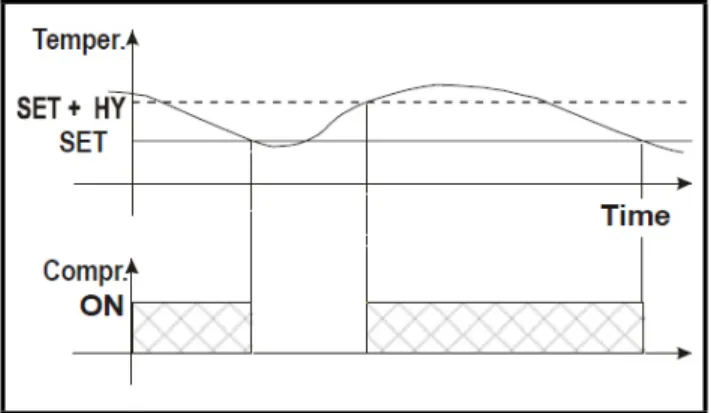
The regulation is performed according to the
tem-perature measured by the thermostat probe with a
pos-itive differential from the setpoint: if the temperature
increases and reaches setpoint plus the differential,
the compressor is started and then turned OFF when
the temperature reaches the setpoint value again.
In case of a fault in the thermostat probe, the start
and stop of the compressor are timed through
param-eters
Con
and
CoF
.
3.2. Defrost
With
oA1
different from
dEF
and
tdF
=
EL
, the
controller performs a timed defrost, simply stopping
the compressor.
With
oA1
=
dEF
, two defrost modes are available
through the
tdF
parameter: defrost through electrical
heater (
tdF
=
EL
) and hot gas defrost (
tdF
=
in
); in
this case, the second relay has to be set.
The defrost interval depends on the presence of the
RTC (optional). If the RTC is present, it is controlled
by means of parameter
EdF
:
• With EdF = in, the defrost is made every IdF time – standard way for controller without RTC.
• With EdF = rtC, the defrost is made in real time de-pending on the hours set in the parameters
Ld1...Ld6 on workdays and in Sd1…Sd6 in holi-days.
Other parameters are used to control defrost
cy-cles: its maximum defrost duration (
MdF
) and two
defrost modes: time or controlled by the evaporator’s
probe (
P2P
).
3.3. Second Relay
Configuration (PAR.
oA1; TERM. 1-7)
Depending on the kind of application, the function
of the second relay (terminals 1-7) can be set through
the
oA1
parameter.
3.3.1. Defrost Relay (oA1 = dEF)
With
oA1
=
dEF
, the relay functions as a defrost
relay. See
Section 3.2.,
Defrost
for more details.
3.3.2. Light Relay
With
oA1
=
Lig
, the relay operates as light.
3.3.3. Auxiliary Relay (oA1 = AUS)
3.3.3.1. Relay Activation by Digital Input
(oA1 = AUS, i2F = AUS)
With
oA1
=
AUS
and
i2F
=
AUS
, the relay 1-7 is
switched ON and OFF by a digital input.
3.3.3.2. Auxiliary Thermostat
An
anti-condensing heater with the possibility of
switching it ON and OFF also by keyboard.
The function of the auxiliary relay can be
config-ured by means of the following parameters:
• ACH - Kind of regulation for the auxiliary relay: Ht: heating; CL: cooling
• SAA - Setpoint for auxiliary relay • SHy - Differential for auxiliary relay • ArP - Probe for auxiliary relay
• Sdd - Auxiliary output OFF during defrost
3.3.4. ON/OFF Relay (oA1 = onF)
In this case, the relay is activated when the
con-troller is turned ON and deactivated when the
control-ler is turned OFF.
Figure 3-1 - Compressor Temperature Regulation
NOTE: Set oA1 = AUS and ArP = nP (no probe for auxiliary output). In this case the relay 1-7 can be activated only by digital input with i1F or i2F = AUS.
Second Relay Configuration (PAR. oA1; TERM. 1-7) Controlling Loads • 3
3.3.5. Neutral Zone Regulation
With
oA1
=
db
,
relay 1-7 can control a heater
ele-ment to perform a neutral zone action.
• oA1 cut in = SEt - Hy • oA1 cut out = SEt
3.3.6. Alarm Relay
With
oA1
=
ALr
,
the relay 1-7 operates as an
alarm relay. It is activated every time an alarm occurs.
Its status depends on the
tbA
parameter: if
tbA
=
y
, the relay is silenced by pressing any key.
If
tbA
=
n
, the alarm relay remains ON until the
alarm condition recovers.
3.3.7. Night Blind Management
dur-ing Energy Savdur-ing Cycles
With
oA1
=
HES
,
the relay 1-7 operates to
man-age the night blind: the relay is energized when the
energy saving cycle is activated, by digital input,
frontal button or RTC (optional).
4
Front Panel
Commands
4.1. Keys and Functions
Table 4-1
shows the keys that are found on the
front panel of the XR35CX controller and their
corre-sponding functions:
4.2. Use of LEDS
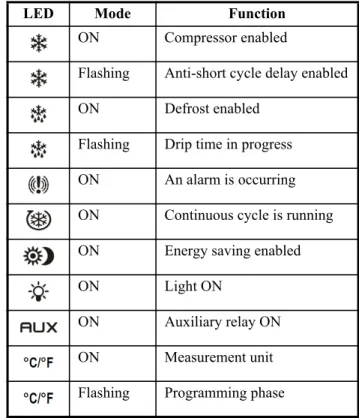
Each LED function is described in
Table 4-2
:
Figure 4-1 - XR35CX Front Panel
Key Function
To display the target setpoint; in program-ming mode, it selects a parameter or con-firms an operation.
(DEF key) To start a manual defrost. (UP arrow key) To see the MAX stored temperature; in programming mode, it browses the parameter codes or increases the displayed value.
(DOWN arrow key) To see the MIN stored temperature; in programming mode, it browses the parameter codes or decreases the displayed value.
Switches the controller OFF, if onF = oFF.
Table 4-1 - XR35CX Front Panel Keys and Functions
Switches the light ON and OFF, if oA1 = Lig.
Key Combinations
To lock and unlock the keyboard. To enter programming mode.
To return to the room temperature dis-play.
LED Mode Function
ON Compressor enabled
Flashing Anti-short cycle delay enabled
ON Defrost enabled
Flashing Drip time in progress ON An alarm is occurring ON Continuous cycle is running ON Energy saving enabled
ON Light ON
ON Auxiliary relay ON
ON Measurement unit
Flashing Programming phase Table 4-2 - LEDs
How to See the MIN Temperature MAX and MIN Temperature Memorization • 5
5
MAX and MIN
Temperature
Memorization
5.1. How to See the MIN
Temperature
1. Press and release the DOWN arrow key.
2. The Lo message will be displayed followed by the minimum temperature recorded.
3. By pressing the DOWN arrow key again or by wait-ing 5 seconds, the normal display will be restored.
5.2. How to See the MAX
Temperature
1. Press and release the UP arrow key.
2. The Hi message will be displayed followed by the maximum temperature recorded.
3. By pressing the UP arrow key again or by waiting 5 seconds, the normal display will be restored.
5.3. How to Reset MAX and
MIN Temperature
Recorded
1. Press and hold the SET key for more than 3 seconds while the maximum or minimum temperature is dis-played. (rSt message will be displayed)
2. To confirm the operation, the rSt message starts blinking and the normal temperature will be dis-played.
6
Main Functions
6.1. To Set the Current Time
and Day (Only for
Controllers with RTC)
When the controller is switched ON, it is
neces-sary to program the time and day.
1. Enter the Pr1 programming menu by pressing the SET + DOWN arrow keys combination for 3 sec-onds.
2. The rtc parameter displays. Press the SET key to enter the real time clock menu.
3. The Hur (hour) parameter displays.
4. Press the SET key and set current hour by pressing the UP and DOWN arrow keys, then press SET to confirm the value.
5. Repeat the steps on Min (minutes) and dAy (day) parameters.
6. To exit, press SET + UP arrow keys or wait for 15 seconds.
6.2. How to See the
Setpoint
1.Push and immediately release the SET key: the display will show the setpoint value.
2.Push and immediately release the SET key or wait for 5 seconds to dis-play the probe value again.
6.3. How to Change the
Setpoint
1. Push the SET key for more than 2 seconds to change
the setpoint value.
2. The value of the setpoint will be displayed and the °C or °F LED starts blinking.
3. To change the setpoint value, push the UP or DOWN arrow keys within 10 seconds.
4. To memorize the new setpoint value, push the SET key again or wait 10 seconds.
6.4. How to Start a Manual
Defrost
Push the
DEF
key for more than
2 seconds and a manual defrost
will start.
6.5. How to Change a
Parameter Value
To change the parameter’s value operate as
fol-lows:
1. Enter the Programming mode by pressing the SET + DOWN arrow keys for 3 seconds (the °C or °F LED starts blinking).
2. Select the required parameter (refer to Section 7, Parameters for the list of parameters). Press the SET key to display its value.
3. Use the UP or DOWN arrow keys to change its val-ue.
4. Press SET to store the new value and move to the following parameter.
5. To exit, press SET + UP arrow keys or wait 15 sec-onds without pressing a key.
6.6. The Hidden Menu
The Hidden Menu includes all the parameters of
the controller.
6.6.1. How to Enter the Hidden
NOTE: This function setup is applicable only for controllers with RTC.
NOTE: The set value is stored even when the time-out expires and ends the procedure.
How to Assign a MODBUS Address Main Functions • 7
Menu
1. Enter the Programming mode by pressing the SET + DOWN arrow keys for 3 seconds (the °C or °F LED starts blinking).
2. Immediately release the keys, then push the SET + DOWN arrow keys again for more than 7 seconds. The Pr2 label will be displayed immediately fol-lowed by the Hy parameter. NOW YOU ARE IN THE HIDDEN MENU.
3. Select the required parameter. See Section 7, Pa-rameters for the list of parameters.
4. Press the SET key to display its value.
5. Use the UP or DOWN arrow keys to change its val-ue.
6. Press SET to store the new value and move to the next parameter.
7. Press SET + DOWN arrow keys or wait for 15 sec-onds without pressing a key to exit.
6.6.2. How to Move a Parameter
from the Hidden Menu to the
First Level and Vice Versa
Each parameter present in the Hidden Menu can
be removed or put into THE FIRST LEVEL (user
lev-el) by pressing SET
+ DOWN arrow keys.
In the Hidden Menu, when a parameter is present
in First Level, the decimal point is visible.
6.7. How to Assign a
MODBUS Address
1. Follow Steps1 and 2 of Section 6.6.1., How to En-ter the Hidden Menu to access the Hidden Menu. 2. Select the Adr parameter.
3. Press SET to select.
4. Choose the address number using the arrow keys
and press SET again to save.
5. Press the SET and UP arrow keys to exit.
6.8. How to Lock the
Keyboard
1. Keep the UP and the DOWN arrow keys pressed for more than 3 seconds.
2. The PoF message will be displayed and the key-board will be locked. At this point it will be possible to see the setpoint or the MAX or MIN temperature stored only.
3. If a key is pressed more than 3 seconds, the PoF message will be displayed.
6.9. To Unlock the
Keyboard
To unlock the keyboard, press the UP and the
DOWN arrow keys for more than 3 seconds until the
Pon
message displays.
6.10.The Continuous Cycle
When defrost is not in progress, it can be activated
by pressing the UP arrow key for about 3 seconds.
The compressor operates to maintain the
CCS
set-point for the time set through the
CCt
parameter. The
cycle can be terminated before the end of the set time
by pressing the same activation key (UP arrow key)
for 3 seconds.
6.11.The ON/OFF Function
With
onF
=
oFF
, pushing the
ON/OFF
key will turn the controller OFF. The
OFF
message is displayed. In this
configura-tion, the regulation is disabled.
To switch the controller ON, push again the
ON/
OFF
key.
NOTE: If a parameter is not present in Pr1, the noP message is displayed after 3 seconds. Keep the keys pressed until the Pr2 message is dis-played.
NOTE: The set value is stored even when the time-out expires and ends the procedure.
WARNING! Loads connected to the normally closed contacts of the relays are always sup-plied and under voltage, even if the controller is in stand-by mode.
7
Parameters
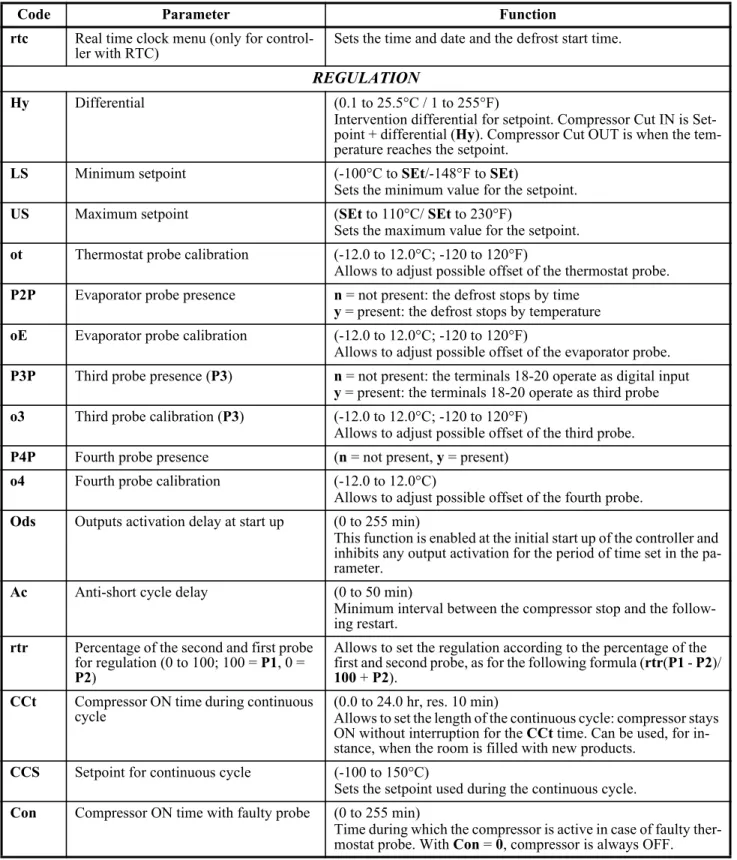
Code Parameter Function
rtc Real time clock menu (only for
control-ler with RTC) Sets the time and date and the defrost start time.
REGULATION
Hy Differential (0.1 to 25.5°C / 1 to 255°F)
Intervention differential for setpoint. Compressor Cut IN is Set-point + differential (Hy). Compressor Cut OUT is when the tem-perature reaches the setpoint.
LS Minimum setpoint (-100°C to SEt/-148°F to SEt)
Sets the minimum value for the setpoint.
US Maximum setpoint (SEt to 110°C/ SEt to 230°F)
Sets the maximum value for the setpoint. ot Thermostat probe calibration (-12.0 to 12.0°C; -120 to 120°F)
Allows to adjust possible offset of the thermostat probe. P2P Evaporator probe presence n = not present: the defrost stops by time
y = present: the defrost stops by temperature oE Evaporator probe calibration (-12.0 to 12.0°C; -120 to 120°F)
Allows to adjust possible offset of the evaporator probe. P3P Third probe presence (P3) n = not present: the terminals 18-20 operate as digital input
y = present: the terminals 18-20 operate as third probe o3 Third probe calibration (P3) (-12.0 to 12.0°C; -120 to 120°F)
Allows to adjust possible offset of the third probe. P4P Fourth probe presence (n = not present, y = present)
o4 Fourth probe calibration (-12.0 to 12.0°C)
Allows to adjust possible offset of the fourth probe. Ods Outputs activation delay at start up (0 to 255 min)
This function is enabled at the initial start up of the controller and inhibits any output activation for the period of time set in the pa-rameter.
Ac Anti-short cycle delay (0 to 50 min)
Minimum interval between the compressor stop and the follow-ing restart.
rtr Percentage of the second and first probe for regulation (0 to 100; 100 = P1, 0 = P2)
Allows to set the regulation according to the percentage of the first and second probe, as for the following formula (rtr(P1 - P2)/ 100 + P2).
CCt Compressor ON time during continuous
cycle (0.0 to 24.0 hr, res. 10 min)Allows to set the length of the continuous cycle: compressor stays ON without interruption for the CCt time. Can be used, for in-stance, when the room is filled with new products.
CCS Setpoint for continuous cycle (-100 to 150°C)
Sets the setpoint used during the continuous cycle. Con Compressor ON time with faulty probe (0 to 255 min)
Time during which the compressor is active in case of faulty ther-mostat probe. With Con = 0, compressor is always OFF. Table 7-1 - List of Parameters
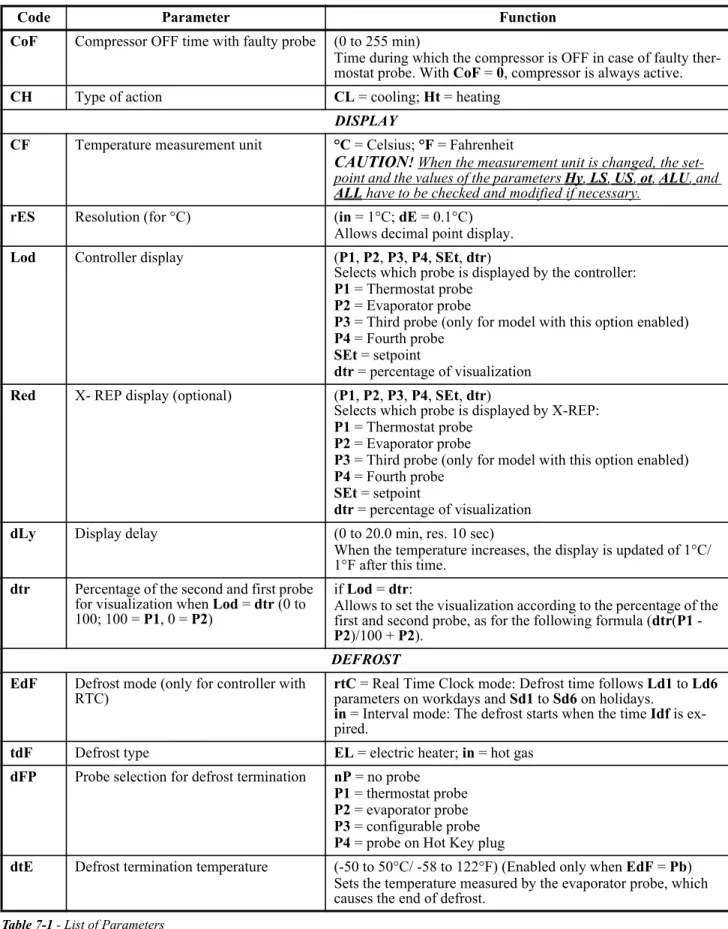
The ON/OFF Function Parameters • 9 CoF Compressor OFF time with faulty probe (0 to 255 min)
Time during which the compressor is OFF in case of faulty ther-mostat probe. With CoF = 0, compressor is always active.
CH Type of action CL = cooling; Ht = heating
DISPLAY
CF Temperature measurement unit °C = Celsius; °F = Fahrenheit
CAUTION
!When the measurement unit is changed, the set-point and the values of the parameters Hy, LS, US, ot, ALU,andALL have to be checked and modified if necessary.
rES Resolution (for °C) (in = 1°C; dE = 0.1°C)
Allows decimal point display.
Lod Controller display (P1, P2, P3, P4, SEt, dtr)
Selects which probe is displayed by the controller: P1 = Thermostat probe
P2 = Evaporator probe
P3 = Third probe (only for model with this option enabled) P4 = Fourth probe
SEt = setpoint
dtr = percentage of visualization Red X- REP display (optional) (P1, P2, P3, P4, SEt, dtr)
Selects which probe is displayed by X-REP: P1 = Thermostat probe
P2 = Evaporator probe
P3 = Third probe (only for model with this option enabled) P4 = Fourth probe
SEt = setpoint
dtr = percentage of visualization
dLy Display delay (0 to 20.0 min, res. 10 sec)
When the temperature increases, the display is updated of 1°C/ 1°F after this time.
dtr Percentage of the second and first probe for visualization when Lod = dtr (0 to 100; 100 = P1, 0 = P2)
if Lod = dtr:
Allows to set the visualization according to the percentage of the first and second probe, as for the following formula (dtr(P1 - P2)/100 + P2).
DEFROST
EdF Defrost mode (only for controller with
RTC) rtC = Real Time Clock mode: Defrost time follows Ld1 to Ld6 parameters on workdays and Sd1 to Sd6 on holidays. in = Interval mode: The defrost starts when the time Idf is ex-pired.
tdF Defrost type EL = electric heater; in = hot gas
dFP Probe selection for defrost termination nP = no probe P1 = thermostat probe P2 = evaporator probe P3 = configurable probe P4 = probe on Hot Key plug
dtE Defrost termination temperature (-50 to 50°C/ -58 to 122°F) (Enabled only when EdF = Pb) Sets the temperature measured by the evaporator probe, which causes the end of defrost.
Code Parameter Function
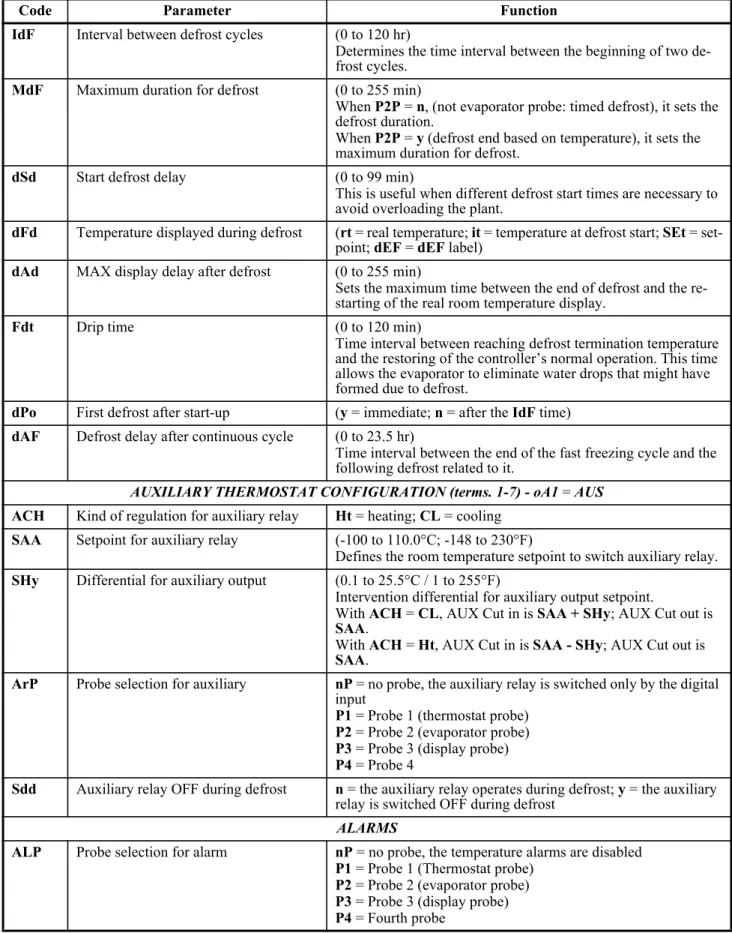
IdF Interval between defrost cycles (0 to 120 hr)
Determines the time interval between the beginning of two de-frost cycles.
MdF Maximum duration for defrost (0 to 255 min)
When P2P = n, (not evaporator probe: timed defrost), it sets the defrost duration.
When P2P = y (defrost end based on temperature), it sets the maximum duration for defrost.
dSd Start defrost delay (0 to 99 min)
This is useful when different defrost start times are necessary to avoid overloading the plant.
dFd Temperature displayed during defrost (rt = real temperature; it = temperature at defrost start; SEt = set-point; dEF = dEF label)
dAd MAX display delay after defrost (0 to 255 min)
Sets the maximum time between the end of defrost and the re-starting of the real room temperature display.
Fdt Drip time (0 to 120 min)
Time interval between reaching defrost termination temperature and the restoring of the controller’s normal operation. This time allows the evaporator to eliminate water drops that might have formed due to defrost.
dPo First defrost after start-up (y = immediate; n = after the IdF time) dAF Defrost delay after continuous cycle (0 to 23.5 hr)
Time interval between the end of the fast freezing cycle and the following defrost related to it.
AUXILIARY THERMOSTAT CONFIGURATION (terms. 1-7) - oA1 = AUS
ACH Kind of regulation for auxiliary relay Ht = heating; CL = cooling SAA Setpoint for auxiliary relay (-100 to 110.0°C; -148 to 230°F)
Defines the room temperature setpoint to switch auxiliary relay. SHy Differential for auxiliary output (0.1 to 25.5°C / 1 to 255°F)
Intervention differential for auxiliary output setpoint.
With ACH = CL, AUX Cut in is SAA + SHy; AUX Cut out is SAA.
With ACH = Ht, AUX Cut in is SAA - SHy; AUX Cut out is SAA.
ArP Probe selection for auxiliary nP = no probe, the auxiliary relay is switched only by the digital input
P1 = Probe 1 (thermostat probe) P2 = Probe 2 (evaporator probe) P3 = Probe 3 (display probe) P4 = Probe 4
Sdd Auxiliary relay OFF during defrost n = the auxiliary relay operates during defrost; y = the auxiliary relay is switched OFF during defrost
ALARMS
ALP Probe selection for alarm nP = no probe, the temperature alarms are disabled P1 = Probe 1 (Thermostat probe)
P2 = Probe 2 (evaporator probe) P3 = Probe 3 (display probe) P4 = Fourth probe
Code Parameter Function
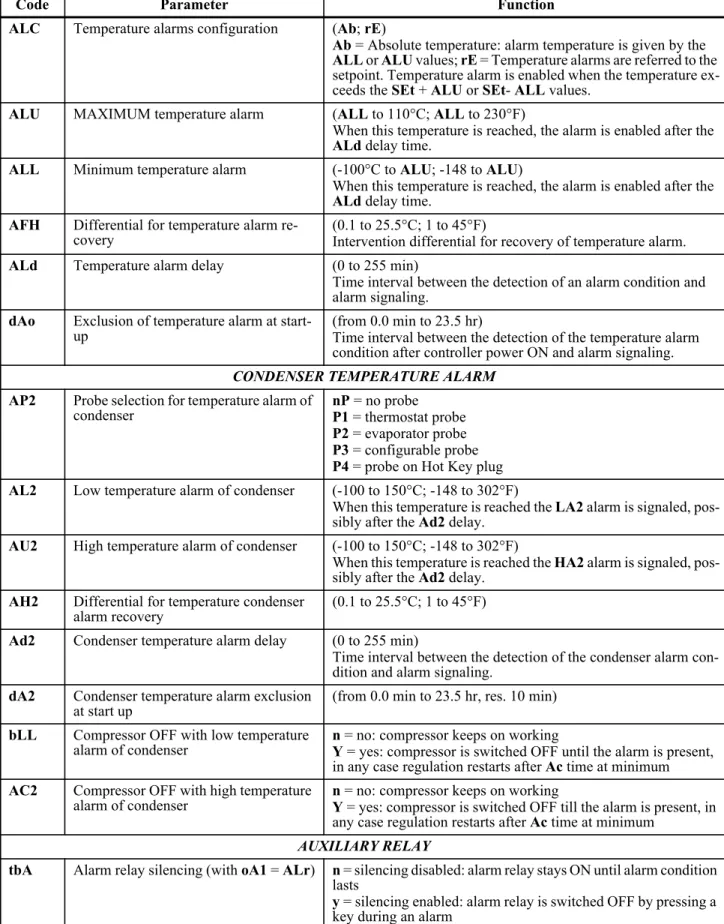
The ON/OFF Function Parameters • 11 ALC Temperature alarms configuration (Ab; rE)
Ab = Absolute temperature: alarm temperature is given by the ALL or ALU values; rE = Temperature alarms are referred to the setpoint. Temperature alarm is enabled when the temperature ex-ceeds the SEt + ALU or SEt- ALL values.
ALU MAXIMUM temperature alarm (ALL to 110°C; ALL to 230°F)
When this temperature is reached, the alarm is enabled after the ALd delay time.
ALL Minimum temperature alarm (-100°C to ALU; -148 to ALU)
When this temperature is reached, the alarm is enabled after the ALd delay time.
AFH Differential for temperature alarm
re-covery (0.1 to 25.5°C; 1 to 45°F)Intervention differential for recovery of temperature alarm.
ALd Temperature alarm delay (0 to 255 min)
Time interval between the detection of an alarm condition and alarm signaling.
dAo Exclusion of temperature alarm at
start-up (from 0.0 min to 23.5 hr)Time interval between the detection of the temperature alarm condition after controller power ON and alarm signaling.
CONDENSER TEMPERATURE ALARM
AP2 Probe selection for temperature alarm of
condenser nP = no probeP1 = thermostat probe P2 = evaporator probe P3 = configurable probe P4 = probe on Hot Key plug AL2 Low temperature alarm of condenser (-100 to 150°C; -148 to 302°F)
When this temperature is reached the LA2 alarm is signaled, pos-sibly after the Ad2 delay.
AU2 High temperature alarm of condenser (-100 to 150°C; -148 to 302°F)
When this temperature is reached the HA2 alarm is signaled, pos-sibly after the Ad2 delay.
AH2 Differential for temperature condenser
alarm recovery (0.1 to 25.5°C; 1 to 45°F)
Ad2 Condenser temperature alarm delay (0 to 255 min)
Time interval between the detection of the condenser alarm con-dition and alarm signaling.
dA2 Condenser temperature alarm exclusion
at start up (from 0.0 min to 23.5 hr, res. 10 min)
bLL Compressor OFF with low temperature
alarm of condenser n = no: compressor keeps on workingY = yes: compressor is switched OFF until the alarm is present, in any case regulation restarts after Ac time at minimum AC2 Compressor OFF with high temperature
alarm of condenser n = no: compressor keeps on workingY = yes: compressor is switched OFF till the alarm is present, in any case regulation restarts after Ac time at minimum
AUXILIARY RELAY
tbA Alarm relay silencing (with oA1 = ALr) n = silencing disabled: alarm relay stays ON until alarm condition lasts
y = silencing enabled: alarm relay is switched OFF by pressing a key during an alarm
Code Parameter Function
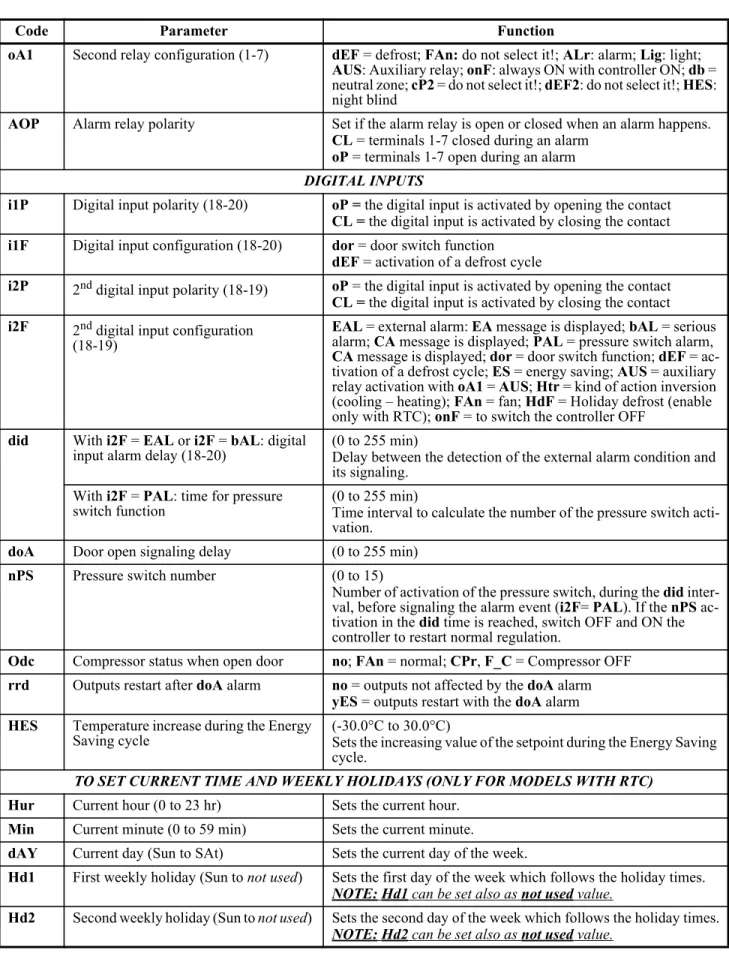
oA1 Second relay configuration (1-7) dEF = defrost; FAn: do not select it!; ALr: alarm; Lig: light; AUS: Auxiliary relay; onF: always ON with controller ON; db = neutral zone; cP2 = do not select it!; dEF2: do not select it!; HES: night blind
AOP Alarm relay polarity Set if the alarm relay is open or closed when an alarm happens. CL = terminals 1-7 closed during an alarm
oP = terminals 1-7 open during an alarm
DIGITAL INPUTS
i1P Digital input polarity (18-20) oP = the digital input is activated by opening the contact CL = the digital input is activated by closing the contact i1F Digital input configuration (18-20) dor = door switch function
dEF = activation of a defrost cycle
i2P 2nd digital input polarity (18-19) oP = the digital input is activated by opening the contact
CL = the digital input is activated by closing the contact i2F 2nd digital input configuration
(18-19)
EAL = external alarm: EA message is displayed; bAL = serious alarm; CA message is displayed; PAL = pressure switch alarm, CA message is displayed; dor = door switch function; dEF = ac-tivation of a defrost cycle; ES = energy saving; AUS = auxiliary relay activation with oA1 = AUS; Htr = kind of action inversion (cooling – heating); FAn = fan; HdF = Holiday defrost (enable only with RTC); onF = to switch the controller OFF
did With i2F = EAL or i2F = bAL: digital
input alarm delay (18-20) (0 to 255 min)Delay between the detection of the external alarm condition and its signaling.
With i2F = PAL: time for pressure
switch function (0 to 255 min)Time interval to calculate the number of the pressure switch acti-vation.
doA Door open signaling delay (0 to 255 min)
nPS Pressure switch number (0 to 15)
Number of activation of the pressure switch, during the did inter-val, before signaling the alarm event (i2F= PAL). If the nPS ac-tivation in the did time is reached, switch OFF and ON the controller to restart normal regulation.
Odc Compressor status when open door no; FAn = normal; CPr, F_C = Compressor OFF rrd Outputs restart after doA alarm no = outputs not affected by the doA alarm
yES = outputs restart with the doA alarm HES Temperature increase during the Energy
Saving cycle (-30.0°C to 30.0°C)Sets the increasing value of the setpoint during the Energy Saving cycle.
TO SET CURRENT TIME AND WEEKLY HOLIDAYS (ONLY FOR MODELS WITH RTC)
Hur Current hour (0 to 23 hr) Sets the current hour. Min Current minute (0 to 59 min) Sets the current minute.
dAY Current day (Sun to SAt) Sets the current day of the week.
Hd1 First weekly holiday (Sun to not used) Sets the first day of the week which follows the holiday times.
NOTE:Hd1 can be set also as not used value.
Hd2 Second weekly holiday (Sun to not used) Sets the second day of the week which follows the holiday times.
NOTE:Hd2 can be set also as not used value.
Code Parameter Function
The ON/OFF Function Parameters • 13
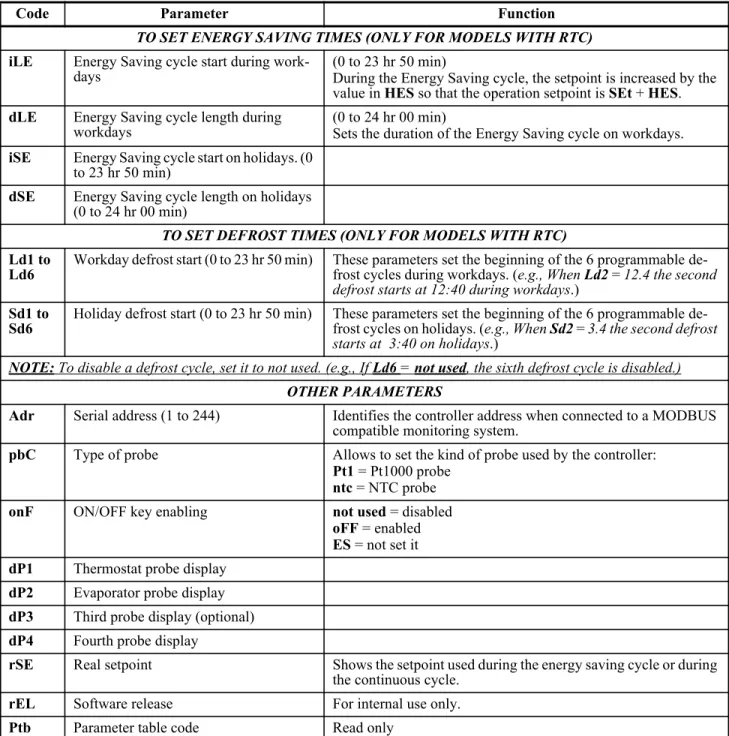
TO SET ENERGY SAVING TIMES (ONLY FOR MODELS WITH RTC)
iLE Energy Saving cycle start during
work-days (0 to 23 hr 50 min)During the Energy Saving cycle, the setpoint is increased by the value in HES so that the operation setpoint is SEt + HES. dLE Energy Saving cycle length during
workdays (0 to 24 hr 00 min)Sets the duration of the Energy Saving cycle on workdays. iSE Energy Saving cycle start on holidays. (0
to 23 hr 50 min)
dSE Energy Saving cycle length on holidays (0 to 24 hr 00 min)
TO SET DEFROST TIMES (ONLY FOR MODELS WITH RTC)
Ld1 to
Ld6 Workday defrost start (0 to 23 hr 50 min) These parameters set the beginning of the 6 programmable de-frost cycles during workdays. (e.g., When Ld2= 12.4 the second defrost starts at 12:40 during workdays.)
Sd1 to
Sd6 Holiday defrost start (0 to 23 hr 50 min) These parameters set the beginning of the 6 programmable de-frost cycles on holidays. (e.g., When Sd2= 3.4 the second defrost starts at 3:40 on holidays.)
NOTE: To disable a defrost cycle, set it to not used. (e.g., If Ld6 = not used, the sixth defrost cycle is disabled.)
OTHER PARAMETERS
Adr Serial address (1 to 244) Identifies the controller address when connected to a MODBUS compatible monitoring system.
pbC Type of probe Allows to set the kind of probe used by the controller: Pt1 = Pt1000 probe
ntc = NTC probe
onF ON/OFF key enabling not used = disabled
oFF = enabled ES = not set it dP1 Thermostat probe display
dP2 Evaporator probe display dP3 Third probe display (optional) dP4 Fourth probe display
rSE Real setpoint Shows the setpoint used during the energy saving cycle or during the continuous cycle.
rEL Software release For internal use only.
Ptb Parameter table code Read only
Code Parameter Function
8
Digital Inputs
The first digital input 18-20 is enabled with
P3P
=
n
. With
P3P
=
n
and
i1F
=
i2F
, the second digital
in-put is disabled. The free voltage digital inin-puts are
pro-grammable by the
i1F
and
i2F
parameters.
8.1. Generic Alarm
(i2F=EAL)
As soon as the digital input is activated, the unit
will wait for the
did
time delay before signaling the
EAL
alarm message. The outputs status do not
change. The alarm stops just after the digital input is
deactivated.
8.2. Serious Alarm Mode
(i2F=bAL)
When the digital input is activated, the unit will
wait for the
did
delay before signaling the
CA
alarm
message. The relay outputs are switched OFF. The
alarm will stop as soon as the digital input is
deacti-vated.
8.3. Pressure Switch
(i2F=PAL)
If the pressure switch has reached the number of
activations (cycles) of the
nPS
parameter during the
interval time set by the
did
parameter, the
CA
pres-sure alarm message will be displayed. The
compres-sor and the regulation are stopped. When the digital
input is ON, the compressor is always OFF.
If the
nPS
activation in the
did
time is reached, switch the
con-troller OFF and ON to restart normal regulation.
8.4. Door Switch Input (i1F
or i2F=dor)
This input signals the door status and the
corre-sponding relay output status through the
Odc
param-eter:
no
,
Fan
= normal (any change);
CPr
;
F
_
C
=
Compressor OFF.
Since the door is opened, after the delay time set
through the parameter
doA
, the door alarm is enabled,
the display shows the message
dA
and
the regulation
restarts is
rtr
=
yES
. The alarm stops as soon as the
external digital input is disabled again. With the door
open, the high and low temperature alarms are
dis-abled.
8.5. Start Defrost (i1F or
i2F=dEF)
If conditions are favorable for defrost, a defrost
will be started. After the defrost is finished, the
nor-mal regulation will restart only if the digital input is
disabled, otherwise the controller will wait until the
MdF
safety time is expired.
8.6. Switch the Auxiliary
Relay (i2F=AUS)
With
oA1
=
AUS
, the digital input switches the
status of the auxiliary relay.
8.7. Inversion of the Kind of
Action:
Heating-Cooling (i2F=Htr)
This function enables the controller to invert the
regulation of the controller: from cooling to heating
and vice versa.
8.8. Energy Saving (i2F=ES)
The Energy Saving function allows you to change
the setpoint value as the result of the
SEt
+
HES
(pa-rameter) sum. This function is enabled until the
digi-tal input is activated.
8.9. Holiday Defrost
(i2F=HdF) - Only for
Models with RTC
ON/OFF Function (i2F=onF) Digital Inputs • 15
8.10.ON/OFF Function
(i2F=onF)
Switches the controller ON and OFF.
8.11.Digital Inputs Polarity
The digital input polarity depends on the
i1P
and
i2P
parameters.
• i1P or i2P
=
CL: the input is activated by closing the contact.• i1P or i2P
=
oP: the input is activated by opening the contact.9
RS485 Serial Line
(for Monitoring
Systems)
The RS485 serial line allows you to connect the
controller to a monitoring system MODBUS-RTU
compatible, such as the X-WEB500/3000/300.
10 X-REP Output
(Optional)
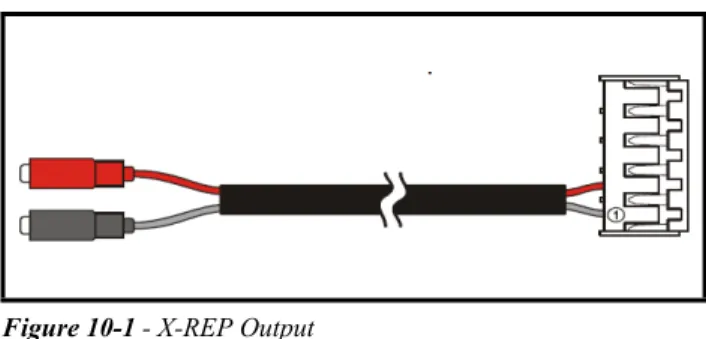
Optionally, an X-REP can be connected to the
controller through the dedicated connector.
To connect the X-REP to the controller, the
fol-lowing connectors must be used: CAB-51F(1m),
CAB-52F(2m), and CAB-55F(5m).
Probe Connection Installation and Mounting • 17
11 Installation and
Mounting
The XR35CX controller should be mounted on a
vertical panel, in a 29 x 71 mm hole, and secured
us-ing the special bracket supplied.
The temperature range allowed for correct
opera-tion is 0 to 60°C. Avoid places subject to strong
vibra-tions, corrosive gases, excessive dirt, or humidity.
The same recommendations apply to probes. Allow
air to circulate through the cooling holes.
12 Electrical
Connections
The controller comes with a screw terminal block
to connect cables with a cross section up to 2.5 mm
2.
Before connecting cables, verify that the power
sup-ply complies with the controller’s requirements.
Sep-arate the probe cables from the power supply cables,
from the outputs and the power connections.
Do not
exceed the maximum current allowed on each relay;
in case of heavier loads, use a suitable external relay.
12.1.Probe Connection
The probes should be mounted with the bulb
up-wards to prevent damages due to casual liquid
infiltra-tion. It is recommended that the thermostat probe be
placed away from air streams to measure the average
room temperature correctly. Place the defrost
termi-nation probe among the evaporator fans in the coldest
place, (where most ice is formed) and far from heaters
or from the warmest place during defrost, to prevent
premature defrost termination.
13 How to Use the
Hot Key
13.1.How to Program a Hot
Key From the
Controller (Upload)
1. Program one controller using the front keypad. 2. When the controller is ON, insert the Hot Key and
push the UP arrow key; the uPL message appears followed by a flashing End LED.
3. Push the SET key and the End LED will stop flash-ing.
4. Turn OFF the controller, remove the Hot Key, then turn it ON again.
13.2.How to Program the
Controller Using a Hot
Key (Download)
1. Turn OFF the controller.
2. Insert a programmed Hot Key into the 5-pin recep-tacle and then turn the Controller ON.
3. Automatically, the parameter list of the Hot Key is downloaded into the controller memory; the doL message will blink followed by a flashing End LED.
4. After 10 seconds, the controller will restart working with the new parameters.
5. Remove the Hot Key.
NOTE: The Err message is displayed in case of an error or failure in programming. In this case push the UP arrow key again if you want to restart the upload or remove the Hot Key to abort the operation.
NOTE: The Err message is displayed in case of an error or failure in programming. In this case, turn the unit OFF and then ON if you want to restart the download or remove the Hot Key to abort the operation.
Silencing Buzzer / Alarm Relay Output Alarm Signals • 19
14 Alarm Signals
14.1.Silencing Buzzer /
Alarm Relay Output
If
tbA
=
y
, the buzzer and the relay are silenced by
pressing any key.
If
tbA
=
n
, only the buzzer is silenced while the
alarm relay is ON until the alarm condition recovers.
14.2.Alarm Recovery
Probe alarms
P1
,
P2
,
P3
, and
P4
start some
sec-onds after the fault in the related probe; they
automat-ically stop some seconds after the probe restarts
normal operation. Check connections before
replac-ing the probe.
Temperature alarms
HA
,
LA
,
HA2
, and
LA2
au-tomatically stop as soon as the temperature returns to
normal values.
Alarms
EA
and
CA
(with
i1F
=
bAL
) recover as
soon as the digital input is disabled.
Alarm
CA
(with
i1F
=
PAL
) recovers only by
switching the controller OFF and ON
.
14.3.Other Messages
Message Cause Outputs
P1 Room probe failure Compressor output acc. to par. Con and COF
P2 Evaporator probe
failure Defrost end is timed P3 Third probe failure Outputs unchanged P4 Fourth probe
fail-ure Outputs unchanged
HA Maximum
temper-ature alarm Outputs unchanged
LA Minimum
tempera-ture alarm Outputs unchanged. HA2 Condenser high
temperature It depends on the Ac2 parameter LA2 Condenser low
temperature It depends on the bLL parameter
dA Door open Compressor restarts
EA External alarm Output unchanged CA Serious external
alarm (i1F = bAL) All outputs OFF CA Pressure switch
alarm (i1F = PAL) All outputs OFF rtc Real time clock
alarm Alarm output ON; Other outputs un-changed; Defrosts according to par. IdF Set real time clock has to be set rtF Real time clock
board failure Alarm output ON; Other outputs un-changed; Defrosts according to par. IdF Contact the ser-vice
Table 14-1 - Alarm Signals
Message Output
Pon Keyboard unlocked PoF Keyboard locked noP In programming mode:
No parameter is present in Pr1. On the display or in dP2, dP3, dP4: The selected probe is not enabled. Table 14-2 - Additional Display Messages
15 Specifications
Housing Self extinguishing ABS
Dimensions Case: Front: 32 mm x 74 mm Depth: 60 mm Panel Mount: 71 mm x 29 mm panel cut-out Protection IP 20 Frontal: IP65
Connections Screw terminal block ≤ 2.5 mm2 wiring Power Supply
(depending on the model) 24VAC, ±10%230VAC, ±10%, 50/60Hz 110VAC, ±10%, 50/60Hz
Power Absorption 34VA max
Display 3 digits, red LED, 14.2 mm high
Inputs Up to 4 NTC or PT1000 probes
Digital: Free voltage contact Relay outputs
Compressor:
SPST 8(3) A, 250VAC or SPST 16A 250VAC Aux:
SPDT 8(3) A, 250VAC
Data Storing On the non-volatile memory (EEPROM)
Internal Clock Back-up 24 hours
Kind of Action 1B
Pollution Grade 2
Software Class A
Rated Impulsive Voltage 2500V
Overvoltage Category II Temperature Operating: 0 to 55°C Storage: -30 to 85°C
Relative Humidity 20 to 85% (no condensing)
Measuring and Regulation Range
NTC probe: -40 to 110°C (-40 to 230°F) PT1000 probe: -100 to 150°C (-148 to 302°F) Resolution 0.1°C or 1°C or 1 °F(selectable) Accuracy (ambient temp. 25°C) ±0.7°C ±1 digit Table 15-1 - XR35CX Specifications
Other Messages Connections • 21
16 Connections
• Supply: 120VAC or 24 VAC: connect to terminals 5-6.
• The X-REP output is optional. Figure 16-1 - XR35CX Connections
17 E2 MODBUS Network Wiring
• Connect the MODBUS Network to the RS485 Connector on the E2 PIB board (Belden 8641 recommended). • Note to wire the RS485 +/- polarity at the E2 in the reverse of the XR35CX devices.
• Position the three termination jumpers to the UP (terminated) position to provide RS485 termination at the E2. • Do not connect the shield of the MODBUS network to the E2 PIB center terminal. Instead, use a 100 ohm 1/2 watt
resistor to connect the MODBUS cable shield to earth ground.
• At each XR35CX device, wire the MODBUS cable to the RS485 +/- terminals and connect the MODBUS shield to the pin 18 terminal.
• Terminate the end of the MODBUS network at the last XR35CX device on the daisy chain with the MODBUS ter-mination block (P/N 535-2711), or by connecting a 150 ohm resistor between the MODBUS +/- terminals.
Figure 17-1 - XR35CX to E2 MODBUS Network Wiring
100 ohm ½ Watt Sh iel d S h ield S h ie ld
EARTH GROUND CONNECTION
MODBUS TERMINATION BLOCK 535-2711 150 ohm Terminate last device only
REVERSE POLARITY OF +/- ON RS-485 CABLE FROM E2 TO DEVICE
E2 Setup of Devices ECT MODBUS Networking to E2s • 23
18 ECT MODBUS
Networking to
E2s
Connecting a XR35CX controller to an E2
re-quires the E2 to be version 2.
84
or above. Contact
Re-tail Solutions for upgrade information if the controller
is a version before 2.
84
.
An E2 has up to three COM ports that can be
as-signed for MODBUS communication: COM2, an
RS485 port on the E2 power interface board, and
COM4 and COM6, which are optional ports requiring
expansion cards.
COM4 is recommended for
MOD-BUS connection of XR35CX units.
COM ports can only be used for one function; in
other words, if COM2 is set up as the I/O network,
you cannot connect MODBUS devices to COM2.
En-sure your E2 is equipped with an RS485 COM Card
(P/N 637-4890)
and configured in E2 General
Servic-es (
,
Serial
tab) to enable COM4 or an
E2 Expansion COM Card
(P/N 637-4871)
to enable
COM6.
Connect the MODBUS network cable to the
three-terminal connector on the COM port you wish to
as-sign as MODBUS. Reverse polarity of +/- on RS485
cable from E2 to the device.
18.1.E2 Setup of Devices
18.1.1.Set Up Network Ports
Before setting up a device, the port on the E2 that
has the MODBUS cable connected must be set up as
a MODBUS port.
1. Log in to the E2 with Level 4 access.
2. Press
followed by
- General Controller Info.Figure 18-1 - Location of E2 COM Ports
Figure 18-2 - MODBUS Networking
E2 PIB COM PORT ASSOCIATIONS
COM1 COM4 COM6 COM2 Serial Device RS485 COM Port (2 Connectors) RS485 COM Card
(2 Connectors) Serial Device
RS232 Port
POWER INTERFACE BOARD (PIB)
E2 Modem/Expansion COM Card Mounted Above PIB
Plug-In Modem Card
COM3
E2 Enclosure (Right Side)
RS485 RS232
E2
XR75CX #1 TERMINATED, BIASED (ALL 3 JUMPERS IN UP POSITION) XR35CX #1 #2 #3 XR35CX XR35CX3. Press
+
to open the Serial tab of the General Controller Info setup screens:4. This screen will have a “Connection” field for all COM ports on the E2. Highlight the COM port con-nection field that will be used for the device, and press
- LOOK UP. From the list of network types, select MODBUS.5. Four fields will become visible underneath the COM port connection field, which pertain to the way the device communicates:
• Baud - Default setting is 19.2k. The baud rate set-ting should be set to match the baud rate of the de-vice (9600). (All dede-vices connected to the same COM port should be set to the same baud rate.) • Data Size - Leave this field at the default value (8). • Parity - Leave this field at the default value (None). • Stop Bits - Leave this field at the default value (1). 6. Press
to save changes and exit.18.1.2.Add and Connect the Device
To enable communications between E2 and the
XR35CX units, the devices must be added and
ad-dressed in E2.
1. Log in to the E2 with Level 4 access.
2. Press
- Connected I/O Boardsand Controllers.
3. In the Num Network Ctrls: NetSetup screen, under the ECT tab, enter the number of devices in the Quantity field. (Max shows the maximum number of devices allowed on the network.)
4. Press
to return to the Network Setup menu, then select
- Network Summary.5. Locate the units you added to the network list (press
and
to scroll through the list). If desired, en-ter a new name for each device in the Name field.6. By default, each device in the network list has a board number of 0. To set the address and begin communication, choose the device and press
. In the list of MODBUS devices, choose the address number corresponding to the XR35CX ad-dress set up through the XR35CX front display, and press
to select it. A window will open where Figure 18-3 - Serial Communications Manager ScreenFigure 18-4 - Num Network Ctrls: NetSetup Screen
E2 Setup of Devices ECT MODBUS Networking to E2s • 25 you can specify the address of the controller. If a
network ID has already been selected, its name will be shown next to the network ID in this list. If the network ID you are trying to assign has already been used, you must set the address on this device to a different number that is not being used.
7. Repeat Steps 5 and 6 until each device has a name and address.
8. When finished, press
to return to the Net-work Setup menu, then press
- Network Sum-mary (Figure 18-7). Locate the devices you set up, and look at each device’s status in the Status field. You will see one of the following messages: • Online - The device is communicating normally. • Offline - The device is not communicating, has notbeen commissioned, is not functional, or is not pow-ered up. Verify the device is powpow-ered up, wired cor-rectly, and has the proper network address, baud rate, and parity.
• Unknown - The device is not communicating or has not been commissioned. Verify the device is pow-ered up, wired correctly, and has the proper network address, baud rate, and parity.
• No Port - No port is set up in the E2 Serial Config-uration Manager to be a MODBUS port.
• Wrong FW Rev - This message is likely caused by the device having a firmware version older than the minimum revision required by E2 for communica-tion. Replace the device with a new one or a device
that has the latest version of firmware on it.
Figure 18-6 - List of MODBUS Devices
18.2.Wiring Types
Retail Solutions specifies Belden #8761 shielded
twisted pair cables for use as MODBUS wiring (or
Belden #82761 and Belden #88761 for plenum
instal-lations).
For MODBUS network wiring of XR35CX
con-trollers to E2, Belden #8641 (
CPC P/N 135-8641
) is
the recommended wire type to use.
If the recommended cable is not available in your
area, be sure the wiring meets or exceeds the
follow-ing specs:
18.3.MODBUS Termination
Blocks
Because the XR35CX device has no on-board
means of termination, use the MODBUS termination
block (
P/N 535-2711
) for termination that can be
wired to the end of the cable segment using the
three-pin connector. Wire the two signal wires to the
out-side terminals, and connect the shield to pin
18
,
keep-ing the exposed shield wire length as short as possible
(3 inches ideal maximum length).
Shielded? Yes
Conductor Type Twisted Pair
Gauge 18 - 24 AWG
Capacitance between
signal wires 31 pF/ft or less(9.45 m) or less Capacitance between
signal and shield 59 pF/ft or less(17.98 m) or less Maximum Length 4000 ft/18 to 22 AWG
(1219.2 m) 2500 ft/24 AWG (762 m)
Nominal Impedance 120±50
Figure 18-8 - MODBUS Termination Block (P/N 535-2711)
SHIELD WIRE
(CONNECT TO OF LAST DEVICE)PIN 18
FROM OTHER
DEVICES TO LAST DEVICEAT END OF DAISY
MODBUS Termination Blocks Default Setting Values • 27
19 Default Setting Values
Label Name Range Value Level
SEt Setpoint LS to US 3.0
---rtc* Real time clock menu --- --- Pr1
Hy Differential 0.1 to 25.5°C/ 1 to 255°F 2.0 Pr1
LS Minimum setpoint -100°C to SEt/-58°F to SEt -50.0 Pr2
US Maximum setpoint SEt to 110°C/ SEt to 230°F 110 Pr2
ot Thermostat probe calibration -12 to 12°C /-120 to 120°F 0.0 Pr1
P2P Evaporator probe presence n = not present; Y = present Y Pr1
oE Evaporator probe calibration -12 to 12°C /-120 to 120°F 0.0 Pr2
P3P Third probe presence n = not present; Y = present n Pr2
o3 Third probe calibration -12 to 12°C /-120 to 120°F 0 Pr2
P4P Fourth probe presence n = not present; Y = present n Pr2
o4 Fourth probe calibration -12 to 12°C /-120 to 120°F 0 Pr2
Ods Outputs delay at start up 0 to 255 min 0 Pr2
Ac Anti-short cycle delay 0 to 50 min 1 Pr1
rtr P1-P2 percentage for regulation 0 to 100 (100 = P1, 0 = P2) 100 Pr2
CCt Continuous cycle duration 0.0 to 24.0 hr 0.0 Pr2
CCS Setpoint for continuous cycle (-100 to 150.0°C) (-67 to 302°F) 3 Pr2
Con Compressor ON time with faulty probe 0 to 255 min 15 Pr2
CoF Compressor OFF time with faulty probe 0 to 255 min 30 Pr2
CH Kind of action CL; Ht CL Pr1
CF Temperature measurement unit °C to °F °C Pr2
rES Resolution in = integer; dE = decimal point dE Pr1
Lod Probe displayed P1; P2 P1 Pr2
Red2 X-REP display P1 – P2 – P3 – P4 – SEt – dtr P1 Pr2
dLy Display temperature delay 0 to 20.0 min (10 sec) 0.0 Pr2
dtr P1-P2 percentage for display 1 to 99 50 Pr2
EdF* Kind of interval for defrost rtC to in rtC Pr2
tdF Defrost type EL = electrical heater; in = hot gas EL Pr2
dFP Probe selection for defrost termination nP; P1; P2; P3; P4 P2 Pr2
dtE Defrost termination temperature -50 to 50°C 8.0 Pr1
IdF Interval between defrost cycles 1 to 120 hr 8 Pr1
MdF Maximum duration for defrost 0 to 255 min 20 Pr1
dSd Start defrost delay 0 to 99 min 0 Pr2
dFd Displaying during defrost rt, it, SEt, dEF it Pr2
dAd MAX display delay after defrost 0 to 255 min 30 Pr2
Fdt Draining time 0 to 120 min 0 Pr2
dPo First defrost after start-up n = after IdF; y = immediate n Pr2
dAF Defrost delay after fast freezing 0 to 23 hr and 50’ 0.0 Pr2
ACH Kind of action for auxiliary relay CL; Ht CL Pr2
SAA Setpoint for auxiliary relay -100 to 110°C / -58 to 230°F 0.0 Pr2
SHy Differential for auxiliary relay 0.1 to 25.5°C/ 1 to 255°F 2.0 Pr2
ArP Probe selection for auxiliary relay nP/P1/P2/P3/P4 nP Pr2
Sdd Auxiliary relay operating during defrost n to y n Pr2
ALP Alarm probe selection nP; P1; P2; P3; P4 P1 Pr2
ALC Temperature alarms configuration rE = related to set; Ab = absolute Ab Pr2
ALU MAXIMUM temperature alarm SEt to 110.0°C; SEt to 230°F 110.0 Pr1
ALL Minimum temperature alarm -100°C to SEt/ -58°F to SEt -50.0 Pr1
AFH Differential for temperature alarm
recovery (0.1°C to 25.5°C) (1°F to 45°F) 2.0 Pr2
ALd Temperature alarm delay 0 to 255 min 15 Pr2
dAo Delay of temperature alarm at start up 0 to 23 hr and 50’ 1.3 Pr2
AP2 Probe for temperature alarm of condenser nP; P1; P2; P3; P4 P4 Pr2
AL2 Condenser for low temperature alarm (-100 to 150°C) (-67 to 302°F) -40 Pr2 AU2 Condenser for high temperature alarm (-100 to 50°C) (-67 to 302°F) 110 Pr2 AH2 Differ. for condenser temperature alarm
recovery (0.1°C to 25.5°C) (1° to 45°F) 5 Pr2
Ad2 Condenser temperature alarm delay 0 to 254 (min), 255 = not used 15 Pr2 dA2 Delay of condenser temperature alarm at
start up 0.0 to 23 hr 50’ 1.3 Pr2
bLL Compressor OFF for condenser low
tem-perature alarm n(0) - Y(1) n Pr2
AC2 Compressor OFF for condenser high
tem-perature alarm n(0) - Y(1) n Pr2
tbA Alarm relay disabling n = no
y = yes y Pr2
oA1 Second relay configuration ALr = alarm
dEF = defrost Lig = Light AUS = AUX onF = always ON Fan= do not select it db = neutral zone cP2 = second compressor dF2 = do not select it HES = night blind
Lig Pr2
AOP Alarm relay polarity (oA1 = ALr) oP; CL CL Pr2
Label Name Range Value Level
MODBUS Termination Blocks Default Setting Values • 29 i1P Digital input polarity (18-20) oP = opening
CL= closing CL Pr1
i1F Digital input 1 configuration (18-20) dor; dEF dor Pr1
i2P Digital input polarity (18-19) oP = opening
CL = closing CL Pr1
i2F Digital input configuration (18-19) EAL - bAL- PAL - dor - dEF - ES
- AUS - Htr - FAn - HdF - onF EAL Pr2
did Digital input alarm delay (18-20) 0 to 255 min 15 Pr2
doA Door open alarm delay 0 to 255 min 15 Pr1
nPS Number of activation of pressure switch 0 to 15 15 Pr2
Odc Compress status when open door no; Fan; CPr; F_C F-C Pr2
rrd Regulation restart with door open alarm n – Y y Pr2
HES Differential for Energy Saving (-30°C to 30°C) (-54°F to 54°F) 0 Pr2
Hur* Current hour 0 to 23 --- Pr1
Min* Current minute 0 to 59 --- Pr1
dAY* Current day Sun to SAt --- Pr1
Hd1* First weekly holiday Sun to SAt – not used not used Pr1
Hd2* Second weekly holiday Sun to SAt – not used not used Pr1
iLE* Energy Saving cycle start during
work-days 0 to 23 hr 50 min 0.0 Pr1
dLE* Energy Saving cycle length during
work-days 0 to 24 hr 00 min 0 Pr1
iSE* Energy Saving cycle start on holidays 0 to 23 hr 50 min 0.0 Pr1
dSE* Energy Saving cycle length on holidays 0 to 24 hr 00 min 0 Pr1
Ld1* 1st workdays defrost start 0 to 23 hr 50 min - not used 6.0 Pr1
Ld2* 2nd workdays defrost start 0 to 23 hr 50 min - not used 13.0 Pr1
Ld3* 3rd workdays defrost start 0 to 23 hr 50 min - not used 21.0 Pr1
Ld4* 4th workdays defrost start 0 to 23 hr 50 min - not used not used Pr1
Ld5* 5th workdays defrost start 0 to 23 hr 50 min - not used not used Pr1
Ld6* 6th workdays defrost start 0 to 23 hr 50 min - not used not used Pr1
Sd1* 1st holiday defrost start 0 to 23 hr 50 min - not used 6.0 Pr1
Sd2* 2nd holiday defrost start 0 to 23 hr 50 min - not used 13.0 Pr1
Sd3* 3rd holiday defrost start 0 to 23 hr 50 min - not used 21.0 Pr1
Sd4* 4th holiday defrost start 0 to 23 hr 50 min - not used not used Pr1
Sd5* 5th holiday defrost start 0 to 23 hr 50 min - not used not used Pr1
Sd6* 6th holiday defrost start 0 to 23 hr 50 min - not used not used Pr1
Adr Serial address 1 to 247 1 Pr2
pbC Kind of probe Pt1000; ntc ntc Pr2
Label Name Range Value Level
onF ON/OFF key enabling not used, oFF, ES not used Pr2
dP1 Room probe display --- --- Pr1
dP2 Evaporator probe display --- --- Pr1
dP3 Third probe display --- --- Pr1
dP4 Fourth probe display --- --- Pr1
rSE Real set actual set --- Pr2
rEL Software release --- 2.6 Pr2
Ptb Map code --- --- Pr2
Label Name Range Value Level