Abstract —We present DEVELOP-FPS, a software tool specially designed for the development of First Person Shooter (FPS) players controlled by Rule Based Scripts. DEVELOP-FPS may be used by FPS developers to create, debug, maintain and compare rule base player behaviours, providing a set of useful functionalities: i) for an easy preparation of the right scenarios for game debugging and testing; ii) for controlling the game execution: users can stop and resume the game execution at any instant, monitoring and controlling every player in the game, monitoring the state of each player, their rule base activation, being able to issue commands to control their behaviour; and iii) to automatically run a certain number of game executions and collect data in order to evaluate and compare the players performance along a sufficient number of similar experiments.
Keywords —Intelligent Game Characters, Behaviour Control and Monitoring, Rule Based Scripts, Development Software Tool.
I. INTRODUCTION
N the recent years artificial intelligence become a key feature to the success of a computer game. The hard-core gamer no longer accepts "space invaders" kind of behaviour with easily identifiable patterns, he expects the game to deliver a convincing challenge always different and interesting. To the game publisher the increase of a game lifespan is also a strategic decision to make; the player capability of defining new scenarios and adversaries allows him to define his own challenges and opponents expanding the longevity of the game.
The development of game oriented platforms, consoles or special tuned computers, provided new spaces to developed and apply new AI technics in commercial games. Game development toolkits are starting to provide support to design of non-player characters’ behaviour (NPCs), mainly through the use of copyrighted languages (UnrealScript on UnrealEngine [1]), open-source or free languages (Lua on World of Warcraft [2]) or libraries of behaviours (PandAI on Panda3D engine [3]). Although some commercial games include game editors, these are usually centred on terrain or level construction, giving a limited support to the artificial intelligence aspects. The high-end game developments of tools support the design and deploy intelligent NPC through limited and proprietary solutions. Most of the game companies had its own tools and development kits, which are not made available to the game community. The low-cost, open source and
shareware alternatives put most of their effort in supporting the game engine and graphical design, solving problems like physical simulation, collisions detection and character
animation, the tools to assist the design and development of NPCs' behaviour are usually omitted.
The existence of a debugging tool to validate the behaviour of a NPC is still a dream in the designer’s mind. As the behaviour complexity of NPCs increases, also growths the need for a tool that provides a set of functionalities like: breakpoints that can stop a behaviour script at any point; recreate situations to test snippets of code; monitor variables, functions and NPCs knowledge; force the behaviour or remotely control a character. Most of the scripting languages used in the development of AI components are interpreted (directly or in byte-code), and the common tool available to construct those scripts is a text editor with colour syntax (although some languages provide plugins for standards IDE only for write the code). When some execution bug occurs, the common procedure is stopping the script, in some situations the interpreter will also crash. Some better interpreters will provide an error message identifying the type of error and its location in the code. With no tools to deploy, test and monitor the components, it is up to the programmer to perform the debug and test cycle of his own code. For instance, the Unity game development tool [4,5] provides a debug mechanism based on log messages produced in the script. The existence of mature tools providing a professional environment to support all the development process would dramatically reduce the time spend in this cycle, liberating the programmer to produce better code.
If we want that a game became a professional product, we have to provide tools that allow extensive and professional test of the code, guaranteeing the quality of the final delivery. Scripting languages without tool support can rapidly degenerate in spaghetti code with lots of tweaks and artifices that disallow any future changes or reuse of the program.
We propose a generic architecture to support the process of development and test of autonomous characters behaviour in a computer game environment. Based on this architecture we create a software tool (DEVELOP-FPS), which support the development, debug and execution of NPCs behaviours in a FPS like game. The tool is supported on the Unreal Tourment 2004 engine and uses the Pogamut API library [6] to access the environment sensor information and control of the avatar. Our tool provides the developer with a set of functionalities
DEVELOP-FPS: a First Person Shooter
Development Tool for Rule-based Scripts
Bruno Correia, Paulo Urbano and Luís Moniz,
Computer Science Department,
Universidad de Lisboa
that allow monitor and control an individual character, define and deploy specific scenario situations, gather data and statistics of running experiments, and get different perspectives of the scenario.
In the next section we detail our generic architecture in a global perspective. In section 3 we present our application and the options made. Finally in section 4 we make some conclusions and provide future development directions.
II.GENERIC ARCHITECTURE
Our generic architecture is composed by four main components: The NPC behaviour definition script; the individual control console; the global control console; and the game engine server. These components were substantiated using the Jess Rule Based Language [7] to define the characters behaviour and the Unreal Engine as the game server. This architecture is outlined in figure 1.
Fig. 1. Generic architecture: the Unreal Tournament Server, The Global Console and the individual Non Player Character Agents with the Jess scripts. We can split this architecture in two main component
classes: individual character management, and global management. The first group comprise the tools to access, monitor and control and individual character. Through those tools the developer can issue commands to the agents, using the individual console, which can cause a wide range of effects, from alterations in the character internal representations to consequences in the game environment. In order to maintain a certain degree on independence from the specific game environment, all the control of the NPC avatar in the environment is actuated through a middleware interface (Pogamut), that provide an intermediate abstraction over the game engine. The NPC behaviour script can be debugged and executed using the console, the developer can directly control the interpreter, issuing commands, stopping execution, testing alternatives, and monitoring execution.
The second group comprise the simulated environment where all the characters actuate, and a global management
tool. The simulated environment provides a game world with a physical engine, graphical representations of the environment from different points of view, and functionalities to interact with the scenario – actions an NPC can perform and information it can perceive. As stated before the actions and perceptions are made available through the middleware interface.
The global console offers a set of functionalities to manage the characters as group, issuing commands that all of then must accomplish.
III. THE SOFTWARE TOOL DEVELOP-FPS
DEVELOP-FPS is a software tool written in JAVA, specially designed for the development of First Person Shooter (FPS) players controlled by Rule Based Scripts in Jess. DEVELOP-FPS may be very powerful if used by FPS developers to create, debug, maintain and compare rule base player behaviours along a number of repeated experiments. It
was designed for developing scripts for the Game Unreal Tournament but it can easily be adapted to other game platforms.
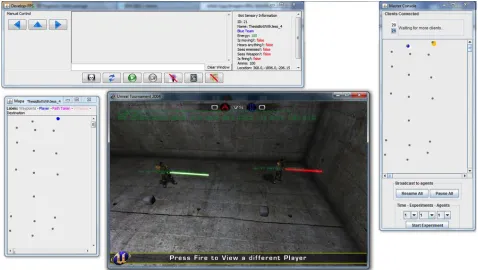
In figure 2 we may see an example of DEVELOP-FPS in action: In the centre two NPCs are fighting, on the right the Global Console is displayed and on the top and left we can see the individual console of one the players and the 2D-map as seen from the that player perspective.
Fig. 2. A screenshot of the game control with four windows displaying a graphical view of the environment, two 2D maps representing a global situation an individual position, an individual control console.
We will now proceed to detail the tool architecture and their main components and respective functionalities.
A.Global Terminal
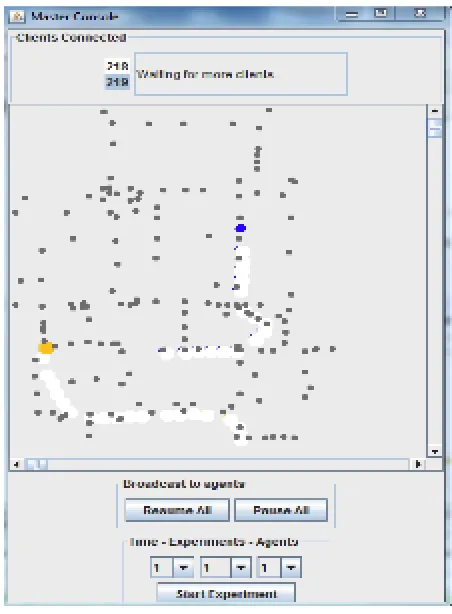
The global console role functions are: 1) to offer a bird eye view of the world, providing a 2D map of the game world and displaying the waypoints and character positions; 2) launching an individual console for each character giving the user the possibility to monitor and control each NPC; 3) the possibility to stop and resume the game execution; and 4) to automatically run a certain number of game executions and collect data in order to evaluate and compare the characters performance along a sufficient number of similar experiments. In Figure 3, we see a snapshot of the global console in a game played by 2 NPCs with IDs 218 and 219.
AS we said above, the global console 2D map will represent an updated bird eye view of the NPCs positions (large circular icons), with a different colour for each NPC, and also the waypoints: the reference locations in the environment defined by the user, for navigation purposes. The information is obtained from each NPC trough Sockets: each NPC sends its
position to the Global Console every 0.5 seconds.
In the top of the console we see the IDs of the connected clients (the individual identification of each game character), and the one selected will have its respective console displayed, the others will be hidden—only one of the individual consoles can be displayed at any moment. In the bottom we may see two buttons that are used to stop the game execution of every character (“Stop All”) and to resume their execution (“Resume All”). This is an important feature for developing behaviours for game characters, due to the frequent necessity to stop the game execution for debugging and testing behaviours.
There are three parameters for the repetition of a set of similar experiments: 1) The duration of each run; 2) the number of experiments and 3) the number of agents. Note that
each game can end because there is only one player left or because the duration has reached the defined limit.
Fig. 3. The display of the Global Console: the 2D world map where we see a set of waypoints and two characters. In the bottom of the console we see the Pause All and Resume All buttons and the three important parameters to repeat a set of experiments.
At the moment, we do not provide an interface for specifying which settings the user wants varied, and what values he wants them to take for, neither for specifying what data to collect from each run. It is up to the NPC developer to program all this information directly in the JAVA code. For example, he may want to vary the set of world maps to use and he may want the report of the NPC winner, the number of
survivors, the energy of NPCs in the end of the game. The repeated experiments report will be written on a file (in csv format).
B.NPC Terminals
Each Non Player Character (NPC) has its own private console (Fig. 4), which may be hided or visible and when is displayed it can be used for monitoring and controlling the game character. It displays the NPC position, orientation coordinates and sensory information, along with information regarding the rule base execution. There is the possibility to display a world map with an icon representing the Terminal Player, which can be used to tell the NPC to go to a certain position on the map. Below there is a mini-command center. The jess code entered in this command center is executed only by this NPC and the output can be visualized above the command center in a window. This jess code can be used for additional NPC behaviour monitoring and controlling. On the left, we find three manual buttons for controlling the NPC movements and on the bottom a line of buttons useful for stopping and resuming execution besides other functionalities.
In the presence of the Global Terminal only one NPC is allowed for display, as we do not want to fill the screen with terminal windows. If we want to monitor or control different agents, we have to activate the display of one after another sequentially. In order to choose to be displayed a different NPC filling a specific slot in the Global Terminal with the NPC ID.
In case the Global Console is switched off, something different happens: every time a created NPC does not detect the Global Terminal, it launches its individual terminal. Therefore, if there are 10 NPCs created from the same computer, there will be 10 individual terminals displayed in the computer monitor, visually overcharging it.
Fig. 4. Example of a NPC terminal. On the top section the Jess data, which can be totally or partially hiden. On the left, three manual movement and orientation button controls. On the right, the agent state may be displayed, and on the center, we see the command window.
1)Control Buttons Line
In the bottom of the NPC terminal we see a line of control
buttons (see Fig. 5). Fig. 5. The NPC control interface. From left to right, Kill
Show/Hide Jess state, Show/Hide map. In the Figure, the agent state is hided and the same happens with the Jess state.
We will describe each button function from left to right. Kill agent button: The NPC is killed and disappears from the game.
Reload Logic: If we change the NPC script, by
activating this button, the agent behaviour will be controlled by the most recent script version. It will be updated in the agent without being forced to close the application and reinitialize the game.
Play/Pause: The NPC execution is paused and can be
resumed. This way we can stop a certain player in order to monitor its behaviour with more detail. We can resume the behaviour at any time.
Step: Behaviour is executed one step forward. Time is divided in steps and behaviour can be followed step by step.
Show/Hide Agent State: The agent state, which
appears on the right section of the terminal window, may be hided or displayed.
Show/Hide Jess State: The agent information
regarding the Jess rule based script execution may be hided or displayed.
Show/Hide Map: The NPC map can be hided or
displayed.
2)NPC Sensory Information
In order to monitor the behaviour execution of an NPC, it is useful to access to its most important internal data, like the energy level, the position and rotation and also other relevant information like if it is moving or if it is seeing or hearing anything. What about the enemies? Is it seeing any of them? It is seeing any weapon and what about the number of ammunition that it is currently possessing? All that information can be displayed on the individual terminal window, along with the NPC ID and name (see Fig. 6).
At this point, we have considered the referred data as the most important to be displayed. As we will explain later there are other ways to monitor other aspects of the agent, by using the powerful command window tool.
3)Manual Controls
On the left we may see three manual control buttons that allow us to control manually the movement of an NPC. By clicking the right or left arrow buttons, the NPC will make a respectively clockwise or anti-clockwise 45º rotation; by clicking the north arrow, it will advance forward a certain small distance, if possible. This buttons can be very useful if we want to manually position the NPC so that it will end with a certain position and orientation.
Fig. 6. The displayed sensory information in a NPC console.
4)Individual 2D Map
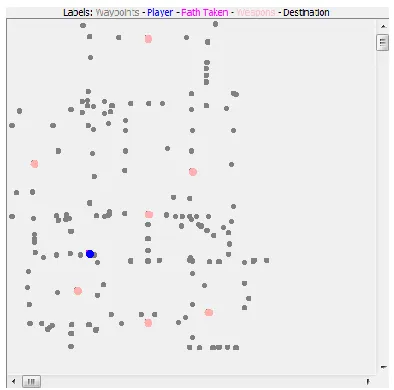
We can visualize a world map with the position of every NPC in the game but where the position of the currently monitored NPC is highlighted (see Fig. 7).
Fig. 7. 2D Map. It allows the visualization of the monitored agent in relation to the others and the world. On the top we see information regarding the colour legends.
The map may be used as an interface for controlling the position of the NPC. The user can click in any waypoint on the map, and if it is possible, the NPC goes directly to the chosen waypoint.
5)Jess Monitoring
Fig. 8. Jess monitoring information: the working memory facts list, the rule activations and fired rule and also the user defined functions along with other useful built-in functions.
After stopping a NPC, it will be easy to test the script rules, monitoring their activation in a certain situation. We can follow the rule-based behaviour of a NPC using the step control button and observing the Jess information on the individual terminal window.
The user defined functions visualization was introduced with the goal of helping the user just in case he wants to execute a particular function using the command window. It will certainly be useful for him to look up for the right function name.
On the right of the terminal window, depicted in Fig. 5, we see three buttons that allow us to hide any of these three Jess information types.
6)Command Window
For a full agent monitoring and control, in the individual terminal is offered a command window, which is an interface where the game developer has the possibility to execute any Jess command and behaviour or perception functions and observe their output. This is an important tool for script exploration and debugging besides being very useful for setting up test situations.
The user can fire rules step by step tracing the NPC behaviour, following the evolution of the NPC state and facts list as well as the rules activation and selection. Or he can execute some specific Jess function that extends the NPC state besides the standard information given on the right and referred on III.B.2. The user can even create a function in real-time and execute it, and as Jess is written in Java, he can have full access to the Java API.
As an example, consider that we want to test the script when the user is facing the enemy. We would run the game until our NPC sees its enemy and that after pausing the game, we would pick up the right user defined Jess function: (turn-to- enemy), and execute it in the command prompt. Afterwards we would see the ordered list of rule activations in the window terminal by executing the (agenda) command, so that we could check if the rules script were behaving as expected.
C.The Execution Step: the interface between JAVA and JESS The game execution is divided in steps, but the script developer is responsible for the definition of what is a step, although there are some restrictions. The JAVA NPC controller will always put two special Jess modules in the focus stack: the PERCEPTION and BEHAVIOR, and will issue a (run) command for execution of the PERCEPTION rules followed by the BEHAVIOR ones.
Thus, it is convenient that the script developer separates the Jess rules in two modules: one specialized in gathering information like, for example, the nearest enemy location, and the other specialized in actions, like moving or shooting. In each module more than one rule can fire—each module is executed only when no more rules fire. Therefore, the script must carefully manage the return of the control to JAVA so that Jess rules in any of the two modules do not fire forever.
TABLE I
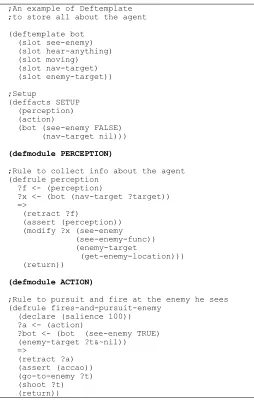
A JESS SCRIPT TO ILLUSTRATE A SIMPLE NPC BEHAVIOUR DEFINITION USING A PERCEPTION/ACTION CYCLE.
;An example of Deftemplate ;to store all about the agent
(deftemplate bot (slot see-enemy) (slot hear-anything) (slot moving)
(slot nav-target) (slot enemy-target))
;Setup
(deffacts SETUP (perception) (action)
(bot (see-enemy FALSE) (nav-target nil)))
(defmodule PERCEPTION)
;Rule to collect info about the agent (defrule perception
?f <- (perception)
?x <- (bot (nav-target ?target)) =>
(retract ?f)
(assert (perception)) (modify ?x (see-enemy (see-enemy-func)) (enemy-target
(get-enemy-location))) (return))
(defmodule ACTION)
;Rule to pursuit and fire at the enemy he sees (defrule fires-and-pursuit-enemy
(declare (salience 100)) ?a <- (action)
?bot <- (bot (see-enemy TRUE) (enemy-target ?t&~nil))
=>
(retract ?a) (assert (accao)) (go-to-enemy ?t) (shoot ?t) (return))
more rules are executed inside the respective module: after a (return) in a PERCEPTION rule, control is given to the ACTION module, and after a (return) in an ACTION rule, control is given back to JAVA, putting an ending in the step. We can see several perception and action functions: (see- enemy-func) returns a boolean and (get-enemy-location) returns the enemy position coordinates; (goto-enemy) means that the MPC goes towards a position near the enemy and (shoot) means the NPC turns towards the enemy position and shoots.
Note that while in the JESS command window we can execute a rule after another monitoring behaviour in a thinner scale than a step. In the example given there is only one rule in
each module and so a step execution will fire 2 rules in case they are both activated.
At table II we present another short example of the Jess code to control the character movement in a formation controlled by the group leader. As the previous example the behavior is controlled by a cycle of perception/action activated be a message from the squad leader. This message indicates to the character is new position on the formation and the direction it should be facing. When a new message is received, the PERCEPTION module stores the information of the character new objectives. This information is used to activate the module ACTION and execute the appropriated actions to achieve those goals.
TABLE II
AN EXEMPLE OF A PICE OF CODE THAT CONTROL THE MOVEMENT OF A CHARACTER IN A FORMATION
..
This rules and modules can be combined in more complex behaviours, taking advantage of the capability of the tool environment to make extensive tests to each component.
Although the integration of different pieces of code is not entirely error free, these characteristics provide us with a significant enhancement over the current accessible tools. (defmodule PERCEPTION)
(defrule perception ?f <- (perception)
?x <- (bot) ; representation of BOT current attributes =>
(retract ?f)
;If received a message to move in formation (id 9) (if (and (eq (get-receiver-team-id-from-message) 9))
then (bind ?var (select-place-on-diamond-formation (get-location-from-message)
(get-rotation-from-message))) ;setup destination
(modify ?x (nav-target ?var)) ;setup bot rotation
(modify ?x (rot-target
(select-rotation-on-diamond-formation ?var))) )
(assert (perception))
(store RuleFired perception) (return)
)
...
(defmodule ACTION)
(defrule go-to-destination ?a <- (action)
;If there is a destination and a rotation (bot (nav-target ?target&~nil)(rot-target ?rot)) =>
(retract ?a) (assert (action)) ;move bot
(go-to-target ?target ?rot))
(store "RuleFired" go-to-destination) (return)
IV. CONCLUSIONS AND FUTURE WORK
In this paper we presented a generic architecture to support the development of tools to assist the design, debug and execution of artificial intelligent non-player characters in a game simulated environment. We build the application DEVELOP-FPS as a concrete example of the implementation of the architecture, and introduce some of its core functionalities and capabilities. This tool allows the management of the NPCs from different levels, individually monitoring and controlling their behavior or act in a global perspective.
We have designed several experiments using this tool, from simple behaviours that only follow a fixed path to advanced cooperative team behavior which include collision avoidance and split and regroup capabilities. Our tool was fundamental in the debugging process and testing of the developed behaviours. The advantages of forcing situations when a specific behavior characteristic was triggered and follow the execution trace of the agent rules were an improvement in the character creation.
We believe that this kind of tools is fundamental in the process of constructing and deploying artificial intelligence components. Although commercial games companies had their own proprietary tools, these are not made available to the general public. The use of a text editor and a trial and error approach hardly is viable when the project grows beyond a certain dimension. The development of these tools is a something that in a close future had to taken into account when
a new game project is initiated.
By now we are already extending the game developer tool in order to have different agent teams controlled by the Global Console. Another useful extension can be the addition of a command window into the Global Console so that we can broadcast Jess commands and functions to every Non Character Player or just to a specific team, which may help setting up test scenarios. The definition of teams and the definition of coordinated actions and group tactics is currently work in progress. We expect that our tool will improve and facilitate the designer tasks.
REFERENCES
[1] UnrealEngine and UnrealScript official web page (http://www.unrealengine.com/).
[2] Whitehead II, J., Roe, R.: World of Warcraft Programming: A Guide and Reference for Creating WoW Addons. Wiley; (2010).
[3] Lang, Christoph: Panda3D 1.7 Game Developer's Cookbook. Packt Publishing (2011).
[4] Goldstone, Will. Unity Game Development Essentials. Packt Publishing; (2009).
[5] Unity game development tool official web page (http://unity3d.com).
[6] Pogamut official web page (http://pogamut.cuni.cz).
[7] Friedman-Hill, Ernest. Jess in Action: Java Rule- Based Systems. Manning Publications (2003).
[8] Moniz, L., Urbano, P., Coelho, H.: AGLIPS: An educational environment to construct behaviour based robots. In Proc. of the International Conference on Computational Intelligence for Modelling, Control and Automation – CIMCA (2003).