International Doctoral School in
Information and Communication Technologies (ICT)
University of Trento, Italy
Mobile Application Security in the Presence of
Dynamic Code Updates
Maqsood Ahmad
SUBMITTED TO THE DEPARTMENT OF
INFORMATION ENGINEERING AND COMPUTER SCIENCE (DISI)
IN THE PARTIAL FULFILMENT OF THE REQUIREMENTS FOR THE DEGREE OF
DOCTOR OF PHILOSOPHY
Advisor: Associate Prof. Dr. Bruno Crispo, University of Trento, Italy
Examiners: Prof. Luigi Mancini, University of Rome ”La Sapienza”, Italy
Prof. Fabio Massacci, University of Trento, Italy
Dr. Giovanni Russello, The University of Auckland, New Zealand
This work is licensed under a
Creative Commons
Attribution-NonCommercial-ShareAlike 3.0 Unported License To view a copy of this license, visit the following website:
The increasing number of repeated malware penetrations into official mobile app markets poses a high security threat to the confidentiality and privacy of end users’ personal and sensitive information. Protecting end user devices from falling victims to adversarial apps presents a technical and research challenge for security researchers/engineers in academia and industry. Despite the security practices and analysis checks deployed at app markets, malware sneak through the defenses and infect user devices. The evolution of malware has seen it become sophisticated and dynamically changing software usually disguised as legitimate apps. Use of highly advanced evasive techniques, such as encrypted code, obfuscation and dynamic code updates, etc., are common practices found in novel mal-ware. With evasive usage of dynamic code updates, a malware pretending as benign app bypasses analysis checks and reveals its malicious functionality only when installed on a user’s device.
This dissertation provides a thorough study on the use and the usage manner of dynamic code updates in Android apps. Moreover, we propose a hybrid analysis approach, StaDART, that interleaves static and dynamic analysis to cover the inherent shortcomings of static analysis techniques to analyze apps in the presence of dynamic code updates. Our evaluation results on real world apps demonstrate the effectiveness of StaDART. However, typically dynamic analysis, and hybrid analysis too for that matter, brings the problem of stimulating the app’s behavior which is a non-trivial challenge for automated analysis tools.
To this end, we propose a backward slicing based targeted inter component code paths execution technique, TeICC. TeICC leverages a backward slicing mechanism to extract code paths starting from a target point in the app. It makes use of a system dependency graph to extract code paths that involve inter component communication. The extracted code paths are then instrumented and executed inside the app context to capture sensitive dynamic behavior, resolve dynamic code updates and obfuscation. Our evaluation of TeICC shows that it can be effectively used for targeted execution of inter component code paths in obfuscated Android apps. Also, still not ruling out the possibility of adversaries reaching the user devices, we propose an on-phone API hooking
based app introspection mechanism, AppIntrospector, that can be used to analyze, detect and prevent runtime exploitation of app vulnerabilities that involve dynamic code updates.
Keywords: Android Security, Malware Analysis, Dynamic Code Updates
I would like to extend my heartfelt gratitude to my supervisor, Prof. Bruno Crispo, for his guidance, support and advice on academic research.
I would also like to thank the co-authors of our publications for their untiring and honest effort to make our collaborative research possible.
Last but not least, I would always be indebted to my family and friends for their best wishes, prayers and unconditional support.
Maqsood Ahmad Trento, Italy April 2017
Abstract i
Acknowledgements iii
Contents viii
List of Tables ix
List of Figures xi
Listings xiii
List of Algorithms xv
List of Acronyms xvii
1 Introduction 1
1.1 Motivation and Problem Statement . . . 1
1.1.1 App Analysis in the Presence of Dynamic Code Updates . . . 2
1.1.2 Ensuring Execution of Targeted Code Paths during Dynamic Analysis 3
1.2 Research Contributions . . . 4
1.2.1 Reflection-Bench and Empirical Analysis on Real World Apps . . . 4
1.2.2 Handling Dynamic Code Updates using a Combination of Static
and Dynamic analysis . . . 5
1.2.3 Triggering Problem: Targeted Execution and Runtime Analysis . . 5
1.3 Structure of the Thesis . . . 6
2 Background 9
2.1 Android Security . . . 10
2.1.1 App Sandboxing . . . 10
2.1.2 Android Permissions . . . 11
2.1.3 App Vetting . . . 12
2.2 Dynamic Class Loading and Reflection in Android . . . 14
2.2.1 Overview of Dynamic Class Loading . . . 14
2.2.2 Overview of Reflection . . . 15
2.2.3 Usage Motivation of Dynamic Class Loading . . . 16
2.2.4 Usage Motivation of Reflection . . . 16
2.3 Analysis of Dynamic Code Update Features in Android Apps . . . 17
2.4 Chapter Summary . . . 20
3 Bypassing Analysis tools Using Dynamic Code Updates 21 3.1 Introduction . . . 22
3.2 Motivating Examples . . . 23
3.3 Reflection-Bench and InboxArchiver . . . 25
3.3.1 Reflection-Bench . . . 26
3.3.2 InboxArchiver: Test Malware using DCL . . . 30
3.4 Analysis Tool: Design and Implementation . . . 32
3.5 Application Analysis . . . 34
3.5.1 API Selection . . . 35
3.5.2 Dataset Description . . . 37
3.6 Analysis Results and Discussion . . . 38
3.7 Considerations on Analysis Tools for Android . . . 41
3.8 Limitations . . . 42
3.9 Related Work . . . 42
3.10 Chapter Summary . . . 43
4 StaDART: Combining Static and Dynamic Analysis 45 4.1 Introduction . . . 45
4.2 An Overview of StaDART . . . 47
4.3 Method Call Graph . . . 50
4.4 Implementation . . . 52
4.4.1 The server . . . 52
4.4.2 The client . . . 55
4.5 Evaluation . . . 58
4.6 Discussion . . . 62
4.7 Related Work . . . 63
4.8 Chapter Summary . . . 65
5.2 Motivating example . . . 69
5.3 Our approach . . . 70
5.3.1 Slice Extraction . . . 71
5.3.2 Inter-Component Communication . . . 71
5.3.3 Slice Execution . . . 73
5.4 Design and Implementation . . . 73
5.4.1 Overview . . . 73
5.4.2 Enhancement to Backward Slicer . . . 74
5.4.3 Capturing Dynamic Behavior . . . 75
5.5 Evaluation and Discussion . . . 75
5.6 Related Work . . . 76
5.7 Chapter Summary . . . 77
6 Runtime Analysis of Dynamic Code Updates 79 6.1 Introduction . . . 80
6.2 Threat Model . . . 81
6.3 AppIntrospector . . . 82
6.3.1 Design Constraints . . . 82
6.3.2 AppIntrospector Overview . . . 82
6.4 Hooking Module . . . 84
6.4.1 Review of Existing Hooking Tools . . . 84
6.4.2 Implementation . . . 87
6.5 Analysis Module . . . 88
6.5.1 Dynamic Code Updates: API Selection . . . 89
6.5.2 Implementation . . . 90
6.6 Evaluation and Discussion . . . 93
6.7 Related Work . . . 94
6.8 Chapter Summary . . . 95
7 Conclusions and Future Directions 97 7.1 App Analysis in the Presence of Dynamic Code Updates . . . 98
7.2 Targeted Code Paths Execution in Android Apps . . . 98
7.3 Runtime Analysis of Dynamic Code Updates . . . 99
7.4 Closing Remarks . . . 99
Bibliography 100
A Publications 113 A.1 Journal Publications . . . 113 A.2 Conference Publications . . . 113
2.1 Usage of DCL and Reflection in Applications . . . 18
3.1 Analysis with State-of-the-art tools . . . 29
3.2 InboxArchiver Analysis using Online Analysis Systems . . . 32
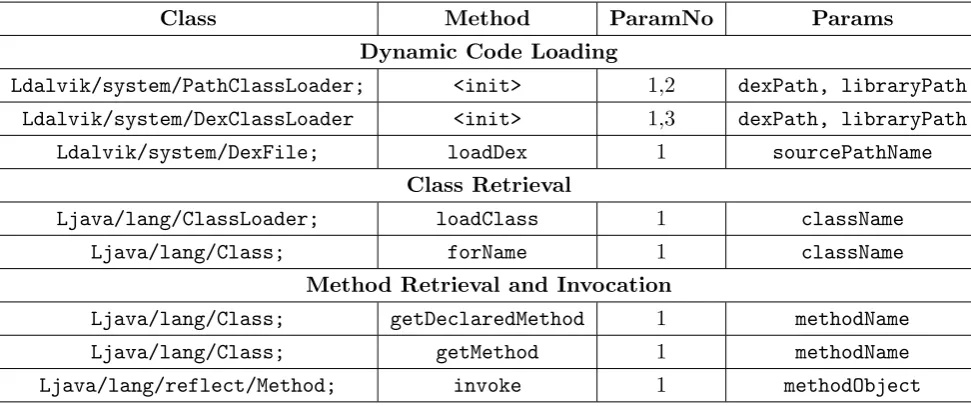
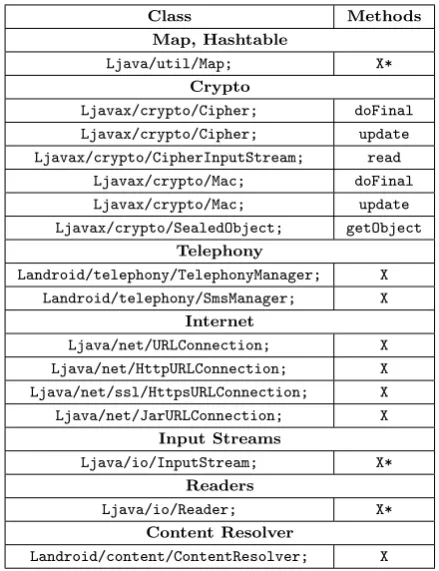
3.3 The List of Tracked APIs and Their Parameters . . . 36
3.4 Sources of Parameters . . . 37
4.1 The List of Searched Patterns . . . 54
5.1 DroidBench/ICC-Bench apps. ICC: # of implicit/explicit transitions be-tween components. . . 76
6.1 Summary of Tool Specifications. Size: Lines of code approximately. . . 84
6.2 Code Loading APIs . . . 89
6.3 Instantiate Class and Invoke Methods . . . 90
3.1 InboxArchiver - Screenshot . . . 31
3.2 Analysis Tool Design . . . 33
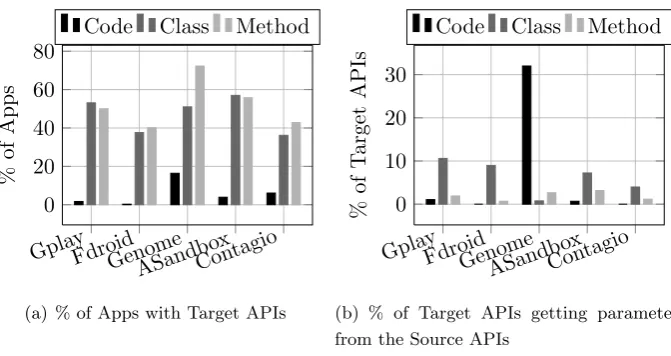
3.3 Prevalence of Target APIs in the analyzed apps and Source APIs providing the parameter passed to Target APIs . . . 39
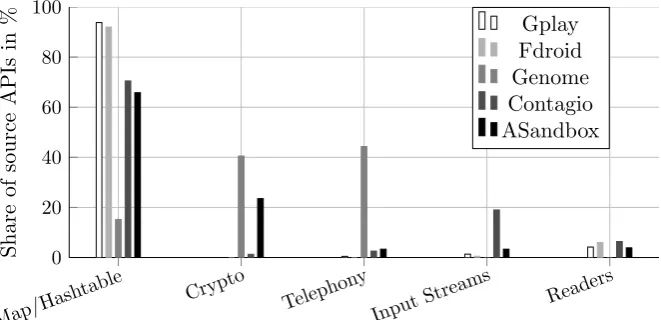
3.4 Contribution of source APIs in providing arguments to Target APIs. X-axis represent the various categories of source APIs. . . 40
4.1 System Overview . . . 47
4.2 MCG ofdemo app Obtained with a) AndroGuard b) StaDART after Pre-liminary Analysis c) StaDART after Dynamic Analysis Phase . . . 51
4.3 StaDART Workflow . . . 52
4.4 Prevalence of Reflection/DCL and StaDART effectiveness in expanding MCG 59 4.5 MCG Expansion . . . 60
4.6 MCG Expansion when apps use DCL . . . 60
4.7 Benign Apps with increase in permission nodes . . . 61
4.8 Malicious Apps with increase in permission nodes . . . 62
5.1 SDG during the first and second iteration. Comp: Component . . . 70
5.2 TeICC Design . . . 74
6.1 App - Framework Interaction . . . 83
6.2 AppIntrospector . . . 83
6.3 AppIntrospector - Hooking module . . . 87
6.4 AppIntrospector - Analysis module . . . 91
2.1 Example Manifest File . . . 11
2.2 DCL and Reflection Usage in AnserverBot . . . 19
3.1 FakenotifyA - SMS Trojan . . . 24
3.2 FakenotifyB - Version 2 of FakenotifyA . . . 25
3.3 Excerpt from AnserverBot . . . 25
3.4 Backward Code Slice. TargetLine: 63, TargetClass: Ljava/lang/Class;, TargetMethod: forName . . . 34
5.1 MessageReceiver . . . 69
5.2 SendService . . . 69
5.3 Extracted and Refined Slice . . . 71
6.1 Native Patched Method Example . . . 91
6.2 Java Patched Method Example . . . 92
1 App Analysis Main Function Algorithm . . . 53
2 Analysis of the Reflection Invoke Message . . . 54
3 Analysis of the DCL Message . . . 55
OS Operating System
DCL Dynamic Code/Class Loading
API Application Program Interface
ICC Inter Component Communication
SAAF Static Android Analysis Framework
AOSP Android Open Source Project
UID User Identification
GID Group Identification
APK Android Application Package
SMS Short Message Service
ART Android RunTime
AOT Ahead Of Time
DEX Dalvik Executable
DVM Dalvik Virtual Machine
SDK Software Development Kit
JSON JavaScript Object Notation
XML Extensible Markup Language
MCG Method Call Graph
MOI Method Of Interest
TeICC Targeted Execution Of Internet Component Communication
POI Point Of Interest
SDG System Dependency Graph
JNI Java Native Interface
ELF Executable and Linking Format
ARM Acorn RISK Machine
ADBI Android Dynamic Binary Instrumentation
LOC Lines Of Code
Introduction
In recent years, technological advancements in every field of life have been observed, adopted and have now become integral parts of our daily lives. The field of communication has revolutionized the way man lives and the world has effectively become a global village. The advent of the Internet in conjunction with modern day smart handheld devices, i.e., smartphones and tablets, etc., has brought the world to a user’s fingertips.
Mobile devices are more pervasive and ubiquitous than ever before. Traditional com-puting has transformed, and rightly so, the number of active mobile devices surpassed the world population in 2014 [54]. Smartphone vendors, framework providers, and mobile application developers contribute to this mobile computing ecosystem. With computing gone mobile, users are empowered to perform office work, undertake banking transactions, remain active on their social networks, and much more, on the move. As smartphones provide a wide range of services of varied nature, they access, store, process, send and receive users’ personal information, which if compromised can harm the user financially, socially and psychologically. The nature and the sensitivity of the information handled by a smartphone requires protection from both inside and outside adversarial access.
1.1
Motivation and Problem Statement
Mobile devices are shipped with one of the many operating systems (OS) available; pro-prietary or open source depending upon the vendor. Typically, vendors allow users to extend the functionality of their devices by downloading applications (shortly apps) from various app markets. Although, this feature is more or less common to a varying degree in all the mobile platforms, in this text we would mainly focus on the Android platform. Since its introduction in 2008, Android has emerged as the leading operating system used for handheld devices. Dominating the smartphone market for the last few years, it reached 86.2% of the smartphone market share in 2016 [97]. During a 30-day active user
2 1.1. MOTIVATION AND PROBLEM STATEMENT
monitoring in September 2015, Google confirmed that Android has 1.4 billion active users globally [50]. Android is an open source operating system with open architecture where apps are published at numerous third-party market along with its official app market, i.e., Google Play store [25]. Google Play store surpassed 2.6 million apps in December 2016 [92].
These are some of the stats that provide an idea about the popularity of the Android framework. The pervasiveness, popularity and capability of mobile devices to collect and store users’ private and sensitive information makes them very attractive for malware developers too. Hence, the number of mobile malware samples increases as the days go by. Among others, here too, Android based devices are in the firing line and recent reports suggest that 99% of all the mobile malware are targeted towards Android based devices [60].
To counter mobile malware, app markets deploy different kind of vetting mechanisms, e.g., Bouncer at the Google Play store. Generally, apps are analyzed before being made available for the users at the app markets. Apps failing the analysis check are rejected and Google claimed to have reduced the number of malware by 40% the year immediately following the introduction of Bouncer [81].
Researchers in both academia and industry contribute to strengthen the analysis pro-cess and detect malicious apps. Analysis techniques are broadly divided into static and dynamic analysis, both having their own advantages and disadvantages. As analysis tech-niques evolve, malware developers also come up with new ways of evading these analysis tools and infecting user devices. With the passage of time, malicious apps have also evolved and a variety of evasion techniques, such as anti-emulation, anti-debugging, code obfuscation, evasive use of dynamic code updates, etc., are being widely used to thwart analysis tools.
1.1.1 App Analysis in the Presence of Dynamic Code Updates
Mobile app developers use dynamic code updates to extend their apps’ functionality at runtime. The use of techniques, such as dynamic code loading (DCL) and reflection, is getting mainstream in mobile apps in the quest to develop feature-rich and adaptive solutions to meet the needs of providing sophisticated user experiences. On the other hand, the inherent nature of these techniques makes apps analysis a challenging task, and therefore, they are often used by malware developers to evade analysis tools deployed at the app markets.
on static analysis finds it extremely daunting to properly analyze code in the presence of dynamic code updates [95]. Indeed, the dynamic nature of DCL and reflection do not allow static analysis tools to properly infer the behavior of an app and, as a result, make them clueless when detecting malicious functionality.
Moreover, most of the static analysis tools are based on the assumption that the code base of an app remains the same and does not change dynamically [41, 57, 74]. Obviously, this assumption is far from reality and a simplification made to cover the limitations of the current analysis tools. On the other hand, researchers have demonstrated that dynamic code updates can be used to bypass the analysis check at app markets [51,90,103]. Nevertheless, a number of static analysis approaches are found in literature to analyze apps in the presence of dynamic code updates [72, 80, 106] . However, static analysis can always be hindered with app features of dynamic nature. At the same time, solutions found in the literature for enhancing static analyzers of Java code to analyze dynamic code updates rely on loadtime code instrumentation which is not available for Android, and therefore, these solutions cannot be directly applied to Android apps [48]. Similarly, solutions based on instrumentation of apps rely on repackaging the app, which breaks the app signature and allows malicious apps to conceal their malicious functionality.
A research challenge in this regard is to study what makes dynamic code updates so hard to analyze when only static analysis is used. Moreover, as it can be concluded from the above discussion that the possibility of dynamic analysis coupled with static analysis can make the job of an analyst simpler, a challenge would be to design a hybrid approach that can be deployed to analyze mobile apps in the presence of dynamic code updates.
1.1.2 Ensuring Execution of Targeted Code Paths during Dynamic Analysis
To cover the shortcomings of static analysis and resolve analysis issues created by features like dynamic code updates, dynamic analysis is often the go-to solution. On the one hand, dynamic analysis provides solution to these problems. On the other hand, it requires test cases which could execute a major/required portion of the code which leads to another challenging problem. Execution of certain code paths in mobile apps depends upon a combination of various user/system events. Generally, it is hard to predict inputs which can stimulate the required behavior in these apps. This feature of mobile apps is widely used by malware developers to conceal malicious functionality.
4 1.2. RESEARCH CONTRIBUTIONS
app. In literature, researchers have focused mainly on providing inputs to make an app follow a specific path. Providing the exact inputs and environment becomes very hard as different apps may require different execution environments. Moreover, not all inputs can be predicted statically, because of obfuscation or other hiding techniques. In addition, existing target triggering solutions, such as [93] and [43], are generally limited to code execution inside a signal component of the app or do not handle the dynamic code updates well.
The key research challenge in this direction is to design an automated and effective solution for dynamic targeted execution of Android apps. Moreover, the triggering mecha-nism should also cover inter component communication as it constructs an essential part of Android apps behavior and analysis would be incomplete without it.
1.2
Research Contributions
The main research aim of this thesis is to move forward the state-of-the-art app analysis research in the presence of dynamic code updates. Here we briefly discuss the main research contributions of this work.
1.2.1 Reflection-Bench and Empirical Analysis on Real World Apps
In order to understand what causes the difficulty in analyzing apps in the presence of dynamic code updates, it is important to perform a study on the manner in which dynamic code updates are used in real world apps. Moreover, it is essential to have a set of benchmark apps that could be used by the research community to test the capability of their static analysis tools to handle dynamic code updates.
• We design and develop reflection-bench, a set of benchmark apps that use reflection
to conceal information leakage, and use it to test some of the state-of-the-art static analysis tools. We plan to make reflection-bench public so that it can be used by other researchers to test the effectiveness of their analysis tools in the presence of reflection.
• We develop an automated static analysis tool which can perform analysis on Android
apps, detect information flow between given source and sink APIs, and produce statistics about the presence of such information flow paths between source/sink APIs in individual apps as well as the whole market.
• We collect and analyze a dataset of real world apps containing 16,528 benign and
reflection/DCL APIs. To the best of our knowledge, this is first study focusing on the sources of the parameters of reflection/DCL APIs. The analysis results would help in understanding the behavior of apps that use dynamic code updates and designing more effective analysis procedures and policies to detect malicious apps in the market.
1.2.2 Handling Dynamic Code Updates using a Combination of Static and
Dynamic analysis
We propose a hybrid approach combining static and dynamic analysis to cover for the inherent inability of static analysis to deal with dynamic code updates in Android apps.
• We propose, design and implement StaDART, a system that interleaves static and
dynamic analysis in order to reveal the hidden/updated behavior. By utilizing Art-Droid, we avoid modifications to the Android framework and make it largely frame-work independent. StaDART downloads and makes available for analysis the code loaded dynamically, and is able to resolve the targets of reflective calls complement-ing app’s method call graph with the obtained information. Therefore, StaDART can be used in conjunction with other static analyzers to make their analysis more precise.
• We integrate StaDART with DroidBot to make it fully automated and to ease the
evaluation. Moreover, we analyze a dataset of 2,000 real world apps (1,000 benign and 1,000 malicious). Our analysis results show the effectiveness of StaDART in revealing behavior which is otherwise hidden to static analysis tools.
• We plan to release our tool as open-source to drive the research on app analysis in
the presence of dynamic code updates.
1.2.3 Triggering Problem: Targeted Execution and Runtime Analysis
One of the main challenges associated with solutions based on dynamic analysis is the triggering problem, i.e., apps require certain user/system events to follow specific paths. In this direction, the key research goal is to advance the state-of-the-art research in triggering mechanisms and design an intelligent and scalable solution for execution of targeted inter component code paths in Android apps. The main contributions in this regard are enlisted here.
• We extend the backward slicing mechanism to support inter component
6 1.3. STRUCTURE OF THE THESIS
a backward slicing tool, SAAF, to perform data flow analysis with context-, path-and object-sensitivity.
• Targeted execution of the extracted inter-component slices without modification to
the Android framework.
• We design and implement a hybrid analysis system based on static data-flow analysis
and dynamic execution on a real-world device for improved analysis of obfuscated apps featuring dynamic code updates.
Keeping in mind the severity of the problem and the increasing use of anti-analysis techniques in recent malware that infiltrated the official Google market, we go a step ahead and aim to move part of the analysis from the analysis environment to real user devices. Key contributions in this regard are:
• We introduce a paradigm shift by moving part of the analysis of Android apps from
an artificial analysis environment to end user devices. Careful design, implementa-tion and deployment of this type of soluimplementa-tions could pave the path to solving problems like de-obfuscation, triggering and avoiding vulnerability exploitation at runtime.
• We investigate and provide a theoretical overview of some of the well known hooking
tools in security research community and techniques found in the literature.
• We design and implement an app introspection mechanism that leverages API
hook-ing to analyze, detect and prevent malicious activities that involve dynamic code updates. Our analysis solution relies on minimal collaboration from app develop-ers and does not require any modification to the Android framework or rooting the device.
1.3
Structure of the Thesis
This dissertation is organized as follows:
Chapter 2 provides a brief background of Android security. It describes the basics of
dynamic code update techniques and their usage motivations in Android apps. Fur-thermore, it makes a case of the prevalence of dynamic code updates by presenting the results of our analysis on the use of dynamic code updates in real world Android apps, both benign and malicious.
Chapter 3 goes deeper into the problem by presenting an analysis on the manner in
update APIs get their parameters. It also presents a set of benchmark apps and use them to demonstrate the inability of static analysis tools to analyze apps in the presence of dynamic code updates.
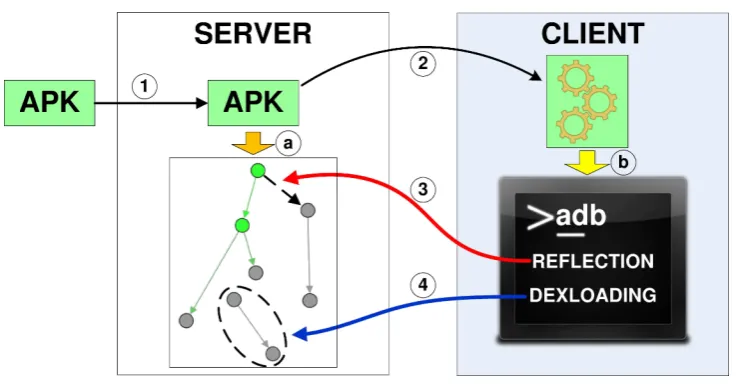
Chapter 4 provides the design, details of the implementation and evaluation results
of our proposed hybrid solution based on interleaving static and dynamic analysis techniques to handle dynamic code updates in Android apps.
Chapter 5 presents the design, implementation and evaluation results of our proposed
backward slicing based mechanism for targeted execution of inter component commu-nication in Android apps. It also discusses the enhancement made to the backward slicing mechanism and the tool used for backward slicing.
Chapter 6 shifts the analysis from an artificial analysis environment to real user de-vices. It presents a runtime analysis approach to avoid exploitation of benign, but vulnerable, apps that involve dynamic code updates. It relies on an API hooking based app introspection mechanism that analyzes dynamic code updates as they appear.
Chapter 7 draws the main conclusions of this research work and discusses the possible
Background
Android is globally accepted as the most widely used operating system for handheld de-vices. It supports a wide range of devices, such as smartphones, watches, smart TVs, etc. Android provides an open platform for the developers as well the device manufac-turers. As a result, device manufactures ship customized variants of Android with their devices. On the other hand, any third-party developer can develop applications to extend the Android platform. These apps are usually published to app stores from where users can download, purchase and install them. This openness of the platform makes it more attractive for developers and as a result, the number of apps developed for Android based devices are always on the rise. However, it also attracts adversaries to develop malicious apps and infect user devices. Hence, the number of malware directed towards Android based devices is also the highest among other peer platforms.
To counter the problem of malware penetration into the Android ecosystem, Android incorporates a wide of range of security features. Android security team collaborates with developers, device manufacturers and researchers to ensure that the best security practices are followed and the Android platform/apps are free of bugs and vulnerabilities. The goal of these security features and practices is to stop malware reach a user device and, in case a malware infects a user device, minimize the damage, i.e., to protect a user’s private data and resources. Android uses a layered security architecture to counter malware that targets various levels of the Android stack. In order to protect sensitive data and resources from malicious apps, Android relies on a Unix-like sandboxing model and app permissions. Moreover, Android uses an app scanning process at the Google Play store which blocks apps that can be harmful for user devices.
Despite the robust security architecture of the Android platform, malware developers still find ways to bypass the scanning process and infect user devices. Hence, Android ecosystem has malicious apps in abundance. There has been an ongoing competition between the good and the bad since the day existed and the area of Android security
10 2.1. ANDROID SECURITY
is no different. Researchers/developers in both industry and academia propose the best security practices and tools to avoid being victims of malicious apps. On the other hand, malware developers use an array of techniques to evade analysis tools and infect user devices.
2.1
Android Security
An open architecture resulted in Android being the leading OS in smarphone community. Android is open source where the source code is provided as part of the Android Open Source Project (AOSP) for developers, researchers and device manufacturers [39]. The open architecture allows for a repetitive and rigorous research-attack-fix cycle, and as a result a security hardened framework which is a basic step towards a vigorous Android ecosystem. We briefly discuss some of the key security features that Android incorporates to ensure app security.
2.1.1 App Sandboxing
The heart of Android platform is based on a Linux kernel. Over the years, Linux kernel has been exposed to rigorous research and testing. As a result, it has become secure and mostly free of bugs. Therefore, it is widely adopted in both academia as well as industry. Based on the Linux kernel, Android inherits some key security features which help in running each app in an individual sandbox. The main purpose of app sandboxing is to prevent harmful apps from damaging other apps on the device as well the Android framework.
Linux provides a user-based permission model to protect one user’s resources from the other. Android leverages this user-based permission model to restrict apps to their own sandboxes. Contrary to Linux, however, Android uses a separate user ID (UID) for each app. So, each app run as a separate user in a separate process. This in turn creates a kernel-level sandbox for each app where there are virtual walls between different apps and the Android framework itself. Each process has its own privileges which determines the data and resources that can be accessed by this process. Moreover, processes are assigned group IDs to enforce permissions to access sensitive resources. Consequently, an app can not access the data of another app or resource unless and until explicitly permitted.
2.1.2 Android Permissions
An Android app is delivered to users as an APK file which is a .zip archive containing
multiple code, resources and configuration files. One of these files,AndroidManifest.xml,
determines the app’s capability. It provides information about the various components of the app, i.e., activities, services, content providers, etc. Listing 2.1 shows an example Manifest file.
Listing 2.1: Example Manifest File
1 < ?xml v e r s i o n=" 1.0 " e n c o d i n g =" utf -8 "? >
2 < m a n i f e s t x m l n s : a n d r o i d =" h t t p : // s c h e m a s . a n d r o i d . com / apk / res / a n d r o i d "
3 p a c k a g e =" com . t e s t " >
4
5 < uses - p e r m i s s i o n a n d r o i d : n a m e =" a n d r o i d . p e r m i s s i o n . R E A D _ P H O N E _ S T A T E " / >
6 < uses - p e r m i s s i o n a n d r o i d : n a m e =" a n d r o i d . p e r m i s s i o n . S E N D _ S M S " / >
7
8 < a p p l i c a t i o n
9 a n d r o i d : a l l o w B a c k u p =" t r u e "
10 a n d r o i d : i c o n =" @ d r a w a b l e / i c _ l a u n c h e r "
11 a n d r o i d : n a m e =" com . t e s t . M y A p p l i c a t i o n "
12 a n d r o i d : l a b e l =" @ s t r i n g / a p p _ n a m e " >
13 < a c t i v i t y
14 a n d r o i d : n a m e =" com . t e s t . M y A c t i v i t y "
15 ...
16 </ a c t i v i t y >
17 < / a p p l i c a t i o n >
18
19 < / m a n i f e s t >
In the Android sandboxing model, an app is restricted to access limited resources
by default. Access to sensitive resources, which if compromised can adversely affect
the user or device, is generally provided through higher level framework APIs. These resources are guarded with permissions and an app must declare the required permission in its Manifest file if it has to access the resource. Android framework defines a list of permissions corresponding to various sensitive resources, e.g., accessing camera, network, telephony services, messaging services, etc.
In Listing 2.1, Line 5 and Line 6 represent the declared permissions by the app.
The permission android.permission.SEND SMSguards the SMS sending API. Any app
12 2.1. ANDROID SECURITY
Android used an all accept or reject model where a user had to accept all the permissions in order to proceed with the installation. Starting from Android 6.0, users can selectively allow and/or deny permissions and install the app. Furthermore, a user can later on revoke allowed permissions or allow denied permissions. Current permission model makes app installation more flexible.
Permissions provided by the Android framework are called System permissions. These permissions are known to app developers and they guard standard framework features or resources. In addition, developers can define their own permissions to guard some of the functionality their apps provide to other apps on the device. As a result, only apps having these user-defined permissions can avail the exported functionality. Based on the nature of the resources they guard, permissions are divided into various protection levels.
• Normal: Normal permissions are required for apps that require access to data or
resources where a user’s privacy or operation of other apps are not exposed to high risk. Normal permissions are granted by the system without notifying the user.
• Dangerous: In contrast, dangerous permissions guard data or resources where a
user’s privacy or operation of other apps is at stake. Dangerous permissions are dis-played to users and only granted to an app after an explicit user approval. Example
of a dangerous permission is android.permission.SEND SMS.
• Signature: Signature level permissions are granted by the system only if the declar-ing and requestdeclar-ing apps are signed with the same signature.
• SignatureOrSystem: SignatureOrSystem level permissions are granted by the
system to apps which are in the Android system image or in case where declaring and requesting apps are signed with the same signature. Android documentation discourages use of permissions with this protection level.
In most of the cases, a SecurityExceptionis raised when an app tries to access data
or resources guarded with a permission that is not granted to the app. Permissions allow apps to operate within the boundaries explicitly defined by the user. It enables a user to have control over the app, i.e., revoke permissions or uninstall the app if the app shows malicious behavior.
2.1.3 App Vetting
options to extend the functionality of their Android based devices. On the other hand, it makes it hard to distinguish between legitimate apps and malicious apps disguised as benign apps. Hence, the job of security engineers and researchers to maintain a vigorous Android ecosystem has become more difficult.
At the Google Play store, Android introduced an app scanning mechanism named Bouncer in 2012. Bouncer is the vetting process Google Play store uses to detect and block malicious apps. With the introduction of Bouncer, they claimed to have reduced the number of malware by 40% the following year. Nevertheless, proper vetting process at most of the Android app stores is close to non-existent. Therefore, these app stores contribute to a major portion of the malware samples.
The vetting process usually checks apps for malicious contents, looks for suspicious patterns and observes the behavior of the submitted app before publishing it to the app store. Two broad categories used for app analysis are static and dynamic analysis, which analyze the app without and with executing it, respectively. Using such analysis techniques, Google Play store blocks most of the apps with obvious malicious behavior. Therefore, incidents of malicious apps being reported at the Google Play store are a minor portion of all the malware. Higher number of malicious apps found at the third-party app stores are largely due to the lack of app vetting process at these app stores. To ensure security and prevent malicious apps at third-party stores infect users’ devices, Android introduced a new security feature in Android 7.0, i.e., Verify Apps. The verify apps feature scans apps downloaded from sources other than Google Play before installation. It also keeps on monitoring the app after installation and warns the user if the app shows malicious behavior.
14 2.2. DYNAMIC CLASS LOADING AND REFLECTION IN ANDROID
2.2
Dynamic Class Loading and Reflection in Android
Dynamic code updates play a very important role in modern day feature-rich and dy-namically changing mobile apps. Here, we provide some background of dynamic class loading and reflection, their usage and implementation in Android. Android uses An-droid Runtime (ART) to run apps and system services. ART uses ahead of time (AOT)
compilation using a dex2oat tool to convert DEX files into.oatbinaries. However, ART
is backward compatible with its predecessor Dalvik and can execute apps compiled for the Dalvik Virtual Machine (DVM). Moreover, the dynamic code update functionality, i.e., DCL and reflection, is supported by ART as it was supported by the Dalvik runtime.
2.2.1 Overview of Dynamic Class Loading
DCL provides flexibility to a developer to load classes at runtime to extend the function-ality of apps. Similar to Dalvik, ART allows a developer to load additional code obtained
from alternative locations at runtime [53]. It allows apps to load .zip, .jar and .apk
files containing a valid classes.dex file from outside the app code base, such as files
stored on the internal storage or downloaded from the network.
Android provides a set of class loaders, arranged in a hierarchical manner, which are used to load classes to memory from internal storage. Every child class loader holds a
ref-erence to its parent class loader where the root of the tree is theBootStrap ClassLoader,
which has a null reference to its parent.
A common interface required by all the class loaders is implemented by an abstract
class namedClassLoader whereas other specific class loaders are then derived from
Class-Loader, such as DexClassLoader, PathClassLoader, etc. ClassLoader provides methods
such as loadClass(), findLoadedCalss() and defineClass(), which allows a
devel-oper to load a class, search for loaded classes and define a class from a byte sequence at
runtime, respectively. Android also provides a class DexFile whose methods can be used
to load classes directly. However, these methods require a reference to a class loader as an argument.
In case of a class loading request, the current class loader first checks whether the class has already been loaded or not. If it fails to find the class in the list of the loaded classes, it requests its parent class loader to find out if the class has already been loaded. This process continues until the request reaches the root of the tree which tries to find the class.
If the root of the tree is unable to find the requested class, a ClassNotFoundException
itself. If it fails to load the requested class, the ClassNotFoundException is released.
2.2.2 Overview of Reflection
Reflection is the ability of a program to treat its own code as data and manipulate it during execution [47]. Using reflection, an app can reason about and modify its execution state during runtime. The dynamically loaded code is usually accessed using reflection. Android uses the same reflection APIs as used in Java. In the following, the functionality provided by reflection APIs is outlined:
• Retrieving Class objects: All of the reflection operations start fromjava.lang.Class. Objects of this class represent all the classes and interfaces in a running app. Classes and interfaces that could be used to obtain reflective information about
other classes and objects are provided by the java.lang.reflectpackage. Classes
in the java.lang.reflect package are usually without any public constructor.
However, these classes can be instantiated by calling different methods on Class.
Based on the information, an object of Class can be retrieved in different ways. It
is clarified that an instance of Class is referred here as object while an instance
of the corresponding Class object is referred to as ’instance’. If an instance of a
Class object is available, its Class object can be retrieved by calling getClass()
method on the instance. If the type information of an object is available, the
corre-spondingClass object can be retrieved by appending.class to the class type (and
.TYPE for primitive types). A very common way to obtain Class objects, however,
is to call Class.forName(className) where the string className represents the
name of the Class object. Once a Class object is retrieved, other related classes
can also be retrieved using methods such as getSuperClass(), getClasses(),
getDeclaredClasses(), etc.
• Accessing Members: Once a Class object is retrieved, its members can also be
accessed using reflection APIs. These members can be fields, methods or
construc-tors. Field objects can be retrieved using getField(fieldName), where the string
fieldName represents the name of the field, and getDeclaredFields(), which re-trieves all the declared fields. Similarly, there are APIs to obtain the type information
of fields, and obtain and change field values as well. Having a Class object,
Con-structor objects of this class can be retrieved using the getConstructor(Class[]
params),getConstructors(), orgetDeclaredConstructors(). Similarly,Method
objects of a retrieved class can be obtained using methods such asgetMethod(methodName,
16 2.2. DYNAMIC CLASS LOADING AND REFLECTION IN ANDROID
specificMethod represented by the stringmethodName, all the public methods of the
class, and all the declared methods in the class, respectively.
• Instance creation and Method Invocation: An instance of a specific class type
can be created if the corresponding object of Class or Constructor is available. A
default zero argument constructor of the class can be called using thenewInstance()
method on theClass object whereas the constructor with parameters can be called
using the newInstance(params) method on the Constructor object. Both of these
methods return instances of the givenClass object. Similarly, the methods obtained
from theClass objects can be invoked using theinvoke(objectRef)method where
the string objectRef represents a reference to the object on which the method is
invoked.
2.2.3 Usage Motivation of Dynamic Class Loading
Dynamic class loading is usually used for the following purposes:
• Extensibility: As shared library does help developers in building modular software, DCL permits to easily extend the app’s capabilities such that developers can pro-grammatically get new code running by loading it via different sources (i.e., network, persistent storage, etc. . . ) at runtime.
• App updates: Instead of distributing updated versions of the same app,
function-ality provided by the current app are extended using updates downloaded through the network and loaded dynamically using class loaders.
• Common Frameworks: Some of the apps depend upon a common framework.
For example, an advertisement framework, which shows advertisements to the user. Such a framework is most of the times installed as a separate app and the apps which rely on it load its code dynamically when needed. If this would not have been the case, the functionality provided by the framework must have been implemented in every app dependent upon the framework. Similarly, in the case of updating that common functionality provided by the framework, only the framework needs to updated rather than updating all the dependent apps.
2.2.4 Usage Motivation of Reflection
• Hidden API method invocation: Developers of the Android operating system may mark some methods as hidden. In this case, the declaration of these methods does not appear in the SDK library and, thus, they are not available for app de-velopers. At the same time, app developers, who want to use these undocumented features of Android, may use reflection APIs to invoke them.
• Access to the private API methods and fields: During the compilation, the
compiler ensures that the rules for accessing fields and methods hold according to the specified modifiers. Unfortunately, using the reflection API at runtime it is possible to manipulate modifiers and, therefore, gain access to private variables and methods.
• Conversion from JSON and XML representation to Java objects:
Reflec-tion is heavily used in Android to automatically generate JSON and XML represen-tation from Java objects and vice versa.
• Backward compatibility: It is advised to use reflection to make an app backward
compatible with the previous versions of the Android SDK. In this case, reflection is exploited either to call the API methods, which have been marked as hidden in the previous versions of the Android SDK, or to detect if the required SDK classes and methods are present.
• Plugin and external library support: In order to extend the functionality of
an app, reflection APIs may be used to call plug-ins or external library methods provided during runtime.
In general, we can conclude that dynamic code loading and reflection are both essential parts of apps, specifically Android apps. To reinforce the fact further, we provide an analysis of real world apps on the usage of reflection and DCL in the following section.
2.3
Analysis of Dynamic Code Update Features in Android Apps
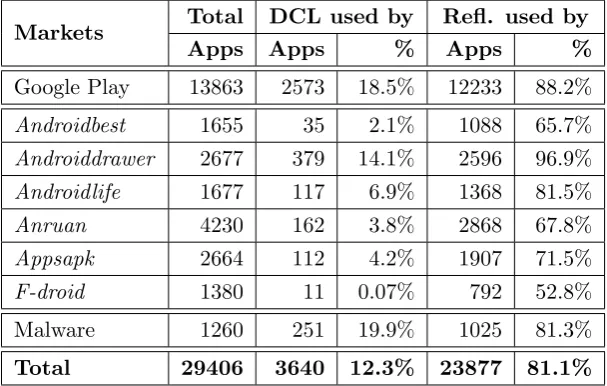
To understand the significance of the use of reflection and DCL in Android apps, we performed a study of 13,863 apps from Google Play store and 14,283 apps from several third-party markets gathered in July 2013, along with 1260 malware samples from [116]. In this analysis, we consider reflection calls that influence the app method call graph
(MCG), i.e., method invocation (invoke) and object creation (newInstance) functions,
and do not study other reflection API capabilities like field modification.
The aggregated results of the analysis with our modified version1 of AndroGuard [2]
1
18 2.3. ANALYSIS OF DYNAMIC CODE UPDATE FEATURES IN ANDROID APPS
Table 2.1: Usage of DCL and Reflection in Applications
Markets Total DCL used by Refl. used by
Apps Apps % Apps %
Google Play 13863 2573 18.5% 12233 88.2%
Androidbest 1655 35 2.1% 1088 65.7%
Androiddrawer 2677 379 14.1% 2596 96.9%
Androidlife 1677 117 6.9% 1368 81.5%
Anruan 4230 162 3.8% 2868 67.8%
Appsapk 2664 112 4.2% 1907 71.5%
F-droid 1380 11 0.07% 792 52.8%
Malware 1260 251 19.9% 1025 81.3%
Total 29406 3640 12.3% 23877 81.1%
are shown in Table 2.1. It is evident that dynamic code update features are widely used by application developers.
On Google Play we downloaded approximately 500 top free applications from each category. Results of the analysis reveal that on average 18.5% of analyzed apps from Google Play contain DCL and 88% use reflection. On average, apps with DCL contain 1 DCL call and apps with reflection incorporate around 22 reflective calls. The categories
“BUSINESS”, “SHOPPING” and “TRAVEL AND LOCAL” show minimal DCL rates
(at most 10% of apps use DCL). The most “dynamic” category is “GAME”; 38.3% of
applications in this category use DCL2.
We further downloaded apps from 6 third-party markets, namely, androidbest [5],
androiddrawer [6], androidlife [7], anruan [9], appsapk [10] and f-droid [21]. The first
5 markets distribute only provided APK files, while the latter (f-droid) along with the
final packages also provides links to the source code of the apps. The lowest fraction
of applications with DCL calls were observed on the f-droid market that contains only
open-source apps. In terms of individual usage, the average number of reflection calls is
around 19 per app package across all third-party markets (with f-droid exhibiting again
the lowest number of reflection calls at around 14).
Besides the analysis of benign applications, we studied malware samples provided in [116]. The average usage of DCL across all malware samples is 19.9%, whereas 81% of all samples use reflection. However, this dataset is old, and DCL usage rates in more recent malicious applications are expected to be significantly higher [90] because this
2
functionality is used to conceal malicious payloads [64] from static and dynamic analyzers like Google Bouncer.
Listing 2.2: DCL and Reflection Usage in AnserverBot
1 [ com . sec . a n d r o i d . p r o v i d e r s . drm . D o c t y p e ]
2 p u b l i c s t a t i c O b j e c t b ( F i l e pFile , S t r i n g pStr1 , S t r i n g pStr2 , O b j e c t [] p A r r O f O b j ) {
3 S t r i n g s3 ;
4 if ( p F i l e == n u l l) {
5 S t r i n g s1 = a . g e t F i l e s D i r () . g e t A b s o l u t e P a t h () ;
6 // get the n a m e of the f i l e to be l o a d e d
7 // 9 C k O r C 3 2 u I 3 2 7 W B D 7 n _ _ - > / a n s e r v e r b . db
8 S t r i n g s2 = X m l n s . d (" 9 C k O r C 3 2 u I 3 2 7 W B D 7 n _ _ ") ;
9 s3 = s1 . c o n c a t ( s2 ) ;
10 }
11 for ( F i l e l o c F i l e = new F i l e ( s3 ) ; ; l o c F i l e = p F i l e ) {
12 S t r i n g s4 = l o c F i l e . g e t A b s o l u t e P a t h () ;
13 S t r i n g s5 = a . g e t F i l e s D i r () . g e t A b s o l u t e P a t h () ;
14 C l a s s L o a d e r l o c C l a s s L o a d e r = a . g e t C l a s s L o a d e r () . g e t P a r e n t () ;
15 // get the c l a s s s p e c i f i e d by " p S t r 1 " f r o m a n s e r v e r b . db
16 C l a s s l o c C l s = new D e x C l a s s L o a d e r ( s4 , s5 , null, l o c C l a s s L o a d e r ) . l o a d C l a s s ( p S t r 1 ) ;
17 C l a s s [] a r r O f C l s = new C l a s s [ 5 ] ;
18 a r r O f C l s [0] = C o n t e x t .c l a s s;
19 a r r O f C l s [1] = I n t e n t .c l a s s;
20 a r r O f C l s [2] = B r o a d c a s t R e c e i v e r .c l a s s;
21 a r r O f C l s [3] = F i l e D e s c r i p t o r .c l a s s;
22 a r r O f C l s [4] = S t r i n g .c l a s s;
23 // get the m e t h o d s p e c i f i e d by " p S t r 2 "
24 M e t h o d l o c M t d = l o c C l s . g e t M e t h o d ( pStr2 , a r r O f C l s ) ;
25 // c r e a t e new i n s t a n c e of the c l a s s
26 O b j e c t l o c O b j = l o c C l s . n e w I n s t a n c e () ;
27 // i n v o k e the m e t h o d t h r o u g h r e f l e c t i o n
28 r e t u r n l o c M t d . i n v o k e ( locObj , p A r r O f O b j ) ;
29 }
30 }
Example Malware: Listing 2.2 is a code snippet of the AnserverBotTrojan [115],
which illustrates how reflection and DCL are used to thwart static analyzers from detection of malicious functionality. Line 16 shows an example of a dynamic class loading call in
Android using the DexClassLoader class. The name of the file from which the code is
20 2.4. CHAPTER SUMMARY
parameter and, thus, may not be available for static analysis.
2.4
Chapter Summary
Bypassing Analysis tools Using
Dynamic Code Updates
Dynamic code update techniques, such as reflection and dynamic class loading, enable apps to change their behavior at runtime. These techniques are heavily used in Android apps for extensibility. However, malware developers misuse these techniques to conceal malicious functionality, bypass static analysis tools and expose the malicious functionality only when the app is installed and run on a user’s device. Although, the use of these tech-niques alone may not be sufficient to bypass analysis tools, it is the use of reflection/DCL
APIs with obfuscated parameters that makes the state-of-the-art static analysis tools for
Android unable to infer the correct behavior of the app. This chapter demonstrates this
fact further by testing some of the state-of-the-art static analysis tools with
Reflection-Bench, our suite of benchmark test applications that use reflection in various ways to perform malicious activities. Moreover, using a test malware app, InboxArchiver, that is based on dynamic code loading to conceal malicious functionality, we demonstrate how dynamic code loading can be used to evade online analysis systems.
To understand the current trends in real apps, it is important to perform a study on the sources of the parameters used in reflection/DCL APIs. In this chapter, we describe how malicious apps bypass analysis tools using reflection/DCL with parameters provided by sources, such as network, files, encrypted strings, etc., which are hard to analyze statically. We further develop a tool to analyze a dataset of 3,645 real world malware samples and 16,528 benign apps in order to investigate the sources of the parameters used in reflection/DCL APIs. The results of our analysis indicate the presence of such programming practices in both legitimate and malicious apps. However, malicious apps
tend to obfuscate the parameters of reflection/DCL APIs more often. The use of Crypto
related APIs as sources of the parameters of reflection/DCL APIs is significantly higher in
22 3.1. INTRODUCTION
malicious apps, which endorses the fact that malicious apps try to thwart static analysis tools.
3.1
Introduction
Malware developers use an array of techniques to evade analysis tools deployed by app markets and execute malicious code on users’ devices. Code obfuscation, anti-debugging, emulator detection, time bombs, reflection and DCL are some of the techniques found in modern mobile malware. In this dissertation, we are particularly interested in the latter two techniques. Reflection and DCL enable development of flexible apps which can change their behavior at runtime after being installed on a user’s device. The same feature serves well for malware developers as they develop seemingly benign apps at installation time that can load additional malicious code at runtime using DCL and access it using reflection APIs. Doing so, they evade static analysis tools that rely on the availability of all the information before the analysis starts. Reflection/DCL APIs operate on string parameters representing code files, classes, methods, etc. When these parameters are not readily available in the code at analysis time (i. e., encrypted and only decrypted at runtime, read from a file provided via network), state-of-the-art static analysis tools find it impossible to infer the exact behavior of the app. Therefore, the sources of these parameters become much more important from security point of view as they play a vital role in malicious usage of reflection/DCL APIs. While previous works use various techniques to analyze apps in the presence of dynamic code updates, this dimension of reflection/DCL is most often overlooked [80] [106] [110].
In order to further describe the problem, this chapter demonstrates the lack of effec-tiveness of the state-of-the-art tools when it comes to analysing apps that hide suspicious behavior using reflection and dynamic code loading. We develop a set of benchmark apps that use reflection in different ways to conceal information leakage. Our analy-sis of reflection-bench using some of the state-of-the-art static analyanaly-sis tools shows their ineffectiveness to handle apps that use reflection. We plan to make reflection-bench pub-lic to enable researchers to test their analysis tools with it. Furthermore, we develop InboxArchiver, a seemingly benign app that uses dynamic code loading to hide its suspi-cious functionality, and use it to test some of the most well known online analysis systems. The analysis reports show that InboxArchiver easily bypasses these analysis systems.
reflection/DCL APIs. The tool takes an Android APK file (or a directory containing APK files), performs analysis on it and generates statistics about the usage of reflection/DCL APIs and the corresponding sources of their parameters. The results of our analysis on real world apps show that it is more common in malicious apps to take parameters of
reflection/DCL APIs from sources, such asCrypto related APIs, which help thwart static
analysis.
Contributions:
• We design and develop reflection-bench, a set of benchmark apps that use reflection
to conceal information leakage, and use it to test some of the state-of-the-art static analysis tools. We plan to make reflection-bench public so that it can be used by other researchers to test the effectiveness of their analysis tools in the presence of reflection.
• We develop an automated static analysis tool which can perform analysis on Android
apps, detect information flow between given source and sink APIs, and produce statistics about the presence of such information flow paths between source/sink APIs in individual apps as well as the whole market.
• We collect and analyze a dataset of real world apps containing 16,528 benign and
3,645 malicious apps in order to investigate the sources of the parameters used in reflection/DCL APIs. To the best of our knowledge, this is first study focusing on the sources of the parameters of reflection/DCL APIs. The analysis results would help in understanding the behavior of apps that use dynamic code updates and designing more effective analysis procedures and policies to detect malicious apps in the market.
3.2
Motivating Examples
24 3.2. MOTIVATING EXAMPLES
BrainTest: Check Point Mobile Threat Prevention detected an Android malware in
August 2015, which is packaged inside a game app known as BrainTest and has 100,000-500,000 downloads at Google Play Store. As reported, the malware infected up to 1 million users.
The malware uses a number of techniques to bypass Google Bouncer. It conceals its malicious activity if the IP or domain in which the app is being executed is mapped to Google Bouncer. It uses a combination of time bombs, dynamic code loading, reflection, encrypted code files, and malicious code (root exploits) downloaded from the Internet, to harden reverse engineering and evade analysis tools.
Once the app is installed on a user’s device, it decrypts an encrypted file start.ogg
from the app’s assets directory and loads it using DexClassLoader. The dynamically
loaded file starts communicating with a Command&Control (C&C) server. The server
responds with a .json file that contains a link to a .jar file which the app downloads
and dynamically loads using DexClassLoader. In addition, the .json file also contains
names of the classes and methods which are to be invoked by the app using reflection APIs. The malware then drops root exploits and installs/uninstalls other APKs as the C&C server directs.
Listing 3.1: FakenotifyA - SMS Trojan
1 S m s M a n a g e r l o c a l S m s M a n a g e r = S m s M a n a g e r . g e t D e f a u l t () ;
2 S t r i n g s t r 2 = p a r a m S t r i n g 1 ;
3 S t r i n g s t r 3 = p a r a m S t r i n g 2 ;
4 l o c a l S m s M a n a g e r . s e n d T e x t M e s s a g e ( str2 , null, str3 , null, n u l l) ;
Fakenotify: It is noticed that Android malware evolves to harden analysis and reverse engineering. Listing 3.1 shows an excerpt from an SMS trojan named FakenotifyA [61]. The Listing shows how FakenotifyA uses a standard SMS sending procedure to send
messages to premium numbers. Although, the message, paramString2, and the number,
paramString1, to which the message is sent are provided at runtime, the SMS sending mechanism is pretty obvious and easy to detect for the analysis tools.
After some time, a new version of the same malware, FakenotifyB, surfaced. Fakeno-tifyB is exactly similar to FakenotifyA when it comes to its malicious functionality, however, FakenotifyB makes use of reflection to dynamically create an instance of the
SMSManager class, retrieves objects of its getDefault and sendTextMessage methods and invokes them. In addition to using reflection, the parameters representing the names of SMSManager class and its methods are provided in encrypted form and only decrypted at runtime. The SMS sending routine is shown in Listing 3.2 and it is much harder for analysis tools to infer its behavior unlike FakenotifyA [61].
Listing 3.2: FakenotifyB - Version 2 of FakenotifyA
1 C l a s s c l a s s 1 = C l a s s . f o r N a m e ( S t r i n g D e c o d e r . d e c o d e (" & nd } D % d .(! x ! e j D n 5 . S m s M & n & g !} "
) ) ;
2 O b j e c t obj = c l a s s 1 . g e t M e t h o d ( S t r i n g D e c o d e r . d e c o d e (" g ! ( ? ! f & wx ( ") , new C l a s s [ 0 ] ) . i n v o k e (null, new O b j e c t [ 0 ] ) ;
3 c l a s s 1 . g e t M e t h o d ( S t r i n g D e c o d e r . d e c o d e (" s ! ndz !4( M ! ss & g ! ") , new C l a s s [] { j a v a / l a n g / String , j a v a / l a n g / String , j a v a / l a n g / String , a n d r o i d / app / P e n d i n g I n t e n t , a n d r o i d / app / P e n d i n g I n t e n t }) . i n v o k e ( obj , new O b j e c t [] { s , null, s1 , null,
n u l l}) ;
isolated incident in the Android malware. There are many examples where whole malware families rely on loading code dynamically and using encrypted strings in reflection/DCL APIs to evade detection by analysis tools. Listing 3.3 shows a piece of code taken from a
sample of the AnserverBot family. It uses an encrypted string (9CkOrC32uI327WBD7n )
to hold the file name which is then decrypted (str2) at runtime and concatenated with
another string (str1) to get the file name (str3). The absolute path is then retrieved in
str4 and provided to DexClassLoader to load the file dynamically.
Listing 3.3: Excerpt from AnserverBot
1 // 9 C k O r C 3 2 u I 3 2 7 W B D 7 n _ _ - > / a n s e r v e r b . db
2 S t r i n g s t r 2 = X m l n s . d (" 9 C k O r C 3 2 u I 3 2 7 W B D 7 n _ _ ") ;
3 s t r 3 = s t r 1 . c o n c a t ( s t r 2 ) ;
4 for ( F i l e l o c a l F i l e = new F i l e ( s t r 3 ) ; ; l o c a l F i l e = p a r a m F i l e ) {
5 S t r i n g s t r 4 = l o c a l F i l e . g e t A b s o l u t e P a t h () ;
6 S t r i n g s t r 5 = a . g e t F i l e s D i r () . g e t A b s o l u t e P a t h () ;
7 C l a s s L o a d e r l o c a l C l a s s L o a d e r = a . g e t C l a s s L o a d e r () . g e t P a r e n t () ;
8 // get the c l a s s s p e c i f i e d by " p a r a m S t r i n g 1 " f r o m a n s e r v e r b . db
9 C l a s s l o c a l C l a s s = new D e x C l a s s L o a d e r ( str4 , str5 , null, l o c a l C l a s s L o a d e r ) . l o a d C l a s s ( p a r a m S t r i n g 1 ) ;
The point worth noticing in these three examples is the use of parameters in reflec-tion/DCL APIs that are not readily available for the analysis tools. Consequently, static analysis tools find it impossible to construct the exact behavior of these apps. Therefore, the focus of the analysis in this chapter is not only reflection/DCL APIs, but also the manner in which the parameters are provided to these APIs.
3.3
Reflection-Bench and InboxArchiver
26 3.3. REFLECTION-BENCH AND INBOXARCHIVER
and DCL, are discussed separately. In the first subsection, we discuss Reflection-Bench (our benchmark of Android applications to test static analysis for reflection resolution), whereas in the second subsection, we discuss our sample test malware, InboxArchiver, which makes use of dynamic code loading to evade current available online analysis sys-tems.
3.3.1 Reflection-Bench
Reflection is a very useful and heavily used dynamic code update technique in ever chang-ing Android apps. However, it comes with an inherent ability to harden static analysis of apps which makes it attractive for malware developers. Although, researchers have worked on trying to resolve reflection in Android apps, there has not been a benchmark of apps which could be used as a test suite for reflection in Android. We present Reflection-Bench, a set of Android apps, which use reflection to conceal information leakage so that it cannot be detected by static anlyzers. We use Reflection-Bench to test some of the very recent state-of-the-art static analysis tools.
Overview: The purpose of developing Reflection-Bench is to provide a set of Android
based applications which could be used by analysis tools to test their capabilities in resolving reflection. These apps use reflection in various forms to conceal information leakage and make the flow of the program ambiguous. We have developed a set of 14 apps based on how reflection is used and how the reflection APIs get their arguments.
Before describing the apps in Reflection-Bench, we go through the different cases of reflection that this benchmark covers. We divide the apps into different categories and try to make detection harder as we move from one case to the other. The hardness of reflection resolution depends upon the nature of the arguments used in the reflection APIs. We can broadly categorize their nature into static strings and dynamic strings. By static strings, we intend to refer to those string arguments which are provided as part of the application package, e.g., strings defined inside the program, read from a file which is part of the application, etc.
In Reflection-Bench, we do not consider the case of dynamic strings/arguments, e.g, those received over the network, read from files on disk, received from other apps, etc. The case of such dynamic strings makes it almost impossible for static analysis tools to resolve reflection. We focus on those cases where all the information regarding the arguments of the reflection APIs are provided as part of the application. However, with each case the complexity is gradually increased.
Moreover, we also consider the cases where the string arguments are formed from the concatenation of multiple strings or decrypted from encrypted strings using crypto APIs. In addition, we consider two levels of complexity where in level one, reflection is used to call only the methods defined inside the app and in level two, both the methods defined inside the program as well as the senstive APIs, which are responsible for leaking sensitive information, are called through reflection.
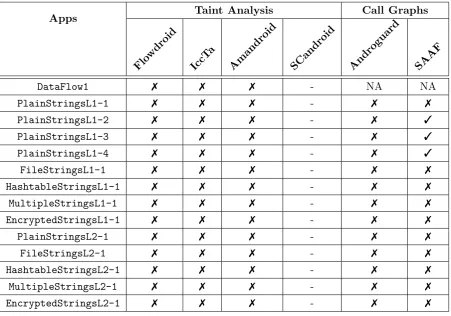
Reflection-Bench is designed so that it can be used to test tools which perform taint analysis as well as those which only generate call graphs for other forms of static analysis.
Implementation: We have two major classes in most of the cases, i.e, BaseClass and
MainActivity. BaseClass has two methods, where Method1 gets the device ID using the
getDeviceID API and stores it in a local field Str. Method2 gets a string and sends it
out using thesendTextMessage() API.
MainActivity calls Method1() of BaseClass, gets its field Str and sends it to the Method2 of BaseClass which leaks it out.
We tried to cover different combinations of reflection APIs which could make it hard for static analyzers to detect the information leakage. In the following, we describe how reflection APIs are used in each case.
• 1 MainActivity retrieves the the field Str of BaseClass usinggetField()reflection
API.
• 2 MainActivity retrieves an instance of BaseClass using the reflection APIforName(),
creates its object using the newInstance() API and gets its field Str using the
getField() reflection API.
• 3 MainActivity retrieves an instance of BaseClass using the reflection APIforName(),
gets its Constructor using the getConstructor API, creates its object using the
newInstance() API and gets its field Str using thegetField() reflection API.
• 4 MainActivity retrieves an instance of BaseClass using the reflection APIforName(),
creates its object using the newInstance() API and gets its field Str using the
getField() reflection API. It also retrieves the methods of BaseClass using the
getMethod()reflection API and calls them using the invoke() reflection API.
• 5 MainActivity retrieves an instance of BaseClass using the reflection APIforName(),
gets its Constructor using the getConstructor API, creates its object using the
newInstance() API and gets its field Str using the getField() reflection API. It
also retrieves the methods of BaseClass using the getMethod() reflection API and
28 3.3. REFLECTION-BENCH AND INBOXARCHIVER
In the above cases, the names of the class ”BaseClass”, its methods and its field are provided as static strings in the MainActivity class. In the following, we try to acquire/generate these names at runtime in addition to Case 4 .
• 6 Reads the names of BaseClass, its methods and its field from a file.
• 7 Reads the names of BaseClass, its methods and its field from a Hashtable.
• 8 Constructs the names of BaseClass, its methods and its field from multiple strings
in the program.
• 9 Decrypts the encrypted names of BaseClass, its methods and its field using
Crypto APIs.
In all of the above cases, reflection APIs are only used in MainActivity and the
sensitive APIs, i.e., getDeviceId() and sendTextMessage(), are called directly
in BaseClass. In the following cases, we introduce reflection in BaseClass too in addition to Case 4 .
• 10 BaseClass retrieves an instance of the TelephonyManager class using the
reflec-tion APIforName(), creates its object using thenewInstance() API, gets the
sen-sitive APIs using thegetMethod()reflection API and calls them using theinvoke()
reflection API.
In the above case, we use static strings for the names of the class TelephonyManager
and the methods getDeviceId() and sendTextMessage(). In the following we
acquire/generate these names at runtime in addition to Case 10 .
• 11 Reads the names of TelephonyManager class, methods getDeviceId() and
sendTextMessage() from a file.
• 12 Reads the names of TelephonyManager class, methods getDeviceId() and
sendTextMessage() from a Hashtable.
• 13 Constructs the names of TelephonyManager class, methodsgetDeviceId()and
sendTextMessage() from multiple strings inside the app.
• 14 Decrypts the encrypted names of TelephonyManager class, methodsgetDeviceId()
and sendTextMessage() using Crypto APIs.
Table 3.1: Analysis with State-of-the-art tools
Apps Taint Analysis Call Graphs
Flo wdroid
IccT a
Amandroid SCandroid Androguard SAAF
DataFlow1 7 7 7 - NA NA
PlainStringsL1-1 7 7 7 - 7 7
PlainStringsL1-2 7 7 7 - 7 3
PlainStringsL1-3 7 7 7 - 7 3
PlainStringsL1-4 7 7 7 - 7 3
FileStringsL1-1 7 7 7 - 7 7
HashtableStringsL1-1 7 7 7 - 7 7
MultipleStringsL1-1 7 7 7 - 7 7
EncryptedStringsL1-1 7 7 7 - 7 7
PlainStringsL2-1 7 7 7 - 7 7
FileStringsL2-1 7 7 7 - 7 7 <