Live response
Programs, processes and attacks
Windows Live response/analysis 101
Programs
• A compiled Windows program - Portable Executable File
format (also called the
PE/COFF format)
When started certain (imported) DLLs are loaded that is needed by the executable
Link Libraries and OS relocation 1
• A dynamic link library (or shared library) takes the idea of an ordinary library (also called a statically linked library) one step further
• A dynamic/shared link library is a lot like a program, but instead of being run by the user to do one thing it has a lot of functions "exported" so that other programs can call them
– This list, called the export table, gives the address inside the DLL file of each of the functions which the DLL allows other programs to access
• The calling executable have a list of imports or imported functions from every DLL file it uses
• When Windows loads your program it creates a whole new "address space" for the program
• When your program contains the instruction "read memory from address 0x40A0F0 (or something like that) the computer hardware actually looks up in a table to figure out where in physical memory that location is
Link Libraries and OS relocation 2
• Programs, when they are loaded, are "mapped" into address space. This process basically copies the code and static data of your
program from the executable file into a certain part of address space, for example, a block of space starting at address 0x400000
– The same thing happens when you load a DLL
• A DLL, or a program for that matter, tells the operating system what address it would prefer to be mapped into
– Although the same address means different things to different programs, within a single program an address can only be used once
• If two DLLs wants to be mapped to the same address the OS first check if the DLL is relocateable
• If so it performs the necessary relocations
Memory Layout for Windows XP
Exerpt from ”Windows Memory Layout, User-Kernel Address Spaces.pdf”
Processes
• A process provides a framework in which a program (or
even multiple programs) can be run on a system
• Each process contains a number of key elements
– Memory for the storage of the machine-language version of the program’s instructions etc. (VADs)
– Memory for any variables declared in the program – Tables tracking the location of included DLLs,
their particular functions, and so on – An access token that specifies which
rights and permissions the process has if it tries to access other system resources or the resources of another networked computer
Process redirection
• A process can accomplish anything on the system that its associated
access token allows - which normally is the user or service account that launched the process
• By redirecting the flow of execution, an attacker can trick the process into performing malicious actions
– Process redirection can occur through DLL Injection
– By injecting a rogue DLL into a process’s memory, an attacker can insert malicious code
– If the attack is performed over the network - no footprint is left on disk
• The Import Address Table is used to keep track of the address in memory of functions that were imported into the process memory space as part of dependent DLLs
IAT (Import Address Table)
• pFile = Address (file offset) to data
• pView = View offset from headers or sections start
• RVA = Relative Virtual Address to data in RAM
• VA (Virtual Address) = RVA + Load/Base address of EXE/DLL
Offset type
+650 exploits and +216 payloads to choose from 2011-04
Metasploit explotation
DLL injection [demo]
• Shellcode (download DLL function 1)
– Can also be done in a thread as here maintaining programs original behaviour
• Victim
– Windows XP SP0 – Tasks before/after
• Payload
– Reverse_ord_tcp
• Connect back to the attacker, inject the meterpreter server DLL
Tasklist /svc (victim)
Image Name PID Services
========================= ====== ============================ System Idle Process 0 N/A
System 4 N/A smss.exe 528 N/A csrss.exe 592 N/A winlogon.exe 616 N/A services.exe 660 Eventlog, PlugPlay lsass.exe 672 PolicyAgent, ProtectedStorage, SamSs vmacthlp.exe 832 VMware Physical Disk Helper Service svchost.exe 872 RpcSs
svchost.exe 972 AudioSrv, Browser, CryptSvc, Dhcp, dmserver, ERSvc, EventSystem,
FastUserSwitchingCompatibility, helpsvc, lanmanserver, lanmanworkstation, Messenger, Netman, Nla, Schedule, seclogon, SENS, ShellHWDetection, srservice, TermService, Themes, TrkWks, uploadmgr, W32Time, winmgmt, WmdmPmSp, wuauserv, WZCSVC svchost.exe 1212 Dnscache
svchost.exe 1228 LmHosts, RemoteRegistry, SSDPSRV, WebClient explorer.exe 1380 N/A
spoolsv.exe 1488 Spooler VMwareTray.exe 1624 N/A VMwareUser.exe 1640 N/A msmsgs.exe 1648 N/A VMwareService.exe 1828 VMTools cmd.exe 1184 N/A ctfmon.exe 1588 N/A wmiprvse.exe 176 N/A tasklist.exe 228 N/A
Image Name PID Services
========================= ====== ============================ System Idle Process 0 N/A
System 4 N/A smss.exe 528 N/A csrss.exe 592 N/A winlogon.exe 616 N/A services.exe 660 Eventlog, PlugPlay lsass.exe 672 PolicyAgent, ProtectedStorage, SamSs vmacthlp.exe 832 VMware Physical Disk Helper Service svchost.exe 872 RpcSs
svchost.exe 972 AudioSrv, Browser, CryptSvc, Dhcp, dmserver, ERSvc, EventSystem,
FastUserSwitchingCompatibility, helpsvc, lanmanserver, lanmanworkstation, Messenger, Netman, Nla, Schedule, seclogon, SENS, ShellHWDetection, srservice, TermService, Themes, TrkWks, uploadmgr, W32Time, winmgmt, WmdmPmSp, wuauserv, WZCSVC svchost.exe 1212 Dnscache
svchost.exe 1228 LmHosts, RemoteRegistry, SSDPSRV, WebClient explorer.exe 1380 N/A
spoolsv.exe 1488 Spooler VMwareTray.exe 1624 N/A VMwareUser.exe 1640 N/A msmsgs.exe 1648 N/A VMwareService.exe 1828 VMTools cmd.exe 1184 N/A ctfmon.exe 1588 N/A wmiprvse.exe 580 N/A tasklist.exe 792 N/A
Reflective dll injection
ListDLLs v2.25 - DLL lister for Win9x/NT Copyright (C) 1997-2004 Mark Russinovich Sysinternals - www.sysinternals.com
---lsass.exe pid: 680
Command line: C:\WINDOWS\system32\lsass.exe Base Size Version Path
0x01000000 0x5000 5.01.2600.0000 C:\WINDOWS\system32\lsass.exe 0x77f50000 0xa9000 5.01.2600.0000 C:\WINDOWS\System32\ntdll.dll 0x77e60000 0xe5000 5.01.2600.0000 C:\WINDOWS\system32\kernel32.dll 0x77dd0000 0x8b000 5.01.2600.0000 C:\WINDOWS\system32\ADVAPI32.dll 0x77cc0000 0x75000 5.01.2600.0000 C:\WINDOWS\system32\RPCRT4.dll 0x74520000 0xa7000 5.01.2600.0000 C:\WINDOWS\system32\LSASRV.dll 0x77c10000 0x53000 7.00.2600.0000 C:\WINDOWS\system32\msvcrt.dll 0x76f90000 0x10000 5.01.2600.0000 C:\WINDOWS\system32\Secur32.dll 0x77d40000 0x8d000 5.01.2600.0000 C:\WINDOWS\system32\USER32.dll 0x77c70000 0x40000 5.01.2600.0000 C:\WINDOWS\system32\GDI32.dll 0x74440000 0x69000 5.01.2600.0000 C:\WINDOWS\system32\SAMSRV.dll 0x76790000 0xb000 5.01.2600.0000 C:\WINDOWS\system32\cryptdll.dll 0x76f20000 0x25000 5.01.2600.0000 C:\WINDOWS\system32\DNSAPI.dll 0x71ab0000 0x15000 5.01.2600.0000 C:\WINDOWS\system32\WS2_32.dll 0x71aa0000 0x8000 5.01.2600.0000 C:\WINDOWS\system32\WS2HELP.dll 0x762a0000 0xf000 5.01.2600.0000 C:\WINDOWS\system32\MSASN1.dll 0x71c20000 0x4f000 5.01.2600.0000 C:\WINDOWS\system32\NETAPI32.dll 0x71bf0000 0x11000 5.01.2600.0000 C:\WINDOWS\system32\SAMLIB.dll 0x71b20000 0x11000 5.01.2600.0000 C:\WINDOWS\system32\MPR.dll 0x767a0000 0x13000 5.01.2600.0000 C:\WINDOWS\system32\NTDSAPI.dll 0x76f60000 0x2c000 5.01.2600.0000 C:\WINDOWS\system32\WLDAP32.dll 0x743b0000 0xd000 5.01.2600.0000 C:\WINDOWS\system32\msprivs.dll 0x71cf0000 0x44000 5.01.2600.0000 C:\WINDOWS\system32\kerberos.dll 0x76d10000 0x1d000 5.01.2600.0000 C:\WINDOWS\system32\msv1_0.dll 0x744b0000 0x63000 5.01.2600.0000 C:\WINDOWS\system32\netlogon.dll 0x767c0000 0x2a000 5.01.2600.0000 C:\WINDOWS\system32\w32time.dll 0x76080000 0x61000 6.00.8972.0000 C:\WINDOWS\system32\MSVCP60.dll 0x76d60000 0x15000 5.01.2600.0002 C:\WINDOWS\system32\iphlpapi.dll 0x76de0000 0x26000 5.01.2600.0000 C:\WINDOWS\system32\netman.dll
0x76d40000 0x16000 5.01.2600.0000 C:\WINDOWS\system32\MPRAPI.dll 0x76e40000 0x2f000 5.01.2600.0000 C:\WINDOWS\system32\ACTIVEDS.dll 0x76e10000 0x24000 5.01.2600.0000 C:\WINDOWS\system32\adsldpc.dll 0x76b20000 0x15000 3.00.9238.0000 C:\WINDOWS\system32\ATL.DLL 0x771b0000 0x11a000 5.01.2600.0000 C:\WINDOWS\system32\ole32.dll 0x77120000 0x8b000 3.50.5014.0000 C:\WINDOWS\system32\OLEAUT32.dll 0x76e80000 0xd000 5.01.2600.0000 C:\WINDOWS\system32\rtutils.dll 0x76670000 0xe4000 5.01.2600.0000 C:\WINDOWS\system32\SETUPAPI.dll 0x76ee0000 0x37000 5.01.2600.0000 C:\WINDOWS\system32\RASAPI32.dll 0x76e90000 0x11000 5.01.2600.0000 C:\WINDOWS\system32\rasman.dll 0x76eb0000 0x2a000 5.01.2600.0000 C:\WINDOWS\system32\TAPI32.dll 0x772d0000 0x63000 6.00.2600.0000 C:\WINDOWS\system32\SHLWAPI.dll 0x76b40000 0x2c000 5.01.2600.0000 C:\WINDOWS\system32\WINMM.dll 0x773d0000 0x7f4000 6.00.2600.0000 C:\WINDOWS\system32\SHELL32.dll 0x76da0000 0x30000 5.01.2600.0000 C:\WINDOWS\system32\WZCSvc.DLL 0x76d30000 0x4000 5.01.2600.0000 C:\WINDOWS\system32\WMI.dll 0x76d80000 0x1a000 5.01.2600.0000 C:\WINDOWS\system32\DHCPCSVC.DLL 0x762c0000 0x8a000 5.131.2600.0000 C:\WINDOWS\system32\CRYPT32.dll 0x76f50000 0x8000 5.01.2600.0000 C:\WINDOWS\system32\WTSAPI32.dll 0x76360000 0xf000 5.01.2600.0000 C:\WINDOWS\system32\WINSTA.dll 0x75a70000 0xa3000 5.01.2600.0000 C:\WINDOWS\system32\USERENV.dll
0x71950000 0xe4000 6.00.2600.0000 C:\WINDOWS\WinSxS\x86_Microsoft.Windows.Common-Controls_6595b64144ccf1df_6.0.0.0_x-ww_1382d70a\comctl32.dll
0x77340000 0x8b000 5.82.2600.0000 C:\WINDOWS\system32\comctl32.dll 0x767f0000 0x24000 5.01.2600.0000 C:\WINDOWS\system32\schannel.dll 0x74380000 0xf000 5.01.2600.0000 C:\WINDOWS\system32\wdigest.dll 0x0ffd0000 0x22000 5.01.2518.0000 C:\WINDOWS\System32\rsaenh.dll 0x74410000 0x2d000 5.01.2600.0000 C:\WINDOWS\system32\scecli.dll 0x743e0000 0x27000 5.01.2600.0000 C:\WINDOWS\system32\ipsecsvc.dll 0x745d0000 0xb7000 5.01.2600.0000 C:\WINDOWS\system32\oakley.DLL 0x74370000 0xa000 5.01.2600.0000 C:\WINDOWS\system32\WINIPSEC.DLL 0x743a0000 0x9000 5.01.2600.0000 C:\WINDOWS\system32\pstorsvc.dll 0x71a50000 0x3b000 5.01.2600.0000 C:\WINDOWS\system32\mswsock.dll 0x71a90000 0x8000 5.01.2600.0000 C:\WINDOWS\System32\wshtcpip.dll 0x743c0000 0x17000 5.01.2600.0000 C:\WINDOWS\system32\psbase.dll 0x0ffa0000 0x21000 5.01.2518.0000 C:\WINDOWS\System32\dssenh.dll 0x76bf0000 0xb000 5.01.2600.0000 C:\WINDOWS\system32\PSAPI.DLL
DLL list
before
and after
Hooking and DLL injection examples
• By hooking a call to a function that lists the files in a directory, an attacker can modify the results that are displayed
– The same applies to network connections etc.
• By hooking the appropriate functions in an anti-virus program, the attacker can force the program to not scan certain files or directories • By hooking the functions involved in receiving keyboard input, the
hacker can log keystrokes, creating files that record all keystrokes entered by users and even transmitting those files to the attacker • The attacker can cause a process to open a port (not visible) on a
system and allow privileged connections to the system from across a network, creating a back door onto the system that the hacker can use to regain control and access in the future
• Similar methods to hooking are physical modification of libraries and using wrapper libraries
Maintaining Order Using Privilege Modes
• Controlling access to resources and ensuring that each process has access to only the appropriate resources is a large part of what the operating system is responsible for doing
– Each process has only access to memory that is in its defined address space
• The Windows OS runs processes in one of two modes
– User Mode (ring 3) and Kernel Mode (ring 0)
– x86 CPU supports 4 privilege modes (HW protected)
• Windows Driver Foundation (WDF) for XP and Vista/7 supports
– User-mode driver framework (UMDF) – Kernel-mode driver framework (KMDF)
• Benefits with UMDF
– Increased stability – Ease of development
– Increased security – no access to kernel-mode address space
Drivers and rootkits
• Microsoft digital signing of drivers
– MS 64 bit OS can only install MS signed drivers
• Installing kernel mode drivers need above ordinary user privilege
– User mode drivers as USB-keys etc. is ok for ordinary users
• For the attacker installing his code (driver, DLL injection or hooking) in the system in kernel mode is the holy grail
– A root kit is a set of malicious code that hides the attacker’s presence by concealing malicious processes, listening ports, and other resources being used by the attacker
– If a root kit is running in Kernel Mode, it can conceal its activities from any detection process that is running in User Mode
• Sysinternals RootkitRevealer runs in both kernel mode and user mode comparing results of system tables inquiries
What is Live Response/Analysis?
How do I perform Live-Analysis?
Live Forensics
• Microsoft Portable Executable and Common Object File Format Specification
Finding Live Evidence
• When to Perform Live Response?
– Sophisticated attack methods and crypto technologies requests new forensic evidence collection methods
– Time stamps are very important and doing live-analysis will alter non-volatile data in the computer! Locard’s Exchange Principle
– On the other hand – pulling the power cable may cause corruption – Sometimes there is no other option - mission-critical server
• The key components to any live-analysis are as follows
– Keep interaction with the target system to a bare minimum – Bring your own trusted tools
– Think before you act, and then think again before you act. Once you take any action on a live system, there is no changing the outcome
©2011 Eoghan Casey. Published by Elsevier Inc. All rights reserved.
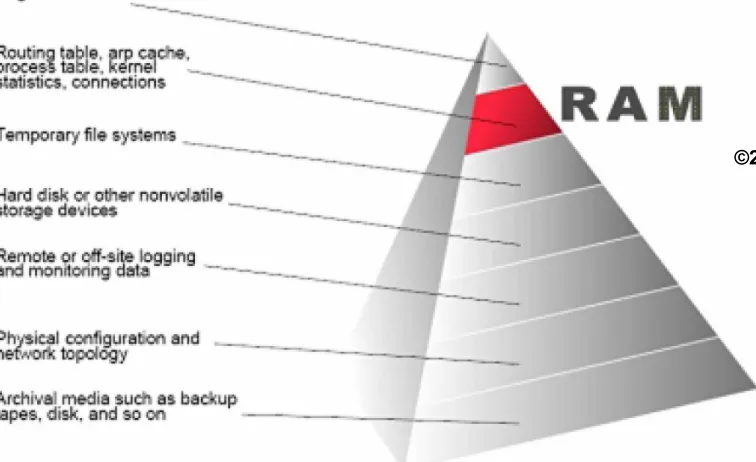
FIGURE 13.5 Order of volatility.
http://www.faqs.org/rfcs/rfc3227.html
Creating Windows Live-Analysis CDs
• You can buy a solution but building your own may be
best
– BYOC – your own DLLs and executables etc.
– You may need one CD for every OS you are about to analyze
– USB media are good but starts plug & play and possibly other programs
• In VMware
1. Install a fresh copy of the desired operating system version on a clean computer
2. Install all current patches on the system using Windows Update 3. Copy the DLLs from the known-good computer to the CD
4. Rename your known-good tools so that you will not accidentally run their equivalent products from the victim computer
What Data to Collect 1…?
• System Time
– date /t and time /t
• Logged-on Users
– psloggedon, net session, logonsessions
• Open Files
– psfile, net file
• Network Information (Cached NetBIOS Name Table)
– nbtstat -c (someone may have used net view etc. on the net)
• Network Connections
– Netstat -ano (b also gives exe name – XPSP2 and higher) – External port scans of victim
• Monitoring Communication with the Victim Box
What Data to Collect 2…?
• Process Information
– tlist and tasklist – pslist
– listdlls – handle
• Process-to-Port Mapping
– netstat -b, tcpvcon
– fport (funkar inte alls med Vista), Openports (funkar inte bra med Vista)
• Process Memory Dumps
– MANDIANT Memoryze
– adplus.vbs script och cdb.exe – ingår i ”Debugging Tools for Windows package” (WinDbg)
• http://support.microsoft.com/default.aspx?scid=kb;en-us;286350
• Network Status
– Ipconfig and routing table (netstat -rn or route print)
– Promiscdetect and Promqry - http://support.microsoft.com/?kbid=892853 • The full path to the executable image (.exe file)
• The command line used to launch the process, if any • The amount of time that the process has been running • The security/user context that the process is running in • Which modules the process has loaded
What Data to Collect 3…?
• Clipboard Contents (pclip.exe third party tool) • Service/Driver Information
– psservice
– SC (service controller) managing services sc query type= service state= all
sc query type= driver or Perl script
• Command History
– doskey /history
• Mapped Drives
– net use
or Perl script
• Shares
– net view or Perl script
• Scheduled jobs (at)
Name : wudfsvc
Display : Windows Driver Foundation - User-mode Driver Framework Start : LocalSystem
Desc : Manages user-mode driver host processes PID : 1088
Path : C:\Windows\system32\svchost.exe -k LocalSystemNetworkRestricted Mode : Auto
State : Running Status : OK
What Data to Collect 4…?
• Full system memory dumps
– Will not grab the swap file
• New research – DFRWS 2005 -> ...
• Software method
– Does not freeze the system
– Windows 2003 SP1, XP SP3, Vista and newer does not allow access to the \\.\PhysicalMemory pipe, not even from an
administrator account!
– Dumping tools commonly use kernel-driver installation routines
• Win32/64dd, Mantech MDD, Mandiant Memoryze and Guidance Winen
• Several other methods exist
– FireWire
What Data to Collect 5…?
• Nonvolatile Information
– Things that may not be persistent after a reboot or difficult to get from an image
• Registry Settings
– ClearPageFileAtShutdown
– DisableLastAccess (last accessed file attribute – 2003/Vista) • “fsutil behavior query disablelastaccess” returns 1
– AutoRuns
– Protected Storage (not in Vista/7)
• View things encrypted in registry as autocomplete etc.
• Passview, pstoreview, etc. • RV auto decrypts PSSP
What Data to Collect 6…?
• Event Logs
– Binary format .evt, Vista/7 has a binary XML format .evtx – psloglist and dumpel (dump event logs)
• Devices and Other Information
– devcon (device manager cmd util)
• System version and patchlevel
– psinfo
• Audit policy
– auditpol
• History of logins
– ntlast (require that auditing is turned on to work)
• Useful CMD tools as UnxUtils and Wintools - unwind
– http://en.wikipedia.org/wiki/UnxUtils
Live-Response Methodologies I
• Methodology or procedure to retrieve the data from the
systems can vary, depending on a number of factors
– Network infrastructure, deployment options and perhaps the political structure of your organization
• Local Response Methodology
– Tools on CD using batch files or Perl scripts saving to USB media – Helix [demo], Incident Response Collection Report (IRCR2),
Windows Forensic Toolchest (WFT) [demo] etc.
• Remote Response Methodology
– Remote execution via special agent or tools as PsExec or Window Management Instrumentation (WMI) scripts
• http://technet.microsoft.com/en-us/sysinternals/bb897553
Live-Response Methodologies II
• Remote Response Methodology cont.
– AccessData Single-Node Enterprise, ProDiscover Incident
Response, Encase FIM/Mobile Entreprise edition, Mandiant First Response (now commercial) etc.
• The Hybrid Approach
– Used when responder cannot login on remote systems but wants to store data to a central location
– Local Response Methodology and Netcat, RAPIER, Forensic Server Project (FSP) and First Responder Utility (FRU) etc.
• How to minimize impact?
– Artifacts as registry keys, added files, executables in memory etc.
• How to distinguish the forensic impact?
Live-Response Methodologies III
• Picking Your Tools
• Validate them with static analysis ie. document
– Where you got it (URL) – The file size
– Cryptographic hashes for the file, using known algorithms – Retrieving information from the file, such as PE headers, file
version information, import/export tables, etc.
• And dynamic analysis ie. test them while monitoring
the system
• Sysinternals Process monitor (File, registry and network monitor plus process explorer in the same package!) etc.
Other IR tools
• AccessData – Live Response 2010R1
• Microsoft COFEE (Computer Online Forensic Evidence
Extractor)
http://www.microsoft.com/industry/government/solutions/cofee/default.aspx
– Separation of the data acquisition procedures with the data examination procedures
– COFEE has leaked onto the web
– DECAF – anti-COFEE - http://www.decafme.org/
• SPADA
– http://www.iacis.com/
• RAPIER (Rapid Assessment & Potential Incident
Examination Report)
RAPIER’s GUI
Module Selection Area
Modules can be
selected individually
Time to run and
Netcat
The swiss army knife of network
tools (nc -h)
Works like unix cat cmd but
over network (~man cat)
cat - concatenate
files and print on the standard output
All platforms are supported
Crypto enabled derivatives
• CryptCat
• SBD
• Socat
• http://sectools.org/netcats.html
nc -l -p [p] > file
nc [ip] [p] < file
Live IR notes
• The worst time to learn how to acquire information from a
system is during the incident
• Expertise does not scale
• Common responses may trample valuable information
– Patch
– Run AV scanners
– Run spyware scanners
– Execute automatic OS updater
• Not everyone knows how to acquire the requested
information
Unix-like Live response I
• More or less identical to Windows live response (knowledge dependent)
• Date and time
– date or date -R
• Show active network connections
– netstat -an | grep -e ESTABLISHED -e CLOSE ...
• Show open TCP or UDP ports
– netstat -an | grep LISTEN
• Show processes with open TCP/UDP ports
– lsof -n | grep -e TCP -e UDP -e LISTEN
• Processes
– ps -aux
• Open files
Unix-like Live response II
• Internal routing table
– netstat -rn
• Loaded kernel modules
– lsmod
• Mounted filesystems
– df, mount
– At suspected crypto usage check /etc/fstab and /etc/mtab
• Dump process memory (core must be enabled/set)
– kill -s <core_signal> pid – cat /proc/<pid>/(s)maps – gcore utility (man gcore) – Linux Memory Tools (LMT)
• Dump RAM (with dd)
– /dev/mem – /proc/kcore
ulimit -a
ulimit -c unlimited
Unix-like Live response III
• Non-volatile Information
– System version and patch level
• uname -a
– Logged in users
• w
– Login history
• last
– Syslog etc.
• Most of the logs are available under /var/log – some are binary
– User accounts
• /etc/passwd and /etc/shadow
– User command history file
Unix-like OS
• Most of the smartphones, tablets and netbooks will be based on scaled down Unix-like operating systems in the future!
• Linux
– Google/Open Handset Alliance → Android
– HP → webOS, Google → Google Chrome OS
– Nokia (Maemo) and Intel (Moblin) → MeeGo → Tizen
• Mac OS X (NeXT, Darwin) and QNX
Memory forensics I
• Dumpa fysiska minnet (RAM), varför?
– Current running processes and terminated processes – Open TCP/UDP ports/raw sockets/active connections – Memory mapped files
• Executable image, shared, objects (modules/drivers), text files
– Caches
• Web addresses, typed commands, passwords, clipboards, SAM database, edited files
– Hidden data, encryption keys and many more – Problematiskt… systemet live
• Page/swap file, ny process etc., Locards exchange principle
• Analysera minnet
Memory forensics II
• Full system memory dumps via software method
– Does not freeze the system, will not grab the swap file
– Windows 2003 SP1, XP SP3, Vista and newer Windows OS does not allow access to the \\.\PhysicalMemory pipe, not even from an administrator account!
– Dumping tools commonly use kernel-driver installation routines
• Win32/64dd, Mantech MDD, Mandiant Memoryze and Guidance Winen
• Live dumpa en enstaka process minne
– Enklare analys och page filen kommer med
• Windows Memory Analysis
– Andreas Schuster – PTFinder (Perl) – Walters/Petroni – Volatility (Python) – Memoryze - Mandiant
• Windows Memory Analysis - fritt kapitel
Persistence of Data in Memory
• Cold Boot Attacks (encryption)
– http://citp.princeton.edu/memory/
Memory Analysis with FTK 4
•
To import a memory dump
– In FTK Examiner, click Evidence > Import Memory Dump.
– Select the system from the dropdown list. If the system is not
listed, select the <Add new Agent> item from the list, and enter a hostname name or an IP Address.
– Click the Browse button to locate the memory dump file you want to add to your case and click Open.
– Click OK to add the memory dump to your case.
Memory Analysis with FTK 4
http://computer.forensikblog.de/en/2009/10/memory_analysis_with_ftk_3.html
• There is no more suspect to find than the open TCP 4444 port
Live response data analysis
• What does the data tell us?
– Malware present? Is the system compromized etc. – Get a picture about what happened
– Perform a better post mortem analysis
• Reduce the amount of data
– Eliminate ”known good” data
• Registry keys, processes, users, network connections etc...
– Complicated, time consuming and prone to errors doing it by hand – Scripting solutions as Perl and Python etc.
• PyFLAG (Forensic and Log Analysis GUI)
• http://www.pyflag.net/cgi-bin/moin.cgi
• Live response is generally characterized by bad enviroment, stress, pressure, and confusion
Readings
• Check out papers, forensic books, web links and fronter
• Check out the guidelines as
– Collecting Evidence from a Running Computer - A Technical and Legal Primer for the Justice Community
• http://euro.ecom.cmu.edu/program/law/08-732/Evidence/RunningComputer.pdf – National Institute of Justice
• Electronic Crime Scene Investigation A Guide for First Responders, Second Edition
• Investigations Involving the Internet and Computer Networks
• Linux live response
– [server]\forensics\docs
Read about logging: