Raspberry PI Based Robotic Vehicle with
Continuous Visual Feedback
Albin George Eldhose
1, Gavin Francis
2, Mobin P Abraham
3, Sachin K S
4, Jinto Mathew
5UG student (ECE), Dept. of ECE, MBITS Engineering College, Nellimattom, kerala, India1,2,3,4 Assistant Professor, Dept. of ECE, MBITS Engineering College, Nellimattom, Kerala, India5
ABSTRACT: In this paper, we have developed a system for the continuous surveillance and to monitor remote areas
with the Tele robotic mechanism to visualize the situation happened in remote areas with internet based communication with the concept of controlling a Tele robotic system with web server to operate with a webpage based controlling automation system. This technology will also play a prominent role for the better surveillance through the Polaroid. We are interfacing Polaroid with the Robotic systems. Robotic field got a good revolution in the industries for their enhancement in production of various products. With the combination of Robotic system, Polaroid with the inter-networking through the webpage can resolve insecure issues. This paper have wide application in the field of Tele robotics via web server. We use this technology in the defence system and at the borders to restrict intruders into the country. This gadget can operate from anywhere in the world through webpage.
KEYWORDS: Raspberry Pi, webpage, Polaroid, Robotic system, Surveillance, Wi-Fi dongle.
I.INTRODUCTION
Robotics is one of the important field in the concern of industrial usage and daily life and the robotics may effect on the various fields in the technological manipulations and that can be intelligent with advancement of various areas like sensors, memories. The early robots are controlled through Infrared Technology, but later the advancement areas in the technology to lead robotics as embedded to the fields of service, security and safety. They can be vastly used in the distributed computer systems, surveillance cameras and these robotic intelligent system can be used till now in the pick and place, combining subsystems and these systems can be used where the hazardous places to complete the works where human can affect by that work environments.
As many of researchers are interested on web based robotics as these are very new interest. It became an open research to all web based robotics unless for operating in hazardous environments that are traditional tele-robotic areas, Internet robotics has opened up a completely new range of virtual world applications, namely tele-manufacturing, tele-training, tele-surgery, museum guide, traffic control, space exploration, disaster rescue, house cleaning, and health care. Automated video monitoring is an important research area in the commercial sector as well.
With the popularity of internet, users can start thinking with widespread of technology advancement to usage of network related applications. Also, users can spent more time on internet compared to their sleep also. It can reflect the design such as applications for purpose of remote surveillance and can reduce the hazardous work environment to humans. Imagine the case where the robot is controlled with remote area accessing through webpage is the advancement of such, technically improve the tasks of controlling from remote end. In the robotic field, tele-robotics is such a wonderful platform to improve the usage of tele-robotics in every field. Here, teletele-robotics is the mechanism of controlling a mobile robot with web server to corresponding visual feedback approach methodology.
through wirelessly by zigbee technology and Radio frequency. But robot cannot be controlled from remote end.
Another method of robotic arm controlled by the haptic technology and it is also referred as tactile feedback technology. This technology is expensive because haptic devices are costlier. A web server is setup on the single board computer named Raspberry Pi, a tight VNC Server is used for controlling remote end applications. The applications can be controlled by Raspberry Pi with a web server to remote client computers to access the data and web page by remote server.
The latest incarnation of the Raspberry Pi, 'model B+' is used here. The Raspberry Pi foundation recently launched the last evolution of the original Raspberry Pi called 'The new Raspberry Pi Model B+'. This Raspberry Pi Model B+ has 26 GPIO Pins. L293 motor driver used for controlling robot and Arm can control from server.
II.MATERIALS AND METHODS
2.1. Raspberry Pi:
Raspberry Pi is a low power consumption, lower cost and it is a single board computer with small size like pocket size minicomputer. It can be used for a many applications like audio, HD video, games etc. Raspberry pi has advantage of running like a desktop pc and consists of operating systems like raspbian, pidora, Arch Linux these softwares are included in the NOOBS (New Out Of the Box Software) and the latest development in Raspberry Pi models is model A, model B can be remodified as a Model B+.
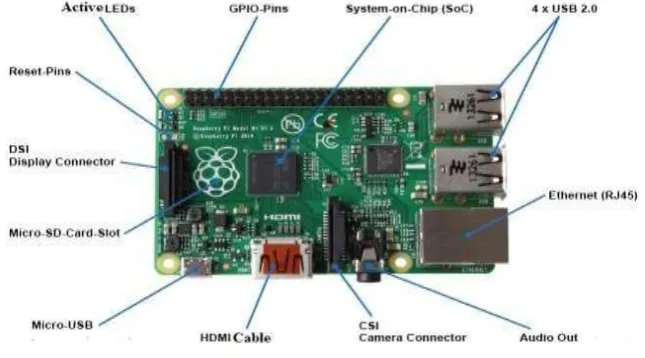
The model B+ consists of BCM2835 Application processor with 512 MB of RAM. In model B+ have advanced features like more GPIO Pins, More USB, microSD, low power consumption, better Audio, Better Performance measure compared to model B.
Fig 1: Raspberry Pi Model B+
The architecture to develop Pi is ARM 11 with the CPU speed of 700 MHz low power ARM1176JZFS core. Raspberry Pi acts as a mini computer through their internal developments of operating system boots from microSD card, running a version of linux operating system.
2.2. Pi camera:
to develop code for motion streaming through MJPG Streamer.
2.3. Robotic Arm:
A robotic arm is a mechanical manipulator with similar functions of human arm with the rotation of wrist and moving hand with appropriate gripper. Robotic arm can have two joints with an appropriate mechanism and can have various directions like forward, backward, upward, and downward. The parts can be connected with DC Motors and are interfaced with Motor driver IC i.e., L293D. IC can be connected to Raspberry pi GPio Pins and can be operated with programming languages like Python C. The complete Arm setup can be controlled through webpage according to user choice and that can improve the mechanical feasibility to operate these devices.
2.4. Operating System:
Raspberry pi essentially uses linux kernel based systems software, but ARM11 can’t be working on the popular versions of linux includes ubuntu. Now Raspberry Pi developers can suggest the some supportive software i.e., NOOBS. The NOOBS can include Archlinux ARM, pidora, puppy linux, Raspbian but depending on user’s choice exclude the software from Noobs and that can acts as operating system. Raspbian linux operating system is recommended for the robotic applications. Raspbian can be extracted as a image file to write on SD card. SD card can be used as a image file reader and can convert to read image file through SD card Formatter. After completing the formatting, the image file of operating system can be read through win32 Disk imager.
2.5. PuTTy:
PuTTy is a standalone tool, open source terminal emulator and network file transfer application. It supports several network protocols including SCP, SSH, Telnet, rlogin and raw socket connection. It can be used for the interlinking of Raspberry Pi to a windows PC and its main purpose is to connecting server through secure shell(SSH) and port address. Whenever login through puTTy; the Raspberry Pi ip address and windows pc ip address matches and communication path could be established .
2.6. Tight VNC server:
Tight VNC server is a platform to manage Raspberry Pi in remote accessing purpose. It can act as remote desktop software, cross platform, open source remote desktop software and virtual network computing to control another computers screen remotely. Client can control the server through Tight VNC Server.
2.7. Wi-Fi dongle:
The Wi-Fi module that is attached to the wlan port of the Pi is configured to the address 162.148.43.9.8080. By enabling this IP address, we can access the image captured by the Pi. By using the IP address generated by the Pi, we can control the robot with the help of the webpage.
III.BLOCK DIAGRAM
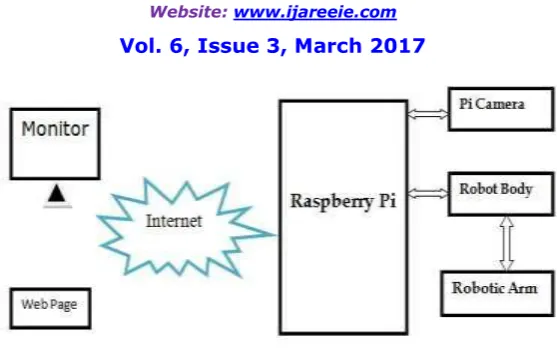
Fig 2 : Block diagram
Hardware &Software Requirements:
[1] Raspberry pi
[2] SD memory card Minimum 8 GB (class 10 is preferable)
[3] Micro USB power cable or micro USB type mobile charger (5 V) [4] Ethernet cable
[5] Pi camera [6] Robot Body [7] Robot Arm
[8] Raspbian Wheezy Operating System [9] SD Formatter Tool
[10]PuTTy
[11]Win32 Disk imager [12]Wi-Fi dongle
IV.WEB SERVER
The main role of web server to implement the relation with hardware module through the internet. Here the web server can be developed through the apache, MySql, PHP. Webpage can be developed through HTML; it can have images, styles, scripts relate to text content. The different web servers are Apache, Nginx, lighttpd, LAMP
Raspberry pi web server:
If we are used to develop a cheap web server, to create testing environment or to store the data, the Raspberry Pi is perfect. Once the configuration of Raspberry Pi is completed, it is linked with static web ip address that can be hosted in Raspberry Pi server through SSH and port address. The host address can be written as 192.168.1.2, port address as 22 and set SSH in the puTTy configuration tool. Once the IP config completes then Raspberry Pi can be command through the local host address. Web server is also supports as a backend system for storing and retrieving data and apache web server is setup in the project for the purpose of communicating with hardware with the following command sudo apt–get install apache2 php5 lipapache2-mod-php5. Similarly, PHP also installed though above command and after reboot Raspberry Pi to change the settings. We develop MySql server for the data base of running applications with the command sudo apt–get install mysql-servermysql-client php5-mysql The default directory for storing web server file is /var/www. Whatever data we develop within the directory can be served on the request of path name to client.
V.RESULTS AND ANALYSIS
Pi B+ is a single board, credit card sized computer with the 4 USB slots to use for external accessories and the HDMI slot for connecting any display module or TV. Ethernet cable can be used to connecting Raspberry Pi to laptop with LAN cable. After connecting Pi, we create a local host address with Internet protocol version4(IPV4) in the network and sharing center; by click on IPV4 and gave a static IP address 192.168.1.2,then this address is local host for LAN cable connected to Raspberry Pi. Now communication can be established with puTTy. Now Raspberry Pi can be connecting through puTTy with username as pi and password as raspberry. After connection established between Raspberry Pi, click sudoraspi-config, sudo apt update and sudo apt upgrade to convert Raspberry Pi as a new version of tools required to development applications.
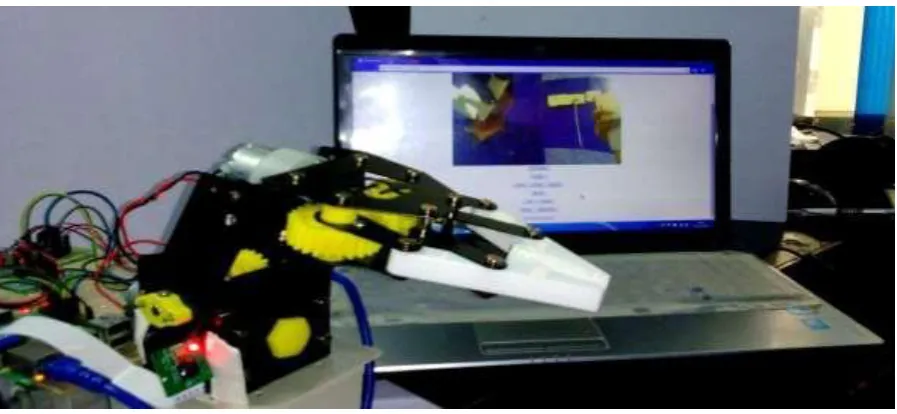
Raspberry Pi acts as webserver for the application of webpage controlled robotics. Web server can be developed through different scripting language. Here, main implementation relate to video streaming, the entire experimental setup as shown in fig
Fig 3: Hardware implementation of the system
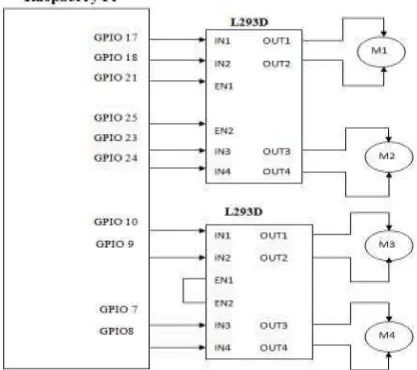
The experimental setup can be revealed that raspberry pi acts as server for our application and develop the code for interfacing various hardware modules like pi camera ,robot body , robotic arm the usage of these modules in this project can be correlate to develop an application to operate robot with motion streamer continuously to control robot. here robot setup can be shown in figure. The connections of motors of robotic body and robotic arm can be shown in figure.
The whole setup of robot body and robotic arm having 4 motors that are connected to l293D motor driver. L293D is interface between Raspberry Pi GPIO pins, robot body & robotic arm. L293D board can be used to operate the motor in various directions like forward and backward. In L293D enable is set high for motor operations. A total of 10 GPio pins used for motors controlling and a power supply board is used for giving power supply to l293D board to operate motors. DC motors operate through 5v or 12V. Adapter can be connected to power supply board then whole setup can be enabled. A microUSB slot can be used to giving power supply to raspberry pi.
Flow Diagram:
It represents the operation of controlling robotic arm through webpage
Fig 5: Flowchart for System
VI.IMPLEMENTATION
a. Live video streaming
Fig 6: Live Streaming of web server
b. Robotic Arm Control with Live Streaming:
The whole robot vehicle setup is at remote end and the connection among GPIO pins and web server with continuous streaming is possible with the application of WebIOpi. In this application we can importing the data from GPIO pins, here GPIO pins are connecting with motors and that motors operation can be connected to web server with a specific webpage address 192.168.1.2:8000. In this webpage development, we create different options to control robot and camera streaming. The buttons can be developed through AJAX and can be controlled through PHP. We develop the code for robot body and robotic arm through python; a scripting language to operate Raspberry Pi. When the buttons can be created using Ajax, the server & streamer can’t reload every time, the fig represents the video streaming and robotic arm controlling. The development of this application through static IP address. If we develop dynamic IP address we use another mechanism to control it.
VII.CONCLUSION AND FUTURE WORK
This paper describes a controlled robotic arm from webpage with continuous surveillance of actions done by the telerobotic arm. Mobile robot can be controlled through webpage connected through wireless dongle and the telerobotic can be visualize the acknowledgement with continuous response from remote end with controlling via webpage. Also, use port forwarding methodology to use any where to control robot. In future work by making this project with extension of GPS to navigate based on the locations given through the network, we can move tele robot to the multipurpose actions among remote surveillance.
REFERENCES
[1] Heng-Tze Cheng, Zheng Sun, Pei Zhang, “Real-Time Imitative Robotic Arm Control for Home Robot Applications”, Carnegie Mellon University, ” IEEE transactions on cybernetics., vol. 21, no. 6, pp. 1057-7149, March 2011.
[2] V. Ramya, B. Palaniappan, T. Akilan “Embedded System for Robotic Arm Movement Control using Web Server and ZigBee Communication”, International Conference on Research Trends in Computer
[3] Technologies, Proceedings published in International Journal of Computer Applications® (IJCA) (0975 – 8887), pg 30-34, 2013. S.Hemanth Kumar, B.AnandaVenkatesan “Teleoperation Of Robotic Arm With Visual Feedback”International Journal of Advance Research In Science And Engineering http://www.ijarse.com IJARSE, Vol. No.4, Issue 03, March 2015 ISSN-2319-8354(E)
[4] http://electronicsforu.com/newelectronics/articles/raspberry.asp
[5] https://www.raspberrypi.org/help/what-is-a-raspberry-pi/
[6] V. Meenakshi, Ch. Lakshmi Saketh, K. KalyanKumar “ Secured Spy IP Control Robot Using Raspberry Pi”, International Journal of Emerging Technology and Advanced Engineering Website: www.ijetae.com (ISSN 2250-2459)
[7] Lung Ngai, Wyatt S. Newman, Vincenzo Liberatore, “An Experiment in Internet-Based, Human-Assisted Robotics”, Case Western Reserve University, pg-1011-1015,IEEE, 2002.
[8] Huosheng Hu, Lixiang Yu, PuiWoTsui, Quan “Internet-based Robotic Systems for Teleoperation” International Journal of Assembly Automation, Vol. 21, No. 2, pg 1-10, 2000
[9] Kuk-Hyun Han, Yong-Jae Kim, Jong-Hwan Kim and Steve Hsia, “Internet Control of Personal Robot between KAIST and UC Davis”, 2000. [10] R.A. Kadu, Prof. V.A. More, P.P. Chitte, J.G. Rana, M.R. Bendre . “Wireless Control & Monitoring of Robotic Arm” International Journal of
Computer Technology and Electronics Engineering (IJCTEE) Volume 2, Issue 1, pg 28-38, 2010
[11] Zhao Zhang ,“The Internet Remote Robot with Skype Webcam”,International Conference on System Science and Engineering,June 30-July 2, 2012, Dalian, China
[12] W. Lao, J. Han and Peter H.N. de With, “Automatic video-based humanmotion analyzer for consumer surveillance system”, IEEE Trans Consum Electron, Vol. 55, No. 2, pp. 591-598, 2009.