Conversion of Entire Structure of Database
from SQL SERVER to MS Access
Chalorme Roy Mukhopadhyay
1, Prof. Dr Pranam Paul
2
Final Year Student of MCA, Narula Institute of Technology1, Agarpara, Westbengal, India1
HOD, Department of Computer Application, Narula Institute of Technology2, Agarpara, Westbengal, India2
ABSTRACT: To begin this project, I will try to Migrate table from SQL Server platform to MS Access platform for the initial process of the project. My goal is to keep the main structure of the table in intact format, means I will get the original database structure with its original data and as well as its primary key too (if there is any primary key present in table) after data migration process is over. This whole process is called as data migration between two different databases in my project. And in my project I will get the tables in MS Access Platform as it was in the SQL Server Platform.
KEYWORDS: Databases, Migrate, Table, Goal, SQL Server, MS Access, Intact.
I. INTRODUCTION
Here, I will work and find out how data will be migrated from SQL Server to MS Access platform keeping the entire structure of the database intact.
As my work progressed, I found out how the details of the table structure can be fetched from SQL Server, which means SQL Server itself is allowing copying its table’s structure. If I was unable to collect these data about the structure through SQL, then I had to think about how to break the security of the DBA part of the SQL Server in an ethical manner.
II. RELATED WORKS
•Discussion of Actual Work:
Here, I am discussing about my actual work to convert the database from SQL Server to MS Access. Section [1] discusses the establishing the connection. While section [2] gives the idea about these two databases. And [3] is an entire example of the migration process.
1. Establishing the connection between two databases:
I have implemented my concept of migrating data from SQL Server to MS Access in Visual Basic (6.0) to develop the software which will be able to convert the database from SQL Server to MS Access.
All necessary actions required for connecting the SQL Server database and MS Access database through Visual Basic were done.
The SQL commands were written in VB properly so that they could be fired in proper database and the output were kept in record sets. Here, at first, SQL commands were fired through VB, the output were temporarily stored in record sets provided by VB. From the record set, each record were taken tuple wise and they were stored one by one in MS Access keeping the format of each fields intact.
2. Required information about SQL Server database and implementation in MS Access:
2.1 Creation of table structure in Destination Database:
To get the actual structure of a table in SQL Server I use “sp_help <object_name>” command. But as I am working with VB and using SQL commands so I had to find the equivalent command of “sp_help” in SQL. I can get the structure from the table in SQL Server named “INFORMATION_SCHEMA.COLUMNS”. All required fields were taken from “INFORMATION_SCHEMA.COLUMNS” using the proper SQL command.
The required fields to be fetched from “INFORMATION_SCHEMA.COLUMNS” table were the table name, column name, data type, data length. This information was later used to define or create the main structure of the table in MS Access.
Fig. 2.1
The output of “sp_help” equivalent SQL command for a particular table having 2 foreign keys- B, C
2.2 Getting information from the tables INFORMATION_SCHEMA.COLUMNS,
INFORMATION_SCHEMA.TABLE_CONSTRAINTS:
In the following Fig. 2.2 TABLE_NAME, COLUMN_NAME, CONSTRAINT_TYPE, and
CONSTRAINT_NAME from INFORMATION_SCHEMA.COLUMNS,
INFORMATION_SCHEMA.TABLE_CONSTRAINTS tables are shown:
Fig. 2.2
Output of SQL command with constraint name and their type
2.3 Finding the primary key in the table:
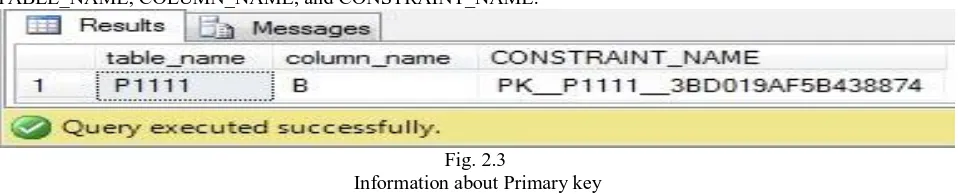
Primary key is the important part of any table, as it can uniquely identify any tuple from other tuples. It cannot be null. It also has vital role at the time of inserting any data tuple wise in a table. So, to fetch the information about primary key of any table and store it in a variable is very important. This will be used during the creation of the table in destination database. So, I had to use the SQL command to find the primary key in the table.
The following Fig. 2.3shows the primary key present in a particular table. It provides the information about TABLE_NAME, COLUMN_NAME, and CONSTRAINT_NAME.
Fig. 2.3
Information about Primary key
This command is also capable of finding the composite key (when more than one field together uniquely identifies the tuple, it is called composite key).
As discussed in section 2.3, that information was used to get the primary key.
2.4 Finding the foreign key between the tables:
It is also very important to find the foreign key or reference key between tables. I know, by foreign key tables are inter related to each other. And the field which is used as reference key in tables must have same data type and structure. If foreign key or its structure is altered, omitted or replaced, then the entire table is changed and I am not able to migrate the actual table, in fact it will show an error message. So it is very important to find the foreign keys, store it in a variable and declare it in the destination database table, keeping the entire database intact.
The following Fig. 2.4 shows the reference keys present in the database:
Fig. 2.4
Foreign keys present in the tables
In the above Fig. 2.4 the foreign key are denoted to corresponding field name and it also gives the information about the field which is referenced to it.
Similar structure is created while creating the table structure in the destination database and hence the main structure is kept intact.
2.5 Parent- child relation between tables:
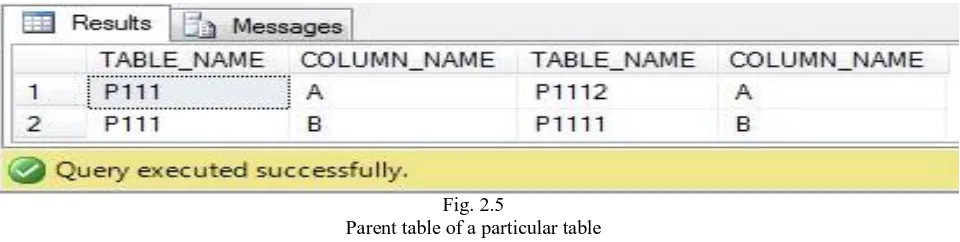
It is also important to find which table is related to each other and which one is created first. I know many table could be related to each other. The table which is created first is called the parent table, while the later created table is called child table. Let me divide the creation of table in levels in SQL Server database. At the time of creating the tables in destination database, the tables in first level of SQL Server must be created before the second level and so on. In similar words, every child table can only be created, if and only if all the parent tables of that child table are defined first.
The following Fig. 2.5 shows parent tables of a particular table selected.
Fig. 2.5
Parent table of a particular table
This structure is maintained while creating the database in destination database.
2.6 Selection of Existing Source Database: After establishing the parent-child relationship (if have any) between
2.7 Selecting the table to be migrated:
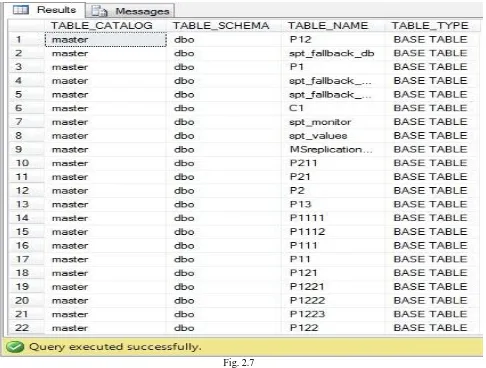
After login in with the Server Name in the database of SQL Server, I have to select the table which will be migrated to the MS Access. So, I have to show all the tables available under that user, so that the user can select the table. This list of tables is shown by the data grid in my software, user will select the table and the table will be migrated to the MS Access platform keeping its main structure, relation with other table and data types of every field intact. All tables available under a particular user is shown from where particular table can be chosen for migration. In the following Fig. 2.7I can get the list of tables available for a particular user:
Fig. 2.7
Tables available under a particular user Once the user selects the table it is migrated to MS Access.
III. SIMULATION RESULTS
3. Example:
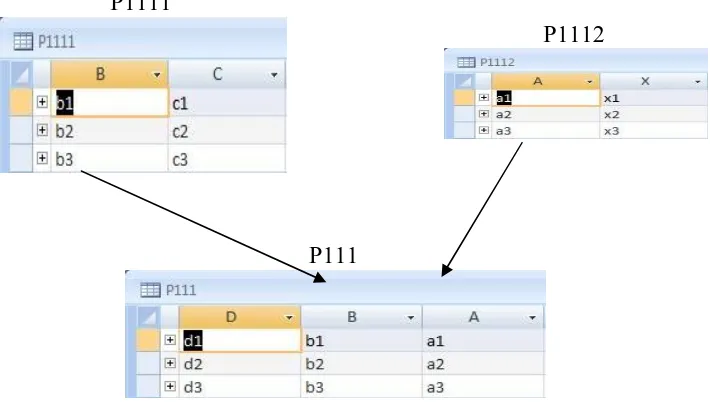
To illustrate my work let me consider the following example given in Fig 3.A Here, a table named P111 has two parent tables – P1111 and P1112.
I want to migrate this P111 table from SQL Server to MS Access. As it have two parent tables,
Fig. 3.A - Structure of database in SQL Server to be migrated in MS Access
Here we can see in SQL Server, that Table P111 have 2 foreign keys named B (connects with table P1111) and A (connects with table P1112) which makes table P1111 and table P1112 as the parent tables of table P111.
Fig. 3.B - Structure of database in MS Access after migration from SQL Server
Here we can see in MS Access, that Table P111 have 2 foreign keys named B (connects with table P1111) and A (connects with table P1112) which makes table P1111 and table P1112 as the parent tables of table P111.
P1111
P1112
P111
P1111
P1112
Above figures signifies that from SQL Server P111 table is copied with its data, structure and referenced tables in MS Access.
Now, ifI want to migrate P111 table from SQL Server to MS Access. Here is the step by step explanation how this table is migrated from SQL Server to MS Access.
3.1: Finding the foreign key in child table:
As I select the child table and convert it, at first, it searches for the foreign key. Here child key have two foreign keys. Fig. 3.1 shows the information about the foreign keys fetched by the SQL command.
Fig 3.1
Foreign keys of child table
So before creating the structure of P111 table, it goes to P111 and P1112 tables.
3.2: Creation of structure of foreign key:
As it moves to P1111 table, which is foreign key of P111 table, it again searches for foreign key of P1111 table. Fig. 3.2 shows it has no result.
Fig 3.2
No foreign key of P1111
3.3 Creation of structure and data insertion P1111 table:
As P1111 have no foreign key so it starts to construct the structure of P1111 table. Then it finds the Primary key of it and one by inserts the tuples.
3.4 Creation of structure and data insertion P1112 table:
The above process is done recursion ally meaning as 3.A.4.3 creates and inserts data in table P1111, then the structure of P1112 is created, primary key is implemented and data are inserted.
3.5 Creation of structure of P111 table and data insertion:
As all the tables of P111 table now has been created, so it comes back to P111 table, then creates it structure and inserts all the data. And finally all tables are migrated from SQL Server to MS Access.
IV. CONCLUSION AND FUTURE WORK
As my initial goal was to migrating tables from one database to another different database the software developed by me is successful of migrating tables between SQL SERVER to MS Access. Though it has some limitations but I look forward to work out and develop more accurate software.
Above said limitation of my project can be rectified. I will work out about this limitation in future and hopefully will overcome this limitation.
Apart from this, as I am able to migrating tables from SQL Server to MS Access, now I will concentrate on extending my project so that it will be able to migrating the table in some other way, i.e. from some other database to some other database.
Not only that, I wish to carry forward my work and developing the software which will be able to migrating tables between all major databases which follow the CODD’s rule (SQL Server, MS Access, My SQL).
REFERENCES
[1] Kevin Loney and George Koch, Oracle 9i, The Complete Reference, sixteenth reprint, 2005, Oracle Press. [2] Silberschatz, Korth and Sudarshan, Database System Concepts, fourth edition, McGraw-Hill International Edition. [3] Ivan Bayross, SQL, PL/SQL: The Programming Language Of Oracle, 4th Revised Edition.
[7] Yahoo.com
[8] https://community.oracle.com [9] https://oracle.com
[10] www.blocks.oracle.com
[11] Kibria Dastagir Dafadar, Chalorme Roy Mukhopadhyay, Prof. Dr Pranam Paul; “Implementation of Data Migration between Two Different Databases for discrete table”; Paper ID: V40202104; Accepted and Published in “International Journal of Innovative Research in Computer and Communication Engineering (IJIRCCE)”; ISSN No: 2320-9801 (Online), 2320-9798 (Print); Vol. 4, Issue: 1; Feb 2016; pp 2144 – 2147.
[12] Chalorme Roy Mukhopadhyay,Kibria Dastagir Dafadar, Prof. Dr Pranam Paul; “Implementation of Data Migration between Two Different Databases for inter connected tables”; Paper ID: V40202106; Accepted for Publication in “International Journal of Innovative Research in Computer and Communication Engineering (IJIRCCE)”; ISSN No: 2320-9801 (Online), 2320-9798 (Print) ); Vol. 4, Issue: 1; Feb 2016; pp 2148 – 2154.
BIOGRAPHY
Chalorme Roy Mukhopadhyay is a Final year student of MCA in Narula Institute of Technology, Agarpara, Westbengal, India. She completed her BCA degree from George College (Kolkata) , under the West Bengal University of Technology.
Achievements:
1. Got 431st Rank on NEST(Nationwide Education And Scholarship Test) Aptitude Test 2013,
2. Scored among the top 24 %( 76 percentile) on NIIT 8th National IT Aptitude Test 2012.
3. Two papers published in an International Journal.
Prof. Dr Pranam Paul, Assistant Professor and Departmental Head, CA Department, Narula Institute of Technology (NIT), Agarpara had completed MCA in 2005. Then my carrier had been started as an academician from MCKV Institute of Technology, Liluah. Parallely, at the same time, I continued my research work. At October, 2006, National Institute of Technology (NIT), Durgapur had agreed to enroll my name as a registered Ph.D. scholar. Then I had joined Bengal College of Engineering and Technology, Durgapur. After that Dr. B. C. Roy Engineering College hired me in the MCA department at 2007. At the age of 30, I had got Ph.D. from National Institute of Technology, Durgapur, WestBengal. I had submitted my Ph.D. thesis only within 2 Years and 5 Months. After completing the Ph.D., I had joined Narula Institute of Technology in Computer Application Department. Parallely I continue my research work. For that, I have 39 International Journal Publications among 54 accepted papers in different areas. I am also reviewer of International Journal of Network Security (IJNS), Taiwan and International Journal of Computer Science Issue (IJCSI); Republic of Mauritius.
Achievement:
1. Accepted my name for publication in “Who’s Who Science and Engineering, 2011 – 2012” published by “Marquis Who’s Who”, USA on 31st Dec 2010
2. Selected my name as “Top 100 Engineers’ 2011”, by “International Biographical Centre”, Cambridge, England