
Ogata, H. et al. (Eds.) (2015). Proceedings of the 23rd International Conference on Computers in Education. China: Asia-Pacific Society for Computers in Education
Developing a multiplatform solution for mobile
learning
Mia ČARAPINAa*, Igor MEKTEROVIĆb, Tomislav JAGUŠTb, Neven DRLJEVIĆc, Jelena BAKSAb, Petar KOVAČEVIĆb, Ivica BOTIČKIb
aUniversity of Applied Sciences, Zagreb, Croatia
bUniversity of Zagreb, Faculty of Electrical Engineering and Computing, Croatia
cEuropean Parliament, Directorate-General for Innovation and Technological Support, Luxembourg
Abstract: The development of cutting-edge connected mobile applications nowadays brings
out several concerns: Should one develop only for one mobile platform or more, and which mobile platforms should be targeted (Android, iOS, Windows or all)? If developing a multiplatform solution, should independent native applications be developed or should a cross-platform framework be used? The dimensions of the before mentioned issues can further be cut by examining the following: Who will application users be? Is application being developed from the scratch or is it based on some previous work? This paper tackles these issues by describing the development of the multiplatform system named SCOLLAm [in]Form by using Xamarin cross-platform mobile development framework. The cross-platform development approach was chosen in order to reduce the problem of the application sustainability since its functionalities are expected to be frequently modified and extended during the 3-year design-based development period. Moreover, the paper discusses the guidelines for choosing a cross-platform development framework and lays out the accompanying development challenges.
Keywords: Cross-platform development, inquiry learning, experiential learning, mobile
learning, collaborative learning, augmented reality, adaptive systems
1.
Introduction
This paper describes the principle idea behind the SCOLLAm (Seamless and COLLAborative Mobile learning on tablet computers) project, its background and objectives. Funded by the Croatian science foundation1, the project introduces tablet computers as a new learning medium in primary schools in Croatia. The project adopts design-based research and development approach in which a multiplatform educational system for seamless mobile and collaborative learning on tablet computers SCOLLAm [in]Form will be designed and developed. The development of the platform started in September 2014 and is to be completed by September 2017 throughout a number of phases in a 3-year design-based research approach.
The project leverages experiences of the Singapore’s National Institute of Education’s mobile learning projects (Looi, 2012), primarily by developing the approach taken up within the collaborative mobile application ColInq development project (Boticki, So, Toh, Chen, & Seow, 2011), and in SamEx mobile application development (Boticki, Baksa, Seow, & Looi, 2015), which is in more detail described in the section 3.1. Building on the experiences gained from the development of SamEx functionalities, the project aims at implementing new system modules all under the name of a single solution [in]Form: an adaptive mobile learning and social interaction module, a digital lesson designer and player, and augmented reality (AR) module. Another objective is development of a multiplatform solution for Android, Windows and iOS operating systems, thereby including all popular mobile platforms as the project target platforms.
Since the prime SamEx development platform was Windows 8.1, the project team had to decide on whether to develop native solutions for each mobile platform or to use a cross-platform development
1 http://www.hrzz.hr/default.aspx?id=47
framework in order to share code and functionalities between platform-specific versions of the application. This paper describes the development of a multiplatform solution SCOLLAm [in]Form and gives an insight into the development chronology of all the predecessor applications (section 3.1) and the description of the SCOLLAm [in]Form architecture (section 3.2). A comparison between different cross-platform frameworks in presented the section 3.3 and an overview of Xamarin [in]Form solution and the specifics of cross-platform development are described in the section 4.
2.
Theoretical background
The SCOLLAm project combines innovative educational technologies and modern pedagogical approaches in order to affect teaching and learning in elementary education, primarily focusing on the first four grades of compulsory education in Croatia. The methodology on how to integrate these technologies and pedagogical approaches is in detail discussed and decided upon in collaboration with the class teachers. The main pedagogies upon the project methodology is built are experiential learning (Kolb, 1983), inquiry-based learning and collaborative learning (Dillenbourg, 1999).
In order to draw closer to a lifestyle of a young digital native (Prensky, 2001), the SCOLLAm project implements modern devices, technologies and methods such as tablet computers, mobile learning, learning adaptation techniques and the concept of augmented reality. The project encourages mobility of the learners by leaning on the practices from the mobile learning domain which adopts mobile devices as tools for in-classroom and out-of-classroom teaching and learning (Sharples, Taylor, & Vavoula, 2005) encouraging both formal and informal learning. Besides the aforementioned, the project also focuses on the diversity of individual learners by applying methods of adaptive learning
(Park & Lee, 2007) in order to tailor the content or learning paths to the specific needs of an individual or a group of learners. The project also explores the potential of augmented reality (AR) as a direct or indirect view of the real world in which physical objects or other real-world concepts (e.g. locations) are annotated with, or overlaid with additional digital information (Wu, Lee, Chang, & Liang, 2013). Mobile devices represent an ideal general environment for augmented reality learning experiences (ARLEs) as they contain numerous sensors (camera, GPS, compass, microphone, etc.) applicable for AR (Cubillo, Martin, Castro, & Boticki, 2015).
3.
A design-based mobile learning solution development approach: from ColInq system
via SamEx system to cross-platform solution SCOLLAm [in]Form
3.1
SamEx application
Although the development of SamEx started in 2012 with the aim to design a system for individual collecting, storing and access to multimedia artifacts and in order to support experiential learning, the design was influenced by the ColInq system (Boticki et al., 2011) for mobile, collaborative and location based inquiry learning. The ColInq client application was developed in 2010 for the Windows Mobile 6.0 platform, together with the associated administrative web application which allowed users to create and manipulate photo and video content, take notes or create inquiry questions to be answered. Similarly, SamEx system was designed in order to support collecting, storing and editing collected data. SamEx client application is a system component which serves both as a learning content delivery interface and for creating new content from the students’ side. It allows students to interact with their teachers and colleagues, by posting or sharing educational content, answering contextual questions and giving feedback (comments and likes) to the existing content. Each version of the developed client application supports some or all of the functionalities or elements listed below:
User registration – each user has to sign up with unique ID by using a dedicated QR code in order to use the application.
Status or experience – a student post composed out of text, audio, video or/and sound recording.
Questions – teacher defined questions to be answered by students. Students can also comment their own or other students’ answers.
Trigger or trigger questions – teacher defined questions which are contextually shown to users according to their current location or other parameters defined in the administrative web application by the teacher.
Topics – predefined groupings of unifying questions, postings and discussions related to specific topic.
Badges – symbolic representation of user’s progress in the predefined category.
Likes – an option of expressing the opinion about other student’s post.
Subscriptions – filtering user data (e.g. posts from selected friends) which is especially important in the status/experiences and question listings.
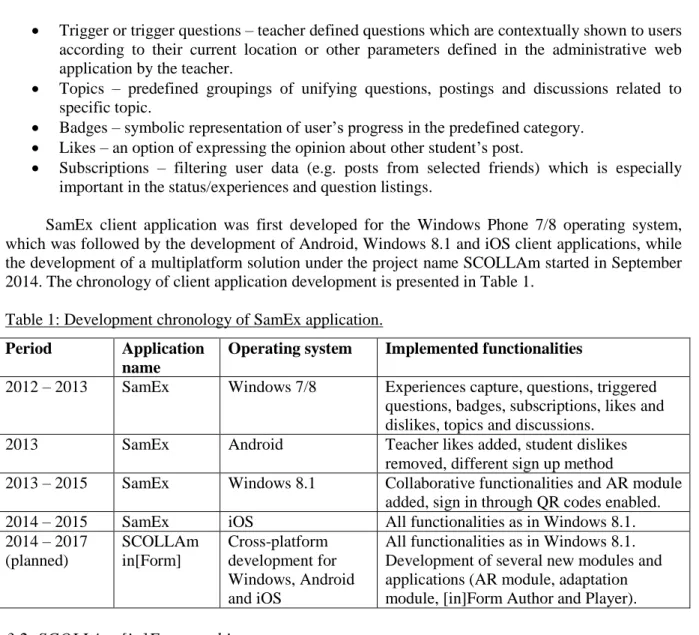
SamEx client application was first developed for the Windows Phone 7/8 operating system, which was followed by the development of Android, Windows 8.1 and iOS client applications, while the development of a multiplatform solution under the project name SCOLLAm started in September 2014. The chronology of client application development is presented in Table 1.
Table 1: Development chronology of SamEx application. Period Application
name
Operating system Implemented functionalities
2012 – 2013 SamEx Windows 7/8 Experiences capture, questions, triggered questions, badges, subscriptions, likes and dislikes, topics and discussions.
2013 SamEx Android Teacher likes added, student dislikes removed, different sign up method
2013 – 2015 SamEx Windows 8.1 Collaborative functionalities and AR module added, sign in through QR codes enabled. 2014 – 2015 SamEx iOS All functionalities as in Windows 8.1. 2014 – 2017 (planned) SCOLLAm in[Form] Cross-platform development for Windows, Android and iOS
All functionalities as in Windows 8.1. Development of several new modules and applications (AR module, adaptation module, [in]Form Author and Player).
3.2
SCOLLAm [in]Form architecture
SCOLLAm platform design introduces several additional modules not present in the previous design of SamEx system: an AR module, an adaptation module and a digital lesson player named [in]Form Player as depicted in Figure 1. It also contains service modules for data logging, analytics and a digital lessons authoring tool [in]Form Author.
Database [in]Form
administrative web application
[in]Form client applications (Windows, Android and iOS) AR module Adaptation module Learning analytics processor [in]Form Author Service ...
Figure 1. SCOLLAm platform architecture.
The digital lesson designer [in]Form Author is a web application to be used for authoring multimedia-rich interactive teaching lessons, to some extent similar to the presentation slides. The application allows teachers and lesson designers to create simple lessons, questionnaires and games, which can then be run through the [in]Form platform or via any JavaScript-enabled web browser.
The AR module is composed of a series of small scenario-specific ARLE modules which can be used in different content contexts and at differing levels of complexity, making lessons fit for students
of different grades, as well as allowing for adaptability via the adaptation module. After an ARLE finishes, its digital lesson receives the results, such as the number of points a student achieved, attempted answers before finding the correct answer, etc.
3.3
Choosing a cross-platform development framework
One of the key decisions to be made before developing a multiplatform mobile client applications was whether to build a native application for each platform or to choose one of numerous cross-platform frameworks on offer. In order to support rapid development and increase the amount of shared code amongst various platforms, the cross-platform solution was a logical choice. Recent reports show that Android and iOS combined hold more than 95% of smartphone market share (DE, 2015; IDC, 2015; Rossignol, 2015) which makes them the compulsory platforms for any cross-platform mobile application development. On the other hand, as described in the section 3.1, SCOLLAm project reuses legacy source code written in C# which is native to Microsoft Windows mobile platforms.
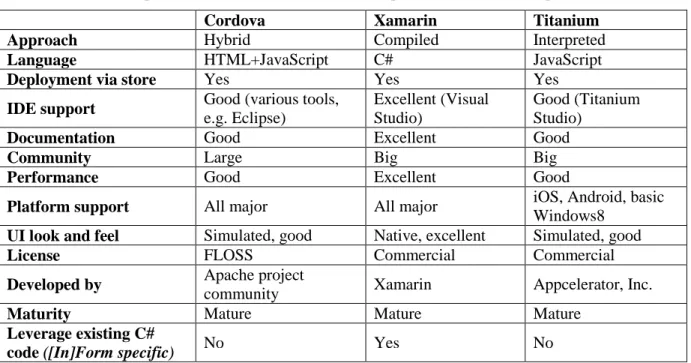
The aforementioned requisite ruled out all C++ based frameworks (Qt2, Marmalade3, MoSync4) and all proprietary and non-mainstream technologies (LiveCode5, FlashBuilder6). Due to the lack of advanced mobile device features access (camera, GPS, etc.) pure-web application approach was not an option. Thus, the following frameworks were evaluated: Cordova7 (ex PhoneGap), Titanium8 and Xamarin9. The comparison matrix of evaluated frameworks is shown in Table 2.
Table 2: Feature comparison matrix of most notable cross-platform mobile development frameworks.
Cordova Xamarin Titanium
Approach Hybrid Compiled Interpreted
Language HTML+JavaScript C# JavaScript
Deployment via store Yes Yes Yes
IDE support Good (various tools, e.g. Eclipse)
Excellent (Visual Studio)
Good (Titanium Studio)
Documentation Good Excellent Good
Community Large Big Big
Performance Good Excellent Good
Platform support All major All major iOS, Android, basic
Windows8 UI look and feel Simulated, good Native, excellent Simulated, good
License FLOSS Commercial Commercial
Developed by Apache project
community Xamarin Appcelerator, Inc.
Maturity Mature Mature Mature
Leverage existing C#
code ([In]Form specific) No Yes No
Titanium, though being a high-quality mature development framework, was discarded due to the limited Windows 8 support and pricing when compared to Cordova and Xamarin. More detailed comparison between Cordova and Xamarin shows Xamarin provides a much more integrated environment experience than Cordova. Besides providing an all-in-one installation procedure, Xamarin leverages the state-of-the-art Visual Studio IDE with advanced debugging features, code-completion, etc. On the other hand, Cordova is free of charge and relies on a more wide-spread and open
2 http://www.qt.io/ 3 https://www.madewithmarmalade.com/ 4 http://www.mosync.com/ 5 http://livecode.com/ 6 http://www.adobe.com/devnet/flash-builder.html 7 https://cordova.apache.org/ 8 http://www.appcelerator.com/product/ 9 http://xamarin.com
technologies: HTML, CSS and JavaScript whereas Xamarin uses C#. As per other criteria (documentation, user-base, UI, maturity) both frameworks are assessed as more than satisfying. What prevailed, in this particular case, is Xamarin’s excellent development environment, better technical support, fair academic pricing and the ability to easily re-use the existing C# codebase, which is, granted, a very particular requirement. Also, Xamarin enables project structuring and separation of the generic views (through Xamarin.Forms10 technology) from the OS-specific views (through Xamarin iOS and Android projects), as it enables to mix-and-match those approaches. It should also be observed, though not highly relevant for the SCOLLAm case, that Xamarin compiles to native code and achieves better performance and native UI, whereas Cordova simulates the native environment through hidden browser component and carefully styled HTML elements.
In conclusion, both Cordova and Xamarin are found to be acceptable solutions, where Cordova has the advantage of being free, while Xamarin has a better technical support and a state-of-the-art development environment.
4.
Development of the multiplatform collaborative mobile application SCOLLAm
[in]Form
Due to the shared runtime and language across the platforms, Xamarin provides the possibility of sharing a very large part of the code. Domain logic, modules which handles database access, networking and file system can all be written once and used across the different platforms. Considering that a native Windows 8.1 SamEx mobile client was implemented previously, the first step of the migration to cross-platform implementation was separating core modules from the platform-specific components. The components which were the easiest to extract were local database access module and web service communication module. Those components were adapted for cross-platform design and placed in the separate shared project which will be used by all mobile client applications. This architecture, as depicted in Figure 2, allows for code-sharing in fundamental modules and manages the local data access and remote information flow between mobile applications and web server.
The creation of the user interface layer demands the specific knowledge of the underlying platform and usually takes significant part of the application development process to build. User interface layers for iOS and Android [in]Form applications were for the most part built with Xamarin.Forms. A large subset of interface elements and controls used in [in]Form application (e.g. buttons, labels, grids, tables) was already available for use in Xamarin.Forms framework in abstracted form, allowing for the large percentage of user interface code to be shared among the iOS and Android platforms.
Android Windows iOS
SQLite database WSManager HTTPManager Periodic updater ExperienceWS
Figure 2. High level architecture overview of [in]Form application.
10 http://xamarin.com/forms
4.1
Development of specific functionalities
Generally, the code that cannot be shared has to be written separately for every platform, and includes the access to the native code of the platform. For example, accessing specific device functionality or defining custom user interface elements could require writing platform-specific modules.
The [in]Form module which required native implementations for each platform was the Group drawing module consisting of a canvas where students can draw, re-arrange multimedia artifacts, add captions and collaborate in creating interactive dashboards. Since Xamarin.Forms is an abstraction for basic native user-interface elements, it was impossible to implement custom controls needed for group-drawing canvas using only those basic abstractions in order to share them across platforms.
Also, since augmented reality capability depends heavily on access to device sensors which are not exposed consistently on all platforms, platform-specific native code will have to be mixed with Xamarin platform-neutral code. In order to keep the differences between platforms to a minimum, it was decided to use a Metaio AR SDK that supported all the target platforms and would allow conceptual and API reuse on all platforms.
Acknowledgements
This work has been in part supported by Croatian Science Foundation under the project UIP-2013-11-7908.
The positions expressed in this document are the sole responsibility of the authors and do not represent any official position of the European Parliament.
References
Boticki, I., Baksa, J., Seow, P., & Looi, C.-K. (2015). Usage of a mobile social learning platform with virtual badges in a primary school. Computers & Education, 86(0), 120–136.
doi:http://dx.doi.org/10.1016/j.compedu.2015.02.015
Boticki, I., So, H.-J., Toh, Y., Chen, W., & Seow, P. (2011). ColInq: A System for Collaborative Inquiry Learning with Mobile Devices. International Journal of Robots, Education and Art, 1(2), 10 – 22.
doi:10.4156/ijrea.vol1.issue2.2
Cubillo, J., Martin, S., Castro, M., & Boticki, I. (2015). Preparing augmented reality learning content should be easy: UNED ARLE—an authoring tool for augmented reality learning environments. Computer
Applications in Engineering Education, n/a–n/a. doi:10.1002/cae.21650
DE. (2015). Developer Economics Q1 2015: State of the Developer Nation. Retrieved from
https://www.developereconomics.com/reports/developer-economics-q1-2015/?campaign=DE1Q15DEBL Dillenbourg, P. (1999). What do you mean by ’ collaborative learning '? Collaborative Learning Cognitive and
Computational Approaches, 1(6), 1–15.
IDC. (2015). Android and iOS Squeeze the Competition, Swelling to 96.3% of the Smartphone Operating System Market for Both 4Q14 and CY14, According to IDC. Retrieved from
http://www.idc.com/getdoc.jsp?containerId=prUS25450615
Kolb, D. A. (1983). Experiential Learning: Experience as the Source of Learning and Development (1st ed.). Prentice Hall.
Looi, C.-K. (2012). Sustaining and Scaling Educational Innovations: Sharing Experiences and Challenges from Singapore. Hong Kong: CITE Research Symposium 2012. Retrieved from
http://citers2012.cite.hku.hk/en/keynote_looi.htm
Park, O., & Lee, J. (2007). Adaptive instructional systems. In Handbook of Research on Educational
Communications and Technology: Third Edition (3rd ed., pp. 469–484). Routledge.
Prensky, M. (2001). Digital Natives, Digital Immigrants. On the Horizon, 9(5).
Rossignol, J. (2015). iOS and Android Combine for 96.3% Smartphone Market Share in Fourth Quarter. Retrieved from http://www.macrumors.com/2015/02/24/ios-android-market-share-q4-2014/
Sharples, M., Taylor, J., & Vavoula, G. (2005). Towards a theory of mobile learning. In In Proceedings of MLearn
2005 conference.
Wu, H.-K., Lee, S. W.-Y., Chang, H.-Y., & Liang, J.-C. (2013). Current status, opportunities and challenges of augmented reality in education. Computers & Education, 62(0), 41–49.
![Figure 2. High level architecture overview of [in]Form application.](https://thumb-us.123doks.com/thumbv2/123dok_us/1899901.2777880/5.893.209.686.798.1070/figure-high-level-architecture-overview-form-application.webp)
