Dear Reader
In just a few years Beginning Microcontrollers with the MSP430 has become one of
the most popular MSP430 tutorials online. This has pushed me to provide even more
information to help you use the MSP430. More content and information is coming.
The latest tutorial will be available from now on from the website of my consulting
company Argenox Technologies:
http://www.argenox.com/design/wp_msp430tutorial.php
Best Regards,
Gustavo
Beginning Microcontrollers
with the
MSP430
Tutorial
Gustavo Litovsky
Version 0.4
iThis document is distributed in the hope that it will be useful, but WITHOUT ANY WARRANTY; without even the implied warranty of MERCHANTABILITY or FITNESS FOR A PARTICULAR PURPOSE.
You May copy, transmit and distribute this document to anyone provided you attribute it to Gustavo Litovsky and the copyright notice remains. If you wish to use any part of the document for commercial purposes, please contact me at gustavo [at] glitovsky [dot] com All Trademarks are the properties of their respective owners.
Original copies of this docment are located at
www.glitovsky.com
iii
What’s new in this version?
Version 0.4
• A new chapter on Flash Version 0.3
• A major update to the UART section describing more in detail how to configure the interface, including an algorithm on accurately calculating the registers. Also included are details on communicating with the Host PC such as framing.
• More information about the selection and use of crystals with the MSP430 and other micro-controllers
Preface
I decided to write this tutorial after seeing many students struggling with the concepts of program-ming the MSP430 and being unable to realize their applications and projects. This was not because the MSP430 is hard to program. On the contrary, it adopts many advances in computing that has allowed us to get our application running quicker than ever. However, it is sometimes difficult for students to translate the knowledge they acquired when studying programming for more traditional platforms to embedded systems.
Programming for embedded systems (as is the case with the MSP430) is not more difficult than personal computers. In fact, it is much better in that it exposes us to the little details of how the system operates (the clocks, I/O) at a level that anyone can learn, as well as unparalleled flexibility. This, however, also forces us to make critical decisions that affect how the application runs. The MSP430 microcontroller is an extremely versatile platform which supports many applications. With its ultra low power consumption and peripherals it enables the designing engineer to meet the goals of many projects. It has, of course, its limitations. It is geared mostly towards low energy and less intensive applications that operate with batteries, so processing capabilities and memory, among other things, are limited.
This tutorial will begin from the basics, introducing you to the theory necessary to manipulate binary digits and digital logic as used in the microcontroller. Using this you will be able to see how to manipulate the registers which control the operation of all microcontrollers. It will then cover the specifics of modules in the MSP430, from both the hardware and software perspective. I decided to follow this format primarily because you, the reader, might want to use this tutorial as a reference and just jump to a module you need help with. But I also wanted to keep the tutorial to be accessible for beginners and so the first part of the tutorial covers many of the essentials. If you wish to begin programming immediately and understand code, you could skip to Chapter 4. Previous knowledge of the C programming language is assumed, although if you’ve done some Java programming, you will likely be familiar with the concepts. It is important to note that this tutorial should be supplemented by the Datasheet, User’s Guide, Example Code and Application Notes for the specific MSP430 derivative used and any other component in the system. These are extremely useful in teaching you how to integrate all the ideas you have and apply them. All these documents are freely available at www.TI.com Don’t Ignore them! They will answer many of your questions.
A companion file is included . This code has two components. The first is straight C code primarily based on the slaa325 application note from TI which was ported to the EZ430 and establishes very basic communications. The second part is based upon the TI Sensor Demo Code for the EZ430-RF2500.
Contents
Preface v
1 Introduction 1
1.1 Why Microcontrollers? . . . 1
1.2 What Hardware do I need? . . . 1
1.2.1 EZ430-F2013 USB Stick Development Tool . . . 2
1.2.2 EZ430-RF2500 . . . 3 1.2.3 Experimenter Boards . . . 4 1.2.4 FET Debugger . . . 4 1.2.5 Custom Hardware . . . 4 2 Getting Started 7 2.1 Introduction . . . 7
2.2 Running a Project using IAR . . . 8
2.3 Running a Project using CCS . . . 10
3 Microcontroller Basics 11 3.1 Data Types and Numeric Representation . . . 11
3.2 Hexadecimal for MSP430 . . . 12
3.2.1 Conversion of Numbers . . . 14
3.3 Digital Operations . . . 14
3.4 Manipulating Module Registers . . . 15
3.4.1 XOR Operator . . . 20
3.5 ASCII . . . 21
3.6 Conclusion . . . 21
4 Beginning Programming for MSP430 23
5 MSP430 Clocks 27 5.1 Introduction . . . 27 5.2 Internal Oscillators . . . 28 5.3 External Crystals . . . 28 5.4 Clock Sources . . . 30 5.5 Clock Signals . . . 30
5.6 Basic Clock Module In EZ430-RF2500 . . . 31
5.7 Considerations for using clocks . . . 33
6 General Purpose Input Output - GPIO 35 6.0.1 Pin Multiplexing . . . 35 6.1 Switches . . . 38 6.1.1 Debouncing . . . 39 6.2 LEDs . . . 39 6.3 Bit banging . . . 40 7 Flash Memory 41 7.1 Introduction . . . 41
7.2 Flash and Memory Organization . . . 41
7.3 Looking at the Flash . . . 42
7.4 Programming the Flash . . . 45
7.4.1 Configuring the Flash . . . 46
7.4.2 Reading the Flash . . . 47
7.4.3 Writing to Flash . . . 48
7.4.4 Finalizing Flash Access . . . 49
7.5 Flash Programming from the RAM . . . 49
7.6 The Linker and Flash . . . 50
7.7 Using the Flash for data storage . . . 55
7.8 More Examples . . . 55
8 Timers 57 8.1 Introduction . . . 57
8.2 Setting up the clock . . . 57
8.3 Timer Modes . . . 58
CONTENTS ix
9 Interrupts and Low Power Modes 59
9.1 Interrupts . . . 59
9.2 Low Power Modes . . . 65
9.2.1 Exiting Low Power Modes . . . 67
10 Analog to Digital Converters - ADCs 69 10.1 Introduction . . . 69
10.2 ADC Parameters . . . 70
10.2.1 ADC Resolution . . . 70
10.2.2 ADC Sampling Frequency . . . 71
10.3 ADC Example - Temperature and Voltage . . . 72
10.3.1 ADC Clock . . . 73
10.3.2 ADC Modes . . . 73
11 Digital Interfaces 75 11.1 Serial Peripheral Interface (SPI) . . . 76
11.1.1 Configuring SPI . . . 77
11.1.2 Using SPI for Communications . . . 79
12 UART 81 12.1 Hardware Connection . . . 81
12.1.1 UART connectivity on the MSP430F1611 . . . 81
12.1.2 UART connectivity on the MSP430F2274 . . . 82
12.2 Using UART . . . 82
12.3 Configuring the UART . . . 83
12.3.1 Selecting the UART Function for Pins . . . 84
12.3.2 Enabling UART RX and TX . . . 84
12.3.3 Select the character format . . . 84
12.3.4 Selecting A Clock . . . 85
12.3.5 Setting the Baud Rate Generator . . . 86
12.3.6 Enabling the Module . . . 87
12.3.7 Enabling Interrupts . . . 87
12.4 Configuring the Host Computer . . . 88
12.5 Sending and Receiving Information with the UART . . . 88
12.5.2 ASCII . . . 89
12.6 Sending Multiple bytes . . . 89
12.6.1 Sending Strings . . . 90
12.7 Receiving Data . . . 91
12.8 Framing . . . 93
12.9 Future Additions . . . 95
13 Wireless Communications with CC2500 97 13.1 Introduction . . . 97
List of Figures
1.1 EZ430-F2013 Development Stick . . . 2
1.2 EZ430-RF2500 Development Stick . . . 3
2.1 Creating a new empty project in IAR . . . 9
3.1 Converting Numbers Using the Windows Calculator . . . 14
3.2 ADC10 Register Example . . . 16
5.1 Loading Capacitors on Crystal . . . 28
5.2 Selecting the DCO Frequency . . . 32
6.1 MSP430F2274 Schematic . . . 35
6.2 Connecting Switches to MSP430 . . . 38
7.1 MSP430 Memory Organization Examples . . . 42
7.2 MSP430 Memory after writing 0xAA in IAR . . . 44
7.3 MSP430 Memory after writing 0xFF in IAR . . . 44
7.4 MSP430 Memory after writing 0x00 in IAR . . . 45
7.5 MSP430 Memory after writing 0xAA in CCS . . . 46
9.1 Low Power Mode Savings . . . 66
10.1 3-bit ADC Example . . . 71
11.1 SPI Configurations . . . 77
12.1 Connecting UART . . . 82
12.2 UART Bits . . . 83
List of Tables
3.1 Data Types . . . 12
3.2 Hexadecimal Number System . . . 12
3.3 Extended Hexadecimal vs. Binary and Decimal . . . 13
3.4 Digital Operations - OR and AND . . . 14
3.5 Digital Operations - NOT and XOR . . . 15
3.6 Hexadecimal representation of position . . . 19
3.7 XOR Truth Table . . . 20
3.8 Extended Hexadecimal vs. Binary and Decimal . . . 21
11.1 SPI Signals . . . 76
11.2 SPI Pins in the MSP430F2274 . . . 78
Chapter 1
Introduction
1.1
Why Microcontrollers?
To those who are unfamiliar with these devices, microcontrollers might seem extremely simple and rare as compared to personal computers. However, microcontrollers and microprocessors are embedded in many devices, with hundreds of them forming part of today’s automobile, control-ling everything from the engine to the sound system. Cellular phones include more sophisticated microprocessors, but these are not as different from the MSP430 that we will cover here in that the basics apply to both. The power of microcontrollers lies in their small size and adaptability. As opposed to fixed digital circuitry, microcontrollers can be programmed to perform many ap-plications and can be later changed when improvement are required. This saves both time and money when a field upgrade is required (which you will discover to be a grand objective of any company). However, there are limitations with respect to processing power and memory (the two biggest problems you face the use of embedded processors). It is the job of the engineer to come up with the requirements of the application and select the proper device for the application. With the advances in processing capability, many more applications can be realized today with micro-controllers than ever before, especially due to their low power profile. Indeed, the flexibility of these devices will ensure their incorporation in designs many years into the future.
It is important to note that a wide array of microcontrollers exist, some rivaling or surpassing the capabilities of full fledged computers in the 70s, 80s, and maybe even 90s. UV Erasure of microcontroller and ROM are today mostly a thing of the past. With the advent of Flash memory, the microcontroller can be programmed hundred of thousands of times without any problems. Also, they incorporate a wide array of modules such Analog to Digital Converters, USB, PWM, and Wireless transceivers, enabling integration into any kind of application.
1.2
What Hardware do I need?
It is often the case students are confused about what exactly is needed for using a particular micro-controller. Indeed, many companies assume everyone will understand the basics and therefore skip this vital information. It used to be that companies provided the silicon (actual chip) and let the
application engineer sort out everything else. Today, most companies attempt to provide as much information as possible to the developing engineer since most engineers want to get the application working as soon as possible and avoid wasting time.
Normally, an embedded system is composed of the following:
• An Embedded Microcontroller
• A Programming/Debugging interface for the Microcontroller
• Microcontroller Support Circuitry
• Application Specific Circuitry
The Programming/Debugging interface is the most often ignored element of the system, but it is a very important factor. Without it, how is code supposed to be put in the Microcontroller? With just Programming capabilities, we can download a firmware image into the microcontroller. However, Debugging is often a necessity since no person can write perfectly good code and ensure it can run correctly. A common debugging interface is JTAG, which is often used in Microcontrollers. The MSP430 also uses this interface,but TI adds extra functionality whose information is available only under a Non Disclosure Agreement. Therefore, I would argue that selection of both the debugger(or programmer) and even the compiler will dictate much of the effectiveness of the time spent on the design. Do not settle for inferior tools! You will pay for them later in sweat and suffering.
Today’s companies offer many platforms with which to develop and learn how to use their micro-controller. Such is the case with TI. Some of their most useful development platforms are:
1.2.1
EZ430-F2013 USB Stick Development Tool
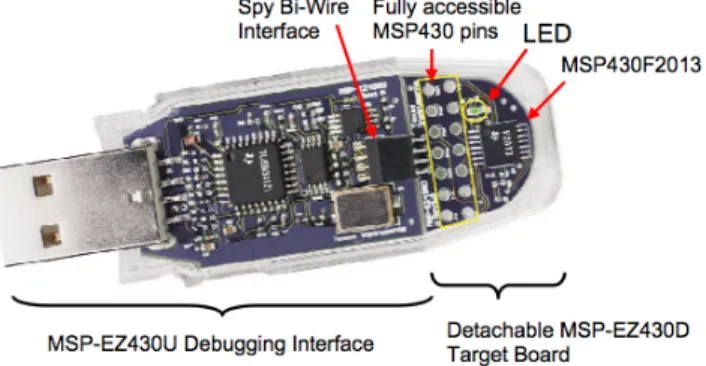
Figure 1.1: EZ430-F2013 Development Stick
This is one of the first MSP430 development tools to be in the USB stick form factor, which is gaining popularity because it is so easy to use. Since it is very low cost($20)and has an integrated debugger, it allows very quick development. It is composed of two boards (both located inside the plastic casing): The programming board and the target board. The target board is the board
1.2 What Hardware do I need? 3
with the actual microcontroller (an MSP430F2013) and all the circuitry needed to use it. It can be detached from the programmer once the software has been downloaded to the MSP430.
The debugger board, with its USB connector, can allow programming on any computer (although there might be issues with a specific Operating System being unsupported). For more information, see the following links:
EZ430-F2013 Home Page MSP430F2013 Home Page
MSP430 Design Page - F2013 Contest
This last website has the EZ430 contest that can provide you with real insight as to what can be done just with the EZ430.
1.2.2
EZ430-RF2500
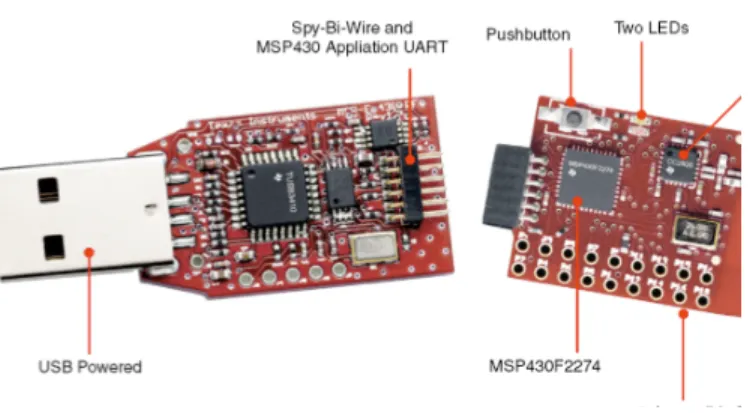
Figure 1.2: EZ430-RF2500 Development Stick
This development board is very similar to the regular EZ430 but includes a RF2500 transceiver and a MSP430F2274 microcontroller (not the F2013). This is the kit that is the subject of this tutorials because it delivers great value - microcontroller, transceiver and debugger - at a very low price TI also supplies the sensor demo code which can be quickly programmed on both devices to enable quick temperature monitoring. One target board has to be programmed with the End Device code and the other with the Access Point code. The End device is the connected to the battery board while the target board that has the Access Point software is left connected to the programmer board and to the PC.
The sensor demo is simple. The End Device takes a reading of its Temperature Sensor (inte-grated into the MSP430 and accessible as an ADC channel) and Voltage (the one applied to the MSP430F2274). It sends this data to the Access Point, which also takes its own temperature and voltage readings. The AP then integrates both of these and forwards them to the PC using the UART. This data can be read using a hyperterminal equivalent program (Putty, a free program, is recommended).
1.2.3
Experimenter Boards
TI also provides more comprehensive boards, called Experimenter Boards. These are much larger and don’t come with a built in Debugger. For that you need a FET Debugger(which is discussed below). The two boards that are available are:
MSP430FG4618/F2013 Experimenter Board Home Page MSP430F5438 Experimenter Board Home Page
Putty - Terminal Emulation Software Home Page
1.2.4
FET Debugger
To access the JTAG pins and debug the MSP430, TI provides a debugger, called a FET Debugger. If you have purchased a board with a 14-pin JTAG connector, such as the experimenter boards or many other boards by third parties, you will likely need this debugger.
There are two versions: one that connects a parallel port and another with USB connectivity. The USB one is the most common one. This debugger allows step by step execution of code, breakpoints, and other advanced things.
For more information:
MSP430 USB Debugging Interface Homepage
There are a few other debuggers out there, mostly sold by a company called Olimex and some other third parties.
1.2.5
Custom Hardware
Most often, once you’ve developed your code and tested it on a development platform, you would like to create your own PCB with the microcontroller The microcontroller itself is only an IC. It requires several things to operate (which every development kit as mentioned above provides):
• Supply voltage consistent with Electrical Specifications (1.8V - 3.6V for most MSP430)
• Decoupling capacitors to reduce noise on the supply voltage (no power supply is perfect)
• External Crystals (in some cases where they are needed for the clock generation)
• A Programmer/Debugger or Bootstrap Loader
The list above provides the basic elements most microcontrollers need, which are besides the specific parts and connections related to the application itself (such as sensors, transceivers, passive components etc).
Users of the Microcontroller must ensure they provide the correct power supply. Although the MSP430 family requires little current and thus can be operated by batteries or other low current
1.2 What Hardware do I need? 5
sources without any problems, it requires a specific voltage to be applied, and any deviation from the Maximum Recommended Specifications (available in the datasheet) can destroy the IC. Mi-crocontrollers such as those made by Microchip and Atmel usually can tolerate 5V (and in some cases require it), but MSP430 generally accepts 1.8V to 3.6V, with possible damage to the IC when the voltage is over 3.9V or so. It is essential that if you use your custom designed circuit for the MSP430, you comply with the requirements set forth by the datasheet.
External Crystals should be used in applications that require more accuracy than is available from the microcontroller. They add more size and cost, but enable more accurate clocks. Chapter 5 provides some more information about the clocks and crystals.
Most students are familiar with computers and how to program them, using a compiler to generate the binary code and execute it. Microcontrollers, however, are different. They are programmed with code produced by a special compiler in a computer. Once the code is compiled and linked, it can be downloaded and debugged on the actual microcontroller (provided the interface to do so is available). The MSP430 devices use an interface called JTAG to perform these functions. JTAG allows a user to download and debug the code on the microcontroller, after being written with one of the several compilers that are available. This interface is accessed by using a FET Programer that connects the computer to the microcontroller. For MSP430 devices that do not have many pins available, the programming interface available is called Spy-bi-Wire. This is proprietary to TI and makes JTAG use 2 lines instead of the usual 4 or 5.
Chapter 2
Getting Started
2.1
Introduction
I hear and I forget; I see and I remember; I do and I understand. - Old Chinese Proverb
As the chinese proverb indicates, doing is the best way of understanding. This chapter was created to get you started compiling MSP430 programs, simply because it is the best way you will actully learn and understand what this tutorial teaches. In order to compile MSP430 applications, an MSP430 compiler is needed. There are several options:
• Code Composer Studio (CCS) - TI’s own MSP430 development suite that is also used for many other TI devices. It is based on Eclipse and is a cost effective solution for development. Currently it is in version 5.1.
Code Composer Studio for MSP430
• IAR Embedded Workbench for MSP430 - IAR is a well established company and its com-piler is very good. It produces output code that is sometimes smaller and faster than others. On the flip side, it is usually more expensive. A free version called the Kickstart edition is provided that allows up to 4kB or 8kB of code depending on the MSP430 device used. Another possibility is a 30-day Evaluation version that has no limitation.
IAR Embedded Workbench Kickstart for MSP430
• MSPGCC - A free MSP430 port of the well known GCC compiler. It requires some more work to get going but is a very attractive option. It can be used for professional development. MSPGCC Wiki
If you are just beginning to program, I recommend that you get IAR Kickstart just to compile a few programs. You can then move to CCS or MSPGCC.
2.2
Running a Project using IAR
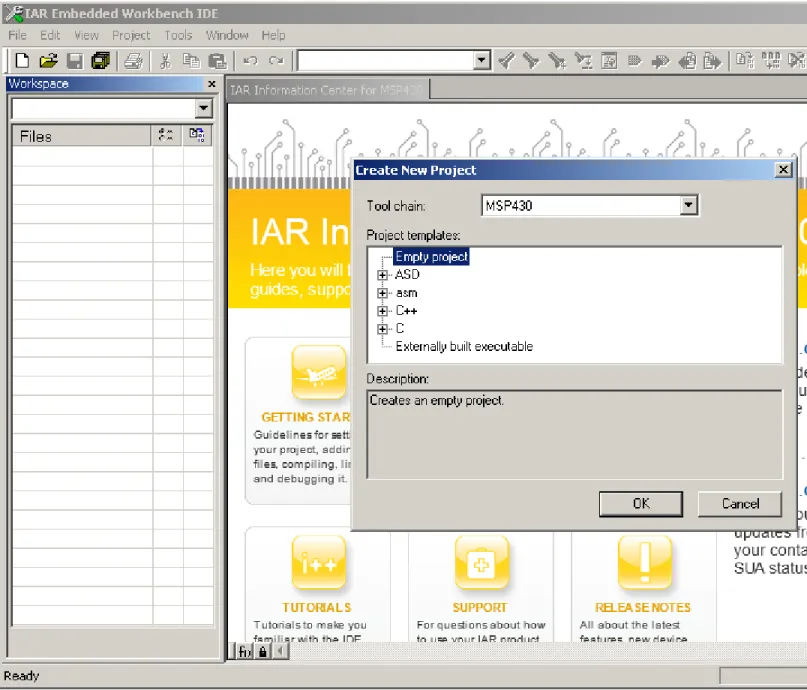
I assume that you’ve installed IAR. This should be straightforward. IAR uses the concept of project in a workspace. A workspace is simply a container of projects, and if you open IAR, a workspace is already created for you. Workspaces are actual files with the extension ¨’eww¨’. In order to compile, link and debug MSP430 code, we must create a project. To do this, go to Project-¿ Create New Project. Select MSP430 for the toolchain:
Once you press OK, you will be asked to save the project file. Please note that the file name will also be the project’s name. Once the project is created, we must add the source code and configure it. Since we have created an empty project, no files are incorporated. Press the ¨New Document¨button and IAR will open a new tab for a new file. save this file with the name ¨main.c¨(the actual name can be almost anything but it helps to make it obvious).
Copy paste the hello world source code below in main.c and save it: Listing 2.1: MSP430 Hello World - hello world.c
1 #include "msp430x22x4.h"
2
3 volatile unsigned int i; // volatile to prevent optimization
4
5 void main(void)
6 {
7 WDTCTL = WDTPW + WDTHOLD; // Stop watchdog timer
8 P1DIR |= 0x01; // Set P1.0 to output direction
9
10 for (;;)
11 {
12 P1OUT ˆ= 0x01; // Toggle P1.0 using exclusive-OR
13 i = 50000; // Delay
14 do (i--);
15 while (i != 0);
16 }
17 }
We will cover the actual operation of the code later, but this code simply blinks the LED on board. Note that main.c is still not part of the project and cannot be compiled. To add it, right click on the project name in the workspace window, go to Add and then Add ¨main.c¨. Note that this only works if main.c is the currently active tab. Else, select the Add files option and choose main.c.
We now need to configure the project options. To do this right click on the project name in the workspace browser and go to Options. A window will appear. This window includes all the options for the project. The most important one at the moment is to select the actual MSP430 device that will be debugged. In the Device selection box there is a button, clicking on it shows a list of MSP430 devices. Select here the MSP430 that you have on your board. ANother very important aspect is to ensure that the FET Debugger is used. For this go to the Debugger in the list and change ”‘Simulator”’ that appears as default to ”‘FET Debugger”’.
2.2 Running a Project using IAR 9
Figure 2.1: Creating a new empty project in IAR
If while debugging your application, the download of your application is very fast, you might be accidentally be using the Simulator. Many engineers have spent time trying to figure out why their application wasn’t working only to discover that they were not actually downloading it to the board.
Once you’ve finished, press OK and close the options dialog. Then right click on the project and press Rebuild all. IAR will compile and link the source code. You may then download and debug using the CTRL+D shortcut.
IAR will automatically download the application and if everything is OK, will stop at the first line of code. Pressing on the Go button will execute the code freely.
2.3
Running a Project using CCS
During the CCS installation, you should have chosen to install support for the MSP430 and tue USB FET device.
Similarly to IAR, CCS also has the concept of a workspace where projects are located, though CCS uses Eclipse’s method of storing a workspace which is based on a folder with the information. When you first open CCS, you’ll be asked to give the path to the workspace. This can be almost any location. The first time CCS opens, it will request the mode in which you want to operate. The Code Size limited option is good for starting and evaluating until you must move up because of the code limitation. Once CCS opens, select the Project Menu and then New CCS Project. You can put any valid Project name. Ensure that the device family is MSP430 and select the variant and then the particular device. Finally select an Empty project.
CCS creates a new project and also a main.c file.
Copy paste the hello world source code below in main.c and save it: Listing 2.2: MSP430 Hello World - hello world.c
1 #include "msp430x22x4.h"
2
3 volatile unsigned int i; // volatile to prevent optimization
4
5 void main(void)
6 {
7 WDTCTL = WDTPW + WDTHOLD; // Stop watchdog timer
8 P1DIR |= 0x01; // Set P1.0 to output direction
9
10 for (;;)
11 {
12 P1OUT ˆ= 0x01; // Toggle P1.0 using exclusive-OR
13 i = 50000; // Delay
14 do (i--);
15 while (i != 0);
16 }
17 }
No configuration changes are needed. Simply go to Run-¿ Debug or press F11. A new debug session will be open. You can then select run and the example will run.
Chapter 3
Microcontroller Basics
Microcontrollers are binary computers and so they operate on the basis of binary numbers. Binary numbers consist of only 1 and 0. Binary, however, is unnatural for humans to use. Assembly lan-guage is one step above binary. It is therefore the most basic lanlan-guage for controlling computers since it represents binary directly and it is easier to understand. Knowledge of assembly is not completely necessary to program the MSP430, but it is useful in optimizing routines to get the maximum performance (in terms of speed or memory). The C programming language is the pri-mary language used and will be followed throughout this tutorial. In general, a compiler translates the C code into the binary code and we will not worry about how this is performed initially. A microcontroller is not just a CPU. It usually incorporates a range of peripherals, besides the memory and storage needed to operate. Simply put, it is a computer with some specialized func-tions. Of course, it cannot compare to a modern PC in aspects such as speed and processing capability for all but the high performance CPUs, but it is useful in a wide variety of applications where larger processors are not feasible. We begin by discussing the most important part of any computer: numbers and computation.
3.1
Data Types and Numeric Representation
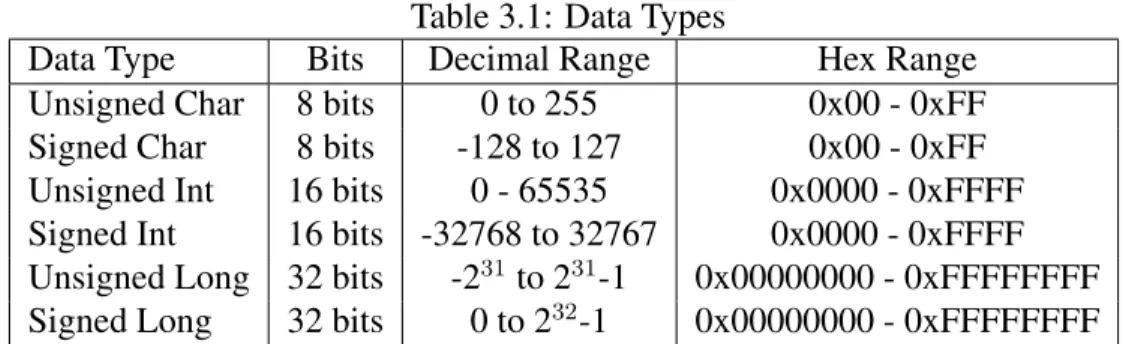
Using binary to represent numbers is sometimes confusing. I will attempt to clear this up. This section is critical to understanding how we operate on registers and control the microcontroller. The first thing to understand is that the C code can accept many data types and that the compiler assigns them a specific number of bits. The table below summarizes these data types and their capacity to represent values. If this is not strictly followed, code problems, overflows and errors will occur. Table 3.1 shows the data types and their sizes as used in the IAR compiler:
Therefore, when a variable is declared to be unsigned char, for example, only values from 0 to 255 can be assigned to it. If we tried to assign a higher number, overflow would occur. These data type representation are also compiler dependent. You should check your compiler’s documenta-tion for what data types are available. Unsigned and Signed simply determine whether numbers represented can be negative. In the case of unsigned, all numbers are assumed to be positive (0 to 255 for char, for example), while if the char variable was declared to be a Signed char its values go from -128 to 127.
Table 3.1: Data Types
Data Type Bits Decimal Range Hex Range
Unsigned Char 8 bits 0 to 255 0x00 - 0xFF
Signed Char 8 bits -128 to 127 0x00 - 0xFF
Unsigned Int 16 bits 0 - 65535 0x0000 - 0xFFFF Signed Int 16 bits -32768 to 32767 0x0000 - 0xFFFF Unsigned Long 32 bits -231to 231-1 0x00000000 - 0xFFFFFFFF Signed Long 32 bits 0 to 232-1 0x00000000 - 0xFFFFFFFF
It is possible to specify whether by default a variable is Signed or Unsigned. This is done at the compiler’s options menu.
When creating a variable, you must be aware of how large a number you will need to store and choose the data type appropriately.
3.2
Hexadecimal for MSP430
Hexadecimal notation is essential because it is so widely used in the microcontroller as a direct form of representing binary numbers. Hexadecimal is a number system which uses 16 symbols to represent numbers. These symbols are 0 to 9 followed by A to F. Table 3.2 shows these symbols and their equivalent in the decimal and binary number system.
Table 3.2: Hexadecimal Number System Hexadecimal Decimal Binary
0 0 0 1 1 1 2 2 10 3 3 11 4 4 100 5 5 101 6 6 110 7 7 111 8 8 1000 9 9 1001 A 10 1010 B 11 1011 C 12 1100 D 13 1101 E 14 1110 F 15 1111
The decimal system only has symbols for 10 numbers(0 to 9), after which we must use two symbols to represent numbers (00 to 99). After 100 we must use 3 symbols(000 to 999), and so on. Hex-adecimal numbers are usually denoted with0xbefore the actual number. This is standard notation
3.2 Hexadecimal for MSP430 13
although sometimeshis used. Since Hexadecimal has 16 symbols(0x0 to 0xF), any number above 0xF must be represented by at least 2 symbols, and any number above 0xFF must be represented by at least three, etc.
It’s important to note that leading zeros don’t change the actual value, but they do indicate the total range available. In the case above, a register which contains 0x000F is 16 bits (also known as 2 bytes, or 4 nibbles). However, the upper 3 nibbles (upper 12 bits) are all 0 either by default or because they’ve been changed.
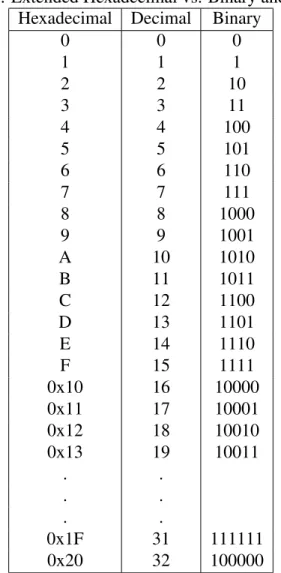
Table 3.3 shows an extended list of hexadecimal numbers. Binary and Decimal are also shown for comparison. As you can see, Hexadecimal can simplify writing and prevent errors since any binary number can easily be represented using less symbols. 11111111 is nothing more than 8 bits, which can be represented more easily by 0xFF. In fact, going from 0x00 and 0xFF we can represent
28 = 256numbers. This is because each position in hex represent 4 bits (a nibble) and two of them
represents 8 bits (a byte). This is a compact form and very convenient in programming. Some software calculators, such as those in Windows or Linux, can easily convert between numbers in different number systems and are a big help while programming. Notice that sometimes they will not accept leading zeros and these zeros must be accounted for when programming.
Table 3.3: Extended Hexadecimal vs. Binary and Decimal Hexadecimal Decimal Binary
0 0 0 1 1 1 2 2 10 3 3 11 4 4 100 5 5 101 6 6 110 7 7 111 8 8 1000 9 9 1001 A 10 1010 B 11 1011 C 12 1100 D 13 1101 E 14 1110 F 15 1111 0x10 16 10000 0x11 17 10001 0x12 18 10010 0x13 19 10011 . . . . . . 0x1F 31 111111 0x20 32 100000
3.2.1
Conversion of Numbers
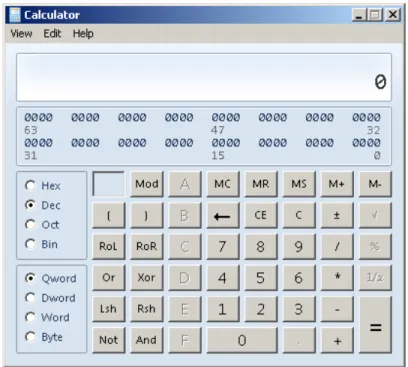
To convert a number from one base to the other, first ensure the calculator is inScientific Mode. To convert a number simply press the radio button corresponding to the base you want to convert from, enter the number and press the radio button corresponding to the base you want the result in. The number is automatically converted. The radio buttons are shown in Figure 3.1.
Figure 3.1: Converting Numbers Using the Windows Calculator
3.3
Digital Operations
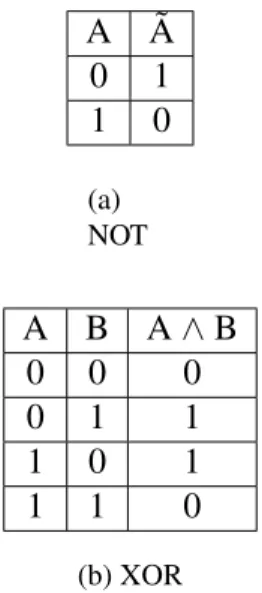
To be able to manipulate the registers of the MSP430, some knowledge of digital logic is necessary. The most basic operations we will need to be familiar with are AND, OR, XOR, and NOT and their truth tables are shown in Tables 3.4 and 3.5.
A B A|B 0 0 0 0 1 1 1 0 1 1 1 1 (a) OR A B A & B 0 0 0 0 1 0 1 0 0 1 1 1 (b) AND
3.4 Manipulating Module Registers 15 A A˜ 0 1 1 0 (a) NOT A B A∧B 0 0 0 0 1 1 1 0 1 1 1 0 (b) XOR
Table 3.5: Digital Operations - NOT and XOR
3.4
Manipulating Module Registers
We previously discussed variables, which are collections of bits that can be used to represent num-bers (although usually you don’t deal with the individual bits and use decimal). Most programmers do not have a problem understanding their use. If we have to store the results of an operation, we can easily assign it to a variable and use it later,regardless of what number system we use. Registers are very similar to variables in that they are also a collection of bits that can be read and modified by you. As opposed to variables, however, registers are variables internal to the microcontroller and its modules. They do not reside in RAM and therefore aren’t allocated by the compiler. There are two types of registers : CPU Registers and Module Registers. We will not discuss the CPU’s registers that are used to store data and manipulate it. Since we are not programming in assembly, we do not need to concern ourselves with them as the compiler takes care of all of this. Rather, we are talking about Module Registers that control many of the peripherals in the microcontroller. The reason that these registers are important will become more and more apparent as you will read the tutorial.
In the MSP430, some registers are 8-bits (one byte) and some are 16-bits (2 bytes). We usually represent them visually by empty cells, with each cell capable of having a value of 1 or 0.
7 6 5 4 3 2 1 0
15 14 13 12 11 10 9 8 7 6 5 4 3 2 1 0
The numbers above each cell simply represent the position, with position seven representing the Most Significant Bit(MSB) and position 0 representing theLeast Significant Bit(LSB).
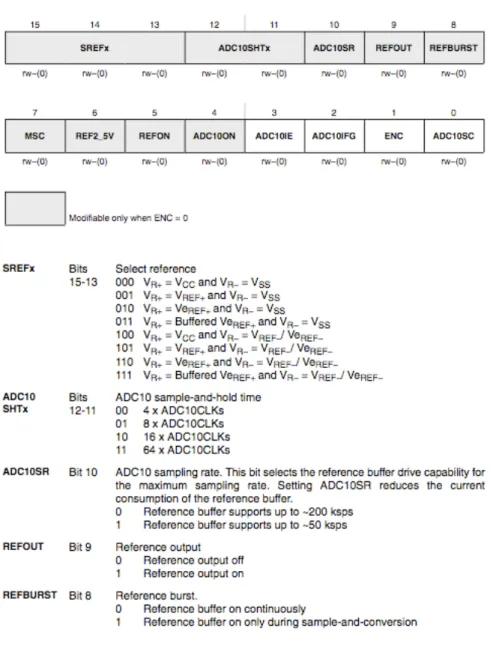
The register is simply a collection of bits. Each of the little boxes can have 1 or 0 in it used to control something or represent data. How do we control the above registers? We do so by using the Digital Operations we discussed in section 3.3. Before we discuss this, we must cover the defines used by the MSP430 code which we will be referencing. We have all these registers in the MSP430 and the information about them can be easily found in the User’s Guide of each MSP430. At the end of each module’s description will be a reference of the registers that control that module, their name, and the purpose of each bit. Figure 3.2 shows an example of a register from a User’s Guide:
Figure 3.2: ADC10 Register Example
The register in this case is 16-bit. Visually, bits are grouped together when they share a common function. Therefore, Bits 15 to 13 are designated as SREFx. Notice that below each cell there is the designation rw. This means that you can both read and write to these bits using the manipulation techniques we’ll discuss in the following section. It is possible for a register to be read only. This
3.4 Manipulating Module Registers 17
is usually reserved for information about a particular module, indicating its status or something similar. Looking at the register description, we see a wealth of information. First of all, this register configures several aspects of the ADC such as the input channel (the physical pin), the sample and hold time, and the references.
A very important point to make is that the register is called ADC10CTL0. You might be ask-ing yourself how can a register be named. In fact, the name is a convenient reference point. It’s much easier to refer to it by ADC10CTL0 than by ¨The register starting at 04Ah¨. Remember, in programming we normally refer to variables by their names and we don’t directly deal with their actual address since the compiler does that for us. It is good programming practice to replace odd numbers with names since humans are much more comfortable with them (have you ever visited Amazon.com by going to it’s IP number? Not likely). We haven’t declared these registers, so how do we know their names and how does the compiler know? The compiler provides a header file which includes the defines for all registers in all peripherals and shortcuts to utilizing them. This header file is included in every program we use and makes our life much easier. It is unlikely we’ll ever refer to the register by its position. Rather, we simply refer to it as ADC10CTL0. Another important point to make is all those names in the bit cells (such as SREFx, ADC10SHTx, etc are also defined and can be easily used to make code more readable. The header file specifically con-tains these definitions for SREF0 to SREF16.
We will leave aside ADC10CTL0 for now and will use another very useful register called P1OUT. The Input/Output (I/O) module contains registers to control the output of the microcontroller pins(to drive them HIGH or LOW). Bit 0 of P1OUT controls P1.0, bit 1 controls P1.1 and so forth. Suppose we want to make P1OUT equal to 0xFF, which would set all 8 bits in it to 1 and will cause all pins in Port 1 to go HIGH, then the register would look as follows:
7 6 5 4 3 2 1 0
1 1 1 1 1 1 1 1
The equivalent C code would be:
P1OUT = 0xFF; // Set all the bits of P1OUT to 1
On the other hand we can also take the new register full of 1’s and make it all zeros again (this will make all pins in port 1 to become LOW):
P1OUT = 0x00; // Set all the bits of P1OUT to 1
Setting the register as above is just fine when we’re changing all the bits, but it won’t work if previously one of the bits was set to 1 or 0 and we want to leave it that way, (the whole register will be in effect ¨erased¨) Perhaps another part of the program controls one of the bits in the register and if we use the assignment ( = ) symbol we will affect it adversely.
Lets suppose P1OUT is all 0 except position 0 (bit 0), which contains a 1, as follows: If we want to set bit 1 of the register to 1, this would be represented as follows in binary:
7 6 5 4 3 2 1 0 0 0 0 0 0 0 0 1 00000001 OR 00000010 = 00000011
Remember that OR is performed bit by bit, each position with the same position, so that position 0 is added to the other position 0, position 1 with 1, and so forth. Our previous 1 in position 0 still remains unaffected.
We could, by virtue of what we learned previously, replace the binary with hex notation, which would make it easier to read and write:
0x01 OR 0x02
= 0x03
Much easier to write obviously. We are still left with how to write this down in C so that the compiler would understand this is what we want to do. Remember, we are referring to P1OUT, which the compiler knows represents a register of 8 bits. Now in the MSP430 C programming, the addition used is the OR operand (represented as the pipe symbol, a vertical line):
P1OUT |= 0x02;
This results in adding the 1 to position 1, while leaving the register as it was elsewhere. It’s important to note that if the position to which 1 is added is already 1, there is no overflow (because we’re performing an OR). Therefore:
0x02 | 0x02 = 0x02;
The OR is not a summation. It is a bit by bit assignment as per its truth table.
It is fairly obvious that if we wanted to set something to 0 we can’t just use the OR operator since adding a zero will leave the bit unchanged. In this case the AND operand (In C it is represented by the ampersand symbol) is used to set something to 0 since
0xFF AND 0x02 = 0x02
or
3.4 Manipulating Module Registers 19
Table 3.6: Hexadecimal representation of position
Bit 7 6 5 4 3 2 1 0
1 0x80 0x40 0x20 0x10 0x08 0x04 0x02 0x01
0 0x7F 0xBF 0xDF 0xEF 0xF7 0xFB 0xFD 0xFE
0xFF represents 11111111, so we’re not affecting anything. Using the combination of the OR and the AND we can control any bit/bits in the register.
Diagram in table 3.6 shows the value of each position. for example, a ’1’ in position 1 is repre-sented by 0x02.
Using the table, if we wanted to add a ’1’ in position 7, we just need to OR the register with 0x80. If we wanted to put a 0 in position 7, we would AND the register with the inverse of 0x80 which is 0x7F ( a 0 in position 7 and 1 in the rest). These can also be added together to control multiple bits. For example, we can add a bit in position 7 and 6 by doing an OR with 0x80 and 0x40:
P1OUT |= 0x80 + 0x40;
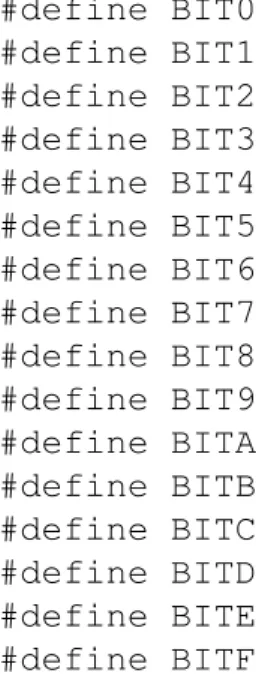
To make these operations easier, the MSP430 header includes the exact definitions for the bits up to 16 bits: #define BIT0 (0x0001) #define BIT1 (0x0002) #define BIT2 (0x0004) #define BIT3 (0x0008) #define BIT4 (0x0010) #define BIT5 (0x0020) #define BIT6 (0x0040) #define BIT7 (0x0080) #define BIT8 (0x0100) #define BIT9 (0x0200) #define BITA (0x0400) #define BITB (0x0800) #define BITC (0x1000) #define BITD (0x2000) #define BITE (0x4000) #define BITF (0x8000)
We can use these definitions so we don’t have to memorize the hexadecimal notations. We can use them as follows:
P1OUT |= BIT0
The preprocessor (a program that runs before the compiler) goes through and replaces every in-stance of BIT0 with 0x0001. You don’t see this happen (unless you look at some intermediate files). After the preprocessor runs, the above listing becomes:
P1OUT |= 0x0001;
The above definition for each uses 4 nibbles (4 positions or 2 bytes) because we are representing 16 bits. So we can perform the following:
P1OUT |= BIT4; \\ Make P1.4 High(1)
This will turn on pin P1.4. To combine we can also do:
P1OUT |= BIT4 + BIT3; \\ Make P1.4 and P1.3 High(1)
We can put a zero in the position without explicitly inverting. The tildeis the equivalent of the logical NOT operation in C:
P1OUT &= ˜BIT4; \\ Make P1.4 Low (0)
All this together makes register manipulation much easier. By the way, Binary can be input to the code by first putting 0b before the bits representing the number:
P1OUT |= 0b11111111;
3.4.1
XOR Operator
Finally, there exists also the XOR operator whose truth table is show below:
A B A∧B
0 0 0
0 1 1
1 0 1
1 1 0
Table 3.7: XOR Truth Table
This table shows that if we always XOR with 1 we ¨flip¨a bit from 0 to 1 or from 1 to 0 . In both cases, either when A is 0 or A is 1, XORing with 1 results in the bit flipping. This is convenient with elements such LEDs since it provides a toggle without needing to check what was the previous value.
P1OUT ˆ= BIT4; \\ Toggle P1.4
XORing with 0 leaves the bit as it is and is therefore not very useful operation.
The operations discussed above form the basic elements for bit manipulation necessary to control all the registers of the microcontroller and its peripherals, even allowing communication with other devices connected using SPI,I2C or any other bus.
3.5 ASCII 21
3.5
ASCII
Some knowledge of ASCII is useful since the UART information (communications with PC) can be interpreted as ASCII characters. ASCII is a character encoding scheme. This means that symbols such as letters and numbers are represented in a binary, hex , or decimal (which are related between themselves). Please refer to freely available ASCII tables which can show you, for example, that the number 0 is represented by 0x30. Therefore, if a 0x30 is sent to the PC using the UART module and the PC is in ASCII mode, it will show the number ’0’ on screen.
Table 3.8 shows some ASCII characters and their equivalents in Hex, Binary and Decimal: Table 3.8: Extended Hexadecimal vs. Binary and Decimal
Glyph Hexadecimal Decimal Binary
A 41 65 100 0001
B 42 66 100 0010
C 43 67 100 0011
For a more extended list, you can look up ASCII in Wikipedia or another other source. ASCII differentiates between each glyph (letter, characters, etc), and even between their lowercase and uppercase equivalents. Also, ASCII defines other elements such as space or newline.
The use of the UART to send ASCII characters and strings will be covered in the chapter on UART. A simple example is when we want to send the string ¨Hello World ¨we would send each of the char-acters, with the space between the words also sent. At the end of the line most likely we would send the newline character.
3.6
Conclusion
Now that we know how to modify registers, we must understand why and when to modify them. Much of this depends on the applications, but some general guidelines can be established that will enable you to do as needed for your application.
Chapter 4
Beginning Programming for MSP430
We will now begin discussing the basics of how to start programming the MSP430. The code will be based for the EZ430-RF2500 platform and be primarily geared towards the IAR compiler. It will likely run on CCE or other compilers, but some porting might be needed. As we go through the next chapters, we’ll learn to integrate more and more of the modules into our design for a variety of applications. We can’t possibly cover all uses of these modules but we will cover enough so that you will be able to leverage these ideas and further learn about the modules on your own.
A very basic piece of code that can be compiler and ran in an MSP430 microcontroller is: Listing 4.1: MSP430 Hello World - hello world.c
1 #include "msp430x22x4.h"
2
3 volatile unsigned int i; // volatile to prevent optimization
4
5 void main(void)
6 {
7 WDTCTL = WDTPW + WDTHOLD; // Stop watchdog timer
8 P1DIR |= 0x01; // Set P1.0 to output direction
9
10 for (;;)
11 {
12 P1OUT ˆ= 0x01; // Toggle P1.0 using exclusive-OR
13 i = 50000; // Delay
14 do (i--);
15 while (i != 0);
16 }
17 }
This code has some elements that were previously discussed and it is very simple. The first line includes the header file with definitions that simplify programming. We don’t have to address P1DIR by its hexadecimal number (the address which points to it). Rather, we simply use P1DIR. In this case we included msp430x22x4.h, but other header files will be needed for other MSP430 derivatives. The simplest way to see which one to use is to lookup the header file used in the example files of that MSP430. It is also possible to search the compiler directories for these files and guess given a particular derivative. Notice the letter x in the header name can be one or multiple numbers or a letter (commonly F for Flash).
Following this, there is a variable declaration. i is declared to be unsigned int. The volatile modifier tells the compiler not to eliminate it in its optimizations routines. If a variable is declared and never modified in main() the compiler will likely eliminate it because it doesn’t know about an interrupt routine accesing it.
Now comes the main routine of the code. main() is common to among all programs. When code execution begins (when debugging for example), the first line to be executed is the first line in main(). Something that might not be obvious is what is actually set when the program begins. That is, are any clocks running before we execute the code for setting the speed?
The answer is that it must be running. The CPU cannot operate without a clock. However, what is the speed and who sets it? When the MSP430 starts, it has defaults for many of the peripherals, including clocks, I/O, and others. Check the Datasheet and user’s guide for information about the defaults. The Master Clock (MCLK), which is the source clock of the CPU, starts up at a frequency specified in the datasheet. . This is done behind the scenes, but is very important. Although we won’t address it yet, it is important to change the clock frequency and make sure it is adapted to our application and ensure that all clocks and crystals are running correctly.
One of these is the Watchdog timer, which must be disabled or else the microcontroller will restart endlessly. The first line of main() stops the Watchdog timer. This is a line that will be standard in all MSP430 programs, unless you will adopt something else (such as using the Watchdog timer for another purpose).
A possible problem that is not apparent at first should be discussed. What happens when we require a lot of initialization time before main() starts? This can happen when we, for example, declare a very large array to be used in our program. The issue is that the Watchdog timer will expire before initalization has ended and this will restart the system, in an endless loop. This can happen if we have a lot of memory, greater that 2kB , and we are declaring an array with many elements. To avoid this problem, we can declare a function for low level initialization, as follows:
1 void __low_level_init(void)
2 {
3 WDTCTL = WDTPW+WDTHOLD;
4 }
This code will run before any variable initialization and will stop the Watchdog regardless of any initialization. However, this function is not available in all compilers. IAR and CCE do include it. The rest of code in Listing 4.1 is simply meant to flash an LED connected to P1.0. The first step in this is to change the direction of pin 0 in port 1 to an output. This only needs to be done once. We then include an infinite loop. There is no condition for breaking so it continues forever. We could have easily used
1 while(1)
2 {
3 P1OUT ˆ= 0x01; // Toggle P1.0 using exclusive-OR
4 i = 50000; // Delay
5 do (i--);
6 while (i != 0);
7 }
The only way then to stop the loop is to use the break command. The rest of the code is simple. We XOR the value that is in position 0 of P1OUT with one, toggling it( from 1 to 0 and from 0 to
25
1). We then create a delay with a do... while loop. The timing of the delay is not always easy to establish (unless steps are taken to measure the number of cycles it takes). We simply have a loop that goes 50000 times and executes nothing (except the check for the condition). Once this loop is done, we begin again with the XOR of P1OUT.
Usually, when we write an MSP430 application we do as follows: 1. Stop the Watchdog Timer
2. Setup the Oscillators and clocks and check for their correct operation using the appropriate handlers
3. Setup The I/O pins
4. Setup the rest of the modules to be used 5. start the application specific code
Information about the Watchdog timer is included in the User’s Guide. The next chapter will add upon the elements we will need to create a fully functional application.
Chapter 5
MSP430 Clocks
5.1
Introduction
Although most users of Personal Computers would not be aware of this, clocks are at the heart of any synchronous digital system. CPUs require clocks to run the CPU since asynchronous operation is not possible in computer proccesing (it presents many difficulties such as when the data to be processed from comes from different places at different speeds). In PCs, the selection of clock speeds is determined by various factors. Unless you are overclocking, you will never deal with them directly. Microcontrollers, on the other hand, are usually very flexible with clocks and require that the designer specify what clocks will be used and at what speeds. Usually this means that both hardware and software aspects of clocks be considered during the design stage.
As an example, the MSP430 accepts a low frequency crystal (typically 32.768Khz ), which must be added externally. Upon initializing the microcontroller, the clock system of the MSP430 must be configured to take advantage of this clock. In the EZ430-RF2500, no crystal is available and the only oscillator used is the internal oscillator. This saves space but clock precision is reduced. Why are clocks important? One important effect is on the frequency of the CPU. The speed at which it runs depends on a clock called MCLK. Because of this, the speed of instruction execution will depend on the clock. Do you have an application which needs to move data fast? The slow default speed might be too slow for your needs. On the other hand, the power consumption of the microcontroller is very dependent on the CPU speed. Although peripherals do consume current, the CPU, when running, is in most cases the major offender. Current consumption usually varies linearly with clock speed and therefore one way to keep consumption to a minimum is to set the clock speed as low as possible (or turn it off completely when not needed). MSP430 Microcon-trollers generally use two categories of clocks, fast and slow. The fast clocks source the CPU and most modules and varies usually from several hundred kHz to Several MHz (25MHz currently in the new MSP430F5xx family). The slow clocks belong to the low kHz range and are usually either 12kHz or 32.768kHz.
How do we generate the clocks? There are many ways to do so, but in the MSP430 (and many other microcontrollers) there are generally three types of clock sources:
• Internal Oscillators
• External Crystals
• External Oscillators
5.2
Internal Oscillators
Internal Oscillators are usually an RC network with circuitry to try and improve the accuracy of the clock. Trimming and Calibration by the manufacturer can significantly improve the precision of the clock. Remember, however, that temperature does affect the clock frequency and if this dependancy isn’t reduced by some sort of calibration, it can wreak havoc on an application. There-fore, it is usually important to select The benefit of this type of oscillators is that their frequency can be easily changed and they don’t occupy any more space on the PCB. On the MSP430, A fast Digitally Controller Oscillator (DCO) oscillator is avaialble, with another slow 12kHz oscillator optional and usually available in newer MSP430 variants.
5.3
External Crystals
External Crystals add a large measure of accuracy to oscillators and should be used as much as possible unless cost and area considerations are more important. They are not tunable but with PLL or other circuitry can generate other frequencies based on the crystal.
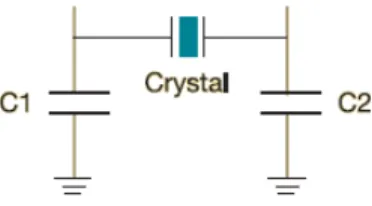
The selection and use of crystals is not always so straightforward because they are specified using several parameters. Aside from the frequency,accuracy, drift and aging factors, the most over-looked part of adding a crystal to the circuit is the loading capacitance. A detailed explanation for the need and purpose of the loading capacitance is available from most crystal manufacturers. In general, every crystal used in a parallel configuration, which is the case in the MSP430 and many other microcontrollers, requires capacitors to provide the capacitance that is necessary for the oscillator to oscillate at the right frequency. These capacitors are usually connected to the two crystal pins as follows:
Figure 5.1: Loading Capacitors on Crystal
The effective loading required is specified by the crystal manufacturer, not by the microcontroller manufacturer (although the microcontroller manufacturer could make recommendations or force you to use a certain loading because of built in capacitors). This loading is what the crystal needs to oscillate at the frequency it is specified at. Any change in the effective loading changes the crystal’s effective frequency, affecting the system using the crystal. The loading capacitors provide this capacitance, but they’re not the only ones. Every pair of parallel plates with voltage across
5.3 External Crystals 29
them forms a capacitor. Two parallel pins such as microcontroller pins have voltage and therefore introduce parasitic capacitance from the circuit. Internal microcontroller circuitry does the same because of the way the oscillator is constructed. The PCB on which the microcontroller is mounted also adds parasitic capacitance. From this you should realize that to get the effective loading capacitance you must take into account all these extra parasitics. Some of these are specified in the datasheet and others are usually assumed to be in a certain range.
Lets begin a simple exercise by assuming there are no parasitics. If we assume that we selected a 4MHz crystal with a parasitic capacitance of 7pF. We need the combination of C1 and C2, which are usually selected to have the same value, to give a loading of 7pF.
CLef f = C1∗C2 C1 +C2 = C1∗C2 C1 +C2 Therfore if C1 = C2, we have CLef f = C12 2C1 = C1 2 C1 = 2∗CLef f = 2∗7 = 14pF
Therfore, both C1 and C2 should be 14pF to give 7pF of loading capacitance.
As was previously mentioned, this does not take into account the parasitics and the microcontroller effect. The oscillator inside the microcontroller introduces two capacitances generally calledCXIN
andCXOU T. Each appears in parallel with one of the external loading capacitors, resulting in the
effective load capacitance of:
CLef f =
(C1 +CXIN)∗(C2 +CXOU T)
(C1 +CXIN) + (C2 +CXOU T)
We are not finished, however. The PCB itself and the pins introduce a parasitic capacitance that should be taken into account as well. This parasitic capacitance appears in parallel to the previous parasitic capacitance and therefore is simply added (as is done for parallel capacitors):
CLef f =
(C1 +CXIN)∗(C2 +CXOU T)
(C1 +CXIN) + (C2 +CXOU T)
+Cpar
PCB Parasitic capacitances are not always easy to measure. Because of this, it is common to assume a PCB parasitic capacitance of 2-5 pF.
It is worth the note that in the work above we assumed that we must provide external capacitors to load the crystal. This is not always true. The MSP430 accepts a 32kHz crystal for low power application. If you look at several designs with the 32kHz crystal you will notice there are no loading crystals. In these cases the MSP430 provides the loading capacitance internally to save space. The internal capacitance provided can be fixed, as is the case with MSP430 derivatives such as the MSP430F1611, or they can be software selectable from among several values. For example, the MSP430F1611 datasheet page 38 specifies CXIN andCXOU T, the Integrated input
required should have a loading capacitance as close to 6pF as possible if parasitics are not taken into account.
Note that a 32 kHz crystal actually has a 32.768 kHz frequency (which is useful because 32768 is a power of 2, the base for binary numbers). The 32 kHz crystal to be used is usually of the watch crystal type. Mouser and Digikey have several acceptable crystals available in several packages. Cost for this crystal can be $0.30, and will usually be less than $1.
References:
MSP430 32-kHz Crystal Oscillators Application Note - slaa322b Crystal Oscillators Using MSP430
Pierce-gate oscillator crystal load calculation What is frequency at load capacitance?
5.4
Clock Sources
Clock sources are the term encompassing both crystals and internal oscillators. Their availability depends on your particular MSP430 derivative. For example, The MSP430F2274 does not include the XT2CLK (probably due to the low number of pins in the package). The following is a summary of the nomeclature of the clock sources:
• LFXT1CLK: Low-frequency/high-frequency oscillator that can be used with low-frequency watch crystals or external clock sources of 32,768-Hz. or with standard crystals, resonators, or external clock sources in the 400-kHz to 16-MHz range.
• VLOCLK: Internal low frequency oscillator with 12-kHz nominal frequency. Its low fre-quency means very low power.
• DCOCLK: Internal digitally controlled oscillator (DCO).
• XT2CLK: Optional high-frequency oscillator that can be used with standard crystals, res-onators, or external clock sources in the 400-kHz to 16-MHz range.
All these sources give you great flexibility. You could avoid using crystals altogether by using the internal DCO and VLO, or, if you need more precision, use the external crystals at the expense of PCB space and some money. It is standard practice to use LFXT1 with a 32.768 kHz crystal, leaving XT2 to be used with a high frequency crystal.
5.5
Clock Signals
The clocks available are actually the last element in a long chain. That is, first we begin with the clock generator, followed by some circuitry which further helps improve clock performance and change its parameters (such as dividing the frequency by some constant). Finally, clock distribution in the MSP430 allows for different clock sources . As an example, a Timer Module in the MSP430
5.6 Basic Clock Module In EZ430-RF2500 31
can be source from either the fast clock or the slow one. The CPU, however, can only be sourced from the fast clock called MCLK. The User’s Guide section for each peripheral will specify what are the allowable clock sources.
Note that the flexibility of the Clocks is limited. In the MSP430F2274 we have 3 clock signals available to CPU and Modules:
• ACLK: Auxiliary clock. ACLK is software selectable as LFXT1CLK or VLOCLK. ACLK is divided by 1, 2, 4, or 8. ACLK is software selectable for individual peripheral modules.
• MCLK: Master clock. MCLK is software selectable as LFXT1CLK, VLOCLK, XT2CLK (if available on-chip), or DCOCLK. MCLK is divided by 1, 2, 4, or 8. MCLK is used by the CPU and system.
• SMCLK: Sub-main clock. SMCLK is software selectable as LFXT1CLK, VLOCLK, XT2CLK (if available on-chip), or DCOCLK. SMCLK is divided by 1, 2, 4, or 8. SMCLK is software selectable for individual peripheral modules.
The CPU is always sourced by MCLK. Other peripherals are sourced by either SMCLK, MCLK, and ACLK. It is important to consider all the modules in the system and their frequency require-ments to select their source. ADC sampling at high speeds cannot be done with ACLK.
5.6
Basic Clock Module In EZ430-RF2500
Since the EZ430-RF2500 uses an MSP430F2274, we must refer to MSP430F2274 documents, especially example code and User’s Guide. An important feature of the MSP430F2274 is that Texas Instruments has included very useful calibration constants that reside in the Information Flash Memory(It is similar to where the program code resides but it exists to allow the user to store things like calibration constants and not get erased when we erase code and flash it).
The first consideration is to check which Clock Sources we have for the EZ430-RF2500. Inspecting the board (and checking the schematic) shows that there is in fact no crystal for the MSP430F2274. Therefore, all our sources for the Basic Clock Module are internal oscillators:
• DCOCLK - Internal High Speed Oscillator up to 16MHz
• VLOCLK - Very Low Frequency (12kHz) oscillator
The DCOCLK is the main clock for the system and supplies the CPU. The VLOCLK is extremely useful when our application goes to one of the sleep modes (which we discuss in 9.1). This clock can maintain timers for waking up the system at a certain point in the future. Selecting the frequency for DCOCLK is a matter of changing the settings of some registers, as shown in Figure 5.2.
As you can see, It is difficult to select the correct frequency precisely. To avoid issues, TI provides a set of calibrated constants that have a 1% deviation from the desired frequency.
Figure 5.2: Selecting the DCO Frequency
Listing 5.1: Configuring EZ430 Clocks
1 void configureClocks()
2 {
3 // Set system DCO to 8MHz
4 BCSCTL1 = CALBC1_8MHZ;
5 DCOCTL = CALDCO_8MHZ;
6
7 // Set LFXT1 to the VLO @ 12kHz
8 BCSCTL3 |= LFXT1S_2;
9 }
The following are the list of all calibration constant provided in the Flash:
CALDCO_16MHZ CALDCO_12MHZ CALDCO_8MHZ CALDCO_1MHZ
Although these are only 4 constants ( they don’t include other possibly useful frequencies), they will suffice for many applications.
Listing 5.2: MSP430 Hello World with Clock Control
1 #include "msp430x22x4.h"
2
3 void configureClocks();
4 volatile unsigned int i; // volatile to prevent optimization
5
6 void main(void)
7 {
8 WDTCTL = WDTPW + WDTHOLD; // Stop watchdog timer
9 configureClocks();
10 P1DIR |= 0x01; // Set P1.0 to output direction
11
12 for (;;)
13 {
14 P1OUT ˆ= 0x01; // Toggle P1.0 using exclusive-OR
15 i = 50000; // Delay
16 do (i--);
17 while (i != 0);
5.7 Considerations for using clocks 33
19 }
20
21 void configureClocks()
22 {
23 // Set system DCO to 8MHz
24 BCSCTL1 = CALBC1_8MHZ;
25 DCOCTL = CALDCO_8MHZ;
26
27 // Set LFXT1 to the VLO @ 12kHz
28 BCSCTL3 |= LFXT1S_2;
29 }
Listing 5.2 shows the Hello World application with the added clock routine. If you run this code you will immediately notice that the LED will flash much faster. The reason for this is that the default DCO clock frequency is much lower than 8MHz. It is the CPU which tells pin 1.0 to toggle, and so the speed of the CPU determines the toggle speed (although there is a small delay because of the I/O Module and other things calls). The function itself adds some overhead.
8MHz will be the standard speed we will use in our EZ430-RF2500 application. This is fast enough to run most things, and is good for communicating with the CC2500. If you look at the CC2500 datasheet, you’ll see that they specify the maximum clock frequency possible. The 8MHz clock will source the SPI module that communicates with the radio and although it can be divided further to reduce the clock speed to comply with the required specifications if we have a faster clock, 8MHz will work without any modifications.
5.7
Considerations for using clocks
Clocks are among the most critical aspects of microcontrollers and the MSP430 because they sometimes require significant engineering effort to use. This is especially true for battery powered applications where we don’t have the luxury of an electrical outlet. After all, these are the kind of applications for which the MSP430 was designed.
As previously mentioned, there is a direct tradeoff betwen clock speed and energy consumption. During the development process a bottom-up and top-down aproaches are usually used. We start the initial development at a limited clock speed and scale up as necessary to achieve each one of our tasks. On the other hand, the top-down approach begins with a fast clock and scales the clock down after functionality is proven in an attempt to conserve energy. In many cases, it is immediately apparent where we should begin. A hand held watch would require a bottom-up approach, while audio sampling would require top-down. In many cases, the use of modules and external devices complicates the clock selection process because of conflicing requirements. The flexible clock system of the MSP430 simplifies things, but tradeoffs will still be required.
Although this topic will be covered in later chapters, energy can be saved by turning clocks off. This will prevent us from using any modules for which the clock has been turned off, but should be done in cases where it’s advantageous.
Chapter 6
General Purpose Input Output - GPIO
Digital pins are the main communication element that a microcontroller has with the outside world. They can go HIGH (1) or LOW(0) depending primarily on the system voltage (VCC). The datasheet for your particular MSP430 will provide details about the voltage swing used to represent these two positions, and they are usually several hundred millivolts from the system voltage.
6.0.1
Pin Multiplexing
Figure 6.1: MSP430F2274 Schematic
Looking at the schematic representation of the MSP430 (MSP430F2274 in Figure 6.1) you will notice that each pin has a long name, with several designations separated by a slash. Because microcontrollers have a limited number of pins, the manufacturer has to multiplex the pins among the internal modules. That is, each pin can only do one things at a time and you have to select what that function will be (upon startup there are some defaults which you will likely override with your code). Multiplexing can become a problem if you’re in short supply of I/O pins and you’re using