Table of Contents Index
Full Description Reviews Examples Reader reviews Errata
Java Management Extensions
J. Steven Perry
Publisher: O'Reilly First Edition June 2002
ISBN: 0-596-00245-9, 312 pages
Table of Content
Table of Content ... 2
Preface... 4
Audience ... 4
Organization... 5
Conventions Used in This Book ... 6
Comments and Questions ... 6
Source Code Availability... 7
Acknowledgments... 7
Chapter 1. Java Management Extensions Concepts ... 8
1.1 Introducing JMX... 8
1.2 JMX Architecture... 9
1.3 The Sample Producer/Consumer Application ... 29
Chapter 2. Standard MBeans ... 41
2.1 What Is a Management Interface? ... 41
2.2 How Do Standard MBeans Work? ... 43
2.3 Downloading and Installing the JMX Reference Implementation ... 69
Chapter 3. Dynamic MBeans... 70
3.1 Why Use Dynamic MBeans?... 70
3.2 How Do Dynamic MBeans Work? ... 70
3.3 Dynamic MBean Inheritance Patterns ... 105
Chapter 4. Model MBeans ... 117
4.1 Why Use Model MBeans? ... 117
4.2 How Do Model MBeans Work? ... 118
4.3 Instrumenting Resources as Model MBeans... 145
Chapter 5. Open MBeans... 150
5.1 Open MBean Types ... 150
5.2 Open MBean Metadata Classes ... 167
Chapter 6. The MBean Server ... 187
6.1 What Is the MBean Server? ... 187
6.2 Obtaining a Reference to the MBean Server ... 188
6.3 The MBeanServer Interface... 193
6.4 Controlling MBean Registration... 215
6.5 MBeanServerDelegate ... 216
Chapter 7. JMX Notifications... 220
7.1 The JMX Notification Model... 220
7.2 JMX Notification Classes and Interfaces... 223
Chapter 8. Dynamic Loading... 236
8.1 Overview... 236
8.2 How Does Dynamic Loading Work?... 242
Chapter 9. The Monitoring Services... 249
9.1 The MonitorNotification Class ... 253
9.2 Counter Monitors ... 256
9.4 String Monitors ... 261
9.5 Other Issues... 263
Chapter 10. The Timer Service... 264
10.1 The Timer Class... 265
10.2 Using the Timer Service ... 272
Chapter 11. The Relation Service ... 278
11.1 Introduction... 278
11.2 The Basic Relation Service Classes... 279
11.3 Using the Relation Service... 287
11.4 Using the Relation Service Support Classes... 290
11.5 Modifying a Role ... 295
Preface
As technology evolves, it enables us to write applications that are increasingly distributed and complex. Today's network technologies allow us to process units of work on
physically separate machines scattered throughout the world. As the scale and complexity of today's newest applications increases, so too does the challenge of managing them. After all, it is not really beneficial to distribute an application across many different machines if the answer to a question as simple as "Is the application still running?" cannot easily be determined.
This book is about Java Management Extensions, or JMX, which is the Java standard for management of application resources. An application resource can be any piece of hardware or software that you wish to monitor and control, such as a printer, router, database connection, or queue. At the heart of JMX is the concept of a managed bean, or MBean, which is a resource that has been instrumented via JMX. The MBean gets its name from the fact that it resembles a JavaBean, in that its state is entirely maintained through the use of get and set methods for its attributes. A notification model similar to the Java notification model is also available for MBeans that need to emit notifications.
JMX provides an architecture, a set of design patterns, and a set of application
programming interfaces (APIs) that allow you to instrument your application and system resources so that they can be managed. JMX was designed to be able to integrate with existing management technologies, such as the Simple Network Management Protocol (SNMP) and Web-Based Enterprise Management (WBEM). This book covers every facet of JMX as it is currently specified, from instrumentation to writing agents to using the JMX agent services. Some parts of JMX are still unspecified (most notably the JMX distributed services), so it can't cover everything; however, it is my intention that this book be the most complete reference on JMX that is available today.
Here is a summary of what this book covers:
• JMX instrumentation: standard, dynamic, model, and open MBeans • JMX notifications: how to broadcast, filter, and listen for them
• The MBean server: a registry of MBeans and a communication broker between management applications and registered MBeans
• JMX agent services: dynamic loading, monitoring, timer, and relation services, available through the JMX agent
Audience
projects. (I assume that you are already convinced of the need to build management capabilities into your application.)
Chapter 1 looks at JMX at a high level. The JMX architecture is given the most treatment here, as it is the core of JMX. The following chapters are very meaty and are intended for developers who want to know how to use all of the aspects of JMX that are currently specified.
Organization
Chapter 1 contains an overview of JMX that introduces fundamental concepts and provides an overview of the JMX architecture. It also introduces the sample application we'll use throughout the book, which demonstrates each MBean instrumentation
approach. We'll see how to build and run the application and how to use a web browser to monitor what's going on inside it.
Chapter 2 covers how to create and use standard MBeans and discusses the inheritance patterns that they must follow. In this chapter, we will take a look at the fundamentals of a management interface and how to define one.
Chapter 3 looks at how dynamic MBeans work and the inheritance patterns you can use when creating them. It also shows how to describe a dynamic MBean using the metadata classes provided by the JMX specification.
Chapter 4 discusses how model MBeans work and how they differ from any other MBean type. It also shows how to describe model MBeans using the metadata classes specific to model MBeans.
Chapter 5 looks at how to describe fundamental and complex data types using the open MBean data types provided and the metadata classes specific to open MBeans.
Chapter 6 covers the MBean server from top to bottom. The MBean server's API, its implementation, and details of how to use the MBean server to interact indirectly with MBeans are given thorough discussion.
Chapter 7 looks at the JMX notification model and the various interfaces and classes that are provided by the JMX Reference Implementation (RI). It also discusses how to write a notification listener, broadcaster, and filter.
Chapter 8 covers dynamic loading and how to use the M-Let service to load MBeans from anywhere on the network.
Chapter 10 discusses the timer service, an agent service that can be used to create a scheduler or simply to send repeated notifications at a specific interval.
Chapter 11 covers the relation service and how to use it to enforce application policies regarding relationships between MBeans.
Conventions Used in This Book
The following typographical conventions are used in this book:
Italic
Used for file and directory names, functions, methods, parameters, and URLs. Also used for emphasis and for the first use of technical terms.
Constantwidth
Used for code listings and for resources, attributes, interfaces, classes, and targets where they appear in the text.
Constant width bold
Used for emphasis in code listings.
Constant width italic
Used for replaceable parameter names in command syntax.
This icon indicates a tip, suggestion, or general note.
This icon indicates a warning or caution.
Comments and Questions
Please address comments and questions concerning this book to the publisher:
O'Reilly & Associates, Inc.
1005 Gravenstein Highway North Sebastopol, CA 95472
(800) 998-9938 (in the United States or Canada) (707) 829-0515 (international/local)
There is a web page for this book, which lists errata, examples, or any additional information. You can access this page at:
http://www.oreilly.com/catalog/javamngext/
To comment or ask technical questions about this book, send email to:
For more information about books, conferences, Resource Centers, and the O'Reilly Network, see the O'Reilly web site at:
http://www.oreilly.com
Source Code Availability
Most of the examples in the book are keyed to a sample application instrumented with JMX calls. The source code for this application is available at the book's web site (http://www.oreilly.com/catalog/javamngext/ ), along with a README file explaining how to build and run it.
Acknowledgments
First and foremost, I would like to thank my wife Heather, daughter Madison, and son Foster for their incredible support during the months I spent writing this book. Many late nights and long weekends writing made for a pretty tired (and grumpy, no doubt)
Chapter 1. Java Management Extensions Concepts
The growth of large-scale distributed applications in the past decade has been impressive. Mission-critical business applications have evolved from a sequence of programs running on a single computer to business components running on different machines scattered throughout a network. Managing one application running on a single computer is fairly straightforward; you can monitor the health of the application through the use of a single log file, or operator console, and tools provided by the operating system. The difficulty of managing today's distributed systems has increased along with the complexity of those systems. When considering a management solution for today's enterprise applications, some questions arise:
• Which management solution is best for the application? • What standards should a management solution follow?
• How much effort is required to enable the components of the application to be managed?
Java Management Extensions ( JMX), the result of the Java Community Process ( JCP) Java Specification Request ( JSR) 3, was designed to deal with all of these questions. JMX was designed to address the management needs of applications written for the Java platform and to be compatible with existing management standards, such as the Simple Network Management Protocol (SNMP), which is the standard for management of enterprise networks. It was also designed so that instrumentation of resources to put them under the control of a management application is as easy as possible.
1.1 Introducing JMX
A resource is any entity in the system that needs to be monitored and/or controlled by a management application; resources that can be monitored and controlled are called manageable. A management application is a piece of software that can be used to monitor and control manageable resources (typically remotely). Managing a system of manageable resources is what we call system management. The JMX architecture enables Java applications (or systems) to become manageable.
Three fundamental questions must be addressed by any complete management solution:
• How do I make my resources manageable?
• Once my resources are manageable, how do I make them available (visible) for management?
• Once my resources are visible for management, how do management applications access them?
1.2 JMX Architecture
In this section, we will take a look at the three levels of the JMX architecture. The level closest to the application is called the instrumentation level. This level consists of four approaches for instrumenting application and system resources to be manageable (i.e., making them managed beans, or MBeans), as well as a model for sending and receiving notifications. JMX notifications are analogous to SNMP traps.
The middle level of the JMX architecture is called the agent level. This level contains a registry for handling manageable resources (the MBean server) as well as several agent services, which themselves are MBeans and thus are manageable. The combination of an instance of the MBean server, its registered MBeans, and any agent services in use within a single Java Virtual Machine ( JVM) is typically referred to as a JMX agent.
The third level of the JMX architecture is called the distributed services level. This level contains the middleware that connects JMX agents to applications that manage them (management applications). This middleware is broken into two categories: protocol adaptors and connectors. Through a protocol adaptor, an application such as a web browser can connect to one or more JMX agents and manage the MBeans that are
registered within it (for example, via HTTP). As long as the management application can understand the objects contained in the protocol stream, it can manage the MBeans they represent; thus, protocol adaptors do not need to be written in Java. A connector follows the familiar proxy pattern and is made up of a client and server pair. The server half of the connector pair is normally collocated with the JMX agent it represents (although this is not required), while the client half runs in the JVM of the management application. Issues such as security and Java serialization are understood by both the client and server components of the connector.
The JMX architecture is depicted graphically in Figure 1-1.
Figure 1-1. The JMX architecture (note: protocol adaptors and connectors are not currently standardized)
This section covers the JMX instrumentation level and includes all MBean types, with examples. This is the level that should be of most concern to developers, because this level prepares resources to be manageable. Figure 1-1 shows the two areas of concern for the instrumentation level of the JMX architecture:
• Application resources, such as a connection, a pool of connections, a printer connected to the network, or even the application itself
• The instrumentation strategy that is used to instrument application resources
An application resource that is to be manageable through JMX must provide information about five of its features:
• Attributes, which contain the state of the resource
• Constructors, which are used by management applications and other JMX agents to create instances of the resource
• Operations, which may be invoked by a management application or other JMX agent to cause the resource to perform some action
• Parameters to constructors and operations
• Notifications, which are emitted by the resource and sent via the JMX notification infrastructure to any interested agents
The combination of these five pieces of information—or metadata—about a resource's features is known as its management interface. It is through this interface alone that a management application or other JMX agent may interact with a resource.
There are four instrumentation approaches defined by JMX that we can use to describe the management interface of a resource: standard, dynamic, model, and open. Before we discuss these approaches, let's get a good working definition of an MBean, which is how we will refer to a managed resource from this point forward.
1.2.1.1 What is an MBean?
An MBean is an application or system resource that has been instrumented to be manageable through JMX. Instrumenting a resource involves writing some code. This code must follow four rules. First, the state of the resource must be completely described through getters and setters.[1] It is this requirement that earns the instrumented resource the
"bean" moniker (from the same rule for maintaining the state of a JavaBean). Second, the resource must be instrumented (i.e., coded) according to one of the JMX MBean types (standard, dynamic, model, or open). Following this requirement earns the resource bean the "M" (for manageable) part of the MBean name. Third, the MBean must provide at least one public constructor. Finally, an MBean must be concrete (i.e., not declared
abstract).
[1] This is not strictly true for the dynamic, model, and open MBean types. However, I highly recommend strict
adherence to this pattern.
Version
The version of the GenericResource
ProcessingTime
The number of milliseconds of processing time that have been consumed by this instance of GenericResource
NumberOfExceptions
The total number of exceptions that have been thrown by this instance of
GenericResource in the course of its processing
The most straightforward implementation of the state of GenericResource would look
like Example 1-1.
Example 1-1. Attributes of a candidate resource
public class GenericResource { // class details. . .
// Version (read-only)
private String _version = "1.0.1"; public String getVersion() {
return _version; }
// ProcessingTime (read-only) private long _processingTime; public long getProcessingTime() { return _processingTime;
}
// NumberOfExceptions (read-write) private short _numberOfExceptions; public short getNumberOfExceptions() { return _numberOfExceptions;
}
public void setNumberOfExceptions(short value) { _numberOfExceptions = value;
}
// other class details. . . }
This simple example demonstrates the fundamentals of instrumenting the attributes of a resource according to the JavaBeans state pattern. Each attribute is backed by a private member variable, so that the part of the resource's state represented by that attribute cannot be accessed directly. All attributes in this example are readable and have corresponding getters. Only the NumberOfExceptions attribute is writable, and it
provides a setter for that purpose.
Standard MBeans are the simplest type of MBean to code from scratch. All you need to do is define the MBean interface as a Java interface and implement that interface on the resource MBean. If we were to instrument GenericResource (from Example 1-1) as a
standard MBean, we would define a Java interface that looks like this:
public interface GenericResourceMBean { // Version (read-only)
public String getVersion();
// ProcessingTime (read-only) public long getProcessingTime();
// NumberOfExceptions (read-write) public short getNumberOfExceptions();
public void setNumberOfExceptions(short value); }
We would then implement the interface on the GenericResource class:
public class GenericResource implements GenericResourceMBean { // etc. (from Example 1-1)
}
The name assigned to this interface is very important: it must be the name of the class that implements it, followed by MBean. In other words, for any resource class XYZ that is
to be instrumented as a standard MBean, a Java interface called XYZMBean must be
defined, and it must be implemented by XYZ. Note that the MBean suffix is case-sensitive: Mbean is incorrect, as is mBean or mbean.
That is all the instrumentation code that must be written to make GenericResource
capable of being managed! Of course, this example is more simplistic than most resources we will deal with in the real world, most of which will include one or more management operations. Suppose we want to add a method, reset(), to reset the state of the ProcessingTime and NumberOfExceptions attributes. We would add this method to
the MBean interface, as shown in the following code.
public interface GenericResourceMBean { // Version (read-only)
public String getVersion();
// ProcessingTime (read-only) public long getProcessingTime();
// NumberOfExceptions (read-write) public short getNumberOfExceptions();
public void setNumberOfExceptions(short value);
Then we would implement the method on the GenericResource class, as shown in
Example 1-2.
Example 1-2. The GenericResource managed bean
public class GenericResource { //class details. . .
// Version (read-only)
private String _version = "1.0.1"; public String getVersion() {
return _version; }
// ProcessingTime (read-only) private long _processingTime; public long getProcessingTime() { return _processingTime;
}
// NumberOfExceptions (read-write) private short _numberOfExceptions; public short getNumberOfExceptions() { return _numberOfExceptions;
}
public void setNumberOfExceptions(short value) { _numberOfExceptions = value;
}
public void reset() { _processingTime = 0; setNumberOfExceptions(0); }
// other class details. . . }
The metadata required of every MBean is created automatically by the JMX infrastructure for standard MBeans. Before an MBean can be managed, it must be registered with a JMX agent (as described in the later section, Section 1.2.2.1). When a standard MBean is registered, it is inspected, and metadata placeholder classes are created and maintained by the JMX agent on behalf of the MBean. The Java reflection API is used to discover the constructor(s) on the MBean class, as well as other features. The attribute and operation metadata comes from the MBean interface and is verified by the JMX agent.
We will look at creating standard MBeans in detail in Chapter 2.
Consider instrumenting a resource as a standard MBean if:
• The management interface of the resource is fairly static (i.e., it won't change much over time).
1.2.1.3 Dynamic MBeans
In the case of standard MBeans, the JMX agent creates the metadata that describes the features of a resource. In contrast, the developer himself must provide the metadata that describes a resource as a dynamic MBean. With the increased difficulty comes a gain in flexibility, however, because the instrumentation developer controls the creation of the metadata.
Dynamic MBeans implement a JMX interface called DynamicMBean that contains
methods that allow the JMX agent to discover the management interface of the resource at runtime. The DyamicMBean interface is defined in Example 1-3.
Example 1-3. The DynamicMBean interface
package javax.management;
public interface DynamicMBean {
public Object getAttribute(String attribute)
throws AttributeNotFoundException, MBeanException, ReflectionException;
public void setAttribute(Attribute attribute)
throws AttributeNotFoundException, InvalidAttributeValueException, MBeanException, ReflectionException;
public AttributeList getAttributes(String[] attributes);
public AttributeList setAttributes(AttributeList attributes);
public Object invoke(String actionName, Object params[], String signature[])
throws MBeanException, ReflectionException;
public MBeanInfo getMBeanInfo();
}
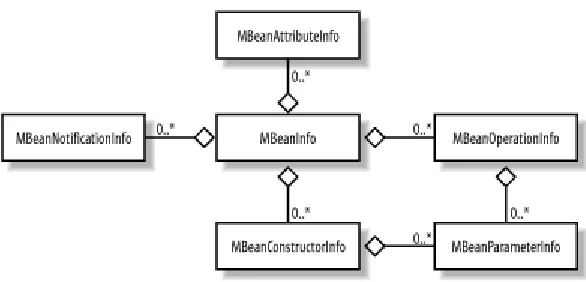
There are six types of dynamic MBean metadata (one for each type of feature), shown in Figure 1-2 in Unified Modeling Language (UML) notation.
To describe the management interface of a resource as a dynamic MBean, we create five fundamental pieces of metadata that correspond to its five fundamental features:
[image:15.612.159.452.67.208.2]constructors, attributes, parameters, operations, and notifications. As we can see from Figure 1-2, these five pieces of metadata are described through instances of
MBeanConstructorInfo, MBeanAttributeInfo, MBeanParameterInfo,
MBeanOperationInfo, and MBeanNotificationInfo, respectively. The parameters that
are passed to a constructor or operation must also be described through the JMX metadata class MBeanParameterInfo. Once all the metadata for an MBean has been described
through these classes, it is contained in a single metadata class—MBeanInfo—that
describes the MBean interface in its entirety. The JMX agent uses the getMBeanInfo() method of the DynamicMBean interface to obtain this MBeanInfo object in order to
discover the management interface of a dynamic MBean.
Once the management interface has been discovered, the JMX agent uses the other methods of DynamicMBean to retrieve and set attribute values and invoke operations on
the MBean.
We will look at how to instrument a resource as a dynamic MBean in detail in Chapter 3.
Consider instrumenting a resource as a dynamic MBean if:
• You want to make a resource manageable but cannot change the source code of the resource itself (e.g., if it's third-party software). Wrapping the resource class in a DynamicMBean
implementation is ideal in this case.
• The management interface of the resource changes over time as the resource evolves as part of an application.
The management interface potentially changes each time the resource is instantiated.
The features of a resource that is instrumented as a model MBean are described through the use of metadata classes that are specific to model MBeans. In addition, every model MBean must implement the ModelMBean interface, which is defined in Example 1-4.
Example 1-4. The ModelMBean interface
public interface ModelMBean extends DynamicMBean, PersistentMBean,
ModelMBeanNotificationBroadcaster {
public void setModelMBeanInfo(ModelMBeanInfo inModelMBeanInfo) throws MBeanException, RuntimeOperationsException;
public void setManagedResource(Object mr, String mr_type) throws MBeanException,
RuntimeOperationsException, InstanceNotFoundException,
InvalidTargetObjectTypeException; }
Notice that the ModelMBean interface extends the DynamicMBean interface, which means
that a model MBean is a dynamic MBean. However, every JMX implementation is required to ship an off-the-shelf implementation of ModelMBean called
RequiredModelMBean. This presents the developer with a key benefit: because a model
MBean implementation already exists, the work of writing one is already done. While the instrumentation developer must still create the necessary metadata classes (which we will discuss shortly), she does not have to implement the ModelMBean interface, which
significantly reduces development time.
Model MBeans introduce the concept of a descriptor, which is an additional set of metadata—specific to model MBeans—that allows the instrumentation developer to provide a much richer description of any MBean feature. Certain predefined descriptor values provide support for functionality such as the following:
• Automatic attribute change notifications
• Persistence of the MBean's state at a specified interval • Logging of MBean state changes
• Caching of an MBean feature (such as an attribute value or the return value of an operation) to improve performance for static (or relatively static) MBean features
Model MBean metadata extends dynamic MBean metadata, in that each model MBean metadata class extends its dynamic MBean counterpart. This relationship is shown in Figure 1-3.
ModelMBeanInfo is an exception, as it is an interface (implemented by a support class
called ModelMBeanInfoSupport) that extends MBeanInfo. There is also no special model
MBean metadata class to describe parameters, because there is no difference between a parameter to a dynamic MBean constructor or operation and a parameter to a model MBean constructor or operation.
The relationships between the model MBean metadata classes are shown in Figure 1-4.
Figure 1-4. UML diagram showing the relationships between the model MBean metadata classes
We will discuss how to instrument resources as model MBeans in detail in Chapter 4.
Consider instrumenting a resource as a model MBean if:
• The benefits of instrumenting as a dynamic MBean are required, but a significant per-MBean development time investment is undesirable.
A richer set of information about one or more of the features of the MBean (such as its attributes or operations) than can be described using dynamic MBeans is required.
Using the standard, dynamic, or model MBean instrumentation approaches allows us to describe MBean features (i.e., attributes, constructors, parameters, operations, and notifications) that are one of the following types:
• A fundamental Java type, such as boolean, char, long, or float (through its
corresponding JDK wrapper—Boolean, Char, Long, or Float, respectively)
• A string, as java.lang.String
• An array of fundamental types or strings
However, sometimes MBean attributes are more complex. Open MBeans were designed in an effort to make MBeans accessible to the widest possible range of management applications. Strictly speaking, you can use complex types on the management interface of standard, dynamic, and model MBeans. However, for a management application to correctly interpret the state of those types, the classes (i.e., the Java bytecode)
representing those types must be available to the management application. The result is a coupling between the management application and the resources it manages,
compromising the maintainability of the underlying managed resources. Open MBeans eliminate the need for management applications to understand the classes describing the complex types, deferring this intelligence instead to a predefined set of open MBean classes that can universally describe those types.
Every open MBean type is a concrete subclass of an abstract open MBean class called
OpenType, and only subclasses of OpenType are allowed to describe features of open
MBeans. Three new types are defined that allow the instrumentation developer to describe MBean features of arbitrary complexity:
ArrayType
Describes an n-dimensional array of any open MBean type
CompositeType
Describes an arbitrarily complex structure of open MBean types
TabularType
Describes a tabular structure (analogous to a database table) of any number of rows, where the same CompositeType describes each row in the table
At some point, the state of an MBean (or any object, for that matter) must be resolved down to fundamental types, strings, or arrays. However, open MBeans provide us with a mechanism to describe complex links between types so that those links can be resolved indirectly. For example, if we want to instrument a class A as an MBean, and A in turn
contains an instance of a class B, which contains an instance of a class C, we need some
way to describe the links in the inheritance graph between A, B, and C. It is for precisely
Open MBeans differ from dynamic and model MBeans in that there is no special interface specifically for open MBeans that an open MBean must implement. Instead, open MBeans must implement the DynamicMBean interface; what makes them "open" is
their use of special open MBean metadata classes to describe their features and their use of the OpenType subclasses we discussed earlier. For every open MBean feature (with the
exception of notifications), JMX defines an interface/support class pair that is used to describe the feature. For example, to describe an open MBean attribute, we use the
OpenMBeanAttributeInfo interface, which is implemented by a support class called OpenMBeanAttributeInfoSupport. Each support class, in turn, extends its dynamic
MBean counterpart. For example, OpenMBeanAttributeInfoSupport extends MBeanAttributeInfo. These relationships are shown for all open MBean metadata
classes in Figure 1-5.
Figure 1-5. UML diagram showing the inheritance relationships between the open MBean metadata interfaces, their support classes, and the dynamic MBean metadata classes
The OpenMBeanInfoSupport class contains the metadata for the MBean's features
(which follows the pattern for dynamic and model MBeans). The relationships between the open MBean metadata classes are shown in Figure 1-6.
We will cover open MBeans in detail in Chapter 5.
Consider instrumenting a resource as an open MBean if:
• The benefits of dynamic instrumentation are required.
• One or more MBean features cannot be completely described using one of the Java fundamental types, an array, or
java.lang.String (in other words, if the feature is a
complex data structure).
1.2.1.6 JMX notifications
The JMX agent is designed so that management applications, or other components of the system, actively collect information about (i.e., query) the resources that are being managed by that agent. This works well when this information is refreshed at reasonable intervals and the application resources are stable. However, there are times when an immediate notification of a resource fault needs to be communicated to an interested party (such as a management application) outside the JMX agent. It is for this reason that the JMX notification model was designed. A JMX notification is similar to an SNMP trap and can be used to send critical, warning, or simply system or application information when certain events occur in the system.
At the core of the notification model are two principal participants:
• A notification broadcaster, which emits notifications
• A notification listener, which registers its interest in receiving certain notifications through the JMX agent infrastructure and receives those notifications when they are broadcast
A notification broadcaster is an object that implements the NotificationBroadcaster
interface. Through this interface, a notification listener can register or remove its interest in receiving notifications and can query the notification broadcaster about what
A notification listener is an object that implements the NotificationListener interface,
which has a single method, handleNotification(), that it uses to process all the notifications it receives.
To receive notifications, a notification listener must register its interest in receiving the notifications emitted by the broadcaster through the broadcaster's implementation of
NotificationBroadcaster. When the notification listener does so, it passes references
to itself, an optional notification filter object, and an optional handback object. The notification filter is an object that implements the NotificationFilter interface, and it
is used by the broadcaster to determine which notifications it will send to the listener. Only those notification types that have been enabled in the filter will be sent to the listener. The handback object is opaque to the broadcaster and has meaning only to the listener, which uses the handback object in its processing of the notification.
If no notification filter object is passed to the notification broadcaster, the listener is in effect telling the broadcaster that it wants to receive every notification the broadcaster emits. However, if the notification listener wants to receive only a subset of the
notifications emitted by the broadcaster, it creates a notification filter object and adds the notification types in which it is interested through the NotificationFilter interface.
[image:21.612.223.389.427.568.2]The relationships between the various components of the JMX notification model are shown in Figure 1-7.
Figure 1-7. UML diagram showing the relationships between the entities that participate in the JMX notification model
A listener can receive notifications from multiple broadcasters, which in turn can send notifications to multiple listeners. In fact, a single listener may register itself multiple times with the same broadcaster, providing a different handback and/or notification filter object each time. This allows the listener a great deal of flexibility in how to process specific notifications. When the broadcaster emits a notification, an instance of
Notification is sent, along with the handback object supplied by the listener. The
notification supplied by the broadcaster must include a userData object. The
free to implement it as necessary. However, the listener must be aware of this object (and what it looks like) in order to be able to determine whether to ignore it or to process it.
Notifications are a fairly advanced topic. We will take a detailed look at how to create, send, filter, and receive notifications in Chapter 7.
Consider using notifications if:
• It is necessary to alert interested parties about the inner workings of a resource in real time.
• The details of the inner workings of a resource are not of special significance (other than their business value, of course) until a particular set of circumstances occurs.
1.2.2 The Agent Level
The agent level of the JMX architecture is made up of the MBean server and the JMX agent services. The MBean server has two purposes: it serves as a registry of MBeans and as a communications broker between MBeans and management applications (and other JMX agents). The JMX agent services provide additional functionality that is mandated by the JMX specification, such as scheduling and dynamic loading.
In this section, we will look at the MBean server and then at each of the required JMX agent services.
1.2.2.1 The MBean server
The MBean server is at the heart of the JMX agent. The MBean server acts as a registry for MBeans, and the JMX agent accesses this registry through the MBeanServer interface.
To decouple the interaction between the agent and the MBean instance, JMX introduces the concept of an object name, which is implemented by a JMX class called ObjectName.
Before an MBean is registered, an object name that uniquely identifies the MBean within the MBean server's internal registry must be created for the MBean (this can be done by the agent who registers the MBean or by the MBean itself ). If the object name is unique within the MBean server's registry, a new entry containing the object name and a
reference to the MBean is created for that MBean. If the object name used to register the MBean is not unique, the registration attempt will fail because another MBean has already been registered using that object name.
Once an MBean is registered, the object name assigned to the MBean is used as the means of indirect communication between the agent and the MBean. The MBean server acts as a broker for the request through its implementation of the MBeanServer interface.
If the agent wants to query an MBean for its attribute values, it invokes the appropriate method on the MBeanServer interface and passes the object name of the MBean whose
registry, retrieves the reference to the MBean object, and makes the invocation. The results of the invocation on the MBean object are then returned to the agent. At no time does the agent have a direct reference to the MBean.
A factory class, MBeanServerFactory, is provided to obtain a reference to the MBean
server. The use of a factory decouples the MBeanServer interface from its
implementation. MBeanServerFactory provides two static methods that allow us to
create an MBean server:
createMBeanServer()
Creates an instance of the MBean server, holds that reference internally to the
MBeanServerFactory, and returns the reference to the caller. The
MBeanServerFactory internal reference to the MBean server that was created
prevents it from being subject to garbage collection.
newMBeanServer()
Creates an instance of the MBean server and returns that reference to the caller. No internal reference is maintained inside the MBeanServerFactory. When there
are no more live references to the MBean server, it is eligible for garbage collection.
We will take a detailed look at the MBean server and how to create and use it in Chapter 6.
1.2.2.2 The M-Let service
The M-Let (short for management applet) service is a JMX agent service that allows you to load MBeans from anywhere on the network, including a local machine. The M-Let service is itself an MBean and can be managed as such. Information about MBeans to be loaded is contained in a text file called an M-Let file. This file has an XML-like syntax, but the syntax does not constitute well-formed XML. Using special tags called M-Let tags, we can encode enough information in the M-Let file that the M-Let service can locate, download the bytecode for, and instantiate MBeans.
Here's how the M-Let service works. First, we instantiate the M-Let service's MBean class and register it with the MBean server. Next, through a method call, we provide the M-Let service with the URL to the M-Let file, which retrieves the M-Let file and reads its contents. The M-Let service then instantiates all of the MBeans specified in the M-Let file.
when we registered the M-Let service MBean with the MBean server) as the MBean class loader.
We will take a detailed look at how to use the M-Let service in Chapter 9.
Consider using the M-Let service if:
• You need to be able to load MBeans into the MBean server from anywhere on the network.
• You need or desire the configuration of your application's resources to be centralized.
• You need a class loader for MBeans that is itself an MBean.
1.2.2.3 Monitoring services
A monitor observes the attribute value of an MBean, called the observed object, at specific intervals, called the granularity period. From this observation the monitor calculates a value called the derived gauge, which is either the value of the attribute or the difference in the value of the attribute (for numerical attributes only, of course) between the most recent two observations. When the derived gauge satisfies a certain condition —which varies depending on the type of monitor in use—a notification of a type that is specific to that monitor is sent to all registered notification listeners. The monitoring service can also send error notifications if a problem arises.
The JMX specification mandates that three types of monitors be provided with every compliant implementation:
Counter monitors
Observe a continually increasing, nonnegative, integer MBean attribute (of type
byte, short, int, long, or the corresponding JDK wrapper class) and send a
notification when the derived gauge exceeds a certain value, known as the threshold
Consider using a Counter monitor to monitor an attribute:
• Whose type is a continually increasing, nonnegative integer • To send a notification when the attribute's value exceeds a
certain threshold
When a notification must be sent each time an attribute's value is increased by some fixed amount
Observe an arbitrarily changing numeric value (of type short, int, long, float, double, or the corresponding JDK wrapper type) and send a notification when the
derived gauge exceeds an upper limit (known as the high threshold ) or drops below a lower limit (known as the low threshold )
Consider using a gauge monitor to monitor an attribute:
• Whose type is numeric
• Whose value can increase or decrease at any time
• Whose value is constrained between a lower threshold and an upper threshold
• To send a notification if the attribute's value exceeds the upper threshold or drops below the lower threshold
String monitors
Observe a string attribute of an MBean and send a notification when the derived gauge either matches or differs from a predefined string value
Consider using a string monitor to monitor an attribute:
• Whose type is a string
• To send a notification if the current value of the attribute matches a predefined string or differs from a predefined string
We will discuss the monitoring services in Chapter 9.
1.2.2.4 The timer service
The timer service is a special-purpose notification broadcaster designed to send notifications at specific time intervals, starting at a particular date and time. Like the other agent services, the timer service is required for all compliant JMX implementations. The timer service is itself an MBean, so it can be managed (although it does not have to be registered with the MBean server to be used). There are two primary uses of the timer service:
• To send a single notification to all listeners interested in that notification type • To send multiple notifications that repeat at specific intervals for a set number of
times, or indefinitely
type, defined by the agent that instructs the timer service to send that notification. In other words, the timer service does not send a predefined set of notification types. Instead, the agent tells the timer service what notification types to send and provides other
information that specifies when to start sending the notification, how many times the notification is to repeat, and the amount of time that is to elapse between each notification (for repeating notifications only).
We will discuss the timer service in Chapter 10.
Consider using the timer service if:
• Your application requires a scheduler that can also be managed (the timer service is itself an MBean).
You need a manageable facility to send out notifications at regular intervals, either a fixed or infinite number of times.
1.2.2.5 The relation service
The relation service provides a facility to associate MBeans with each other and must be implemented by every compliant JMX implementation. You use the metadata classes provided by the relation service to describe n-ary relationships between registered MBeans as dictated by your application policies. You then use the relation service to maintain the consistency of those relationships so that those application policies are followed. The relation service formalizes the rules for describing and maintaining relationships between MBeans, resulting in two major benefits:
• The relationship between MBeans is formalized into a well-defined type that can be checked by the relation service in a way similar to how Java types are checked. • The number of MBeans that may participate in one role of a relationship (i.e., its
cardinality) can be enforced by the relation service.
To use the relation service effectively, you need to understand a few key concepts:
Roles
A role describes the MBean objects that perform a particular role.
Role information
Role information provides metadata about a role, such as the role name and the minimum and maximum number of MBeans that are allowed to perform that role.
Relation type information is also metadata, but it describes the relationship between one or more role information objects. The RelationType interface
provides information about the relation type, such as the name of the relation type and the various roles that make up that type.
Relations
A relation is an instance of a relation type. It is critical to the correct functioning of the relation service that all relation types remain consistent. In other words, the metadata describing the relationship between MBeans (i.e., the relation type) provides the constraints on the relation that allow the relation service to be used to ensure that the relation remains consistent at all times. Once a relation has been instantiated, it must remain consistent, or the relation service will throw an exception.
We will discuss the relation service in Chapter 11.
Consider using the relation service if:
• There is a clearly defined policy regarding the relationship between the MBeans in your system.
• You require a facility to enforce application policies about the relationship between MBeans.
1.2.3 The Distributed Services Level
In this section, we will take a look at the distributed services level of the JMX
architecture, which is unspecified at the time of this writing. However, significant work has already been done to create the standard. Specifically, the RMI connector client and server will be standardized soon as part of JSR 160. This will provide a standard for all subsequent connectors to follow. The protocol adaptor side will remain unspecified for a while, although significant work has been done in this area as well. The main reason to standardize on the RMI connector is to leverage existing work in the JDK regarding issues such as security, connection pools, and security.
In this section, we will briefly look at connectors and adaptors. Then we will see what is coming soon with the distributed services level of JMX architecture regarding JSR 160.
1.2.3.1 Protocol adaptors and connectors
• Hide the specific details regarding the network location of the resources in an application under management (i.e., provide location transparency).
• Present a consistent view (via an interface) of an MBean server that is located in a different process space than the local MBean server.
Shielding the proxy client from the details of how to send and receive messages to the server stub (and vice versa) makes it unnecessary for any particular instance of the MBean server to know its location on the network, which means that this can be left as a configuration detail.
An adaptor is different from a connector in that there is no client component. The adaptor runs at the server location and renders the MBean server state in a form that is
appropriate for, and can be recognized by, the client. An example of this is the
HtmlAdaptorServer that ships as part of the JMX RI (note that it is not officially part of
the RI, as the distributed services level has yet to be fully specified). It is unlikely that any adaptors will be mandated by the JMX specification in the near future. However, given the momentum that the adoption of JMX is enjoying, several adaptor
implementations should soon be available.
We will not cover the specifics of the RMI connector or of any particular adaptor here, as those details are unspecified at the moment. However, you'll find several contributions to investigate in the contrib package of the JMX RI.
1.2.3.2 JSR 160
The next release of JMX—which is set to coincide with Release 1.4 of the Java 2
Enterprise Edition ( J2EE) platform (at the time of this writing, early 2003)—will provide standards for the distributed services level of the JMX architecture. The main
standardization you can expect from JMX 1.5 is the RMI connector, which provides a mechanism for handling remote agents.
Some of the information in this section is subject to change, because JSR 160 is not final.
The RMI connector is based on the concept of a remote MBean server, which is fundamental to the model used by JMX connectors as part of the distributed services architecture. This concept is illustrated in Figure 1-8.
There are two components to a connector: the client and the server. Between the two connector components is the connection itself. In JMX 1.5, the only specified connection will be RMI. However, the remote MBean server concept can apply to other protocols, such as HTTP and SOAP. The connector server listens for incoming connections from connector clients. When a connector client attempts to establish a connection, the connector server handles the details of creating the connection. After the connection has been established, all of the MBeans registered in the remote MBean server can be accessed; that is, their attributes can be retrieved and set (depending on the read/write status of each particular attribute, of course) and their operations can be invoked.
This also holds true for notifications sent from MBeans in the remote agent. Notifications emitted by remote broadcasters will be sent through the RMI connection to their intended listeners. The details of how the notification is sent over the connection are unknown to both the broadcaster and the listener.
1.3 The Sample Producer/Consumer Application
In the remainder of this chapter, we will build and run a sample application that
demonstrates each MBean instrumentation approach. The sections that follow look at the design of the application, where to obtain the source code, how to actually build and run the application, and how to monitor the application via a web browser.
1.3.1 Design
In this section, we will take a look at how the sample application is designed, so that you can better understand what is going on when you see it run. First, we will look at the pattern that is fundamental to the application's design. Then we will see how the pattern is implemented and what classes constitute the source code for the application.
uses. That "something" is generically defined as a unit of work. This can be physically realized as anything relevant to a problem that is solved by this pattern.
For example, the unit of work might be an email message that is sent to the email system (the monitor) by the producer (an email client) and removed by the consumer (some agent on the incoming email server side). The producer might perform additional processing on the message before sending it to the email system, such as checking the spelling. By the same token, the consumer may perform additional processing of the message after removing it from the queue, such as applying an anti-virus check. For this reason, we will refer to the pattern as "value-added producer/consumer." This pattern is shown in UML notation in Figure 1-9.
Figure 1-9. UML diagram showing the "value-added producer/consumer" pattern
As you can see in Figure 1-9, the producer and consumer are separated (decoupled) by the monitor. This pattern is best applied to systems that are inherently asynchronous in nature, where the producer and consumer are decoupled by varying degrees. This decoupling can be a separation of location as well as of synchronicity.
The implementation of the value-added producer/consumer pattern is shown in Figure 1-10. The classes in the diagram are implemented as Java classes. The stereotypes shown in the diagram are named according to the pattern shown in Figure 1-9.
Basic is the base class for all of the classes that make up the implementation (with the
exception of WorkUnit, which represents the unit of work that is exchanged between Supplier and Consumer). Controller is a class that acts as the JMX agent and is
responsible for creating the producer and consumer threads that run inside the application.
Queue is a thread-safe queue that acts as the monitor. Producer threads place items in the
queue in a thread-safe way, and consumer threads remove them. Worker is the base class
for Supplier and Consumer, because much of their behavior is common.
In the sample application, the following resources can be managed:
• Controller
• Queue
• Supplier
• Consumer
I encourage you to look at the source code to see exactly what attributes and operations are on each of the management interfaces for these resources.
1.3.2 Source Code
The source code for the application is standalone with respect to each type of
instrumentation approach. There are three versions of the application, each in its own package. The name of the package corresponds to the instrumentation approach. For example, with the exception of common classes such as GenericException, the
application source code for standard MBeans is entirely contained in the standard
package; thus, if you install the source code to c:\jmxbook, the path to the application source code for standard MBeans will be c:\jmxbook\sample\standard. All of the source code shares the contents of the exception package. Other than that, however, the
application can be built and run independently of the other packages.
major differences between the application versions are in the source code. The console output and the management view will show very little difference (other than output from the Ant build script) between the versions of the application.
1.3.3 Building and Running the Application
Before you can build and run the sample application (see Section P.5 in the Preface for details on how to obtain the application's source code), you must download the JMX RI and Jakarta Ant. For this book, I used JMX RI 1.0.1 and Ant 1.4. You can obtain the JMX RI at http://java.sun.com/products/JavaManagement/ and Jakarta Ant at
http://jakarta.apache.org/ant/index.html.
The name of the build file Ant uses to build the application for all of the instrumentation strategies is build.xml. The build scripts are designed to work with very little
modification on your part. However, you may have to modify either the build script or the Ant build file, depending on where you installed the JDK, the JMX RI, and Ant itself. Example 1-5 shows an excerpt from build.xml.
Example 1-5. Selected portions of the Ant build file for the application, build.xml
. . .
<project name="jmxbook" default="standard" basedir=".">
<!-- Set global properties -->
<property name="source_root" value="c:\jmxbook\sample"/> <property name="jmx_home" value="c:\jmx1.0.1"/>
<path id="project.general.class.path">
<pathelement path="${jmx_home}\jmx\lib\jmxri.jar"/> <pathelement path="${jmx_home}\jmx\lib\jmxtools.jar"/> <pathelement path="."/>
</path>
<!-- Build the init target --> <target name="init">
<!-- create the time stamp --> <tstamp>
<format property="build.start.time" pattern="MM/dd/yyyy hh:mm:ss aa"/>
</tstamp>
<echo message="Build started at ${build.start.time}..."/> </target>
<!-- Build the exception target -->
<target name="build-exception" depends="init"> <javac>
<classpath refid="project.general.class.path"/> <src path="${source_root}"/>
</target>
<!-- Build the "standard" target -->
<target name="build-standard" depends="build-exception"> <javac>
<classpath refid="project.general.class.path"/> <src path="${source_root}"/>
<include name="standard\*"/> </javac>
</target>
<!-- Build the "dynamic" target -->
<target name="build-dynamic" depends="build-exception"> <javac>
<classpath refid="project.general.class.path"/> <src path="${source_root}"/>
<include name="dynamic\*"/> </javac>
</target>
<!-- Build the "model" target -->
<target name="build-model" depends="build-exception"> <javac>
<classpath refid="project.general.class.path"/> <src path="${source_root}"/>
<include name="model\*"/> </javac>
</target> .
. .
</project>
As you can see, the Ant build file is an XML document. This is what sets Ant apart from other build utilities, such as make. Each component to be built using Ant is called a target. A target may have one or more dependent targets that must be built first, each of which may be dependent on other targets, and so on. Ant resolves these dependencies for you. A target is specified in an Ant build file as an XML tag called target and has the following
format:
<target name="mytarget" depends="d1,d2">
in which case mytarget depends on targets d1 and d2, or:
<target name="mytarget">
if mytarget has no dependent targets. Let's look at the build-standard target from
Example 1-5:
<!-- Build the "standard" target -->
<target name="build-standard" depends="build-exception"> <javac>
<src path="${source_root}"/> <include name="standard\*"/> </javac>
</target>
You can see that the build-standard target depends on the build-exception target.
Ant knows that there may be other dependencies, so it looks at build-exception:
<!-- Build the exception target -->
<target name="build-exception" depends="init"> <javac>
<classpath refid="project.general.class.path"/> <src path="${source_root}"/>
<include name="exception\*"/> </javac>
</target>
and notices that build-exception depends on init. Ant then looks at init:
<target name="init">
<!-- create the time stamp --> <tstamp>
<format property="build.start.time" pattern="MM/dd/yyyy hh:mm:ss aa"/>
</tstamp>
<echo message="Build started at ${build.start.time}..."/> </target>
Ant sees that init has no dependencies, so it begins the build. init is built first,
followed by build-exception and finally build-standard. Notice the javac tag
within build-standard and build-exception. This is known as an Ant task. A task is
a Java class that executes within the JVM in which Ant is running (unless you tell Ant to fork a new process when executing the task). The javac task is the java compiler. The classpath, src, and include tags nested within the javac task tell the Java compiler
what the CLASSPATH is, the root location of the .java files, and the packages (directories)
to compile, respectively.
The application classes for each chapter in this book are built and run using either a batch file or a shell script. If you are running the application on Windows (as I did to produce the screen shots for this chapter), use the batch file (i.e., the .bat file). If you are running the application on Unix, use the shell script (i.e., the .sh file). Throughout the rest of this chapter, the examples will be Windows-based. There are two reasons for this. First, because of the popularity of Windows, it is likely that most developers will be running this operating system. Second, the differences in the behavior of the application when it is run on Windows versus Unix are negligible.
the instrumentation strategy. Suppose we want to run the standard MBean batch file, which will build and run the application as standard MBeans. Example 1-6 shows the batch file that builds the application.
Example 1-6. standard.bat, the batch file that builds the application as standard MBeans
@set TARGET_NAME=build-standard @set JAVA_HOME=c:\jdk1.3.1 @set ANT_VERSION=1.4
@set ANT_HOME=c:\ant%ANT_VERSION%
@echo Starting Build ...
call %ANT_HOME%\bin\ant %TARGET_NAME%
if NOT "%ERRORLEVEL%"=="0" goto DONE
%JAVA_HOME%\bin\java sample.standard.Controller 100 150
:DONE
This batch file is very simple. Aside from setting a few environment variables, it does only two things: it builds the application by calling Ant, and, if that succeeds, it starts the application. Figure 1-11 shows the output of running the batch file. Recall our earlier discussion of how Ant resolves target dependencies; you'll see that the targets are built in the order described there.
Figure 1-11. Running the build/run batch file for standard MBeans
All of the batch files (standard.bat, dynamic.bat, and model.bat) operate as described below, but I've used standard.bat here for the purposes of illustration.
In each version of the application, Controller contains the main() method that starts the
producer and consumer threads and is itself an MBean that can be managed and
monitored. There are two command-line arguments to Controller's main() method: the
I set these values for a reason: it is unlikely that you will find an application of the value-added producer/consumer pattern where the producer and consumer perform an equal amount of work. These command-line parameters to Controller allow you to simulate
this asymmetry. When Controller is started, one producer thread and one consumer
thread are created. However, Controller has a management method that allows you to
start additional threads to balance out the workload (we will see how to do this later).
Figure 1-10 illustrates the relationship between the various classes in the application, where there is a single Queue object into which Supplier threads place WorkUnit objects
and from which Consumer threads remove them. For a single unit of work, here is the
flow of control:
1. The Supplier performs an amount of work N—where N is specified on the
command line to Controller—and places a single WorkUnit object into the Queue.
2. The Consumer removes a single WorkUnit object from the Queue and performs an
amount of work M—again, where M is specified on the command line to
Controller.
These steps are repeated for each work unit.
The work that is performed by Supplier and Consumer threads is to
calculate prime numbers. The amount of work specified on the command line to Controller is the number of prime numbers to
calculate for each WorkUnit. The Supplier calculates N primes,
then places a WorkUnit object into the Queue. The Consumer
removes a WorkUnit object from the Queue and then calculates M
primes.
This section looked at how to run the sample application and briefly discussed what it is doing internally to simulate the production and consumption of units of work. I strongly encourage you to examine the source code for yourself to see the various attributes and operations available on the management interfaces of each resource in the application.
In the next section, we will look at how to use a web browser to monitor and manage the sample application's MBeans.
1.3.4 Monitoring and Managing the Application
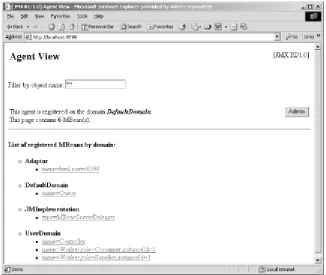
Once the application is running, you can point your web browser to port 8090 (the default—you can change this, but if you do so, remember to point your browser to the new port number). Figure 1-12 shows the result of pointing my web browser (which happens to be Internet Explorer) to port 8090 after running standard.bat.
Remember the work factors that we specified on the command line to Controller for the
producer and consumer threads? Because they are different (100 and 150, respectively),
and the producer thread does less work than the consumer thread for each work unit, I expect the Queue to always be full once the application reaches a steady state.
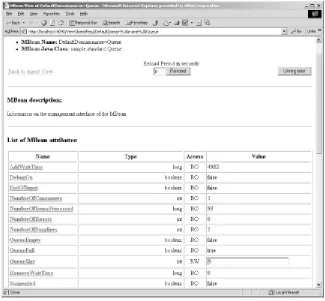
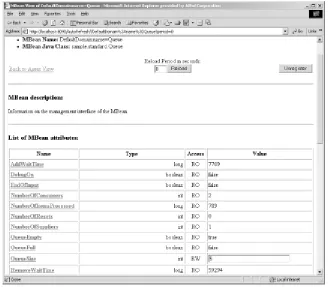
If I click on the Queue MBean in my browser, I see the screen shown in Figure 1-13.
There are several interesting things about Figure 1-13. First, the AddWaitTime attribute is
much larger than the RemoveWaitTime attribute. After processing 72 units of work
(according to the NumberOfItemsProcessed attribute), the Supplier thread has waited a
total of 3,421 milliseconds to add items to the Queue because it was full, whereas the Consumer thread has not had to wait at all to remove items (although, depending on
which thread actually starts first, you may see a small amount of Consumer wait time).
This is pretty much what we would expect, as the Supplier thread does only two-thirds
[image:37.612.143.469.71.346.2]the work of the Consumer thread.
Suppose we want to start another Consumer thread to pick up some of the slack of the
other Consumer thread and balance things out a bit. For the moment, let's ignore the fact
that we can control the amount of work each type of Worker thread can perform. In a
real-world application, we would not have that luxury. As I mentioned earlier in this chapter, Controller acts as the JMX agent for the application, but it is also itself a
managed resource (i.e., an MBean). If we look at the management interface of
Controller, we'll see that there is a management operation to start new Worker threads,
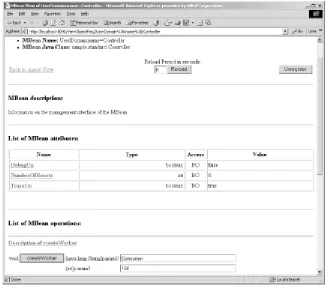
called createWorker(). Figure 1-14 shows the management view of the Controller
[image:38.612.143.468.71.372.2]MBean and its createWorker() operation.
There are two parameters to createWorker(): the first is a string that contains the worker type, and the second is the work factor that worker is to have (i.e., the number of primes calculated per unit of work). The valid values for the worker type are "Supplier" and "Consumer". We want to create a new Consumer thread with the same work factor as the
currently running Consumer thread, so we set these parameters to Consumer and 150,
[image:39.612.142.468.71.359.2]respectively. Once we have entered the parameters for the management operation into the text boxes, as shown in Figure 1-14, we click the createWorker button to invoke the management operation. If the operation succeeds, we will see a screen that looks like Figure 1-15.
Figure 1-15. The screen we see once createWorker() has successfully been invoked
We would now expect that activity in the Queue has balanced out somewhat, and we
work. Figure 1-16 shows the management view of the Queue after we start the second Consumer thread.
Figure 1-16. The management view of the Queue after starting a second Consumer thread
Notice that after processing 1,013 units of work (as we see from the
NumberOfItemsProcessed attribute), the Consumer threads have waited nearly 7 times
as long as the Supplier thread. Through the use of management operations, we can give