Study of the Implementation of Ad-hoc On Demand
Distance Vector (AODV) Protocol in Network
Simulator (NS-2)
Sanjesh Pant1, Aditi Sharma2, Pramod Gaur3
1
Assistant Professor of Computer Science & Engineering Dept. Mahaveer Institute of Technology & Science , Pali , Rajasthan India
2
Phd Scholar of Computer Engineering MBM Engineering Collge, Jodhpur , Rajasthan
3
Associate Professor of Computer Science & Engineering Dept Mahaveer Institute of Technology & Science , Pali , Rajasthan India
Abstract: The evolution of wireless technologies is increasing rapidly and the significant growth of wireless network services have made wireless communications for transporting information across many different domains. In the framework of Wireless Sensor Networks (WSNs), there have been many potential situations in which WSN can be deployed to support numerous applications .However, the current real-time l applications of WSNs are very limited. Mainly the reason for the delay in the development of new services is because of the lack of a complete set of standard mechanisms that can be used to build different application environments . As NS-2 is the open source network simulation tool which is an invaluable tool for researchers those who are working on wired or wireless networks. NS-2 is a variant of the REAL network simulator. In the past few years it has been evolving, and it is still far from complete. Several organizations like DARPA, Xerox, UCB, and Sun Microsystems have been involved in its development, including. The main objective has been to make a network simulation tool which helps to study and analyze new ideas in detail before implementation.
Keywords: Network Simulator(NS-2), AODV, TCL , OTCL, NAM
I. INTRODUCTION
Network Simulator Version 2, also known as NS-2. It is an event driven packet level network simulator developed as part of the VINT project (Virtual Internet Test bed). It was a collaboration of many institutes including UC Berkeley, AT&T, XEROX PARC and ETH. Version 1 of NS was developed in 1995 and with version 2 released in 1996. Version 2 included a scripting language called Object Oriented Tcl (OTcl). It is an open source software package available for both Windows 32 and Linux platforms. The open source network simulation tool ns-2 is an invaluable tool for researchers working on wired or wireless networks. ns-2 is a variant of the REAL network simulator. Over the past few years it has been evolving, and it is still far from complete. Several organizations have been involved in its development, including DARPA, Xerox, UCB, and Sun Microsystems. The objective has been to make a network simulation tool to study and analyze new ideas in detail before implementation.
The software has been designed to work on Linux, but it can be made to run on Windows XP by using the Cygwin tool. For the current version ns-2.29, Fedora Core 2 is recommended, although ns-2 may work on Red Hat 9 or even FC4. Though there are no stringent hardware requirements, using a fast PC will result in less wasted time when you're running large simulations. You use OTcl scripting to make a simulation scenario, which may include network components like nodes, routers, and link bandwidth. When using Windows-based simulators like Opnet and OMNeT, making a simulation scenario is as easy as dragging and dropping the required network components onto a workspace.. Though ns-2 provides limited ability to view the animations after the simulation, its sister program Network Animator (NAM) makes it possible. NAM also can record the animation in the form of graphics as the simulation progresses. These graphics can then be converted to GIF or AVI format for later viewing. NAM also provides options for adjusting the step size of the animation in milliseconds, zooming in and out, and pausing the animation.
II. OVERVIEW OF AODV
Comparatively AODV over DSR is that the source route does not need to be included with each packet which is advantage of AODV over DSR. This results in a reduction of routing protocol overhead. Unfortunately, AODV requires periodic updates which consume more bandwidth than is saved from not including source route information in the packets. AODV discovers a route through network wide broadcasting. The source host starts a route discovery by broadcasting a route request to its neighbors. When a node wants to send a packet to some destination node and does not have a valid route in its routing table for that destination, it initiates a route discovery process. It is describe in detail as follow.
A. Control Messages in AODV
There are four control messages are used by AODV described as below:
1) Routing Request (RREQ): When a route is not available for the destination, a route request packet (RREQ) is flooded throughout the network which contains the following format
2) Routing Reply (RREP): If a node is the destination, or has a valid route to the destination, it unicasts a route reply message (RREP) back to the source. This message has the following format
3) Route Error Message (RERR): All nodes monitor their own neighborhood and broadcast message when:
1) A node detects that a link with adjacent neighbor is broken (destination no longer reachable).
2) If it gets a data packet destined to a node for which it does not have an active route and is not repairing.
3) If it receives a RERROR from a neighbor for one or more active routes, to notify the other nodes on both sides of the link about loss of this link.
III. ARCHITECTURE OF NS-2
[image:2.612.187.441.317.488.2]A. Design of NS-2
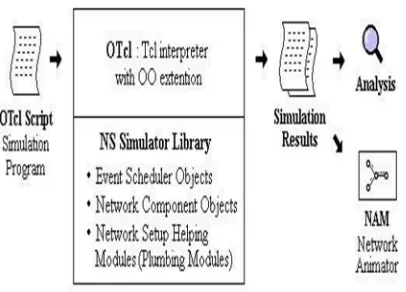
Figure 3.1: Simplified User's View of NS-2
As shown in the given Figure, NS-2 is an Object-oriented Tcl (OTcl) script interpreter which basically has a simulation event scheduler and also contains the network component object libraries, and module libraries for network set-up .
[image:2.612.200.403.560.706.2]To use NS-2, programs for in the OTcl scripting language. An OTcl script will do the following. An OTcl simulation script which is depended on the users purpose , as trace files are store the simulation results. And for analysis which can loaded by an external application: . Firstly we create NAM trace file (ex. file.nam) which is use with the Network Animator Tool Secondly we create a Trace file (ex. file.tr) which is use in with XGraph or Trace Graph
C++/OTcl linkage
NS2 is written in C++ with OTcl interpreter as a front end. As the NS separates the data path implementation from the control path implementations basically for efficiency reasons.
What Languages are used with NS-2?
1) Split-Language programming is used: Scripting Language (Tcl - Tool Command Language and pronounced tickle System Programming Language (C/C++)
2) Ns, whic h is a Tcl interpreter helps to run Tcl Script
3) The network simulator is Object-oriented completely because of the use of C++/OTcl.
B. The TCL interpreter
The language which is used to provide a linkage between C++ and OTcl is TclCL .TCL abbreviates as Toolkit Command Language which is a scripts written to set up/configure network topologies. Basically, it provides the linkage as for the class hierarchy, object instantiation, variable binding and also for the command dispatching. As we can use OTcl as for the periodic or the triggered events. And the following is written and compiled with C++
1) Event Schedule
2) Basic network component objects
The compiled objects which are made available to the OTcl interpreter with the help of an OTcl linkage that creates a matching OTcl object for each of the C++ objects and also control functions and the configurable variables which is specified by the C++ object behaves as member functions and member variables of the corresponding OTcl object.
C. Characteristics of NS-2
1) NS-2 implements the following features
2) Router queue Management Techniques DropTail, RED, CBQ
[image:3.612.181.438.494.713.2]3) Multicasting
D. Software Tools used with NS-2
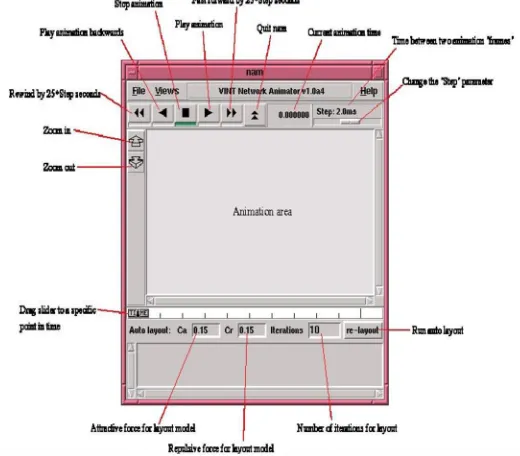
1) Nam; The visual interpretation of the network topology is specially created by the tool called as NAM. This application was developed as part of the VINT project. Its features are as follows. Figure displays the NAM application and its components.
2) Visual interpretation of the network created
3) From a Tcl script, it can be executed directly.
4) In it there is a Controls which specially include play, stop, pause, a display speed controller and also with a packet monitor facility.
5) As it presents the information such as throughput, number packets on each link.
6) The drag and drop interface is provided which is helpful for creating topologies.
E. Trace Data Analyzers
[image:4.612.178.438.266.494.2]The XGraph and Trace Graph are describes in this section , the two applications are used to analyse trace files which is produces from a simulation
Figure 3.4: NAM tool description
F. XGraph
1) XGraph is an X-Windows application that includes:
2) Interactive plotting and graphing
3) Animation and derivatives
The executable can be called within a TCL Script to use XGraph in NS2. This will then load a graph displaying the information visually displaying the information of the trace file produced from the simulation
G. Node Creation
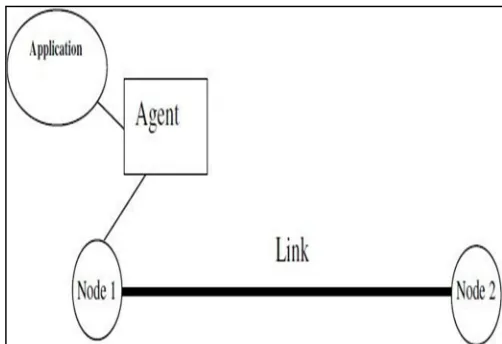
Figure 3.5: NS-2 is very structured. This diagram shows two nodes, a link, an agent and an application
following two lines create two node objects and assigns them the handles n0 and n1 respectively using the command set.
set n0 [$ns node]
set n1 [$ns node]
The following creates 5 nodes, with handles n0-n4 for {set i 0} {$i = 5} {incr i} {
Set n($i) [$ns node] }
To set the colour of a node, the following code is used. $n0 color red
where colour is black, red, blue, seaGreen.
G. Network Agents
In NS-2 simulator, Traffic generation is based on the objects of two classes , that is the class Agent and the class Application. In the network, every node needs to send or receive traffic which has to have an agent attached with it. An application runs on top of an agent. The kind of traffic that is simulated is determined by an application.
There are two types of agents in NS-2: UDP and TCP agents
H. UDP
set udp0 [new Agent/UDP] set null [new Agent/NULL] $ns attach-agent $n0 $udp0
$ns attach-agent $n1 $null $ns connect $udp $null
This code first creates a UDP agent and attaches it to n0 using the attach- agent procedure. It then creates a Null agent, which will act as a traffic sink and attach it to n1. The two agents are connected using the simulator method connect. To add a Loss Monitor to the agent the following OTcl code is used. The Agent/Loss Monitor can monitor number of packets transferred, as well as packets lost. We can scheduled the procedure to poll the Loss Monitor every T seconds and also we obtain throughput information.
–
set loss Monitor [new Agent/Loss Monitor]I. TCP
set tcp [new Agent/TCP]
set tcp sink [new Agent/TCPSink] $ns attach-agent $n0 $tcp agent to node 0 $ns attach-agent $n1 $tcp sink
$ns connect $tcp $tcp sink
Firstly we create TCP agent through this code agent and by using the attach-agent procedure it is attaches to the tcp node. A TCPSink agent then created acts as a TCP sink, and which is attaches to the node tcp sink. The two agents are connected using the simulator method connect.
The following types of TCP are available in NS-2: TCP, TCP/Reno, TCP/Vegas, TCP/Sack1, TCP/Fack, TCPSink.
J. CBR (Constant Bit Rate)
A CBR traffic object generates traffic according to a deterministic rate. Packets are a constant size. A CBR traffic source in a simulation can be implement using the OTcl code as follows:
set my cbr [new Application/Traffic/CBR] my cbr attach-agent $udp $ns at time $my cbr start
K. Tracing
All the information required for animation purposes- both on a static network layout and on dynamic events such as packet arrivals, departures, drops and link failures contains in a trace file. In NS-2 we can implemented tracing with the following OTcl code.
In order to Trace packets on all links In NS-2 we can a set an example of a standard trace file as follows and its format : In this trace file it contains five enqueue operations(+), four dequeue operations(-), four receive events (r) and one drop event(d). The simulation is dependent upon columns, different trace file formats are produced.
In order to trace a specific link : ns trace-queue $node0 $node1 $trace file
To trace up variable tracing in NS-2
1)set cwnd chan [open all.cwnd w]
2)$tcp trace cwnd cwnd chan
3)$tcp attach $ cwnd chan The variable sstthresh of $tcp is traced by a generic $tracer
4)Set tracer [new Trace/Var]
5)$tcp trace ssthresh $tracer
L. NS-2 OTcl Sample Scripts
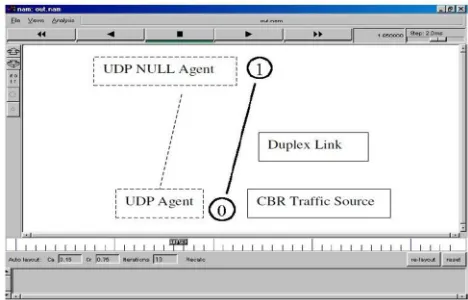
ns scriptname.tcl Above written command will generate the trace file which is written tcl as a script. Then we can analysed this trace file and it can be inspected using a visualization or analysis tool such as Nam or Trace graph.
set ns [new Simulator] set nf [open out.nam w] $ns namtrace-all $nf
# Define a ’finish’ procedure proc finish { } { global ns nf
$ns flush-trace
#Close the trace file close $nf #Execute nam on the trace file exec nam out.nam &
exit 0
}
Create two nodes
set n0 [$ns node] set n1 [$ns node] #Create a duplex link between the nodes $ns duplex-link $n0 $n1 1Mb 10ms DropTail #Create a UDP agent and attach it to node n0 set udp0 [new Agent/UDP]
$ns attach-agent $n0 $udp0
# Create a CBR traffic source and attach it to udp0 set cbr0 [new Application/Traffic/CBR]
$cbr0 set packetSize 500 $cbr0 set interval 0.1 $cbr0 attach-agent $udp0
#Create a Null agent (a traffic sink) and attach it to node n1 set null0 [new Agent/Null]
$ns attach-agent $n1 $null0
#Connect the traffic source with the traffic sink $nsconnect $udp0 $null0
# Schedule events for the CBR agent $ns at 0.5 ”$cbr0 start”
$ns at 4.5 ”$cbr0 stop”
#Call the finish procedure after 5 seconds of simulation time $ns at 5.0 ”finish”
[image:7.612.188.422.566.716.2]# Run the simulation $ns run
IV. CONCLUSION
Thus, in this paper we make a case study about the performance of very popular on demand routing protocol AODV, by means of various performance metrics such as PDR, end to end delay & packet loss, as well also by obtaining simulation results by varying number of nodes in the network & which have concluded that there is non linear change in the values of these metrics will also makes realize working & control messages involved in AODV protocol.
In this case study successful test on the comparison of AODV shows that our performance evaluation mechanism is really effective for scalable performance test in NS-2. This is basically use to measure the network routing protocols performance, meanwhile, as it has the fix model of analysis the trace file, with some minor modification, it can then be apply to measure other kinds of stuffs with the whole network simulation.
However, since we have explore some important fields of the trace file, in the future, we still need to provide the measurement with other fields of the trace file and analysis more details on the things what we can get in the trace file.
V. FUTURE SCOPE
Our future work mainly involves to study and evaluate the performance of AODV under sink- hole attack by finding the variation occurred in the values of these performance metrics when AODV is under sinkhole attack & to perform the comparative analysis of the simulation results obtained for AODV before & after sinkhole attack. As AODV basically uses the routing tables in which one route per destination, as well as destination sequence number and a mechanism to prevent loops and to determine freshness of routes. We studied a detailed simulation model to which it would be used to demonstrate the performance characteristics of the two protocols. The general observation from the simulation is that for application oriented metrics such as delay and delivery rate.
REFERENCES [1] Virtual Internet work testbed collaborationhttp://www.isi.edu/nsnam/vit [2] NS by Example, http://nile.wpi.edu/NS/
[3] The ns Manual. http://www.isi.edu/nsnam/ns/doc/index.html
[4] Introduction to Shell Scripting. http://www.uwsg.iu.edu/usail/concepts/shell- scripting.html
[5] Ian D Chakeres & Elizabeth M Belding Royer, AODV Routing Protocol Implementation Desig
[6] Luke Klein-Berndt, A Quick Guide to AODV Routing, Wireless Communication technology group National Institute of standard & Technolog [7] Mouhamad IBRAHIM and Giovanni NEGLIA, Introduction to Network Simu- lato
[8] NS-2, The ns Manual (formally known as NS Documentation) available at http://www. isi.edu/nsnam/ ns/doc. [9] Vijayalakshmi M. & Avinash Patel , Qos Parameter Analysis On Aodv And Dsdv Protocols In A Wireless Network