© 2017, IRJET | Impact Factor value: 5.181 | ISO 9001:2008 Certified Journal | Page 2519
Smart Tracking System for School Buses
Abhilash R
1, Mahima R
2, Monisha S
3, Nagashri R
4Dept. of Computer Science and Engineering, The National Institute of Engineering, Mysuru, Karnataka, India.
Lokesh S
5Associate professor, Dept. of Computer Science and Engineering, The National Institute of Engineering, Mysuru,
Karnataka, India.
---***---Abstract –
Millions of children require school bus for pick
up and drop to the school on an everyday basis. A safe transport for these children is one of the main concerns that need to be taken care of by the school management. Hence, the need for reliable management system of school bus in today’s world has increased to a greater extent.
We propose a Smart tracking system for School buses, which is an android based application designed and implemented to provide remote tracking and SMS mode of alert mechanism. The application is user friendly, interactive and secure, which uses Google API’s to fetch the current location and GPS to track the school bus in real time. In order to show the feasibility and effectiveness of the system, this paper presents the methods and workflow of different modules used in the application.
Key Words: School bus; GPS; Android; SQLite; JSON; Google API’s, Haversine distance.
1.
INTRODUCTION
Many students need to go to school on an everyday basis. Parents are concerned about their child's safety. A research undertaken by the Scottish Executive Central Research Unit proves that going by school bus is safer and a better mode of transport. Why we say school bus is safer? Because we can track the school bus and get every slightest update about it time to time. This can also save parent's time and they can be relieved by seeing all the updates time to time. Hence, need for reliable management system of school bus in today’s world has increased to a greater extent.
Our proposed system is an Android application; Android is a simple, user friendly, interactive and integrated mobile OS developed by Google. Android is designed and implemented primarily for touch screen mobile devices such as smart phones and tablets.
Android's UI is mainly based on direct manipulation, using touch gestures that correspond to real-world actions, such as swiping, tapping and pinching, to manipulate on-screen objects, along with a virtual keyboard for text input.
The remote tracking of the school bus is one the main feature of our system, The Google Location Services API, part of Google Play Services, provides a powerful, high-level framework that automatically handles location providers, user movement, and location accuracy. It also handles location update scheduling based on power consumption parameters you provide. In order to get the current location, we will first parse the JSON data from Google Map API and then use the Haversine formula which determines the shortest distance between two points over the earth’s surface – given their latitudes and longitudes.
The interaction between parent and the bus administrator must be instant and applicable to all kinds of mobile phone; hence we have made use of SMS mode of alert mechanism so that the application is benefited for both android and non android users.
In case of accidents, we make use of sensors like accelerometer which is inbuilt in the mobile phones to intimate the authorities about such events. Such sensors are also used to check the speed of the vehicle and report the authorities if the driver crosses a certain limit.
© 2017, IRJET | Impact Factor value: 5.181 | ISO 9001:2008 Certified Journal | Page 2520
2.
EXISTING SYSTEM
Currently, most of the schools do not have a digitally monitored school bus. An attendant is appointed to look after the children for their safe pickup/drop. The school authorities and parents have no means to track the bus or even communicate with the attendant a few times. Hence, there arise concerns for the safety of the child.
In some sophisticated schools, there exists a tracking system that use techniques of virtual fence known as Geofencing which compares the entity position with a predetermined zone or a point of interest, checking if the entity is inside or outside an area.Those techniques do not allow full coverage of the course, making difficult to determine if the bus is travelling in a planned path [1].
Another approach to track the bus is by a web based application, which gives real time location of bus on Google Maps to remote user.Firstly GPS receives the satellite signals and then the position co-ordinates with latitude and longitude are determined by it. The location is determined with the help of GPS and transmission mechanism. After receiving the data the tracking data can be transmitted using any wireless communications systems. GSM/GPRS is used generally to transmit the data [2].
In order to communicate quicker, A SMS via server based tracking system, which is a mobile based application where SMS is sent by the users to know the location of the bus to the central server and vice versa [3].
The limitations of these approaches are the exact location of the school bus cannot be known. The parents cannot determine the bus arrival. There is no feature to intimate the parents/authorities in case there is bus breakdown or any issues which must be immediately notified. There is no feature to get the speed of the bus at any instance in case the driver drives rash. They are time consuming and a main server is required to co-ordinate. GSM/GPRS hardware are required. Battery of the mobile phone is drained very quickly.
3.
PROPOSED SYSTEM
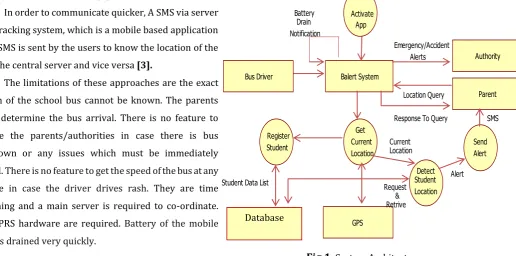
Our proposed android based application consists of 2 modules, An Administrator, the one who manages the school bus and The Parent, who can query about the location of the bus anytime needed. The details of the student and authorities are first registered and stored in the SQLite database; this will help to maintain a systematic record and is easy to fetch data whenever required. The proposed system mainly aims to provide remote tracking of school bus and simple mode of communication. To make the interaction easier, we have made use of SMS mode of alert mechanism so that the application is benefited for both android and non android users.
The Administrator must make use of administrator application module, so that he/she can interact with the parent/ authority through SMS along with GPS for location tracking. For an android user, he/she must make use of the parent application module and can interact with the bus administrator through a query SMS along with the help of GPS feature to know the location. For a non-android user, the alert SMS will be sent frequently when the bus reaches the pickup/ drop point or when the bus reaches to school.
Fig 1
: System Architecture. Balert SystemBus Driver
Authority
Parent
GPS Register
Student
Activate App
Get Current Location
Detect Student Location
Send Alert Battery
Drain Notification
Emergency/Accident Alerts
Location Query
Response To Query SMS
Alert Current
Location
Request & Retrive Student Data List
[image:2.595.68.585.505.761.2]© 2017, IRJET | Impact Factor value: 5.181 | ISO 9001:2008 Certified Journal | Page 2521 The proposed system involves intimating the parent,
when the bus is about to approach the pickup/ drop point and also when the bus reaches the school. There is a provision for the bus administrator to send alerts to the authority in case of emergencies like tire puncture, engine problem. If there is any variation in the accelerometer readings, a precautionary SMS is sent to the authority and parent suspecting of an accident.
The parent can also query the bus administrator about the current bus location or inform the administrator if the child is going to be absent on that particular day.
The main features of our proposed system are;
A. Student Data List
User data in our application is saved using SQLite database. In SQLite data are stored in table format. A table has columns with different data types. To use SQLite in Android, java sub class extends SQLiteOpenHelper class. SQLiteOpenHelper class acts as a database controller. It has methods to perform the CRUD (Create, Retrieve, Update, Delete) operations.
B. Google Map API’s and JSON
To obtain the current location, we will be parsing the JSON data from Google Map API in our java programs.
JSON short for JavaScript Object Notation. It is a standard for information interchange that is easy for humans to read and easy for machines to parse.
So basically what we will be doing is access the API, send a location to search for in a string, get the JSON object and make the program read and return the Latitude and Longitude from it.
It includes 2 steps:
1. Address(Request) Parsing
2. URL parsing
1.
Address (Request) Parsing
We get the current location by specifying the URL
http://maps.googleapis.com/maps/api/distancema dist/json?
Then we need specify the originating and destination addresses in latitudes and longitudes, we also need mention the mode of travelling like walking mode, driving mode etc
2.
URL parsing
Method to retrieve JSON Object from URL:
Then using the URL we try to retrieve ,
HttpClient httpclient = new DefaultHttpClient(); HttpPost httppost = new HttpPost(url);
HttpResponse response =
httpclient.execute(httppost);
HttpEntity entity = response.getEntity(); InputStream inputStream = entity.getContent(); Now, we convert the response to string format for accessing it easily. Then, a JSON Object is created and the result is stored in it
JSONObject jsonObj = new JSONObject(result); Method to parse the JSON Object:
The JSON Object is now converted as JSON Array so that we can specify the destination address in string format.
JSONArray jsonArray = jsonObject .getJSONArray("destination_addresses");
© 2017, IRJET | Impact Factor value: 5.181 | ISO 9001:2008 Certified Journal | Page 2522
C. Haversine Distance Formula
The Haversine formula determines the great-circle distance between two points on a sphere – that is, the shortest distance over the earth’s surface – given their latitudes and longitudes.
Mathematical form:
a = sin²(Δφ/2) + cos φ
1⋅
cos φ
2⋅
sin²(Δλ/2)
c = 2
⋅
a tan2( √a, √(1−a) )
d = R
⋅
c
Where, φ is latitude, λ is longitude, R is earth’s radius
(mean radius = 6,371km);
Java script:
Every latitude and longitude is first converted to radians. Then the distance between source and destination latitudes, also the distance between longitudes is found.
Finally we use the Haversine Distance Formula,
double a = Math.sin(dLat / 2) * Math.sin(dLat / 2) + Math.sin(dLon / 2) * Math.sin(dLon / 2) * Math.cos(sourceLatitude) * Math.cos(destinationLatitude);
double c = 2 * Math.asin(Math.sqrt(a)); return R * c;
D. SMS Mechanism
Our application sends a SMS on current bus location to parent mobile that queried. It also sends an alert SMS when the bus is near the pickup/drop point or when the bus reaches the school, which is run in the background. The current bus location is fetched from GPS using GetCurrentLocationDetails method. SmsManager manages SMS operations such as sending data, text, and pdu SMS messages in the android system. Here, SmsManager sends a multi-part text based SMS to parents.
E. Battery Status Notification
The BatteryManager broadcasts all battery and charging details in a sticky Intent that includes the charging status. It displays Battery low along with percentage if current battery level is less than lower battery level.
F.
Accident Detection by Accelerometer
Accelerometer sensors are available that can measure acceleration in one, two or three orthogonal axes. Android provides SensorManager and Sensor classes to use the sensors in our application.
The steps are as follows:
sensorManager = (SensorManager) context.getSystemService
(context.SENSOR_SERVICE)
To retrieve permission to access the sensors present in the device.
Accelerometersensor = sensormanager
To specify on which sensor we need the control over.
Registering the sensor,
sensorManager.registerListener(this, accelerometerSensor,
SensorManager.SENSOR_DELAY_NORMAL) any variation in the values of the accelerometer, a
function
onSensorChanged(SensorEvent event) is run. The obtained accelerometer value is checked for the
condition which must be greater than the maximum acceleration that is set initially.
If the vibration is greater than the max acceleration value, an alert SMS is sent to all the records that is stored in the mobile list saying “The bus might have met with an accident “specifying the bus’s latitude and longitude at that instant.
After everything we unregister the sensor by sensorManager.unregisterlistner(this)
G. Conversion from Silent to Ringer mode
© 2017, IRJET | Impact Factor value: 5.181 | ISO 9001:2008 Certified Journal | Page 2523 4.
IMPLEMENTATION
The entire application has been divided into 2 modules: 1. Administrator module.
2. Parent module.
4.1 Administrator module
:The Administrator is the one who manages the school bus. He/she may be the driver or attendant of the school bus.
The main objective of this module is:
Help the authority and parent to track the movement of their school bus and obtain the current location.
Alert the parents through SMS to get to the pickup/drop location, when the bus reaches within predefined range of their house.
Send an SMS to the parent when the child reaches the school.
An emergency message can be sent whenever there is an emergency condition like tire puncture, engine problem etc.
In case of an accident of the bus, an alert is sent to the authorities and parent, also the emergency hospital number instantly.
The entire workflow of the Administrator module is illustrated in the following steps:
A. Authorization:
The Administrator has to enter the correct credentials in order to Login successfully and access different features.
B. Setting up the School Location:
The Administrator has to first set up the School Location by specifying the accurate Latitude and Longitude values.
C. Adding a Student:
The Administrator can now add students who board a particular school bus.
A detailed description of students is taken which includes basic information about the student like name, register number, class and section.
And it also contains important fields like
- House location in latitude and longitude, - Parent’s mobile number,
- The distance before which the parent has to be notified about the bus arrival.
The Administrator can view the details of the students, which will offer a better management of the children in the bus.
There is also a provision to update and delete the details of the particular student’s record.
D. Adding the Authority:
The Administrator can also add authorities. This helps the school management to keep track of the school bus and notify them about any emergencies like tire puncture, engine problem and also in case of accidents.
Authority information includes name and mobile number.
There is a provision to view, update and delete the details of a particular authority.
The Administrator starts the service of this module when the bus is about to pickup/drop the students.
E. Sending an Alert SMS to come to the pickup/drop location:
When the bus is about to reach the predefined range of the student’s house, an alert SMS is sent indicating the parent to come to the pickup/drop location.
This feature will always be running in the background
© 2017, IRJET | Impact Factor value: 5.181 | ISO 9001:2008 Certified Journal | Page 2524 - The current location is obtained by parsing the
JSON data from google map api.
- Then using Haversine Distance formula, the distance between current location and home location is found.
- If the distance is less than the predefined distance, an alert SMS is sent indicating the parent to come to the pickup location. F. Sending an Alert SMS on reaching the school:
When the bus has reached the school, an alert SMS is sent to the parent and authority regarding the safe arrival.
This feature will always be running in the background
- First, the entire school region is predetermined, then the school location is fetched from the database.
- The current location is obtained by parsing the JSON data from google map api.
- Then using Haversine Distance formula, the distance between current location and school location is found.
- If the distance is less than the predetermined school region, an alert SMS is sent indicating the safe arrival of the school bus.
G. Sending an Alert SMS during emergencies: When the bus meets with emergency conditions like tire puncture, engine problem etc or even accidents, an alert SMS is sent to the authorities notifying the current situation.
- On selecting the particular emergency alert, its respective message is sent to authorities and the necessary measures can be taken.
There is a provision to specify any other important alerts that should be immediately notified to the authorities.
H.
Changing the Password:
The Administrator can change the password used for authorization, by specifying the current and new passwords correctly.
4.2 Parent module:
Parents are often worried about their child’s safety in the school bus. This module helps parents to be well informed about the school bus.
The main objective of this module is to:
Help the parent to query the current location of the school bus.
Inform the administrator, if the child is absent on that particular day. This will help the administrator to skip the pickup/drop location.
The entire workflow of the Parent module is illustrated in the following steps:
A. Setting the bus device number:
The parent should set the administrator mobile number in the settings, in order to interact with the administrator.
B. Querying the current location:
When the parent wants to know the current location of the bus, a location alert SMS is sent to the administrator module. Immediately the current location of the bus is fetched and sent back to the parent
- First, a location alert SMS is sent to the administrator querying the current location. - On receiving the alert, the number is checked
for the presence in the database.
- If it is a valid number, the current location is obtained by parsing the JSON data from google map api.
© 2017, IRJET | Impact Factor value: 5.181 | ISO 9001:2008 Certified Journal | Page 2525 C. Sending an Absent Alert SMS:
An absent alert SMS is sent to the administrator when the student is not boarding the bus on that particular day. This will help the administrator to skip the pickup/drop location of that student. - First, an absent alert SMS is sent to the
administrator.
- On receiving the alert, the number is checked for the presence in the database.
- If it is a valid number, then the student is marked absent in the database using a presence flag.
- Finally, the administrator is notified that the child is absent and may skip that pickup/drop location.
Fig 2
: Flow chart5.
CONCLUSION AND FUTURE
ENHANCEMENTS
The proposed system describes a method to track school buses and provide interaction in more efficient and effective way resulting in greater reliability and security. We use simple yet clean GUI, which makes it easy to use. Since, we are making use of an android application; no additional hardware is required for implementation. Most of the functions are running in background, hence explicit intimation of alert messages is not required. The application also helps to maintain a systematic record of students, contacts of parent/authority and emergency notifications during times like tire puncture, engine problem and even accidents.
The project can be further enhanced by connecting it to a Cloud, where we can trace real time movement of bus using Google Maps. Use of video camera to this system would take this system to the next level in the field of security. Advanced routing algorithms help in reduction of traffic.
The project is successfully designed and tested which provides accurate locations and efficient safety measures in case of emergencies. This allows the school management and parents to have a peace of mind and helps them to carry out their schedule in a tension- free manner.
6.
REFERENCES
[1] S Om Prakash, R Karthikaeyan,”Vehicle Tracking System with Smartphone Integration”, International Journal of Scientific & Engineering Research, [2] Manini Kumbhar, Meghana Survase, Pratibha
Mastud, Avdhut Salunke “Real Time Web Based Bus Tracking System”, International Research Journal of Engineering and Technology.
[3] R.Maruthi, C.Jayakumari, “SMS based Bus Tracking System using Open Source Technologies”, International Journal of Computer Applications. [4] Wei-Meng Lee, “Beginning Android 4 Application
Development”, Wrox, Wiley India Edition.
[5] Reto Meier, “Professional Android 4 Application Development”, Wrox, Wiley India Edition.