No.16
About SOURCE DATA.
• •
There's been a change at SOURCE DATA: me! I'm the new editor, and I want to take the opportunity to talk with you about:
M
:AILING:sometimes, we get calls from you, and you tell us that you haven't received your copies of SOURCE DATA. If you have moved, you need to let us know your new ad-dress, about 2 months in advance, if possible. This way, we can change our address file in time for the next mail-ing. You may also want to make sure the Post Office is forwarding your bulk rate mail. The Post Office throws away bulk rate mail if you have not specifically guaranteed that you will pay postage on bulk rate mail to be forwarded. We try to mail before the 10th of the month, so if you can't get your address to us before the 30th of the month, check with the Post Office about for-warding your bulk rate mail.
S
UBSCRIPTIONS:SOURCE DATA is a free publication of Data-point Corporation, so there's no fee required to receive it. Just let us know if you'd like to be added to the
subscriber's list. ADVERTISING:
1'1
our close date for advertising is the 5th of the month. For example, if you want to advertise in the April/May issue, you need to get your release form (and camera-ready art, if you are sending it) to me by April 5. Make sure that you use names trademarked by Datapoint correctly. All references to DAT ASHARE@ and DATABUS@ should be set in upper-case letters_ If you aren't sure about the trademarking of a Datapoint pro-duct, please call before you send!Y
OUR LETTERS:please send them! I'm always anxious to get any information that you might have concerning .sOURCE DATA or Datapoint. I need your input to make SOURCE DATA your publication. If you have tried a novel application that worked well for you, share it with us. Chances are, we'll print your suggestion_
If you ever have questions concerning SOURCE DATA, please don't hesitate to get in touch with me, Karrie Reagan, at (512) 699-7059. I'll be glad to spend some time with you.
December 19811January 1982
New Capabilities Available
in RMS
RMS™ version 1.7 adds even more capabilities to Datapoint's Resource Management System TM.
Word Processing Available
The Integrated Electronic Office™ comes to RMS 8200 workstations and 8600 consoles with the introduc-tion of RMS IEOS. This release is a subset of the DOS IEOS version 1.3. The major exception is that document retrieval via the Associative Index Method™ (AIMTM) will not be introduced until the next release of RMS Continued on page 2
In This Issue DATA PROCESSING
New Capabilities Available in RMS . ... 1
RMS Question and Answer . ...... .... 2
The Poor Misunderstood CA LL Statement . ... 3
DATASHARE 61.2 Enhancements Examined . ... 4
Expanded Communications Capabilities for 1500 . .. 5
OFFICE APPLICA TIONS New Products Announced in New York . ... 6
CDR/CASH Systems Revisited . ... 0 • • • • • • • • 7 The New Member of the Integrated Electronic Office ~ Color Business Graphics. 8 Corrections for IEOS Supervisor's Users Guide . .. . 10
OFFICE COMMUNICA TIONS New Features on EMS 1.3 . . . 11
Message Services Now Available on 1500/1550 Standalone Processors . ... 12
Using the KSX, Datapoint's Digital Key System . ... 13
OTHER News for Users Gro ups . ... 16
Federal Datapoint Users Form Group . .... 16
Michigan Datapoint Users Group . .. : ... 16
About SOURCE DATA ... 1
Software Releases ... 17
Customer Education Changes ... ... 16
Datapoint Customer Education Schedule for January & February . ... . 20
RMS Question and Answer
The number of users on RMS, the 8800, and the 8600 is expanding each day. Accordingly, you have questions. Here are some of the more frequent ones.
'I
Q
II
HOw many datastations or worksta·~W
~;:t~~a?n
be configured on a~ The number of datastations or workstations that may be configured depends on the user's application, including the amount of memory in
the nucleus. Typically, the nucleus size ranges from 28K to 40K, depending on the number of devices configured for the system. The nucleus can, however, be more than 100K in size when configured as a data resource processor, depending on the number of buffers and the number of file access variables
(FA Vs). The user can allocate up to 240 memory
buf-fers for a node identified as giving file node support. In a typical configuration, the node will need between 10 and 12 FA Vs and 96 buffer sectors.
A full function workstation generally uses 64K of
memory. DATABUS programs may exceed this limit. The 64K requirement is the general memory require-ment for each port configured as a workstation, in
addition to the nucleus requirements.
The memory requirement for a datastation depends on the number of buffers required for each file open, User Data Area (UDA), and the number of overlays required. Your local Datapoint office can help you determine the memory requirements for a
DA T ASHARE configuration.
'I QII
Can tubes be attached to a DataII
All
Resource Processor?Yes, but attaching tubes can impact perfor-mance, especially if the applications are CPU bound.
RMS New Capabilities (Cont'd) .
lEaS. AIM is currently being added to RMS itself, as a
disk access method for use by not only word processing,
but also DA T ABUS/DA T ASHARE. RMS lEaS may be ordered as model code 9853. The updated documenta
-tion is model code 50652. If you have not attended an lEaS training class, you need to attend one in addition to
the general RMS training requirement, before receiving this software. The DOS lEaS training class many of you
have already attended is acceptable.
RMS Now Tri-Lingual
The ever-popular language for batch report produc-tion jobs - Report Program Generator (RPG) - is now available in RMS, along with the two previous high-level
languages DATABUS and interactive COBOL.
Conver-sion effort required for those of you with DOS RPGPLUS is minimal. RMS RPGPLUS may be ordered as model code 9837. The User's Guide, Document No. 50609, is also available.
'I QII
Are Serial Printers supported on~W
RMS?~ A serial printer can be supported off the multiple port communications adapter (MPCA) with the release of RMS 1 .6 on an 8800 or 8600. A printer can also be supported off the serial port on the 8600. The printer is a system printer and is capable of activities such as listing a file, spooling, lEOS, COBOL output, and so on. In addition, the printer is available to everyone on the system who has the correct security codes to the printer.
A serial printer can also be attached to an 8200 or directly off the MPCA (like DOS) and can be driven by DB/DS using the DISPLA Y verb. On a 6600 these are
the only supported means of using a serial printer.
When a remote printer is supported via a modem, the
ability to detect clear to send (buffer full) is not available unless an intelligent modem is used that can pass back clear to send.
What happens if two executors or
'I Q II
unspoolers are configured for BJFwith identical parameters (class,
II
A
II
If the job is submitted and the first executor type, etc·l?or unspooler is busy, the job waits until the first executor or unspooler is available. Therefore, if you want duplicate executors or unspoolers, the parameters should not be identical.
SOURCE DATA is a bimomhly educational pUblication for customers of Datapoint. Editor: Karrie A. Reagan
Address all manuscripts, comments, questions, subscription requests, advertising to: SOURCE DATA
9725 Datapoint Dr. 1T41
San Antonio. Texas "18284
(512) 699-7059
Dated Material: Techniques or facilities described in each issue are accurate as of the publication date; however, the computing industry changes rapidly, so please rely on
up·to-date permanent documentation, such as u.ser's guides, for details of software or equipment features.
Copyright © 1982 by Datapoim Corporation. All Rights Reserved.
DATA PROCESSING
The Poor Misunderstood
CALL Statement
Many programmers never use the CALL statement. "It's terribly inefficient," they say. "The manual says so." And sure enough, the DBCMPLUS User's Guide says "CALLing [a subroutine] is considerably more time-consuming than executing the code in line."
But let's look again. That's not all the manual says: "If
a page swap is invoked by the subroutine CALL, then CALLing the subroutine is considerably more time
-consuming .. . ". The villain, you see, isn't CALL, it's the page swap. By itself, CALL is a pretty fast instruc-tion. But page swaps are always S-L-O-W. And guess what? On Datapoint systems, you'll probal:ly get more of those bad page swaps if you don't use CALLs.
Page Swaps
So, what's a page swap? And why is it so slow? When your DATABUS or DATASHARE interpreter executes a program, it doesn't read the whole IDBC file into memory. Rather, it just reads in those sectors (or "pages") containing the code it needs at the moment. As long as the interpreter doesn't need anything outside those pages, it can fetch and execute the code at memory speeds -FAST! But as soon as the interpreter needs code that isn't in memory, it has to read it in from disk - SLOW! Even worse, the new code may very well overwrite the code that was in memory. So if you have to use that original code, it has to be read again, beginning a vicious circle.
This process of reading and re-reading code sectors is called page swapping. The more swapping your program does, the slower it's going to run. On old 2200 systems, only one sector of IDBC could reside in memory, so almost any CALL or GOTO would require a new page: swapping was a big problem. On modern systems with large memories, an active program may have a dozen or so sectors in memory all at once. Many CALLs or GaTOs will jump to memory code so swapping doesn't happen as often. But when it does, it's still a problem.
Anything that causes the interpreter to need a new page can cause swapping. A CALL can force a swap, but
so can a GOTO, BRANCH, RETURN, TRAP, or just a long in-line routine. In fact, if you write a program total-ly in-line, you can figure on needing roughtotal-ly as many disk page reads as there are pages in your listing.
Now CALL Can Help
Here's where using CALLs can actually speed up your
program. Let's take an example. Say that you have a long in-line program or routine that occupies 10 successive sec
-tors of its IDBC file. That means you'll need 10 disk reads to get those sectors into memory. But suppose that 6 times within this program, you repeat substantially the same code - about a page of it each time. If you had written this code as a subroutine, the program would occupy only 5 sectors: 4 for the mainline and 1 for the subroutine.
Behold! That version would execute with only 5 disk reads, about half as many. (We're making some reasonable assumptions about processor memory and program load.)
Furthermore, say this routine is a loop, executed many times, and say your port can reasonably count on having about 5 pages of memory for IDBC code. Using in-line code, you'll average 10 reads per loop, over and over and over, because each new page you read overlays a page you'll need again on the next pass through the loop. Lots of swaps! SLOW execution! Using the version with the CALLed subroutine, though, you'd only have 5 disk reads, once. After the first pass, all the code for the entire loop would be right there in memory. Zero swaps! FAST execution!
And so we come to the moral: if you want a fast, effi-cient program, use CALLs to avoid page swaps. And maybe a further moral: read your manuals carefully, so you're not misled by old wives' tales (or should we say old programmers' rules).
DATASHARE 6 1.2
Enhancements Examined
Some new features that you've been asking for have been implemented in the 1.2 release of DOS DATASHARE 6.
New Features
One group of features will make it easier for you to
bring up generalized data entry applications:
NFORMAT, SFORMAT, COUNT, PACK,
UN-PACK.
NFORMAT dynamically creates a DAT ABUS numeric string variable in the requested format.
SFORMAT dynamically sizes a DATABUS
character string variable to the requested length.
COUNT counts the minimum number of keystrokes to enter the data in a list of character
and numeric string variables. This is useful to
establish the number of keystrokes a particular data
entry should take.
PACK concatenates character and numeric string
variables into one character string variable. It is
designed to be more efficient than several APPEND
instructions.
UNPACK splits a character or numeric string
variable into several string variables. It is more
effi-cient than a series of RESET and MOVE instruc-tions.
Full support for Datapoint's 8600 processor has been added. This allows easy migration of a customer's DATASHARE application to the 8600 processor. The 8600 support requires DOS.D 2.7 and ARC 1. 7.
Two new list controls have been added to WRITE
statements to aid data entry applications. One, *LL,
causes characters to be written from the string only
through the logical length rather than the physical
length; *PL reverses an *LL.
When running an 1800/3800 with 9462 MPCA, a maximum of 8 ports can be configured.
Serial printer support off the ICA on an 1800/3800 is allowed for DAT ASHARE local printing.
The print line width has been increased to 156
characters to allow a full width print line on 12 pitch printers and compressed print on 160 and 45 cps printers.
By option, records written via ISAM writes can be
record compressed.
The EDIT verb has been enhanced at the request of customers with international operations. Now the
cur-rency symbol can be changed from a dollar sign ($) to
some other character. The role of decimal point and comma can also be interchanged.
The ability to provide a user translate table to define
reading output from foreign devices, and is used only for disk.
Now programs can click on background interrupt, printer interrupt, DATA BUS code page fault, and in-dex sector request.
From ACALL, you can now examine the following DATABUS flags: EQUAL, EOS, OVER, and LESS.
Improved Software
The areas where the software has been improved in-clude file handling, print spooling, display/keyin/print,
traps, 1800 with 9320, ROLLOUT, SLAVES, and UPS.
Ordering
DS6 1.2 can be ordered as an upgrade to Model Code
Expanded Communications
Capabilities for 1500
9828. Customers currently paying monthly software maintenance on DS6 are eligible to receive DS6 1.2 for a media charge only. Program media available are cas· settes (4), SSSD diskettes (2), or DSDD diskettes (1). No user's guide changes were made.
Some Additional Information
Because of the number of changes made to DS6, you must reconfigure to run DS6 1.2. The companion release,
DBCMPLUS 3.2, is available on cassettes (2), SSSD diskettes (I), or DSDD diskettes (1).
AIM users must recompile all programs using AIM.
The syntax has not changed, but some of the internal code has. AIM support requires DBCMPLUS 3.2, AIMDEX 2.6.2, AIMDEX 2.7, and DS6 1.2.
UPS support with DS6 1. 2 requires UPS 2.1. Synchronous SLAVE requires DSSLAVE 1.2.
New communication software (EMGRTSI5) has been released for the 1500 processor to provide emulation of Honeywell's G-1l5 remote terminal. EMGRTS15 operates in a half-duplex mode over dial or leased lines at speeds of 1200 to 4800 bits per second (bps).
The execution of this program requires at least 32K random access memory (RAM) and executes as the main program under DOS.H. For those who have concurrent job processing requirements, the 1500 processor with 64K of RAM will support this capability.
OFFICE APPLICA liONS
New Products Announced
in New York
On November 16, Datapoint announced three new products for Attached Resource Computer@ (ARC™) network users during a press conference in New York. The new products are the 9680 Color Business Graphics system, which allows a user to create images on a color monitor and reproduce them on paper, color slides, prints, and transparencies; the 9660 Laser Printer, an intelligent electro-photographic non-impact printer with high throughput and high printing quality; and the 9498 Facsimile Communications Interface, which allows
Datapoint processors to transmit and receive images though facsimile devices.
Color Business Graphics
i1J
The 9680 Color Business Graphics system allows ARC users to dynamically create, display, print and photograph color graphic images. It incorporates a high resolution 512 x 482 pixel display monitor, a graphic input tablet with stylus, and a system controller. Optional peripherals include a color dot matrix printer and two models of film recorders capable of exposing film for producing 35mm slides or prints, 8xl0 color prints and 8xl0 color transparencies.Graphics information can be input to the 9680 system via either the tablet and stylus or the system processor keyboard. Additionally, since graphic information is
Facsimile Interface
8800 Processor
Color Business Graphics
stored in standard Datapoint disk file format, it can be transmitted and handled like any other ARC file.
Software capabilities have been designed into the 9680 Color Business Graphics system, making it easy to use by non-technical individuals and requiring no user pro-gramming.
9660 Laser Printer
With a 9600 Laser Printer, a user anywhere in an ARC network can initiate the printing of documents with specific selections of type
-::::=:::!I
fonts and page orientations. The user can also specify the use of any combination of the five types of paper that can be simultaneously loaded into the Laser Printer's input drawers, with routing to specific output bins.The print images produced by the 9660 are formed from a dense matrix of tiny dots, or "pixels." Pixels are arrayed 480 to the inch horizontally and 240 per inch ver-tically. The actual printed images are formed by con-verting that data stream into a modulated laser beam that is swept across a photo-sensitive image transfer drum. Printing is on a wide range of papers or transparency material.
The 9660 can print on either one or both sides of the paper. Printing is performed at a rate of 20 surfaces per minute, or about 1300 lines per minute. The 9660 can
Information Switching Exchange (lSX)
Laser Printer
print not only in the standard "portrait" mode, but also in "landscape" mode, where the printing is parallel to the paper's longer dimension.
The 9660 includes five input paper drawers so that dif-ferent paper types, sizes, colors, and letterheads can be available for immediate use. Up to 32 different character sets can be used on anyone page.
The standard 9660 has an output module with 10 paper output bins, and up to seven additional output modules may be added. Documents can be directed to a particular bin under software control. Lock boxes are available that fit into the output bins.
Facsimile Interface
(. 1
The 9498 Facsimile Communications Inter-face is a microprocessor-controlled device that can provide the facsimile protocols and format conver-sions necessary for direct communication with both analog and digital facsimile devices conforming to US 1 and CCITT Groups I (analog), II (analog), and IIICDR/CASH Systems
Revisited
Coaxial Cable
3800
CDR 6000
File Processor
10to60MB
The CDR/CASH System
(digital). It communicates with processors via an RS232C interface.
Software in the processor allows graphic images from either a remote or local facsimile device to be stored on and recovered from disk files, providing a sophisticated computer-controlled store-and-forward capability.
The Facsimile Communications Interface also provides the capability of unattended reception, allowing recep-tion of facsimile transmission from multiple remote fac-simile devices without operator intervention. The images received are stored automatically on disk for later hard -copy reproduction.
The facsimile system may be further enhanced by add -ing Datapoint's Electronic Message System (EMS™), and appropriate applications software, to provide the capability of remote electronic mail transmission.
All three products can be ordered immediately. For further information concerning any of these products, please contact your local Datapoint representative.
Special features of DATASHARE such as MUL TILlNKTM and phantom ports are integral to the new call reporting products in Datapoint's communica-tions management product line. Both the Call Detail Recorder (CDR) and the Call Accounting System for Hotels (CASH) are written in Datapoint's unique language, and they form a hybrid combination of the traditionally separate categories of Communications Management and Data Processing products.
Call Detail Recording
Both CASH and CDR are designed to record the call detail of an intelligent key system, PBX, or passive line monitor. The systems then assign costs to each call by ac-cessing a diskette- or disk-resident database. Finally, reports may be executed to detail and summarize the call information, in formats suitable to the particular ap-plication of each product. With CASH, for example, the reports are designed for presenting a hotel guest with a detailed record of the calls made during his stay and the cost of each call made. With CDR, the reports allow the communications manager to allocate the actual costs of telephone services to the users, be they individuals or cor -porate entities; the manager has traffic analysis available. The process described in the paragraph above is dependent upon the stream of call records from the telephone system. This asynchronous bit stream is passed over a standard RS232 interface to the communications adaptor of the CASH or CDR processor (the products are available on both the 1800 and 6600 series processors). Through DATASHARE's MUL TILINK line driver facili-ty, the data stream is received into the system.
While the format of these records may vary from one telephone device to another, the format that CASH or CDR expects from a particular PBX may be easily entered into the system's parameter file. It is a phantom port within the DAT ASHARE system that performs the tasks of reformatting these records and writing them to a call history file, which serves as the basis for reporting.
Performs Many Tasks at Once
report execution. The ability under DATASHARE of allowing multiple ports to execute commands simultaneously becomes particularly important in the CASH system, where hotel administrative requirements can call for a number of terminals (guest check-in by room clerks, guest billing by cashiers, and administrative reports) all of which may be executing at any time during the day, without the necessity of rolling out to the Disk Operating System, and without loss of call detail.
Working With the System
In addition to CASH's built-in reporting features, the standard facilities of DATASHARE also allow it to feed the basic element of its reports (the costed call record) in-to another data processing system for combination with other reporting elements for comprehensive reporting.
For example, some hotel front-office accounting sytems are directly connected to the telephone company's automated time-and-charges service (HOBle), and the systems post the calls directly to the guest ledger without manual intervention. CASH can also send such a costed
The New Member of the
Integrated Electronic
Office -
Color
Business Graphics
call record (in the identical format to that of the HOBIC
system) for automatic posting, with one significant
dif-ference: the cost contained in the CASH call record may
be the retail rate at which the hotel wishes to price the
call (under the FCC's new resale rulings) even though the
actual cost to the hotel may be a lesser amount (due to
DDD or alternate facilities routing).
The CDR, the product for general commercial
ap-plication, also further benefits from the characteristics of
DATASHARE. Within the CDR DATASHARE system,
other DA TABUS programs are able to execute
simultaneously. This means that, within certain con-straints and with adequate memory provision, the manager has at his disposal a standard business process-ing system able to serve other applications and not just a limited-function call reporting device.
One specific and ready-made application that may be
incorporated along with the CDR is the Telephone Direc-tory Package of Datapoint's Communications Manage-ment Information System, also a product based upon
DATASHARE .
. We at Datapoint have committed our resources to
pro-vide you with the Integrated Electronic Office. The con-cept of providing total office integration, and the
conse-quent improvement in office productivity, requires an
understanding of what an office is and what functions are performed there. Basic office activities, regardless of the
specific industry, are telephone calls, meetings,
prepar-ing memos and letters, copyprepar-ing and routprepar-ing, filing and retrieval, business data processing, and other information flowing functions. In other words, an office is an infor-mation pathway. To provide the most effective and effi
-cient flow, we must use as many channels of communica-tion as possible and maintain sufficient control for cross
Four Types of Information
There are four basic information formats, or channels: Statistics, Text, Audio, and Visual. Datapoint has a full breadth of products to provide all formats. And more im-portantly' with the Attached Resource Computer (ARC) network, orderly cross channel communications are easily attained. Although each communications channel is im -portant, each is superior for specific functions. This arti -cle provides an insight into the Color Business Graphics System, a powerful person-to-person information tool for visual communications.
Data, written words, and speech are all serial forms of communications, and we receive them as single bits of data. Our minds must collate these "bits" to grasp the true concept of the information we receive. This is a slow process. Typically, we can write at about 100 words a minute, read at 350 to 500 words a minute, and speak at about 250 words a minute. We can comprehend visual aids at over 40,000 comparable words a minute, since pictures travel directly into the conceptual part of the brain. By using color for emphasis, we can retain pictures much faster and with infinitely better detail than by try-ing to comprehend the written word.
We read words one letter at a time, but we can grasp a picture in an instant.
Business Graphics for Displays
By using business graphics in displays, we can avoid poring through reams of statistical reports we receive periodically. Compacting the data into understandable, clear charts allows you to present information that most everyone will remember. In this way, all levels of manage -ment can review operations regularly with the inform a -tion presented in simple graphs instead of spending time disecting pages of reports.
Until recently, good business graphics were very expen-sive and time consuming, involving either a staffed graphics department or an interface to an outside ven-dor. With computer-generated business graphics, we have the tool to generate visuals in a economical and timely manner.
Datapoint Business Graphics
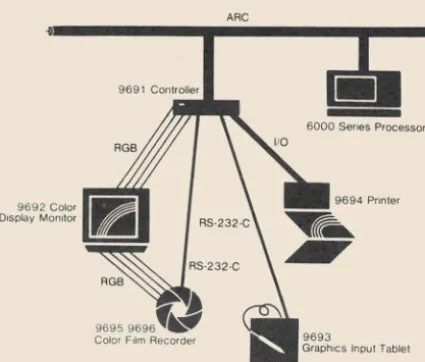
The Datapoint ARC Color Business Graphics System (CBG) is the newest addition to the Integrated Electronic Office, providing the fully interactive generation, pro-duction, and display of powerful graphics and presenta-tion visuals. As a system that i~ part of an ARC dispersed processing network, the CBG system lets you generate graphs directly from any data file on the ARC and store all graphs and pictures in standard ARC files. Thus, im-ages can be manipulated as text/data files for retrieval or transmission to any other CBG system on the ARC system, either directly or via EMS.
Until recently, producing business graphics was costly and time consuming. The ARC CBG system is provided as a "turnkey" system that requires no user programming and minimal operator training. Using English-like com-mands and fully explained screen prompts, you can easily generate presentations. The "key operator," or more highly trained person, can provide the next level of refinement to the finished pictures.
You can generate charts interactively by inserting in-formation into the displayed "menu." Once you've developed a chart, you can store it indefinitely. You can even update the existing data to produce a new visual aid or update the same chart with different information. Since different types of charts are required for business displays, the CBG system offers bar charts, pie charts, word charts, and line graphs for variety. Each one has its own unique application to emphasize time and/or quan-tity comparisons.
Pictures are as easy to draw as the charts. With the CBG system, you get a "light key" menu from which to choose those of the specific sixteen colors you want to use in the picture . You can also determine the type of elements you want to draw, such as straight lines, rec-tangles, circles, curves, and free form sketching or trac-ing, and the type style you want to use, choosing from over twenty fonts. In addition, you can move, copy, enlarge, reduce, rotate, and erase any of the elements of a picture. Text is entered into a picture using an ARC ap-plications processor. Other "help" features include magnifying selected areas of the picture so you can place objects exactly where you want them and have full con-trol of color for each element in the picture. Once you've created a picture, it can be stored, copied, edited, sent, deleted, or printed.
More Flexibility
Additional features include the ability to rearrange pictures or charts in any sequence, including repeating
images and playing back an arranged "script" with selec-table delays between pictures, to provide animation_
Op-tional output packages, such as the color printer or the
film recorder, can provide the hard copies you require_ The color printer provides eight-color representations of the screen images, and the film recorder provides either 8xlO prints or transparencies, and/or 35mm exposures, depending on the model you choose_
9692 Color
Display Monitor
ARC
9691 Controller
...
6000 Series Processor
9694 Pnnter
Typical Color Business Graphics System
Many corporate departments will benefit from the
availability of this communications tooL CBG offers the user a fast, easy-to-use system that is totally interactive and requires no programming or specialized operator
skills.
Typical departmental uses include:
Business Planning Forecasts
Business proposals Trend analysis
Sales Management
Monthly sales trends
Customer presentations
Financial
Financial trends
Return -on-investment Break-even analysis
Monthly and quarterly reviews
Marketing
Market share
Forecasts
Pricing and volume analysis Market segmentation
Demographic studies
Manufacturing.
Inventory tracking Shipping schedules
Materials requirements planning reports
Corporate Communications Brochures
Sales promotional materials Mailings to customers
Corporate information to personnel Presentations
Training
Course preparation material Course presentations
For further information concerning the Color Business Graphics System, please contact your local Datapoint
representative.
Corrections for IEOS
Supervisor's Users Guide
We've been told that there is misleading information in the IEOS Supervisor's Users Guide (Document No. 50547) concerning naming documents from one sub-directory to another, with ultimate distribution in another library.
On page V -1 there is a reference at the bottom of the page to OUTPUT the document that is to be named to system. If you look on page V -2, paragraph 4, it explains the procedure for adding this document into another library.
This procedure is incorrect! If you want to transfer an lEOS-created document to another library, through DOS, the COpy command must be-used. The OUTPUT command does not take any of the IEOS formatting along with it. It strips off all primary and embedded secondary formatting. If you try to copy an OUTPUTed document into a library, it will ask if you want to convert it. This will put a new line command for every line of
text, as if it were reformatting a DOS-created file_
If you want to move information from one library to another, via DOS, make sure you use COpy to move from IEOS to DOS instead of OUTPUT, so the IEOS for-matting is preserved.
[image:10.624.49.262.144.325.2]•
oJ
OFFICE COMMUNICATIONS
New Features on EMS 1.3
With the new release of the EMS Network Controller version l. 3 .1, several major feature enhancements have been added. Among them are:
Telex support in the U.S. TWX support
Teletype· support
Retrieval of old messages for retransmission More comprehensive accounting facilities
This software is compatible with lEaS 1.4, recently released on the 1800, 3800, ,and 1500 processors.
Communications with Telex, TWX, and TTY ter-minals open up several new areas for Datapoint customers. Almost all financial institutions use Telex in daily operations, like transferring funds. Any terminal
that functions like a Teletype could be used with the EMS Network Controller. For example, portable terminals
might be used to set up a mail network for salespeople who are on the move. They could call in to send and receive messages from anywhere.
The Network Controller or the remote workstation can originate the call. The remote can either auto-dial or dial manually. The Network Controller will always auto-dial.
If the Network Controller's parameters have been set to NO POLL, it will wait for the remote to call in for messages.
The Network Controller is able to send and receive any
"answerback" information required by a remote ter-minal. Answerback is a terminal identification code that is hardwired in some terminals. This code is sent at the beginning and end of messages to insure that you are talking to the machine you want.
·Teletype is a registered trademark of Teletype Corporation.
Continued . . .
---__
---NEw
YORK Local N;t~-;;ik----_" , , ; ...
/ ' / '
TWX Format
Datapoint
Network
Controller
WP Workstation
Datapoint Stand-alone Computer
Miami TWX Teletype Format
,
Teletype
TWX
Telex
Machines
Legend
Multi-function Work
-station capable of
per-forming data process
-ing. word processing
and electronic message
service
Local Communication - - -
-Telex Format
/
Atlanta TelexStandard Datapoint Text Format
HOUSTON Local Network
Using the EMS 1_3 Network Controller
Oklahoma City
Teletype Support
The supported set of teletype devices consists of: Automatic Send/Receive (ASR)
Keyboard Send/Receive (KSR) Send Only (SO) or Receive Only (RO)
configurations of the Teletype 33, 35, 43
These devices prepare documents for transmission by keyboarding the route and text information required for the messages. A tape is then placed in the teletype's transmitter to await transmission to the Network Con-troller. Messages are delivered by being "printed" on the teletype's hard-copy device. Either leased or switched phone lines may be used. The Network Controller com-municates through a 9462 Communications Adapter.
Since Teletypes are supported, any other product that looks like a Teletype can be accessed within the EMS net-work. EMS will allow any Datapoint processor that runs UNITERM software to send messages to and receive messages from the Network Controller. Any other asyn-chronous TTY -compatible terminal may also join in the Electronic Message System network.
TWX Support
The physical connection for TWX is the same as for the Teletype, using a 9462 Communications Adapter for Network Controller communications, over switched or leased phone lines. Either the TWX or the Network Con-troller can initiate the transmission.
Telex Support
The Network Controller connects through a 9400 Communications Adapter and a Telex Line Adapter (TLA) to access the Telex network. The Network Con-troller can dial or be dialed by any domestic Telex machine throughout the network.
Message Retrieval
The new message retrieval function at the Network Controller enables the system operator to retransmit messages that may have been lost or received in error. This is helpful at sites that occasionally experience paper-out conditions while receiving transmissions. Under the control of the system operator, messages may be retransmitted on the basis of time and date, message number, or mail station.
Accounting Facilities
The Network Controller has comprehensive accoun-ting facilities to give an accurate picture of the system's usage. Cost information by message, workstation, com
-munications line, or the whole system is available. Usage information, by mailstation and priority of messages sent, is also available. This data is stored in daily accounting files. Previous day's files can be accessed during normal operations. The current day's information is accessed when the system closes down for daily accounting.
Documentation Available
Several User's Guides and Product Manuals are available on EMS and its components:
EMS Network Controller User's Guide, Document No. 50520
EMS Product Specification, Document No. 60944
Message Services User's Guide,
Document No. 50519
EMS Manual, Document No. 60882
EMS Product Manual, Document No. 50474
Network Controller Installation Guide,
Document No. 61046.
For further information concerning the new Network
Controller and its capabilities, please contact your local
Data point representative.
Message Service is now
available on
1500/1550
Standalone Processors
Datapoint now offers IEOS/MS 1.4.1 on 150011550 products. This new software version gives you the added convenience of message services incorporated with IEOS 1.4.1 capabilities. Now you can participate in your ex-isting Electronic Message network as a remote site, or pre-sent this new enhancement as an addition to your current equipment configuration.
Inside the diskette box, you will find a printed installa-tion guide to be used as an aid in installing the system. The equipment required to run IEOS/MS from a remote site is:
150011550 with communication capability, syn-chronous communication lines with 212A, 201C, 208A, or 208B modems.
The following model codes are needed in ordering:
RELEASE ITEMS:
Model Codes 9825 20697 20809 20793 Descriptions IEOS/MS
(6) Single Sided, Single Density Diskettes
(5) Single Sided, Dual Density Diskettes
(2) Dual Sided, Dual Density
Diskettes
IEOS/MS has been released on 1500/1550 Single Sided, Single Density diskettes for transfer to a 9310 or 9320 10 MB cartridge only.
So, if this release is just what you have been looking for, contact your local Datapoint Sales Representative for
more specifics.
,
".
Salesmen, who conduct so much of their business over the phone, need the best phone system available. At the
3D-person Memorex Corporation sales office in Culver
City, California, the salespeople found they could get
what they needed in the form of a digital office phone system from Datapoint.
Prior to moving into the new offices in Culver City, the Memorex salespeople worked in Los Angeles, where they used a straight keyset phone system, with each phone hav-ing 20 buttons. "We were way over-trunked," recalled Pamela Huie, administrative services supervisor. "We had to go to 18 trunk lines so that everybody could talk on
every phone. It was necessary because the office was
divided into two sections, the computer media group and
the computer peripherals group. We had started with eight lines for each group, but if someone called for the
computer peripherals people and then wanted to talk
with the computer media people, that person had to hang
up and call back, even though the two salespeople might be sitting nearly side by side. We went to 18 trunks to avoid that," she said.
In March 1981, the office moved five miles, from Los Angeles to Culver City, and to a Datapoint Key Switching Exchange (KSX™).
The KSX had been introduced to the Memorex cor-porate telecommunications planner in early 1981 as part of a test marketing program, and the system was installed on March 16, 1981. The KSX was officially announced two weeks later. A Datapoint customer education representative stayed at the office for the first day, to show a training film and to acquaint the office staff with the features of the system.
"The salespeople really liked the speed dialing option. You could see them writing out notes of what numbers they had programmed into the phones."
The Hardware
With the Datapoint KSX, the Culver City Memorex of-fice uses 12 trunk lines for the system's 30 phones, a
Using the KSX,
Datapoint's Digital Key System
number Ms. Huie says seems to be about right for the maximum load.
The heart of the KSX system is the Key Service Unit (KSU), a knee-high controller containing the system's computerized switching circuits. The KSU connects the KSX to the public phone system and stores software that determines the details of how the system operates. Data-point service technicians can access the KSU through the phone lines to change the software as required.
Key Service Unit
A KSX can support as many as 32 phone company
trunk lines. Twenty-four of the lines can be two-way, with
the last. eight being dedicated to outgoing calls. The
system can support a total of 128 phones, of which 80 can be Datapoint KEYSET /24 ™ instruments.
KEYSET/24
In Memorex-Culver City, all 30 phones in the KSX are KEYSET /24 instruments. The KEYSET /24 is the vehicle to access the majority of the features offered by the KSX, such as speed dialing, call transferring, call conferencing, and last number redial. Single-line electronic in-struments, that look like ordinary pushbutton phones, are limited to basic functions.
In addition to the 12 standard dialing buttons, each KEYSET /24 includes 24 line keys and four special func-tion keys. To make an outside call, the user lifts the hand-set, hears the intercom dial tone, and pushes one of the line keys. He then gets the phone company's dial tone.
Each KEYSET /24 has a built-in speaker for handsfree receipt of intercom calls and call announcements, and receipt of system-wide or selective zone paging. Optional-ly, each KEY SET /24 can be equipped with an external SpeakerBox that provides the additional capability of full-duplex handsfree placement and receipt of intercom and outside calls.
Special Function Keys The four special function but-tons are hold/forward (HOLD/ FWD), dial/message (DIAL! MSG), ON/OFF, and transfer/ conference (XFR/CONF).
I
H9i~D
I
The HOLD/FWD key can be used to place a call on hold by pushing it and hanging up. Calls can be forwarded to another extension by lifting the receiver, pressing the HOLD/FWD key, dialing the number of the new extension, and hanging up. The button can also be used to set up a "do not disturb" situation, by lifting the receiver, pressing the HOLD/FWD key, then pressing the asterisk, and then hanging up. All callers will then get a busy signal.I
DI~~G
I
The DIAL/MSG key is used for the speed dialing feature. Ten numbers can be stored simply by pressing the DIAL/MSG key, dialing the selected code number (0-9), then the desired number, and then press-ing the ON/OFF key. A stored number can be used by pushing an outside line button, the DIAL/MSG key, and the code digit for the desired number. If a caller reaches a busy number on an outside call, he can redial the number automatically by staying on the line and pushing the DIAL/MSG button. If the DIAL/MSG button is blinking, it means the system attendant has a message for that extension.~
FRICONF Calls can be transferred by pushing the
XFR/CONF button, dialing the new extension number, and hanging up after announcing the transfer. When on a call to someone outside the KSX system, another extension of the KSX can be connected to make a conference call by pressing the XFR/CONF button,
ing the extension, and pressing the button again after the extension answers. Two outside lines can be connected to form a conference call by dialing the first number, put-ting it on hold, dialing the second number and putput-ting it on hold, and then pressing the XFR/CONF button.
The Message Center
In most KSX systems, one of the extensions is the message center where the attendant sits. The attendant can see which extensions are in use or access anyone of them immediately with KSX's Direct Station Select, a console with 60 buttons.
The message center also illustrates the use of the soft-ware parameters that can be programmed into the com-puter circuits of the KSU. At the Culver City office, the KSU has been programmed so that any call on hold reverts to the message center after 120 seconds.
Software
Software parameters can be programmed into the
system through a terminal with a standard RS232 inter-face, or, in the case of the Culver City office, by calling Datapoint. Ms. Huie would simply call the Datapoint Customer Support Center in San Antonio, over a toll-free number, and the Customer Support technicians would
KEYSET/24 User Stations
access the KSU over the phone line to make the necessary
changes.
Software parameters can be selected to prevent in·
dividual stations from making long distance calls, to allow lines to ring in on selected stations, to restrict use of certain lines by selected stations, and to set up paging lones.
The Results
"What I like best is the automatic redialing feature. If
you get a busy number, you just hit the button and you're dialing it again and again," she said. "A lot of the guys really like to use hands-free dialing, they put it in speaker mode to make calls. But I make them switch to using the handset after the call is answered. With 20 salespeople, the office can get pretty noisy," Ms. Huie added.
"But, the very best thing is that when the receptionist is transferring a call, the salesperson doesn't have to pick up the phone. She can talk to that person on the speaker at the extension desired, and the salesperson can push the line number and pick up the call. It's as easy as that," she said.
"Everybody likes the KSX, and it's a definite improve-ment over what we had," she concluded.
KSU Lines to Central
Office or ISX
N e w s for Users Groups
-As you can see, we've heard from two of you. If you send information concerning your Datapoint Users Group, that in· formation will be printed in the next SOURCE DATA. Let us hear from you - soonl
Federal Datapoint
Users Form Group
A Federal Datapoint Users Group has been formally established for Federal Datapoint users in the
Washington, D.C. and Baltimore, MD metropolitan areas. The users group membership represents over 10 federal agencies and departments. The group holds quarterly meetings. Attendance is free, but advance registration is required. The next quarterly meeting will be held on March 19th at 1 :15 p.m. For further informa-tion, please write:
Federal Datapoint Users Group Mail Stop 206
Room IB411
12201 Sunrise Valley Drive Reston, V A 22092
Get in touch if you are a federal Datapoint user in the areal
Michigan Datapoint
Users Group
If you're in Michigan, you're in luck. The Michigan
Datapoint Users Group, established in 1979, has grown
into an active group of over 50 Datapoint users. The
group holds quarterly meetings, publishes a newsletter,
and maintains a close working relationship with the
Michigan branch office. Group president, Thomas Kelly,
says, "We are so delighted with our growth and success,
that we would like all the Datapoint users in our area to
be informed of our existence." Well, now you know.
The next meeting will be held at the Stephenson Club on February 9 at 3:00 in the afternoon. For further infor-mation concerning the group, please contact Mr. Thomas Kelly, President, Michigan Datapoint Users Group 7410 Anthony, Dearborn, MI 48126; (313) 584-7963.
Customer Education
Changes
Effective immediately, registrations for Customer Education classes in New York, Boston, Philadelphia,
Arlington, VA, and Atlanta will be taken by Customer Education in San Antonio, at (512) 699-7039. Please call San Antonio for information regarding classes in these areas or to register for any classes.
This is the second step in centralizing all Customer Education registration to the San Antonio offices. If you remember, in October and November, the number for
Software Releases
Illustrated below is a Software Release Form. These forms are issued for every new release of a software product. They are sent to Datapoint branch offices in the Software Operations Newsletter they receive periodically. SOURCE DATA publishes a table of condensed information from releases.
Software Program Releases
NamelDate Description Purpose Model Media *
AP32702.1 AP3270 2.1 is the IBM 3277 or 3278 Corrects 20781 1 DMF Cassette Released Terminal emulator used in conjunction problems 50599 User's Guide II Nov 81 with AC3271B or ACMLU ARC Adds new
Communications and Emulation Software. features
Cancels AP32701.1
ARCSYS 1.2 Consists of DOS.D 2.7, ARC 1.7 Corrects 9833 ARCSYS 1.2 Released ARCSYS/RFM, ARCSTAT 4.1, ARCOPY problems 20653 10MB disk 19 Oct 81 1.3, LINK 2.3, and LIBSYS 2.2 Cancels 20654 25MB disk ARCSYS 1.1 20655 60MB disk
50646 DOS 2.7 User's Guide 50383 ARCST A T User's
Guide
50396 ARCOPY User's
Guide
50167 LINK User's Guide
50273 LIBSYS User's Guide
50299 ARC User's Guide
CASH I 1.2.1 Call Accounting System for Hotels Final 9840 CASH 1.2.1 Released used to retain information concerning release 20651 7 Single Sided 13 Oct 81 incoming calls. Also lists costing Cancels DDDs
information. CASH 1.1.2 20652 2.5MB System Disk 20654 25MB System Disk 20655 60MB System Disk 50631 User's Guide 50654 CASH 1.2 User's
Guide Addendum
CDR I 1.1.1 Call Detail Recorder used as a call Final 9839 CDR I 1.1.1 Released costing and management system that release 20651 7 DDDs
20 Oct 81 records details of calls placed through 20652 2.5MB System Disk a PBX, calculates their costs, 20653 10MB System Disk and produces reliable reports 20654 25MB System Disk
for management. 20655 60MB System Disk
50630 User's Guide
DBCMPI53.1 DAT ABUS compiler that compiles Adds new 20793 DS/DD Diskette Released programs written in a 1500 subset features 20809 SS/DD Diskette 4 Aug 81 of the DAT ABUS language. Compiled Corrects 20697 SS/SD Diskette
programs may be executed with one problems 40273 DBCMP153.1 of the 1500 DATABUS or DATASHARE Cancels 50302 User's Guide
interpreters. DBCMPI52.4
DCTAPE 2.2 DCT APE supplies two programs, TIN Corrects 20419 2 DMF Cassettes Released for input and TOUT for output, problems 20420 I Diskette 26 Oct 81 allowing the user to place information Cancels 40344 DDD
on tape from disk. DCTAPE 2.1 50293 User's Guide
DS1500 1.1 DS1500 is a high-level, multiuser New 20967 I SS/SD Diskette Released interactive program that interprets software 20727 I DS1500 1.1 7 Oct 81 the DAT ABUS language, operating on Cancels 20793 I DD/DS Diskette
the 1500/1550 series processors. DS41500 1.1 20809 1 SS/DD Diskette
50482 User's Guide
*Media Charge - $15.00 for one cassette, diskette, or double density diskette, $125 for 2.5MB disk, $180 for 10MB disk,
Name/Date Descript£on Purpose Model Media
*
DS32702.1 DS3270 is the 3270 emulation Corrects 20784 1 DMF Cassette Released DA TABUS program with ACALL for problems 50602 User's Guide 11 Nov 81 DATASHARE 5 and DATASHARE 6. Adds new
features Cancels DS32701.1, ACAL3270 1.1
DSSLAVE 1.2 DSSLA VE is the remote station Corrects 20771 1 DMF Cassette Released interpreter for use with DAT ASHARE. problems 20772 1 SS/SD Diskette 5 Nov 81 It is compatible with Async 2200, 5500, Cancels 40439 1 SS/DD Diskette
6600, 1800, 3800, and ARC. DSSLAVE 1.1 50537 User's Guide IEOS/WP 1.4.1 IEOS/WP is the IEOS Word Final 9822 IEOS/WP (1500) Released Processor for the 1500. release 1.4.1
12 Nov 81 Cancels 20697 5 SS/SD Diskettes IEOS/WP 20793 2 DS/DD Diskettes 1.3.1 20809 4 SS/DD Diskettes
50502 User's Guide 50547 Supervisor's Guide
LINK 2.4 LINK 2.4 is a companion program to Corrects 20293 1 DMF Cassette
Released SNAP/3 to link relocatable program problems 20366 1 SS/SD Diskette
11 Nov 81 modules into program segments. Cancels 40308 1 SS/DD Diskette
LINK 2.3 50167 User's Guide MINI·ACD I MINI-ACD is a compact automatic call Final 20823 Operating System Released distribution telephone switching system. release 80487 Data Cartridge Tapes
6 Nov 81 50632 User's Guide ML TC3500 3.3 ML TC3500 is a MUL TILINK line hand- Corrects 20400 1 DMF Cassette Released ler that supports the Burroughs standard- problems 20402 1 SS/SD Diskette 5 Nov 81 poll/ select line protocol. Cancels 40432 1 SS/DD Diskette
ML TC3500 3.2 40470 1 DS/DD Diskette 50281 User's Guide
Customer Education Schedule
for January
&
February
Below is the schedule for customer education during the next couple of months. The Customer Education Course Catalog, Document No. 60269, con·
tains course descriptions, prerequisites, education center information and cost. Copies are available at your local Datapoint office. Enrollment for
courses is handled by the regional education centers as indicated on the accompanying map. General questions about courses may be directed to the San
Antonio Education Center.
Call (512)699·7039
SOURCE DATA Advertising
The advertising listed below is presented without verification or review of any kind by Datapoint Corporation. Data
-point Corporation makes no representation concerning the content of these advertisements or the quality of any product,
software, or service offered. Datapoint Corporation reserves the right to reject any advertisement at its sole discretion.
1800 SYSTEM - 120K. 10MB disk (9301). two diskette drives 2MB total.
9462 MPCA. 9022 aux. power. $20,000
ROMAC & Associates, Mr. W. Irish
Rochester, New York 716-232-4610
~
FOX&FOX
~
COMPUTER SERVICESFOX & FOX COMPUTER SERVICES
wishes to announce the availability of
S-CHAIN. If you have a DOS function
to perform repetitively on a group of files (such as list. copy. sapp. compile). this Databus utility will instantly create a chain. and upon inspection and approval of the operator. execute it.
Price: $35.00 Write Fox & Fox. P.O. Box 9193.
Berkeley. California 94709. Phone
(415) 548-0880.
APPLICATIONS SOITWARE EXCHANGE FREE Parties interested in participating in this new program. call or write:
COMPU-NET SERVICES, INC. Two Crossroads of Commerce. Suite 225
Rolling Meadows. Illinois 60008 (312) 577-9494
APPLICATIONS SOITWARE
with Datapoint Equipment at a 30% Discount
For information. write or call: COMPU-NET SERVICES, INC. Two Crossroads of Commerce. Suite 225
Rolling Meadows. Illinois 60008 (312) 577-9494
New DOS Utilities - Speed up your disk maintenance with XCAT.
BLOCKILL. XLIST. XMOUNT. HELP. These expanded utilities cross subdirec· tories and allow wildcard characters pro· viding for faster and easier disk maintenance. For 30 day trial period. send check for $75 to SOFTWARE SERVICES INC. of ARLINGTON. 3513 N. Powhatan St.. Arlington. VA 22213. (703) 532·5679
National Computer Connections, Inc.
A DATAPOINT OEM WITH NATIONWIDE DISTRIBUTION
is seeking new application software to make available through its distribu· tors. If you have a well documented, demonstratable package which you are willing to maintain, please contact us and learn about our unique continuing compensation plan for software developers.
National Computer Connections, Inc.
P.
o.
Box 3070 Galveston, Texas 77553713/1634430
DATAPOINT
®
Accountant II
General Accounting Packages 1500 - DATASHARE - ARC
Compatible with DOS and RMS
• Payroll • Accounts Payable • CPA Time Accounting • General Ledger
• Fixed Assets
• Accounts Receivable • Inventory
• Legal Time Accounting • Mailing Lists
Proven Accountant II Software - Nationwide References
~3
CC I Software
102 E. Main St., Suite 509 • Urbana, Il &1801 • (217) 328-0030
NEW YORK METRO AREA USERS Comprehensive in-house. contractual or per diem. problem·solving assistance for
DATABUS/DATASHARE. DOS/RMS. ARC. and MACRO assembler. Let us fme· tune your system. Call:
ACCESS DATA PRODUCTS, Inc.
237 W. Lincoln Ave Mt. Vernon, New York 10550
(914) 667-4852
MSSPLAN "Electronic Spreadsheet" Software tool for plans. budgets. forecast & projections. Requires 24 line screen and 132 character printer.
DA TABUS source code included. License $250- Demo diskette $50 Management System Services P.O. Box 171. Bellevue. W A 98009 (206) 828-3642
Freedom Printer - 80 cps: FOR SALE 2 years light duty (under maintenance & in good condition). Located near Corpus Christi. Tx: $1750. Call (512) 776-3146
RMS
SOFTWARE
RMS Business Systems
Software
available from:
CUSTOM COMPUTING, INC.
P.O. BOX 1374 KILGORE. TEXAS 75662
comPUTER SYSTEms
THE RISING SUN
IN
DATAPOINT@
SOFTWARE
WHO ELSE CAN DO ALL THIS?
EDIT - SORT - INDEX - COMPILE - MOUNT
AND SUPPORTING UTILITIES ALL UNDER
DATASHARE@WITH NO ROLLOUT OR PS
SUITE 101,2455 EAST 51ST STREET, TULSA, OKLAHOMA 74105 (918) 742-0706
WANTED
3600 or 8200 Terminals 800 or 1600 BPI Tape Drive FOR SALE
2.5MB Cartridge Disk Packs - $25 each
Call or Write:
Steve Hill. PAYDAY. 605 Third St.
San Francisco. CA 94107
(415) 495·5959
WE BUY, SELL, AND
TRADE USED
EQUIP-MENT. P.O. Box 7504,
Washington, DC
20044-7504
Welcome Equitable Life
SENTINENT SYSTEMS CORPORATION
1270 Broadway, Suite 1001 New York, New York 10001
*ULTRAGEN System Generator *TRACE
Program Debugger
Send for Catalog or Call (212) 947·6625
UNCHAIN YOUR COBOL PROGRAMS I
DIPRINT allows most DOS COBOL programs to direct
LOCAL· PRINTER output to printer disk print file. or console display at Tun time with NO source code changes.
Perfect for ARC APs. Pennanmt license $500. Bob Brown, 938 Peachtree St. NE. Suite 215, Atlanta GA 30309·3990
1500 Software
MSSGLS-General Ledger System
MSSPFP-Post Facto Payroll System
License $250 each - Demo pack $50 each
DATABUS/DATAFORM source code
included.
Management System Services P.O. Box 171. Bellevue. WA 98009 (206) 828·3642
to the growing list of users of HORIZON II REPORT WRITER/INQUIRY SYSTEM and FINANCIAL
MODEL-ING. To help us celebrate, we're reducing the cost of HORIZON from $7,500 to $4,500 on all orders received by
February 28, 1982.
And since we would like to get to know all the users of Datapoint equipment, we'll send you:
FREE
SORT AND INDEX UTILITIES THAT RUN
UNDER DATASHARE WITH NO ROLLOUTS OR PS
Just mail us a cassette with your name and address and we'll forward our DATASHARE SORT and INDEX utilities
to you absolutely free of charge. Offer good through February 28, 1982 .
•
ral
Business Systems, Inc.
2050 Route 22 Scotch Plains, NJ 07076 (201) 561-9100 TWX 710-997-95784
CAMIS (CONTRACTOR ACCOUNTING lie
MANAGEMENT INFORMATION SYSTEM) Proven
application software for the construction/project management industry. We are ~king end users and Datapoint marketing organizations to assist in expanding beyond our current IS installations. Data Solutions, Inc.
(404) 457·3850
Hospital and clinic software for pharmacy. nursing.
SOURCE DATA Advertising
Form
Ads for publication in issue number 17 - February/March 1982 must be received by February 5.
Classified ad space is 1 inch high by 2 114 inches wide - one block. The rate is $44 for your ad to ap' pear in one issue of SOURCE DATA. Use the space below to type the exact text for your ad. (Note the
maximum number of characters is approximately 300 which includes spaces, punctuation, etc.)
Alternatively, you may supply camera· ready copy for a display ad of multiple blocks up to a maximum
of 6 blocks. The rate is $44 per block.
Please supply the information below. Payment must accompany ad. Send to address shown on reverse.
Classified ad text: