MP/M lITH Operating System PROGRAMMER'S GUIDE
Copyr ight @ 1981 Digital Research
P. O. Box 579 801 Lighthouse Avenue Pacific Grove, CA 93950
(408) 649-3896 TWX 910 360 5001
COPYRIGHT
Copyright
@
1981 by Digital Research. All rights reserved. No part of this publication may be reproduced, transmitted, transcribed, stored in a retrieval system, or translated into any language or computer language, in any form or by any means, electronic, m~chanical, magnetic, optical, chemical, manual or otherwise, without the prior written permission of Digital Research, Post Office Box 579, Pacific Grove, California, 93950. The reader is granted permission to include the example programs, either in whole or in part, in his own programs.DISCLAIMER
Digital Research makes no representations or warranties with respect to the contents hereof. Further, Digital Research reserves the right to revise this publication and to make changes from time to time in the content hereof without obligation of Digital Research to notify any person of such revision or changes.
TRADEMARKS
FOREWORD
MP/M IITM is a multi-user operating system for microcomputers th a t use the In tel 8
a
8a ,
the Z i log Z 8 O®, 0 r s i mil a r 8 - bit t Y P e architecture. It will support terminal access with multi-programming at each terminal. It uses the same Basic Disk Operating System (BOOS) as CP/M@ thus assuring compatibility of existing programs running under CP/M.The minimum hardware environment for MP/M II must include an 8080
or Z80 processor, 32K bytes of random access memory (RAM), a system console, and a real-time clocko A typical MP/M II kernel occupies approximately 15K bytes.
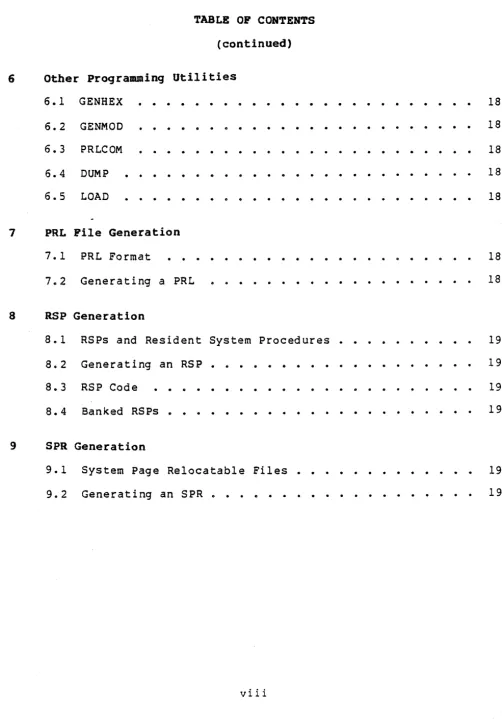
TABLE OP CONTENTS
1 Introduction to MP/M II
1.1 Overview of MP/M II Features
1.2 MP/M II Nucleus • • • • • 0 1.2.1
1 .. 2 .. 2 1 .. 2 .. 3 1.2.4 1 .. 2.5
Process Dispatching Queue Management
Flag Management .... ..
Device Polling • • • • • . . . Console and List Device Management .. Memory Management . . . .
1.2.6
1.2.7 System Timing Functions . . . . G • G .. G
103 MP/M II Memory Structure IG4 Terminal Message Process 105 Command Line Interpreter 1.6 Transient Programs
1.7 Resident System Processes
1.8 BDOS and XDOS Calling Conventions ..
2 The aDOS Interface
2el aDOS Console and List I/O Interface
202 SDOS File System o • • • • •
2.2.,1
2G2.2
2 .. 2 .. 3
2.2,,4 2e2.S 2 .. 2.6 2 .. 2.7 2.2 .. 8 2.,2.9 2.2.10 2.2 .. 11 2.2.12 2.2.13 2.2.14
File Naming Conventions
Disk Drive and File Organization .. File Control Block Definition User Number Conventions . . . .. Directory Labels and XFCBs ..
File Passwords • • • • .. • File Date and Time Stamps File Open Modes ... .. File Security . . . .. Concurrent File Access .. .. Multi-Sector I/O . . . .
XIOS Blocking and Deblocking Reset, Access and Free Drive BDOS Error Handl ing . . .
TABLE OF CONTENTS
(continued)
2.3 Base Page Initialization
2.4 BOOS Function Calls • • •
·
. .
3 XDaS Interface
3.1 Introduction
. . .
· ·
. · ·
·
·
3.2 Process Oeser i ptor Data Structure 3.3 Queue Data Structures·
3.3.1 Ci rcular Queues 3.3.2 Linked Queues
3.3.3 User Queue Control Block 3.3.4 Queue Naming Conven tions 3.4 Memory Descriptor Data Structure 3.5 System Data Page
.
· ·
.
·
3.6 XDOS Internal Data Segment 3.7 XDOS Error Handling·
3.8 XDOS· Function Calls
·
·
4 ASM
4.1 Overview
4.2 Program Format
4.3 Forming the Operand. 4.3.1
4.3.2 4.3.3 4.3.4
Labels • • • • • Numeric Constants Reserved Words • • • String Constants • •
· ·
· ·
· ·
·
·
·
·
·
·
·
·
·
·
· ·
· ·
· ·
·
·
·
· ·
·
·
Arithmetic and Logical Operators •
·
.
. . .
·
·
·
·
·
· · · ·
·
· · · ·
·
· ·
·
·
4.3.54.3.6 Precedence of Operators • • • • • 4.4 Assembler Directives
4.4.1 4.4.2
The ORG Directive The END Directive
. .
.
.
53 57I I I
I I I
TABLE OF CONTENTS (continued)
4.4.4 The SET Directive
..
..·
..
..·
..
.. 0·
0·
·
161 4.4.5 The IF and ENDIF Directives·
.
.. ..
·
..
· ·
.. ..
162 4.4.6 The DB Directive .. ....
·
.. ..
·
·
..
. .
163 4 .. 4 .. 7 The DW Directive.
..
.. ....
..
....
163 4.408 The DS Directive..
·
.. .. .. 164 4 .. 5 Operation Codes. .
.. ..·
.. .. ..
..·
.
.. 1644 .. 6 Error Messages ..
..
.. ..
1715 RM'
5 .. 1 RDT Overview
..
....
·
..
·
173 5 .. 2 Invoking RDT..
..
.. .. G..
.
.. ..·
.. ..
.. 173 5 .. 3 RDT Command Conventions .. .. .. .. ....
.. 174 5,,4 Terminating RDT..
·
..
....
.. .. 175 5.5 RDT·Commands .. .. .. .. "..
.. .. .. 175 5 .. 5 .. 1 The A (Assemble) Command 175 5 .. 5.2 The B (Bitmap Bit Set/Reset) Command .. 175 5 .. 5 .. 3 The D (Display) Command·
..
·
176 5.5 .. 4 The F (Fill) Command· ·
...
.. .. .... ..
·
176 5.5 .. 5 The G (Go) Command.
· · ·
.. 177 5.5 .. 6 The I (Input File) Command..
..
.
....
177 505.7 The L (Li st) Command·
..
.,..
e .... ..
.. 178 5 .. 5.,8 The M (Move) Command ..·
..
.. ....
C>..
..·
1785.509 The N (Normali ze) Command .. .. .. 178
TABLE OP CONTENTS
(continued)
6 Other Programming Utilities
6.1 GENHEX 6.2 GENMOD 6.3 PRLCOM 6.4 DUMP 6.5 LOAD
. . .
.
. . .
. .
.
.
.
.
.
7 PRL File Generation
7.1 PRL Format
7.2 Generating a PRL
8 asp Generation
8.1 RSPs and Resident System Procedures 8.2 Generating an RSP
.
.
. . .
.
8.3 RSP Code
.
.
.
8.4 Banked RSPs "
.
.
.
. .
. . .
9 SPR Generation
9.1 System Page Relocatable Files 9.2 Generating an SPR "
.
.
.
183 183 184 184 185
187 187
191 191 191 192
[image:8.624.55.557.54.772.2]A B
C
D E F
G H I
APPENDIXES
Flag Assignments
Process Priority Assignments • • • •
aDOS Function Summary e • • • • • e
.
.
XDOS Function Summary
. . . .
. .
.
.
. .
.
.
Sample Page Relocatable ProgramSample Resident System Process • • • • 8 • • • • • fI Acronyms and Conventions
Glossary G e • • • c e o • •
ASCII and Hexadecimal Conversions
195 197 199 201
SECTION 1
INTRODUCTION TO MP/M II
1.1 OVerview of MP/M II Peatures
MP/M II is a microcomputer operating system that supports multiple terminals with multi-programming at each terminal. Upward-compatible with CP/M, MP/M II presents a CP/M interface to each terminal. In fact, most CP/M programs can run without modification under MP/M II. However, MP/M II is not limited to this model. Using MP/M II's powerful multi-programming capability, a single terminal can initiate more than one program. In addition, the system functions used by MP/M II to control the multi-programming environment are available to application programs. As a result, MP/M II supports extended features beyond the CP/M model such as communication between and synchronization of independently running programs.
Under MP/M II, there is an important distinction between a program and a processe A program is simply a block of code residing somewhere in memory or on disk; it is essentially static. A process, on the other hand, is dynamic, and can be thought of as a "logical machinen that not only executes the program's code, but also executes code in the operating systemo When MP/M II loads a program, i t also creates a process that is associated with the loaded program. Subsequently, it is the process, rather than the program that controls all access to the system's resources. Thus, MP/M II monitors the process, not the program. This distinction is a subtle one, but vital to understanding the operation of the system as a whole.
Programs running under MP/M II fall into three categories: CP/M programs, MP/M II system processes, and MP/M II Resident System Processes. The first category consists of CP/M-like programs that MP/M II loads into an available memory segmento MP/M II supports from 1 to 7 memory segments or partitions that can be loaded with programs. Once loaded and initiated, a program becomes associated with a process that is maintained by the MP/M II real-time nucleus.
The second category consists of MP/M II system processes that perform operating system tasks. For example, the Command Line Interpreter (CLI), is the system process that loads and initiates user programs.
MP/M II Programmer's Guide 1.1 Overview of MP/M II Features
The following l1st briefly summarizes MP/M II's capabilities.
• Multi-terminal support. MP/M II supports up to 16 terminals. Also, a single process can access multiple terminals.
• Multi-programming at each terminal. Any system console can initiate multiple programs or processes. In addition, a process can generate sub-processes.
• Support fo r bank-s wi tched memory. MP/M I It s memory segments can either reside in common memory or be distributed thr~ugh separate memory banks, thereby extending the' ~ystem's
effective memory capacity.
• Inter-process communication, synchronization, and mutual exclusion. These ·functions are provided by queues.
• Logical interrupt mechanism using flags. This allows MP/M II to interface with any physical interrupt structureo
• System tim ing functions. These functions enabl e processes running under MP/M II to compute ellapsed times, delay execution for specified intervals, and to access and set the current date and time. In addition, the user can schedule programs to be run by date and time. The system timing is also used to provide round-robin scheduling of compute-bound processes executing at the same priority.
• User-selected options at system generation time.. The available options include the number of system consoles, the number, size, and location of memory segments, and the maximum number of files and locked records supported by the system at one time. Also, the user can select which RSPs to include with MP/M II during system generation.
MP/M II Programmer's Guide 1.1 Overview of MP/M II Features
Two major extensions to the file system are:
• File locking. Normally, files opened under MP/M II cannot be opened or deleted by other users. This feature prevents accidental conflicts with other users •
• \ Shared access to files. As a special option, independent users can open the same file in shared or unlocked mode. MP/M II supports record locking and unlocking commands for files opened in this mode, and protects files opened in shared mode from deletion by other users.
The XDOS module gives MP/M II its multi-programming capabilities. It contains the real-time nucleus that monitors the execution of processes and arbitrates conflicts for the system's resources. It also includes the Terminal Message Process (TMP) which reads and echoes command lines for the system consoles, and the Command Line Interpreter (CLI) which accepts TMP command lines and initiates user programs and RSPs., The XDOS also contains the set of extended MP/M II functions that can be accessed by user programs.
The XIOS module is similar to the CP/M BIOS module but is extended in several ways. Primitive functions such as console I/O are modified to support multiple consoles. Several new primitive functions support MP/M II's additional features. Also, new facilities are added to eliminate wait loops. The XIOS is the hardware-dependent module that defines MP/M II's interface to a particular hardware environment. Although a standard XIOS is supplied by Digital Research, the XIOS is usually customized to support the user's own hardware environment. Note: Processes running under MP/M II can make direct XIOS calls only for console and list I/O.
MP/M II Programmer's Guide 1.2 MP/M II Nucleus
1~2 MP/M II Nucleus
MP/M II is controlled by a real-time mul ti-tasking nucleus that resides within the XDOS module. This nucleus performs process
dispatching, memory management, and system timing tasks. It also performs queue management, flag management, device polling, and console and list device management. The following sections describe these functions in greater detail. Many of the system functions that perform these tasks can also be called by user programs with the XDOS
functions.
Although MP/M II is a multi-processing operating system, at any given point in time, only one process has access to the CPU resource. Unless it is specifically written to communicate or synchronize execution with other processes, it runs Una\iare that other processes may be competing for the system's resources. Eventually, the system. suspends the process from execution and gives another process the opportunity to run.
1.2.1 Process Dispatching
The primary task of the nucleus is transferring the CPU resource from one process to another., This task is called dispatching and is performed by a part of the nucleus called the Dispatcher. Under MP/M II, each process is associated with a data structure called a Process Descriptor (see Section 3.2). The Dispatcher uses this data structure to save and restore the current state of a running process. Every process in the system resides in one of three states: ready, running, or suspended. A ready process is one that is waiting for the CPU resource. A suspended process is one that is waiting for the CPU resource., A suspended process is one that is waiting for some other system resource or a defined event. A running process is one that the CPU is currently executing.
A dispatch o~eration for "a running process can be described as follows:
1) The Dispatcher suspends the process from execution and stores the current state in the Process Descriptor.
2) The Dispatcher scans all the suspended processes on the Ready List and selects the one with the highest priority. 3) The Dispatcher restores the state of the selected process
from its Process Descriptor and gives it the CPU resource. 4) The process executes until it makes a system call, or an
MP/M II Programmer's Guide 1.2 MP/M II Nucleus
Only processes that are placed on the Ready List are eligible for selection during dispatch. By definition, a process is on the Ready List if it is waiting for the CPU resource only. Processes waiting for other system resources cannot execute until their resource requirements are satisfied. Under MP/M II, a process is blocked from execution if it is waiting for:
• a queue message so that it can complete a read queue operation.
• space to become available in a queue so it can complete a queue write operation.
• a system flag to be set.
• a console or list device to become available.
• a specified number of system clock ticks before it can be removed from the system Delay List.
• an I/O event to be completedo
These situations are discussed in more detail in the following sections.,
MP/M II is a priority-driven system. This means that the Dispatcher selects the highest priority ready process and gives i t the CPU resource. Processes with the same priority are "round-robin" scheduled. That is, they are given equal CPU time slices when executing CPU bound code. With priority dispatching, control is never passed to a lower priority process if there is a higher priority process on the Ready List.. Since high priority compute-bound processes tend to monopolize the CPU resource, it is advisable to lower their priority to avoid degrading overall system performance. In addition, compute-bound processes can make XDOS Dispatch calls periodically to promote sharing of the CPU resource in those systems that do not support a clock. When a process makes a Dispatch call, the call appears as a null operation to the process, but allows other processes to gain access to the CPU resource.
MP/M II Programmer's Guide 1.2 MP/M II Nucleus
1.2.2 Queue Management
Queues perform several critical functions for processes running under MP/M II. They are used for communicating messages between processes, for synchronizing process execution, and for mutual exclusion. Queues are special data structures, implemented in MP/M II as "memory files" that contain room for a specified number of fixed-length messages (see Section 3.3). Like files, queues are made, opened, deleted, read from, and written to with XDOS function calls. When a queue is created with the XDOS Make Queue command, it is assigned an a-character name that identifies the queue in XDOS Open Queue commands. As the name implies, messages are read from a queue on a first-in, first-out basis.
A process can read messages from a queue or write messages to a queue in two ways: conditionally or unconditionally. If no messages exist in the queue when a conditional read is performed, or the queue is full when a conditional write is performed, the system returns an error code to the calling process. On the other hand, if a process per for m san un co nd i t ion a I r e ad fro man em p t y que u e , the s y s t em suspends the process from execution until another process writes a message to the queue. A process suspended in this manner is placed on the queue's Dequeue list. A similar situation occurs when a process makes an unconditional write to a full queue. A process suspended in this way is placed on the queue's Enqueue list. MP/M II uses these Enqueue/Dequeue lists to synchronize process execution.
When more than one process resides on a queue's Enqueue or Dequeue list, preference is given to the higher priority process. Conflicts involving processes with the same priority are resolved on a first-come first-serve basis.
Mutual exclusion queues are a special type of queue under MP/M II. They contain one message of zero length and are assigned a name beginning with the upper-case letters, MX. In effect, a mutual exclusion queue is a binary semaphore. Mutual exclusion queues ensure that only one process has access to a resource at a time. Access to a resource protected by a mutual exclusion queue takes place as follows: l} The process issues an unconditional Read Queue call from the
queue protecting the resource, thereby suspending itself until the message is available.
2) The process accesses the protected resource.
3) The process writes the message back to the queue when it has finished using the protected resource, thus freeing the resource for other processes.
MP/M II Programmer's Guide 1.2 MP/M II Nucleus
Mutual exclusion queues have one other feature that is different from normal queueso When a process reads a message from a mutual exclusion queue, the nucleus saves the address of the Process Descriptor for the process reading the message in a two-byte buffer a·rea of the queue. If the process is aborted while it owns the mutual exclusion message, the nucleus automatically writes the message back to the queue for the aborted process, thus enabl ing other processes to gain access to. the protected resource.
1.2.3 Flag Management
MP/M II's nucleus uses flags for signaling and synchronizing processes with defined events. Processes access the system's flags wit h the XD as f un c t ion s, F 1 a g Set and F 1 a g Wa it. In t ern a 11 y, a f 1 a g can reside in two states: set or reset .. The reset state is further divided into two categories:
• No process is waiting for the flag to be set.
• A process is waiting for the flag to be set, and blocked from execution until it is set.
No t e : Two pro c e sse s are no tallow e d to wa ito nth e sam e f 1 a 9 • T his is an err 0 r sit ua t ion ref err ed to as flag "und e r - run" • S i mil a r 1 y, a process attempting to set a flag that is already set is another error situation, called flag "over-run".
Flags provide a logical interrupt system independent of the phys ical interrupt system 0 f the microcomputer.. They are pr imar il y intended for use by the XIOS module to support the Interrupt Handler. For example, when the Interrupt Handler receives a physical interrupt indicating an I/O operation is complete, it sets a flag and branches to the Dispatcher. A process suspended from execution because it is waiting for the flag to be set, is placed on the Ready List, making it eligible for selection during dispatch. Once dispatched, the process can assume the I/O operation is complete.
MP/M II Programmer's Guide 1.2 MP/M II Nucleus
1.2.4 Device polling
Device polling is another mechanism a process can use to wait for an I/O or external event without using flags or consuming the CPU resource with a programmed delay loop. Polling is implemented in the XIOS module exclusively. For example, assuming that the XIOS supports polled console input, when a process makes a BDOS console input call, .the process eventually reaches the XIOS console input routine where the actual hardware-dependent input operation is performed. Before performing the input operation, the nucleus tests to see if a character is ready for input. If it is ready, the nucleus performs the input operation and execution of the process continues. If a character is not ready, the process must wait. In a single-user environment under CP/M, the BIOS can simply loop on console status un til a c h a r act e r 1S r e ad • Un d e r M P / M I I, t his t e c h n i que can not b e used because it consumes the CPU resource. If the looping process has a high priority, any other lower-priority processes on the Ready List
are denied the CPU resource.
-Device polling avoids this situation because the Dispatcher makes the console status test. If a character is not ready, the XIOS makes an XDOS Poll call. This suspends the running process on the system Poll List. Subsequently, in every dispatch operation, the Dispatcher makes a single console status call for the process. When the status call indicates a character is ready, the nucleus removes the process from the Poll List and places it on the Ready List. Thus device polling is one of the ways a process can wait for an external or I/O event to occur without monopolizing the CPU resource.
1.2.5 Console and List Device Management
Console and List devices are special resources under MP/M II. When the system gives a console or list device to a process, it internally stores the address of the Process Descriptor, thereby recording ownership of the device by that process. If another process attempts to use the device, the nucleus suspends the calling process and places it on the device's Wait List. It remains on this list until the process owning the device either terminates execution or detaches from the device. When this occurs, the nucleus selects the highest priority waiting process, gives it the device, places it on the Ready List, and performs a dispatch.
Processes can own more than one console or list device. Fields within the Process Descriptor designate which device is to be used in I/O operations. A process gains ownership of a device by a mechanism called attaching. If a process attaches a device when the device is free, the process gains ownership of the device. Otherwise, the process is suspended from execution, as described above. As an option, a process can conditionally attach to a device in which case it is notified if another process owns the device. Conditional attachment gives a process more control over its own execution instead of leaving it up to the nucleus. Thus a process can avoid ~eing
MP/M II Programmer's Guide 1.2 MP/M II Nucleus
1.206 Memory Management
The MP/M II nucleus can manage from one to eight memory segments. These segments are of fixed length, and used primarily as regions for loading transient program's. The partitions are page-aligned, which means that they must begin on a page boundary_ Because a page is defined as 256 bytes, a page boundary always begins at an address where the low-order byte is
o.
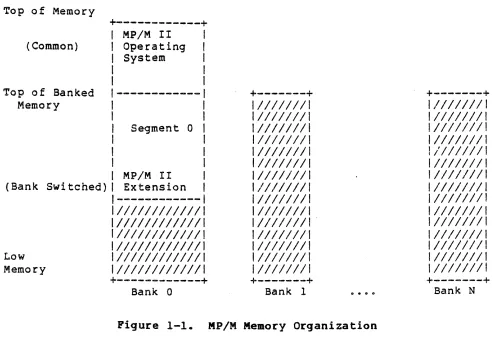
The nucleus manages the memory resource with XDOS functions that allocate and free memory segments. Figure 1-1 illustrates how memory is organized under MP/M II.Top of Memory
+---+
I MP/M III
( Common) I Operating I I System I
I I
I I
Top 0 f Banked
1---1
+---++---+
Memory I I
11111111I
IlIIIIIII
I I
1111111II
11111II1I
I Segment 0 I
I1111I1II
I1111I11I
I I
11I1111I
1I111111I
I I
1I11I11I
1/1111111
I I
111111I1
I1111111I
I MP/M II I
I111111I
I111111II
(Bank Switched) I Extension I
/1111111
I1111111I
1---1
I111111I
I1111111I
II11111I111111
I111I111
I111I111I
111111I1I11111
1I11I11I
1II11111I
I1111I11111111
11111111
I1111111I
I11I1111111111
1111111I
1111I111I
Low
I1111111111111
111111II
I11111111
Memory
I1111111111111
1111111I
11111111I
+---+
+---+ +---+Bank 0 Bank 1 Bank N
Figure 1-1. MP/M Memory Organization
The shaded areas represent those regions that can support memory segments. If bank-switched memory is not used, available memory is restricted to bank zero. The total number of memory segments, in addition to their size and bank locations, are system generation options. Segment 0, however, is a special segment reserved for system modules and RSPs. It always resides immediately below the operating system region in bank
o.
[image:19.612.52.551.215.562.2]MP/M II Programmer's Guide 1.2 MP/M II Nucleus
is 16K but the size can vary on systems capable of switching memory in units smaller than 16K. As a result, the typical maximum memory segment size is 48K. The largest user memory segment that can be allocated to bank 0 is usually much less than this value.
More than one memory segment can be defined in a single bank. Memory segments that do not begin at 0 can only be used to execute page relocatable (PRL) programs. Memory segments beginning at 0, can execute COM or PRL programs.
1.2.7 System Timing Functions
MP/M II's system timing functions include: keeping the time of day, delaying the execution of a process for a specified period of time, and scheduling programs to be loaded from disk and executed. The XDOS internal process, CLOCK, provides the time of day for the system. This process issues Flag Wait calls on the system one second flag, Flag 2. When the XIOS Interrupt Handler sets this flag, it wakes up the CLOCK process which then increments the internal time and date. Subsequently, the CLOCK process makes another Flag Wait call and suspends itself until the flag is set again. MP/M II provides functions that allow the user to set and access the internal date and time. In addition, the B005 uses the internal time and date to record when a file is updated, created, or last accessed.
The XOOS Delay function replaces the typical programmed delay loop for delaying process execution. The Delay function requires that a tick be supported in the XIOS and that Flag 1, the system tick flag, be set every 16 to 20 milliseconds (usually 60 times a second). When a process makes a Delay call, it specifies the number of ticks it is to be suspended from execution. The system maintains the address of the Process Descriptor for the process on an internal Delay List along with its current delay tick count. A system process, TICK, waits on the tick flag and decrements this delay count on each system tick. When the delay count goes to zero, the process is removed from the Delay List and placed on the Ready List.
MP/M II Programmer's Guide 1.3 MP/M II Memory Structure
1.3 MP/M II Memory Structure
The memory structure of the MP/M II operating system is shown in Figure 1-20
High Memory
Low Memory
+---+
I SYSTEM. OAT I+---+
ITMPD.OAT I
+---+
1 USERSYS.STK 1
+---+
1 XIOSJMP.TBL I
+---+
I RESBDOS.SPR I
+---+
I XDOS .. SPR I+---+
I RSP'S I+---+
I BNKXIOSoSPR I
+---+
I BNKBOOS.SPR I+---+
I BNKXOOS.SPR I+---+
I TMP. SPR I
+---+
I BRS's I+---+
I LCKLSTS.DAT I+---+
I CONSOLE. OAT I+---+
<--+<--+
I I I I I I I I I I I I I I I I
I I --- Commo n
I I Memory
I I I I I I I I
1<--+
I
1--- Memory Segment 0
I Bank 0
I I I 1 I I I I I
< ....
_+Pigure 1-2. MP/M II Memory Structure
The exact memory addresses of each of the memory segments shown above vary with the MP/M II version and depend on the user specifications made during the system generation procesSe
If the host system is bank-switched, the modules above the BNKXIOS.SPR module must reside in common memory. Common memory is always accessible no matter what bank is used. The modules below the BNKXIOS.SPR module must reside in bank 0, which is defined as the bank of memory active when MP/M II is loaded. The BNKXIOS.SPR module itself can reside partly in common memory and partly in bank
o.
If bank-switching is not used, then all of memory is common. The memory segments shown in Figure 1-2 are described below.MP/M II Programmer's Guide 1.3 MP/M II Memory Structure
See Section 3.5 for the details of the SYSTEM.DAT segment.
The size of the TMPD.DAT segment depends on the number of consoles specified for the system during the system generation process. MP/M II supports from 1 to 16 consoles, and associated with each console is a Terminal Message Processor (TMP) , identified as TMPO through TMP15. The TMP provides the command line support for each console. Each console uses 64 bytes within the TMPD.DAT segment to contain a TMP Process Descriptor. The size of the USERSYS.STK segment varies according to the number of consoles, as shown in Table 1-1.
Table 1-1. Size OOOH IOOH 200H
TMPD.DAT Segment Size Number of Consoles No user system stacks
1 to 4 consoles 5 to 7 consoles
The USERSYSGSTK segment is included if the user selects the option to add system call user stacks during system generation. If included, the system temporarily uses 64 bytes of stack space in this segment when user programs make BDOS function calls. This option allows users to run CP/M *.COM files under MP/M I I . Some BOOS function calls, especially console I/O functions, consume more stack under MP/M II than CP/M. The system allocates space for user system stacks from the USERSYS.STK segment for each user memory segment. The size of the USERSYS.STK segment varies according to the number of memory segments, as shown in Table 1-2.
Table 1-2. Size OOOH lOOH 200H
USERSYS.STK Segment Size Number of Memory Segments No user system stacks 1 to 4 memory segments 5 to 7 memory segments
The XIOSJMP.TBL segment is a copy of the first page of the BNKXIOS.SPR module. It is required because the system divides the BOOS module into two sub-modules, RESBDOS.SPR and BANKBDOS.SPR. The RESBDOS module accesses the BNKXIOS via the XIOSJMP.TBL module. The BANKBDOS module accesses the BNKXIOS module directly. The XIOSJMP.TBL module is 256 bytes in length.
MP/M II Programmer's Guide 1.3 MP/M II Memory Structure
The XDOSeSPR segment contains the MP/M II nucleus and the extended disk operating system. This segment is approximately 23008 bytes in length.
RSPs can use two segments within MP/M II. The first segment resides in common memory, and exists only if one or more RSPs are included during system generation. This common memory segment RSP contains all RSP Process Descriptors and queues. The second segment, named the BRS segment, exists in the non-common portion of memory segment O. It is present only when one or more banked RSPs are included during system generation (See Section 1.7).
The BNKXIOS.SPR module contains the user-customized Basic and Extended I/O System in page-relocatable format (PRL). It can extend across the common memory boundary. In general, code supporting the BOOS file system can reside in bank 0 while code supporting console and list I/O must reside in common memory. Refer to the MP/M II System Guide for more info"rmation regarding the BNKXIOS modulee
The BNKBDOS.SPR module contains the non-resident portion of the aDOS module. All BOOS functions related to the file system are supported by this segment. This segment is approximately 2300H bytes in length ..
The BNKXDOS.SPR module contains the non-resident portion of the XDOS module. This segment will vary in length with MP/M II version.
The TMP.SPR module contains the code for the reentrant Terminal Message Process. This module is approximately 300H bytes in length.
The BRS segment contains data and code used by banked RSPs that does not have to be in common memorYG Banked RSPs are valuable because they minimize the common memory requirement.
The LCKLSTSoDAT segment is a special data structure that maintains a record of open files and locked records on the system .. Each open file and locked record consumes a 10-byte entry in this segment.. The size of this segment is determined by parameters specified during system generation.
The size of the CONSOLE.DAT segment depends on the number of consoles specified for the system during the system generation process. MP/M II supports from 1 to 16 consoles, and associated with each console is a Terminal Message Processor (TMP), identified as TMPO through TMPI5. The TMP provides the command line support for each console. Each console uses 256 bytes wi thin the CONSOLE.DAT segmen t to contain the stack and buffers for its TMP. The code for the TMPs is reentrant and resides within the TMP.SPR segment.
MP/M II Programmer's Guide 1.4 Terminal Message Process
1.4 Terminal Message Process
The Terminal Message Process (TMP) refers to one of a collection of XDOS system processes that are associated with the system consoles. Each system console' has its own TMP designated as TMPO through TMPlS. The number of system consoles implemented depends on the number supported in the XIOS and how many are specified during system generation. Clearly, the number of system consoles cannot exceed the number supported in the XIOS. However, a smaller number than the XIOS supported maximum can be specified during system generation.
The system maintains the buffers, stack, and local variables for the TMP in each system console's region of the CONSOLE.DAT segment. The process descriptors for the TMP's are located in the TMPD.DAT segment. The code, which is shared by all the TMP's, is a single re-entrant routine within the TMP.SPR module. Thus, while each TMP performs the same function for each system console, they compete with each other as well as with any other running processes for the CPU resource.
The TMP provides the command line support for system consoles within MP/M II. This includes displaying the system prompt at the console:
OA)
and reading the command line. The TMP reads the command line from one of two sources: the console or a Submit file. Normally, it reads from the console with the BDOS Read Buffer Input command. Alternatively, it reads from the $N$.SUB file (N=the console number) on the MP/M II system disk. This occurs only if the user has previously entered a submit file at the console with the SUBMIT facility.
After reading a command line, the TMP performs one of two actions depending on the type of command entered. If the command line is a new drive specification:
OA)8:
the TMP issues a aDOS Select Disk call to select the new drive. If the system supports the newly selected drive, the TMP updates the drive field of its Process Descriptor, displays the new prompt:
08>
and waits for the next command line.
If the command is in any other form, the TMP assigns its console to another system process, the Command Line Interpreter, (CLI). The TM P the n . sen d s the com man d 1 i n e a Ion g wit h fie 1 d ssp e c i f yin 9 its default drive, user number, list device and console number to the eLI
MP/M II Programmer's Guide 1.4 Terminal Message Process
owns the system console. When the console becomes free, the TMP reissues the prompt and the cycle repeats.
Hote: The command level default drive and current user number are maintained in the TMP Process Descriptor for each system console. This information is displayed in the system prompt. If an application program changes the current disk or user number by making an explicit aDOS call, the TMP Process Descriptor values are not changed. The USER utility updates the TMP Process Descriptor user number when it sets the user number to a new value. To do this, it locates the TMP Process Descriptor associated with the console and updates its user number fi eld.
IGS Command Line Interpreter
When the Command Line Interpreter (CLI) receives a command line sent to it with the XDOS Send eLI Command, it interprets the command, and initiates the requested transient program or RSP. Normally, the TMP sends the command line to the CLI. However, other processes can also use the Send CLI Command function. Also, the 8DOS program Chain function is implemented internally with the Send CLI Command. Hote: Any process making a Send eLI Command call must first assign its console to the CLI.
The Send CLI Command function sends the command line to the CLI by attempting to write the command line message to the system queue, "CLIQu. The command line message contains the current disk, user number, list device and system console number in addition to the ASCII command line. The CLIQ is a single message queue with a length of 129 bytes. If the CLIQ already contains a command line message, the nucleus suspends the process issuing the Send eLI Command, and places i t on the CLIQ's Enqueue List, where it remains until the CLI reads the message. Once the CLI reads the message, the process must compete with any others that may also reside on the Enqueue List for the opportunity to write its message and regain the ready state. The process with the highest priority that has been on the list the longest always goes first.
MP/M II Programmer's Guide 1.5 Command Line Interpreter
The command line read by the CLI must be in ASCII and usually takes the form:
where
<command> <command tail>
<command> => {d:}filename{ipassword} or => queuename
<command tail> => <file spec> or
<file spec> <delimiter>
d:
filename typ
password queuename
=> <file spec><delimiter><file spec> => {d:}filename{.tYP}{ipassword} => one or more blanks or a tab or
one of the following: n=,/[J<>R => MP/M II drive specification, RAR
through "P"
=> 1 to 8 character file name => I to 3 character file type
=> 1 to 8 character password value => 1 to 8 character queue name of
Resident System Process
Fields enclosed in curly brackets are optional. If there is no drive specification {d:}, the current default drive is assumed. If the type field {.typ} is omitted, a type field of all blanks is implied. If the password field {ipassword} is omitted, a password field of all blanks is implied. No type field is included in the <command> file specification because the CLI assumes either a PRL or COM type.
After the CLI reads a command line, it performs the following steps:
1) It parses the command line to pick up the <command> field. 2) If there is no drive specification or password field, the
MP/M II Programmer's Guide 1.5 Command Line Interpreter
due to a queue read from its queue, this sequence initiates the RSP for execution.
3} If the command field does not name a RSP queue, indicated by an unsuccessful queue open or the presence of a drive specification or password field, the eLI assumes it names a file residing on the default or specified drive. It then attempts to open the file, filename.PRL. If the open is unsuccessful, it tries again with the file, filename.COM. When the current user number is non-zero and the file to be opened does not exist under that user number, the aoos
attempts to open the file under user O. The open operation is successful if the file exists under user 0, and has the system attribute set.
If neither open is successful and no explicit drive reference was made, the eLI repeats the same sequence on the -M P / M I I s Y s t e m d r i v e • ( The s y s t e m d r i ve i s des i g nat e d
during system generation)" The eLI does not make this second attempt if the system drive was referenced in the fir s t a t t em pt. I n add i t ion, r eg a r dIe s S 0 f the f i Ie's use r number, only files with the system attribute set are accepted in the second open sequence.
In all cases, if the file password specified in the <command> field does not match the password of a file protected in Read mode, a password error terminates the eLI's open operatione
4) If the command file open is successful, the CLI performs different actions depending on whether the opened file is of type PRL or COMe For PRL files, the eLI selects the smallest available memory segment which can fit the PRL the file. For COM files, the eLI selects the first available absolute memory segment to load the file. Hote: More than oneabsolute memory segment can exist in a bank-switched system.
5) If no memory segment is available, the program loading by the CLI is terminated and the system returns an error message. Otherwise, the CLI loads the program into its selected memory segment beginning at BASE+IOOH (BASE
=
memory segment base address). If the command file isof the PRL type and the selected memory segment is not absolute, the CLI performs a relocation operation at this time (See Section 1.6).The load operation can be aborted if a read error occurs, or in the case of COM files, if the selected memory segment is not large enough to contain the file.
MP/M II Programmer's Guide 1.5 Command Line Interpreter
7) Once the base page is initialized, the CLI sets up a Process Descriptor for the loaded program, and assigns the command file name to the process. The CLI also sets the current disk, user number, list device and console number fields of the Process Descriptor to the values received in the command line message, and gives the process a 20-byte stack. It then initiates the transient program with an XDOS Create Process call. The CLI is then ready to read the next command line and repeat the cycle.
1.6 Transient Programs
Under MP/M II, a transient program is one that the CLI loads and initiates. As the name transient implies, the program is not system resident. The system must load it into an available memory segment every time it executes.
MP/M II can execute two types of transient programs. The first type, absolute programs, must run in an absolute memory segment. An absolute memory segment is one that has a base address of zero (BASE
=
OOOOH). The command files of absolute transient programs are identified by a file type field of COM. A COM file contains the absolute memory image of the file beginning at 100H. Thus, the CLI 1 0 ad saC OM f i l e i n to m em 0 r y beg inn i n gat 1 0 0 H. M P / M I I C OM f i I e s are equivalent to those in CP/M.The second type of transient program, Page Relocatable Programs (PRLS), can run in relocatable or absolute memory segments. PRL command files have a type field of PRL. A PRL file contains three regions: a I-page header, a code region, and a relocation bit map. The header has a field containing the length of the program's code region and a field specifying the minimum amount of additional data space required by the program. The CLI uses this information to select a memory segment for the program. The code region contains the code and initialized data for the program. The eLI loads the code region into memory beginning at BASE+IOOH, where BASE is the memory segment base address.
MP/M II Programmer's Guide 1.6 Transient Programs
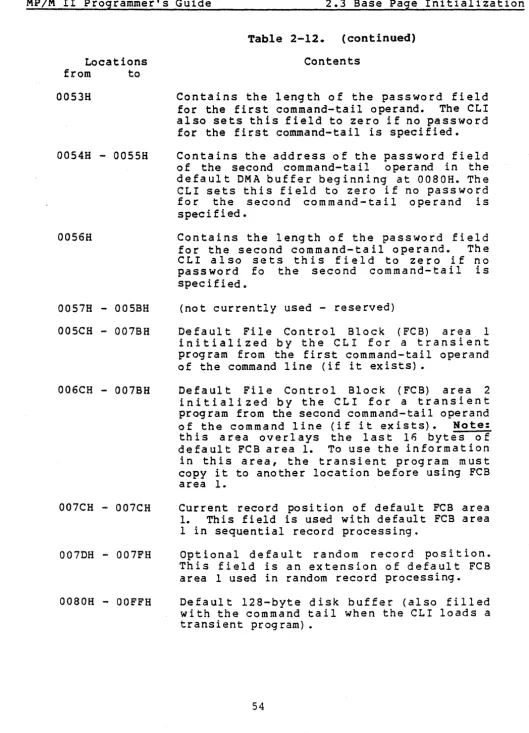
As part of the program load operation, the CLI initializes the memory segment base page as follows:
BASE+OOOH BASE+OOSH BASE+OSOH BASE+OSIH BASE+OS3H BASE+OS4H BASE+OS6H BASE+OSCH BASE+06CH BASE+080H
Direct XIOS and program termination jump BOOS and XDOS function jump
Command file drive
Password address of 1st file in the command tail Password length of 1st file in the command tail Password address of 2nd file in the command tail Password length of 2nd file in the command tail Parsed FCB for 1st file in the command tail Parsed FCB for 2nd file in the command tail Comma nd ta i I
During execution, a transient program makes BDOS or XDOS system calls by calling BASE+S. Direct XIOS calls are made with the jump at BASE+OOOH. Note: Direct XIOS calls are restricted to console and list I/O. All memory within the segment below the address contained in BASE+6 is available to the transient program. Thus, transient programs can use this address to size memory_ The remaining information placed into the base page is data parsed out of the command line. This information is provided as a convenience to the programmer and is covered in detail in Section 2.
When the CLI initiates a transient program, it assigns a 20-byte stack area to the process. This stack is initialized in such a way that if the program returns to the system, its execution is terminated. A process can also terminate execution with a jump to BASE+OOOH, a BOOS System Reset call, or an XDOS Terminate Process call.
le7 Resident System Processes
Resident System Processes (RSPs) are optional processes that can be included with MP/M II during system generation. There are two types of RSPs: standard and banked. A standard RSP is a page-relocatable file that has a filetype of RSP. When integrated into MP/M II, a standard RSP resides in the common memory region. A banked RSP consists of two p.ge-relocatable files, both of which have the same filename but have file type fields of RSP and BRS respectively. When a banked RSP is included in MP/M II, the RSP file loads into common memory, whereas the BRS file loads into memory segment 0 in bank O. Because all Process Descriptors and queues must reside in common memory, the common module of a banked RSP contains its Process Descriptor and any additional Process Descriptors and queues.
MP/M II Programmer's Guide 1.7 Resident System Processes
RSPs load into memory as part of the MPMLDR operation, and are initiated following the XIOS System Initialization call and prior to the initialization of the TMPs. Once initiated, an RSP runs like any other process in the system,. competing for the CPU and other system
resources on a priority basis.
If a RSP is to be invoked as a built-in command from the console command line, it must perform the following steps:
1) Make a queue with a message length sufficiently large to accept the command tail. The name of the queue is the command name of the RSP. Because the eLI converts command lines to upper-case, RSP queue names must be upper-case. If the CLI is to assign the console to the RSP, the RSP's Process Descriptor name must be the same as its queue name. 2) Make an unconditional Read Queue call to the queue. This
suspends the RSP on its queue's Enqueue List until the CLI writes it a command line message.
3) Perform its task by making SDOS and XDOS function calls using the command line message containing the current drive, user, list device and system console number obtained from the queue read. Note: An RSP does not make system calls by calling location 5. The system initializes the first two bytes of a standard RSP and the first two bytes of the common module of an extended RSP to contain the system entry point address. The system sets the first two bytes of the bank-zero module of a banked RSP to the beginning address of its corresponding common module. RSPs must use these addresses to make system calls.
4) After performing its task, the RSP must make an XDOS Detach Console call and an XDOS Detach List call if it is assigned the console by the CLI. It then returns to step 2 and awaits another command line.
Another special type of RSP is the Resident System Procedure. A Resident System Procedure provides a method of serially using a block o f cod e a s a s y s t e m res 0 u r c e • A Re sid en t S Y s t e m Pro c e d u rei sse t up by a RSP. The process creates a queue with the name of the Resident System Procedure and sends it a single two-byte message containing the address of the procedure to be accessed serially. Once this is accomplished, the RSP terminates itself.
MP/M II Programmer's Guide 1.8 BOOS and XOOS Calling Conventions
108 aDOS and XDOS Calling Conventions
MP/M II's BOOS and XDOS system functions can be accessed by both transient programs and RSPs. Transient programs make system calls via the primary entry point at lo~ation BASE+OOSH, where BASE equals the base address of the transient program's memory segment. Standard RSPs obtain the system entry point address from the first two bytes of the program. For banked RSPs, the first two bytes of the common module contain the system entry point address. The first two bytes of the bank-zero module contain the address of the common module.
MP/M II uses a standard protocol for system function calls. It is the same protocol used by CP/M. In general, when making a system call, register C contains the function number, and register pair DE contains the information address. Functions return single-byte values
in register A, and double-byte values in register pair HL. Any system call made with an out-of-range or non-supported function number returns a OFFFFH in register pair HL. Note: CP/M returns with HL set to 0 on invalid function calls. For compatibility, register A equals L and register B equals H upon return in all cases. The register passing conventions of MP/M II agree with those of Intel's PL/M systems programming language.
When entering a transient program, the system sets the stack pointer to a IO-level stack, with the address contained in BASE+OOIH pushed onto the stack. Thus, a return to the system is equivalent to a jump to BASE+OOOH .. Typically, this stack is sufficiently large to handle system calls. However, most transient programs set up their own stack and return to the system via a jump to location 8ASE+OOOH. Because of the way RSPs are integrated into the system, they must set up and initialize their own stackQ
The programmer should be aware that aDOS and XDOS function calls do not restore registers to their entry values upon return to the calling program. The responsibility for saving and restoring any critical register values rests with the calling process.
As an example, the following transient program illustrates how to make system calls. This program reads characters continuously until it encounters an asterisk, at which time it terminates execution by returning to the system.
ORG BASE EQU BDOS EQU CONIN EQU ORG NEXTC MVI CALL CPI JNZ RET END OOOOH $ BASE+OOOSH 1 IOOH C,CONIN 8DOS
'* ,
NEXTC;BEGINNING OF MEMORY SEGMENT ;MP/M II SYSTEM ENTRY POINT ;CONSOLE INPUT FUNCTION
iBASE OF TRANSIENT PROGRAM AREA iREAD NEXT CHARACTER FUNCTION
*
iRETURN CHARACTER IN A;END OF PROCESSING ;LOOP IF NOT
SECTION 2 THE aDOS INTERPACE
2.1 SDOS Console and List I/O Interface
A primary design objective of MP/M II has been to achieve CP/M compatibility. Thus, from the perspective of the applications program there are only minor differences between CP/M and MP/M II with regard to aDOS console and list I/O functions. These differences are described in Section 2.4, aDOS Function Calls.
Each program executing under MP/M II has a data structure called a Process Descriptor which defines the characteristics of the process. One byte of the Process Descriptor identifies the console and list I/O device numbers currently being used by the process. The high-order 4 bits of this byte, labeled the CONSOLE/LIST field, contain the list device number. The low-order 4 bits contain the console device number. The aDOS console and list I/O functions obtain the appropriate device number from the CONSOLE/LIST field of the Process Descriptor to call the XIOS console or list subroutine.
A process must be attached to a console or list device to access the device. This applies to both BOOS and direct XIOS function calls. MP/M II intercepts all BOOS and direct XIOS function calls for the console and list devices to determine if the specified device is attached to the calling process. The function call is permitted only if the device is currently unattached, or attached to the calling process. If the device is attached to some other process, MP/M II performs an XDOS Attach call for the specified device. The calling process then blocks, suspending execution, until the device is detached from the process owning the device and the calling process is the highest priority process requiring the device. Attaching a specific device to a process can be done explicitly by making XDOS Attach Console or Attach List calls, or implicitly by making BOOS and direct XIOS function calls which in turn force device attachment.
MP/M II maintains tables of processes currently owning the console and list devices. These tables contain Process Descriptor addresses. It is thus possible for one process to own several console or list devices by having its Process Descriptor address in several table entries. Multiple devices can be attached by repeatedly using the XDOS Set Console or Set List Device function call followed by an XDOS Attach call. Later, when actual I/O is to be performed, the specific console or list device must be set in the Process Descriptor by making an appropriate XDOS Set Console or Set List Device function call.
MP/M II Programmer's Guide 2.1 BOOS Console and List I/O
While performing BOOS console I/O functions, there are several ASCII control characters that cause MP/M II to take specific actions. The AC character can abort the process owning the console. The AD character forces the process owning the console to detach from the console, allowing another waiting process to gain access to the console, and then attaches the console again before continuing. The ~S and AQ characters are used to stop and re-start console display output. The AS character will cause console display output to be suspended. At that point a AQ can be typed to resume console display out put 0 r a ... C can bet yp edt 0 abo r t the pro c e s sow n i n g the con sol e • Typing and other key when output has been suspended will cause MP/M II to send the ASCII Bell character (AG) to the console.
2.2
enos
File SystemThe Basic Disk Operating System (BOOS) supports a named file system on one to sixteen logical drives. Each logical drive is divided into two regions: a directory area and a data area. The directory area defines the files that exist on the drive and identifies the data area space that belongs to each file. The data area contains the file data defined by the directory. The directory area is subdivided into sixteen logically independent directories, each identified by user numbers 0 through 15. In general, only files belonging to the current user number are "visible" in the directory. For example, the MP/M II OrR utility only displays files belonging to the current user number.
The BOOS file system automatically allocates directory and data area space when a file is created or extended and returns previously allocated space to free space when a file is deleted. If no directory or data space is available for a requested operation, the BOOS returns an error to the calling process. These actions are transparent to the calling process. As a result, the user does not need to be concerned with directory and drive organization when using the file system functions.
An eight-character filename field and a three character type field identifies each file in a directory. An eight character password can also be assigned to a file to protect it from unauthorized access. All BOOS functions that involve file operations specify the requested file by the filename and type fields. Multiple files can be specified by an ambiguous reference. An ambiguous reference uses one or more "?" marks in the name or type field to indicate that any character matches that position. Thus, a name and type specification of all "?"'s (equivalent to a command line file specification of "*.*") matches all files in the directory that belong to the current user number.
MP/M II Programmer's Guide 2.2 BOOS File System
subsequent access by read and write functions. After a file has been opened, subsequent aDOS functions can read or write to the file, either sequentially or randomly by record position. BDOS read and write commands transfer data in 128 byte logical units, which is the basic record size of the file system. The close function performs two steps to terminate access to a file. First, it indicates to the file system that the calling process has finished accessing the file. The file then becomes available to other processes. In addition, the function makes any necessary updates to the directory to permanently record the current status of the file.
BOOS directory functions operate on existing file entries in a drive's directory. This category includes functions to search for one or more files, delete one or more files, rename a file, set file attributes, assign a password to a file, and compute the size of a file. The BOOS search and delete'functions are the only functions that allow ambiguous file references. All other directory and file related functions require a specific file reference. The BOOS file system does not allow a process to delete, rename, or set the attributes of a file that is currently opened by another process.
BDOS drive-related functions include those which select a drive as the default drive, compute a drive's free space, interrogate drive status and assign a directory label to a drive. The directory label for a drive controls whether file passwords are to be honored, and the type of date and time stamping to be performed for files on the drive. Also included in this category are functions to reset specified drives and to control whether other processes can reset particular drives. When a drive is reset, the next operation on the drive reactivates i t by logging it in. The function of the log-in operation is to initialize the drive for file and directory operations .. Under MP/M II, a successful drive reset operation must be performed on drives that support removeable media before changing disks.
Mis c elI a n e 0 us fun c t ion sin c I ud e tho set hat set the cur r e n t D M A address, access and update the current user number, chain to a new program, and flush the internal blocking/deblocking buffer. Also included are functions to set the
aDos
multi-sector count and the BOOS error modee TheaDos
multi-sector count determines the number of 128-byte records to be processed by BOOS read,' write, record lock, andMP/M II Programmer's Guide 2.2 BOOS File System
The following list summarizes the operations performed by the
aDOS file system:
Disk System Reset Drive Selection File Creation File Open File Close
Directory Search File Delete
File Rename
Random or Sequential Read Random or Sequential Write Interrogate Selected Disks Set DMA Address , Set/Reset File Indicators Reset Drive
Access/Free Drive
Random Write With Zero Fill Lock and Unlock Record
Set Multi-Sector Count Set BDOS Error Mode Get Disk Free Space Chain To Program·
Flush Buffers
Set Directory Label
Read and Write File XFCB Set/Get Date and Time Set Default Password
Return BDOS Serial Number
The following sections contain information on important topics related to the aDOS file system. The reader should be familiar with the content of these sections before attempting to use the aDOS functions described individually in Section 2.4.
2.2.1 File Naming Conventions
Under MP/M II, filenames consist of four parts: the drive select code (d), the filename field, the file type field, and the file password field. The general format for a command line file specification is shown below:
{d:}filename{.tYP}{ipassword}