Cl 0::
«
::s::
Ud
l.LJ...J ~ l.LJ
:c
~ ~ Cl 0::«
::s::
u
«
a..
I--l.LJ ...J ~ l.LJ:c
~ ~ Cl 0::«
::s::
u
d
l.LJ...J ~ l.LJ
:c
~ E:1 Cl 0::«
::s::
u
«
a..
I--l.LJ ...J ~ l.LJ:c
~ ~ Cl 0::«
::s::
UCi
I--l.LJ ...J ~ l.LJ
:c
~ ~d "MU"tttlf
/"" HttbllbtwsttH _#++wa tMbt*&& i f IV.\« + Itt
Congratulations, you have just become the proud owner of a new Hewlett-Packard 9100B. Calculator. This calculator is a big brother to the successful Hewlett-Packard 9100A. The 9100B however, has several features which more than triple its computing power, these being:
1. A TWO PAGE memory allowing up to 392 program steps or 32 data storage registers.
2. A true SUBROUTINE capability permitting instant access to subroutines from any point in a program.
3. A convenient X..c-- ( ) operator allowing rapid data recall to the X register.
4. A STEP PROGRAM "dual display" greatly simplifying program editing and modification.
A detailed explanation of the use of these features is found in the 9100B Operating and Programming Manual (Hewlett-Packard Part No. 09100-90021) supplied with your calculator.
We hope you find the 9100B Calculator and Library a useful tool and guide for your computational work. To better serve you and other 9100 Calculator users, we welcome you to send us program solutions you have written. Please write them up in a format similar to the programs furnished in the Program Library and send them to us. Also send in any comments you might have on the 9100B Calculator and Program Library to our Applications Group. We at Hewlett-Packard look forward to serving you.
P.O. Box 301
Loveland, Colorado 80537
Sincerely,
HEWLETT-PACKARD COMPANY
~~~
Dave Cole Applications
INTRODUCTION TO LIBRARY
This Program Library is intended to illustrate practical problem solutions available with the 9100B Calculator. Approximately two thirds of the programs in this library are compatible with the 9100A Calculator. Those programs which are applicable only to the "B" calculator will have a 9100B ONLY above the program number.
Many programs are short enough so that they may be incorporated as subroutines in other programs. Each program consists of a description, equations (with references), examples and a list of the program steps. The programs have been placed in a three-ring binder with classification dividers so that changes, additions and reorganizations can be easily made. Each classification has a corresponding part number and each program within a category is numbered according to the classification part number.
In each Program Library Classification is found a listing of the programs in that section. The first grouping contains 9100A programs (with "AfT program numbers). The second grouping contains "B" only programs for that classification. An inspection of the first group program numbers will disclose that certain "A" programs have been removed from the "B" Library. These deleted programs have been replaced by more extensive "B" programs.
HP Part No. 09100-70000 09100-70800 09100-71000 09100-72000 09100-73000 09100-73200 09100-73700 09100-74000 09100-74200 09100-75000 09100-75200 09100-75500 09100-75800 09100-76000
PROGRAM LIBRARY CLASSIFICATIONS
Mathematics Statistics Electronics Mechanics Business Physics Thermodynamics Surveying Structures Fluid Mechanics Life Sciences Chemical Secondary Education Miscellaneous
You are invited to submit programs for inclusion in the Hewlett-Packard KEYBOARD, a periodic publication which contains useful information about the Hewlett-Packard 9100 Calculator systems. Submitted programs having a broad appeal or illustrating ingenious programming techniques will be included in the KEYBOARD with credit.
Please return the Program Library card (in the pocket on the rear cover) indicating the Program Library disciplines in which you are interested.
2
The following accessories are available: HP Part No.
09100-90020 09100-90021 09100-90022 09100-90024 5060-5919 4040-0350 9320-1183 9320-1184 9320-1185 9320-1186 9320-1187
Five Programming Pads
Operating and Programming Manual 9100B Program Library
Diagnostic Card and Envelope Box of Ten Magnetic Program Cards Dust Cover
c
c~
o
\JIm. i*+bt'fI b h h"'±"'+b'!t 'd'WfjuttNbdW
Program Library Usage
To facilitate the use of the 9100B Program Library, brief discussions of:
and
Manual Program Entry,
Program Loading from Magnetic Card, 9100B Peripherals
111 1'h I i ) ! d tl
are included here. The Operating and Programming Manual (HP Part No. 09100-90021) covers these topics in greater detail and should be consulted for further information.
Manual Program Entry
Initially, the program steps must be manually entered into the calculator step-by-step. Then, you may record the program on a magnetic card furnished with your calculator. The use of the magnetic card eliminates repeated manual re-entry. Programs recorded on the magnetic card may be entered instantly, using the ENTER
button on the calculator. Mter entering the program steps into the calculator, it is suggested that you use the sample data to verify test answers. If you do not get the correct answers, it is suggested that you carefully check each program step to see if the program is correctly entered into the appropriate location and/or re-read the user instructions. This may be done by comparing the step location and the code number to the printed program. You can do this very conveniently using the STEP PROGRAM key in the program mode.
Program Loading
In general, 9100B programs will occupy both the (+) and (-) calculator pages. The most efficient manner to load a 2-page program is to load Side A into the (+) page and Side B into the (-) program page. This can easily be accomplished by placing no END statements on the (+) program page. The END statement may be included on the (-) program page. Load the program as follows:
PRESS: END
ENTER PROGRAM: Side A
(Since there is no END on Side A, the calculator will advance to (- )(0)(0) automatically).
-ENTER PROGRAM: Side B
(With or without an END, the calculator will advance to (+)(0)(0) ready for execution) .
In the Program Library the above two instructions will be replaced by the single instruction: ENTER PROGRAM: Side A followed by Side B
To insure that an extraneous END statement does not get recorded on Side A, all unused registers on the (+) page should be filled with CONTINUE's prior to recording.
9100B Peripherals
Several peripheral devices are available to complement the 9100B Calculator, these being: 9125A
9120A 9160A 9150A
x -
Y Plotter PrinterOptical Card Reader Display Monitor
The "B" library has been written to simplify the attachment of the 9125A and 9120A to the 9100B. At appropriate input and output points in a program CONTINUE's have been placed for use in calling the printer or plotter. In most cases the plotting programs incorporate plotting Subroutines allowing the user to specify units in terms of inches, or centimeterso
3
-9100B/ 9100A Program Library Cross-Reference
The 9100B Program Library contains several B Only programs which previously were "A" programs. These programs were either multiple pass or storagelIiiiIted on the 9100A Calculator. After conversion, these programs offer the advantages of being single pass, having ample storage, and in some cases yielding plotted output. The table given below lists these converted programs.
-"A" Library Part Number Program Title "B" Library Part Number 70015 NUMERICAL INTEGRATION USING 70409
SIMPSON'S RULE WHEN f(x) IS KNOWN
70018 CONVOL UTION 70408
70019 4th OR 5th DEGREE POLYNOMIAL 70405 ROOTS
x
70020 INTEGRAL OF THE FORM F(X)
=
f
f(u)du 70410A
70810 WEIBULL DISTRIBUTION PARAMETER 70902 CALCULATION FOR FAILURE DATA
70814 MULTIPLE LINEAR REGRESSION 70901 70815 NON-LINEAR REGRESSION-LEAST 70903
SQUARES PARABOLA
71002 TCHEBYSHEFF FILTER DESIGN-- 71501 FINITE TERMINATIONS
71011 S PARAMETER TO Y PARAMETER 71502 CONVERSION
74008 COORDINATE GEOMETRY AND 74102
ENCLOSED AREA
74011 TRAVERSE WITH COMPASS RULE 74101 ADJUSTMENT OPTION
4
('--\
o
0::: <C ~ U <CC~
I-l.LJ ...J
3:
l.LJ::r.:
~ ~MATHEMATICS 09100-70000 70001 - n!
Calculates n! for positive integer n. (n < 70) 70002 - POLYNOMIAL EVALUATION
Evaluates polynomials of the form:
t+#LMWt"rWMF!!Ww't¥fS'"!t'! #t Hdtd±Hktt:tltb+wf.HW tlm"W Ott II
!,
f(z) = Cnzn + Cn_1Zn- 1 + . . . + C1z + Co for complex Ci ' i=l, ... , n and complex z.
70003 - NUMERICAL INTEGRATION USING SIMPSON'S ONE-THIRD RULE Uses Simpson's rule to obtain the area under a curve. The equation used is:
h
A =
"3
(YO + 4Y 1 + Y 2)70006 - 1st ORDER DIFFERENTIAL EQUATIONS Solves differential equations of the form:
Y I
=
f(x, y)70007 - RAISING A NUMBER TO A POWER Solves the equation:
70008 - 2nd ORDER DIFFERENTIAL EQUATIONS Solves differential equations of the form:
y"
=
f(x, y, y/)70009 - QUADRATIC EQUATION Solves ax2 + bx + c
=
0 for the roots.PI'li Iii"t" ",," I i
70010 - FINITE DIFFERENCE INTERPOLATION USING GAUSS'S BACKWARD FORMULA Uses Gauss's backward formula for interpolation in tabular data with equal abscissa spacing. The program fits a cubic equation through the tabular data.
70011 - CUBIC EQUATION Solves x3 + px2 + qx + r 70013 - FACTORS OF n
o
for the real and complex roots. Gives all factors of an integer no70014 - REAL ROOTS OF f(x)
Calculates real roots of f(x) by starting from Xo and incrementing until f(x) changes sign, then converges on the root. f(x) is programmed in by the user.
70016 - SIMULTANEOUS SOLUTION OF TWO EQUATIONS IN TWO UNKNOWNS The program solves two independent equations of the form:
ax+by = e cx + dy = f
x and yare the unknowns to be found.
PRINTED IN U.S.A.
_ _ i'ZVEa:tilUU: :
1
MA THEMA TICS (CON'T)
2
12 70017 - n! (n < 10 )
Calculates n! for positive integer n.
70021 - POLYNOMIAL EVALUATION (1 ~ n ~ 10)
Repeatedly evaluates for a given x, a real polynomial of the form: f() x
=
AnX n A + n- 1 x n-1 . . . 1 x A + A 0 f or 1 - n -< < 1070022 - 3 X 3 MATRIX INVERSION OR SIMULTANEOUS SOLUTION OF THREE EQUATIONS IN THREE UNKNOWNS
Solves three linear independent equations in three unknowns simultaneously or inverts a 3 x 3 matrix.
70023 - FOURIER SERIES
Calculates the Fourier Series coefficients that represent a periodic time function f(t) with period T. The specific f(t) is programmed into the calculator by the user.
70024 - GAMMA FUNCTION Evaluates the gamma function 70025 - BESSEL FUNCTION
f(v) for 0 :5
v
~ 109 where(X)
f(v)
=
J
e-t tV- 1dt oCalculates the value of the Bessel function In(x) of the first kind of integer order n where x2 k
(- 4)
L
k
=
0 k! (n + k) ! 70401 - HYPERGEOMETRIC SERIES EXPANSIONGiven a, b, and c, this program determines the coefficients of the hypergeometric series F(a, b, c; X). This program is useful in solving Gauss's differential equation. 70402 - (3 X 3) MATRIX MULTIPLICATION
Given two (3 x 3) matrices A and B, this program determines the product matrix C = A. B . 70403 - ROOTS OF A 4th DEGREE POLYNOMIAL
This program determines the roots (real and complex) of a 4th degree polynomial of the form X4 + a1x3 + a2x2 + a3X + a4
where ai is real.
70404 - NUMERICAL SOLUTION OF TWO FIRST ORDER DIFFERENTIAL EQUATIONS This program may be used to solve a wide variety of pairs of first order differential equations of the form
: f(X, Y,Z), dz
dx
=
g (X, Y, Z) .70405 - ROOTS OF A 6th DEGREE POLYNOMIAL
The program determines the roots (real and complex) of a 6th degree polynomial of the form X6 + a1x5 + a2x4 + a3 x3 + a4x2 + a 5X + a6
where ai is real.
70406 - CHARACTERISTIC EQUATION OF A (3 X 3) MATRIX AND EIGENVALUE DETERMINATION Given a (3 x 3) matrix A, this program computes the characteristic equation
>., 3 + p >.,2 + q A + r = 0
and then determines the eigenvalues by using Program 09100-70011 as a Sub-Program.
-()
,-
..~'bWMIDI.!W.WWIeJ!"M.'bl.NWtI!ltjMHtItad*\. 1 h±*!'t\"NHtWIl"'Wk'*d#WMt!MfthrlW% 'HhlL!HIWWI'MW'M"' "tit,S!,," ,t 'it Iii MHLl!iHtIltWW!L"'¥f til'bt±\',Mb*'t H,NriW*Iri.. It. LI."!II ' .... - ... ¥H+ ... "j'Sd.MW'M/hlhWWrlM eml'H +w,' +lA'8!11h"'IHI I t , n"WHI I HI HUlWU '
o
o
o
MATHEMATICS (CON'T)
70407 - SIMULTANEOUS SOLUTION OF FOUR LINEAR EQUATIONS IN FOUR UNKNOWNS Given a system of four linear equations in four unknowns defined by the matrix equation
this program uses Cholewski's method to determine the Xi'S. 70408 - CONVOLUTION INTEGRAL WITH PLOT
This program evaluates and plots y(t), the convolution of e(t) and h(t). Mathematically
t
y(t)
=
f
e ( T) h(t - T ) d T •o
70409 - NUMERICAL INTEGRATION USING SIMPSON'S RULE WHEN f(x) IS KNOWN
The specific f(x) is programmed into the calculator by the user and is then used by the general solution to evaluate the integral. Execution time is dependent on the number of panels. Note f(x) should not have any singularities in the integration interval.
x
70410 - INTEGRAL OF THE FORM: F(x)
=
AI
f (u) du WITH PLOTThis program calculates the integral of a known function f(u) between any lower limit A and a successively incremented upper limit X. Simpson's rule is used to perform the integration. A special application of this program is when f(u) is a probability denSity function. F(x) then represents the cumulative distribution function.
70411 - MAX - MIN OF Z
=
Z(X, Y)This program determines the approximate range of a function Z of two independent variables X and Y given a range for X and Y. This program can be used in conjunction with Program 09100-70412, PLOT OF Z
=
Z(X, Y).70412 - PLOT OF Z
=
Z(X, Y)Given a function Z of two independent variables X and Y, this program creates a three dimensional plot over a prescribed range of X and Y.
STATISTICS 09100-70800
70801 - MEAN AND STANDARD DEVIATION
Calculates the mean and standard deviation of n data points. 70802 - STANDARD DE VIA TION AND MEAN OF GROUPED DATA
Calculates the mean and standard deviation of data points of certain frequencies. 70803 - LINEAR REGRESSION
Calculates the best fit of a set of data pOints to the line y
=
ax + b, i. e., the program computes the estimates ~ andb.
It also gives the correlation coefficient r.70804 - NORMAL PROBABILITY INTEGRAL
Evaluates the integral under the normal density function.
70805 -
X2
-
CHI SQUARE DISTRIBUTION2
Calculates the integral of the Chi Square distribution from 0 up to a value of
X
for a given number of degrees of freedom.2
70806 -
X -
CHI SQUARE EVALUATION EXPECTED VALUES EQUAL (Ei=
E) Chi square calculation where the expected value of each observation is equal. 70808 -X2 -
CHI SQUARE EVALUATION EXPECTED VALUES UNEQUAL (Eif
Ej)Chi square calculation where the expected values of the observations are not necessarily equal. 70811 - LEAST SQUARES FIT-POWER CURVE
Calculates coefficients fitting data pOints (xb Yi) to an equation of the form: y
=
axb3
STATISTICS (CON'T)
4
70812 - LEAST SQUARES FIT-EXPONENTIAL
Calculates coefficients fitting data points (xi, Yi) to an equation of the form: y
=
aebx 70813 - POISSON DENSITYCalCulates the various summations associated with the Poisson density to give a probability based on an input parameter and summation endpoints.
70816 - RANDOM NUMBER GENERATOR
Random numbers (RN) in the range 0 ~ RN ~ 1 are calculated; more than 10,000 random numbers may be generated before any previous value is repeated.
70901 - MULTIPLE LINEAR REGRESSIONS
Given a set of data points (Xi' Yi , Zi), this program determines the coefficients of the linear equation
70902 - WEIBULL DISTRIBUTION PARAMETER CALCULATION FOR FAILURE DATA Calculates the parameters for the Weibull distribution and thus estimates of times to failure percentages may be made.
70903 - NON-LINEAR REGRESSION - LEAST SQUARES PARABOLA Calculates coefficients fitting data points (xb Yi) to an equation of the form:
y
=
aO + a 1x + a2x270904 - NORMAL (GAUSSIAN) CURVE PLOT
Given mean (M) and variance (J" '2 , this program generates a normal curve given by
1 y
=
(J",.f2-iT
e2
-(X - M)
2 (J" 2
This program can be used with Program 70905, Histogram Generation. 70905 - HISTOGRAM GENERATION WITH PLOT
This program generates and RIots a histogram of ten windows given a set of positive numbers. The mean M and variance (J" 2 of the data set are computed and stored for use by Program 70904,
NORMAL CURVE PLOT.
70906 - HISTOGRAM GENERATION
This program generates a histogram table of ten windows given a data set of positive numbers.
In addition it determines the mean M and the variance (J" 2 of the data set.
70907 - ONE WAY ANALYSIS OF VARIANCE
This program separates the total variance in a table of data into that due to chance
and that due to differences between the population means underlying each column of sample data. 70908 - F DISTRIBUTION
This program evaluates the F distribution density function for given values of F, V 1, and V 2' 70909 - TWO WAY ANALYSIS OF VARIANCE (m X 4)
This program analyses the total statistical variance in a table of data by separating the total variance into two parts, the variance among rows, and the variance between columns. These variances are then compared to the variance due to random influence.
70910 - TWO WAY ANALYSIS OF VARIANCE WITH REPLICATES
This program analyses the total statistical variance of a table of data by separating the total variance into three parts; the variance among rows, the variance between columns, and the variance due to interaction.
ELECTRONICS 09100-71000
o
c
71001 - TCHEBYSHEFF FILTER DESIGN
Calculates component values for Tchebysheff low pass filters with equal terminations. 71003 - BUTTERWORTH FILTER DESIGN
Calculates component values for Butterworth low pass filters between equal terminations. 71004 - MINIMUM LOSS PADS
Calculates resistive minimum loss pad and gives resistor values and loss in dB. 71005 - TCHEBYSHEFF EVALUATION
Used to determine filter order or the frequency response of a particular Tchebysheff filter. 71006 - A TTENUATOR PADS
T
ORIT
Calculates resistor values for either
T
orIT
pads. 71007 - BAND PASS FILTER DESIGNCalculates ideal component values and evaluates the frequency response by the image parameter method for a band pass filter.
71008 - STUB MATCHED TRANSMISSION LINE
Calculates the distance from a load to a point where a shorted stub is to be placed and the length of the stub to match a transmission line.
71009 - TRANSM1SSION LINE
Calculates the impedance at any point on a transmission line either toward the generator or toward the load, the voltage reflection (magnitude and phase) and the VSWR on the line. 71010 - WYE -+DELTA AND/OR DELTA-+WYE CONVERSION
Transforms impedances wired in delta configuration to the equivalent wye configuration and vice-versa. Loop and nodal analyses are used to perform the transformations.
71501 - TCHEBYSHEFF FILTER DESIGN - FINITE TERMINATIONS
Calculates component values for Tchebysheff low pass filters with finite terminations (equal or unequal).
71502 - S PARAMETER TO Y PARAMETER CONVERSION
Converts S parameters for linear (active or passive) circuits to Y parameters. 71503 - FREQUENCY RESPONSE FROM POLES AND ZEROES WITH PLOT
Given the zeroes and poles of a complex function f(s), the magnitude and phase response is computed over a specified frequency range. The program can consider any combination of six poles and zeroes of the form ri + jw.
MECHANICS 09100-72000
o
72002 - TRANSCENDENTAL EQUATION (ARC INVOLUTE IN GEAR DESIGN) Solves for the angle c:P in radians in the following expression
INV (c:p)
=
TAN c:p -cp
where the INV (cp) is given. 1x10-17 < c:p < 1x10⁶ (cp is in radians). 72003 - SPRING DESIGN - COMPRESSION AND EXTENSION SPRINGS
This program calculates one of three variables (d - diameter of Wire, N - number of turns of wire, and D - mean coil diameter), the remaining two being set, and calculates the maximum allowable stress. Other inputs are set to predetermined values.
72004 - STRESS AND STRAIN FROM A RECTANGULAR ROSETTE
Calculates the principal strains and stresses given rectangular rosette and strain gauge inputs. 72501 - PROPERTIES OF AREAS
This program determines the properties of any area which can be approximated by a set of rectangles. The properties determined are:
1. Area 3. Distances from axes to the centroid 2. Moments of inertia 40 Products of inertia about the centroid
&&llR •• AMalle.lNaC ,.; au. M=*".saars Ott e, M W 4¥A ij ; \
5
BUSINESS 09100-73000
73001 - ANNUAL INTEREST
Calculates i that satisfies the equation: P i(1 + i)n
R
(1 + i)n - 1 73008 - AMORTIZED LOAN
Calculates the monthly payment on the principal of a loan for a specified term, the amount of payments toward principal and interest, and a running total of the amount of payments toward principal and interest to date.
73101 - RETURN ON INVESTMENT FOR UP TO 16 VARYING CASH FLOWS This program solves for the value of interest per period for up to sixteen varying cash flows. The program solves the equation:
16 PV (Present Value)
=
L
k
=
1 (1 + i)k where Ck represents a cash flow per period. PHYSICS 09100-7320073202 - FLUX DENSITY
Calculates the flux density along an axis of a circular loop for a specified radius r, current I, and distance d.
~d
73203 - VENTURI METER
Calculates flow Q by using Bernoulli's equation. 73204 - ORBITAL MECHANICS
Calculates the velocity of a satellite at apogee and perigee and the orbital time in seconds of a satellite orbiting a body in space.
THERMODYNAMICS 09100-73700
73851 - HEAT TRANSFER THROUGH A MULTILAYERED CYLINDER
This program calculates the rate of heat flow through a multilayered cylinder. Both convective and conductive layers are considered.
73852 - TRANSIENT CONDUCTION IN A SLAB
Given the initial temperature of a sUtb and a fluid, this program determines the temperature (as a function of time and distance) of the slab as it is immersed into the fluid.
SURVEYING 09100-74000
74003 - INVERSE TRAVERSE FROM COORDINA TES
Calculates bearing, distance, and quadrant code from end-point coordinates.
", " ' tt !"1m? t i t
SURVEYING (CON'T)
o
74004 - THREE POINT PROBLEM
Calculates the coordinates of an observer's position given coordinates of three other points and two reference angles to the observer's position.
74101 - TRAVERSE WITH COMPASS RULE ADJUSTMENT OPTION
Traverses by bearing and distance, calculates coordinates, closure error, total traverse distance and precision ratio. The program may then be used to distribute the closure error by the Compass Rule.
74102 - COORDINATE GEOMETRY AND ENCLOSED AREA
Traverses by bearing and distance and calculates coordinates, enclosed area, and the following curve data:
1. Arc length 3. Central angle in decimal degrees 2. Chord length 4. Coordinates of tangent points STRUCTURES 09100-74200
74203 - CANTILEVER BEAM - INTERMEDIATE LOAD Calculates shear, moment, and deflection.
74204 - CANTILEVER BEAM - TRIANGULAR LOAD Calculates shear, moment, and deflection.
74205 - COORDINATES OF EQUALLY SPACED POINTS ON A CIRCLE
Computes the rectangular coordinates of equally spaced points on a circle given the center point coordinates, radius and offset angle of the circle, and the number of coordinate points desired on the circle.
FLUID MECHANICS 09100-75000
o
75001 - CHEZY -MANNING EQUATIONFinds channel flow when channel is circular pipe and flowing full. 75003 - RECTANGULAR WEIR
Calculates the rate of fluid flow over a rectangular weir. 75004 - WATER FLOW IN PIPE
Calculates the loss factor (f) and the head loss for a pipe of specified dimensions with a known flow rate a
LIFE SCIENCES 09100-75200 75201 - RADIOACTIVE DECAY
Calculates the mass loss between any two times given the half-life, initial mass and present mass; displays the decay curve; or calculates the age of the mass based upon the present mass. CHEMICAL 09100-75500
0 '"
, '75502 - ELEMENTAL PERCENTAGE AND MOLECULAR WEIGHT - 6 ELEMENT
Calculates percentages and molecular weight of compounds containing 6 elements or less. 75503 - CHN ANALYSIS [K VALUES]
Calculates K values given C, Hand N, blank values, and percentages for a known standard. 75504 - CHN PERCENTAGES
Given C, H, and N values and using previously calculated K values and known blank values, calculates C, Hand N percentages.
&aaa_MaG.;.' "anitA 4:"5" 4.;:;; Ail;; , i a (
7
CHEMICAL (CON'T)
75505 - MOLECULAR WEIGHT BY VPO
Calculates molecular weight for an unknown based on a series of vapor pressure osmometer (VPO) readings at various dilutions by extrapolating a least squares curve fit to infinite dilution.
75506 - MEMBRANE OSMOMETER
Determines the number-average molecular weight by extrapolating a least squares curve fit to infinite dilution.
SECONDARY EDUCATION 09100-75800 75802 - PRIME NUMBERS
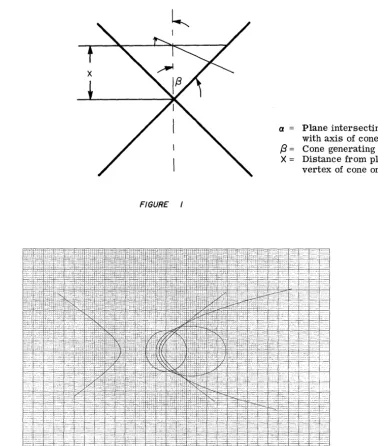
Calculates all prime numbers between any two numbers. 75901 - CONIC SECTION DETERMINATION WITH PLOT
Given the generating angle of a cone,
/3 ,
and the intersection angle with a plane, a , this program determines and plots the conic section.MISCELLANEOUS 09100-76000
8
76003 - NA VIGA TIONAL COURSE CALCULATION
Calculates course settings for one or more adjoining legs of a proposed journey, the length of each leg, and the total distance covered on completion of the journey.
76004 - CIRCLE DETERMINED BY THREE POINTS
Calculates the radius and center point (in rectangular coordinates) of the circle defined by three given points.
76005 - AREA OF A RECTILINEAR SURFACE POLYGON
Calculates the area of any rectilinear polygon given the rectangular coordinates of the vertices. 76501 - DIAGNOSTIC (EXERCISER)
The program exercises each calculator operation and memory location with the exception of the FMT, PRINT, and error conditions.
-t t 'dH tt&Irl'rit!' ,,"liP "'IIW,.,HfY'"Jt filM rY,,"IIU"'IIflfrge .Wlt!!' 11m i " ' '\lHtl'hw Hit'!",. I ,"r Q
c:::
<C ~u
d
w
....J
3:
w
:c
~t::1
Qc:::
<C ~ U <Ca..
l- I-W ....J3:
w
:c
~t::1
Qc:::
<C ~u
d
I-W ....J
3:
w
:c
~ E:1 Qc:::
<C ~ U <Ca..
1-. I-W ....J3:
w
:c
~t::1
Qc:::
<C ~ Uq
I-W ....J3:
w
:c
~t::1
70001 - n!
Calculates n! for positive integer n. (n < 70) 70002 - POLYNOMIAL EVALUATION
Evaluates polynomials of the form:
f( ) Z = Cnz n + Cn_1z n-1 + . • . + C1z + Co
for complex Ci , i=1, .. 0 , n and complex z.
70003 - NUMERICAL INTEGRATION USING SIMPSON'S ONE-THIRD RULE Uses Simpson's rule to obtain the area under a curve. The equation used is:
h
A =
"3
(YO + 4Y 1 + Y 2)70006 - 1st ORDER DIFFERENTIAL EQUATIONS Solves differential equations of the form:
Y I = f(x, y)
70007 - RAISING A NUMBER TO A POWER Solves the equation:
Z 3
=
Z1 Z2 were i h Z=
Xi + JYi i .= , ,
1 2 3 70008 - 2nd ORDER DIFFERENTIAL EQUATIONSSolves differential equations of the form: y II = f(x, y, y I)
70009 - QUADRATIC EQUATION Solves ax2 + bx + c
=
0 for the roots.70010 - FINITE DIFFERENCE INTERPOLATION USING GAUSS'S BACKWARD FORMULA Uses Gauss's backward formula for interpolation in tabular data with equal abscissa spacing. The program fits
a
cubic equation through the tabular data.70011 - CUBIC EQUATION
Solves x3 + px2 + qx + r = 0 for the real and complex roots. 70013 - FACTORS OF n
Gives all factors of an integer n. 70014 - REAL ROOTS OF f(x)
Calculates real roots of f(x) by starting from Xo and incrementing until f(x) changes sign, then converges on the root. f(x) is programmed in by the user.
70016 - SIMULTANEOUS SOLUTION OF TWO EQUATIONS IN TWO UNKNOWNS The program solves two independent equations of the form:
ax+by = e cx + dy = f
x and yare the unknowns to be found.
MATHEMATICS (CON'T) 70017 - n! (n < 1012 )
Calculates n! for positive integer n.
70021 - POLYNOMIAL EVALUATION (1 $ n ~ 10)
Repeatedly evaluates for a given x, a real polynomial of the form:
n n-1
f(x) = Anx + An_1x ••• A1x + AO for 1 $ n $ 10
70022 - 3 X 3 MATRIX INVERSION OR SIMULTANEOUS SOLUTION OF THREE EQUATIONS IN THREE UNKNOWNS
Solves three linear independent equations in three unknowns simultaneously or inverts a 3 x 3 matrix.
70023 - FOURIER SERIES
Calculates the Fourier Series coefficients that represent a periodic time function f(t) with period T. The specific f(t) is programmed into the calculator by the user.
70024 - GAMMA FUNCTION
Evaluates the gamma function r(lI) for 0 $ II $ 109 where
co
r
(II) =of
e-tt 1I-1dt 70025 - BESSEL FUNCTIONCalculates the value of the Bessel function In(x) of the first kind of integer order n where
x
n
co (_~2
)k In(x)=(-2 )
L
k
=
0 k! (n + k) ! 9100B ONLY2
70401 - HYPERGEOMETRIC SERIES EXPANSION
Given a, b, and c, this program determines the coefficients of the hypergeometric series F(a, b, c; X). This program is useful in solving Gauss's differential equation. 70402 - (3 X 3) MATRIX MULTIPLICATION
Given two (3 x 3) matrices A and B, this program determines the product matrix C ;; A· B • 70403 - ROOTS OF A 4th DEGREE POLYNOMIAL
This program determines the roots (real and complex) of a 4th degree polynomial of the form X4 + a1x3 + a2x2 + a3X + a4
where ai is real.
70404 - NUMERICAL SOLUTION OF TWO FmST ORDER DIFFERENTIAL EQUATIONS This program may be used to solve a wide variety of pairs of first order differential equations of the form
dy
dx f(X, Y, Z) ,
az
dx = g(X,Y,Z).
70405 - ROOTS OF A 6th DEGREE POLYNOMIAL
The program determines the roots (real and complex) of a 6th degree polynomial of the form X6 + a1x5 + a2x4 + a3x3 + a4x2 + a5X + a6
where ~ is real.
c
\.
c
c
o
MATHEMATICS (CON'T) 9100B ONLY
70406 - CHARACTERISTIC EQUATION OF A (3 X 3) MATRIX AND EIGENVALUE DETERMINATION Given a (3 x 3) matrix A, this program computes the characteristic equation
A3 + p A2 + q A + r = 0
and then determines the eigenvalues by using Program 09100-70011 as a Sub Program. 70407 - SIMULTANEOUS SOLUTION OF FOUR LINEAR EQUATIONS IN FOUR UNKNOWNS
Given a system of four linear equations in four unlmowns defined by the matrix equation [Aij] [XiJ = [Pi],
this program uses Cholewski's method to determine the Xi's. 70408 - CONVOLUTION INTEGRAL WITH PLOT
This program evaluates and plots y(t), the convolution of e(t) and h(t). Mathematically
t
y(t) =
J
e ( T) h(t - T ) d T • o70409 - NUMERICAL INTEGRATION USING SIMPSON'S RULE WHEN f(x) IS KNOWN
The specific f(x) is programmed into the calculator by the user and is then used by the general solution to evaluate the integral. Execution time is dependent on the number of panels. Note f(x) should not have any singularities in the integration interval.
x
70410 - INTEGRAL OF THE FORM: F(x) =
AI
f (u) du WITH PLOTThis program calculates the integral of a known function f(u) between any lower limit A and a successively incremented upper limit X. Simpson's rule is used to perform the integration. A special application of this program is when f(u) is a probability density function. F(x) then represents the cumulative distribution function.
70411 - MAX - MIN OF Z = Z(X, Y)
This program determines the approximate range of a function Z ofl two independent variables
X and Y given a range for X and Y. This program can be used in conjunction with Program 09100-70412, PLOT OF Z = Z(X, Y)o
70412 - PLOT OF Z = Z(X, Y)
Given a function Z of two independent variables X and Y, this program creates a three dimensional plot over a prescribed range of X and Y.
b' N,t t t t rldftttNftWN't",Wff#¥WWW mrS!! I I 'tt"WfwwfflftrdltMW" 'W''''' Cl 0:::
«
~u
d
I-w
....I
3:
w
:c
Im',"'rr:nrrn'NVtW)!P ttt!! ! , 'UfI"U f "!I"[,ftj " lfI"W"'''ffi8!!fllft)'$''fL'', "IC"II "{tHe W"I"W"Wbw '¥±ti+'!' I'JI'P'I" I"'" W'RnWH I ' 'P'If'!'f""P'[ I' ",,"5'
~
E:1 This program calculates n~ for integer n where
0
~n
~69.
Cl
0:::
«
G
n!=n(n-1)···3·2·1
«
a..
l- I-W ....I3:
w
:c
~ ~ Cl 0:::«
~u
d
I-w
....I3:
w
:c
~ ~ Cl 0:::«
~u
«
a..
l- I-W ....I3:
w
:c
~ ~ Cl 0:::«
~d.
09100-70001
EXAMPLES
O~
=
16!
=
720USER INSTRUCTIONS
ENTER PROGRAM (Starting Address is 0-0) PRESS: GO TO (0) (0) [or END]
~PRESS: CONTINUE ENTER DATA: n ---- X PRESS: CONTINUE DISPLAY
0 - - Z
n~-- Y
n - - X
c
c
0
a
0
ROLL ' "
F
ENDc
N
N
PAGE 1
o
ENTER 1
N!
Denotes Revisionl
i
JULY, 1969
PART NO.
09100-70001
o
o
c:::
«
~
u
d
w
....I ~ W:::c
~t:::l
o
c:::
«
~u
«
a..
I--W ....I ~ W:::c
~t:::l
o
c:::
«
~u
d
I--W ....I ~ W
:::c
~t:::l
o
c:::
«
~u
«
a..
I--W ....I ~ W:::c
~t:::l
o
c:::
«
~u
a
I--w
....I ~ W:::c
~t::J
This program evaluates polynomials of the form
n
n-1
f(Z)=C n Z
+
Cn-
1Z
+ ... +
C
1Z + Co
for complex
C
i ,
=0,1; .. ,
n
and complex Z.---09100-70002
EXAMPLES
P(Z)
=
(3 + 4i)Z2 + (-2 + i)Z1 + (1 - i) for Z=
2 + i ReZ=
2 IrnZ=
1P(2 + i) = -11 + 23i
P(Z)
=
49. 6Z 4 + 18Z3 + 52. 4Z2 + 8Z + 12.8 for Z=
i ReZ=
0 IrnZ=
1P(i)
=
10 - 10iGENERAL FORM
USER INSTRUCTIONS
ENTER PROGRAM (Starting Address is 0 - 0) PRESS: GO TO (0) (0) [or ENDl
.---i __ PRESS: CONTINUE
DISPLAY
0 - - Z
o
- - Y1 - - X
ENTER DATA: n --... Z, Irn Z --. Y, Re Z --... X
~PRESS: CONTINUE DISPLAY
0
- -
Z 0 - - Y ni- -
Z ni is an indicator or coefficient entry number. When ni=
0 enter Co. ' - -ENTER DATA: 1m Cni --. Y,ReCni - - + X PRESS: CONTINUE
DISPLAY
o
Z
' - - - 4 IrnP(Z) Y
ReP(Z) X
c
PART NO.
09100-70002
Sf:0iP K0iY
X
y
c
0
10
CLEAR 20I "1
1
01DISPLAY
STOP 41
ReZ
ImZ
n
13
TO POLAR4
X-+( J5
d
STORE DA A
BRANCH
ReCnj
ImCnj
o
PAGE 2
PART NO.
09100-70002
x
y
RECALL
(Z).be• iHifhM'fllt'l"i!i"!"'@U!1g,!!!!·wl M 'W!ItIt ""f! ""V"""'II" ruw ' f f ! ti H • • te'OCt'
o
a::::
«
~u
C
~
I-W ..J3:
w
I ~ ~o
a::::
«
~u
«
a..
l- I-W ..J3:
w
I ~ ~o
a::::
«
~u
d
I-W ..J
3:
w
I ~ ~o
a::::
«
~u
«
a..
l- I-W ..J
3:
w
I ~ ~o
a::::
«
~u
a
I-W ..J
3:
w
I ~ ~This program evaluates the area under a curve represented by discrete points. The equation used is Simpson's One-Third Rule ie.,
X2
f
f(x)dx
=
~
(YO+ 4Y
1
+ Y
2 ) -
~O
h
5 f(4l(e-)
Xo
where
X
0<
e-
<
X
2Graphically the integration is performed over two panels (each of width h) as shown below
Y
f(x)
~---~~~,~~---~X
I
Xo XI X2
--':h:'-
II
The application of Simpson's Rule over 2n panels between
Xo= a
,andX
2n= b
givesI
bh
a
f(x)dx
=
3 (Yo+ 4 Y
1+2Y
2+4 Y
3+2Y
4+ "'+4 Yn-
I+ Y n )
I~O
(b-a) h
4
f(4l(e-)
where
a<~
< band f(4)(t) is the fourth derivative of f(x) evaluated att .
Thus to use the program divide the abscissa into 2n panels. (The method requires an even number of panels of width h.) Since the error term is neglected, choose h (the distance between points) such that the error term
is small. Usually h«
1
when f(4)(t) is unknown.Reference: Numerical Analysis by Kaiser S. Kunz
09100-70003
USER INSTRUCTIONS
ENTER PROGRAM (Starting Address is 0 - 0) PRESS: GO TO (0) (0) [or END]
PRESS: CONTINUE DISPLAY
o
z
o
Y
1
- - x
ENTER DATA: h - + X PRESS: CONTINUE DISPLAY
o
o
z
Y
2 X
ENTER DATA: Xo - - + X PRESS: CONTINUE DISPLAY
z
Y
X
Note: Subsequent Xi's are calculated from Xo and hand are not entered. A - the area shows every other time
starting after third y entry
(Corresponds to calcu-ENTER DATA: Yi ---. X latedXi displayed in Y) PRESS: CONTINUE (To restart a new
prob-lem PRESS: END, PRESS: CONTINUE) To Change Increment (new h)
This can only be done if area or Z register is blank
ENTER DATA: Yi - - . X PRESS: SET FLAG PRESS: CONTINUE DISPLAY
---
o
Z
o
Y
1 X
ENTER DATA: new h--. X
PRESS: CONTINUE (Program branches to area display and ordinate entry. Proceed as before. ) X
o
.25
.50 .75 1. 001.
25
1. 50 1. 752.00
Xo
.25
.50 .75 1. 00 1. 502.00
EXAMPLES INCREMENT CONSTANTY 2
2.8
3.8
5.2
7.0
9.2
12.1
15.6
20
h
=.25
2
J
f(x)dx =
16.
58o
INCREMENT CHANGE
Y 2
2.8
3.8
5.2
7.0
h
=
.25
12.1l
~
2
I
f(x )dx =
16.62
oh
=
.5c
PAGE 1
PART NO.
09100-70003
y
z
c
Tel> INDICATE
F
RST DATA
1
o
o
BRANCH WiHEN CHANGE h
T
INDICATE
Xo
0
Yo
Xo
o
c
CALCULA E Xi
=X i-I h
Xi
AREA i-I
Xi+ h
o
PAGE 2
PART NO.
09100-70003
x
y
z
SUM A T
PREVIOUS AREA
\ ;/
BRANCH
ORDINATE
-· ..
···-AT·--··SAM~~tf"1:~tt:"t\tT-r---·-·-~-···l····--···t----~ ... -... + .. _._ ... +, .. _,."".,'.' ... ·.·l·.·.· .. ··--.. ---t---+-~,-" .. -~ .. "'·, ... · · · · ,
-2
'--· ... ·,···-_··· .. -··· ... ..;.· ... • .. ••·•• .. · .. , ... 1· .. • ... - - - + - - - f - - - ,
- + - - + - - - 1 - - - t - - - , - - - I ... , ... ,.-... - - - 1 - - - I - -... '
---t---~-~ .... ".".'" ... , ... t
o
c:::
<C :::.::: U
d
w
..j
3:
w
:::c
~t:J
o
c:::
<C :::.::: U <Ca..
I--W ..j3:
w
:::c
~t:J
o
c:::
<C :::.::: Ud
w
..j
3:
w
:::c
~t:J
o
c:::
<C :::.::: U <Ca..
I--W ..j3:
w
:::c
~t:J
o
c:::
<C :::.::: Ud
I--W ..j3:
w
:::c
[§} t:JThis program may be used to solve a wide variety of first order (homogenous or homogenous, linear or non-linear) differential equations of the form
y/
= f(X,Y)
The solution is a numerical solution which calculates Yi for Xi' The X values are closely spaced with incre-ment h over the desired range. Specifically the solution used in this program is a Runge-Kutta Method (third-order) which uses the equations,
Yi+1 =Yj
+
k
(p+2q+2r+s)
where
Reference: Numerical Analysis by Kaiser S. Kunz
p
= hf (Xj,Yj)
q
=
hf (
X
j+
~
,
Y
j+
~)
h
q
r= hf( Xj
+
2" '
Yj
+
2")
s=hf(Xj+h, Yj +r)
h= X j+1-Xj
09100-70006
USER INSTRUCTIONS
ENTER PROGRAM (Starting Address is 0 - 0) PRESS: (GO TO) (4) (a)
Place mode switch to PROGRAM
Starting at 4-a, enter the program steps which take the independent variable from the X gister, the dependent variable from the Y re-gister and calculate f(X, Y). Place f(X, Y) in the Y register and exit to location 8-b. Note there is a maximum of 57 steps (4-a through 8-a) available for storingandpositioningf(X, Y). Place mode switch to RUN
PRESS: GO TO (0) (0) [ or END] PRESS: CONTINUE
ENTER DATA: (Initial conditions and incre-ment)
h - . Z, Yo - . Y, Xo - . X PRESS: CONTINUE
The Calculator will display answers at every increment of the independent variable in the form
h - - Z
Yi - - Y Xi - - X
To stop the solution at the next increment de-press PAUSE until display. To restart de-press CONTINUE.
To start from a new set of initial conditions PRESS: STOP
PRESS: GO TO (0) (0) [or END] PRESS: CONTINUE
Enter initial conditions and increment as be-fore. Vo (Volts) 1.0 EXAMPLES
R
'V'V'vf(t)~
T
C
~:)
Vo(O) = 0 to = 0
h = .01
f(t)
~
Vo
t 1
i1
i3
:0:)
f~)~
~Ii~.
t
c
f(t) _ Vo(t) _ C dVo(t) = 0
R R dt
Initial } to = 0 Conditions V 0(0) = 0 dVo(t) _ Vo(t) f(t)
( I t - - CR + CR Increment h = .01 LetVo =1V, C=lF,R=lnandt1=4sec. The equation becomes
dVo(t) = _ Vo(t) + 1; t
<
4 dtdVo(t)
dt - Vo(t); t
>
4The program steps that form V
6
= f(t, Yo) appear on Page 1. See User Instructions.0
"I
... i; ! w·! .hle"W'jI l.tL·4tLJLj#*IItJwlHW.+<fhidHW . . . . !tH!I'ty.".wHlld"l"AALJi#i4:.lWH 1I4lwihIJWYUUtH.wKW+ib "IMUlti!)]" II I. j I'I! 9' 1M h IIIH'!!"!!!!1 ~J I t ' " .\~ • I 'ij"II'II'PM'.' ''i'm Oil"",.! •
PAGE
1
PART NO.
09100-70006
x
y
z
c
4
t
4
c
I-Va
4
t
~Vo
4
!
i-q
Ii
oi
~
a
ffi
x
Xo
Xj
CALCULA E
CALCULAT
····--OR
~
··--·-·-·~RESP·EG.::r:
PAGE 2
PART NO.
09100-70006
y
z
Yo
h
Yj
h
p
=
hf ( X
j tY
i )
CALCULA E
qOR
r
...
---.-.~==+~-=-=-:::-:-:~=-=1--/
o
o
o
CALCULA
~l;l~lTIALI
E POINTS FiR STARTING
NEXT INC EMENT
I
:Co
I
I
l:c
I
I
<X)
~
~
..c:
-
o I
q-~
o
a:::
lL..
.---.---PAGE 4
PART NO.
09100-70006
x
y
PART NO.
09100-70006
x
J!
c
"~'e:LttetJt"AEp'T-2q;;F2r s ..
"'tN
THE ..
E.a
G1S.LJ...JL1-.~~~_"_+-".~"""'~._~~..
~___
4'~_"_--+" ___ "'._'_}--_·--l---_~_~.J .. _. .. .. 4o
·.J~"'T"B"""R:1r1AN'C~~--cALCUL'AI·,...!·'
.. -..
'~~r~---.~~-
... ···ANI} ..
··HEfNlT+AI::+Z·E~H-LEROS ..
~-F4~'G"··
"'ANO'-'''BRJ ..
-..
~..
--+O--CAbCltbA+£~-S--~~'+~'-"--'--~~~'-I~~'-j
... -'BRANCfii'O-ctttCtJt
-~-q-AND-
.... ---;·-" .. --... -, ... " ... ,.., ... _;..--_._._-_ ... , ... ", ... , ... __ ... , ... , .. .
- - - _ _ _ _ _ _ _ _ •• _.~ _ _ _ _ _ _ _ _ M _ _ _ _ _ _ _ _ _ _ _ _ _ _ _ _ _ _ _ ~ _ _ _ ~ _ _ ."~ .... ~_ ... ~ •• ~_~._ .... ~ •• _ ' " _
flU! ttt •• ! t#W"I,,"e iln'fH,m!"!!,, UU'" TV,,"wltJl wrmwClwnrm''''cf' 8 1 1 1 Wt'!II!!p)!"? "'N!!f'H" rpe'df"Wn
o
~«
~u
d
w
....J
3:
w
:r:
~
This program solves the equationZ3
=
Z
1Z2
o
~«
~u
«
a.
l- I-W ....J3:
w
:r:
~t::l
o
~«
~u
d
I-W ....J
3:
w
:r:
~t::l
o
~«
~u
«
a.
l- I-W ....J3:
w
:r:
~t::J
o
~«
~u
Q
I-W ....J
3:
w
:r:
~t::J
where ZI and Z2 are given. Zi may be real or complex ie.
and
InZ
=
In(,jX2
+
y2 )
+
j
8
8 = TAN-
1~
are used. The following equations are programmed
Z - gZ21nZ,
3-=g(X
2+
j
Y2)( In,jXl+Y12
+
j8
1 )i =
1,2,3
=
e
X2ln ,jxl+Yl-Y2 8
1{COS(Y2In,jxl+Yl+X28
1
)+
jSIN (Y2In,jX12 +yl + X28
1 ) }Reference: Complex Variable and Applications by Churchill
09100-70007
USER INSTRUCTIONS EXAMPLES
c-\
jENTER PROGRAM (Starting Address is 0 -0) SET:
I I
RADIANSI
PRESS: GO TO (0) (0) [ or END] 1) Z3 =
e
(2 + j2)r-+-PRESS: CONTINUE DISPLAY
0
- -
Z0
- -
Y Z3 = -3. 075 + j6. 7191
- -
X ENTER DATA: Y 1 --+ Y,2) Z3 = (2 + j3r 5 PRESS: CONTINUE
DISPLAY
0 - - Z
0 - - Y Z3 = 1. 674 + j. 896 2 - - X
ENTER DATA: Y2 --+ Y, PRESS: CONTINUE DISPLAY
0 - - Z Y3 - - Y X3 - - X RESULT: Z3
=
X3 + jY 3j,biIJI!I,w,'hLw+i!IItIHl'€'4 f!M"t'WIlIdI\LM"·,
PAGE 1
PART
NO. 09100-70007
Step
x
b
C
0
0
1
CLEAR1
DISPLAY
o
- - - ---"-""""-"-"---"-"---""-""-"---"-,-.
PAGE 2
PART NO.
09100- 70007
:c
((~
Cl 0:::
«
~u
«
a..
l- I-lLJ -l ~ lLJ:::c
~ ~ Cl 0:::«
~u
a:
I-lLJ - l ~ lLJ
:::c
~ ~ Cl 0:::«
~u
«
a..
l- I-lLJ -l ~ lLJ:::c
~ ~ Cl 0:::«
~u
a
I-lLJ -l ~ lLJ
:::c
~ ~This program may be used to solve a wide variety of second order differential equations of the form
yl/=f(X,Y,Y')
The solution is a numerical solution which calculates Y i and Y i' for a set of closely spaced values of Xi over the desired range. The method used employs a Taylor series around the point Xi. The equations used are
2
YI'
+
1
=
Y'
I
+
h
y.'
I+ JL
6
(4
'(:/1 -Iy:
1-1 1/ )where the first term of the error is and
y.' =y.' + l(5y./I
-16y./I+23 y./I)
1+1 I
12
1-2 1-1 I4
where the first term of the error is-3 h Y
(5)8
w he re
h
=
X
i
+
1 -
X
i
Y
/I V /Ih Y
/II .In order to start the solution the equations
-1
=
'0 -
. 0
wIth error ofand
Y
-2 -
/I -Y
0 -
/I2 h Y
. 0
III WI . th error 0 f -2 h
2
Y (
4 )
are used.Xo' Yo' and Yo' are known from the boundary conditions.
Yd'
is calculated from f(X o' Yo' Yo' ). Yo" is obtained by differentiating f(X, Y, y' ) and substituting in values Xo' Yo' Yo' , and Yo" . Theseinitial conditions are required input.
In cases where an increasing exponential predominates it may be necessary to reverse the direction of the in-dependent variable. This may be done simply by making h negative.
09100-70008
USER INSTRUCTIONS
ENTER PROGRAM (Starting Address is 0 - 0) PRESS: (GO TO) (5) (a)
PLACE MODE SWITCH TO PROGRAM The general program has a blank section for storing your specific differential equation. Starting at 5-0, enter the program steps which take the independent variable from the b ter, the dependent variable from the f regis-ter, and the derivative or the dependent vari-able in the e register, and calculate f(X, Y, y'). Place f(X, Y, y' ) in the Y register and exit to location 9 - 3. Note there is a maximum of 59 steps (5 - 0 through 9 -2) available for storing and positioning f(X, Y, yl ).
PLACE MODE SWITCH TO RUN PRESS: GO TO (0) (0) [or END] PRESS: CONTINUE
DISPLAY
..
o
o
1
z
Y
X
ENTER DATA: Y// - .
z, yg' -. y,
h - ' XPRESS: CONTINUE DISPLAY
o
o
2 Z Y XENTER DATA: Xo - .
z,
Yb -.
Y,Y
o- 'X
PRESS: CONTINUE
The Calculator will display answers at every increment of the independent variable in the form
To stop the solution at the next increment de-press PAUSE until display. To restart de-press CONTINUE.
To start from a new set of initial conditions PRESS: STOP
PRESS: GO TO (0) (0) [or END]
~--PRESS: CONTINUE
EXAMPLES
c
Fo SINwt M
x
MX + C
I
X
I
X
+ KX = F 0 SIN wtX(O)
=
10 C=
.08 w = 47T m =.1*(0)
=
0 F 0=
100 K=
25X
= - .81*1X -
250X + 1000 SIN 47Tt X(O)= -
2500X
= -1. 6~X
I
X -
250X + 40007T COS 47Tt X(O)=
40007TNOTE: SET
I
RADIANSI
h
=
.001The program steps thatform
X
=
f(t, X,X)
appear on Page 1. See User Instructions.I-Z
w 2
:2: w u 1 <[ .-l a... ~
0 0
0
er:
<t:
~C
~:r::
o·
Step Key
X
X
36 21 10
32
-.8
X
-250
-250X
4
PAGE I
Y
X
~~----~~~-Ixl
xlxl
~-,-~,,~.-.. --~~--~~-.81
X
-250X
·=.81><1><
4
PART NO.
z
-.8Ixlx
'I··· +... 1 ...
7T
... ~-~-.--.-~--.----.+-.-
... ··· ...···-··-·~---f-t----+-I
·· ...···1
09100-70008
47T
!I
... _ ... + ... - ... -+ .. - -... -+---~--~~--1-... - .. -.--... + ... --~--H--.--J-... , .... _.
i
: 33
GO TO ( )( ) i 44
i
9
IIt
47T
t
SIN
47Tt
1000
1000 SIN
47Tt
47T t
1><1><
=
25·0X·
u
PAGE 2
x
1 T
INDICATE
h
Yd"
Xi
yll
-1
II
INDICATE
Y~
Yi
PART
NO. 09100-70008
Xo
x
y
z
CALCUL
---_._._--_.---- ---.---.. -... ---"-~--.... ----_._ ... ---.... -.... __ .... _.-.-..
-,"--PAGE 4
PART NO.
09100-70008
c
o
o
i Step
~I ( } ) p . , 1 -__
-f''''~~_m---I -f''''~~_m---I
(9'
, =>
I
i-'~ ~!
r-o::I
lJ:jI.L
f-c
PART NO.
09100-70008
x
y
z
, . . trW ftt t:, Nf iBn 'd,U 'f"lWW: 'tt -.. db"tttittd' sO t' ! 'lIt rft&tM''tiibt (Hbrt*WhllWWr
r
e t' 1111 I'W,t
H
d:W#H*,'tftbWt*rri##ttifMMLttbw"ttt h# fbtwH'LHtl! t I
o
0:::«
~u
«
d
w
...J
3:
w
::c
~t:::l
o
0:::«
~u
«
a..
l- I-W ...J
3:
w
::c
~t:::l
o
0:::«
~u
d
w
...J
3:
w
::c
~t:::l
o
0:::«
~u
«
a..
l- I-W ...J3:
w
::c
~t:::l
o
0:::«
~u
Ci
I-W ...J
3:
w
::c
~t:::l
This program calculates the two roots Xl and X2 of the equation
ax
2+bX+c =0
a~OThe equation used to calculate the roots is:
.. Denotes Revision
09100-70009
USER INSTRUCTIONS
ENTER PROGRAM (Starting Address is 0-0) PRESS: GO TO (0) (0) [ or END]
r---I~ PRESS: CONTINUE
real roots:
ENTER DATA: a--+Z, b --+Y, c--+X PRESS: CONTINUE
DISPLAY
complex roots:
Im(X2) - - - Z
Im(X1) Y
(Note Z contains zero)
EXAMPLES GENERAL FORM
aX2 + bX + c
=
0X2 + X + 1. 25 = 0
X2
=
-.5 + jl Xl=
-.5 - jl2X2 + 5X + 3
=
0 X2 -1. 5Xl
= -
1.0X2 +4
=
0 X2=
j2Xl = -j2
c
PAGE
PART
NO.
09100-70009
Step Key
X
y
C
c
b
o
COMPLEX
>0
c
PAGE 2
09100-70009
z
=0
c
..
\·-( \
Hd*'Mk\'i"J4ftelli!ti'\:tM" "i i'"
,d.
t, ,':: ti 1.1 t't' . tii rltt 'fbl',t h't#ttbbi1ftHtt±bWitrLfbW wb.'· 'ft '%d'ft"#rldtill#rfM/i'll"ft jlt'fi 'r liWHM"!"!!2!'!ldn: ,,'" J"'''" tiffo
0:::: <C ~ U <Cd
w
....J
3:
w
::c
~ ~o
0:::: <C ~ U <C CL l- I-W ....J3:
w
::c
~8
o
0:::: <C ~u
d
w
....J
3:
w
::c
~8
o
a::
<C ~ U <C CL l- I-W ....J3:
w
::c
~8
o
0:::: <C ~ UC1
I-W ....J
3:
w
::c
~8
This program interpolates for data points in the region of tabulated data for uniformly spaced abscissas, with spacing h. The equation used is the backward-interpolation formula of Gauss which uses four pairs of data points and sets up the polynomial for cubic interpolation.
The equation used is:
.. Y
=
Yo + u 8Y -1/2 +!!
(u + 1) 82yo +j:
(u + 1)(u)(u - 1) 83y -1/2 The difference table is:where and u
-2
-1a
18 y -1/2 82y
0
3 8 Y -1/2
=
Y3 - Y2Y
4 - 2Y3 + Y2
Y 4 - 3Y 3 + 3Y 2 - Y 1 X - X3
u h
-Reference: Introduction to Numerical Analysis by F. B. Hildeb rand
McGraw -Hill 1956
09100-70010
USER INSTRUCTIONS
ENTER PROGRAM (Starting address is 0 - 0) PRESS: GO TO (0) (0) [or END]
PRESS: CONTINUE DISPLAY
0 - -
z
0 - - Y 1 - - X
ENTER DATA: Y 1 ---+ Z, Y 2 ---+ Y, Y 3 ---+ X PRESS: CONTINUE
DISPLAY
0 - - Z
0 - - Y
2 - - X
ENTER DATA: Y 4 ---+ Z, X3 ---+ Y, h ---+ X
~ PRESS: CONTINUE DISPLAY
0 - - Z
0 - - Y 3 - - X
ENTER DATA: X ---+X PRESS: CONTINUE DISPLAY
0 - - Z Y(X) Y
X - - X
TO RESTART PRESS: END PRESS: CONTINUE
h 1 2 3 4 h EXAMPLES GENERAL FORM: Y(X) i X. 1 Y.
1
(
' .. \.'",/
1 -1 -1 Y(3. 1)
=
21. 181 2 1 1Y(2. 5)
=
10.375 3 3 19Y(-2)
=
-11. 000 4 5 101=
2X. Y.
1 1
0 -7
.5 - 6. 75 Y(.7)
= -
6.314 1 -5 Y(1. 2)= -
3.544 1.5 -.25=
.5c
PAGE
1
PART NO.
09100-70010
Step Key
x
y
z
F
o
DISPLAY 1
0 INDICATE
-... - ... -.. ---.---.... -... _ ... _ 1
-... - ... - ... . .. t i
... .... .. t
--+-.. · .. _-_···j··· .. ·I···· ... - - - f - - - j - - - -... --...
-.-.-CHG SIGN
o·
CALCULA E
8
Y_1
l 1 . ...
-o·
... - .... + - - - 4 ... ; ... -.~:c
o
....,
I
"-::E
o
0::: I..L.
o
!
1
Y-+()2
a
PART NO.
09100-70010
x
y
z
INDICATE
HIRD ENTRY
_ _ n _ _ · _ · · .... _¥ .. ··¥_¥···.¥o
o
CALCULA
+-~-~.-.. -., .. , .. -.-, .. - - + - - - + - - -... , ... " ... ,.---;
PAGE
3
PART
NO.
09100-70010
x
y
z
o·
x
Y(X}
o
X
ENTRY
c
PWW
,!'
'rle't'- tffHteatW"fI"" r:rll 'f'N'7!" " u "'If'" !,,'r::,!!! t1!!r Cl 0:::«
~u
d
w
...J3:
w
:::c
~t::1
Cl 0:::«
~u
«
a..
l-I-w
...J3:
w
:::c
~t::1
Cl 0:::«
~u
d
I-w
...J3:
w
:::c
~t::1
Cl 0:::«
~u
«
a..
l-I-w
...J3:
w
:::c
~ t::1 Cl 0:::«
~u
a
I-W ...J
3:
w
:::c
~t::1
This program solves
X3 + pX2 + qX + r 0
for real and complex roots.
Solve Quadratic
Display Roots
Choose initial increment
~ K= 1£1
0 ' r
AX _~X
-TO
K =-K
09100-70011
USER INSTRUCTIONS
ENTER PROGRAM (Starting address is 0 - 0) PRESS: GO TO (0) (0) [or END]
PRESS: CONTINUE
ENTER DATA: p --. Z, q --. Y, r --. X PRESS: CONTINUE
DISPLAY:
3 real roots
1 real 2 complex
roots
o
Z
o
Y3 - - X
o
o
1z
Y XPRESS: CONTINUE DISPLAY:
real ... ~---roots
X - - Z 3
X
2 - - Y X - - X
1
(X 3)-
z
'----_ _ complex ( ) roots: 1m Xl and X2 - Y
Re(X
1 and X2) - X
EXAMPLES General Form
3 2
X + pX + qX + r Example 1
Example 2
X3
=
-1X
2
=
-1Xl
=
-13 2
X -X +X-l
o
PART NO.
09100-70011
x
y
z
c
r
q
p
."*-1---+---.--... --.
- -... ---.-... - t - - . - -.. +
-- -- -- -- -- _ . --
_
.. _._ .. _ ... _ ...•-~--- -~--- -~--- -~--- -~--- -~--- _ . __ ...
----·--····-··· .. ··-··t .. · .. · · +
-o
CALCULATF
K
PAGE 2
PART NO.
09100-70011
"',.,.uw4" T f J4Jw!.6J";'d 4% ++\1. IWL li II Wi 1'!!4"ijjJ! i! [U,]" "ll,d..u
PAGE 3
PART
NO.
09100-70011
c
C)
PAGE 4·
PART NO.
09100-70011
x
y
COMPLEX
ISPLAY
T FOR REA,
OOTS
1
or
3
o
o
POSITION blSPLAY
Cl 0::
«
~
u
d
w
....J
~
W
::r:
!!If"!! '"'1'81
~ This program gives the factors of any positive integer n. t::::l Cl 0::
«
~u
«
a...
I--W ....J ~ W::r:
~t::1
Cl 0::«
:::.:::u
«
0.
I--w
....J ~ W::r:
~
t::::l Cl 0::«
:::.::: U«
a...
I--w
....J ~ W::r:
~t::1
Cl 0::«
~u
a
I--w
....J ~ W::r:
~t::1
09100-70013
USER INSTRUCTIONS
ENTER PROGRAM (Starting Address is 0 - 0) PRESS: GO TO (0) (0) [or END]
~ PRESS: CONTINUE DISPLAY
0 - -
z
0 - - Y
o
- - XENTER DATA: No. to be factored - . X DISPLAY
0 - -
z
0 - - Y n - - - X
~PRESS: CONTINUE DISPLAY
n
remaining
- factor
- - - z
- - - Y
Factor X FINAL DISPLAY