2011
Intelligent Tutoring System Authoring Tools for
Non-Programmers
Shrenik Devasani Iowa State University
Follow this and additional works at:https://lib.dr.iastate.edu/etd Part of theComputer Sciences Commons
This Thesis is brought to you for free and open access by the Iowa State University Capstones, Theses and Dissertations at Iowa State University Digital Repository. It has been accepted for inclusion in Graduate Theses and Dissertations by an authorized administrator of Iowa State University Digital Repository. For more information, please [email protected].
Recommended Citation
Devasani, Shrenik, "Intelligent Tutoring System Authoring Tools for Non-Programmers" (2011).Graduate Theses and Dissertations. 10315.
by
Shrenik Devasani
A thesis submitted to the graduate faculty
in partial fulfillment of the requirements for the degree of MASTER OF SCIENCE
Co-majors: Human Computer Interaction; Computer Science
Program of Study Committee: Stephen B. Gilbert, Co-major Professor
Leslie Miller, Co-major Professor Craig Ogilvie
Iowa State University Ames, Iowa
2011
DEDICATED
I would like to dedicate this thesis to my parents, Ram Manohar and Bharathi, and my sister Shravya.
TABLE OF CONTENTS
LIST OF FIGURES vi
LIST OF TABLES vii
ABSTRACT viii
CHAPTER 1. INTRODUCTION 1
1.1 Overview 1
1.1.1 Components of an Intelligent Tutoring System 1
1.1.2 Classification of Intelligent Tutoring Systems 2
1.1.2.1 Model-tracing tutors 2
1.1.2.2 Constraint-based tutors 3
1.1.2.3 Example-tracing tutors 3
1.1.3 Benefits of Intelligent Tutoring Systems 4
1.1.4 Challenges of Authoring Intelligent Tutoring Systems 4
1.2 Authoring Tools for Intelligent Tutoring Systems 5
1.2.1 Cognitive Tutor Authoring Tools (CTAT) 5
1.2.2 Extensible Problem Specific Tutor (xPST) 7
1.3 Previous Work With xPST 9
1.3.1 xPST Authoring Study 9
1.3.2 Torque xPST Driver 10
1.3.3 Torque xPST Authoring Study 11
1.4 Research Questions 11
1.5 Thesis Organization 12
CHAPTER 2. WEB-BASED AUTHORING TOOL 14
2.1 Previous Work 14 2.2 Current Implementation 16 2.2.1 User Management 16 2.2.2 Tutor Management 16 2.2.3 Event Logging 18 2.2.4 Other Features 20 2.2.5 Testing 21
CHAPTER 3. EVALUATION OF TWO INTELLIGENT TUTORING SYSTEM
AUTHORING TOOL PARADIGMS: GRAPHICAL USER INTERFACE-BASED AND
TEXT-BASED 23
3.1 Abstract 23
3.2 Introduction 23
3.2.1 Cognitive Tutor Authoring Tools (CTAT) 24
3.2.1 Extensible Problem Specific Tutor (xPST) 25
3.3 Methods 25
3.3.2 Materials 26
3.3.3 Procedures 27
3.4 Results 27
3.4.1 Model Analysis 28
3.4.2 Timing Data 29
3.4.3 Exit Questionnaire Data 31
3.5 Discussion and Future Work 32
CHAPTER 4. LATTICE-BASED APPROACH TO BUILDING TEMPLATES FOR NATURAL LANGUAGE UNDERSTANDING IN INTELLIGENT TUTORING
SYSTEMS 34
4.1 Abstract 34
4.2 Introduction 34
4.3 The ConceptGrid Approach 36
4.4 The ConceptGrid Interface 39
4.5 Algorithm and Implementation 42
4.6 Results: The xSTAT Project 43
4.7 Conclusions and Future Work 46
4.8 Acknowledgement 47
4.9 Appendix 47
CHAPTER 5. AUTHORING INTELLIGENT TUTORING SYSTEMS FOR 3D GAME
ENVIRONMENTS 49
5.1 Abstract 49
5.2 Introduction 49
5.3 Previous Work 51
5.4 Design 52
5.4.1 Simulation Engine: Virtual Battlespace 2 55
5.5 Tutor Authoring Process 56
6.6 Tutor Authoring Process 59
5.7 Appendix 61
5.7.1 Background 61
5.7.2 Personalized Adaptive Training 62
5.7.3 Challenge: Easily Creating an ITS for a Synthetic Environment 64
CHAPTER 6. SUMMARY AND FUTURE WORK 65
APPENDIX A. EXTENSIONS MADE TO XPST 67
A.1 Extensions to xPST‟s Language 67
A.2 Tutoring with Physiological Data 69
A.3 Visual Feedback 70
APPENDIX B. EVALUATION OF TWO INTELLIGENT TUTORING SYSTEM
AUTHORING TOOL PARADIGMS 72
LIST OF FIGURES
Figure 1.1 – Behavior graph in CTAT ... 6
Figure 1.2 – xPST architecture ... 8
Figure 2.1 – Screenshot of the previous xPST web-based authoring tool ... 15
Figure 2.2 – Current xPST web-based authoring tool (WAT)... 17
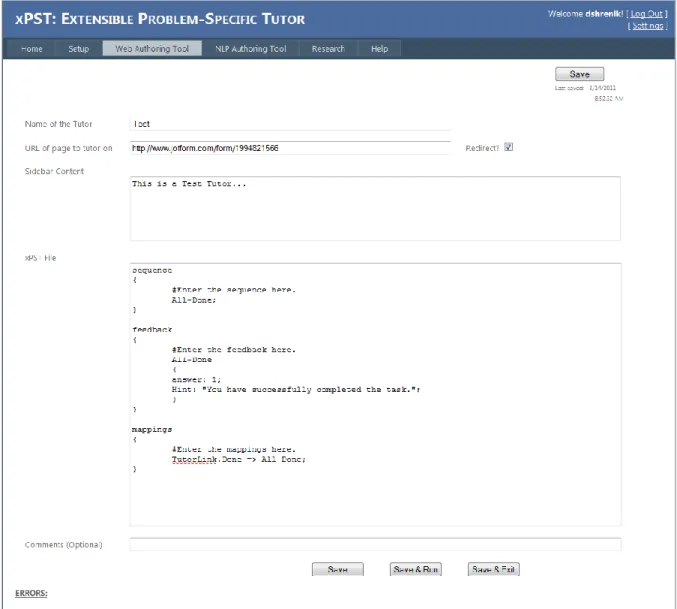
Figure 2.3 – WAT‟s Tutor Editor ... 18
Figure 2.4 – Sample listing of errors in an xPST tutor ... 20
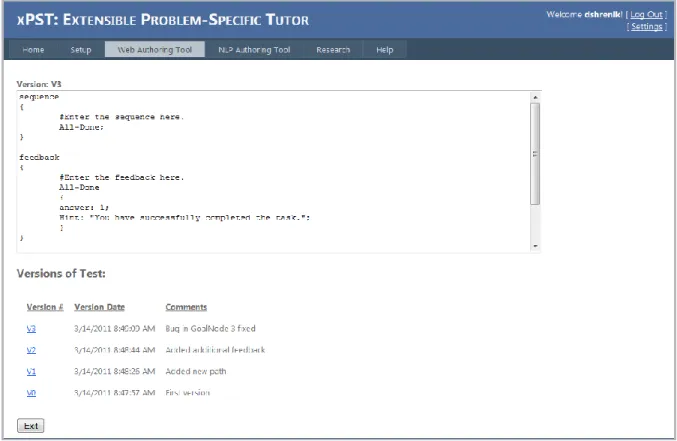
Figure 2.5 – Version management within the WAT ... 21
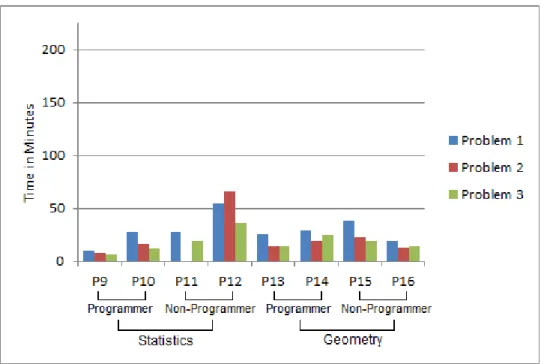
Figure 3.1 – Time spent by xPST tutor-authors ... 29
Figure 3.2 – Time spent by CTAT authors ... 30
Figure 3.3 – Average time versus problem number ... 31
Figure 4.1 – The lattice-style table-driven interface of ConceptGrid. The template represents the concept “Rejection-Correct”, described in Table 4.2. ... 42
Figure 4.2 – Feedback Table ... 43
Figure 4.3 – ConceptGrid Management on WAT ... 48
Figure 5.1 – An atomic state consisting of a learner, insurgent, civilian and a bomb. ... 54
Figure 5.2 – An example of a hint presented to the learner: Diffuse the bomb. ... 55
Figure 5.3 – Just-in-time feedback in the state “NearWindow”, when the learner fails to crouch down: You must crouch down when near a window. ... 59
Figure 5.4 – The vision for the future of personalized adaptive training. The live, virtual and constructive training experience is determined by the training objectives, the soldier's previous skills, and the soldier's personality and stress resilience profile. ... 63
LIST OF TABLES
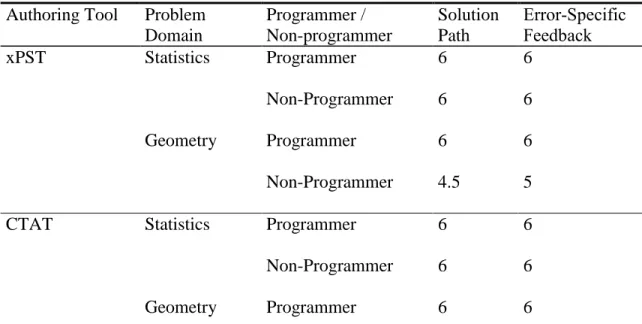
Table 3.1 – Scoring of tutors (maximum possible score is 6) ... 28 Table 3.2 – Average ratings by participants on a Likert scale of 1 to 5 ... 32 Table 4.1 – Atomic checktypes used in designing a template. ... 38 Table 4.2 – Examples of concepts. Conclusion-Correct and Conclusion-Incorrect look at
the holistic response and the rest look at the sub-components of the response. ... 41 Table 4.3 – Results of the classification of 554 student responses using ConceptGrid ... 45 Table 5.1 – Possible atomic states for the scenario “ClearBuilding” ... 57
ABSTRACT
An intelligent tutoring system (ITS) is a software application that tries to replicate the performance of a human tutor by supporting the theory of “learning by doing” and providing customized instruction to a student while performing a task within a problem domain such as mathematics, medical diagnosis, or even game play. ITSs have been shown to improve the performance of a student in wide range of domains. Despite their benefits, ITSs have not seen widespread use due to the complexity involved in their development. Developing an ITS from scratch requires expertise in several fields including computer science, cognitive psychology and artificial intelligence. In order to decrease the skill threshold required to build ITSs, several authoring tools have been developed.
In this thesis, I document several contributions to the field of intelligent tutoring in the form of extensions to an existing ITS authoring tool, research studies on authoring tool paradigms and the design of authoring tools for non-programmers in two complex domains – natural language processing and 3D game environments.
The Extensible Problem Specific Tutor (xPST) is an authoring tool that helps rapidly develop model-tracing like tutors on existing interfaces such as webpages. xPST‟s language was made more expressive with the introduction of new checktypes required for answer checking in problems belonging to domains such as geometry and statistics. A web-based authoring (WAT) tool was developed for the purpose of tutor management and deployment and to promote non-programmer authoring of ITSs. The WAT was used in a comparison study between two authoring tool paradigms – GUI based and text based, in two different problem domains – statistics and geometry.
User-programming of natural language processing (NLP) in ITSs is not common with authoring toolkits. Existing NLP techniques do not offer sufficient power to non-programmers and the NLP is left to expert developers or machine learning algorithms. We attempted to address this challenge by developing a domain-independent authoring tool, ConceptGrid that is intended to help non-programmers develop ITSs that perform natural language processing. ConceptGrid has been integrated into xPST. When templates created using ConceptGrid were tested, they approached the accuracy of human instructors in scoring student responses.
3D game environments belong to another domain for which authoring tools are uncommon. Authoring game-based tutors is challenging due to the inherent domain complexity and dynamic nature of the environment. We attempt to address this challenge through the design of authoring tool that is intended to help non-programmers develop game-based ITSs.
CHAPTER 1. INTRODUCTION
1.1 Overview
An intelligent tutoring system (ITS) is a software application that tries to replicate the performance of a human tutor by supporting the theory of “learning by doing” and providing personalized feedback and customized instruction to a student or a trainee while performing a task within a problem domain such as mathematics, medical diagnosis, or even game play.
1.1.1 Components of an Intelligent Tutoring System
There are four components in an intelligent tutoring system that represent tutoring and communication knowledge (Woolf, 2008): a domain module, a student module, a tutoring module and communication module.
The domain module is the backbone of an ITS and consists of the domain knowledge which represents experts‟ behavior and how they perform in the domain. It can include definitions, skills and processes required to perform a task. The student module consists of knowledge that represents the student‟s misconceptions, skill levels, behavior and mastery of the domain. It also specifies how the tutor must reason about the student‟s knowledge. The tutoring module consists of knowledge that represents teaching strategies. The communication module consists of knowledge that represents methods for communication between the student and the tutoring system. Examples include graphical user interfaces, avatars, and conversational dialogue mechanisms.
1.1.2 Classification of Intelligent Tutoring Systems
Intelligent tutoring systems can be classified into 3 groups:
1. Model-tracing tutors
2. Constraint-based tutors
3. Example-tracing tutors
1.1.2.1 Model-tracing tutors
Model-tracing tutors are based on the ACT-R theory and architecture of cognition (Anderson & Lebiere, 1998). According to the ACT-R theory, human knowledge can divided into two kinds of representations – declarative (consisting of facts) and procedural (consisting of productions). Procedural knowledge is formed from declarative knowledge.
A model-tracing tutor is associated with an expert model that comprises of production rules that represent domain knowledge. Model-tracing tutors employ a process called “model tracing” where the expert model is used to trace the student‟s actions. A model-tracing tutor can offer feedback for every step taken by the student while solving a problem. It identifies errors when a step taken by the student either matches a production rule that represents an incorrect step, or fails to match any rule.
Model-tracing tutors have been successfully implemented in several domains including college-level physics (Gertner & VanLehn, 2000; Shelby et al., 2001) and high school algebra (K.R. Koedinger, J.R. Anderson, W.H. Hadley, & M.A. Mark, 1997).
1.1.2.2 Constraint-based tutors
Constraint-based tutors (Mitrovic, Mayo, Suraweera, & Martin, 2001) employ the constraint-based modeling approach of student modeling. It is based on Ohlsson‟s theory of learning from performance errors (Ohlsson, 1996). Knowledge is represented in the form of constraints, rather than problem-solving paths. A constraint consists of three components – a relevance condition that describes when the constraint is applicable, a satisfaction condition that specifies additional tests and a feedback message associated with the constraint. A constraint-based tutor is interested in the current state that the student is in, rather than what the student has done thus far. As long as the student does not enter an incorrect state, he or she is free to do as desired. States that are pedagogically equivalent are grouped together into equivalence classes. All states in an equivalence class trigger the same instructional actions by the tutor. Constraint-based modeling requires a higher level of abstraction resulting in smaller domain models, which in turn reduces authoring effort.
Examples of constraint-based tutors include the SQL-Tutor, an ITS that supports students learning to write SQL queries (Mitrovic & Ohlsson, 1999) and the KERMIT, an ITS that teaches database design (Suraweera & Mitrovic, 2002).
1.1.2.3 Example-tracing tutors
Example-tracing tutors evaluate student behavior by comparing it with examples of correct and incorrect problem-solving behavior (V. Aleven, B. M. McLaren, J. Sewall, & K. R. Koedinger, 2009). Example-tracing tutors are capable of providing step-by-step guidance. They can tutor on complex problems consisting of multiple correct strategies by maintaining multiple correct interpretations of student behavior. Though example-tracing tutors are easier
to build than model-tracing tutors, it has been shown that the two types can be behaviorally indistinguishable.
Authoring tools like CTAT and xPST can be used to develop example-tracing tutors.
1.1.3 Benefits of Intelligent Tutoring Systems
Intelligent tutoring systems have been shown to improve the performance of a student in wide range of domains. Beal et al performed a controlled evaluation of an interactive on-line tutoring system for high school mathematics (Beal, Walles, Arroyo, & Woolf, 2007). They showed that students who received on-line tutoring showed improvement while students who received regular classroom instruction showed no pre- to post-test improvement. The AutoTutor, an ITS that simulate a human tutor by holding a conversation with the student in natural language has shown to achieve learning gains of approximately 0.8 sigma (Graesser, Chipman, Haynes, & Olney, 2005). PAT, an algebra tutor was used in a large scale experiment where 470 students in experimental classes using the tutor outperformed students in comparison classes by 15% on standardized tests (K.R. Koedinger, et al., 1997).
1.1.4 Challenges of Authoring Intelligent Tutoring Systems
Developing effective ITSs requires a good understanding of the thought processes involved both while teaching, and while learning. It has been observed that it takes 100 hours of development time to create 1 hour of instruction (Woolf & Cunningham, 1987). Building intelligent tutoring systems requires expertise in several fields such as computer science, artificial intelligence, cognitive psychology and interface design. This requirement makes building ITSs from scratch, a time consuming and challenging process and increases the
costs of creating the ITS, limiting the number of ITSs that can be created within the various domains.
1.2 Authoring Tools for Intelligent Tutoring Systems
The goal of an ITS authoring tool is to simply the process of building ITSs and decrease the skill threshold for building them. Also, they enable the rapid prototyping of ITS designs (T. Murray, 1999). Achieving these goals will help non-programmers and users who lack computational thinking build ITSs.
Computational thinking can be defined as “the thought processes involved in formulating problems and their solutions so that the solutions are represented in a form that can be effectively carried out by an information-processing agent” (Wing, 2006).
Several authoring tools have been developed that are targeted specifically for non-programmers (Blessing, Gilbert, Ourada, & Ritter, 2007; Koedinger, Aleven, Heffernan, McLaren, & Hockenberry, 2004). When an authoring tool is intended to be used by non-programmers, it is essential to manage the trade-off that exists between ease of use and power, and scaffold computational thinking in the authoring tool for non-computational thinkers.
In this section, I discuss about two authoring tools: Cognitive Tutor Authoring Tools (CTAT) and the Extensible Problem Specific Tutor (xPST).
1.2.1 Cognitive Tutor Authoring Tools (CTAT)
The Cognitive Tutor Authoring Tools, or CTAT (Koedinger, Aleven, & Heffernan, 2003), is a tool suite that enables an instructor to add learning by doing to online courses.
CTAT supports the creation of two types of tutors: example-tracing tutors , which can be created without programming but require problem-specific authoring, and cognitive tutors, which require AI programming to build a cognitive model of student problem solving but support tutoring across a range of problems.
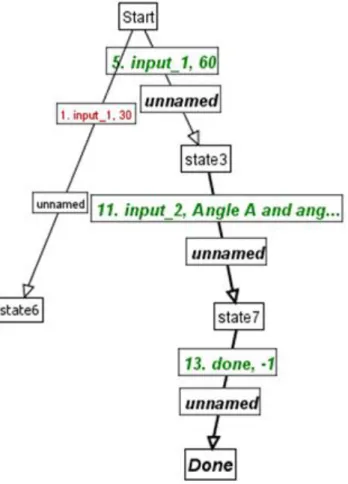
Figure 1.1 – Behavior graph in CTAT
A CTAT tutor-author uses an interface builder to create an interface for the tutor. Once the interface is ready, an example-tracing tutor can be developed by creating a directed, acyclic graph called the “behavior graph” that represents the acceptable ways of solving a problem. The links in the graph represent problem-solving actions, and the nodes represent
problem-solving states. A behavior graph can contain incorrect solution paths that reflect incorrect problem solving behavior by the student.
1.2.2 Extensible Problem Specific Tutor (xPST)
The Extensible Problem Specific Tutor, or xPST (Blessing, Gilbert, Blankenship, & Sanghvi, 2009), is an ITS authoring tool that helps rapidly develop example-tracing tutors on existing interfaces such as webpages. Building tutors on existing interfaces reduces tutor-development time, and allows the interface to be separable from the tutoring component.
The xPST System consists of three main components:
1. The xPST Engine
2. The Presentation Manager
3. The Web Authoring Tool
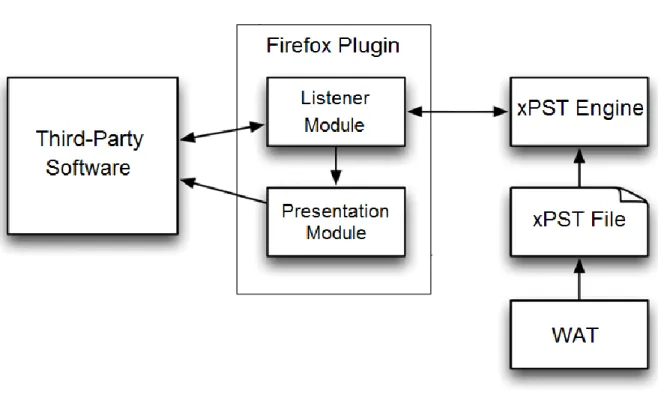
The xPST engine “eavesdrops” on the tutor interface and observes the student‟s actions on the interface. The Presentation Manager gives visual feedback to the student on the interface. The Web Authoring Tool helps tutor authors create and deploy tutors.
Figure 1.2 – xPST architecture
In order to create tutor, the author must create a cognitive model by writing an xPST file, using the Web Authoring Tool. This model represents the procedural knowledge necessary to correctly complete the steps involved in the task. The xPST file is a text file and uses a simple cognitive modeling language. Each xPST file must have a sequence section, a feedback section, and a mappings section.
In the sequence section, the author must mention the order in which steps must be completed by the learner. The sequence section supports different connecting words like “and”, “or” and “then”. For example, “stepA then stepB” corresponds to “Do stepA first and then do stepB”.
In the feedback section, the author specifies the hints and just-in-time error messages (JITs) for each step name mentioned in the sequence section. The author must also specify the correct “answer” to each step. When the learner completes the corresponding step, it is
the equivalent of providing the correct answer to that step, and the tutor moves on to the next step in the sequence.
Each widget on the webpage has a unique ID, which can be seen using the xPST plugin, when the author clicks on the widget. The author must map these widgets to the step names used in the sequence section. This section helps the tutor know whether the learner has completed the required steps by eavesdropping on the learner‟s actions on the webpage.
1.3 Previous Work With xPST
The Extensible Problem Specific Tutor has been extended to support tutoring in 3D game environments and studies have been conducted to show xPST has been used by authors to build tutors on both web interfaces and game environments.
1.3.1 xPST Authoring Study
This study tested the ability of novice users of xPST to create tutors (S. Gilbert, Blessing, & Kodavali, 2009). The purpose of the study was to examine the learning curve of novice authors while learning to build tutors using xPST.
The study involved 10 participants. They were given access to an example tutor and a 44-minute video tutorial. Each participant was asked to build three tutors each for three different tasks, all related to searching for a particular library database (the ACM portal). A total of 26 tutors were developed by the 10 participants (some failed to complete all three tutors). The tutors were scored on a scale of 1 to 5, according to the rubric used in Blessing and Gilbert (2008). Eighteen tutors received a score of 4 or more. The time taken by the
participants to build the tutors was kept track of. The three tasks, on an average required 3.71 hours, 2.53 hours and 1.73 hours, respectively.
1.3.2 Torque xPST Driver
xPST was extended to support tutoring in 3D game environments developed using the game engine Torque (Kodavali, Gilbert, & Blessing, 2010). The Torque xPST driver acts as a bridge between the Torque game engine and the xPST engine to enable xPST tutoring in games. It does the job that the Firefox plugin does while tutoring on web interfaces. The driver eavesdrops on the game and captures events and actions done by the learner and sends them to the xPST engine.
Torque Game Engine Advanced (TGEA) (Lloyd, 2004), a commercial off-the-shelf game engine from GarageGames, was used as the simulation engine. TGEA supports scripting through TorqueScript, which is similar in syntax to JavaScript. It was used in developing both the driver and the game scenarios.
The Torque xPST driver comprises of two components – the Listener Module and the Presentation Module. The Listener Module captures events that occur in the game and sends them to the xPST engine. It also receives feedback that needs to presented to the learner from the xPST engine and sends it to the Presentation Module. The Presentation Module is involved in presenting the feedback it to the learner, which includes hints and just-in-time error messages. The communication between the xPST Engine and the Torque xPST driver happens through a “Dormin message”, which is a string in a specific format that contains various attributes that describe the current state of the task, the message to be communicated, and the action verb that determines the message‟s course of action.
1.3.3 Torque xPST Authoring Study
This study tested the ability of novice users of xPST to create tutors in 3D games (S. B. Gilbert, Devasani, Kodavali, & Blessing, 2011). The purpose of the study was to examine the learning curve of novice authors while learning to build tutors for 3D games, using xPST. The study involved 10 participants, selected based on a pre-survey, that included them only if they had a minimal amount of programming experience. They were given access to an example tutor and a 15-minute video tutorial. Each participant was asked to build two tutors each for two different tasks, online, over a two week period. The first task, titled “Target Acquisition”, required the player to enter the proximity region of an enemy tower, start communication with his base, report his location, and then issue a “Fire” command. The second task, titled “Evacuate”, was based on a scenario consisting of three cottages with a hostage in each of them. The player had search for the three cottages, and issue an “Evacuate” command to each of the three occupants. The “Target Acquisition” task required a minimum of three goalnodes, and the “Evacuate” task required a minimum of seven goalnodes.
A total of 20 tutors were developed by the 10 participants. The average time to complete Task A was 19.74 minutes, with a standard deviation of 9.16 minutes. The average time to complete Task B was 13.81 minutes with a standard deviation of 6.24 minutes. The results indicated that users with minimal programming experience could use xPST to create tutors for 3D game environments.
1.4 Research Questions
1. How does an intelligent tutoring system authoring tool paradigm and the complexity of a problem domain affect the tutor-authoring process by non-programmers in comparison with non-programmers?
2. Can an authoring tool that uses a GUI to facilitate use by non-programmers
enable the creation of a tutor that can accurately evaluate written textual responses as a human instructor would manually do?
1.5 Thesis Organization
This chapter provided an introduction to the field of intelligent tutoring systems and the challenges involved in authoring them. It has also described the Extensible Problem Specific Tutor (xPST) and the previous work related to it. In the rest of my thesis, I document several contributions to the field of intelligent tutoring in the form of extensions to an existing ITS authoring tool, research studies on authoring tool paradigms and the design of authoring tools in two complex domains – natural language processing and 3D game environments.
Chapter 2 describes a Web-based Authoring Tool (WAT) that allows easy creation of ITSs and their deployment on the web. It supports both learner management and tutor management on a single platform. In Chapter 3, I describe an evaluation of two intelligent tutoring system authoring tool paradigms: graphical user interface based and text based. Chapter 4 is a conference paper titled “Lattice-Based Approach to Building Templates for Natural Language Understanding in Intelligent Tutoring Systems” (Devasani, Aist, Blessing, & Gilbert, 2011). My contribution includes the design and development of the system, and writing major portions of the paper. Gregory Aist provided me with valuable suggestions,
especially for the user interface. Stephen Blessing provided me a corpus collected from one of his studies, which was used to evaluate and test the accuracy of my tool. Stephen Gilbert provided me with valuable suggestions and edited the paper. Chapter 5 is a workshop paper titled “Authoring Intelligent Tutoring Systems for 3D Game Environments” (Devasani, Gilbert, Shetty, Ramaswamy, & Blessing, 2011). My contribution includes the design and development of the framework, and writing major portions of the paper. Stephen Gilbert designed the user interface for the authoring tool. Suhas Shetty and Nandhini Ramaswamy made valuable improvements after identifying drawbacks in my design. Stephen Blessing provided valuable feedback and edited the paper. Chapter 6 summarizes the important features of this thesis and describes the future work involved with the tools I have developed. Appendix A describes various extensions to xPST that have developed in order to make it more expressive and powerful as a computational tool, while remaining useful to non-programmers. Appendix B contains the material relevant to the study described in Chapter 3.
CHAPTER 2. WEB-BASED AUTHORING TOOL
xPST is an ITS authoring tool that allows non-programmers to create tutors. Users without a technical background can find the tasks of management and deployment of tutors to be laborious. A web-based authoring tool that can take care of these issues is required and helps in more rapid creation of ITSs. A web-based authoring tool can prove to be extremely useful for the purposes of both maintenance and distribution of tutors that are developed using an intelligent tutoring system authoring tool. An efficient web-based authoring tool can manage all the resources and dependent files at a single location, thereby allowing the learner to concentrate on the task of building tutors and developing tutoring strategies.
2.1 Previous Work
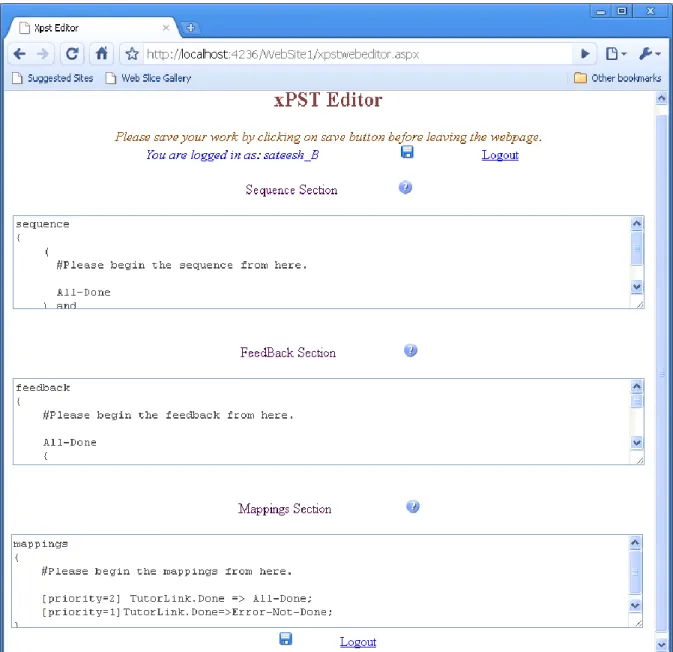
An Authoring Tool was built to help authors develop tutors with xPST. It was a simple Integrated Development Environment (IDE) for authoring xPST tutors. It was designed to serve two purposes: 1) To provide a simple, easy to use graphical user interface (GUI) to author xPST files without installing additional software on the client computer 2) To provide a tool to log the time spent by the author while writing the xPST file. The tool also performs syntax checking and points out errors in the xPST file.
Figure 2.1 – Screenshot of the previous xPST web-based authoring tool
2.2 Current Implementation
The current implementation of the xPST Web-Based Authoring Tool (WAT) has implemented several improvements over the previous version. It supports both user management and tutor management on a single platform.
2.2.1 User Management
The Web-Based Authoring Tool supports user management in a simple manner. Users can create and manage own accounts on the WAT.
2.2.2 Tutor Management
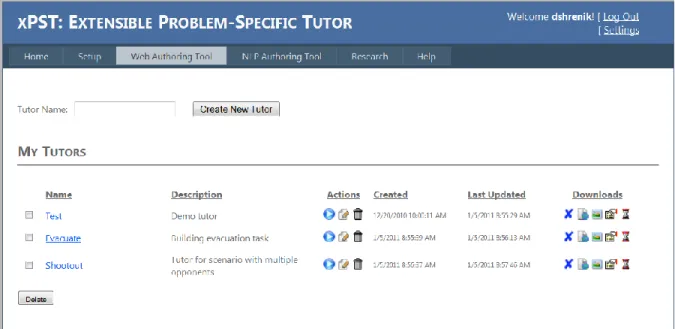
Once registered, users can develop, manage, and deploy their web-based xPST tutors. Users can develop tutors over multiple sessions using the Tutor Editor, which is a part of the WAT. When a new tutor is created, the WAT creates four files associated with the tutor - .xpst file, .scenario file, .HTML file, and the .properties file, and links them. If needed, the user can download the four files associated with each tutor to his computer so that he can deploy them locally on his server.
Figure 2.2 – Current xPST web-based authoring tool (WAT)
The following process is to be followed in order to create a tutor with the WAT:
1. Create the problem interface (webpage) if it does not already exist.
2. Login to the WAT
3. Create a new tutor
4. Provide the URL to the webpage that serves as the problem interface
5. Draft an xPST file using the Tutor Editor
6. WAT creates the necessary files, links and deploys them
Figure 2.3 – WAT’s Tutor Editor
2.2.3 Event Logging
The WAT supports logging of events that occur while an author develops a tutor. A separate log file is created and updated for each tutor that a user creates. This feature is useful for the purposes of data mining in research studies.
TutorCreated – Time at which the tutor was created. This event is logged only once.
TutorOpen – Time at which the tutor was opened. This event is logged when
the tutor is created and every time the user clicks the „Edit‟ button from the Tutor List.
ManualSave – Time at which the tutors is saved manually. This event is
logged every time the user clicks one of the “Save”, “Save & Run”, and “Save & Exit” buttons.
AutoSave – The time at which the tutor was auto-saved. This happens every
20 seconds.
xPSTEdit – This event is logged along with ManualSave or AutoSave,
provided a change has been made to the xPST file since the last ManualSave or AutoSave (whichever occurred later).
The details of these events allow researchers to identify how long it takes to create tutors for a particular domain. Using the details of the above events, two important measures are calculated and recorded in the log file:
xPSTTime – The total time spent by the user in editing the contents of the
xPST file.
xPSTTime = Σ(Xi), where Xi = value(ith XpstEdit)
TotalTime – The total duration for which the Tutor Editor was open. This
includes time spent in both editing the contents of the xPST file and testing the tutor.
TotalTime = Σ(Xi) + Σ(Yi), where Xi = value(ith ManualSave), Yi = value(ith AutoSave)
2.2.4 Other Features
An important feature of the WAT is the syntax checker (this is an improved and more robust version of the syntax checker from the previous xPST authoring tool described in 2.1). It identifies syntax errors in the xPST file, and displays all the errors along with their line numbers and possible solutions at the bottom of the page. This feature is necessary to reduce tutor development time since early piloting of the interface showed that novice users spend most of their time correcting syntax errors.
Figure 2.4 – Sample listing of errors in an xPST tutor
The WAT supports Versioning, so that previous versions of the tutors are not lost. Every time a tutor is manually saved, a new version is recorded, along with optional comments that the user might have specified that will be associated with that version.
Figure 2.5 – Version management within the WAT
Also, the Tutor Editor automatically saves the xPST file periodically, every 20 seconds.
2.2.5 Testing
The WAT has been successfully used for two different cognitive modeling studies. The first was called “Evaluation of WebxPST: A Browser-Based Authoring Tool for Problem-Specific Tutors” (Blessing, Devasani, & Gilbert, 2011). A total of five tutor-authors, two course instructors, and three undergraduate students created a total of 74 tutors for statistics homework problems, using the WAT. The second study, titled “Evaluation of Two Authoring Tool Paradigms: GUI Based and Text Based” (see Chapter 3), had a total of
eight tutor-authors develop a total of 16 geometry and statistics tutors. Both the studies were conducted smoothly on the WAT and the tutor-authors reported no technical problems.
CHAPTER 3. EVALUATION OF TWO INTELLIGENT
TUTORING SYSTEM AUTHORING TOOL PARADIGMS:
GRAPHICAL USER INTERFACE-BASED AND TEXT-BASED
Manuscripts from this chapter will be submitted as a paper to the Eleventh International Conference on Intelligent Tutoring Systems. (2012).
Shrenik Devasani, Stephen Gilbert, Stephen Blessing
3.1 Abstract
We describe an evaluation of two intelligent tutoring system authoring tool paradigms, graphical user interface-based and text-based in two domains, statistics and geometry. We conducted a study with 16 tutor-authors divided into 2 groups (programmers and non-programmers). Our results showed that the GUI-based approach provides a much lower bar for entry when compared to the text-based approach. However, the difference in tutor-authoring time between the two approaches reduces as the tutor-authors gain experience using the respective authoring tools.
3.2 Introduction
Authoring an intelligent tutoring system from scratch is a challenging task since it requires expertise in several fields including cognitive science, computer science and pedagogy. An authoring tool tries to lower the skill threshold required for developing ITSs and also enable their rapid development (T. Murray, 1999).
When an authoring tool is being designed, there are several design trade-offs involved because many of the design decisions that lead to an authoring tool result from conflicting trade-offs. For example, increasing the power of an authoring tool might come at the cost of its ease of use. In this paper, we try to evaluate the effects of the trade-offs involved in the design of GUI-based and text-based authoring tools.
Studies have been conducted to identify the advantages and disadvantages of visual programming (Whitley, 1997). Visual representations have shown to be beneficial when the size or complexity of the problem grows (Day, 1988; Polich & Schwartz, 1974). On the other hand, visual representations use space-saving techniques which cause low screen density, when compared to textual representations, and therefore will not be practical for large problems (Whitley, 1997).
For the experiment, we chose CTAT (Koedinger, et al., 2003) and the Extensible Problem Specific Tutor, or xPST (Blessing, et al., 2009) as examples of GUI-based and text-based authoring tools respectively. Both CTAT and xPST can be used to develop example tracing tutors (V. Aleven, B. McLaren, J. Sewall, & K. R. Koedinger, 2009), for both single strategy problems and multiple strategy problems. We chose two problem domains of varying complexity, from an authoring point of view – statistics and geometry. Statistics problems are sequential in nature and generally have a single solution path. Problems in geometry could have multiple strategies and therefore multiple solution paths.
3.2.1 Cognitive Tutor Authoring Tools (CTAT)
CTAT supports the development of example-tracing tutors through a technique called “programming by demonstration” (Nevill-Manning, 1993). Once the interface for a problem
has been built, the tutor-author proceeds by demonstrating all possible solution paths to the problem. The demonstration automatically creates a directed, acyclic graph called the “behavior graph”, which represents the acceptable ways of solving a problem. The feedback associated with the individual states in the problem is added to the tutor through CTAT‟s GUI.
Though CTAT is capable of supporting the development of both cognitive tutors and example-tracing tutors, we consider only the example-tracing tutor development feature of CTAT in this study.
3.2.1 Extensible Problem Specific Tutor (xPST)
xPST is an ITS authoring tool that helps rapidly develop example-tracing tutors on existing interfaces such as webpages. An example-tracing tutor is built using xPST by writing a text file that describes the order in which individual steps in the problem are to be completed by the learner and the answers and feedback associated with each step.
xPST‟s syntax was designed such that it was simple enough for non-programmers to use, and also powerful enough for experienced users to build tutors rapidly.
3.3 Methods
The experiment involved 2 independent variables – authoring tool paradigm (text-based or GUI-(text-based) and problem domain (statistics or geometry). Programming level (programmer or non-programmer) was the moderating variable.
3.3.1 Participants
Participants were recruited through an email advertisement, fliers on campus and word-of-mouth. Sixteen participants completed the study successfully. Each participant had to take a pre-survey that asked them questions about their experience with computer programming. A participant was classified as a “programmer” if he or she had taken two or more programming courses and as a “non-programmer”, otherwise. The participants were divided into eight groups formed from all possible combinations of programming level (programmer or non-programmer), authoring tool paradigm (text-based or GUI-based) and problem domain (statistics or geometry). Before starting the study, the participants were asked to complete and sign an informed consent form online.
3.3.2 Materials
Each participant was given the task of building three tutors using a specific authoring tool (CTAT or xPST) for a specific domain (statistics or geometry). All three problems were of the same complexity, with their solutions having six subgoals or steps.
The participants were provided with the link to the study webpage that had all the resources and material required to complete their tasks. The study webpage contained a brief introduction the field of intelligent tutoring systems. The training material on the webpage included a video tutorial that gave a demo of the step-by-step procedure to be followed while creating a tutor, for a sample problem as well as a text tutorial. We estimate the total training time to be about 1-2 hours.
CTAT tutor-authors used Remote Desktop to log in remotely to a Microsoft Windows computer which had CTAT v2.10.0 and Adobe Flash Player 10 pre-installed. xPST
tutor-authors logged in to the xPST Web-based Authoring Tool (WAT, described in Chapter 2) using Mozilla Firefox 3 or higher. The problems for which the tutors were to be built were predefined and the interfaces for the problems were provided to the participants. CTAT tutor-authors could access the problem interfaces (.swf files) on the remote machine provided to them. xPST tutor-authors were provided with the links to the webpages that contained the problem interfaces.
3.3.3 Procedures
Each participant was asked to create three tutors, as if he or she was a teacher for that subject preparing homework problems for his or her students. Instructions were provided for each problem that included the problems‟ solutions and the types of feedback the tutor must give for each problem. The tutors created by the participant were meant to monitor each step in the corresponding problem. For each problem, the tutor had to provide exactly one hint. Also, for each tutor overall, there was one message that gives feedback for a specific error that a student might make.
The entire study was conducted online. The participants were allowed to complete their tasks over multiple sessions at their own pace, over a two-week period. After successful completion of their tasks, the participants received a compensation of $40 in cash and a chance to win $149 in cash through a lottery.
3.4 Results
We had a total of eight groups with two participants each. Each participant built a total of three tutors, leading to the creation of 48 tutors in all.
3.4.1 Model Analysis
Each tutor was scored on two criteria – “Solution Path” and “Error-Specific Feedback.” A tutor was given a score of 1 under “Solution Path” if it correctly provided tutoring for all possible solution paths in the problem (including providing hints on each step), 0.5 if it correctly provided tutoring for one of the possible solution paths and 0 if it provided completely incorrect tutoring. A tutor received a score of 1 under “Error-Specific Feedback” if it correctly provided the required error-specific feedback and 0, otherwise.
The cumulative scores have been shown in Table 3.1. Since a group had two participants who built three tutors each, the maximum score possible is six. The model analysis shows that all the tutor-authors who were classified as programmers built tutors that provided accurate tutoring. Tutor-authors who were classified as non-programmers built tutors that displayed accurate tutoring behavior for statistics problems, but slightly less accurate behavior for geometry problems.
Table 3.1 – Scoring of tutors (maximum possible score is 6)
Authoring Tool Problem
Domain Programmer / Non-programmer Solution Path Error-Specific Feedback xPST Statistics Programmer 6 6 Non-Programmer 6 6 Geometry Programmer 6 6 Non-Programmer 4.5 5
CTAT Statistics Programmer 6 6
Non-Programmer 6 6
Non-Programmer 4 6
3.4.2 Timing Data
The total time spent in creating each tutor was logged separately. The time spent in creating an xPST tutor was calculated as described in 2.2.3. The CTAT logger logs the time and date when the tutor-author interacts with the GUI. This total time measure for both CTAT and xPST includes the time spent in authoring the tutor as well as testing it.
Figure 3.1 shows the histogram of the time spent in minutes by the xPST tutor-authors, in building tutors for all three problems.
Figure 3.2 shows the histogram of the time spent in minutes by the CTAT tutor-authors, in building tutors for all three problems. The log file for the second tutor created by one of the participants (P11) was unavailable.
Figure 3.2 – Time spent by CTAT authors
Figure 3.3 shows the learning curve for the tutor-authors. It is interesting to see that after the tutor-authors gained experience building three tutors, the average time required in creating a tutor by the groups xPST–Statistics (19 min), CTAT–Statistics (18.75 min) and CTAT–Geometry (18 min) were almost equal. However, the average time required in creating a tutor for the third geometry problem using xPST (52 min) was much higher than the average time required using CTAT (18 min). Geometry problems involve multiple solution strategies. The results suggest that subtle ordering of steps is more convenient in CTAT because of CTAT‟s visual representation of the strategies on the behavior graph.
Figure 3.3 – Average time versus problem number
3.4.3 Exit Questionnaire Data
All 16 participants answered a short questionnaire (though it was optional). The questionnaire asked them for their feedback about the authoring tool they had used to create tutors. They were asked to rate the ease of use and power of the authoring tool on a Likert scale of 1 to 5, and to answer open-ended questions about the tool's strengths, weaknesses, and suggestions for improvement. One common theme that emerged from the open-ended questions was that both xPST and CTAT are easy to author once understanding how they work. Some quotations are included below that illustrate these:
“Very easy to use once you get a feel for the syntax.” – P7 (xPST –
Non-Programmer)
“Once we understand how to create the tutor then the tool is very simple to use.” –
P14 (CTAT – Programmer) 0 10 20 30 40 50 60 70 80 90
Problem 1 Problem 2 Problem 3
Av era ge T im e in M in u tes xPST - Statistics xPST - Geometry CTAT - Statistics CTAT - Geometry
The average ratings from the exit questionnaire have been summarized in Table 3.2. Both xPST and CTAT were rated slightly higher by programmers for their ease of use when compared to non-programmers.
Table 3.2 – Average ratings by participants on a Likert scale of 1 to 5
Authoring Tool Programmer /
Non-programmer
Ease of Use Power
xPST Programmer 4.25 3.50
Non-Programmer 3.50 3.25
CTAT Programmer 4.75 4.00
Non-Programmer 3.50 4.00
3.5 Discussion and Future Work
We used a between-subjects experimental design to prevent order effects and contamination as the participants moved between authoring systems and domains. We felt that the comparisons between levels of the independent variables would be compromised having if the variables were to be within-subject. We cannot claim that our results are statistically significant, likely because of the small sample size.
The graphical user interface-based approach allows for easier learning initially and a lower bar for entry. However, once a tutor is built, it can be time consuming to edit. One of the advantages of the text-based approach is that debugging and editing an existing tutor may be easier since the entire code is available to the tutor-author at one glance. We conclude by proposing a hybrid authoring tool that exploits the synergy between the graphical user interface-based paradigm and the text-based paradigm. Much like common integrated development environments (IDEs) such as Adobe Dreamweaver and Microsoft Visual
Studio, the ideal authoring tool would have a “design” tab which tutor-creation through a GUI and a “source” tab that supports the editing of the tutor directly through code. We expect such a tool would cater to programmers and programmers, experienced and non-experienced.
CHAPTER 4. LATTICE-BASED APPROACH TO BUILDING
TEMPLATES FOR NATURAL LANGUAGE
UNDERSTANDING IN INTELLIGENT TUTORING SYSTEMS
Research described in this chapter was published in the Fifteenth Conference on ArtificialIntelligence in Education, Auckland. (2011).
Shrenik Devasani, Gregory Aist, Stephen Blessing, Stephen Gilbert
4.1 Abstract
We describe a domain-independent authoring tool, ConceptGrid, which is intended to help non-programmers develop intelligent tutoring systems (ITSs) that perform natural language processing. The approach involves the use of a lattice-style table-driven interface to build templates that describe a set of required concepts that are meant to be a part of a student‟s response to a question, and a set of incorrect concepts that reflect incorrect understanding by the student. The tool also helps provide customized just-in-time feedback based on the concepts present or absent in the student‟s response. This tool has been integrated and tested with a browser-based ITS authoring tool called xPST.
4.2 Introduction
Interpreting textual responses from students by an Intelligent Tutoring System (ITS) is essential if it can come close to matching the performance of a human tutor, even in domains such as Statistics and Physics, since the use of language makes the learning process
more natural. Natural language has the advantage of being easy to use for the student, as opposed to learning new formalisms.
Over the past decade, studies have been conducted that confirm the importance of using language in both traditional learning environments and in intelligent tutoring systems. Chi et al. (Chi, Bassok, Lewis, Reimann, & Glaser, 1989; Chi, De Leeuw, Chiu, & LaVancher, 1994) have showed that eliciting self-explanations enhances deeper learning and understanding of a coherent body of knowledge that generalizes better to new problems. Aleven et al. (Aleven, Koedinger, & Cross, 1999) conducted studies with the PACT Geometry Tutor in which students who provided explanations to solution steps showed greater understanding in the post-test, compared to students who did not provide explanations.
Many ITSs have successfully incorporated natural language processing. The CIRCSIM Tutor (Glass, 2001) is a language based ITS for medical students that uses word matching and finite state machines to process students‟ natural language input. Rus et al. (Rus & Graesser, 2006) have described an approach of evaluating answers by modeling it as a textual entailment problem. Intelligent tutoring systems such as the AutoTutor (Graesser et al., 2000) and Summary Street (Steinhart, 2001) use Latent Semantic Analysis (LSA) (Landauer, Foltz, & Laham, 1998) to evaluate student answers, a technique that uses statistical computation and is based on the idea that the aggregate of all the word contexts in which a word appears determines the similarity of meaning of words to each other. The problem with LSA is that it does not encode word order and it cannot always recognize negation. Another problem with LSA is that it scores students‟ responses only based on how
well it matches the ideal answer, and cannot point out what exactly is wrong with an incorrect response.
Though ITSs today use a variety of techniques to provide support for natural language understanding, user-programming of NLP in ITSs is not common with authoring toolkits. The various techniques described here do not give sufficient power to non-programmers as the NLP is left to expert developers or to machine learning algorithms, and the user is more likely to focus on tutoring strategies. Our approach addresses these issues.
4.3 The ConceptGrid Approach
ConceptGrid is intended to be used by tutor-authors with little or no programming experience. The most crucial aspect about developing an authoring tool that can be used by non-programmers is managing the trade-off between its ease of use and its expressive power. Keeping this in mind, ConceptGrid has been designed such that its ease of use and expressiveness lie between that of simple word matching approaches and complex approaches such as those that use complex machine learning algorithms.
The tutor-author develops the natural language understanding component for a tutor by breaking down the expected response to a question into specific concepts. The author then builds templates that describe a set of required concepts (that are meant to be a part of student‟s response to a question) and a set of incorrect concepts (that reflect incorrect understanding by the student). Every template is mapped to a single user-defined concept name. Since a student can describe a single concept in various forms, several templates can be used to describe different representations of a single concept, in order to recognize and
provide feedback to a wider range of student responses (both correct and incorrect). Thus, there is a one-to-many relationship between concepts and templates.
A template consists of one or more atomic checktypes, or check functions, that evaluate a student's input. These particular atomic checktypes are based on well-known algorithms and distance measures (Hamming, 1950; Levenshtein, 1966; Porter, 1980). The word "atomic" refers to the fact that these checktypes can be applied to a single word only. The set of atomic checktypes have been described in Table 4.1.
Apart from these atomic checktypes, we have two more checktypes that help make
the template more expressive: Any(n1, n2) and Not(n, „direction‟, word_list). The checktype
"Any" matches any sequence of words that is at least n1 words long and at most n2 words. It
helps account for words that are not explicitly accounted for using the other checktypes. The "Not" checktype takes care of negation. It makes sure that the n words appearing to the left or right (specified by „direction‟) of the word following the checktype do not match the words mentioned in "word_list".
The checktypes Synonym and Stemmer can be nested within other atomic checktypes to make them more powerful. Levenshtein(Synonym(„interface‟),1), for example, captures the idea that any synonym of the word "interface" is fine, even if it has a spelling mistake.
When the student misses out on a subset of the required concepts, or mentions a subset of incorrect concepts, customized feedback can be given that points out the issue.
Table 4.1 – Atomic checktypes used in designing a template.
Checktype Description
Exact(word_list) Returns true if a literal character-by-character word
match with any of the words in word_list is found
Almost(word_list) Returns true if a literal match, after ignoring vowels,
with any of the words in word_list is found
Levenshtein(n, word_list) Returns true if the least Levenshtein distance between a
word in word_list and matched word is <= n
Hamming(n, word_list) Returns true if the least Hamming distance between a
word in word_list and matched word is <= n
Soundex(word_list) Returns true if a Soundex match with any of the words
in word_list is found
Synonym(word_list) Returns true if an exact match with any of the words in
word_list or its synonyms from WordNet (Fellbaum, 1998) is found
Stemmer(word_list) Returns true if a literal match with the stem of the
matched word, with any of the words in word_list is found (uses Porter Stemmer)
4.4 The ConceptGrid Interface
The web-based interface is designed to allow the tutor-author to create templates that describe both required and incorrect concepts, and mention the customized just-in-time feedback that needs to be given to the students.
To simplify the process of constructing templates, we have a lattice-style table-driven interface for entering the template‟s checktypes and the corresponding parameters (Figure 4.1). A new template is created either by entering the dimensions of the table or by entering a sample response, from which a table is created and initialized. The table consists of a sequence of multi-level drop-down menus that represent the checktypes. The multiple levels help the author nest different checktypes. Each drop-down menu is associated with a specific number of textboxes that store the parameters associated with it. Each drop-down menu has several textboxes below it that store the contents of the parameter "word_list" associated with the corresponding checktype. The contingent approach of having the parameters dependent on the specific checktype provides a mild form of just-in-time authoring help. The user can navigate through the table just like a numerical spreadsheet and add or delete new rows and columns.
There are two sets of templates; the first describes required concepts and the second describes incorrect ones. Multiple templates can be mapped onto a single concept. Consider the following question in a statistics problem: “Based on your results, what do you conclude about the conditions of the music?” Let us assume that the correct answer to the question is "Reject the null hypothesis. There is a significant difference in memory recall between the rock music and no music conditions."
Some of the concepts that can be defined for the sample response mentioned above are described in Table 4.2.
The tutor-author then can design a ternary truth table called the Feedback Table (Figure 4.2) where he or she can enter the feedback that is to be given to the students, based on the truth values of the concepts: true – concept present (green check), false – concept absent (red X), or don‟t care (yellow dash). The author enters the values of the truth table through tri-state checkboxes. Feedback can be entered for both the absence of required concepts and presence of incorrect ones.
The Feedback Table helps provide feedback in a simple manner for seemingly complicated issues, such as an inconsistent statement (the last row of the Feedback Table in Figure 4.2) in the example discussed. Through its GUI, the Feedback Table achieves the computational equivalence of providing customized feedback by checking for truth conditions of the concepts using relational operators and conditional programming.
There is a provision to create user-defined variables that can be used while building checktypes or mentioning the feedback. This approach helps re-use templates for similar questions. The author can also enter a set of stop words that will be filtered out from the student‟s response prior to being processed.
Once the templates are designed and the feedback tables are filled, the author can test the templates with sample student responses. The output of the test mentions if the student‟s response has matched the required concepts. If a match is not found, then it displays the feedback associated with that response. It also displays the truth values of all the concepts defined by the author.
Table 4.2 – Examples of concepts. Conclusion-Correct and Conclusion-Incorrect look at the holistic response and the rest look at the sub-components of the response.
Concept Name Description
Rejection-Correct Matches responses that correctly mention whether the
null hypothesis has to be rejected or not
Rejection-Incorrect Matches responses that incorrectly mention whether
the null hypothesis has to be rejected or not
Significance-Correct Matches responses that correctly mention the
significance of the result of the statistical test
Significance-Incorrect Matches responses that incorrectly mention the
significance of the result of the statistical test
Ind-Variable-Mention Matches responses that explicitly mention the
independent variable (e.g. type of music)
Dep-Variable-Mention Matches responses that explicitly mention the
dependent variable (e.g. memory recall)
Conclusion-Correct Matches responses that have the correct conclusion of
the statistical test
Conclusion-Incorrect Matches responses that have the incorrect conclusion
4.5 Algorithm and Implementation
The implicit sequencing in the lattice approach means that the resulting complex checktypes are finite parsers. That is, progress through the lattice corresponds to progress left-to-right in processing the input.
The templates are represented internally as and-or trees. The algorithm involves a combination of recursion and memoization to efficiently process the input. Since the algorithm might need to backtrack many times, memoization helps speed up the processing by having function calls avoid repeating the calculation of results for previously processed inputs.
Our tool has been integrated with the Extensible Problem Specific Tutor (xPST) - an open source authoring tool that is intended to enable non-programmers to create ITSs on existing websites and software (Blessing, et al., 2009). Though xPST is a text-based authoring tool, its syntax is not very-code like. ConceptGrid has been customized to generate "code" that is compatible with xPST‟s syntax, based on the author's templates and Feedback Table, which can be then be inserted into any xPST file.
Figure 4.1 – The lattice-style table-driven interface of ConceptGrid. The template represents the concept “Rejection-Correct”, described in Table 4.2.
Figure 4.2 – Feedback Table
4.6 Results: The xSTAT Project
The research question for this paper is whether ConceptGrid could enable an instructor to create a tutor that would score students' free response answers as accurately as he or she manually did. At this point, the question is purely a feasibility issue: can it be done with the ConceptGrid tool? We tested this issue as a part of the xSTAT project at University of Tampa, dedicated to developing an intelligent homework helper for statistics students (Maass & Blessing, 2011).
For the xSTAT effort, six authors (3 instructors and 3 undergraduates) created multiple tutors each for college level statistics problems. The problems contained real-world scenarios with actual data, followed up by several questions for the student to answer. Each of the problems had a question at the end that asked students to enter the conclusion of the statistics test. To assess these problems, 6 were chosen out of the total pool of 74 and given to students as homework problems. All problems were solved on-line using a standard web browser. Half of the students received feedback on their answers via the xPST intelligent tutor (i.e., answers were marked as either correct or incorrect, and hints and just-in-time
messages were displayed), and half did not (i.e., these students simply filled out the web-based form). It is worth noting that these tutors were created without ConceptGrid, so that authors had to explicitly enter the "xPST code" that represents the templates without a graphical user interface. Also, in the absence of visualization through the Feedback Table, subsets of missing and incorrect concepts had to be explicitly mentioned. This non-lattice approach was not very usable by non-programmers. This difficulty motivated the creation of the ConceptGrid lattice approach, which is computationally equivalent and designed to be much more usable by non-programmers.
In all, 41 students solved a total of 233 instances of the six problems across the homework. We built a corpus after collecting all student responses to the end question (both those with tutoring and without). The corpus had 554 unique responses to this final conclusion question across the six homework problems. This corpus includes multiple incorrect responses by the same student to the same problem if they were in the tutored condition.
These responses were manually scored by an instructor and a teaching assistant based on the presence or absence of the concepts defined in Table 2. Then, one of the authors attempted to use ConceptGrid to produce templates that would score the 554 responses similar to those manual scores. The result of that work contained a total of 10 templates common to all six problems, to cover all concepts, except “Ind-Variable-Mention” and “Dep-Variable-Mention”. The concepts “Ind-Variable-Mention” and “Dep-Variable-Mention” required a template each that was unique to each of the six problems. In all, there were 22 templates across all six problems. A template, on an average consisted of 4 checktypes.
Since the manner in which a template tries to match a student‟s response – a sequence of words is comparable to the manner in which a regular expression matches a string, it might seem that the results have a lot of false negatives. But, since this approach tries to "understand" responses by looking for smaller concepts and key phrases with the help of checktypes rather than literal word matching, it is much more expressive. The results in Table 3, where we report the number of false positives, false negatives and the accuracy, the fraction of correct classifications, confirm this observation. The last column shows the values of Cohen‟s Unweighted Kappa (Cohen, 1960), which is a measure of the degree to which the human grader and ConceptGrid concur in their respective classifications.
Table 4.3 – Results of the classification of 554 student responses using ConceptGrid
Concept False Positives False Negatives Accuracy Kappa
Rejection-Correct 1 34 0.9368 0.8657 Rejection-Incorrect 6 5 0.9801 0.9217 Significance-Correct 1 7 0.9856 0.9662 Significance-Incorrect 12 1 0.9765 0.8890 Ind-Variable-Mention 1 3 0.9928 0.9853 Dep-Variable-Mention 4 3 0.9874 0.9733 Conclusion-Correct 0 24 0.9567 0.8614 Conclusion-Incorrect 6 0 0.9892 0.9727
4.7 Conclusions and Future Work
We have described ConceptGrid, a tool that is intended to help non-programmers develop ITSs that perform natural language processing. It has been integrated into an ITS authoring tool called xPST. We tested it as a part of the xSTAT project and were able to approach the accuracy of human instructors in scoring student responses.
We would like to conduct an empirical evaluation study that helps demonstrate that the ConceptGrid tool, a part of xPST, is actually feasible for non-programmers to use on a variety of tasks, as we have done for xPST's core authoring tool (S. Gilbert, et al., 2009). The study will also help provide an insight into the time required by a tutor-author to develop templates for particular question types.
Currently, ConceptGrid does not support a dialogue between the student and tutor as do CIRCSIM (Evens et al., 2001) and AutoTutor (Graesser, et al., 2005). It only evaluates student responses and gives just-in-time feedback. To support more extensive knowledge-construction dialogues, ConceptGrid responses would need to provide information required by the dialogue manager.
Our current approach is non-structural, i.e., it is focused on words and numerical analysis, rather than grammar and logic. The advantage with this approach is that it is simple for non-programmers to use, and is very effective in domains such as statistics where the student responses are expected to follow a general pattern. In addition, the ConceptGrid approach is domain-independent, one of its biggest advantages.
ConceptGrid could be extended to be structural as well, but that achievement might come at the cost of usability by non-programmers. To include structural matching, either the templates could nest by invoking other templates, or the atomic checktypes could include