Open Research Online
The Open University’s repository of research publications
and other research outputs
Open Networking Lab: online practical learning of
computer networking
Conference or Workshop Item
How to cite:
Rosewell, Jonathan; Kear, Karen; Jones, Allan; Smith, Andrew; Donelan, Helen; Mikroyannidis, Alexander; Peasgood, Alice; Sanders, Chris; Third, Allan; Wermelinger, Michel; Moss, Nicky; Williams, Judith and Connolly, Teresa (2018). Open Networking Lab: online practical learning of computer networking. In: The Online, Open and Flexible Higher Education Conference: Blended and online Learning: Changing the Educational Landscape, 10-12 Oct 2018, Aarhus University, Denmark.
For guidance on citations see FAQs.
c
[not recorded]
Version: Accepted Manuscript
Copyright and Moral Rights for the articles on this site are retained by the individual authors and/or other copyright owners. For more information on Open Research Online’s data policy on reuse of materials please consult the policies page.
Open Networking Lab: online practical learning of computer networking
Jon Rosewell, Karen Kear, Allan Jones, Andrew Smith, Helen Donelan, Alexander
Mikroyannidis, Alice Peasgood, Chris Sanders, Allan Third, Michel Wermelinger, Nicky
Moss, Judith Williams, Teresa Connolly
The Open University, United Kingdom
{ jon.rosewell; karen.kear; allan.jones; andrew.smith; helen.donelan; alexander.mikroyannidis; alice.peasgood chris.sanders; allan.third; michel.wermelinger; nicky.moss; judith.williams; teresa.connolly }@open.ac.uk
Abstract
Learning to configure computer networks is a topic requiring a substantial practical component and suggesting a pedagogic approach that foregrounds experiential learning. However, providing appropriate computer networking hardware is expensive for classroom labs, and is not viable for individual distance learners. Simulation offers an alternative basis for practical learning and supports a range of modes, from individual distance learning to in-class blended learning. Sophisticated network simulation packages, such as Cisco’s Packet Tracer, have high fidelity to networking devices and can simulate complex network scenarios. Unfortunately their complex interfaces make it difficult for a novice student to engage productively.
The Open Networking Lab (ONL) will provide online resources for students of introductory computer networking. It will take an activity-centred approach, supported with video and screencasts, in preference to lengthy text. Practical activity is based on PT Anywhere, a network simulator that provides students with an easy-to-use, browser-based interface over Cisco’s Packet Tracer. PT Anywhere thus provides fully authentic simulation but, by only revealing a subset of features, supports a carefully scaffolded approach to teaching and learning.
We report at an early stage in the development of the ONL. Material is being piloted with students at UK Further Education colleges. Evaluation will include observation, surveys and interviews with students and staff; PT Anywhere also provides learning analytics. A further stage of development will culminate in a badged open course on the Open University’s OpenLearn platform.
The ONL will provide vocational learning at scale in educational institutions, employment contexts and for individual learners.
Keywords: simulation, vocational learning, OER, evaluation, blended learning
1.
Introduction
Skills development in computer networking has typically been based on practical experience in laboratories using real networking equipment. However, providing and maintaining appropriate computer networking hardware is expensive for educational institutions, and access to hardware is not viable for independent learners. There is therefore a need for a simulated network experience, to allow teachers to reinforce classroom learning and students to practice their developing skills (Corter at al. 2007). The Open Networking Lab project (https://onl.kmi.open.ac.uk/) addresses this need, by providing a user-friendly network simulator, integrated within an open online course, to enable anyone to learn the basics of computer networking, regardless of prior knowledge. The project is creating a free online ‘badged open course’ which can be used either in-class with support from a teacher or for independent learning, at home or in the workplace. The
project is hosted at The UK Open University and is supported by funding from UfI (http://www.ufi.co.uk) as part of their ‘VocTech Impact 2017’ funding initiative for vocational learning using digital technologies. The ultimate aim is to enable as many people as possible to access learning, and eventually employment, in computer networking – an area which is in high demand from industry.
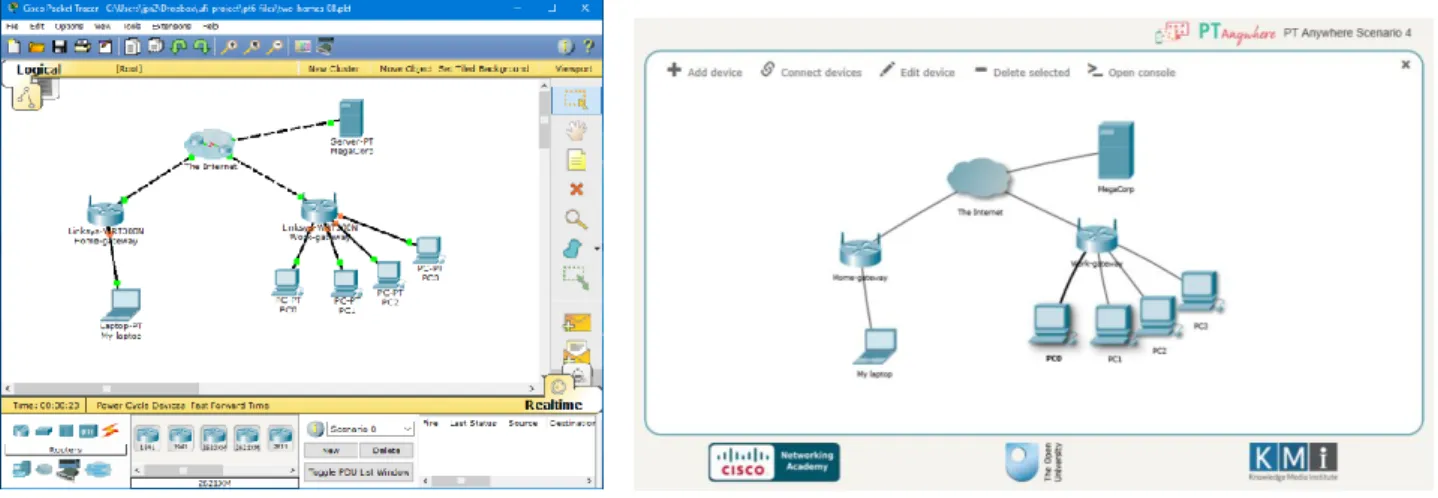
Figure 1: (a) Packet Tracer; (b) PT Anywhere
To address the educational need for a network simulator, the computer networking company Cisco developed the powerful Packet Tracer simulation software (DiCerbo et al., 2010), which is used globally to support learning within the Cisco Networking Academy educational community, and beyond. Packet Tracer is a highly authentic simulator, with a correspondingly complex set of features and user interface (Figure 1 (a)). In response to the need for a simpler version, more suited to novices, the PT Anywhere (short for Packet Tracer Anywhere) software was developed (Mikroyannidis et al. 2017). PT Anywhere was developed in the context of the FORGE project (http://ict-forge.eu/), a European initiative for online learning and experimentation via interactive learning resources (Mikroyannidis et al. 2015). PT Anywhere provides students with an easy-to-use, browser-based interface over Cisco’s Packet Tracer; it offers fully authentic simulation but uses a simplified interface, revealing only a subset of features (Figure 1 (b)). Using PT Anywhere enables a scaffolded, experiential and authentic approach to learning (Vygotsky, 1978; Kolb, 1984; Brown et al., 1989). Embedded learning analytics facilities provide valuable data which educators can use to explore learning patterns (Gibson & de Freitas, 2016), looking at individual learners’ paths through the simulation activities or at aggregated data from a set of learners.
The Open Networking Lab project is further developing the PT Anywhere web-based network simulation software. The course incorporates hands-on practical activities using PT Anywhere, supported by primarily audio-visual learning materials. The student’s study throughout the course is firmly based on screencast demonstrations using Packet Tracer, followed by practical activities using PT Anywhere, and self-assessment quizzes. Integrated Learning Analytics tools provide insights into how learners engage with the software and activities.
The Open Networking Lab course will be hosted on the Open University’s OpenLearn platform for Open Educational Resources and open courseware (http://www.open.edu/openlearn/) where it will be accessible without cost to any learner or educator worldwide. Initial development is being carried out using the ‘sister’ platform OpenLearn Create (http://www.open.edu/openlearncreate/) so that the learning resources can be iteratively developed, piloted and improved prior to launch on OpenLearn itself.
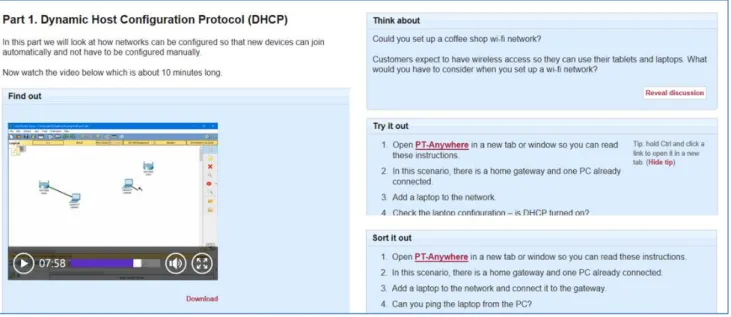
Figure 2: Screenshots from the Open Networking Lab online course showing screencast video (left) and activities (right)
In the Open Networking Lab course (Figure 2), learners are shown, primarily via screencasts, how computer networks are set up and configured. They then try out these ideas for themselves using the PT Anywhere simulator. Quizzes and other forms of formative assessment further support the learning, and enable learners to be confident that they have gained appropriate skills and knowledge. This package of activity-based learning should help learners feel motivated and engaged, and enable them to gain a sense of achievement as they progress through the online course. After completing the course, including passing two summative quizzes, learners will be able to claim a digital badge in computer networking.
On completion of the course, learners will be able to:
• identify and understand computer networking technology and concepts • use a simulator to set up a simple network (e.g. for a home or small office) • using a simulator, undertake preliminary troubleshooting and fault identification.
The Open Networking Lab course will be accessible to a wide range of vocational learners (particularly at post-16 Further Education (FE) and apprenticeship level) who seek technical qualifications and employment in computer networking. Learners will be able to move from having no knowledge in this area to a level of confidence and competence. Educators and industry can use the Open Networking Lab materials to support their learners.
The software and resources are being evaluated in collaboration within the Cisco network of FE colleges, engaging hundreds of learners, in two stages of evaluation. Participating FE colleges for the project are all part of the Cisco Academy network (https://www.netacad.com/). The first pilot included half of the planned material and these resources were used by the college students as part of their normal studies. Project team members provided both remote and face-to-face support to the colleges, and observed how the learning resources were used by students and teachers. College teachers were also supported via a comprehensive
Lecturer’s Handbook. Data is being gathered from learners using surveys and observation, and from teachers via interviews. PT Anywhere and OpenLearn also provide various kinds of learning analytics. This data, with appropriate ethical considerations, forms part of the evaluation.
The aim of the first pilot evaluation was to identify how the software and course material could be further improved, and to judge the impact on student learning and engagement. These aspects were considered using both quantitative and qualitative data; preliminary results are reported in this paper.
This evaluation will feed into work to complete the Open Networking Lab course. A further round of evaluation and improvement is planned before final publishing as a badged open online course.
2.
Evaluation methods
Evaluation of pilot presentations of Open Networking Lab material in further education colleges was carried out during May-July 2018. Quantitative approaches (student survey questions, activity logs) were used to address the following questions:
• How usable was the online resource?
• How well does the content fit the needs of the students? • How effective is the learning from the online resource? • How engaged were the learners?
• What patterns of engagement are shown?
Qualitative approaches (student open comments, classroom observation and interviews with teaching staff) were used to address the following questions:
• What improvements are required to the software and learning resources? • What improvements are required to the support for delivery in college?
The evaluation plan, data collection instruments, information and consent forms were approved by the Open University’s Research Ethics Committee. For students under the age of 18 years, parental consent was sought. Evaluations were carried out in eight colleges with a total of 177 enrolled students; a variety of teaching methods was used, including self-study and guided study (see Table 1 for details). Survey forms were completed by students at the end of the pilot in all colleges, and in some cases also during the pilot. A total of 150 responses from 80 students were collected. A total of 146 online Open Networking Lab student accounts were created during the pilot, and from these 82 students gave permission to use their logged data. Interviews were held with 5 teaching staff.
Table 1: Further education colleges in pilot evaluation
College Level and context Age range Number of
students on course A Adult education evening class using ONL as self-study Adults 10 B Apprentices Level 3 & 4 using ONL in whole day session 17-37 22 C BTEC Level 3 in two 3-hour sessions over 2 weeks 16+ 15 D BTEC Level 3 in two 3-hour sessions over 2 weeks 16+ 39 E Computer Science Level 4 in two 3-hour revision sessions over 2
weeks
18-30 27
F A-level Computer Science in three 1-hour lessons 16-18 6 G CCNA Level 4 in two 4-hour sessions over 2 weeks 16+ 13 H BTEC Level 3 in four 1-hour sessions over 4 weeks 16-18 45
The target audience of the Open Networking Lab is complete beginners, but the timing of the pilot at the end of the academic year meant that many students had some experience of networking. For them, the Open Networking Lab was a revision opportunity with a different approach.
3.
Results and discussion of evaluation
In this section we will address the evaluation questions posed above, using both quantitative and qualitative data. Illustrative student comments are shown.
3.1. How usable was the online resource?
Students and staff generally found the online resource easy to use, and it worked well (Figure 3 (a) & (b)). Some initial difficulties were resolved by using the recommended browser versions.
Figure 3: (a) ‘The ONL software worked well for me’ (Student survey, Likert scale, N=79) (b) ‘The ONL software was easy for me to use’ (Student survey, Likert scale, N=79)
3.2. How well does the content fit the needs of the students?
The Open Networking Lab content was designed for complete beginners although, due to the timing of the pilot, students mainly used it for revision. Figure 4 (a) & (b) show that most students already had experience of networking, but still felt they had learned from using the Open Networking Lab materials.
0 5 10 15 20 25 30 35 40 45 Strongly disagree Disagree Neither agree nor disagree Agree Strongly agree N u m b er o f stu d en ts
The ONL software worked well for me
0 5 10 15 20 25 30 35 40 45 Strongly disagree Disagree Neither agree nor disagree Agree Strongly agree N u m b er o f s tu d en ts
The ONL software was easy for me to
use
Figure 4: (a) ‘How much did you know about computer networking before starting ONL?’ (Student survey in first ONL session, Likert scale, N=81);
(b) ‘I know more about home networking now I have done the ONL classes’ (Student survey in final ONL session, Likert scale, N=80)
The following quotes from students indicate that the topics were felt to be at the appropriate level. “I found it very welcoming for someone of my experience”
“The information would be helpful for someone that has little or no networking knowledge” “The included PT activities were really useful. The content was relevant for pure beginners.” “it's a good course for the level of students it's aimed at.”
3.3. How effective is the learning from the online resource?
As noted in the previous section, 35 out of 80 students agreed or strongly agreed that they knew more about networking after the Open Networking Lab class (Figure 4 (b)), even though the majority had already studied the topic (Figure 4(a)).
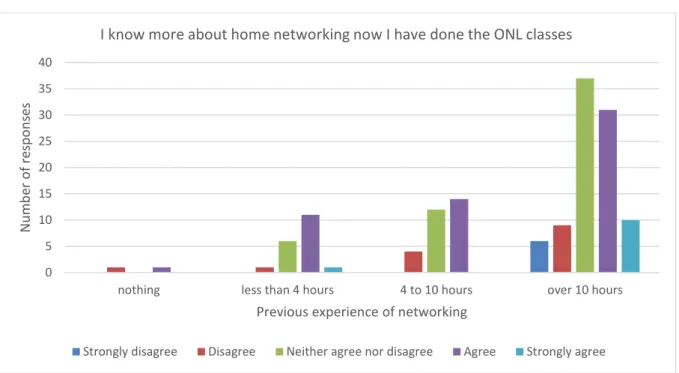
To account for the wide variation in previous experience, the following graphs (Figures 5 and 6) show data from students categorized as follows: no previous experience, less than 4 hours, 4 to 10 hours, over 10 hours of networking experience before the Open Networking Lab class. (Some students were surveyed more than once during the pilot; this data includes all responses. All students who responded more than once recorded their previous experience consistently.)
0 10 20 30 40 50 60
Nothing less than 4 hours 4 to 10 hours over 10 hours N u m b er o f stu d en ts
Previous experience of networking How much did you know about computer
networking before starting ONL?
0 5 10 15 20 25 30 35 Strongly disagree Disagree Neither agree nor disagree Agree Strongly agree N u m b er o f s tu d en ts
I know more about home networking now I have done the ONL classes
Figure 5: ‘I know more about home networking now I have done the ONL classes’ (Student survey, Likert scale, N=150)
Figure 5 shows how learning from the Open Networking Lab varies with previous experience. This indicates that students with little previous experience tend to know more after studying Open Networking Lab materials. Although this is less so for students with greater previous experience, a good proportion still indicate that they know more about networking after using the Open Networking Lab (41 of 93 replies agreed or strongly agreed).
“I feel this goes into the perfect amount of detail. Enough to give context to everything else but no needless information, definitely the ideal ‘brief overview’”
“As the topics become more advanced the explanations become more concise which is helpful to someone like me who is new to networking.”
One tutor commented that more experienced students tend to forget the basics, so the Open Networking Lab has a role as a refresher course.
0 5 10 15 20 25 30 35 40
nothing less than 4 hours 4 to 10 hours over 10 hours
N u m b er o f r es p o n se s
Previous experience of networking
I know more about home networking now I have done the ONL classes
3.4. How engaged were the learners?
Figure 6: ‘The ONL was interesting to me’ (Student survey, Likert scale, N=150)
Most students agreed that the Open Networking Lab was interesting, regardless of their previous experience (Figure 6). The PT Anywhere activities were interesting to the students. Students appreciated the knowledge and authority of the Open University lecturers on the videos, and liked being taught by experts.
“I liked the open university video as they went through a lot of things in depth” “The videos has lots of potential to teach you lots.”
Classroom observation noted that in some classes students worked individually at their own pace, mainly paying attention to the screen. In other classes, there was some discussion in pairs about the content. Students were more engaged by practical activities (PT Anywhere and the quizzes) than by the text and videos.
“I prefer the combination of shorter videos and more practical activities in this session. It keeps you engaged as opposed to shutting off 5 minutes into a 17 minute long video.”
35 out of 80 of students agreed that they would do more Open Networking Lab instead of their usual classes if they had the chance (Figure 7).
0 10 20 30 40 50 60
nothing less than 4 hours 4 to 10 hours over 10 hours
N u m b er o f r es p o n se s
Previous experience of networking
ONL was interesting to me
Figure 7: ‘If I had the chance to learn more about networking in this way (instead of my usual classes), I would do more ONL’ (Student survey, Likert scale, N=80)
3.5. What patterns of engagement are shown?
An insight into patterns of student participation can be gleaned from logged activity data. The following data is drawn from an initial sample of students (N=27) who had given consent. Figure 8 shows the number who viewed sessions online, showing some drop out with later sessions.
Figure 8: Number of students who viewed each session online (ONL logs, N=27)
In this pilot, sessions were not designed to be of equal length (Session 4 Dynamic Configuration in particular was much shorter). Figure 9 shows that those students who do view a session spend a reasonable amount of time with it.
0 5 10 15 20 25 30 35 Strongly disagree
Disagree Neither agree nor disagree
Agree Strongly agree
N u m b er o f stu d en ts
If I had the chance to learn more about networking in this way (instead of my usual classes), I would do more ONL
0 5 10 15 20 25 30
Session 1: The home network Session 2: IP addressing Session 3: Switching and routing Session 4: Dynamic configuration
Number of students who viewed each session online
Figure 9: Mean viewing time in minutes for each session (ONL logs, N=27)
Within this overall pattern of usage, considerable individual variation can be seen; for example, classroom observers noted that some students downloaded videos onto their phones to watch later. In Figure 10, individual students (N=27) are shown and characterised on three scores:
• The percentage of time spent online compared to the designed time for the course (240 minutes for the pilot).
• The percentage of video resources accessed (viewed online or downloaded). • The percentage of epub, pdf or other alternative offline formats downloaded.
Figure 10: Patterns of individual student access to content (ONL logs, N=27) 0.0 5.0 10.0 15.0 20.0 25.0 30.0 35.0
Session 1: The home network Session 2: IP addressing Session 3: Switching and routing Session 4: Dynamic configuration
Mean viewing time in minutes for each session
0.0 10.0 20.0 30.0 40.0 50.0 60.0 70.0 80.0 90.0 100.0 1 2 3 4 5 6 7 8 9 10 11 12 13 14 15 16 17 18 19 20 21 22 23 24 25 26 27 Perc ve n ta ge o f co n ten t acce ss ed Student Students accessing content
Percentage of planned study time spent viewing website Percentage of videos accessed
As can be seen, students varied considerably in their behaviour. The data have been ranked by time spent online, so that Student 1 spent the most time viewing the website, Student 27 the least. The majority of students in the pilot spent less than half the designed time on the website. Some, however, downloaded a significant proportion of the material for use offline.
Picking out four specific examples in Figure 10 illustrates different strategies at play:
• Student 1 spent a lot of time on the website and accessed most of the content including video. • Student 8 spent less time on the website, but downloaded most of the content as offline versions. • Student 14 shows a mix of time on website and downloading offline versions.
• Student 25 spent hardly any time on the website, but viewed or downloaded all videos.
At this stage in our analysis we have not connected the ONL logs to classroom observation, so it is not clear whether this differing student behaviour is the result of different classroom pedagogies or the free choice of individual learners. It is evident however that the final version of the Open Networking Lab should support as wide a range of learner strategies as possible.
3.6. What improvements are required to the software and learning resources?
Staff interviews and classroom observation showed that the Open Networking Lab website and PT Anywhere were straightforward to use, although some PT Anywhere activities were not fully developed in this pilot. A specific issue is the need to open PT Anywhere in a new browser tab or window so that the instructions can be viewed alongside the simulation.
Student comments show they value the interactive aspects of the material, particularly PT Anywhere activities and the quizzes, and would like more. They also wanted more explanation of acronyms and of why wrong answers in quizzes were incorrect.
There were many comments about the length, content and pace of the videos, and on technical problems such as audio quality and level.
“there should be improvement on the mic quality as the quality jumps from one video to another”
“Video could be split into two videos. This video is very long, at 17 minutes, and needs to be split into shorter segments of a few minutes each.”
“This video is very informative, with a lot of info packed into a short amount of time. It could possibly be beneficial to make two videos, that go into a little more depth, and allow the learner more time to understand what is happening.”
The videos in the pilot were initial drafts. As new versions are produced, the course team are restructuring them into shorter segments, and endeavouring to achieve a slightly faster and more upbeat delivery. Authors face a challenge in balancing the desire for short videos with the need to include enough context and content to provide valuable learning. Final recordings will be made in a studio to achieve better technical quality. The pilot contained interactive quiz questions embedded within a session and a final quiz question at the end of each session. These were valued by students and staff but they felt there could be a greater number and variety of questions. In the final badged open course form, additional mid-course and final sets of quizzes will be used to award the course badge.
“Would be helpful to have a short quiz after each video, to check understanding, make it more interactive” (Staff comment)
3.7. What improvements are required to the support for delivery in college?
The Open Networking Lab material is intended for several modes from teacher-supported use in a classroom to individual learning at a distance. The context of the pilot evaluation was teacher-supported classroom use and staff were asked how the OU team could support wider use of the Open Networking Lab in the FE sector. Their suggestions included: describing the ONL audience clearly, showing how materials fit or augment existing curricula, providing a detailed index of content, providing case studies showing how the Open Networking Lab can be used. These comments have been used to shape the Lecturer’s Handbook for the Open Networking Lab. Staff also offered a number of detailed practical suggestions which have been incorporated into the Lecturer’s
Handbook. These included: use recommended browsers, check configuration of classroom PCs, provide headphones or ear buds, consider a whole-class introduction using projector or whiteboard, create user accounts in advance.
4.
Conclusions
The data from the initial pilot of the course indicated that learners and their teachers found the Open Networking Lab course materials valuable. Students were engaged by the resources, and reported that they learned from them. We can conclude that the approach – experiential online learning through screencasts, practical activities using a simulation package, and automated assessment – is a good one for these (mainly young) vocational learners.
Based on this evaluation, the PT Anywhere software and the learning resources have been modified and improved. For example, the screencasts were split into shorter segments, and more practical activities and self-assessment opportunities were included. The improved resources will be made available to FE colleges for use and evaluation with a second cohort of students in late Autumn 2018. Colleges which were not involved in the initial pilot will been approached in order to broaden the user base, and enable testing with teachers who are new to the resources. User feedback from this second evaluation will be taken into account for the final stages of the course development.
The Open Networking Lab will then be launched on OpenLearn in 2019 as an open-access free online course. It will be available to students, apprentices and lifelong learners, either as part of training offered by colleges/employers or as self-directed learning. The final product will be an OpenLearn Badged Open Course (BOC), enabling learners to develop and evidence their skills in a self-supported learning environment, or with support from teachers as blended learning.
References
Brown, J. S., Collins, A., & Duguid, P. (1989). Situated cognition and the culture of learning. Educational Researcher, 18 (1), 32-42.
Corter, J. E., Jeffrey V., Nickerson, J. V., Esche, S. K., Chassapis, C., Im, S. & Ma, J.E. (2007). Constructing reality: A study of remote, hands-on, and simulated laboratories. ACM Trans. Comput. Hum. Interact. 14, Article 7.
DiCerbo, K. E., Kovac, R., West, P., Frezzo, D. C., Behrens, J. & Sehnalakova, J. (2010). Individual practice and collaborative inquiry: Instructional configurations in a simulation environment. In: Networking and Services (ICNS), 2010 Sixth International Conference on, pp. 335-339.
Gibson, D. & de Freitas, S. (2016). Exploratory analysis in learning analytics. Technology, Knowledge and Learning, 21 (1). pp. 5-19.
Kolb, D.A. (1984). Experiential learning: experience as the source of learning and development. Englewood Cliffs, NJ: Prentice Hall.
Mikroyannidis, A., Domingue, J., Third, A., Smith, A. & Guarda, N. (2015). Online Learning and Experimentation via Interactive Learning Resources. In: Proc. 3rd Experiment@International Conference (exp.at'15), Ponta Delgada, São Miguel Island, Azores, Portugal.
Mikroyannidis, A., Gomez-Goiri, A., Smith, A. & Domingue, J. (2017). Online experimentation and interactive learning resources for teaching network engineering. In: 2017 IEEE Global Engineering Education Conference (EDUCON), 25-28 Apr 2017, Athens, Greece, IEEE, pp. 181–188.
Vygotsky, L.S. (1978). Mind in society: The development of higher psychological processes. Cambridge, MA: Harvard university press.
Acknowledgment
We gratefully acknowledge funding and support from the Ufi Charitable Trust, together with ongoing support and collaboration from Cisco.