Spring Security
Reference Documentation
2.0.x
Preface ... vi
I. Getting Started ... 1
1. Introduction ... 2
1.1. What is Spring Security? ... 2
1.2. History ... 3
1.3. Release Numbering ... 4
1.4. Getting the Source ... 4
2. Security Namespace Configuration ... 5
2.1. Introduction ... 5
2.1.1. Design of the Namespace ... 5
2.2. Getting Started with Security Namespace Configuration ... 6
2.2.1.web.xmlConfiguration ... 6
2.2.2. A Minimal<http>Configuration ... 7
2.2.3. Using other Authentication Providers ... 9
2.3. Advanced Web Features ... 10
2.3.1. Remember-Me Authentication ... 10
2.3.2. Adding HTTP/HTTPS Channel Security ... 10
2.3.3. Concurrent Session Control ... 11
2.3.4. OpenID Login ... 11
2.3.5. Adding in Your Own Filters ... 11
2.3.6. Session Fixation Attack Protection ... 13
2.4. Method Security ... 13
2.4.1. The<global-method-security>Element ... 14
2.4.2. Theintercept-methodsBean Decorator ... 14
2.5. The Default AccessDecisionManager ... 15
2.5.1. Customizing the AccessDecisionManager ... 15
2.6. The Default Authentication Manager ... 15
3. Sample Applications ... 17 3.1. Tutorial Sample ... 17 3.2. Contacts ... 17 3.3. LDAP Sample ... 18 3.4. CAS Sample ... 18 3.5. Pre-Authentication Sample ... 18
4. Spring Security Community ... 19
4.1. Issue Tracking ... 19
4.2. Becoming Involved ... 19
4.3. Further Information ... 19
II. Overall Architecture ... 20
5. Technical Overview ... 21
5.1. Runtime Environment ... 21
5.2. Shared Components ... 21
5.2.1. SecurityContextHolder, SecurityContext and Authentication Objects ... 21
5.2.2. The UserDetailsService ... 22 5.2.3. GrantedAuthority ... 22 5.2.4. Summary ... 23 5.3. Authentication ... 23 5.3.1. ExceptionTranslationFilter ... 24 5.3.2. AuthenticationEntryPoint ... 24 5.3.3. AuthenticationProvider ... 24
5.3.4. Setting the SecurityContextHolder Contents Directly ... 25
5.4. Secure Objects ... 25
5.4.2. AbstractSecurityInterceptor ... 25 6. Supporting Infrastructure ... 28 6.1. Localization ... 28 6.2. Filters ... 28 6.3. Tag Libraries ... 31 6.3.1. Configuration ... 31 6.3.2. Usage ... 31 7. Channel Security ... 32 7.1. Overview ... 32 7.2. Configuration ... 32 7.3. Conclusion ... 33 III. Authentication ... 34
8. Common Authentication Services ... 35
8.1. Mechanisms, Providers and Entry Points ... 35
8.2. UserDetails and Associated Types ... 37
8.2.1. In-Memory Authentication ... 38
8.2.2. JDBC Authentication ... 38
8.3. Concurrent Session Handling ... 39
8.4. Authentication Tag Libraries ... 40
9. DAO Authentication Provider ... 41
9.1. Overview ... 41
9.2. Configuration ... 41
10. LDAP Authentication ... 43
10.1. Overview ... 43
10.2. Using LDAP with Spring Security ... 43
10.3. Configuring an LDAP Server ... 43
10.3.1. Using an Embedded Test Server ... 44
10.3.2. Using Bind Authentication ... 44
10.3.3. Loading Authorities ... 44
10.4. Implementation Classes ... 45
10.4.1. LdapAuthenticator Implementations ... 45
10.4.2. Connecting to the LDAP Server ... 46
10.4.3. LDAP Search Objects ... 46
10.4.4. LdapAuthoritiesPopulator ... 46
10.4.5. Spring Bean Configuration ... 47
10.4.6. LDAP Attributes and Customized UserDetails ... 47
11. Form Authentication Mechanism ... 49
11.1. Overview ... 49
11.2. Configuration ... 49
12. BASIC Authentication Mechanism ... 50
12.1. Overview ... 50 12.2. Configuration ... 50 13. Digest Authentication ... 51 13.1. Overview ... 51 13.2. Configuration ... 52 14. Remember-Me Authentication ... 53 14.1. Overview ... 53
14.2. Simple Hash-Based Token Approach ... 53
14.3. Persistent Token Approach ... 54
14.4. Remember-Me Interfaces and Implementations ... 54
14.4.1. TokenBasedRememberMeServices ... 54
14.4.2. PersistentTokenBasedRememberMeServices ... 55 Spring Security
15. Java Authentication and Authorization Service (JAAS) Provider ... 56 15.1. Overview ... 56 15.2. Configuration ... 56 15.2.1. JAAS CallbackHandler ... 56 15.2.2. JAAS AuthorityGranter ... 57 16. Pre-Authentication Scenarios ... 58
16.1. Pre-Authentication Framework Classes ... 58
16.1.1. AbstractPreAuthenticatedProcessingFilter ... 58
16.1.2. AbstractPreAuthenticatedAuthenticationDetailsSource ... 58
16.1.3. PreAuthenticatedAuthenticationProvider ... 59
16.1.4. PreAuthenticatedProcessingFilterEntryPoint ... 59
16.2. Concrete Implementations ... 59
16.2.1. Request-Header Authentication (Siteminder) ... 59
16.2.2. J2EE Container Authentication ... 60
17. Anonymous Authentication ... 61
17.1. Overview ... 61
17.2. Configuration ... 61
18. X.509 Authentication ... 63
18.1. Overview ... 63
18.2. Adding X.509 Authentication to Your Web Application ... 63
18.3. Setting up SSL in Tomcat ... 64
19. CAS Authentication ... 65
19.1. Overview ... 65
19.2. How CAS Works ... 65
19.3. Configuration of CAS Client ... 65
20. Run-As Authentication Replacement ... 67
20.1. Overview ... 67
20.2. Configuration ... 67
21. Container Adapter Authentication ... 69
21.1. Overview ... 69
21.2. Adapter Authentication Provider ... 69
21.3. Jetty ... 70
21.4. JBoss ... 71
21.5. Resin ... 72
21.6. Tomcat ... 73
IV. Authorization ... 75
22. Common Authorization Concepts ... 76
22.1. Authorities ... 76
22.2. Pre-Invocation Handling ... 76
22.2.1. The AccessDecisionManager ... 76
22.3. After Invocation Handling ... 78
22.3.1. ACL-Aware AfterInvocationProviders ... 79
22.3.2. ACL-Aware AfterInvocationProviders (old ACL module) ... 80
22.4. Authorization Tag Libraries ... 81
23. Secure Object Implementations ... 83
23.1. AOP Alliance (MethodInvocation) Security Interceptor ... 83
23.1.1. Explicit MethodSecurityIterceptor Configuration ... 83
23.2. AspectJ (JoinPoint) Security Interceptor ... 83
23.3. FilterInvocation Security Interceptor ... 85
24. Domain Object Security ... 87
24.1. Overview ... 87
24.2. Key Concepts ... 87 Spring Security
24.3. Getting Started ... 89
A. Security Database Schema ... 91
A.1. User Schema ... 91
A.1.1. Group Authorities ... 91
A.2. Persistent Login (Remember-Me) Schema ... 91
A.3. ACL Schema ... 92
B. The Security Namespace ... 93
B.1. Web Application Security - the<http>Element ... 93
B.1.1.<http>Attributes ... 93
B.1.2. The<intercept-url>Element ... 94
B.1.3. The<port-mappings>Element ... 95
B.1.4. The<form-login>Element ... 95
B.1.5. The<http-basic>Element ... 96
B.1.6. The<remember-me>Element ... 96
B.1.7. The<concurrent-session-control>Element ... 97
B.1.8. The<anonymous>Element ... 98
B.1.9. The<x509>Element ... 98
B.1.10. The<openid-login>Element ... 98
B.1.11. The<logout>Element ... 98
B.2. Authentication Services ... 99
B.2.1. The <authentication-provider> Element ... 99
B.2.2. Using<custom-authentication-provider>to register an AuthenticationProvider .. 99
B.2.3. The<authentication-manager>Element ... 99
B.3. Method Security ... 99
B.3.1. The<global-method-security>Element ... 99
B.3.2. LDAP Namespace Options ... 100 Spring Security
Preface
Spring Security provides a comprehensive security solution for J2EE-based enterprise software applications. As you will discover as you venture through this reference guide, we have tried to provide you a useful and highly configurable security system.
Security is an ever-moving target, and it's important to pursue a comprehensive, system-wide approach. In security circles we encourage you to adopt "layers of security", so that each layer tries to be as secure as possible in its own right, with successive layers providing additional security. The "tighter" the security of each layer, the more robust and safe your application will be. At the bottom level you'll need to deal with issues such as transport security and system identification, in order to mitigate man-in-the-middle attacks. Next you'll generally utilise firewalls, perhaps with VPNs or IP security to ensure only authorised systems can attempt to connect. In corporate environments you may deploy a DMZ to separate public-facing servers from backend database and application servers. Your operating system will also play a critical part, addressing issues such as running processes as non-privileged users and maximising file system security. An operating system will usually also be configured with its own firewall. Hopefully somewhere along the way you'll be trying to prevent denial of service and brute force attacks against the system. An intrusion detection system will also be especially useful for monitoring and responding to attacks, with such systems able to take protective action such as blocking offending TCP/IP addresses in real-time. Moving to the higher layers, your Java Virtual Machine will hopefully be configured to minimize the permissions granted to different Java types, and then your application will add its own problem domain-specific security configuration. Spring Security makes this latter area - application security - much easier.
Of course, you will need to properly address all security layers mentioned above, together with managerial factors that encompass every layer. A non-exhaustive list of such managerial factors would include security bulletin monitoring, patching, personnel vetting, audits, change control, engineering management systems, data backup, disaster recovery, performance benchmarking, load monitoring, centralised logging, incident response procedures etc.
With Spring Security being focused on helping you with the enterprise application security layer, you will find that there are as many different requirements as there are business problem domains. A banking application has different needs from an ecommerce application. An ecommerce application has different needs from a corporate sales force automation tool. These custom requirements make application security interesting, challenging and rewarding.
Please read Part I, “Getting Started”, in its entirety to begin with. This will introduce you to the framework and the namespace-based configuration system with which you can get up and running quite quickly. To get more of an understanding of an in-depth understaning of how Spring Security works, and some of the classes you might need to use, you should then read Part II, “Overall Architecture”. The remaining parts of this guide are structured in a more traditional reference style, designed to be read on an as-required basis. We'd also recommend that you read up as much as possible on application security issues in general. Spring Security is not a panacea which will solve all security issues. It is important that the application is designed with security in mind from the start. Attempting to retrofit it is not a good idea. In particular, if you are building a web application, you should be aware of the many potential vulnerabilities such as cross-site scripting, request-forgery and session-hijacking which you should be taking into account from the start. The OWASP web site (http://www.owasp.org/) maintains a top ten list of web application vulnerabilities as well as a lot of useful reference information.
We hope that you find this reference guide useful, and we welcome your feedback and suggestions.
Part I. Getting Started
The later parts of this guide provide an in-depth discussion of the framework architecture and implementation classes, an understanding of which is important if you need to do any serious customization. In this part, we'll introduce Spring Security 2.0, give a brief overview of the project's history and take a slightly gentler look at how to get started using the framework. In particular, we'll look at namespace configuration which provides a much simpler way of securing your application compared to the traditional Spring bean approach where you had to wire up all the implementation classes individually.
We'll also take a look at the sample applications that are available. It's worth trying to run these and experimenting with them a bit even before you read the later sections - you can dip back into them as your understanding of the framework increases.
Chapter 1. Introduction
1.1. What is Spring Security?
Spring Security provides comprehensive security services for J2EE-based enterprise software applications. There is a particular emphasis on supporting projects built using The Spring Framework, which is the leading J2EE solution for enterprise software development. If you're not using Spring for developing enterprise applications, we warmly encourage you to take a closer look at it. Some familiarity with Spring - and in particular dependency injection principles - will help you get up to speed with Spring Security more easily.
People use Spring Security for many reasons, but most are drawn to the project after finding the security features of J2EE's Servlet Specification or EJB Specification lack the depth required for typical enterprise application scenarios. Whilst mentioning these standards, it's important to recognise that they are not portable at a WAR or EAR level. Therefore, if you switch server environments, it is typically a lot of work to reconfigure your application's security in the new target environment. Using Spring Security overcomes these problems, and also brings you dozens of other useful, entirely customisable security features.
As you probably know, security comprises two major operations. The first is known as "authentication", which is the process of establishing a principal is who they claim to be. A "principal" generally means a user, device or some other system which can perform an action in your application. "Authorization" refers to the process of deciding whether a principal is allowed to perform an action in your application. To arrive at the point where an authorization decision is needed, the identity of the principal has already been established by the authentication process. These concepts are common, and not at all specific to Spring Security.
At an authentication level, Spring Security supports a wide range of authentication models. Most of these authentication models are either provided by third parties, or are developed by relevant standards bodies such as the Internet Engineering Task Force. In addition, Spring Security provides its own set of authentication features. Specifically, Spring Security currently supports authentication integration with all of these technologies:
• HTTP BASIC authentication headers (an IEFT RFC-based standard) • HTTP Digest authentication headers (an IEFT RFC-based standard) • HTTP X.509 client certificate exchange (an IEFT RFC-based standard)
• LDAP (a very common approach to cross-platform authentication needs, especially in large environments) • Form-based authentication (for simple user interface needs)
• OpenID authentication
• Computer Associates Siteminder
• JA-SIG Central Authentication Service (otherwise known as CAS, which is a popular open source single sign on system)
• Transparent authentication context propagation for Remote Method Invocation (RMI) and HttpInvoker (a Spring remoting protocol)
• Automatic "remember-me" authentication (so you can tick a box to avoid re-authentication for a predetermined period of time)
• Anonymous authentication (allowing every call to automatically assume a particular security identity) • Run-as authentication (which is useful if one call should proceed with a different security identity) • Java Authentication and Authorization Service (JAAS)
• Container integration with JBoss, Jetty, Resin and Tomcat (so you can still use Container Manager Authentication if desired)
• Java Open Source Single Sign On (JOSSO) * • OpenNMS Network Management Platform * • AppFuse *
• AndroMDA * • Mule ESB *
• Direct Web Request (DWR) * • Grails * • Tapestry * • JTrac * • Jasypt * • Roller * • Elastic Plath * • Atlassian Crowd *
• Your own authentication systems (see below)
(* Denotes provided by a third party; check ourintegration pagefor links to the latest details)
Many independent software vendors (ISVs) adopt Spring Security because of this significant choice of flexible authentication models. Doing so allows them to quickly integrate their solutions with whatever their end clients need, without undertaking a lot of engineering or requiring the client to change their environment. If none of the above authentication mechanisms suit your needs, Spring Security is an open platform and it is quite simple to write your own authentication mechanism. Many corporate users of Spring Security need to integrate with "legacy" systems that don't follow any particular security standards, and Spring Security is happy to "play nicely" with such systems.
Sometimes the mere process of authentication isn't enough. Sometimes you need to also differentiate security based on the way a principal is interacting with your application. For example, you might want to ensure requests only arrive over HTTPS, in order to protect passwords from eavesdropping or end users from man-in-the-middle attacks. Or, you might want to ensure that an actual human being is making the requests and not some robot or other automated process. This is especially helpful to protect password recovery processes from brute force attacks, or simply to make it harder for people to duplicate your application's key content. To help you achieve these goals, Spring Security fully supports automatic "channel security", together with JCaptcha integration for human user detection.
Irrespective of how authentication was undertaken, Spring Security provides a deep set of authorization capabilities. There are three main areas of interest in respect of authorization, these being authorizing web requests, authorizing methods can be invoked, and authorizing access to individual domain object instances. To help you understand the differences, consider the authorization capabilities found in the Servlet Specification web pattern security, EJB Container Managed Security and file system security respectively. Spring Security provides deep capabilities in all of these important areas, which we'll explore later in this reference guide.
1.2. History
Spring Security began in late 2003 as "The Acegi Security System for Spring". A question was posed on the Spring Developers' mailing list asking whether there had been any consideration given to a Spring-based security implementation. At the time the Spring community was relatively small (especially by today's size!), and indeed Spring itself had only existed as a SourceForge project from early 2003. The response to the question was that it was a worthwhile area, although a lack of time currently prevented its exploration.
With that in mind, a simple security implementation was built and not released. A few weeks later another member of the Spring community inquired about security, and at the time this code was offered to them. Several other requests followed, and by January 2004 around twenty people were using the code. These pioneering users were joined by others who suggested a SourceForge project was in order, which was duly established in March 2004.
In those early days, the project didn't have any of its own authentication modules. Container Managed Security Introduction
was relied upon for the authentication process, with Acegi Security instead focusing on authorization. This was suitable at first, but as more and more users requested additional container support, the fundamental limitation of container-specific authentication realm interfaces was experienced. There was also a related issue of adding new JARs to the container's classpath, which was a common source of end user confusion and misconfiguration.
Acegi Security-specific authentication services were subsequently introduced. Around a year later, Acegi Security became an official Spring Framework subproject. The 1.0.0 final release was published in May 2006 -after more than two and a half years of active use in numerous production software projects and many hundreds of improvements and community contributions.
Acegi Security became an official Spring Portfolio project towards the end of 2007 and was rebranded as "Spring Security".
Today Spring Security enjoys a strong and active open source community. There are thousands of messages about Spring Security on the support forums. There is an active core of developers work who work on the code itself and an active community which also regularly share patches and support their peers.
1.3. Release Numbering
It is useful to understand how Spring Security release numbers work, as it will help you identify the effort (or lack thereof) involved in migrating to future releases of the project. Officially, we use the Apache Portable Runtime Project versioning guidelines, which can be viewed at http://apr.apache.org/versioning.html.
We quote the introduction contained on that page for your convenience:
“Versions are denoted using a standard triplet of integers: MAJOR.MINOR.PATCH. The basic intent is that MAJOR versions are incompatible, large-scale upgrades of the API. MINOR versions retain source and binary compatibility with older minor versions, and changes in the PATCH level are perfectly compatible, forwards and backwards.”
1.4. Getting the Source
Since Spring Security is an Open Source project, we'd strongly encourage you to check out the source code using subversion. This will give you full access to all the sample applications and you can build the most up to date version of the project easily. Having the source for a project is also a huge help in debugging. Exception stack traces are no longer obscure black-box issues but you can get straight to the line that's causing the problem and work out what's happening. The source is the ultimate documentation for a project and often the simplest place to find out how something actually works.
To obtain the source for the project trunk, use the following subversion command:
svn checkout http://acegisecurity.svn.sourceforge.net/svnroot/acegisecurity/spring-security/trunk/
You can checkout specific versions from
http://acegisecurity.svn.sourceforge.net/svnroot/acegisecurity/spring-security/tags/.
1
You can find out more about the use of theldap-serverelement in the chapter on LDAP.
Chapter 2. Security Namespace Configuration
2.1. Introduction
Namespace configuration has been available since version 2.0 of the Spring framework. It allows you to supplement the traditional Spring beans application context syntax with elements from additional XML schema. You can find more information in the SpringReference Documentation. A namespace element can be used simply to allow a more concise way of configuring an individual bean or, more powerfully, to define an alternative configuration syntax which more closely matches the problem domain and hides the underlying complexity from the user. A simple element may conceal the fact that multiple beans and processing steps are being added to the application context. For example, adding the following element from the security namespace to an application context will start up an embedded LDAP server for testing use within the application:
<security:ldap-server />
This is much simpler than wiring up the equivalent Apache Directory Server beans. The most common alternative configuration requirements are supported by attributes on theldap-server element and the user is
isolated from worrying about which beans they need to be set on and what the bean property names are.1. Use of a good XML editor while editing the application context file should provide information on the attributes and elements that are available. We would recommend that you try out theSpringSource Tool Suite as it has special features for working with the Spring portfolio namespaces.
To start using the security namespace in your application context, all you need to do is add the schema declaration to your application context file:
<beans xmlns="http://www.springframework.org/schema/beans" xmlns:security="http://www.springframework.org/schema/security" xmlns:xsi="http://www.w3.org/2001/XMLSchema-instance" xsi:schemaLocation="http://www.springframework.org/schema/beans http://www.springframework.org/schema/beans/spring-beans-2.0.xsd http://www.springframework.org/schema/security http://www.springframework.org/schema/security/spring-security-2.0.4.xsd"> ... </beans>
In many of the examples you will see (and in the sample) applications, we will often use "security" as the default namespace rather than "beans", which means we can omit the prefix on all the security namespace elements, making the context easier to read. You may also want to do this if you have your application context divided up into separate files and have most of your security configuration in one of them. Your security application context file would then start like this
<beans:beans xmlns="http://www.springframework.org/schema/security" xmlns:beans="http://www.springframework.org/schema/beans" xmlns:xsi="http://www.w3.org/2001/XMLSchema-instance" xsi:schemaLocation="http://www.springframework.org/schema/beans http://www.springframework.org/schema/beans/spring-beans-2.0.xsd http://www.springframework.org/schema/security http://www.springframework.org/schema/security/spring-security-2.0.4.xsd"> ... </beans:beans>
We'll assume this syntax is being used from now on in this chapter.
The namespace is designed to capture the most common uses of the framework and provide a simplified and concise syntax for enabling them within an application. The design is largely based around the large-scale dependencies within the framework, and can be divided up into the following areas:
• Web/HTTP Security - the most complex part. Sets up the filters and related service beans used to apply the framework authentication mechanisms, to secure URLs, render login and error pages and much more.
• Business Object (Method) Security - options for securing the service layer.
• AuthenticationManager - handles authentication requests from other parts of the framework. A default instance will be registered internally by the namespace.
• AccessDecisionManager - provides access decisions for web and method security. A default one will be registered, but you can also choose to use a custom one, declared using normal Spring bean syntax.
• AuthenticationProviders - mechanisms against which the authentication manager authenticates users. The namespace provides supports for several standard options and also a means of adding custom beans declared using a traditional syntax.
• UserDetailsService - closely related to authentication providers, but often also required by other beans.
We'll see how these work together in the following sections.
2.2. Getting Started with Security Namespace Configuration
In this section, we'll look at how you can build up a namespace configuration to use some of the main features of the framework. Let's assume you initially want to get up and running as quickly as possible and add authentication support and access control to an existing web application, with a few test logins. Then we'll look at how to change over to authenticating against a database or other security information repository. In later sections we'll introduce more advanced namespace configuration options.
2.2.1.
web.xmlConfiguration
The first thing you need to do is add the following filter declaration to yourweb.xmlfile:
<filter> <filter-name>springSecurityFilterChain</filter-name> <filter-class>org.springframework.web.filter.DelegatingFilterProxy</filter-class> </filter> <filter-mapping> <filter-name>springSecurityFilterChain</filter-name> <url-pattern>/*</url-pattern> </filter-mapping>
This provides a hook into the Spring Security web infrastructure. DelegatingFilterProxy is a Spring
Framework class which delegates to a filter implementation which is defined as a Spring bean in your application context. In this case, the bean is named "springSecurityFilterChain", which is an internal infrastructure bean created by the namespace to handle web security. Note that you should not use this bean name yourself. Once you've added this to yourweb.xml, you're ready to start editing your application context
file. Web security services are configured using the<http>element.
2.2.2. A Minimal
<http>Configuration
All you need to enable web security to begin with is<http auto-config='true'>
<intercept-url pattern="/**" access="ROLE_USER" /> </http>
Which says that we want all URLs within our application to be secured, requiring the roleROLE_USERto access
them.
Note
You can use multiple <intercept-url> elements to define different access requirements for
different sets of URLs, but they will be evaluated in the order listed and the first match will be used. So you must put the most specific matches at the top.
To add some users, you can define a set of test data directly in the namespace:
<authentication-provider> <user-service>
<user name="jimi" password="jimispassword" authorities="ROLE_USER, ROLE_ADMIN" /> <user name="bob" password="bobspassword" authorities="ROLE_USER" />
</user-service>
</authentication-provider>
If you are familiar with previous versions of the framework, you can probably already guess roughly what's going on here. The <http> element is responsible for creating a FilterChainProxyand the filter
beans which it uses. Common issues like incorrect filter ordering are no longer an issue as the filter positions are predefined.
The <authentication-provider> element creates a DaoAuthenticationProvider bean and the <user-service>element creates anInMemoryDaoImpl. AProviderManagerbean is always created by the
namespace processing system and the DaoAuthenticationProvider is automatically registered with it.
You can find more detailed information on the beans that are created in the namespace appendix.
The configuration above defines two users, their passwords and their roles within the application (which will be used for access control). It is also possible to load user information from a standard properties file using the
properties attribute on user-service. See the section on in-memory authentication for more details. Using
the<authentication-provider> element means that the user information will be used by the authentication
manager to process authentication requests.
At this point you should be able to start up your application and you will be required to log in to proceed. Try it out, or try experimenting with the "tutorial" sample application that comes with the project. The above configuration actually adds quite a few services to the application because we have used the auto-config
attribute. For example, form login processing and "remember-me" services are automatically enabled.
2.2.2.1. What doesauto-configInclude?
Theauto-configattribute, as we have used it above, is just a shorthand syntax for:
<http>
<intercept-url pattern="/**" access="ROLE_USER" /> <form-login /> <anonymous /> <http-basic /> <logout /> <remember-me /> </http>
These other elements are responsible for setting up form-login, anonymous authentication, basic authentication, logout handling and remember-me services respectively. They each have attributes which can be used to alter their behaviour.
auto-config
Requires a UserDetailsService
An error can occur when using auto-config without a UserDetailsService in your application
context (for example, if you are using LDAP authentication). This is because remember-me is automatically enabled when auto-config="true" and it requires an authentication mechanism
which uses aUserDetailsServiceto function (see the Remember-me chapter for more details). If
you have an error caused by a missing UserDetailsServicethen try removing theauto-config
setting (and anyremember-mesetting you might have).
2.2.2.2. Form and Basic Login Options
You might be wondering where the login form came from when you were prompted to log in, since we made no mention of any HTML files or JSPs. In fact, since we didn't explicitly set a URL for the login page, Spring Security generates one automatically, based on the features that are enabled and using standard values for the URL which processes the submitted login, the default target URL the user will be sent to and so on. However, the namespace offers plenty of suppport to allow you to customize these options. For example, if you want to supply your own login page, you could use:
<http auto-config='true'>
<intercept-url pattern="/login.jsp*" filters="none"/> <intercept-url pattern="/**" access="ROLE_USER" /> <form-login login-page='/login.jsp'/>
</http>
Note that you can still useauto-config. Theform-loginelement just overrides the default settings. Also note
that we've added an extra intercept-url element to say that any requests for the login page should be
excluded from processing by the security filters. Otherwise the request would be matched by the pattern /**
and it wouldn't be possible to access the login page itself! If you want to use basic authentication instead of form login, then change the configuration to
<http auto-config='true'>
<intercept-url pattern="/**" access="ROLE_USER" /> <http-basic />
</http>
Basic authentication will then take precedence and will be used to prompt for a login when a user attempts to access a protected resource. Form login is still available in this configuration if you wish to use it, for example
through a login form embedded in another web page.
2.2.2.2.1. Setting a Default Post-Login Destination
If a form login isn't prompted by an attempt to access a protected resource, the default-target-urloption
comes into play. This is the URL the user will be taken to after logging in, and defaults to "/". You can also configure things so that they user always ends up at this page (regardless of whether the login was "on-demand" or they explicitly chose to log in) by setting thealways-use-default-targetattribute to "true". This is useful
if your application always requires that the user starts at a "home" page, for example:
<http>
<intercept-url pattern='/login.htm*' filters='none'/> <intercept-url pattern='/**' access='ROLE_USER' />
<form-login login-page='/login.htm' default-target-url='/home.htm' always-use-default-target='true' /> </http>
2.2.3. Using other Authentication Providers
In practice you will need a more scalable source of user information than a few names added to the application context file. Most likely you will want to store your user information in something like a database or an LDAP server. LDAP namespace configuration is dealt with in the LDAP chapter, so we won't cover it here. If you have a custom implementation of Spring Security's UserDetailsService, called "myUserDetailsService" in
your application context, then you can authenticate against this using
<authentication-provider user-service-ref='myUserDetailsService'/>
If you want to use a database, then you can use
<authentication-provider>
<jdbc-user-service data-source-ref="securityDataSource"/> </authentication-provider>
Where "securityDataSource" is the name of a DataSource bean in the application context, pointing at a
database containing the standard Spring Security user data tables. Alternatively, you could configure a Spring SecurityJdbcDaoImplbean and point at that using theuser-service-refattribute:
<authentication-provider user-service-ref='myUserDetailsService'/>
<beans:bean id="myUserDetailsService" class="org.springframework.security.userdetails.jdbc.JdbcDaoImpl"> <beans:property name="dataSource" ref="dataSource"/>
</beans:bean>
You can also use standard AuthenticationProvider beans by adding the <custom-authentication-provider> element within the bean definition. See Section 2.6, “The Default
Authentication Manager” for more on this.
2.2.3.1. Adding a Password Encoder
Often your password data will be encoded using a hashing algorithm. This is supported by the Security Namespace Configuration
<password-encoder> element. With SHA encoded passwords, the original authentication provider
configuration would look like this:
<authentication-provider> <password-encoder hash="sha"/> <user-service>
<user name="jimi" password="d7e6351eaa13189a5a3641bab846c8e8c69ba39f" authorities="ROLE_USER, ROLE_ADMIN" /> <user name="bob" password="4e7421b1b8765d8f9406d87e7cc6aa784c4ab97f" authorities="ROLE_USER" />
</user-service>
</authentication-provider>
When using hashed passwords, it's also a good idea to use a salt value to protect against dictionary attacks and Spring Security supports this too. Ideally you would want to use a randomly generated salt value for each user, but you can use any property of theUserDetails object which is loaded by your UserDetailsService. For
example, to use theusernameproperty, you would use
<password-encoder hash="sha">
<salt-source user-property="username"/> </password-encoder>
You can use a custom password encoder bean by using theref attribute of password-encoder. This should
contain the name of a bean in the application context which is an instance of Spring Security's
PasswordEncoderinterface.
2.3. Advanced Web Features
2.3.1. Remember-Me Authentication
See the separate Remember-Me chapter for information on remember-me namespace configuration.
2.3.2. Adding HTTP/HTTPS Channel Security
If your application supports both HTTP and HTTPS, and you require that particular URLs can only be accessed over HTTPS, then this is directly supported using therequires-channelattribute on<intercept-url>:
<http>
<intercept-url pattern="/secure/**" access="ROLE_USER" requires-channel="https"/> <intercept-url pattern="/**" access="ROLE_USER" requires-channel="any"/>
... </http>
With this configuration in place, if a user attempts to access anything matching the "/secure/**" pattern using HTTP, they will first be redirected to an HTTPS URL. The available options are "http", "https" or "any". Using the value "any" means that either HTTP or HTTPS can be used.
If your application uses non-standard ports for HTTP and/or HTTPS, you can specify a list of port mappings as follows:
<http> ...
<port-mappings>
<port-mapping http="9080" https="9443"/> </port-mappings>
</http>
You can find a more in-depth discussion of channel security in Chapter 7, Channel Security.
2.3.3. Concurrent Session Control
If you wish to place constraints on a single user's ability to log in to your application, Spring Security supports this out of the box with the following simple additions. First you need to add the following listener to your
web.xmlfile to keep Spring Security updated about session lifecycle events:
<listener>
<listener-class>org.springframework.security.ui.session.HttpSessionEventPublisher</listener-class> </listener>
Then add the following line to your application context:
<http> ...
<concurrent-session-control max-sessions="1" /> </http>
This will prevent a user from logging in multiple times - a second login will cause the first to be invalidated. Often you would prefer to prevent a second login, in which case you can use
<http> ...
<concurrent-session-control max-sessions="1" exception-if-maximum-exceeded="true"/> </http>
The second login will then be rejected.
2.3.4. OpenID Login
The namespace supports OpenID login either instead of, or in addition to normal form-based login, with a simple change:
<http>
<intercept-url pattern="/**" access="ROLE_USER" /> <openid-login />
</http>
You should then register yourself with an OpenID provider (such as myopenid.com), and add the user information to your in-memory<user-service>:
<user name="http://jimi.hendrix.myopenid.com/" password="notused" authorities="ROLE_USER" />
You should be able to login using themyopenid.comsite to authenticate.
2.3.5. Adding in Your Own Filters
If you've used Spring Security before, you'll know that the framework maintains a chain of filters in order to apply its services. You may want to add your own filters to the stack at particular locations or use a Spring Security filter for which there isn't currently a namespace configuration option (CAS, for example). Or you might want to use a customized version of a standard namespace filter, such as the
AuthenticationProcessingFilterwhich is created by the <form-login>element, taking advantage of some
of the extra configuration options which are available by using defining the bean directly. How can you do this with namespace configuration, since the filter chain is not directly exposed?
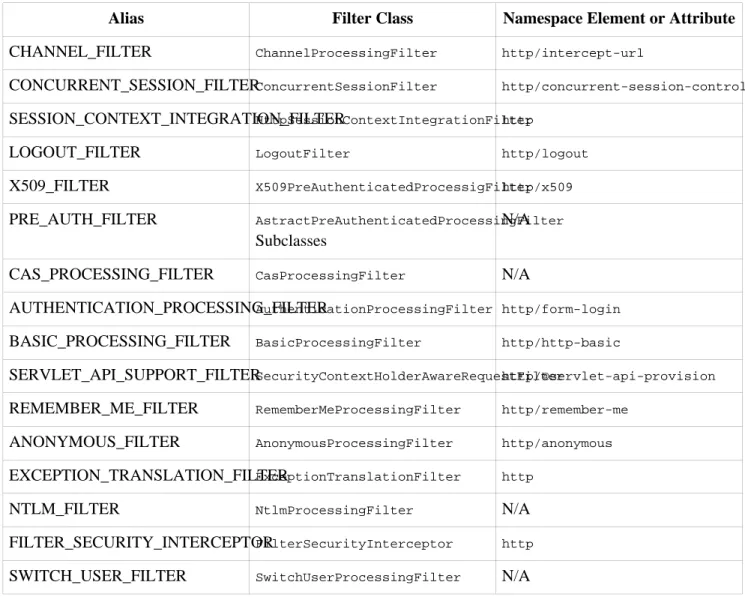
The order of the filters is always strictly enforced when using the namespace. Each Spring Security filter implements the Spring Ordered interface and the filters created by the namespace are sorted during
initialization. The standard Spring Security filters each have an alias in the namespace. The filters, aliases and namespace elements/attributes which create the filters are shown in Table 2.1, “Standard Filter Aliases and Ordering”.
Table 2.1. Standard Filter Aliases and Ordering
Alias Filter Class Namespace Element or Attribute
CHANNEL_FILTER ChannelProcessingFilter http/intercept-url
CONCURRENT_SESSION_FILTERConcurrentSessionFilter http/concurrent-session-control
SESSION_CONTEXT_INTEGRATION_FILTERHttpSessionContextIntegrationFilterhttp
LOGOUT_FILTER LogoutFilter http/logout
X509_FILTER X509PreAuthenticatedProcessigFilterhttp/x509
PRE_AUTH_FILTER AstractPreAuthenticatedProcessingFilter
Subclasses
N/A
CAS_PROCESSING_FILTER CasProcessingFilter N/A
AUTHENTICATION_PROCESSING_FILTERAuthenticationProcessingFilter http/form-login
BASIC_PROCESSING_FILTER BasicProcessingFilter http/http-basic
SERVLET_API_SUPPORT_FILTERSecurityContextHolderAwareRequestFilterhttp/@servlet-api-provision
REMEMBER_ME_FILTER RememberMeProcessingFilter http/remember-me
ANONYMOUS_FILTER AnonymousProcessingFilter http/anonymous
EXCEPTION_TRANSLATION_FILTERExceptionTranslationFilter http
NTLM_FILTER NtlmProcessingFilter N/A
FILTER_SECURITY_INTERCEPTORFilterSecurityInterceptor http
SWITCH_USER_FILTER SwitchUserProcessingFilter N/A
You can add your own filter to the stack, using thecustom-filterelement and one of these names to specify
the position your filter should appear at:
<beans:bean id="myFilter" class="com.mycompany.MySpecialAuthenticationFilter"> <custom-filter position="AUTHENTICATION_PROCESSING_FILTER"/>
</beans:bean>
You can also use the afterorbeforeattribtues if you want your filter to be inserted before or after another
filter in the stack. The names "FIRST" and "LAST" can be used with thepositionattribute to indicate that you
want your filter to appear before or after the entire stack, respectively.
Avoiding filter position conflicts
If you are inserting a custom filter which may occupy the same position as one of the standard filters created by the namespace then it's important that you don't include the namespace versions by mistake. Avoid using theauto-config attribute and remove any elements which create filters
whose functionality you want to replace.
Note that you can't replace filters which are created by the use of the <http> element itself -HttpSessionContextIntegrationFilter, ExceptionTranslationFilter or FilterSecurityInterceptor.
If you're replacing a namespace filter which requires an authentication entry point (i.e. where the authentication process is triggered by an attempt by an unauthenticated user to access to a secured resource), you will need to add a custom entry point bean too.
2.3.5.1. Setting a CustomAuthenticationEntryPoint
If you aren't using form login, OpenID or basic authentication through the namespace, you may want to define an authentication filter and entry point using a traditional bean syntax and link them into the namespace, as we've just seen. The corresponding AuthenticationEntryPoint can be set using the entry-point-ref
attribute on the<http>element.
The CAS sample application is a good example of the use of custom beans with the namespace, including this syntax. If you aren't familiar with authentication entry points, they are discussed in the technical overview chapter.
2.3.6. Session Fixation Attack Protection
Session fixationattacks are a potential risk where it is possible for a malicious attacker to create a session by accessing a site, then persuade another user to log in with the same session (by sending them a link containing the session identifier as a parameter, for example). Spring Security protects against this automatically by creating a new session when a user logs in. If you don't require this protection, or it conflicts with some other requirement, you can control the behaviour using the session-fixation-protection attribute on <http>,
which has three options
• migrateSession- creates a new session and copies the existing session attributes to the new session. This is
the default.
• none- Don't do anything. The original session will be retained.
• newSession- Create a new "clean" session, without copying the existing session data.
2.4. Method Security
Spring Security 2.0 has improved support substantially for adding security to your service layer methods. If you are using Java 5 or greater, then support for JSR-250 security annotations is provided, as well as the framework's native @Secured annotation. You can apply security to a single bean, using the
intercept-methods element to decorate the bean declaration, or you can secure multiple beans across the
entire service layer using the AspectJ style pointcuts.
2.4.1. The
<global-method-security>Element
This element is used to enable annotation-based security in your application (by setting the appropriate attributes on the element), and also to group together security pointcut declarations which will be applied across your entire application context. You should only declare one <global-method-security> element. The
following declaration would enable support for both Spring Security's@Secured, and JSR-250 annotations:
<global-method-security secured-annotations="enabled" jsr250-annotations="enabled"/>
Adding an annotation to a method (on an class or interface) would then limit the access to that method accordingly. Spring Security's native annotation support defines a set of attributes for the method. These will be passed to the AccessDecisionManager for it to make the actual decision. This example is taken from the
tutorial sample, which is a good starting point if you want to use method security in your application:
public interface BankService {
@Secured("IS_AUTHENTICATED_ANONYMOUSLY") public Account readAccount(Long id);
@Secured("IS_AUTHENTICATED_ANONYMOUSLY") public Account[] findAccounts();
@Secured("ROLE_TELLER")
public Account post(Account account, double amount); }
2.4.1.1. Adding Security Pointcuts usingprotect-pointcut
The use ofprotect-pointcutis particularly powerful, as it allows you to apply security to many beans with
only a simple declaration. Consider the following example:
<global-method-security>
<protect-pointcut expression="execution(* com.mycompany.*Service.*(..))" access="ROLE_USER"/> </global-method-security>
This will protect all methods on beans declared in the application context whose classes are in the
com.mycompanypackage and whose class names end in "Service". Only users with theROLE_USER role will be
able to invoke these methods. As with URL matching, the most specific matches must come first in the list of pointcuts, as the first matching expression will be used.
2.4.2. The
intercept-methodsBean Decorator
This alternative syntax allows you to specify security for a specific bean by adding this element within the bean itself.
<bean:bean id="target" class="com.mycompany.myapp.MyBean"> <intercept-methods>
<protect method="set*" access="ROLE_ADMIN" />
<protect method="get*" access="ROLE_ADMIN,ROLE_USER" /> <protect method="doSomething" access="ROLE_USER" /> </intercept-methods>
</bean:bean>
This allows you to configure security attributes for individual methods on the bean or simple wildcarded patterns.
2.5. The Default AccessDecisionManager
This section assumes you have some knowledge of the underlying architecture for access-control within Spring Security. If you don't you can skip it and come back to it later, as this section is only really relevant for people who need to do some customization in order to use more than simple role based security.
When you use a namespace configuration, a default instance of AccessDecisionManager is automatically
registered for you and will be used for making access decisions for method invocations and web URL access, based on the access attributes you specify in yourintercept-urlandprotect-pointcutdeclarations (and in
annotations if you are using annotation secured methods).
The default strategy is to use an AffirmativeBased AccessDecisionManager with a RoleVoter and an AuthenticatedVoter.
2.5.1. Customizing the AccessDecisionManager
If you need to use a more complicated access control strategy then it is easy to set an alternative for both method and web security.
For method security, you do this by setting the access-decision-manager-ref attribute on global-method-securityto the Id of the appropriateAccessDecisionManagerbean in the application context:
<global-method-security access-decision-manager-ref="myAccessDecisionManagerBean"> ...
</global-method-security>
The syntax for web security is the same, but on thehttpelement:
<http access-decision-manager-ref="myAccessDecisionManagerBean"> ...
</http>
2.6. The Default Authentication Manager
We've touched on the idea that the namespace configuration automatically registers an authentication manager bean for you. This is an instance of Spring Security's ProviderManager class, which you may already be
familiar with if you've used the framework before. You can't use a customAuthenticationProviderif you are
using either HTTP or method security through the namespace, but this should not be a problem as you have full control over theAuthenticationProviders that are used.
You may want to register additionalAuthenticationProviderbeans with the ProviderManagerand you can
do this using the<custom-authentication-provider>element within the bean. For example:
<bean id="casAuthenticationProvider"
class="org.springframework.security.providers.cas.CasAuthenticationProvider">
<security:custom-authentication-provider /> ...
</bean>
Another common requirement is that another bean in the context may require a reference to the
AuthenticationManager. There is a special element which lets you register an alias for the AuthenticationManagerand you can then use this name elsewhere in your application context.
<security:authentication-manager alias="authenticationManager"/>
<bean id="customizedFormLoginFilter" class="org.springframework.security.ui.webapp.AuthenticationProcessingFilter"> <security:custom-filter position="AUTHENTICATION_PROCESSING_FILTER "/>
<property name="authenticationManager" ref="authenticationManager"/> ...
</bean>
Chapter 3. Sample Applications
There are several sample web applications that are available with the project. To avoid an overly large download, only the "tutorial" and "contacts" samples are included in the distribution zip file. You can either build the others yourself, or you can obtain the war files individually from the central Maven repository. We'd recommend the former. You can get the source as described inthe introductionand it's easy to build the project using Maven. There is more information on the project web site at
http://www.springframework.org/spring-security/if you need it. All paths referred to in this chapter are relative to the source directory, once you have checked it out from subversion.
3.1. Tutorial Sample
The tutorial sample is a nice basic example to get you started. It uses simple namespace configuration throughout. The compiled application is included in the distribution zip file, ready to be deployed into your web container (spring-security-samples-tutorial-2.0.x.war). The form-based authentication mechanism is
used in combination with the commonly-used remember-me authentication provider to automatically remember the login using cookies.
We recommend you start with the tutorial sample, as the XML is minimal and easy to follow. Most importantly, you can easily add this one XML file (and its corresponding web.xml entries) to your existing
application. Only when this basic integration is achieved do we suggest you attempt adding in method authorization or domain object security.
3.2. Contacts
The Contacts Sample is quite an advanced example in that it illustrates the more powerful features of domain object access control lists in addition to basic application security.
To deploy, simply copy the WAR file from Spring Security distribution into your container’s webapps
directory. The war should be calledspring-security-samples-contacts-2.0.0.war (the appended version
number will vary depending on what release you are using).
After starting your container, check the application can load. Visit http://localhost:8080/contacts (or
whichever URL is appropriate for your web container and the WAR you deployed).
Next, click "Debug". You will be prompted to authenticate, and a series of usernames and passwords are suggested on that page. Simply authenticate with any of these and view the resulting page. It should contain a success message similar to the following:
Authentication object is of type: org.springframework.security.providers.UsernamePasswordAuthenticationToken
Authentication object as a String:
org.springframework.security.providers.UsernamePasswordAuthenticationToken@1f127853: Principal: org.springframework.security.userdetails.User@b07ed00:
Username: rod; Password: [PROTECTED]; Enabled: true; AccountNonExpired: true; credentialsNonExpired: true; AccountNonLocked: true;
Granted Authorities: ROLE_SUPERVISOR, ROLE_USER; Password: [PROTECTED]; Authenticated: true; Details: org.springframework.security.ui.WebAuthenticationDetails@0:
Granted Authorities: ROLE_SUPERVISOR, ROLE_USER
Authentication object holds the following granted authorities:
ROLE_SUPERVISOR (getAuthority(): ROLE_SUPERVISOR) ROLE_USER (getAuthority(): ROLE_USER)
SUCCESS! Your web filters appear to be properly configured!
Once you successfully receive the above message, return to the sample application's home page and click "Manage". You can then try out the application. Notice that only the contacts available to the currently logged on user are displayed, and only users withROLE_SUPERVISORare granted access to delete their contacts. Behind
the scenes, theMethodSecurityInterceptoris securing the business objects.
The application allows you to modify the access control lists associated with different contacts. Be sure to give this a try and understand how it works by reviewing the application context XML files.
3.3. LDAP Sample
The LDAP sample application provides a basic configuration and sets up both a namespace configuration and an equivalent configuration using traditional beans, both in the same application context file. This means there are actually two identical authentication providers configured in this application.
3.4. CAS Sample
The CAS sample requires that you run both a CAS server and CAS client. It isn't included in the distribution so you should check out the project code as described inthe introduction. You'll find the relevant files under the
sample/casdirectory. There's also aReadme.txtfile in there which explains how to run both the server and the
client directly from the source tree, complete with SSL support. You have to download the CAS Server web application (a war file) from the CAS site and drop it into thesamples/cas/serverdirectory.
3.5. Pre-Authentication Sample
This sample application demonstrates how to wire up beans from the pre-authentication framework to make use of login information from a J2EE container. The user name and roles are those setup by the container.
The code is insamples/preauth.
Chapter 4. Spring Security Community
4.1. Issue Tracking
Spring Security uses JIRA to manage bug reports and enhancement requests. If you find a bug, please log a report using JIRA. Do not log it on the support forum, mailing list or by emailing the project's developers. Such approaches are ad-hoc and we prefer to manage bugs using a more formal process.
If possible, in your issue report please provide a JUnit test that demonstrates any incorrect behaviour. Or, better yet, provide a patch that corrects the issue. Similarly, enhancements are welcome to be logged in the issue tracker, although we only accept enhancement requests if you include corresponding unit tests. This is necessary to ensure project test coverage is adequately maintained.
You can access the issue tracker athttp://jira.springframework.org/browse/SEC.
4.2. Becoming Involved
We welcome your involvement in Spring Security project. There are many ways of contributing, including reading the forum and responding to questions from other people, writing new code, improving existing code, assisting with documentation, developing samples or tutorials, or simply making suggestions.
4.3. Further Information
Questions and comments on Spring Security are welcome. You can use the Spring Community Forum web site at http://forum.springframework.org to discuss Spring Security with other users of the framework.
Remember to use JIRA for bug reports, as explained above. Everyone is also welcome to join the Acegisecurity-developer mailing list and participate in design discussions. The traffic volume is very light.
Part II. Overall Architecture
Like most software, Spring Security has certain central interfaces, classes and conceptual abstractions that are commonly used throughout the framework. In this part of the reference guide we will introduce Spring Security, before examining these central elements that are necessary to successfully planning and executing a Spring Security integration.
Chapter 5. Technical Overview
5.1. Runtime Environment
Spring Security is written to execute within a standard Java 1.4 Runtime Environment. It also supports Java 5.0, although the Java types which are specific to this release are packaged in a separate package with the suffix "tiger" in their JAR filename. As Spring Security aims to operate in a self-contained manner, there is no need to place any special configuration files into your Java Runtime Environment. In particular, there is no need to configure a special Java Authentication and Authorization Service (JAAS) policy file or place Spring Security into common classpath locations.
Similarly, if you are using an EJB Container or Servlet Container there is no need to put any special configuration files anywhere, nor include Spring Security in a server classloader.
This design offers maximum deployment time flexibility, as you can simply copy your target artifact (be it a JAR, WAR or EAR) from one system to another and it will immediately work.
5.2. Shared Components
Let's explore some of the most important shared components in Spring Security. Components are considered "shared" if they are central to the framework and the framework cannot operate without them. These Java types represent the building blocks of the remaining system, so it's important to understand that they're there, even if you don't need to directly interact with them.
5.2.1. SecurityContextHolder, SecurityContext and Authentication Objects
The most fundamental object isSecurityContextHolder. This is where we store details of the present security
context of the application, which includes details of the principal currently using the application. By default the
SecurityContextHolder uses a ThreadLocal to store these details, which means that the security context is
always available to methods in the same thread of execution, even if the security context is not explicitly passed around as an argument to those methods. Using aThreadLocalin this way is quite safe if care is taken to clear
the thread after the present principal's request is processed. Of course, Spring Security takes care of this for you automatically so there is no need to worry about it.
Some applications aren't entirely suitable for using aThreadLocal, because of the specific way they work with
threads. For example, a Swing client might want all threads in a Java Virtual Machine to use the same security context. For this situation you would use theSecurityContextHolder.MODE_GLOBAL. Other applications might
want to have threads spawned by the secure thread also assume the same security identity. This is achieved by using SecurityContextHolder.MODE_INHERITABLETHREADLOCAL. You can change the mode from the default SecurityContextHolder.MODE_THREADLOCALin two ways. The first is to set a system property. Alternatively,
call a static method onSecurityContextHolder. Most applications won't need to change from the default, but
if you do, take a look at the JavaDocs forSecurityContextHolderto learn more.
Inside theSecurityContextHolderwe store details of the principal currently interacting with the application.
Spring Security uses anAuthenticationobject to represent this information. Whilst you won't normally need
to create anAuthenticationobject yourself, it is fairly common for users to query theAuthenticationobject.
You can use the following code block - from anywhere in your application - to obtain the name of the authenticated user, for example:
Object obj = SecurityContextHolder.getContext().getAuthentication().getPrincipal();
if (obj instanceof UserDetails) {
String username = ((UserDetails)obj).getUsername(); } else {
String username = obj.toString(); }
The above code introduces a number of interesting relationships and key objects. First, you will notice that there is an intermediate object between SecurityContextHolder and Authentication. The SecurityContextHolder.getContext()method is actually returning aSecurityContext.
5.2.2. The UserDetailsService
Another item to note from the above code fragment is that you can obtain a principal from theAuthentication
object. The principal is just an Object. Most of the time this can be cast into a UserDetails object. UserDetails is a central interface in Spring Security. It represents a principal, but in an extensible and
application-specific way. Think of UserDetails as the adapter between your own user database and what
Spring Security needs inside theSecurityContextHolder. Being a representation of something from your own
user database, quite often you will cast theUserDetailsto the original object that your application provided, so
you can call business-specific methods (likegetEmail(),getEmployeeNumber()and so on).
By now you're probably wondering, so when do I provide aUserDetailsobject? How do I do that? I thought
you said this thing was declarative and I didn't need to write any Java code - what gives? The short answer is that there is a special interface called UserDetailsService. The only method on this interface accepts a String-based username argument and returns a UserDetails. Most authentication providers that ship with
Spring Security delegate to a UserDetailsService as part of the authentication process. The UserDetailsServiceis used to build theAuthenticationobject that is stored in theSecurityContextHolder.
The good news is that we provide a number ofUserDetailsServiceimplementations, including one that uses
an in-memory map and another that uses JDBC. Most users tend to write their own, though, with such implementations often simply sitting on top of an existing Data Access Object (DAO) that represents their employees, customers, or other users of the enterprise application. Remember the advantage that whatever your UserDetailsService returns can always be obtained from the SecurityContextHolder, as per the above code
fragment.
5.2.3. GrantedAuthority
Besides the principal, another important method provided by Authentication is getAuthorities(). This
method provides an array ofGrantedAuthorityobjects. AGrantedAuthorityis, not surprisingly, an authority
that is granted to the principal. Such authorities are usually "roles", such as ROLE_ADMINISTRATOR or ROLE_HR_SUPERVISOR. These roles are later on configured for web authorization, method authorization and
domain object authorization. Other parts of Spring Security are capable of interpreting these authorities, and expect them to be present.GrantedAuthorityobjects are usually loaded by theUserDetailsService.
Usually the GrantedAuthority objects are application-wide permissions. They are not specific to a given
domain object. Thus, you wouldn't likely have a GrantedAuthority to represent a permission to Employee
object number 54, because if there are thousands of such authorities you would quickly run out of memory (or, at the very least, cause the application to take a long time to authenticate a user). Of course, Spring Security is expressly designed to handle this common requirement, but you'd instead use the project's domain object security capabilities for this purpose.
Last but not least, sometimes you will need to store theSecurityContextbetween HTTP requests. Other times
the principal will re-authenticate on every request, although most of the time it will be stored. The Technical Overview
HttpSessionContextIntegrationFilter is responsible for storing a SecurityContext between HTTP
requests. As suggested by the name of the class, theHttpSessionis used to store this information. You should
never interact directly with theHttpSessionfor security purposes. There is simply no justification for doing so
- always use theSecurityContextHolderinstead.
5.2.4. Summary
Just to recap, the major building blocks of Spring Security are:
• SecurityContextHolder, to provide any type access to theSecurityContext.
• SecurityContext, to hold theAuthenticationand possibly request-specific security information.
• HttpSessionContextIntegrationFilter, to store the SecurityContext in the HttpSession between web
requests.
• Authentication, to represent the principal in a Spring Security-specific manner.
• GrantedAuthority, to reflect the application-wide permissions granted to a principal.
• UserDetails, to provide the necessary information to build an Authentication object from your application's
DAOs.
• UserDetailsService, to create aUserDetailswhen passed in aString-based username (or certificate ID or
alike).
Now that you've gained an understanding of these repeatedly-used components, let's take a closer look at the process of authentication.
5.3. Authentication
As mentioned in the beginning of this reference guide, Spring Security can participate in many different authentication environments. Whilst we recommend people use Spring Security for authentication and not integrate with existing Container Managed Authentication, it is nevertheless supported - as is integrating with your own proprietary authentication system. Let's first explore authentication from the perspective of Spring Security managing web security entirely on its own, which is illustrative of the most complex and most common situation.
Consider a typical web application's authentication process:
1. You visit the home page, and click on a link.
2. A request goes to the server, and the server decides that you've asked for a protected resource.
3. As you're not presently authenticated, the server sends back a response indicating that you must authenticate. The response will either be an HTTP response code, or a redirect to a particular web page.
4. Depending on the authentication mechanism, your browser will either redirect to the specific web page so that you can fill out the form, or the browser will somehow retrieve your identity (eg a BASIC authentication dialogue box, a cookie, a X509 certificate etc).
5. The browser will send back a response to the server. This will either be an HTTP POST containing the contents of the form that you filled out, or an HTTP header containing your authentication details.
6. Next the server will decide whether or not the presented credentials are valid. If they're valid, the next step will happen. If they're invalid, usually your browser will be asked to try again (so you return to step two above).
7. The original request that you made to cause the authentication process will be retried. Hopefully you've Technical Overview