http://www.sciencepublishinggroup.com/j/wcmc doi: 10.11648/j.wcmc.20170504.11
ISSN: 2330-1007 (Print); ISSN: 2330-1015 (Online)
Review Article
Wireless Communications and Application to School
Attendance: A Case Study
Pierre Tsafack, Achille Fumtchum, Emmanuel Tanyi
Department of Electrical and Electronic Engineering, University of Buea, Buea, Cameroon
Email address:
[email protected] (P. Tsafack), [email protected] (A. Fumtchum), [email protected] (E. Tanyi)
To cite this article:
Pierre Tsafack, Achille Fumtchum, Emmanuel Tanyi. Wireless Communications and Application to School Attendance: A Case Study.
International Journal of Wireless Communications and Mobile Computing. Vol. 5, No. 4, 2017, pp. 18-25. doi: 10.11648/j.wcmc.20170504.11 Received: August 9, 2017; Accepted: September 4, 2017; Published: September 26, 2017
Abstract:
Attendance and punctuality are very critical for a good operation of every organization. This paper proposes a way of taking school attendance using an android device and a web application connected via a Local Area Network (LAN). The student data are stored in an android phone which is to send attendance to the web application when the student comes into the coverage area of the LAN. The web application then displays the attendance data in an interactive interface with attendance grading.Keywords:
LAN, Wi-Fi, Android Phone, WEB Application, School Attendance, IoT1. Introduction
Tracking is the use of various methods of workplace surveillance to gather information about the activities and locations of staff members so as to enhance efficiency of the organisation [1]. With the increasing rate of dishonesty and unpunctuality, most organizations are investing more money into staff follow-up [2]. Since the deployment of third generation networks in Cameroon, the number of people using smart phones has increased exponentially. According to Mobile Telecommunication Network (MTN) Cameroon financial statement released at the end of June 2016, the number of smart phone users in Cameroon increased to 2.6 million with a 34.1 percent increase [3]. These mobile phones are equipped with very sophisticated and useful modules as seen in [4] and can be very useful in user tracking and follow-up if properly programmed. It is pragmatic to make use of these phones for attendance and tracking of students. In fact, lateness and absenteeism are the major causes of low percentage passed and weak lessons mastery in Cameroon's schools and Universities; first year students are more affected because for most of them it is their very first time to live alone and far from the family. Advancements in technology have enabled coverage distance of wireless networks to be controllable such that a network can be confined within a
limited geographic area like a building, classroom or a few blocks on the access point used [5]. This advantage is already exploited in limiting the coverage area of Wi-Fi networks and so attendance can be taken based on that. This paper is intended at producing an android based application which can be used for attendance taking in an organisation or school. The android application is a student based application which is intended to support Wi-Fi Login and attendance taking services such that the attendance of a student can be taken through the phone when he enters the intended local area network. The web application is an administrator based application which is intended to display statistical attendance data of every student on a simple-to-use interface. The two applications will function together.
2. Tracking Systems and Description
There are some case studies of indoor tracking mechanisms deployed by some organizations, such as Biometric Scanners, Access Cards, Camera Video Surveillance and GPS tracking.
2.1. Biometric Scanners
Biometric Scanners are automated methods of recognizing a person based on a physiological or behavioural characteristic [6]. Among the features measured are face, fingerprints, hand geometry, iris, retina and voice. Biometric templates are difficult to reverse-engineered and recreate personal information and they can hardly be stolen and used to access personal information [6]. The most popularly used biometric scanners are the fingerprint and iris scanners. Iris scanners are becoming more common in high-security applications because people's eyes are so unique; they also allow more than
200 points of reference for comparison, as opposed to 60 or 70 points in fingerprints [7]. Iris recognition works with clear contact lenses, eyeglasses, and non-mirrored sunglasses [8]. Also, the system faces some drawbacks such as being easily fooled by a high quality image of an eye [9].
2.2. Access Cards
Another indoor tracking mechanisms deployed by some organizations is Access Cards which is similar to a credit card, containing data on an embedded magnetized strip that can electronically unlock a door or activate a machine[10]. The systems can be as small as one door controlled locally and expanded to include hundreds of doors and the potential to remotely control multiple locations. Figure 1 shows an example of an access card control system controlling multiple doors through one Host Computer.
Figure 1. Access Card Control system [11].
As limitations, this access control systems can be hacked since they use magnetic tape to store information about the user; logging in with the card does not guarantee that the access card holder is the one logging in since another person can login using the same access card; it can also be stolen and used to login. It is very costly to install and manage.
2.3. Camera Video Surveillance
Video Surveillance is also used as a tracking mechanisms deployed by some organizations. With their wide range of styles and features, security cameras are common in most industries around the world. By combining advanced camera features with outdoor housings or discreet camera design, an IP camera can be installed in almost any location. This makes them ideal for monitoring inside and outside of businesses and offices, recording in remote locations, or recording high quality video to identify suspicious people.
Some advantages of the video surveillance system include the fact that surveillance feeds can be accessed from anywhere on internet which is very convenient. In addition to attendance taking, the footages and audio can be used to detect crime like
theft or harassment. This system also faces some drawbacks. Some of which include its high cost; also, the camera security always cause privacy issues in an organization which some employees find unacceptable.
2.4. Ctrack Outdoor Vehicle Tracking System
Ctrack Outdoor Vehicle Tracking System is an Australian company that specializes in providing GPS vehicle tracking solutions to fleet operators across Australia [12].
They provide real time GPS vehicle tracking and fleet management systems that can be customized to suit fleet specific needs. Figure 2 shows the structure of the Ctrack vehicle tracking system.
An Employee’s vehicle is equipped with a GPS tracking device which sends the location of the car at all times to the company’s main server through cell towers or through satellite service. The data is then sent to the specific client network and can be used to monitor his Employees. As advantages, this system keeps track of Employees and so helps to curb employee excessive use of vehicles and time for personal purposes. It can keep track of Employee driving habits and help to clamp down Employees who consistently over speed.
An overview of the attendance tracking systems used all over the world has been presented above. Their advantages as well as their disadvantages have also been presented. In the following section the design method for the LAN-school attendance system using an android and web application will be presented.
3. Methodology and Design
This LAN-school attendance system will use the Waterfall software development model defined in [13] which divides a software application life-cycle into requirement analysis, system design, implementation, testing, deployment and maintenance. This section will focus on the requirement analysis and system design.
3.1. System Analysis
For complete functionality of this system, several requirements are mandatory both for the mobile (android) side and the server side of the application. The android device is to pick up the specific Wi-Fi SSID and send attendance to the server automatically through the Local Area Network. For this to be fully operational, the android device is to support Wi-Fi equipped with WPA encryption standard. This encryption standard was released in 2003 by the Wi-Fi Alliance and the android devices released after that can support the standard [14]. The phone (through the application) should be able to automatically connect to the LAN and send attendance data with the student identification number. The server receiving this data will record the sending time of the data along with the student identification information. The server is to store data in the form of text and therefore will be a light weight server. The LAN coverage area is supposed to be limited to the geographical area corresponding to the classroom vicinity. This will require specific Access Points configured with specified properties so as to meet this need.
3.2. System Requirements
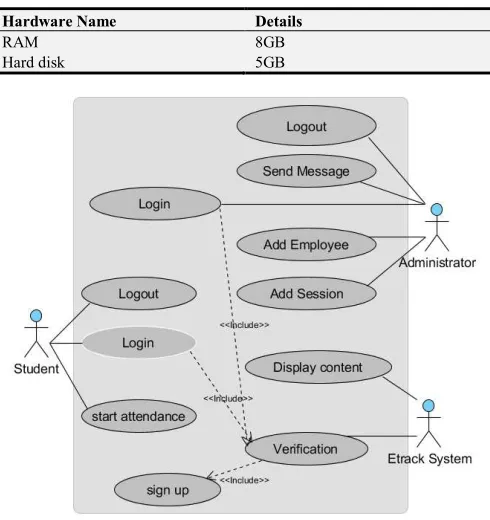
Tables 1, 2, 3 and 4 show the hardware, communication and software interfaces needed for the system.
- Software interfaces
Table 1. Web Application Software Interfaces.
Software Details
Application Server Apache
Database MySQL
Web Browser All Browsers
Languages PHP, JavaScript, HTML5, CSS
Framework Laravel
Table 2. Android Application Software Interfaces.
Software Details
Database SQLite
Languages Java, xml
IDE Android Studio
- Hardware interfaces
Table 3. Android Device Hardware Interfaces.
Hardware Name Details
Android Version Version 3.0 and above
RAM 500MB
Hard disk 100MB
Table 4. Server Hardware Interfaces.
Hardware Name Details
RAM 8GB
Hard disk 5GB
Figure 3. Etrack use case diagram.
- Use Case Diagram
the android application running on his mobile phone. He can log into the system and start recording his attendance. He can as well logout from the system if he does not want his attendance to be taken. An administrator (Lecturer or Employer) is also a verified user who has the ability to view attendance of all students/Employees through the built web interface. He has the ability to send messages to students/employees, add new sessions to the system and also add new students/employee data into the system. This Etrack system verifies a user and the administrator. It also displays the database data in a simple and interactive interface including session addition, user addition and message sending.
- Database Structure
The model used to structure the database is a hierarchical
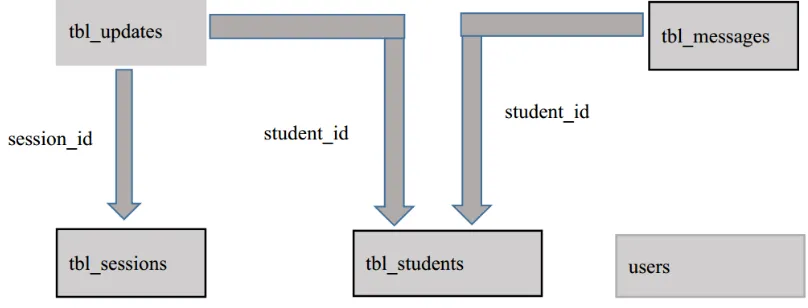
model which organizes data in a tree structure. There is a hierarchy of parent and child data segments which are linked together by links called foreign keys. The various records are divided into tables in the relational model and the individual records are called rows. To create links between these record types, the hierarchical model uses Parent Child Relationships which are mainly one to many mapping relationships. Figure 4 shows the relational database structure designed for this system. This is a simple database structure which is easier to manage and queries can be done much easier than other structures because of its hierarchical structure. Tables 5 to 9 show the details of the various tables created in the database. The size limitation of every field is presented in the Type column in brackets.
Figure 4. Relational Database structure.
Table 5. tbl_student.
Column Name Type Properties
id int(4) primary,auto_increment,
student_name varchar(40)
student_id varchar(10) unique
student_email varchar(30) unique
student_password varchar(50)
Table 6. tbl_updates.
Column Name Type Properties
id int(11) primary,auto_increment
student_id int(11) foreign key(tbl_student id)
Session_id Int(11) foreign key(tbl_sessions id)
created_at timestamp
updated_at timestamp
Table 7. tbl_messages.
Column Name Type Properties
id int(11) primary,auto_increment
student_id int(4) foreign key(tbl_student id)
title varchar(50)
message varchar(500)
alldata int(1)
created_at timestamp
updated_at timestamp
Table 8. Users.
Column Name Type Properties
id int(1) primary, auto_increment
admin_name varchar(30)
admin_email varchar(30) unique
password varchar(50)
Table 9. tbl_sessions.
Column Name Type Properties
id int(11) primary,auto_increment
Start_time datetime
End_time datetime
Created_at timestamp
Updated_at timestamp
This section has laid down the various designs that will be used in system implementation. It has also presented the various hardware and software interfaces needed for proper functionality of the system. The next section will be about the implementation of these designs and the various tests carried out to validate the system.
4. Implementation, Tests, Results and
Discussions
system implementation as well as the various forms of testing done to assert its validity. The results of the system after implementation and testing are also explained in details in this section along with some discussions on its functionality.
4.1. Implementation
The system design was realised with Visual Paradigm 10.0 and implementation was done on Android Studio and Sublime text using Windows 8-64bits operating system. The system contains two separated but connected modules which run on different Operating Systems.
a - The first module runs on Android operating system in an Android mobile device and is in charge of sending user attendance to the web module. This module is implemented on Android Studio using Java and XML programming languages.
b - The second module runs on Windows 8 operating system which acts as the Server (back end) of the application and also provides the user interfaces (front end) for user interaction with Server. The module was implemented with the help of the Laravel Framework and the programming languages used were PHP, JavaScript, CSS and HTML5.
Table 10 shows the various tools that were used in the implementation for both the web and the android application.
Table 10. Tools Used.
Case Tool/Language
Programming Environments Android Studio, Sublime text
Programming Languages Java, XML,PHP, JavaScript, HTML5, CSS
Framework Laravel
Design Tools Visual Paradigm 10.0
4.2. Tests
The first module(android application) was tested using an emulator of android studio running on android version 6.0 Operating System followed by an actual device running on Android version 4.1 Operating System. The following tests were carried out.
a. Automatic connection to configured access point. b.Timing service for automatic update of attendance when
user is within the LAN.
c. Actual attendance sending with student id inclusive. The testing on module two (web application) was done using a computer running on Windows 8 operating system. Firefox, Google Chrome and Windows Explorer browsers were used. The following functionalities were tested.
a. Adding of new sessions.
b.Sending of messages to all or some students c. Viewing of statistical data on attendance. d.New students Addition.
4.3. Results
The following section shows the various interfaces obtained at the end of the implementation and testing of the system.
- Android Application Views
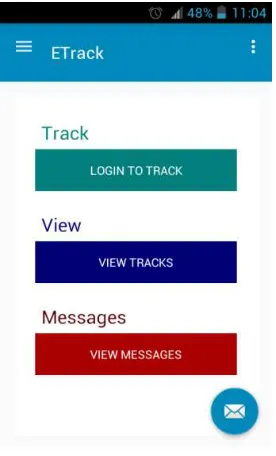
Figure 5-(a) is the home view of the android application
taken on Android Version 4.1.2 which is the first page when application is launched. Figure 5-(b) is the login screen which permits a user to log into the Local Area Network when application is first installed. This is to get the user (student) identification information into the local database to be used for attendance taking.
Figure 6-(a) shows the view used to commence attendance taking during a session. The ‘’START ATTENDANCE’’ button is pressed to take attendance for a particular session (in this case, student attendance is sent immediately rather than waiting for regular timing update).
Figure 6-(b) is the Message home view which shows in short all messages that have been received from the student starting with the most recent one. It displays the title of the message, the date, time sent and the message body.
(a) Android Home View
(b) Login view
(a) Start Attendance view
(b) Message Home View
Figure 6. Student attendance sub-system interfaces.
(a) Message Detail View
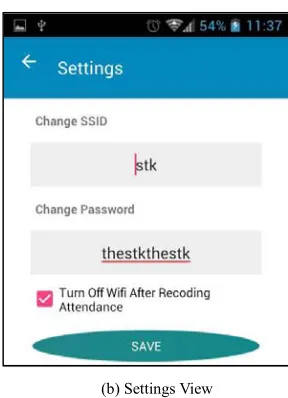
(b) Settings View
Figure 7. Message Details and Settings views.
- Web Application Views
Figure 8. Login Screen for Etrack.
Figure 9. Message Screen.
Figure 7-(a) shows the details of a message when the message is tabbed on the message home screen. Figure 7-(b) shows the settings view. This page is used to set the SSID and the password of the Local Area Network generated by an access point. This view also provides an option to turn off the Wi-Fi after taking attendance. This option helps in battery conservation since Wi-Fi consumes a lot of energy.
Figure 8 is the Login screen for a lecturer. A lecturer who is logged in can perform all tasks supported by this web application. A person who is not logged in can only view the home screen of the application.
Figure 10. Add student screen.
Figure 11. Add new Session View.
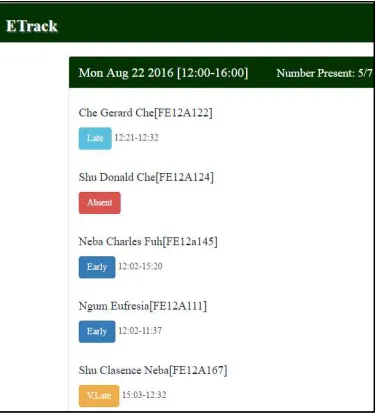
Figure 10 shows the page used to add a new student into the Etrack database. Input information includes the student name, student Identification number and his email address. Figure 11 presents the user interface used to add a new session to the database and also to view the recently added session to the database. Figure 12 displays the attendance details of every student in a session.
Figure 12. Daily attendance page.
These details include the time the student came in and when he left the LAN, the number of students who were present for the session and the date and time when session started and when it ended. The colors on the screen show the degree of lateness of a student; their programming nomenclature is presented in Table 11.
Table 11. Colours programming nomenclature.
Color Meaning
Between 0 and 20 minutes late
Between 20 and 30 minutes late
Above 30 minutes late
No attendance was taken for session
Figure 13 shows the total attendance statistics for all students. This includes the total number of sessions that have held and the number of times the student has attended.
Figure 13. Statistics view.
5. Conclusion
The android application as expected automatically turns ON Wi-Fi services in a phone, connects it to the configured network and sends attendance to the LAN concerned. These functionalities were accomplished along with the messaging. The web application was also expected to display the content of the attendance database in an easy-to-use interface which also provides interfaces for adding new students, adding new sessions and sending text messages. These functionalities were fully realised with a user friendly interface as shown in section 4.
phone, forgetting to turn ON Wi-Fi on time, a limited number of phones able to be connected at the same time to the computer and also sending somebody else with his/her phone, the system still remains a viable option in many cases especially if the following improvements can be made.
Adding alarm service to both student and lecturer on the next scheduled sessions. This service will be able to use the session data set by the lecturer to notify students and the lecturer of next coming sessions.
Adding interactive and bidirectional messaging between student and lecturer and amongst students across the LAN. File sharing can also be implemented across the LAN.
Incorporating fingerprint recognition with the android phone in order to assert that the user starting the attendance is actually the verified user.
References
[1] Daegeon Kim, Sung Chun Lee, Pairwise Threshold for Gaussian Mixture Classification and Its Application on Human Tracking Enhancement, IEEE Ninth International Conference on Advanced Video and Signal-Based Surveillance, Pages: 368-372, 2012
[2] M. A. Mohammed, Mahir Hassan Kadhim, Ahmed Fuad, Mustafa Musa Jaber, Follow up system for directorate of scholarship and cultural relations in Iraq, International Conference on Computer, Communications, and Control Technology (I4CT) Pages: 182-187, 2014
[3] Jeffrey Kutchka, Danielle Tchuinkou, Joel Mandebi, Erman Nghonda, Christophe Bobda, Automatic Assessment of Environmental Hazards for Fall Prevention Using Smart-Cameras, IEEE First International Conference on Connected Health: Applications, Systems and Engineering Technologies (CHASE), Pages: 24-29, 2016
[4] Dong Chen, Jason Brown; Jamil. Y. Khan, LoWPAN based Neighborhood Area Network for a smart grid communication infrastructure, Fifth International Conference on Ubiquitous and Future Networks (ICUFN), Pages: 576-581, 2013 [5] Pavel Ivanov Andreev, Bohos Rupen Aprahamian,
Investigation of a new technology of controlling electrical
apparatus via a smart phone, 15th International Conference on Electrical Machines, Drives and Power Systems (ELMA), Pages: 410-413, 2017
[6] Fahad-Bin-Mazhar, Oli Ahamed, Md. Rasedujjaman Biometric smart attendance kit with fingerprint scanner by using microcontroller, International Conference on Electrical & Electronic Engineering (ICEEE), Pages: 13-16, 2017
[7] A cGurpreet Kaur, Navdeep Kanwal, Comparative review of various approaches for feature extraction in face recognition, 3rd International Conference on Computing for Sustainable Global Development (INDIACom), Pages: 2705-2710, 2016 [8] Jianxu Chen, Feng Shen, Danny Ziyi Chen, Patrick J. Flynn,
Iris Recognition Based on Human-Interpretable Features, IEEE Transactions on Information Forensics and Security, Volume: 11, Issue: 7, Pages: 1476-1485, 2017
[9] Nadia Othman, Bernadette Dorizzi, Impact of Quality-Based Fusion Techniques for Video-Based Iris Recognition at a Distance, IEEE Transactions on Information Forensics and Security, Volume: 10, Issue: 8,Pages: 1590, 2015
[10] E. Schmidt, T. Cebulla and J. Holmen, Magnetic thin film access card system, IEEE Transactions on Magnetics Year:, Volume: 3, Issue: 3, Pages: 325-329, 1967
[11] Kuo-Yi Chen, Chin-Yang Lin and Ting-Wei Hou, The Low-Cost Secure Sessions of Access Control Model for Distributed Applications by Public Personal Smart Cards, IEEE 17th International Conference on Parallel and Distributed Systems, Pages: 894-899, 2011
[12] Xin Jing, Liu Xiao-dan, Ran Bao-jing, Liu Ding, Adaptive multiple cues integration for robust outdoor vehicle visual tracking 34th Chinese Control Conference (CCC), Pages: 4913-4918, 2015
[13] Chunming Gao, Guy Hembroff, Implications of modified waterfall model to the roles and education of health IT professionals, IEEE Network Operations and Management Symposium, Pages: 1368-1369, 2012
![Figure 2. CTRACK geo-positioning structure [12].](https://thumb-us.123doks.com/thumbv2/123dok_us/8464833.1709508/2.595.96.494.285.480/figure-ctrack-geo-positioning-structure.webp)