1
Using Augmented Reality to engage STEM students with
an authentic curriculum
M. Hobbs
1,*, D. Holley
21Anglia Ruskin University, Department of Computing and Technology, Cambridge, CB1 1PT
2Bournemouth University, Centre of Excellence for Learning, Talbot Campus, Poole, Dorset, BH12 5BB
Abstract
This paper reports on the introduction of a set of 'Augmented Reality' (AR) tasks, offering an innovative, real world and problem based set of activities for a group of first year University Gaming and Computer Science students. Our initial research identifies a gap in the perceptions of STEM students between the usefulness of discipline based modules and a compulsory 'Professional Development' module where more ‘employability’ based skills were delivered. It had a history of poor student engagement and attendance, and failed to provide a compelling narrative/links to the outside world. The AR tasks were designed to facilitate group-working and multi-channel communication, and to engage students through the use of a more creative technology. Framed as a rich case study, insights are captured through student blogs, video interviews and a questionnaire. Initial findings indicate higher levels of satisfaction and an appreciation of groupwork tasks, enhanced student engagement and a greater awareness of the value of transferable skills.
Keywords: STEM, PDP, Academic skills, Student engagement, Augmented Reality, BYOD
Received on 10 November 2015, accepted on 1 April 2016, published on 15 June 2016
Copyright © 2016 M. Hobbs and D. Holley, licensed to EAI. This is an open access article distributed under the terms of the Creative Commons Attribution licence (http://creativecommons.org/licenses/by/3.0/), which permits unlimited use, distribution and reproduction in any medium so long as the original work is properly cited.
doi: 10.4108/eai.15-6-2016.151447
*Corresponding author. Email:[email protected]
1. Introduction
This paper reports on the introduction of a set of creative 'Augmented Reality' (AR) tasks, offering innovative, real world and problem based activities for first year University Gaming and Computer Science students. Our initial research identifies a gap in the perceptions of STEM students between the usefulness of discipline based modules and a compulsory 'Professional Development' module where more ‘employability’ skills are embedded. It had a history of poor student engagement/attendance, and failed to provide a compelling narrative.
The extensive review of the literature of augmented reality (AR) by Carmigniani and Furht [1] provides a taxonomy of systems and applications, including education. In common with most analysis of AR they focus on how systems deliver content and an interactive, context aware, experience for the user. Since the
introduction of AR (1990s) [2] augmented reality systems have been used in many areas of education, including higher education [3] and STEM subjects such as maths [4] and physics [5] Yuen et al [6] suggested five directions for AR in education – books, gaming, discovery based learning, object modeling and skills training. Each area benefits from the context sensitive delivery of interactive material that can enhance an essentially 'real world', authentic experience. In their overview they noted: “... most current educators will find that, while it is possible for them, as individuals, to create AR content using the tools mentioned earlier in this paper, truly user-friendly AR creation tools may still be just over the horizon.”
While this is probably still true for the more sophisticated AR experiences, there is a significant sub-set of simple AR application creation tools that allow those with limited technical ability to become AR creators. These newer, user friendly technologies [7] have combined with the rise of smartphone usage [8] to enable
on
e-Learning
Research
Article
EAI Endorsed Transactions on e-Learning 04 - 06 2016|Volume3|Issue11 |e2
EAI
European Alliancethe majority of students to access educational AR applications via their own device. Our study is located within the user-generated content of SMART devices, in that our students are creating their own artifacts using the Aurasma AR ‘App’.
1.1. Theoretical context for AR
The theoretical basis for AR in education can be seen as an extension to the Cognitive Theory of Multimedia Learning that suggests images/other media give more impact to the learning experience. However, in this study we focus on the use of AR as a creative tool. We aim to harness the process of creating AR to provide a context for a range of higher education skills within a Collaborative Learning (CL) framework. A systematic review of the literature in computer supported CL by Shawkey et. al. [9] shows AR as one of several computer systems that can be used to facilitate CL and this view is confirmed by Lin et. al. [10].
Collaborative Learning is based on the idea that students learn as much, or more, from each other than they do from an instructor – this is particularly relevant to higher education where it is expected that the majority of the work is done by the student outside of the lecture theatre. Vygotsky’s theories of learning as a social, constructivist process [11], where individuals establish a shared view of a problem and how to solve it, underpins CL and offered useful insights into the design of the revised set of student tasks [12][13]. By utilising their own mobile devices learning can take place at a time and virtual / physical location of the students choosing and offers the advantages of more personalised learning across multiple platform, both personal and institutional[14].
1.2 The Case Study Approach
Drawing upon [15] Stake (1983) we see this case study as a rich case in its own right: comparing and contrasting the data from the student feedback offers a rich and deep analysis. Case studies offer insights into both what is common and particular about a case, and a uniqueness that Stouffer [16] refers to as pervasive, extending to factors such as the nature of the case, historic setting, physical context, cases through which this case is recognised and those informants through whom the case can be known. Thus for a complex and nuanced case, looking at our students through this lens offers the advantages of multiple data collection tools, institutional documents; field notes from the researchers during the process of the intervention; student blogs and video focus groups analysis. These all offer insights into the student’s sense of meaning and learning construction both during and after the event as they reflect upon their experiences [17].
1.3 Research Method
12 sets of 'small focus group' interviews were conducted in class using a set format to ensure uniformity. By their participation students received an authentic research experience which they can use to base similar techniques to get user feedback from their own projects later in the course. All participants took part voluntarily and were aware that participation/ non- participation would not have any impact on their marks. The researcher was introduced as a member of staff from the Education department, interested in teamwork and technology projects.
The focus groups were filmed and permission gained for edited clips to be embedded within our own project website and for dissemination purposes. For data transcription purposes, each student had a 'number' placed in front of him/her, to enable accurate analysis. The course tutor led on the filming, and coached different members of the class in how to film as the focus groups took place, thus assisting students to develop another skill to add to their PDP. Some students were appreciative of the opportunity to undertake this type of activity, seeing it as part of their broader skillset development; others were unable to identify the benefits of adding to a skill set so early in their academic career.
2 The Augmented Reality 'mini' project
2.1 Soft Skills for STEM Students
It is particularly difficult to get technically motivated students from STEM disciplines to consider the softer skills, even when they are aware that these are desired by employers and are likely to be the differentiating factor in recruitment between equally technical applicants. Within the perceived context of a lack of STEM graduates, there is a significant problem that too many lack the soft skills to enable them to be ready for work [18]. Other studies have shown that there is a gap between what companies want in terms of skills, and what is provided by higher education institutions; with communication skills, team working and independent problem solving being identified [19][20].
3
topics such as: Self-Evaluation Exercise, Note Taking, Group Work, Presentations, Library and referencing Skills, Report Writing, Keeping a Log Book, Time Management, Submitting Work, Plagiarism and the creation of the PDP portfolio.
End of year Course Reviews identified issues of poor engagement with the module, seen in low pass rates and tutors comments on lack of attendance. Despite the tensions of delivering a STEM curriculum with a high discipline based content, students clearly needed the ‘softer skills’ developed through this module. Thus a redesign was needed, and a more creative approach considered [23].
2.2 The re-design: using a student centred
approach
Our work follows the ALT recommendations [24] about engaging students as active participants, increasing fun in teaching for improved engagement with materials studied. This was enhanced where students chose to stretch the criteria of the task
The use of the institutional VLE is a requisite for all academic staff, however, within our institutions, typically this is used to host documents and presentations created by lecturers for access by students. Our redesign included a requirement for student groups to create content and add this to the VLE, thus sharing materials with both peers and tutors. We selected the blog tool to support this function, and it was noticeable that several groups decided to take the blog idea, but to create and host ‘their’ group blog on one of the many free external tools, such as pbwiki, blogger or wordpress. Students comfort in carving out a shared and personal learning space for their teams to operate within shows how far students have moved from the tensions outlined by Wheeler [25].
The ‘expected’ more traditional materials were available, but very much used to facilitate a flipped classroom [26] approach, and drawn upon during the interactive seminars, where students came along with questions they had prepared about the actual assessment and process.
2.2 Why AR?
Media interest in AR and application framework development had a surge of activity in 2012, but to some extent AR is regarded as a solution in search of a problem [27]. However, although wider commercial applications remain elusive it has been seen as a promising area for education [28].
Our students were aware of AR but had little experience apart from a few who had played AR games. At all times care was taken that if a student did not wish to engage with the AR mini project they would still be
able to complete their PDP tasks and would not be disadvantaged.
AR systems such as Aursama [29] are ultimately financed by revenue generated from advertising or commercial applications. However, to boost user numbers they encourage individual creation of AR artefacts through free user accounts. An advantage of Aurasma is that it allows the complete AR creation process to be carried out on a mobile device with the freely available app (iOS and Android). The Aruasma app runs on a mobile device and uses the camera viewfinder to recognise a trigger image. Once trigged an 'Aura' (i.e. the pre-recorded media) can be viewed on the screen of mobile device. We utilised a 'Bring Your Own Device' (BYOD) model, which included all students even if they did not own a SMART device.
2.4 Project Design and Tasks
Previous studies [30] showed the value of using an interesting and inherently engaging technology (in that case a Virtual World) to facilitate group work and to promote broader skill acquisition. Then, as now, ability with the technology was secondary to the development of the skills needed to achieve the tasks.
Student brief: Self-selecting into small groups of 3/5 groups were asked to create a name and logo and to engage with the University Library, in the broadest sense, by producing an AR artefact. They were encouraged to plan, script and story board their short video. Apart from asking them to observe the intellectual property rights of images, videos and music, students were free to create their own videos. Weekly sessions were used for feedback, discussion and introducing the supporting materials on the student Virtual Learning Environment (VLE). Additional support was offered through email, discussion boards and comments posted on blog sites. Groups were asked to do a short 5min presentation to the class. Most demonstrated reasonable presentation skills; in many cases showed considerable independent research around the topic. Because they were all related to the same topic students found it easy to ask questions; this promoted lively debate. Group meetings and task allocations demonstrated time/project management skills.
2.5 Using Aursama and Creating AR
Students were asked to download the app from Google play for android or iTunes for apple devices. In each group most students downloaded and tried out the app, but typically most of the work was done on one or two devices with input shared by the group.
Aurasma is designed to be used by non-experts with no training other than the prompts from the interface. It starts from the scanning screen or viewfinder (camera view with superimposed pulsing circle of dots). This has an ‘i’ in the top left corner which gives you short
EAI Endorsed Transactions on e-Learning 04 - 06 2016|Volume3|Issue11 |e2
EAI
European Allianceinstructions as a user guide. The ‘A’ icon at the bottom of puts you in the ‘Explore’ page showing the main menu icons along the bottom of the screen (create aura, scan for triggers, search for aruas/channels, account/profile).
A channel is a name for a collection of auras, typically from one person but can be a collection; by default you follow the ‘popular’ aura channel and students were given a specific channel for this project (password protected) so that they could share their work. To help them create an aura, students were given instructions on making their own auras - here is an abbreviated version of those instructions that illustrates the simplicity of the process (an aura can be created in a few minuets):
Choose overlay i.e. the media you want to play– Library tab – opens with a library of pre-existing overlays. Device tab - Or choose ‘Device to use existing image / video/ sound / 3D model etc. Allows preview and select.
Choose Trigger – scan an image with the camera, note the scale at the bottom, when slider is at the right hand end the image has sufficient clarity and uniqueness for a trigger. Press camera icon to record. Location trigger is also available.
Position overlay – You can move the overlay around with your finger.
Create Name, - give your aura a name
Private / Public – if you want the aura to be visible on other devices you need to register so that you can make it public. If you don’t have any channels you can register and create a new channel at this point.
Finish
Scan / Play - Scan the trigger image to play the media. You can capture an image of the media play from the camera icon at the base of the screen. You can ‘share’ the aura with other users by sending a link via email.
The students quickly discovered and shared tips about using the app to get the best results, some of which (such as the use of email link for rapid loading and viewing of an aura) were later incorporated into supporting materials.
3 Evaluation
3.1 Group Interviews
A total of four hours of video was captured with each of the 12 groups having around 20 minuets each. Initial questions were used to set the group at ease and get each of them talking about their background and why they chose this particular course.
Students were given an outline of the core questions and the reasons why they were being asked so that they could make the most of the session as a reflective exercise.
Here is the set of core questions (highlighted in italics) with follow up questions listed:
Why did you choose this course? (Asked to each member of the group in turn) What is your background /experience in computing/computer gaming?
What is your impression of Augmented Reality? Have you seen it used, have you used it yourself? Were you aware of what it was before this project?
What is your favourite AR artefact and what did you like about it? What do you think of AR in general? Is it something useful?
How did you find using the AR tools? Did you have any issues downloading or installing the app? did you find the instructions were helpful?
What auras/ AR artifacts have you created? Can you show us now? Was it easy to find media to play? Did you find suitable triggers? Is there anything that would have made this process easier?
How did you work as a group? Did you manage to meet up often enough? Did you use online tools such as the VLE blog, discussion board or email? Did you allocate group-working roles? Do you think this was a helpful exercise for group work and your PDP skills?
The videos were analyzed and common themes extracted. We were particularly interested in how the groups worked, as this was the core ‘emergent’ behavior we were trying to support.
At the start of the module a classroom session was used to introduce the main issues with group work, provide opportunity for some discussion and to point out the supporting materials available on the VLE. Other than that the self-selecting groups of students were allowed to do whatever they thought appropriate for the task. As well as a knowledge and ability for group work the intention was to foster an independent, autonomous attitude to this task and assessments in general. Table 1 shows key results from the summarized video interviews with the style of working and student comments (in italic).
Table 1. Key results from group interviews
Summary results and student comments
1 Worked as a group on the project, meeting in the library. “It’s very, very simple to use. It goes through everything that you need to know to create an aura.”
2 Worked individually with Facebook as a point of contact. Some previous experience with AR, happy to do more with this project. “The beauty of it was that we were able to email each other as it was a very technology-based thing.”
3 Worked individually and as a group, used Facebook as point of contact. “I first heard about it, I think it was 2011, demonstrated on an iPad.”
5 some progress with the project. “We found a book about sports which had an aura of somebody doing weightlifting.”
5 Worked together as a group. Also made an aura from signs at the college. “We went for a book that stood out and that didn’t have a plain background.”
6 Used Skype and Facebook to communicate with regular face to face meetings. Posed to the blog as a group and individually. Made aura for a book on confidence: “We decided that this [the book] was relevant for this kind of PDP course.”
7 Well-organised group. Had problems but managed to create an aura. “It’s been challenging but we’ve overcome it.”
8 The group used the blog but also set up a Facebook page and website. Created a logo and group name. “We tried to find a decent trigger image that isn't too widely used and doesn’t conflict with copyright.”
9 Group met up regularly, communicated through Skype / Facebook and in person. Created a group name and a logo and attached some books related to the course. “For some reason the university computers just won’t pick it up but we’ve tried our own tablets and it works absolutely fine so we don’t know what’s going on.”
10 Worked together and Facebook chats to communicate but already knew each other. “If you follow the instructions, anyone could do it.” 11 Used Facebook/ Steam to communicate as
well as face-to-face meetings. Aurasma app was easy to use. The group task was commented on as - “It’s a bit of a pain but it will help”
12 Met as a group but somewhat disorganized. One student made an aura and had updated a blog. “When I first came to university I didn’t know anybody. To be put into a group to meet people is quite nice.”
The insights from the group working sessions demonstrate the range of technologies that first year computing students select as their technology of choice. Most of the groups used Facebook and Whatsapp for their informal communications before uploading more formal blogs and reports to be recorded on the VLE. An interesting variant was the use of ‘Steam’ a game delivery and communication platform. Significantly, Steam is not part of the curriculum for the gaming students so this demonstrates the appropriation of a technology for another use – as suggested by Pachler and Cook [31]. Feedback from pervious cohorts reflected a dislike for group work, which was not found in this curriculum initiative; instead we have had positive comments about the group work. Students have also valued the opportunity
for socialization and have discovered for themselves the authentic nature of the team task.
3.2 Effect on Assessment Submission
There was a marked improvement in performance between this cohort and the previous PDP results. Table 2
shows the changes in the rate of submission between the previous year and the year of the AR mini-project. Non-submission improved from 34% (in a cohort of 55) to 22% (in a cohort of 78). The PDP is a pass/fail element attached to a larger module that teaches game engine technology. The change in those who engaged with the PDP is even more marked when you consider that in 2013/14, 15% who submitted the main assessment but did not bother with PDP, but in 2014/15 there was actually one more student who submitted to PDP than for the main assessment.
Table 2. Summary of Assessment Submission
Cohort Main Assessment PDP work
No % No %
55 44 80 25 66
78 60 77 61 79
3.3 Student Opinions
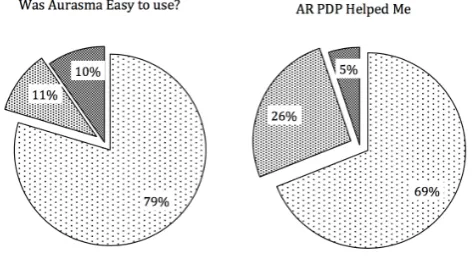
A questionnaire was used to gather information about the opinions and views of students. Overall the results were positive to questions that we had hoped would demonstrate a high rate of satisfaction with the AR project. Figure 1 outlines the results from two key questions – which were did they find Aurasma easy to use, (79% agreed), and did they thing that the Augmented Reality project PDP had been helpful (69% agreed).
Figure 1. Student responses from the questionnaire
EAI Endorsed Transactions on e-Learning 04 - 06 2016|Volume3|Issue11 |e2
EAI
European AllianceThe student questionnaire analysis showed broad agreement from the whole cohort about the appropriateness of the technology, the ease of its use and for the relevance of the task, with 90% of the cohort reporting no difficulty. 68% agreed that the use of augmented reality made the course more relevant and interesting.
Nearly half of the students identified with the statement 'I prefer to work alone', and it is this lack of softer skills that employers identify as necessary. Also of interest was 58% of the students acknowledged that the CPD module had developed their softer skills. 74% agreed that their group working skills had improved, that their communication skills had improved, as had their presentation skills. Time management/ organisational skills had developed as a result of the course, and 75% reported more confidence in referencing and writing. For on-going work, student responses to the task being more challenging: 60% considered the task level needed to be raised; and the 50% of students wanted the tasks to be more directly related to their individual student interests.
The wider benefits of this approach can be seen in enhanced skills around research and the role of the library which will be of direct use to the students in their on-going studies. Similarly, the modelling of the focus group and filming of the infractions, although not highly valued by the students (47% agreed it was useful) offers an embryonic example for the skills they will need when testing their own applications and games. The recognition that the viewpoint of the user should be the prime focus rather than the developer is a key developmental step.
3.4 Emergent themes from the project
(i) Groups that met up in person seemed to achieve significantly more than those groups, which used online communication exclusively. (ii) The subject of the project, developing AR
artefacts for library purposes, did not seem to inspire them, although it did make them visit the library.
(iii) Students could see the worth of cooperation and recording what they did so that the project could progress.
(iv) For the tutors, working with an authentic task offered something concrete to relate abstract notions of academic skills
(v) Novelty of application helped the groups working as there was no ‘expert’.
These themes are summarized from the overall feedback, as they were the most significant factors, most commonly expressed within the body of evidence.
All the participants were keen video game players and very proud of their choice of course - many had selected it specifically because of the core element of 'hard' programming with 'most' programming modules. This is seen as a key element of obtaining work in the gaming industry, and two students, from an arts and music
background, highlighted the programming course element before disclosing their extremely exceptional skills in a different area.
They did not value the PDP module as highly as other 'programming' modules, but when prompted, did acknowledge the value for employment. Some groups already knew one another but for others it was a good way to make contact with fellow students at an early part of their course. The groups communicated in very different ways (see the list of summary responses). Most groups reported a technical/communication issues that they had to overcome by researching their own solution. So despite a relatively easy set of well-scaffolded tasks, students reported a genuine sense of achievement, which contributed to confidence and independence.
4 Conclusions
Developing user-generated content, where students have a large degree of autonomy in the design and implementation for the PDP course was core to the philosophy underpinning this work. Our case study has provided some interesting findings about STEM students and their engagement with ‘softer skills’. With such a small study, it is not possible to generalise the findings, however, we have been able to identify some key features to be incorporated for ‘PDP’ and made a start on more general curriculum guidance. We found that although the students were unfamiliar with group work at a higher education level, they managed to develop their own strategies that showed embryonic skill development. In a future iteration we will model and scaffold teamwork in a more overt and clear way.
We are keen to provide more opportunities to practice communication. When interviewed a significant minority of the students struggle to make eye contact, hold a conversation and speak eloquently about a subject. Preparing and giving presentations in a supportive environment is an excellent way of developing these skills.
7
practice in being highly autonomous and independent in choosing the way they approach tasks of this nature. The future work will build on lessons learned from this work and will feed into the next delivery of the PDP module in 2015/16.
We would like to acknowledge the work of Mathew Scofield (researcher) for his assistance with the data analysis.
5
References
[1] CARMIGNIANI, J., & FURHT, B. (2011) Augmented reality: an overview. In Handbook of augmented reality
pages 3-46. Springer New York.
[2] AZUMA, R. T. (1997) A survey of augmented reality.
Presence-Teleoperators and Virtual Environments, 6 (4), 355 – 385.
[3] LIAROKAPIS, F. AND ANDERSON, E.F. (2010) Using augmented reality as a medium to assist teaching in higher education. Proc. of the 31st Annual Conference of the
European Association for Computer Graphics
(Eurographics 2010) pages 9-16.
[4] KAUFMANN, H., & SCHMALSTIEG, D. (2003) Mathematics and geometry education with collaborative augmented reality. Computers & Graphics, 27(3), pages 339-345.
[5] IBÁÑEZ, MARÍA BLANCA, et al. (2014) Experimenting with electromagnetism using augmented reality: Impact on flow student experience and educational effectiveness.
Computers & Education 71: pages 1-13.
[6] YUEN, S., YAOYUNEYONG, G., AND JOHNSON, E.(2011) Augmented reality: An overview and five directions for AR in education. Journal of Educational Technology Development and Exchange 4:1, pages 119-140
[7] VALE, R. (2015) EdTechReview on Augmented Reality [Online] http://edtechreview.in/trends- insights/insights/1503-teaching-with-augmented-reality-it-s-here
[8] UCAS Media (2013)Eight out of ten freshers have
smartphones. [Online]
http://www.ucasmedia.com/news/2013/eight-out-of-ten-freshers-have-smartphones
[9] SHAWKY, D., SAID, T., BADAWI, A., HOZAYIN, R. (2014) Affordances of computer-supported collaborative learning platforms: a systematic review, Interactive Collaborative Learning 2014 International Conference . [10] LIN, T, DUH, H., LI, N., WANG, H., TSAI, C. (2013) An
investigation of learners' collaborative knowledge construction performances and behavior patterns in an augmented reality simulation system, Computers & Education, Volume 68, October 2013, Pages 314-321. [11] VYGOTSKY, L.S. (1978). Mind in Society. The
development of higher psychological processes (Cole, M., Ed.). Cambridge MA: Harvard University Press (Original work published 1930).
[12] LEE, C.D. AND SMAGORINSKY, P. (2000) Vygotskian perspectives on literacy research: Constructing meaning through collaborative inquiry. Cambridge, England: Cambridge University Press.
[13] COOK, J. (2010) Mobile phones as mediating tools within augmented contexts for development. International Journal of Mobile and Blended Learning, 2(3), pages1-12.
[14] KUKULSKA-HULME, A., TRAXLER, J., AND PETTIT, J. (2007) Designed and user-generated activity in the mobile age. Journal of Learning Design, 2(1) pages. 52–65 [15] STAKE, R.E. (1983) The case study method in social
inquiry. Evaluation models. Springer Netherlands, pages. 279-286
[16] STOUFFER, S. A. (1941) Notes on the case-study and the unique case, Sociometry, 4 1941 349-357.
[17] KRESS, GUNTHER. (2000) Design and Transformation: New Theories of Meaning. Pp. 153–161 in Multiliteracies:
Literacy Learning and the Design of Social Futures, edited by Bill Cope and Mary Kalantzis. Pages 155-156 London: Routledge.
[18] CBI/PEARSON (2013) Changing the pace – Education and Skills Survey. [Online] http://www.cbi.org.uk/media/2119176/education_and_skill s_survey_2013.pdf
[19] HARRIS, M. (2014) STEM paradox, is there really a shortage of STEM graduates in the workplace? Physics World.
[20] UKCES (2014) The Labour Market Story: Skills for the Future, briefing paper, UK Commission for Employment
and Skills. [Online]
https://www.gov.uk/government/uploads/system/uploads/a ttachment_data/file/344441/The_Labour_Market_Story-_Skills_for_the_Future.pdf
[21] HOUGHTON, W., MADDOCKS, A. (2005) Personal Development Planning for Engineering Students, Higher Education Academy, Engineering Subject Centre.
[22] QAA (2013) Recognising achievement beyond the curriculum [Online] http://www.qaa.ac.uk/assuring-standards-and-quality/skills-for-employability.
[23] HOLLEY, D., HOBBS, M., HOWLETT, P. AND SAWYERR, W. (2013) The chaotic science lab: supporting trainee Science teachers a cross-departmental project. Anglia Ruskin University Networks, 16, pages 51-58. [Online] http://hdl.handle.net/10540/303566.
[24] LAURILLARD, D., DEEPWELL, M. (2014) Alt survey on the effective use of learning technology in education, Association of Learning Technologists.
[25] WHEELER, S. (2009) Learning Space Mashups: Combining Web 2.0 Tools to Create Collaborative and Reflective Learning Spaces. Future Internet, 1 (1), pages 3-13.
[26] DODDS, M. (2015) Evidence for the Flipped Classroom in STEM. [Online] <https://www-users.cs.york.ac.uk/~miked/publications/flipped_classroom .dodds.pdf>.
[27] DUNLEAVY, M., & DEDE, C. (2013) Augmented reality teaching and learning. In J. Spector, M. Merrill, J. Elen, & M. Bishop (Eds.), Handbook of Research on Educational Communications and Technology, pages 735- 745. New York: Springer.
[28] LEE, K. (2012) Augmented Reality in Education and Training, TechTrends, 56:2, pages 12-21.
[29] AURSASMA: (2015) Aurasma website, HP software. [Online] < http://www.aurasma.com> .
[30] BROWN, E., HOBBS, M., & GORDON, M. (2008) Virtual World Environment for Group Work, International
Journal of Web-Based Learning and Teaching Technologies, 3(1): Pages 1-12 .
[31] PACHLER, N., COOK, J. AND BACHMAIR, B. (2010) Appropriation of mobile cultural resources for learning.International Journal of Mobile and Blended Learning, 2 (1). Pages p. 1-21.
EAI Endorsed Transactions on e-Learning 04 - 06 2016|Volume3|Issue11 |e2