B.Comp. Dissertation
Email Client for a Browser-based Application Platform
By Chen Xi
Department of Computer Science School of Computing National University of Singapore
i
B.Comp. Dissertation
Email Client for a Browser-based Application Platform
By Chen Xi
Department of Computer Science School of Computing National University of Singapore
2008/2009
Project No: H041290
Advisor: Assoc Prof Martin Henz
Deliverables:
Report: 1 Volume Program: 1 CD-ROM
ii
Abstract
TiddlyCard is a client-side computing environment that is based on the web-browser which allows users to manage their information. In this project, I have built an email application to allow email retrieval from an IMAP server, email sending via a SMTP server as well as other common functionalities provided by an email client. This browser-based email application differs from the common email client by its support of online mode and partial or on-demand email downloading, and it differs from the common webmail by the support of the offline mode and local email storage. The whole application comprises of two main layers: the IMAP/SMTP implementation layer and a well-designed user interface layer.
The application is based on the file system, class system as well as the core library of the TiddlyCard system. The Chilkat IMAP/SMTP Library is chosen as one of the implementations of IMAP and SMTP protocol. I have adopted Ext 2.0 JS library to build the user interface of the application.
Subject Descriptors: C.2.2 Network Protocols
D.1.5 Object-oriented Programming D.2.2 Design Tools and Techniques D.2.11 Software Architectures
Keywords:
JavaScript, email client, asynchronous message passing, client-side computing
Implementation Software and Hardware:
JavaScript 1.5, Microsoft Internet Explorer, Chilkat ActiveX Component, Ext 2.0 JS Library
iii
Acknowledgement
First and foremost, I would like to express my outmost gratitude to my supervisor Assoc Prof Martin Henz for his valuable advice and tremendous support throughout the entire project.
This project would not have been possible without the assistance and support from other developers in the TiddlyCard family of projects. In particular, I would like to thank Mr. Daryl Seah for his continuous support on the TiddlyCard system.
For those whose names do not appear here, but who have helped me in one way or another in this project, my sincere gratitude goes out to all of you as well.
iv
List of Figures
Figure 1 Online Model and Offline Model ... 1
Figure 2 Overall Structure ... 11
Figure 3 Design Pattern: Adapter ... 12
Figure 4 Add in JavaMail Implementation ... 12
Figure 5 Design Pattern: Abstract Factory ... 14
Figure 6 Flow Chart of UI Components ... 18
Figure 7 User Login Window ... 19
Figure 8 Server Configuration Window ... 20
Figure 9 User Interface of TiddlyCard Email Client ... 21
Figure 10 Mailbox Window ... 22
Figure 11 Main Panel ... 23
Figure 12 View an Email in New Tab ... 26
Figure 13 Compose New Window ... 27
Figure 14 Add an Attachment ... 28
Figure 15 Compose New Window with Attachments Added ... 28
Figure 16 Reply an Email ... 29
Figure 17 Delete an Email ... 30
Figure 18 Offline Mode ... 32
Figure 19 Delete Function in Offline Mode ... 34
v
Table of Contents
Title ... i
Abstract ... ii
Acknowledgement ... iii
List of Figures ... iv
Table of Contents ... v
1. Introduction ... 1
2. Background ... 2
2.1 Email Applications ... 2
2.2 TiddlyCard System... 3
3. MIME, IMAP and SMTP ... 4
3.1 Multipurpose Internet Mail Extension (MIME) ... 4
3.2 Internet Message Access Protocol (IMAP) ... 7
3.3 Simple Mail Transfer Protocol (SMTP) ... 8
4 Implementations of IMAP and SMTP ... 8
4.1 PHP ... 8
4.2 JavaMail ... 9
4.3 Chilkat IMAP Library ... 10
5. Development and Implementation ... 10
5.1 Objectives ... 10
5.2 Overall Structure ... 10
5.3 Design Patterns ... 11
5.3.1 Structural Pattern: Adapter ... 11
5.3.2 Creational Pattern: Abstract Factory ... 13
5.3.3 Creational Pattern: Singleton ... 15
vi
5.4.1 TiddlyCard Libraries ... 16
5.4.2 Chilkat IMAP/SMTP Library ... 17
5.4.3 Ext JS JavaScript Library... 17
5.5 Functionalities ... 17
5.5.1 Initialization ... 18
5.5.2 Online Mode ... 19
5.5.2.1 User Login ... 19
5.5.2.2 Main User Interface ... 21
5.5.2.3 MailboxPanel ... 22
5.5.2.4 MainPanel ... 23
5.5.3 Offline Mode ... 31
5.5.3.1 User Login ... 31
5.5.3.2 Main User Interface ... 31
6. Summary ... 34
7. Future Development ... 36
References ... vii
Appendix A: Program Listing ... ix
1. Introduction
TiddlyCard Email Client is a browser-based email client and a plugin application for TiddlyCard system, which is a platform that allows client-side computing on the web browser environment. In addition to the common functionalities for most of the email clients, such as checking and sending emails, it also provides three additional features: 1). It is designed in a way such that different IMAP/SMTP implementation can be plugged in to achieve cross-browser portability, i.e. the application can be run on different browsers such as IE, Firefox, etc. as long as certain implementation is provided.
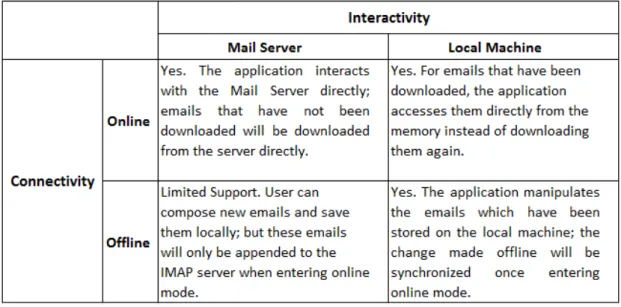
2). It supports two different Distributed Electronic Mail Models: online and offline, i.e. it can either download and store emails on the client machine or only download emails or email parts on demand but not save these emails locally; and user can switch from one model to another easily. Below is a diagram showing the relationship between the internet connectivity and the application’s interactivity with the mail server and the local machine.
Figure 1 Online Model and Offline Model
3) The IMAP and SMTP protocol are implemented using asynchronous methods, i.e. 1
2 when the email client sends out certain request such as fetch emails to the IMAP server and waits for the response from the server, other functionalities of the email client are still available to users, i.e. the application and the browser are not freezing.
The rest of the paper is organized as follows. Section 2 provides the background information of this project, which includes a brief introduction to the existing email clients and the TiddlyCard system; section 3 presents the internet standards MIME, IMAP and SMTP which this project conforms to; section 4 explores several implementations of IMAP and SMTP currently available; section 5 discusses the development and implementation of the email client: section 5.1 illustrates the objectives of the implementation; section 5.2 presents the overall structure of the application; section 5.3 introduces the design patterns adopted; section 5.4 lists out the external libraries which have been used; section 5.5 demonstrates the functionalities available in this email client. Finally, section 6 summarizes the work involved, and section 7 provides suggestions for future development.
2. Background
2.1 Email Applications
Currently email applications that are widely used can be classified into two types: one type is the email client which needs to be installed into the users’ computer and is mostly operating system specific, such as Microsoft Outlook, Mac OS X Leopard; the other type is the web-based email programs called webmail, such as Gmail, Yahoo Mail, etc.
The first type of the email client is highly dependent on the operating system, and thus it is lack of portability, but since it downloads emails locally into users’ computer,
3 user can view emails that have already been downloaded even when he/she is not connected to the internet; and once connected, the email client will synchronize with the POP3 or IMAP server automatically.
For web-based email programs, emails are not stored locally in users’ computer; instead, in order to view emails, user needs to first connect to the internet, and then use web browser to send HTTP request to the proxy server, which handles the request and download emails from the POP3 or IMAP server or send emails via the SMTP server based on the request; thus connection to the internet is mandatory, therefore it is impossible for off-line use. But the advantage of this type of email applications is that they are highly portable: since user accesses emails via web browser, thus no matter which operating systems the user uses, as long as he has a web browser like IE, Firefox, etc, the user can access his email account easily.
2.2 TiddlyCard System
TiddlyCard is a collaborative client-side browser-based application platform, which builds upon the core JavaScript language from an operating system’s perspective. It provides support for basic I/O, persistent file storage, as well as management of multiple concurrent processes; it also introduces an extended JavaScript class system which makes many high-level language features available such as abstract class, singleton class etc. The class system eases the development in JavaScript to a great extent; and the email client is based on this class system and takes use of several functionalities available in TiddlyCard System to achieve local email storage and asynchronous methods. The functionalities used in the email client are discussed in greater detail in section 4.2.
4
3. MIME, IMAP and SMTP
3.1 Multipurpose Internet Mail Extension (MIME)
Multipurpose Internet Mail Extension (MIME) is an internet standard that extends the standard format of textual mail messages on the internet; it is defined in six RFC memoranda: RFC 2045, RFC 2046, RFC 2047, RFC 4288, RFC 4289 and RFC 2077 (Freed et al, 1996).
The standard format of textual mail messages has several disadvantages: first, it does not support character sets richer than US-ASCII; second, it does not specify mechanisms for emails containing binary data such as pictures, audio etc. third, it does not support emails with multiple parts or alternative bodies.
MIME addresses most of these problems by the following mechanics: first, email is defined in a tree structure by using a header field Content-Type and a subfield called boundary, i.e. to define a multipart message, set the Content-Type in the message header to message/multipart, and choose an arbitrary string as the boundary between each part; moreover a part of a message can be another complete MIME message, so a MIME message can be recursively defined; second, the email header of each part contains a Content-Transfer Encoding field which specifies the encoding scheme for non-ASCII data such as 8bit data and binary data, thus messages containing characters from the UTF-8 Unicode character set as well as pictures and audios can be constructed and transmitted over the internet. There are five values defined for the Content-Transfer-Encoding field: 7bit, 8bit, binary, quoted printable and base64.
7bit Data
5 octets or less between CRLF line separation sequences, and no octets with decimal values greater than 127 or equal to 0 are allowed (Postel, 1982). 7bit data corresponds to characters in the US-ASCII character set. If the Content-Transfer-Encoding field is set to 7bit, it simply means the data are in its original format, and no encoding is performed.
8bit Data
According to RFC-821, “8bit Data” refers to data that is represented as lines with 998 octets or less between CRLF line separation sequences, but octets with decimal values greater than 127 may be used (Postel, 1982). 8bit data corresponds to characters in UTF-8 Unicode character set; therefore it can represent non-ASCII characters such as those used in some Asian and European languages. If the Content-Transfer-Encoding field is set to 8bit, it indicates that the data are in the 8bit range, but the data are still in its natural format, and no encoding is performed. However, 8bit data may not be safe to be transported over internet as some transfer protocols restrict messages to contain 7bit data only. For example, SMTP defined in RFC 821 only allows messages containing 7bit US-ASCII data.
Binary Data
According to RFC-821, “Binary Data” refers to data where any sequence of octets is allowed (Postel, 1982). The same problem as the 8bit data, binary data may fail to be transported as they are prohibited in some transfer protocols.
Quoted-Printable Encoding
Quoted-Printable Encoding is defined in RFC 2045 and is used to encode arbitrary sequence of octets into sequence of octets in 7bit range (Freed, 1996). It is intended to encode data which largely consists of octets that correspond to characters in US-ASCII character. Therefore, if the original data are mostly US-ASCII text, the
6 encoded form of the data remains largely human-readable. For example, a text consisting of a single line:
Now's the time for all folk to come to the aid of their country. is represented in the quoted-printable encoding as:
Now's the time =
for all folk to come=
to the aid of their country.
Base64 Encoding
Base64 Encoding is another encoding mechanism defined in RFC 2045, which is also used to transform arbitrary sequence of octets into sequence of octets in 7bit range, but the encoded form the data may not be humanly readable (Freed, 1996). The encoded data will contain characters from a 65-character subset of US-ASCII. For example, the original text data:
I have a dream.
is transformed using base64 encoding as: SSBoYXZlIGEgZHJlYW0u
As a summary, the Content-Transfer-Encoding values “7bit”, “8bit”, and “binary” simply indicates the domain of the data, but no encoding transformation is actually performed; the quoted-printable encoding and the base64 encoding transform arbitrary data into data in 7bit range so that the data can be transmitted over some restricted transfer protocols. Thus MIME messages can include non-ASCII characters as well as pictures and audios as long as certain encoding mechanism is applied, and those messages can be transmitted safely over the internet.
The encoding mechanism for messages is important to the email client, as when messages are downloaded, certain parts of the message need to be decoded based on
7 its Content-Transfer-Encoding so that the data can be displayed in its original format to users; and when messages are stored locally, 8bit and binary data may be encoded again so that they can be stored in a single MIME message.
3.2 Internet Message Access Protocol (IMAP)
Internet Message Access Protocol (IMAP) is one of the two prevailing internet standard protocols for retrieving and managing emails, while the other one is the Post Office Protocol (POP3).
There are three client/server models: online, offline and disconnected, according to the definition of Distributed Electronic Mail Models in RFC 1733 (Crispin, 1994). IMAP supports all of the three models while POP3 only supports the offline model, in which email client connects to the mail server on demand, and downloads all the pending messages to the client machine, then it will delete all these messages on the server and disconnect from the server; after that user can manipulate emails locally, while in the online model, email client maintains connection with the mail server for reading and manipulating emails: it sends request to the server asking for data such as an email header or attachment, and the server only sends back that specific data instead of all the messages on the server; and all messages are stored on the server until user explicitly deletes them.
Obviously IMAP have several advantages over POP3. First, it downloads data on demand and it supports partial fetch of a MIME message, thus it requires less network bandwidth compared to POP3; second IMAP allows simultaneous access to the mail server from multiple clients, while POP3 only allows one at each time; and for POP3, all emails are deleted from the server once they have been downloaded to one client machine, thus if user uses multiple clients, emails will be scattered in different clients. In addition, IMAP allows manipulation of mail folders, such as mailbox creation,
8 deletion and rename. Therefore, IMAP is adopted in this project; an IMAP interface based on the internet standard IMAP4rev1 specified in RFC 3501 is defined, and different IMAP implementations are adapted to conform to this interface.
3.3 Simple Mail Transfer Protocol (SMTP)
Simple Mail Transfer Protocol (SMTP) is a standard for electronic mail transmissions over the internet, which is first defined in RFC821, and last updated by RFC 5321 (Klensin, 2008). The key command in SMTP is the MAIL command which initiates a mail transaction and transfers the email data to an SMTP server which in turn transfers the data to one or more mailboxes or passes it to other systems. A SMTP interface based on this standard is defined, and different SMTP implementations are adapted to conform to this interface.
4 Implementations of IMAP and SMTP
Several different implementations of IMAP/SMTP have been explored in order to find the appropriate implementation for this project. Below is a list of the implementations that have been explored.
4.1 PHP
PHP has an IMAP extension which enables operations with the IMAP protocol as well as the POP3 protocol; it provides full implementation of IMAP; in order to make the IMAP extension work, c-client library must be installed.
PHP also has a built-in function mail() which enables email sending; for this mail function to be available, a working email program must be installed such as sendmail; if user uses an email program other than sendmail such as qmail and postfix, a
9 sendmail wrapper must be written, and PHP must have access to this sendmail binary on the operating system during compile time. However, PHP mail function does not support SMTP Authentication and Secure Socket Layer (SSL) connection. In order to make them available, additional package needs to be installed, such as PEAR Mail Package.
In summary, this PHP implementation requires several packages to be installed on the client machine, and the PHP configuration files need to be manually changed in order to set up the whole IMAP library as well as to ensure the SSL encryption is supported; the tedious installation procedure of this IMAP library may compromise the portability of the email client.
4.2 JavaMail
JavaMail API provides a platform-independent framework to build mail applications; it defines classes based on international standards such as MIME, IMAP, POP3 and SMTP. For it to be available, javax.mail and javax.activation packages need to be included in the proxy server. On the server side, either JSP or Java Servlet needs to be available to handle user request and call methods provided by those packages. However, JavaMail does not provide SSL connection, and in order to use it, the Java Secure Socket Extension (JSSE) needs to be added to the proxy server, the JSSE provider needs to be registered permanently in <java home>\jre\lib\security\java.security properties file or dynamically by calling security.addProvider() method, and JavaMail’s default socket factory needs to be replaced with JSSE’s SSL socket factory.
JavaMail provides a complete implementation of IMAP and SMTP; it is one of the potential implementations which are suitable for this email client.
10
4.3 Chilkat IMAP Library
Chilkat IMAP is a client ActiveX component which provides a standard API based on IMAP to read and manage emails on the IMAP server; it supports SSL connection to the IMAP server and provides easy access to all message parts and attachments; and since Chilkat IMAP ActiveX does not require the existence of a proxy server and it has a simple installation procedure, moreover, it provides an implementation which largely conforms to the standard IMAP4rev1; it is chosen as one of the IMAP implementations in this TiddlyCard Email Client project.
5. Development and Implementation
5.1 Objectives
The project is to support multiple implementations of IMAP protocol and SMTP protocol by using certain design patterns so that various implementations can be plugged into the existing framework easily, and also TiddlyCard Email Client provides support for two different Distributed Electronic Mail Models: the online model and the offline model, i.e. the email client either downloads all emails each time it connects to the IMAP server and store them locally or only download emails on demand and do not provide local email storage; lastly a browser-based user interface is designed and constructed for the email application.
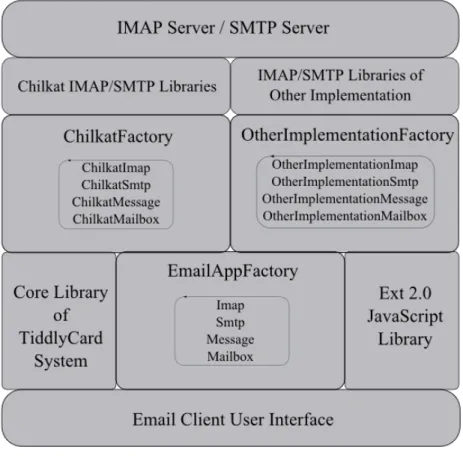
5.2 Overall Structure
Figure 2 Overall Structure
5.3 Design Patterns
5.3.1 Structural Pattern: Adapter
The structural pattern adapter is intended to convert the interface of a class into another interface user expects. It is especially useful when you want to use an existing class, but its interface does not match the one needed (Gamma, Helm, Johnson and Vlissides, 1994).
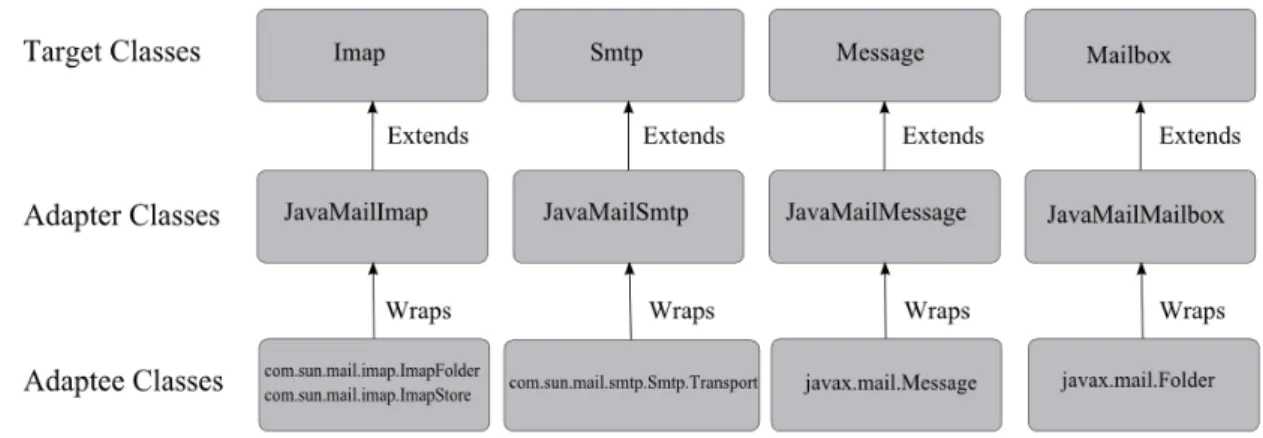
This email client is based on the IMAP and SMTP interface which are defined according to the internet standards IMAP4rev1 and SMTP (RFC 532); thus in order to use the available IMAP and SMTP implementations such as Chilkat and JavaMail, the interface of these implementations must be adapted or wrapped to conform to the interface defined in this email client; for example, The design structure for the IMAP
implementations is shown below:
Figure 3 Design Pattern: Adapter
By using the Adapter design pattern, to plug in a new IMAP/SMTP implementation to the application, several adapter classes need to be written; specifically, the adapters for the IMAP interface and SMTP interface of the implementation as well as the Message class and the Mailbox class used in that implementation need to be provided. For example, to plug in the JavaMail implementation, the adapter classes shown in the diagram below need to be added, and the corresponding design structure also needs to be enforced:
Figure 4 Add in JavaMail Implementation
The Target Classes are abstract classes which define the signatures of all the methods 12
13 that need to be implemented; the Adapter Classes need to provide the full implementation of these methods possibly using the methods available in the corresponding Adaptee Classes.
5.3.2 Creational Pattern: Abstract Factory
The creational pattern abstract factory is intended to provide an interface for creating families of related or dependent objects without specifying their concrete classes; it is especially useful when a system can be configured with any one of multiple families of products and the system is independent on which particular family is actually used (Gamma et al, 1994).
For this email client, since it needs to support multiple implementations of IMAP and SMTP so that this email client is portable and extensible, the application may create Imap object and Smtp object as well as the related Message object and Mailbox object using one of several different implementations based on the explorer type and libraries available, and the user should not be concerned on which particular implementation is used. This fits in the scenario where the abstract factory should be applied. Without using abstract factory, the particular class needs to be specified when an object is constructed, e.g. in order to create a Message object, we have to write code as below: (ChilkatMessage and JavaMailMessage are the adapter classes for the Message class used in Chilkat and JavaMail respectively)
(Chilkat Implementation) var m = new ChilkatMessage() (JavaMail Implementation) var m = new JavaMailMessage()
And this kind of object creation will be scattered in the whole application, thus if we want to change from one implementation to another, it will be extremely hard; because we have to change all the code for this type of object creation. The design pattern abstract factory removes this inefficiency, increases the flexibility and extensibility of the application, and makes the change from one particular
implementation to another fairly simple.
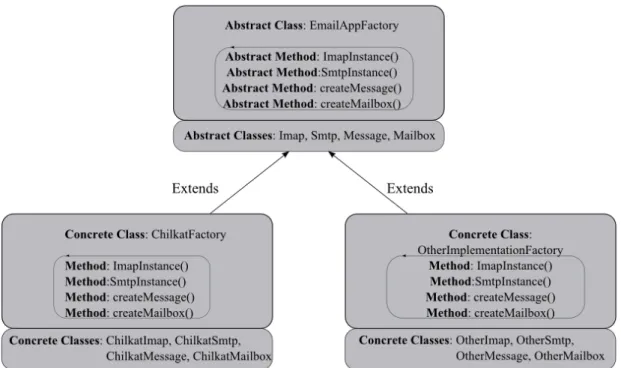
The EmailAppFactory class is an abstract class which can create objects of the classes Imap, Smtp, Message and Mailbox which are also abstract; each particular implementation defines its own Factory class which creates Imap, Smtp, Message and Mailbox objects specific to that implementation. The hierarchical representation of this design pattern is shown below:
Figure 5 Design Pattern: Abstract Factory
So the particular implementation is specified only at the initialization of the application:
(Chilkat Implementation) var factory = new FactoryType[CHILKAT](); (JavaMail Implementation) var factory = new FactoryType[JAVAMAIL]();
where FactoryType is an array of factory class names that are available; specifically, FactoryType = [tc.app.email.ChilkatFactory, tc.app.email.JavaMailFactory, … ]; and the integer constants CHILKAT and JAVAMAIL are the indexes corresponding to the specific implementation in the array.
15 Thus, to plug in a new implementation, the factory class for the new implementation needs to be created and the class name needs to be added into the FactoryType array in addition to the adapter classes mentioned in the previous section.
i.e. FactoryType = […, tc.app.email.NewImplementationFactory ,…];
and to create a Factory object using the new implementation, the following code is needed:
var factory = new FactoryType[NEW_IMPLEMENTATION]();
where NEW_IMPLEMENTATION is the index for the factory class of the new implementation in the FactoryType array.
The code will be identical anywhere else when creating objects such as Imap, Message, etc. for example, to construct a Message object, we simply write:
var message = factory.createMessage();
Thus, to switch from one implementation to another only involves change of one line of code; even during runtime, the type of the implementations can be switched: first create a new factory object specific to the implementation we want to switch to; then assign this object to the global variable factory and use the current server configuration information to configure the new Singleton objects Imap and Smtp created by the new factory object; then from this point of time onwards, all the Imap, Smtp, Message and Mailbox objects created by the factory object are using the new implementation.
The Abstract Factory design pattern makes the structure of the application clearer and reduces a lot of repetitive and redundant code.
5.3.3 Creational Pattern: Singleton
16 and provide a global point of access to it (Gamma et al, 1994).
In this email application, the Factory object, the Imap object and the Smtp object should be created at most once, and at any point of time, there should only be one instance of Factory, Imap and Smtp; therefore the creational pattern singleton is adopted, that is, for example, the method factory.ImapInstance() only creates an Imap object when it is called for the first time; for successive invocations, it only returns this Imap object created.
5.4 External Libraries
5.4.1 TiddlyCard Libraries
TiddlyCard Email Client takes use of several libraries provided by TiddlyCard System such as the class system, the core library as well as the file system.
TiddlyCard Class System is an object-oriented language extension for JavaScript available in the TiddlyCard System. It provides a standard way to define namespaces, interfaces, classes and methods in JavaScript. TiddlyCard Email Client is based on this class system to construct interfaces, classes etc.
TiddlyCard Core Library provides a way to run JavaScript code asynchronously. The Email Client uses this library to implement the asynchronous version of the methods such as imap.fetch(), smtp.sendMail(), etc. Thus when messages are being loaded, other functions of the email application can still be called, and the web browser will not be freezing.
TiddlyCard File System is used by the Email Client to write and read files in the local storage, thus emails can be stored locally and accessed when there is no internet
17 connection.
5.4.2 Chilkat IMAP/SMTP Library
As mentioned in section 4.3, the Chilkat ActiveX component provides a full implementation of both IMAP and SMTP; and it also includes a well-documented API for the IMAP and SMTP libraries which are available on the Chilkat website. It is chosen as one IMAP/SMTP implementation for this application.
5.4.3 Ext JS JavaScript Library
Ext JS is a cross-browser JavaScript library for building feature-rich and highly interactive web applications by using techniques such as AJAX and DOM scripting; it is especially suitable for single-page web applications. Ext library provides a diverse set of form controls such as ComboBox, GridPanel, Toolbar, and HTML editor etc. It supports major web browsers such as IE, Firefox and Safari. TiddlyCard Email Client uses Ext 2.0 JS library to build its user interface.
5.5 Functionalities
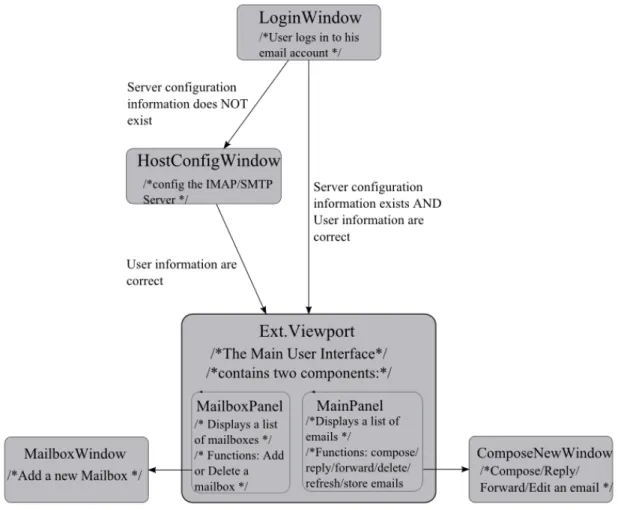
This section presents the functionalities provided by the application through the user interface. The user interface is built upon the Ext JS library but with most of the UI components customized to provide additional features and functionalities used in this application. Appendix A lists out all the Ext widget class extensions constructed and used in this application; below is a flow of those widgets that will be displayed to the user as he goes through the application:
Figure 6 Flow Chart of UI Components
5.5.1 Initialization
The initialization is done by the static method init() of the class Email. During the initialization of the application, a Factory object is created; the particular type of the Factory depends on the web browser used and the implementations available. Because currently we only provide one implementation the Chilkat implementation, the default type of the Factory is set to ChilkatFactory. This Factory object is used to construct the Imap object, the Smtp object, Mailbox objects and Message objects later in the program.
18 During the initialization, some of the Ext JS components used in the user interface are
also constructed, such as the LoginWindow object, the MainPanel object, and the MailboxPanel object, etc. And a list of event listeners is also defined here, such as the listener for the “mailboxselect” event which is fired when a particular mailbox is selected in the mailbox panel; the listener triggers the EmailGrid object to download the list of email headers in the mailbox selected and display them in the main panel.
5.5.2 Online Mode
This section presents a view of the application in online mode, i.e. the application is run when there is an internet connection, and the application interacts with the IMAP server and SMTP server directly. Email deletion, email sending as well as other actions performed by the user occur at real time.
5.5.2.1 User Login
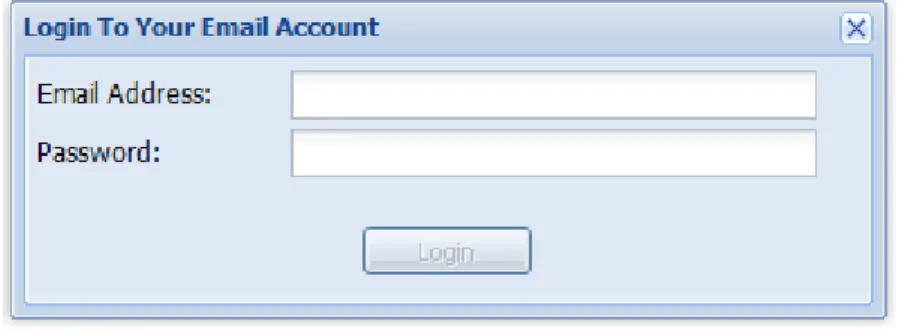
Figure 7 User Login Window
After opening the tiddlycard_email.html file, a login window appears. Since this application is based on the IMAP protocol, it can only access IMAP servers such as those provided by Google and AOL.
This login window is an instance of the LoginWindow class which extends the Ext.Window class with additional methods and events added, such as the login method, the displayLayout method and the onlineMode event. The login method is executed when user clicks the Login button, and in the online mode, it sends the login request to the IMAP server; the displayLayout method is a callback function used to
display the main user interface once the server response is received; and the onlineMode event is also fired when connected to the IMAP server.
After the user enters his email address and password and clicks Login, the application will first check if the domain of the email address exists in the server configuration file; if it does, the application simply fetches the server configuration information for that domain from the file. The configuration information includes the IMAP
Hostname, IMAP port number, SMTP Hostname and SMTP port number.
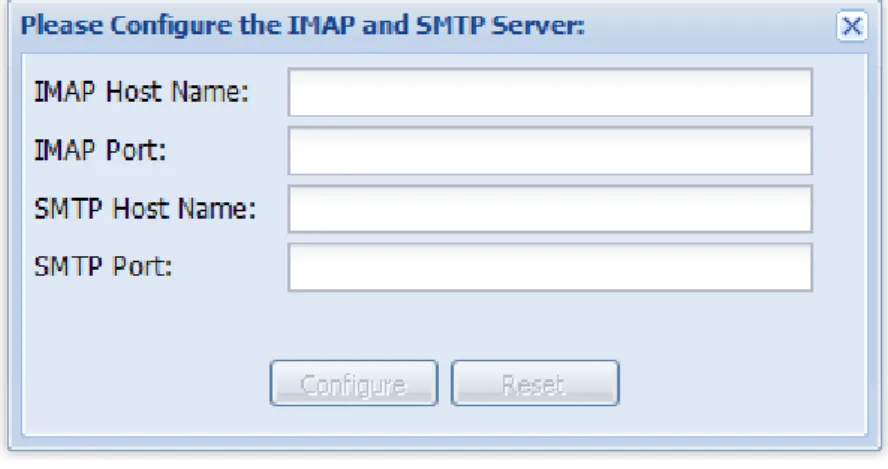
If the domain does not exist in the file, then a configuration window will pop out asking the user to enter the information:
Figure 8 Server Configuration Window
This server configuration window is an instance of the HostConfigWindow class which extends the Ext.Window class. Once the user enters the configuration information and clicks Configure, the event “configure” is fired, which is handled inside the LoginWindow object.
After all the configuration information is ready, the Factory object creates two
Singleton objects: the Imap object and the Smtp object, the two objects are configured using the information in the server configuration file or the information entered by the 20
user; and then the Imap object calls the method login to establish a connection and login to the IMAP server.
Once a login successful response from the server is received, the newly entered configuration information together with its domain are written into the server configuration file; and next time when a user logs in using an email address of that domain, the server does not need to be reconfigured.
5.5.2.2 Main User Interface
If the email address and the password entered by the user pass the authentication of the IMAP server, then the main interface of the email application will be displayed:
Figure 9 User Interface of TiddlyCard Email Client
The main interface is an Ext.ViewPort object which consists of two components, the 21
MailboxPanel object on the left side and the MainPanel object on the right side.
5.5.2.3 MailboxPanel
Inside the MailboxPanel object, a list of the mailbox names is displayed; the list is fetched from the IMAP server by the list method of the Imap object when the “onlineMode” event is fired;
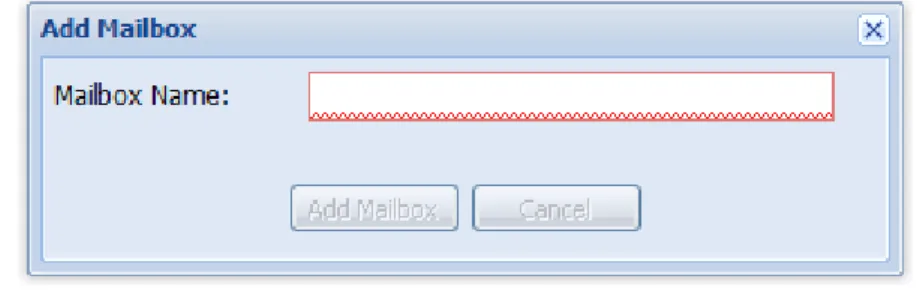
When the user clicks the “New Mailbox” button, an “Add Mailbox” will pop out:
Figure 10 Mailbox Window
After user enters a valid mailbox name, a mailbox with that name will be added to the MailboxPanel object, and the Imap object calls the create method to send the mailbox creation request to the IMAP server.
When the user clicks the “Delete” button, if the mailbox to be deleted is a default mailbox on the server such as Inbox, then a warning message box will pop out; otherwise the mailbox is removed from the MailboxPanel object, and the deletion request is sent to the IMAP server by calling the method delete of the Imap object.
This mailbox panel is an instance of the MailboxPanel class which extends the Ext.tree.TreePanel class with the addMailbox and deleteMailbox methods added; these two methods are called when user clicks the New Mailbox button and the Delete button respectively. Inside the addMailbox method, a MailboxWindow object is created and displayed which is shown in Figure 7. The MailboxWindow class extends the Ext.Window class with an extra addMailbox method which sends the actual “add 22
mailbox” request to the IMAP server.
This MailboxPanel object can be hidden from the main user interface by clicking the arrow button at the top right corner of the panel so that only the MainPanel object is displayed to the user. The following MainPanel object in Figure 8 is shown when the MailboxPanel is hidden.
5.5.2.4 MainPanel
The main panel contains the list of emails in the current mailbox and the preview panel for the email selected.
Figure 11 Main Panel
This main panel is an instance of the MainPanel class which extends the Ext.TabPanel class; it contains two other customized objects: the EmailGrid object which displays the list of emails and the preview Panel object which displays the contents of the currently selected emails. The MainPanel object also defines the event handlers for
24 the buttons at the top toolbar of the panel, such as the openComposeWindow method which is called when user clicks the Compose button. The EmailGrid class extends the Ext.grid.GridPanel class, and it handles most of the requests to the IMAP server, such as download email header, download email parts, delete emails and empty trash box, etc.
As mentioned earlier, after user successfully logs in to his email account, the
“onlineMode” event is fired, and its event handler will trigger the initialize method of the EmailGrid object to be called. Inside this initialize method, the Imap object calls the List method to fetch the list of mailboxes from the IMAP server; after this list is downloaded, it is loaded into the mailbox panel, and the first mailbox in the list is selected by default; and because of the “mailboxselect” event listener defined during the initialization of the application,the EmailGrid object starts to download email headers for the first mailbox selected by default.
Because IMAP protocol allows partial downloading, the application only downloads a list of email headers instead of the whole message, thus the size of the data that needs to be downloaded are greatly reduced, and the time taken for the whole downloading process is also noticeably decreased; even for a mailbox with hundreds of emails, the downloading process can be finished within several seconds.
The downloading of the email body as well as other parts of an email is delayed until the user explicitly selects the email from the list; when user selects an email, the “rowselect” event is fired, and its event listener calls the download method of the EmailGrid object, which fetches the email body and other parts from the IMAP server. For the attachments, only the list of attachment file names as well as its size is
downloaded; and only when user clicks the attachment file name in the list, the actual attachment data is downloaded and written into a local file with the same file name,
25 and then this file is opened in another web browser window for user to view the attachment contents.
After emails are loaded into the main panel, user can perform various actions on the emails, such as delete an email and compose a new email. Below is a list of
functionalities provided in the main panel.
(1) Refresh the email list
When user clicks the Refresh button at the top toolbar of the MainPanel, the refresh method of the MainPanel object is invoked, inside which the Imap object call the fetch method to download all emails including any newly received emails from the IMAP server, and after it finishes downloading, the list of emails will be reloaded into the Main Panel.
(2) The Store Function
This function is an extra functionality provided by the application to achieve local storage of the emails, which the webmails such as Gmail and Yahoo Mail cannot achieve.
When user clicks the Store button at the top toolbar of the Main Panel, the store method of the MainPanel object is invoked, which first creates a folder for each mailbox, and then it checks whether the emails in each mailbox have been
downloaded, if they are, all of them will be written into local files; since each email is originally represented using a JSON object, to write it into a file, the JSON.stringify() method is called to transform the JSON object into a string representation, and then this string is written into a file with the corresponding message uid as its file name; each email corresponds to exact one file. The message uid is unique among all emails for an email account.
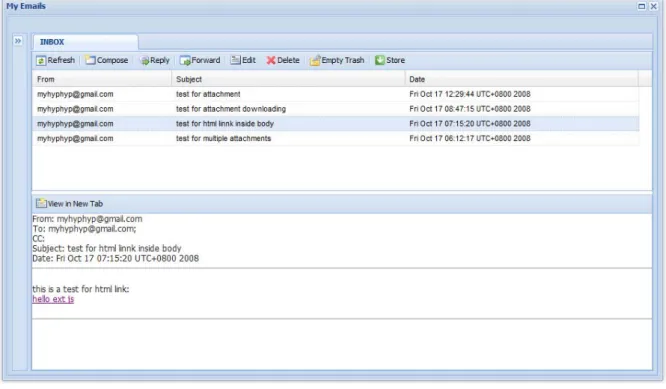
(3) View an email in new tab
When user double clicks the email in the list or explicitly clicks the View in New Tab button at the top toolbar of the Preview Panel, the openTab method of the MainPanel objects is invoked, which creates a new panel for the email and opens this panel in a new tab; this tab is different from a web browser’s tab, instead it is part of the email application interface. An email opened in a new tab is shown below:
Figure 12 View an Email in New Tab
User can open as many as tabs as he wants. And when an email is already opened in a tab, but the users double clicks the email from the list again, the openTab method will open the existing tab for that email instead of creating a new one.
(4) Compose an email
When the user clicks the Compose button, a Compose New window will pop out:
Figure 13 Compose New Window
This window is an instance of the ComposeNewWindow class which extends the Ext.Window class; it defines the methods for adding and removing attachments, appending a new email to the Drafts folder as well as sending an email.
When user clicks the Save and Close button, the append method of this
ComposeNewWindow object is called, which first adds the email locally to the list of emails in the Drafts folder, and then calls the append method of the Imap object to send the request to the IMAP server so as to append the email to the Drafts folder on the server.
When user clicks the Add an attachment button, the addAttachment method of the ComposeNewWindow object is invoked, which opens a typical Windows file browser and the user can select files from the local folder and add them as attachments:
Figure 14 Add an Attachment
After the file is added successfully, the file name will be displayed at the bottom of the window:
Figure 15 Compose New Window with Attachments Added
When user clicks the Send button, the sendEmail method of the
ComposeNewWindow object is invoked, which calls the mail method of the Smtp object to send the email to the email addresses specified in the fields To, Cc and Bcc.
(5) Reply, Forward and Edit an email
Figure 16 Reply an Email
The Reply, Forward and Edit Email Windows are similar to the Compose New Window, except that the original message is displayed at the bottom of the body, and you can edit the message and compose a new message.
(6) Delete an email
When user clicks the Delete button at the top toolbar of the Main Panel, the confirmDeleteEmails method of the MainPanel object is invoked, which opens a Deletion Confirmation message box asking the user to confirm the deletion of the
email currently selected:
Figure 17 Delete an Email
If user clicks Yes, the deleteEmails method of the EmailGrid object is invoked, which immediately remove the emails from the list in the Main Panel, and then it calls the Imap object to send the request to the IMAP server; on the server side, a Delete flag is added to the email, after which the email will be moved from the current mailbox to the Trash box.
(7) Empty Trash
When user clicks the Empty Trash button, the emptyTrash method of the MainPanel object will be invoked, which displays a confirmation message box asking the user to confirm the permanent deletion of all emails in the Trash box, if user clicks Yes, the emptyTrash method of the EmailGrid object will be invoked, which first removes all emails from the Trash box on the user interface level, and then it calls the expunge method of the Imap object which sends the request to the IMAP server to remove all the emails with the Delete flags in the Trash box on the server. The deletion process
31 appears very fast to the user because emails are removed immediately once user confirms the deletion, but the actual deletion is sent to the IMAP server afterwards.
5.5.3 Offline Mode
5.5.3.1 User Login
The User Login window is the same as the one used in online mode which is shown in Figure 4; after user enters his email address and password and clicks Login, the login method of the LoginWindow object is invoked, which calls the Imap object to send the connection request to the IMAP server; if the connection fails, i.e. there is no internet connection currently, the application enters the offline mode; and the callback function will then perform the user authentication: it first check the “.credentials” file which stores all email addresses and its corresponding password that were used by the user last time when he logs in to the online mode, and if the information entered by the user matches one of the email address/password pairs in the file, then it means the email account exists and the password is correct, and the main user interface will be loaded into the browser; if the email address entered by the user does not exist in the file, a message box will alert the user that no information has been stored for that account; if the email address entered exists in the file but the password does not match, then an error message box will pop out and prompt the user to enter the password again.
5.5.3.2 Main User Interface
If user enters the correct information in the previous step, the main user interface in the offline mode will be displayed to the user, and a message box will also pop out to inform the user that there is currently no internet connection, and the application now enters the offline mode.
Figure 18 Offline Mode
The offlineMode event will be fired after user’s successful login, and its listener triggers the MailboxPanel object to read the list of mailboxes for this email account from the local file “mailboxList.txt”, and then it fills in this list to the mailbox panel. The first mailbox is selected by default.
Because of the “mailboxselect” event defined during the initialization of the application, which is also mentioned in the Online Mode section 5.5.4.2, emails will start loading into the main panel, once a mailbox is selected. In the online mode, email headers will be downloaded from the IMAP server and then filled into the main panel; while in the offline mode, emails are read from the local files; since each email is represented using a JSON string, the eval() function is performed for each of them to transform it back into a JSON object, and then a list of the JSON objects representing the emails are loaded into the store of the EmailGrid object inside the main panel and displayed to the user.
33 The Compose New function is available in the offline mode. User can compose new emails in the same way as the online mode except that the emails composed are stored on the local machine instead of being appended to the IMAP server; and next time when user logs in to the application in the online mode, those emails newly composed will be appended to the IMAP server automatically during the initialization process.
Some of the functions are not available in the offline mode, such as the Send Email function; it is not provided in the offline mode simply because emails cannot be sent when there is no internet connection; moreover, it also may not be a good approach to implement it the same way as the Compose New function, i.e. store the email locally and send it next time when user logs in to the online mode; this is because from user point of view, when he clicks the Send button, he expects the email is sent right away instead of waiting until next time when he logs in; thus it is better not to give user an illusion that the email has been sent out in the offline mode while it is actually not; therefore the Send function is only implemented in the online mode. If user attempts to send an email, a warning message will pop out:
Figure 19 Delete Function in Offline Mode
6. Summary
This browser-based email client provides the functionalities common to most of the email clients as well as some distinct features which range from the overall design patterns of the application to the detailed implementations; these features are listed below:
1) It adopts the Abstract Factory design pattern to provide a common interface for different IMAP/SMTP implementations, which allows various implementations to be plugged in to the application, thus it achieves cross-browser portability and extensibility as long as certain IMAP/SMTP implementations are plugged into this email application. The Adapter design pattern is used to adapt the available IMAP/SMTP implementations to conform to the common IMAP/SMTP interface defined in this application. These design patterns make the overall structure of the implementation clearer and extensible, and also they have largely reduced the program redundancy.
2) Support of both online mode and offline mode. The online mode allows a user to login to any of his email accounts on an IMAP server, and perform various actions such as composing emails, deleting emails, sending emails, etc; most of the functionalities available in a webmail such as Gmail are provided by this email application. While the offline mode, which is not supported by a webmail, is also available in this email application. The offline mode allows user to log in to his email account when there is no internet connection; user can view the emails that have been downloaded to the local machine during the user’s last login to the online mode, and it also allows user to perform some of the actions such as composing a new email, and the email newly composed in the offline mode will be appended to the Drafts folder on the IMAP server next time when user logs in to the application in the online mode.
3) It leverages on the core library and the class system of the TiddlyCard platform to achieve asynchronous method calls. The requests are sent to the IMAP server asynchronously so that other functionalities of the application are not blocked when the request is being sent and waiting for the response from the server.
A comparison of functionalities between the TiddlyCard Email Client and other mostly-used email applications has also been conducted; and it is shown in the table below:
Figure 20 Comparison of TiddlyCard Email Client with Other Email Applications
36 From the table above, we can see that TiddlyCard Email Client has achieved the advantages of both of the two types of the email applications: the email client such as Microsoft Outlook and the webmail such as Gmail. TiddlyCard Email Client is used in a web browser which increases its portability; it supports on-demand and partial email downloading which makes the email retrieval process faster; it can store emails on the local machine which enables the offline access to user’s email account; in summary, TiddlyCard Email Client has greater portability and flexibility compared to the mostly used email applications nowadays.
7. Future Development
This application provides most of the functionalities available in an email client. However, some of the functionalities are yet to be achieved, and much more can be done to improve the efficiency and provide additional features to the application. Here are some ideas for future developers to consider:
1) The application currently only allows user to refresh the email list by explicitly clicking the refresh button, which may not be able to retrieve any newly received emails in time; the possible improvement might be either refreshing the email list automatically every certain period of time or refreshing the email list only when there are some emails which have newly arrived and the list needs to be refreshed. 2) The functionalities available in the offline mode of the current application are
limited; to make more functions available, synchronization techniques need to be provided so that any changes to the emails made by the user in the offline mode can be detected once the application connects to the IMAP server and enters the online mode; in addition, these changes also need to be sent to the IMAP server and updated on the server side so that user’s email account displayed in this application is always synchronized with his account on the mail server.
37 that it can be used cross-browser. Currently there is only one implementation available which is the Chilkat implementation; to make the application run on the Firefox or other browsers, other implementations such as JavaMail, Flash ActionScript etc can be plugged into the current system.
4) More fine-grained control of the Store Email function can be provided. Currently the Store function saves all the emails downloaded into files on the local machine. One improvement to this is to let user choose whether to save everything or only those explicitly requested by the user.
vii
References
Crispin, M. (1994). Distributed Electronic Mail Models in IMAP4. RFC1733, University of Washington, U.S.; 1994.
Flanagan, D. (2006). JavaScript: The Definitive Guide. Fifth Edition, O’Reilly Publishing Company, Sebastopol, 2006.
Freed, N. and Borenstein, N. (1996). Multipurpose Internet Mail Extensions (MIME) Part One: Format of Internet Message Bodies. RFC2045, Network Working Group, U.S.; 1996.
Freed, N. and Borenstein, N. (1996). Multipurpose Internet Mail Extensions (MIME) Part Two: Media Types. RFC2046, Network Working Group, U.S.; 1996. Freed, N. and Klensin, J. (2005). Media Type Specifications and Registration
Procedures. RFC4288, Network Working Group. U.S.; 2005.
Freed, N. and Klensin, J. (2005). Multipurpose Internet Mail Extensions (MIME) Part Four: Registration Procedures. RFC4289, Network Working Group. U.S.; 2005.
Gamma, E., Helm, R., Johnson, R. and Vlissides, J. (1994). Design Patterns: Elements of Reusable Object-Oriented Software. First Edition, Addison Wesley Publishing Company, Massachusetts, 1995.
Hughes, L. (1998). Internet E-mail: Protocols, Standards, and Implementation. First Edition, Artech House, Norwood, 1998.
Klensin, J. (2008). Simple Mail Transfer Protocol. RFC5321, Network Working Group, U.S.; 2008.
Leiba, B. (1999). IMAP4 Implementation Recommendations. RFC2683, IBM T.J. Watson Research Center, U.S.; 1999.
Moore, K. (1996). MIME (Multipurpose Internet Mail Extensions) Part Three: Message Header Extensions for Non-ASCII Text. RFC2047, University of Tennessee, U.S.; 1996.
viii Mullet, D. and Mullet, K. (2000). Managing IMAP. First Edition, O’Reilly Publishing
Company, Sebastopol, 2000.
Nelson, S. and Parks, C. (1997). The Model Primary Content Type for Multipurpose Internet Mail Extensions. RFC2077, Network Working Group, U.S.; 1997. Oppliger, R. (2000). Secure Messaging with PGP and S/MIME. Artech House,
Norwood, 2000.
Postel, J.B. (1982). Simple Mail Transfer Protocol. RFC821, University of Southern California, U.S.; 1982.
Zakas, N.C., McPeak, J., Fawcett, J. (2007). Professional Ajax. Second Edition, Wiley Publishing Company, Indianapolis, 2007.
ix
Appendix A: Program Listing
Folder Path File Name Description
~/TiddlyCard/trunk/ tiddlycard_email.html The starting html page. The
application starts to run from this page.
~/TiddlyCard/trunk/src/tc/app/email/ .plugin Plugin file for this application.
~/TiddlyCard/trunk/src/tc/app/email/include/ tools.js includes all the utility functions
used in this application such as trim(), encode64(), etc.
~/TiddlyCard/trunk/src/tc/app/email/include/ json.js External JSON utility functions
such as stringify() and parse(). ~/TiddlyCard/trunk/src/tc/app/email/include/ EmailAppFactory.js Abstract factory class which defines
the set of objects a factory needs to create.
~/TiddlyCard/trunk/src/tc/app/email/include/ Imap.js Abstract class which defines the
standard IMAP interface used in this application.
~/TiddlyCard/trunk/src/tc/app/email/include/ Smtp.js Abstract class which defines the
standard SMTP interface used in this application.
~/TiddlyCard/trunk/src/tc/app/email/include/ Message.js Abstract class which defines a list of method signatures of a Message object.
~/TiddlyCard/trunk/src/tc/app/email/include/ Mailbox.js Abstract class which defines a list of method signatures of a Mailbox object.
~/TiddlyCard/trunk/src/tc/app/email/include/ ChilkatImplementation/
ChilkatFactory.js Concrete factory class which
extends the Factory class and uses the Chilkat implementation. ~/TiddlyCard/trunk/src/tc/app/email/include/
ChilkatImplementation/
ChilkatImap.js Adapter class for Chilkat.Imap
class. ~/TiddlyCard/trunk/src/tc/app/email/include/
ChilkatImplementation/
ChilkatSmtp.js Adapter class for Chilkat.MailMan2
class. ~/TiddlyCard/trunk/src/tc/app/email/include/
ChilkatImplementation/
ChilkatMessage.js Adapter class for
Chilkat.ChilkatEmail2 class. ~/TiddlyCard/trunk/src/tc/app/email/include/
ChilkatImplementation/
ChilkatMailbox.js Adapter class for Chilkat.Mailboxes class.
x
~/TiddlyCard/trunk/src/tc/app/email/script/ Email.js The static class which defines the
list of constants and variables used in this application as well as the initialization method.
~/TiddlyCard/trunk/src/tc/app/email/script/ LoginWindow.js It defines the class for user login window; it extends the Ext.Window class.
~/TiddlyCard/trunk/src/tc/app/email/script/ HostConfigWindow.js It defines the class for IMAP/SMTP configuration window; it extends the Ext.Window class.
~/TiddlyCard/trunk/src/tc/app/email/script/ MailboxPanel.js It defines the class for mailbox panel which is located at the left side of the main user interface and displays the list of all the mailboxes; it extends the Ext.tree.TreePanel class.
~/TiddlyCard/trunk/src/tc/app/email/script/ MainPanel.js It defines the class for the main
panel which is located at the right side of the main user interface and displays the list of emails and the email preview window; it extends the Ext.TabPanel class.
~/TiddlyCard/trunk/src/tc/app/email/script/ EmailGrid.js It defines the class for the grid of list of emails which is contained in the upper part of the MainPanel; it extends the Ext.grid.GridPanel class.
~/TiddlyCard/trunk/src/tc/app/email/script/ MailboxWindow.js It defines the class for the mailbox window which is used to add a new mailbox.; it extends the Ext.Window class.
~/TiddlyCard/trunk/src/tc/app/email/script/ ComposeNewWindow.js It defines the class for the compose email window which is used to compose/reply/forward/edit an email; it extends the Ext.Window class.
~/TiddlyCard/trunk/src/tc/app/email/script/ Ext.ux.form.BrowseButton.js External Ext 2.0 BrowseButton Extension used in this application
~/TiddlyCard/trunk/src/tc/app/email/css/ style.css The style sheet used in this
application
xi ~/TiddlyCard/trunk/src/tc/app/email/store/ folders for each email
account.
Appendix B: How to Use the Program
1. Install the ImapActiveX and EmailActiveX components into Internet Explorer 4 and above; the installers for these two components are inside ~/installer/ folder. (The developer license has been purchased for these two components)
2. After successful installation, go to the root folder, find the tiddlycard_email.html file and double click it to open it in IE; the booting process will start and it takes several seconds to finish.
3. After the booting process, the login window will be displayed to the user:
User can now enter his email address and password to access his email account using the application.
Notice: since our application is based on IMAP protocol, only the IMAP mail servers can be accessed; POP3 mail servers are not supported. Examples of IMAP mail servers are Gmail and AOL.
4. Upon successful login, the main user interface will be displayed to the user, and user can view/compose/delete emails etc. using the application.