Ease of Use in Web Conferencing –
Why it Matters
The Cost Benefits Of
Making Usability a Priority
Andy Nilssen & Alan Greenberg
Wainhouse Research
February 2009
Study sponsored by: Wainhouse Research, LLC
34 Duck Hill Terrace Duxbury, MA 02332 USA +1.781.934.6165
Contents
Executive Summary ... 1
Introduction: The Role of Online Meetings in Today’s Workplace ... 3
Survey Methodology...4
I. Things You May Know About Ease of Use... 5
The Impact of Ease of Use...5
Vendor Selection and Ease of Use ...6
II. What Gets Hurt When Ease of Use is Missing ... 7
The Cost of Training...7
The Cost of Meetings That Start Late ...9
The Cost of Providing Help ...10
III. Things to Know about Ease of Use and Utilization... 10
Closing Thoughts ... 11
About the Authors...12
About Wainhouse Research...12
About IBM Lotus Sametime Unyte ...12
Appendix: Survey Demographics ... 13
Figures
Figure 1 Impact of Ease of Use ...5Figure 2 Nuances Surrounding Ease of Use ...6
Figure 3 Supplier Criteria ...7
Figure 4 Training Methods and Ease of Use ...8
Figure 5 How Often and Why Meetings Start Late ...9
Figure 6 Organization Size ...13
Figure 7 Involvement with Web Conferencing ...13
Figure 8 Meetings / Events Attended Per Month ...14
Executive Summary
Web conferencing is a revolutionary business tool. The technology’s many benefits – which include saving travel costs, increasing individual and team productivity, and removing distance as a barrier for getting the right people (and customers) involved – has motivated many to become proficient at its use. But the recent dramatic changes in the global economic climate have brought into focus a new urgency to find ways to cut costs and work together efficiently. Web conferencing is poised to play a central role in this imperative if it can be quickly adopted by businesses of all sizes – including those who are not technology savvy, and who lack time or inclination to deal with anything that might increase complexity. Thus, while usability may have been considered “nice to have” in the past, is it swiftly becoming a necessity? Through survey data, this study examines the role of usability as the major issue that stands in the way of truly beneficial adoption of web conferencing by the mainstream.
A web conferencing solution that is easy to use faces a daunting challenge: it must seamlessly blend a cold combination of computer and network-based technology into a natural, familiar meeting process that has been the norm since the dawn of humankind. Though early adopters and those who are technology-savvy appear to have achieved success, what about others? Have everyday users learned to harness the power and benefits of web conferencing – or are they experiencing difficulty and/or have given up? Can the value of Ease of Use be quantified – perhaps manifesting itself in terms of training costs, adoption, or productivity? Does Ease of use play a greater role in your organization’s potential to realize the powerful benefits of web conferencing than the traditional emphasis on features or price?
To answer these questions, Wainhouse Research recently conducted a survey of 173 web conferencing users by gathering their experiences and opinions in three areas – 1) the value of Ease of Use, 2) the hidden costs that occur when Ease of Use is missing in an offering, and 3) the role of Ease of Use in the adoption of web conferencing.
In gauging the value of Ease of Use, those surveyed respond solidly between “somewhat agree” and “highly agree” on several factors:
• In order of highest level of agreement, Ease of Use a) “saves training time and cost,” b) “saves time & money,” c) “saves support time & cost,” and d) “increases the chances of online meetings being successful.”
• Respondents continue to agree solidly - within the same ranges as before - that a) “web
conferencing should be easy to use because mishaps can potentially waste the time” of everyone attending a web conference, b) “that an offering with fewer features but greater Ease of Use can be of higher value than an offering with more features that is complex to use” and c) “users who are uncomfortable with the technology are reluctant to host online meetings because they don't want to look foolish in front of peers.”
• “Ease of Use” is now the respondents’ most important criterion when choosing a web
conferencing supplier, ranking above (in descending order) “reliability,” “price,” “feature set,” and “vendor-supplied support.”
Are there any hidden costs if Ease of Use is lacking? We explored three areas:
• “Training costs.”About half of the respondents state that their companies offer some live training, either in-person or online (the remainder learn by doing). The majority (92%) of those that offer live training produce it themselves or share training with their provider – which costs them money. Half of those that offer live training admit that were web conferencing easier to use, training on how to use web conferencing could be completely eliminated or reduced substantially.
• “Meetings that start late.”A quarter of respondents report that over half of their web conferences start more than five minutes late due to reasons other than personal tardiness. A deeper dive into the reasons reveals that “software downloads/installation,” “figuring out how to join,” and “missing login materials/credentials” collectively account for three-fifths of the delays. All of these can be mitigated through Ease of Use – saving the cost of participants wasting time waiting for their meetings to begin.
• “Providing help.” Respondents report that while the largest need for help is for connecting successfully into a meeting, leaning or re-learning features is cited by over third and one-sixth of respondents respectively. This need can be reduced through Ease of Use. Furthermore, when users need help, half of them ask a colleague, their admin, or the company’s IT staff rather than asking the vendor – which ties up precious internal resources.
Lastly, we explored utilization in the respondent companies, as the benefits of web conferencing can only be realized to the extent that the technology is adopted and used by employees. On average,
respondents believe that web conferencing would be used for 33% more meetings were it easier to use. Digging deeper into the data shows that almost half believe meeting usage would increase 20% to 30% more, while another one-third believes the increase would be 50% or more.
The net result of our analysis of this survey data has led Wainhouse Research to conclude that the opportunity cost of not being able to maximize the use of web conferencing in an organization may well represent the single largest unrealized combination of cost savings and benefit delivery to occur when web conferencing is not easy to use. We urge readers to review the remainder of this paper for the details behind these conclusions (including full graphics of the survey data), and to gain further insight as to why Ease of Use has risen to become a driving factor in the success of web conferencing in
organizations.
Introduction:
The Role of Online Meetings in Today’s Workplace
Online meetings have come to be indispensable for many organizations, enabling people to work together, improve productivity, save money, learn, and achieve their daily business needs. Just as computers improved upon the human ability to manipulate and enable data, they enabled knowledge workers to then take that data and do all the things we’ve come to expect in the workplace: innovate, create, share, collaborate, improve, promote, sell. Much of the mini-intellectual revolution empowered by the PC at its initial stages was based on some simple concepts: Lotus 1-2-3 spreadsheets, designed to support mathematical calculations, or WordStar word processing, designed to enable more efficient writing.The Internet and revolution in telecommunications then placed a variety of tools at the desktop designed to link people together, and make it easier for them to share information between computers. It’s no surprise that web conferencing began in the 90’s, alongside the first wave of the public Internet, as knowledge workers began to discover the fruits of sharing visual content. Wainhouse Research sizes the web conferencing market to be well in excess of $1B today.
By now, web conferencing has become ubiquitous, with “webinars” becoming the standard term for an online seminar, “virtual classroom” the term for online educational settings, and “web (or online) meeting” the term for a meeting where information is shared and perhaps worked on from someone’s PC. Users of all stripes, from trainers to sales professionals to engineers – and many others – now use web
conferencing for formal and informal knowledge sharing. The economic impact is immense (travel savings, increased productivity, enhanced work/life balance), and well documented elsewhere.
We have approached a point in time, however, that the positive overall economic impact has come to obscure an area that few consider on a daily basis: is the technology applied as well as it can be? What are we missing if the effort has not been put into making web conferencing as simple to use as possible? Is there a cost when users stumble and struggle to figure out how to use the technology instead of effortlessly, transparently, go about their business?
A successful online meeting contains the following parameters:
• Agenda, goals, and action items • Starts on time
• Has presenter(s) prepared with and able to share their content as necessary
• Works without a hitch, with presenters/speakers focused on content at hand, and interacting with participants (not whether or not the technology is working)
• Leaves all participants satisfied that knowledge has been transferred, information shared, progress made.
• Ends on time
Yet not all online meetings can be considered successful. Presenters may stumble. Attendees may not know how to connect. Start-times may be delayed. Worst of all, users may have a less than desirable
experience and decide not to return to the technology.
Web conferencing is one of those areas (like PC’s) that appear on surface deceptively easy to use – thus many users dive into it in the same way they dive into a new car or PC or cell phone: start driving or using, read the manual later. Many organizations provide real-time training and help desks, or online tutorials for self-paced learning. But as we found in the course of researching this paper, training alone (which can be costly) is not the only answer, and product complexity and design may impact the effectiveness of that training.
To better understand these issues, Wainhouse Research conducted a survey of web conferencing ‘power’ users to explore these questions: does Ease of Use make a difference? Can real costs be saved and can productivity be further enhanced? Results are contained in this white paper.
Survey Methodology
Survey invitations were sent to two audiences – an IBM Sametime Unyte (sponsor of this research) customer base list, and Wainhouse Research’s WebMetrics panel of web conferencing buyers and users. The survey was fielded from 2-Oct-2008 and closed on 16-Oct-2008. The invitation offered drawings for one of five Amazon.com gift certificates and an 8 GB Apple iPod touch as incentives, as well as an invitation to download this resulting white paper. A total of 173 completed surveys were received.
• Respondents included a mix of premise-based users and Software-as-a-Service users. Many respondents are trainers, sales and marketing, HR, engineering, and small business owners. • Two-thirds (67%) of the respondents come from SMBs (< 1,000 employees), while the remaining
third (32%) are with larger organizations.
• Over two-thirds of respondents either attend web conference meetings (69%) or host said meetings (71%). Two out of five are support staff for (41%) or purchasers (40%) of web conferencing. Slightly more than one-third either attend seminars (35%) or present in seminars (34%).
• Almost two thirds of respondents (63%) typically attend between 1 to 5 web conferencing meetings or events monthly. Another 19% attend from 6 to 10 meetings monthly, while slightly more than 6% attend 11 to 20, and slightly fewer than 6% attend more than 20 meetings or event in a typical month.
I. Things You May Know About Ease of Use
While Ease of Use is not too hard to define, it is much harder to quantify. Any general definition would include the notion that a product is designed to be used efficiently (thus taking less user time), simple and intuitive to learn, and satisfying to use.
The Impact of Ease of Use
We asked the survey respondents if they believe Ease of Use has an impact, and if so, how. Given a list of potential benefits, users prioritized them by ranking on a scale of 1 (highly disagree) to 5 (highly agree). All benefits score between “somewhat agree” and “highly agree,” as shown in the Figure 1 below. “Saving training time/costs” is the most highly rated benefit of Ease of Use, followed by “saving the organization time & money” and “saving support time/cost”. Note that these first three benefits each contain some type of “hard” fiscal benefit.
The next two benefits deal with meeting efficiency and user comfort: “increasing success rates of online meetings and events,” and “making people more comfortable with online meetings.” The last two chosen – “used for more meetings” and “used by more people over time” suggest that Ease of Use can catalyze adoption by fostering use for more meetings, and by more people.
The ability to launch a simple, ad hoc meeting - quickly and
easily - is very important.
- Survey Respondent
Impact of Ease of Use on Web Conferencing
3 = Neutral, 4 = Somewhat Agree, 5 = Highly Agree
Will be used by more people in my organization over time Will be used for more meetings in my
organization over time Can make people more comfortable
with on-line meetings Increases the chances that on-line
meetings are more successful Saves support time & cost Saves my organization time & money Saves training time & cost
4.53 4.48 4.30 4.65 4.37 4.37 4.44 3.0 3.2 3.4 3.6 3.8 4.0 4.2 4.4 4.6 4.8 5.0
To gain further insight, we asked the respondents to react to three statements regarding different aspects of Ease of Use. The single highest agreed upon concept, not surprisingly, has to do with errors and mishaps: “web conferencing should be easy to use because
mishaps can occur that waste time of attendees.” This statement has the strongest potentially “hard” cost – the potential of wasting the time of everyone in the meeting. Whether an organization includes professionals with billable hours, or salaried employees, wasted time cumulatively can have a significant impact on productivity – and actual financial results.
Respondents also are at the high end of agreement with two more statements: 1) that “an offering with fewer features but greater Ease of Use can be of more value than an offering with more features that is complex to use,” and 2) “those who are uncomfortable with the technology are reluctant to host
meetings.” While not “hard” costs per se, the logical conclusion
is that value might be found in Ease of Use, and that without comfort, less activity would take place and less ROI might be gained from investments in licenses, equipment and infrastructure.
Because (the product) is easy to use, we can spontaneously bring
customers or vendors into meetings to share a document and thus rapidly resolve an issue
without a special face-to-face meeting being called. Full-featured, but complex-to-use
web conferencing solutions would not afford us this same
spontaneity and efficiency. - Survey Respondent
How do you feel about these statements?
3 = Neutral, 4 = Somewhat Agree, 5 = Highly Agree
4.26
4.20
4.67
3.0 3.2 3.4 3.6 3.8 4.0 4.2 4.4 4.6 4.8 5.0 Users who are uncomfortable with the technology
are reluctant to host on-line meetings because they don't want to look foolish in front of peers
An offering with fewer features but greater ease of use can be of higher value than one with more features that is complex to use.
Web conferencing should be easy to use because mishaps can potentially waste the time of everyone attending
Figure 2 Nuances Surrounding Ease of Use
Vendor Selection and Ease of Use
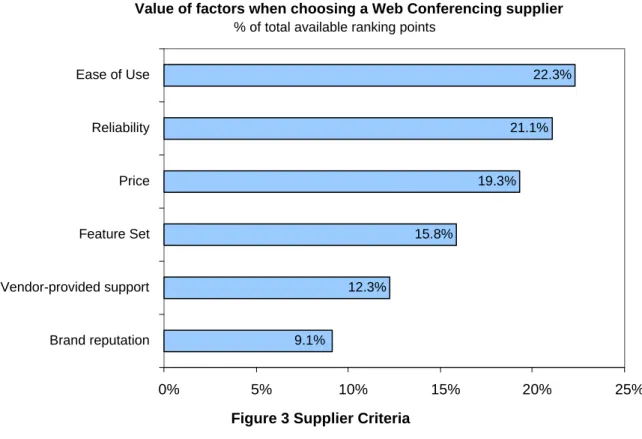
To understand the relative important of Ease of Use, we asked respondents to select from six factors to consider when choosing a web conferencing supplier. This ranking exercise, in which we assigned values based on how items were ranked, found that Ease of Use is so meaningful it is ranked as the #1 criterion for selecting web conferencing.
Value of factors when choosing a Web Conferencing supplier % of total available ranking points
22.3% 21.1% 9.1% 15.8% 12.3% 19.3% 0% 5% 10% 15% 20% 25% Brand reputation Vendor-provided support Feature Set Price Reliability Ease of Use
Figure 3 Supplier Criteria
“Ease of Use” is followed closely by “reliability” and “price.” (This is consistent with surveys we’ve taken over time, with the exception that price has dropped in importance over the past few years as users have come to recognize the importance of Ease of Use and reliability – and as prices in the marketplace have become more competitive.) The “particular feature set” is ranked fourth in importance, well below price, and is followed by “vendor-provided support” and “brand reputation.”
II. What Gets Hurt When Ease of Use is Missing
We asked the survey respondents about three areas that could potentially result in racking up tangible costs were a web conferencing service not easy to use.
The Cost of Training
How does a new user learn to become proficient with web conferencing? Live training costs money – even if conducted over the Internet. If a web conferencing solution is easy to use, can money be saved on training? The series of three questions that follow help to quantify the potential cost savings from training reductions. Remember, saving training costs and time was the top factor among those benefits of ease of use cited in Figure 1.
The cost of getting to know a new system is "high"… So reliability and then Ease of Use are very important to me.
– Survey Respondent
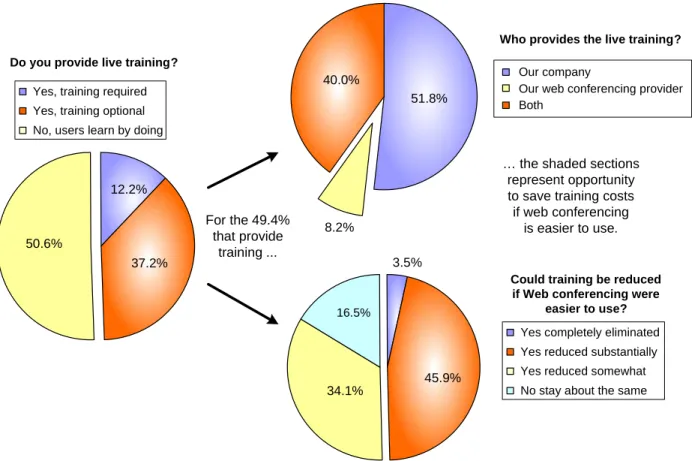
In the first chart on the left in Figure 4, we show the results of this question: whether live training to learn how to use web conferencing is offered by organizations. While half (50.6%) state that “individuals learn
by doing,” the remaining half (49.4%) of organizations surveyed offer “some degree of live training” (12.2% require live training, 37.2% offer optional live training).
37.2% 12.2%
50.6%
Yes, training required Yes, training optional No, users learn by doing
40.0%
51.8%
8.2%
Our company
Our web conferencing provider Both
45.9% 3.5%
16.5%
34.1%
Yes completely eliminated Yes reduced substantially Yes reduced somewhat No stay about the same
Do you provide live training?
Who provides the live training?
Could training be reduced if Web conferencing were
easier to use? For the 49.4%
that provide training ...
… the shaded sections represent opportunity to save training costs if web conferencing
is easier to use.
Figure 4 Training Methods and Ease of Use
In the pie chart on the top right of Figure 4, the half (49.4%) of organizations that provide live training (from the first chart) reveal who provides the training. While less than one tenth (8.2%) rely “exclusively on their web conferencing service provider,” the large remainder either “provide live training exclusively themselves” (40.0%) or “share the training with their provider” (51.8%). Thus the overwhelming majority (91.8%) of those who provide live training offer at least a portion of the of live training themselves. This results in a very real, quantifiable, direct cost that could potentially be eliminated or reduced were web conferencing easier to use.
In the third pie chart of the series, the half (49.4%) of organizations that provide live training (from the first chart) were asked if training could be reduced were web conferencing easier to use. While only 3.5% believe the training could be “totally eliminated,” another 45.9% believe training costs could be “reduced substantially.”
Thus for the half of organizations that offer live training for web conferencing, the vast majority offer (and thus incur the cost of) a portion of the training themselves, and half believe that the training could be either eliminated or reduced substantially were web conferencing easier to use.
The Cost of Meetings That Start Late
Conceptually, web conferencing is a technology that can easily transform physical meetings into online virtual meetings. In order to do so, it introduces a layer of technology which, if not rock solid and easy to use, can add complexity and increase the potential for meetings not to occur on schedule. This risk can be quantified by asking how often web conferences do not start on time – which in all reality increases costs by wasting the time of everyone in attendance.
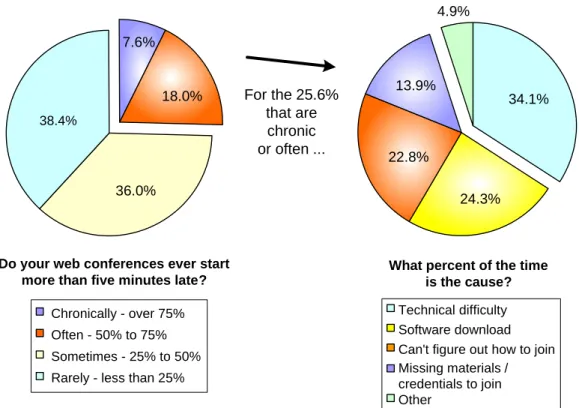
Figure 5 reveals how often web conferences start late and the reasons why – and how Ease of Use can potentially reduce costs.
18.0% 7.6% 38.4% 36.0% Chronically - over 75% Often - 50% to 75% Sometimes - 25% to 50% Rarely - less than 25% Do your web conferences ever start
more than five minutes late?
4.9% 22.8% 13.9% 34.1% 24.3% Technical difficulty Software download Can't figure out how to join Missing materials / credentials to join Other
What percent of the time is the cause? For the 25.6%
that are chronic or often ...
Figure 5 How Often and Why Meetings Start Late
Respondents were asked not to include meetings that start late due to personal tardiness. Nonetheless, about a quarter of survey respondents (25.6%) report that web conferences start more than five minutes late either “chronically” or “often” (more than half of all meetings).
The most cited reason for meetings starting late is “technical difficulty” (34.1%), followed by “software download/install delays” (24.3%), “difficulty in figuring out how to join” (22.8%), and “missing
materials/credentials” (13.9%). Other than “technical difficulty”, which can include a number of factors, the other three factors can all be mitigated through Ease of Use. For example, web conferencing client software downloads should require only one or two intuitive responses from the user, after which they should install and work. Instructions on how to join a meeting can be very complex and require multiple steps, or made very easy by
We use Sametime Unyte because it rarely requires a
download or any action from a participant.
design. The payoff would be substantial, as the combination of the three factors that can be mitigated through Ease of Use is responsible for over three-fifths of the web conferences that start late.
The Cost of Providing Help
Getting advice to resolve an issue with web conferencing or assistance in learning (or re-learning) a feature can cost money – often in ways that do not involve support staff.
Why do users ask for help? While the survey respondents report that the most common reason to seek support is to “resolve difficulty connecting or re-connecting to a meeting” (44.5%), the “need to learn a new feature” is cited by over one-third (36.4%) and to “re-learn a previously known feature” is cited by about a sixth (15.6%). These latter two reasons to seek support could clearly be reduced were a web conferencing service easier to use.
Where do users go when they have a problem or need immediate help? While about half (50.9%) receive support from their web conferencing provider or “other” sources, the remaining half (49.1%) ask for help from either a colleague or their administrator(16.2%), or the company’s IT staff (32.9%) – and thus encumber valuable staff time, which represents another opportunity for cost and internal resource savings.
The survey responses reinforce that web conferencing costs can be reduced through improved Ease of Use. Specifically, the cost of a company providing live training for its employees, the cost of participants waiting for web conferences that start late, and the cost of providing help or learning / re-learning features by IT support staff or the user’s peers can all be significantly reduced through Ease of Use.
III. Things to Know about Ease of Use and Utilization
Web conferencing has become a mainstream business tool due to its proven ability to save costs, increase productivity, and reach participants independent of geographic boundaries. Organizations can only realize these benefits, however, to the extent that the technology is adopted and used by their employees.Applications that are easy to use encourage our staff to be less reliant on vehicles when
attending inter-campus meetings. Less vehicle use will
reduce the number of fleet vehicles and this saves significant (cost of purchase/ ongoing maintenance costs/fuel
costs) money and reduces carbon footprint.
Can Ease of Use increase utilization? To find out, we asked “If web conferencing were easier to use, how much more do you think the average person would use web conferencing?” The average of the responses reveals that web conferencing would be used for 33% more meetings if it were easier to use. Digging deeper into the detail behind this figure shows that almost half (46%) believe meeting usage would increase 20% to 30% more, while another one-third of respondents (34%) believe the increase would be 50% or more.
before-for 33% more meetings”) may well represent the single largest unrealized cost savings to occur when web conferencing is not easy to use.
When asked about their experiences with web conferencing services and how easy to use the services are for the average user, respondents rank several web conferencing services as very high – though none rank higher than Lotus Sametime Unyte.
Closing Thoughts
As stated earlier, Wainhouse Research believes that the opportunity cost of not being able to maximize the use of web conferencing in an organization may well represent the single largest unrealized
combination of cost savings and benefit delivery to occur when web conferencing is not easy to use. Though an organization can be forced to “make do” with a web conferencing solution that is difficult to use – which frankly may occur simply because it may not be aware that better alternatives are available – the results of this survey clearly reveal and quantify the impact on costs and adoption. Thus any
organization not thinking about ways of ensuring its users are comfortable and successful by providing web conferencing that is easy to use is missing out on its opportunity to realize the full benefits of the technology, including:
• Cutting costs for travel and training • Enhancing productivity
• Having happier users who are able to focus on the tasks at hand, and not on dealing with technology or usage mishaps.
Most specifically, users have made it clear that Ease of Use can impact training and support costs while actually driving greater utilization of web conferencing. Wainhouse Research believes this is the crux of the matter: while organizations may have achieved a level of value in their use of web conferencing for sales and marketing, HR, training, development, and corporate communications functions, additional gains can be made in all of these areas while reducing costs by re-assessing product complexity and ensuring that any chosen platform or service is very easy to use. In essence, it is well worth any business’s time to audit adoption rates, be critical of stumbling blocks that hinder the abovementioned gains, examine its approaches to (and costs of) training users, and in general, be mindful of the value of planning for – and watching – just how transparent and beneficial web conferencing that is truly easy to use is for the organization.
About the Authors
Andy Nilssen is a Senior Analyst & Partner at Wainhouse Research, where he leads the WR web conferencing and IM & Presence practice. Andy is a co-author of WR's recent Unified Communications Products report which sized the entire UC market space, and WR’s bi-annual WebMetrics study, which tracks web conferencing usage and user preferences. Earlier in his career, Andy managed the planning and launch of PictureTel's second-generation group videoconferencing systems. Andy has over 25 years of experience in high-technology product marketing and market research, earned his MBA and BSEE degrees from the University of New Hampshire, and holds two ease-of-use related patents.
Alan Greenberg is a Senior Analyst & Partner at Wainhouse Research. Alan has worked in the
telecommunications, videoconferencing, software and services, and multimedia arenas for more than 25 years, holding marketing positions with Texas Instruments and several other technology companies. He has conducted research into dozens of distance learning and e-Learning products and programs and covers web conferencing, managed services, and mobile and 3G wireless conferencing for WR. He is co-lead analyst on the Wainhouse Research WebMetrics research program, and has authored many research notes on web conferencing and e-Learning vendors. Alan holds an M.A. from the University of Texas at Austin and a B.A. from Hampshire College.
About Wainhouse Research
Wainhouse Research, www.wainhouse.com, is an independent market research firm that focuses on critical issues in the Unified Communications and rich media conferencing fields. The company conducts multi-client and custom research studies, consults with end users on key implementation issues,
publishes white papers and market statistics, and delivers public and private seminars as well as speaker presentations at industry group meetings. Wainhouse Research publishes a variety of reports that cover the all aspects of rich media conferencing, and the free newsletter, The Wainhouse Research Bulletin.
About IBM Lotus Sametime Unyte
Lotus Sametime Unyte Meeting is a full-featured online meeting service that integrates Web, audio and video conferencing. Whether you are a small business working with clients across town, or a large enterprise that hosts training sessions for hundreds around the world, Lotus Sametime Unyte has the features and functions that will help you run a successful meeting. You can select a plan that allows up to 15, 25 or 999 participants per meeting – and choose either a flat rate or pay-as-you-use-it plan. Which ever you chose, you can count on quality service that is simple to use. For more information on Lotus Sametime Unyte or to sign up for a free 14-day trial, visit www.sametimeunyte.com.
Appendix: Survey Demographics
Survey invitations were sent to two audiences – a Unyte (sponsor of this research) customer base list, and Wainhouse Research’s WebMetrics panel of web conferencing buyers and users. The survey was fielded from 2-Oct-2008 and closed on 16-Oct-2008. The invitation offered drawings for one of five Amazon.com gift certificates and an 8 GB Apple iPod touch as incentives, as well as an invitation to download this resulting white paper. A total of 173 completed surveys were received.
10% 16% 17% Other 1% 26% 27% 4% Just me 2 to 50 people 51 to 100 people 101 to 1,000 people 1,001 to 10,000 people Over 10,000 people Organization Size
The bulk of respondents come almost equally from small organizations (27% from 2-50 people) and mid-range SMB’s (26% from 101-1,000 people). Another 17%, not quite one in five, are with large enterprises of 10,000 or more. And 16% are from
organizations of 1,001-10,000 people, while 10% are with organizations of 51-100 people. Only 4% are individual (typically
self-employed or freelance) respondents. The single “Other” response was “train 1,000 local / 20,000 worldwide”
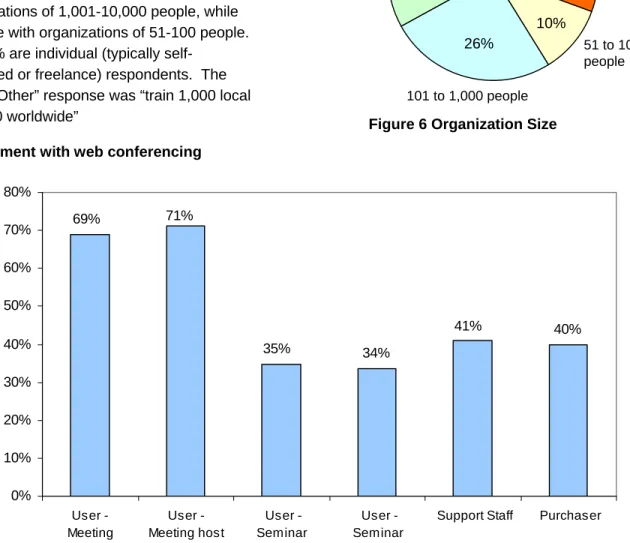
Figure 6 Organization Size Involvement with web conferencing
34% 40% 35% 41% 71% 69% 0% 10% 20% 30% 40% 50% 60% 70% 80% User - Meeting attendee User - Meeting host User -Seminar attendee User -Seminar presenter
Support Staff Purchaser
Respondents were asked to check all categories that apply to their usage. About seven out of ten respondents either attend web conference meetings (69%) or host said meetings (71%), perhaps reflecting the “advanced” nature of our lists. Slightly more than one-third either attend seminars (35%) or present in seminars (34%). Two out of five are support staff for (41%) or purchasers (40%) of web conferencing.
Web conferencing meetings or events attended per month
19.1% 6 to 10 5.8% 63.0% 1 to 5 5.8% 6.4% None 11 to 20 Over 20 Almost two thirds of respondents (63%) typically attend
between 1 to 5 web conferencing meetings or events monthly. Another 19% attend from 6 to 10 meetings monthly, while slightly more than 6% attend 11 to 20, and slightly fewer than 6% attend more than 20 meetings or event in a typical month.
The almost 6% who do not attend meetings/events are comprised of individuals who indicated they are purchasers or support staff, or are individuals who interpreted this question literally: they self-identify as meeting “hosts,” not as attendees. A very tiny group of users (one-third of the 6% who say they do not attend)