Virtualization Platforms
Daniel Schlosser and Michael Duelli and Sebastian Goll? {schlosser,duelli,goll}@informatik.uni-wuerzburg.de
University of W¨urzburg, Institute of Computer Science, Chair of Communication Networks, W¨urzburg, Germany
Abstract. Hosting virtual servers on a shared physical hardware by means of hardware virtualization is common use at data centers, web hosters, and research facilities. All platforms include isolation techniques that restrict resource consumption of the virtual guest machines. How-ever, these isolation techniques have an impact on the performance of the guest systems. In this paper, we study how popular hardware virtualiza-tion approaches (OpenVZ, KVM, Xen v4, VirtualBox, VMware ESXi) affect the network throughput of a virtualized system. We compare their impact in a dedicated and a shared host scenario as well as to the bare host system. Our results provide an overview on the performance of pop-ular hardware virtualization platforms on commodity hardware in terms of network throughput.
Keywords: hardware virtualization; analysis; commodity hardware; network throughput; isolation
1
Introduction
Hardware virtualization means abstracting functionality from physical compo-nents and originated already in the late 1960s. Recently, the importance of virtu-alization has drastically increased due to its availability on commodity hardware, which allows multiple virtual guests to share a physical machine’s resources. The resource access is scheduled and controlled by thevirtual machine monitor
(VMM), also calledhypervisor. Different virtualization platforms have been im-plemented and are widely used in professional environments, e.g. data centers and research facilities like G-Lab [1], to increase efficiency and reliability of the offered resources. The resources that may be used by a virtual guest system as well as lower performance bounds regarding these resources are determined inservice level agreements (SLA) between providers and customers. The imple-mentation of the VMM influences how well the resource allocation complies with these SLAs and to which extent different guests interfere with each other. Hence,
?
This work was funded by the Federal Ministry of Education and Research (BMBF) of the Federal Republic of Germany (F¨orderkennzeichen 01BK0917, GLab). The authors alone are responsible for the content of the paper.
a provider has to know the performance limitations, the impact factors, and the key performance indicators of the used VMM to ensure isolation and SLAs.
Hardware virtualization is used in two basic scenarios. In thededicated sce-nario, only a single virtual guest is run on a physical host. By means of hardware virtualization, the guest system is made independent of the underlying physical hardware, e.g., to support migration in case of maintenance or hardware failures. Hardware virtualization is also used to consolidate the resources of the physi-cal host among multiple virtual guest systems in a shared scenario. While the performance of a virtualized system can be directly compared to the bare host system in the dedicated scenario, the performance of a virtual guest may be also affected by interference with other virtual guests in a shared scenario.
The performance cost of virtualization and isolation, i.e. the prevention of virtual guest interference, has been widely studied for CPU, memory, and hard disk usage. Nowadays, most commodity servers have built-in hardware support for virtualization enabling fast context switching in the CPU and resource re-striction for the memory. However, the input/output (I/O) system, especially network throughput, is still a crucial factor.
Therefore, we focus on the network throughput of virtualized systems as the performance metric in this paper. We apply this metric on a non-virtualized Linux and on a virtualized version of this system using several popular hardware virtualization platforms, i.e. OpenVZ, KVM, Xen v4, VirtualBox, VMware ESXi. Furthermore, we install a second virtual guest and analyze the effects when the second virtual guest is idle, running some CPU/memory intensive tasks, or is transmitting packets.
The remainder of this paper is structured as follows. In Section 2, we present the different virtualization concepts used by the considered VMMs and related work. We explain our measurement setup and methodology in Section 3. Re-sults for the dedicated scenario considering only a single guest are described in Section 4. An analysis of two virtual guests in shared scenarios is discussed in Section 5. In Section 6, we draw conclusions and give an outlook on future work.
2
Background and Related Work
In this section, we describe the techniques used by the considered VMMs to virtualize the underlying hardware and give an overview on related work.
2.1 Virtualization Concepts
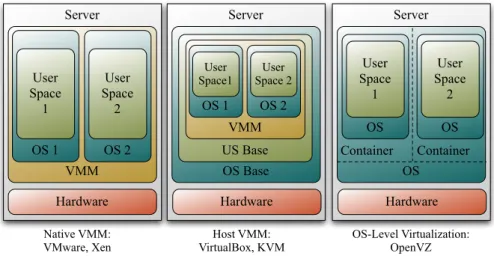
The recent popularity of virtualization on commodity hardware created a ple-thora of virtualization platforms with different complexity and environment-dependent applicability. An overview of virtualization platforms is given in [20]. Several ways to realize hardware virtualization have evolved, which differ in the required adaptations of the guest system. For instance, a VMM may run on bare hardware (called Type 1, native, or bare metal) or on top of an un-derlying/existingoperating system (OS) (calledType 2 orhosted). Alsohybrids
Server OS Base US Base Server Hardware VMM OS 1 OS 2 Native VMM: VMware, Xen Host VMM: VirtualBox, KVM User Space 2 User Space 1 Hardware VMM OS 1 OS 2 User Space 2 User Space1 Server OS Hardware OS User Space 1 OS User Space 2 OS-Level Virtualization: OpenVZ Container Container
Fig. 1: Virtualization concepts of the considered VMMs.
between Type 1 and 2 are possible. Finally, OS-level virtualization is a special form, where the guests are run in a container of the OS operating directly on the hardware.
Native VMMs and hosted VMMs provide afull virtualization, i.e. the guest system does not have to be modified. This means that the virtualized guest oper-ating system is working as if it would run directly on the hardware. But whenever the guest wants to access a hardware resource, which is only a virtualized re-source, the VMM has to interrupt the guest and ‘emulate’ this hardware access. This affects the performance of the guest system. To alleviate these problems, the guest system can be modified, e.g. with special drivers, to redirect resource accesses to function calls of the VMM. This method is calledpara-virtualization
and may improve the performance of the guest. OS level virtualization solves this resource access problem by using the same modified kernel in the guest containers as in the hosting OS. Hence, this technique has the advantage that the overhead for virtualization is quite low compared to the other solutions. However, the OS and the kernel of the guest is predetermined.
In this work, we consider five popular hardware virtualization platforms which can be categorized as
– native virtualization, represented by VMware ESXi [19] and Xen v4 [21], – host virtualization, represented by VirtualBox [16] and KVM [12], and – operating system-level virtualization, represented by OpenVZ [15].
Figure 1 depicts how the considered virtualization platforms encapsulate virtual guests and indirect access to resources for applications, which run in user space.
Fair access to the physical hardware is important and known to work for resources that can be split into quotas, e.g. memory, disk space, or processor cy-cles per second. However, access to any of these separately restricted resources
involves theinput and output(I/O) of data which typically shares a single bottle-neck, e.g. an internal bus. Especially, network I/O fairness is a crucial issue which involves another shared physical resource, thenetwork interface card (NIC). In this paper, we consider the packet forwarding throughput of the aforementioned virtualization platforms as a performance metric.
2.2 Related Work
An overview of virtualization techniques and mechanisms as well as their history and motivation is given in [8]. Several publications considerresource access fair-ness when multiple guest systems run on a single host. In [14], virtualization was done using Xen. The authors show that while the processor resources are fairly shared among guests, the scheduling of I/O resources is treated as a secondary concern and decreases with each additional guest system. The authors of [4] use a NetFPGA-based prototype to achieve network I/O fairness in virtual machines by applying flexible rate limiting mechanisms directly to virtual network inter-faces. Fairness issues in software virtual routers using Click are considered in [9]. The impact of several guests with and without additional memory intensive tasks on packet forwarding is measured. More details and performance tuning for the Click router is provided in [10].
As mentioned before, the performance and fairness heavily depend on the used VMM. Hence, several comparisons of mostly two VMMs have been con-ducted. We focus on the references considering network I/O performance which altogether consider packet forwarding performance with different packet lengths from 64 to 1500 bytes. In [18], a comparison of VMware ESX Server 3.0.1 and open-source Xen 3.0.3 with up to two guests was conducted by VMware using the Netperf packet generator. They show that Xen heavily lags behind VMware ESX. This study was repeated with VMware ESX Server 3.0.1 and open-source Xen Enterprise 3.2.3 in [22] by Xen Inc. which showed that a specialized Xen Enterprise lags by a few percent. The authors of [7] consider multiplexing of two data flows with different scheduling mechanisms on a real Cisco router, a virtual machine host, in two VM guests using Xen, and a NetFPGA packet generator. They show the dependency of the software routers on the packet length. Mea-surements of OpenVZ and User Mode Linux (UML) were conducted in [5] on wireless nodes of the Orbit test bed. UDP throughput and FTP performance is measured, but it is also stated that the hardware is not the best choice for virtualization. In [6], the network virtualization platform Trellis is presented and packet-forwarding rates relative to other virtualization technologies and na-tive kernel forwarding performance are compared. The considered virtualization technologies comprise Xen, Click, OpenVZ, NetNS, and the Trellis platform. The Linux kernel module pktgen [13] is used for packet generation. In their results, Xen has the lowest performance followed by OpenVZ.
To the best of our knowledge, this is the first paper to compare the packet for-warding performance of today’s most popular hardware virtualization platforms on a common commodity server system without special hardware requirements,
e.g. NetFPGA cards, or fine-tuned virtualization parameters, such that compar-isons can be easily repeated.
3
Hardware Setup and Measurement Scenarios
In the following section, we give an overview on the hardware setup of our measurements and provide technical details on the considered scenarios.
3.1 Hardware Setup
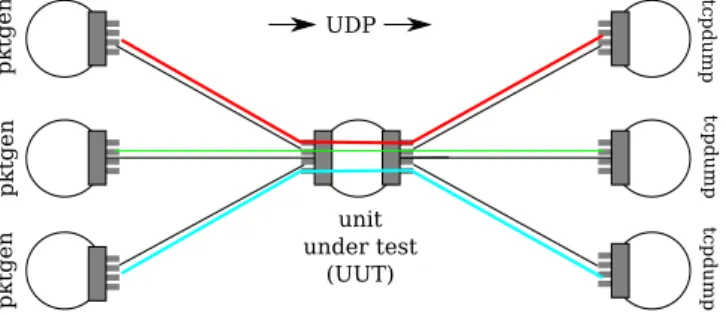
For our measurements, we use seven Sun Fire X4150 x64 servers from the G-Lab testbed [1], each with 2×Intel Xeon L5420 Quad Core CPU (2×6 MB L2 Cache, 2.5 GHz, 1333 MT/s FSB, and 8×2 GB RAM. The unit under test (UUT) is equipped with eight 1 Gigabit ports, while all other servers are equipped with only four 1 Gigabit ports. The UUT is connected on each NIC to three other servers each with a single connection using Cat.5e TP cable or better. The setup and interconnection of the servers is illustrated in Figure 2.
unit under test (UUT) UDP pktgen pktgen pktgen tc p dum p tc p dum p tc p dum p
Fig. 2: The hardware setup.
Each machine is running Debian 5.0.4 (“lenny”) with Linux kernel 2.6.26 compiled for the amd64 (x86 64) architecture. Only for the test of Xen we needed to adjust the base system with Debian 5.0.5 (“lenny”) with Linux kernel 2.6.31 for amd64. Since VMware ESXi installs directly on the host machine, the choice of a custom operating system is not applicable in this case. We investigate the following versions of the different VMMs with a Debian “lenny” as a guest system and the given Kernel installed:
– KVM 0.9.1 (kvm-72) [12]: Guest running Linux 2.6.26 for amd64 – OpenVZ 3.0.22 [15]: Guest running same OS kernel as host – VirtualBox 3.2.8 [16]: Guest running Linux 2.6.26 for amd64 – VMware ESXi 4.1.0 [19]: Guest running Linux 2.6.26 for amd64
– Xen development version of July 16th, 2010 [21]: Guest running Linux 2.6.26 for i386 (i686; x86) withphysical addressing extensions (PAE) support.
For the KVM and VirtualBox machines, virtual NICs are using the “virtio” para-virtualized network driver. For OpenVZ and Xen, para-virtualization is achieved implicitly through the OS-level or para-virtualization approach taken by OpenVZ and Xen, respectively. For VMware ESXi, both the “E1000” full-virtualized network driver and the “VMXNET 3” para-full-virtualized network driver (using the VMware Tools on the guest) are considered.
3.2 Measurement Metrics and Methodology
In all scenarios, we investigate the packet forwarding throughput performance of the different virtualization solutions on the UUT. In each experiment, net-work traffic is generated using the packet generator integrated into the Linux kernel (pktgen[13]). It sends out UDP packets which are forwarded by the UUT to another destination server where the traffic is recorded by tcpdump [3] and discarded afterwards. After stopping packet generation, the packet generator reports how many packets it was able to send. We calculate the “offered band-width” from this value and the time in which the traffic has been sent as well as the “measured throughput” from the data of the tcpdump file.
For our performance evaluation, we set up two different scenarios, a dedicated host scenario and a shared host scenarios, which we describe in the next sections.
3.3 Dedicated Host Scenario – Impact of Virtualization
In this scenario, we measure the packet forwarding performance of the Linux system without any virtualization (raw) and compare it with a setup where the same system is installed inside the tested VMM. We consider up to three traffic sources. It has to be noted that each traffic stream through the UUT does not interfere with any other stream outside the server, i.e. each traffic stream enters the server over a different network interface and also leaves the system via another distinct network interface. Each network interface is directly bridged to a corresponding virtual interface of the guest system.We consider packets with an Ethernet frame size of 64, 500, 1000, and 1500 byte for each data stream.
For each packet size, a target bandwidth of 10, 100, 200, 400, 600, 800, 900, and 1000 Mbit/s was run nine times for statistical evidence. Since pktgendoes not allow for setting a target bandwidth, but instead manages different loads of traffic by waiting a certain amount of time between sending two consecutive packets, this delay had to be calculated. For target bandwidth b [Mbit/s] and target packet sizes[byte], the resulting delay [ns] would be 8000×(s+24)/b. This formula works well for large packet sizes, but the kernel is not able to generate small packets fast enough. Hence, we adopted the inter packet delay to 1 and 0 ns to maximize the generated traffic and send as many packets as possible.
3.4 Shared Host Scenario – Impact of other Guest Systems
The consolidation of multiple virtual systems on a single physical host may have an impact on the network performance of the virtualized guests. Thus, we add
a second virtual guest to the VMM, which runs another Debian “lenny” and repeat all measurements. Initially, the second guest does not run any processes generating additional load (no load). In order to investigate if CPU intensive processes in another guest systems has an influence of the performance of our UUT, we generate variable amounts of CPU and virtual memory load with the
stresstool (version 0.18.9) [2] and considered two more cases. In the first case, called light load, stress was running with parameter --cpu 1, corresponding to a single CPU worker thread. In the second case, called heavy load, stress
was running with parameters--cpu 8 --vm 4, corresponding to 8 CPU worker threads, and 4 virtual memory threads which allocate, write to, and release memory. In case of full virtualization (KVM, VirtualBox, VMware, and Xen), each virtual guest was assigned a single (virtual) CPU out of the 8 physical CPU cores installed on the server.
Besides CPU and memory load, we targeted the influence of a second guest systems network load, even if the guests do not share physical network interfaces. We focus in this scenario on Ethernet frame sizes of 64 byte, as the previous scenarios revealed this packet size to be most critical. Hence, we reconfigured the UUT to have only two virtual interfaces, which are bridged to different physical interfaces. We adjust the second guest system to have also two virtual interfaces, which are bridged to two distinct physical interfaces. We run the same tests as before, but this time we send traffic through the second guest. We adjust the traffic in such a way that it is 50% and 95% of the maximum rate, which we measured in the test with the second guest being idle. For this test, we also measure the throughput of the second guest to investigate if the second guest system can still forward the offered data rate.
4
The Performance Cost of Virtualization
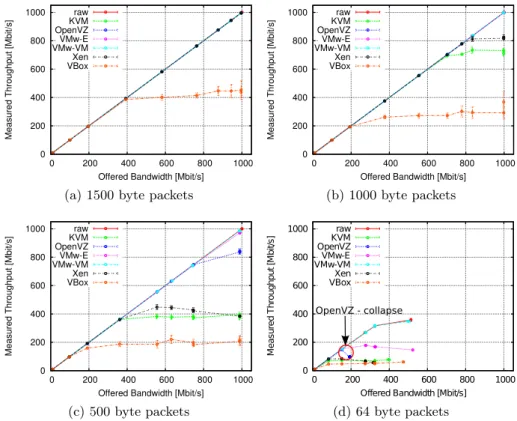
Depending on the used VMM, the network throughput performance of the vir-tual guests differs significantly. In Figure 3, we plot the bandwidth the traffic generator produced (“offered bandwidth”) against the throughput the central test system was able to forward (“measured throughput”) averaged over all nine repetitions of a test. The error bars, which in many cases can hardly be seen, present the 95% confidence intervals for the mean values. The graphs for the 1500 byte packets reveal no difference between the system without virtualization and most of the VMMs. Only the VirtualBox system is not able to forward all packets. For smaller packet sizes, i.e. 1000 bytes and 500 bytes, the difference be-tween the different VMMs is clearly visible. The fact that the offered bandwidth for all packet sizes above 500 bytes increases up to the maximum of the link, i.e. 1 Gbit/s, shows that the VMMs are able to fetch the packets from the net-work interface. However, in all cases in which the measured bandwidth is lower than the offered bandwidth, a significant number of packets get lost in theunit under test (UUT). Looking at Figure 3d, two additional effects can be noticed for the smallest used packet sizes, i.e. 64 bytes. Not all graphs extend to the same length on the y-axis. This means that the traffic generator was not able
0 200 400 600 800 1000 0 200 400 600 800 1000
Measured Throughput [Mbit/s]
Offered Bandwidth [Mbit/s] raw KVM OpenVZ VMw-E VMw-VM Xen VBox
(a) 1500 byte packets
0 200 400 600 800 1000 0 200 400 600 800 1000
Measured Throughput [Mbit/s]
Offered Bandwidth [Mbit/s] raw KVM OpenVZ VMw-E VMw-VM Xen VBox (b) 1000 byte packets 0 200 400 600 800 1000 0 200 400 600 800 1000
Measured Throughput [Mbit/s]
Offered Bandwidth [Mbit/s] raw KVM OpenVZ VMw-E VMw-VM Xen VBox (c) 500 byte packets 0 200 400 600 800 1000 0 200 400 600 800 1000 M ea su re d T hr ou gh pu t [ M bi t/s ]
Offered Bandwidth [Mbit/s] raw KVM OpenVZ VMw-E VMw-VM Xen VBox OpenVZ - collapse (d) 64 byte packets
Fig. 3: Offered bandwidth vs throughput of VMMs for different packet sizes. to offload the same amount of traffic to the UUT in all cases. This behavior is caused bylayer-2 flow control. Whenever the frame buffer of the network card is fully occupied, the network card sends a notification to the sending interfaces to throttle down the packet rate. The maximum throughput of the UUT is never affected by this behavior. We kept it activated, as it provides another option to the test system to react on traffic rates it cannot handle besides dropping packets. Please note that in all cases in which the layer-2 flow control is actively reducing the sent packets, the test system already drops packets. This behavior, therefore, never influences the maximum throughput of the system. The second observable effect is the behavior of OpenVZ when forwarding 64 byte packets. The OpenVZ system achieves a maximum throughput at a given input rate and collapses afterwards. We also notice this effect in other scenarios with 64 byte and 500 byte packet sizes. But in these cases, the throughput rate does not only collapse but is heavily varying for some offered traffic rates.
Next, we consider how the throughput of the UUT scales if we increase the number of traffic generators. Figure 4 depicts the maximum achieved throughput with one, two, and three traffic sources. Note that as we have seen, e.g. in Figure 3c, the maximum achieved throughput is not necessarily recorded at the highest offered bandwidth. The bar plot for the UUT without any VMM reveals
0 500 1000 1500 2000 2500 3000
raw KVM OpenVZVMw-E VMw-VMXen VBox
Measured Throughput [Mbit/s]
1 stream 2 streams 3 streams
(a) 1500 byte packets
0 500 1000 1500 2000 2500 3000
raw KVM OpenVZVMw-E VMw-VMXen VBox
Measured Throughput [Mbit/s]
1 stream 2 streams 3 streams (b) 1000 byte packets 0 500 1000 1500 2000 2500 3000
raw KVM OpenVZVMw-E VMw-VMXen VBox
Measured Throughput [Mbit/s]
1 stream 2 streams 3 streams (c) 500 byte packets 0 500 1000 1500 2000 2500 3000
raw KVM OpenVZVMw-E VMw-VMXen VBox
Measured Throughput [Mbit/s]
1 stream 2 streams 3 streams
(d) 64 byte packets Fig. 4: Maximum accumulated throughput of VMMs.
that in all cases, except the one sending the 64 byte packets, the performance of the raw system scales linearly, i.e. we measure a throughput of 1 Gbit/s, 2 Gbit/s, and 3 Gbit/s. In the case of 64 byte packets, Figure 4d also reveals a limitation of the raw system, as the accumulated throughput for two and three traffic generators is the same. It has to be noted that in this case the raw system uses layer-2 flow control to throttle down the traffic generators. But the raw system is able to forward all received packets, in contrast to all VMMs which accept up to 600 Mbit/s input rates but drop packets down to the depicted maximum accumulated throughput. Another behavior which cannot be seen in the bar plots is that we measured a significant difference in the mean throughput of the three data streams for the VMware system without the para-virtualized driver. The results in Figure 4 show that most VMMs have a throughput limitation, which varies with the packet size. All VMMs except OpenVZ reveal this limita-tion even for 1500 byte packet sizes. Only OpenVZ is able to forward packets of this size with the same performance as the raw system. However, if we look at the results for the other packet sizes, we clearly see the impact of virtualization even for OpenVZ. For smaller packet sizes, i.e. 500 byte and below, the VMware with the para-virtualized VMXNET3 driver (abbreviated by VMw-VM in the figures) outperforms all other solutions.
In conclusion, we see that the performance costs of virtualization gets higher, the more small packets are sent and the higher the bandwidth on the UUT is. Also OpenVZ, which only provides OS-level virtualization, has a noticeable influ-ence on the systems’ performance in these cases. The biggest problem identified is that the VMMs try to take as many packets of the network card as possible and therefore prevent layer-2 flow control to limit incoming data to a rate, which can be handled by the system. Hence, the majority of packets is lost before entering the guest system.
5
Isolation of Guest Systems
Initially, we conducted tests with a second virtual guest Linux that was only idle. These tests showed that the difference to the scenario with only a single guest are mostly negligible. Only OpenVZ showed a difference in the shape of its collapse for high offered bandwidth rates with small packets. Hence, we focus in this paper on the more interesting effects. More details are provided in [17].
0 200 400 600 800 1000 1200
raw KVM OpenVZVMw-E VMw-VMXen VBox
Measured Throughput [Mbit/s]
0 % rel. load 50 % rel. load 100 % rel. load
(a) 1500 byte packets
0 200 400 600 800 1000 1200
raw KVM OpenVZVMw-E VMw-VMXen VBox
Measured Throughput [Mbit/s]
0 % rel. load 50 % rel. load 100 % rel. load (b) 1000 byte packets 0 200 400 600 800 1000 1200
raw KVM OpenVZVMw-E VMw-VMXen VBox
Measured Throughput [Mbit/s]
0 % rel. load 50 % rel. load 100 % rel. load (c) 500 byte packets 0 200 400 600 800 1000 1200
raw KVM OpenVZVMw-E VMw-VMXen VBox
Measured Throughput [Mbit/s]
0 % rel. load 50 % rel. load 100 % rel. load
(d) 64 byte packets
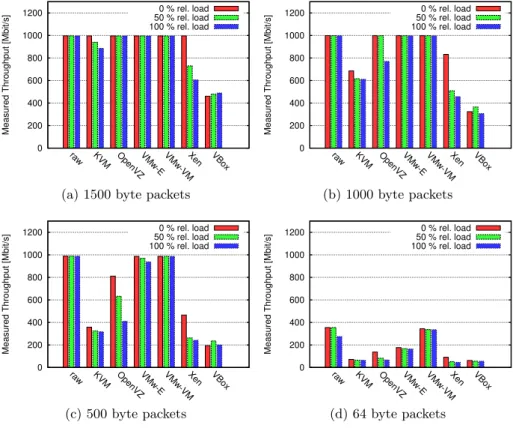
Fig. 5: Maximum throughput considering a second guest transmitting small pack-ets relative to the maximum throughput in the dedicated scenario, c.f. Figure 4d.
Table 1: Averaged relative throughput changes considering a single traffic source and a second guest running CPU/Memory intensive processes,cf. Section 3.4.
packet KVM OpenVZ VM-E1000 VM-VMXNET3 Xen VirtualBox
size light heavy light heavy light heavy light heavy light heavy light heavy 64 4.2% -0.4% 1.0% -18.2% -2.7% -4.5% -0.5% -0.6% 6.8% 7.9% 2.1% 2.0% 500 5.5% 4.0% 1.5% -11.4% -4.4% -5.3% 0.0% -0.1% 3.7% 3.4% -2.0% -4.0% 1000 5.1% 5.6% 0.0% 0.0% 0.0% 0.0% 0.0% 0.0% 0.8% 1.7% 3.6% -4.8% 1500 0.0% 0.0% 0.0% 0.0% 0.0% 0.0% 0.0% 0.0% 0.0% 0.0% 3.4% 2%
Table 2: Averaged offered bandwidth (in) and throughput measured(out) for 2nd guest in background at 50% relative load, c.f. Figure 4d.
packet raw KVM OpenVZ VM-E1000 VM-VMXNET3 Xen VirtualBox size in out in out in out in out in out in out in out 1500 153.1 153.1 37.1 37.1 72.1 72.1 71.8 71.8 152.2 151.9 37.1 36.8 37.1 36.7 1000 153.0 153.0 37.1 37.1 72.1 72.1 71.8 71.8 152.0 151.8 37.1 36.6 37.1 36.0 500 153.0 153.0 37.1 37.1 72.1 68.1 71.8 71.8 152.0 151.7 37.1 36.1 37.1 36.2 64 153.0 153.0 37.1 37.0 72.1 62.5 71.8 71.8 152.1 151.8 37.1 35.4 37.1 36.8
Table 3: Averaged offered bandwidth (in) and throughput measured(out) for 2nd guest in background at 95% relative load, c.f. Figure 4d.
packet raw KVM OpenVZ VM-E1000 VM-VMXNET3 Xen VirtualBox size in out in out in out in out in out in out in out 1500 275.8 270.4 72.1 63.2 127.0 127.0 126.6 126.6 274.4 268.3 72.0 56.2 72.1 42.1 1000 275.6 270.4 72.1 61.3 127.0 102.7 126.7 126.6 274.3 267.6 72.1 50.9 72.1 41.5 500 275.9 271.4 72.1 60.8 125.9 80.1 126.6 126.6 274.3 267.5 72.1 48.9 72.1 40.2 64 274.9 269.3 72.1 64.6 124.4 62.7 126.6 126.6 274.4 268.4 72.0 47.2 72.1 42.4
The impact of a second virtual guest, which is performing CPU and memory intensive tasks, is also small. We, therefore, provide only the difference in max-imum achieved throughput in Table 1. It has to be noted that positive values in Table 1 correspond to an increase of throughput under these conditions. For example, Xen forwards in any considered scenario more packets, if a second vir-tual guest is running CPU or CPU and memory intensive tasks. Only OpenVZ is negatively affected by more than 10% relative forwarding performance consid-ering small packets. This effect might be caused by the fact that OpenVZ, in the original implementation, does not foresee the option to restrict the execution of processes to predefined CPUs. Thus, thestressprocesses are run on all CPUs compared to the other scenarios, where thestressprocesses are strictly bound to the CPU of the second process. It has to be noted that both OS containers in OpenVZ are started with the “CPUUNIT” parameter, which means equal sharing of CPU resources. This result is surprising and we intend to study it closer in future work.
However, the impact of a second guest is clearly recognizable, whenever it is handling small packets. Figure 5 depicts our measurement results for the measurement scenario in which the second guest forwards small packets, cf. Section 3.4. Even if the UUT is only handling 1500 byte packets KVM and Xen achieve a lower maximum throughput. But if we consider the results for streams of 1000 byte and 500 byte packets, also OpenVZ and VMware without a para-virtualized network driver are affected, whereas the raw system and the VMware guest with VMXNET3 driver still handle all packets.
For 64 byte packets it seems as if the VMware system with VMXNET3 driver outperforms the unvirtualized system. But this is not the case. Due to the fact that we send packets through the second guest relative to the performance we measured before, the raw system handles 270 Mbit/s of 64 byte packets in the background and forwards all packets. The VMware system is only forwarding about 200 Mbit/s in the second guest and is buying the higher throughput of the test system by a loss rate of about 20%.
The offered bandwidth and the measured throughput for the second guest in this experiment are provided for both load scenarios in Table 2 and Table 3, respectively. These measurements reveal that the second guest is also negatively affected. If both guests are forwarding 64 byte packets, loss rates up to 50% can be experienced. The most severe impact can again be seen for OpenVZ. It seems as if the well known problem of the Linux kernel to handle small packets, c.f. [11], has an even larger impact when using OS-level virtualization. This effect has to be considered when planning experiments on experimentation facilities using this kind of virtualization, as it might cause a high variance in the results of experiments, depending on the processes in other guest systems.
6
Conclusion
In this paper, we analyzed the impact of virtualization for a single system in terms of packet forwarding throughput. We compared KVM, OpenVZ, VMware, Xen, and VirtualBox to a raw host system and the impact of another virtual guest system performing CPU and memory intensive tasks as well as forwarding of small packets. Our results revealed that the impact of virtualization is notice-able for most virtualization platforms even when only considering the through-put on a single network interface. When increasing the number of interfaces and traffic sources, each VMM revealed a throughput bottleneck, which depends on the size of the packets being transmitted but is significantly lower than the for-warding capacity of the raw system. The impact of a second guest, which is idle or running only CPU and memory intensive tasks, is rather small. However, a second guest that forwards small packets even at comparably low rates is able to influence the performance of a virtualized system severely. Our findings show that virtualized systems and the traffic they handle need to be monitored. In professional system, network monitoring and exact measurements of the used systems enable the diagnosis of performance bottlenecks and definition of relo-cation strategies. But also for research facilities, in which many scientists share the resources of a test bed, it is crucial to record all influences which might be introduced by another test running on the same test bed, in order to pro-vide credible scientific results. In future work, we will integrate the results from this paper into performance models for virtualized systems and virtual software routers to analyze and optimize throughput and isolation.
Acknowledgments The authors would like to thank Prof. Tran-Gia for the stimulating environment which was a prerequisite for this work.
References
1. German-Lab (G-Lab),http://www.german-lab.de
2. Stress tool,http://weather.ou.edu/~apw/projects/stress/ 3. tcpdump,http://www.tcpdump.org
4. Anwer, M.B., Nayak, A., Feamster, N., Liu, L.: Network I/O fairness in virtual machines. In: Proceedings of the 2nd ACM SIGCOMM workshop on Virtualized infrastructure systems and architectures (VISA). pp. 73–80. New York, USA (2010) 5. Bhanage, G., Seskar, I., Zhang, Y., Raychaudhuri, D., Jain, S.: Analyzing router performance using network calculus with external measurements. In: TridentCom 2010 (May 2010)
6. Bhatia, S., Motiwala, M., Muhlbauer, W., Mundada, Y., Valancius, V., Bavier, A., Feamster, N., Peterson, L., Rexford, J.: Trellis: a platform for building flexible, fast virtual networks on commodity hardware. In: Proceedings of the 2008 ACM CoNEXT Conference. pp. 72:1–72:6. New York, USA (2008)
7. Bredel, M., Bozakov, Z., Jiang, Y.: Analyzing router performance using network calculus with external measurements. In: 18th International Workshop on Quality of Service (IWQoS). pp. 1–9 (Jun 2010)
8. van Doorn, L.: Hardware virtualization trends. In: Proceedings of the 2nd interna-tional conference on Virtual execution environments (VEE). pp. 45–45. New York, USA (2006)
9. Egi, N., Greenhalgh, A., Handley, M., Hoerdt, M., Huici, F., Mathy, L.: Fairness issues in software virtual routers. In: Proceedings of the ACM workshop on Pro-grammable routers for extensible services of tomorrow (PRESTO). pp. 33–38. New York, USA (2008)
10. Egi, N., Greenhalgh, A., Handley, M., Hoerdt, M., Huici, F., Mathy, L.: Towards high performance virtual routers on commodity hardware. In: Proceedings of the 2008 ACM CoNEXT Conference. pp. 20:1–20:12. New York, USA (2008)
11. Han, S., Jang, K., Park, K., Moon, S.: PacketShader: a GPU-accelerated software router. vol. 40, pp. 195–206. ACM (2010)
12. KVM: Kernel-based virtual machine,http://www.linux-kvm.org/
13. Olsson, R.: pktgen the Linux packet generator. In: Proceedings of Linux symposium (2005)
14. Ongaro, D., Cox, A.L., Rixner, S.: Scheduling I/O in virtual machine monitors. In: Proceedings of the fourth ACM SIGPLAN/SIGOPS international conference on Virtual execution environments (VEE). pp. 1–10. New York, USA (2008) 15. OpenVZ: Open virtualization,http://openvz.org/
16. Oracle: Virtualbox,http://www.virtualbox.org/
17. Schlosser, D., Duelli, M., Goll, S.: Performance Comparison of Common Server Hardware Virtualization Solutions Regarding the Network Throughput of Virtu-alized Systems. Tech. rep., University of W¨urzburg (2011)
18. VMware: A Performance Comparison of Hypervisors (2007),http://www.vmware. com/pdf/hypervisor_performance.pdf
19. VMware ESXi:http://www.vmware.com/products/vi/esx/
20. Wikipedia: Comparison of platform virtual machines — Wikipedia, The Free Ency-clopedia (2010),http://en.wikipedia.org/w/index.php?title=Comparison_of_ platform_virtual_machines
21. Xen:http://www.xen.org/
22. XenSource Inc: A Performance Comparison of Commercial Hypervisors (2007),