INTRODUCTION
Next-generation interfaces are one of the key technologies for computer usage in our society. The related technologies have achieved remarkable development in recent years [1–4]. Thus, screen touch, voice input, gesture, etc. have become more common as input operations for a computer. Those natural user interfaces are operable through a natural interaction between a human and a computer. Additionally, each interface has some advan-tages compared with the conventional devices such as a mouse and keyboard. The gesture interfaces have continuously attracted atten-tion from the early days, and various forms for gesture interface have been designed to re-place the conventional ones [5].
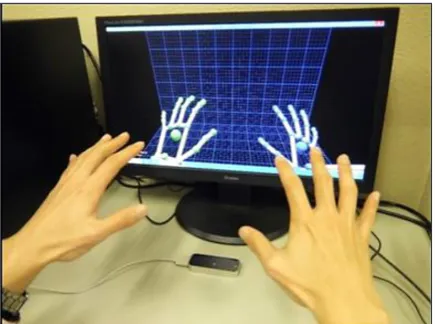
As a sensor for markerless motion capture, leap motion controller (LMC) has been widely used to recognize the hand gestures and finger positions [6]. Figure 1 shows a practical situation of the gesture interface with LMC. The device is a compact sensor incorporating two CCD cameras, and the object positions can be obtained from the stereo-vision images. The detection accuracy of the sensors is approximately 0.01 mm. With the convenient features, the basic characteristics of LMC have been studied from various viewpoints. Vinayak and Ramani designed and evaluated a geometric interaction system using LMC for bare-hand mid-air virtual pottery [7]. Bachmann et al. analyzed the user’s performance in selec-tion tasks with LMC [8]. Then, they pointed out the movement times twice as large as for a mouse device and an error rate of 7.8% for the LMC and
Recognition Characteristics of Interface Designed
for Gesture Operations of 3D Objects
Tsutomu Sekine
11 Department of Systems Design Engineering, Faculty of Science and Technology, Seikei University, 180-8633,
Japan
e-mail: [email protected]
ABSTRACT
This study focuses on the development of an interface for gesture control and Boolean operation of 3D objects in 3D computer-aided design (CAD). Although mouse and keyboard have been mainly used as computer input devices, novel computer interfaces are becoming increasingly popular with rapid development of computer technologies. Among several computer interfaces, the gesture interface is well-known as an system operable through the natural hu-man behavior. However, the application to 3D CAD has been scarcely studied so far. From the backgrounds, a simple gesture interface was developed to operate a 3D object in 3D CAD. Leap Motion Controller (LMC) was used as a motion sensor device. A dialog-based graphical user interface (GUI) was also created for the parameter setting. As a
result, several operational functions could be successfully executed through various hand-finger motions. Moreover,
the system enabled us to experience an intuitive interaction with 3D CAD. Then, the several demonstrations were
performed to identify the recognition characteristics of the gesture interface. The differences in the recognition rate were revealed as the results. Especially, it confirmed that a combination of static and dynamic gestures could help to enhance the recognition rate in the gesture interface using LMC. In accordance with the findings, the functions for
Boolean operation were also implemented for the manipulation of a 3D object, such as extrusion and hole making.
Keywords: gesture interface, computer-aided design, human-computer interaction, leap motion controller, motion sensor
Volume 13, Issue 4, December 2019, pages 143–150
https://doi.org/10.12913/22998624/113475
Research Journal
Accepted: 2019.11.15the LMC’s characteristics capable of providing the data that are clinically meaningful for wrist flexion/extension [13].
Some studies also focused on the several kinds of applications with LMC. Katahira and Soga proposed a system using LMC to produce a realistic picture of augmented reality [14]. Kincaida et al. proposed a system using LMC to measure tremors in clinical settings [15]. A pro-totype of an anthropomorphic gripper with five fingers was made by Staretu and Moldovan [16]. LMC was used as the controllable interface of gripper. Tang and Webb designed a contactless gesture control system using LMC for industrial robot [17]; moreover, they evaluated the system through a unique assessment method. Zubrycki and Granosik also described a system with LMC for 3-finger dexterous gripper [18].
Meanwhile, LMC has been applied to 3D computer-aided design (CAD) in recent years. Xiao and Peng proposed a hand gesture-based de-sign interface using LMC for the review of CAD models [19]. Pareek and Sharma reported a LMC based CAD interface using number, position, ve-locity and direction of fingers as the input data [20]. Song et al. created a gesture interface using LMC for 3D modeling with applicable level of
for 3D CAD, and the interface was set up to rec-ognize several hand-finger motions for program functions, taking the advantage of the gestures for 3D CAD.
The following sections are organized as fol-lows. Section 2 describes a gesture interface with LMC; moreover, the development of the interface, including the setting dialog, was re-ported. Section 3 represents the implementa-tion of program, and the discussion was made in this study. Section 4 gives conclusions based on several findings.
DEVELOPMENT OF GESTURE INTERFACE
WITH LMC
The system configuration of 3D CAD with a gesture interface is shown in Figure 2. The four main processes are Detection, Verification, Ex-ecution, and Perception. In Detection, the inter-face captures the hand-finger gestures through a motion sensor. LMC was used as the motion sensor device. As briefly described in Sec. 1, the device consists of two CCD cameras and three infrared LEDs. These track infrared light with a wavelength of 850 nanometers, which is out-side the visible light spectrum [22]. The objects’ positions can be obtained from the stereo-vision images. An interaction can be detected in an in-verse pyramid area up to 600 mm. The apex of the pyramid is placed on the device with a maxi-mum field of view of 150° [23]. The maximaxi-mum frame rate is 300 fps, and the detection accuracy in fingertip position is approximately 0.01 mm. The relative study [24] reported showed that the accuracy for static setups was below 0.2 mm and that for dynamic setups was 0.4 mm in realistic scenarios. After the information including a hand form and motion was obtained from the former process, the integrity was instantaneously veri-fied with reference to the predefined gestures in Verification. Swipe, circle and screen tap were
set as the three gestures recognizable effortless-ly in LMC. These gesture images are shown in Figure 3. Figure 3 (a) represents a swipe motion dealing with the hand-finger motions in vertical or horizontal direction. With reference to Figure 3 (b), circle was also defined as a hand-finger mo-tion like circle drawing. The rotamo-tional direcmo-tion is distinguishable according to either clockwise or counterclockwise motion. Figure 3 (c) shows a screen tap motion like pushing a screen in the detection space over LMC. Here, the gestures mentioned above are typical examples with the forefinger. Unlike those gestures, a brief stay was considered and newly added as a recogniz-able gesture in LMC. It is a two-handed, static gesture as shown in Figure 4, and the recognition was performed when the palms of two hands were held over the sensor.
In Execution, a program function can be executed according to the setting behaviors in 3D CAD after a hand-finger gesture is detected
contactless and verified through the interface. Then, a model on 3D CAD acts in accordance with the program function. Visual Studio 2015 was used as an integrated development environ-ment (IDE) to develop the interface, and several functions were set using the IDE. Furthermore, the programs were written in Visual C#. Finally, the behaviors of 3D model are visually displayed in 3D CAD. Then, a movement of 3D model as a result output by the execution can be noticed. This is the Perception process. Inventor Profes-sional 2019 was used as a 3D CAD because of the application programming interface (API) offering various program functions useful for creating a gesture interface.
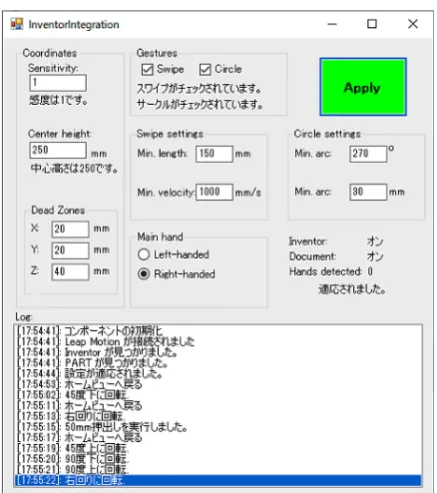
A setting dialog was created to promote the integration between LMC and 3D CAD. On the dialog, various setting parameters are located and connected to program functions. Figure 5 shows the framework of dialog. There are several groups based on the characteristics of the program
Fig. 2. System configuration of gesture interface with LMC
functions. The settings for coordinate systems are placed in the top left of dialog. We can ad-just a sensitivity and deadzone’s region of LMC through this group. The group concerning the “gesture” in the top center of dialog includes the gesture-related functions. This group includes the swipe and circle check boxes. One or both items can be selected, and some messages are displayed according to the ticks. If the state of these check boxes is true, the settings can be changed; more-over, the history of parameter change and gesture recognition is displayed on the “Log” area at the bottom of the dialog.
There are the settings for swipe in the sec-ond one from the top center of dialog. Minimum length and velocity are necessary for detecting the hand-finger motions associated with swipe. If the length or velocity of a hand-finger motion is smaller than the set values, a preconfigured program function is not executed. The settings for circle are also set in the second one from the top left of dialog. Minimum angle and radius are necessary for detecting the hand-finger motions associated with circle. A preconfigured program function can be performed unless the angle or ra-dius of a hand-finger motion is smaller than the set values. The right or left hand can be selected using this dialog. After the modification using the dialog, the button “apply” in the top left of dialog is clicked to apply all the settings to the gesture interface of 3D CAD. Then, the corrections and gesture operations are continuously displayed on the “Log” area.
DEMONSTRATIONS AND DISCUSSIONS
A detectable region over LMC is defined on the basis of an orthogonal coordinate system with
the X, Y, and Z axes. In LMC, the X axis is set as a horizontal direction. The Y axis is also set as the vertical direction. The Z axis is placed as a right-handed coordinate system with the X and Y axes. The gesture operations along with the Z axis are used for a near or far movement of 3D model and so on.
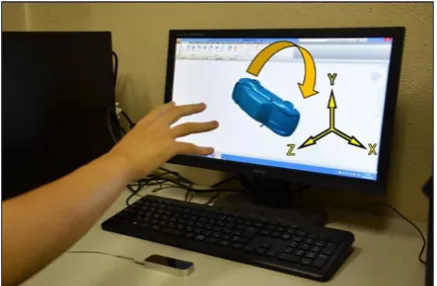
Figures 6 to 9 illustrate each one-handed op-eration implemented in this study, respectively. The interface provides translation, rotation, and scaling. Compared with the conventional opera-tions, the gesture operation offers an intuitive in-teraction with 3D CAD. One finger’s translational motion led to 3D model’s translational movement in accordance with the finger motion. However, in mouse operation, the mouse movement is re-quired after pressing the wheel button. The 3D model rotation started with detecting more than four fingers, while the mouse operation entails the movement after pressing the wheel button and holding down the shift key on the keyboard. With detecting more than five fingers, the scaling of 3D model was adjustable through a near or far behavior of hand-finger motion over LMC. On the other hand, the turn wheel on a mouse needs to be rotated. For scale-up, the wheel is rotated in back direction, whereas, for scale-down, the wheel is rotated in forward direction. A 45-degree rotation of 3D model was also implemented when the swipe motion was detected as a one-handed operation with two fingers. The function can be
Fig. 5. the framework of setting dialog
executed through the swipe motion along with both the horizontal and vertical directions.
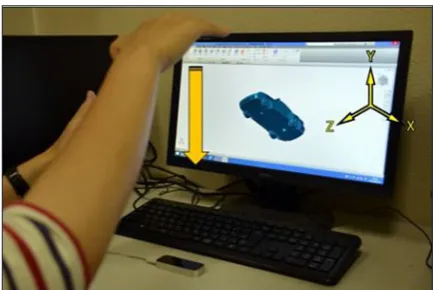
As a two-handed operation, the interface can also give a 90-degree rotation of 3D model and return to a home viewpoint. Here, a home view-point means an initial perspective in 3D CAD. One of the two-handed operations is a combina-tion of static and dynamic gestures. A 90-degree rotation of 3D model is available through detect-ing a palm of one hand and swipe motion parallel to the X or Y-axis. As shown in Figures 10 and 11, detecting two hands is indispensable in the execu-tion. In addition, a brief stay was designed as a static gesture of two hands. As shown in Figure 4, returning to a home viewpoint is performed when palms of two hands are held over the sensor for several seconds. The demonstrations of each ges-ture operation enabled to experience an intuitive interaction with 3D CAD. In conventional op-erations, ViewCube and Home-button shown in Figure 12 are usually used for achieving the same operations. Using a mouse, the 3D model can be rotated through clicking a surface, edge, or vertex of ViewCube. Returning to a home viewpoint is also executed after the Home-button is clicked.
As explained above, the program functions added to 3D CAD could be executed through the gesture operations recognizable in LMC. Thus, it was veri-fied that the gesture interface created in this study could provide each basic function designed with practical consideration for the use in 3D CAD.
The gesture interface was investigated in operational tests. A 45-degree rotation, 90-de-gree rotation, and brief stay were selected as the conditions. Each operation represents a dynam-ic gesture, a combination of statdynam-ic and dynamdynam-ic gestures, and a static gesture. The experimen-tal conditions were set as 200 mm for the cen-ter height of detectable region, 100 mm for the minimum distance of swipe motion, 1000 mm/s for the minimum speed of swipe motion, respec-tively. Each operation was repeated 30 times to identify the recognition rates in the gesture inter-face created in this study. In the case of brief stay, the predefined gesture was given to revert to an initial perspective in 3D CAD after a 3D model was moved through the other operation. Then, the recognition rate within 10 seconds was evaluated. After the tests, each recognition rate was calcu-lated through counting the logs in “Log” area.
Fig. 6. Translational motion of 3D model
Fig. 7. Rotation of 3D model
Figure 13 shows the recognition rates ob-tained in each operational test. In the figure, each label of column chart represents Dynamic for dynamic gesture by means of a 45-degree ro-tation with one hand, Combination for a combi-nation of static and dynamic gestures by means of a 95-degree rotation with two hands, and Static for a static gesture by means of brief stay with two hands, respectively. From the results, the recognition rate of brief stay was the highest among the three conditions. The numerical value was 96.7%. In this test, almost all of the ges-ture operations were recognized except for once. As a cause of the failure, it was considered that one hand exceeded the detectable region. On the other hand, the recognition rates in 45-de-gree and 90-de45-de-gree rotation were 71.7% and
88.3%, respectively. The comparison of results in 45-dgree and 90-degree rotations indicated a beneficial feature which a combination of static and dynamic gestures had; namely, a combina-tion of both gestures can help to enhance the recognition rate in gesture interface using LMC. Two possibilities are offered by this compari-son. It is highly possible to recognize a dynamic gesture of one hand readily if the detection state is preliminarily made by a static gesture of the other hand. The other possibility is that a static gesture of one hand becomes a visual mark of a detectable region when a dynamic gesture of the other hand is made over LMC. Accordingly, it was considered that the recognition rate was improved with benefit from the synergetic effect of them discussed above.
Fig. 10. 90-degree rotation along with X-axis Fig. 11. 90-degree rotation along with Y-axis
Fig. 12. ViewCube and Home-Button in 3D CAD
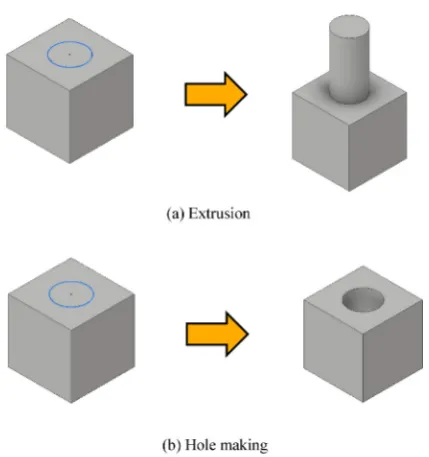
Several Boolean functions in 3D CAD were customized based on the recognition character-istics. The functions were executed through a combination of the static and dynamic gestures. As shown in Figure 14, screen tap was used as a dynamic gesture. In the operations, the gesture
interface using LMC enables us to execute Bool-ean functions in 3D CAD after a 2D reference shape was preliminarily given to create a 3D shape. Moreover, several operations executed using screen tap are selectable through chang-ing the number of fchang-ingers. Figure 16 represents a few of the examples. Extrusion can be executed with one finger and hole making can be achieved with two fingers.
CONCLUSIONS
In this study, a gesture interface using LMC was designed to operate 3D objects in 3D CAD, and it confirmed that several functions could be successfully executed. One finger’s translational motion led to the 3D model’s translational move-ment, in accordance with the finger motion. The 3D model rotation started with detecting more than four fingers. In addition, the scaling of 3D model was adjustable through a near or far behav-ior of hand-finger motion over LMC. A 45-degree rotation of a 3D model was also implemented as a swipe motion using one hand. A 90-degree rotation of a 3D model was available using both hands making a combination of static and dynam-ic gestures. The interface also enables to return to a home viewpoint with detecting both hands. Furthermore, several Boolean functions in 3D CAD could be executed through a combination of static and dynamic gestures. They are selectable through changing the number of fingers in a dy-namic gesture. Each gesture operation indicated that the developed gesture interface could offer an intuitive interaction with 3D CAD.
Several demonstrations were performed to identify the recognition characteristics of the ges-ture interface. The differences of the recognition rate were revealed as the results. Especially, the comparison of results in 45-degree and 90-degree rotations indicated a beneficial feature of a com-bination of static and dynamic gestures. In other
Fig. 15. Examples of Boolean operations
REFERENCES
1. F. Karray, M. Alemzadeh, J.A. Saleh, M.N. Arab, “Human-Computer Interaction: Overview on State of the Art” Int. J. Smart Sensing and Intelligent Systems, 1(1), 137–159, 2008.
2. H.J. Park, S. McKilligan, “A Systematic Litera-ture Review for Human-Computer Interaction and Design Thinking Process Integration” in 7th Inter-national Conference on Design, User Experience and Usability (DUXU) 2018, Las Vegas, NV, USA, 2018.
3. A. Iannessi, P.Y. Marcy, O. Clatz, A.S. Bertrand, M. Sugimoto, “A review of existing and potential computer user interfaces for modern radiology” In-sights Imaging, 9(4), 599–609, 2018.
4. D. Bachmann, F. Weichert, G. Rinkenauer, “Re-view of Three-Dimensional Human-Computer In-teraction with Focus on the Leap Motion Control-ler” Sensors, 18, 2194, 2018.
5. T. Vuletic, A. Duffy, L. Hay, C. McTeague, G.
Campbell, M. Grealy, “Systematic literature re-view of hand gestures used in human computer interaction interfaces” Int. J. Human-Computer Studies, 129, 74–94, 2019.
6. L. Motion, LEAP MOTION, Developer Portal,
(Online). Available: https://developer.leapmotion. com/. Accessed on 10th April 2017.
7. Vinayak, K. Ramani, “A gesture-free geometric approach for mid-air expression of design intent in 3D virtual pottery” Comput. Aided Des., 69, 11–24, 2015.
8. D. Bachmann, F. Weichert, G. Rinkenauer, “Evalu-ation of the leap motion controller as a new con-tact-free pointing device” Sensors, 15, 214–233, 2015.
9. C. Naidu, A. Ghotkar, “Hand Gesture Recogni-tion Using Leap MoRecogni-tion Controller” Int. J. Sci. and Res., 5, 436–441, 2016.
10. M. Kobayashi, A. Takeda, “Implementation and Evaluation of Sign Language Recognition by us-ing Leap Motion Controller” IPSJ Tohoku Branch SIG Technical Report, 2017. (in Japanese)
11. L. Shao, “Hand movement and gesture recognition
using Leap Motion Controller” https://stanford.
tion of a System for AR Enabling Realistic Display of Gripping Motions Using Leap Motion Control-ler” Procedia Computer Science, 60, 1595–1603, 2015.
15. C.J. Kincaida, A.C. Vaterlausa, N.R. Stanford, S.K. Charles, “Frequency response of the leap motion controller and its suitability for measuring tremor” Medical Engineering & Physics, 63, 72–78, 2019. 16. I. Staretu, C. Moldovan, “Leap Motion Device
Used to Control a Real Anthropomorphic Gripper” Int. J. Adv. Robotic Systems, 13, 113, 2016. 17. G. Tang, P. Webb, “The Design and Evaluation of
an Ergonomic Contactless Gesture Control System for Industrial Robots” Journal of Robotics, 2018, 9791286, 2018.
18. R. Szewczyk, C. Zieliński, M. Kaliczyńska, Recent
Advances in Automation, Robotics and Measuring Techniques, 2014.
19. Y. Xiao, Q. Peng, “A hand gesture-based interface for design review using leap motion controller” in 21st International Conference on Engineering De-sign (ICED 17), Vancouver, Canada, 2017. 20. S. Pareek, V. Sharma, “Development of CAD
Inter-face Using Leap Motion” http://vaibhav-sharma. com/resources/development_of_a_cad_interface_ using_leapmotion.pdf. Accessed on 15th Novem -ber 2015.
21. J. Song, S. Cho, S.Y. Baek, K. Lee, H. Bang, “Ga-FinC: Gaze and Finger Control interface for 3D model manipulation in CAD application” Comput. Aided Des., 46, 239–245, 2014.
22. A. Colgan, “How Does the Leap Motion Controller Work?,” Leap Motion Blog, (Online). Available:
http://blog.leapmotion.com/hardware-to-software-how-does-the-leap-motion-controller-work/. Ac -cessed on 27th October 2019.
23. S. Invitto, C. Faggiano, S. Sammarco, V. De Luca, L.T. De Paolis, “Interactive Entertainment, Virtual Motion Training and Brain Ergonomy” in 7th In-ternational Conference on Intelligent Technologies for Interactive Entertainment (INTETAIN), To-rino, Italy, 2015.
![Fig. 3. Gestures predefined in LMC [6]](https://thumb-us.123doks.com/thumbv2/123dok_us/8804883.1774027/3.595.177.419.551.759/fig-gestures-predefined-in-lmc.webp)