The Developer’s
Guide to Social
T
heDeveloper’s Library Series from Addison-Wesley provides practicing programmers with unique, high-quality references andtutorials on the latest programming languages and technologies they
use in their daily work. All books in the Developer’s Library are written by
expert technology practitioners who are exceptionally skilled at organizing
and presenting information in a way that’s useful for other programmers.
Developer’s Library books cover a wide range of topics, from
open-source programming languages and databases, Linux programming,
Microsoft, and Java, to Web development, social networking platforms,
Mac/iPhone programming, and Android programming.
Visit developers-library.com for a complete list of available products
The Developer’s
Guide to Social
Programming
Building Social Context Using
Facebook, Google Friend
Connect, and the Twitter API
Mark D. Hawker
Upper Saddle River, NJ •Boston•Indianapolis•San Francisco New York •Toronto •Montreal •London•Munich•Paris •Madrid
of a trademark claim, the designations have been printed with initial capital letters or in all capitals. The author and publisher have taken care in the preparation of this book, but make no expressed or implied warranty of any kind and assume no responsibility for errors or omissions. No liability is assumed for incidental or consequential damages in connection with or arising out of the use of the information or programs contained herein.
The publisher offers excellent discounts on this book when ordered in quantity for bulk purchases or special sales, which may include electronic versions and/or custom covers and content particular to your business, training goals, marketing focus, and branding interests. For more information, please contact:
U.S. Corporate and Government Sales (800) 382-3419
For sales outside the United States please contact: International Sales
[email protected] Visit us on the Web: informit.com/aw
Library of Congress Cataloging-in-Publication Data: Hawker, Mark D.
The developer’s guide to social programming : building social context using Facebook, Google friend connect, and the Twitter API / Mark D. Hawker.
p. cm.
ISBN 978-0-321-68077-8 (pbk. : alk. paper) 1. Online social networks. 2. Entertainment computing. 3. Internet programming. 4. Google. 5. Facebook (Electronic resource) 6. Twitter. I. Title.
HM742.H39 2010 006.7’54—dc22
2010020866 Copyright © 2011 Pearson Education, Inc.
All rights reserved. Printed in the United States of America. This publication is protected by copy-right, and permission must be obtained from the publisher prior to any prohibited reproduction, stor-age in a retrieval system, or transmission in any form or by any means, electronic, mechanical, photocopying, recording, or likewise. For information regarding permissions, write to:
Pearson Education, Inc
Rights and Contracts Department 501 Boylston Street, Suite 900 Boston, MA 02116
Fax (617) 671 3447 ISBN-13: 978-0-321-68077-8 ISBN-10: 0-321-68077-4
Text printed in the United States on recycled paper at RR Donnelley Crawfordsville in Crawfordsville, Indiana.
❖
To Mam and Dad, I am forever grateful for your
patience, understanding, love, and support.
More than you will ever know. And to my
brother, Dale, who continues to pleasantly
surprise us all. I will love you always.
“Some dreams are dressed in gossamer and
gumboots; ethereal hope undergirded by
practical endeavour.”
SarahJayne Vivian
I: Twitter
1 Working with the Twitter API 1
2 Diving Into the Twitter API Methods 21
3 Authentication with Twitter OAuth 45
4 Extending the Twitter API: Retweets, Lists, and Location 61
II: Facebook Platform
5 An Overview of Facebook Platform Website Integration 77
6 Registration, Authentication, and Translations with Facebook 99
7 Using Facebook for Sharing, Commenting, and Stream Publishing 115
8 Application Discovery, Tabbed Navigation, and the Facebook JavaScript Library 137
III: Google Friend Connect
9 An Overview of Google Friend Connect 165
10 Server-Side Authentication and OpenSocial Integration 193
11 Developing OpenSocial Gadgets with Google Friend Connect 209
IV: Putting It All Together
12 Building a Microblog Tool Using CodeIgniter 235
Table of Contents
I: Twitter
1 Working with the Twitter API 1 Twitter API Essentials 1
Twitter API Methods 3
Twitter API Parameters 6
Twitter API Return Formats 10
Accessing the Twitter API 11
cURL 12
Twitter-async 14
Twitter API Rate Limiting 17
Twitter API Error Handling 18
Summary 19
2 Diving Into the Twitter API Methods 21 Twitter API Methods 21
User Objects 23
Status Objects 26
Direct Message Objects 28
Saved Search Objects 29
ID Objects 30
Relationship Objects 31
Response Objects 32
Hash Objects 33
Twitter Search API 34
Introducing the Atom Syndication Format 34
Twitter Search API Methods 38
Summary 43
3 Authentication with Twitter OAuth 45 Introducing Twitter OAuth 45
OAuth Benefits 46
Implementing Twitter OAuth 48
Twitter OAuth Workflow 48
Test Tube: A Sample Twitter Application 50
Summary 59
4 Extending the Twitter API: Retweets, Lists, and Location 61
Extending Twitter’s Core Functionality 61
Retweet API 62
Lists API 64
Geolocation API 68
Twitter Community Evolution 71
Platform Translations 71
Spam Reporting 72
Future Directions 74
Summary 76
II: Facebook Platform
5 An Overview of Facebook Platform Website Integration 77
Facebook Platform for Developers 77
Facebook Platform 78
Registering a Facebook Application 79
Referencing a Facebook Platform Application 81
Facebook API, FQL, and XFBML 84
Facebook API and FQL 84
XFBML 97
Summary 98
6 Registration, Authentication, and Translations with Facebook 99
User Authorization and Authentication 99
Logging In and Detecting Facebook Status 101
ix
Contents
Connecting and Inviting Friends 109
Translations for Facebook 111
Preparing Your Application and Registering Text 111
Administering and Accessing Translations 113
Summary 114
7 Using Facebook for Sharing, Commenting, and Stream Publishing 115
Content-Sharing and Live Conversation 115
Facebook Share 116
Facebook Widgets 118
Social Commenting and Stream Publishing 120
Comments Box 120
Open Stream API 123
Summary 135
8 Application Discovery, Tabbed Navigation, and the Facebook JavaScript Library 137 Application Dashboards and Counters 138
News and Activity Streams 139
Games and Applications Counters 143
Navigating and Showcasing Your Application Using Tabs 145
Configuring and Installing an Application Tab 146
Extending an Application Tab 149
Dynamic Content and the Facebook JavaScript (FBJS) Library 157
Facebook Animation Library 157
Facebook Dialogs 160
Handling Events with an Event Listener 162
Summary 164
III: Google Friend Connect
9 An Overview of Google Friend Connect 165 Components of Google Friend Connect 165
Google Friend Connect JavaScript API 167
Server-Side Integration 167
Google Friend Connect Plug-ins 168
Using the Google Friend Connect JavaScript API 169
Installing and Configuring the JavaScript Library 169
Working with Google Friend Connect Data 171
An Overview of the OpenSocial API 173
OpenSocial API Methods 173
TheDataRequestObject 174
Fetching People and Profiles 176
Fetching and Updating Activities 177
Fetching and Updating Persistence 178
Color Picker: A Google Friend Connect Application 181
Summary 191
10 Server-Side Authentication and OpenSocial Integration 193
Server-Side OpenSocial Protocols and Authentication Methods 193
Google Friend Connect Authentication Methods 194
OpenSocial Client Libraries 196
Using the PHP OpenSocial Client Library with Google Friend Connect 197
Google Friend Connect Authentication Workflow 197
Setting Up a Server-Side Application 198
OpenSocial Data Extraction Principles 201
Summary 207
11 Developing OpenSocial Gadgets with Google Friend Connect 209
An Overview of Google Gadgets 209
Anatomy of an OpenSocial Google Gadget 210
OpenSocial v0.9 Specification 214
Advanced OpenSocial Gadget Development 217
Creating a Google Gadget 222
Color Picker, Revisited 222
Testing, Tracking, and Directory Submission 230
xi
Contents
IV: Putting It All Together
12 Building a Microblog Tool Using CodeIgniter 235 An Overview of CodeIgniter 235
The Model-View-Controller Architectural Design 236
Installing, Configuring, and Exploring CodeIgniter 237
CodeIgniter Libraries 240
CodeIgniter Helpers 245
Building the Basic Sprog Application 246
Stage 1: Creating the Registration, Login, and Home Pages 247
Stage 2: Extending the Sprog Application with Updates, Comments, and Likes 257
Summary 266
13 Integrating Twitter, Facebook, and Google Friend Connect 267
Implementing Twitter Functionality 267
Setting Up Twitter and Twitter-async Support 268
Stage 3: Extending the Sprog Application with Twitter Functionality 270
Updating a User’s Twitter Account 276
Implementing Facebook Functionality 279
Registering a Facebook Application and Adding Facebook Support 279
Stage 4: Extending the Sprog Application with Facebook Functionality 281
Implementing Google Friend Connect Functionality 292
Registering and Adding Google Friend Connect Support 292
Stage 5: Extending the Sprog Application with Google Friend Connect Functionality 294
Summary 301
The World Wide Web is in constant flux and, since the introduction of utilities such as Facebook and Twitter, has only recently had social interaction at its core. Currently, Facebook and Twitter have more than 400 million active users, and the Facebook Platform alone is integrated with more than 250,000 websites and applications, engaging over 100 million Facebook users each month.These numbers continue to increase each day. Another dominant force is Google, who introduced their Friend Connect, which enables users to add social functionality to any of their websites. All three companies continue to roll out massive changes to their development platform, rendering previous best practices obsolete.
However, just knowing the technical aspects of each platform is not a guarantee that it will succeed. It is important to also see how each is distinct and to prepare you for changes through examples and sample code.The purpose of these examples is to provide a springboard to build applications on, so there is plenty of room for extending and adapting to suit your own needs.This book is one of the first of its kind to bring together three of the most popular social programming platforms under one hood. Welcome to social programming.
Who This Book Is For
This book is written for beginner or intermediate developers who are comfortable with PHP and the major technologies of the Web: (X)HTML, JavaScript, and Cascading Style Sheets (CSS), as well as Atom, JavaScript Object Notation (JSON), Really Simple Syndication (RSS), and Extensible Markup Language (XML).The reader should also have access to a web server, such as Apache or Internet Information Services (IIS), to test code examples.
No prior experience of social programming is required, although some familiarity and active user accounts with Facebook, Google, and Twitter is assumed.To be a good developer for a platform, it helps to understand it from a user’s perspective.
This book will help the reader understand what makes a good Facebook, Google Friend Connect, and Twitter application; explain and show how to use the core tech-nologies of each platform; and build your confidence to develop engaging social applications.
How This Book Is Structured
This book is divided into four main parts:
Part I,“Twitter,” provides an overview of the methods, authentication workflows, and components of the Twitter API. It explains what is contained within the Twitter API, including search, retweets, lists, and geolocation using code examples supported by a PHP client library, twitter-async.
highlighting key features of the platform through both client- and server-side scripting using the Facebook Platform.
Part III, “Google Friend Connect,” showcases the service and its integration with OpenSocial through client- and server-side scripting and the creation of a Google gadget. A sample application, Color Picker, is created to demonstrate Google Friend Connect in action.
Part IV, “Putting It All Together,” pulls each of the three social platforms together into a coherent whole and demonstrates how to create your very own microblog from scratch. A sample application, Sprog, is created using a popular web application frame-work, CodeIgniter, which is extended using select functionalities from Twitter, Facebook, and Google Friend Connect.
Contacting the Author
Writing this book has been one of, if not the, greatest and most thrilling experiences of my life.This adventure has been supported by a great number of people. First, I want to thank my acquisitions editor,Trina MacDonald, who was always there to listen and sup-port me when I had queries and really helped shape the book. I appreciate the encour-agement given through some tough and challenging times. Second, I’d like to thank my development editor, Songlin Qiu, for her advice and insight; my technical editors, Joshua Gross, Ben Schupak, and Joseph Annuzzi, who did an excellent job testing and correct-ing my source code; and Olivia Basegio for keepcorrect-ing us all in check. Others who offered excellent advice and direction include Doug Williams at Twitter, Patrick Chanezon, Arne Roomann-Kurrik, Bob Aman and Chris Schalk at Google, and Jaisen Mathai.Thanks also to my connections on Twitter and Facebook for being with me from the beginning, including Kevin Makice and Dusty Reagan, and to Raj Anand and Dr. Lydia Lau for their input on my original proposal.
A final, special mention goes to SarahJayne Vivian for keeping me inspired and moti-vated, and for showing me the true meaning of friendship.Thank you. It truly has been an amazing journey and one that I will never forget.
About the Author
1
Working with the Twitter API
T
he beauty and success of Twitter lies in its simplicity. It’s simple not just for its users but also within its rich application programming interface (API), which provides you the tools required to interact with Twitter’s internal services.The Twitter API is responsible for more than 90% of Twitter server traffic and provides the gateway to much of Twitter’s core functionality, such as status updates, direct messaging, and searches. As the Twitter platform evolves, more features will be added to the Twitter API, so this book will serve as a complement to the expanding online Twitter documentation. Recent enhancements include the Geolocation API, Lists API, and the Retweet API (each of which is covered in Chapter 4,“Extending the Twitter API: Retweets, Lists, and Location”).This chapter explains a number of building blocks, such as methods, authentication, return formats, and status codes that will enable you to start interacting with the service. Interaction with the Twitter API is described using a command-line interface (cURL), and in this chapter, you are introduced to a PHP client library developed by Jaisen Mathai called twitter-async, which supports basic authentication as well as Twitter OAuth, which is covered in Chapter 3,“Authentication with Twitter OAuth.” At the end of this chapter, you will have gained an understanding of the Twitter API and developed the necessary skills to start interacting with the service. From here, Chapter 2,“Exploring the Twitter API and Search API,” will guide you through Twitter API return objects to give you an in-depth understanding of how to interpret responses to suit all of your applications.
Twitter API Essentials
Counting to 140
Twitter imposes a limit of 140 characters, or more technically 140 bytes, to updates (prima-rily because of the size restrictions of cell text messages). Although the Twitter API accepts longer strings of text, those messages are truncated. Because Twitter uses the UTF-8 char-acter set, it is possible to represent each of the 128 ASCII charchar-acters, which consume 1 byte, plus special Unicode and international characters, which can consume up to 4 bytes. This is why tweets with special characters are truncated even though they are technically 140 characters in length. Twitter uses the Normalization Form C (NFC) convention for count-ing update length, which can be evaluated uscount-ing the Normalizerclass in PHP.
The Twitter API is a Representational State Transfer (REST)-based resource exposed over HTTP(S), which means that “accessor” methods (those that retrieve data) require a
GEToperation and “mutator” methods (those that create, update, or destroy data) require a
POSToperation.
However, the Lists API methods require that you use a PUToperation for updating data
and also a DELETEoperation for destroying data.This is discussed in Chapter 4 because it is
slightly removed from the conventional structures of the other Twitter API methods.The
DELETEoperation instructs the Twitter servers to remove the requested resource and does
not return a response value to guarantee that this has been performed successfully. It is
recommended that applications use the POSToperation wherever possible because both
successful and unsuccessful attempts will be reported to the requestor.
REST-based web services such as the Twitter API consist of three elements:
n HTTP operation
How the request is being transferred to the Twitter API.The transfer operations are
GET,POST,PUT, and DELETE, as described earlier, and which operation is appropriate
depends on the method being executed. Supplying an incorrect operation will result in an error.
n Method
A URL that points to the location of a resource on Twitter’s servers. A list of meth-ods appears in the next section, and Chapter 2 further describes these methmeth-ods. Methods can also include a number of parameters for customizing requests (for example, returning only a certain number of values) or for supplying update text.
n Return format
The format in which to return data back, which must be supported by that method. Twitter accommodates Extensible Markup Language (XML), JavaScript Object Notation (JSON), Really Simple Syndication (RSS), and Atom return formats depending on the method that has been executed. For example, changing the URL extension of a request from .xmlto.jsonwill adjust the return format.
3
Twitter API Essentials
Retweet API (for accessing and creating retweets), the Lists API (for accessing and creating lists), and the Geolocation API (for geotagging tweets).These components are discussed more fully in Chapter 4. Each Twitter API component functions in a similar way, sharing parameter conventions and returning data in standard file formats, which makes each component an intuitive service.
Twitter API Methods
Twitter API Versioning
The Twitter API supports versioning, which means that Twitter will be able to provide beta functionality without compromising stable code. There are currently two method address conventions: one for search methods, http://search.twitter.com/; and one for other methods, https://api.twitter.com/<<version>>/. In the second case, you can replace
<<version>>with the version number that you intend to use, which should be set to 2(the latest release version as of this writing). Twitter expects that deprecation between old and new versions will take approximately six months, and so you have plenty of time to update code before changes become permanent.
The official Twitter API documentation groups methods into “categories” which can be
identified by the method stub. For example, the users/showmethod is part of the User
method category.The method stub will help you translate methods back into the language used by Twitter to describe the methods in their official documentation. Most categories are organized logically and include methods to perform each of the standard CRUD (Create, Read, Update, and Delete) operations.The Search API methods that have the
stubssearchandtrendsuse the https://search.twitter.com/ prefix, and all other methods
use the https://api.twitter.com/2/ prefix.The Lists API methods have been deliberately excluded here because they use a slightly different structure and are detailed in Chapter 4.
Where methods show an <<id>>parameter, this must be replaced with a valid Twitter
user identifier, such as a screen name, as explained in the next section. All methods should be appended with a .<<format>>to denote which format the method should return.
Accessor Methods
These methods require a GEToperation for extracting data from Twitter and are split into
the following categories:
n Account methods
Theaccount/rate_limit_statusmethod returns the number of requests that a
user has remaining before his limit is refreshed. At the time of this writing, users
had approximately 150 requests available to them per hour.The account/verify_
credentialsmethod checks whether a user’s credentials, in the form of a username
n Block methods
Theblocks/blockingmethod returns a collection of users that a user has blocked
on Twitter.The blocks/blocking/idsmethod returns the same collection of users
as the blocks/blockingmethod, although you are given only their user identifiers.
Theblocks/exists/<<id>>method checks whether a specified user has been
blocked by the authenticated user.
n Direct messages methods
Thedirect_messagesmethod retrieves a number of messages that a user has
received and works alongside the direct_messages/sentmethod, which refers to
the messages that the authenticated user has sent.
n Favorites methods
Thefavoritesmethod returns a number of updates that a user has marked as a
favorite. Favorites in Twitter are similar to bookmarks in a web browser.
n Friendships methods
Thefriendships/existsmethod returns a simple true or false if two users are
following each other. In addition, the friendships/showmethod can be used to
extract more detailed information, such as whether the follow is reciprocated.
n Help methods
Thehelp/testmethod can be used to check whether the Twitter API is up and
running and does not count toward a user’s rate limit.
n Saved searches methods
Thesaved_searchesmethod returns a list of search terms that the authenticated
user has saved. A particular search can be retrieved via the saved_searches/show/
<<id>>method.
n Search methods
Thesearchmethod is used to perform powerful searches and is covered in detail in
Chapter 2.
n Social graph methods
Thefollowers/idsandfriends/idsmethods return the identifiers of all the
fol-lowers and friends a user has. For users with large numbers of connections, this can be iterated over to retrieve them all.
n Status methods
Thestatuses/retweets/<<id>>method retrieves a number of statuses that have
“retweeted” the original <<id>>update.The statuses/show/<<id>>method
simply returns the Status object (see Chapter 2) for a given <<id>>.
n Timeline methods
5
Twitter API Essentials
objects (see Chapter 2) for a user’s friends, everyone on Twitter, or a specific user. In addition, mentions (updates that reference a particular user) of the authenticated
user can be retrieved through the statuses/mentionsmethod.Three retweet
methods exist and are covered in Chapter 4:statuses/retweeted_by_me,
statuses/retweets_of_me, and statuses/retweeted_to_me.
n Trends methods
Thetrendsmethod can be used to return the topics that are currently “trending”
on Twitter.To refine this search, you can also use the trends/current,trends/ daily, and trends/weeklymethods. In addition to these three methods,Twitter has
two “local trends” methods—trends/availableandtrends/location—which
return trends for a given area (for example, the buzz in London or San Francisco).
n User methods
The final set of methods is for returning details about users such as extracting the
details of followers (statuses/followers) and friends (statuses/friends), but
also for specific users via the users/showandusers/lookupmethods.Twitter
enables you to search for users via the users/searchmethod, and to access
sug-gested users through the users/suggestionsandusers/suggestions/
<<category>>methods.
The next group of methods is contained within the same categories but is now for cre-ating, updcre-ating, and deleting Twitter data.
Mutator Methods
In addition to the accessor methods described in the preceding section, you might also
want to manipulate Twitter data.These methods require a POSToperation for mutating
Twitter data and are split into the following categories of methods:
n Account
Twitter maintains a concise profile for every user that can be updated via the
account/update_profilemethod.This can be used to update their name,
descrip-tion, and location.You can also update colors and images via the account/update_
profile_background,account/update_profile_colors, and account/update_
profile_imagemethods. For users who want updates to be sent to their cell
phone, you can set the account/update_delivery_devicemethod. Finally, for
ending a Twitter session, you should use the account/end_sessionmethod, which
logs your user out of your application and Twitter.
n Block
One method exists for blocking nuisance users (blocks/create/<<id>>), and
another exists for unblocking should a user change his mind (blocks/destroy/
n Direct messages
Some applications may want to send or delete messages on behalf of their users.The
direct_messages/destroy/<<id>>anddirect_messages/newmethods exist for
such a use case.
n Favorites
If you want to manage a user’s favorite tweets in your application, both the
favorites/create/<<id>>andfavorites/destroy/<<id>>methods should
come in handy. Simply supplying an <<id>>will add or remove a favorite from a
user’s profile.
n Friendships
For managing a user’s friends list, the friendships/create/<<id>>and friendships/destroy/<<id>>methods are particularly useful for creating and
destroying connections. Like the methods for manipulating favorites, all you need to provide is an <<id>>of the user to follow or un-follow.
n Notifications
If users request to receive updates to their cell phone, you can use the
notifications/follow/<<id>>andnotifications/leave/<<id>>methods to
set which friends they receive updates from.
n Saved searches
Users sometimes may want to store frequently requested searches into their profile
so that they are easy to access at later dates.The saved_searches/createand
saved_searches/destroy/<<id>>methods make this action seamless.
n Statuses
You can use status methods to create statuses (statuses/update) and to delete
them (statuses/destroy/<<id>>).You can also use a status method to retweet a
status (statuses/retweet/<<id>>).
Instead of describing each method (and its parameters) in any more detail in this chap-ter, this discussion will follow an object-oriented approach, describing each return value as an “object” (see Chapter 2). From just the methods listed here, you can perhaps start to understand the size of the Twitter API and get an idea about which methods can be accessed when connecting to the Twitter API later in this chapter.The remainder of this section defines the many parameters available to tailor Twitter API method requests. Some methods require parameters to be set, such as user identifiers or update text, but most do not (and function just fine).
Twitter API Parameters
7
Twitter API Essentials
timeline requests to reduce the burden of requests on its servers (not that a full result set does not have to be returned each time the method is executed).You can set parameters
by either appending them to the method request if using GEToperations such as
https://api.twitter.com/1/users/show.xml?id=markhawker and by adding additional parameters separated by an ampersand (&) or by including them within POST,PUT, or DELETEoperations.The following section explores both approaches.
Coverage and Deprecation
Not all parameters are available for each of the Twitter API methods and may change over time. Chapter 2 covers each parameter in detail. Parameters for the Lists API are defined in Chapter 4 because this is a newer component that uses different naming conventions.
The Twitter API uses UTF-8 character encoding for all parameters, which means that special characters such as the ampersand (&) and equals (=) characters must be encoded before being sent to Twitter. Most programming languages contain functions for
perform-ing this conversion for you; for example,htmlentities(). Encoding special characters
will take up more storage than a single-byte character, which means that some requests may be rejected if they are over Twitter’s 140-character limit. A list of the most popular parameters that you can use when interacting with the Twitter API have been gathered and categorized into parameters that affect input and parameters that affect output. Parameters that can be used in both Search API methods and in other Twitter API methods are denoted by an asterisk (*) character, whereas parameters exclusive to the Search API are denoted by a caret (^) character.
Parameters Affecting Input
These parameters affect data that is sent to the Twitter API:
n description,email,location,name,url
These parameters can be any set of alphanumeric characters and should be limited
to a maximum length of 20, 40, 100, 30, and 160 characters, respectively.The email
parameter must be a valid e-mail address.
n follow
Booleantrueorfalseparameter used when you want to enable notifications for a
target user and to follow that user.
n image
Used for setting a user’s profile image or background and requires multipart form data rather than a URL or raw image bytes.The content-type must be a valid GIF, JPEG, or PNG image. In addition size restrictions apply: < 2,048 pixels and 800KB for backgrounds and < 500 pixels and 700KB for profile images.
n in_reply_to_status_id
n lat,long
The latitude and longitude of the update, which must be a number set within the
range-90.0to+90.0, and where north and east are positive.These parameters are
ignored if outside that range, if not a number, if geo_enabledis disabled, or if they
are not sent in pairs.
n profile_background_color,profile_link_color,profile_
sidebar_border_color,profile_sidebar_fill_color,profile_text_color
Used for setting a user’s profile colors and must be set to a valid hexadecimal value.
Values may be either three or six characters in length; for example,fffandffffff
are equivalents for the color white.You do not need to include the hash (#) charac-ter when using this paramecharac-ter.
n query
The saved search query that the user would like to save.
n source
To help users identify which tool has published a tweet,Twitter has provided this parameter, which can contain a short string for identifying your application.The parameter will be returned as a URL-encoded string containing a hyperlink to your application. Applications that use OAuth have this parameter set by default.
n status,text
Used for setting a user’s status or within a direct message.To avoid truncation, the string of text should be within 140 characters when encoded.
n tile
Boolean parameter used to set whether a profile background image should be “tiled” onscreen. Otherwise, it will remain in a fixed position in the top-left corner of a profile page.
Parameters That Affect Output
These parameters affect data requested from the Twitter API:
n callback*
For client-side JSON requests, the callbackparameter can be set to a JavaScript
function name, which will automatically be sent the return data to parse.
n count,page*,rpp^
Twitter imposes pagination limits, but you can combine countandpageparameters
to retrieve the maximum number of results. For example, by setting countto100,
you can iterate through pages 1–32to extract all available status updates. Note that
thepageparameter begins with 1, not 0.These parameters are scheduled to be
dep-recated in favor of cursor-based pagination.The rppparameter is specific to the
Search API and is akin to the countparameter.The default is 15, but this can be
9
Twitter API Essentials
You can use the pageparameter in conjunction with rppto extract the maximum
number of results, which is currently 1,500. If you exceed Twitter’s pagination lim-its, an empty result set will be returned. Currently, the Search API will return results up to 1.5 weeks in the past, but this might increase or decrease in the future as the number of updates per day continues to increase.These parameters are set to be
replaced by the cursorparameter.
n cursor
Setting a cursorbreaks requests into “pages,” each with 100 results. Providing a
value of -1begins paging, and the Twitter API will then return next_cursorand
previous_cursorparameters within responses so that you can “scroll” through
requests.Twitter also returns next_cursor_strandprevious_cursor_str, which
are the string-based equivalents of the next and previous integers.
n geocode^
For returning updates within a given radius (miorkm) of a latitude/longitude in the
format latitude,longitude,radius. Remember to URL-encode commas (,) to
code%2C.
n id,user,user_a,user_b
When referencing a user, the idparameter can be set to either the integer user_id
or alphanumeric screen_nameof a user or an integer identifier of a valid status,
direct message, or saved search.
n lang^,locale^
To search for updates in languages other than English, use this parameter along with the country’s two-letter ISO 639-1 code.
n lat,long
The latitude and longitude of the location to return trending topics for which must
be a number set within the range -90.0to+90.0, where north and east are positive.
n max_id*,since_id*
An integer used to return status updates or direct messages that have identifiers greater or less than that integer. For example, to show all statuses published more recently than a particular status, say 12345, you set the since_idto12345.
However, if you want to show all of the statuses that were posted before that partic-ular status, you set the max_idto12345instead.
n per_page
An integer used to control the number of results returned when searching for users. This must be less than 20.
n q*
n screen_name,source_screen_name,target_screen_name
The “friendly” alphanumeric name or username of a Twitter user, which is not the same as a user_id, but it is possible that a screen_namemay contain just numeric
characters. In this case, the screen_nameparameter would be set to distinguish it
from a user_id. For example, a valid screen_namemay be 1234567890, which
could also be interpreted by Twitter as a valid user_idvalue.
n show_user^
When set totrue, this parameter is used to prefix updates with<user>:for
readers that do not display Atom’sauthorelement.The default value for this
parameter isfalse.
n source_id,target_id,user_id
The numeric identifier for a user, which remains fixed, unlike the screen_name
parameter, which can be changed by the user. It is recommended that you work
with and store this parameter rather than screen_namefor your applications.
n woeid
For retrieving location-specific trending topics, a Where on Earth IDentifier (WOEID) is required.
The final part of this section looks at the return formats accepted by the Twitter API. With this final piece of knowledge, you can start accessing and interacting with the Twitter API to retrieve data.
Twitter API Return Formats
For successful requests, you should expect the Twitter API to return data back in the for-mat that you requested.The Twitter API supports four MIME types for forfor-matting returned data:
n JSON
JavaScript Object Notation is a lightweight data-interchange format favored in AJAX applications and is considered a simpler and faster alternative to XML. Defined in a structured format, JSON is object based, and simple text can be used to represent many different data types and relationships. It is the favored MIME type of the twitter-async client library, which is used throughout Chapters 2, 3, and 4. JSON is the only data format supported by all the Twitter API methods, and so it’s particularly important for you to understand it.
n RSS and Atom
11
Accessing the Twitter API
n XML
Extensible Markup Language is a general-purpose language for specifying custom markup languages.The language is extensible in that users can define their own tags and structure. XML is used to structure data in a way that separates content from presentation: a guiding principle of Web 2.0.
Not all methods support all of these data formats. Support for each of the methods will be clearly identified as you explore the Twitter API in more detail in Chapter 2. As a com-parison to XML, JSON returns a set of “key/value” pairs nested within curly braces. For
example, using the users/showmethod with the screen_nameparameter set to
“markhawker” with JSON output would produce the following, which has been snipped for brevity because we’re just comparing the two formats:
{
"screen_name":"markhawker", ..., "status":{
"text":"Testing JSON and XML output formats.", ... }
}
Whereas the same users/showrequest in XML would produce the following:
<user>
<screen_name>markhawker</screen_name>
...
<status>
<text>Testing JSON and XML output formats.</text>
...
</status>
</user>
As you can see, the two formats are comparable and return exactly the same data. It is
easy to “translate” JSON into a PHP object by using the json_decode()function, which
can then be manipulated in your applications.This complexity is handled for you if you choose to use the twitter-async client library, which handles JSON responses by default. The basics of the Atom file format are described in Chapter 2 when interacting with the Search API, although it is not a requirement to use the format at all (because JSON is sup-ported by all Twitter API methods).
Accessing the Twitter API
Authorized Connections
The “Connections” tab inside a Twitter profile lists OAuth applications that users have authorized on their Twitter account. From there, users can choose the “Revoke Access” option to de-authorize unwanted applications.
Twitter has not set a deadline for deprecating Basic Authentication, but it is only a mat-ter of time. For this reason, it is important that you get to grips with OAuth as soon as possible.You can enable Basic Authentication by either typing the methods into your browser’s address bar or by using a command-line application known as cURL. For pro-duction applications, you will require something more sophisticated, and so this section also details how to make Twitter API requests using a client library called twitter-async. If you intend to use another client library or programming language, the platform-independ-ence of cURL should help guide you more than being taught how to interact with the Twitter API using a specific programming language.The elegance and simplicity of twit-ter-async makes it a great choice for developing Twitter applications from the ground up.
cURL
The cURL application provides a way of accessing URL resources from the command line and functions much like a text-based web browser. If cURL is not already installed on your computer, you can download it for free from http://curl.haxx.se/download.html for almost any operating system. If you download the version with Secure Sockets Layer (SSL), you need to ensure that all the necessary files are included in the package.You can find whether you have all the necessary files by navigating to the directory where you
have saved the cURL files and trying to run the command curl. If you get the following
response, you’ve succeeded:
curl: try "curl --help" or "curl --manual" for more information
If you get an error response saying that your operating system was unable to find a specified component, it is recommend that you try another download source (of which there are usually multiple sources for each version of cURL). Alternatively, search for the component online or check the cURL FAQ (http://curl.haxx.se/docs/faq.html).You can also run any of the method URLs directly from your web browser, although it is recom-mended that you change the file format from JSON to XML because browsers display XML more elegantly inline.The web method works only for accessor methods, those that pull data from Twitter, and cannot be used for actions such as creating tweets or sending direct messages, which is why cURL is recommended.
If you are happy to try out cURL, here are some useful commands to help you interact with the Twitter REST API from the command line:
n curl
13
Accessing the Twitter API
n -A "Name Of Your User Agent"
This is used to set the user agent of the request.Twitter requires that you set this parameter so requests can be attributed to particular applications and debugged by the applications’ respective programmers.
n -d
The–dswitch is used to send unencoded data via POST. If you want to send a POST
request without parameters, just use –d "".
n --data-urlencode "status=Hello, world."
The--data-urlencodeswitch is used to send URL-encoded messages—ones
including special characters and spaces—via a POSTrequest.
n -G
The–Gswitch is used to send –ddata as a GETrequest so that parameters can be set
in the same way as in the switches described earlier (instead of appending them to method URLs).
n -H "Expect:"
The Twitter API may reject some cURL requests because it sometimes sets the
header parameter to Expect: 100-continue.This needs to be set to an empty field
to be valid.
n -k
You might receive an error message when using the https://prefix with requests
stating that the “certificate verify failed.”This verification process can be disabled by supplying the –kswitch.
n -u <<username>>:<<password>>
Used for authentication where <<username>>can be a Twitter screen_name,idor email, and <<password>>. Although cURL provides some security when sending
these details across the network, they might not be 100% secure. Using cURL with SSL will help reduce the risk of a third-party phishing your Twitter credentials.
n -v
Standing for verbose, this command-line switch will return the full HTTP headers and additional server debugging information (for example, port names, user agent, and cookie details).
As an example, you can run the following via cURL to display the public timeline (which does not require authentication):
Returning the timeline of your followers requires user authentication. Remembering to replace <<username>>:<<password>>with your actual username and password, try the
following:
curl –k –u <<username>>:<<password>>
https://api.twitter.com/2/statuses/home_timeline.xml
Getting more complex, to post an update which requires user authentication and a
statusparameter using a POSTrequest, try this:
curl –k –u <<username>>:<<password>> --data-urlencode "status=Testing updating my status with cURL."
https://api.twitter.com/2/statuses/update.xml
In addition to using the cURL command-line function, code examples using the twit-ter-async client library are provided in the next section to hint at how the Twitter API functions inside a programming language such as PHP.
Twitter-async
You can download the twitter-async client library, which requires PHP 5.2+, from http://github.com/jmathai/twitter-async. It contains just three files, enabling you to exe-cute (a)synchronous calls to the Twitter API using Basic Authentication or OAuth.The asynchronous element of twitter-async means that multiple requests can be executed in parallel, instead of waiting idly for them to be executed serially (for example, sending mul-tiple direct messages to a number of followers and then returning the results of each back to the client application).The simplest twitter-async application you can make is one that makes an unauthenticated call to the Twitter API, such as retrieving search trends:
$twitter = new EpiTwitter();
$trends = $twitter->get_trends();
echo $trends->responseText;
The preceding code shows the creation of the $twitterobject, which is one of three
methods of initiating a request.The second is Basic Authentication, which is achieved by
supplyingusernameandpasswordparameters within the request. For example:
$user = $twitter->get_basic("/account/verify_credentials.json", null, "username", "password");
The third method is using OAuth, discussed in detail in Chapter 3, which is the use of
a consumer key and consumer secret.The EpiTwitterobject that was just created has
only two methods, one of which is constructing it! The second is executing the Twitter API methods, which use the following naming convention:
n The operation in lowercase, such as get,post, or delete, plus an underscore (_).
Operations that end in _basicare specifically for Basic Authentication or no
15
Accessing the Twitter API
n The path to the Twitter API method that is in lowercase except for when there
needs to be a forward slash (/), which is denoted by a capital letter (for example,
usersShow). Underscores must be retained where appropriate, such as in the
account/verify_credentialsmethod.
n Parameters can be added by including an array inside the request, as follows:
usersShow(array("screen_name" => "markhawker")).
For example, the account/verify_credentialsmethod can be called by using the
following:
$response = $twitter->get_basic("account/verify_credentials.json",
null, <<username>>, <<password>>);
Or, if you are using OAuth, you could use this:
$response = $twitter->get_accountVerify_credentials();
The client library also supports image uploading and exposing response headers, and it provides additional functionality for exception handling.The following code can be used to initiate the twitter-async library, assuming that it is stored within a directory called
twitter-async, which should be above your test page, which can be saved as index.php:
<?php
require_once "twitter-async/EpiCurl.php";
require_once "twitter-async/EpiOAuth.php";
require_once "twitter-async/EpiTwitter.php";
$username = "INSERT YOUR TWITTER USERNAME"; // Edit Me
$password = "INSERT YOUR TWITTER PASSWORD"; // Edit Me
$twitter = new EpiTwitter();
try {
$response = $twitter->get_basic("/account/verify_credentials.json",
null, $username, $password);
if($response->code == 200) {
echo "<p>Username: ".$response->screen_name."</p>";
echo "<p>Description: ".$response->description."</p>";
}
}
catch(EpiTwitterException $e){ echo $e->getMessage(); exit; }
catch(Exception $e) { echo $e->getMessage(); exit; }
?>
The preceding code uses Basic Authentication, which you can replace with OAuth
code after reading through Chapter 3.You should replace the $usernameand$password
parameters with your own Twitter credentials.The example shows how a GETrequest can
screen_nameanddescription.With a verified account, you can then extend the
exam-pleindex.phpfile to also retrieve a user’s latest friends by using the following:
1 echo "<h1>Latest Friends</h1>";
2 echo "<ul>";
3 $friends = $twitter->get_basic("/statuses/friends.json", null,
$username, $password);
4 foreach($friends as $friend) {
5 echo "<li>".$friend->screen_name.": ".$friend->status->text."</li>";
6 }
7 echo "</ul>";
Another way to access the $friendsdetails is to use a for()loop and access each
friend using $friends[$i]["screen_name"], ensuring that your counter is set to $i.
Notice that you can also extract a user’s status via the embedded Status object accessible via$friend->status->text.The second parameter for this example was set to null, but
you could also insert an array containing the parameters that you want to set. If you want to extract all the user’s friends, you must set “cursoring” by adding array("cursor" =>
-1)and then extracting the value of the next cursor and rerunning the request:
1 echo "<h1>All Friends</h1>";
2 echo "<ul>";
3 $cursor = -1;
4 do {
5 $friends = $twitter->get_basic("/statuses/friends.json",
array("cursor" => $cursor), $username, $password);
6 foreach($friends->users as $friend) {
7 echo "<li>".$friend->screen_name.": ".$friend->status->text."</li>";
8 }
9 $cursor = $friends->next_cursor_str;
10 } while ($cursor > 0);
11 echo "</ul>";
Thisdo-while()loop initiates cursoring on Line 3 and then proceeds to return
friends’ details until the cursor returns 0, which means that all the user’s friends have been
returned.The foreach()loop should also be updated to replace $friendswith
$friends->usersbecause cursoring places subsequent results within an array called
users. A final example uses the asynchronous capabilities of twitter-async, which delays
accessing results from requests for as long as possible.This might prove useful if you want to update a number of user accounts simultaneously or send multiple direct messages:
$twitter->useAsynchronous(true);
$users = array("user1", "user2", "user3", "user4"); // Edit Me
$responses = array();
foreach($users as $user) {
17
Accessing the Twitter API
array("user" => $user, "text" => "Hey, {$user}. What’s up?"),
$username, $password);
}
echo "<h1>Direct Messages</h1>";
echo "<ul>";
foreach($responses as $response) {
echo "<li>Direct Message: {$response->id}</li>";
}
echo "</ul>";
This code, alongside the other elements of index.php, should be uploaded to your
web server.You’ll need all this in Chapter 2 when you experiment with more of the Twitter API methods.
Twitter API Rate Limiting
Rate limiting is Twitter’s way of controlling and regulating access to their servers, to pro-vide equitable performance to all application developers and users.You may have seen the Fail Whale when you tried to access Twitter on the Web, and perhaps you’ve also seen “Rate Limit Exceeded” errors appearing on third-party applications that you may be using to access Twitter.This was their server’s way of saying they were overcapacity and needed a brief pause for breath.
Two different limits apply to the number of requests per hour made to the Twitter API. For the Twitter API, the default rate is 150 requests per hour, through a mixture of account- and IP-based rate limiting.Therefore, if you reach the Twitter API limit on one third-party application, other applications will also be subject to that limit. In which case, you should access your account through the Twitter web client until your limits have been reset.The Search API is limited by IP address, but the rate limits are considered sufficient to not warrant a number being released on the number of requests per hour.
POSTandGETRate Limiting
Rate limiting affects only methods that request information via a GETrequest. This means that methods that use the POST,PUT, or DELETErequests to submit, update, or delete data (such as tweets) are not affected. Requests to the account/rate_limit_statusmethod to check limit status are not charged, to provide developers access to how many free requests a user has.
Twitter API Error Handling
For error handling, methods that require a particular request will return a meaningful sta-tus code indicating whether the request was successful or not. If you’ve ever encountered a “404 – Page Not Found” or a “501 – Internal Server Error,” you’ve experienced status codes.These are just fancy “user-friendly” ways to present a status code error back to the browser in a meaningful way.The Twitter API uses a similar method of returning response codes and friendly error messages should a problem arise with a request.
Twitter uses the following three-digit codes to report whether a request was successful and provides a description of the error encountered within a construct known as a Hash object (see Chapter 2), which is a simple structure containing the error code and a description from the Twitter API:
n 200 – OK
Your request was successful, and so you should receive back exactly what you requested from the Twitter API in the data format that you specified.
n 304 – Not Modified
There was no new data to return, and so you already have the most up-to-date data.This will occur if you make a request to a timeline in a period sooner than once per minute.
n 400 – Bad Request
The request was invalid.This could be because a method that required parameters may have been missed, formatted incorrectly, or a rate limit has been exceeded.
n 401 – Not Authorized
Authentication failed for the user details you provided.This means that a password has been supplied incorrectly. Check that it is correct and try again.
n 403 – Forbidden
The request was understood, but it was refused. Check the returned error text for an explanation.This may be due to rate limits being reached.
n 404 – Not Found
The method URL requested is invalid or does not exist.
n 406 – Not Acceptable
The method was formatted incorrectly when being requested from the Search API. Check that you have properly encoded the URL.
n 500 – Internal Server Error, 502 – Bad Gateway, 503 – Service Unavailable
19
Summary
As an example,Twitter API error messages are returned in the requested format with an error message. For example, an XML error may look like this:
<?xml version="1.0" encoding="UTF-8"?>
<hash>
<request>/direct_messages/destroy/456.xml</request>
<error>No direct message with that ID found.</error>
</hash>
When you are using twitter-async, you can retrieve an error message from a response by using the $response->codeand$response->errorvariables to return both the status
code and error message, respectively. It is assumed that any request that does not return a status code 200 will need to be reformatted and requested again.This model makes it simple to enclose a request within a conditional statement to test for this occurrence.You can then choose whether to return this error message directly back to users or return a meaningful response indicating that they must resubmit their request.The most common error message will be that a rate limit will have been exceeded, and so sending a request for this data before submitting the response may be preferable, storing a cached value for the number of remaining requests for the duration of the session so that it is not being requested each time.
Summary
2
Diving Into the
Twitter API Methods
C
hapter 1,“Working with the Twitter API,” explored the Twitter applicationprogram-ming interface and provided essential information you need when interacting with the Twitter API, such as return formats and response codes.The Twitter API is split into sev-eral method categories, but these are grouped together in this chapter, except for the Retweet API, Lists API, and Geolocation API (which are explored in Chapter 4, “Extending the Twitter API: Retweets, Lists, and Location”).The Twitter API contains a number of methods, including ones for sending updates, direct messages, following and unfollowing users, and account management.The Search API contains methods for extracting search and trend information from Twitter as a means of filtering, finding, and sorting the huge volumes of data.
This chapter explores the numerous Twitter API methods in detail, illustrating them using an object-oriented approach focusing on their return values, and giving examples of each alongside sample output and source code.You can test the examples using the com-mand-line cURL interface or via twitter-async, as described in Chapter 1. If you do not want to use cURL, you can access many of the Twitter API methods directly via the Twitter web interface by typing the commands into your web browser’s address bar and providing your Twitter username and password when prompted.
Twitter API Methods
Beware, Deprecation!
+Attribute 1: Type +Attribute 2: Type #Attribute 3: Type
+<<HTTP_REQUEST>> Method 1(Parameter 1:Type,
Parameter 2:Type=20): Return File Format -<<HTTP_REQUEST>> Method 2(): Return File Format
[image:37.504.82.417.350.447.2]Object Name
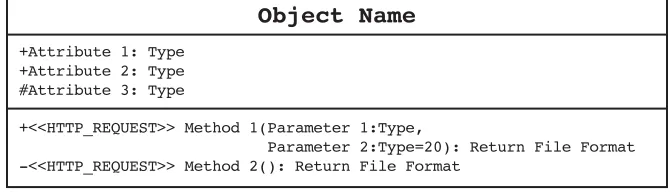
Figure 2.1 Skeleton that will be used to describe Twitter API objects.
To understand the methods that the Twitter API provides in conjunction with the param-eters described in Chapter 1, it is important to explore the various outputs that you can expect when interacting with the service.These return “objects” include several useful pieces of data about a status or direct message, a user, or even an error or simple Twitter response.There are eight main objects in the Twitter API:
n User objects
n Status objects
n Direct Message objects
n Saved Search objects
n ID objects
n Relationship objects
n Response objects
n Hash objects
Alongside sample XML responses for each of these methods to illustrate these return objects, a form of UML (Universal Modeling Language, a universal language and diagram-ming technique) is used to illustrate these return objects and the methods that can be used to expose them. Figure 2.1 provides an example of an object and the conventions that have been adopted in this chapter.
Several conventions have been adopted to fit in with the nature of the Twitter API, as follows:
n Objects are divided into three “compartments”: a class name; attributes, which
include types such asinteger,string, ortrue/falseBoolean values (and attributes
23
Twitter API Methods
n #elementdefines a protected element that requires user authentication for it to be
returned (for example, when users have protected their status). Methods denoted with a hash (#) character mean that they can be executed without authentication but may not return all values.
n -methoddefines a private method that must be executed with user authentication
or will fail and return an error Hash object.
n +methoddefines a public method that does not require any user authentication to
return all data.
n <<HTTP_OPERATION>>denotes what operation is required by the method, which can
be one of GET,POST,PUT, or DELETE.
n Parameters are enclosed in brackets, and default values are identified with an equals
(=) character. For example,count=20means that the default value for the count
parameter is 20. So, if the parameter is omitted, 20 values will be returned.
n Return formats appear after the method name and colon (:) and must be set to one
ofjson,xml,atom, or rss.
For each of the Twitter API objects, you’ll see an illustration of the object, a descrip-tion, and example of what values to expect back from the service. In Chapter 1, a sample file was created,index.php, which is extended in this chapter with more calls to the
Twitter API.
User Objects
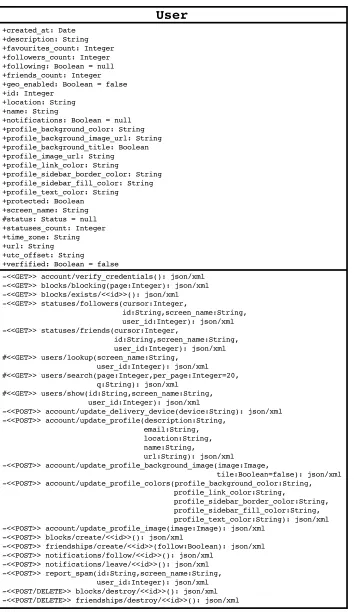
User objects (see Figure 2.2) are full of interesting data about an individual or a set of
individuals when wrapped inside a usersarray, such as when using statuses/friendsor
blocks/blockingmethods.With any of the methods that use cursors for pagination, you
should expect the return format to look like the following skeleton code block, which includes a collection of User objects plus indicators of the values of the next and previous cursors, which can be used to retrieve subsequent results:
<users_list>
<users type="array">...</users>
<next_cursor>...</next_cursor>
<previous_cursor>...</previous_cursor>
</users_list>
User objects are also embedded within Status objects to help reduce the number of calls made to the Twitter API. In this instance, they do not contain the embedded Status
object as shown above. In Direct Message objects, there are also senderandrecipient
User
-<<GET>> account/verify_credentials(): json/xml -<<GET>> blocks/blocking(page:Integer): json/xml -<<GET>> blocks/exists/<<id>>(): json/xml -<<GET>> statuses/followers(cursor:Integer, id:String,screen_name:String,
user_id:Integer): json/xml
-<<GET>> statuses/friends(cursor:Integer, id:String,screen_name:String, user_id:Integer): json/xml #<<GET>> users/lookup(screen_name:String, user_id:Integer): json/xml #<<GET>> users/search(page:Integer,per_page:Integer=20, q:String): json/xml #<<GET>> users/show(id:String,screen_name:String, user_id:Integer): json/xml
-<<POST>> account/update_delivery_device(device:String): json/xml -<<POST>> account/update_profile(description:String, email:String, location:String, name:String, url:String): json/xml -<<POST>> account/update_profile_background_image(image:Image, tile:Boolean=false): json/xml -<<POST>> account/update_profile_colors(profile_background_color:String, profile_link_color:String, profile_sidebar_border_color:String, profile_sidebar_fill_color:String, profile_text_color:String): json/xml -<<POST>> account/update_profile_image(image:Image): json/xml -<<POST>> blocks/create/<<id>>(): json/xml
-<<POST>> friendships/create/<<id>>(follow:Boolean): json/xml -<<POST>> notifications/follow/<<id>>(): json/xml -<<POST>> notifications/leave/<<id>>(): json/xml -<<POST>> report_spam(id:String,screen_name:String,
user_id:Integer): json/xml -<<POST/DELETE>> blocks/destroy/<<id>>(): json/xml -<<POST/DELETE>> friendships/destroy/<<id>>(): json/xml +created_at: Date
+description: String +favourites_count: Integer +followers_count: Integer +following: Boolean = null +friends_count: Integer +geo_enabled: Boolean = false +id: Integer
+location: String +name: String
[image:39.504.164.341.72.378.2]+notifications: Boolean = null +profile_background_color: String +profile_background_image_url: String +profile_background_title: Boolean +profile_image_url: String +profile_link_color: String +profile_sidebar_border_color: String +profile_sidebar_fill_color: String +profile_text_color: String +protected: Boolean +screen_name: String #status: Status = null +statuses_count: Integer +time_zone: String +url: String +utc_offset: String +verfified: Boolean = false
Figure 2.2 Twitter API User object including Status object.
An example of a User object returned by requesting the
https://api.twitter.com/1/users/show.xml?id=markhawker method currently contains the following keys and values in XML:
<user>
<id>15397909</id>
<name>Mark Hawker</name>
<screen_name>markhawker</screen_name>
<location>West Yorkshire, United Kingdom</location>
<description>Health informatics researcher and social application
developer. Creator of @omnee.</description>
25
Twitter API Methods
<profile_text_color>00131e</profile_text_color>
<profile_link_color>1d8395</profile_link_color>
<profile_sidebar_fill_color>e3f0f2</profile_sidebar_fill_color>
<profile_sidebar_border_color>1d8395</profile_sidebar_border_color>
<friends_count>185</friends_count>
<created_at>Fri Jul 11 23:02:14 +0000 2008</created_at>
<favourites_count>131</favourites_count>
<utc_offset>0</utc_offset>
<time_zone>London</time_zone>
<profile_background_image_url>http://a3.twimg.com/profile_background_
images/35364101/collage.gif</profile_background_image_url>
<profile_background_tile>true</profile_background_tile>
<statuses_count>13859</statuses_count>
<notifications/>
<geo_enabled>false</geo_enabled>
<verified>false</verified>
<following/>
<status>...</status>
</user>
Notice the Status object that is returned inside the statuselement for all
nonpro-tected accounts, and keys, such as <notifications/>, which contain no data and use a
shorthand opening and closing tag.The created_atkey is used to show when an
individ-ual first started using Twitter. In this case, it was on July 11, 2008. By default, the majority
of methods will return 100 users per page, so the cursorparameter is required to return
details of all followers. Here are two examples using the twitter-async library and the sam-ple code created in Chapter 1:
$user = $twitter->get_basic("/users/show.json", array("screen_name" =>
"markhawker"), $username, $password);
// $user = $twitter->get_usersShow(array("screen_name" => "markhawker"),
$username, $password);
$followers = $twitter->get_basic("/statuses/followers.json",
array("cursor" => -1, "screen_name" => "markhawker"), $username,
$password);
// $followers = $twitter->get_statusesFollowers(
array("cursor" => -1, "screen_name" => "markhawker"), $username,
$password);
If successful, each request should return a User object or an array of User objects,
which can be accessed using a foreach($followers->users as $follower)orfor()
loop. Note that there are two distinct ways of forming the queries using either
get_basic()or by using the Twitter API method name in the name itself, which will
return equivalent results. In some instances, you might want to use the longhand version
to extract data other than in JSON format. From the $followersdata, the relevant
next_cursor_strandprevious_cursor_strparameters can be retrieved by using
which was demonstrated in Chapter 1. Each element of the $usercan be accessed by
using$user->followed by the name of the element; for example,$user->idor
$user->friends_count. If you want to access the Status object, you just use
$user->status->id, where the idfield can be replaced by any of the elements contained within the
Status object (as described in the following section).
The two variants to these methods are the users/suggestionsandusers/
suggestions/<<category>>methods, which were not included in Figure 2.2.They can
be used to access Twitter’s suggested user lists—such as users who are recommended from Business, Health, or Technology categories—and can be accessed as follows:
$users = get_basic("/users/suggestions/health.json", null, $username,
$password);
echo "<ul>";
foreach($users->users as $user) {
echo "<li>".$user->screen_name."</li>";
}
echo "</ul>";
If you are unsure of category names, you can use the users/suggestionsmethod to
extract a list of categories and their associated “slugs,” which you can then use in the
users/suggestions/<<category>>method.
Status Objects
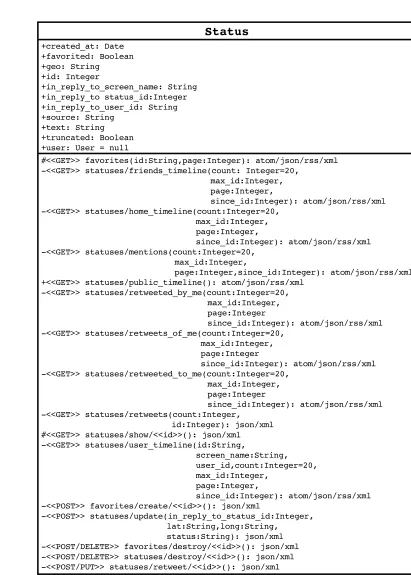
Status objects (see Figure 2.3) contain data about the user’s latest status update as well as
geolocation data, which is explored in Chapter 4.The truncatedkey denotes that a status
update was larger than the 140-character limit imposed by Twitter and has been truncated. Thefavoritedkey denotes whether the authenticated user has bookmarked that update,
which can be accessed using any of the favoritesmethods. Other information contained
within Status objects is the sourceof the update and information as to whether it was
also a mention.
Each Status object contains a User object minus its nested Status object. Multiple Status objects are enclosed inside a statusesarray and can be accessed in the same way as
the collection of User objects. An example of a Status object returned by requesting the https://api.twitter.com/2/statuses/show.xml?id=5327214528 method currently contains the following keys and values in XML:
<status>
<created_at>Sun Nov 01 01:08:45 +0000 20