Bot Herding With RSS
George Easton, San Diego State University, USAAnnette C. Easton, San Diego State University, USA
ABSTRACT
Students in a large, introductory IT course created individual RSS feeds that pointed to personal content and syndicated, course-related content. In a relatively short period the class had amassed approximately 1000 web resources. The process paralleled one of a benevolent bot herder; the outcome stimulated an interest in social computing.
Keywords: Really Simple Syndication; RSS; Web 2.0; social computing; botnets
INTRODUCTION
ne of the student learning objectives in our introductory IT class is to expose students to markup languages such as XML (eXtensible Markup Language) and to common applications of these languages, such as XHTML and RSS (Really Simple Syndication). Like most faculty, we also have personal learning objectives for the classes we teach, including the simple act of learning the names and faces of our students. Because this particular personal objective becomes more challenging with larger classes (our introductory IT classes are 200+ students), we designed an exercise that would explicitly expose our students to XHTML and RSS and innocuously provide a mechanism to help make it easier for us to achieve the benevolent objective of learning their names and faces. Specifically, the students were asked to create a personal web page in XHTML and to reference it and their resume` in their personal RSS feed, to which we subscribed. The process became more interesting when students saw the similarities between the exercise and the process employed by botnets programmed to collect Personally Identifiable Information (PII). The RSS exercise also required students to identify and “syndicate” course-related web resources which gave the students a glimpse of the potential of social computing.
RSS
The glue of the Web 2.0 technologies is RSS (Sigal, 2005). Ironically, the simplicity of RSS masks its robustness. Today, this really simple XML-based protocol is common to many of the Web services and social networking applications used every day by millions of people. Wikis, blogs, podcasts, mashups and many of the other collaborative, consumer-oriented, Web 2.0 applications are functionally dependent on RSS. With businesses eagerly embracing the social networking technologies, we felt the need to include RSS and XML in the set of the learning objectives of our introductory IT class.
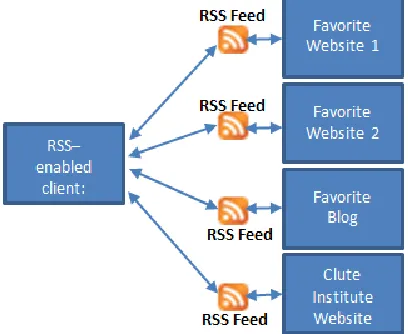
RSS is typically associated with the term Really Simply Syndication. It should be noted however, that similarly-functioning technologies, including RDF Site Summary and Rich Site Summary, have also been associated with the RSS acronym. Atom is the most recent derivative of RSS technology. (See the Appendix A for a more thorough chronology of RSS). Generally, all of these terms refer to a technology that facilitates sharing and syndication of website content, by subscription. In simple terms, RSS allows subscribers to “pull” web content to their computers automatically as new information is made available on websites that have associated RSS “feeds.” Figure 1 below depicts the basic architecture of RSS.
Businesses gradually realized the value of RSS as their email campaigns became less effective. As Internet Service Providers and email clients, such as Microsoft’s Outlook, became more effective at blocking and filtering unsolicited email, or spam, businesses looked for other ways to use the Internet for marketing purposes. RSS avoids spam filters and other delivery-deterring mechanisms because recipients have to opt-in, or subscribe, to RSS
comes to the consumer, rather than the consumer going to the content, more content can arguably be consumed. RSS effectively gives marketers another channel to build brand awareness. This is the reason some consider RSS to be one of the most powerful Internet marketing tools available today (Northrip, R., 2003).
Figure 1 – Basic RSS Architecture
General RSS-awareness today can be primarily attributed to the ubiquitous, bright-orange RSS icon that appears on almost every website one visits today. Click on the icon and your email client, your browser, or any RSS-enabled “reader,” such as Google Reader or MyYahoo!, will give you the option to subscribe to an RSS feed. Essentially, RSS feeds automatically alert subscribers to new website content, thus eliminating the need for periodic visits to the site to check for updates. In other words, RSS technology is an efficient and an effective way to procure almost any Web content.
General RSS awareness, however, was a suboptimal student learning objective for this task. Instead, we hoped to help students reach at least the “Application” level of learning (Bloom, 1956) and apply RSS in new and interesting ways. This objective may have been achieved soon after the students identified a similarity between RSS feeds and botnets.
BOTNETS
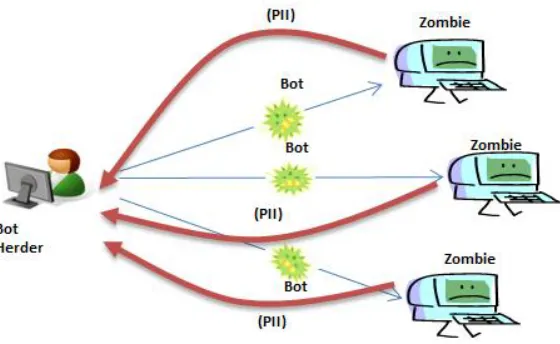
Figure 2 – Botnet Returning Personally Identifiable Information (PII)
RSS AND THE BENEVOLENT BOT HERDER
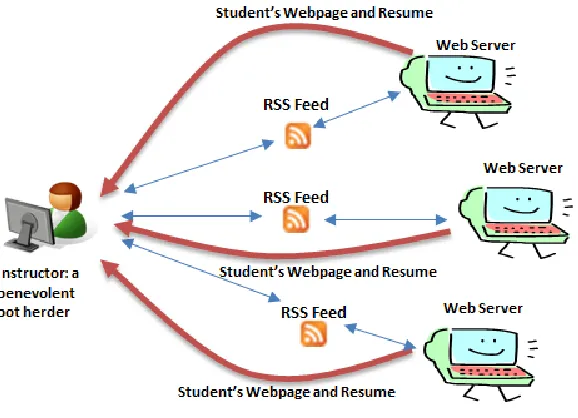
A few of the more astute digital natives in the class noticed an interesting similarity between the basic RSS architecture (Figure 1) and the botnet process that collects Personally Identifiable Information (Figure 2). The similarity is particularly interesting if one accepts a few, reasonable assumptions. Specifically,
Bot herders and instructors can act benevolently (or at least non-maliciously)
Bots and RSS feeds are both forms of computer code
Bots and RSS feeds can be programmed to do benevolent things (like help instructors learn more about their students)
Zombies can be web servers (where the students’ RSS feeds, web pages and resumes` are stored)
Figure 3 – The Benevolent Bot Herder
RSS AND SOCIAL COMPUTING
Besides helping achieve the student learning objectives for XML and RSS and helping us achieve our personal learning objective, the RSS exercise gave both students and faculty a glimpse of how this technology may contribute in other ways to our classes. Specifically, the student-generated RSS feeds can be used to identify and syndicate socially-produced information of almost any format. For example, students can search the web for course related content (e.g., videos, news articles, photos, podcasts, etc.) and “syndicate” that content for the class and/or the faculty. This is the essence of social computing, i.e., making socially-produced information available to others. “The premise of social computing is that it is possible to design digital systems that support useful functionality by making socially produced information available to their users.” (http://en.wikipedia.org/wiki/Social_computing).
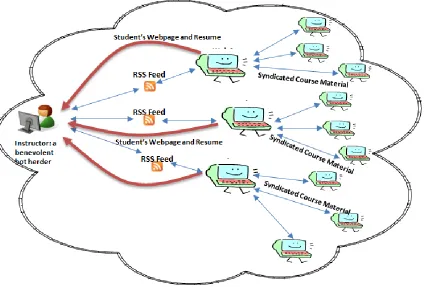
Essentially, when we reversed the RSS sender/receiver relationship and made the student responsible for creating the RSS feed, the faculty assumed the role of subscriber. The 200+ student RSS feeds were easily edited to return both “personally identifiable information” and syndicated, course-related content. Besides their web page and resume, we asked our students include in their RSS feeds syndicated material that would complement the course material. In other words, students were asked to contribute/collaborate on the materials that would pertain to our discussion of a particular topic. Figure 5 below depicts three student RSS feeds that are referencing both student information (their web page and resume) and syndicated course material from multiple sites on the World Wide Web.
Figure 5 – Social Computing And The RSS Botnet
potentially be used to complement our course content. Obviously, the students’ syndicated content required filtering for acceptability and screening for relevancy before it could be made available to the rest of the class.
To help in this task, we asked the students to use the optional RSS element <category> to categorize each item in their RSS feed. For example, in Figure 6 below, the SDLC video item in the sample RSS feed is categorized as an SDLC item; the RSS video is categorized as an RSS item. RSS readers, such as Internet Explorer (shown in Figure 6), that interpret and display the category element also support filtering by category. Unfortunately, not all RSS readers behave the same way. Google Reader, for example does not interpret the category element. Instead, it allows subscribers to tag items with their own categories. Since we desired a web-based RSS client, such as Google Reader, to allow our graduate assistants to help us subscribe and manage the RSS feeds, the categorization task of the syndicated content shifted back to the faculty and grad assistants. The takeaway here was a better understanding of the category element as a mechanism for self-classifying RSS content. However, this optional RSS element does not provide any relief for assessing the quality or relevancy of the syndicated content. In a subsequent iteration of this exercise we will be exploring alternative mechanisms for creating efficiencies in processing the content of the student RSS feeds.
Figure 6 – Categorizing RSS Items
CONCLUSION
As benevolent bot herders we were pleased that students responded enthusiastically to the RSS exercise. Furthermore, we were pleased to have immediate access to the names, pictures and innocuous personal information about each of the 200+ students in our classes. Additionally, we believe that student-generated RSS feeds provide an interesting way to engage the students in the course by having them contribute, albeit syndicated, course content. Furthermore, student-generated RSS feeds provide a practical, easy-to-implement, tool for helping students better understand the markup languages and Web 2.0 applications that are so prevalent today.
AUTHOR INFORMATION
of Information Systems and Information Systems Design courses. She received a B.S. in Information Systems from California State University, Fresno and a Ph.D. in Management Information Systems from the University of Arizona. Her research interests are in information technology education, skills assessment of entry level information systems students, and integrating new technologies into the information systems curriculum.
BIBLIOGRAPHY
1. Bloom B. S. (1956). Taxonomy of Educational Objectives, Handbook I: The Cognitive Domain. New York: David McKay Co Inc.
2. Botnet Threat [Video animation]. Retrieved from
http://images.businessweek.com/ss/05/05/hacker_botnet/index_01.htm
3. Descy, D. (2005). All Aboard the Internet: Introducing RSS: Your one stop for news and information!
TechTrends, May/June 2005, Volume49, Number 3, pp.4-6.
4. Easton, G. and Easton, A. (2010). An Introduction to Management Information Systems, Boston, MA: Pearson Learning Solutions, p.216.
5. MediaThink (2004). The Next Big Thing Online, Retrieved from http://www.mediathink.com/rss/mediathink_rss_white_paper.pdf.
6. Northrip, R. (2003). How to Create RSS feeds with Dreamweaver, Retrieved from http://www.webreference.com/programming/rss_feeds/.
7. Pilgrim, M. (2002). What is RSS, Retrieved from http://www.xml.com/pub/a/2002/12/18/dive-into-xml.html.
8. Sigal, M. (2005, August 9). Envisioning RSS as a Web 2.0 platform, Retrieved from http://blogs.oreilly.com/digitalmedia/2005/08/envisioning-rss-as-a-web-20-pl.html 9. Social Computing. (n.d.) In Wikipedia online. Retrieved from
http://en.wikipedia.org/wiki/Social_computing.
Appendix A: Chronology Of RSS
RSS was originally introduced by Netscape in March 1999 (as RSS 0.90) the technology associated with its “My Netscape Network.” Because RSS 0.90 relied on the Resource Description Framework (RDF) it was also known as “RDF Site Summary.” Later, Netscape introduced RSS 0.91 and re-dubbed it “Rich Site Summary.” RSS 0.91 was based on XML rather than RDF because RSS 0.90 was considered too complex. Netscape ultimately abandoned its RSS effort and RSS 0.91 was adopted by Userland Software. A parallel RSS development effort was initiated by the RSS-DEV working group. Their version of RSS was grown from the RSS 0.90 specification and the RDF framework. In August, 2000, the RSS-DEV group announced RSS 1.0. Userland continued the development of RSS 0.91, creating versions 0.92, 0.93, 0.94, and eventually RSS 2.0 which was referred to as “Really Simple Syndication.” Userland gave the copyright for RSS 2.0 to Harvard which froze the specifications for RSS 2.0 and effectively assured that future changes to the specification would be done under a different name. As a result, “Atom” (Atom Syndication Format) was introduced. Unlike RSS 1.0 and RSS 2.0, which are informal specifications, “Atom” was issued as a proposed "internet official protocol standard" by the Internet Engineering Task Force (Winer, D., 2004).