Paper AD14
Crossing the Chasm: Simplifying Data Management with Perl and
Metadata
Stephen Baker, d-Wise Technologies, Raleigh, NC, USA
ABSTRACT
The rubber hits the road in the clinical industry when programmers ready to perform the analysis get their code-happy hands on the study data – however, once the CROs drop the data off how does it actually make the journey to the statistical programmer‟s desktop? This is a critical process, but too often compressed deadlines result in
fragmented systems built with a collection of one-off programs that tend to become complicated over time and the data workflow lifecycle becomes fragmented. This paper will discuss how Perl was applied to the challenges of supporting data from multiple vendors with similar, but still unique, data preparation needs including the issues of not using a consistent framework, the benefits of a common platform, breaking data management activities down into “actions” – and driving those actions with object-oriented metadata, using tools to separate business logic from programming logic and rapidly building capability through automated processes.
INTRODUCTION
Data managers and statistical programmers face a sense of urgency to expeditiously usher data received from CROs through the analytical process. As a consequence, there is a tendency to write ad-hoc programs to prepare data for analysis. The “chasm” described by this paper emerges when these one-off programs come face to face with scalability demands of growing organizations. Where one-off programs are the norm, the tendency is to just write another program rather than attempt to reuse existing code. The “chasm” expands over time as the number of such one-trick programs grows. As the number of programs grows, so does the complexity of the data management environment. As the complexity grows, the support burden grows as well. Cross cutting considerations (such as changes to server names, login credentials, or standard coding and reports) must be reflected in numerous
programs rather than applied once in a central system. Systems such tend to complicate over time and as they grow larger the visibility into the “health” of the data workflow lifecycle diminishes. Sooner or later, more time is spent in managing the programs that prepare the data than is spent on the science itself.
The challenge is to understand the “chasm” and demystify data management by applying lessons for software development. In software development, problems spaces are broken down by abstracting what is common across the data workflow lifecycle and applying the right tool for the job. When interfacing with multiple vendors to collect data, certain elements of the data lifecycle are unique –one vendor may produce SAS® datasets while another vendor provides zipped archives of excel spreadsheets. Yet other elements are common, such as where vendors deliver the data and standard mappings or reports applied to the data during analysis. Thinking a little more abstractly, common elements throughout the process as functional building blocks - unzip this file, or run this SAS program, move this data here, send an email, update a database. Looking at the problem space through the eyes of a software developer, these functional blocks really only differ between studies in their metadata – the path to a folder, the name of a program to run, the credentials to unzip an archive. The chasm is starting to look more like a framework. Defining a metadata driven framework encapsulates the real details of each workflow in a single place, rather than sprinkled throughout dozens of programs. Designing workflows becomes intuitive, empowering the whole organization. Equally importantly, understanding legacy workflows is simplified dramatically to simply
understanding metadata - reducing support burdens. As applications development staff extends the framework, new features are instantly delivered to the larger community. The challenge is starting to sound more like an
opportunity.
This paper is the author‟s reflections on collaborating with a client to define such a metadata-driven framework using Perl for data management to support multiple vendors with similar, but still unique, data preparation processes. It examines the problem space and the critical architecture decisions that applications development staff and informatics management must navigate to cross the chasm and simplify data management by applying technology and defining metadata.
DEFINING THE PROBLEM: THE FLOW OF DATA THROUGH THE CLINICAL ORGANIZATION
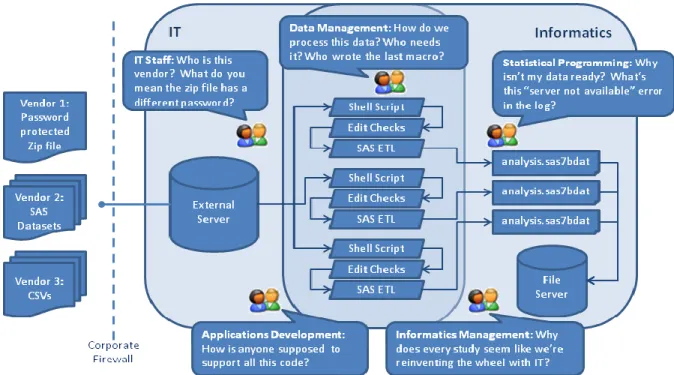
Crossing the chasm means understanding how to turn chaos into efficiency.
Figure 1: Chaos, or the flow of data through the clinical organization?
This paper focuses on a problem space that is common throughout all clinical organizations engaged in outsourced data collection. Each such organization has a need to receive data from outside vendors and prepare this data for statistical processing. Whether as a consequence of dealing with multiple outside vendors or due to the specialized needs that differentiate the underlying science within one study from another, the format of the data delivered by the CROs will vary (one vendor delivering SAS datasets, another delivering Excel spreadsheets) as will the preparatory activities that ready the data for analysis (passwords to extract a zipped archive, applying coding and edit checks). Another element complicating this ecosystem is the organizational structure of business. Inevitably, the strategic responsibility for defining the systems within the company will be jointly shared by functional groups, such as between informatics and IT. To receive data from CROs, a system exposed to the outside world through the corporate firewall will exist (likely managed by IT) and data consumers (like informatics) will have to use these shared systems rather than build their own. Many organizations lack a standard operating system and operate in a mixed environment using UNIX, Linux, Windows, and various file servers. A formidable enterprise consideration is scalability, manifest as the ability of the system to accommodate changes for future business without disrupting ongoing or legacy activities.
Speaking in the language of an applications architect, the system must: Support varying input data formats from CROs
Externalize configuration details such as user credentials and file server paths Support varying data preparation activities
The system should be flexible to changes in the infrastructure and portable across operating systems Be easily extensible as the business places new demands on the framework
While enumerating the challenges is important, equally important is considering the elements that make the flow of data through the clinical organization manageable. Let‟s examine a use case that can prove problematic. A statistical programmer, Bob, is awaiting data needed for a recently locked study to finalize analysis before a deadline. The CRO emails Bob that data has been dropped into the FTP server, but when Bob looks in the file system for the new data he is disappointed to see the data looks the same as last week. With his limited knowledge of the ETL flows and intermediate processing developed by data management, Bob realize something probably failed in the data workflow but is unlikely to be able to pinpoint the source of the problem as errors in applying coded
terms or an unexpected failure with disc space – errors someone in data management or even IT might be better equipped to identify. How does the system manage the communication loop around this workflow? One option is the system places the onus on the users, meaning Bob sends a number of emails throughout the organization desperately asking for help. Staff in data management and IT, already busy, perhaps ignore the emails. Management has no ability to see the overall health of the data workflows and prioritize staff tasks to remedy the issue, creating challenges for the teams that should be working together towards common goals. One can envision this haphazard approach to communicating about the date lifecycle could result in an unmanageable email chain forwarded throughout the organization, a highly undesirable approach that undermines accountability and provides no comprehensive details needed by management and staff to prioritize day-to-day activities. An alternative solution would take responsibility for communicating the status of each step within a given workflow to the correct people in the organization – reporting failures to a dashboard and specifics about the failures to the parties best suited to fix them. Again, in the language of an applications architect the system should:
Support all staff having visibility into the health of the data flows
Provide a “single source of the truth” for understanding how individual data flows are defined Provide a simple interface for the users to define new flows or modify existing flows
For the system to be easily accessible by everyone in the organization we need a common language to describe the processing activities – we‟ll call these „actions‟. Actions could be tasks like moving a file from one directory to another, unzipping an archive, creating SAS datasets from Excel files, searching a log file for messages about errors, running some SAS code, or sending a notification to the users. These actions are the building blocks of the workflows. This detail expressed as an architectural requirement could mean the system must:
Provide a reusable library of actions from which to build work flows Support extended the library easily and surfacing new features to users
SCOPE OF THE PROBLEM
Figure 1 shows a chaotic approach to defining workflows to get data from multiple vendors into the analysis pipeline. Many organizations function on a day-to-day basis within this type of environment. Perhaps when the group had to manage data for only a study or two it was possible to write unique programs for each workflow. As the organization began to support more studies and concurrently more data the one-off program approach became less ideal. As people left the company or moved on to other roles, the knowledge about how to maintain the systems was lost. Fewer and fewer people are capable of fixing problems within each data flow, meaning there are numerous single points of failure within the data management lifecycle where communicating program failures and quickly
implementing solutions becomes quite taxing. Over time, the tidy collection of custom programs dealing with one or two studies evolved into an unmanageable assortment of code and scripts. Challenged to support multiple legacy workflows and new business, the staff finds itself running around in circles trying to overcome breakdowns in the system just to keep the business in motion. Some organizations feel this pain profusely having long outgrown the ad-hoc approach to data management; other organizations are at the early stages of growth and are realizing the need for something more robust while the pain is still manageable.
As already identified, the problem, more succinctly, is putting a system in place to replace a collection of fragmented scripts and SAS programs with a centralized process and making this process easily accessible to everyone in the organization.
DEFINING THE SOLUTION: COMPONENTS OF A ROBUST FRAMEWORK
The approach to metadata driven data management discussed in this paper is based on a system that includes a central Perl application that runs all workflows. This server runs continuously, querying the metadata to determine what actions to execute and processing data received from vendors according to workflows defined as a sequence of actions configured with metadata. A database is used for capturing system events. Configuration metadata is captured in text files. To examine the implementation details and how each element contributes to the success of the framework, it will be helpful to consider an example…
FUNCTIONAL REQUIREMENTS
The system must receive data from CROs and vendors on an FTP server.
The system must produce SAS datasets from the files received on the FTP server for the users‟ needs. The system must move data from the FTP server to the file server the biometrics users leverage for their work.
o Data Mapping & Conversion o Edit Check Execution o Standard Report Generation o Patient Narratives
o Patient Profile Documents (PPD) o Lab Data Processing
Normal Ranges Unit Conversions Toxicity Grading o AE/CM Mapping
The system must support metadata configuration at the study level for, at a minimum: o the location of source data received from the FTP server
o the location of the target data produced by the system o the intermediate processing steps required
o the users to be notified and events that require notification
Where possible, the system should leverage metadata in automating the creation of documents associated with the data
The system must provide an upload health dashboard
The system must provide a means to trigger an upload on-demand to meet the needs of time-critical uploads
The system must support a variety of operating systems, folder hierarchies, and input data types to meet the long term needs of the business
The system should provide production support features to proactively notify and facilitate the prompt resolution of upload failures
TECHNOLOGY CHOICES
Concerning technology choices, the requirements described could be realized in a number of technologies. For the purpose of this paper, we need to choose an implementation technology that is portable across operating systems. The technology should offer implementation advantages such as standard libraries for common needs and be regularly available as a skills set for staffing considerations. The technology should provide robust support for automation and scripting, processing all file types (e.g. text, SAS, Excel), and dealing with rectangular or tabular data (rows and columns) that is common in the clinical environment.
SAS software is specifically designed for viewing, manipulation, and analysis of tabular data. SAS products are available in nearly all clinical organizations, as is the skills sets to wield SAS products and write SAS code. However, from an applications development and automation perspective SAS is not necessarily an ideal choice. SAS certainly has the capability to be used for this purpose, but it is really better designed from the ground up for this need – rather it is designed for the processing of tabular data and statistical analysis of this data. Exclusively from a technology perspective, Perl is an ideal tool for scripting the automation of a number of programs and processing text files. As such, both SAS and Perl are highly suited technology choices for this implementation. From an operating system perspective, both SAS and Perl function in a variety of operating systems so there is no compelling argument based on infrastructure in terms of supporting these technologies as both are supported in the current infrastructure and should not be a barrier to infrastructure changes going forward. From a cost perspective, Perl is a free technology whereas SAS is a licensed technology. The cost to license SAS software is highly
dependent on the machines SAS will be running on and the number of users that will be using SAS. As such, building the automation framework in Perl has cost advantages that will be difficult to realize with an exclusively SAS solution.
In assessing these technology choices, given the dependency of the data users on SAS technology for data viewing, manipulation, and analysis it seems unlikely that revisiting the choice of SAS would be a productive exercise. The data users have competencies in this area and the software is designed specifically for (and quite well suited) to the viewing, manipulation and analysis needs the clinical business necessitates. Perl, on the other hand, could be viewed as an optional technology. As a scripting language, Perl is extremely powerful at manipulating text files and scripting other operations. Perl is completely adequate for the needs of the automation controller portion of this system, but is by no means the only possibility for meeting these needs. Alternative scripting languages, operating system tools, and even technology such as Java could also suffice for these needs. The advantages in Perl are that code is portable immediately across operating systems, the language is extremely powerful and terse such that the a small amount of coding is needed to program complicated tasks, and the wealth of open source contributions to the Perl framework give immediate support for integration needs. Perl is quite simply simple to use and also highly
suited for the needs of the system, but organizations should consider other technologies given their available skill sets and long term technology standardizations strategy.
EXAMINING THE ARCHITECTURE
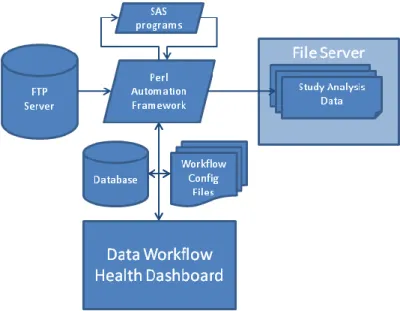
The system proposed above could be represented in the following architecture diagram, greatly simplifying the chaos we say in Figure 1.
Figure 2: Centralized metadata driven framework
The architecture described centralizes the processing of data workflows in the Perl automation framework and workflow configuration files capture the metadata that advises the actions in the system. Some actions are to run specialized, reusable SAS programs (remember our requirements for Data Mapping & Conversion, Edit Check Execution, Standard Report Generation, … AE/CM Mapping) – displayed as the SAS component of the system which is now correctly used for its intended purpose rather than as the core automation or scripting technology where it is not well suited. Study data is received on an FTP server accessed by the automation framework and the resulting analysis datasets are loaded onto a file server for the users. The automation framework publishes logging information about the health of data workflows in a database which is visualized for all users in the Data Workflow Health Dashboard.
HOW DOES IT WORK?
A framework works best when the most reusable features are maintained by the system and are driven by
configuration details, or metadata, that can be easily tweaked outside of the system. In the “chaos” diagram (Figure 1), the flow that produces each analysis dataset is viewed as a unique, siloed process independent of the whole. Applying application development principles, the system must be broken down into fundamental building blocks that can be represented abstractly, each building block having unique metadata that supports the business needs. Several examples are examined below:
Chaos Building Block Metadata
Excel spreadsheets, CSV files, SAS datasets, some zipped, some unzipped, maybe a password
Input data ActionName.Data.type=excel ActionName.Data.compressed=yes ActionName.Data.password=foo System is rigidly coupled to unique
usernames/passwords, servers, file paths for Bob‟s code, Alice‟s code, and the IT administrators
User accounts and server configurations
Flow.userid=system_account Flow.password=*******
A script to unzip a file, another to move it from location a to location B, a unique SAS program to apply edit checks, another to run statistical methods… multiplied by the number of studies…
Actions ActionName.type=unzip ActionName.source=in.zip ActionName.dest=/directory/one ActionName.type=move ActionName.sourcedir=/in/folder ActionName.destdir=/out/folder Emails between applications
development, statistical
programming, data management, IT management, Informatics management
System notifications [email protected]
Quickly, several core elements of the framework emerge:
The system must separate programming logic and configuration information Repeatable tasks, „actions‟, should be defined and used to build all workflows
Notification needs such as emailing data consumers and updating a dashboard should be supported
THE SYSTEM MUST SEPARATE PROGRAMMING LOGIC AND CONFIGURATION INFORMATION
Separating programming logic and configuration information can be accomplished in several ways, but the core element of this system component is defining the metadata that will drive the system and building the solution to query this metadata.
If these requirements were mapped to specific technologies, a database might be suggested for system logging information which would easily support a data management dashboard. The configuration details specific to each flow could be captured in the database as well. A user interface such as a “workflow designer” could be conceived as a series of forms that would lead a user through the various metadata required to define a new flow. The forms might let a user pick from a predefined list of supported actions, such as moving a file or unzipping a file, and would surface the required fields. A server process, running under a system account, would poll the database for work to be done. When work was identified, the server would execute the steps and notify users when they were complete or indicate failures that require further attention. The status could be surface to the dashboard.
METADAT DRIVEN ACTIONS AS BUILDING BLOCKS
The art of system design is determining the proper tradeoff between automation and flexibility. Certain elements of the system are inevitably not going to be standard – for example, some vendors may provide data that requires transposition. The system can support custom tasks while still preserving consistency by capturing the metadata about the locations and names of custom programs being run. This provides insight into the “unique” pieces of the system over time and potentially offers an opportunity to can additional efficiencies by integrating those features as they stabilize. At a minimum, at least the framework maintains a “single source of the truth” regarding the unique components of each flow and the standard components of each flow.
The simplicity of the framework‟s building blocks can be somewhat misleading. Determining the right actions to support is a non- trivial task. Obvious activities, such as copying files or unzipping files, are quickly identified and easily supported. More ambiguous tasks, such as specialized ETL or statistical methods, might be tougher to compartmentalize. In the reference system, actions defined included: unzip, copy, move, delete, run a SAS program, run a Perl program, search through a text file, search through a log file.
Using object oriented principles, we designed an interface for actions the included three methods: setProperties(pathToWorkflowConfigurationFile);
execute();
notify([email protected], [email protected], [email protected]);
Each action implements this interface. For example, the copy file action would read the workflow configuration file and get the source and target locations as properties and then execute the copy using those properties. Likewise, the run a SAS program action would get the path to the SAS program, the folder containing the data the SAS program will manipulate, and the name of the log file to produce as properties and then execute the SAS program on the folder producing the log file. The search through a log file action will get the path to the log file, strings to search
for in the log file, and the condition each search string represents (info, warn, error), and then search the log file for the string notifying users and potentially aborting a workflow if an error condition was found. As each organization will have unique needs in defining actions, the task of defining the correct actions for your needs is left as an activity for the user.
AUTOMATION THROUGH METADATA
Metadata is a nebulous term, one overused in the industry. In the context of this paper, metadata is taken to mean the elements of data management that differentiate processes, and therefore enables automating workflows described as a sequence of reusable actions driven by externally captured metadata. To meet this need, we put metadata into workflow configuration files (text files configuration actions) and also into a database (system details like server logins and sequencing of processing of the workflow configurations). The important thing to focus on is the flexibility of the technology to allow you to define and group metadata in a valuable way. A metadata ontology or syntax needn‟t be too verbose, it simply needs to provide a vehicle to define data elements and their values. The system can interpret these values any way that is helpful.
Metadata is one of those buzz-words that gets throw around in a number of contexts and takes vastly different meanings. The existing solution leverages metadata in the form of the input file that drives the upload script. Beyond that, a metadata component of this system is largely non-existent. If the business had needs that could benefit from a metadata driven solution, it is extremely possible to build these needs into any re-design without forcing a technology or product choice. As an example, the normal ranges check and unit conversions are metadata driven processes. By associating a specific type of data transformation with a column of a table or row of data, the system could easily capture the calculation lifecycle for given data points. Likewise, study level metadata such as the name of the trial could easily be associated with studies. Processing level metadata (such as the location of directories) is already used by the script, but could be used more aggressively to support less rigid coupling between the
infrastructure and the systems. When discussing data, things are clearly defined (what is this value). Metadata can capture details not easily understood by having just the data (such as where did this value come from, or what error checks or value ranges were tested against this value, or where is this value present elsewhere in this data). This type of data, centrally managed, could provide a number of gains for generating documents and automating processes. Further, seeing a comprehensive view of the data and metadata could be valuable in making business decisions and clinical analysis. Metadata can also be used to drive jobs and processes, making system automation and configuration less painful.
WHAT DID WE GET FROM PERL
Perl offered some great implementation advantages that are worth noting in this paper. We already identified SAS as a choice technology for manipulation, viewing, and analysis of tabular data. What was Perl good for?
From an implementation perspective, Perl is an amazingly effectively solution for processing text files. Since we choose to put the metadata configuring workflows into text files, Perl provides great support for quickly reading a text file into a data structure and operating on that data. The log4Perl framework uses a property file processor that quickly reads files that list key-value pairs. Using this feature, we had to write only a few lines of code to process a configuration file and create a hash of named key-value pairs that could be used to automate actions using the following syntax for configuration files:
CopyStudy1.Action=Copy; CopyStudy1.source=/inPath CopyStudy1.target=/outPath
Using object orientation, we could quickly declare a new action, set its properties, and execute the action. From an extensibility perspective, this object oriented approach allowed us to add support for additional actions without having to make modifications to the core automation code.
Much like the property file processor gave us quick hooks into our configuration files, the log4perl module gave us readily available support for sending emails and writing to a database. The log4perl module uses a design pattern whereby loggers are defined alongside log levels in a single file. At appropriate places in the code, we could audit system events by specifying a message (e.g. “SAS program X.sas executed with parameters Y and Z”) and a level (e.g. “INFO”). By updating the log4perl configuration file, verbosity of the logging could be instantly controlled given system administrators the ability to turn emailing features on or off, turn debugging on and off, and even point at specific databases. Another Perl module used for connecting to and reading data from database allowed the automation framework to quickly read the “level” associated with messages written to the database and determine whether previous actions had completed successfully and processing should continue or if an error condition was reach and notifications should be sent to the user community.
For processing log files to search for strings that users should be warned about or that would indicate a failure that should trigger the system to abort, Perl provides regular expressions. While a lengthy discussion of regular expressions is beyond the scope of this paper, regular expressions are a powerful syntax for defining very specialized searching patterns. This affords great flexibility in defining how all search patterns behave. For example, defining a pattern useful in SAS files such as “ERROR:” followed by some text including “value missing” is easily accomplished. This simple pattern, wildcard search, could be made more powerful by looking for the word “ERROR” followed by some text and at least 7 digits – giving us the ability to pull the identifier reported in an error message to direct users immediately to the offending record responsible for the error message. These search strings were among the metadata captured in workflow configuration files, allowing the system to automate
searching a file (programming logic) and the user to externally configure the search strings and the notification level associated with finding the string (e.g. fail if you find this string even one time, or notify users if you find this string more than 20 times).
As a script tool, Perl also has numerous advantages. From running system commands to support running SAS to unzipping files without having to wonder what tools the operating system might have available, Perl greatly accelerates the scripting process with minimal effort. These scripting capabilities allowed us to quickly integrate SAS into the framework and to make the solution portable across operating system.
From a deployment perspective, Perl is especially seductive. Installing Perl on Windows servers involves executing a single download of the Active State build for Perl. To install on UNIX or Linux boxes, similar downloads are available but installation managers for these operating systems come out-of-the-box with Perl support. In many cases, these boxes already have Perl installed. Adding additional modules is supported quickly and painlessly through the CPAN module, which is explicitly design for this purpose. CPAN will query a Perl module server either externally or internally (or both), find and download a given module, install it, and run a battery of tests included with the module to validate the installation is successful. By loading our custom modules into an internal repository, we were able to leverage CPAN for deployment of our code as well. By writing a suite of test cases for IQ and OQ, we were able to have a turnkey installation process that included automated validation. With the knowledge that CPAN prints output to the console, we designed our test cases to print output to the console as well in a format that would allow us to redirect console output to a text file to document the IQ/OQ process. This was especially valuable in the regulated clinical environment in allowing a no-hands approach to installing the framework and meeting quality control and regulatory needs.
A final benefit is the readability of Perl code. Designed by a linguist rather than a computer scientist, Perl appeals to human readability. Whereas some languages have obtuse syntaxes that obscure the implementation details, Perl is terse and concise and with a basic understanding of syntax it becomes very possible to navigate the code. Without sacrificing functionality, Perl makes it simple to perform complicated operations with very limited code and makes the code very readable for future support and enhancements.
These benefits are discussed to show some, but certainly not all, of the advantages Perl afforded the implementation team in building the automation framework. The tangible product of these benefits is rapid development. Having a language that can offers such powerful out-of-the-box support for installation and a wealth of libraries through CPAN for feature one might otherwise have to write custom code for greatly accelerated the development process and reduced the programming load tremendously. When other Perl programmers have identified features they feel the community could benefit from (such as logging to a database) they have contributed modules to the open source CPAN environment. As Perl is a mature language in existence for many years, the available open source modules allowed the development team to build on the work of others in a number of cases rather than starting from scratch.
CONCLUSION
In conclusion, data management is a task common to all clinical organizations. Supporting multiple vendors and simultaneously building scalable systems requires some attention to automation. The key benefits of understanding how to abstract your processes into definable tasks configurable via metadata is that the programming logic and business logic are separated. By compartmentalizing these two facets of the system, each can evolve without introducing undue strain on the other.
While this paper focuses on the need to identify the functional building blocks of a system to automate data management through configurable metadata, a discussion of the role of standards is also prudent. A number of standards and technologies are available in the clinical environment, including CDISC and ODM. Some organizations have adopted these standards internally; others are leveraging internal standards for their needs. Regardless of the standard used, picking a standard makes life easier for application development. The selection of data model for data transport (and perhaps another for analysis) greatly simplifies the task of programming reusable system components in support of the „action‟ based approach described.
The system architecture described afforded the client numerous advantages. The code that moved data from vendors through the lifecycle into the hands of the statistical programmers went from an ad-hoc, unmanageable collection of custom programs to a reusable library of actions and SAS programs driven by metadata. By storing configuration details in text files and associated system metadata in a database, the applications development staff was able to give statistical programming and data management tools to quickly build workflows through a single process. This single-source-of-the-truth approach meant that every time a new workflow needed to be defined or an old workflow required attention the workflow configuration file was the only place to look for details. Using a key-value syntax for defining metadata and a database for information allowed application development to build web forms for creating, viewing, and managing workflows and also visualizing workflows and the health of data management activities. Providing log4perl style support for capturing events within each action gave enormous visibility into the details of data processing and allowed the system to accelerate the communication loop around addressing errors. Management likewise benefit from being able to see this information on a web dashboard which allowed them to prioritize the business activities to keep non-critical activities from delaying time sensitive needs. Since new actions could be rapidly added to the system by application development when the user‟s determined new feature needs, the system could grow with the needs of the organization. By implementing multi-threading, the system gave benefits of scalability over the legacy system which processed each workflow one at a time, meaning data from the last study on the stack might be on hold until earlier studies had been processed.
In choosing to move from the “chaos” across the chasm to the robustness and stability of the automation framework, it is important to determine the technical sophistication of the user community. The success of any new technology introduction depends heavily on understanding the needs of the user community and building a system to address the pain points of existing approaches. By automating data management through metadata, the laborious task of getting data to statistical programmers became greatly simplified and as such was exposed to a larger community than with the previous ad-hoc system. This created a collaborative environment where data management, IT, applications development, and statistical programming could work together easily to get things done – and most importantly provided a common framework and therefore language for dealing with this task. The adoption phase of the project involved porting all existing studies to the new framework and then hosting a workshop to train all staff on how to use the system.
As a final thought, this paper discuss a theme of separating programming from metadata and applying the right technologies. In the clinical world, SAS products have a formidable role in manipulating, viewing, and analyzing data – a role that is for many organizations here to stay. This presence means many professionals in the clinical industry have depth of experience writing SAS code to get things done. It is important to use SAS for what it is good for, and recognize where using SAS might not be the optimal choice. In this paper, we discuss a solution that applies Perl to realize the end goal of a metadata driven data management automation framework. Many of the core elements of the system (such as defining the actions and metadata to configure them) are technology agnostic. As discussed, Perl offered numerous rapid development advantages – but was still not used everywhere… in some places, we still used SAS because it was the right tool for the job. Moving from an old system to a new system also requires an investment of time and resources to build and migrate to a new framework, an exercise that is counter-intuitive to “just get it done” type thinking. As discussed, ad-hoc approaches evolve from desirable, to complicated, to unmanageable, to painful – and costs increase at each step along the way. Data management will continue to involve receiving data from vendors in a variety of formats and quickly getting that data ready for analysis. To keep from falling into the chasm as the data management load grows, it‟s important to start looking at how to think about metadata as a vehicle for turning this chaos into efficiency and how technologies like Perl can be applied to create automation tools to cross the chasm and simplify data management.
CONTACT INFORMATION
Your comments and questions are valued and encouraged. Contact the author at: Stephen Baker d-Wise Technologies 4020 Westchase Blvd. Raleigh, NC USA 27612 Work Phone: 1 (888) 563-0931 Fax: 1 (888) 563-0931 Email: [email protected] Web: www.d-wise.com