Overview
Access Requestor and Policy
Decision Point in TNC@FHH
by Martin Schmiedel
September 2006
Fachhochschule Hannover
Fachbereich Informatik
Author:
Martin Schmiedel (M.Sc., Diplom-Informatiker (FH)) mail:[email protected]
Fachhochschule Hannover Fachbereich Informatik
Contents
1 Introduction 7
2 Basic conditions and requirements 9
2.1 Basic conditions . . . 9
2.2 Non-functional Requirements . . . 9
2.3 Functional Requirements . . . 10
3 Access Requestor for Windows 11 3.1 Architecture . . . 11
3.2 Network Access Requestor . . . 13
3.2.1 Architecture of NAR . . . 13
3.2.2 Implementation of EAPOL and EAP-TNC . . . 14
3.2.3 Flow inside NAR during connection establishment . . . 14
3.2.4 Flow during Handshake . . . 14
3.3 TNC Client . . . 14
3.3.1 Architecture Overview . . . 16
3.3.2 Flows inside TNC Client . . . 17
3.4 Development Environment and Build Process . . . 19
3.4.1 Development Environment . . . 19
3.4.2 Build of AR . . . 19
3.5 Development of network driver NDISProt . . . 19
3.5.1 Adjustment and Compilation of NDISProt . . . 19
3.5.2 Installation of NDISProt driver . . . 20
3.6 Development of User Interface . . . 21
3.6.1 Basics and Technics . . . 21
3.6.2 wxWidgets as GUI framework . . . 22
4 Policy Decision Point for Linux 23 4.1 Overall Architecture . . . 23
4.2 Network Access Authority . . . 23
4.2.1 Architecture Overview NAA . . . 23
4.2.2 Flow inside NAA . . . 27
4.3 TNC Server . . . 27
4.3.1 Architecture Overview TNCS . . . 27
4.3.2 Flow inside TNC Server . . . 29
4.4 Development . . . 32
4.4.1 Development Environment . . . 32
4.4.2 Development support for the build of TNCS-SO . . . 32
4.4.3 Development of EAP-TNC Module . . . 32
4.5 Development of EAP-TNC Module from FreeRadius . . . 32
4.5.1 Configuration of FreeRadius . . . 32
4.5.2 Extension of EAP Module . . . 33
4.5.3 Generation of EAP submodule EAP-TNC . . . 33
4.6 Build of PDP . . . 35
4.7 Configuration file tncs fhh.conf . . . 35
5 Client/Server-spanning concepts 37 5.1 Concepts for Platform independence . . . 37
5.2 Connecting the IML . . . 38
5.3 TNCCS Communication and Fragmentation . . . 38
5.3.1 TNCCS creation and analysis . . . 38
5.3.2 Fragmentation of messages . . . 38
6 Configuration of network environment 45 A Design Documents 49 A.1 Sequence diagrams . . . 49
A.2 Class diagrams . . . 52
A.3 TNC Client Screenshots . . . 54
B Development, Installation and Configuration 57 B.1 Development Environment in Windows . . . 57
B.2 Entwicklungsumgebung unter Linux . . . 62
B.3 Installation von NDISProt . . . 65
B.4 Build of wxWidgets . . . 68
B.5 Configuration files . . . 68
Bibliography 69
1 Introduction
In the project ”‘TNC@FHH”’ the TNC architecture was built up in a protypical way based on 802.1x in wired Ethernet LANs.
This document shall explain the main ideas and design decisions of the developed components ”‘Access Requstor”’ and ”‘Policy Decision Point”’ and how to build, install and run these components. The developed IMV-IMC-pairs are subject of a different document. It is assumed that the reader is familiar with TNC architecture, it’s components and the interfaces.
2 Basic conditions and requirements
2.1 Basic conditions
These are the general conditions that were the basis for the development: • No commercial targets, only academic ideals
• use only third-party software that is available for everyone • develop with free available IDEs
• use 802.1x in wired ethernet infrastructures as underlying technology
• run with any switch that supports 802.1x (tested only with HP Procurve Switches)
2.2 Non-functional Requirements
These non-functional requirements were important for the project: • develop open source
• use C and C++ and the C Platform Bindings from IF-IMC and IF-IMV • AR runs in Windows XP environment
• PDP runs in Linux environment (tested with SuSE 9.3) • But both components should be easily portable
• TNC specifications must be implemented as exact as possible (IF-IMC 1.1, IF-IMV 1.1, IF-PEP 1.0, IF-T EAP Methods 1.0, IF-TNCCS)
2.3 Functional Requirements
These are the functions that have been implemented: • Integrity of Windows clients can be checked.
• Integrity check results in one of three action recommendations: ”‘access de-nied”’, ”‘access allowed”’, ”‘isolated access allowed”’
• Action recommendations result from a simple security policy.
• Switch transfers these recommendations to actions on the specific port. • Assignment to VLANs depending on the result is supported (via IF-PEP). • No automatical remediation of AR is supported (only assignment to
3 Access Requestor for Windows
3.1 Architecture
AR is designed as one only application that has to be started manually by the user and does not run in the background. Because of that integrity check is visible and understandable for the user.
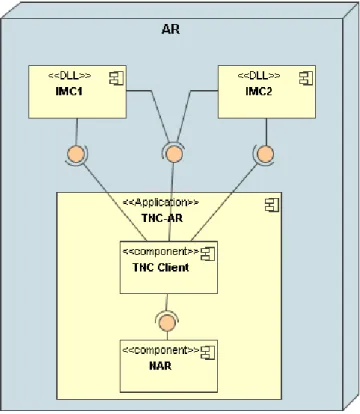
The overall architecture is shown in picture 3.1. AR is built up of application
TNC-AR and IMC components (DLLs) that are connected toTNC-ARas described in Windows Platform Binding of IF-IMC.
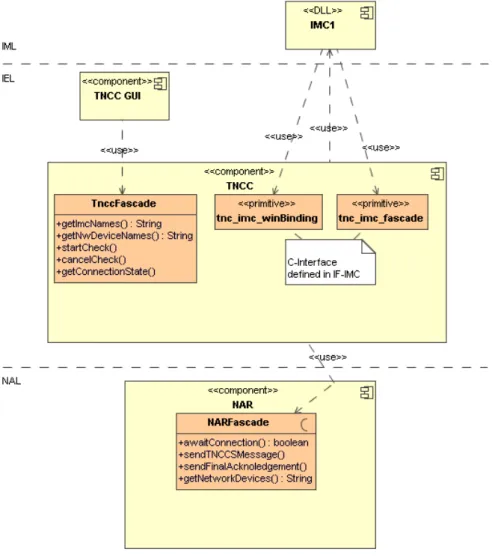
TNC-AR includes two components that are similar to the components defined in TNC architecture. These components are loosely coupled so that you can easily change the network technology in NAL without touching component TNC Client. You find a detailled class diagram with all classes of AR in appendix (chapter A.2). The facades between the components of AR are shown in picture 3.2.
3.2 Network Access Requestor
3.2 Network Access Requestor
3.2.1 Architecture of NAR
The static architecture of NAR is shown in picture 3.3.
Figure 3.3: Static architecture of NAR Classes of NAR have clearly separated tasks:
NARFascade is access point to NAL for TNC Client. Interface is independent of the network access technology used in NAL.
NetAccessControl works as flow control and controls the correct 802.1x flow and all other classes.
WinNetAccessor implements access to the network out of Windows (implemented by using a NDIS protocol driver, see chapter 3.5).
PacketGenerator creates EAPOL packets with encapsulated EAP-TNC packets. PacketValidator analyses ethernet packets received by WinNetAccessor according
to their 802.1x contents.
FragmentationManager cares of fragmentation and defragmentation of messages. For detailled descriptions see comments in source code.
3.2.2 Implementation of EAPOL and EAP-TNC
The two classes PacketGenerator and PacketValidator (see picture 3.4) are re-sponsible for analysis of incoming and creation of outgoing ethernet packets.
Figure 3.4: Classes for Packet generation and validation
Using theses classes NetAccessControl can easily create ethernet packets and can check the relevance of incoming packets to the actual context.
For detailled descriptions see comments in source code.
3.2.3 Flow inside NAR during connection establishment
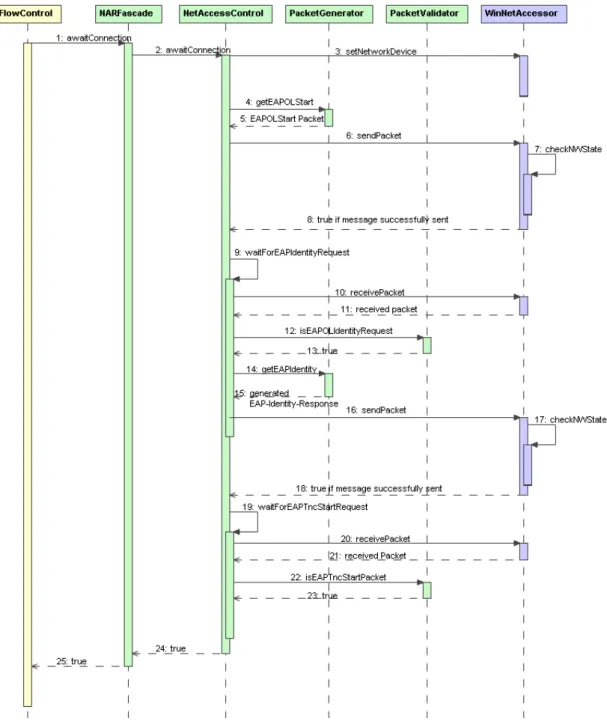
Roughly you can split the flows inside the NAR in two phases: In the first phase the NAR establishs the connection to PDP so that in the second phase TNCCS messages can be transfered between AR and PDP.
The flow of the first phase is shown in picture 3.5.
3.2.4 Flow during Handshake
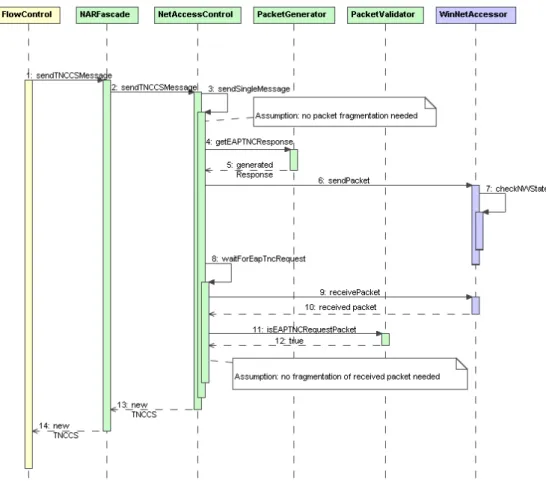
In the second phase NAR is responsible for sending and receiving TNCCS messages. The flow (see picture 3.6) is started by TNC Client everytime the TNC Client wants to send a new TNCCS message.
In the shown flow we have excluded the fragmentation of messages for simplicity (for fragmentation see chapter 5.3.2).
3.3 TNC Client
Figure 3.6: Flow in NAR while sending and receiving TNCCS messages
3.3.1 Architecture Overview
Classes inside the componentTNC Clientare shown in picture 3.7. These are their tasks:
FlowControl controls the flow inside TNC Client.
TNCCFascade is access point to the TNC Client for GUI. TNCCSMsgMaster analyses and creates TNCCS messages.
ImcImvMsgCoordinator distributes IMC-IMV messages to the IMC components. IMCCommunicator communicates with IMCs via IF-IMC-interface.
WinIMCCollector loads IMCs according to Windows Binding from IF-IMC. ImcImvMsgRepository stores messages that should be sent from IMCs to IMVs
and that have been sent by IMVs to IMCs. For detailled descriptions see comments in source code.
3.3 TNC Client
Figure 3.7: Classes inside TNC Client
3.3.2 Flows inside TNC Client
The sequence diagram in picture 3.8 shows the flow inside TNC Client. More detailled sequence diagrams to the flows in TNC Client can be found in chapter A.1 in appendix.
3.4 Development Environment and Build Process
3.4 Development Environment and Build Process
3.4.1 Development Environment
The AR has been developed with Eclipse 3.1.1 in Windows XP. The Eclipse-Plugin CDT (C/C++ Development Tooling) SDK 3.0.21 allows the development of C and C++ application out of Eclipse.
3.4.2 Build of AR
The Access Requestor is designed as executable application (*.exe) for the Cygwin environment2. So an emulated gcc is used for compiling the application in Windows. In Eclipse we created a ”‘Managed Make C++ Project”’ for the AR so that the AR can be built completely out of Eclipse with CDT. The parameters that have to be set in the Eclipse project are listed in appendix B.1. Especially the usage of wxWidgets as framework for the GUI needs several settings (also see 3.6).
3.5 Development of network driver NDISProt
3.5.1 Adjustment and Compilation of NDISProt
For accessing the network we need the NDIS Protocol Driver ”‘NDISProt”’ because we did not find any other possibility to access the ethernet network (without any stack like TCP/IP) directly from C code out of Windows. This driver is one of the examples from Windows Driver Development Kit. There you can find the driver and an application for testing this driver. Both have to be compiled before we can use them.
Customization of NDISProt
For the usage in the TNC architecture we have to make some customizations to the driver. Because the driver cannot per default receive packets that are addressed to the address defined in 802.1x for the communication via EAPOL (see [IEE04, p. 31], 01-80-C2-00-00-03) we have to add another packet type to ndisprot.h. This type is ”‘All Multicast”’ (see Listing 3.1).
#define NUIOO_PACKET_FILTER (NDIS_PACKET_TYPE_DIRECTED| \ NDIS_PACKET_TYPE_MULTICAST| \ NDIS_PACKET_TYPE_BROADCAST | \ NDIS_PACKET_TYPE_ALL_MULTICAST)
1http://www.eclipse.org/cdt/ 2http://www.cygwin.com
Listing 3.1: Customizations in ndisprot.h
Compilation of NDISProt
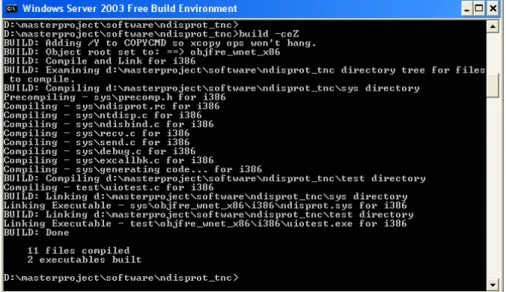
Using the ”‘Build Environment”’ included in the DDK we can compile NDISProt as described in the documentation of this DDK example (see Figure 3.9).
Figure 3.9: Build of NDISProt in Windows Server 2003 Free Build Environment
After that the setup information file ndisprot.inf and the driver ndisprot.sys
have been created and are ready for service.
3.5.2 Installation of NDISProt driver
Now the generated network driver can be installed as protocol for the network card (see Screenshots in appendix B.3).
The setup information file ndisprot.inf states that the driver should be started manually. The command is:
net start ndisprot
Now ethernet packets can be received viaReadFilemethod and sent viaWriteFile
3.6 Development of User Interface
Figure 3.10: TNC Client user interface: Integrity assessment ends with granted access.
3.6 Development of User Interface
3.6.1 Basics and Technics
One target of TNC@FHH was to make the integrity check as transparent as possible. Therefore a user interface has been developed so that the user can control the integrity check and can exactly see what happens.
Picture 3.10 shows a screenshot of the user interface. Using this GUI the user is able to
• choose the network interface that should be used for integrity assessment. • see which IMCs are installed and available for integrity check and exclude
untrustworthy IMCs from integrity check.
• activate detailled logging to a file with a lot of information about the hand-shake.
• see the actual state of check via a log window. • cancel the test whenever he wants.
3.6.2 wxWidgets as GUI framework
The user interface of TNCC has been developed by using wxWidgets3. WxWidgets allows the development for different plattforms with one code-basis. This property can help porting the TNCC to Linux later on. In this project we use wxWidgets in Version 2.6.3.
Before you can use wxWidgets it has to be installed and built. How this works is described in appendix B.4.
The settings for using wxWidgets inside Eclipse can be found in [Don04] and the setting needed in the context of this project are described in B.1.
4 Policy Decision Point for Linux
4.1 Overall Architecture
Figure 4.1 shows the overall architecture of PDP. PDP is designed as a ”‘plug-in”’ to FreeRadius RADIUS server. The existing EAP module of FreeRadius has been extended with EAP-TNC functionality (see chapter 4.4.3). So we can reuse network access, RADIUS functionality and EAP functionality. All but the base functionality is linked as shared object so that development is much easier.
A detailled class diagram with all classes of PDP can be found in chapter A.2 of appendix.
Slim facades between the components of PDP lead to a loosely coupled components. These facades are shown in picture 4.2.
4.2 Network Access Authority
4.2.1 Architecture Overview NAA
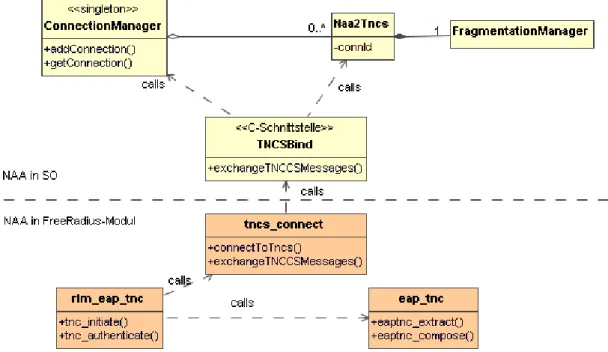
In picture 4.3 the most important source files and classes of NAA are shown. Below the dotted line the files belonging to the EAP-TNC-Modul (from FreeRadius in C) are shown, above the dotted line the C++ classes from the Shared Object are shown.
4.2 Network Access Authority
Figure 4.3: Static architecture of NAA component Source files from FreeRadius
These are the tasks of the source files from FreeRadius extension: rlm eap tnc is the external access point for the EAP modul.
tnc connect includes methods that establish direct connection to the functionality of TNC Shared Object.
eap tnc cares of EAP-TNC specific tasks (analyse and create EAP-TNC mes-sages).
NAA classes of Shared Object
Extended NAA functionality is implemented inside the Shared Object: TNCSBind is a C interface for the FreeRadius module.
ConnectionManager administrates all connections to PDP that are active. Ad-ditionally, ConnectionManager loads IMVs using LinuxIMVCollector and informs them of new or finished connections via IMVCommunicator.
Naa2Tncs exists for every active connection once and builds the bridge between NAA tasks (like fragmentation of TNCCS messages) and the pure TNC Server (via TncsFlowControl).
4.3 TNC Server
FragmentationManager executes fragmentation and defragmentation initiated by
Naa2Tncs.
4.2.2 Flow inside NAA
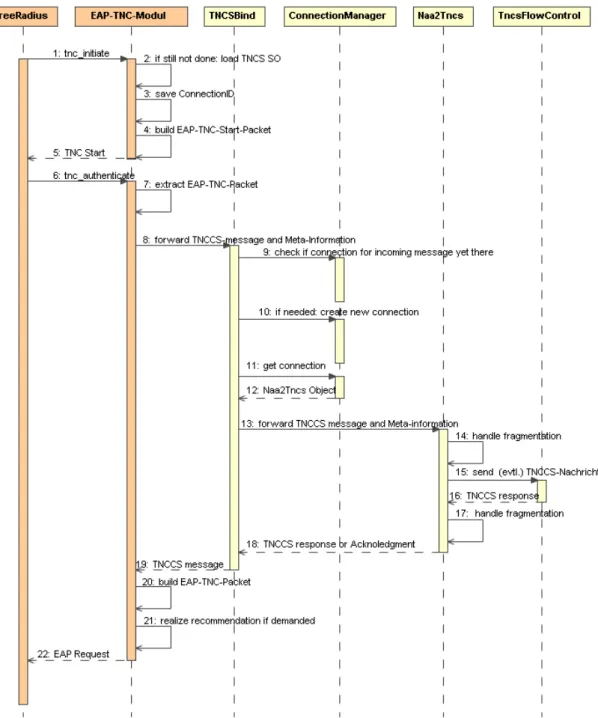
The sequence diagram in picture 4.4 shows roughly how the presented functions and classes interact with each other.
4.3 TNC Server
4.3.1 Architecture Overview TNCS
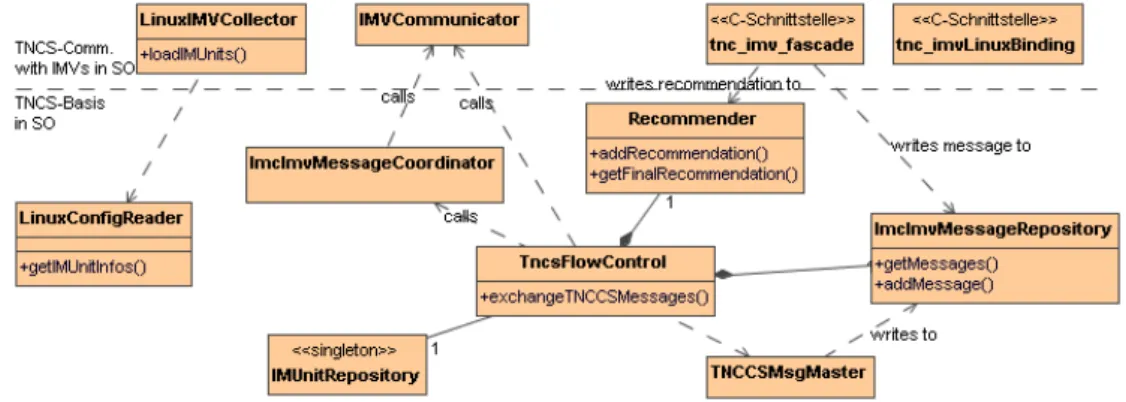
The architecture of TNC Server with the most important classes is shown in picture 4.5. The classes are ordered vertically:
The classes below the dotted line handle the correct flow and state of TNC Server. TncsFlowControl is the central class that takes TNCCS messages fromNaa2Tncs
and initiates the processing of the message.
TNCCSMsgMaster creates and analyses TNCCS messages.
ImcImvMessageRepository stores IMC-IMV messages that come from IMCs re-motely and from IMVs locally.
IMUnitRepository stores access information to each registered IMV component. LinuxConfigReader reads configuration filetnc_configas described in Linux
Bind-ing of IF-IMV.
Recommender stores recommendations given by IMV components and generates final recommendations based on a security policy.
Classes above the dotted line communicate directly with IMV components: LinuxIMVCollector loads IMV components at server start.
IMVCommunicator communicates with IMVs via IF-IMV.
tnc imv fascade offers together withtnc_imv_linuxBindingthe TNCS functions from IF-IMV to IMVs.
4.3 TNC Server
Figure 4.5: Static architecture of TNCS
4.3.2 Flow inside TNC Server
Picture 4.6 shows the flow inside TNC Server (diagram can be connected to diagram 4.4 on page 28 at number 15).
4.3.3 End of Handshake and Policy Management
End of Handshake
In our implementation a handshake ends under one of the following conditions: • All IMVs already gave a recommendation OR
• no IMV (although asked) sends new IMC-IMV messages to TNC Server OR • a configurable number of batches has been reached.
Policy Management
The final recommendation is based on a simple security policy in this implemen-tation. There are 6 different settings that can be chosen. After having collected recommendations from all IMVs the TNC Server walks through one of the six flowcharts (see picture 4.7) and so generates a final decision. Which diagram to use can be configured in /etc/tnc/tncs_fhh.config.
4.3 TNC Server
4.4 Development
4.4.1 Development Environment
We used Eclipse 3.1.0 for Linux as development environment. As for the AR in Windows we used the Eclipse plugin CDT SDK here in version 2.1.1.
4.4.2 Development support for the build of TNCS-SO
The development and build of the TNCS Shared Object is done gaining full support of CDT. We created a ”‘Managed Make C++ Project”’ and built the TNCS SO completely out of Eclipse. The mandatory Eclipse settings are listed in appendix B.2. At the end of this build process part a Shared Object libTNCS.so has been generated that will be included in the complete build of PDP.
4.4.3 Development of EAP-TNC Module
This part of application cannot be built out of Eclipse because it is part of the Free-Radius application that is delivered with a complex build process. So we wrote the code in a text editor and copied the created and modified files into the FreeRadius distribution.
4.5 Development of EAP-TNC Module from
FreeRadius
4.5.1 Configuration of FreeRadius
We can use FreeRadius with its default configuration. Only one adjustment is to be done:
In /usr/local/etc/raddb/clients.conf the PEP is registered as client (see ex-ample configuration in Listing 4.1).
client 192.168.1.1 {
secret = mypassword
shortname = TNC-PEP
nastype = other
}
4.5 Development of EAP-TNC Module from FreeRadius
4.5.2 Extension of EAP Module
Modifications in configuration files of EAP Module
The configuration files of EAP module are modified as following (compare [Rag05]): In /usr/local/etc/raddb/eap.conf a new entry for EAP-TNC is registered in ”‘Supported EAP-types”’ and referenced as Default EAP type (see Listing 4.2). eap{ default_eap_type = tnc ... #Supported EAP-types tnc{ } ... }
Listing 4.2: Settings in eap.conf
Changes in general EAP Module code
The EAP module framework maps the EAP types and EAP type numbers to the responsible module. Therefore in <FREERADIUS>/src/modules/rlm_eap/libeap/ eapcommon.c in array eap_types ”‘tnc”’ has to be entered at position 38 (EAP-TNC is assigned to EAP-Type 38) (see Listing 4.3).
static const char *eap_types[]={ ...
"37", "tnc", "39" };
Listing 4.3: EAP-TNC in eapcommon.c
A similiar addition has to be undertaken in eap_types.h (see Listing 4.4).
#define PW_EAP_MAX_TYPES 39
#define PW_EAP_TNC 38
Listing 4.4: EAP-TNC in eap types.h
With these additions the EAP module now forwards all EAP messages to the new EAP submodule EAP-TNC presented in the next section.
4.5.3 Generation of EAP submodule EAP-TNC
The easiest way to create the new EAP-TNC module rlm_eap_tnc was to copy the existing module rlm_eap_md5 and change everywhere ”‘md5”’ to ”‘tnc”’ so
that we have a module fully functional. The modules can be found in <FREE-RADIUS>/src/modules/rlm_eap/types.
We implemented the mandatory functions tnc_initiate and tnc_authenticate
in filerlm_eap_tnc.cand registered them in the struct rlm_eap_tnc(see Listing 4.5).
static int tnc_initiate(void *type_data, EAP_HANDLER *handler){ ...
}
static int tnc_authenticate(void *arg, EAP_HANDLER *handler){ ...
}
EAP_TYPE rlm_eap_tnc= { "eap_tnc",
NULL, /* attach */
tnc_initiate, /* Start the initial request */
NULL, /* authorization */
tnc_authenticate, /* authentication */
NULL /* attach */ }
Listing 4.5: rlm eap tnc.c
Important is that these methods fill the passed EAP_HANDLERwith the correct EAP Request (based on EAP-TNC) as output parameter.
The TNCS-SO is accessed as usual Shared Object out of this module.
VLAN Assignment
We do not want to configure the VLAN assignment user-oriented as it is usually done in FreeRadius via configuration file /usr/local/etc/raddb/users(see List-ing 4.6).
Lumpy Auth-Type := EAP, User-Password == "myPassword"
Tunnel-Type = "VLAN",
Tunnel-Medium-Type = "IEEE-802",
Tunnel-Private-Group-ID = 96
Listing 4.6: Configured VLAN assignment in raddb/users
Instead we made the assignment programmatically based on the judgement of TNCS.1 Listing 4.7 shows how the RADIUS attributes according to IF-PEP can be set into EAP_HANDLER.
VALUE_PAIR *tunnelType = pairmake("Tunnel-Type", "VLAN", T_OP_SET);
pairadd(&handler->request->reply->vps, tunnelType);
4.6 Build of PDP
VALUE_PAIR *tunnelMedium = pairmake("Tunnel-Medium-Type", "IEEE-802", T_OP_SET);
pairadd(&handler->request->reply->vps, tunnelMedium);
char *vlanNumber="96";
VALUE_PAIR *vlanId = pairmake("Tunnel-Private-Group-ID", vlanNumber, T_OP_SET); pairadd(&handler->request->reply->vps, vlanId);
Listing 4.7: Programmative VLAN assignment
4.6 Build of PDP
The complete build of PDP consists of several steps: 1. TNCS-SO is built as described in the last section. 2. TNCS-SO is copied to its target position.
3. All potentially changed *.c- and *.h-files are copied to its destination in Free-Radius distribution. These are the files from the following directories:
• modules/rlm_eap/types/rlm_eap_tnc
• modules/rlm_eap/libeap
4. The EAP-TNC module, EAP Module and the whole FreeRadius distribution are compiled.
5. The generated files are copied to its target positions.
The steps 2 und 3 are summarized in a scriptcopyAll, step 4 and 5 go in accordance with the FreeRadius Build process. (see Listing: 4.8).
/home/tncuser/workspace/copyAll && make && make install
Listing 4.8: Build execution for PDP
4.7 Configuration file tncs fhh.conf
To ease the configuration of PDP a configuration file tncs_fhh.confis part of the system that is built up like a property file. You can see the structure in listing B.2 in appendix.
The configuration file offers the following setting possibilities:
VLAN ISOLATE The VLAN ID for ARs that should be isolated
BATCH COUNT Number of batches the TNCS allows before finishing the Hand-shake
POLICY The Number of active security guide line (see chapter 4.3.3 and comments in file)
TNCS PATH Path to the TNCS-Shared Object
The applicable IMVs are registered in file tnc_configaccording to IF-IMV, Linux Binding.
5 Client/Server-spanning concepts
In order to reach reusement, simple extensibility and portability there are classes and concpts inside TNC@FHH that are developed once and used in AR as well as in PDP.
5.1 Concepts for Platform independence
Inside TNC architecture there are two areas that are platform dependent: • Accessing the network
• Linking the IMCs/IMVs
With the Factory-Pattern we achieved that these areas are implemented plattform-dependent but used plattform-inplattform-dependent. Picture 5.1 shows how this works. So it is very simple to port the TNC Client to Linux. You only have to implement
LinuxIMCCollector and LinuxNetAccessor.
5.2 Connecting the IML
Connecting the IML works very similar in TNC Client and TNC Server. Because of that we implemented the connection in shared classes as far as possible.
Figure 5.2 shows all the classes that take part in this process.
Figure 5.2: Classes for connecting the IML
Figure 5.3 shows the flow during the communication with the components of IML at the example of TNC Client.
The flow shown in picture 5.3 can also take place in TNC Server with one exception. Instead of IMCCommunicator IMVCommunicator has to be used. The mechanism shown in picture 5.4 makes possible that the right Communicator is used in a transparent way to the caller.
5.3 TNCCS Communication and Fragmentation
The classes responsible for TNCCS communication (defined in IF-TNCCS) and fragmentation (defined in IF-T EAP Binding) are shown in picture 5.5.
5.3.1 TNCCS creation and analysis
Figure 5.6 shows how the creation and analysis of TNCCS messages inside IEL work.
5.3.2 Fragmentation of messages
FragmentationManagerinside NAL is the main actor in the complex fragmentation and defragmentation process and offers a lot of methods. Figure 5.7 shows which
5.3 TNCCS Communication and Fragmentation
Figure 5.3: Flow of communication between IML components and TNC Client decisions have to be made at the start of the process when a EAP-TNC message arrives. Figure 5.8 and 5.9 continue and finish this process. All these decisions can be mapped to methods of FragmentationManager.
Fragmentation works similar in NAR and NAA. Inside the AR Fragmentation-Manager is controlled by NetAccessControl, inside the PDP Naa2Tncs plays this role.
Figure 5.4: Communication with IMCs vs. communication with IMVs
5.3 TNCCS Communication and Fragmentation
5.3 TNCCS Communication and Fragmentation
6 Configuration of network
environment
Now we want to explain how to configure your switch so that it works together with our TNC implementation. We show exemplarily the settings of a HP Procurve 5348xl that we used during our development (also see [HP 05]).
We assume that we use network 192.168.1.0 and the IP of the switch is 192.168.1.1.
General 802.1x activation
We activate 802.1x on the switch with the following steps:
config switches to configuration mode
aaa authentication port-access eap-radius
defines that we want to use RADIUS for au-thentication
show auth shows the latest settings (see figure 6.1)
radius host 192.168.1.5 defines the IP address of the RADIUS server (our PDP)
radius-server key mypass-word
defines that ”‘mypassword”’ should be used as key when accessing the RADIUS server
aaa port-access authentica-tor active
activates 802.1x authentication
802.1x authentication for single ports
aaa port-access authenticator A11 switches on 802.1x authentication for Port A11
VLAN setup
The webconsole is the simplest way for configuring the VLANs. Via ”‘Configura-tion”’ and ”‘VLAN Configura”‘Configura-tion”’ you can watch existing and add new VLANs. You should configure these two VLANs:
Figure 6.1: The authentication configuration of Procurve switch VLAN ID VLAN Name Description
96 AuthZone VLAN for ARs that passed the integrity check
97 IsoZone VLAN for ARs that should be isolated after integrity check
Figure 6.2 shows a complete VLAN configuration that could look like yours. Now the switch is ready for TNC. The configuration of a Cisco switch proceed similar and is explained in [Cis04].
Appendix A
Design Documents
A.1 Sequence diagrams
A.2 Class diagrams
A.2 Class diagrams
A.3 TNC Client Screenshots
Figure A.5: TNC Client User Interface: The integrity checks has ended with ”‘Ac-cess denied”’
A.3 TNC Client Screenshots
Figure A.6: TNC Client User Interface when NDISProt is not running. The in-tegrity check cannot be started.
Appendix B
Development, Installation and
Configuration
B.1 Development Environment in Windows
The following tables and Screenshots show the settings to be done in Eclipse in order to compile and build the AR successfully.
GCC C++ Compiler/Preprocessor/Defined Symbols Symbol required by GNUWIN32 wxWidgets STRICT wxWidgets WXMSW wxWidgets WINDOWS wxWidgets WXDEBUG wxWidgets
The dialog ”‘Defined Symbols”’ is shown in figure B.2.
GCC C++ Compiler/Directories/Include paths Path required by <WXW>/lib/mswd wxWidgets <WXW>/build-debug/lib/wx/- include/msw-ansi-debug-static-2.6 wxWidgets <WXW>/include wxWidgets <WXW>/contrib/include wxWidgets <WXW>/src/regex wxWidgets <WXW>/src/png wxWidgets <WXW>/src/jpeg wxWidgets <WXW>/src/zlib wxWidgets <WXW>/src/tiff wxWidgets
<WXW> stands for the path to wxWidgets installation. The dialog ”‘Include paths”’ is shown in figure B.3.
GCC C++ Compiler/Miscellaneous/Other flags
Flags required by
-c fmessage-length=0 -fno-rtti -fexceptions wxWidgets The dialog ”‘Other flags”’ is shown in figure B.4.
GCC C++ Linker/Libraries/Libraries
Library required by
TNCUtil Usage of Util-functions xerces-c27 Xerces (XML-Parsing) wx mswd core-2.6 wxWidgets wx based-2.6 wxWidgets oleaut32 wxWidgets ole32 wxWidgets uuid wxWidgets comctl32 wxWidgets
GCC C++ Linker/Libraries/Library Search Path
Path required by
<Path to libxerces-c27.dll.a> xerces-c27 <Path to libTNCUtil.a> TNCUtil <WXW>/build-debug/lib wxWidgets <WXW>/contrib/lib wxWidgets The dialog according included libraries is shown in figure B.6.
GCC C++ Linker/Miscellaneous/Linker flags
Flag required by -mwindows wxWidgets
B.1 Development Environment in Windows
Figure B.1: Overview of Compiler settings
Figure B.3: Directories where the Compiler should search for source files
B.1 Development Environment in Windows
Figure B.5: Overview of Linker settings
B.2 Entwicklungsumgebung unter Linux
The following tables and screenshots show the mandatory settings in Eclipse for building the shared object of TNCS successfully.
GCC C++ Linker/Libraries/Libraries
Library required by
dl dynamic loading of so-files (IMV-SO-files) TNCUtilLinux usage of util-functions
xerces-c.so Xerces (XML-Parsing)
GCC C++ Linker/Libraries/Library search path
Path required for
<Path to libxerces-c.so.a> xerces-c.so <Path to libTNCUtilLinux.so> TNCUtilLinux The Dialog for library settings is shown in figure B.8.
GCC C++ Linker/Shared Library Settings
Mark set required for
Shared building NAA-TNCS as Shared Object The dialog ”‘Shared Library Settings”’ is shown in figure B.9.
B.2 Entwicklungsumgebung unter Linux
Figure B.7: Overview of Linker-settings
B.3 Installation von NDISProt
B.3 Installation von NDISProt
Figure B.10: Properties of LAN connection before NDISProt installation; one click on ”‘Install”’ starts the installation.
Figure B.11: Now we add a ”‘Protocol”’.
B.3 Installation von NDISProt
Figure B.13: After ndisprot.inf has been selected, the driver is found and se-lected.
Figure B.14: Driver is installed and is shown in the properties dialog of LAN con-nection.
B.4 Build of wxWidgets
Before we can use wxWidgets for developing applications it has to be built for the specific plattform. In the case of TNC Client this is the cygwin environment in Windows. After the wxWidgets distribution has been installed successfully to $WXWIN we build wxWidgets for Cygwin by executing the steps from Listing B.1 in ”‘Cygwin Bash Shell”’.
cd $WXWIN
mkdir build-debug cd build-debug
../configure --with-msw --enable-debug --enable-debug_gdb --disable-shared make
Listing B.1: Build of wxWidgets for Cygwin
B.5 Configuration files
#VLAN-Configuration VLAN_ACCESS=96 VLAN_ISOLATE=97 #Batch-Configuration BATCH_COUNT=5 #Policy-Configuration POLICY=5 #possible values: #1 (positive simple) #2 (positive unanimity) #3 (positive majority) #4 (negative simple) #5 (negative unanimity) #6 (negative majority)#TNCS-Connection (path max 200 tokens)
#if no valid path is given:
#default: /usr/local/lib/libTNCS.so
TNCS_PATH=/tmp/_master-temp/tncs/libTNCS.so
Bibliography
[Cis04] Cisco Systems, Inc.: Catalyst 3550 Multilayer Switch Software Config-uration Guide, Mai 2004. Cisco IOS Release 12.1(20)EA2.
[Don04] Donaldson, Cameron: C++ GUI Programming on Windows 2000/XP,
http://howtos.mrcam.org/guides/development/cppguiprogramming. html Dezember 2004. Stand: 08. August 2006.
[HP 05] HP Procurve Networking: Access Security Guide, Oktober 2005. ProCurve Switches E.10.02 (Series 5300xl), M.08.73 (Series 3400/6400cl). [IEE04] IEEE Computer Society: 802.1X - Port-Based Network Access Con-trol, 13. Dezember 2004. IEEE Standard for Local and metropolitan area networks.
[Rag05] Raghu: Rlm eap Extensible Authentication Protocol, http://wiki. freeradius.org/index.php/Rlm_eap Dezember 2005. FreeRadius Wiki Stand: 29. Mai 2006.
List of Figures
3.1 Deployment Diagram: Overall architecture of AR . . . 11
3.2 Component Diagram: Fascades between components of AR . . . 12
3.3 Class diagram: Static architecture of NAR . . . 13
3.4 Class diagram: Packet generation and validation . . . 14
3.5 Sequence diagram: NAR during establishing of connection . . . 15
3.6 Sequence diagram: NAR during sending and receiving TNCCS mes-sages . . . 16
3.7 Class diagram: TNC Client . . . 17
3.8 Sequence diagram: Flows inside TNC Client . . . 18
3.9 Screenshot: Build of NDISProt . . . 20
3.10 Screenshot: TNC Client user interface after granted access . . . 21
4.1 Deployment Diagramm: Overall architecture of PDP . . . 24
4.2 Component Diagram: Fascades inside PDP . . . 25
4.3 Class diagram: Static architecture of NAA . . . 26
4.4 Sequence diagram: Flows inside NAA . . . 28
4.5 Class diagram: Architecture of TNCS . . . 29
4.6 Sequence diagram: TNC Server between Receiving and Sending TNCCS 30 4.7 Flussdiagramm: All available Policies . . . 31
5.1 Class diagram: Plattform dependent creation with Factory-Pattern 37 5.2 Class diagram: Connecting the IML . . . 38
5.3 Sequence Diagram: Connecting the IML in TNCC . . . 39
5.4 Sequence diagram: Communication with IMCs vs. IMVs . . . 40
5.5 Class diagram: Implementation of IF-TNCCS . . . 40
5.6 Sequence Diagram: TNCCS messages . . . 41
5.7 Flussdiagramm: Start of fragmentation process, incoming acknoledge-ments . . . 42
5.8 Flussdiagramm: Handle of received TNCCS-message . . . 43
5.9 Flussdiagramm: Handle of outgoing TNCCS-messages . . . 44
6.1 Screenshot: Procurve console ”‘show auth”’ . . . 46
6.2 Screenshot: VLAN configuration in Procurve-Webconsole . . . 47
A.1 Overall flow TNCCS and IMC communication in TNCC . . . 50
A.2 Initialization of TNC Client . . . 51
A.4 class diagram of PDP . . . 53
A.5 Screenshot: TNC Client User Interface after ”‘Access denied”’ . . . 54
A.6 Screenshot: TNC Client User Interface when NDISProt is not running 55 B.1 Screenshot: Eclipse Compiler Dialog for AR . . . 59
B.2 Screenshot: Eclipse Preprocessor Dialog for AR . . . 59
B.3 Screenshot: Eclipse Include Directories Dialog for AR . . . 60
B.4 Screenshot: Eclipse Compiler Miscellaneous Settings . . . 60
B.5 Screenshot: Eclipse Linker Dialog for AR . . . 61
B.6 Screenshot: Eclipse Linker Library Dialog for AR . . . 61
B.7 Screenshot: Eclipse Linker Settings Dialog for TNCS . . . 63
B.8 Screenshot: Eclipse Library Dialog for TNCS . . . 63
B.9 Screenshot: Eclipse Shared Settings Dialog for TNCS . . . 64
B.10 Screenshot: Properties of LAN-connection before NDISProt . . . . 65
B.11 Screenshot: Choice of ”‘Protocol”’ as Network component . . . 66
B.12 Screenshot: Search for NDISProt . . . 66
B.13 Screenshot: NDISProt found and selected . . . 67