PVS System Guide
Version 2.4
•
November 2001
S. Owre N. Shankar J. M. Rushby D. W. J. Stringer-Calvert {Owre,Shankar,Rushby,Dave_SC}@csl.sri.com http://pvs.csl.sri.com/SRI International
The initial development of PVS was funded by SRI International. Subsequent en-hancements were partially funded by SRI and by NASA Contracts NAS1-18969 and NAS1-20334, NRL Contract N00014-96-C-2106, NSF Grants 9300044, CCR-9509931, and CCR-9712383, AFOSR contract F49620-95-C0044, and DARPA Orders E276, A721, D431, D855, and E301.
Contents
Contents i
1 Introduction 1
2 A Brief Tour of PVS 7
2.1 Creating the Specification . . . 8
2.2 Parsing and Typechecking . . . 10
2.3 Proving . . . 11 2.4 Status . . . 15 2.5 Generating LATEX . . . . 15 3 PVS Commands 17 3.1 Exiting PVS . . . 18 3.2 Getting Help . . . 18 3.3 Editing PVS Files . . . 19
3.4 Parsing and Typechecking . . . 20
3.4.1 Parsing . . . 20
3.4.2 Typechecking . . . 21
3.4.3 Typechecking Information . . . 22
3.5 Proving . . . 23
3.5.1 Proving a Single Formula. . . 24
3.5.2 Proving Sets of Formulas . . . 26
3.5.3 Selecting Decision Procedures . . . 28
3.5.4 Editing and Viewing Proofs . . . 29
3.5.5 Displaying Proof Information . . . 33
3.5.6 Adding and Modifying Declarations . . . 34
3.5.7 Prover Emacs Commands . . . 36
3.5.8 General Commands . . . 36
3.5.9 Prover Commands . . . 36
3.5.10 Proof Stepper Commands . . . 38
3.6 Prettyprinting . . . 39
3.7 Viewing TCCs. . . 39
3.8 PVS Files and Theories. . . 40 i
ii CONTENTS
3.8.1 Finding Files and Theories . . . 40
3.8.2 Creating New Files and Theories . . . 41
3.8.3 Importing Files and Theories . . . 42
3.8.4 Deleting Files and Theories . . . 42
3.8.5 Saving Files . . . 42
3.8.6 Mailing PVS Files . . . 43
3.8.7 Dumping Files . . . 44
3.9 PVS Output . . . 44
3.9.1 Printing Buffers and Regions. . . 44
3.9.2 Printing Files and Theories . . . 45
3.9.3 Generating alltt Output . . . 45
3.9.4 Generating LATEX Output . . . . 46
3.10 Display Commands . . . 48 3.11 Context Commands . . . 51 3.12 Library Commands . . . 53 3.13 Browsing . . . 54 3.14 Theory Status . . . 55 3.15 Proof Status . . . 56 3.16 Environment Commands . . . 57 3.17 Interrupting PVS . . . 57 4 Customizing PVS 59 4.1 Invoking PVS . . . 59 4.2 Emacs . . . 61 4.3 The PVS Image . . . 62 4.4 Window Systems . . . 62
5 Running PVS in Batch Mode 65 5.1 Validation Runs . . . 68
5.2 Example Validation Run . . . 69
5.2.1 The Specification . . . 70
5.2.2 The Validation File . . . 70
5.2.3 The Validation Run. . . 70
5.2.4 The Log File . . . 71
A Introduction to Emacs 75 A.1 Leaving Emacs . . . 77
A.2 Getting Help . . . 78
A.3 Files . . . 78
A.4 Buffers . . . 79
A.5 Cursor Motion commands . . . 79
A.6 Error Recovery . . . 80
CONTENTS iii
A.8 Killing and Deleting . . . 81
A.9 Yanking . . . 81
A.10 Marking . . . 82
Bibliography 83
Chapter 1
Introduction
The Prototype Verification System (PVS) provides an integrated environment for the development and analysis of formal specifications, and supports a wide range of activities involved in creating, analyzing, modifying, managing, and documenting theories and proofs. This manual describes the system, including the system com-mands, the computing environment, how to get and install PVS, customization, and a short tutorial on Emacs. The complete set of manuals for the PVS system consists of this manual, the language reference [3], and the prover guide [7]. There are also several supporting technical reports: the formal semantics of PVS [6], an advanced tutorial [5], and a description of the abstract datatypes mechanism [4]. All of these manuals (and much more!) are available online at http://pvs.csl.sri.com/
The rest of this chapter provides a broad overview of PVS; the facilities provided by the system are discussed in the order you are likely to encounter them.
The PVS Environment
PVS runs on SUN 4 (SPARC) workstations using Solaris 2 or higher and PC systems running Redhat Linux. PVS is implemented in Common Lisp, but it is not necessary to know Lisp to effectively use the system.1 PVS runs best using the X window system,
though it is not required. The Emacs (Gnu Emacs or XEmacs) editors provide the interface to PVS; familiarity with Emacs and access to the Gnu Emacs manual [8] (usually available as an info file) are desirable. A brief introduction to Emacs is provided in Appendix A on page 75 of this manual. The LATEX generating facilities require a good understanding of the LATEX document preparation system [1]. If you have Tcl/Tk available, there are PVS interfaces provided that display proof trees, theory hierarchies, and proof commands. Instructions for obtaining and installing the PVS system as well as Emacs, X windows, LATEX, and Tcl/Tk may be found at http://pvs.csl.sri.com.
1The only exception to this is in writing complex prover strategies.
2 1 Introduction
The PVS Language
The specification language of PVS is built on higher-order logic; i.e., functions can take functions as arguments and return them as values, and quantification can be ap-plied to function variables. There is a rich set of built-in types and type-constructors, as well as a powerful notion of subtype. Specifications can be constructed using definitions or axioms, or a mixture of the two.
Specifications are logically organized into parameterized theories and datatypes. Theories are linked by import and export lists. Specifications for many foundational and standard theories are preloaded into PVS as prelude theories that are always available and do not need to be explicitly imported. Details on the PVS language may be found in the PVS language reference [3].
Specification Files and the PVS Context
PVS specifications are ordinary ascii text files prepared and modified using a text
editor—usually the Emacs editor that acts as the interface to PVS. A PVS specifica-tion consists of any number of such files, each of which contains one or more theories or datatypes. PVS specification files have the .pvsextension.
Each specification file has associated with it a proof file (with the.prfextension) that saves the proof scripts generated during proof attempts on formulas contained in the associated PVS specification file. In addition, the system generates binary representations of the typechecked specification files (with the .bin extension) that speed up retypechecking when a PVS session is resumed in the same context.
The set of files and theories constituting a specification, together with various items of status information, comprise a PVS context. The PVS context retains infor-mation about the state of a specification and verification from one PVS session to the next. This information is primarily kept in the .pvscontext file that is associated with each PVS context. It keeps track of which formulas have been proved, and which binary files are valid by keeping track of the write dates associated with the various files.
PVS contexts are closely related to directories, and the term context is used in this document to refer to either the PVS context or its associated directory. Note that the directory may contain files other than those produced by or for PVS, but these are not considered to be a part of the context.
During a PVS session, there is always a current context in which the activities of PVS take place. For example, typechecking of a specification file is allowed only if that file is a part of the current context. There are commands for changing the current context during a PVS session, so that it is unnecessary to exit PVS just to change contexts. Because contexts are associated with UNIX directories there can be at most one PVS context in a directory, so for most purposes a PVS context and its containing directory can be treated synonymously.
1 Introduction 3
PVS Libraries
PVS has a library facility that allows files and theories from one PVS context to be used in another, thus allowing for general reuse, and making it easier to standardize theories that are frequently used. There are two ways that the library facility can be used: by explicitly importing a theory from a different PVS context within a specification, or by issuing a command that effectively extends the prelude.
The PVS User Interface
You interact with the PVS system through a customized Emacs. It is expected, though not required, that editing of specifications is performed with this editor. Using other editors is quite painful, as they cannot directly interact with the underlying Lisp image.
Instructions are issued to PVS by means of Emacs commands. For example, in order to perform a proof, the cursor is positioned at a formula declaration in the Emacs buffer and the Emacs commandM-x proveor the key sequenceC-c pis issued. PVS returns information to you through various display mechanisms provided by Emacs or Tcl/Tk.
The PVS interface allows a certain amount of parallel activity. For example, you can continue editing theories or perform any other activity supported by Emacs while PVS is typechecking a series of theories or performing a lengthy proof. Also, you need not wait for one PVS activity to finish before issuing another command; most commands are queued for execution in the order they were issued, but certain status and other short commands preempt any ongoing analyses, perform their function, and then return the system to its previous activity.
Prettyprinting
The PVS prettyprinter rearranges the layout of PVS specification text into a standard, regular format. The commands allow the prettyprinting of files, theories, regions, or individual declarations. You can choose whether to prettyprint specification text, but output from PVS itself is always prettyprinted.
Parsing
The parser checks theories for syntactic consistency and builds an internal represen-tation that is used by other components of the system. When errors are detected by the parser or other components of PVS, the cursor is generally placed at the location where the error was detected and an error message is displayed in a pop-up window.
4 1 Introduction
Typechecking
The PVS typechecker analyzes theories for semantic consistency and adds semantic information to the internal representation built by the parser. The type system of PVS is not algorithmically decidable; theorem proving may be required to establish the type-consistency of a PVS specification. The theorems that need to be proved are called type-correctness conditions (TCCs). TCCs are attached to the internal representation of the theory and displayed on request. There are commands available that attempt to prove the TCCs using built-in prover strategies. You may choose when to prove the TCCs, but until they are proved the theory that generated them is not considered to be typechecked.
The PVS system automatically tracks the status of theories (whether they have been changed, parsed, typechecked etc.) and also takes care of the dependencies among theories. For example, if the specification text of a theory is changed and then a command is issued that requires semantic information, PVS will parse and typecheck the theory automatically. More subtly, if the text of a theory that is used by the current theory is changed, both theories will need to be typechecked in order to guarantee consistency. This happens automatically as the need arises.
It is often necessary to make changes in theories on which long chains of other theories depend, and frequent reparsing and retypechecking of such theory chains can be very time-consuming. Therefore PVS provides commands which allow limited additions and modifications of declarations without requiring that the associated theories be retypechecked (Section 3.5.6, page 34).
There is some incremental typechecking that goes on at the theory level. When a typecheck command is issued on a PVS file that has been modified, the file is first parsed, and the resulting abstract syntax is compared to the previous abstract syn-tax. If they are the same, the theory is not retypechecked. Otherwise it typechecks as usual. Comments, added or deleted whitespace, and certain kinds of expression trans-formations (such as changing a + 1 to +(a,1)) will thus not trigger retypechecking.
Browsing
Specifications can be quite large and involve many theories and files, and it can become difficult to remember all the identifiers declared, their locations, definitions, and uses. PVS provides facilities for displaying or visiting the declaration of an identifier indicated by the cursor, for displaying all references to an identifier, and for producing a cross-reference of all declared identifiers.
1 Introduction 5
Proving
PVS provides a powerful interactive proof checker with the ability to store and replay proofs. PVS can be instructed to perform a single proof, or to rerun all the proofs in a given theory, all the proofs of all the lemmas used in a proof, or all the proofs in an entire specification. This manual describes how to enter the prover and some of the commands for obtaining and editing proof information. Details on the proof checker commands may be found in the prover guide.
Status and Proof Chain Analysis
The PVS system provides several commands for determining the status of specifica-tion elements such as theories and formulas. You can, for example, inquire whether a theory has been typechecked or whether a specific formula has been proved.
Proof chain analysis is an important form of status report. An individual theorem is considered proved when it is the conclusion of a successful proof, but this is a local notion; the result is a true theorem only if all the lemmas appearing in its proof have themselves been proved or stated as axioms or definitions, and all TCCs have been discharged. Proof chain analysis assures that all of the aforementioned obligations are discharged. In addition to recording whether or not the proof chain is sound, the output of this analysis also identifies the axiomatic foundation of the given theorem.
Generating Output
When a formal specification and verification is complete, it is usually desirable to present it to others in as readable a form as possible. PVS provides commands for generating LATEX versions of the specifications and proofs that can be included in typeset documents. The output produced can be controlled by user-supplied tables so that mathematical notation, including infix and mix-fix symbols and subscripts and superscripts, can be created easily. This customized prettyprinting facility makes it possible to reproduce the notation standard to some branch of mathematics or com-puter science, thereby assisting peer review of the formal specification. The typeset specifications are also of value during the development of a formal specification and verification, as they allow direct comparison with existing, informal presentations and analyses.
Display Commands
There are a few commands available for displaying graphical information using an interface to the Tcl/Tk system. These include the display of proof trees, theory hierarchies, and prover commands. These displays are interactive; for example the
6 1 Introduction
proof tree display is updated as a proof is developed, and clicking on a theory in the theory hierarchy display pops up an Emacs buffer containing that theory specification.
Other Commands
There are other miscellaneous commands are not easily categorized, such as com-mands for sending bug reports, interrupting PVS, getting help, and some comcom-mands that help in editing PVS files.
Chapter 2
A Brief Tour of PVS
In this section we introduce the system by developing a theory and doing a simple proof. This will introduce the most useful commands and provide a glimpse into the normal usage of PVS. You will get the most out of this section if you are sitting in front of a terminal with PVS installed.1. In the following we assume some familiarity
with UNIX and Emacs. If you are unfamiliar with Emacs you may want to look at the introduction in Appendix A on page75.
Start by going to a UNIX shell and creating a working directory (using mkdir). Next, change (cd) to this working directory and start up PVS by typing pvs.2 This
command executes a shell script which runs Emacs, loads the necessary PVS Emacs extensions, and starts the PVS lisp image as a subprocess. See Chapter 4on page59
for further details on thepvscommand and its parameters. After a few moments, you should see the welcome screen indicating the version of PVS being run, the current directory, and instructions for getting help. You may be asked whether you want to create a new context in the directory; answer yes unless it is the wrong directory or you don’t have write permission there, in which case you should answer no and provide an alternative directory when prompted. When you are ready to exit PVS, type the key sequence C-x C-c.
In the following, PVS Emacs commands are given first in their long form, followed by an alternative abbreviation and/or key binding in parentheses. For example, the command for proving in PVS is given asM-x prove(M-x pr,C-c p). This command can be entered by holding down theMetakey,3 then pressingx. Release theMetakey, then type prove (or pr) and press the Return key. Alternatively, hold theControl
key down while typing a c, then let go and type a p. The Return key does not 1If you don’t have it installed, see the instructions athttp://pvs.csl.sri.com
2You may need to include a pathname, depending on where and how PVS is installed. 3Most keyboards provide a
Meta key (hence theM-prefix). On the SUN4, this key is labeled 3; IBM style keyboards tend to use theAltkey. TheMeta key is like the shift key—to use it simply hold theMeta key down while typing another key. If your keyboard does not have aMeta key, you can press theEscapekey for the same effect. Note that theEscapekey does not act as a shift, but is pressed and released before the command, e.g. Escapefollowed by xfollowed bypr.
8 2.1 Creating the Specification
need to be pressed when giving the key binding form. In PVS all commands and abbreviations are invoked by first typing a M-x; everything else is a key-binding. In later sections we will refer to commands by their long form name, without the M-x
prefix. Some of the commands prompt for an argument and specify a default; if the default is the desired one, you can simply type the Return key.
To begin, type M-x pvs-help(C-c h) for an overview of the commands available in PVS, and use C-vand M-vto browse the help file and get a feel for the commands provided by PVS. Type q to exit the help buffer. If you are running Emacs under X windows, you should see a menu bar across the top of the window, including a
PVS entry. If you move the mouse cursor over this entry, and press the left mouse button, a menu will be displayed that also shows all the PVS commands (including the help commands). This menu may also be used to invoke the commands, though most users prefer to learn the keyboard commands as this is generally faster. When discussing the PVS commands we will not mention the PVS menu, but you should be aware that all of the PVS Emacs commands are available as menu entries.
2.1
Creating the Specification
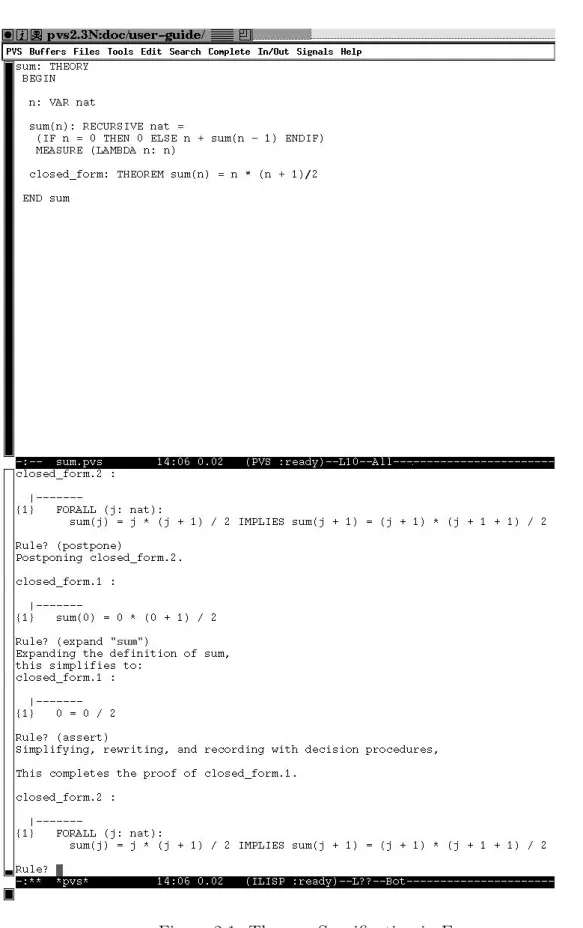
Now let’s develop a small specification. Figure2.1shows a specification for summation of the firstn natural numbers, as it appears in Emacs. Thesumspecification is in the top window, and a proof is in progress in the bottom. The mode line indicates that PVS is ready for a command.
This simple theory has no parameters and contains three declarations. The first declaresnto be a variable of typenat, the built-in type of natural numbers. The next declaration is a recursive definition of the function sum(n) whose value is the sum of the first n natural numbers. Associated with this definition is a measure function, following the MEASURE keyword, which is explained below. The final declaration is a formula which gives the closed form of the sum.
Thesumtheory may be introduced to the system in a number of ways, all of which create a file with a .pvs extension.4 The most common ways are:
1. Simply use M-x find-file (C-x C-f), or M-x find-pvs-file (M-x ff, C-c C-f), provide sum.pvsfor the file name and type in the specification.5
2. Use the M-x new-pvs-file command (M-x nf) to create a new PVS file, and type sum when prompted for a file name. Then simply type the specification into the buffer (a basic template will be provided).
3. Since the file is included in the distribution in the Examples subdirectory of the main PVS directory, it can be imported with the M-x import-pvs-file
4The file does not have to be namedsum.pvs, it simply needs the.pvs extension. 5If there is already a file calledsum.pvsin the current context, this will load that file.
2.1 Creating the Specification 9
10 2.2 Parsing and Typechecking
command (M-x imf). Use theM-x whereis-pvs command to find the path of the main PVS directory.
4. Finally, any external means of introducing a file with extension .pvs into the current directory will make it available to the system; for example, going to a UNIX window and using vi to type it in, or cp to copy it from the Examples
subdirectory.
2.2
Parsing and Typechecking
Once the sum specification is displayed in the current buffer, it can be parsed with the M-x parse (M-x pa) command, which checks the syntactic consistency of the specification and creates the internal abstract representation for the theory described by the specification. If the system finds an error during parsing, an error window will pop up with an error message, and the cursor will be placed in the vicinity of the error. If you didn’t get an error, introduce one (say by misspelling theVARkeyword), then move the cursor somewhere else and parse the file again—note that the buffer is automatically saved. Fix the error and parse once more. In practice, the parse command is rarely used, as the system automatically parses the specification when it needs to.
The next step is to typecheck the file by typing M-x typecheck (M-x tc, C-c C-t), which checks for semantic errors, such as undeclared names and ambiguous types. After sum has been typechecked, a message is displayed in the minibuffer indicating that two TCCs were generated. These TCCs represent proof obligations that must be discharged before the sum theory can be considered typechecked. The proofs of theTCCs may be postponed indefinitely, though in general it is a good idea to view TCCs to convince yourself that they are provable before moving on to other proofs in your specification. TCCs can be viewed using the M-x show-tccs (M-x tccs, C-c C-q s) command, the results of which are shown in Figure 2.2 below.
% Subtype TCC generated (at line 7, column 33) for n - 1 % untried
sum_TCC1: OBLIGATION FORALL (n): NOT n = 0 IMPLIES n - 1 >= 0;
% Termination TCC generated (at line 7, column 29) for sum % untried
sum_TCC2: OBLIGATION FORALL (n): NOT n = 0 IMPLIES n - 1 < n;
Figure 2.2: TCCs for Theory sum
The first TCC is due to the fact that sum takes an argument of typenat, but the type of the argument in the recursive call to sum is integer, since nat is not closed under subtraction. Note that theTCCincludes the conditionNOT n = 0, which holds in the branch of the IF-THEN-ELSE in which the expressionn - 1 occurs.
2.3 Proving 11
The secondTCCis needed to ensure that the functionsumis total,i.e., terminates. PVS does not directly support partial functions, although its powerful subtyping mechanism allows PVS to express many operations that are traditionally regarded as partial. The measure function is used to show that recursive definitions are total by requiring the measure to decrease with each recursive call.
These TCCs are trivial, and in fact can be discharged automatically by using the
M-x typecheck-prove (M-x tcp) command, which attempts to prove all TCCs that have been generated. (Try it.)
2.3
Proving
We are now ready to try to prove the main theorem. Place the cursor on the line containing theclosed formtheorem, and typeM-x prove(M-x prorC-c p). A new buffer will pop up, the formula will be displayed, and the cursor will appear at the
Rule? prompt, indicating that the prover is ready to accept input. The commands needed to prove this theorem constitute only a very small subset of the commands available to the prover. In fact, for this proof all that is actually needed is the single command(induct-and-simplify "n"), which is a more powerful strategy. For more information on these and other prover commands consult the prover guide [7].
First, notice the display, which consists of a single formula (labeled {1}) under a dashed line. This is asequent; formulas above the dashed lines are calledantecedents and those below are called consequents. The interpretation of a sequent is that the conjunction of the antecedents implies the disjunction of the consequents. Either or both of the antecedents and consequents may be empty. An empty antecedent is equivalent to true, and an empty consequent is equivalent to false, so if both are empty the sequent is false. Every proof in PVS starts with a single consequent.
The basic objective of the proof is to generate a proof tree of sequents in which all of the leaves are trivially true. The nodes of the proof tree are sequents, and while in the prover you will always be looking at an unproved leaf of the tree, called the current sequent. Thecurrent branch of a proof is the branch leading back to the root from the current sequent. When a given branch is complete (i.e., ends in a proved leaf), the prover automatically moves on to the next unproved branch, or, if there are no more unproven branches, notifies you that the proof is complete.
Now on to the proof. We will prove this formula by induction on n. To do this, type (induct "n").6 This is not an Emacs command, rather it is typed directly at
the prompt, including the parentheses. As indicated, two subgoals are generated; the one displayed is the base case, where n is 0. To see the inductive step, type
(postpone), which postpones the current subgoal and moves on to the next unproved 6PVS expressions are case-sensitive, and must be put in double quotes when they appear as arguments in prover commands.
12 2.3 Proving
one. Type (postpone) a second time to cycle back to the original subgoal (labeled
closed form.1).
Three extremely useful Emacs key bindings to know here are M-p, M-n, and M-s.
M-p gets the last input typed to the prover; further uses of M-p cycle back in the input history. M-n works in the opposite direction. To use M-s, type the beginning of a command that was previously input, and type M-s. This will get the previous input that matches the partial input; further uses of M-s will find earlier matches. Try these key bindings out; they are easier to use than to explain. Thus to type the second postpone command above, you can either type M-p or type (po followed by
M-s. Section 3.5.7 on page 36 describes further useful shortcut commands for the prover.
To prove the base case, we need to expand the definition of sum, which is done by typing(expand "sum"). After expanding the definition of sum, we issue the(assert)
command, which applies the decision procedures of the prover to simplify the conse-quent to TRUE, completing the proof of this subgoal. The prover then automatically moves on to the next subgoal, which is the inductive step.
The first thing to do here is to eliminate the FORALL quantifier. This can most easily be done with the skolem! command7, which provides new constants for the
bound variables. To invoke this command type (skolem!) at the prompt. The resulting formula may be simplified by typing (flatten), which will break up the consequent into a new antecedent and consequent. The obvious thing to do now is to expand the definition of sumin the consequent. This again is done with the expand
command, but this time we want to control where it is expanded, as expanding it in the antecedent will not help. So we type(expand "sum" +), indicating that we want to expandsum in the consequent.8
The final step is to invoke the PVS decision procedures, which can automatically decide certain fragments of arithmetic. This is done by typing(assert). Theassert
command actually does a lot more than decide arithmetical formulas, performing three basic tasks:
• It tries to prove the subgoal using the decision procedures.
• It stores the subgoal information in an underlying database, allowing automatic use to be made of it later.
• It simplifies the subgoal by rewriting (if any auto-rewrites have been given) and by using the underlying decision procedures.
These arithmetic and equality procedures are the main workhorses of most PVS proofs.
7The exclamation point differentiates this command from theskolemcommand, where you pro-vide the new constant names.
8We could also have specified the exact formula number (here1), but including formula numbers in a proof tends to make it less robust in the face of changes. There is more discussion of this in the prover guide [7].
2.3 Proving 13
The proof is now complete, and is saved in the sum.prf file. The buffer from which theprove command was issued is then redisplayed if necessary, and the cursor is placed on the formula that was just proved. The entire proof transcript is shown below. Yours may be slightly different, depending on your window size and the timings involved.
closed_form :
|---{1} FORALL (n: nat): sum(n) = n * (n + 1) / 2 Rule? (induct "n")
Inducting on n on formula 1, this yields 2 subgoals: closed_form.1 : |---{1} sum(0) = 0 * (0 + 1) / 2 Rule? (postpone) Postponing closed_form.1. closed_form.2 : |---{1} FORALL (j: nat):
sum(j) = j * (j + 1) / 2 IMPLIES sum(j + 1) = (j + 1) * (j + 1 + 1) / 2
Rule? (postpone)
Postponing closed_form.2.
closed_form.1 :
|---{1} sum(0) = 0 * (0 + 1) / 2 Rule? (expand "sum")
Expanding the definition of sum, this simplifies to:
closed_form.1 :
|---{1} 0 = 0 / 2 Rule? (assert)
Simplifying, rewriting, and recording with decision procedures,
This completes the proof of closed_form.1.
14 2.3 Proving
|---{1} FORALL (j: nat):
sum(j) = j * (j + 1) / 2 IMPLIES sum(j + 1) = (j + 1) * (j + 1 + 1) / 2
Rule? (skolem!) Skolemizing,
this simplifies to: closed_form.2 :
|---{1} sum(j!1) = j!1 * (j!1 + 1) / 2 IMPLIES
sum(j!1 + 1) = (j!1 + 1) * (j!1 + 1 + 1) / 2
Rule? (flatten)
Applying disjunctive simplification to flatten sequent, this simplifies to:
closed_form.2 :
{-1} sum(j!1) = j!1 * (j!1 + 1) / 2
|---{1} sum(j!1 + 1) = (j!1 + 1) * (j!1 + 1 + 1) / 2 Rule? (expand "sum" +)
Expanding the definition of sum, this simplifies to:
closed_form.2 :
[-1] sum(j!1) = j!1 * (j!1 + 1) / 2
|---{1} 1 + sum(j!1) + j!1 = (2 + j!1 + (j!1 * j!1 + 2 * j!1)) / 2 Rule? (assert)
Simplifying, rewriting, and recording with decision procedures,
This completes the proof of closed_form.2.
Q.E.D.
Run time = 0.81 secs. Real time = 223.01 secs.
A brief version of the just completed proof can be generated by the command command M-x show-last-proof.
2.4 Status 15
2.4
Status
Now type M-x status-proof-theory (M-x spt) and you will see a buffer that dis-plays the three formulas in sum, along with an indication of their proof status. This command is useful to see which formulas and TCCs still require proofs. Another use-ful command is M-x status-proofchain(M-x spc), which analyzes a given proof to determine its dependencies. To use this, go to thesum.pvsbuffer, place the cursor on the closed form theorem, and enter the command. A buffer will pop up indicating that the proof is complete, and that it depends on theTCCs and thenat induction
axiom, as well as some definitions and TCCs provided by the prelude.
2.5
Generating L
ATEX
In order to try out this section, you must have access to LATEX and a TEX previewer such as xdvi.
Type M-x latex-theory-view (M-x ltv). You will be prompted for the theory name to which you should type sum, or just Return if sum is the default. You will then be prompted for the TEX previewer name. Either the previewer must be in your path, or the entire pathname must be given. This information will only be prompted for once per session, after which PVS assumes that you want to use the same previewer. You can set the previewer automatically, by adding the following line to your ~/.pvsemacsfile.
(setq pvs-latex-viewer "previewer")
sum: theory begin
n: var nat
sum(n): recursive nat = (if n = 0 then 0 else n+ sum(n−1) endif)
measure (λ (n: nat): n)
closed form: theorem sum(n) = n×(n+ 1)/2
end sum
Figure 2.3: Theory sumwith default translations
After a few moments the previewer will pop up displaying thesumtheory, as shown in Figure2.3. Note that*has been translated as×andLAMBDAasλ. These and other translations are built into PVS; you may also specify translations for keywords and identifiers by providing a substitution file named pvs-tex.sub, that contains com-mands to customize the LATEX output. For example, if the substitution file contains the two lines
16 2.5 Generating LATEX
sum:
Theory
begin
n: var nat Pn
i=0i: recursive nat = (if n = 0 then 0 else n+ Pn−1
i=0 i endif) measure (λ (n: nat): n)
closed form: theorem Pni=0i = n×(n+ 1)/2 end sum
Figure 2.4: Theory sumwith additional translations
THEORY key 7 {\large\textbf{\textrm{Theory}}} sum 1 2 {\sum_{i = 0}^{#1} i}
Chapter 3
PVS Commands
This chapter contains descriptions for all PVS commands; the commands are grouped according to function. A summary of the information in this chapter is also provided in the buffer displayed by the M-x pvs-help command. The information in this chapter is best absorbed after reading and experimenting with the brief tour provided in Chapter 2.
Each of the following sections begins with a table summarizing the commands dis-cussed in that section; each table entry gives the full name of the command, available aliases and/or key bindings, a brief description, and the effect of providing command arguments. Commands are invoked by typing M-x followed by the command name or its abbreviation, or by using a (less mnemonic) key sequence. For example, the
typecheckcommand can be invoked by typingM-x typecheckor one of the alternate forms M-x tc or C-c C-t. The behavior of many of the commands can be modified by providing an argument, and many of the commands work on regions.1 For
ex-ample, preceding the typecheck command with a C-u or M-1 forces the file to be reparsed and typechecked, even if it has already been typechecked. Each command that takes an argument has a second line prefixed by Arg: that describes the effect of the argument.
Many PVS commands are appropriate at either the file or theory level; yielding two different commands. For example, the command for creating a new PVS file is
new-pvs-file, while the command new-theory creates a template for a new the-ory within the current PVS file. In general, a command foo that applies to both files and theories will have a version named M-x foo-pvs-file and one named M-x foo-theory.
1See Section 4.9 of [8] for details on providing arguments to commands, and Section 9 for creating and manipulating regions.
18 3.2 Getting Help
3.1
Exiting PVS
Command Aliases Function
exit-pvs C-x C-c Terminate PVS session
suspend-pvs C-x C-z Suspend PVS
Theexit-pvscommand first saves the context information (see thesave-context
command) and then exits PVS. If there is a proof in progress, the system will not exit, but will instead output a message asking you to exit the prover, thus giving you the opportunity to save the proof before exiting.
The suspend-pvs command suspends the Emacs process, except under X-windows, where the command has no effect. The system first asks whether the context should be saved; if you answer yes the save-context command is invoked prior to suspending PVS. This may take a while, as the save-contextmay have to save any number of files, depending on what has changed in the context. The suspended job can be restarted from the UNIX shell in which it was suspended by first determining the job number (using the UNIX command “jobs”) and then typing “fg %n”, where n is the job number.2
3.2
Getting Help
Command Aliases Function
help-pvs,pvs-help C-c h Display the PVS help buffer
help-pvs-bnf,pvs-help-bnf C-c C-h b Display the pvs grammar
help-pvs-language, C-c C-h l Display help for the PVS language
pvs-help-language
help-pvs-prover, C-c C-h p Display help for the prover commands
pvs-help-prover
help-pvs-prover-command, C-c C-h c Display help for prover command
pvs-help-prover-command
help-pvs-prover-strategy, C-c C-h s Displays the specified prover strategy
pvs-help-prover-strategy
x-prover-commands Displays the prover commands in a Tcl/Tk window
help-pvs-prover-emacs, C-c C-h e Display help for prover emacs commands
pvs-help-prover-emacs
The help-pvscommand displays a summary of PVS commands in the PVS Help
buffer. Help may be obtained for an individual command by typing C-h f followed by the command or its abbreviation, or by typingC-h kfollowed by the key sequence
2This assumes you are running the
cshortcshshell. To restart under a shell lacking job control, use the UNIXcommandpsto determine the process id (pid) and then dokill -CONT pid.
3.3 Editing PVS Files 19
that invokes the command. These are built in to Emacs, and may be used to get help for any Emacs command or key sequence, not just PVS commands.
The help-pvs-bnf command provides the PVS grammar in BNF form, and the
help-pvs-languagecommand displays a summary of the PVS language with exam-ples in the Language Help buffer.
The help-pvs-prover command displays the documentation string for all of the prover commands in the Prover Help buffer. The help-pvs-prover-command
displays the documentation string for the specified command, and the
help-pvs-prover-strategy command provides the arguments, definition, format string, and documentation string for the specified command. The latter is useful for finding out exactly what a strategy does, or for defining your own strategies based on existing ones. If you are running under the X window system, x-prover-commands
provides an easy interface to get help for individual prover commands.
The help-pvs-prover-emacs command displays a summary of the commands that provide a convenient Emacs interface to the PVS prover. This is discussed in more detail in Section 3.5.7, page 36. The help text appears in the Prover Emacs Help buffer.
3.3
Editing PVS Files
Command Aliases Function
forward-theory M-} Move forward to beginning of next theory
backward-theory M-{ Move backward to beginning of previous theory
find-unbalanced-pvs C-c ] Find unbalanced delimiters
comment-region C-c ; Comment out all lines in the current region
Arg: Uncomment all lines in the current region
PVS specification files are edited using the standard Emacs editing commands. AppendixA, page75gives a brief introduction to the most useful Emacs commands for editing PVS files.
The forward-theory and backward-theory commands are used to move to dif-ferent theories within a single PVS file. The cursor is moved to the beginning of a theory; if there are no preceding or following theories to move to, the message “No more theories” or “No earlier theories” is displayed and the cursor remains un-changed.
The find-unbalanced-pvs command checks whether there are any unbalanced parentheses (( )), square brackets ([ ]), curly braces ({ }), or BEGIN-END pairs. If none are found, the message “All delimiters balance” is displayed. Otherwise the cursor is left at the token for which there is no match and a corresponding message is displayed.
The comment-region command inserts the comment character (%) at the begin-ning of every line in the specified region. To uncomment a region, simply provide
20 3.4 Parsing and Typechecking
an argument to the command, and all commented lines within the region will be uncommented.
3.4
Parsing and Typechecking
3.4.1
Parsing
Command Aliases Function
parse pa Parse file in current buffer
Arg: Forces the file to be reparsed
Parsing a PVS specification accomplishes two things: first, it checks that the specification is syntactically correct, i.e., satisfies the PVS grammar, and second, it builds the internal abstract grammar data structures. The parse command is not normally used, as typechecking will automatically parse the file if required. Note that only files (with extension .pvs) may be parsed. When a file is parsed, it becomes a part of the context if it wasn’t already, and any proofs that have been saved for the file are reinstated. If the file being parsed has a valid.binfile, then this file is loaded instead (this will result in the file being typechecked as well as parsed).
Parsing is invoked by moving the cursor to a buffer containing a file in the current context, and issuing the parse command. While parsing the file, the minibuffer displays the message “Parsing foo.” If there is no error, the message “foo parsed in # seconds” is displayed. If the file has not changed since the last time it was parsed, the message “foo is already parsed” is displayed. To force reparsing, provide an argument to the parse command. Note that the argument is usually not needed, as changes to the file are automatically detected by the system and the file is reparsed in that case.
When an error is detected, the file is displayed with the cursor at the location where the error was detected, which is frequently after the actual source of the error. In addition, the PVS Error buffer is displayed with an explanatory error message. You may need to consult the language manual for details on the grammar.
Certain language features may result in the parser producing theory messages. See theshow-theory-messages command (page 22) for details.
3.4 Parsing and Typechecking 21
3.4.2
Typechecking
Command Aliases Function
typecheck tc,C-c C-t Typecheck theories in current buffer
Arg: Force reparsing and retypechecking
typecheck-importchain tci Typecheck importchain of theories
Arg: Force reparsing and retypechecking
typecheck-prove tcp Typecheck theories, proving TCCs
Arg: Force reparsing and retypechecking
typecheck-prove-importchain tcpi Typecheck importchain of theories, proving TCCs
Arg: Force reparsing and retypechecking
Typechecking a PVS specification checks semantic constraints, determines the types of expressions, and resolves names (see the language manual [3]). Typecheck-ing is invoked much like parsTypecheck-ing, and automatically parses the file if necessary. Er-rors are indicated in the same manner as for parsing, although the cursor is usually more accurately positioned at the error. As in parsing, an argument to the com-mand forces reparsing and retypechecking. Without the argument, typecheck and
typecheck-importchainare the same. With the argument,typecheckonly reparses and retypechecks the current file, whiletypecheck-importchainforces reparsing and retypechecking of the entire import chain of the theories of the current file.
Forcing a file to be retypechecked is done primarily for development and debug-ging, as is the case for reparsing. If you have typechecked a set of PVS files, made some changes and found an error on retypechecking that shouldn’t have occurred, try forcing a typecheck of the file where the error occurred. If that doesn’t help, try forcing with typecheck-importchain. The error should disappear after that, unless it is a true typecheck error. If it is not a simple typecheck error, send a bug report [email protected].
The typechecker will automatically attempt to typecheck any theories appearing in
IMPORTINGclauses. If the theories appear in the current context, then the associated file is typechecked, otherwise PVS tries to find a file with the same name as the theory. For example, in typechecking
IMPORTING foo[int]
the current context (reflected in the context file .pvscontext) is searched for a file known to contain theory foo. If no such file is found, then the file foo.pvsis sought. If that also cannot be found, the system complains and the desired file must be manually located (or created) and typechecked.
The typecheck-provecommand typechecks the file, and then attempts to prove the generated TCCs. If the file is already typechecked, but the TCC proofs have not yet been attempted, then they are attempted in the order they were generated. The
TCC proof attempts are made with built-in prover strategies (selected according to the type of TCC generated). These strategies basically expand all definitions in the
22 3.4 Parsing and Typechecking
TCC, and repeatedly skolemize, perform heuristic instantiation, lift IFs, and invoke the decision procedures.3 As explained in the prover guide, you may redefine thetcc
strategies; usually to extend their capabilities.
The typecheck-prove-importchaincommand typechecks the file, and attempts to prove the TCCs of all the theories on the import chain that have not already been attempted. Providing an argument forces the retypechecking of the import chain.
The typecheck-provecommands can take some time, especially if there are a lot of TCCs. This can be controlled in a number of ways:
Use these commands sparingly. Our experience is thatTCCs should be analyzed whenever a new specification is created, significantly modified, or is nearing completion. At these times it pays to use the typecheck-provecommand and to look at the TCCs that weren’t subsequently proved, and check that they at least seem provable. After minor changes, we find it best to use justtypecheck
and defer consideration of the TCCs until later.
Define your own TCC strategy. The prover guide describes techniques for defin-ing your own strategies, and you may change existdefin-ing ones, such as the tcc
strategy to be more efficient for your particular specifications. Changing the
tccstrategy should probably be done in thepvs-strategiesfile in the current context, especially if it is tailored to the specifications in that context.
Use judgements to cut down on the number of TCCs. The language manual describes how to do this.
Use NONEMPTY TYPE or CONTAINING in type declarations This is also described in the language manual.
When typechecking is completed, a message is displayed, indicating the total number ofTCCs generated along with a breakdown of the number proved, subsumed4,
and unproved.
3.4.3
Typechecking Information
Command Aliases Function
show-theory-warnings Show typechecker warnings for the given theory
show-pvs-file-warnings Show typechecker warnings for the given file
show-theory-messages Show typechecker messages for the given theory
show-pvs-file-messages Show typechecker messagess for the given file
3The TCC strategies are variants of a powerful strategy called
(grind), which is useful for more than justTCCs.
4A TCCis subsumed if there is an earlier TCC which implies it. PVS uses a simple syntactic test, so not all possible subsumptions will be determined.
3.5 Proving 23
In the process of typechecking a specification, conversions5 may be applied to make an expression type correct. This may not be what the user intended, so in addition to reporting the number ofTCCs generated during typechecking the system will also report the generation of any messages or warnings.6
If there is only one possible conversion that could be applied to make an expres-sion type correct, a message is generated. If there were multiple possibilities, the typechecker will choose one and generate a warning.
3.5
Proving
The prover is described in full in the prover guide [7], here we simply describe the commands used to invoke the prover and to rerun proofs noninteractively.
The prover may be applied to a single formula, all formulas in a theory, all formulas in the import chain of a theory, all formulas in a PVS file, or all formulas in the proof chain of a given formula. Only the prove,x-prove, step-proof and x-step-proof
commands lead to prover interaction; the other commands simply rerun proof scripts that have been previously generated.
PVS keeps track of the status of formulas within and across sessions. The sta-tus may be one of four values; “untried” means that no proof has been attempted, “proved” means that the proof has been completed, “unchecked” means that a proof has been completed, but that the specification has been modified since the proof attempt, and “unfinished” means that a proof has been attempted, but not yet com-pleted. Formulas labelled as “proved” will be “complete” or “incomplete”. The status is only “complete” when all formulas (including TCCs) upon which the proof is dependent have been completed.
Modifying a specification causes the proof status of all proved formulas to revert to “unchecked,” although the proof scripts are retained.7
5See the Language Guide[3] for details of conversions.
6Whilst in the prover, a message is generated directly to indicate any conversions applied to the sequent.
7PVS currently tracks the consequences of changes rather coarsely: any change in a file reverts all the proofs in that file, and all those in theories that depend on that file (and so on, transitively) to the “unchecked” state.
24 3.5 Proving
3.5.1
Proving a Single Formula
Command Aliases Function
prove pr,C-c p Prove formula pointed to by cursor
x-prove xpr,C-c C-p x Start proof along with X display
step-proof prs,C-c C-p s Set up proof stepper for current formula
x-step-proof xsp,C-c C-p X Combinesx-prove and step-proof redo-proof prr C-c C-p r Redo the proof of formula at cursor
Arg: don’t display the proof
prove-next-unproved-formula
prnext,C-c C-p n Start proof on next unproved formula
To invoke the prover on a single formula, move the cursor to any part of the desired formula and type the prove command. The formula may be in a PVS file, a buffer generated by the prettyprint-expanded command (with extension .ppe), a buffer generated by the show-tccs command (with extension .tccs), or a prelude buffer produced by one of the view-prelude commands.8 If the formula has already been
proved, then you will be asked whether the proof should be retried; ano answer ends the prove command. Otherwise, if the formula has an associated proof script, you will be asked whether to rerun the proof or start over. In either of these two cases, the proof is displayed in the*pvs*buffer. If the proof script terminates before completing the proof or if no script was requested, the prover will prompt for a command, which should be typed directly into the *pvs* buffer at the Rule? prompt.9 At this point
you are interacting with the prover, and certain commands will be unavailable until the prover is exited.10
The prover exits automatically when a proof is successfully completed. If at any time you want to exit the prover, go to the bottom of the *pvs* buffer11 and type (quit) to the Rule? prompt. If there is no such prompt, type C-c C-c and
(restore)to get to the prompt. Once the prover is exited, control is returned to the buffer from which the prover was invoked, with the cursor positioned at the beginning of the formula being proved. Do not kill the *pvs* buffer, as this will also kill the associated PVS process.
The x-prove command is exactly like the prove command, except that it also pops up a window in which the proof tree is represented graphically. See section3.10, 8Of course, the prelude formulas have already been proved; this facility allows you to explore the proofs.
9The system tries to keep as much of the proof visible as possible by redisplaying the screen so that the Rule? prompt is at the bottom of the window. This feature is not always desir-able (e.g., over a slow modem connection), and may be turned off by setting the Emacs variable *pvs-maximize-proof-display*to nil.
10 Specifically, the commands
parse, typecheck, prove, change-context, exit-pvs, and all of the prove commands of this section are unavailable while the prover is active.
11While in the prover you may freely move around in the
*pvs*buffer or move to any other buffer to examine specifications or perform ordinary editing functions.
3.5 Proving 25
page 48 for more details. If you are not running under X windows, then a warning message will be displayed and the command will be treated as aprove command.
The step-proof command is used to initiate the proof stepper, and is invoked in the same way as the prove command. Two buffers are displayed, one showing the sequent (the*pvs*buffer) and the other showing the proof script associated with the formula, if any (the Proof buffer). Section 3.5.10, page 38 explains how to use the proof stepper.
The x-step-proofcommand combines thex-proveand step-proofcommands. The prove-next-unproved-formula command invokes the prover on the next unproved formula at or beyond the current cursor position. If the formula already has a proof, you will be asked whether to go ahead and run it or to start anew. Note that starting a new proof will not delete the old proof unless you allow the prover to overwrite it at the end of the proof session.
Theredo-proofcommand is invoked exactly like theprovecommand, but simply reruns the proof with no questions asked. An error is signaled if the indicated formula has no associated proof. In addition, if an argument is provided, the proof will not be displayed interactively—instead the proof is processed in the background, and the status of the proof is provided in the minibuffer when the attempt is completed.
26 3.5 Proving
3.5.2
Proving Sets of Formulas
Command Aliases Function
prove-theory prt,C-c C-p t Rerun unproved proofs in theory
Arg: include those already proved
prove-theories Rerun proofs in specified theories
Arg: include those already proved
prove-pvs-file Rerun unproved proofs in current file
prf,C-c C-p f Arg: include those already proved
prove-importchain Rerun prove-theory on IMPORTchain
pri,C-c C-p i Arg: include those already proved
prove-importchain-subtree Rerun prove-theory on specified subtree
pris of IMPORTchain
Arg: include those already proved
prove-proofchain Rerun proofs on formulas in proofchain
prp,C-c C-p p Arg: include those already proved
prove-formulas-theory Try unproved formulas with specified strategy
prft Arg: attempt proved formulas as well
prove-formulas-pvs-file Try unproved formulas with specified strategy
prff,C-c C-p U Arg: attempt proved formulas as well
prove-formulas-importchain Try unproved formulas with specified strategy
prfi Arg: attempt proved formulas as well
prove-formulas-importchain-subtree Try unproved formulas with specified strategy
prfs Arg: attempt proved formulas as well
prove-tccs-theory Try unproved TCCs with specified strategy
prft Arg: attempt proved TCCs as well
prove-tccs-pvs-file Try unproved TCCs with specified strategy
prff,C-c C-p U Arg: attempt proved TCCs as well
prove-tccs-importchain Try unproved TCCs with specified strategy
prfi Arg: attempt proved TCCs as well
prove-tccs-importchain-subtree Try unproved TCCs with specified strategy
prfs Arg: attempt proved TCCs as well
prove-untried-theory Try untried proofs with specified strategy
prut,C-c C-p u Arg: attempt TCCs as well
prove-untried-pvs-file Try untried proofs with specified strategy
pruf,C-c C-p U Arg: attempt TCCs as well
prove-untried-importchain Try untried proofs with specified strategy
prui Arg: attempt TCCs as well
prove-untried-importchain-subtree Try untried proofs with specified strategy
prus Arg: attempt TCCs as well
Proof scripts can be rerun using the prove-theory, prove-pvs-file,
prove-importchain, prove-importchain-subtree and prove-proofchain
commands, which simply rerun the proof scripts, if any, for all of the formulas of the theory, its PVS file, import chain, import chain subtree, or proof chain, respectively.
3.5 Proving 27
The import chain of a theory is simply the transitive closure of the IMPORTINGs including those implicit in a theory declaration. The prove-importchain-subtree
command takes additional theory name arguments and excludes these theories and their subtree from the importchain. The proof chain of a given formula is the transitive closure of the formulas used in the proof of that formula. These commands skip formulas that have no proof scripts, and normally skip formulas which already have status “proved;” providing an argument to the command forces PVS to reprove all formulas that have proof scripts. When any of these commands finish processing, the corresponding proof status command is automatically invoked to display the results (see Section3.15).
The prove-theories command prompts for theory names (with completion) one at a time, until an empty theory name is provided, and then runs prove-theoryon each of these.
The commands prove-formulas-theory, prove-formulas-pvs-file,
prove-formulas-importchain, prove-formulas-importchain-subtree
prove-tccs-theory, prove-tccs-pvs-file, prove-tccs-importchain,
and prove-tccs-importchain-subtree prove-untried-theory,
prove-untried-pvs-file, prove-untried-importchain, and
prove-untried-importchain-subtree are all similar, but allow a given strat-egy to be applied to all applicable formulas.
For the prove-formulas commands, all unproved formulas that are not TCCs or axioms or postulates are attempted with the provided strategy, which defaults to
(grind). Theprove-tccs commands are similar, but only attempt unproved TCCs, and the default strategy is(tcc). With an argument, the already proved formulas are also attempted. If a given proof attempt succeeds, then it replaces any existing proof. If it fails and the given formula already has a proof, then the original proof is kept. Otherwise the new proof is associated with the formula. Thus after these commands all attempted formulas will have proofs associated with them. The strategy is any acceptable single prover command, as in the following example.
(then (grind :if-match nil) (inst?) (grind))
The prove-untried commands are similar, but they only affect formulas that have no associated proof, and providing an argument attempts TCCs that have no proofs as well. To apply a strategy to just the untried TCCs, redefine thetccin your
pvs-strategiesNote that after any of these commands, all attempted formulas will have associated proofs, so issuing the same command with a different strategy will have no effect.
28 3.5 Proving
3.5.3
Selecting Decision Procedures
Command Function
new-decision-procedures
Set the default to new decision procedures
old-decision-procedures
Set the default to old decision procedures
prove-theory-using-default-dp
Rerun unproved proofs in specified theory using default decision procedures
Arg: include those already proved
prove-theories-using-default-dp
Rerun proofs in specified theories using default decision procedures
Arg: include those already proved
prove-pvs-file-using-default-dp
Rerun unproved proofs in current file using default decision procedures
Arg: include those already proved
prove-importchain-using-default-dp
Rerun prove-theory onIMPORTchain using default decision procedures
Arg: include those already proved
prove-importchain-subtree-using-default-dp
Rerun prove-theory on subtree of IMPORTchain using default dec. procedures
Arg: include those already proved
prove-proofchain-using-default-dp
Rerun proofs on all formulas in proof chain using default decision procedures
Arg: include those already proved
These commands have no effect if PVS was invoked with the -force-decision-procedures switch; see Section 4.1
See the prover manual for a discussion of the new and old decision procedures; here we simply describe the commands for controlling their use.
The new-decision-procedures and old-decision-procedures commands set the default decision procedures to be used in subsequent proofs. When a single formula is attempted that doesn’t have a proof, the default decision procedure is automatically used. If it already has a proof that was developed using the other decision procedure, you will be prompted whether to use the default or stay with the original decision procedure. When a proof is saved, the decision procedure used during the proof is saved as well. For the prover commands such as prove-theory, the proofs are each attempted with the decision procedure they were developed with. The remaining commands allow existing proofs to be rerun using the default decision procedures, and otherwise behave exactly as the similarly named commands defined in the previous section.
3.5 Proving 29
3.5.4
Editing and Viewing Proofs
Command Aliases Function
edit-proof show-proof Edit the proof of the indicated formula
install-proof C-c C-i Install proof on the indicated formula
install-and-step-proof C-c s Install proof on a formula and step
install-and-x-step-proof C-c x Install proof on formula, display, and step
revert-proof Revert to previous proof of formula
remove-proof Remove proof associated with a formula
show-proof-file Edit the proofs of the indicated PVS file
show-orphaned-proofs Edit the orphaned proofs
show-proofs-theory Show all proofs of a theory
show-proofs-pvs-file Show all the proofs of a PVS file
show-proofs-importchain Show all proofs of importchain of a theory
install-pvs-proof-file Installs proof file for typechecked theory
load-pvs-strategies Loads a pvs-strategies file
set-print-depth Sets print depth for printing sequents
set-print-length Sets print length for printing sequents
set-print-lines Sets number of lines to print for each sequent formula
set-rewrite-depth Sets the print depth for rewrite messages
set-rewrite-length Sets the print length for rewrite messages
dump-sequents Save unproved sequents to a file
toggle-proof-prettyprinting Toggles the prettyprinting of proof files
Every formula of a specification for which a proof has been attempted has an asso-ciated proof script that reflects the commands used during the proof attempt. Proof scripts may be edited using the edit-proofcommand. This command is invoked on the formula declaration at the cursor; the formula may occur in a specification buffer (with extension .pvs), a prettyprint-expanded buffer (with extension .ppe), a show-tccs buffer (with extension.tccs), or a buffer generated by one of theview-prelude
commands. When the edit-proof command is invoked, it creates a buffer with the name Proof containing the relevant proof script,12 which may then be edited using
the standard Emacs editing commands. Editing proof scripts is a convenient way to handle modifications made to a specification, and allows the same proof script to be revised and used for many similar formulas. The Proofbuffer normally persists until the next time the edit-proof command is invoked, allowing the same proof script to be attached to different formulas using install-proof.
A proof script records a tree of prover commands that will generate a proof of the given formula. Although the proof tree does not record verbatim the commands originally typed to the prover, the proof script should be easy to understand. For example, the Proof buffer of the formula closed form in the sum example would contain
12If the formula has no proof script, an empty
30 3.5 Proving
;;; Proof for formula sum.closed_form ;;; developed with old decision procedures (""
(INDUCT "n")
(("1" (EXPAND "sum") (ASSERT))
("2" (SKOLEM!) (FLATTEN) (EXPAND "sum" +) (ASSERT))))
When editing is complete, the proof script may be attached either to the original, or to a different formula using the install-proof command. If this command is invoked in the Proof buffer, it attaches the new proof script to the original formula and offers to rerun the proof. The proof script may also be attached to any other formula by invoking install-proof in a .pvs, .ppe, or.tccs buffer, in which case the script is attached to the formula at the cursor. The previous proof script for the chosen formula is saved, and may be retrieved by means of the revert-proof
command, which swaps the previous script with the current one. If no proof is being edited (i.e., there is noProof buffer), an error is reported.
The proof may also be installed using the install-and-step-proof or
install-and-x-step-proof commands, both of which install the proof and initi-ate the proof stepper; the latter also displays the proof tree.
Checkpoints may be added to the Proofbuffer obtained by theedit-proof com-mand. To add a checkpoint, position the cursor and type C-c a. The checkpoint is indicated by a double exclamation point (!!). Any number of checkpoints may be added. When the proof is installed using C-c C-i, these are changed to the
checkpoint proof rule, and branches of the proof that do not have a checkpoint on them are wrapped in a just-install-proofproof rule. When this proof is rerun, it will run until it hits acheckpoint, and then prompt for a prover command. When it hits a just-install-proof, it simply installs the given commands and marks that branch as proved. This allows the prover to quickly get to the next checkpoint, with-out attempting to reprove branches that do not have checkpoints in them. When a proof that has just-install-proof rules in it is finished, the prover asks whether the proof should be rerun, as the formula will not be considered proved until the proof is rerun.
To remove a checkpoint from the Proof buffer, position the cursor at the check-point and typeC-c r. To remove all checkpoints, typeC-c DEL.
In addition to the above, the key bindings for browsing and the prover emacs (tab) commands are available in a Proof buffer.
The remove-proof command is used to remove the proof associated with the specified formula. The primary use for this is to remove proofs from axioms for which a proof attempt has been made.
If a proof is in progress, proofs may still be edited, but the prover must be exited before the edited proof may be attached to a formula. Note that invokingedit-proof
for-3.5 Proving 31
mula, if there is one. To display the current proof script, use theshow-current-proof
command described below.
As noted above, each specification file (with extension .pvs) has an associated proof file of the same name with a.prfextension. This file contains the proof scripts for all of the formulas of the specification file whose proofs have been attempted. The
show-proof-filecommand allows you to browse a proof file, and select or view any of the associated proof scripts. A Proofs File buffer is created with a line for each proof script in the file. You may select a proof script for editing, or simply view the script in a pop-up buffer. This command may be used to look at the proof file of any context or PVS file—in this respect it is analogous to the import-pvs-file
command.
To view a proof script, place the cursor on the desired line, and type “v.” The proof script will be displayed in a pop-up buffer, but may not be edited. To edit a proof script, position the cursor and type “s.” This will create or use the Proof
buffer which may be edited and attached to formulas exactly as described above. While developing a specification, some theorems or even entire theories may be moved around or deleted, creatingorphaned proofs. Orphaned proofs are saved in the
orphaned-proofs.prffile. In some cases, the system will recognize that an orphaned proof should be reattached to a formula, and will ask whether it should go ahead.
The show-orphaned-proofs command provides access to the orphaned proofs file by means of an Orphaned Proofs buffer that displays the formula name, theory name, and file name associated with each orphaned proof. A given proof may be selected by moving the cursor to the line and typing “s,” which pops up the Proof
buffer. This buffer is the same as the one generated by the edit-proof command, except that there is no default formula, so that install-proof (C-c C-i) will not work from the Proof buffer. Typing a “d” on a proof line deletes the corresponding entry from the orphaned proof file, typing a “v” pops up a View Proof buffer, and typing a “q” exits the orphaned proof buffer.
The commands show-proofs-theory, show-proofs-pvs-file, and show-proofs-importchain display all of the proofs of the associated theory, PVS file, or importchain in a buffer named Show Proofs, which is in PVS Viewmode.
The install-pvs-proof-filecommand prompts for a PVS file name, and reads in the corresponding proof file, replacing any proofs that may have been loaded or developed. This command is needed in order to get a new proof file accepted in a context. When specification files are parsed and/or typechecked, the corresponding proof files are read in. After that the system will not pay any attention to changes made to the proof file, but simply update it as changes are made that affect proof status. This command allows you to modify the file or copy a new one in and get it installed.
The load-pvs-strategies command loads the strategies files from your home directory, imported libraries, and the current context. This command is only needed when a new strategy is being developed during a proof; when a proof is started
32 3.5 Proving
the system checks whether any of the strategy files have changed and automatically loads them if they have. See the prover guide [7] for details on the contents of the
pvs-strategies files.
The set-print-depth, set-print-length, and set-print-lines commands control how much of an expression is displayed in a sequent. If the print depth and length are set to 0 and the lines is NIL, then the entire sequent is displayed. This is the default. If the depth is set to a positive integer, then any subterms at that depth are replaced by a pound sign (#). Similarly, if the length is set to a positive integer, then any subterms beyond the specified length are replaced by three periods (...). The length and depth of an expression are not easy to define, because it is related to the abstract syntax used by the prettyprinter. In general, expressions separated by commas have a length, while subterms13are deeper by one than the containing terms.
If the print lines is set to a number n, then only the first n lines of each formula of the sequent is displayed, and remaining lines are replaced by two periods (..). Note that all these commands are also rules in the prover that otherwise behave as aSKIP, so it is easy to adjust the printout interactively.
Theset-rewrite-depthandset-rewrite-lengthcommands control how much information to output when printing the results of automatic rewrites. Normally, both the rule name and the expression being rewritten are displayed in the proof commentary when an auto-rewrite is triggered. The value should be a positive number orNIL. If it is a positive number, then any subexpression at that depth or length will be replaced by a pair of periods (..) or thre