Telit Modules Software User Guide
Telit GSM/GPRS Family Software User Guide 1vv0300784 rev.6 2010-10-04
Reproduction forbidden without Telit Communications S.p.A. written authorization - All Rights Reserved page 2 of 178
This document is related to the following Telit Modules:
PRODUCT GT863-PY GT864-QUAD GT864-PY GM862-GPS GC864-QUAD GC864-DUAL GC864-QUAD V2 GC864-DUAL V2 GE863-QUAD GE863-GPS GE863-SIM GE863-PRO3 GE864-QUAD GE864-QUAD V2 GE864-DUAL V2 GE864-QUAD Automotive V2 GE864-QUAD Atex GE865-QUAD GL865-DUAL GL865-QUAD
Telit GSM/GPRS Family Software User Guide 1vv0300784 rev.6 2010-10-04
Reproduction forbidden without Telit Communications S.p.A. written authorization - All Rights Reserved page 3 of 178
Contents
1.
Introduction ... 11
1.1. Scope ... 11 1.2. Document Organization ... 11 1.3. Text Conventions ... 12 1.4. Related Documents ... 131.5. Document Change Log ... 14
2.
Basic Operations ... 15
2.1. AT Interface Style ... 15
2.2. Turning ON the Module ... 16
2.3. Turning OFF the Module ... 16
2.3.1. Software Shutdown ... 16
2.4. First Telit Module Approach ... 17
2.4.1. Telit Module Identification ... 17
2.4.2. Band Configuration ... 17
2.4.3. Enabling the Extended Error Result codes ... 18
2.4.4. Second Interface Instance ... 18
2.4.5. Serial Port Speed Configuration ... 20
2.4.6. AT Command Interface selection ... 21
2.4.7. SIM Checking ... 21
2.4.7.1. Query SIM presence and status ... 21
2.4.7.2. SIM PIN ... 22
2.4.7.3. SIM PUK ... 23
2.4.7.4. Query SIM Status ... 24
2.4.7.5. SIM Detection Mode ... 25
2.4.7.6. Generic SIM access ... 26
2.4.7.7. Preferred Operator List ... 27
2.4.8. Network checking ... 29
2.4.8.1. Query Network status ... 29
2.4.8.2. Network Operator Identification ... 30
2.4.8.3. Received Signal Strength & Quality ... 31
2.4.8.4. Network Status Checking ... 32
2.4.8.5. Enhanced Network Selection and AT&T functions ... 35
2.4.9. Network Survey ... 37
2.4.9.1. Network Survey ... 37
2.4.9.2. BCCH Network Survey ... 38
Telit GSM/GPRS Family Software User Guide 1vv0300784 rev.6 2010-10-04
Reproduction forbidden without Telit Communications S.p.A. written authorization - All Rights Reserved page 4 of 178
2.5.1. Setting up a Voice Call ... 38
2.5.1.1. Setting the Module in Voice Mode ... 38
2.5.1.2. Setting the Desired Audio Path Active ... 39
2.5.1.3. Setting the Desired Volume on the Active Audio Path Speaker Output ... 41
2.5.1.4. Checking for Microphone Mute Setting ... 41
2.5.2. Dialing a Phone Number (Voice Call) ... 42
2.5.3. Closing the Voice Call ... 42
2.5.4. Codec Information ... 43
2.5.5. Audio Codec ... 43
2.6. Establishing a CSD Data Call ... 44
2.6.1. Setting up Data Call Device ... 44
2.6.1.1. Setting the Device in Data Mode ... 44
2.6.1.2. Setting the Desired Modulation and Speed for the Connection ... 44
2.6.2. Dialing a Phone Number (Data Call) ... 45
2.6.3. Closing the Data Call ... 47
2.6.3.1. Exiting the Data Mode and Entering the Command Mode ... 47
2.6.3.2. Hanging up the Data Call ... 47
2.7. Answering an Incoming Call ... 48
2.7.1. GSM Single Numbering Scheme ... 48
2.8. Enabling TTY Function ... 50
2.9. HW Flow control ... 53
2.9.1. RTS detection of DTE ... 53
2.9.2. CTS assertion of Module ... 53
3.
Advanced Operations ... 54
3.1. Accessing the Phonebook ... 54
3.1.1. Selecting Phonebook Memory Storage ... 54
3.1.1.1. Locking or Unlocking ME ... 56
3.1.2. Finding Phonebook Entries ... 57
3.1.3. Reading Phonebook Entries ... 58
3.1.4. Writing a Phonebook Entry ... 59
3.1.5. Deleting a Phonebook Entry ... 60
3.1.6. Dialing a Phonebook Entry ... 61
3.2. Encryption Algorithm ... 62
3.2.1. Set Encryption Algorithm ... 62
3.3. Network Time Zone ... 63
3.3.1. Automatic Data/Time updating ... 63
3.4. Call Management ... 64
3.4.1. Identifying the Call Type ... 64
Telit GSM/GPRS Family Software User Guide 1vv0300784 rev.6 2010-10-04
Reproduction forbidden without Telit Communications S.p.A. written authorization - All Rights Reserved page 5 of 178
3.4.3. Restricting Calling Line Indication ... 66
3.4.3.1. Querying CLIR Service Status ... 66
3.4.3.2. Restrict or Allow Caller Line ID Indication ... 67
3.4.4. Call Barring Control ... 69
3.4.4.1. Querying Call Barring Service Status ... 69
3.4.4.2. Barring or Unbarring All Incoming Calls ... 70
3.4.4.3. Barring or Unbarring Incoming Calls in International Roaming ... 72
3.4.4.4. Barring or Unbarring All Outgoing Calls ... 73
3.4.4.5. Barring or Unbarring All Outgoing International Calls ... 74
3.4.4.6. Barring or Unbarring All Outgoing International Calls except to Home Country ... 76
3.4.4.7. Unbarring All Calls ... 78
3.5. Storing MSISDN into SIM ... 79
3.6. DTMF Tones ... 82
3.6.1. DTMF decoder ... 83
3.7. GSM Power Saving Function ... 85
3.7.1. Enabling and Disabling the Power Saving Function ... 86
3.7.2. Power saving modes ... 88
3.8. SMS Management ... 92
3.8.1. Setting up Short Message Service ... 92
3.8.1.1. Selecting SMS format type... 92
3.8.1.2. Checking SMS Service Centre Number ... 94
3.8.1.3. Adding SMS Service Centre Number ... 94
3.8.1.4. Selecting New Messages Indication Behavior ... 96
3.8.1.5. Setting Text Mode Parameters ... 97
3.8.1.6. Selecting SMS Memory and Checking for Memory Space ... 99
3.8.2. Supported Character Sets ... 102
3.8.2.1. IRA Character Set... 103
3.8.2.2. UCS2 Character Set ... 104
3.8.3. Writing a New SMS into Storage ... 106
3.8.4. Sending a Previously Stored SMS ... 108
3.8.5. Sending a New SMS without Storing It ... 110
3.8.6. Sending a New SMS by means of the GPRS service ... 111
3.8.7. Deleting an SMS ... 113
3.8.8. Reading an SMS ... 115
3.8.9. Listing a Group of SMSs ... 115
3.8.10. Cell Broadcast Service ... 117
3.8.11. Read concatenated SMS ... 118
3.9. General Purpose Input/Output Pins ... 120
3.9.1. Setting GPIO Pin as OUTPUT ... 123
3.9.2. Setting GPIO Pin as INPUT ... 124
3.9.3. Querying GPIO Pin Status ... 125
Telit GSM/GPRS Family Software User Guide 1vv0300784 rev.6 2010-10-04
Reproduction forbidden without Telit Communications S.p.A. written authorization - All Rights Reserved page 6 of 178
3.9.4.1. GPIO4 Pin as RF Transmission Control ... 127
3.9.4.2. GPIO5 Pin as RFTXMON OUTPUT ... 127
3.9.4.3. GPIO6 Pin as ALARM OUTPUT ... 128
3.9.4.4. GPIO7 Pin as BUZZER OUTPUT ... 130
3.9.5. Clock and Alarm Functions ... 131
3.9.5.1. Regulating the Clock ... 132
3.9.5.2. Reading the Current Date and Time ... 132
3.9.5.3. Regulating the Alarm Time and Operations ... 133
3.9.5.4. Postpone the Alarm Time and Operations ... 139
3.9.5.5. Stopping the Alarm Activity ... 140
3.9.5.6. Querying the Alarm Status ... 140
3.9.5.7. Alarm Operation Example ... 141
4.
GPRS Operations ... 143
4.1. Introduction ... 1435.
GPS Operations ... 146
5.1. Introduction ... 146 5.2. GPS Serial Ports ... 146 5.3. WGS 84 ... 148 5.4. NMEA 0183 Protocol ... 1485.4.1. NMEA Output Messages ... 148
5.4.1.1. GGA - Global Positioning System Fixed Data ... 150
5.4.1.2. GLL - Geographic Position - Latitude/Longitude ... 151
5.4.1.3. GSA - GNSS DOP and Active Satellites ... 151
5.4.1.4. GSV - GNSS Satellites in View ... 152
5.4.1.5. RMC - Recommended Minimum Specific GNSS Data ... 153
5.4.1.6. VTG - Course Over Ground and Ground Speed ... 154
5.4.2. NMEA Input Messages ... 155
5.4.2.1. Transport Message ... 155
5.5. AT Commands to Control GPS Receiver ... 160
5.5.1. Controlled Mode ... 160
5.5.2. NMEA Sentences on MODEM Serial Port #0 ... 161
5.5.3. Power Control of GPS Receiver ... 163
5.5.4. GPS Reset ... 165
5.5.5. GPS Antenna Management ... 166
5.5.5.1. GPS Antenna Current and Voltage Readout ... 166
5.5.6. Saving GPS Parameters ... 168
5.5.7. Restoring GPS Parameters ... 168
5.5.8. Reading Acquired GPS Position ... 168
5.5.9. Setting the GPS Module in Power Saving Mode ... 169
Telit GSM/GPRS Family Software User Guide 1vv0300784 rev.6 2010-10-04
Reproduction forbidden without Telit Communications S.p.A. written authorization - All Rights Reserved page 7 of 178
6.
Service and Firmware Update ... 172
6.1. Xfp Tool ... 172
6.1.1. Step-by-Step Upgrade Procedure ... 173
6.1.1.1. Upgrade Procedure using the Command Line ... 176
Telit GSM/GPRS Family Software User Guide 1vv0300784 rev.6 2010-10-04
Reproduction forbidden without Telit Communications S.p.A. written authorization - All Rights Reserved page 8 of 178
Figures
fig. 1: AT0, AT1, AT2 Parsers ... 19
fig. 2: TTY device – module connection ... 50
fig. 3: RTS/CTS flow control ... 53
fig. 4: Control Serial lines ... 91
fig. 5: CFUN Mode vs. DTR event ... 91
fig. 6: GPS serial port configuration: “B” (GM862-GPS) ... 147
fig. 7: GPS serial port configuration: “A & B” (GE863-GPS) ... 147
Tables
Tab. 1: Products table ... 2Tab. 2: Modules and supported AT Interface Styles ... 16
Tab. 3: DTMF tones ... 82
Tab. 4: CFUN modes ... 88
Tab. 5: CFUN modes ... 89
Telit GSM/GPRS Family Software User Guide 1vv0300784 rev.6 2010-10-04
Reproduction forbidden without Telit Communications S.p.A. written authorization - All Rights Reserved page 9 of 178
AT Commands list in alphabetical order
The following list shows the AT commands covered by this User Guide. The number reported close to each command indicates the page of the first AT command occurrence. Refer to [1] to know which product supports the interested AT command.
+++ ... 48 AT ... 18 AT#AUTOBND ... 19 AT#BND ... 18 AT#CAP ... 40 AT#CCLK ... 65 AT#CMGLCONCINDEX .. 119 AT#CODEC ... 44 AT#CODECINFO ... 44 AT#CSURV ... 38 AT#CSURVB ... 39 AT#DTMF ... 84 AT#ENCALG ... 63 AT#ENS ... 36 AT#GPIO ... 124 AT#HFMICG ... 51 AT#HSMICG ... 52 AT#MONI ... 34 AT#NITZ ... 64 AT#QSS ... 25 AT#SELINT ... 22 AT#SERVINFO ... 35 AT#SHDN ... 17 AT#SHFAGC ... 52 AT#SHFEC ... 52 AT#SHFNR ... 52 AT#SHFSD ... 52 AT#SHSAGC ... 52 AT#SHSEC ... 52 AT#SHSNR ... 53 AT#SHSSD ... 52 AT#SII ... 19 AT#SIMDET ... 26 AT#SMSMODE ... 97 AT#SNUM ... 82 AT#TTY ... 52 AT#WAKE ... 142 AT$GPSACP ... 169 AT$GPSAI ... 167 AT$GPSAT ... 167 AT$GPSAV ... 167 AT$GPSD ... 162 AT$GPSNMUN ... 163 AT$GPSP ... 165 AT$GPSPS ... 170 AT$GPSR ... 166 AT$GPSRST ... 169 AT$GPSSAV ... 169 AT$GPSWK ... 171 AT&P0 ... 21 AT&W0 ... 21 AT+ CGSMS ... 112 AT+CALA... 134 AT+CAPD ... 140 AT+CBST ... 45 AT+CCLK ... 133 AT+CFUN ... 87 AT+CGATT ... 113 AT+CGMM ... 18 AT+CGMR ... 18 AT+CGSMS ... 112 AT+CLCK ... 57 AT+CLIP ... 66 AT+CLIR ... 68 AT+CLVL ... 42 AT+CMEE ... 19 AT+CMGD ... 114 AT+CMGF ... 93 AT+CMGL ... 116 AT+CMGR ... 98 AT+CMGS ... 106 AT+CMGW ... 107 AT+CMSS ... 108 AT+CMUT ... 42 AT+CNMI ... 97 AT+CNUM ... 81 AT+COPS ... 31 AT+CPBF ... 58 AT+CPBR ... 59 AT+CPBS ... 55 AT+CPBW ... 60 AT+CPIN ... 22 AT+CPMS ... 101 AT+CPOL ... 28 AT+CRC ... 65 AT+CREG ... 30 AT+CRSM ... 80 AT+CSCA ... 95 AT+CSCB ... 118 AT+CSCS ... 103 AT+CSMP ... 99 AT+CSNS ... 49 AT+CSQ ... 32 AT+FCLASS ... 39 AT+IPR ... 21 AT+VTD ... 83 AT+VTS ... 83 ATA ... 49 ATD ... 43 ATH ... 43
Telit GSM/GPRS Family Software User Guide 1vv0300784 rev.6 2010-10-04
Reproduction forbidden without Telit Communications S.p.A. written authorization - All Rights Reserved page 10 of 178
DISCLAIMER
The information contained in this document is the proprietary information of Telit Communications S.p.A. and its affiliates (“TELIT”).
The contents are confidential and any disclosure to persons other than the officers, employees, agents or subcontractors of the owner or licensee of this document, without the prior written consent of Telit, is strictly prohibited.
Telit makes every effort to ensure the quality of the information it makes available. Notwithstanding the foregoing, Telit does not make any warranty as to the information contained herein, and does not accept any liability for any injury, loss or damage of any kind incurred by use of or reliance upon the information.
Telit disclaims any and all responsibility for the application of the devices characterized in this document, and notes that the application of the device must comply with the safety standards of the applicable country, and where applicable, with the relevant wiring rules.
Telit reserves the right to make modifications, additions and deletions to this document due to typographical errors, inaccurate information, or improvements to programs and/or equipment at any time and without notice.
Such changes will, nevertheless be incorporated into new editions of this document.
Copyright: Transmittal, reproduction, dissemination and/or editing of this document as well as utilization of its contents and communication thereof to others without express authorization are prohibited. Offenders will be held liable for payment of damages. All rights are reserved.
Telit GSM/GPRS Family Software User Guide 1vv0300784 rev.6 2010-10-04
Reproduction forbidden without Telit Communications S.p.A. written authorization - All Rights Reserved page 11 of 178
1.
Introduction
1.1.
Scope
The purpose of this document is to describe some standard and proprietary AT commands supported by Telit modules. The most important module functions are taken into consideration and for each one of them a proper AT command is described. Some useful services and features of the GSM Network supported by the Telit modules are also described and examples of AT command sequences are provided.
NOTE:
The AT command sequences described in this document are not mandatory, and this information should be used as an introduction in the AT command use.
All detailed information about available AT commands and Telit modules features can be found in the documents [1] and [2].
1.2.
Document Organization
This User Guide contains the following chapters:
“Chapter 1: Introduction”: Provides a scope for this User Guide, text conventions, and related documents.
“Chapter 2: Basic Operations”: Describes basic AT command sequences to perform actions like, for example, turning the module on and off and establishing calls.
“Chapter 3: Advanced Operations”: Describes AT command sequences that allow you to perform more complex actions like, for example, accessing the phonebook and managing calls and SMSs.
“Chapter 4: GPRS Operations”: Provides and introduction to using the GPRS functions of the module.
“Chapter 5: GPS Operations”: Provides a detailed description of GPS operations for modules supporting GPS functions.
“Chapter 6: Service and Firmware Update”: Provides a step-by-step instruction for service and firmware upgrade.
“Chapter 7: Acronyms and Abbreviations”: Provides a definition for all the acronyms and abbreviations used in this document.
Telit GSM/GPRS Family Software User Guide 1vv0300784 rev.6 2010-10-04
Reproduction forbidden without Telit Communications S.p.A. written authorization - All Rights Reserved page 12 of 178
1.3.
Text Conventions
Danger – This information MUST be followed or catastrophic equipment failure or bodily injury may occur.
Caution or Warning – Alerts the user to important points about integrating the module, if these points are not followed, the module and end user equipment may fail or malfunction.
Tip or Information – Provides advice and suggestions that may be useful when integrating the module.
All dates are in ISO 8601 format, i.e. YYYY-MM-DD.
FORMAT CONTENT
Courier New, Bold Command input
Telit GSM/GPRS Family Software User Guide 1vv0300784 rev.6 2010-10-04
Reproduction forbidden without Telit Communications S.p.A. written authorization - All Rights Reserved page 13 of 178
1.4.
Related Documents
[1] AT Commands Reference Guide, Telit document: 80000ST10025a [2] Refer to the specific “Telit Product Description” document [3] Refer to the specific “Telit Hardware User Guide” document [4] Easy GPRS User Guide, Telit document: 80000ST10028 [5] ETSI GSM 07.07
[6] EVK2 User Guide, Telit document: 1vv0300704 [7] ETSI GSM 03.38
[8] NMEA-0183 Standard For Interfacing Marine Electronic Devices [9] Device Requirements AT&T, Document Number 13340
[10] WGS 84 IMPLEMENTATION MANUAL, EUROCONTROL and IfEN [11] NMEA Reference Manual, SiRF Technology, Inc.
[12] ITU-T Recommandation E.164 [13] ETSI GSM 11.11
[14] ITU-T Recommendation V.24
[15] UC864/CC864 Windows 2000, XP and Vista Driver, Telit document: 1vv0200903.
Telit GSM/GPRS Family Software User Guide 1vv0300784 rev.6 2010-10-04
Reproduction forbidden without Telit Communications S.p.A. written authorization - All Rights Reserved page 14 of 178
1.5.
Document Change Log
R
Reevviisisioonn DaDattee CChhanangegess
ISSUE #0 2008-08-01 First release ISSUE #1 2009-01-15 Updated P/N list
Added GC864PY and GE864-QUAD-Automotive to the list of modules concerned by the present document Added comment on setting the working bands
Updated delay time for wake-up from sleep mode Update Diagram 3.5.2
Deleted § 6.1.2 Tfi Tool
ISSUE #2 2009-09-29 Added: AT Commands list, AT+CGSMS, AT+CAPD Updated: GE family table, Tab. 2, reference [1], Tab. 4
Changed +ALARM into +CALA on § 3.9.5.7
ISSUE#3 2010-01-26 Added Ge864-QUAD Atex, GE864QUAD Antenna, GE863 Pro3 128/64, GE864-QUAD V2 and GE864-QUAD AUTOMOTIVE V2 ISSUE#4 2010-06-28 Added § 2.9 RTS detection.
Updated § 3.7.1, § 3.7.2, § 1.4, § 6.1.1 and Tab. 4. Updated Tab. 1, Tab. 2, Tab. 6
ISSUE#5 2010-10-04 Added GE865-DUAL to applicability table
ISSUE#6 2011-03-10 Added the following commands: AT#DTMF, AT#CSURV, AT#CSURVB, AT#QSS, AT#SII, AT#CODECINFO,
AT#CODEC, AT#ENCALG, AT+CSNS, AT#SIMDET, AT#NITZ, AT+CSIM, AT#CMGLCONCINDEX
Telit GSM/GPRS Family Software User Guide 1vv0300784 rev.6 2010-10-04
Reproduction forbidden without Telit Communications S.p.A. written authorization - All Rights Reserved page 15 of 178
2.
Basic Operations
For AT command syntax, refer to [1].
2.1.
AT Interface Style
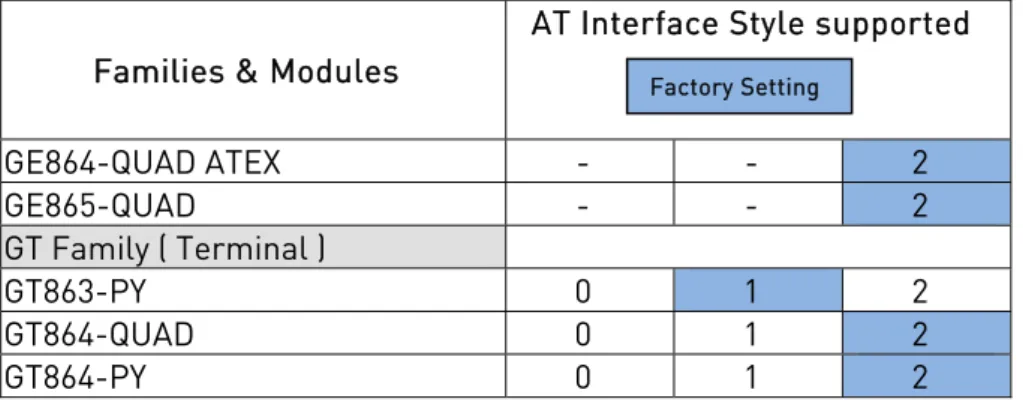
For information about AT Interface Backward Compatibility and #SELINT Factory Setting for each type of Telit module covered by this guide refer to document [1]. For reader convenience the Tab. 2 summarizes the Module Families in relation with the supported AT Interface Style: 0, 1 and 2. The switching among the supported AT Interface Styles is performed with the #SELINT AT command.
Families & Modules
AT Interface Style supported
GM Family ( Modem) GM862-QUAD 0 1 2 GM862-QUAD-PY 0 1 2 GM862-GPS 0 1 2 GC Family ( Compact ) GC864-QUAD 0 1 2
GC684-QUAD /w SIM holder 0 1 2
GC864-PY 0 1 2
GC864-DUAL - - 2
GC864-QUAD V2 0 1 2
GC864-QUAD V2 with SIM holder 0 1 2
GC864-DUAL V2 - - 2 GE Family ( Embedded ) GE863-QUAD 0 1 2 GE863-GPS 0 1 2 GE863-PY 0 1 2 GE863- SIM 0 1 2 GE863- PRO3 - - 2 GE863- PRO3 with Linux - - 2 GE864-QUAD 0 1 2 GE864-QUAD V2 0 1 2 GE864-DUAL V2 0 1 2 GE864-QUAD Automotive V2 - - 2 GE864-PY 0 1 2 GE864-QUAD Automotive - - 2 Factory Setting
Telit GSM/GPRS Family Software User Guide 1vv0300784 rev.6 2010-10-04
Reproduction forbidden without Telit Communications S.p.A. written authorization - All Rights Reserved page 16 of 178 Families & Modules
AT Interface Style supported
GE864-QUAD ATEX - - 2 GE865-QUAD - - 2 GT Family ( Terminal ) GT863-PY 0 1 2 GT864-QUAD 0 1 2 GT864-PY 0 1 2
Tab. 2: Modules and supported AT Interface Styles
NOTE:The AT commands described in this guide refer to the #SELINT 2 AT Interface Style.
2.2.
Turning ON the Module
To get more information about procedure and timing refer to [3].
2.3.
Turning OFF the Module
To get more information about procedure and timing refer to [3].
2.3.1.
Software Shutdown
Issue the following command: AT#SHDN
OK
During shutdown the module executes the following actions: Detachment from the network
Module Power OFF
To get more information about procedure and timing refer to [3]. Factory Setting
Telit GSM/GPRS Family Software User Guide 1vv0300784 rev.6 2010-10-04
Reproduction forbidden without Telit Communications S.p.A. written authorization - All Rights Reserved page 17 of 178
2.4.
First Telit Module Approach
After a proper Power ON sequence the Telit module is ready to receive AT commands on its Serial Port. Some functions have to be checked in order to be sure that the module is ready to send and receive calls and SMS.
2.4.1.
Telit Module Identification
Use the following AT command to verify if the connection between DTE and Telit
module (DCE) is working. The current serial port speed setting is Autobauding (Factory Setting):
AT OK
Use the following AT commands to verify the Software version and Telit module identification:
AT+CGMR: Returns the Software version information AT+CGMM: Returns the Telit Module identification Examples
Checking the software version AT+CGMR
10.00.004 OK
Checking the module identification AT+CGMM
GM862-QUAD OK
2.4.2.
Band Configuration
Use the following AT command to select the current band range: AT#BND=[<band>];
The range of parameter <band> depends on the SELINT configuration, see [1] for details.
Examples AT#BND=[0]
Telit GSM/GPRS Family Software User Guide 1vv0300784 rev.6 2010-10-04
Reproduction forbidden without Telit Communications S.p.A. written authorization - All Rights Reserved page 18 of 178 Use the following AT command to enable/disable the automatic band selection at power-on.:
AT#AUTOBND=[<value>];
The range of parameter <value> depends on the SELINT configuration, see [1] for details.
The module is a quad band device, but in any case it is necessary to set the correct working bands, see [1] for details.
2.4.3.
Enabling the Extended Error Result codes
To enable the error report in numerical format for +Cxxx commands, issue the following command:
AT+CMEE=1 OK
To enable the error report in verbose format for +Cxxx commands, issue the following command:
AT+CMEE=2 OK
2.4.4.
Second Interface Instance
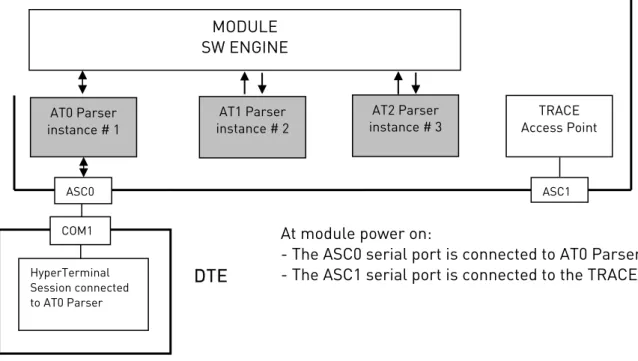
Use the following AT command to activate one of the three AT instances available and assign it to the ASC1 serial port, see fig. 1.
AT#SII = <inst>
For parameter description, refer to [1]. Examples
AT#SII?
#SII: 0 Trace service is connected to ASC1, see fig. 1 OK
AT#SII=1 ASC1 is disconnected from Trace service and connected to AT1 Parser.
Telit GSM/GPRS Family Software User Guide 1vv0300784 rev.6 2010-10-04
Reproduction forbidden without Telit Communications S.p.A. written authorization - All Rights Reserved page 19 of 178
fig. 1: AT0, AT1, AT2 Parsers
MODULE SW ENGINE AT0 Parser instance # 1 AT2 Parser instance # 3 TRACE Access Point
DTE
HyperTerminal Session connected to AT0 ParserCOM1 At module power on:
- The ASC0 serial port is connected to AT0 Parser, - The ASC1 serial port is connected to the TRACE. AT1 Parser
instance # 2
Telit GSM/GPRS Family Software User Guide 1vv0300784 rev.6 2010-10-04
Reproduction forbidden without Telit Communications S.p.A. written authorization - All Rights Reserved page 20 of 178
2.4.5.
Serial Port Speed Configuration
Use the following AT command to specify the Serial Port speed of the Telit module (DCE):
AT+IPR=<rate>
For a detailed description of parameters and possible responses, refer to [1]. Examples
Checking the current serial port speed setting (Factory Setting = autobauding): AT+IPR?
+IPR: 0 OK
Checking the serial port speed range: AT+IPR=?
+IPR:
(0,300,1200,2400,4800,9600,19200,38400,57600,115200),(0,300,1200 ,2400,4800,9600,19200,38400,57600,115200)
OK
Setting up the serial port speed of the module (DCE) to 38400 bps: AT+IPR=38400
OK
AT&W0 store the setting on profile 0 OK
AT&P0 at Power ON use profile 0 OK
Checking the current serial port speed: NOTE:
Before entering the following AT command set up the DTE serial port to 38400 bps. AT+IPR?
+IPR: 38400 OK
Telit GSM/GPRS Family Software User Guide 1vv0300784 rev.6 2010-10-04
Reproduction forbidden without Telit Communications S.p.A. written authorization - All Rights Reserved page 21 of 178
2.4.6.
AT Command Interface selection
Use the following AT command to check the current AT Interface Style: AT#SELINT?
For details on the possible responses, refer to [1]. Examples
After powering ON the module, checking the current AT Command Interface: AT#SELINT?
#SELINT: 0 OK
Checking the AT Command Interfaces Set supported: AT#SELINT=?
#SELINT: (0-2) OK
Selecting an AT Command Interface Set: AT#SELINT=2
OK
Select a wrong AT Command Interface Set just to see the response: AT#SELINT=3
ERROR
Checking which AT Command Interface is active: AT#SELINT?
#SELINT: 2 OK
2.4.7.
SIM Checking
2.4.7.1. Query SIM presence and status Issue the following command: AT+CPIN?
Responses:
+CPIN: XXXX (Refer to [1] for the details.) OK
ERROR
Telit GSM/GPRS Family Software User Guide 1vv0300784 rev.6 2010-10-04
Reproduction forbidden without Telit Communications S.p.A. written authorization - All Rights Reserved page 22 of 178 Error results if extended error result codes is enabled, see +CMEE command
Numeric Format or Verbose Format Details +CME ERROR: XX understandable message Refer to [1] Examples
The SIM is not inserted into Telit Module. Extended error result code is not enabled. Checking if PIN code is needed, just to see the response command:
AT+CPIN? ERROR
The SIM is not inserted into Telit Module. Verbose extended error result code is enabled. Checking if PIN code is needed, just to see the response command: AT+CPIN?
+CME ERROR: SIM not inserted
The SIM is not inserted into Telit Module. Numerical extended error result code is enabled. Checking if PIN code is needed, just to see the response command: AT+CPIN?
+CME ERROR: 10
Inserting the SIM into Telit Module and checking if PIN code is needed: AT+CPIN?
+CPIN: SIM PIN OK
2.4.7.2. SIM PIN
Issue the following command: AT+CPIN=<pin>
For parameter description, refer to [1]. Responses:
OK ERROR
See table below:
Error results if extended error result codes is enabled, see +CMEE command Numeric Format or Verbose Format Details +CME ERROR: XX understandable message Refer to [1]
Telit GSM/GPRS Family Software User Guide 1vv0300784 rev.6 2010-10-04
Reproduction forbidden without Telit Communications S.p.A. written authorization - All Rights Reserved page 23 of 178 Examples
A wrong PIN code is entered. Extended error result is not enabled. AT+CPIN=1235
ERROR
A right PIN code is entered: AT+CPIN=1234
OK
A wrong PIN code is entered. Verbose extended error result code is enabled: 1.Enabling Verbose extended error result code:
AT+CMEE=2 OK
2.Entering a wrong PIN code: AT+CPIN=1235
+CME ERROR: incorrect password.
NOTE:
After 3 failed attempts SIM PIN is no longer requested and the SIM is locked. Use SIM PUK to enter a new SIM PIN and unlock the SIM.
2.4.7.3. SIM PUK
Issue the following command: AT+CPIN=<pin>[,<newpin>] For parameter description, refer to [1]. Responses:
OK ERROR
See table below:
Error results if extended error result codes is enabled, see +CMEE command Numeric Format or Verbose Format Details +CME ERROR: XX understandable message Refer to [1]
Telit GSM/GPRS Family Software User Guide 1vv0300784 rev.6 2010-10-04
Reproduction forbidden without Telit Communications S.p.A. written authorization - All Rights Reserved page 24 of 178 TIP:
After 10 failed attempts to enter SIM PUK code, the SIM Card is locked and no longer available.
2.4.7.4. Query SIM Status
Use the following AT command to enable/disable the Query SIM Status unsolicited indication.
AT#QSS = <mode>
For parameter description, refer to [1].
Example 1
AT#QSS=1 valid for SELINT=0,1,2 OK
#QSS: 0 unsolicited indication: the SIM is extracted. #QSS: 1 unsolicited indication: the SIM is inserted. Example 2
AT#QSS=2 valid only for SELINT=2 OK
AT+IPR=19200 select the Serial Port speed = DTE speed OK
AT&W0 store the setting on profile 0 OK
AT&P0 at Power ON use profile 0 OK
Power OFF/ON the Module
Telit GSM/GPRS Family Software User Guide 1vv0300784 rev.6 2010-10-04
Reproduction forbidden without Telit Communications S.p.A. written authorization - All Rights Reserved page 25 of 178 AT+CPIN?
+CPIN: SIM PIN SIM is locked OK
AT+CPIN=<PIN> enter PIN OK
#QSS: 2 unsolicited indication: SIM is unlocked
The interval time between the two unsolicited indications #QSS: 2 and #QSS: 3 depends from the number of SMS stored on the module and the Phonebook dimension.
#QSS: 3 unsolicited indication: SMS and Phonebook accessible
2.4.7.5. SIM Detection Mode
Use the following AT command to manage the SIMIN Pin used to detect the SIM. AT#SIMDET=<mode> OK Example AT#SIMDET? #SIMDET: 2,1 AT#QSS=1 SIM is extracted
#QSS: 0 unsolicited indication: SIM is extracted SIM is inserted
#QSS: 1 unsolicited indication: SIM is inserted
AT#SIMDET=0 simulate SIM not inserted, but it is still physically inserted OK
Telit GSM/GPRS Family Software User Guide 1vv0300784 rev.6 2010-10-04
Reproduction forbidden without Telit Communications S.p.A. written authorization - All Rights Reserved page 26 of 178 Now the SIM is extracted and inserted, but no unsolicited indication appears on DTE extract the SIM
AT#SIMDET=1 simulate SIM inserted, but it is still physically extracted OK
#QSS: 1 unsolicited indication: SIM is physically extracted
Now the SIM is inserted and extracted, but no unsolicited indication appears on DTE
2.4.7.6. Generic SIM access
Use the following command to read/write SIM files. To interpret the command flow and decode the meaning of the strings showed by the following example refer to [13], [16].
AT+CSIM=1 Lock SIM interface OK
AT+CSIM=14,A0A40000026F30 select EF 6F30 +CSIM: 4,”9F0F”
OK
AT+CSIM=10,A0C000000F get response +CSIM: 34,”000000696F30040011F555010200009000” OK
AT+CSIM=10,A0B0000069 read binary +CSIM: 214,"32F23002F60182F45032F01032F80242F41902F81062F21002F21012F60372F22072 F09972F81202F46142F22062F02062F86022F60132F11092F31412F47042F01022F83082 F63032F4 01FFFFFFFFFFFFFFFFFFFFFFFFFFFFFFFFFFFFFFFFFFFFFFFFFFFFFFFFFFFF9000" OK
AT+CSIM=0 Unlock SIM interface OK
Telit GSM/GPRS Family Software User Guide 1vv0300784 rev.6 2010-10-04
Reproduction forbidden without Telit Communications S.p.A. written authorization - All Rights Reserved page 27 of 178 2.4.7.7. Preferred Operator List
Use the following AT command to manage the Preferred Operator List stored on SIM. AT+CPOL=[<index>][,<format>[,<oper>]]
For parameter description, refer to [1]. Responses:
+CPOL: ……… (Refer to [1] for the details.) OK
ERROR
See table below:
Error results if extended error result codes is enabled, see +CMEE command Numeric Format or Verbose Format Details +CME ERROR: XX understandable message Refer to [1]
Examples
Checking the supported parameters: AT+CPOL=?
+CPOL: (1-20),(2) OK
NOTE:
The used SIM supports 20 positions. The supported format (2) is numeric. Reading the entire list:
AT+CPOL? +CPOL: 1,2,"20801" +CPOL: 2,2,"20810" +CPOL: 3,2,"23205" +CPOL: 4,2,"22802" +CPOL: 5,2,"29341" +CPOL: 6,2,"26207" +CPOL: 7,2,"21403"
Telit GSM/GPRS Family Software User Guide 1vv0300784 rev.6 2010-10-04
Reproduction forbidden without Telit Communications S.p.A. written authorization - All Rights Reserved page 28 of 178 +CPOL: 8,2,"21910" +CPOL: 9,2,"21601" +CPOL: 10,2,"23410" +CPOL: 11,2,"20201" +CPOL: 12,2,"20408" +CPOL: 13,2,"26003" +CPOL: 14,2,"20610" +CPOL: 15,2,"23002" +CPOL: 16,2,"26803" +CPOL: 17,2,"27202" +CPOL: 18,2,"24001" +CPOL: 19,2,"23802" +CPOL: 20,2,"24201" OK NOTE:
The meaning of the string “XXXYY” is the following: - XXX = Mobile Country Code
- YY = Mobile Network Code
Trying to delete the first entry using a non-existent <format> value just to see the response when the Extended Error Result code is enabled:
AT+CPOL=1,3
+CME ERROR: operation not supported Deleting the first entry using a right <format> value: AT+CPOL=1,2
OK
Checking if the first entry is deleted: AT+CPOL?
+CPOL: 2,2,"20810" +CPOL: 3,2,"23205"
Telit GSM/GPRS Family Software User Guide 1vv0300784 rev.6 2010-10-04
Reproduction forbidden without Telit Communications S.p.A. written authorization - All Rights Reserved page 29 of 178 . . +CPOL: 19,2,"23802" +CPOL: 20,2,"24201" OK NOTE:
The entry on first position is deleted. Writing a new entry on first position: AT+CPOL=1,2,20801
OK
Checking if the first entry is written on first position: AT+CPOL? +CPOL: 1,2,"20801" +CPOL: 2,2,"20810" . . +CPOL: 19,2,"23802" +CPOL: 20,2,"24201" OK NOTE:
The new entry is written on first position.
2.4.8.
Network checking
2.4.8.1. Query Network status
Issue the following command: AT+CREG?
Responses:
+CREG: X,Y (Refer to [1] for the details.) OK
ERROR
Telit GSM/GPRS Family Software User Guide 1vv0300784 rev.6 2010-10-04
Reproduction forbidden without Telit Communications S.p.A. written authorization - All Rights Reserved page 30 of 178 Error results if extended error result codes is enabled, see +CMEE command
Numeric Format or Verbose Format Details +CME ERROR: XX understandable message Refer to [1] Examples:
Checking if Telit Module is registered: AT+CREG?
+CREG: 0,1 OK
The antenna is not connected to the Telit Module, repeating the previous AT command: AT+CREG?
+CREG: 0,3 OK
Telit Module is registered. Collecting Local Area Code and Cell Id: AT+CREG=2
OK AT+CREG?
+CREG: 2,1,55FA,12EB OK
A wrong parameter is entered just to see the result format when verbose extended error result is enabled:
AT+CREG=9
+CME ERROR: operation not supported 2.4.8.2. Network Operator Identification
Once the mobile has registered on some Network, it is possible to query the mobile for Network identifications codes and names with the following command:
AT+COPS=? Responses:
+COPS: (……) (Refer to [1] for the details.) OK
ERROR
See table below:
Error results if extended error result codes is enabled, see +CMEE command Numeric Format or Verbose Format Details +CME ERROR: XX understandable message Refer to [1]
Telit GSM/GPRS Family Software User Guide 1vv0300784 rev.6 2010-10-04
Reproduction forbidden without Telit Communications S.p.A. written authorization - All Rights Reserved page 31 of 178 Examples
Telit Module is registered. Collecting Networks Operators Identifications: AT+COPS=?
+COPS: (2,"I WIND",,"22288"),(3,"vodafone
IT",,"22210"),(1,"SI.MOBIL",,"29340"),,(0-4),(0,2) OK
The antenna is not connected to the Telit Module. Verbose extended error result is enabled. Repeating the previous AT command:
AT+COPS=?
+CME ERROR: no network service 2.4.8.3. Received Signal Strength & Quality
Once the mobile has registered on a Network, it may be useful to know the received signal strength & quality to give the User an indication about the radio link reliability. Use the following AT command:
AT+CSQ Responses:
+CSQ: XX,YY (Refer to [1] for the details.) OK
ERROR
See table below:
Error results if extended error result codes is enabled, see +CMEE command Numeric Format or Verbose Format Details +CME ERROR: XX understandable message Refer to [1] Examples
The antenna is not connected to the Telit Module or not network coverage at all. AT+CSQ
+CSQ: 99,99 OK
The antenna is connected to the Telit Module. Repeating the previous AT command: AT+CSQ
+CSQ: 17,0 OK
Telit GSM/GPRS Family Software User Guide 1vv0300784 rev.6 2010-10-04
Reproduction forbidden without Telit Communications S.p.A. written authorization - All Rights Reserved page 32 of 178 NOTE:
<rssi> = Received Signal Strength Ind. = 17, <ber> = Bit Error Rate = 0.
A wrong parameter is entered just to see the result format when verbose extended error result is enabled:
AT+CSQ?
+CME ERROR: operation not supported NOTE:
When Received Signal Strength Indication is less than 6 the radio link quality is poor, the call could be cut off.
NOTE:
The quality is measured on the traffic channel, hence it is available only during a conversation, in Idle the reported value must not be considered.
In conversation the quality decreases with the increase of the <ber> number.
NOTE:
The <ber> value refers strictly to the GSM radio channel and is a very technical parameter; it can be used to monitor the voice call quality since the voice quality is inversely proportional to the <ber> number.
NOTE:
The reported signal quality only refers to the GSM radio channel link and not to the whole path from the caller to the receiver. It may happen that the quality on the GSM radio link is very good and hence the reported <ber> is 0 (good quality) but the quality of the remaining path to the other party is very bad and hence the final data connection quality is very poor. For this reason the signal quality indicator <ber> should not be taken into account to monitor data calls quality.
2.4.8.4. Network Status Checking
Once the Telit Module is registered on a Network, it could be useful to know the received signal strength and the Network on which the Telit Module is registered. This information can be gathered by means of the following standard AT commands: +CREG, +COPS and +CSQ. These commands are not fast in the response due to Network
Telit GSM/GPRS Family Software User Guide 1vv0300784 rev.6 2010-10-04
Reproduction forbidden without Telit Communications S.p.A. written authorization - All Rights Reserved page 33 of 178 Software Application as general as possible, he/she can use the standard AT commands above mentioned and described on the previous paragraphs.
Telit Modules provide the User with proprietary AT commands to gather all the information needed in a faster and simpler way. The proprietary AT commands are: #MONI, #SERVINFO.
Selecting the Serving Cell
Select the Serving Cell with the following set command: AT#MONI=0
Responses:
OK
ERROR
Collecting the Serving Cell Information
Collect the Serving Cell Information with the following execution command: AT#MONI
Response:
#MONI: ……… (Refer to [1] for the details.) OK
Examples
The antenna is not connected to the Telit Module. Trying to collect Cells Information just to see the format response:
AT#MONI ERROR OK
The antenna is connected to the Telit Module. Collecting network information only about the serving cell.
1. Selecting Serving Cell: AT#MONI=0
OK
2. Collecting information: AT#MONI
#MONI: I WIND BSIC:70 RxQual:0 LAC:55FA Id:12EB ARFCN:979 PWR:-75dbm TA:0
Telit GSM/GPRS Family Software User Guide 1vv0300784 rev.6 2010-10-04
Reproduction forbidden without Telit Communications S.p.A. written authorization - All Rights Reserved page 34 of 178 NOTE:
The module is registered on the network "I WIND", the signal strength is -75dBm. For more information, refer to [1].
The antenna is connected to the Telit Module. Collecting network information about the serving cell and neighboring cells.
1.Selecting all available cells: AT#MONI=7
OK
2.Collecting information: AT#MONI
#MONI: Cell BSIC LAC CellId ARFCN Power C1 C2 TA RxQual PLMN
#MONI: S 70 55FA 12EB 979 -75 dbm 29 29 0 0 I WIND
#MONI: N1 75 55FA 1297 983 -86 dbm 18 18 #MONI: N2 70 55FA 12EA 985 -87 dbm 17 17 #MONI: N3 73 55FA 1D23 754 -100 dbm 2 16 #MONI: N4 72 55FA 12EC 977 -101 dbm 3 3 #MONI: N5 72 55FA 1D0D 751 -107 dbm -5 -5 #MONI: N6 FF FFFF 0000 1007 -107 dbm -1 -1
OK NOTE:
The module is registered on the network "I WIND", the signal strength is -75dBm. For more information, refer to [1].
Collecting the Serving Cell Information
Collect the Serving Cell Information with the following execution command: AT#SERVINFO
Response:
o #SERVINFO: ……… (Refer to [1] for the details.) OK
Examples
The Telit Module is registered. Collecting network information only about the serving cell:
Telit GSM/GPRS Family Software User Guide 1vv0300784 rev.6 2010-10-04
Reproduction forbidden without Telit Communications S.p.A. written authorization - All Rights Reserved page 35 of 178 AT#SERVINFO
#SERVINFO: 979,-75,"I WIND","22288",70,55FA,00,1,,"II",01,6 OK
NOTE:
The module is registered on the network "I WIND", the signal strength is -75dBm. For more information, refer to [1].
NOTE:
This command should be used only to gather information about network name and signal strength. To check if mobile is registered or is looking for a suitable network to register on, use +CREG command. As a matter of fact, if the network signal is too weak and mobile looses the registration, until a new network is found the #MONI command reports the last measured valid values and not the real ones. The TA (timing advance parameter) is valid only during a call.
TIP:
Check network registration with +CREG command. When mobile is registered, query the mobile for network operator name and signal strength with #MONI command.
2.4.8.5. Enhanced Network Selection and AT&T functions
Use the following set command to enable/disable the Enhanced Network Selection and the AT&T functions. The Telit module features enabled or disabled by this command are conditioned by the SIM card type used, as pointed out by the following notes. AT#ENS=[<mode>]
For parameter description, refer to [1]. Responses:
OK ERROR Examples
Scenario 1: module with any SIM card. AT#ENS=0
Telit GSM/GPRS Family Software User Guide 1vv0300784 rev.6 2010-10-04
Reproduction forbidden without Telit Communications S.p.A. written authorization - All Rights Reserved page 36 of 178 NOTE: After entering the command, power OFF/ON the module to make the selected operation active. The module follows the Standard European operation described by the 3GPP specification R98, (factory configuration).
Scenario 2: module with no AT&T SIM cards. AT#ENS=1
OK
NOTE: After entering the command, power OFF/ON the module to make the selected operation active. The module follows the Standard European operation described by the 3GPP specification R98 or R4 (in accordance with the used product) and supports the following features:
use of EONS features (refer to [9], § 15)
use of the ENS features for Network selection (refer to [9], §13)
support of special requirements for USSD strings (refer to [9], <CDR-GSM-255> special support of strings ATDxxxxxPyyyyyy (refer to [9] <CDR-CON-3074>,
<CDR-CON-3342>)
AT#AUTOBND=1 as default, if previous value ≠ 2 AT#BND supports only values 0 and 3
support of AT command PACSP to display the PLMNModeBit (refer to [9]) AT#STIA=2,10 as default
use of the max telephone number written on SIM instead of a default value equal to 20
tone on USSD reception (refer to [9]) AT#PLMNMODE=1 as default
different coding and encoding for MCC and MNC for SAT functions (refer to [9]) special handling of store field into the MWI messages (refer to [9], §16)
Scenario 3: module with an AT&T SIM card. NOTE:
The following setting is recommended for AT&T SIM card. AT#ENS=1
OK NOTE:
After entering the command, power OFF/ON the module to make the selected operation active. The module follows the Standard European operation described by the
Telit GSM/GPRS Family Software User Guide 1vv0300784 rev.6 2010-10-04
Reproduction forbidden without Telit Communications S.p.A. written authorization - All Rights Reserved page 37 of 178 3GPP specification R98 or R4 (in accordance with the used product) and supports the features indicated in scenario 2, plus the following:
- Use of the Acting Home PLMN feature (refer to [9], § 12)
- The module writes in the SIM card the Location Info. Using the AT&T coding NOTE:
When AT#ENS=1, it is recommended to use the following setting: AT#AUTOBND=2
AT#NITZ=7,X (X if the user wants the URC) AT#SMSMODE=1
2.4.9.
Network Survey
Network Survey AT Command family holds a large number of commands. Hereafter are showed two examples.
2.4.9.1. Network Survey
Use the following AT command to perform a quick survey though channels belonging to the current band.
AT#CSURV [=<s>,<e>]
For parameter description, refer to [1]. Examples
AT#BND? #BND: 0 OK
AT#CSURV=4,8
Network survey started ...
arfcn: 7 bsic: 18 rxLev: -78 ber: 0.00 mcc: 222 mnc: 01 lac: 54717 cellId: 21007 cellStatus: CELL_SUITABLE numArfcn: 3 arfcn: 7 13 27
arfcn: 4 bsic: 16 rxLev: -85 ber: 0.00 mcc: 222 mnc: 01 lac: 54717 cellId: 21094 cellStatus: CELL_SUITABLE numArfcn: 2 arfcn: 4 1021
arfcn: 8 rxLev: -92 arfcn: 6 rxLev: -93 arfcn: 5 rxLev: -98
Telit GSM/GPRS Family Software User Guide 1vv0300784 rev.6 2010-10-04
Reproduction forbidden without Telit Communications S.p.A. written authorization - All Rights Reserved page 38 of 178 Network survey ended
OK
2.4.9.2. BCCH Network Survey
Use the following AT command to perform a quick survey though channels belonging to the current band. The survey stops as soon as <n> BCCH carriers are found
AT#CSURVB = [<n>]
For parameter description, refer to [1]. Examples
AT#CSURVB=2
Network survey started ...
arfcn: 104 bsic: 63 rxLev: -68 ber: 0.00 mcc: 222 mnc: 88 lac: 22010 cellId: 4737 cellStatus: CELL_FORBIDDEN numArfcn: 3 arfcn: 114 989 995
arfcn: 761 bsic: 57 rxLev: -72 ber: 0.00 mcc: 222 mnc: 88 lac: 22010 cellId: 7437 cellStatus: CELL_FORBIDDEN numArfcn: 4 arfcn: 776 785 794 803
Network survey ended
2.5.
Establishing a Voice call
1Before setting up a Voice Call, it is recommended to check if the Telit Module is registered on a network (see § 2.4.7.4) and if the signal strength is enough to carry on the radio link.
2.5.1.
Setting up a Voice Call
This section describes how to set up a voice call. 2.5.1.1. Setting the Module in Voice Mode
Use the following AT command to set up the module for a Voice Call: AT+FCLASS=8
OK
1
Telit GSM/GPRS Family Software User Guide 1vv0300784 rev.6 2010-10-04
Reproduction forbidden without Telit Communications S.p.A. written authorization - All Rights Reserved page 39 of 178 NOTE:
+FCLASS=8 command may be omitted if the ";" modifier is added at the end of the ATD command, after the number to be dialed, see §2.5.2.
2.5.1.2. Setting the Desired Audio Path Active
The present section is applicable to the Telit Modules supporting the connection of audio devices, refer to [2], [3].
Telit Modules have two different audio paths: internal microphone/ear (MT)
external microphone/ear (HF)
Usually the internal path is used for a handset function, while the external is used for hands-free function. There are two ways to switch between these two paths:
SOFTWARE and HARDWARE, see the following AT command examples: AT#CAP=<n>
OK
For parameter description, refer to [1].
Examples
Using SOFTWARE way to select internal audio path (MT): AT#CAP=2
OK
Using SOFTWARE way to select external audio path (HF): AT#CAP=1
OK
Using HARDWARE way to select audio path: AT#CAP=0
OK
Selecting the audio path by means of the pin AXE [3]:
set the hardware pin AXE = HIGH to select internal audio path (MT). set the hardware pin AXE = LOW to select external audio path (HF).
Telit GSM/GPRS Family Software User Guide 1vv0300784 rev.6 2010-10-04
Reproduction forbidden without Telit Communications S.p.A. written authorization - All Rights Reserved page 40 of 178 TIP:
When HARDWARE control is not used AXE pin can be left unconnected. TIP:
Telit GSM/GPRS Family Software User Guide 1vv0300784 rev.6 2010-10-04
Reproduction forbidden without Telit Communications S.p.A. written authorization - All Rights Reserved page 41 of 178 2.5.1.3. Setting the Desired Volume on the Active Audio Path Speaker Output
Use the following AT command to set up the volume level: AT+CLVL=<vol>
OK
For parameter description, refer to [1].
NOTE:
The volume setting refers to the ACTIVE path ear line and is stored each time. When changing audio path the volume setting will be reset to the previously stored value for that audio path.
2.5.1.4. Checking for Microphone Mute Setting
The microphone of the active path can be muted with AT+CMUT=1 command; to be sure that it is not muted use the following read command:
AT+CMUT? Response:
+CMUT: X (Refer to [1] for the details.) OK
NOTE:
The mute setting does not work the same way as the volume setting. The mute setting configuration is valid for both audio paths.
Telit GSM/GPRS Family Software User Guide 1vv0300784 rev.6 2010-10-04
Reproduction forbidden without Telit Communications S.p.A. written authorization - All Rights Reserved page 42 of 178
2.5.2.
Dialing a Phone Number (Voice Call)
AT command used to dial up a phone number. ATD <number>[;]
For parameter and response description, refer to [1]. Examples
Calling the national number 040-4X92XYX. The module is set in voice mode (AT+FCLASS=8 has been executed).
ATD 0404X92XYX OK
Calling the national number 040-4X92XYX in international format +39-040-4X92XYX. The module is set in voice mode (AT+FCLASS=8 has been executed).
ATD +390404X92XYX OK
Calling the national number 040-4X92XYX in international format +39-040-4X92XYX. The module is not set in voice mode (AT+FCLASS=8 has not been executed). In this case to perform the Voice Call the User must use the “;” character at the end of the command. ATD +390404X92XYX;
OK
2.5.3.
Closing the Voice Call
Use the following AT command to close the current Voice Call: ATH
OK
TIP:
During the voice call the module isin command mode, so the escape sequence (+++) must not be issued before sending commands.
Telit GSM/GPRS Family Software User Guide 1vv0300784 rev.6 2010-10-04
Reproduction forbidden without Telit Communications S.p.A. written authorization - All Rights Reserved page 43 of 178
2.5.4.
Codec Information
Use the following AT command to get codec information about a call. AT#CODECINFO = <format>,<mode>
OK
For parameter description, refer to [1].
Example
AT#CODECINFO=1,1 enable codec information
OK
ATD<phone number>;
#CODECINFO: "HAMR","FR","EFR","HR","FAMR","HAMR" OK
NO CARRIER remote hang up
#CODECINFO: "None","FR","EFR","HR","FAMR","HAMR"
2.5.5.
Audio Codec
Use the following AT command to select a codec during a call. AT#CODEC = <codec>
OK
For parameter description, refer to [1]. Example
AT#CODEC?
#CODEC: 0 get the current codec setting
OK
AT#CODECINFO=1,1 enable codec information
OK
ATD<phone number>; establish the call
#CODECINFO: "HAMR","FR","EFR","HR","FAMR","HAMR" OK
Telit GSM/GPRS Family Software User Guide 1vv0300784 rev.6 2010-10-04
Reproduction forbidden without Telit Communications S.p.A. written authorization - All Rights Reserved page 44 of 178 #CODECINFO: "None","FR","EFR","HR","FAMR","HAMR"
AT#CODEC=1 select FR mode
OK
ATD<phone number>; establish the call #CODECINFO: "FR","FR"
OK
NO CARRIER remote hang up
#CODECINFO: "None","FR"
2.6.
Establishing a CSD Data Call
Before establishing a CSD Data Call (not GPRS), it is recommended to check if the Telit module is registered on a Network and if the signal is strong enough to support the radio link (see § 2.4.7.4).
2.6.1.
Setting up Data Call Device
This section describes how to set up the data call device. 2.6.1.1. Setting the Device in Data Mode
Use the following AT command to set up the module for a Data Call: AT+FCLASS=0
OK
TIP:
The +FCLASS setting isstored in memory, so there is no need to repeat this command if +FCLASS setting is not required to change.
2.6.1.2. Setting the Desired Modulation and Speed for the Connection
The Data Connection can be established using different speeds, bearer services, connection element. The connection mode can be selected with the following set command:
AT+CBST[=<speed>[,<name>[,<ce>]]] OK
Telit GSM/GPRS Family Software User Guide 1vv0300784 rev.6 2010-10-04
Reproduction forbidden without Telit Communications S.p.A. written authorization - All Rights Reserved page 45 of 178 For parameter description, refer to [1].
Examples
Reading current values: AT+CBST?
+CBST: 0,0,1 OK
Setting new speed: AT+CBST=1,0,1 OK
Checking if new speed value is set: AT+CBST?
+CBST: 1,0,1 OK
TIP:
It is recommended to use the Non Transparent connection to avoid the reception of characters not concerning the transmitted message.
2.6.2.
Dialing a Phone Number (Data Call)
Use the following command to dial a phone number: ATD <number>
For parameter and response description, refer to [1]. Examples
Calling the national number 040-4X92XYX. The module is set in data mode (AT+FCLASS=0 has been executed).
ATD 0404X92XYX CONNECT 9600
Calling the national number 040-4X92XYX in international format +39-40-4X92XYX. The module is set in data mode (AT+FCLASS=0 has been executed).
ATD +39404X92XYX CONNECT 9600
Telit GSM/GPRS Family Software User Guide 1vv0300784 rev.6 2010-10-04
Reproduction forbidden without Telit Communications S.p.A. written authorization - All Rights Reserved page 46 of 178 TIP:
The response to the ATD command is returned after the modem handshaking, this takes about 30 seconds, so allow this time before doing anything.
TIP:
When the module is doing the handshake to establish the connection, entering any charactercloses the handshake and aborts the call.
Telit GSM/GPRS Family Software User Guide 1vv0300784 rev.6 2010-10-04
Reproduction forbidden without Telit Communications S.p.A. written authorization - All Rights Reserved page 47 of 178
2.6.3.
Closing the Data Call
This section describes how to close a data call.
2.6.3.1. Exiting the Data Mode and Entering the Command Mode To exit the module Data Mode, do the following:
1. Enter the following Escape Sequence: +++
2. Wait for the escape sequence pause time (see S12 parameter, refer to [1]). 3. Wait for the response OK.
NOTE:
After the Escape Sequence and during the call the only command accepted by the module is the ATH. All the other commands are not supported during a call.
TIP:
In order to enter the Command Mode no characters must be sent between two consecutive “+” characters (escape sequence pause time S12) forming the Escape Sequence.
2.6.3.2. Hanging up the Data Call
Use the following AT command to close the current data connection: ATH
NO CARRIER
TIP:
During the data call the module is in data mode (on line), so the escape sequence (+++) must be issued before sending AT commands to the module.
Telit GSM/GPRS Family Software User Guide 1vv0300784 rev.6 2010-10-04
Reproduction forbidden without Telit Communications S.p.A. written authorization - All Rights Reserved page 48 of 178
2.7.
Answering an Incoming Call
2When an Incoming Call is detected, the module reports an Unsolicited Code. For details, refer to [1].
To answer the call, use the following AT command: ATA
For response details, refer to [1]. TIP:
The call is answered with the appropriate type (VOICE or DATA) regardless of the +FCLASS setting active. To distinguish between Data and Voice see the command response or the extended format incoming call indication.
2.7.1.
GSM Single Numbering Scheme
Most operators use a primary phone number associated to the voice service and a secondary phone number for data and fax. If the operator employs a GSM Single Numbering Scheme, the voice and data number is the same. To select the bearer to be used when a mobile terminated Single Numbering Scheme call is established, use the following command.
AT+CSNS=<mode> OK
Example 1
AT+CSNS=0 voice (factory default) OK RING RING ATA voice channel is ON 2
Telit GSM/GPRS Family Software User Guide 1vv0300784 rev.6 2010-10-04
Reproduction forbidden without Telit Communications S.p.A. written authorization - All Rights Reserved page 49 of 178 Example 2 AT+CSNS=2 data OK RING RING ATA …….
Telit GSM/GPRS Family Software User Guide 1vv0300784 rev.6 2010-10-04
Reproduction forbidden without Telit Communications S.p.A. written authorization - All Rights Reserved page 50 of 178
Telit module Generic solution
2.8.
Enabling TTY Function
The characters entered through the TTY device, connected to the Telit module (see fig. 2), are coded using the following two tones: 1400 Hz and 1800 Hz. These tones are not supported by the GSM speech coder, consequently they must be transformed to be compatible with the speech coder. This activity is performed by the CTM modem that in the Telit module solution is internal to the module itself. The internal CTM modem transforms the two unsupported tones into the following four tones: 400Hz, 600Hz, 800Hz, 1000Hz that can be managed by the speech coder. The TTY device can be
connected to the Telit module using one of the two audio paths provided by the module itself. This feature enables the transmission of the TTY data and voice jointly on the existing speech channel of the module.
fig. 2: TTY device – module connection
Examples
Connect the TTY device (1400/1800) to the selected analog audio line of the module. In accordance with the selected physical audio connection, configure the audio path as indicated below.
Selecting the Hands Free audio path (“HF lines”, refer to § 2.5.1.2; Audio 2, refer to [6]): 1. Using SOFTWARE way to select external audio path (HF):
AT#CAP=1 OK
2. Setting the volume of the active audio path: AT+CLVL=5
OK
3. Setting the Hands Free microphone input gain: AT#HFMICG=4
OK
4. Disabling the side tone on Hands Free audio output: TTY device 1400/1800 GSM network GSM engine TTY device CTM modem GSM engine CTM modem
Telit GSM/GPRS Family Software User Guide 1vv0300784 rev.6 2010-10-04
Reproduction forbidden without Telit Communications S.p.A. written authorization - All Rights Reserved page 51 of 178 AT#SHFSD=0
OK
5. Disabling echo canceller function on Hands Free audio output: AT#SHFEC=0
OK
6. Disabling automatic gain control for Hands Free mode: AT#SHFAGC=0
OK
7. Disabling noise reduction for Hands Free mode: AT#SHFNR=0
OK
8. Enable the transmission of data on the existing speech channels: AT#TTY=1
OK
After this configuration, the next Voice Call will be able to jointly support voice and TTY data.
Using the Hand Set audio path (“MT lines”, refer to § 2.5.1.2; Audio 1, refer to [6]): 1. Using SOFTWARE way to select internal audio path (HS):
AT#CAP=2 OK
2. Setting the volume of the active audio path: AT+CLVL=5
OK
3. Setting the Hand Set microphone input gain: AT#HSMICG=4
OK
4. Disabling the side tone on Hand Set audio output: AT#SHSSD=0
OK
5. Disabling echo canceller function on Hand Set audio output: AT#SHSEC=0
OK
6. Disabling automatic gain control for Hand Set mode: AT#SHSAGC=0
Telit GSM/GPRS Family Software User Guide 1vv0300784 rev.6 2010-10-04
Reproduction forbidden without Telit Communications S.p.A. written authorization - All Rights Reserved page 52 of 178 7. Disabling noise reduction for Hand Set mode:
AT#SHSNR=0 OK
8. Enabling the transmission of data on the existing speech channels: AT#TTY=1
OK
After this configuration, the next Voice Call will be able to jointly support voice and TTY data.
Telit GSM/GPRS Family Software User Guide 1vv0300784 rev.6 2010-10-04
Reproduction forbidden without Telit Communications S.p.A. written authorization - All Rights Reserved page 53 of 178
2.9.
HW Flow control
fig. 3: RTS/CTS flow control
2.9.1.
RTS detection of DTE
RTS of DTE is checked by the module every GSM TDMA frame (4.61 ms). As soon as RTS of DTE is detected as NOT asserted the module immediately stops the transmitting of bytes toward DTE equipment.
Consequently, the maximum number of characters that Telit module can send to the DTE when RTS of DTE is NOT asserted depends on the used baud rate.
Example:
at 115200 8N1 the maximum number of characters (bytes) is 54
115200 8N1 => 115200 bit/s = 11520 char/s = 11.52 char/ms = 53.1 char/frame at 57600 8N1 the maximum number of characters (bytes) is 27
at 9600 8N1 is 5
2.9.2.
CTS assertion of Module
CTS is asserted by the module when the data in its receiver buffer is grater than 75% (0x1000 bytes), the DTE transmission is stopped. CTS is NOT asserted when data in the receiver buffer of the module is lower than 25%, the DTE transmission starts again.
Module DTE (User Application) RTS CTS RTS CTS
Telit GSM/GPRS Family Software User Guide 1vv0300784 rev.6 2010-10-04
Reproduction forbidden without Telit Communications S.p.A. written authorization - All Rights Reserved page 54 of 178
3.
Advanced Operations
3.1.
Accessing the Phonebook
The User can access the phonebook storage of the SIM card inserted on Telit module. By means of dedicated AT commands the User stores and recalls phone numbers and their associated names.
The Telit module supports the following SIM phonebook storages: "SM" - SIM phonebook
This is the PB used to store and recall numbers during the normal operation of the module.
"FD" - SIM fixed dialing-phonebook (only phase 2/2+ SIM)
This PB has several restrictions; to set it you need the PIN2 code and after having activated the FD only the calls to the numbers stored in the FD or their children are allowed, all the other calls are forbidden.
"LD" - SIM last-dialing-list (+CPBW and +CPBF are not applicable for this storage) This is the list of the last dialed numbers, it is updated automatically at each call originated and insertion or search on it is not possible, the only operations allowed are recall, read and delete.
"MC" - SIM missed-calls-list (+CPBW and +CPBF are not applicable for this storage)
This is the list of the missed calls calling numbers, it is updated automatically at each call missed and insertion or search on it is not possible, the only operations allowed are recall, read and delete.
"RC" - SIM received-calls-list (+CPBW and +CPBF are not applicable for this storage)
This is the list of the received calls calling numbers, it is updated automatically at each call received and insertion or search on it is not possible, the only operations allowed are recall, read and delete.
In order to access the storage the User has to choose one. This must be the first Phone Book operation always. Once storage is selected, it is no longer needed to select it again until the desired storage remains the same and the module is turned off.
3.1.1.
Selecting Phonebook Memory Storage
Use the following AT command to select the phonebook memory storage: AT+CPBS=<storage>
Telit GSM/GPRS Family Software User Guide 1vv0300784 rev.6 2010-10-04
Reproduction forbidden without Telit Communications S.p.A. written authorization - All Rights Reserved page 55 of 178 Responses:
OK ERROR
See the table below:
Examples
Reading the supported range of phonebook storages: AT+CPBS=?
+CPBS: ("SM","FD","LD","MC","RC") OK
Reading the actual phonebook storage: AT+CPBS?
+CPBS: "SM",10,250 OK
Selecting “FD” phonebook storage: AT+CPBS="FD"
ERROR AT+CMEE=2 OK
AT+CPBS="FD"
+CME ERROR: SIM PIN2 required
NOTE:
When the FD storage is selected, the PIN2 must be inserted or the FD facility must be enabled. To enable the facility use +CLCK command (see par. 3.1.1.1)
NOTE:
If PIN2 is used, after 3 failed attempts the SIM is blocked. To unblock the SIM use PUK2, refer to § 2.4.7.
Error results if extended error result codes is enabled, see +CMEE command Numeric Format or Verbose Format Details +CME ERROR: XX understandable message Refer to [1]
Telit GSM/GPRS Family Software User Guide 1vv0300784 rev.6 2010-10-04
Reproduction forbidden without Telit Communications S.p.A. written authorization - All Rights Reserved page 56 of 178 Selecting “MC” phonebook storage:
AT+CPBS="MC" OK AT+CPBS? +CPBS: "MC",0,20 OK NOTE:
After powering up and PIN authentication, the module reads the data records stored on the SIM for a backup. During this activity the SIM access is inhibited (SIM is busy after the issue of the PIN or after powering up if PIN request is disabled) for a time varying from few seconds to about one minute, depending on the percentage of written records in the SIM phonebook. If Phonebook commands are issued during this time interval the module returns an error message. If this happens, retry the operations later.
3.1.1.1. Locking or Unlocking ME
Use the following AT command to lock or unlock an ME3
or a Network facility: AT+CLCK=<fac>,<mode>[,<passwd>[,<class>]]
For parameter description, refer to [1]. Responses:
OK ERROR
See table below:
Error results if extended error result codes is en