The Complete IMS
HALDB Guide
All You Need to Know to Manage HALDBs
Jouko Jäntti
Cornelia Hallmen
Raymond Keung
Rich Lewis
Examine how to migrate databases to
HALDB
Explore the benefits of using
HALDB
Learn how to administer
and modify HALDBs
The Complete IMS HALDB Guide
All You Need to Know to Manage HALDBs
June 2003
First Edition (June 2003)
This edition applies to IMS Version 7 (program number 5655-B01) and IMS Version 8 (program number 5655-C56) or later for use with the OS/390 or z/OS operating system.
Note: Before using this information and the product it supports, read the information in “Notices” on page xi.
Contents
Notices . . . xi
Trademarks . . . xii
Preface . . . xiii
The team that wrote this redbook . . . xiii
Become a published author . . . xiv
Comments welcome . . . xv
Part 1. HALDB overview . . . 1
Chapter 1. HALDB introduction and structure . . . 3
1.1 An introduction to High Availability Large Databases . . . 4
1.2 Features and benefits . . . 5
1.3 Candidates for HALDB . . . 6
1.4 HALDB definition process . . . 7
1.4.1 Database Recovery Control (DBRC) . . . 9
1.5 DL/I processing . . . 9
1.6 Logical relationships with HALDB . . . 10
1.7 Partition selection . . . 10
1.7.1 Partition selection using key ranges . . . 10
1.7.2 Partition selection using a partition selection exit routine . . . 11
1.8 Database structure . . . 11
1.8.1 Partition ID and reorganization number . . . 11
1.8.2 Segment structure . . . 12
1.8.3 Extended pointer set (EPS). . . 14
1.8.4 Indirect list data set (ILDS) . . . 14
1.8.5 Number of data sets . . . 15
1.8.6 Special considerations for secondary indexes . . . 16
1.9 Naming conventions . . . 17
1.9.1 Partition names . . . 18
1.9.2 DD names . . . 18
1.9.3 Data set names . . . 18
Chapter 2. Defining HALDB databases . . . 21
2.1 Overview of HALDB definition . . . 22
2.1.1 Design the logical structure of the database . . . 22
2.1.2 Implement the logical structure with the DBDGEN process . . . 22
2.1.3 Determine the partitioning scheme . . . 23
2.1.5 Database exit routines . . . 24
2.1.6 System definition . . . 25
2.1.7 Buffer pools . . . 25
2.1.8 Dynamic allocation . . . 26
2.2 DBDGEN differences for HALDB . . . 26
Chapter 3. HALDB and DBRC . . . 31
3.1 RECON records for HALDB . . . 32
3.1.1 Master database record . . . 32
3.1.2 Partition database record . . . 33
3.1.3 Partition record . . . 33 3.1.4 Partition DBDS record . . . 34 3.2 Dynamic allocation . . . 35 3.3 Authorization processing . . . 35 3.4 Partition initialization . . . 35 3.5 DBRC commands . . . 35 3.5.1 INIT commands . . . 36 3.5.2 CHANGE commands . . . 36 3.5.3 DELETE commands . . . 38 3.5.4 LIST commands . . . 38 3.5.5 GENJCL commands . . . 40
3.6 DBRC groups for HALDB . . . 42
3.6.1 Change accumulation groups . . . 42
3.6.2 Database data set groups . . . 42
3.6.3 Database groups . . . 42
3.6.4 Recovery groups . . . 42
3.7 Use of database names in DBRC commands . . . 43
3.7.1 Commands that require a master database name . . . 43
3.7.2 Commands that require a partition name . . . 43
3.7.3 Commands that allow a master database or a partition name . . . 44
3.7.4 DBRC commands that are not allowed with HALDB. . . 44
Chapter 4. Partition Definition utility . . . 45
4.1 Using the PDU. . . 46
4.1.1 Configuring the PDU . . . 47
4.1.2 Selecting a database. . . 49
4.1.3 Setting HALDB master DBD parameters . . . 51
4.1.4 Setting processing options and global partition information . . . 52
4.1.5 Creating your partitions manually . . . 54
4.1.6 Creating your partitions automatically . . . 57
4.1.7 Changing partition definitions . . . 59
4.1.8 Deleting definitions . . . 60
5.1 Using the batch interface. . . 62
5.2 DBRC initialization commands for HALDB . . . 62
5.2.1 INIT.DB . . . 62
5.2.2 INIT.PART . . . 64
5.3 DBRC change commands for HALDB. . . 68
5.3.1 CHANGE.DB . . . 69
5.3.2 CHANGE.PART . . . 69
5.3.3 CHANGE.DBDS . . . 70
5.4 DBRC delete commands for HALDB. . . 71
5.4.1 DELETE.DB . . . 71
5.4.2 DELETE.PART . . . 71
Chapter 6. Partition initialization . . . 73
6.1 Partition initialization function . . . 74
6.2 DBRC flags used with partition initialization . . . 75
6.2.1 Partition initialization required (PINIT) flag . . . 75
6.2.2 Image copy needed flag . . . 76
6.3 Database Prereorganization utility . . . 76
6.4 Database Partition Data Set Initialization utility . . . 76
6.4.1 Unconditional partition initialization . . . 78
Chapter 7. Partition selection. . . 79
7.1 Choosing the type of partition selection . . . 80
7.1.1 Key range partitioning . . . 80
7.1.2 Partitioning with an exit routine . . . 81
7.2 Writing partition selection exit routines . . . 82
7.2.1 Partition selection exit routine functions . . . 82
7.2.2 Information passed to and from the exit routine . . . 84
7.2.3 Sample exit routine (DFSPSE00) . . . 84
Part 2. Migration . . . 87
Chapter 8. Migration from non-HALDB to HALDB . . . 89
8.1 General migration considerations . . . 90
8.1.1 DBD changes . . . 90
8.2 HALDB Migration Aid utility (DFSMAID0) . . . 93
8.2.1 Reports . . . 93
8.2.2 Adjusting the sizes from the reports . . . 94
8.2.3 Control statements . . . 94
8.3 Migrating simple databases. . . 96
8.3.1 Unloading the existing database . . . 96
8.3.2 Saving existing database information . . . 97
8.3.3 Changing the DBD . . . 97
8.3.5 Defining the partitions . . . 97
8.3.6 Allocating database data sets . . . 98
8.3.7 Initializing the partitions . . . 99
8.3.8 Reloading the HALDB database . . . 99
8.3.9 Image copying the database data sets . . . 100
8.4 ILDS creation options . . . 100
8.4.1 HD Reload with no control statement . . . 100
8.4.2 HD Reload with an ILDSMULTI control statement . . . 100
8.4.3 HD Reload with a NOILDS control statement . . . 101
8.5 Migrating databases with secondary indexes . . . 101
8.5.1 Changing DBDs for secondary indexes . . . 102
8.5.2 Estimating the sizes of secondary index partitions . . . 107
8.5.3 Unloading databases with secondary indexes . . . 109
8.5.4 Allocating secondary index data sets . . . 111
8.5.5 Loading databases and their secondary indexes . . . 111
8.5.6 Secondary index pointers after the migration . . . 113
8.5.7 Using MIGRATE=YES with secondary indexes . . . 113
8.6 Migrating databases with logical relationships . . . 114
8.6.1 Changing DBDs with logical relationships. . . 114
8.6.2 Changing DBDs with logical relationships. . . 115
8.6.3 Unloading logically related databases for migration . . . 118
8.6.4 Loading logically related databases for migration . . . 119
8.6.5 Logical relationship pointers after the migration . . . 119
8.7 Migrating from PDB or PDF. . . 120
8.7.1 Partition selection . . . 120
8.7.2 DBD changes . . . 120
8.7.3 Using standard IMS utilities for the migration . . . 121
8.7.4 Using application programs for the migration . . . 121
8.7.5 Using PSU Unload and application programs for the migration . . . 122
8.8 Migrating from user partitioning . . . 123
8.8.1 Using application programs for the migration . . . 123
8.8.2 Using HD Unload and application programs for the migration . . . . 125
8.8.3 Warning on the use of HD Reload . . . 126
8.9 Fallback to non-HALDB . . . 126
8.9.1 Fallback with secondary indexes . . . 127
8.9.2 Fallback with logical relationships . . . 127
Chapter 9. Migration examples . . . 129
9.1 Migration of HIDAM database to PHIDAM . . . 130
9.1.1 Image copy of non-HALDB database data sets . . . 130
9.1.2 Running the Migration Aid utility . . . 130
9.1.3 Unloading the HIDAM database . . . 136
9.1.5 Deleting the database from the RECONs . . . 137
9.1.6 Changing the DBD and running the DBDGEN . . . 138
9.1.7 Defining partitions with PDU . . . 139
9.1.8 Allocate HALDB data sets . . . 139
9.1.9 Initializing HALDB partitions . . . 140
9.1.10 Loading HALDB database. . . 141
9.1.11 Image copy HALDB data sets . . . 142
9.1.12 ACBGEN . . . 142
9.2 Migration of a database with a secondary index . . . 142
9.3 Migrating a PDB database . . . 147
Chapter 10. Using the HALDB Conversion and Maintenance Aid . . . 151
10.1 HALDB Conversion and Maintenance Aid product . . . 152
10.1.1 The conversion process overview . . . 153
10.2 Activating the tool . . . 154
10.2.1 Modifying the startup CLIST . . . 155
10.2.2 Allocating the environment description data set . . . 155
10.3 Migration example with HALDB Conversion tool. . . 155
10.3.1 Define an IMS environment. . . 156
10.3.2 Define a project . . . 164
10.3.3 Process a conversion project . . . 168
10.4 Additional functions . . . 176
Part 3. Application considerations . . . 181
Chapter 11. Application considerations . . . 183
11.1 Initial loads . . . 184
11.1.1 PHDAM considerations . . . 184
11.1.2 PHIDAM considerations . . . 184
11.1.3 Loading partitions in parallel . . . 185
11.1.4 Initial loads of databases with secondary indexes . . . 186
11.1.5 Initial loads of databases with logical relationships . . . 188
11.2 Processing partitions in parallel. . . 189
11.2.1 DBRC authorization of partitions . . . 189
11.2.2 Parallel processing within an online system . . . 190
11.2.3 Parallel processing with block level data sharing . . . 190
11.2.4 Parallel processing without block level data sharing . . . 190
11.2.5 Program modifications for parallel processing . . . 192
11.3 Restricting a PCB to one partition . . . 193
11.3.1 Processing a partition sequentially . . . 194
11.3.2 Requesting segments outside of the partition . . . 194
11.3.3 Secondary index and logical relationship considerations . . . 195
11.4 Handling unavailable partitions . . . 197
11.5 Processing secondary indexes as databases . . . 198
11.5.1 Secondary indexes with /SX fields . . . 199
11.5.2 Secondary indexes with symbolic pointers . . . 202
11.6 Handling test environments . . . 205
11.6.1 DBRC registration . . . 205
11.6.2 Testing with non-HALDB databases . . . 206
11.7 Copying databases to different environments . . . 207
11.7.1 The partition ID . . . 207
11.7.2 Using image copies . . . 207
11.7.3 Using unloads . . . 208
11.7.4 Copying part of the data . . . 208
11.7.5 Copying partition definitions . . . 208
11.7.6 Timestamp recoveries to a copy . . . 208
11.7.7 Planned enhancement for copying partition definitions. . . 209
Part 4. Administration. . . 211
Chapter 12. HALDB online commands . . . 213
12.1 Online commands with HALDB . . . 214
12.2 /DISPLAY command . . . 214
12.2.1 Display of a HALDB master database. . . 215
12.2.2 Display of a HALDB partition. . . 215
12.3 /DBRECOVERY command . . . 217
12.3.1 DBR of a HALDB master database . . . 217
12.3.2 DBR of a HALDB partition . . . 217
12.4 /DBDUMP command . . . 218
12.4.1 DBD of a HALDB master database . . . 218
12.4.2 DBD of a HALDB partition . . . 219
12.5 /START command . . . 219
12.5.1 Start of a HALDB master database . . . 219
12.5.2 Start of a HALDB partition . . . 219
12.6 /STOP command . . . 220
12.6.1 Stop of a HALDB master database . . . 220
12.6.2 Stop of a HALDB partition . . . 220
12.7 /LOCK command . . . 220
12.7.1 Lock of a HALDB master database . . . 220
12.7.2 Lock of a HALDB partition . . . 221
12.8 /UNLOCK command . . . 221
12.8.1 Unlock of a HALDB master database . . . 221
12.8.2 Unlock of a HALDB partition . . . 221
12.9 Using the ALL keyword with commands . . . 221
12.10 Commands while databases are in use . . . 221
Chapter 13. Backup and recovery . . . 227
13.1 Backup and recovery overview . . . 228
13.2 Image copies for HALDB data sets . . . 228
13.2.1 Database Image Copy utility (DFSUDMP0) example . . . 229
13.2.2 Database Image Copy 2 utility (DFSUDMT0) example. . . 229
13.2.3 Using GENJCL to create image copy JCL . . . 230
13.3 Recoveries of HALDB data sets . . . 230
13.3.1 Change Accumulation utility with HALDB . . . 231
13.3.2 Database Recovery utility and ORS with HALDB . . . 231
13.4 Rebuilding ILDS and PHIDAM index data sets . . . 236
13.4.1 Performance of the Index/ILDS Rebuild utility . . . 237
13.4.2 Using GENJCL.USER to generate Index/ILDS Rebuild JCL . . . . 238
13.5 Recovering HALDB secondary index data sets . . . 239
13.5.1 Using IMS Index Builder for recoveries . . . 241
13.6 Batch Backout utility with HALDB . . . 241
Chapter 14. HALDB reorganization . . . 243
14.1 The reorganization process . . . 244
14.1.1 Non-HALDB reorganization overview . . . 244
14.1.2 HALDB reorganization overview . . . 245
14.1.3 Options for reorganization . . . 246
14.1.4 Unloading HALDB partitions and databases . . . 246
14.1.5 Reallocating HALDB database data sets . . . 247
14.1.6 Reloading HALDB partitions and databases . . . 249
14.1.7 Reorganizing HALDB secondary indexes . . . 251
14.2 The self-healing pointer process . . . 251
14.2.1 The elements of the self-healing process . . . 251
14.2.2 Finding target segments . . . 253
14.2.3 Healing pointers . . . 254
Chapter 15. Changing existing HALDB databases. . . 257
15.1 Changing database definitions . . . 258
15.1.1 Changes not requiring unload and reload of the database . . . 258
15.1.2 Changes requiring unload and reload of the database . . . 258
15.1.3 Using online change with HALDB . . . 258
15.1.4 Adding a secondary index . . . 259
15.2 Changing partition definitions . . . 259
15.2.1 Changing high key definitions . . . 260
15.2.2 Making changes with a partition selection exit routine . . . 265
15.2.3 Changing partition names . . . 267
15.2.4 Partition ID numbers . . . 267
15.3 Changing secondary indexes . . . 268
Chapter 16. Using IMS tools for HALDB . . . 271
16.1 IMS High Performance Unload . . . 272
16.2 IMS High Performance Load . . . 273
16.3 IMS Index Builder . . . 275
16.4 IMS Image Copy Extensions . . . 276
Part 5. Appendixes . . . 279
Appendix A. Sample GENJCL.USER skeletons for HALDB allocation . 281 Overview . . . 282
Creation of skeletal JCL . . . 282
Index skeletal JCL member. . . 283
ILDS skeletal JCL member . . . 284
VSAM data skeletal JCL member . . . 284
OSAM data skeletal JCL member . . . 285
Defaults member . . . 286
Definition of DBDS groups . . . 286
Execution of GENJCL.USER commands . . . 288
Execution of allocation jobs . . . 289
Appendix B. HALDB functions added by APARs . . . 291
HALDB functions delivered by APARs . . . 292
Appendix C. Summary of HALDB utilities . . . 293
IMS database utilities for HALDBs . . . 294
Abbreviations and acronyms . . . 297
Related publications . . . 299
IBM Redbooks . . . 299
Other publications . . . 299
Online resources . . . 300
How to get IBM Redbooks . . . 300
Notices
This information was developed for products and services offered in the U.S.A.
IBM may not offer the products, services, or features discussed in this document in other countries. Consult your local IBM representative for information on the products and services currently available in your area. Any reference to an IBM product, program, or service is not intended to state or imply that only that IBM product, program, or service may be used. Any functionally equivalent product, program, or service that does not infringe any IBM intellectual property right may be used instead. However, it is the user's responsibility to evaluate and verify the operation of any non-IBM product, program, or service.
IBM may have patents or pending patent applications covering subject matter described in this document. The furnishing of this document does not give you any license to these patents. You can send license inquiries, in writing, to:
IBM Director of Licensing, IBM Corporation, North Castle Drive Armonk, NY 10504-1785 U.S.A.
The following paragraph does not apply to the United Kingdom or any other country where such provisions are inconsistent with local law: INTERNATIONAL BUSINESS MACHINES CORPORATION PROVIDES THIS PUBLICATION "AS IS" WITHOUT WARRANTY OF ANY KIND, EITHER EXPRESS OR IMPLIED, INCLUDING, BUT NOT LIMITED TO, THE IMPLIED WARRANTIES OF NON-INFRINGEMENT,
MERCHANTABILITY OR FITNESS FOR A PARTICULAR PURPOSE. Some states do not allow disclaimer of express or implied warranties in certain transactions, therefore, this statement may not apply to you. This information could include technical inaccuracies or typographical errors. Changes are periodically made to the information herein; these changes will be incorporated in new editions of the publication. IBM may make improvements and/or changes in the product(s) and/or the program(s) described in this publication at any time without notice.
Any references in this information to non-IBM Web sites are provided for convenience only and do not in any manner serve as an endorsement of those Web sites. The materials at those Web sites are not part of the materials for this IBM product and use of those Web sites is at your own risk.
IBM may use or distribute any of the information you supply in any way it believes appropriate without incurring any obligation to you.
Information concerning non-IBM products was obtained from the suppliers of those products, their published announcements or other publicly available sources. IBM has not tested those products and cannot confirm the accuracy of performance, compatibility or any other claims related to non-IBM products. Questions on the capabilities of non-IBM products should be addressed to the suppliers of those products.
This information contains examples of data and reports used in daily business operations. To illustrate them as completely as possible, the examples include the names of individuals, companies, brands, and products. All of these names are fictitious and any similarity to the names and addresses used by an actual business enterprise is entirely coincidental.
COPYRIGHT LICENSE:
This information contains sample application programs in source language, which illustrates programming techniques on various operating platforms. You may copy, modify, and distribute these sample programs in any form without payment to IBM, for the purposes of developing, using, marketing or distributing application programs conforming to the application programming interface for the operating platform for which the sample programs are written. These examples have not been thoroughly tested under all conditions. IBM, therefore, cannot guarantee or imply reliability, serviceability, or function of these programs. You may copy, modify, and distribute these sample programs in any form without payment to IBM for the purposes of developing, using, marketing, or distributing application programs conforming to IBM's application programming interfaces.
Trademarks
The following terms are trademarks of the International Business Machines Corporation in the United States, other countries, or both:
CICS® FICON™ IBM® ibm.com® IMS/ESA® IMS™ Language Environment® MVS™ OS/390®
Redbooks (logo) ™FICON™ Redbooks™ S/390® Sequent® SP1® SP™ ™ WebSphere® z/OS™
The following terms are trademarks of other companies:
Partitioned Database Facility (PDF) is a trademark of Neon Enterprise Software, Inc. in the United States, other countries, or both.
ActionMedia, LANDesk, MMX, Pentium and ProShare are trademarks of Intel Corporation in the United States, other countries, or both.
Microsoft, Windows, Windows NT, and the Windows logo are trademarks of Microsoft Corporation in the United States, other countries, or both.
Java and all Java-based trademarks and logos are trademarks or registered trademarks of Sun Microsystems, Inc. in the United States, other countries, or both.
C-bus is a trademark of Corollary, Inc. in the United States, other countries, or both.
UNIX is a registered trademark of The Open Group in the United States and other countries. SET, SET Secure Electronic Transaction, and the SET Logo are trademarks owned by SET Secure Electronic Transaction LLC.
Preface
This IBM Redbook describes the High Availability Large Database (HALDB) capability available with IMS™. IMS HALDB was introduced with IMS Version 7. It allows IMS databases to grow to almost unlimited sizes while providing increased availability. This book updates IMS Version 7 High Availability Large Database Guide, SG24-5751, as well as adds topics that were not covered in the previous book.
This publication provides a broad explanation of HALDB and its uses. Specific areas covered include:
HALDB overview, definition, and structure
Migration from non-HALDB databases
Application considerations
HALDB database administration
This publication documents our hands-on experience in a test environment. It includes migration and administration examples. Some IBM Data Management Tools for IMS are also discussed in this book. Special emphasis is given to the IMS HALDB Conversion and Maintenance Aid product. Examples of the use of these tools are provided.
The team that wrote this redbook
This redbook was produced by a team of specialists from around the world working at the International Technical Support Organization, San Jose Center. Jouko Jäntti is a Project Leader specializing in IMS with the IBM International Technical Support Organization, San Jose Center. He holds a Bachelors degree in Business Information Technology from Helsinki Business Polytechnic, Finland. Before joining the ITSO in September 2001, Jouko worked as an Advisory IT Specialist at IBM Global Services, Finland. Jouko has been working on several e-business projects with customers as a specialist in IMS, WebSphere®, and UNIX on the OS/390® platform. He has also been responsible for the local IMS support for Finnish IMS customers. Prior to joining IBM in 1997, he worked as a Systems Programmer and Transaction Management Specialist in a large Finnish bank for 13 years, and was responsible for the bank's IMS systems.
Cornelia Hallmen is an IMS instructor in Munich, Germany. She has over 11 years of experience as an IMS Systems Programmer in a large German bank
and was responsible for its IMS systems, especially for high availability and for the implementation of new versions and functions. She joined IBM in 2000 as an instructor for IMS databases.
Raymond Keung is a Systems Analyst/IMS Database Administrator in Toronto, Canada. He has five years of experience in IMS. He has worked at IBM for 14 years. His areas of expertise include technical support for IMS upgrades and software installation for database conversions. He is also responsible for performing IMS database administrative tasks and maintaining data and structural integrity of production databases.
Rich Lewis is a Senior Consulting IT Specialist with IBM Advanced Technical Support, Americas, located in Dallas, Texas. He has provided IMS technical support and consulting services as a member of the Dallas Systems Center for over 20 years. His areas of expertise include IMS database design, performance, and availability. He has developed and taught IMS classes for IBM and is a frequent speaker at IMS technical conferences, user group meetings, road shows, and seminars.
Thanks to the following people for their contributions to this project: Rich Conway, Bob Haimowitz, Julie Czubik
International Technical Support Organization, Poughkeepsie Center
Rose Levin, Becky Bard, Harley Beier, Claudia Ho, John Langley, Rick Long, Elmer Rohde, Pete Sadler, Pat Schroeck, Larry Sullivan, Vern Watts IBM Silicon Valley Laboratory, San Jose, USA
Christian Koeppen Peck-Software, USA
Rick Long, Ken Daugherty, Jim Kelly, Geoff Nicholls, Norbert Theurich The authors of IMS Version 7 High Availability Large Database Guide,
SG24-5751
Become a published author
Join us for a two- to six-week residency program! Help write an IBM Redbook dealing with specific products or solutions, while getting hands-on experience with leading-edge technologies. You'll team with IBM technical professionals, Business Partners and/or customers.
Your efforts will help increase product acceptance and customer satisfaction. As a bonus, you'll develop a network of contacts in IBM development labs, and increase your productivity and marketability.
Find out more about the residency program, browse the residency index, and apply online at:
ibm.com®/redbooks/residencies.html
Comments welcome
Your comments are important to us!
We want our Redbooks™ to be as helpful as possible. Send us your comments about this or other Redbooks in one of the following ways:
Use the online Contact us review redbook form found at: ibm.com/redbooks
Send your comments in an Internet note to: [email protected]
Mail your comments to:
IBM Corporation, International Technical Support Organization Dept. QXXE Building 80-E2
650 Harry Road
Part 1
HALDB
overview
In this part we discuss the benefits of using HALDB databases. We identify which databases are candidates for migration to HALDB. We describe the structure of HALDB databases and their partitions. We explain how you define HALDB databases and how to initialize their partitions. We describe the ways in which HALDB can assign database records to partitions.
Chapter 1.
HALDB introduction and
structure
High Availability Large Database (HALDB) was introduced with IMS Version 7 to extend the functions provided by IMS full-function databases. As the name suggests, HALDB is designed to increase the capacity and availability of full-function databases. HALDB has three database types:
PHDAM Partitioned HDAM
PHIDAM Partitioned HIDAM
PSINDEX Partitioned secondary index HALDB support includes the following:
OSAM and VSAM (ESDS and KSDS) access methods
Logical relationships and secondary indexes
Data sharing
Remote Site Recovery (RSR)
Extended Recovery Facility (XRF)
Online change
OSAM sequential buffering
IMS Monitor
IMS Performance Analyzer product
This chapter provides an overview of HALDB and its structure.
1.1 An introduction to High Availability Large Databases
The capacity of a non-HALDB full-function database is limited by the number of data sets allowed in a database and their maximum sizes. The capacity of a data set is either 4 GB if it is VSAM or 8 GB for OSAM. Up to ten data sets are allowed. All segments of the same type must be in the same data set. So, when one data set is full, the database is full.HALDB removes this limit by removing the restriction that all occurrences of the same segment type must be in the same data set. HALDB groups database records into sets of partitions. The hierarchic structure is maintained within a partition and a whole database record always resides in a single partition. Partitions may be very large. Each partition may have up to ten data sets. A database may have up to 1001 partitions, so segments in a HALDB database may be stored in up to 10,010 data sets. Each HALDB data set may be up to 4 GB, so a HALDB database may contain over 40 terabytes of data.
HALDB also has availability and manageability benefits. Partitions may be managed, allocated, authorized, and allocated independently. Some partitions may be available to an online system while others are being processed by utilities. This increases the flexibility available in handling databases. HALDB has several benefits:
Capacity It allows a single database to be very large.
Manageability It allows for the division of a database into small partitions that are easier to manage than the entire database. Availability It allows different subsystems or utilities access to
manage partitions independently.
Usability It provides for increased use of online processes for definitions.
Compatibility It provides application programming compatibility with non-HALDB databases.
These benefits are delivered with application compatibility. Only in rare cases are application programming changes required when a database is migrated to HALDB.
1.2 Features and benefits
HALDB addresses a number of limitations associated with non-HALDB full-function databases. Non-HALDB database limitations include:
Storage capacity for each database is limited by the maximum size of its data sets. These sizes are 4 GB for VSAM and 8 GB for OSAM.
Limited options are available for increasing the storage capacity of a single database.
Availability of the database is not granular. The entire database is either available or unavailable.
Secondary index databases with direct pointers must be rebuilt when their indexed databases are reorganized.
Logical relationships require updates to pointers in related databases when a database is reorganized. Utility executions are required to make these updates.
Increasing the size of a database requires the reorganization of the entire database. This may require an extended outage.
Each of these limitations is specifically addressed by HALDB while maintaining application compatibility.
HALDB increases the storage capacity of full-function databases by providing the ability to partition each database. Each database can have up to 1001 partitions, and each partition can have up to 10 data set groups, each of which can be up to 4 GB. Application programs access the database without needing to understand the partitioning of the database.
HALDB improves the manageability of databases. Large databases can be split into several partitions with small data sets. These smaller data sets may be easier to handle. This is particularly true for databases that previously required multi-volume data sets. You can create multiple small partitions such that each data set fits on a single volume. This can simplify database data set
management.
Availability of data can also be improved with HALDB. Allocation, authorization, reorganization, and recovery can be done independently by partition. In the event that a partition is unavailable, programs can continue to access the partitions that are available. A status code can be returned to a program to indicate that data are presently unavailable. In this way, much of the database can remain available even when parts of it are offline. Similarly, reorganization of the database can be run independently for each partition. Only those partitions of the database that are being reorganized are unavailable. Online systems and batch jobs may continue to access the rest of the partitions.
Secondary indexes can be managed independently from their indexed databases. Logically related databases can be managed independently from each other. The reorganization of a partition or database does not require changes to secondary indexes or logically related databases. HALDB’s self-healing process for these pointers provides this independence.
1.3 Candidates for HALDB
HALDB can be used to replace any existing HDAM or HIDAM database and its secondary indexes. The migration process for these databases is similar to an ordinary reorganization process. The database is unloaded into a sequential data set, the database is redefined as a HALDB, and the database is reloaded as a HALDB database. Application programs can then access the new HALDB database. In almost all cases, no changes are required to existing application programs.
The following list categorizes databases that are candidates for conversion to HALDB:
Very large databases
The most obvious candidates for HALDB are the databases that are approaching the 4 GB (VSAM) or 8 GB (OSAM) data set limitation. Their conversion to HALDB provides for future growth and makes them more manageable.
Previously partitioned databases
Some of these large databases already may have been partitioned with user partitioning or by products like IMS/ESA® Partition Support Product (PDB). These databases are also candidates for conversion to HALDB.
Databases benefitting from improved reorganization processes
HALDB partitioning provides faster reorganizations. This means that the reorganizations may be done more frequently. The self-healing pointer process for secondary indexes and logical relationship eliminates many of the utilities associated with the reorganization of non-HALDB databases. This simplifies their reorganization.
Databases benefitting from more free space
The virtually unlimited size of HALDB databases allows users to specify increased free space. This may improve database performance and reduce or eliminate the need to reorganize them.
Databases benefitting from parallel processing
Parallel execution of application programs may access the same database. A conversion of the database to HALDB simplifies this processing.
There are advantages to using HALDB even with only one partition:
The reorganization process for databases with secondary indexes and logical relationships is shortened and simplified.
PHIDAM databases are more easily managed than HIDAM databases. The primary index of a PHIDAM database is no longer a separate database.
If the database grows, space may be added by simply adding partitions.
Future IMS database enhancements
HALDB support is the basis for future enhancements to IMS full-function databases. Conversions to HALDB may provide both immediate benefits and additional future benefits.
1.4 HALDB definition process
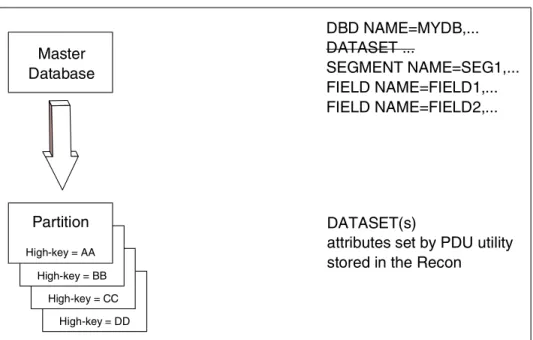
A HALDB definition consists of two distinct entities, the master database definition and its associated partition definitions. The HALDB master database definition is created by the ordinary DBDGEN process. This definition is input to the partition definition process. This is shown in Figure 1-1 on page 8.
Figure 1-1 Changes to the database definition with HALDB
The definition of partitions is external to DBDGEN. DBDGEN is used to define the organization of the database including its hierarchic structure, data set group boundaries, pointer options, logical relationships, and secondary indexes. It does not generate the partition definitions or data set information. The HALDB Partition Definition utility (PDU) is an ISPF interface to DBRC. It provides the mechanism for the definition of partitions and data set characteristics. It stores these definitions in the DBRC RECONs. Alternatively, DBRC batch commands can be used to define the partitions and data sets.
Both databases and partitions may be controlled and displayed with online commands. Commands used with non-HALDB databases, such as /START, /STOP, and /DISPLAY, are also used with HALDB databases and partitions. See Figure 1-2 on page 9 for an illustration of a database before and after conversion to HALDB. Master Database DBD NAME=MYDB,... DATASET ... SEGMENT NAME=SEG1,... FIELD NAME=FIELD1,... FIELD NAME=FIELD2,... DATASET(s)
attributes set by PDU utility stored in the Recon
Partition Information Partition High-key = DD Partition Information Partition High-key = CC Partition Information Partition High-key = BB Partition Information Partition High-key = AA
Figure 1-2 IMS database before and after conversion to HALDB
1.4.1 Database Recovery Control (DBRC)
Database Recovery Control (DBRC) is required for HALDB. HALDB databases must be registered in the DBRC recovery control data set (RECON) either by use of PDU or DBRC batch commands. DBRC information is also used for dynamic allocation. DFSMDA members are not used.
From DBRC’s point of view, a HALDB is a master database consisting of partition databases.
1.5 DL/I processing
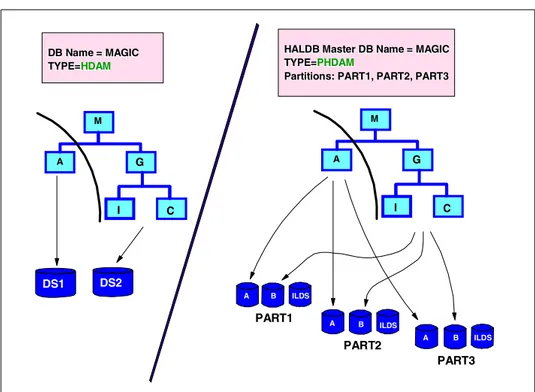
The application programming interface for HALDB is the same as that used with non-HALDB full-function databases. In general, programs that process a non-HALDB will operate the same when the database is converted to HALDB. There are three exceptions. First, if you make a partition unavailable, the program will receive an unavailable data condition. This condition can exist with non-HALDB databases, but for other reasons. Second, if you process a
secondary index as a database, the I/O area may differ. This depends on the HALDB Master DB Name = MAGIC
HALDB Master DB Name = MAGIC
TYPE=
TYPE=PHDAMPHDAM
Partitions: PART1, PART2, PART3
Partitions: PART1, PART2, PART3
PART3 PART1
PART2
DB Name = MAGIC DB Name = MAGIC
TYPE= TYPE=HDAMHDAM
A B ILDS A B ILDS A B ILDS DS1 DS2 M A G I C M A G I C
definition of the secondary index. Processing of the indexed database does not change. Third, you cannot insert logical children with an application load program (PROCOPT=L). This would only affect you if you created a new logically related database. We explain how to handle these changes in Chapter 11, “Application considerations” on page 183.
No other changes to the external characteristics of the DL/I application programming interface were introduced for HALDB.
1.6 Logical relationships with HALDB
Logical relationships are supported with HALDB in the same way as they are with non-HALDB DL/I databases, with a single exception: Bidirectional logical relationships in a HALDB database must be implemented with physical pairing. When loading a new partitioned database that contains logical relationships, the logical child segments may not be loaded as part of the load step. Logical children are added by normal update processing after the database has been loaded.
1.7 Partition selection
HALDB assigns database records to partitions based on the key of the root segment. When retrieving or inserting a database record, HALDB must select the correct partition. This process is called partition selection. Partition selection determines where root segments are placed and the order in which partitions are processed.
Partition selection is based either on the key ranges or a partition selection exit routine. For batch, BMP, and JBP programs, a PCB can be restricted to access a single partition.
1.7.1 Partition selection using key ranges
Partition selection can be done using key ranges for each partition. These ranges are created by assigning a high key to each partition. A root segment is assigned to the partition with the lowest high key, which is also no higher than the key of the root, for example, if there are three partitions with high keys of 1000, 2000, and 3000. Keys of 1001 through 1500 are assigned to the partition with a high key of 2000. Partitions are ordered in the order of their high keys.
1.7.2 Partition selection using a partition selection exit routine
Installations that prefer to select partitions by some criteria other than key ranges may use a partition selection exit routine. The routine assigns records to
partitions based on the key of the root segment. It also determines the order in which sequential processing accesses the partitions. We explain the
requirements and possibilities for these exit routines in 7.2, “Writing partition selection exit routines” on page 82.
1.8 Database structure
There are three HALDB database types:
PHDAM: Partitioned HDAM
PHIDAM: Partitioned HIDAM
PSINDEX: Partitioned secondary index
The primary index of a PHIDAM database is not separately defined. Its definition is included with the definition of the database. Each partition of a PHIDAM database has its own index data set.
Each partition of a PHDAM or PHIDAM has an indirect list data set (ILDS). The ILDS is used for the self-healing pointer process. This process eliminates the need to rebuild secondary indexes or resolve logical relationships when databases are reorganized. We describe the process in 14.2, “The self-healing pointer process” on page 251. It is only used for logical relationships and secondary indexes.
HALDB uses direct pointers, such as physical child and physical twin pointers, within PHDAM and PHIDAM databases. These are the same pointers that are used with non-HALDB databases.
1.8.1 Partition ID and reorganization number
Each partition in a database is assigned a partition ID when it is defined. The partition ID is a 2-byte number that is incremented with the definition of each new partition in a database. Partition IDs are not reused.
Each partition in a PHDAM or PHIDAM has a reorganization number. This number is incremented when the partition is reorganized.
The partition ID and reorganization number are stored in the first data set of each partition of the PHDAM and PHIDAM databases. This is the data set in which root segments are stored. They are stored in the field of the first bit map block that would otherwise hold the free space element anchor point (FSEAP).
1.8.2 Segment structure
HALDB segments consist of two parts, prefix and data. This is the same as non-HALDB databases. However, HALDB prefixes have some additional fields.
PHDAM and PHIDAM
The prefix for PHDAM and PHIDAM segments includes an indirect list key (ILK). The ILK is assigned to a segment when it is created. Its value never changes during the life of the segment. The ILK is 8 bytes and has the following data:
The relative byte address (RBA) of the segment at its creation time (4 bytes)
The partition ID at creation time (2 bytes)
The partition reorganization number at creation time (2 bytes)
Figure 1-3 shows the format of a HDAM or HIDAM segment and that of a PHDAM or PHIDAM segment. The ILK is the last part of the prefix in the HALDB segments. These HALDB segments always include a physical parent pointer in the prefix of segments other than roots. Some non-HALDB segments also have physical parent pointers. They are required in non-HALDB segments only when the segment is the target of a logical relationship or secondary index or the parent of such a segment. They may also be included by specifying the pointer in the DBDGEN.
Figure 1-3 HDAM, HIDAM, PHDAM, and PHIDAM segments
Figure 1-4 on page 13 shows the format of HDAM, HIDAM, PHDAM, and PHIDAM logical child segments. HALDB logical child segments have an extended pointer set (EPS) in their prefix. This replaces the RBA pointer, which non-HALDB logical child segments have among their pointers. HALDB logical
SC - segment code
DB - delete byte
ILK - indirect list key
PHDAM or PHIDAM segment (not a logical child)
SC DB Counters and pointers ILK Data
|---Prefix---|
HDAM or HIDAM segment (not a logical child)
|---Prefix---|
child segments always have their logical parent’s concatenated key stored in the data area. This is optional with non-HALDB logical child segments.
Figure 1-4 HDAM, HIDAM, PHDAM, and PHIDAM logical child segments
Secondary indexes
The prefix of non-HALDB secondary index segments has a four-byte RBA when direct pointers are used. The prefix of HALDB secondary index segments includes an EPS and the key of the target’s root segment. Figure 1-5 shows the format non-HALDB (INDEX) secondary index segments and HALDB (PSINDEX) secondary index segments.
Figure 1-5 Secondary index segments
SC - segment code DB - delete byte
LPCK - logical parent's concatenated key EPS - extended pointer set
ILK - indirect list key
PHDAM or PHIDAM logical child segment
SC DB Counters and pointers EPS ILK Data including LPCK |---Prefix---|
HDAM or HIDAM logical child segment
|---Prefix---| SC DB Counters and pointers Data
DB - delete byte
EPS - extended pointer set
PSINDEX segment
DB EPS Root Key Index Data |---Prefix---|
Secondary INDEX segment
|---Prefix---|
1.8.3 Extended pointer set (EPS)
Each logical child or secondary index segment contains an extended pointer set (EPS). The EPS contains the pointer for the logical relationship or secondary index entry. With bidirectional logical relationships, the EPS contains pointers to the logical parent and to the logical child pair. It replaces the direct pointers or symbolic pointers that are used with non-HALDB databases. They allow you to reorganize a database without updating logical relationships or rebuilding secondary indexes. We explain how EPSs are used in14.2, “The self-healing pointer process” on page 251. The EPS is 28 bytes and contains the following fields:
Reorganization number of target partition
Partition ID of target partition
RBA pointer to logical parent or secondary index target
RBA pointer to paired logical child for bidirectional logical relationships
Indirect list key (ILK) of target segment
Database record lock ID of the target
1.8.4 Indirect list data set (ILDS)
The ILDS is a VSAM KSDS data set. It is the repository for indirect pointers. These pointers eliminate the need for updating logical relationship or secondary index pointers after a reorganization. An ILDS contains indirect list entries (ILEs), which are composed of keys and data. The data parts of ILEs contain direct pointers to the target segments.
Each PHDAM or PHIDAM partition has an ILDS. The ILDS is required even when there are no secondary indexes or logical relationships. Indirect list entries only exist for segments involved in inter-record pointing. These are target segments of secondary indexes or logical relationships. Secondary indexes do not have an ILDS because they never contain any target segments.
Indirect list entries are created or updated only by reorganization reload. They are not created or updated by non-reload processing. An initial load program (PROCOPT=L) does not create any ILEs. After an initial load, the ILDS is empty. If you insert a target segment during normal processing (PROCOPT=I or A), no ILE will be created either. ILEs are not needed in these cases because inserts of target segments create accurate pointers in the EPSs of the secondary index entries or logical child segments.
The key to the ILE is a 9-byte field consisting of the indirect list key and the segment code of the target segment. The ILK is also stored in the segment prefix of the target segment. The next field contains flags (1 byte). ILE data contains an old and a new copy (20 bytes each) of information needed for the self-healing pointer process.
These are:
Partition ID
Reorganization number
RBA of logical parent or secondary index target segment
Database record lock ID for target segment
RBA of paired logical child when physical pairing is used
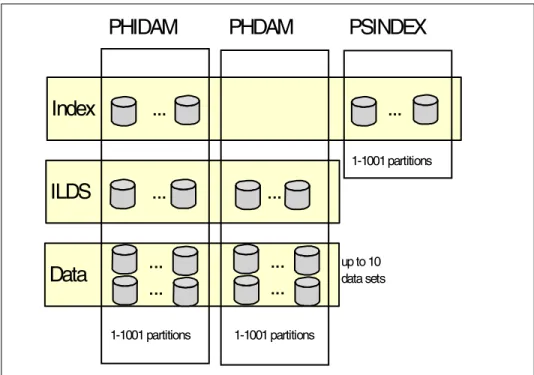
1.8.5 Number of data sets
The number of data sets per partition depends on the database organization.
PSINDEX
A PSINDEX may contain one to 1001 partitions. Each partition contains only one data set, so a PSINDEX may have one to 1001 data sets.
PHDAM
A PHDAM database may contain one to 1001 partitions. Each partition has an ILDS and one to 10 data sets for data set groups, so a partition has two to 11 data sets and a PHDAM database may have two to 11,011 data sets.
PHIDAM
A PHIDAM database may contain one to 1001 partitions. Each partition has an ILDS, a primary index data set, and 1 to 10 data sets for data set groups, so a partition has three to 12 data sets and a PHIDAM database may have three to 12,012 data sets.
The data sets for data set groups are called data data sets. These data sets contain the segment data for PHDAM and PHIDAM databases.
Figure 1-6 on page 16 shows the data sets for the different types of HALDB databases.
Figure 1-6 Data sets in HALDB
The maximum data set size is 4 GB. This applies to both OSAM and VSAM data sets.
1.8.6 Special considerations for secondary indexes
A secondary index database must be a PSINDEX if the target database is a HALDB. The secondary index itself may have one or more partitions.
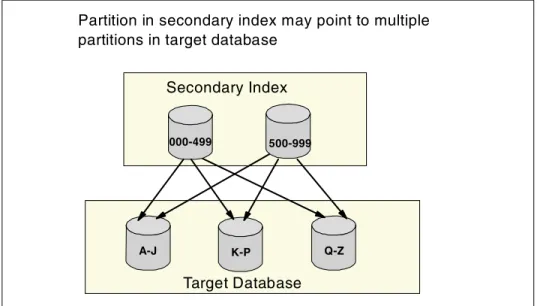
The key ranges for the partitions of a secondary index are not likely to match the key ranges of its target database. Partition selection for the secondary index is based on its key. Partition selection for the target database is based on its key. Usually, these keys are unrelated. In Figure 1-7 on page 17 the target database is partitioned on last name and the secondary index is partitioned on employee number. You will notice that both partitions of the secondary index have target segments in each of the partitions of the target database.
This will be significant for timestamp recoveries of partitions. A timestamp recovery of a partition in the target database would require a timestamp recovery of all of the partitions in the secondary index to the same time. This would require a timestamp recovery of the other partitions in the target database to this same
PHIDAM PHDAM PSINDEX
ILDS ... ...
Data
Index ... ...
...
...
...
...
1-1001 partitions 1-1001 partitions 1-1001 partitions up to 10 data setstime. That is, you will not be able to do a timestamp recovery of an individual partition for most databases that have secondary indexes.
Figure 1-7 Partitioned secondary index
A partition selection exit could be used to partition the secondary index along the same boundaries of the main database. There has to be an appropriate key, because the selection of a partition always depends on the root key. The exit has the possibility to use just parts of the root key to define the correct partition.
Miscellaneous requirements and considerations
There are some other requirements and considerations for secondary indexes:
Symbolic pointing is not allowed.
Secondary indexes must have unique keys. /SX and /CK fields may be used to provide uniqueness.
Shared secondary indexes are not supported.
The reorganization of a target database does not require the rebuilding of its secondary indexes.
1.9 Naming conventions
HALDB databases may have many partitions and even more data sets. Naming conventions for DD names and data set names are used to make their
management simpler. 000-499 500-999 Secondary Index A-J Target Database K-P Q-Z
Partition in secondary index may point to multiple partitions in target database
1.9.1 Partition names
Each partition is given a partition name that is one to seven bytes in length. These names must be unique among the database names, partition names, and Fast Path area names that are registered in a set of RECONs. A partition name may be used to describe the data in the partition, but the name should be chosen carefully. If you add or delete partitions or modify their boundaries, data may be moved from one partition to another. This may make the assignment of
meaningful names difficult. There is no way to change the name of an existing partition.
1.9.2 DD names
DD names are constructed by appending a one-byte suffix to the partition name. The suffix indicates the function of the data set.
For PHIDAM or PHDAM databases, these are:
Suffixes A through J are used for data data sets.
This is the same value that is defined in the DSGROUP statement in the DBD. If there is no DSGROUP specified, the default is A.
Suffix L is used for the indirect list data set (ILDS).
Suffix X is used for the primary index data set.
For PSINDEX databases, there is only one data set in a partition: Suffix A is used for the secondary index data set.
Thus, a partition in a PHIDAM database with partition name PART1 would have DD names of PART1A for its first data data set, PART1B through PART1J for any successive data data sets, PART1L for its ILDS, and PART1X for its primary index data set.
A secondary index partition with partition name PARSI would have a DD name of PARSIA for its data set.
1.9.3 Data set names
Each partition is given a data set name prefix. It may be up to 37 characters. IMS appends seven characters to this prefix to form the data set name. The
IMS-supplied portion contains a one-character alphabetic suffix to indicate the function of the data set and a five-digit partition ID number. The appendix of .A00001 indicates the first data data set in the partition with partition ID 1. The alphabetic character is the same one used as the suffix for the DD name of the data set.
There is no required correlation between the partition name and the names of its data sets. You may assign the same data set name prefix for every partition in a database. Since partition IDs are unique, data sets in different partitions will have different data set names.
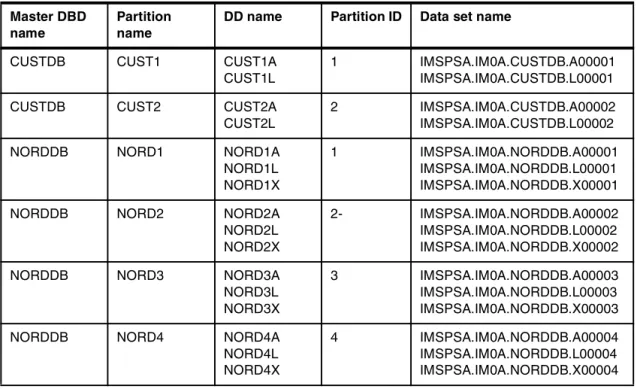
Some examples of databases that we use later in this publication are the Customer database (CUSTDB) and the New Order database (NORDDB). In our example the Customer database is PHDAM and has two partitions, and the New Order database is PHIDAM and has two partitions. Table 1-1 shows the
corresponding DD and data set names. The example used may not be a practical one for a real environment, as the partition names and DD names must be unique within their RECON.
Table 1-1 Customer and order databases - DSN table
Master DBD name
Partition name
DD name Partition ID Data set name
CUSTDB CUST1 CUST1A CUST1L
1 IMSPSA.IM0A.CUSTDB.A00001 IMSPSA.IM0A.CUSTDB.L00001 CUSTDB CUST2 CUST2A
CUST2L
2 IMSPSA.IM0A.CUSTDB.A00002 IMSPSA.IM0A.CUSTDB.L00002 NORDDB NORD1 NORD1A
NORD1L NORD1X
1 IMSPSA.IM0A.NORDDB.A00001 IMSPSA.IM0A.NORDDB.L00001 IMSPSA.IM0A.NORDDB.X00001 NORDDB NORD2 NORD2A
NORD2L NORD2X
2- IMSPSA.IM0A.NORDDB.A00002 IMSPSA.IM0A.NORDDB.L00002 IMSPSA.IM0A.NORDDB.X00002 NORDDB NORD3 NORD3A
NORD3L NORD3X
3 IMSPSA.IM0A.NORDDB.A00003 IMSPSA.IM0A.NORDDB.L00003 IMSPSA.IM0A.NORDDB.X00003 NORDDB NORD4 NORD4A
NORD4L NORD4X
4 IMSPSA.IM0A.NORDDB.A00004 IMSPSA.IM0A.NORDDB.L00004 IMSPSA.IM0A.NORDDB.X00004
Chapter 2.
Defining HALDB databases
This chapter gives an overview of the definition tasks for HALDB. The process you follow to implement a HALDB is similar to implementing a full-function non-HALDB database.
This chapter describes system definition, buffer pool assignment, definition of database exit routines, dynamic allocation, and DBDGEN differences for HALDB databases.
2.1 Overview of HALDB definition
This section briefly describes the steps you need to follow for defining a HALDB database. A HALDB structure consists of two distinct entities, the master database structure and its associated partition structures. The master structure is defined and generated with the DBDGEN process. It is basically unchanged from non-HALDB methods, so your first step is to design the logical structure of your database and implement it with the DBDGEN process. This defines the structure of the master database. A HALDB database contains one or more partitions. You must determine the number and characteristics of your partitions and implement them. The definition process for partitions is external to the DBDGEN process. It uses either the Partition Definition utility (PDU) or DBRC commands.
After ACBGEN and system definition for the master database, assignment of data sets to buffer pools also must be done.
Some of the differences between HALDB and non-HALDB definitions are covered in more detail Chapter 8, “Migration from non-HALDB to HALDB” on page 89.
2.1.1 Design the logical structure of the database
You need to determine your segment structures, the relationships between segments, segment layouts, and, if appropriate, logical relationships and secondary indexes. You follow the same process here as you would for a non-HALDB database.
2.1.2 Implement the logical structure with the DBDGEN process
The DBDGEN creates the HALDB master DBD.
The master DBD provides the structure for DL/I processing, as well as a model for creating the partitions.
The logical structure of the database includes the relationship between the segments, the pointers used, the database access method (PHDAM or PHIDAM), the segment layouts, the database physical data set organization (VSAM or OSAM), and, if appropriate, any secondary indexes or logical relationships. You should also decide whether you need data set groups. One reason for data set groups is now obsolete. You do not need them to resolve size problems, but they could still be helpful for resolving potential performance problems.
Other functions of DBDGEN for non-HALDB databases, such as defining the physical characteristics of the data sets and their DDNAMEs, are not performed for HALDB. You have to use other tasks to define them.
2.1.3 Determine the partitioning scheme
You must determine your partitioning scheme. The questions you need to answer here include:
How many partitions do you need in your database?
How much DASD storage space is required for each partition?
How much free space do you need in your database? Do the free space parameters need to be different for each partition?
What key is to be used to determine the split between partitions?
Do you need a partition selection exit?
For PHDAM, do you want all of your partitions to use the same randomizing parameters, or do you want to have randomizing parameters specific for each partition?
Do you want to automatically or manually define your partitions? This decision influences the names of the partitions. You cannot change these names afterwards.
The HALDB Migration Aid utility (DFSMAID0) may help you in determining the answers to some of these questions.
You have to decide how many partitions you want. Usually this is determined by two considerations: The size of the database and the time required for the reorganization of the database. Partitions may be reorganized independently and in parallel. Since smaller partitions may be reorganized faster, defining many small partitions allows you to reorganize the database in a shorter time.
2.1.4 Create the partitioning scheme
HALDB partition definitions are stored in DBRC RECONs. When defining partitions, you must have update authority for the RECON data sets.
From DBRC’s point of view, a HALDB is a master database consisting of partition databases.
You have two ways of defining partitions:
Partition Definition utility (PDU)
This utility is invoked under ISPF. It reads the DBDLIB and registers the database. You can use it only after having performed a DBDGEN.
There are panels in which you can specify the physical characteristics, such as high keys, randomizer values, and block sizes, as well as some DBRC options, such as skeletal JCL members and maximum number of image copies. Parameters for which default values were defined in DBDGEN are included on some panels. The output of the definition is placed in DBRC’s RECON data sets.
For more information about the PDU see Chapter 4, “Partition Definition utility” on page 45.
DBRC batch commands
You may issue the INIT.DB and INIT.PART commands to register the master database and define its partitions.
For more information about DBRC batch commands see Chapter 5, “Batch definition of HALDB” on page 61.
When using key range partitioning we recommend that you specify a value of x’FF’ for the last partition. This ensures that all keys may be assigned to a partition. If the last partition (the partition with the highest key specified) has a key value other than x’FF’s, any attempt to access or insert a database record with a key higher than the high key specified results in an FM status code for the call. Application programs written for non-HALDB databases are unlikely to expect this status code.
2.1.5 Database exit routines
With the exception of PHDAM randomizing routines, database exit routines are defined for the whole database, not just for a partition. These exit routines are:
Data capture exit routine
Data conversion user exit routine
secondary index database maintenance exit routine
Segment edit/compression exit routine
These exit routines are not passed any information about partitions. Their actions cannot be tailored for individual partitions.
2.1.6 System definition
The DATABASE macro statement is used to define physical databases for an IMS online system. One DATABASE macro must be specified for each PHDAM, PHIDAM, and PSINDEX database. Unlike HIDAM primary indexes, PHIDAM primary indexes are not defined explicitly and DATABASE macros are not used in the system definition. Instead, they are implicitly defined by the DATABASE macro for the PHIDAM database.
2.1.7 Buffer pools
HALDB database data sets are assigned to buffer subpools with DFSVSMxx members for online systems and the DFSVSAMP DD data sets for batch jobs and utilities. This is the same method that is used for non-HALDB databases. Buffer subpools may be used for both HALDB and non-HALDB data sets. These subpools are defined with IOBF statements for OSAM and VSRBF statements for VSAM. They are not changed for HALDB support.
DBD statements are used to assign data sets to specific subpools. Example 2-1 shows the DBD statement format. The dbdname value is used to specify a database or partition. For non-HALDB data sets, the data set identifier is a number. This is the data set number within the database specified by the dbdname value. For HALDB data sets, the data set identifier is a letter. This is the letter associated with the type of data set. It is the same letter that is used for the suffix in the data set’s DDNAME. A through J are used for data set groups. X is used for PHIDAM primary indexes. L is used for ILDSs. A is used for secondary indexes. The id value identifies the database subpool to which the data set is assigned.
If a master database name is specified on a DBD statement, it applies to all partitions in the database. If a partition name is specified, it applies only to that partition. Statements specifying a partition name override any statements specifying the master database name of the partition.
Example 2-1 DBD control statement for buffer pool assignment
DBD=dbdname(data set identifier,id)
Buffer pools for ILDSs are always required when processing the PHDAM and PHIDAM databases. This is true even when the ILDSs have no entries in them.
2.1.8 Dynamic allocation
Dynamic allocation of HALDB data sets uses DBRC RECON information. Since all HALDB databases are registered in the RECONs, this information always exists. DFSMDA members are not used with HALDB data sets.
Dynamic allocation for HALDB data sets cannot be overridden. DD statements should never be used for HALDB data sets. If they are present and they do not match with the information in the RECON, the opening of the data sets fails. The NODYNALLOC statement in DFSVSAMP specifications for batch jobs is ignored for HALDB data sets. For non-HALDB data sets it is used to disable dynamic allocation.
2.2 DBDGEN differences for HALDB
The database definition statements for HALDB databases are slightly different from non-HALDB databases. The four main things that are different in HALDB definitions are:
ACCESS operands PHDAM, PHIDAM, and PSINDEX are used.
DDNAME and data set information are not part of DBDGEN for HALDB. The database definition is purely for defining the hierarchical structure and relationships of the data. DATASET statements are not allowed for HALDB.
The primary index of a PHIDAM database is automatically included in the generation of the PHIDAM database. DBDGEN cannot be performed for the primary index.
Since DATASET statements are not allowed in HALDB database definitions, another method is used for defining multiple data set groups. They are defined with the DSGROUP parameter on SEGM statements. This parameter is not used with non-HALDB databases.
DBDGEN does not define individual partitions. This is done using the HALDB Partition Definition utility or DBRC batch commands. See Chapter 4, “Partition Definition utility” on page 45, and Chapter 5, “Batch definition of HALDB” on page 61.
Definitions specified in the DBDGEN source will generally apply to all partitions. The possible exception is the RMNAME parameter on the DBD statement. RMNAME must be specified in the DBD for PHDAM databases, but it may be overridden. Overrides may specify different values for different partitions.
The PSNAME parameter on the DBD statement specifies the name of a partition selection exit routine. It may be overridden by the PDU or DBRC commands. The
override may specify a different name or may specify that key range partitioning is to be used. Similarly, if the PSNAME parameter is not specified in the DBD, it may be specified by the PDU or DBRC commands.
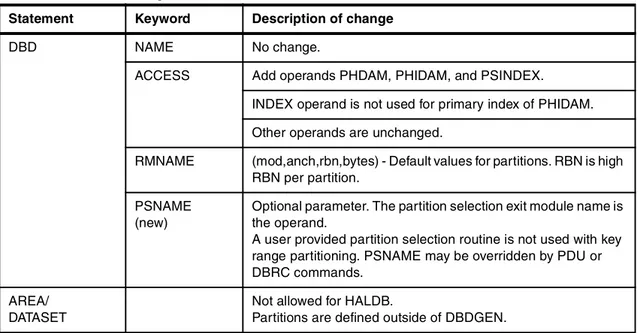
Table 2-1 shows the parameters that are changed or added to DBDGEN statements.
Table 2-1 DBDGEN changes
Note: Partition selection is done prior to invoking the randomizing module. Randomizing modules only select locations within partitions.
Statement Keyword Description of change
DBD NAME No change.
ACCESS Add operands PHDAM, PHIDAM, and PSINDEX. INDEX operand is not used for primary index of PHIDAM. Other operands are unchanged.
RMNAME (mod,anch,rbn,bytes) - Default values for partitions. RBN is high RBN per partition.
PSNAME (new)
Optional parameter. The partition selection exit module name is the operand.
A user provided partition selection routine is not used with key range partitioning. PSNAME may be overridden by PDU or DBRC commands.
AREA/ DATASET
Not allowed for HALDB.
SEGM PARENT VIRTUAL/PHYSICAL: Either may be specified, but only physical used. That is, either specification results in the logical parent’s concatenated key being physically stored in the logical child segment.
POINTER HIER and HIERBWD are not allowed. TWIN, TWINBWD, or NOTWIN must be specified PHDAM and PHIDAM databases. For root segments in PHIDAM databases, only NOTWIN or TWINBWD are allowed.
All dependent segments have a physical parent pointer. If the segment is a logical child, PAIRED and LPARNT are assumed. LTWIN and LTWINBWD are not allowed.
SOURCE Not allowed for PHDAM or PHIDAM. Only physical pairing is supported for bidirectional logical relationships.
DSGROUP (new)
This keyword is used to specify multiple data set groups for partitioned databases. The format is DSGROUP=c, where c is the letters A through J. Up to 10 data set groups can be specified. The DSGROUP value corresponds to the values used in the DDNAME and data set naming conventions for HALDB.
The default for every segment is A (first data set in each partition). If specified on the root segment, it must be DSGROUP=A.
Gaps in the A–J sequence are not allowed. If DSGROUP=C is specified on a SEGM statement, there must also be at least one SEGM statement with DSGROUP=B and one with A.
We provide examples of the needed DBD changes later in this publication. Example 9-8 on page 138 shows the DBD source for a HIDAM database, and Example 9-9 on page 139 shows the DBD source after the database has converted to a PHIDAM.
LCHILD LCHILD statements are not used for the primary index of a PHIDAM database. These indexes are automatically generated by PHIDAM definitions.
POINTER PTR=INDX is required for LCHILD statement following the target segment in indexed PHDAM or PHIDAM DBD.
PTR=SNGL is required for the LCHILD statement in PSINDEX DBD. It is the default value for this LCHILD statement
PTR=NONE is required for the LCHILD statement following a logical parent segment. It is the default for this LCHILD statement.
PAIR Unchanged from non-HALDB. HALDB does not support virtual pairing, so paired segment is physically paired.
INDEX Not needed for a primary index of PHIDAM, otherwise unchanged.
RKSIZE (new)
For PSINDEX only, specifies the length of the root segment key of the target database.
RULES Not used: It does not apply to physical pairing.
FIELD Unchanged.
Note: /CK means the same as with non-HALDB. /SX creates an 8-byte ILK instead of 4-byte RBA.
XDFLD CONST For shared secondary indexes. Not allowed for HALDB.