Dell Migration Manager 8.11
Release Notes
November 28, 2014
These release notes provide information about the Dell Migration Manager 8.11 release. About Dell Migration Manager
New features
Known issues
Third party known issues
System requirements
Upgrade and compatibility
Getting started with Migration Manager
Globalization
About Dell
Third-party contributions
About Dell Migration Manager
Dell Migration Manager is a comprehensive solution for seamless simple or extensive Active Directory restructuring and transparent inter-org Exchange migration.
New features
What’s new in this release New in previous updates to Quest Migration Manager 8.10
What’s new in this release
General
All Dell Migration Manager components can now be installed on Microsoft Windows Server 2012 and Microsoft Windows Server 2012 R2
Dell Migration Manager provides support for Microsoft Windows Server 2012 and Microsoft Windows Server 2012 R2. For more details, see the Dell Migration Manager - System Requirements and Access Rightsdocument.
Dell™ rebranding
In this release, Quest Migration Manager is rebranded to Dell Migration Manager. Some operating systems are not supported from this version, as follows:
For Migration Agent for Exchange:
Microsoft Windows Server 2008 Service Pack 1 or higher (x86 edition) Microsoft Windows Server 2008 Service Pack 1 or higher (x64 edition) Microsoft Windows 7 Service Pack 1 or higher (x86 edition)
Microsoft Windows 7 Service Pack 1 or higher (x64 edition) For Migration Manager console:
Microsoft Windows Server 2008 Service Pack 1 or higher (x86 edition) Microsoft Windows Server 2008 Service Pack 1 or higher (x64 edition) Microsoft Windows 7 Service Pack 1 or higher (x86 edition)
Migration Manager for Active Directory
Automating distributed resource processing
Resource Updating Manager operation can be automated using Resource Updating Toolkit for PowerShell (PowerRUM). This is a collection of Windows PowerShell cmdlets that replicate the functionality of the Resource Updating Manager console. For more details, refer the Automating Distributed Resource Processing.
Migration Manager for Exchange
Migration Manager supports migration from the source Exchange 2013 organization to the target Exchange 2010 or Exchange 2013 organization using Native Move Job.
Migration Manager for Exchange does not provide calendar co-existence for mailboxes migrated by native move job; therefore if necessary you will need to establish it manually using third party tools.
Public folders cannot be migrated using Native Move job.
Native mailbox move provides a limited support for New-MoveRequest cmdlet features. For more details, refer the Mailbox Migration Process and Source and Target Exchange Organizations.
New in previous updates to Quest Migration Manager
8.10
Migration Manager for Active Directory
Migration Manager for Active Directory can now process shared folders on Windows Server 2008 and Windows Server 2008 R2 clusters.
For that, you need to process only the virtual server where the shares are hosted. The server must be processed without agents—make sure the Perform the task remotely (without agents) option is selected for the processing task. You do not have to process the cluster nodes.
Note: Processing of shared volumes, which were introduced in Windows Server 2008 R2, is not supported at this time.
The interface of the Synchronization Properties wizard is changed.
Now you can select one of the following options on the Specify Exchange Options step:
Users without mail options for newly-created target users without Exchange mail capabilities Mail-enabled users for newly-created target mail-enabled users
Mail-enabled users for Native Move for newly-created target mail-enabled users that are ready for the Native Move operation
Mailbox-enabled users for newly-created mailbox-enabled users Notes:
If the target user exists and has more mail options than the source user (for example, mailbox-enabled rather than mail-mailbox-enabled), then the target user configuration is kept.
If the target user exists and has fewer mail options than the source user (for example, mail-enabled rather than mailbox-mail-enabled), then the target user configuration is updated to make the user mail-enabled or mailbox-enabled.
For more details, see the Configuring the Synchronization Job section of Dell Migration Manager for Active Directory User Guide.
During migration (synchronization) to the Microsoft Office 365, Directory Migration Agent does not change the value of the ExternalEmailAddress property of the Office 365 mail user in the following cases:
This address coincides with the primary SMTP address (mail attribute) of a source mailbox. This address is included in the proxy address list (proxyAddresses attribute) of a source mailbox
and resides in the redirection domain or in the primary SMTP domain if the redirection domain is not specified.
Use Single Sign-On from day one of your migration to Office 365.
Migration Manager can now create users in federated domains in Office 365; these users are capable of logging in through Single Sign-On as soon as they get a Microsoft Office 365 account. If you need ongoing coexistence between your source Active Directory environment and the Office 365 subscription, you can enable Microsoft DirSync after the migration.
For more information, see the Supporting Single Sign-On (SSO) using Migration Manager topic of Dell Migration Manager - Migrating to Microsoft Office 365.
Use Single Sign-On in sophisticated environment configurations.
With Migration Manager, you can migrate while taking advantage of Single Sign-On from an environment with separate authentication and Exchange resource forests. We recommend using special migration templates for that. The template for Exchange resource forests lets you populate the Office 365 Global Address List (GAL) from the Exchange resource forest as the first step. The template for activating Single Sign-On enables federation between the authentication forest and the Office 365 subscription as the second step. Using the Exchange resource forest template, you make sure that federation with the separate authentication forest is not broken by ongoing GAL coexistence between the Exchange resource forest and the Office 365 subscription.
For more information, see the Supporting Single Sign-On (SSO) using Migration Manager topic of Dell Migration Manager - Migrating to Microsoft Office 365.
Interoperate with Microsoft DirSync during migration to Microsoft Office 365.
Migration Manager can work with objects created and managed by Microsoft DirSync under the following conditions:
The Active Directory object that Microsoft DirSync treats as the source does not have a mailbox. This is typical for environments with a consolidated Active Directory forest or for environments with separate authentication and Exchange resource forests.
An additional domain is set up in the Exchange organization for mail redirection. The mailboxes to be migrated with Migration Manager reside in this domain. The domain must be accessible from the Internet for mail delivery and must not be listed as an accepted domain for the Office 365 tenant.
For more details, refer the Hybrid Migration Scenarios chapter of Dell Migration Manager - Migrating to Microsoft Office 365.
Customize automatic messages sent during migration to Microsoft Office 365.
Migration Manager now lets you customize the text of the automatic messages sent to users on actions performed on their accounts in Office 365 (account creation, UPN change, password change, and their combinations).
a In the Notifications subfolder of the folder where the Migration Manager for Active Directory (Office 365) console is installed, create any of the following text files:
NewUser_NewPassword.custom.txt NewUser_EnableSSO.custom.txt NewPassword.custom.txt ChangeUPN.custom.txt
ChangeUPN_EnableSSO.custom.txt ChangeUPN_NewPassword.custom.txt EnableSSO.custom.txt
These files are templates that override the default message templates (NewUser_NewPassword.default.txt and so on) for particular scenarios.
Every Directory Migration Agent you install after that inherits these updated files and sends customized notifications to end users.
b To customize the messages only for a collection of users, do the same in the Notifications subfolder of the folder where the corresponding Directory Migration Agent is installed. Only the users processed by that particular agent will get customized notifications.
If you need to disable email notifications for a scenario (for example, for Single Sign-On activation), create an empty file for it (for example, an empty EnableSSO.custom.txt). For more details, refer the Performing Pre-Migration Activities section of Dell Migration Manager - Migrating to Microsoft Office 365.
Migration Manager can now process Microsoft SQL Server 2012 permissions using the SQL Processing Wizard.
Migration Manager can synchronize mailbox permissions and the Send As permission during synchronization and migration to Microsoft Office 365.
So if a source user can send mail messages as another user account and/or manage mailboxes of other users, the corresponding target user will have the same rights.
Notes:
The Rollback Task cannot roll back changes of the Send As and mailbox permissions that were made during migration or synchronization.
If any of these permissions is removed on the source, this action will not be synchronized on the target during the next migration or synchronization session.
If a source user has the Deny Send As permission, the corresponding target user will have no Send As permission (neither Allow nor Deny) after synchronization. If the user has the Allow Send As permission for any mailbox on the source and a membership in a group that has the Deny Send As permission for the same mailbox, this user will have the Allow Send As permission on the target.
The Send As permissions are synchronized only for mailboxes. If a user has the Send As permission for a group (i.e. is able to send emails from this group), the corresponding target user will not have this permission.
This functionality is not supported in the Exchange resource forest when permissions are granted to users or groups from the account forest.
For more details, see the Interoperating with Microsoft Directory Synchronization Tool topic of Dell Migration Manager - Migrating to Microsoft Office 365.
Resource Updating Manager can now process Microsoft Windows 8.1 and Microsoft Windows Server 2012 R2.
For more details, see the Dell Migration Manager System Requirements and Access Rightsdocument. Migration Manager for Active Directory now supports Microsoft Windows Server 2012 R2 Active
Directory as the migration target and Microsoft Windows Server 2012/2012 R2 Active Directory as the migration source in migrations to on-premises domains and to Microsoft Office 365.
Migration Manager for Exchange
Filtering messages in mailbox and calendar collections – in addition to other targets, filtering is now available for the Office 365 target and Exchange 2013 target.
Now you can configure filter settings that let you exclude from migration certain message classes and/or messages (calendar items) that are older than a specified number of days. For more details, see the Skipping Calendar Items section and the Skipping Messagessection of Dell Migration Manager for
Exchange User Guide.
Microsoft Windows Server 2000 is not supported as an agent host.
For more details about supported configurations, refer Dell Migration Manager - System Requirements and Access Rights.
Microsoft Office 365 granular license settings: ability to set the entire subscription plan or only Exchange Online service within the plan without touching existing settings. For details, see Selecting Subscription Planin Migrating to Microsoft Office 365 document.
Detailed information about how to migrate large public folders to the Exchange 2013 target is added to Migration Manager for Exchange User Guide.
For more details, see the Appendix B. Migrating Large Public Folders to Exchange 2013 section at
http://documents.software.dell.com/DOC258720. Performance improvements:
Migration Manager performance is tangibly improved in the following cases:
Slow response from the source Exchange server, for example, mailboxes from the remote location.
Huge folder hierarchy (1000+ folders)
Big number of address books at the Source Exchange organization
Interoperation with Microsoft Office 365 is improved due to caching of Autodiscover information
Previously, in such cases, the migration performance was extremely slow or stuck. The process of migration into and within a Hybrid organization is simplified.
Now a number of manual steps that are required for migration to a hybrid organization is reduced. Microsoft Office 365 related documentation is updated.
A description and step-by-step instructions for supported Migration Manager migration scenarios that involve hybrid deployments are added to the Migration Manager Migrating to Microsoft Office 365 document, section Hybrid Migration Scenarios.
Dell Migration Manager supports Microsoft Exchange Server 2013 Service Pack 1 and is compatible with Exchange Server 2013 Service Pack 1 Cumulative Update 6.
For more details, see the Dell Migration Manager - System Requirements and Access Rightsdocument. For migrations that involve Exchange 2013 target organizations, you can now use the following
alternative methods: Mailbox Synchronization Job or Native Move Job.
Migration of archive mailboxes from Exchange 2010 to Exchange 2013 is now supported in Native Move Job.
Maximum size of a message that can be migrated to the target Exchange 2013 or Office 365 by Migration Agent for Exchange (MAgE) is increased up to 40 MB.
Increasing of data processing speed per single Migration Agent for Exchange instance – up to 70 percent (for more details, see the Technical Details section below).
Technical Details
The default value of the UPLOAD_ITEMS_LIMIT_E15 (UPLOAD_ITEMS_LIMIT_O365) parameter is increased up to 40 MB. This parameter specifies the maximum size of a batch that can be uploaded to the target Exchange 2013 server (Office 365) by the Migration Agent for Exchange (MAgE). This parameter also limits the maximum size of a message that can be migrated by the agent from source to target.
Increasing of data processing speed per single Migration Agent for Exchange instance – up to 70 percent. The performance increase is achieved because some changes were made in the agent operations related to the source Exchange server and SQL database. This performance test was performed in the same configuration and with the same amount of data as the test that is described in the Migration Agent for Exchange Performance section of Migration Manager for Exchange User Guide.
The default value of the UPLOAD_ITEMS_COUNT_LIMIT_E15 parameter is changed from 2048 to 512. This parameter specifies the maximum number of messages in a batch that can be uploaded to the target Exchange 2013 server. This reduces a number of messages that cannot be uploaded and postponed for the next processing session. As a result, this enhancement affects the agent performance rate and stability.
A single Migration Agent for Exchange process can now use 3 GB of RAM on 32-bit versions of Microsoft Windows and 4 GB of RAM on 64-bit versions of Microsoft Windows.
For installed MAgE agents, settings that disable SQL database logging and enable the extended logging will be applied by default during the update installation.
MAgE agents that were stopped before the Repair operation will not be automatically started after the Repair operation is completed.
The number of steps that are required for migration to Microsoft DirSync environment is reduced (including the Hybrid scenario).
Migration to the Office 365 federated domain: support for Single Sign-On (SSO) from the first day of migration.
For more information, see the Supporting Single Sign-On (SSO) using Migration Manager section of Dell Migration Manager - Migrating to Microsoft Office 365.
Adding, deleting or expanding members (users, groups, organizational units) within a collection works faster and more stable.
Now the Native Move collection can be populated by groups and organizational units.
Improvements to general product quality and stability thanks to test automation and optimization of the product processes.
Known issues
The following is a list of issues known to exist at the time of Migration Manager release.
General
Table 1. General known issues.
Known issue Issue ID
Migration Manager console, Migration Agent for Exchange and all legacy migration agents cannot
expand groups within an organizational unit (OU) if the OU is added to a collection as a member. TF305584 Migration Manager cannot be installed on a computer where Resource Updating Manager is already
installed. Uninstall Resource Updating Manager, then install both applications at once; no project data will be lost.
ST78379
The Migration Manager Console cannot be installed on a computer that is in a workgroup. ST70924 The Migration Manager for Active Directory Resource Kit cannot be uninstalled through the main
setup suite.
ST74509 When you specify a new license instead of the old one, you may get the You are now using N% of
your license message, where N is larger than 100. You will stop getting these messages in a certain time, or you can resolve the issue by restarting the Dell Directory Synchronization Agent Configurator Service on the computer where DSA is installed.
ST47876
Terminal Services Client does not resolve the issue.
Express setup and Open Project Wizard may report the Failed to configure project error if you are running setup on localized (non-English) version of Microsoft Windows. Despite the error text, only Statistics Portal will not be configured.
ST36090
Directory Synchronization Agent cannot be installed remotely (from Agent Manager) on Microsoft Windows Server 2008 R2. Consider running DSA installation package locally.
ST78786 If you install Dell Migration Manager Statistics on a computer running localized (non-English)
version of Microsoft Windows, you will not be able to configure Statistics Portal from the Open project wizard for a project. To workaround the issue, create a local user Everyone on the computer where Dell Migration Manager Statistics is installed before you start configuring Statistics Portal.
ST45547
The Dell Migration Manager installation folder path must contain ASCII symbols only. ST63937 If both the Directory Synchronization Agent and the Migration Agent for Exchange are installed on
a computer, then uninstalling the Directory Synchronization Agent may cause the Migration Agent for Exchange to work incorrectly. If this happens, reinstall the Migration Agent for Exchange.
ST83437
A Name Service Provider Interface (NSPI) connection from a MAPI client to a Windows Server 2008-based domain controller may fail with the following error code that is returned from the server: MAPI_E_LOGON_FAILED.
This behavior occurs because Windows Server 2008 only allows for a default maximum of 50 concurrent NSPI connections per user to any domain controller. Additional NSPI connections are rejected with the MAPI_E_LOGON_FAILED error code.
TF236096
Directory Migration and Synchronization
Table 2. General directory migration and synchronization known issues.
Known issue Issue ID
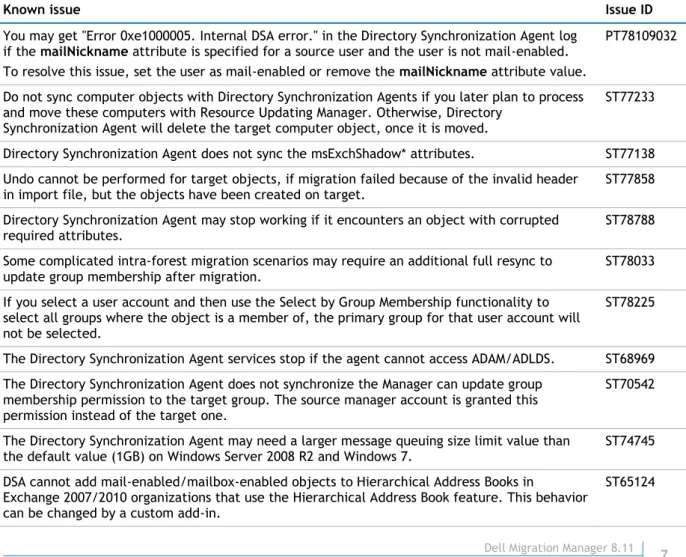
You may get "Error 0xe1000005. Internal DSA error." in the Directory Synchronization Agent log if the mailNickname attribute is specified for a source user and the user is not mail-enabled. To resolve this issue, set the user as mail-enabled or remove the mailNickname attribute value.
PT78109032
Do not sync computer objects with Directory Synchronization Agents if you later plan to process and move these computers with Resource Updating Manager. Otherwise, Directory
Synchronization Agent will delete the target computer object, once it is moved.
ST77233
Directory Synchronization Agent does not sync the msExchShadow* attributes. ST77138 Undo cannot be performed for target objects, if migration failed because of the invalid header
in import file, but the objects have been created on target.
ST77858 Directory Synchronization Agent may stop working if it encounters an object with corrupted
required attributes.
ST78788 Some complicated intra-forest migration scenarios may require an additional full resync to
update group membership after migration. ST78033
If you select a user account and then use the Select by Group Membership functionality to select all groups where the object is a member of, the primary group for that user account will not be selected.
ST78225
The Directory Synchronization Agent services stop if the agent cannot access ADAM/ADLDS. ST68969 The Directory Synchronization Agent does not synchronize the Manager can update group
membership permission to the target group. The source manager account is granted this permission instead of the target one.
ST70542
The Directory Synchronization Agent may need a larger message queuing size limit value than
the default value (1GB) on Windows Server 2008 R2 and Windows 7. ST74745 DSA cannot add mail-enabled/mailbox-enabled objects to Hierarchical Address Books in
Exchange 2007/2010 organizations that use the Hierarchical Address Book feature. This behavior can be changed by a custom add-in.
Undo does not restore deleted objects from tombstone if the target domain controller is
running Windows Server 2008 or later. ST64991
Conflicts that are related to msExchMasterAccountSID disappear from statistics even if the
conflicts still exist. ST56589
In case of Windows Server 2003/2008/2008 R2 as source and target: Dynamic objects are migrated as static. This is by design. This behavior can be changed by a custom add-in.
ST65141 Undo does not work for migrated accounts that have service attributes of a type other than
Unicode String.
ST56845 DSA may select Windows Server 2008 or later read-only domain controllers to work with, and
fails with the LDAP error 0xa. Referral error displayed. To avoid the issue, specify the writable preferred domain controller in the DSA properties.
ST51245
Conflict resolution rules with scope equal to forest are verified using the Global Catalog. As a result, this scope type can be used only for attributes published in the Global Catalog.
ST19140 You cannot delete a target object using the Synchronize object deletion option, if the object
has unsynchronized objects under it.
ST64922 Directory Synchronization Agent only supports the SMTP proxy generation in accordance with
Exchange 2007,Exchange 2010 or Exchange 2013 email policy.
ST56318 DSA sets invalid HomeMTA attribute, when a new mailbox created on a second or successive
clustered mailbox Exchange 2007 server. To learn more about the issue, see the Microsoft Knowledge Base article available at http://support.microsoft.com/kb/928811.
ST35734
During the two-way synchronization, source alias may be replaced with the target alias changed by DSA.
ST44532 Denied objects within synchronization scope are not placed to Failed objects queue. ST44136 BitLocker and Trusted Platform Module Recovery information backed up in the child object of
the AD computer object is lost after migration. ST38557 Antivirus and antispyware software may identify Migration Manager agents and services as
malicious software. You may ignore these warnings.
ST45347, ST45069 It is recommended to configure recipient policy to convert non-Latin symbols to Latin.
Otherwise the non-Latin symbols will be lost.
ST46825 The Directory Synchronization Agent cannot synchronize object deletion for the group that is
set as the primary group for any domain user account, computer account or inetOrgPerson.
ST15618 A migrated (synchronized) account's primary group might be set to a source group that has not
been migrated yet. If so, when target-to-source domain sync is performed by two-way
synchronization job, any modification of account’s primary group will not be synchronized until corresponding source group is migrated (synchronized) within the same migration project. This helps to prevent from losses of primary group values in source domain during initial sync.
N/A
Trust Migration Wizard does not migrate forest-level trusts. CR151624 An issue may arise if the Directory Synchronization Agent and Domain Migration Wizard
simultaneously process passwords and SIDHistory on the same DC. CR165675 CR165732 Although several issues related to the value provided for the new password does not meet the
length, complexity, or history requirement of the domain error were resolved, you may still get this error message in the following situations:
If the source password is empty, while the minimum password length on the target is set to more than 0 characters.
If the source password was previously migrated to the target and is stored in password history of the target account.
N/A
If you merge migrated user accounts with existing target ones and later undo the action, the original passwords of target accounts are not restored. Restoration of all other attributes is not affected.
N/A
When merging accounts, the migration sessions compare source and target password ages even if the Set password to option is selected. To avoid possible inconsistencies in setting passwords during the migration, you can turn off modification time check. To do this, you need to run Registry Editor, browse to
HKEY_LOCAL_MACHINE\SYSTEM\CurrentControlSet\Services\AeActivation_[COMPUTER_NAME]\Co nfig\PwdSwitch, create the CheckConflicts string value, and set it to 0.
During the Undo operation, the proxyAddresses and userPrincipalName attribute values are not checked for uniqueness on the source and target.
N/A If objects that have already been migrated are included in another synchronization job, the
migration admin who migrated these objects will no longer be able to undo their migration.
N/A Intra-forest migration: If after migration with the Reconnect Exchange Mailbox option selected, a new mailbox was created for the source user, then an undo operation for the migrated user will merge proxyAddresses.
N/A
Undo will not be performed for a migrated object if that object was created on target during migration and has child-objects that are not undone yet.
N/A In some cases the OUs created during migration in the target domain may not be deleted during undo.
N/A In case of Windows 2003/2008 as a target: Undo cannot restore a deleted security domain local group from its tombstone.
N/A If a new user is created using an existing user as a template, its extensionAttribute15, which
contains information about matching, is copied from the template as well. If the directory synchronization is running, this will result in incorrect object matching. The workaround is to clean the extensionAttribute15 for the incorrectly matched user.
N/A
Intra-forest migration: If the target domain is running in mixed mode and the option “Add source membership to corresponding target account” is enabled during migration, target security global groups lose links to source contact objects.
N/A
During migration: The Directory Synchronization Agent cannot migrate OUs with the property ShowInAdvancedViewOnly set to TRUE and if these OUs are migrated with hierarchy. The following errors may appear in migration log: Error 0xe30000a4. Object: [object_name] was not created on target. Its parent has probably been deleted after migration.
N/A
If an object has been moved out of synchronization scope and then some its properties are modified, these changes will not be synchronized by the Directory Synchronization Agent after that object is returned to the synchronization scope. Full resynchronization is needed for these changes to be applied.
N/A
Links are not resolved if a session is run in Test mode. This is by design. Links will be resolved
after a session is run in normal mode and they will disappear from Statistics. N/A Even if the creator of a domain pair or task has been revoked the Full Admin role in Delegation
Wizard, he or she is still Full Admin for that domain pair or task. The workaround is to delete the domain pair or task to revoke Full Admin rights.
N/A
If the second installation of the Directory Synchronization Agent is started from Agent Manager until the previous installation is completed, the Unspecified error occurs. Migration Manager does not support parallel Directory Synchronization Agent installations.
N/A
If during migration there were not enough permissions to modify some attributes of the target object, but the object was successfully created, the undo operation will not be available for such objects. The workaround is to skip the attributes to which you do not have enough rights during migration.
N/A
If the Directory Synchronization Agent was uninstalled, you cannot undo the migration sessions performed by that agent. The following error occurs: Undo session failed. Cannot find file C:\Program Files\Quest Software\Migration Manager\DSA\CONFIGS\UndoStorage\[GUID].stg. For more information, refer to Dell Knowledge Base article available at
https://support.software.dell.com/.
N/A
Intra-forest migration: If during the Mail Box Reconnect or Undo Mail Box Reconnect operation a user logs on to the mailbox with source account, he or she may not be able to logon to the mailbox with target account after the operation is completed. The workaround is to wait until Exchange replication is completed or try to refresh Exchange cache (for example, by restarting the information store).
N/A
If at least one object in source domain is modified often (for example, twice a minute), the Directory Synchronization status will not be switched from the Initial synchronization to the Delta synchronization. In this case, the agent will never be switched to the sleeping mode as
well.
The following attributes should not be skipped from directory synchronization: DSA service attributes (extensionAttribute15, extensionAttribute14, adminDescription, AdminDisplayName), objectClass, objectGUID, userAccountControl, objectCategory, objectSID,
msExchMasterAccountSid, msExchMailboxSecurityDescriptor. Otherwise, you may experience problems during directory synchronization.
N/A
Attribute 'name' should be used to skip instead of skipping the following attributes:
distinguishedName, cn, ou. N/A
If name attribute is skipped, the objects will not be created on target. N/A If the Discretionary Access Control List (DACL) of the source user mailbox contains only one
Access Control Entry (ACE) with the Associated External Account permission, the Everyone Full Control permission will be set for the target user mailbox during the Reconnect Exchange mailbox operation if the account is enabled during migration.
N/A
If the value of the source object's attribute selected to store matching information is not empty, during migration, if no object can be found in target directory according to information written in the matching attribute, such object will not be migrated. The following error occurs: Source object X that should be matched by the following high priority rule: objectGUID=Y is matched by the following low priority rule: objectClass=user with the target object Z. The workaround is to clean the matching attribute of the source object.
N/A
If the contacts - members of the source group are migrated to target domain A and the group is migrated to target domain B, the target group will not have migrated contacts as members. N/A If after starting the synchronization job, before the start operation progress has reached 100%
you press Start again, the job status will not be changed to Started and Stop will not be available. The workaround is to wait until the start operation progress has reached 100% and press Start again. This will re-start the synchronization job normally.
N/A
When migrating a small number of objects the links may not be resolved due to the replication latency if the target domain controller is not a Global Catalog. The workaround is to re-migrate the objects.
N/A
When you make not critical changes to a stopped synchronization job that do not require full resynchronization, such as modifying the Exclude list, these changes may be accepted as critical. The following message may appear: The changes you have made require full
resynchronization of the directories. If you keep the settings delta syncs will not be available. The Start option after that becomes unavailable.
N/A
After critical changes were made to a stopped synchronization job that requires full re-synchronization, such as adding a conflict resolution rule, the following message appears: The changes you have made require full resynchronization of the directories. If you keep the settings delta syncs will not be available, but the Start option may still be available.
N/A
Migration and synchronization: if the object has unresolved links from several linked attributes, unresolved links from only one of these attributes will be displayed in the Unresolved links/ Unresolved objects report. Additionally, if this attribute is multivalue, not more than 100 unresolved links will be displayed.
ST46638
When migrating hierarchy if there is an OU in the target domain with the same name as the source OU selected for migration, the attempt to create the OU with such name in the target domain will fail. The error will appear in both the Failed and Conflicts queue.
N/A
When undoing a session that was made with the Merge option, the undo completes successfully. However the following errors may appear in the log: Target object CN=... modification failed. LDAP error 0x41. Object Class Violation (00002014: UpdErr: DSID-031A0F8A, problem 6002 (OBJ_CLASS_VIOLATION), data 0). Cannot modify attributes. You can ignore these errors.
N/A
When creating a report for the migration session the following error may appear:
UnknownError: 'name' is a duplicate attribute name. Line x, position y.; :. The empty xml files may be generated.
N/A
If after a migration a two-way synchronization was set, the service attribute values may not be applied to the source objects. The following messages appear in the log: Target JobID:1 <- FeedBack Handler gave preference to the Target on attribute: extensionAttribute15 ", Target JobID:1 <- FeedBack Handler gave preference to the Target on attribute: extensionAttribute14.
N/A
Synchronization Agent, when you install the other Directory Synchronization Agents manually, the ADAM port number and other information is requested but not detected automatically. The Add prefix/Add suffix fields in the New Conflict Resolution Rule dialog show values for the previously set rules (not cleared). The workaround is to clear them manually when creating a new conflict resolution rule.
N/A
If an object in the source domain is moved into the synchronization scope and a matching object is found in the target domain, then only service attribute values of the object will be applied in the target domain. The values of other attributes will be applied only if they are changed for the source object after synchronization.
N/A
If target domain controller running Windows Server 2008 or later is configured with default firewall settings, you cannot migrate passwords and SIDHistory, and Undo Wizard behaves incorrectly.
ST51469
If domain controller is running Windows Server 2008 or later, and you need to restart the Active Directory service, you should first stop all synchronization jobs and migration jobs working with this DC.
ST49498
When the Undo Wizard tries to remove delete-protected objects, the objects are not deleted, but no error messages are displayed
ST49503 During one-way synchronization target primary SMTP address is copied to source. ST62878 During two-way directory synchronization, Directory Synchronization Agent cannot synchronize
proxy addresses from target mail-enabled user to source mailbox-enabled user if the "Mail-enabled users" scenario is selected.
N/A
Migration to Microsoft Office 365
During Active Directory to Office 365 migration, Directory Migration Agent (DMA) may generate "Error 0x80131700. Error code: 0x80131700. Type: 0x1".
Check all perquisites for DMA in according with the Dell Migration Manager System
Requirements document. The possible cause of the problem: Microsoft Online Services Sign-In Assistant is not installed.
PT78140646
During a second migration or any subsequent migration of groups, members deleted from the source groups are not deleted from the target groups. This is because group membership and other linked attributes (attributes that contain links to objects) are always merged with the target values during migration with "Resolve" rules. If you want to overwrite the values instead of merging them, you should first perform a migration with a "Clear" rule and then another migration with a "Resolve" rule.
ST81332, ST83209, ST83265
When installing the Directory Migration Agent, Migration Manager does not check that the computer meets the agent system requirements. If the computer does not meet them, the agent is installed anyway and will not work afterwards.
ST81875
Active Directory to Office 365 migration does not support Active Directory dynamic groups. ST82034 During Active Directory to Office 365 migration, room and equipment mailboxes are treated as
regular user mailboxes, and the resulting target mailboxes do not have the full set of features they had in the source environment. Such mailboxes need to be reconfigured manually after the migration, as described in the Migrating to Office 365 document.
ST82123
If you uninstall an instance of Directory Migration Agent that you used for a collection, then configuration actions such as creating tasks or initiating coexistence may produce cryptic "Unspecified error" messages in the Migration Manager for Active Directory (Microsoft Office 365) console. If this happens, change the agent for the affected collections or reinstall the agent on the same computer.
ST82152
If you restart an instance of Directory Migration Agent while the Migration Manager for Active Directory (Microsoft Office 365) console is open, then automatic object status updates will stop, and you will need to click Refresh every time you want to update the status. If this happens, restart the console.
ST82568
When you migrate groups from Active Directory to Office 365, the group naming policy is ignored during email address assignment. For example, a group may be supposed to get the email address starting with DL_<group_name> according to the policy, but instead it gets the address starting with <group name>.
ST82845
migration fails with the following error: "Migration of contact failed. Error 0x80131500". Migration Manager can migrate contacts only if they have email addresses.
If you migrate an object and then perform the Break Matching action on the pair that the object is in, you will not be able to roll back the migration for that pair any more.
ST81472 If you migrate an object from Windows Server 2008 R2 Active Directory and then delete the
matching source object, the object is moved to the recycle bin, and attempts to roll back the migration of this object will fail.
ST81768
Rollback does not restore some attributes (for example, ntSecurityDescriptor) of source objects to their precise original state.
ST82177 Rollback does not restore the membership of source or target groups if any source or target
group members were removed after the migration but before the rollback.
ST82498, ST81614 Rollback does not restore the old name of the source object if the matching target object was
renamed (that is, had its name attribute changed) after the migration but before the rollback.
ST82462 If an object is supposed to restore its old display name during rollback, the name is changed
successfully, but the Migration Manager for Active Directory (Microsoft Office 365) console keeps showing the previous name. During subsequent migration, the information in the console becomes up to date.
ST83148
Rollback does not restore group membership for those group members that are in a different domain.
ST82036 Rollback may fail if the source object's msExchMailboxSecurityDescriptor attribute was
changed after the migration but before the rollback.
ST82177
Resource Processing
Table 3. Resource processing known issues.
Known issue Issue ID
General
A Rename task will report successful execution if you specify to rename a computer that is not in the target collection. In fact, nothing will be done with that computer.
ST78383 Resource Updating Manager cannot move computers from workgroups to domains. ST78882 Processing progress dialog includes installed drivers into the Services counter, so the total
number of services will be different from the number displayed by the Services snap-in on target computer.
ST78668
A single computer can be added to a collection in Resource Updating Manager under different names (for example, FQDN and NetBIOS). For such computers, tasks can be applied incorrectly.
ST78863 When you add computers to a collection in Resource Updating Manager, IPv6 addresses are not
supported. ST75293
Target users' Write permissions on files and Registry may be replaced by the source users' Read permissions when the Leave source accounts' permissions option is selected during resource processing.
ST68671
When a RUM Controller installed on Microsoft Windows 7 processes dozens of computers simultaneously, you may get the following error for some of the processed computers: No more connections can be made to this remote computer at this time because there are already as many connections as the computer can accept.
ST74465
A source computer account cannot be deleted during a move operation by using the target administrative account with administrative permissions in the source domain.
ST68261 You may get a license expiration warning while installing Active Directory Processing Wizard on a
computer running Microsoft Windows 7, Microsoft Windows 2008, or Microsoft Windows 2008 R2 with User Account Control (UAC) enabled.
ST72725
After a collection has been created in Resource Updating Manager, you cannot edit its
description. ST71948
The Resource Updating Manager Agent crashes if the computer runs out of disk space. ST74463 Some of the RUM agents may fail to report to RUM controller about task completion when several
RUM Agents are processing resources simultaneously.
ST74383 When viewing a collection processed on a remote RUM console, the View Logs shortcut menu
command fails to find the log files on the remote console. This happens because logs are stored on the console which processed the collection.
ST74374, ST72225 Security settings of server links on SQL 2008 R2 servers cannot be updated by SQL Processing
Wizard.
ST74353 Resource Updating Manager does not notify users when trying to move a node of the Exchange
cluster server or Exchange Virtual Server.
ST63874 Resource Updating Manager cannot perform remote processing of scheduled tasks on computers
running Windows Vista or higher. These scheduled tasks can be processed remotely on these computers from another computer running Windows Vista or higher using vmover.exe as described in Dell Migration Manager for Active Directory User Guide.
ST63596
Resource Updating Manager cannot process permissions set for shared libraries (homegroup specific shared resources) on computers running Windows 7 and Windows Server 2008 R2.
ST62993 Active Directory Processing Wizard: Other Exchange Permissions processing can reassign
Exchange Full Administrator and Exchange Administrator roles to user or group incompletely. This user or group must be added to Exchange server Local Administrators group manually after processing.
ST52707
When moving computers between domains, Resource Updating Manager cannot add additional accounts to local Administrators group, if no trusts are established between these accounts’ domain and domain where Migration Manager console is installed.
ST62786
Stored credentials, Execute As properties, linked servers and accounts under which the SQL Server Agent jobs are started are not updated on SQL Server 2005.
ST22458 The SQL Processing Wizard Undo feature does not work for SQL Server 2005 if the account were
migrated using SIDHistory and the SQL server is in the target domain.
ST21379 In case of migration without trusts permissions in SQL Server 2005 must be updated after the
server running SQL Server 2005 is moved to the target domain.
ST21382 If a user is migrated to two different target domains within one migration project the SQL
Processing Wizard will update permissions only for one of the target accounts. N/A Resource Updating Manager does not process Windows Vista scheduled tasks created by another
user, if the Run whether user is logged on or not checkbox is selected. ST42431 If the Run whether user is logged on or not checkbox is selected for a Windows Vista scheduled
task, Resource Updating Manager will not process the task. To workaround the issue, use the Set Credentials command.
ST42357
Resource Updating Manager does not support processing of permissions assigned for print servers. ST62574 Active Directory Processing Wizard: in case of inter-forest migration group membership updating
for universal groups may generate a warning "foreign link with SID: , GUID: cannot be applied". This message can be safely ignored.
ST52837
ACE primary group field is not processed by Active Directory Processing Wizard. ST53784 Resource Updating Manager cannot execute interactive scripts. ST63923 Active Directory Processing Wizard may select read-only Windows Server 2008 or later domain
controllers to work with, and fails with the LDAP error 0xa. Referral error displayed. To avoid the issue, specify writable preferred domain controller in the processing options.
ST52661
You may get an error in Migration Manager Console when trying to stop a processing task that is not running at the moment. This error message should be ignored.
ST78964 Exchange Processing Wizard: When SIDs that cannot be resolved are being applied, security
descriptors will not be correctly updated. You will get warning messages in Exchange System Manager when you try to view the security information of an object with such a security
descriptor; however, the permissions will work correctly.
SMS Processing Wizard, SQL Processing Wizard, and Active Directory Processing Wizard: A
Resource Admin can change the direction of processing. N/A SMS Processing Wizard: The wizard cannot update the SMS server on the local machine if you
specify credentials to connect. N/A
Trust Migration Wizard: If the source domain has a realm trust established, the wizard cannot migrate such trusts from that source domain.
N/A Trust Migration Wizard: The wizard cannot migrate trusts if the DNS domain name is specified. N/A SMS Processing Wizard and SMS 2003: If a migrated user has the Instance security right granted to a Report or a Software metering rule in SMS, the permissions will not be processed for that user.
N/A Active Directory Processing Wizard: The msExchMasterAccountSid attribute may not be processed correctly if the DNS names of the source and target domain cannot be resolved. N/A SQL Processing Wizard: The wizard cannot process the SQL server used to store the Migration
Manager for Exchange configuration database. N/A
Exchange Processing Wizard: If the mailbox contains a large number of messages (more than
10000), the wizard may stop processing the mailbox due to the timeout period. N/A Exchange Processing Wizard and Microsoft Exchange Servers 2000 with SP1 and SP2: Client
permissions set to subfolders (such as Calendar and Inbox) in a mailbox are not processed.
N/A Exchange Processing Wizard: When messages in public folders are processed, the read/unread
status of the messages is lost. All messages will be marked as unread after processing.
N/A Exchange Processing Wizard: Messages posted using Outlook Web Access by users without mailbox are not processed.
N/A Exchange Processing Wizard: Cannot process a mailbox that has been moved to another store and that has not been logged on to by a user yet. The Unauthorized (401) error occurs.
N/A Exchange Processing Wizard: Cannot process mailbox folders whose names contain unsupported
symbols (such as the following: < / > \ ').
N/A Exchange Processing Wizard: The wizard may fail to process mailbox permissions if a locale other than English is installed on the Migration Manager console.
N/A Exchange Processing Wizard: During processing of Exchange 2013 Exchange Processing Wizard is
unable to set the message owner (creator) correctly for items in folders for users who have the "Edit Items: Own" and "Delete Items: Own" permissions applied to folders. Such permissions are common for shared mailbox folders (shared calendars) and public folders.
N/A
Exchange Processing Wizard and Microsoft Exchange Server 2003: Not all messages may be processed in the additional mailbox folder, if the number of messages in the folder is big. This is due to the limitation on the number of objects that can be opened in one MAPI session. The limit can be changed by editing the key in system registry of the Exchange server. For more
information, refer to Microsoft Knowledge Base article:
http://support.microsoft.com/?kbid=830829.
N/A
If Domain Migration Wizard and Dell Migration Manager are both installed on one computer, after the Dell Migration Manager is uninstalled, the Exchange Processing Wizard that is part of the Domain Migration Wizard does not work any longer
N/A
Resource Updating Manager is unable to process IIS remotely, if the Resource Updating Manager console and IIS Manager for Remote Administration are both installed on one computer running Windows Server 2003. In that case the "Interface not registered" error message will be written to log each time you try to process IIS remotely.
ST80254
After upgrade, the service account for the Migration Manager RUM controller may be set as Local System. To resolve this issue, you can change the Migration Manager RUM Controller Service account using the Tools | Manage Controller Credentials option in the Resource Updating Manager console menu.
N/A
SharePoint Processing
SharePoint Processing Wizard will not operate correctly when installed on a SharePoint server with previously installed Migration Manager or Resource Updating Manager.
SharePoint permissions cannot be merged. If a target account already has permissions on a SharePoint server before you run the wizard, the source account’s permissions may be overwritten by the target permissions.
ST43164
Accounts listed on the Shared Services Administration page are not processed. ST42976 The SharePoint Administrator Group Account in Microsoft SharePoint 2003 is not processed. ST47968
Active Directory groups are not processed. ST42464
Exchange Data Migration
Table 4. Exchange data migration known issues.
Known issue Issue ID
General
During public folder synchronization in Exchange 2007, Exchange 2010 and Exchange 2013 target, Public Folder Target Agent cannot mail enable a public folder if a name of this public folder contains the '\' character
TF358477
In case of two-way calendar synchronization,when you create a new appointment in the Office 365 target and a time change point for daylight saving time occurs between Start time and End time of this appointment, the End time of the corresponding appointment on the source will be shifted by an hour after synchronization.
TF366372
The Start Time of an appointment may be incorrect after synchronization if you change the time zone for the MAgE agent host without restart of the agent.
TF364207 To perform correct migration, the Dell Migration Attendant for Exchange service must be started
on each Agent Host associated with the Exchange Server 2010 computers. Otherwise, Mailbox and Calendar Synchronization agents cannot create mailboxes on the Exchange 2010.
ST65155
If the mailbox message body contains links to corrupted attachments, the mapi_e_corrupt_data error is written to the log file and this mailbox may not be switched.
N/A Single-instance messages are migrated as normal messages. N/A All Exchange 200x servers must support all languages that are used in the source or target
mailboxes or public folders.
N/A Migration Manager agents may not work correctly if mailbox messages, folders, or properties are modified by the user while the agent is processing the mailbox.
N/A If the account used to install Migration Manager agents does not have administrative rights on the remote server, the agent components may not be correctly registered. This will cause agent processes to hang on the server.
N/A
If the legacyExchangeDN attribute contains both the '@' character and the decimal point, Dell Migration Manager may fail to process or switch such mailboxes. Customers experiencing the issue should contact Dell Support.
N/A
Outlook 2007 SP1/SP2 may switch profiles to target mailboxes preliminary using autodiscovery service instead of EMWProf utility. Refer to solution 51188 for detailed description and possible workarounds.
ST61332
The appropriate password length for any service account is limited to 57 characters. Avoid using service accounts with passwords longer than that value.
TF215458 If the Migration Manager console and the Migration Manager for Exchange Resource Kit are
installed in different locations, the Resource Kit node in the console management tree will be empty.
TF213341
Hotfixes
The Job Installation Wizard will not install the Shared Components hotfix, if the Shared Components were installed before and the synchronization job has been set up. Use the
Hotfix Installation Wizard instead.
Clusters
The agents cannot process mailboxes if Virtual Exchange that holds the public folder store is down.
N/A Migration Manager for Exchange Console
The Mailbox Properties dialog is not displayed, if Associated Domain Controller of the
user’s Home Exchange server is not in the same domain, as the user. ST36077 If an object’s distinguished name is longer than 450 characters, the object will not be
displayed in Migration Manager and an error message will be displayed when adding or refreshing a server that hosts the object. This is because the SQL Server allows no more than 450 symbols for an indexed field.
N/A
There might be resource leaks if Migration Manager is started on a remote server via terminal session.
N/A A mailbox with a Display Name value of more than 100 symbols cannot be specified as the Administrator Mailbox.
N/A If the mailbox switch was done and undone several times manually, both source and target mailboxes may contain some duplicated messages.
N/A Migration Manager supports Unicode character sets (for example, the Japanese character
set) if the language locale that contains the corresponding character set is installed on the console and set as default.
N/A
If you change the password for an account used by Migration Manager agents, Migration Manager will not generate an error as expected but will continuously try to start the agents.
N/A For the entire Exchange organization, you can set up only one public folder job having the
‘All Public Folders’ folder as a synchronization root.
N/A The public folders with a backslash (\) character in the folder name are not displayed in the console. You cannot select such folders as synchronization roots and exclude from
synchronization.
N/A
After a hotfix installation, the agents installed on a cluster server are not started automatically and should be started manually.
N/A A hotfix should be installed on all Virtual Exchange Servers running on a cluster before
starting the agents.
N/A The path to Aelita Shared folder is saved in the agent's configuration file. When a Virtual
Exchange Server is moved to another cluster node and shared components on that node are installed on a different drive, the path to Aelita Shared folder will be invalid and the agent will not work.
N/A
If the server hosting the Calendar or Free/Busy Synchronization Agent cannot be found in the configuration database while applying the default settings to the agents, no settings will be applied to any agent. Do not select the options to apply settings to Calendar and
Free/Busy agents if the servers hosting these agents are not present in the database.
N/A
Avoid configuring several Migration Manager consoles to work with the same SQL database
simultaneously because it may cause serious issues. TF263673
Statistics Collection Agent
The Statistics Collection Agent cleans up statistics SQL tables only for the Migration Manager agents enabled for statistics collection.
ST35950 The Migration Manager console displays statistics with a slight delay. N/A Migration Manager Statistics supports only SQL authentication. It does not support Windows authentication.
N/A An object already synchronized within one synchronization collection and then processed
within another collection will be displayed twice in the Migration Manager Statistics reports. N/A If the target administrative group is selected for free/busy synchronization, but the ‘Search for new free/busy messages in the target organization’ check box is not selected (that is, the existing target free/busy messages will be synchronized, but the new target free/busy messages will not be created in the source administrative group), then the ‘Matched’ field
value for this administrative group will be displayed as “0” in the Migration Manager Statistics reports.
The Statistics Collection Agent does not collect statistics data from the agent hosts where it is installed. Therefore, you should install the Statistics Collection Agent only on those agent hosts that you do not need statistics data from.
N/A
If Windows authentication is used by the Migration Manager console computer, the account under which the Statistics Collection Agent is running should have appropriate permissions for SQL server.
N/A
If a mailbox was processed within a Remote Users collection, the Migration Manager Statistics reports will show its LegacyExchangeDN instead of its Display Name in the ‘Display Name’ field.
N/A
If a mailbox was processed within a regular collection, the Migration Manager Statistics reports may show its LegacyExchangeDN instead of its Display Name in the ‘Display Name’ field.
N/A
Any public folders once processed within the public folder collection and then excluded from synchronization will not be excluded from the Migration Manager Statistics reports.
N/A When the synchronization is in progress the target server counter values may exceed the
source server counter values.
N/A If the total size of the folder messages is less than 1 KB, in the Migration Manager Statistics reports the total size of the folder will be displayed as 0.
N/A If the ‘Copy only messages not older than’ check box is selected in the Mail Source Agent
Properties and the Public Folder Source Agent Properties, Migration Manager Statistics will calculate the percentage of synchronized messages as the relation of number of copied messages to the total number of messages. It may seem that not all messages were synchronized. However, actually only messages not older than the specified number of days were synchronized and the task has been completed correctly.
N/A
If the Statistics Collection Agent and any Migration Manager agent are working simultaneously in the same folder, the Statistics Collection Agent will log the following error: Error -2147217900 [Microsoft][ODBC SQL Server Driver][SQL Server]INSERT statement conflicted with COLUMN FOREIGN KEY constraint
'FK_STATProcessedWorkflow3_STATProcessedSession3'. As a result, the Statistics Collection Agent will not collect statistics data during the session in which the error is logged. The statistics data will be collected during the next session.
N/A
For mailboxes added to a mailbox collection implicitly (for example, via a distribution list), the Refresh Switch Status operation from the console will not update information about the switch status in the statistics database. Therefore, information about the switch status displayed in Project Manager and Statistics portal may differ until the Statistics Collection Agent updates the statistics database.
N/A
Changing agent host account in properties of an agent host does not affect Statistics Collection Agent (SCA). To change agent host account for SCA, use properties of the Statistics node in the management tree.
TF216441
Mailbox, Calendar and Public Folder Synchronization General
If you change the value of the Copy message not older than option in the properties of any type of synchronization agent, the new value is applied only after the agent is restarted. In addition, if the new value is greater than the old value, you need to perform full resynchronization. If the new value is less, then resynchronization is not needed.
ST79413
If the Mail Target Agent process PST files for a certain mailbox within the lost collection, the status of the corresponding Move Mailbox request will be checked at every migration session in spite of other settings.
ST68326
If the Move Mailbox operation is failed, the Mail Target Agent (MTA) will process the
corresponding PST files at every migration session. ST68272
The Mail Target Agent does not support move mailbox operation from Exchange Server 2010 to Exchange Server 2003 or Exchange Server 2007 within the target organization.
ST68425 An agent is unable to resolve the mailboxes if the locale on the Alt Host and on the ST68213
Exchange server are different.
Shortcuts in attached messages may not work after the migration. ST47705
The agents do not write statistics, if the Do not clear the agent's statistics option is enabled. Also, you may get the CAgentStat::ReleaseSessionEx InternalError 91 Object variable or With block variable not set error in any agent log. To workaround the issue, specify a long period of time (a year, for example) in the Keep statistics for the last: ... days option.
ST47850
If the recipient table of a message contains contacts with double-byte characters, Aliases of
these contacts will be shown instead of display names. ST41020
A license may be consumed twice for the same mailbox in the following cases: If you move the mailbox in the source environment between servers.
If the mailbox is hosted by an Exchange 2000 or 2003 clustered server and a failover operation occurred during migration.
If the mailbox was processed by several Mail Source Agents (MSA) installed on different servers, used as agent hosts for the source Exchange server.
ST47164, ST61222
Migration Manager does not support Exchange servers where Microsoft Outlook is installed. For more information, see the Microsoft KB article available at
http://support.microsoft.com/kb/266418.
N/A
If the Administrator mailbox specified for the public folder synchronization job is changed during the course of synchronization, the public folder synchronization agents will not work properly.
N/A
The Administrator mailboxes specified for the public folder synchronization jobs should not be added to the collection processed by the mail synchronization agents.
N/A Localized symbols in the folder names created via Outlook Web Access will not be correctly
copied to the target servers. N/A
Migration Manager agents will fail to work with a PST file if the full path to the file is longer than 255 symbols (including the file name). For example, the source agents might fail to create these files, and the target agents might fail to extract data from the PST files.
N/A
Exchange migration can be started only after the mailbox-enabled target users have been created on the target server. That is, the target Global Address List should contain the valid objects by the time Exchange migration is started.
N/A
Exchange 2003 Query-Based Distribution Groups and Exchange 2007/2010 Dynamic Distribution Groups cannot be processed within mailbox and calendar collections.
N/A If a Windows NT account has been migrated to the target domain with SIDHistory
preserved, and this user logs on to the source mailbox using SIDHistory and creates a message in the source mailbox, the user’s rights for this message will be lost in both the source mailbox (before switch) and the target mailbox (after switch).
N/A
If some messages became conflicting as a result of simultaneous message modification in the same public information store by two users, these conflicting messages may be not copied to the target server, the Public Folder Source Agent, or the Mail Source Agent logging the MAPI_E_CORRUPT_DATA error.
N/A
Message and folder deletions will always prevail over other modifications. For example, even if the messages or folders corresponding to the deleted source messages or folders have been modified, they will be deleted by the agents.
N/A
If during the time interval after the target mailbox recreation (performed with the
mailboxes of the Remote Users Collections) and before the source mailbox content copying the MAPI logon occurs, the default mailbox folders will be duplicated.
N/A
If the Hide membership Exchange task was performed on a group and that group is added to a mailbox or calendar collection, none of these group members will be synchronized within the collection. The members of groups having the ’Hide group from Exchange Address Lists' check box selected will not be processed either.
N/A
Dell Migration Manager Switch Notification does not support Unicode format in the From
and Subject fields. N/A
If a message attachment is corrupted the message may be not copied to the target server or a message may be copied without attachment. If one of several attachments is
corrupted, the mail agent will log an error, though the message will be copied along with all valid attachments.
N/A
If nesting of folders exceeds 49 levels, the permissions for the 50th and later nested folders will not be synchronized.
N/A The following properties of the target mailbox will contain the source mailbox Display Name:
PR_ACCOUNT_NAME
PR_ORIGINAL_SENDER_NAME
PR_ORIGINAL_SENT_REPRESENTING_NAME PR_ORIGINAL_DISPLAY_TO
PR_ORIGINAL_DISPLAY_CC
N/A
The following properties will not be synchronized by the agents:
The 'Any form' selected in the 'Allow these forms in this folder' group of public folder Properties dialog box
The 'Drag/Drop posting is a' property specified in the Administration tab of the public folder Properties dialog box
The 'Initial view on folder' property specified in the Administration tab of the public folder Properties dialog box
The 'Save sent message to' property specified in the Delivery options group of the message Options dialog box
N/A
If a synchronization root folder is specified as a ‘Folder’ in the ‘Folder groups’ of the Activities tab of the folder properties it will not appear in the target folder Properties dialog box.
N/A
The agents working on Exchange 200x server may hang up if the DC associated with this
server becomes unavailable. N/A
If a mailbox is hidden from the Global Address List, the Migration Manager agents will not synchronize this mailbox (including Calendar folder and free/busy message) and
permissions granted to this mailbox.
N/A
The Mail and Calendar Agents cannot log on to a mailbox if the name of the information
store that homes the mailbox contains any of the following characters: # + < > " , N/A
If Access Control List of a source folder is full, you get the MAPI_E_TOO_BIG error and the subfolders are not migrated. The issue applies to Mail Target Agent and Public Folder Target Agent.
ST32485
PST files with size exceeding the PST file contents size limit value may still be migrated,
since Migration Manager checks the currently processed file size only after each 500 items. ST36497 Calendar Synchronization Agent, Mail Source Agent and Free/Busy Synchronization Agent
may fail to logon the mailbox on remote server, if the LmCompatibilityLevel parameter in the remote Exchange organization is set to 5. The MAPI_E_FAILONEPROVIDER or
MAPI_E_LOGON_FAILED error messages may appear in the log file. For more information about the LmCompatibilityLevel parameter, see the article available at
http://www.microsoft.com/technet/prodtechnol/windows2000serv/reskit/regentry/76052.m spx.
ST51594
If the Mail Source Agent fails to expand group members when processing Exchange 2007 SCC server, then you should check whether the homeMTA attribute for Microsoft System Attendant mailbox matches the homeMTA attribute of the mailbox of this Clustered Mailbox Server. This also applies to the Calendar Synchronization Agent.
ST58900
The Mail Target Agent and Public Folder Target Agent process the PRV (PUB) files in ascending order in accordance with the date modified parameter. When clocks are adjusted for autumn daylight saving change, then files created during 1 hour after adjustment may be processed the incorrect order, because files order by the date modified parameter does not match the actual order by files creation.
It is not recommended to perform initial synchronization during this time period.
ST63436
Sometimes a target mailbox needs to be deleted and recreated as part of the
synchronization process. In such cases, the mailbox recreation may not occur during the