Encore Presentation System
Encore Controller to Router Connections
Contents:
Scope ... 2
EXT COMM Pinouts ... 2
Cable Connection — Straight Through ... 3
Cable Connection — Null Modem ... 3
Lantronix Ethernet to Serial Cable Connection ... 4
Scope
This application note provides information on how to use RS-232 communications to connect the
Encore Controller (both the SC and LC models) to various routers and peripheral equipment. All
RS-232 connections to the Controller are made through the controller’s DB-9 EXT COMM port.
Important
All Barco/ Folsom Routers can be connected to the
Encore Controller via Ethernet. This is the preferred
connection method.
EXT COMM Pinouts
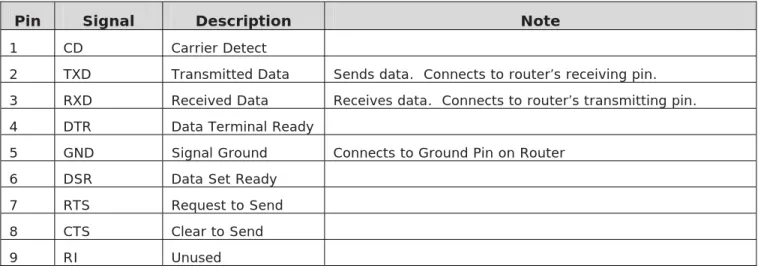
The table below illustrates the pinouts on Encore’s EXT COMM serial connector.
Data “direction”
information is provided from the point of view of the Encore controller.
5 1
9 6
Table 1. Encore EXT COMM pinouts
Pin
Signal
Description
Note
1 CD Carrier Detect
2 TXD Transmitted Data Sends data. Connects to router’s receiving pin. 3 RXD Received Data Receives data. Connects to router’s transmitting pin. 4 DTR Data Terminal Ready
5 GND Signal Ground Connects to Ground Pin on Router 6 DSR Data Set Ready
7 RTS Request to Send 8 CTS Clear to Send 9 RI Unused
Cable Connection — Straight Through
The table below illustrates the required pin connections for typical Encore-to-Router configurations.
A straight-through RS-232 cable is used between Encore and the router.
Encore Controller (SC or LC) MatrixPRO SDI Router RS-232
Straight-through
Table 2. Straight-through pin connections
Encore Pin
Router Pin
2 ↔ 2
3 ↔ 3
5 ↔ 5
Cable Connection — Null Modem
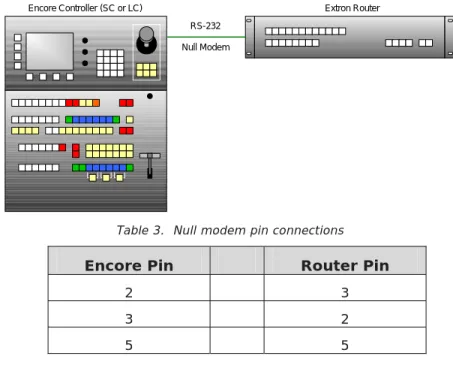
The table below illustrates the required pin connections for alternate Encore-to-Router
configurations (such as to Extron routers). A null modem RS-232 cable is used.
Encore Controller (SC or LC) Extron Router RS-232
Null Modem
Table 3. Null modem pin connections
Encore Pin
Router Pin
2 ↔ 3
3 ↔ 2
Lantronix Ethernet to Serial Cable Connection
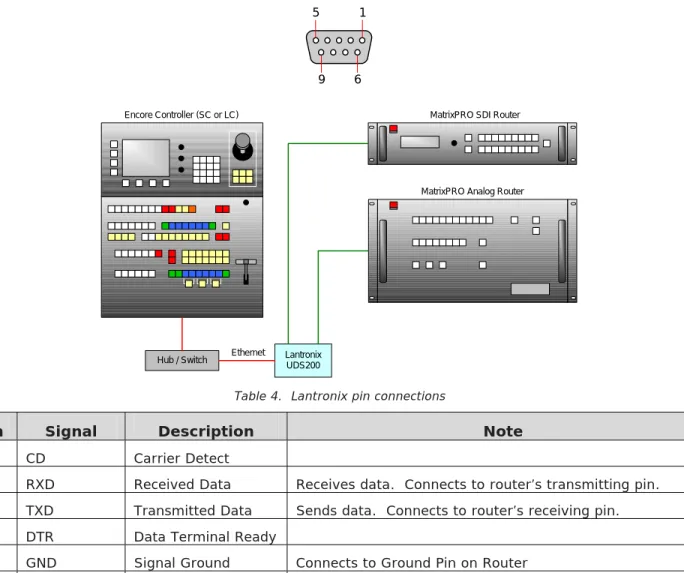
Because Encore Controllers only have one RS-232 serial port (EXT COMM), an external device
(such as the Lantronix UDS200) is required for multiple RS-232 connections. The Lantronix
UDS200 connects to Encore via Ethernet, and provides two RS-232 ports.
The table below illustrates the pinouts on the UDS200’s serial connector.
Data “direction”
information is provided from the point of view of the UDS200.
5 1
9 6
Ethernet
Encore Controller (SC or LC) MatrixPRO SDI Router
Hub / Switch Lantronix UDS200
MatrixPRO Analog Router
Table 4. Lantronix pin connections
Pin
Signal
Description
Note
1 CD Carrier Detect
2 RXD Received Data Receives data. Connects to router’s transmitting pin. 3 TXD Transmitted Data Sends data. Connects to router’s receiving pin. 4 DTR Data Terminal Ready
5 GND Signal Ground Connects to Ground Pin on Router 6 DSR Data Set Ready
7 RTS Request to Send 8 CTS Clear to Send 9 RI Unused
•
Note: RS-232 cable requirements vary. Use the table in the following section for specific
cable requirements for various routers.
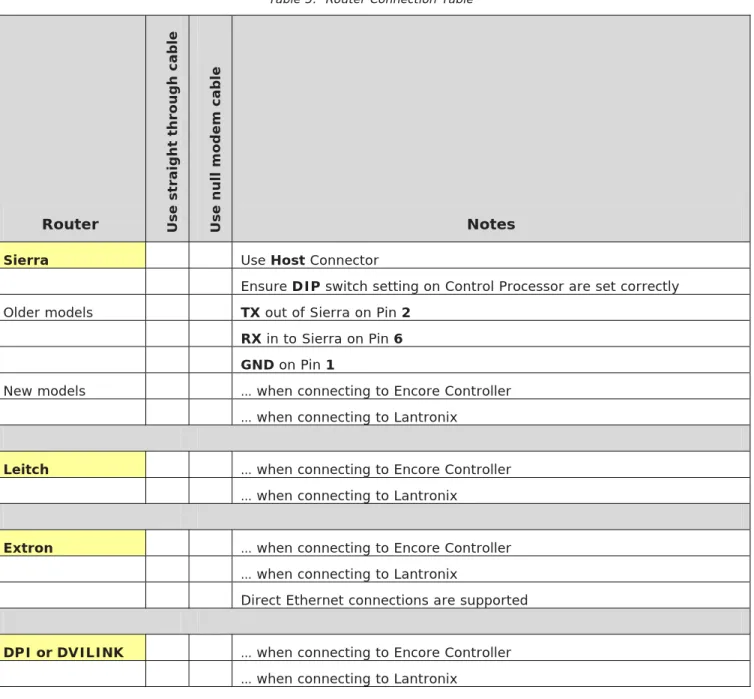
Router Connection Table
The table below illustrates numerous notes and cable requirements, when connecting Encore to
various routers.
Table 5. Router Connection Table
Router
Use straight through cable Use null modem cableNotes
Sierra Use Host Connector
Ensure DIP switch setting on Control Processor are set correctly Older models TX out of Sierra on Pin 2
RX in to Sierra on Pin 6 GND on Pin 1
New models … when connecting to Encore Controller … when connecting to Lantronix
Leitch … when connecting to Encore Controller
… when connecting to Lantronix
Extron … when connecting to Encore Controller
… when connecting to Lantronix
Direct Ethernet connections are supported
DPI or DVILINK … when connecting to Encore Controller
… when connecting to Lantronix
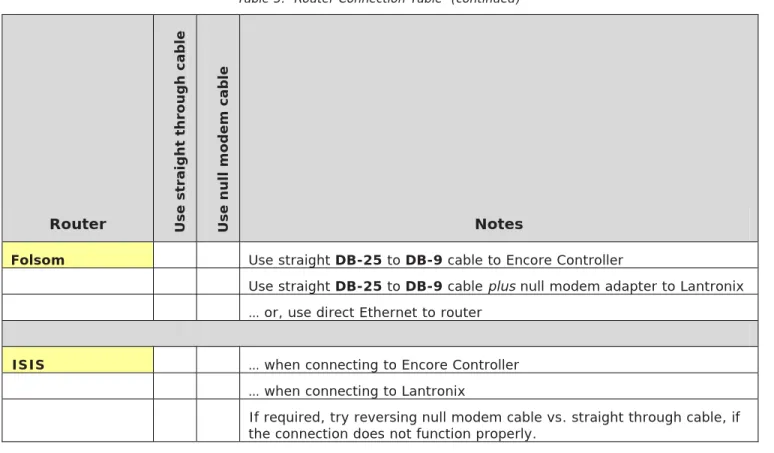
Table 5. Router Connection Table (continued)
Router
Use straight through cable Use null modem cableNotes
Folsom Use straight DB-25 to DB-9 cable to Encore Controller
Use straight DB-25 to DB-9 cable plus null modem adapter to Lantronix … or, use direct Ethernet to router
ISIS … when connecting to Encore Controller
… when connecting to Lantronix
If required, try reversing null modem cable vs. straight through cable, if the connection does not function properly.