AN E-LEARNING SUPPORT TOOLKIT FOR SOCIAL
WORK STUDENTS ON PLACEMENT
Pei Zhang, Gary B. Wills, Yvonne Howard, *Samia Oussena, *Dean Kramer, ** Ravinder Barn and *** Balbir Barn
School of Electronics and Computer Science, University of Southampton, UK {pz, gbw, ymh }@ecs.soton.ac.uk
* Thames Valley University, UK {samia.oussena,dean.kramer}@tvu.ac.uk ** Royal Holloway, University of London [email protected]
*** Middlesex University, UK [email protected]
ABSTRACT
Students of the social work professions generally are required to be placed in social work settings and to undergo assessment in the workplace during their training. These students are usually supported by qualified practice tutors who regularly meet with them and give feedback on their practice performance and progress. The support procedure sometimes is fragile and affects the quality of the students’ learning experience. Through a user centered design approach, the Remora project aims to provide an integration of mobile software toolkits and social software applications to support work-based learning and assessment for social workers. Two main applications are created and deployed on two categories of portable devices to help practice workers in their administration, information sharing and collection of documents linking with competency learning resources. The applications are extendible to be applicable to any work-based learning situation.
KEYWORDS
Mobile, work-based learning, placement, social software
1.
INTRODUCTION
In common with many other professions, the training of social workers requires students to undertake several work placements. Trainee social workers on an accredited social work degree (undergraduate or postgraduate) in England must successfully complete 200 days in a practice setting. During these work placements, they are supervised by practice tutors who assess the students’ competencies against a set of learning outcomes including Key Roles and Units which are described in the practice handbook or practice portfolio. To assure the quality of the assessment process in practice placements, tutors are required to be well-informed about the assessment process and the curriculum that students are following. However, it is a challenge due to heavy workload on the supervising practitioners and difficulty in finding time to attend update meetings. Also, without their support networks, students are away from their normal learning environment and find it difficult to access learning resources. Currently the social work professional bodies indicate there is a lack of e-learning support for all stakeholders involved in the placement assessment process [1]. A common shared platform which meets the needs of learning styles in work placement is needed.
notify subscribers when new content is posted to a website or blog. LASSIE [6] explores how social software might enhance distance learners' use of libraries. Some other projects have been done to enhance work-based learning through mobile devices. In health care, UsPaCe [7] aims to support learning by providing online resources to be accessed via desktop or mobile devices in the workplace. Such systems inherently depend on an Internet connection which is not always possible in the placement. Nightingale Tracker [8] uses a central database and provides data and communication tools built around it. This whole-system approach is relatively heavyweight and inflexible.
Our previous mPLAT [9] project has created loosely-coupled mobile toolkits to connect students’ learning experiences with a competency model and significant components work offline. Based on the lessons learned from mPLAT, in this paper, we present an integration of mobile and social software applications to support the training of social workers in the field, which contains a number of loosely-coupled tools including Search tool and Share tool that enable social work students to effectively share learning information and documents with their practice tutors, and select contents from a variety of sources and manage them on their mobile devices. We developed the toolkits through a co-design process with Department of Health and Social Care in three different UK universities including Thames Valley University, University of Southampton and Royal Holloway, University of London. The following trials deployed the applications on both mobile devices such as iPod and on Netbooks such as the Eee PC, and allocated them to different students in practice placements to evaluate how the two types of portable devices used and support work-based learning.
2.
DESIGN OF THE TOOLKITS
User-centred design process [10] supports the construction of a shared understanding of the context of use and the current status of technology. It also leads to a shared understanding of different concepts contributed by the different groups of people involved. An agile co-design methodology was undertaken in the project to involve domain experts as first-class members of the design team. It can drive the creation software tools that help connect physical activities and conceptual models and allow an adaptable development process [11]. Four workshops were organized to share the understanding of the knowledge between developers and social worker tutors/students and to make sure the real requirements were addressed to lead to the generation of potential applications.
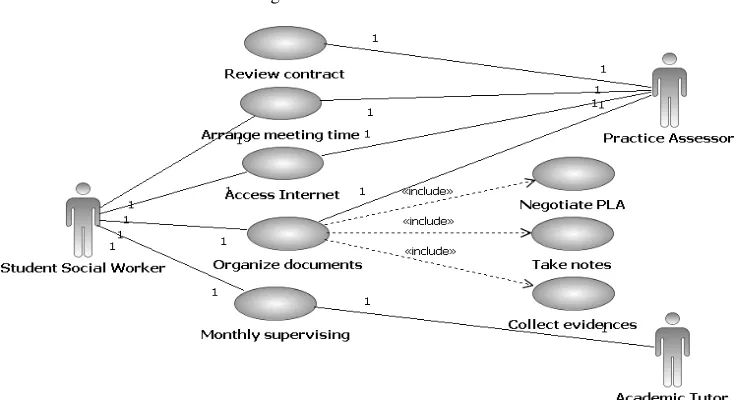
While the co-design process focused on user engagement – it was also important to capture the functionality in a form that both users and developers could utilize. We used use case diagrams [12] as a way for capturing the overall functional architectures of the proposed system which is shown in Figure 1.
From the co-design process, practice students and tutors identified a range of needs for a toolkit. After discussions and a prioritization process the following functionality was selected for further development:
• Access to Internet/Intranet for information
• Sharing and organizing texts of report
• Linking key roles to case studies
• Reflective commentary between students and practice assessor
• Access to programme handbook/notes/Placement Learning Agreement (PLA) etc. effectively
• Meeting management and planning
2.1 The share tool and search tool
Based on the co-design, a potential application that combines mobile technology and Social Software was identified to share and organize information efficiently (notes, handbook, PLA, thoughts, links, observations, etc) in the context of the social work competency model involving key roles, units and elements.
The share tool was focused on delivering functionality that would enable the user to expose documents for others to see/edit, provide for collaborative editing in a shared space and support (via generally available tools) blogging the reflection needs of students. Social bookmarking method typically in the form of tags could be used here to help link key roles to leaning documents. Shared spaces would support communication/collaboration requirements between students, between students and practice tutors and between other stakeholders.
Social work students were expected to refer to particular Internet sites such as those relevant to mental health issues in the UK and to cache popular resources locally on the device to be read off-line. To facilitate off-line access to these documents, a search function was built and deployed on mobile devices. The search engine included scalability and the ability to locate documents through their contents rather than their file name. Potentially thousands of documents could be stored on the device and located using familiar keyword searches [13]. The search function taught students about best practice searching behavior and allowed them to differentiate between different types of resource (legislation/guidance and local practice) in order to contextualize their practice.
2.2 Architecture
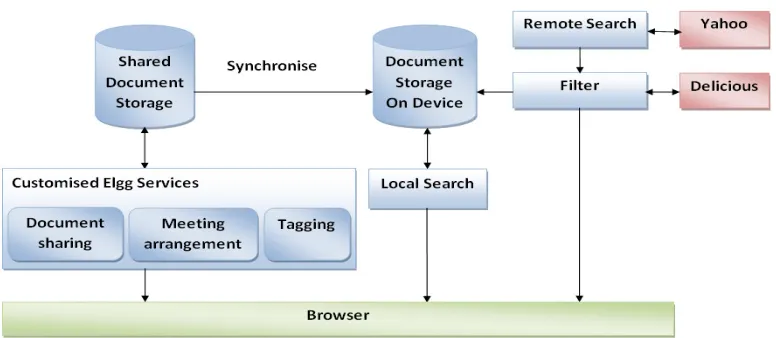
Figure 2 shows the architecture of the applications.
The search tool application was implemented by a web server runs on the mobile device with a web interface. Two software applications supply the Remote Search and Local Search functionalities. Remote search calls the Yahoo! web search API and filters the results by the user’s Delicious1 bookmarks.
The filtering mechanism allows the system to emphasize the general search results. Domain specific results are highlighted to enable users to select contents they have interest in and cache them locally on the device which can be searched by the Local Search function. A search engine is ported into the mobile device carrying out the Local Search that enables users to search off-line documents without worrying about the location or the name of the required documents. The document repository in the mobile device can be synchronized with the shared document repository which is working as the document storage for the share tool.
The share tool enables practice students to exchange information and to share learning resource with their practice tutors. A shared space and repository was supplied for students and tutors to update learning progress information and get feedback on time. In this context, making use of the features of social network services could support the learning process. Elgg 2 is used as the platform and a number of web-based
services are built upon it such as document sharing, meeting arrangement, and tagging learning resources according to the students’ key skills and sub-skills. Documents including study reports and evidence presented by students can then subsequently be searched and analyzed based on the defined tags. These documents can also be loaded in the mobile devices and be searched by the Local Search tool.
2.3 Devices selection
The usability of the mobile device is an important factor in hardware selection in this project. Based on the co-design and the potential applications, users are expected to save their learning documents such as their PLA or handbook and read them through the mobile device. The suitability of reading on small screens is a basic concern. The iPhone or iPod Touch has a 3.5-inch widescreen display and its multi-touch technology enables zooming, making it an attractive candidate.
With further discussions into suitable hardware for interacting with the social networking application Elgg, there has been interest in the use of Internet devices such as the Asus Eee PC. It is a lightweight and scaled down laptop with the primary function of being able to use the internet, email, word processing etc. Although the 3G/HSDPA technology which would allow the user to access the internet using the UK mobile network is currently not available in any version of the Eee PC, a USB 3G/HSDPA dongle modem can be plugged in to enable network connection.
3.
IMPLEMENTATION
A mobile search toolkit application was deployed on an iPod Touch, and a web-based application was accessed through Eee PC to support work-based learning.
3.1 Search tool
The mobile web server Lighttpd3 was installed on an iPod and the search engine Hyper Estraier4 was ported
to the mobile devices.
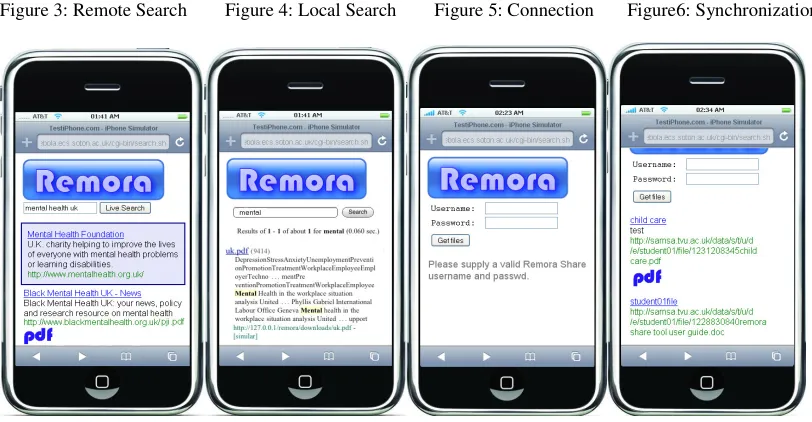
Figure 3 shows the Remote Search user interface. The user opens a web browser to access the mobile web server running on IP 127.0.0.1 to do the Remote search. The remote search CGI script calls the Yahoo web search API. The results from the Yahoo! Search are filtered by the user’s Delicious bookmarks which are maintained as an XML file and the domain specific sites listed in the Delicious bookmark are highlighted.
1 Delicious: http://delicious.com/ 2Elgg (Elgg v1.0): http://elgg.org/ 3 Lighttpd: http://www.lighttpd.net/
Users can update their Delicious bookmarks and refresh the XML file on the mobile device. From Figure 3, we see that the specific Mental Health website is highlighted which means it has been bookmarked. This approach could remind users of important domain specific sites when they are doing general web searches. From Figure 3, we could also see that a PDF icon appears under the search result, which means the located sites is a .pdf file and can be saved in the local document repository by clicking the PDF icon. The saved file is searched by Local Search.
Figure 3: Remote Search Figure 4: Local Search Figure 5: Connection Figure6: Synchronization
Figure 4 shows a user interface when a Local Search is done. Hyper Estraier is a powerful search engine which examines the contents of document to identify those that meet the users' search criteria. From Figure 4 We see that a search term “mental” locates the document even through its file name is uk.pdf.
Figure 5 and Figure 6 show the connection and documents synchronization between the Search and Share applications. Users can capture their documents stored in the shared repository. A similar CGI program is running to synchronize these documents in local mobile device and make them available for Local Search.
3.2 Share tool
The social software engine Elgg is imported as the platform. A number of customized applications were built on the Elgg architecture. Updates of Elgg are frequent and the user interface and information model of Elgg v1.0 is very different from v0.9. We developed on Elgg v0.9 early in the project and then moved on to v1.0.
3.2.1 Document sharing
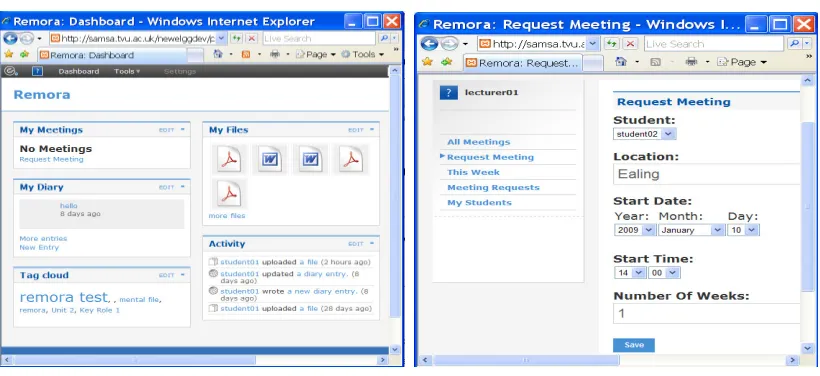
Elgg has mature file repository and sharing feature. In this project, students and their practice tutors are classified in the same community. Once they upload their documents such as meeting notes or reports, they can choose with whom these documents are shared. We customized the file widget by showing shared files on the user’s dashboard instead of only showing files the user created (see My Files widget in Figure 7). We think this gives users a direct view of the on latest documents allocated them once they log in to their home page.
3.2.2Meeting Arrangement
Figure 7 Dash board Figure 8: Meeting arrangement
3.2.3 Tagging
A tag cloud widget was built which is shown in the left column in Figure 7. In addition, when users upload a file, they could link tags with this file by free text tagging or select tags based on learning outcomes like Key Roles and Units. This function can support linking key roles to case studies which help the student’s future production of reports. Users can also define their shared common tags (My tags column) which could be shared and reused with other types of files. Figure 9 shows the tagging application when uploading a file.
Figure 9: Tagging
4.
CONCLUSION
Trainee social workers generally undertake several work placements during their training. They are supported by practice tutors, qualified practitioners who regularly meet with them and give feedback on their progress. This support can be highly variable, affecting the quality of the students’ learning experience.
web based approach to allow deployment on a range of mobile hardware and devices. Information sharing and organizing between students and tutors was an essential requirement in the context of social work competency model. The web application developed focuses on collaborative shared space and documents viewing/editing which help students and tutors communicate in an effective way and receive update information on time.
The trials of our software with social work students and tutors in placement are running currently at Royal Holloway, University of London to support a taught module in order to get further feedback on how the tool is being used. We are conducting further evaluations and more empirical data is being collected. Early indications are that whilst there are key constraints, for example, rates of digital literacy, and the non-mandatory nature of the use of such tools, it is needed for such tools to help practice students and tutors to access internet resources, download documents, store and share notes and files as well as keep in contact with their colleagues throughout their placement, all of which are important considerations for learning.
ACKNOWLEDGEMENT
This work is funded by the UK Joint Information Systems Committee (JISC). The authors would like to thank David Millard, Lester Gilbert and David Denney.
REFERENCES
[1] Julia Waldman and Jackie Rafferty, “Technology-Supported Learning and Teaching in Social Work in the UK—A Critical Overview of the Past, Present and Possible Futures”, Social Work Education, Vol. 27, No. 6, September 2008, pp. 581–591.
[2] A Group Is Its Own Worst Enemy: Social Structure in Social Software, Clay Shirky’s talk at ETCON 2003. [3] Alice Szwelnik, “BMAF project report -- Embracing the Web 2.0 culture in Business Education – the new face
of Facebook”,
http://www.heacademy.ac.uk/assets/bmaf/documents/projects/TRDG_projects/trdg_0708/finalreports_0708/Ali ce_Szwelnik_OBU_web.doc
[4] Martin Owen, Lyndsay Grant, Steve Sayers and Keri Facer, “Social software and learning”, Open Education Report, July 2006.
[5] Weblogs, http://www.weblogs.com/home.html
[6] Secker, Jane and Price, Gwyneth (2007) Libraries, Social Software and Distance Learners. Paper given at CPD25 Conference: The Library in the Interactive Environment: Practical use of technology to improve the student experience'. 23rd April 2007.
[7] Neil Witt, Anne McDermott and Robert Stillwell, The UsPaCe Project, http://www.uspace.org.uk/
[8] Sloan HL, Delahoussaye CP. Clinical application of the Omaha system with the Nightingale Tracker: a community health nursing student home visit program. Nurse Educ. 2003 Jan-Feb; 28(1):15-7.
[9] P. Zhang, D.E. Millard, G.B. Wills, Y. Howard, S.J. Faulds, L. Gilbert, D. Sparks, “A Mobile Toolkit For Placement Learning”, ICALT, pp.92-96, The Eighth IEEE International Conference on Advanced Learning Technologies, 2008.
[10]Jan Gulliksen, Ann Lantz and Inger Boivie, “How to make User Centred Design Usable”, ISSN number: ISSN 1403-073X, January 2000.
[11]D.E. Millard, S.J. Faulds, L. Gilbert, Y. Howard, D. Sparks, G.B. Wills and P. Zhang, “Co-design For Conceptual Spaces: An Angile Design Methodology For M-learning”, In: IADIS International Conference Mobile Learning, 2008.
[12]Jacobson, I., Christerson, M., Jonsson, P., Övergaard, G. (1992). Object-Oriented Software Engineering – A Use Case Driven Approach. Reading, Mass.: Addison-Wesley.