Vol.9 (2019) No. 2
ISSN: 2088-5334
A Supportive Tool for Project Based Learning and Laboratory
Based Education
Irwan Alnarus Kautsar
#, Riyanarto Sarno
* #Department of Informatics, Universitas Muhammadiyah Sidoarjo, Jl. Mojopahit No.666 B, Sidoarjo, 61217, Indonesia E-mail: [email protected]
* Department of Informatics, Institut Teknologi Sepuluh Nopember, Sukolilo, Kota Surabaya, Jawa Timur 60111, Indonesia E-mail: [email protected]
Abstract— This paper presents the current development supportive tool for both lecturers and students that conduct Project Based
Learning (PBL) and Lab Based Education (LBE) on Higher Education Institution (HEI). For PBL and LBE implementations, lecturer needs to monitor, evaluate the learning process. And, students need to publish the learning outcomes in the public domain. In this research, we propose the supportive tool that will be used by lecturer which is taught on different academic courses. Also, the proposed supportive tool had designed to used by the student as a particular group. These groups were formed of the student from several academic courses that supervises by the same lecturer. The developed supportive tool are microframework based which mean it could be implemented on mini devices. The current development supportive tool could be an alternative software assistant that support lecturer to implement Project Based Learning (PBL) and Lab Based Education (LBE). The developed supportive tool has been introduced to 135 students and 16 lecturers as a participant to evaluate the system usability. The results from the questionnaire show more than 90% of users state the benefit of the use supportive tool. Also from analyzing Log metric, users on average complete a designated task in just less than 5 minutes. It indicates that the developed supportive tool is easy to use and shows the effectiveness of the developed supportive tools.
Keywords— supportive tool; Project Based Learning; Laboratory Based Education; PBL; LBE.
I. INTRODUCTION
With the era of the Industry 4.0 revolution, Higher Education Institutions will have been challenging to provide experience to its student for having skill and knowledge to solve world reality problem in a digital manner [1]–[4]. The need for skill and knowledge in Industry 4.0 era is an ability to design a system to preserve vast amount data from digital products and made it (machine) to learn the future needs (automation) [5], [6].
The implementation of Project Based Learning (PBL) in an academic course could be as a solution to give the student experience to working as a team and having the experience to involve on some IT projects or develop an applications [7].
As a complement to the success of Laboratory-Based Education that implemented on mostly University in Japan show that shifting conventional academic course (face to face model in the academic course) to peer teaching that could be as a solution to increase research publications [8], [9]. For implementing both learning methods in the daily academic courses, the lecturers need to be assisted by the supportive tool that not only monitors the learning process
but also scores and publishes learning results on the public domain. From our previous research, we present Lecturer Based Supportive Tools (LBST) which enable lecturers to create learning content through a web-based application that can be accessed in online and offline condition (no need internet connection) [10]. And, it presents interoperability between the existing Learning Management System (LMS) and the developed supportive tool using service-based architecture [11]–[13]. As an addition, this paper proposed a supportive tool that supports lecturers to implement Project Based Learning (PBL) and Lab Based Educations (LBE).
II. MATERIAL AND METHOD
In this section, we will provide a brief explanation of Project Based Learning and Laboratory Based Education. Also, we present the use of Microframework as development method and the proposed architecture.
A. Project Based Learning
course [7], [9], [14]. For the PBL experience, we deliver an assignment to all students to make software with topics: ”A Software As Service for College Students”. In short, all software that will be proposed by students as their final project are software that needed by students itself in order to support their academic activities. Furthermore, students also required to publish a final report, presentation, and poster according to the proposed software.
B. Laboratory Based Education
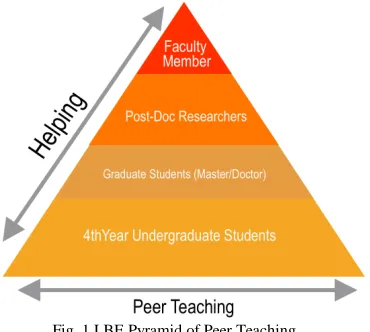
The goal of Laboratory-Based Education is to provide student as a learner for having self-centered learning [8]. The idea is to give a student a laboratory environment that student could direct access and start research as soon as possible. The key in Laboratory-Based Education is a peer teaching. The faculty member only helps undergraduate students when there is a problem that could not be solved by postgraduate students. This pyramid role of the LBE is illustrated in the Fig. 1.
Fig. 1 LBE Pyramid of Peer Teaching
From Fig. 1, the undergraduate students, the graduate student and the post doctoral researcher are learning together with their peers. A faculty member only helps/supervise when needed. LBE is targeting students not only an expertise in their fields, but also developing soft skill such as communication, management, cooperativeness and leadership.
C. Experimental Methods
The experiments have been conducted at Informatics Department, Faculty of Engineering, Universitas Muhammadiyah Sidoarjo and held on Academic Year 2017/2018.
TABLEI
CLASSROOM IMPLEMENTATION FOR LBE AND PBLEXPERIMENTS
Class Code Class Name
HCI-8A3 HCI-8B4
Human Computer Interaction (HCI) (8th Semester)
ADSI-6A1 ADSI-6A2
Analysis and Design Information Systems (ADSI) (6th Semester)
SI-4A3 SI-4A4
Information System (IS) (4th Semester)
Next, for the implementation of Lab Based Education (LBE), we obligate to each class to finding a partner from designated class. From 6 class groups, we divide into two main groups which are class code with an odd number and class code with an even number. Table 1 shows 6 classes groups in which the experiment have been conducted.
Also, we set rules that 8th-semester main task is to develop UX/UI design (as the implementation of their HCI courses). The main task of 6th-semester students is to design the complete diagram (as the implementation of their ADSI courses). The main task of 4th-semester students is software prototyping that based on the UX/UI design and the development diagram as the implementation of their IS courses. The pyramid of designated class that experimenting LBE shown on the Fig. 2.
Fig. 2 Classroom implementation of LBE and PBL experiments
D. Development Method
In early-stage supportive tool development, we had implemented rapid prototyping using Google Design Sprint (GDS) [15]. The key in DS are answering main features (or from original GDS definition called the business questions) through design, build prototype, and test it with user. The GDS methodology itself is inline with six phases: Understand, Define, Sketch, Decide and Validate.
To build the prototype, Flask Microframework has chosen for developing the proposed supportive tool [16]. As python based microframework, the developed supportive tool could serve as a web server. With running a single python script, it can be run independently as web application without hosted at the web server. This mean, the lecturer could use the developed supportive tool directly and no need to install Apache/Nginx web server.
Fig. 3 MVC Model Directory on Flask Microframework
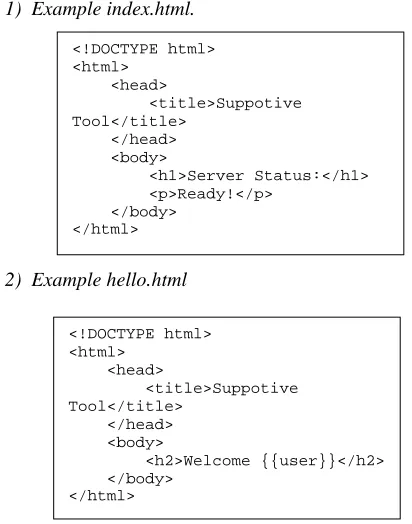
All request from the client will be routed according to the designated URL that configured in *.py files. For an example, we have index.html and hello.html in the templates directory:
1) Example index.html.
2) Example hello.html
To configure the request from the client, it uses “route()” decorator. To route the request and view the targeted HTML, the URL needs to be registered in “@app.route”. For an example, when it needs to set up the index (main page) to access index.html, it uses the scripts as shown at Fig. 4.
Fig. 4 Example “.py” file as main application
From the above script, line 5 to 7 are used to route all request when need access an index homepage (top level directory of its web application). Line 9 to 11 are used to response a request from URL: http://domain/hello/paramater. At line 9 to 11, it is shown that the designated URL could give a parameter.
To start the server, the user need to execute main “.py” file. If “.py” file from Fig. 4 has executed, Fig. 5 shown the WSGI server is ready to accept a request.
Fig. 5 WSGI server has been activated
By default, WSGI using port 5000 to serve its web requests. At local access, a user can request by accessing “http://localhost:5000/” (as shown at the Fig. 6).
Fig. 6 Response from the WSGI server
If user access “http://localhost:5000/hello/Alice”, the server will recognize the parameter after “/hello”, as configured in “app.py” (Fig. 4). The WSGI will respond “hello.html” as shown at Fig. 7.
<!DOCTYPE html> <html>
<head>
<title>Suppotive Tool</title>
</head> <body>
<h1>Server Status:</h1> <p>Ready!</p>
</body> </html>
<!DOCTYPE html> <html>
<head>
<title>Suppotive Tool</title>
</head> <body>
<h2>Welcome {{user}}</h2> </body>
Fig. 7 Response from the WSGI server with parameter
With the above methods, it will be easier to design and implement a user requirement that needs to be developed in the proposed supportive tool.
E. User Interactions
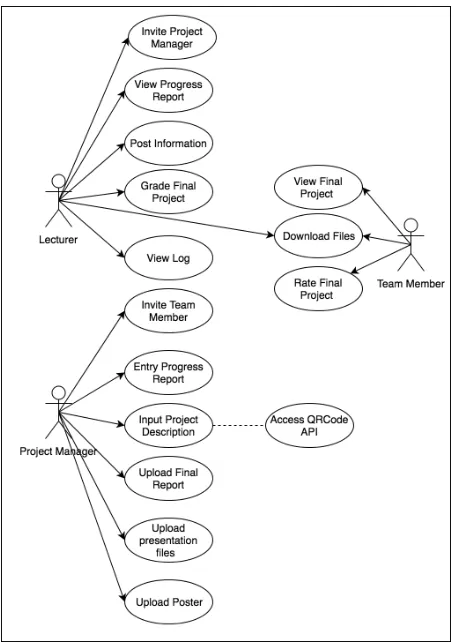
The prospective user for the developed supportive tool is lecturers, student as the project manager and students as a team member. The interactions of the user and developed supportive tool are described in the Fig. 8.
Fig. 8 User interaction diagram on the proposed supportive tooler
The prospective user for the developed supportive tool is lecturers, student The students had been provided with many features. From Fig. 8, The final project materials are uploaded by a student with project manager level access. And a student with no level access can view, download, and uploaded final project where not only from their groups but also from other groups.
F. Proposed Architecture
To adapt bandwidth limitation that might happen during implementation, the proposed supportive tool will be
developed into two versions. First, it will develop for self-hosting or deploy on the low-end machine. Second, it will develop into a server machine as usual. Both versions are using Flask. The differences are the database engine being used. For the self-hosted version using SQLite and for server machine using MySQL. Another differences are the developed supportive for server machine is provided by Web Service using Flask-REST API. The architecture of the current development supportive tool is shown in the Fig. 9.
Fig. 9 User interaction diagram on the proposed supportive tool
III.RESULTS AND DISCUSSION
A. Supportive Tools For Lecturer
Any tools that assist learner while learning the process and track the achievement could be labeled as a ePortfolio. The ePortfolio also used as storage system on any learning model that evidence-based as the results. even though the current developed supportive tool main feature is similar to evidence collection, the proposed supportive tool main feature is not only assisting a student to submit and publish their final project but also designated for lecturers to track the process when final project was conducted by many groups of students.
To use the supportive tools, lecturers only need to send an invitation through email to one of an appointed group member as their Project Manager (PM). In these experiments, we use the existing Google Mail Account to send the invitations and Flask-Mail module to sent email over SMTP.
After lecturers send the invitations, a PM should activate the link and start to add the group member. Other features that provide in lecturers dashboard are Post Information, View Progress Report, and Grading Page. The activity diagram of lecturers as a user shown on the Fig. 10.
Fig. 10 Lecturer activity diagram
Fig. 11 Account activation status of students as the project manager
B. Progress Report
The key success of the PBL and LBE implementations are lecturer roles in monitoring the learning process. To address these need, the current development supportive tool provides Progress Report Form where students obligated to input it in every week. Fig. 12 shows progress report table that has been inputted by students.
Fig. 12 Progress report inputted by students
C. Log Report
Lecturers have been provided not only the information about progress report from each team but also the log information that can be accessed by lecturer only. By using the log, its hopes to help lecturers could analyze the learning process.
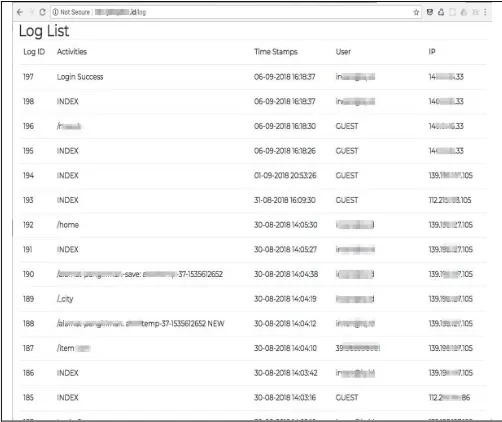
Form log itself, it stores the log with the value of URL Address that has been accessed, the timestamp of the accessed page and the IP address. To make these possible, it needs to insert a log table every each request which is different routes that have configured from .py files. As a result, a full activity from a user has been logged. Fig. 13 show an example log result.
Fig. 13 Log of user activities
The log from user interaction will be useful for meta-analysis as part of post-production evaluation. The exploration of the log-based metric can complete and validate the usability evaluation conducted by interview or questionnaire [17], [18].
D. Project Publishing
Fig. 14 Project description form
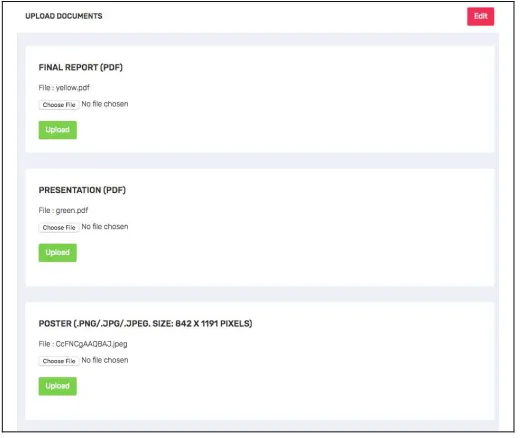
Also, as a result of Lab Based Education activities, the developed supportive tool need to provide an unloading mechanism for store final report, presentation and poster in digital formats. Fig. 15 shows the input form for uploading the digital documents.
Fig. 15 Form for upload final report, presentation and poster
After students have been finished to uploads the document, the uploaded documents will be accessible to the public. Fig 16 shown the front page of the developed supportive tool.
E. Lecturer Grading
When students have been finished to publish their final reports, presentations and posters, it is time for lecturers to give an evaluations. Because of each groups consist of different students from different class, lecturers need to be provided with one single form entry to give a score to whole team member. Fig. 17 shown an example process evaluation for one of student groups.
Fig. 16 Homepage of developed supportive tool
Fig. 17 Scoring form for each groups
F. Supportive Tool Deployment
1) Self Hosted
The use of Microframework brings other advantages. The developed supportive tool application size is less than 20 MB. This made possible to deploy it at the mini device. The term mini device is a hand on carrying pc board that helps lecturers mobility to use the supportive tool in the different classroom.
Fig. 18 Self hosted deployment of developed supportive tool
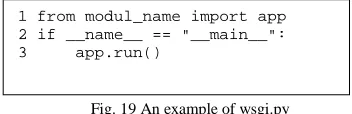
By default, the Werkzeug module used by Flask as request handler, it can only serve one request only. Because the Werkzeug is designed to only development model [19]. To hosted on the mini device or other machine and serve many requests, it needs to use uWSGI as request handler [20]. To start using uWSGI, it needs "wsgi.py" file that imports an “app”. The wsgi.py should be as in Fig. 19:
Fig. 19 An example of wsgi.py
A “module_name” is the name of the .py file as the main program. To start a server, it needs to execute the command in Fig 20.
Fig. 20 The uWSGI command to start a server
With the above command, the proposed supportive tool can be accessed from “http://server_IP_address:5000”.
2) Hosted on Machine Server
In this experiments, developed supportive tool will be deployed on a server with Ubuntu 14.04 as operating system and Nginx as the web server.
Even though it uses Nginx as the default web server, it needs to configure Nginx to pass a request to application socket using uwsgi protocol. The configuration starts with creating a “.ini” file in the project directory to activate the uWSGI. Example of “.ini” files is in the Fig. 21.
Fig. 21 Example uwsgi.ini for uWSGI configuration
Next, it needs to create an upstart script to start the uWSGI. The upstart script will allow operating system init system to automatically start uWSGI and serve the Flask application whenever the server machine boots. The upstart script needs to save in “.conf” format at “/etc/init/projectname.conf”. Example of the upstart file is in Fig. 22.
Fig. 22 Example “.conf” in Nginx as upstart file
The final part of server machine configuration is to create server block and order Nginx to listen on the port 80 and use this block for incoming requests to our server's domain name or IP address.
The configuration is done by creating “.conf” and saved on “/etc/nginx/conf.d/projectname.conf”. Example server block that needs to be configured on the Nginx web server shown at Fig. 23.
Fig. 23 Nginx server block for domain configuration
From the above configuration, the developed supportive tool can be accessed directly by both lecturer and students from his/her mobile device. Because it was installed on a mini device and some Access Point (AP), all user need to connect their device with the access point.
G. Usability Evaluation and Log Metrics
Usability Evaluation is described as the measurement to which a product can be easily used by targeted users with efficiency and satisfaction to achieve certain objectives. To explore user satisfaction, an interview and a certain
1 from modul_name import app 2 if __name__ == "__main__": 3 app.run()
uwsgi socket 0.0.0.0:5000 protocol=http -wsgi:app
[uwsgi] module = wsgi
master = true processes = 5
socket = app.sock chmod-socket = 660 vacuum = true
start on runlevel [2345] stop on runlevel [!2345]
setuid username setgid www-data
env
PATH=/home/username/projectname/projectenv/bin chdir /home/username/projectname
exec uwsgi --ini projectname.ini
server { listen 80;
server_name domain.ourserver.com;
location / {
include uwsgi_params; uwsgi_pass
unix:/home/username/projectname/projectname.soc k;
experiment being conducted by 135 students and 16 lecturers as a participant.
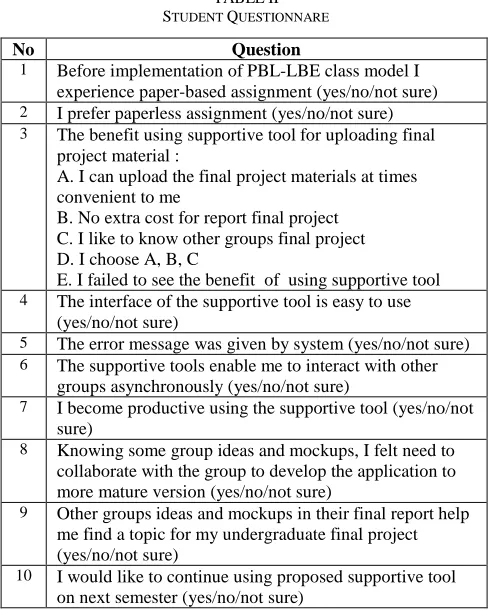
During the experimental session, students were asked to finish several tasks as mentioned in Fig. 8 as the simulation of the use of the developed supportive tool with student level access. Lecturer as a participant also requested to finish several activities as mentioned in Fig. 10 as the simulation of the use of the developed supportive tool with lecturer level access. After finished the experiments, both lecturers and student are interviewed and asked to fill the questionnaire. Table II has shown the question that given to students.
The experiments had conducted within a laboratory where the participants use the supportive tool which installed in local machine server that available in the laboratory. To measure the effectiveness and difficulties, we analyzed the timestamp from the Log creation when participants were asked to accomplished the certain task as part of the experiments.
TABLEII
STUDENT QUESTIONNARE
No Question
1 Before implementation of PBL-LBE class model I experience paper-based assignment (yes/no/not sure) 2 I prefer paperless assignment (yes/no/not sure) 3 The benefit using supportive tool for uploading final
project material :
A. I can upload the final project materials at times convenient to me
B. No extra cost for report final project C. I like to know other groups final project D. I choose A, B, C
E. I failed to see the benefit of using supportive tool 4 The interface of the supportive tool is easy to use
(yes/no/not sure)
5 The error message was given by system (yes/no/not sure) 6 The supportive tools enable me to interact with other
groups asynchronously (yes/no/not sure)
7 I become productive using the supportive tool (yes/no/not sure)
8 Knowing some group ideas and mockups, I felt need to collaborate with the group to develop the application to more mature version (yes/no/not sure)
9 Other groups ideas and mockups in their final report help me find a topic for my undergraduate final project (yes/no/not sure)
10 I would like to continue using proposed supportive tool on next semester (yes/no/not sure)
As results, students mostly opted “Yes” in question 1,2,4 until 10. Fig. 24 shown the dominance of opted Yes in the student's questionnaire.
For question 3 from the student's questionnaire, 90% of students opted A, B, C which shown the benefit of the use supportive tool in order to support the submitting final project materials. Fig. 25 show the percentage of question 3 from the student questionnaire.
Fig. 24 Students rensponses from question 1,2,4 until 10
Fig. 25 Students rensponses from question 3
TABLEIII
LECTURE QUESTIONNARE
No Question
1 I always experience scoring students report with a paper-based assignment (yes/no/not sure)
2 I prefer to check students assignment in a paperless manner (yes/no/not sure)
3 The benefit using supportive tool check students final project material :
A. I can check the final project materials at times convenient to me
B. I could know the progress report while students finish their final projects
C. Both A and B
D. I failed to see the benefit of using supportive tool 4 The interface of the supportive tool is easy to use
(yes/no/not sure)
5 The error message was given by the system (yes/no/not sure)
6 The supportive tools enable me to interact with students asynchronously (yes/no/not sure)
7 I become productive using the supportive tool (yes/no/not sure)
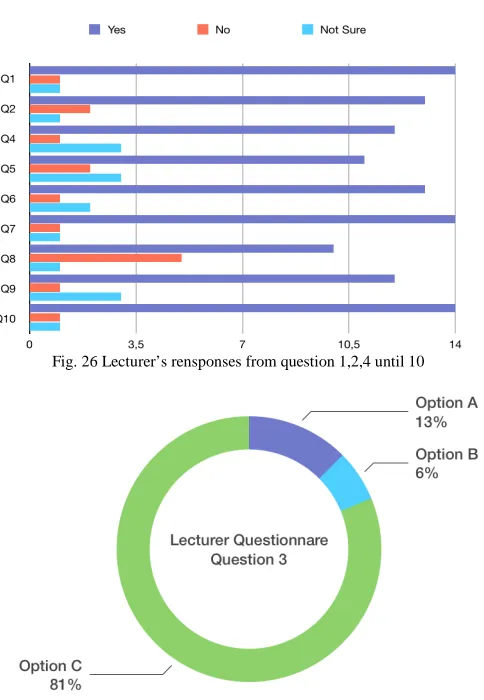
the dominancies of opted “Yes” in the lecturer's questionnaire.
For question 3 at the lecturer’s questionnaire, 90% lectures opted C which shown the benefit of the use supportive tool in order to check and see the progress report of the submitted final project materials. Fig. 27 shown the percentage of Question 3 from the lecturer’s questionnare.
Fig. 26 Lecturer’s rensponses from question 1,2,4 until 10
Fig. 27 Lecturer’s rensponses from question 3
Next experiments were analyzed the created log while participants asked to do several tasks as mentioned in Fig. 8. Example log created as shown in Fig. 13.
As a result, all students in averages needs only less than 4 minutes to accomplish each given task. Fig. 28 shown the average time spent while students perform interaction in with the supportive tools. For lecturers itself, lecturers on average needs less than 3 minutes to finish each given task. Average time spent that lecturers need to accomplish the given task are shown in Fig. 29.
Remembering when there is no tutorial given before the experiments had conducted, all participants just needs a little time to accomplish the given task. It indicates that the developed supportive tool is easy to use and shows the effectiveness of the developed supportive tools.
Fig. 28 Average time spent by students as the participant
Fig. 29 Average time spent by lecturers as the participant
IV.CONCLUSIONS
This paper presents the current development web-based application used by lecturers as supportive tools for implement Project Based Learning and Lab Based Educations. Lecturers can monitor the learning process from progress report that has been inputted by students. Because each group is consist of different class groups, lecturers no need to input manually the score to each student. Lecturers only need the score for a whole group.
version while they found an interesting project that really solves real-world problems.
As a result of one academic semester experiment with 6 class groups, we obtain 32 particular groups with 32 particular web-based applications as their final project. This experiment's results can be useful repositories for next year academic students. The repository can be used not only as a reference but also for a hub among students to develop the final projects into production level applications.
ACKNOWLEDGMENT
We would like to thank Direktorat Riset dan Pengabdian
Masyarakat (DRPM), Direktorat Jenderal Penguatan Riset dan Pengembangan, from Ministry Kementerian Riset, Teknologi, dan Pendidikan Tinggi for funding this research
with contract number: E.6/026-09/22.00/PRY/II/2018.
REFERENCES
[1] J. I. R. Molano, J. M. C. Lovelle, C. E. Montenegro, J. J. R. Granados, and R. G. Crespo, “Metamodel for integration of Internet of Things, Social Networks, the Cloud and Industry 4.0,” J. Ambient Intell. Humaniz. Comput., vol. 9, no. 3, pp. 709–723, Jun. 2018. [2] J. Y. Cho, “4th Industrial Revolution in Indonesia Through Cyber
Education,” presented at the Annual National Working Meeting 2018, Medan, North Sumatra, Indonesia.
[3] A. Benešová and J. Tupa, “Requirements for Education and Qualification of People in Industry 4.0,” Procedia Manuf., vol. 11, pp. 2195–2202, Jan. 2017.
[4] L. S. Dalenogare, G. B. Benitez, N. F. Ayala, and A. G. Frank, “The expected contribution of Industry 4.0 technologies for industrial performance,” Int. J. Prod. Econ., vol. 204, pp. 383–394, Oct. 2018. [5] M. Wollschlaeger, T. Sauter, and J. Jasperneite, “The Future of
Industrial Communication: Automation Networks in the Era of the Internet of Things and Industry 4.0,” IEEE Ind. Electron. Mag., vol. 11, no. 1, pp. 17–27, Mar. 2017.
[6] B. Chen, J. Wan, L. Shu, P. Li, M. Mukherjee, and B. Yin, “Smart Factory of Industry 4.0: Key Technologies, Application Case, and Challenges,” IEEE Access, vol. 6, pp. 6505–6519, 2018.
[7] S. K. W. Chu et al., “The effectiveness of wikis for project-based learning in different disciplines in higher education,” Internet High. Educ., vol. 33, pp. 49–60, Apr. 2017.
[8] K. Amar, S. Ishiharada, M. J. Luthfi, and B. Saksono, “The Adoption of a Laboratory-Based Education Model as the Foundation of a
Research University: Relevance to a University in Indonesia,” Educ. J., vol. 3, no. 4, p. 229, Jul. 2014.
[9] N. A. Rahman, N. T. Kofli, S. Z. Hassan, S. R. S. Abdullah, M. S. A. Rahman, and S. Harun, “Programme outcomes year III student through integrated project and open ended laboratory,” in 2016 IEEE Global Engineering Education Conference (EDUCON), 2016, pp. 1202–1206.
[10] I. A. Kautsar, S. Kubota, Y. Musashi, and K. Sugitani, “Lecturer Based Supportive Tool Development and Approaches for Learning Material Sharing under Bandwidth Limitation,” J. Inf. Process., vol. 24, no. 2, pp. 358–369, 2016.
[11] Anistyasari, Y., R. Sarno, and N. Rochmawati. 2018. “Designing Learning Management System Interoperability in Semantic Web.” In IOP Conference Series: Materials Science and Engineering. Vol. 296. Institute of Physics Publishing. doi:10.1088/1757-899X/296/1/012034.
[12] H. Hermawan and R. Sarno, “Developing Distributed System with Service Resource Oriented Architecture,” TELKOMNIKA Telecommun. Comput. Electron. Control, vol. 10, no. 2, pp. 389–399, Jun. 2012.
[13] I. A. Kautsar, Y. Musashi, S. Kubota, and K. Sugitani, “Developing Moodle plugin for creating learning content with another REST function call,” in 2014 IEEE Global Engineering Education Conference (EDUCON), 2014, pp. 784–787.
[14] S. K. W. Chu et al., The effectiveness of wikis for project-based learning in different disciplines in higher education. Internet and Higher Education. 33, 49–60 (2017).
[15] Jake Knapp, John Zeratsky, and Braden Kowitz, Sprint: How to Solve Big Problems and Test New Ideas in Just Five Days. Simon & Schuster, 2016.
[16] “Welcome | Flask (A Python Microframework).” [Online]. Available: http://flask.pocoo.org/. [Accessed: 03-Sep-2018].
[17] M. do R. Rodrigues, A. L. O. Pires, and A. M. Pessoa, “Higher education students’ perspectives on the use of ePortfolios.: An exploratory study in the context of the Degree in Basic Education,” in 2017 International Symposium on Computers in Education (SIIE), 2017, pp. 1–5.
[18] N. Harrati, I. Bouchrika, A. Tari, A. Ladjailia, Exploring user satisfaction for e-learning systems via usage-based metrics and system usability scale analysis. Computers in Human Behavior. 61, 463–471 (2016).
[19] “Welcome | Werkzeug (The Python WSGI Utility Library).” [Online]. Available: http://werkzeug.pocoo.org/. [Accessed: 06-Aug-2018].