Vol.9 (2019) No. 1
ISSN: 2088-5334
Updated Goals, Operators, Methods, and Selection Rules (GOMS)
with Touch Screen Operations for Quantitative Analysis
of User Interfaces
Pisal Setthawong
#1, Rachsuda Setthawong
*2 #Department of Management Information Systems, Assumption University, Samut Prakarn, 10540, Thailand E-mail: [email protected]
*
Department of Computer Science, Assumption University, Samut Prakarn, 10540, Thailand E-mail: [email protected]
Abstract— When developing applications, User Interfaces (UI) are considered as an important and integral component of any application. With badly designed UI, users are less likely to use the application, leading to low adoption rates and is not desirable in any application development setting. The process of developing good intuitive and stream-lined UI for users is complex, that requires many processes and experts from many fields to contribute. When evaluating potential UI designs, there are many attributes and features that could be examined either in a qualitative and/or quantitative standpoint. The Updated Goals, Operators, Methods, and Selection Rules (GOMS) model is an approach that has been used in the area. With the Keystroke Level (KLM) extension, it is possible to quantitatively estimate the time requirement or efficiency of UI for completing different tasks with minimal effort and has been adopted in many GUI improvement projects. Due to the usefulness, extensions to the GOMS model had been proposed over the years including extensions to account for motion control interfaces. Though the GOMS model has been useful for quantitatively evaluating UI design, the main input device of modern smartphones and tablets are touch screens, which are different in nature when compared to traditional computer inputs. The differences lead to the point that GOMS model with KLM is ill-suited for touch screen based applications. This research paper addresses the issue by proposing extensions to the GOMS model to account for UI that are based on touch screen input devices.
Keywords—quantitative analysis of interfaces; GOMS model extensions; GOMS-KLM; touch screen; human-computer interaction.
I. INTRODUCTION
Developing applications is a complex process that requires many experts from different fields. When developing applications, analysts, programmers, and software engineers are integral in the design, development, and deployment of applications. In the design phase, the process of designing user interfaces (UI) is considered one of the most important processes in the application design process as it directly involves with how the users will interface with the provided applications. With badly designed UI, users will find it difficult to understand the provided UI, which makes it difficult to perform tasks with the UI.
Consequently, it will lead to a bad impression of the application. These factors can lead to lower adoption rates, which is undesirable. With good streamlined and intuitive UI, users will find it easier to understand the UI provided,
perform tasks in an efficient manner, and be appreciate the application.
To deal with the issue of UI design, and how to come up with better UI for application users, there have been multiple research directions in the domain [1]. One area of the research, primarily from the academic side is Human-Computer Interaction (HCI) researches and studies. HCI researcher explores many approaches, such as proposing novel UI approaches, building the empirical understanding of UI, proposing theoretical knowledge of design of UI, and providing design frameworks. From the industry side, User Interface/User Experience (UI/UX) designers have been tackling a similar problem like academia. These researchers are more focused on the product within the scope of the production pipeline. Both of them try to understand human comprehension to the UI design process, and there is a strong overlap between academia and industry researchers.
physical, cognitive, attractiveness and usefulness concerns that have to be addressed when proposing any form of UI for users. Examining the efficiency of alternative proposed UIs is one area that is compared frequently as it can help users be able to use the application more efficiently. When exploring efficiency, estimating the time requirements for completing tasks with alternative UIs, is a common approach to take.
When coming up with a UI design proposal, designers usually propose many alternative UI designs before comparing, contrasting, and improving the UI before deciding on the final design. In each of the UI design, designers usually define what tasks are required to be performed on the UI, and try to draft UI that can accomplish the task. When deciding to select one design over another, many different approaches could be utilized to compare and contrast between the proposed UIs.
When evaluating potential UI designs for effective on the time perspective, or essentially estimating the time-cost of performing tasks, some approaches could be selected. One popular approach that is popular is in this domain is the Goals, Operators, Methods, and Selection Rules (GOMS) model which allows designers to quantitatively estimate the time requirement or efficiency of a given UI in order to complete a specific task.
A. GOMS Model
The original Goal, Object, Model, and Selection Rules (GOMS) [2] was proposed as a technique to predict the time an expert takes to accomplish a task. A popular variation of GOMS is the keystroke-level model (KLM) [8], [9] that simplifies the GOMS model by focusing on the keystroke usage of users so that it was possible to provide a quantitative way to estimate how long a task could be done in a computer by users.
In order to be able to estimate the required time of the task, tasks will have to be broken into simple actions. Elementary actions are the smallest actions that could be attempted. By combining many elementary actions, it is possible to accomplish many tasks on the computer system. Examples of elementary actions for using personal computers include typing, clicking buttons, pointing, and changing between mouse and keyboard controls.
Each of the elementary actions has an associated time cost. This associated time cost are usually estimated by using field tests to explore the response time that typical users use to perform elementary actions. The example of elementary actions and their associated cost in the example of using a typical computer format had been published by earlier research[10], [11] and has been used as a reference point for many other developers in this domain. Details of the elementary actions and their associated time cost for using computers is provided in Table I as a reference.
By breaking down the tasks into elementary actions and calculating the associated time cost to each action, it is possible to calculate the associated time cost of the interface to perform a certain task. The GOMS model, in turn, allows application developers to estimate the time required in completing the task in a provided user interface without having to do detailed user tests; this is presented in Table 1 below.
TABLEI
GOMSMODEL AND EXTENSIONS FOR KLM[10][11]
Code Task Description ~Time
K Key Print Letter on Keyboard 0.2 s T(n) Type Type n characters n * K s P Pointing Using the Mouse to Point at a
Position on the Screen
1.1 s
B Button Press or Release the Mouse Button
0.1 s
BB Double Button
Double Click 0.2 s
H Homing Changing between Mouse and Keyboard
0.4 s
M Mentally Preparing
(User) Thinking about What to Do Next
1.2 s
W(t) Wait Waiting t seconds until Timed Response
t s
Table I above is used as a reference, and it is in turn provides a useful tool for application developers to estimate the time cost of performing tasks and compare them for many different user interfaces that have been proposed early in the conceptualization stage of interface design and have been used for many different UI improvement projects [3]– [5].
B. Motion Controls Extensions
The proposed GOMS model and extensions can estimate the time required for standard computer inputs of the mouse and keyboard. However, with advancements in computing technology, there has been the introduction of new devices and input devices that have created scenarios in which the original GOMS model and early extensions were not capable of estimating the time requirements.
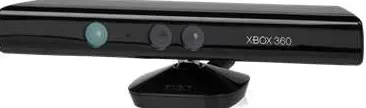
Fig. 1 Microsoft Kinect – Motion Control Device
One such example of alternative input devices contrary to the typical mouse and keyboard combo are input devices that allow motion controls. One such example is the Microsoft Kinect, which is an example of a motion control device that is affordable and readily available. The Kinect [12] is an input device that uses infrared data to detect the position and motion of a person and was designed mainly for motion-based gaming on the XBOX360 platform. Though the Kinect was created mainly as a gaming input device, there had been many developers who have created many different applications [13], [14] that could take advantage of the motion controls.
previous work [15]. The previous research proposed extensions to the GOMS model and was used in the optimization of motion control applications in an exhibition setting successfully. Details of the proposed extensions are displayed in Table II.
TABLEII
GOMSMODEL EXTENSIONS FOR MOTION CONTROLS[15]
Code Task Description ~Time
C Calibration Calibrating Motion Device 7.1 s T Thinking Thinking Time Required
Before Player Takes Action
1.2 s
M Moving Moving the Cursor with Motion Control to the Selection
3.5 s
G Gesture Selecting Current Session with Motion Gesture
4.1 s
P Play Play a Game Session Variable Wait
(t)
Wait Wait t seconds until Timed Response
t sec
C. Touch Screen Interfaces Extensions
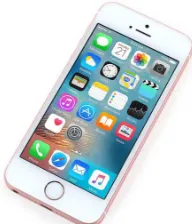
With the introduction of smartphones series as the Apple iPhone and Google Android phones, touch screen interfaces have gained popularity as the input of choice for mobile users. Users of smartphone devices can use the touch screen to interface with their system via a series of taps and gestures. With increased iteration of smartphones and users' competency in using, more gestures are introduced to help streamline the experience when using mobile devices.
Fig. 2 Apple iPhone, Popular Smartphone Series with Touch Screen Interface
In related work, there is mention of touch screen interface extensions in earlier work. There are some works that extended the GOMS model [16][17][18] to deal with touch screen operators by proposing additional operators. Also, there is a software package called Coagulator [19] that provides GOMS model extensions based on earlier research that allows the package to deal with touch screen interfaces in general cases.
With the earlier proposed work, there are some differences in the selection of actions that are extended. The work proposed by Holleis [16] proposed additional operators that are related to the touch screen, which are finger movement and gestures. Another work, which is implemented into the software package Coagulator[18], [19], mentions about motor operations that include Tap, Drag, and Swipe operators, which are considered as elementary gestures in touch screen interfaces. Another work [17]
proposes 6 physical actions related to touch screen usage. Each of the work were designed for different purposes.
Though the earlier work has proposed some operators for touch screen, it is noticed that the operators are based on elementary gestures for the touch screen. However since touch screen gestures can be extended [20], there had been many different types of operators that can be performed on the touch screen that is common for touch screen interfaces, in which the earlier proposed system did not account for directly. To account for complex touch screen gestures, the previous approaches by Holleis and Estes [16], [18] relies on using multiple operators in a compound fashion to address. This requires complex calculation and is undesirable. Also, some complex gestures are considered to be elementary actions for competent touch screen users, and the gestures can be performed as one motor operator as opposed to a series of elementary actions. The issue stated earlier can cause estimation errors with previous approaches as the estimated time requirement of the complex gesture may be significantly higher than the actual time.
With a later work [17], the physical actions are based on many of the modern gestures. However, the list of actions is not adequate for certain popular modern gestures and could be extended. Due to the number of gestures available with a current touch screen, it is noted that each of the gestures may not have the same time requirement due to complexity in action and may need to be extended to include the current generation of touch screens and gestures.
D. Research Goals
Though the GOMS model has been useful for quantitatively evaluating UI design, initial designs and proposal of the GOMS are focused on traditional GUI computer inputs that are based on GUI interfaces with mouse and keyboard input. Mouse and keyboard combo is considered traditional personal computer inputs, and the proposed GOMS model with KLM extensions can provide accurate time estimates for the competition of tasks with a given UI. However, when exploring platforms that people are using applications, it is noted that there is a high adoption of smart mobile devices [7] such as smartphones and tablets which can be installed with custom applications. To interface with these mobile devices, touch screen input is the usual approach. This becomes an issue with the previous GOMS model and approaches, as the previous approaches do not account for touch screen inputs adequately.
This research aims to addresses the issue by proposing extensions to the GOMS model that accounts for UI that are based on touch screen input devices that are used to interface with the current generation of mobile applications. With the proposed model extensions in the research, it is possible to provide accurate time estimations for tasks of a given UI when using touch screen interfaces.
II. MATERIAL AND METHOD
complex gestures that are used in touch screens. Due to that issue, it is not possible to accurately estimate the time requirements for accomplishing tasks for a given UI for touch screen interfaces. To solve the issue, the existing GOMS model should be extended to include touch screen interfaces and address the previous outstanding issues.
This section details the process towards proposing extensions to the GOMS model that can account for touch screen interfaces. The first subsection explains the possible gestures that could be used in current generation touch screen interfaces. Once the specifics of touch screen gestures are established, several gestures that are similar could be grouped to reduce the number of elementary actions proposed. Once the touch screen gestures have been proposed, experiments that have been set up and used to propose an estimated time for the selected elementary action for touch screen interfaces.
A. Touch Screen Gestures
Touch screens are input devices that are layered on top of the visual display of a computing device. Users can control the device by using a series of input by using their fingers to touch specific part of the screen. Finger-based inputs are called gestures. Users can use a simple touch gesture or use multi-touch gestures that require more than one finger, to place input commands to the computing devices. Stylus/pen inputs are also possible but are considered optional for most modern touch screen devices.
TABLEIII TOUCH SCREEN GESTURES
Gesture Description
Tap Touch screen with the finger
Double Tap Touch screen twice with finger rapidly Drag Move finger over the surface
Multifinger Drag
Move 2 or more fingers over surface
Flick Move finger over surface rapidly Multifinger
Flick
Move 2 or more fingers over surface rapidly
Pinch Touch screen with 2 fingers and bring them together
Squeeze Touch screen with five fingers and bring them together
Spread Touch screen with 2 fingers and spread them apart Splay Touch screen with 5 fingers and spread them apart Press Touch screen with the finger for a long time Press and
Tap
Touch screen with the finger for a long time and then tap with 2nd finger
Press and Drag
Touch screen with the finger for a long time and drag with 2nd finger
Rotate Touch screen with 2 fingers and rotate them in CW or CCW
When exploring gestures, there are many common gestures [21], [22] that can be utilized with modern touch screens. Tap, double tap, drag, multifinger drag, flick, multifinger flick, pinch, squeeze, spread, splay, press, press and tap, press and drag, and rotate are the main gestures that are used with the current generation of touch screens. It is possible to create custom handlers for customized gestures in touch screen interfaces [20], but since customized gestures are not commonly used in applications, they are not
considered in this research. The details of each of the common gestures could be viewed in Table III, and illustrations of the gestures are provided in Fig. 3.
Fig. 3 Touch Screen Gestures Illustrated
The touch screen gestures are then used as candidates for elementary actions that should be used when extending the GOMS model for touch screen devices.
B. Grouping Touch Screen Gestures
From the previous subsection, the list of touch screen gestures had been selected for candidate elementary actions for the extended GOMS model for touch screens had been explored. The candidate list could be examined to explore touch screen gestures that are similar in nature and time complexity to reduce the number of elementary actions proposed for the extended model.
The first explored are gestures that have multitouch variations. Some gestures have actions in which could be performed with a single finger and the same gesture could be performed with 2 or more fingers in a multi-finger/multitouch variation of the gesture. In the candidate list, the drag and flick actions have multitouch variations of the gesture. It is observed that the actions are similar, there are little differences between the actions and the time-complexity of using the single touch and multitouch variation to be similar. Due to the similarity, it is possible to group the single touch and multitouch variations of the drag and flick gesture respectively into the same elementary action when considering using for the extensions to the GOMS model.
gesture. The four candidate gestures can be ideally grouped as the same elementary action.
From 14 candidate gestures that are selected, several candidate gestures can be grouped to lower the number of elementary actions selected. 3 groups were proposed that removed eight candidate gestures. The grouped gestures are summarized in Table IV.
TABLEIV GROUPED GESTURES
Candidate Gesture Grouped Gestures Drag: Multi-finger Drag Drag
Flick: Multi-finger Flick Flick Pinch, Squeeze, Spread, Splay Scale
Before the candidate gestures are proposed, there are some tweaks with the list required. First, it is observed that the press and drag and press and tap gestures are compound gestures that could be performed by using the combination of press and either tap or drag operators. This means that the candidate gesture could be reduced. Before the gestures can be performed, several elementary actions could be added to the list to make the time estimate more accurate. One of elementary action that is added to the list is the preparation of the finger in tapping a specific part of the touch screen. The finger is moved to prep itself in tapping part of the screen, and the action requires time to set up before another gesture such as Tap can be performed if accurate tapping is required. Another issue that needs to be considered is that the drag gesture could be either a simple drag or a drag and drop action. To deal with that, two modifications are done. The first modification is the addition of moving the finger to part of the screen which is required in a directed drag and drops action. The next modification is the addition of the release gesture after the gesture had been performed.
TABLEV TOUCH SCREEN GESTURES
Code Gesture Description E Prep Prepare Finger
T Tap Touch Screen with Finger TT Double Tap Touch Screen Twice with Finger D Drag Move Finger/Fingers over Surface M Move Move Finger/Fingers to a Directed Part of
Screen
F Flick Move Finger/Fingers over Surface Rapidly
S Scale Pinch, Squeeze, Spread, or Splay Gesture P Press Touch Screen with Finger for a Long
Time
R Rotate Touch Screen with 2 Fingers and Rotate CW/CCW
L Release Release Fingers
In total, the proposed system selected 10 gestures that would be selected as elementary actions to be extended into the GOMs model. The list and details of the gestures are summarized in Table V.
C. Experiment Setup
A total of 14 common touch screen gestures were selected as candidate gestures, but the list has been reduced to 10 gestures due to similarity. With the ten gestures that are
selected, experiments have been set up to examine the approximate time requirement that a user takes to activate the gesture on the touch screen interface.
To perform the experiment, touch screen devices are selected. For smartphones, there are many physical screen sizes. For example, smartphones come from 4-5.5" screens. Phablets which are oversized smartphones come from 6-7" screens. Tablets typically come in screen size that is larger than 7" and are operated mainly with two hands. Based on shipping data [23], it is observed that the most popular screens on smartphone devices are 5" screens. The 5" screens are small enough to fit and operate with one hand easily and are comfortable to use when compared to the larger devices such as Phablets and Tablets. Due to the comfortable size, the experiment will use smartphones that are of 5" size for the test subjects to use.
The test subjects in the experiment are experienced mobile users who are familiar with touch screen operation and mobile gestures. Each of the test subjects were briefed about the mobile gestures that are used in the experiment. This is done to prevent issues that some of the test users may not be familiar with some of the touch screen gestures and to limit the amount of time required to recall the gesture and to measure the motor time required for the gesture.
To test the subjects, the total list of touch screen gestures is used, which are given in random order. The test subjects are given the smartphone and then instructed which gestures to perform. The test subjects are recorded the reaction time required to act. Once the action has been recorded, the test subject is given a short break, and then the next instruction for gestures is given. This process is repeated until the test subject performs all the gestures. A total of 21 users were selected for the experiment; all experienced users who have used the touch screen on a daily basis. The collected results from the experiment were collected and later calculated to find the average time requires of each of the gestures. The average time results were rounded up to the closest 0.1 seconds as a typical human reaction are slower than the unit selected[24] except for well-trained professionals.
III.RESULTS AND DISCUSSIONS
A. Observations from Experiment
easily allows the users to perform the wide range of touch screen gestures that require multiple fingers efficiently. Due to the experiment requiring many gestures, it is noted that cradle grip users, generally perform the multi-finger gestures faster and more accurate in general.
Related to the issue, in addition to the difficulty of attempting multi-finger gestures, many of the one-handed grip test users found it difficult to tap certain parts of the screen. Many of the test subjects struggle to reach areas that are not close to the thumb, such as the far edge of the screen. When the user struggles to reach the button, the time requirements are higher than typical gestures of the same type. Due to those issues, it is observed that many of the test users utilizing the one-handed grip tended to change to cradle grip from time to time. That action required a changing of the grip before the gesture could be used and requires a slight time overhead before the gesture could be performed. Based on the observations on the grip usage, the usage of touch screen interfaces is not uniform like the usage of keyboard and mouse combination, and the grip can have slight implications on the performance of tasks. Due to that, it is summarized that in the future work, the extensions in considering the grip could be used in which can more accurately deal with the issues that are observed.
In addition to the grip and related issues, the long press gesture is another interesting issue observed during the experiment. The long press gesture triggered by mobile devices can be different from machine to machine. For a standard Android device, the long press can be customized in the settings between short, medium, and a long time to trigger. The short time trigger allows the press event to trigger if the screen has been touched for 0.5 seconds. The other settings increase respectively. For iOS devices, the hold duration can be customized in any 0.1-second increments. Due to the differences in the press delay, the experiment requires the devices to be customized to the setting of 0.5 seconds before the long press action is triggered.
B. Validating the Proposed Extensions
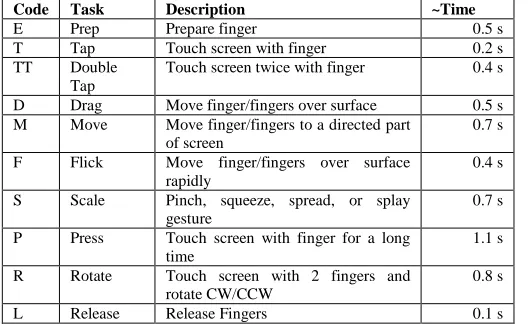
Table VI contains the list of gestures and the average times obtained from the previous experiment. The results of this table could be used as a reference when estimating the time requirements for completing a task with a given UI.
TABLEVI
TIME ESTIMATES FOR PROPOSED GOMSMODEL EXTENSIONS FOR TOUCH SCREEN GESTURES
Code Task Description ~Time
E Prep Prepare finger 0.5 s
T Tap Touch screen with finger 0.2 s
TT Double Tap
Touch screen twice with finger 0.4 s
D Drag Move finger/fingers over surface 0.5 s M Move Move finger/fingers to a directed part
of screen
0.7 s
F Flick Move finger/fingers over surface rapidly
0.4 s
S Scale Pinch, squeeze, spread, or splay gesture
0.7 s
P Press Touch screen with finger for a long time
1.1 s
R Rotate Touch screen with 2 fingers and rotate CW/CCW
0.8 s
L Release Release Fingers 0.1 s
To validate the proposed extensions, the proposed extensions were utilized during the design process of a mobile game that was developed by PIGSSS Games Co. Ltd. The proposed game was a Slot Machine game that is based on touch screen interfaces. The development team has worked with the authors to streamline the interface game for players by using multiple tools and approaches. In the area of efficiency, the authors have utilized mainly the proposed extensions for touch screen interfaces to estimate the time requirements when considering alternating proposed designs. Due to the complexity of the game, the research will examine one of the key interfaces that are used in the development of the game. One of the key features of the slot machine game is how the user spins the slot machine. In modern slot machines implementations, users can select between a single spin, multispin, or auto spins. For multispin, the slot machine will automatically spin the machine until the optional spin criteria specified had been reached. For auto spins, the slot machine will spin infinitely if there are adequate credits. When the slot machine is in the process of multispin or auto spin, the player should also be able to cancel the process.
With the requirement of designing the main spin mechanics of the game, the development team had come up with several alternative UI designs.
The first design proposal uses a button for activating the spin. Alternatively, the spin can be accessed by the flick gesture. If the spin button is pressed, the auto spin is activated, and the context menu of the multispin options appear. If the user releases the press, auto spin is activated, and the context menu disappears. However, the user can choose a multispin option by moving the finger to the option and releasing to activate one of the multispin options. When either the autospin or multispin option is active, it is possible to cancel the action by tapping on the spin button. The time estimate is displayed in Table VII.
TABLEVII
TIME ESTIMATES FOR FIRST PROPOSED INTERFACE
Action Gestures Time Estimate
Single Spin T or F 0.2 s or 0.4 s Starting AutoSpin P + L 1.1 s + 0.1 s = 1.2 s Starting MultiSpin
Options
P + M + L 1.1 s + 0.7 s + 0.1 s = 1.9 s Cancel Auto/Multi-Spin T 0.2 s
A second design proposal modifies the previous design by changing the requirements between starting the autospin or multispin options. When the spin button is pressed, a menu showing the multispin options are displayed. The option in the menu is tapped to access the selected multispin option. The time estimate is displayed in Table VIII.
TABLEVIII
TIME ESTIMATES FOR SECOND PROPOSED INTERFACE
Action Gestures Time Estimate
Single Spin T or F 0.2 s or 0.4 s Starting AutoSpin P + L + T 1.1 s + 0.1 s + 0.2 s = 1.4 s Starting MultiSpin
Options
The third design proposal aims to move the options between selecting the autospin or multispin into the options. By pressing the spin button, the player will activate either the autospin or multispin option that was selected in the options. This approach is most efficient when activating the spins, but when the player requires to change between the autospin/multispin behaviors, the player has to access the options menu, which can take significant time due to the requirement of switching interface screens. The time estimate is displayed in Table IX.
TABLEIX
TIME ESTIMATES FOR THIRD PROPOSED INTERFACE
Action Gestures Time Estimate
Single Spin T or F 0.2 s or 0.4 s Starting AutoSpin P + L 1.1 s + 0.1 s = 1.2 s Starting MultiSpin
Options
P + L 1.1 s + 0.1 s = 1.2 s
Cancel Auto/Multi-Spin T 0.2 s Switching between
Autospin / Multispin Options
T + W(t) + T + T + T + W(t)
0.2 s + t s + 0.2 s + 0.2s +0.2 s = 0.8 + 2t s
Many other design proposals were discussed but removed due to aesthetic issues required to set up the interface. One such example included the usage of separate buttons for each of the spin options. This could be ideal on the efficiency as it is possible to access all the options quickly. However the option is not selected due to the lack of screen real estate on mobile devices.
Based on the earlier proposed interfaces, the third interface had been rejected. The third interface can potentially launch the user-defined auto spin/multispin option efficiently, but it comes at the cost that changing the options is difficult to access, and the saving is not as significant when compared with the other two proposed interfaces.
When comparing between the first and second interfaces, there are differences in time estimation when activating the autospin/multispin options. The first option is slightly faster when activating auto spin, whereas the second option is faster when activating the multispin options. There is not much difference between the two, so the two interfaces were selected, and a mockup and prototype were created to test between the two UI proposals. The screen is displayed in Fig. 4. After user testing, the first interface was selected as many users prefer the layout of the options when compared with the second interface, and that they prefer to use auto spin and cancel auto spin instead of using multispin options.
Fig. 4 Mockup of Proposed Slot Machine Interface
IV.CONCLUSION
This research paper has proposed elementary gestures to extend the GOMS model that deals with touch screen interfaces. From a total of 14 common touch screen gestures that have been examined, the total of 10 simplified gestures had been proposed. For each of the gestures, an experiment was set up to examine the estimated time required for each of the tasks that is proposed. With the proposed extensions, it is now possible to estimate the time requirements of a given UI for touch screen interfaces. A case study was selected from using a mobile game project and the proposed extensions were applied as part of the interface review.
The proposed model differs from an alternative proposal [16]–[19] that proposes motor operators that are related to touch screen gestures. As the alternative proposal aims to work on lower leveled motor operators, higher level gestures could be assembled by combining operators. However, in the proposed work, the team proposes that touch screen gestures that are common gestures in the current generation of touch screen interfaces are likely to be more suitable to consider as an elementary operation or gesture. As opposed using many lower leveled motor operators, it is more suitable to utilize a higher-level gesture instead and is accounted in the extended list of touch screen gestures examined. Another issue that are the differences in the time estimates of the tasks/operators between the works. This is not surprising considering that the sample group used for the estimation of the time consideration of the gesture are of different groups, and different expertise, leading to a difference in the time estimation for similar gestures.
Though the proposed work has come up with many improvements, there are a few issues that could be examined for future work. One of the first issues is that the work examines only the touch screen operation that is common in smartphones and tablets. Smartphones and similar device come with an array of additional sensors such as accelerometers [26] that could be utilized as gestures when using smartphone devices. This could be accounted for in future works.
fastest due to utilizing both thumbs to access the touch screen.
Based on the earlier discussions, the results deduced that there is a relationship between the type of grip and gestures performed that can lead to different times. Also, to improve the GOMS model, the consideration of switching grips may be considered as an elementary action when considering the time requirements. In this research, this issue had not been considered partly due that the additional time may not be significant, leading to lower priority for this issue. However, this is an issue that could be explored in more details in future works.
Another issue that is of interest is that screen sizes of touch screen interfaces can affect the time estimation of actions. With larger screens such as phablets (6-7" smartphones) and tablets, it is difficult to reach parts of the screen. Due to the difficulty, certain actions may require more time to perform. This issue had been reported in other research [27] regarding the issue of reach with the motor ability of subjects. To deal with this issue, changes with the model may be considered. One such example would be adding the action of changing the grip to allow the subject to extend to reach the item easily. For example, an overextended tap gesture which could take more time than a typical tap gesture. This issue had not been considered in this research and could be explored later in a relationship with the grips that are discussed.
ACKNOWLEDGMENTS
The authors would like to thank PIGSSS Games Co. Ltd. for providing technical support, case studies, and feedback that are used during the research process.
REFERENCES
[1] C.M. Gray, E. Stolterman, M.A. Siegel, “Reprioritizing the relationship between HCI research and practice: bubble-up and trickle-down effects,” in Proc. of Designing Interactive System 14, pp. 725-734, 2014.
[2] S. Card, T.P. Moran, and A. Newell, The Psychology of
Human-Computer Interaction, USA: Lawrence Erlbaum Associates, 1986.
[3] M. Schrepp, “On the efficiency of keyboard navigation in web sites,”
Universal Access in the Information Society, vol. 5, no. 2, pp.
180-188, Aug, 2006.
[4] H. Tonn-Eichstadt, “Measuring website usability for visually impaired people -a modified GOMS analysis,” in Proc. of 8th ACM SIGACCESS, 2006, pp. 55-62.
[5] P. Setthawong and V. Vannija, “Improving the IP-PBX administration and management process by utilizing the EZY IP-PBX frontend to augment FreeIP-PBX,” Journal of Global Management
Research, vol. 6, no. 1, pp. 47–56, June. 2010.
[6] S. Tsuji, A. Yagahara, Y. Wakabayashi, K. Horita, K. Fujita, and K. Ogasawara, “Developing and Evaluating Radiotherapy Ordering
System Applied JJ1017 Codes,” Journal of Medical Imaging and
Health Informatics, vol. 7, no. 1, pp. 64-72, 2017.
[7] J. Poushter, “Smartphone ownership and internet usage continues to climb in emerging economies,” Pew Research Center, Tech. Rep., 2016.
[8] W. Gray, B.E. John, and M. E. Atwood, “Project Ernestine: validating a GOMS analysis for predicting and explaining real-world task performance,” Human-Computer Interaction, vol. 8, no. 3, pp. 237-309, 1993.
[9] B. E. John, and D. E. Kieras, “The GOMS Family of user interface analysis techniques: comparison and contrast,” ACM Transactions
on Computer-Human Interaction, vol. 3, no. 4, pp 320-351, 1996.
[10] J. Raskin, The Humane Interface - New Directions for Designing
Interactive Systems, USA: Addison Wesley, 2000.
[11] (2010) Using the keystroke-level model to estimate execution times [Online]. Available: http:// www.pitt.edu/~cmlewis/KSM.pdf/ [12] Z. Zhang, “Microsoft Kinect sensor and its effect,” IEEE MultiMedia,
vol. 9, no. 2, pp. 4-10, Feb, 2012.
[13] M. Kourakli, I. Altanis, S. Retalis, M. Boloudakis, D. Zbainos, and K. Antonopoulou, “Towards the improvement of the cognitive, motoric and academic skills of students with special educational needs using Kinect learning games,” International Journal of Child-Computer
Interaction, vol. 11, pp. 28-39, 2017.
[14] M. Zhang, Z. Zhang, Y. Chang, E. Aziz, S. Esche, and C. Chassapis, “Recent Developments in Game-Based Virtual Reality Educational Laboratories Using the Microsoft Kinect,” International Journal of
Emerging Technologies in Learning (iJET), vol. 13, no. 1, pp.
138-159, 2018.
[15] P. Setthawong, “Optimizing player throughput for interactive motion based kiosk games – a case study from the PTT Technobots Campaign,” in Proc. XIV IBEC, 2015, pp. 1-10.
[16] P. Holleis, F. Otto, H. Hussman, and A. Schmidt, “Keystroke-level model for advanced mobile phone onteraction,” in Proc. Of SIGCHI
Conference on Human Factors in Computing Systems, pp. 1505-1514,
2007.
[17] A. Nyström, “Gesture-level model: A modified Keystroke-level model for tasks on mobile touchscreen devices,” M. Mcit. Thesis, Uppsala University, Uppsala, Sweden, 2018.
[18] S. Estes, “Introduction to Simple Workload Models Using Cogulator,” in Proc. Of Human Factors and Ergonomics Society
Annual Conference, 2016.
[19] (2018) Cogulator [Online]. Available http://cogulator.io
[20] L. Yang, “Beyond pinch and flick: Enriching mobile gesture interaction,” IEEE Computer, vol. 42, no. 12, 2009.
[21] (2010) The touch gesture reference guide [Online]. Available https://static.lukew.com/TouchGestureGuide.pdf
[22] L. Wroblewski, Mobile First, USA: A Book Apart, 2011.
[23] (2018) IDC Worldwide Quarterly Mobile Phone Tracker [Online]. Available
https://www.idc.com/getdoc.jsp/containerId=prUS42628117 [24] S. Thorpe, D. Fize, and C. Marlot, “Speed of processing in the
human visual system,” Nature, vol. 381, pp. 520-522, 1996. [25] (2013) How do users really hold mobile devices? [Online]. Available
https://www.uxmatters.com/mt/archives/2013/02/how-do-users-really-hold-mobile-devices.php
[26] Y.J. Lee, “Detection of movement and shake information using android sensor,” Advanced Science and Technology Letters, vol. 90, pp. 52-56, 2015.
[27] J. Xiong, and S. Muraki, “Effects of age, thumb length and screen size on thumb movement coverage on smartphone touchscreens,”
International Journal of Industrial Ergonomics, vol. 53, pp. 140-148,