Research Journal
Volume 8, No. 24, Dec. 2014, pages 55–60
DOI: 10.12913/22998624/568 Original Article
Received: 2014.09.25 Accepted: 2014.10.25 Published: 2014.12.01
APPLICATIONS OF CLOUD COMPUTING SERVICES IN EDUCATION
– CASE STUDY
Tomasz Cieplak1, Mirosław Malec2
1 Department of Company Organisation, Lublin University of Technology, Nadbystrzycka 38, 20-618 Lublin, Poland, e-mail: [email protected]
2 Department of Fundamentals of Technology, Lublin University of Technology, Nadbystrzycka 38, 20-618 Lublin, Poland, e-mail: [email protected]
ABSTRACT
Applications of Cloud Computing in enterprises are very wide-ranging. In opposition, educational applications of Cloud Computing in Poland are someway limited. On the other hand, young people use services of Cloud Computing frequently. Utilization of Facebook, Google or other services in Poland by young people is almost the same as in Western Europe or in the USA. Taking into account those considerations, few years ago authors have started process of popularization and usage of Cloud Computing ed-ucational services in their professional work. This article briefly summarizes authors’ experience with selected and most popular Cloud Computing services.
Keywords: cloud computing, education.
INTRODUCTION
In Poland, wide usage of application of com-putational software in education has started in 1980’s. The software was used in vary ways, de -pending of its purpose. But, the software always needed expanded IT infrastructure to be used ef-fectively. Also, activity with traditional software systems were limited to the area of school build-ing or one classroom. Students could not have ac-cess to their educational materials, homeworks or statistics related to their activity in school. The solution for those limitation were Web-based educational systems. Yet, in this case the IT in-frastructure became even more complicated and more difficult in administration.
To gain effective educational systems, edu-cational institution had to spend a lot of financial resources for server infrastructure, administra-tive staff, Internet connection and of course pro-fessional software. In this case, teachers were able to prepare educational materials and share them with students but this process had few im-portant limitations. The first limitation was the
way how educational material must be prepared. There were many standards and even more complex tools for preparation of those materi-als. This situation required from teachers to get familiar with standards of materials preparation and most often caused teachers to be attached to one selected system.
BRIEF OVERVIEW OF CLOUD
COMPUTING
The term of Cloud Computing was recorded
for the first time as early as in 1997, when dur
-ing INFORMS conference Rama Chellappa – a
professor at the University of Maryland defined
cloud computing as “the emerging computer par-adigm, whose computation limits are established
not by technical boundaries, but by justified re
-quirements“ [2].
The first research articles concerning the is
-sue were published in 2008. Cloud Computing is a new, yet dynamically developing branch of computer science. Moreover, it may strike as surprising that Cloud Computing has quickly come to enjoy great popularity in many other
fields, influencing such areas as social network
-ing, which can be exemplified by Facebook and
Twitter services.
The basic classification Cloud Computing was divided into three layers. The first layer –
IaaS (Infrastructure as a Service), lies closest to hardware. The next layer – PaaS (Platform as a Service), does not allow the user access to Op-erating System, but offers an elastic and scalable framework for creating and running their applica-tions. SaaS (Software as a Service) constitutes the third layer of application, which are made avail-able as services.
Although both solutions belong to the same class, their implementation and capabilities are
strikingly different. The first difference is the
number of operating systems available that the user can utilize. EC2 (Elastic Compute Cloud),
true to its name, is a very flexible solution. It en
-ables the user to install one of Linux platforms or Microsoft Windows Server. Apart from that the user has a selection of a few hundred of OS
imag-es, configured and prepared for specific tasks. In
case of Windows Azure the OS choice is limited to implementations of Microsoft Windows Server
images. The billing scheme is another significant
difference. It is characterized by different set of
parameters, which influence the final price. On
account of the character of this publication au-thors will refrain from comparing both solutions. This will be the subject of another work. In case of IaaS, its essential advantage is enabling the user to full access to the purchased system which he can then managed as he pleases and run any soft-ware on it. Nonetheless, with IaaS cloud it is vital to remember that many of Cloud features such as
scalability and failover mechanisms are not avail-able there by default. They can be utilized only if the programmer knows how to implement them in a given solution.
For that reason, if the user does not require full control over the system, but puts scalabil-ity and reliabilscalabil-ity above it he should consider using PaaS solution. PaaS services are offered on a number of platforms: Google App Engine. Microsoft Windows Azure, Ruby on Rails IN Cloud and Force.com – Salesforce.com. One of the key advantages of PaaS is its separation from hardware infrastructure and operating system, thanks to which the issues of hardware malfunc-tion, licensing and installing updates are non-existent. Although the user has to abide certain rules and limitations in the created software, he does not need to utilize specialized techniques enabling him to tap onto scalability of available resources.[3]
Cloud Computing does not restrict its capa-bilities to programmers. The users may count on ready, pre-made solutions adapted to their needs. This service model is called SaaS. It does not al-low for creating applications. Instead it permits using ready software which runs and is made available within the cloud. Google Apps,
Micro-soft Office 365 and Windows Live are the best ex
-amples of this model. Perhaps the most renowned SaaS applications are community based social portals and apps such as Facebook, Flickr, Picasa and many more.
CLOUD COMPUTING SERVICES IN DAILY
TEACHERS WORK
Examples shown in this part of article are based on authors’ experience and, in most cases, are consistent with the results of other researchers but detailed implementation of services may vary depending on the teacher [4].
Author’s first experience with implementa
-tion of Cloud Computing services into educa-tion- education-al process began in 2010. As in case of many
oth-er teachoth-ers, the first step was to convince students
to determine the suitability of specific cloud com -puting services – in this case Google Apps – in the teaching process. The activities carried out with the use of Google Apps were compared with the previous experience of the authors of online learning systems, such as eg. Moodle. However, due to the nature of the article, these systems will not be compared.
As mentioned earlier, the email communica-tion should have some rules to fully utilize Gmail function. To keep track of students work received
on the email box, it was needed to implement fil
-ters and labels in Gmail. Without certain students habits this process would fail. Next, maybe less important, was fact that most of student were us-ing their private email addresses, without properly
described first and last names. Almost simultane
-ously, after the implementation of Google Apps, an educational website built on Google Sites ser-vice was launched. What was very important for authors, the implementation time was very short comparing to time needed to run educational ser-vice based for example on on Moodle. To start
the service and fill it with educational materials,
Google user needed just about one hour. But sim-plicity sometimes means less opportunity in case of educational means. In the case of site based on Google, teacher has no possibility to track who and when uses materials. The solution could be Google Analytics, but also in this case informa-tion is very limited. Teacher has no possibility to
prepare in easy way tests, flashcards and other
interactive materials that are implemented into
Moodle. So at the first sight, Google was good
but not sufficient. When a simple communica
-tion via email, file sharing and ads were needed, Google services were sufficient. But in the case
where a teacher needs more sophisticated tools, further research was needed to be carried out. A natural step was to search for applications, which are available as an extension proposed for Google Apps for Education.
In year 2011 such extension was available as Web application called Docebo E-Learning. Un-fortunately, the cost of the application was too high. After extended research, the authors found
very flexible and very cost effective e-learning
solution called Engrade on the market. This sys-tem has been used for three years until now. The total number of registered classes equals sixty four and registered students equals about eight hundred. During this time the system was very stable and, what is very important – especially
in the case of Cloud Computing services – the rules of use of this system were unchanged. Be-cause Engrade is not widely known, at least in Poland, it will be described in more detail later in the article.
Engrade, as a very useful tool to teach yet, it does not meet all the requirements. The authors sought additional applications that, for example, may allow for conducting classes remotely – Re-mote seminars or consultations. The solution was an AnyMeeting system. AnyMeeting is a Cloud Computing service, too. It allows one to conduct meetings and conference – share the view of the screen, text chat and voice conversations. For the authors, this system was used by a group seminar. Such a method of conducting classes, familiarizes students with teleconferences and presentations.
The last tool used in the teaching process is Facebook. It may be a surprising statement, but Facebook appears to be an excellent tool to stay in touch with current or former students. For cur-rent students, allows for quick contact with a person or a group of students – which happens extremely rarely. However, in the case of former students v especially graduates v Facebook gives you the ability to track their careers after gradua-tion, as well as a tool to obtain an opinion on the activities undertaken.
During the research on Cloud Computing ap-plication in education, authors have tested many other services such as Mojo Helpdesk, SlideR-ocket, Do, Youtube, but their usefulness in the ed-ucation process was limited. Of course in the case
of Youtube one can find this tool very useful as a
BENEFITS AND RISKS OF USING CLOUD
COMPUTING
As mentioned at the end of previous part of the article, Cloud Computing gives the
educa-tional institution many benefits but also brings
some risks. With previously mentioned example of SlideRocket service is directly connected the risk called Lock-in. This risk is that an institu-tion will become “locked-in” to the products of a
particular provider. There are significant costs in
migrating from any used system to another. While some providers make claims about the interoper-ability of their products it is rarely easy to transfer content from one system to another. Institutions which start to integrate business or educational
processes with the cloud systems will find it even more difficult to migrate. If a better rival product
emerges or the cloud provider decides to impose or increase charges on institutions it may be too late to change the service.
In many cases of services – especially those provided for free – with software there are also associated advertising. That fact causes the next risk appears called “unsolicited advertising”. This is especially important in EU countries where unsolicited advertising is illegal and institutions must take steps to ensure this does not happen. In addition, the accumulation of usage data by the providers may be of value for onward selling to third parties, though it may be anonymized. The inclusion of appropriate clauses in the contract may minimize the risk of abuse.
A major concern is around the security of data. Institutions may consider that their data is more secure if it is hosted within the institution. Transferring data to a third party in a remote data center, not under the control of the institution and the location of which may not be known, presents a risk. Strict data protection laws in Poland, as a part of the EU, restrict the storage of personal data to countries with which agreements have been signed (those countries are Argentina, Bai-liwick of Guernsey, Faroe Islands, Isle of Man, Jersey, Switzerland and – if the provider is ac-cept certain conditions – Canada, USA).[5] Some cloud providers now provide guarantees in their contracts that personal data will only be stored in particular countries.[6]
Benefits of use of Cloud Computing services
are as follow:
• Economies – services such as email are offered for free by external providers; hardware can be
redeployed or removed, potentially freeing up valuable real estate; personnel costs can be cut.
• Elasticity – allows for rapid escalations in de-mand at peak times, such as at the start of the academic year or during exam periods.
• Enhanced availability – less downtime due to the superior resources and skills available to cloud providers.
• End user satisfaction – range of new applica-tions being provided; students can use such
applications as Office for free without having
to purchase, install and keep these applica-tions up to date on their computers; collabora-tion; data is accessible from any location or from a range of devices; technologies such as HTML5 will increasingly allow users to work
offline when Internet access is intermittent.
ENGRADE AS A TOOL FOR TEACHERS
Engrade is a secure, web-based online grade-book and class management tool, free of charge. This software allows teachers to post and track stu-dents information in one place, as well as allows students and their parents to check grades and at-tendance. Engrade also offers mobile site access to provide access from mobile devices. For those who need more advanced features, like collecting and viewing data from third-party providers, there is paid version, for a per-student annual fee.
As it was said, Engrade is a free of charge for teacher as well as for students and their parents. In the research, in case of use of Engrade by authors, parents accounts were not taken into account. Yet, this utility was used to carry on all documentation of students from all classes. Engrade was tested for three years and during this time occurred no problem with system stability. Also, the design and usability was not changed.
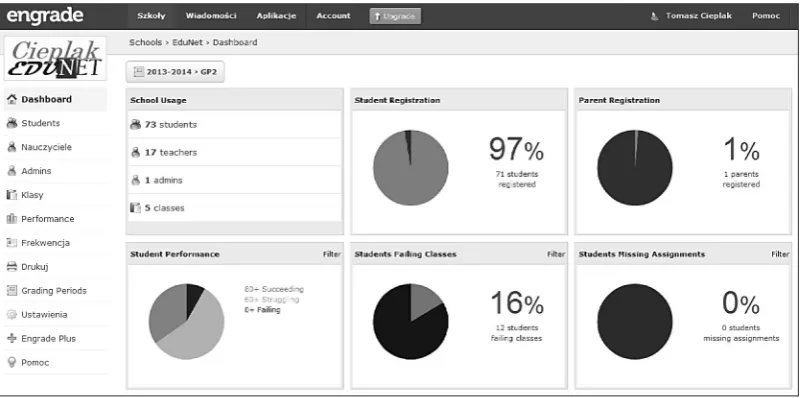
After very easy registration – were few pos-sible account types to choose (to prepare Engrade for an institution it was better to choose and estab-lish a school account of administrator than teacher account) – administrator could register teachers belonging to one school. Figure 1 shows the dash-board of Engrade prepared for testing purpose.
stu-dents testing purpose. Teachers faced few prob-lems with adaptation their classes style for online method of teaching. Some of them no needed computers on their classes and used Engrade as a supporting tool to share materials with students. In case of authors, Engrade was used to: share materials, communicate with students, keep track
of students assignments and finally to collect sug
-gestions about student progress and support
deci-sion on final grade of student .
All features of Engrade are divided into Apps. Figure 2 shows Class Apps with following sec-tions: gradebook, assignments, calendar, atten-dance, list of students, tests turn-ins, discussion, standards, comments to lessons, seating chart. Teacher can also set settings for chosen class –
settings (class name, school year, grading scale,
main apps) were configured during class addition
of a class, but they could always be adjusted by teacher during a school year.
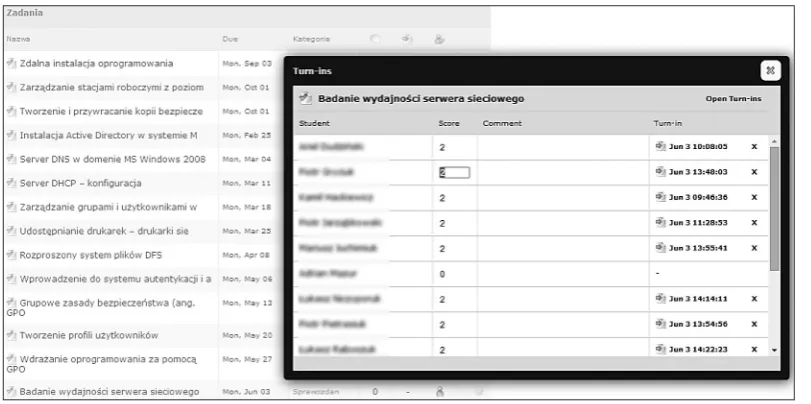
To proper set a class inside Engrade, after add-ing class name and students to the class, teacher needed to put subjects of lessons and dates of deadline for each lesson (see Figure 3). This was very useful to keep self-discipline of teacher as well as discipline of class. After setting all les-sons, students can see all assignments and they know the date when turn-in must be send to get score of an accomplished lesson. Figure 3 shows dates of turn-ins sent by students as well as scores for each student. After completion all turn-ins at the end of semester, teacher was having
informa-Fig. 1. Administrator dashboard of school
Fig. 3. Assignments screen with subjects and turn-ins
tion about each student progress and in the same
time a proposition of the final grade.
Frequently, authors were using flash cards as
a tool to prepare student for tests or other
meth-ods of knowledge verification. For each class was
also checked attendance, which at the end of the
semester was a factor in the final evaluation (see
Figure 2).
CONCLUSIONS
Application of Cloud Computing services was researched and different solutions were tested during three years. Systems like Engrade, AnyMeeting, Google Apps for Education were found as a very useful tools in everyday prac-tice of teachers. According to students opinion on classes, carried out with use of these services, students always knew what would be the course of the lesson, their scores and other information of class progress. That fact made them clear about the rules of gaining credit in a given subject. From point of view of teachers and administration, ana-lyzed systems were easy to set and maintain.
However, it should also be noted that systems operating in a cloud computing have a number of drawbacks. First, the user must have access to the Internet to be able to use these systems. Must be paid attention to the license agreement and the changes in conditions and prices of service.
User may be locked in a specific, single solu
-tion and move to another provider may be a
pro-cess quite difficult and time consuming. When
choosing a system, should be paid attention to
the language versions of the system. English is available in almost all services, but eg. Polish language is available in only a few. The most important note, user must always pay attention to where his data will be collected and how it will be secured in the system.
Already in the course of writing the article, Google has launched a new service called Class-room. Thus, further studies in the academic year 2004/15 will focus on the use of new solutions running in the cloud computing. These services will be Google Classroom and EDU 2.0.
REFERENCES
1. Sultan N.: Cloud computing for education: A new dawn? International Journal of Information Man-agement, Vol. 30 (2), 2010.
2. Chellappa R.: Cloud computing – emerging para-digm for computing. Institute for Operations Man-agement and Research (INFORMS), Dallas, 1997. 3. Cieplak T., Malec M.: Practical usage of cloud
computing in computer integrated manufacturing. In: New methods in industrial engineering and pro-duction management, Lublin University of Tech-nology 2012.
4. Sclater N.: Cloud computing in education. UNES-CO Institute for Information Technologies in Edu-cation, Moscow 2010.
5. European Commission, http://ec.europa.eu/justice/ data-protection/document/international-transfers/ adequacy/index_en.htm (on day 08.20.2014). 6. Zissis D., Lekkas D.: Addressing cloud computing