HEP PARALLEL FORTRAN
USER'S MANUAL
DENELCOR PUBLICATION 10002-00
NOT ICE
This manual describes the facilities provided by the Heterogeneous Element
Processor FORTRAN Compiler. It reflects with reasonable accuracy
specifi-cations in effect at the time the manual was written. Users are cautioned
-the Denelcor reserves -the right to make changes to -these specifications
without notice. Denelcor a~sumes no liability for any dama$e resulting
from or caused by reliance on the information presented. This includes,
but is not limited to, typographical errors and the omission of any
information.
Comments regarding this manual or its contents should be directed to:
Corporate Communication Department, Denelcor, Inc., 3115 East 40th
CONTENTS
SECTION I FORTRAN SOURCE PROGRAM FORM
1. Introduction 1
1.1 Character Set 1
1.2 Source Statements 2
1.2.1 Statement Labels 2
1.2.2 Statements 2
1.2.3 Comments 3
1.2.4 Blank Lines 3
1.2.5 Source Statement Ordering 3
1.3 D in Column 1, Conditional Compilation 6
1.4 COpy Statement 6
SECTION II DATA
2. 2.1 2.2 2.2.1. .2.2.2 2.2.2.1 2.2.2.2 2.3 2.4 2.4.1 2.4.2 2.4.3 2.4.4 2.4.5 2.4.6 2.4.7 Introduction Identifiers Variables
Simple Variable
Arrays
Data Types Constants
Array Storage Allocation
Array References
Integer Constants
Real Constants
Double Precision ~onstants
Complex Constants
Logical Constants
Hollerith Constants
Hexadecimal Constants
SECTION III 3. 3.1 3.1.1 3.2 3.3 3.3.1 3.3.1.1 3.3.1.2 3.3.1.3 3.3.1.4 3.3.1.5 3.3.2 3.4 3.5 3.5.1 3.6 3.7 3.7.1 3.7.2 3.7.3 SECTION 4. 4.1 4.1.1 4.1.2 4.2 4.2.1 4.2.2 4.3 IV
CONTENTS (Continued)
SPECIFICATION STATEMENTS
Introduction
Array Dec1arators
Variable Dimensions DIMENSION Statement
Type Declarations
Explicit Type Statements
INTEGER Statements
REAL Statement
DOUBLE PRECISION Statement
COMPLEX Statement
LOGICAL Statement
IMPLICIT Statement
COMMON Statement
EQUIVALENCE Statement
EQUIVALENCE and COMMON
EXTERNAL Statement
DATA Specifications
DATA Statement
CONSTANT Statement
BLOCK DATA Statement
EXPRESSIONS 17 11 18 19 19 19 20 20 21 21 21 2'2 23 26 , 28 29 30 30 32 32
Introduction 33a
Arithmetic Expressions 33
Operator Precedence 34
Evaluation of Mixed-Mode Expressions 35
Logical Expressions 37
Relations 37
Logical Operators 38
SECTION V 5.
5.1
5.2
5.3
SECTION VI
6. 6.1 6.2 6.2.1 6.2.2 6.2.3 6.2.4 6.3 6.4 6.5 6.6 6.7 6.8 6.9
SECTION VII
7. 7.1
7.2
7.3 7.3 .. 1
7.3.2 7.4
7.4.1
7.4.2
CONTENTS (Continued)
ASSIGNMENT STATEMENTS
Introduction
Arithmetic Assignment Statement
~xed-Type Assignment
Logical Assignment Statement
CONTROL STATEMENTS
Introduction
Statement Numbers
GO TO Statements
Unconditional GO TO Statement
Computed GO TO Statement
Assigned GO TO Statement
ASSIGN Statement Arithmetic IF Statement
Logical IF Statement
DO Statement
CONTINUE Statement
PAUSE Statement
STOP Statement
PURGE Statement
INPUT/OUTPUT
Introduction
Input/Output Lists
Input/Output Statement Parameters
Sequential Input/Output Statements
READ Statement
WRITE Statement
FORMAT Specifications
Numeric Fields
Scale Factors
SECTION VII (Continued) 7.4.3 7:4.4 7.4.5 7.4.6 7.4.7 7.4.8 7.4.9 7.4.10 7.4.11 7.4.12 7.4.13 7.4.14 7.5 7.5.1 7.5.2 7.5.3
CONTENTS (Continued)
G-Fields
Logical Fields
Alphanumeric Fields
Alphanumeric Constant Fields
Mixed Fields
Blank or Skip Fields
Tabulation
Repetition of Field Specifications
Repetition of Groups
Complex Fields
Multiple Record Formats
Carriage Control for Printing
Auxiliary I/O Statements
REWIND Statement
BACKSPACE Statement
END FILE Statement
SECTI':'N VIII PROGRAM UNITS
8. Introduction
8.1 PROGRAM Statement
8.2 END Statement
8.3 RETURN Statement
8.4 RESUME Statement
8.5 Subprogram Communications
8.5.1 Actual Parameters
8.5.2 Formal Parameters
8.5.3 Correspondence Between Actual and Formal Parameters
8.6 Statement Function Definition Statement
8.7 FUNCTION Subprograms
8.7.1 FUNCTION Statement
CONTENTS (Continued)
Page
SECTION VIII (Continued)
8.7.2 FUNCTION Type 74
8.7.3 Library Functions 75
8.8 SUBROUTINE Subprograms .75
8.8.1 SUBROUTINE Statement 75
8.8.2 CALL Statements 76
8.8.3 CREATE Statement 77
APPENDIX A LIBRARY FUNCTIONS 78
APPENDIX 13 FORTRAN LISTING FORMAT 83
APPENDIX C COMPILER OPTIONS 92
APPENDIX D FORTRAN RUNTIME LIBRARY 93
PREFACE
This manual contains the user's instructions for the FORTRAN compiler
associated with the Heterogeneous Element Processor (HEP). It is directed
to the FORTRAN programmer and the programming staff responsible for
main-taining the compiler. Its purpose is to explain the REP v~sion of the
FORTRAN language, the various inputs and outputs of the compiler, and to
SECTION I - FORTRAN SOURCE PROGRAM FORM
1. Introduction
A FORTRAN source program consists of one main program and any number of
subprograms. The main program and subprograms are made up of statements
using the FORTRAN character set.
1.1 Character Set
The character set has two subsets: alphanumeric characters and special char.actcrs.
ALPHANUMERIC CHARACTERS:
Letters (A-Z) and
Digits (0-9)
SPECIAL CHARACTERS:
Blank
=
Equals+
Plus Minus*
Asterisk / Slash( Left parenthesis
) Right parenthesis
Comma
Decimal point $ Dollar sign
Apostrophe (single quote)
Blanks may appear anywhere in a source program. They are significant only
1.2 Source Statements
Standard FORTRAN statements are accepted as formatted lines (or records)
of eighty or fewer characters. Each line is divided into four fields:
COLUMNS
1-5
6 7-72 73-80
FIELDS
Statement label
Continuation indicator
Statement
Identification
The identification field is ignored by the FORTRAN compiler and is provided
for the convenience of the programmer.
1.2.1 Statement Labels
The statement label is made up of digits placed anywhere in columns 1-5 of
the initial line of a statement. Blanks and leading zeros are ignored.
1 .. 2.2 Statements
A statement consists of an initial line and any number of continuation
lines.
An initial line is a line that is neither a comment line nor an END line and contains either a blank or a zero in column 6. A continuation line
is not a comment line and contains any character other than blank or zero
in column 6.
An
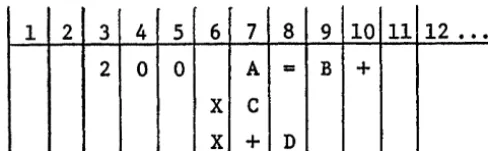
END line is a line containing an END statement, which cannot be continued.-2-EXAMPLE:
1 2 3 4 5 6 7 8 9 10 11 12 ••• 2 0 0 A = B +
X C
X
+
DThe first line of this example is an initial line._ The second and
third lines are continuation lines. The statement label is 200.
The statement is equivalent to:
A=B+C+D
1.2.3 Comments
Comment lines have the character C or an asterisk (*) in column 1. Comments are for the convenience of the programmer and permit program descriptions
to be embedded in the code. Comments do not influence the compiler
pro-gram except that they are printed in the propro-gram listing. Columns 2-72
may be used in any desired format.
A comment line can be followed only by another comment line or the initial
line of a statement.
1.2.4 Blank Lines
Blank lines may be included in the source text. Columns 1-72 must be blank.
A blank line can be followed only by a comment line, another blank line or
the initial line of a statement.
1.2.5 Source Statement Ordering
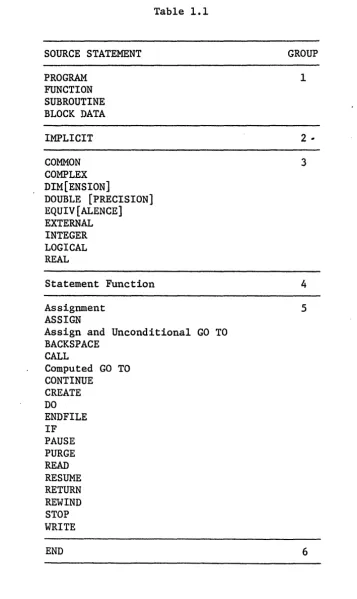
Table 1.1 shows the sequence in which the source statement groups of each
program must be written. Within each group, the statements may be written
[image:12.621.121.365.109.184.2]DATA and CONST statements may appear anywhere after Group 2 and before
Group 6, but must appear after any declarations (COMMON, DIMENSION, or
type) affecting the variables to be initialized.
FORMAT statements may appear anywhere before Group 6.
-4-SOURCE STATEMENT
PROGRAM FUNCTION SUBROUTINE BLOCK DATA
IMPLICIT
COMMON COMPLEX DIM[ENSION]
DOUBLE [PRECISION] EQUIV[ALENCE] EXTERNAL INTEGER LOGICAL REAL
Table 1.1
Statement Function
Assignment ASSIGN
Assign and Unconditional GO TO BACKSPACE
CALL
Computed GO TO CONTINUE CREATE DO END FILE IF PAUSE PURGE READ RESUME RETURN REWIND STOP WRITE GROUP 1
2 ...
3
4
5
[image:14.618.122.480.83.683.2]1.3 D in Column 1, Conditional Compilation
All source lines with the character D in column one are compiled as ordinary
source statements when the compiler is run with the Conditional Compilation
option selected. When Conditional Compilation is not selected, these lines
are treated as comments.
1.4 COpy Statement
The copy feature enables parts of the program to be stored in more than
one file. This statement appears as follows:
COpy name
where "name" is a file-path name. The name must be completely contained
on one line (not extended across continuation lines) and must not contain
blanks.
A program may contain any number of COpy statements, but they must not be nested deeper than three.
The contents of the named file are inserted into the source program so that
the first record of the file is the next line after the COpy statement.
Thus COpy statements may be labeled and referenced the same as CONTINUE
statements. A COpy statement must not precede Group 1 statements, and must not follow a Group 6 statement.
-6-SECTION II - DATA
2. Introduction
Data is represented as constants and variables. A constant is a quantity
whose value is explicitly stated; a variable is a quantity whose value
may change. Each variable is referenced by an identifier that symbolically
identifies the variable.
2.1 Identifiers
Identifiers are used to give names to:
- Variables
- Subprograms
- Common blocks
An identifier is a string of alphanumeric characters, the first of which
must be alphabetic. Any number of characters is allowed in an identifier but only the first eight are recognized. Certain identifiers may be
preceded by a dollar sign ($) (see section 2.2). The dollar sign is not included as one of the significant characters of an identifier.
EXAMPLES:
XIS
PERMUTATION
STRAIN
2.2 Variables
Variable names are identifiers that represent quantities which may assume
a number of different values. Each variable has an associated data type:
A variable may be either synchronous (the FORTRAN standard) or asynchronous.
An asynchronous variable is actually a pair: a standard variable and an
access control. Assigning a value to the variable causes a wait until
its access state is EMPTY and sets its access state to FULL with the new
value. Conversely each use of any asynchronous variable causes a wait
until the access state of the variable is FULL, and leaves the access state EMPTY. The access state may be interrogated with an intrinsic
function (FULL or EMPTY) to determine its state. An async~onous variable
is indicated by a dollar sign ($) preceding the first character of the identifier. Also, the same variable must not be used as both a
syn-chronous and an asynsyn-chronous variable; i.e., $A and A must not both
uppear. in the sallle progrum unit.
Variables may be simple or arrays.
2.2.1 Simple Variables
A simple variable name identifies the location in which a single variable
value can be stored.
EXAMPLES:
N
X4
$VALUE LOOK UP
2.2.2 Arrays
An
array variable name identifies an ordered set of data having one, two, or three dimensions. Each element of an array is referenced by the arrayname followed by a set of subscripts.
An array has an associated data type the same as a simple variable. An
array must be declared by an array declarator which establishes the number
-8-of dimensions and the size -8-of each. The data type of an array is identified
the same as for a simple variable.
The declaration of an array type may occur separately from the declaration
of its dimensions.
2.2.2.1 Array Storage Allocation
The multi-dimensional arrays declared by the programmer are assigned to the
one-dimensional computer memory in such a way that the left-most subscript
varies most rapidly and the right-most subscript least rapidly.
EXAMPLE:
Allocation of array K of three dimensions of two elements each.
Memorl Seguence Arral Element
1 K(l,l,l)
2 K(2,1,1)
3 K(1,2,1)
4 K(2,2,1)
5 K(l,1,2)
6 K(2,1,2)
7 K(l,2,2)
8 K(2,2,2)
2.2.2.2 Array" References
Most FORTRAN statements operate on only one element of an array at a
time. A member of an array is referenced in the form:
where "array" is the name of the array, and the S1 are suscript expressions.
A subscript expression may be any expression (see section 4.1). The
EXAMPLES:
Y (1)
STATION (K)
Q (LINE (N,X)
+
RHO,N)The value of a subscript must be within the limits specified for the array.
The number of subscripts must equal the number of dimensions specified
for the array.
2.3 Data Types
The following data types are defined:
Intege~
Logical
Real
Double precision Complex
The name assigned to a variable is associated with a data type either
implicitly or explicitly.
The explicit type declaration statements (section 3.3.1) assign the type
explicitly.
If the data type of a variable is not declared explicitly, the compiler types it implicitly according to the following conventions.
- If the data identifier begins with one of the letters I, J, K, L, M, or N, the type is INTEGER.
- Any other first letter implies REAL.
The IMPLICIT statement may be used to alter the above conventions and/or
introduce similar rules for data types other than integer and real. See section 3.3.2.
-10-For an asynchronous identifier, the first character after the dollar sign
is used for implicit typing.
2.4 Constants
The data type of a constant is determined by its form.
2.4.1 Integer Constants
An integer constant is a signed or unsigned string of decimal digits. It
consists of up to 19 decimal digits in the range _263(~-9.2x10¹⁸) to
+2G3_l(~9.2xl018).
The internal representation of an integer is a full word (64-bit) two's
complement number. However, integer division produces a result accurate
to only 56 bits.
EXAMPLES:
-1
1234567890
o
2.4.2 Real Constants
A real constant is a signed or unsigned string of decimal digits that
in-cludes a decimal point and/or an exponent. Any number of digits may be
FORMS:
+.
-~.
±i.E+e ±.i
±.iE+e
±i.i
±iE+e
±i.iE+e
where i is a string of digits and e is a I-digit or 2-digit exponent to the
base 10. The plus (+) character is optional. The magnitude of a real
con-stant is in the approximate range of'5.4xlO-79 to 7.2xl075•
EXAMPLES:
3.1415
+0.03l41SE+2
.03l41SE2
3l.4lSE-l
Internally, real data is stored as follows:
o
1 78 63c
I
Mwhere S is the sign of the mantissa (+ = 0, - = 1).
C is the base sixteen characteristic plus 64.
M is the mantissa (56 bits), represented as a sign-magnitude
number.
The mantissa is hex-normalized.
-12-2.4.3 Double Precision Constants
A double precision constant is a signed or unsigned string of decimal digits
that includes an optional decimal point and an exponent. Any number of
digits may be included, but only the first twenty-nine are significant. A
double precision constant has one of the following forms:
FORMS:
±i.iD±e
±i.D±e
±.iD±e ±iD±e
where i is a string of digits and e is a I-digit or 2-digit exponent to the base 10. The plus (+) character is optional. The magnitude of a double precision constant is in the approximate range of 5.4xlO-79to 7.2xl075•
EXAMPLES:
.3l4l5927Dl
3.l4l5DO
31415. 93D-04
Internally, a double precision constant appears as a real constant followed
Sl - Sign
C1 - Characteristic
M1 - Mantissal (56 bits)
Ml. - Mantissa2 (64 bits)
2.4.4 Complex Constants
A complex constant appears as an ordered pair of real constants enclosed in parentheses:
The real part is rl and the imaginary part is r2.
EXAMPLES:
(0., -1.)
(5.2t 2.6)
(-3.El2, .017E-16)
Internally, complex data is stored as two real constants (see 2.4.2).
2.4.5 Logical Constants
A logical constant is a truth value •
• TRUE. or .T. • FALSE. or .F •
A logical constant occupies one word which is either zero (.FALSE.) or
non-zero (.TRUE.).
2.4.5 Hollerith Constants
A Hollerith constant is a string of characters which is represented
in-ternally by 8-bit ASCII codes. A Hollerith constant may appear wherever
-14-an expression may appear, however it must not appear within -14-an expression. It is treated as an integer constant. There are four forms of Hollerith
constants:
FORMS:
where n is an unsigned integer constant and C
i are characters.
Internally, the characters are packed eight per word. The two forms on
the left are equivalent and imply left justification with trailing blanks
(if necessary to pad n to a multiple of 8). The Rand L forms indicate right and left justification respectively, however these two forms indicate
binary zero padding (if necessary) not blanks. All characters including
blanks, are significant in the string.
The apostrophe may be included in an apostrophe-delimited Hollerith
con-stant by using two consecutive apostrophes in the string.
EXAMPLES:
Storage
IHA
A b b b b bI
b
I
b(ASCII)
2HA b A b b b b
I
bI
bI
(ASCII)
'ABCDE' A B C D E b
I
bI
bI
Storage
'-ABC' 'DEF' A B C I
I
D E F b(ASCII)
IRA 0000 0000 0000
I
00411
(HEX)
5LABCDE 4142 4344 4500 0000
I'
(HEX)
2.4.7 Hexadecimal Constants
Hexadecimal constants are written as follows:
where the D. collectively represent a string of up to 16 hexadecimal digits
l.
(0-9, A-F). Internally, hexadecimal constants are stored right justified
in one word. They are treated as integers within expressions.
EXAMPLES:
X'FF'
X'OOOFFOOO'
-16-SECTION III - SPECIFICATION STATEMENTS
1. Introduction
Declarations are used to supply descriptive information about the program
other than to specify computation or other action. This descriptive
information primarily concerns the interpretation of source program
identifiers and object program storage allocation.
The following declaration statements must all appear in the program prior
to any non-declarative statements and statement function definition
state-ments.
Explicit type statements IMPLICIT statement
DIMENSION statement
EXTERNAL statement
COMMON statement
EQUIVALENCE statement
MAXREGS statement
DATA statements are not required to appear in the program prior to any non-declarative statements.
3.1 Array Declarators
Arrays may be defined by several statements;
Explicit type statements
COMMON statement
Array declarators are used in these statements. Each array declarator gives the array identifier and the maximum values each of its subscripts
may assume, thus:
identifier (maxl, max2, maxs)
The maxima must be integers. An array may have one, two, or three
dimen-sions. For example, the statement"
DIMENSION EDGE (10,8)
specifies EDGE to be a two dimensional array whose first subscript may vary
from 1 to 10 inclusive, and the second from 1 to 8 inclusive.
EXAMPLES:
DIMENSION PLACE (3,3,3), HI (2,4), K(256)
Arrays may also be declared in the COMMON and Explicit type statements in
the same way:
COMMON X
C.O,
4), Y, ZINTEGER A (7,32), B
DOUBLE PRECISION K (6,10)
3.1.1 Variable Dimensions
Within a subprogram, array declarations may use integer variables provided
that the array name and variable dimensions are formal parameters of the
subprogram. The actual array name and values for the dummy variables are
given by the calling program when the subprogram is called.
Quantities needed for reference to the array are evaluated upon entry to
the subprogram and unchanged by any subsequent modifications of the
dimen-sion variables.
-18-EXAMPLE:
DIMENSION BETA (L,H,G)
The identifiers BETA, L, M, and G must all be formal parameters.
3.2 DIMENSION Statement
The DIMENSION statement is used to declare identifiers to be array identifiers
and to specify the number and bounds of the array subscripts. The
informa-tion supplied in a DIMENSION statment is required for the allocainforma-tion of
memory for arrays. Any number of arrays may be declared in a single
DIMEN-SION statement.
FORM:
where S is an array declarator.
Each array variable appearing in the program must represent an element of
an array declared in a DIMENSION statement, unless the dimension information
is given in another statement. When the dimension information is provided
in a COMMON or Explicit type statement, it may not appear in a DIMENSION
statement. The DIMENSION keyword may be abbreviated DIM.
3.3 TYPE Declarations
The Explicit type statements INTEGER, REAL, DOUBLE PRECISION, COMPLEX, and
LOGICAL and the IMPLICIT statement are used to specify the type of the
identifiers appearing in the program.
3.3.1 Explicit Type Statements
The general form of the Explicit type statement is:
type identifierl,identifier2, ••• ,identifier
Type may be INTEGER, REAL, DOUBLE, DOUBLE PRECISION, COMPLEX, or LOGICAL,
and the identifier. are identifiers or array descriptors.
1.
An identifier may appear in only one Explicit type statement. Explicit
type statements may be used to declare arrays that are not dimensioned
in DIMENSION or COMMON statements.
3.3.1.1 INTEGER Statement
FORM:
INTEGER identifier,identifier, •••
This statement declares the listed identifiers to be integer type with each datum occupying one word.
EXAMPLES:
INTEGER ALPHA, $PVAL INTEGER TABLESIZE (10)
3.3.1.2 REAL Statement
FORM:
REAL identifier,identifier, •••
This statement declares the listed identifiers to be real type with each
datum occupying one word in floating-point format.
EXAMPLES:
REAL $LOGX, MASS (10,4)
REAL I, J, K
20-3.3.1.3 DOUBLE PRECISION Statement
FORM:
DOUBLE PRECISION identifier,identifier, •••
This statement declares the listed identifiers to be of double precision
type. Each datum occupies two words in floating-point format. The
key-word PRECISION may be omitted.
EXAMPLES:
DOUBLE PRECISION RATE, Y, FLOW
DOUBLE $TIME (27,9)
3.3.1.4 COMPLEX Statement
FORM:
COMPLEX identifier,identifier, •••
This statement declares the identifiers to be of complex type. Each datum
occupies two words, two floating-point numbers representing the real and
imaginary parts.
EXAMPLE:
COMPLEX ZETA, W, ROOT
3.3.1.5 LOGICAL Statement
FORM:
LOGICAL identifier,identifier, •••
This statement declares the listed identifiers to be of logical type. Each
datum occupies one word where zero represents false and non-zero represents
EXAMPLE:
LOGICAL BOOL, $P, $Q, ANSWER
3.3.2 IMPLICIT Statement
The IMPLICIT statement defines the data identifier first-letter parameters
for implicitly specifying data types should the programmer desire
para-meters different from the compiler defaults, which are:
DEFAULTS:
Identifiers beginning with the letters I, J, K, L, M
and N imply INTEGER data.
Identifiers beginning with all other letters imply REAL data.
The format of the IMPLICIT statement is:
FORM:
where:,
type. is the data type (INTEGER, REAL, DOUBLE, DOUBLE PRECISION,
1
COMPLEX, LOGICAL) implied by data identifiers beginning with
the letters listed subsequently.
(Al,A2, ••• ) or (A3-A4 , ••• ) are lists or ranges of alphabetic
characters for the preceding data type. Lists of single
characters are separated by commas; ranges of characters
are denoted by the first and last character or the range
(in alphabetic sequence) separated by a minus sign (e.g.,
A-D).
-22-This statement causes any variable not mentioned in an Explicit type
state-ment and whose first character is one of those listed to be typed according
to the type appearing before the list in which the character appears. For
an asynchronous identifier, the first character after the dollar sign is
used.
EXAMPLE:
IMPLICIT INTEGER (A-C,X), DOUBLE PRECISION (D), LOGICAL (L)
This statement would cause the following implicit declarations to be in
effect:
1. Identifiers beginning with A, B, C, I, J, K, M, N, X are integer.
2. Identifiers beginning with D are double precision.
3. Identifiers beginning with L are logical.
4. Identifiers beginning with E, F, G, H, 0, P,
Q,
R, S, T, U, V, W, Y, Z are real.3.4 COMMON Statement
FORM:
COMMON block-list
The COMMON statement specifies that certain variables or arrays are to be
stored in an area also available to other programs. By means of COM}10N
The common area may be divided into separate blocks identified by block
names. A block is specified thus:
/identifier/identifier,identifier, ••• ,identifie~
The identifier enclosed in slashes is the block name. The identifiers
which follow are the names of the variables or arrays assigned to the
block. These elements are placed in the block in the ordev in which
they appear in the block specification.
The block list of the COMMON statement consists of a sequence of one or more block specifications. For example the statement
COMMON/R/X,Y,T/C/U,V,W,Z
indicates that the el~ments X, Y, and T, in that order, are to be placed
in block R and that U, V, W, Z are to be placed in block C.
Block entries concatenate throughout the program, beginning with the first
COMMON statement. For example the statements
COMMON/D/ALPHA/R/A,B/C/S
COMMON/C/X,Y/R/U,V,W
have the same effect as the statement
COMMON/D/ALPHA/R/A,B,U,V,W/~/S,X,Y
One block of common storage may be left unlabeled and is called blank
common. Blank common is indicated by two consecutive slashes. For
instance
COMMON/R/X,Y//B,C,D
indicates that B, C, and D are placed in blank common.
-24-The slashes may be omitted when blank common is the first block of the
statement.
COMMON B,C,D
Storage allocation for blocks with the same name begins at the same
loca-tion for all programs executed together. For example if a program contains
COMMON A,B/R/X,Y,Z
as its first COMMON statement, and a subprogram has
COMMON/R/U,V,W//D,E,F
as its first COMMON statement, then the quantities represented by X and U
are stored in the same location. A similar correspondence holds for A and D in blank common.
Labeled blocks of a given name must have the same length in all programs executed together.
Blank common may be any length in any program.
Array names appearing in COMMON statements may have dimension information appended, as in a DIMENSION statement. For example
COMMON ALPHA,T(15,lO,5),GAMMA
specifies the dimensions of the array T while entering T in blank common.
-25-3.5 EQUIVALENCE Statement
The EQUIVALENCE statement allows more than one identifier to represent the
same quantity.
FORM:
where R. is a reference. (EQUIVALENCE may be abbreviated EQUIV)
l.
The references of an EQUIVALENCE statement may be simple variables or array identifiers or array element references. The subscripts of an array element
must be integer constants. The number of subscripts must be equal to the
array dimension or must be one. Synchronous and asynchronous variables
may not be made equivalent to each other.
EXA11PLE:
EQUIVALENCE "(A,B,C(3», (T(4),S(1,1,2»
The inclusion of two or more references in a parenthesis pair indicates
that the quantities referenced are to share same memory locations. For
example:
EQUIVALENCE (RED, BLUE)
specifies that the quantities RED and BLUE are stored in the same place.
When no array subscript is given, it is taken to be 1, thus
EQUIVALENCE (X,Y)
is the same as
EQUIVALENCE (X,Y(l»
-26-Elements of multiple dimensioned arrays may be referenced with a single
subscript by use of the element successor function. For example in the
three-dimensional array specified by
the position of element ALPHA (Kl,K2,K3) is given by element position
= (Ka-I)*Nl *N2+(K2-1)*Nl+Kl
Thus the sequence
DIMENSION BETA(4),ALPHA(2,3,4)
EQUIVALENCE(BETA(2),ALPHA(8»
specifies that BETA(2) and ALPHA (2 , I, 2) are stored in the same plac.e.
Since the entire arrays are shifted to satisfy the equivalence only the
relative positions of the references are important. In the examples below
EQUIVALENCE(BETA(I),ALPHA(7»
or
EQUIVALENCE(BETA,ALPHA(7»
will do as well.
Note that the relation of equivalence is transitive, e.g., the two statements.
EQUIVALENCE(A,B),(B,C)
EQUIVALENCE(A,B,C)
3.5.1 EQUIVALENCE and COMMON
Identifiers may appear in both COMMON and EQUIVALENCE statements provided
the following rules are observed.
No two quantities in common may be set equivalent to one another.
Quantities placed in a common block by means of equivalences may cause the
end of the common block to be extended. For example, the statements
COMMON/R/X,Y,Z
DIMENSION A(4)
EQUIVALENCE (A,Y)
causes the common block R to extend from X to
A(4),
arranged as follows:x
Y A(l) Z A(2)
A(3)
A(4)
Equivalence statements which cause extension of the start of a common block
are not allowed. For example the sequence
COMMON/R/X,Y,Z
DIMENSION A(4)
EQUIVALENCE (X,A(3»
-28-is not permitted since it required block R to be arranged
A(l)
A(2)
X A(3)
Y A(4)
X
A(l) and A(2) extend the start of block R.
3.6 EXTERNAL Statement
FORM:
EXTERNAL identifier, identifier, ••• _ :!.~entifier
This statement declares the listed identifiers to be subprogram names. Any
subprogram name given as an argument to another subprogram must appear in
an EXTERNAL declaration in the calling program.
EXAMPLE:
EXTERNAL SIN, COS
CALL TRIGF(SIN,l.5,ANSWER)
CALL TRIGF(COS,.87,ANSWER)
END
SUBROUTINE TRIGF(FUNC,ARG,ANSWER)
ANS\4}'ER=FUNC (ARG)
3.7 DATA Specification
The data specification statements DATA, CONST, and BLOCK DATA are used to
declare constants and specify initial values for variables. These values are compiled into the object program. They become the values assumed by
the variables when execution begins.
3.7.1 DATA Statement
The data to be compiled into the object program is specified in a DATA
statement.
FORM:
DATA v/d/,v/d/, •••
where v is a variable list and d is a data list.
The variable lists in a DATA statement consist of simple variable, array
names, or array elements separated by commas.
Variables in common may appear on the lists only if the DATA statement
occurs in a BLOCK DATA subprogram. Asynchronous variables may appear in
a DATA statement.
The data items of each data list correspond one-to-one with the variables
of each variable list. Each data item specifies the value given to its
corresponding variable.
Data items may be numerical constants or alphanumeric strings. For example
DATA ALPHA,BETA/5,l6.E-2/
specifies the value 5 for ALPHA and the value .16 for BETA.
-30-Any data item may be preceded by an integer followed by an asterisk. The integer indicates the number of times the item is to be repeated. For
example
DATA A(l),A(2),A(3),A(4),A(5)/6lE2,4*32Ell
specifies 5 values for the array A; the value 6100 for A(l) and the value
320 for A(2) through A(5).
When an unsubscripted array name is included in the variable list it implies
that all elements of the array are to be initialized. It is equivalent to
writing out all elements of the array in sequence.
EXAMPLE:
The above example could be written:
DIMENSION A(5)
DATA A/6IE2,4*32EII
The form of the constant, rather than the type of the variable, determines
the data type of the stored constant.
Hollerith constants, or alphanumeric strings, are treated specially in the
DATA statement. A single Hollerith constant may initialize more than one
variable element, whereas any other type of'constant corresponds to a
single element. A Hollerith constant may not contain excess characters,
but it will be extended with blanks so as to fill an integral number of
elements.
EXAMPLES:
DIMENSION 1(2)
DATA II'A','B'I
implies 1(1)
=
'A~~~~~~~'1(2)
=
'B~~~~~~~'-31-DIMENSION 1(2)
DATA I/'ABCDEFGHIJK'/
implies 1(1)
=
'ABCDEFGH' 1(2)=
'IJK~~~~»'DATA J/'ABCDEFGHIJK'/
is an error
DIMENSION R(2)
DATA R/2",e' A' /
implies R(l)
=
'A»»~~~~~'R(2)
=
'A~~~~~~~'3.7.2 CONST Statement
The CONST statement has the same form and general meaning as the DATA
state-mente
FORM:
CONST v/d/,v/d/, •••
where v is a variable list and d is a data ljt-li.. The syntax and semantics
of these lists are identical with those of the DATA statement with one
exception: The CONST statement causes the variables to be allocated in
constant memory. This implies that they are not variables but symbolic
constants. Constants may not appear in I/O statements, be passed as
parameters, be assigned to, or be asynchronous.
3.7.3 BLOCK DATA Statement
FORM:
BLOCK DATA
-32-This statement declares the program which follows to be a data specification
subprogram. Data specification for variables in common blocks requires the
use of a BLOCK DATA subprogram.
The first statement of the subprogram must be the BLOCK DATA statement.
The subprogram may contain only declarative statements associated with
the data being defined.
EXAMPLE:
BLOCK DATA
COMMON/R/X,y/C/Z,W,V DIMENSION Y(3)
COMPLEX Z
DOUBLE PRECISION X
DATA Y(l),Y(2),Y(3),/lE-l,2*3E2/
DATA X,Z/ll,877DO,(-l.4l42l,l.4l42l)/
END
Data may be entered int9 more than one block of common in one subprogram,
'however, any common block mentioned must be listed in full. In the example
above, Wand V are listed in block C although no data values are defined
for them.
-33-SECTION IV - EXPRESSIONS
4. Introduction
Expressions are strings of operands separated by operators. There are two types of FORTRAN expressions: arithmetic and logical.
4.1 Arithmetic Expressions
An arithmetic expression is a sequence of basic elements separated by arithmetic operators and parentheses in accordance with mathematical convention and the rules given below. An arithmetic expression has a single nume-rical value, which is the result of the calculations speci-fied by the quantities and operators comprising the
expression.
The arithmetic operators are:
SYMBOL OPERATION
+
AdditionSubtraction
*
Multiplication/
Division**
Exponentiationvariable, or function reference):
2.71828
Z(N)
TAN (THETA)
Compound expressions may be formed by using operators to combine basic elements:
-X+3
TOTAL/POINTS TAN(PI*M)
Any expression may be enclosed in parentheses and treated as a basic'element:
(X+Y)/2 (ZETA)
COS (SIN(PI:lcM)+X)
Any expression may be preceded by a + or - sign. For example:
+x
-(ALPHA BETA) -SQRT(-GAMMA)
However, note that two operators must not occur consecutively. The expression below is improper:
X*-Y
Use of parentheses yields the correct form:
X*(-y)
By applying the rules above, all permissable arithmetic expressions may be formed:
4.1.1 Operator Precedence
If the precedence of operations is not given explicitly by parentheses, i t is understood to be the following
OPERATOR
*and/
+and-OPERATION
Exponentiation
Multiplication and division
Addition and subtraction or negation
For example, the expression
A*B+C/D**E
is executed as
Sequences of operations of equal precedence are performed left to right except for exponentiation which is performed right to left.
EXAMPLES
W*X/Y/7 is evaluated as «W*X)/Y)/7 is _evaluated as A** (B**C)
4.1.2 Evaluation of Mixed-Type Expr!~~ions
The value of an arithmetic expression may be of integer, real, double precision, or complex type. The type of the expression is determined by the types of its elements according to the rules which follow.
The arithmetic types are ranked as follows:
RANK 1
2
3 4
TYPE Integer Real Double Complex
--35-The type of an expression is the type of the highest ranking element in the expression.
Each operation within an expression is evaluated in the type of the highest rankin~ operand. Thus the evaluation of an expression is not changed to a higher rank until necessary.
EXAMPLE I/J+R*DP*C
is evaluated as
CMPLX(FLOAT(I/J),O.)+CMPLX(REAL(DBLE(R)*DP),O.)*C
Integer expressions are evaluated using binary integer arithmetic throughout. In integer arithmetic, fractional parts arising in division are truncated, not rounded .. For example:
7/3 yields 2 3/7 yields 0
All other calculations use binary floating-point arithmetic.
Conversions to higher rank are performed as follows:
1. An integer quantity becomes the integer part of a real quantity. The fractional part is zero.
2. A real quantity becomes the· most significant part of a double precision real quantity. The least significant part is zero.
3. A real quantity becomes the real part of a complex quantity. The imaginary part is zero.
4.2. Logical Expressions
There are four basic ~lements used FORTRAN logical expres-sions: logical constants, type variables, logical-type functiona~ references, and relations. All of these basic elements represent logical quantities.
A logical quantity may have either of two value~: true or false. Logical quantities occupy one word of memory.
4.2.1 Relations
Relations are constructed from numerical expressions of intetger, re~l, or' double p~ecls10n' type thtough the use of relational operators. The relational operators are:
OPERATOR RELATION
.GT. greater than
.GE. greater than or equal to .LT. less than
.LE. less than or equal to
.EQ. equal to .NE. not equal to
The enclosing periods are part of the operator and must be present.
Two expressions of integer, real, or double precision type
separated by a relational operator form a relation. For example:-.,
X+2.LE.3*Y
is a relation. The entire relation constitutes a basic logical element.
The value of such an element is true if the 'relation ex-pressed is true and false otherwise. In the example above
-37-the element has -37-the value true if X is 2 and Y is 2, and the value false if X is 2 and Y is 1.
Complex operands are allowed for the opertors .EQ. and .NE. ~nly.
Relational operators have lower precedence than arithmetic operators.
4.2.2. Logical Operators
The logical operators are .NOT.,.AND. and .OR.,denoting, respectively, logical negation, logical multiplication and logical addition. The enclosing periods are part of the operators and must be present. The logical operators are defined as follows (where P and Q are logical expressions);
.NOT.P
P.AND.Q
P.OR.Q
true if P is false, false if P is true
true if P and Q are both true, otherwise false
false if P and Q are both false, otherwise true
A logical expression may consist of a single logical element. For example:
.TRUE. BOOL(N)
X.GE.3.14159
Single elements may be combined through use of the logical operators .AND.and.OR.to form compound expressions, such as:
TVAL.AND.INDEX
Any logical expression may be preceded by the operator .
. NOT.as in:
.NOT.T
.NOT.X+7.GT.Y+Z
BOOL(K).AND .. NOT.(TVAL.OR.R)
By repeated use of these rules all permissible logical
expressions may be formed.
When the precedence of operation is not given by parentheses,
it is understood to be the following (in decreasing order
of precedence):
OPERATOR
• NOT •.
.AND.
.OR.
OPERATION
logical negation
logical multiplication
logical addition
Thus the expression
T.AND .. NOT.S.OR .. NOT.P.AND.R
is interpreted
(T.AND.(.NOT.S».OR.«.NOT.P).AND.R)
4.3. Summary of Operator Precedence
When the precedence of operators is not given explicitly
by parentheses, it is understood to be as follows (in order
of decreasing precedence):
-39-OPERATOR OPERATION
**
*,/
+,-exponential
multiply,' divide
add, subtract, negate
. GT . , . GE. , . LT. ,
.LE.;.EQ.,.NE. relational
.NOT. logical negation .AND. logical multiply .OR. logical add
For example, the logical expression
SECTION V - ASSIGNMENT STATEMENTS
5. Introduction
Assignment statements are the basic executable statements of the FORTRAN language. Two types of assignment sta~e ments are available: arithmetic and 1~gical.
5.1. Arithmetic Assignment Statement
The arithmetic assignment statement specifies an arithmetic expression to be evaluated and a variable to which the
expression value is to be assigned.
FORM:
variable = expression
The character If=" is an operational symbol signifying replacement, not equality. Thus the first example below means "take the current value of Y, double i t , and assign "the result to Y."
EXAMPLES: Y=2*Y A= -A
~(N)=N*ZETA(ALPHA)*(M/PI)+(l.O,-l.O)
Type conversion is provided if the variable is of a type different from the expression.
5.2 Mixed-Type Assignment
Mixed-type assignment involves arithmetic assignment state-ments in which the type of the expression on the right differs
-41-from the type of the variable on the left. The evaluated expression is converted to the type of the variable. Table 5.1 gives the conversions for all combinations of expressions
and variables.
Type of Variable
INTEGER INTEGER INTEGER INTEGER REAL REAL REAL REAL
DOUBLE PRECISION
DOUBLE PRECISION
COMPLEX
COMPLEX
(continued)
.Type of Expression
INTEGER REAL
DOUBLE PRECISION
COMPLEX
INTEGER
REAL
DOUBLE PRECISION
COMPLEX INTEGER
COMPLEX
INTEGER
REAL
Table 5.1
-42-Conversion
None.
Truncate fractional
part, convert to integer form.
Truncate fractional
part, convert to integer form.
Truncate fractional part of real part, convert to integer form.
Convert to floating-point form.
None.
Take first word of ex-tended floating-point. Take real part.
Convert to extended floating~point form. Extend real part to extended floating-point form.
Type of Expresslon
COMPLEX DOUBLE PRECISION
COMPLEX COMPLEX
Conversion
Take first word of
extended floating-point, assign to real part, assign zero imaginary. None.
Table 5.1 (continued)
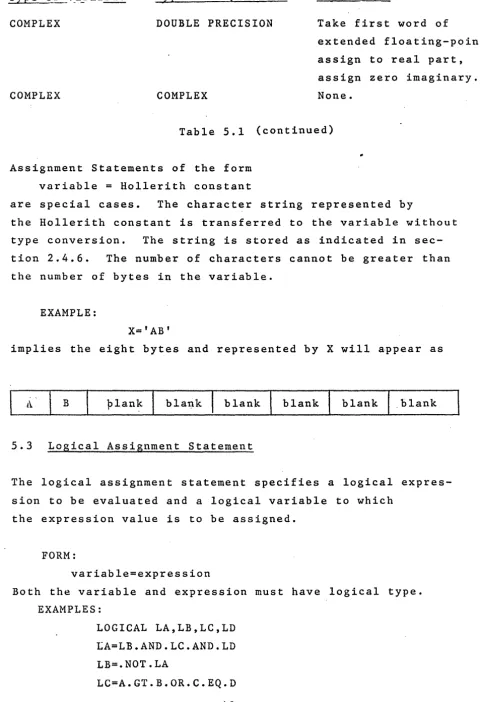
Assignment Statements of the form variable = Hollerith constant
are special cases. The character string represented by
the Hollerith constant is transferred to the variable without type conversion. The string is stored as indicated in sec-tion 2.4.6. The number of characters cannot be greater than the number of bytes in the variable.
EXAMPLE:
X='AB'
implies the eight bytes and represented by X will appear as
plan~ blank blank blank .blank
5.3 Logical Assignment Statement
The logical assignment statement specifies a logical expres-sion to be evaluated and a logical variable to which
the expression value is to be assigned.
FORM:
variable=expression
Both the variable and expression must have logical type. EXAMPLES:
LOGICAL LA,LB,LC,LD tA=LB.AND.LC.AND.LD LB=.NOT.LA
LC=A.GT.B.OR.C.EQ.D
[image:53.617.72.552.58.760.2]-43-SECTION VI - CONTROL STATEMENTS
6. Introduction
The normal flow of a FORTRAN program is sequentially through the statements in th~ order in which they are given t~ the compiler. By means of control statements, the programmer may specify the flow of the program.
6.1 Statement Numbers
FORTRAN statements may be given numbers to be referenced by control statements. A statement number is written as an unsigned integer of five digits or less. Leading zeros and embedded blanks are ignored.
Although statement numbers are written as integers, they do not represent numerical quantities. Statement numbers repre-sent statement labels, a distinct basic quantity. Statement numbers are used for program control, not numerical calculation.
Statement numbers must be unique, i.e., no two statements may have the same number.
6.2 GO TO Statements
GO TO statements unconditionally transfer control from one part of the program to another. There are three forms of the GO TO statement: unconditional, computed, and assigned.
6.2.1 Unconditional GO TO Statement
FORM:
GO TO n
This statement transfers control to the statement num-bered n.
EXAMPLE:
GO TO 345
6.2.2 Computed GO TO Statement
FORM:
GO TO (nl,n2, ••• ,nK),vari~ble
where nr,n~, ••• ,n~ are statemen~ number. The variable must be of integer type.
The statement transfer~ control to the statement numbered n
i '
n 2 ' • • •<
I)" if the va ria b 1 e has the val u e 1, 2, • . • k, r e -spectively. Values outside the range 1 through k cause transfer of control to the following statement. The comma preceding the variable may be omitted.EXAMPLES:
GO TO (22,3,7),SWITCH GO TO (l,2,62,78)Y
6.2.3 Assigned GO TO Statements
FORMS:
GO TO variable
GO TO variable,(ni,n2, ••. ,n~)
. where ni,nz, •.. n~ are statement numbers.
The second form is allowed for compatibility only; the labels n1, . . . nK 'are not used. The comma following the variable may be omitted.
The variable must be a scalar of integer type and must not be
-45-an asynchronous variable. This st2~c~ent transfers control to the statement whose number was last assigned to the
variable. The assignment must take place in a previously executed ASSIGN statement.
The variable is a control variable, having a label as a value, not a numerical quantity.
EXAMPLES:
GO TO ERROR
GO TO X(lOO.200)
6.2.4 ASSIGN Stat~ment
FORM:
ASSIGN statement number TO variable
The variable must be a scalar of integer type and must be an asynchronous variable. This statement assigns the value of the variable for a subsequent assigned GO TO ·statement. The statement number represents the statement
to which the assigned GO TO will transfer control.
EXAMPLES:
ASSIGN 7 TO LABEL ASSIGN 13 TO ERROR
6.3 Arithmetic IF Statement
FORM:
IF (expression)~ ,na,n a
where nl,n2,na are statement numbers.
This statement transfers control to the statement numbered
-46-n1 n2 or n3 if the value of the expression is less than, equal to, or greater than zero, respectively. The expres-sion must be of integer, real, or double preciexpres-sion type.
EXAMPLES:
IF (ETA)4,7,l2
IF (KAPPA-L(lO»20,l4,l4
6.4. Logical Statement
FORM:
IF (expression)S
where· S is a complete statement.
The expression must be a logical expression. S may be any imperative (executable) statement other than a DO statement or another logical IF statement.
If the value of the expression is false, then control passes to the next sequential statement.
If the value of the expression is true, statement S is executed. After execution of S, control passes to the next sequential
statement unless S is an arithmetic iff statement or GO TO type statement in which case control is transferred as indicated.
As an example, consider the statements
IF(B)Y=X*SIN(Z) W=Y**2
If the value of B is true the statements Y=X*SIN(Z) and W=Y**2 are executed in that order.
If the value of B is false, the statement Y=X*SIN(Z)
is not executed.
-47-EXAMPLES:
IF(T.OR.S)~=Y+l
IF(Z.GT.X(K»CALL SWITCH(X,Y) IF(K.EQ.INDEX)GO TO 15
6.5 DO Statement
FORMS:
DO n index =initial, limit
DO n index =initial, limit, step where n is a statement number.
The index must be a simple integer variable, and must not be an asynchronous variable. The initial and limit may be integer simple variables, signed integer constants, or integer expressions. The step must be an integer simple variable, an integer constant or an integer expression. If the step is not given, i t is understood to be one.
The DO statement causes the statements which follow, up to and including the statement numbered n, to be executed repeatedly. This ·group of statements is called the range of the DO statement. Initially, the initial value is assigned to the index. Thereafter, after each execution of the range, the step value is added to the index value and the result assigned to the index.
Prior to each execution of the range, the index value is compared to the limit value. If the index value does not exceed the limit value, the range is executed. This differs from Standard FORTRAN in which the range is always executed once before the first test.
Exit may also be accomplished by a transfer from within the range.
The range of a DO statement may include other DO state-ment provided that the range of each contained DO state-maent is entirely within the range of the containing DO statement.
Within the range of a DO statement, the index is available for use as an ordinary variable. After a transfer exit from the range, the index retains its current value
and is available for use as an ordinary variable. After a normal exit from the range, the index retains the value which caused the exit.
The values of the index, limit, and step may be altered within the range of the DO statement. Altering the value of limit or step does not affect the loop.
~he range of a DO statement must not end with a GO TO type statement or an arithmetic IF statement. A logical IF statement is aliowed as the last statement of the range, provided the logical IF does not contain a GO TO type
statement or an arithmetic IF. transferred thus:
In this case, control is
The range is considered ended when and if control would normally pass to the statement following the logical IF statement.
As an example, consider the sequence: DO 5K
=
1,45 IF (X(K). GT. Y (K»Y(K)=(K)
6 •••
-49-Statement 5 is executed four times, whether the state-ment Y(K)
=
X(K) is executed or not.Statement 6 is not executed until statement 5 has been executed four t.imes.
EXAMPLES:
DO 22 L = 1,30
DO 45K
=
2,LIMIT,36.6. CONTINUE Statement
This statement is a dummy statement, used primarily as a target point for transfers, particualrly as the last statement in the range of a DO statement. For example in the sequence
FQR:t1:
CONT:rNUE
DO 7K
=
START,ENDIF(X(K»22,13,7 7 CONTINUE
~ ·positive value X(K) begins another execution of the range. The CONTINUE provides a target address for the IF statement and ends the rangt of the
6.7 PAUSE Statement
FORMS: PAUSE PAUSE
n
PAUSE character string where n is an integer constant.
This statement causes the operand to be displayed on the system output device. If no operand is given, zero is displayed.
EXAMPLE:
PAUSE 167
6.8 STOP Statement
FORMS: STOP STOP n
STOP 'character string' where n is an integer constant.
This statement terminates the program. It does not stop the system and may be used to transfer control to the operating system.
6.9 PURGE Statement
FORM:
PURG E N 1 N'2' •••• Nn
where the Ni are asynchronous variabl Z~.
The statement causes the access state of all the named
variables to be set empty~ regardless of their existing state.
-·51-SECTION VII - INPUT/OUTPUT
7. Introduction
Input/output statements specify the transfer of information between
com-puter memory and input/output devices, or between one part of comcom-puter memory and another. These statements also allow the program to
mani-pulate I/O devices.
Information may be transferred in two different forms: formatted and
unformatted. The unformatted form involves no data conversion, data
is transferred in its internal format. Formatted data is converted
from internal to external form, or vice versa, under control of a
FORMAT specification in the program.
7.1 Input/Output Lists
Input/output statements may contain a list of variables which are to
receive values on input or are to provide values for output. The list
of a transmission statement specifies the order of transmission of the
variable values. During input, the new values of listed variables may
be used in subscript o~ control expressions for variables appearing later
in the list. For example
READ (l,3)L,A(L),B(L+l)
reads a new value of L and uses this value in the subscripts of
A
andB.
The transmission of array variables may be controlled by indexing similar
to the indexing in the DO statement. The list of controlled variables,
followed by the index control, is enclosed in parentheses and the whole
acts as a single element of the list. For example
is equivalent to
READ (7,23)X(l),X(2),X(3),X(4)
The initial, limit,. and step values are given as in the DO statement:
READ (4, 2)N, (GAIN(K) , K= 1
,M,
N)The indexing may be compounded as in the following:
READ (l,l3)«MASS(K,L)K=l,5),L=l,4)
This statement reads the elements of array MASS in the order
MASS(l,1),MASS(2,1), ••• ,MASS(5.l),MASS(l.2), ••• ,MASS(5,4)
If an entire array is to be transmitted, the indexing may be omitted and
only the array identifier written. The array is transmitteq in order of
increasing subscripts with the first subscript varying most rapidly.
Thus the example above can be written
READ(l,l3)MASS
7.2 Input/Output Statement Parameters
Many input/output statements have similar formats. The following
defini-tions apply to all input/output statements in which they may appear:
u logical I/O unit number which may be an unsigned integer
constant or an integer simple variable and may not be an
asynchronous variable. The correspondence between unit
number and actual I/O device is determined by the system
configuration and the operating system •
53-f format declaration identifier which is the statement number
of a FORMAT statement in the program.
list I/O list as defined in section 7.1.
S1 statement number to which program control is transferr~d in
the event an end-of-file indication is detected on the I/O
unit while processing the statement.
..
S2 statement number to which program control is transferred if
any error is detected while processing the statement.
7.3 Sequential Input/Output Statements
These statements treat input and output to and from I/O units as if the
units contained sequential files, each composed of an ordered set of
records. Each time a READ or WRITE statement is executed, at least one record is processed. As each record is processed, the file is positioned
to read or write the next sequential record.
7;3.1 READ Statement
FORMS:
READ (u,f,END=Sl,ERR=S2) list
READ (u,END=Sl,ERR=S2) list
where u is an I/O unit designation and f is a format reference.
The parameters END=Sl and ERR=S2 are optional. and their order may be reversed.
The READ statement causes information to be r~~1 from the I/O unit designated and stored in memory as values of the variables in the list.
-54-In transmitting formatted data, the conversion from external to internal
form is specified by the format referenced (first form).
When binary data is transmitted the format reference is omitted (second
form).
EXAMPLES:
READ (1,15 END=lOO)ETA,PI
READ (K+L,lO)GSIN,ZAI
READ (M,FMT,ERR=999,END=lOO)(TABL(K),K=l,M)
READ (TAPE)(TEMP(L),L=l,lOO)
7.3.2 WRITE Statement
FORMS:
WRITE (u,f,END=Sl,ERR=S2) list
WRITE (u,END=Sl,ERR=S2) list
where u is an I/O unit designation and f is a format reference.
The END=Sl and ERR=S2 parameters are optional and their order may be
reversed.
The WRITE statement causes the values of the variables in the list to be
transmitted from memory to the designated I/O unit.
In transmitting formatted data, the conversion from internal to external
form is specified by the format reference (first form).
-55-When binary data is transmitted to the format reference is omitted (second
form).
EXAMPLES:
WRITE (2,15)ZILCH
WRITE (K3,4,)(A(K),K=2,20),ICHI
WRITE (4)NUMB,(SYMB(J),J=l,NUMB)
7.4 FORMAT specifications
The format designator f appearing in formatted I/O statements is the
statement label of a FORMAT statement.
FORM:
where S is a data field specification.
7~4.l Numeric Fields
Conversion of numerical data may be one of six types.
1. type - E
internal form - binary floating-point
external form - decimal floating-point
2. type - F
internal form - binary floating-point
external form - decimal fixed-point
3. type - G
internal form - binary floating-point