Editing Syntax Trees on the Surface
Peter Ljunglöf
Department of Computer Science and Engineering
University of Gothenburg and Chalmers University of Technology Gothenburg, Sweden
Abstract
We describe a system for interactive mod-ification of syntax trees by intuitive edit-ing operations on the surface stredit-ing. The system has a graphical interface, where the user can move, replace, add, and in other ways modify, words or phrases. Dur-ing editDur-ing, the sentence is kept grammat-ical, by automatically rearranging words and changing inflection, if necessary. This is accomplished by combining constraints on syntax trees with a distance measure between trees.
1 Introduction
In this paper we describe the underlying theory of a grammatical editing system, where the actions of the user are interpreted as constraints on the syntax tree. The different editing operations that the user performs on the surface string, are interpreted as constraints on the underlying syntax tree which is never shown to the user. The system then searches for the closest matching tree, in terms of a suitable tree distance measure.
We believe that our editing system is more intu-itive and easy to use than a system where the syn-tax is shown explicitly. Then it can be a useful pedagogical tool for supporting language learn-ing and trainlearn-ing, for children with communicative disabilities, and for people learning a second lan-guage. We also hope that the ideas can be useful in touch screen devices, as an additional editing layer in text-based applications such as translation, email and chat.
The current system is a pedagogical tool for lan-guage learning, and is still work in progress. As of April 2011, there is a functioning demo system which needs more work to be useful for the in-tended audience.
2 System overview
2.1 No free text input
The editing interaction is purely graphical, which means that the user is not allowed to enter words, phrases or sentences from the keyboard. There are several reasons for this, but the main reason is to avoid problems with words and grammatical con-structions that the system doesn’t know anything about. Systems that are supposed to handle free text input sooner or later run into problems with unknown words or phrases (Heift, 2001).
Another reason for disallowing free text input is to make the system accessible to people with communicative and/or physical disabilities, or for alternative input methods such as mobile phone touch screens.
2.2 Interacting with the system
The words that the user is editing are icon-like ob-jects that can be selected, inserted, moved around and deleted. A word is selected by clicking, and the selection can be increased to multi-word phrases. The selected word or phrase has an asso-ciated context-menu consisting of similar words or phrases, such as different inflection forms, or syn-onyms, homsyn-onyms, etc. When an item is selected from the context-menu, it replaces the old word or phrase, and if necessary, the nearby words are also modified and rearranged to keep the sentence grammatical.
2.2.1 Example: Modifying a phrase
Assume that the system starts with the sentence “all cats sleep”, and the user wants to see the pos-sible alternatives to the determiner “all”:
The user now changes “all” to the word “this” in-stead, thereby changing the number from plural to singular. Then the system automatically change the inflection of the other words in the sentence, so that it is kept grammatical:
2.2.2 Example: Inserting a phrase
Another alternative is to insert a new phrase into the sentence, by dragging it from a heap of possi-ble phrases:
The system knows where the new phrase can be inserted and shows it by making room for it. On the other hand, the system does not react if the user tries to insert the phrase in an ungrammatical po-sition:
2.3 Implementation
The system consists of three implementation lay-ers. The bottom layer is the GF grammar formal-ism (Ranta, 2009b). We use GF’s multilingual re-source grammar to define the different grammar modules (Ranta, 2009a). The surface strings are stored as GF syntax trees, and the GF linearisation algorithm is used for displaying the sentences to the user. We have no use of parsing the sentences, since the syntax trees are already known and there is no free text input.
On top of GF we implement an API for modi-fying syntax trees by specimodi-fying linearisation con-straints. The API consists of functions that trans-form trees to obey the constraints, by using as few transformations as possible. An example of
con-straints can be that the linearisations of some given tree nodes must come in a certain order (e.g., when the user moves a word to a position between two other words). Another example is that the lineari-sation of a given node must be of a specified form (e.g., when the user selects a specific word form from the context menu).
The final layer is the graphical interface, which communicates with the API to decide which words can be moved where, and what their contextual menus should contain.
3 Grammatical Framework
GF is a two-level formalism, with an underly-ing abstract syntax and a surface concrete syntax (Ranta, 2009b). It is a high-level grammar for-malism with good support for both multilingual and modular grammar writing (Ranta, 2009a). In this paper we focus on a simplified core language, which every grammar can be compiled into. 3.1 GF abstract syntax
The abstract syntax of a GF grammar consists of a finite number of typed functions. In the general framework, functions can be both higher-order and dependently typed, but most applications only use first-order functions with non-dependent types.
A GF function is declared by giving its type, f : A1. . . An → A. Ifn = 0, the function has no arguments, and is called a constant. From the functionf we can create atermof typeAby ap-plying it tonterms of typeA1, . . . , An. In other words,f(t1. . . tn)is a term of type Awhenever t1, . . . , tnare terms of typesA1, . . . , An, respec-tively.
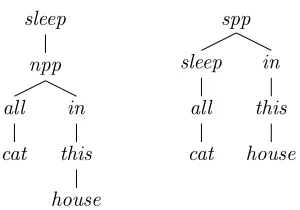
This is similar to how syntax trees are licensed by a context-free grammar, but instead of using nonterminals in the tree nodes, we use function names. In fact, the abstract syntax is equivalent to a context-free grammar without terminal symbols, where the nonterminals correspond to GF types, and where the grammar rules have names. A sim-ple examsim-ple grammar is shown in Figure 1. Two terms of typeSlicensed by this grammar are:
sleep(npp(all(cat),in(this(house)))) spp(sleep(all(cat)),in(this(house)))
cat,house : N this,all : N→NP
sleep : NP→S
in : NP→PP
npp : NP,PP→NP spp : S,PP→S
Figure 1: Example abstract grammar
sleep
npp
all
cat in
this
house
spp
sleep
all
cat in
this
[image:3.612.122.272.308.413.2]house
Figure 2: Trees licenced by the grammar
cat◦ = h“cat”;“cats”i house◦ = h“house”;“houses”i this◦(x) = h“this”+x! 1 ; 1i
all◦(x) = h“all”+x! 2 ; 2i
sleep◦(x) = hx! 1 +h“sleeps”;“sleep”i! (x!2)i in◦(x) = h“in”+x! 1i
npp◦(x, y) = hx! 1 +y! 1 ;x! 2i spp◦(x, y) = hx! 1 +y! 1i
Figure 3: Concrete syntax for the grammar
3.2 GF concrete syntax
The concrete syntax of a GF grammar is a compo-sitional mapping from abstract terms to concrete terms, called thelinearisation. The concrete terms can be quite complex and consist of strings, finite parameters, recursive records and inflection tables. We do not use the full concrete language in this pa-per, but instead use a simplified syntax which all GF grammars can be compiled into.
Every GF term is a tuple of strings and integer values. There are two operations; string concate-nation and tuple selection:
“s1. . .”+“s2. . .” = “s1. . .s2. . .”
ht1;. . .;tk;. . .;tni!k = tk
This term language is similar to multiple context-free grammar (MCFG) (Seki et al., 1991), and in-deed every GF grammar can be converted to an equivalent MCFG (Ljunglöf, 2004).
We writet◦for the linearisation oft. Composi-tionality can then be formulated as,
f(t1. . . tn)◦ = f◦(t◦1. . . t◦n)
wheref◦is the linearisation function correspond-ing to the abstract functionf. The concrete syntax of our example grammar is shown in Figure 3. 3.2.1 Example linearisation
To illustrate the linearisation algorithm, we here give the linearisation of the termsleep(all(cat)):
sleep(all(cat))◦ = sleep◦(all◦(cat◦))
= sleep◦(h“all”+cat◦! 2 ; 2i)
= sleep◦(h“all”+h“cat”;“cats”i! 2 ; 2i) = sleep◦(h“all”+“cats”; 2i)
= sleep◦(h“all cats”; 2i) = hh“all cats”; 2i! 1 +
h“sleeps”;“sleep”i! (h“all cats”; 2i!2)i = h“all cats”+h“sleeps”;“sleep”i! 2i = h“all cats”+“sleep”i
= h“all cats sleep”i
4 Trees and tree editing
Formally, an ordered tree is a connected directed acyclic non-empty graph, in which every node v ∈ V (where V denotes the set of nodes) has exactly one parent node↑v, except the root node which has no parent. Furthermore, there is a precedence relation(≺)defined on sibling nodes.
Each abstract GF term tis a tree where each node v has a label bv. The label values are GF functions. We writev◦for the linearisation of the subtree rooted atv; i.e.,v◦ = bv◦(v1◦. . . v◦n)when
v1. . . vn are the children of v. Note that this is only meaningful if the tree is type-correct.
An example tree representing the term tc =
sleep(all(cat))consists of the nodes a, band c, whereba =sleep,bb= all,cb=cat,a =↑b, and b=↑c.
4.1 Tree edit distance
The tree edit distanceis a distance measure be-tween trees (Tai, 1979). It is a modification of the well-known Levenshtein string edit distance; the distance between two trees is the number of edit operations required to transform one of them into the other. The allowed operations are insertion, deletion and replacement:
• insert(v, f, p, j, k)inserts a new nodevwith labelf as thejth child of the nodep. Fur-thermore, the new node becomes the parent ofp’s existing childrenjtok−1.
• delete(v)removes the nodev. All children ofvbecome children ofv’s parent node.
• replace(v, f)replaces the label ofvwithf.
Note that the resulting tree after an editing opera-tion is not guaranteed to be type-correct. In fact, for deletions and insertions, we always need at least two operations to get a new type-correct tree.
4.2 Constrained linearisation
In GF, not all strings in a linearisation of a sub-tree node have to be used in the linearisation of the full tree. In the example grammar,cat◦ con-tains two strings, but only one of them is used in t=sleep(all(cat))◦. In this paper we need to talk about only the parts of a linearisation that are used, and for this purpose we define theconstrained lin-earisationJvKtof a subtree nodevin a treet. The formal definition is a bit complex, but the intuition
is thatJvKtconsists of the strings inv◦that are
ac-tually used when calculatingt◦. For the example treetc with the nodecrepresenting the child, we
get the constrained linearisationJcKtc =h“cats”i.
4.3 Constraints for automatic tree editing Each GF grammar rulef : B1. . . Bn → Acan be seen as a constraint onf-labeled nodes and its children. Checking that a tree is grammatical ac-cording to the grammar, which in GF is the same as checking that the tree is type-correct, can then be implemented as a constraint satisfaction prob-lem (Sulzmann and Stuckey, 2008). Furthermore, when we formulate the grammar as constraints on trees, we can add additional constraints for speci-fying in more detail how our intended tree should look like.
By using tree constraints and the notion of tree edit distance, we can describe a system for inter-active tree editing. The system starts with a gram-matical tree, and the user specifies additional con-straints on the tree. Then the system searches for the closest grammatical tree (in terms of tree edit distance) that meets the constraints. This contin-ues until the user is satisfied.
This approach lifts the level of tree editing from procedural to declarative: the user does not have to think about how to modify the tree, but instead what the tree should look like. First we have struc-tural constraints on the tree:
• We can state that a node should be in the tree, v ∈V, or should not be in the tree,v /∈V.
• We can state properties about node labels,
b
v = f, and node parents, ↑v = v0; as well as the order between node siblings,v ≺v0.
Since our final goal is to allow for editing directly on the concrete surface strings, we also need some linearisation constraints:
• We can specify that the (constrained) lineari-sation of a node should be, or should not be, a string (tuple):JvK=s, resp.JvK6=s.
A special case is¬JvK, meaning that the node
is not realised in the final sentence; this is true either if it linearises to the empty string:
JvK = , or if the node is removed
com-pletely:v /∈V.
word inJvKis adjacent to the leftmost word
inJv0K; it also implies that both linearisations
are non-empty.
Two special cases are ≺ JvK and JvK ≺ , meaning that the linearisation comes first resp. last in the sentence.
4.3.1 Example: Modifying a phrase
The context-menu example, from section 2.2.1, can be explained like this. Assume that we start with the following treetc:
tc = sleep(all(cat)) t◦c = “all cats sleep”
This tree has the nodesa,b,cwith the labelssleep, all, cat, respectively. Now we want to say that the second word (whose corresponding node isc) should be in its singular form. This can be spec-ified by the constraintJcK = “cat”. The system
can then apply the tree editing operations to search for the closest type-correct treet0cwhich meets the constraint. In this case we need only one opera-tion: we rename thebnode fromalltothis:
t0c = sleep(this(cat))
t0◦c = “this cat sleeps”
4.3.2 Example: Inserting a phrase
Our second example, introduced in section 2.2.2, is when the user wants to insert a prepositional phrasetp=in(this(house))into the treetc. First
we encode the whole subtreetp as structural
con-straints:
b
d = in ↑e = d
b
e = this ↑f = e
b
f = house
Now we can specify wheretp should be inserted
by giving linearisation constraints:
• If we state that the phrase should come right after “sleeps”,JaK ≺ JdK, the system needs
to first insert aspp-labeled node aboveaand then insertdas the 2nd child:
tcp=spp(sleep(all(cat)),in(this(house))) t◦cp=“all cats sleep in this house”
• If we instead state that the phrase should come directly before “sleeps”,JdK≺JaK, the
system inserts annpp-labeled node belowa, and insertsdas the 2nd child:
t0cp=sleep(npp(all(cat),in(this(house))))
t0◦cp=“all cats in this house sleep”
4.4 Fine-tuning the search
When the grammar is large, there might be several possible syntax trees that are equally close to the original tree. One possible solution to this prob-lem is to use a more fine-grained distance measure, where the cost of the editing operations depend on the nodes and the labels that are involved.
If the grammar used in example 4.3.1 contains the singular determinereach in addition to this, then there will be two possible solution trees: sleep(this(cat))andsleep(each(cat)). Our solu-tion is to augment the grammar with distance val-ues between different functions. In this case the grammar could state that replacingall 7→ eachis cheaper thanall7→this, to force the resulting tree to besleep(each(cat)).
We can introduce similar costs for deleting and inserting nodes; so that some functions prefer some other functions as parents, or siblings. This could be used, e.g., for PP attachment problems when inserting new phrases.
5 Syntactic editing of the surface string Now we are ready to get rid of the syntax trees altogether, and introduce syntactic editing oper-ations directly on the surface string. Our final goal is to implement a syntactic editor where the user does not need any knowledge of syntax trees. Therefore the text is presented to the user as a se-quence of words, and in this section we define in-tuitive editing operations on the words.
To implement these operations, we only make use of three GUI “gestures”:select-click, context-clickanddrag. In a 2-button mouse interface, they are commonly implemented by left-click, right-click, and click-and-hold. In a touch-screen in-terface, they can be implemented by touch-and-release, touch-and-hold, and touch-and-drag; but there are of course other possibilities.
5.1 Editing operations
Since the user only modifies the surface string, we need a way of translating surface editing opera-tions onto the underying syntax tree. We use the fact that in GF, each surface word belongs to one and only one node in the syntax tree. So, when the user makes a gesture on a wordw∈ JvKt, we interpret it as a gesture on the underlying nodev.
node is displayed to the user by highlighting the words inJv∗Kt. Sometimes there are other nodes vhaving the same linearisation,JvKt = Jv∗Kt. In
that case we always select themaximalnode, such that Jv∗Kt 6= J↑v∗Kt always holds. The nature
of GF grammars ensures that there always exist a unique maximal node.
5.1.1 Selecting a phrase
There are two possibilities when the user select-clicks a wordw:
• If the word is unselected,w /∈Jv∗Kt, or if all
words in the sentence are selected, the inter-pretation is that the user wants to start over, and select another nodevsuch thatw∈JvKt. The nodevwill be the maximal node with the minimal linearisation coveringw. By “min-imal linearisation” we mean that there is no descendantv0such thatw∈Jv0Kt6=JvKt
• If the word is already selected, w ∈ Jv∗Kt, the interpretation is that the user wants to in-crease the selection. We do this by select-ing the closest maximal ancestorv such that
JvKt6=Jv∗Kt.
Phrases can also be selected by context-clicking and dragging; if the user performs an operation on an unselected word, its covering node becomes se-lected before the operation is performed.
5.1.2 Displaying a context menu
When the user context-clicks a wordw, the system displays a modification menu for the selected node v∗. Let s = Jv∗Kt be the currently highlighted phrase.
The modification menu is calculated like this: We search for nearby trees satisfying the con-straintJv∗K 6= s, i.e., so thatv∗is linearised
dif-ferent from the current linearisation. For each of these trees, we display a menu item consisting of its linearisation ofv∗. If there are no such alter-native linearisations, increase the selection and try again.
When the user selects a menu item, the cur-rent tree is replaced by the corresponding new tree. The selected nodev∗remains selected. The exam-ple in section 4.3.1 shows what happens when the user selects the menu item“cat”for the selected word“cats”.
5.1.3 Deleting a phrase
The user can delete the selected phrase by drag-ging it to the trash can. This introduces the linear constraint¬Jv∗K, saying that either v∗ should be
removed, or thatJv∗K should be empty. The
sys-tem then searches for the closest tree satisfying the constraint.
5.1.4 Moving a phrase
The user can drag the selected phrase to another position in the sentence, which is interpreted as a linear precedence constraint onv∗. If the phrase is moved to between wordswandw0, we introduce the constraintsJvK≺Jv∗K≺Jv0K, wherew∈JvKt
andw0∈Jv0Kt.
If the phrase is moved to the beginning or end of the sentence, instead of between two words, the constraints become ≺ Jv∗K ≺ Jv0K, orJvK ≺
Jv∗K≺, respectively
5.1.5 Inserting a phrase
We assume that somewhere on the screen there is a lexicon of phrases that the user can add to the sentence. If the user drags a phrase from the lexicon into the sentence between two words, we first deselect the currently selected node. Then we create new nodes and constraints representing the new phrase, as in the example in section 4.3.2, and select the topmost node. Finally we can add the same constraints as when moving a phrase,
JvK≺Jv∗K≺Jv0K, but recall thatv∗now denotes
the topmost node in the inserted phrase, and not the previously selected phrase.
5.1.6 Replacing a phrase
Instead of inserting the user can replace phrases, by dragging a phrase from the lexicon and drop-ping it onto the selected phrase. As usual, if the user drops onto a currently unselected word, the system reselects it as explained in section 5.1.1.
All descendantsv1, v2, . . .of the selected node
v∗are removed by adding constraintsv1, v2, . . . /∈ V. Furthermore, the new phrase should be added at v∗. We do this by letting v∗ be the topmost node of the phrase, create new descendant nodes v10, v20, . . ., and then add associated constraints:
c
v∗=f, cv0
1=a, ↑v10 =v∗, v01≺v20, . . .
6 Discussion
6.1 Grammar formalism
The underlying grammar formalism is GF, but there are of course other formalisms that can be used in the same way. The most important feature is the separation of abstract and concrete syntax, which several formalisms have in different ways. Formalisms such as HPSG and LFG are probably also well suited for surface string editing, but the theory of editing presented in this paper must of course be adapted to the underlying formalism.
6.2 Example applications
We hope that our grammatical editing system can be a useful pedagogical tool for supporting lan-guage learning and training, for children with communicative disabilities, and for people learn-ing a second language. We also believe that the ideas can be useful in touch screen devices, as an additional editing layer in text-based applications such as translation, email and chat.
6.2.1 Touch screen devices
An example application can be a translation tool for a touch screen device such as a mobile phone, as a kind of interactive phrasebook. This kind of application is already being developed in the MOLTO project, but currently it has very limited editing facilities (Angelov et al., 2010). Other touch screen possibilities include chat and email, where the user can create messages by dragging around text blocks instead of writing with a error-prone touch screen keyboard. It could also work together with speech recognition, to correct mis-recognised phrases in a grammatical way.
6.2.2 Robust parsing
Another possible application can be robust parsing for limited-domain dialogue systems. It is possi-ble to describe a dialogue system as a GF gram-mar (Ljunglöf, 2009), but the problem with GF is that the concrete syntax is not robust. Suppose that we use a statistical parser such as the MALT parser (Nivre et al., 2007). This returns a parse tree for every string, but in most cases, the tree is not grammatical. Then we can use the techniques in this paper for finding the closest grammatical tree, together with a confidence measure.
6.2.3 The GRASP project
The GRASP1project is developing another exam-ple application, an interactive system for Com-puter Assisted Language Learning (CALL). There are two intended target groups: one is children and adults trying to learn another language; another group is persons with communicative disabilities who are learning to read and write in their first lan-guage.
The idea of the final GRASP system is that it will work as an interactive textbook, where the user can read different texts and also experiment with and modify the texts. The system will be di-vided into modules dealing with different linguis-tic features, e.g., inflection, simple phrases and more advanced constructions. The modules can be used on their own, or can be combined for more advanced training.
The texts are stored as syntax trees in a multi-lingual GF grammar, which makes it possible to linearise the texts in parallel for several languages. This can be useful for second language learning, as the system can display the text in the user’s first language in parallel. Multilinguality is also useful for first language learning, e.g., by displaying the parallel text in a symbol language such as Bliss-symbolics.
6.3 Current status
The GRASP system is work in progress, and not all features described in this paper are imple-mented, as of April 2011. There is a functioning demonstration system, which needs more work to be useful for the intended audience. In particu-lar, the implementation is still too slow and the demonstration grammar needs to be expanded.
The current demostration grammar is a small monolingual Swedish grammar, and the module system is not fully developed. The grammar handles noun phrase inflection, fronting of noun phrases, and verb inflection.
7 Acknowledgements
The author would like to thank three anonymous reviewers for their valuable comments on an ear-lier version of this paper. The GRASP project is financed by Sunnerdahls Handikappfond.
1GRASP is an acronym for “grammatikbaserad
References
Krasimir Angelov, Olga Caprotti, Ramona Enache, Thomas Hallgren, and Aarne Ranta. 2010. The MOLTO phrasebook. In SLTC’10, 3rd Swedish Language Technology Conference.
Trude Heift. 2001. Intelligent language tutoring sys-tems for grammar practice. Zeitschrift für Interkul-turellen Fremdsprachenunterricht, 6(2).
Peter Ljunglöf. 2004. Expressivity and Complexity of the Grammatical Framework. Ph.D. thesis, Uni-versity of Gothenburg and Chalmers UniUni-versity of Technology, Gothenburg, Sweden.
Peter Ljunglöf. 2009. Dialogue management as inter-active tree building. InDiaHolmia’09, 13th Work-shop on the Semantics and Pragmatics of Dialogue, Stockholm, Sweden.
Joakim Nivre, Johan Hall, Jens Nilsson, Gül¸sen Eryiˇgit, Sandra Kübler, Svetoslav Marinov, and Erwin Marsi. 2007. Maltparser: A language-independent system for data-driven dependency parsing. Natural Language Engineering, 13(2):95– 135.
Aarne Ranta. 2009a. The GF resource grammar li-brary.Linguistic Issues in Language Technology, 2. Aarne Ranta. 2009b. Grammatical Framework: A multilingual grammar formalism. Language and Linguistics Compass, 3(5):1242–1265.
Hiroyuki Seki, Takashi Matsumara, Mamoru Fujii, and Tadao Kasami. 1991. On multiple context-free grammars. Theoretical Computer Science, 88:191– 229.
Martin Sulzmann and Peter J. Stuckey. 2008. HM(X) type inference is CLP(X) solving. Journal of Func-tional Programming, 18(2):251–283.