$3.00
October-November 1985
TABLE OF CONTENTS
Inside ZCPR3 . . . .. . . .. 4
Xerox in Black And White ... 27
New PIO For The Big Board ... 29
Faster Screen Output With Turbo ... 31
Cleaning Up Your Screen - Video Adjustments ... 45
dBASE To Bibliofile In Small C ... 48
T~o
Megabytes And More On The DSI-32 ... 51
SOG IV ... 52
The Future Of Computing ... 56
MS-DOS In The Public Domain ... 63
Selecting A Drive Within CP
1M ...73
Graphics In Turbo Pascal (For Any System) ... 80
Regular Features
The S-100 Bus ... 12
Technical Tips ... 86
In The Public Domain ... 15
Culture Corner ... 95
C'ing Clearly ... 19
Crossword No.2 Solution .... 97
The Xerox 820 Column ... 23
86 World ... 33
Future TenseThe Kaypro Column ... 37
Tidbits ... 98
FORTHwords ... 67
Express - Text Editor ... 100
Pascal Procedures ... 75
The Last Page ... 104
NEW LOWER PRICES!
NEW LOWER PRICES!
NEW LOWER PRICES!
"BIG BOARD II"
4 MHz Z80·A SINGLE BOARD COMPUTER WITH "SASI"
HARD·DISK INTERFACE
$545 ASSEMBLED
&
TESTED
Jim Ferguson, the designer of the "Big Board" distributed by Digital Research Computers, has produced a stunning new computer that Cal-Tex Computers has been shipping for a year. Called "Big Board II", it has the following features:
. 4 MHz Z80-A CPU and Peripheral Chips
The new Ferguson computer runs at 4 MHz. Its Monitor code is lean, uses Mode 2 interrupts, and makes good use of the Z80-A DMA chip.
• 64K Dynamic RAM + 4K Static CRT RAM + 24K E(E)PROM or Static RAM
"Big Board II" has three memory banks. The first memory bank has eight 4164 DRAMs that provide 60K of user space and 4K of monitor space. The second memory bank has two 2Kx8 SRAMs for the memory-mapped CRT display and space for six 2732As, 2Kx8 static RAMs, or pin-compatible EEPROMS. The third memory bank is for RAM or ROM added to the board via the STD bus. Whether bought as a bare board or assembled and tested, it comes with a 2732 EPROM containing Russell Smith's superb Monitor.
• Multiple-Density Controller for SSIDS Floppy Disks
The new Cal-Tex single-board computer has a multiple-density disk controller. It can use 1793 or 8877 controller chips since it generates the side signal with TTL parts. The board has two connectors for disk signals, one with 34 pins for 5.25" drives, the other with 50 pins for 8" drives.
• Vastly Improved CRT Display
The new Ferguson SBC uses a 6845 CRT controller and SMC 8002 video attributes controller to produce a display rivaling the display of quality terminals. There are three display modes: Character, block-graphics, and line-graphics. The board emulates an ADM-31 with 24 lines of 80 characters formed by a 7x9 dot matrix.
• STD Bus
The new Ferguson computer has an STD Bus port for easy system expansion .
• DMA
The new Ferguson computer has a Z8Q-A DMA chip that will allow byte-wise data transfers at 500 KBytes per second and bit-serial transfers via the Z8Q-A SID at 880 Kbits per second with minimal processer overhead. When a hard-disc subsystem is added, the DMA chip makes impressive disk performance possible.
CAL-TEX
COMPUTERS, INC.
12788 HWY. 9 • BOULDER CREEK, CA 95006 • (408) 338-2572
$145 PC BOARD WITH 16 PARTS
SIZE: 8.75" X 15.5"POWER: +5V @ 3A, +-12V @ O.1A
• "SASI" Interface for Winchester Disks
Our "Big Board II" implements the Host portion of the "Shugart Associates Systems Interface." Adding a Winchester disk drive is no harder than attaching a floppy-disk drive. A user simply 1) runs a fifty-conductor ribbon cable from a header on the board to a Xebec controller that costs only $295 and implements the controller portion of the SASI interface, 2) cables the controller to a Seagate Technology ST-506 hard disk or one compatible with it, and 3) provides power for the controller-card and drive. Since our CBIOS contains code for communicating with hard-disks, that's all a user has to do to add a Winchester to a system!
• Two Synchronousl Asynchronous Serial Ports
With a Z80-A SIOIO and a Z80-A CTC as a baud-rate generator, the new Ferguson
computer has two full RS232-C ports. It autobauds on both.
• A Parallel Keyboard Port + Four Other Parallel Ports for User 1/0
The new Cal-Tex single-board computer has one parallel port for an ASCII keyboard and four others for user-defined liD.
• Two Z80-A CTCs = Eight Programmable CounterslTimers
The new Ferguson computer has two Z80-A CTCs. One is used to clock data into and out of the Z80-A SIOIO, while the other is for systems and applications use.
• PROM Programming Circuitry
The new Cal-Tex SBC has circuitry for programming 2716s, 2732(A)s, or pin-compatible EEPROMs.
• CPIM 2.2**
CPIM with Russell Smith's CBIOS for the new Cal-Tex computer is available for $150. The CBIOS is available separately for $25.
··CP/M is a registered trademark of Digital Research.
MICRO CORNUCOPIA P.O. Box 223 Bend, Oregon 97709 503-382-5060 Orders Only 503-382-8048 Tech. 9 - Noon
Editor & Publisher
David
J.
ThompsonOperations & Advertising
David Pogue
Associate Editors Rebecca Ozrelic Gary Entsminger
Accounting Sandra Thompson
Graphic Design Craig Lannes
Graphic Production
Michael Odell Tracey Braas
Technical Department
Dana Cotant Eric Roby
Bruce Berryhill Laine Stump
Larry Fogg
Staff Assistants
Dorcas Dsenis Cary Gatton
Laura Pendley "Renee Katter
MICRO CORNUCOPIA supports systems programming languages and builders of single board and S-100 systems.
Application to mail at second class postage rates is pending at Bend, OR 97701 and additional entries. Published bimonthly by Micro Cornucopia Inc., 155 NW Hawthorne, Bend, OR 97701. Postmaster: Send address change to Micro Cornucopia, PO Box 223, Bend, OR 97709.
SUBSCRIPTION RATES:
1 yr. (2nd Class) $16.0D 1 yr. (Canada & Mexico) $22.00 1 yr. (Other foreign) $30.00 Make all orders payable in U.S. funds on a U.S. bank, please.
ADVERTISING RATES: Available on re-quest (call Alice Holbrow).
CHANGE OF ADDRESS: Please send your old label and new address.
SOFTWARE, HARDWARE, AND BOOK VENDORS: We would very much like to review your software, Single Board, and S-100 products. Send materials to the Review Department, Micro Cornucopia.
Copyright 1985 by Micro Cornucopia Inc. All rights reserved
ISSN 0747·587X
•••
111110 IIDllallD.11
Oct. -Nov. 1985
The Micro Technical Journal
No. 26
Not Funny!
Seriously
Last issue I was short (in a long sort of way), but a lot of people thought I
was hilarious. I think they're
hilar-ious, too. So we're even.
Some folks 'really got a belly laugh
when I mentioned Ampro's Jumbo
Board. However, Ampro's Rick Lehr-baum wasn't chuckling when he called
to ask how I had found out about his
massive proj ect. Actually I made it
up, but I didn't let on. (It was so
absurd that I shouldn't have been
surprised the military might fund such a task.)
Anyway, Rick informed me they
have a dedicated microwave link so
engineers can work at opposite ends of the board without running up large phone bills. (Good idea.)
Now, just so you won't be fooled again, be forewarned that practically everything in this editorial is serious.
The Gap
We get a lot of comments on our renewal forms from people who say we are over their heads technically: "I
don't understand half of it, but I like
it."
These are the people who renew. The folks who don't renew probably don't understand half of it and probably don't like it, either.
Well, we have been a technical
journal from day one. And we will
remain technical. There are many good publications for people who are primarily interested in running W ord-Star, Perfect Calc, and other applica-tions. There aren't very many publica-tions like Micro C which deal primarily with hardware, operating systems, and structured languages .
The problem is that there is a moat between the applications stuff (you know, "hit ctrl-K, ctrl-E to turn off the menu") and high level "discussions of new compilers.
Spreadsheets and editors are get-ting "friendlier," which means the user is having less and less contact with the operating system and the hardware. (That's why we're getting calls from folks trying to boot up a disk under WordStar.)
Magazines such as User's Guide and Profiles can help these people use their software and their operating system. Then if they become interest-ed in how their operating system is put together or how to modify it, they become candidates for Micro C (hoo-ray for new candidates).
So we will be running some get-up-to-speed articles. That way up-and-comers will know intuitively the dif-ference between a hex and a gaggle of fairies. (There is a decided difference, but it's too technical to cover here.)
We'll also be watching for books and other publications which will help.
(If you have any recommendations,
drop me a note containing a short description plus price, publisher, and where it's available.)
I'll be flagging the introductory articles here in the editorial, plus there'll be special items for beginners in Tidbits and The Last Page.
Where Do We Go From Here? There's been a continuing undercur-rent of frustration, or uneasiness, or queasiness, or something in the Micro
C office lately, and though I haven't
quite pinned down the source, I have
an idea what it might be.
Technically, we're frustrated, and it shows up in our discussions about the relative merits of the new processors, new operating systems, new any-things.
We know the 8080, Z80 world. We
know the Z80 Kaypro inside and out.
We have paid our dues learning Z801
8080 mnemonics and assemblers. We
have a ~ood feeling for what's great
Tandon Blues
I upgraded my Kaypro II to 5MHz last year, and I was the envy of. everyone in the Southern Colorado Users Association. But this year, when I changed to the PRO-8 monitor ROM and the Kaypro 4 with DSDD Tandon 100-2A drives, my machine would only run at 2.5MHz. Since we have 10 Kaypros at work, I swapped
new drives to see if the problem was
my soldering, the PRO-8 ROM, or the RCA 74S04. It proved to be the Tandon 100-2As because the Epson drives from a Kaypro 4-84 and the Shugart drives from a "New 2" all work like a charm at DSDD and 5MHz. Thought readers should know. Doug Shake
436 Redwood Dr.
Colorado Springs CO 80907
Editor's note:
I'm not too surprised about the problems I'm hearing from Tandon owners. Kaypro began buying J apa-nese drives because of the quality of
the first double-sided half heights that Tandon produced. (And I keep won-dering why Tandon doesn't advertise in Micro C.)
Having Your Remex & Using It Too I have been running the notorious Remex RFD,480 5.25" drives for about five months in a Morrow MD-2 and have several observations about them that may help others who were sucked in by a "good deal;"
1. The drives are incredibly sensi-tive to EMI (electrical interference). To see if this is a problem in your set-up, remove the drive from the comput-er's case and place it several inches away from anything. Alternately place a sheet of steel (not aluminum) between the drive and everything else.
If this cures the problem, construct.a
steel shroud around the drive.
2. The precompensation supplied by some computers (notably Morrow Mi-cro Decisions) is 250 ns. This appears to be more than the poor drives can handle. Recommended precomp is 150 ns or less. On Morrow Micro
Deci-LBTTBRS
sions, the precompensation can be turned off for 40 track drives by selecting 80 track in byte 1 of the MTAB in the BIOS. This change will tum on precompensation only on tracks greater than 40, which, of course, do not exist. Check the BIOS supplied with the machine to find this location.
3. The maximum specified ripple on the 12 volt supply is 100 mV pk-pk. To help achieve this, I placed 2200 uFd across the supply to ground. Although I found no improvement in operation, it was comforting to have the value in spec.
4. As supplied, the speed adjust-ments on my drives seemed to be off slightly. While the drive motor's strobe ring is illuminated with a fluorescent light, adjust R30 (the pot on the lower back wall of the drive) until the strobe ring remains station-ary.
5. Don't adjust things if you can't measure the results.
6. Be sure the connections to motor control cards are good. Spread the pins on the male connector so they
conduct well. If this connector is
loose, the drive motor runs open loop and sounds like a possessed sewing machine.
7. Buy someone else's drives! Mark Sihlanick
121 Twin Creek Terrace Forest VA 24551
Slicer 10MHz Upgrade
I originally bought a 'B' step 6MHz 80186 CPU with a bare Slicer board. I recently noticed an offer by Hawke Electronics, Amotex House, 45 Han-worth Road, Sunbury-on-Thames, Middlesex, U.K. to supply 10MHz AMD 80186s at L12.50 each. (Editor's note: readers will have to figure out the U.S. dollar equivalent.) An appli-cation engineer told me that this was a special by AMD to attract design-ers. There are no details of an equiva-lent Intel step version.
I estimated that the price was about 10% of normal list price, so I bought one, plugged it into the Slicer,
changed the CPU crystal to 20 MHz, and it works!
There seem to be a few problems that could trip up others trying the same upgrade: (1) Obtaining the part for a good price. This offer will not last forever, and might be restricted to the U.K. or Europe. (2) Having fast enough memory to work with the CPU. Nominal memory speed needed is 120 ns, although I am using 150 ns chips. Also, I suspect that some
TMS4500s will not work at this speed,
since there seem to be several variants of the chip. Finally, the Z8530 comms chip on the expansion board runs at half the CPU speed, and you will need the Z8530A part if this is fitted.
Other chips may cause a problem, but the CPU clock is not used else-where, so this is less likely, and could be cured by adding extra wait states on the chip select programming.
This upgrade is obviously of most use to people running CPU bound programs, such as large compilers, graphics programs, etc. Also,
Concur-rent CPM/DOS would benefit. The
only times I notice the speed
improve-ment are when running CP/M2.2
Ad-venture, using an 8080 emulator, or when compiling large (1000 line) C programs.
Stephen Hope 16 Lakeside,
Littleborough, Rochdale Lancashire U.K.
PRO-884Max
I just wanted to give you some feedback on the PRO-884 Max Moni-tor ROM. I installed it, a plus-4 decoder board, and a quad density TEAC drive in my Kaypro 4-84. Generally, they all work fine. Your instructions were very clear, and in fact, it was easier to add the third internal drive than you indicate. Any-one with minimal electronics exper-ience (and a hacksaw) should have no problem doing this.
size keys. My keyboard was made by Maxiswitch of Minneapolis, but they didn't even want to talk to me, much less sell me loose keys. Finally I bought them from a Kaypro dealer. At $8 a key!
N ow I have a dynamite three drive
ZCPR system - drive A: quad
densi-ty for my standard programs, drives B: and C: for data and lesser used codes. My dual density Dysan disks took to quad density very well.
A few tips may help other installers.
1. Before tearing things apart, take
a test drive. Set the new drive on top of the drive housing, pull the plugs out of old drive A: and plug them into the new drive to be sure it works properly. All the cables should be long enough for this.
2. To unscrew the inside mounting screws on the old drive you might need to remove the CRT. This is easily done with the proper allen wrench. (Don't loosen the coil which is at-tached to the neck.)
3. More information on the jumpers in the drives would be helpful to be sure they are all in the right locations.
Problems? Very few. The quad dens-ity drive uses 4K blocks instead of the 2K blocks on the dual density drives. Thus, small files eat up space quickly. If you run ZCPR, the cursor keys must be reconfigured (using the Kay-pro CONFIG Kay-program) for use with WordStar. Smartkey seems to have some problems with this setup, but I haven't completely diagnosed them yet. I'll let you know if I do, especially if I find the solution.
David B. Nelson 2311 Spencer Road Silver Spring MD 20910
Adapting A C. Itoh FI0-40
I just picked up a surplus C. Itoh F10-40 that they've been selling for $500. Before you buy it, they tell you it has "Commodore" on the front, which was OK with me. What they don't tell you is that Commodore has customized the thing for their sys-tems. The mail-order outfit suggests you install it (WordStar) as an "IBM
LITTIRS
Parallel" printer. This at least gets you printing, but no matter how you configure it (I spent many hours trying) it will NOT do variable pitch or variable line height, and it prints the forward direction only, which makes it barely faster than my J uki.
Finally 1 discovered that if you pull the CPU board and close the "JY" jumper (it is shipped with it open) you can install it as a "specialty" printer, and everything works. This changes the backspace function so it prints
bidirectionally. 1 pass this along so
that perhaps 1 can save someone the hours of frustration I experienced. Don Hotson
26 Sutters Mill Court Walnut Creek CA 94596
Video Graphics Boards
Last January I purchased your
Pro-Set II and have been very happy with
improved performance of both the
Pro-Monitor II and Pro-Character II
ROM chips. 1 am considering adding a video graphics board as an upgrade to
my Kaypro II (which also has had an
SWP Co-Power 88 board added), and was wondering if you might make a board of this type or could recommend a board which is compatible with the
Pro-Set II ROM chips.
My Kaypro II was purchased in
May 1983, and is SIN 30551.
I am also investigating the various Z80 CPU speed-up kits available and wondered if you had a recommenda-tion which would be compatible with the Pro-Set II.
John J. Mojonnier, Jr. 232 N. Ridgeland Oak Park IL 60302
Editor's note:
The Gilderfluke board gives you VT-52 (black and white block graphics) emulation on a Kaypro II or 4-83, but
I don't think there is room for that board and your
+
88 unit. If you want color graphics and LOGO you might contact MicroSphere here in Bend (see their ad in this issue).As for a speed up, you can do it yourself with a couple pieces of wire, a
switch, and a Z80B. Your monitor ROM will already run at 5MHz. If you don't feel comfortable doing a little jumpering (Micro C #24 pg. 35
con-tains an illustration of the mod) contact a local Kaypro group. Some-one there will no doubt be an old hand.
Illegal First Byte
Some issues back, one of your subscribers complained about XDIR hanging, especially on the B drive. We had the same problem, and it was caused by an illegal first byte in the
directory. If this byte was not E5 (for
an erased file) or 00 for a good file, XDIR went off into the woods. Clean-ing up this byte with DU77 or the monitor R command to read and write back a 00 or E5 solved the problem. Some versions of XD IR have this problem and some don't.
Thomas Callahan 35 North Shore Avenue Danvers MA 01923
Keyboard For Homebuilt Kaypro II? 1 am attempting to assemble the
equivalent of a Kaypro II ('83) from a
surplus board. Most parts and assem-blies have been relatively easy to find, reasonably priced, and easy to con-nect. Unfortunately, that has not been true with a keyboard. 1 have not been able to find much information about
the Kaypro II keyboard, or that any
particular surplus keyboard is com-patible. I would appreciate hearing from any Micro Cornucopia reader who has information about the
Kay-pro II keyboard or has been successful
in finding a compatible surplus key-board.
William D. Watson 1900 Forest
Inside
ZCPR3
By
Richard Conn
Editor's note: CP/M's console com-mand processor (CCP) is the part of the operating system that accepts commands from the keyboard (i.e., it is the part you deal with while you are
not running a program).
ZCPRI was famous for such niceties as searching the A: drive for a program if the program isn't available on the default drive, and for paging 24 lines at a time under the TYPE command.
ZCPRI was released to the public domain, and as everyone knows, just about everything in the public domain gets revised and expanded. Thus we have seen ZCPR2 and 3. The following is a detailed description of ZCPR3 by its author, Richard Conn.
ZCPR3 is a command processor replacement for CP/M that's both upwardly compatible with CP/M 2.2 and a lot more versatile.
Some of ZCPR3's features are:
- Extensions to the CP/M directory concept and command processing al-gorithm
- Command search hierarchy and
directory search path
- Multiple commands on a single
line and chaining - Command scripts
- An integrated command file mon-itor.
The Environment Descriptor
The heart of ZCPR3, the environ-ment descriptor (Z3ENV for short) is a data buffer which all ZCPR3 tools examine to determine key aspects of the ZCPR3 environment.
Let's say we locate the Z3ENV above the 'BIOS (at a convenient location). When Z31NS installs the system's tools, it gives them the address of this data buffer and tells them about the system environment:
1. Locations of the command search
path, various system segments (RCP, FCP, lOP, NDR, ENV, and Z3T), command line buffer, message buffer, and the external FCB
2. Location and size of the shell stack (which makes shells like VFI-LER and MENU possible)
3. Address of the wheel byte (used to determine if a user is privileged)
4. Processor speed (used for
soft-Listing 1 -Structure of the ZCPR3 Environment Descriptor
Off Bet Definition Comments
00 JHP ; LEADING JHP 2F DB
30 DB 03 DB 'Z3ENV' ; ENVIRONHENT 10
OB DB 1 ; CLASS 1 ENVIRONHENT (EXTERNAL) 31 DB Bo
32 DB 24 09 OW EX PATH ; EXTERNAL PATH ADDRESS 33 DB 22 OB DB EXPATHS ; NUMBER OF 2-BITE ELEMENTS IN PATH
34 DB 132 OC OW RCP ; RCP ADDRESS 35 DB 24 OE DB RCPS ; NUMBER OF 12B-BYTE BLOCKS IN RCP 36 DB 22 37 DB BO
OF OW lOP ; lOP ADDRESS 3B DB 66 11 DB lOPS ; NUMBER OF 12B-BYTE BLOCKS IN lOP 39 DB 58 31. DB 1 12 OW FCP ; FCP ADDRESS
14 DB FCPS ; NUHBER OF 128-BYTE BLOCKS IN FCP 3B DB 102 3C DB 66 15 OW Z3NDIR ; NOR ADDRESS 3D DB 58 17 DB Z3NDIRS ; NUMBER OF 18-BYTE ENTRIES IN NDR 3E DB 1 18 OW Z3CL ; ZCPR3 COHHAND LINE 3F DB 80
11. DB Z3CLS ; NUMBER OF BYTES IN COHHAND LINE 40 DB 66 41 DB 58 lB OW Z3ENV ; ZCPR3 ENVIRONHENT DESCRIPTOR 42 DB 0 10 DB Z3ENVS ; NUMBER OF 128-BYTE BLOCKS IN DESCRIPTOR
~3 DB 102 IE DIt SHSTK ; SHELL STACK ADDRESS 114 DB 66 20 DB SHSTKS ; NUMBER OF SIISIZE-BYTE ENTIRES IN 45 DB 58
SHELL STACK 46 DB 0
21 DB SHSIZE ; SIZE OF A SHELL STACK ENTRY
117 DB 'SH 22 OW Z3HSG ; ZCPR3 MESSAGE BUFFER 4F DB 'VAR' 24 OW EXTFCB ; ZCPR3 EXTERNAL FCB 52 011
51. DB 26 OW EXTSTK ; ZCPR3 EXTERNAL STACK
50 DB 28 DB ; QUIET FLAG (1 .QUIET, O.NOT QUIET) 65 DB 29 OW Z3WHL ; ADDRESS OF WHEEL BITE 68 DB 70 DB 2B DB ; PROCESSOR SPEED IN HHZ
73 DB 2C DB 'D'-'@' ; MAXIMUH DISK 78 DB 20 DB 31 ; MAXIMUH USER
2E DB 1 ; hOK TO ACCEPT DU, O=NOT OK 7E OS
6300 Round Rock Apt 3008
Plano TX 75023
ware timing loops)
, 5. Maximum disk and user area that can be accessed
6. Dimensions of the CRT and printer.
All of the buffers in the Z3ENV are at fixed offsets from the beginning of the Z3ENV in all ZCPR3 systems no matter which computer it's installed on. So, by knowing only the base address of the Z3ENV you can access a particular item of data in the Z3ENV by adding a fixed offset.
Listing 1 shows an Environment Descriptor and all of the offsets to its buffers.
ZCPR3 Libraries
ZCPR3 was designed for program-mers who frequently reuse functions and need to remember offsets and buffer contents. Z3LIB is a large collection of these frequently-used subroutines.
All Z3LIB subroutines are precisely documented in terms of function, input parameters, output parameters, and side effects. All documentation on Z3LIB is available via HLP files which can be scanned by the ZCPR3
; CRT SELECTION (O.CRT 0, I.CRT 1) ; PRINTER SELECTION (N.PRINTER N) ; WIDTH OF' CRT 0
; NUMBER OF LINES ON CRT 0 ; NUMBER OF LINES OF TEXT ON CRT 0 ; WIDTH OF CRT 1
; NUMBER OF LINES ON CRT 1 ; NUMBER OF LINES OF TEXT ON CRT 1 ; WIDTH OF PRINTER 0
; NUMBER OF LINES ON PRINTER 0 ; NUMBER OF LINES OF TEXT ON PRINTER 0 ; FORH FEED FLAG (O.CAN'T FORHFEED, I.CAN) ; WIDTH OF PRINTER 1
; NUMBER OF LINES ON PRINTER 1 ; NUMBER OF LINES OF TEXT ON PRINTER 1 ; FORH FEED FLAG (OsCAN'T FORHFEED, hCAN) ; WIDTH OF PRINTER 2
; NUMBER OF LINES ON PRINTER 2 ; NUMBER OF LINES OF TEXT ON PRINTER 2 ; FORH FEED FLAG (OsCAN'T FORHFEED, hCAN) ; WIDTH OF PRINTER 3
; NUMBER OF LINES ON PRINTER 3 ; NUMBER OF LINES OF TEXT ON PRINTER 3 ; FORH FEED FLAG (O=CAN'T FORHFEEIl, hCAN) ; SHEI.L VARIABLE FILENAHE
; SHELL VARIABLE FILETYPE ; FILENAME 1
HELP utility. VLIB, a companion to Z3LIB, provides a number of subrou-tines which permit terminal control through the Z3TCAP terminal-defini-tion buffer. (SYSLIB, Z3LIB, and VLIB are documented in ZCPR3: The Libraries, and will be available through Echelon in a few months.)
All the subroutines in Z3LIB use the Z3ENV by first calling Z3INIT.
Z31NIT accepts as input the ad-dress of the Z3ENV in HL and initializes an internal buffer which all
Z3LIB routines later use. If the
screen-oriented routines of VLIB are needed, your program must call the Z3VINIT routine (from VLIB) instead of the Z31NIT routine (from Z3LIB).
Accepting the address of the Z3ENV in HL, Z3VINIT initializes the pointers used by both the Z3LIB and the VLIB routines.
Loose Coupling
In an attempt to control the com-plexity of the code written with these routines I used what's called "loose coupling." In other words, the execu-tion of one routine doesn't affect the execution of another.
Listing 2 - Programming With SYSLIB Z3L1B
For example, the routines PUTUD
and GETUD save the current userl
disk (which the program is logged into) and restore it. PUTUD and G ETUD have no effect on any registers. (There is a side effect -G ETUD logs the user into the
directo-ry saved by PUTUD - but you
needn't worry about it.) The only coupling between PUTUD and GE-TUD is a shared buffer (which the programmer never sees).
Loose coupling is expensive - each routine in the libraries is a little larger (by a few bytes) and requires more stack space than a routine which doesn't adhere to these rules. But it's worth it.
Programming With Libraries
Listing 2 illustrates programming with libraries.
A user types a command into the command line buffer of ZCPR3 for later execution. The command line gets inserted in front of whatever commands are already in the buffer. If
this program is named L2, then the command line
ECHO HELLOjL2jECHO DONE
results in the execution of whatever text the user typed during the run of L2.
The routine needs the address of the ZCPR3 Environment Descriptor. It's defined in line 5, and made available in lines 16 and 17 through the call to Z3INIT. The routine PUTCL (lines 9 and 27) from Z3LIB will use this information later in Listing 2.
The prompt 'Enter Your Command' is printed by lines 19 and 20. PRINT comes from SYSLIB, and it displays the string (terminated by a binary 0) on the console. PRINT affects no registers and has no side effects.
The routine BBLINE (from SYS-LIB) (lines 22 to 25) inputs a line from the user (lines 22 and 25). BBLINE accepts a capitalization flag in the A
register as input (A = OFFH to
capital-(continued on page 8)
CP/M, MS-DOS EPROM
PROGRAMMING SYSTEM
1: ; Sample ZCPil3 SystelD Program to insert a cOlDIDand into the
2708 2758 2516 2716 2732 2764
2732A 2764A 27128 27128A 27256 27CXX
2: ; command Une buffer. The inserted cODlllland will be the next command 3:; to be executed.
II:
5; z3env equ
6:
7; ext 8: ext 9: ext 10: ext 11: ext 12:
13: aseg
14: org
15: 16: lxi 17 : call 18:
19: oall 20: db 21 : 22: mvi 23: call 24: cpi 25: 26:
27: call 28: rnz 29: call 30: call 31 : db 32: ret 33: 34: end
Of~OOh ; address of the ZCPR3 EnVironment Descriptor z3.in1t ;init address of Z3ENV for Z3LIB routines bbl1ne ;an input line editor (froID SYSLIB) putcl ;stores a cOlIIIDand Hne (frOID Z3LIB) print ; prints a message (trolD SYSLIB) crlf ;new line on console (trolD SYSLIB) 100h
h,z3env ;set Z3ENV address tor Z3LIB rout1n~3 zlinit
'Enter Your Command) ',0
a,OtIb ;capita11:l:e the line input by the user bbline :get Une frOID the user
o ;see if no char'acters input by user ;abort i f no input
putcl ;in .. ert command line into Z3 cOlDIDand Une butfer ; done it no error
crlt print
'Error - Command Line Overflow' ,0
- SOPTWAR8 AVAILABL8 POR CP/M-a?, CP/M-a6 AND MS-DOS SYST8MS - STAND ALaNS BOARD - 8L8CTRONIC SWITCHING OP 8PROM TYP8S - US8S 24 VOLT XPMR POR POW8R - ALL SUPPLI8S/TIMING ON BOARD - NO PBRSONALITY MODUL8S TO BUY - LARG8 COMPR8H8NSIV8 MANUAL
* *
PARALLEL PRINTER INTERFACE* *
CONN8CTS TO ANY PARALLSL PRINT8R INTSRPAC8 - US8S a OUTPUT DATA BITS AND ONS INPUT DATA BIT (BUSY LINS) BUSY LINS IS A HIGH SPEED S8RIAL INPUT. PULL EPROM R8ADING AND PROGRAMMING. UNIT MAY ALSO BE CONNBCTSD TO ON8 a BIT INPUT/OUTPUT PORT,
* *
CONTROL P.ROGRAM COMMANDS* *
- PROGRAM EPROM(Sl PROM DISK - SAVS 8PROM(Sl TO DISK - R8AD DISK PIL8 IN1'O RAM - PROGRAM EPROM(Sl PROM RAM - READ BPROM(S) INTO RAM - COMPAR8 8PROM WITH RAM - V8RIPY BPROM IS BRAS8D - COPY 8PROM
- DISPLAY /MODIPY RAM - (MONITOR MODS) WITH 11 SUB COMMANDS PILL-DUMP-XPBR-8XAMINS-MODIPY-BIAS-PROGRAM-V8RIPY, ETC,)
---~6~~~~~~4IJS~'W s~~tj'l~~ g~M6t~rs~T8~-->
$199PARTS KIT WITH SOPTWARB AND DOC->$179 PCB,SOPTWARE.i DOC->$69 SOPTWARE ON a ! 51/4 DISK POR KAYPRO, OSBORNE, IBM! OTHER PMTS
TO ORDER SBND CH8CK, MONEY ORDBR, WRITS OR CALL
ANDRATECH P.O. BOX 222 MILFORD, OHIO 45150
6
Z
SEISYOU
FREEl
Free to create computer environments right for you ... free to automate repetitive tasks ... free to increase your productivity. Z·System, the high-performance 8-bit operating system that flies! Optimized assembly language code - full software development system with linkable libraries of often needed subroutines -relocating (ROM and RAM) macro assembler, linker, librarian, cross-reference table generator, debuggers, translators, disassembler - ready to free you!
New generation communications package provides levels of-flexibility,
func-TERM III tionality, performance notavailable until now. Replaces BYEand XMODEM ... master/server local area network capability ... public or private bulletin board and electronic message handling are integral features ... auto-dial/answer, menu install .. . XMODEM (CRC/Checksum), MODEM? Batch, Kermit, CIS, and XON/XOFF protocols .. . 100-page manual ...•...•...•..•...••.•.•.•..•... $99.00
Rolls Royce of message handling systems ... mates with TERM III or BYE for Z·MSG most advanced overall electronic maillfile transfer capabilities . . . menu installed ... extreme configurability ... many levels of access and security ... word, phrase editor, field search . . . complete message manipulation and database maintenance ...•...••.. $99.95
Elegant, menu and command-line driven file and disk catalog.· manager.
DISCAT Generates and controls multiple master catalogs, working catalog used for update quickness. Nine flexible modules easily altered by user for custom requirements. Works with Zshells (VMENU, VFILER, MENU), aliases, and multiple commands per line ...•...•... $39.99
ZCPR3: The Manual Bound, 350 pages, typeset book describes features of ZCPR3 command processor, how it works, how to install, and detailed command usage. Bible to understand Z-System ...•...•..••...•.... $19.95
ZCPR3 and IIOPS Loose-leaf book, 50 pages, 8-1/2" by 11", describes ins-and-outs of input/output processing using Z-System. Shows how to modify your BIOS to include 110 redirection ... complements The Manual ... $9.95
More missing links found - Z Application Progams! Fly with eagles! Our programs promote high performance through flexibility! Productivity results from dynamically changeable work environments, matching operator to tasks and machines.
Above programs require 4BK-byte memory, ZCPR3, Z-Com, or Z-System, and ZBO/NSCBOO/HD641BO-based computer. Shipping from stock. State desired disk format, plus two acceptable alternatives. As payment, we accept Visa, Mastercard, personal checks, money orders, and purchase orders from established companies. We also ship UPS COD.
Call or write to place order or to obtain literature.
~
VALUE and PERFORMANCE
with Relocatable
z-ao
Macro Assembler
FROM MITEK
It's a real bargain! Here's why: • Only $49.95 plus shipping • Phase/dephase
NSIN
• 8080 to Z-80 Source Code Converter
• Generates Microsoft compatible REL files or INTEL compatible hex files
• Compatible with Digital Research macro assemblers MAC & RMAC • Generates Ditigal Research
compatible SYM files • Full Zilog mnemonics • INCLUDE and MACLIS files • Conditional assembly
• Separate data, program, common and absolute program spaces
• Customize the Macro Assembler to your requirements with installation program
• Cross-reference Generation
• Z-80 Linker and Library Manager for Microsoft compatible REL files available as a total package with Macro Assembler for only $95.00 plus shipping
• Manual only is $15
~ for
.urbo p
aSCal
"itelc's R Users "aero 4sse~oeatable
z-s
• G Ihbler""i"
0. enerate 7i also:
m-line Urbo Pa
inClUde
ii~Chine COd~cal
• I es
nC/ude fil
Turbo Pa es provide ble
mach~cal
compati_ aSsembly lae COde With mnemoni nguage comment~S as TO ORDER, CALL TOLL FREE: 1-800-367-5134, ext, 804'For, information or technical assistance: 1-808-623-6361
MITEK
:,' .' SpElCifydeslred 51/." or 8'; format. Personal check, cashier's check,' money order, VISA, MC, or ;' COO welcomed. Include $5 for postage and handling.
:i:SOisa tradem~rk of Zilog, inc. MAC, RMAC, and ZSID.are trademarks. of Digital Research, Inc.
Allows up per month. ule. Keeps voice prints form. Statements
INVENTORY ... .
Allows up to 4,000 parts. of unit sales as well as year to
(612) 339-2521
DEMOD/s~
$18.00
Y
Try all 5 programs above (GL, AR, Ap, IN, PRJ. Order our DEMO DISK for $18.00 (includes ship-ping). Condensed versions of th~ programs give you the "feel" of data entry and access. Includes sample reports and instructions. Specify machine.
INSIDEZCPR3 ________________________________________________________ __
(continued from page 5)
ize the line after the user types it in) and returns the address of a string (terminated by a binary 0).
On exit from BBLINE, the HL register pair contains the address of the first character of this string, and the A register contains the number of
characters in the string. If the user
doesn't type anything, the A register returns with the value 0, and the CPI
o
followed by RZ instructions in lines24 and 25 terminate the program by returning to the operating system.
If the line wasn't empty, execution
continues with the call to PUTCL in line 27. PUTCL accepts the address of a string in HL and stores this string in the ZCPR3 command line buffer, so that becomes the next command to
execute. If the command line resulting
from the addition of this string is longer than the command line buffer, the command line buffer is left un-changed, and PUTCL returns with A
= 0 and the Zero Flag set.
The RNZ instruction on line 28 returns the program to the operating system, allowing the command line just stored to be executed if no error
occurred. If PUTCL encountered a
command line buffer overflow, PRINT displays an error message (lines 29 to 31), and execution resumes with the unchanged original command line.
The PUTCL routine obtains the address and size of the command line buffer from the Z3ENV. The program-mer doesn't have to worry about low-level details such as setting the point-ers to ensure that execution begins at the first character of a new command.
Listing 3 - ZCPR3 Shell
You can concentrate on the high order tidbits like inserting commands into the command line buffer.
VLIB goes one step further -dealing with terminal-independent programming.
ZCPR3, VLIB, And Shells
Listing 3 is a shell (or MENU) which clears the screen, displays the current disk and user area, and prompts for a
command. It uses VLIB routines to
manipulate a terminal, clearing the screen, highlightmg, and positioning the cursor.
Listing 3 is divided into:
1. Constants and external routines
named (lines 1-43)
2. Initialization and ZCPR3 environ-ment check (lines 52-79)
3. Determination of the method of program invocation (liries 85-86)
4. Establishment of the program as a shell (lines 90-115)
5. Message and delay so the user can see the results of his last com-mand (lines 121-123)
6. Screen display, input of user's command, and setup of command line (lines 128-150).
Lines 52-53 establish the address of the ZCPR3 Environment Descriptor for use by the Z3LIB and VLIB routines. The routine Z3VINIT (as opposed to Z3INIT) is used so that the VLIB routines will be able to function as well as the Z3LIB rou-tines.
The shell stack is required for this program (it's an option in any ZCPR3
28:
29: ; VLm routines
30: ext cls
installation), so lines 57-61 determine if the shell stack is available. The . routine GETSH1 returns with register A=O and the Zero Flag set if there's no shell stack.
The ZCPR3 message buffer option is also required for this program, so lines 66-70 test for the presence of the message buffer. GETMSG returns with register A = 0 and the Zero Flag set if there's no message buffer.
Similarly, lines 75-79 test for the command line buffer. This shell acts as a front end, executing command lines issued by the user, so the command line buffer must be avail-able. All three of these key elements - the shell stack, the message buffer,
and the command line buffer - are
part of the recommended standard 1K overhead of a ZCPR3 System.
There are three types of ZCPR3 commands:
1. One issued by the user as a
normal command
2. One issued by ZCPR3 as a shell 3. One issued by ZCPR3 as an error handler.
When ZCPR3 is ready to accept input from the user, it checks the shell
stack. If the shell stack isn't empty,
the command line on the top of the stack is executed in lieu of input from the user.
ZCPR3 sets a message to indicate the source of the command line when-ever it executes a command (if the ZCPR3 message buffer is available). A
(continued on page 10)
;clear screen
1: Sample Zepft3 Sy"tem Program to function a" a "hell, 31 : ext gxym.sg ; posi tion on screen and print ;print with highlighting
8
2: accepting cc .... and" from the user and executing them. 3: Once a co .... and complete", control is returned to 4: thh prog."am (dnce it h a shell), and the next
I 5: co .... and i" entered. 6:
7: Execution of thh shell is halted by 1:ssuing: 8: SHCTftL POP
9:
10: ; Addre,,:s of the ZCPft3 Environment Descriptor 11: z3env equ Of400h
12:
13: ; VLIB highlighting control code" 14: dim equ 1 ; begin standout mode 15: bright equ 2 ; end standout mode 16:
17: ; Z3LIB/VLIB in1tialization
18: ext z3vin1t ;init for terminal processins 19:
20: ; SYSLIB routines 21: ext bbl1ne 22: ext print 23: ext crlf 24: ext retud 25: ext cout 26: ext cin 27 : ext pafdo
ian input line editor ; print" a string ;new line
;return User/D1"k 1n BC ;output a character
;input a character without echo ;print A a" floating decimal
32: ext vprint
; Z3Lm routines 33: 34: 35: 36: 37: 38: 39: 40: 41: 42: 43: 44: ;
ext sbpush; push string onto shell stack ext getet'cb ;get external FCB
ext getshl ;get shell stack information ext getmsg ;get message buffer information ext getcll ;get command 11ne information ext getcl2 ;get command. line information ext Qshell ;was this program run as a sbell? ext putcst ;set command status message ext p u t c l ; set cOllllll&nd 11ne
45: ; Code begin.s 46: ;
47:
. 48: 49: ;
aseg org 100h
50: ; The following sets the ZCPR3 Environment Descriptor
51: ; 52:
53:
54: ;
lXi call
h,z3env z3vin1t
56 : 57: 58: 59: 60: 61 : 62: 63: 64: 65: 66: 67: 68: 69: 70: 71 : 72: 73: 74: 75: 76: 77: 78: 79: 80: 81 : 82: 83: 84: 85: 86: 87: 88: 89: 90: 91 : 92: 93: 94: 95: 96: 97: 98: 99: 100 101 102 103 lOll ·105 106 107 108 109 110 111 112 113 114 115 116 117 118 119 120 121 122 123 124 125 126 127 128 129 130 131 132 133 134 135 136 137 138 139 140 141 142 143 144 145 146 147 148 149 150 151 152 153 154 155 156 157 158
call get.shl Jru: te.stl call print
db 'Shell.s are not .supported', 0 ret
The toll owing cbeek.s tor tbe me.s.sage tac1lity ,
tut 1:
call getlll.sg Jru: te.st2 call print
db 'He.s.sage.s are not .supported',O ret
The toll owing cbeek.s tor tbe cOlIIIIIB.nd line butter tacUity
j
te.st2:
,
call getcll JIlZ gol call print
db ' Command line butter not .supported', 0 ret
The toll owing determ1ne.s it tbe program wa.s run by the u.ser as a cOlllllland or by ZCPR3 a.s a .sbell
gol:
call q.sbell jwa.s tb1.s program run by tbe u.ser? J::; wait jit run a.s a .sbell, get next command
Thi.s .section ot code .seU up tbe program a.s a .shell
.setname: call Jnz lxi JIIIP inx pu.sb lxi dad IIIvi pop .setnamel : call J::; call db ret
getetcb jget name ot program, it po.s.sible .setname jname available, so continue h,det ju.se detault name
.setnamel
h jpoint to tint cbaracter ot progru name h j.save pointer
d,8 jpoint to atter last cbaracter
d
111,0 j.store ending 0
b jget pointer to t1r.st cbaracter ot name sbpu.sb jput progru name on shell .stacle cblccmd ;get command trolll user it no error print
I Could not e.stabl1.sb .sbell', 0
Thi.s section determines it any cOlllllland.s are toll owing the j .sbell invocation cOlIIIIIB.nd and returnoS to ZCPR3 in order to j execute thelll it 30
~blccllld:
call getc12 jget command line data J::; getcmd jproces.s command trom u.ser ret jProce.ss rest ot cOlIIIIIB.nd line
Pau.se so tbe u.ser can read tbe display trolll tbe last command ,
wait:
call vprint
db dllll, 'Strilee any key - ' , br1gbt, 0 call cin
Prompt tbe u.ser tor a new cOlIIIIIB.nd
~etcmd: call call db db call mo., adi call mov call getcmdl : call db db IIIvi call cpi Jz call mvi call call ret ,
cls jclear tbe screen
gxym.sg
5,10 'Directory ',0
retud jget DO in BC a,b jget disk '1' jconvert to letter cout ;"print
a,c ;get u.ser patdo ;print as floating
gxymsg 7,10
d1lll, 'Enter Command) ',brigbt,a a,Otn
bbl1ne
o ;any input? getcmdl ;issue prolllpt again putcl ;store command line a,O ;tll1" 1.s a normal command putcst
cls
j Detaul t command name in case the External FCB
; 13 not available ,
det:
db 'L3' ,0
end End of Listing
WE BRING
ENGINEERS, SCIENTISTS
AND THE IBM-PC
TOGETHER
• 12-bit resolution • a-bit resolution • 24-KHz throughput rate • 30 KHz throughput rate • 16 channel SE, a DI • 16 channel SE, a DI
• LABSTAR Software • LABSTAR Software
$690.00 $490.00
=
IEEE·488 GPIB Multifunction Board• Full GPIB controller capability • Three 16-bit interval timers • 24 digital 1/0 lines
• Software included $495.00
Waveform Synthesizer Board
• Generates user-definable signal • Up to 2000 points per envelop
INSIDEZCPR3 __________________________________________________________ _
(continued from page 8)
program (such as a shell) can read this message and determine how it was invoked.
A shell either installs itself, if it was invoked by the user, or executes, if it was invoked as a shell.
Lines 85 and 86 determine if the
program in Listing 3 was invoked as a normal command or a shell. The QSHELL routine of Z3LIB returns
with register A
=
0 and the Zero Flagset if the message set by ZCPR3 indicates invocation as a shell.
If invoked as a shell it enters a
WAIT routine (lines 121-123). Then you can examine the results of the command before the shell slears the screen and prompts for input.
If not invoked as a shell (you must
have issued a command to run this program specifically) the program in-stalls itself as one in lines 90-115.
Lines 90-91 test to determine if the External FCB is available.
ZCPR3 places the name of the command into the External FCB be-fore the command executes. The GE-TEFCB routine returns with register A 0, the Zero Flag clear, and the HL register pair containing the address of the External FCB, if the External FCB is available.
Lines 94-100 use this information to place a 0 after the last character of the command name. After line 100 exe-cutes, HL contains the address of the first character of a 9-byte string (8 bytes for the command name and an ending 0). This is the command to be pushed onto the top of the shell stack.
If the External FCB isn't available,
GETEFCB returns with register A
=
o
and the Zero Flag set. In this case,lines 92-93 set HL to point to a default command line (see lines 155-156).
With or without the External FCB, execution resumes at line 101 with HL containing the address of a command line string (terminated by a null) to be pushed onto the top of the shell stack. The SHPUSH routine in line 102 pushe$ a string onto the shell stack, and SHPUSH returns with register A
=
0 and the Zero Flag set if it wassuccessful. If not successful, PRINT
displays the error message at line 105,
10
and exits to the operating system (the RET instruction in line 106).
Since the shell stack exists (we tested for it in line 57 with the GETSH1 call), failure by SHPUSH might be caused by the command line being too long for the buffer reserved for a shell stack element, or the shell stack being full.
If the SHPUSH routine succeeds, execution resumes at line 112. At this point, GETCL2 is called to determine if there are any more commands in the
command line buffer. If the shell
program was "L3", for example, the command line could have been
L3;another command
CHKCMD (Lines 113-115) checks for this other command, and if it finds it, GETCL2 returns with register A 0 and the Zero Flag clear. The rest of the command line is executed by returning to the operating system
(line 115). .
If there's no following command,
execution of the shell resumes with its main function: a display and prompt for user input (lines 127- 150).
The visible part of the routine occurs in the routine at G ETCMD (lines 127-150):
1. Clear the screen
2. Display "Directory", followed by the current disk/user starting at line . 5, column 10 on the screen
3. Prompt the user for input with a highlighted command prompt "Enter Command' starting at line 7, column 10
4. Input a command line from the user
5. Place the command line into the command line buffer and return to the operating system for execution of the user's command.
CLS, a VLIB routine called at line 128, determines the byte sequence (defined in the ZCPR3 TCAP buffer) to send to the terminal and clears the screen by sending that sequence of bytes to the console.
The programmer doesn't have to worry with details about the terminal or the sequence of bytes that cleared the screen.
Lines 129-131 use GXYMSG to
place the cursor on the screen and display the word "Directory". GXYMSG uses cursor positioning in-formation specific to the user's ter-minal which it gets from the ZCPR3
TCAP buffer. It positions the cursor
at the address indicated by the first two bytes following the call (in this case, row 5 and column 10 as indicat-ed in line 130 of Listing 3).
"Directory" is followed first by a letter indicating the disk, and then by a number indicating the user area which the user is currently logged into.
Line 132 calls the SYSLIB routine RETUD, which returns with register B containing the number of the
cur-rent disk (B = 0 if current disk is drive
A) and register C containing the number of the current user area.
Lines 133-135 convert the number in B to the appropriate letter and print it. Lines 136-137 print the user num-ber.
Lines 139-141 print the "Enter Command' prompt, which is printed beginning at line 7, column 10. High-lighting comes from surrounding text with the DIM and BRIGHT command codes (which are interpreted by GXYMSG to turn on and tum off highlighting). "Enter Command' will. . be dim on some terminals, reverse
video on others.
Lines 142-143 get a command text from the user via the BBLINE
rou-tine. With register A = OFFH, the line
is capitalized after it's input (the line fed to the command line buffer doesn't have to be capitalized in ZCPR3).
BBLINE returns with the HL reg-ister pair containing the address of a null-terminated string and the A reg-ister containing the number of
charac-ters in this string (not counting the
ending null). If register A
=
0 (no in-put entered - the user simply hits the RETURN key), it prompts again for input (lines 144-145).If a command -line was entered,
processing resumes at line 146. PUTCL stores the string pointed to by the HL register pair in the com-. mand line buffer. (In this example, the error return code was ignored since an error such as command line buffer
overflow simply results in the shell being reinvoked.}
Finally, lines 147-148 set the com-mand status message of ZCPR3, indi-cating that the command was sup-plied by the user. In case the command is another shell, this mes-sage will be read later by this new shell in a manner similar to the QSHELL call on line 85 and interpret-ed correctly. The screen is clearinterpret-ed on line 149, and control is returned to ZCPR3 to execute the command (the RET instruction on line 150).
Assembling
Listing 2 and Listing 3 can be assembled and run on your ZCPR3 system. You'll need M80.COM and L80.COM to assemble' and link the files. SYSLIB.REL, Z3LIB.REL, and VLIB.REL are the relocatable object files containing the three ZCPR3
li-braries. If you call Listing 2 L2.MAC
and Listing 3 L3.MAC, then the following procedure is followed to generate L2.COM and L3.COM for execution:
H80 =L2
LBO /P: 100,L2/H,L2,Z3LIl3/S,SYSLIB/S,/U/E
to assemble and link L2.MAC, and:
system can be found in SIG/M
vol-umes 184 to 192. An update was issued in volumes 200 to 202, and a second update is now being prepared. The current version of the ZCPR3 system can also be purchased from Echelon which updates its ZCPR3 configuration more frequently than
SIG/M.
Where To Look Next
This article just broaches the con-cepts behind the operation of ZCPR3.
If you're interested in finding out
more, contact Echelon, Inc., 101 First Street, Suite 427, Los Altos, CA
94022,415-948-3820 '
The telephone number for the main ZCPR3 (Z System) electronic bulletin board, Z-Node Central, is 415-489-9005.
•••
BACK UP YOUR BIG BOX
CP/M 2.2 COMPUTER A&T Computer .•••••••• $450 Z·80, 765 FOC, 256K RAM (192K RAM DISK), centronics parallel, (2) RS·232, 51A SSOO drive, DR's CP /M 2.2 in ROM,
120VAC supply 3~ x 7 x 13 in.
Substitute DSDD Drive in above •••••••.•..•• $525 NEW COMPANION II A&T Computer ... $750 64180 (42 .. 80 superchip), 765 superchip, 256K RAM, centronics parallel, (2) RS·232, 51A OSOO drive, as designed
by Steve Ciarcia (Sept BYTE) with BIOS.
CIARCIA'S SBC-ISO board only A&T ••.•.•.•.• $370 SBC-ISO A&T with BIOS. . • . • . . . . • . . • • • • • . •. $500 METAL CABINETS with 120VAC supply, mountingspacefor drive, SBC·180 and modem.
PORTABLE BOX for 3~ drive •.•.••••..•... $140 12V 1.5A, 5V 1.5A, ·12V .lA, 3 x 5 x 8 in.
COMPANION BOX for 5IA drive.. .. .. .. .. .. ... $120 12V 1.8A, 5V 2.5A, ·12V .lA, 3~ x 6 x 10 in.
WIDE BOX for (4) 51A drives ••...••••••.••••. $160
12 V 3.6A, 5V 5A, ·12V .lA, 9 x 6 x 10 in. TALL BOX for (2) 8, (2) 51A, (2) 3~ drives
no supply .••.•..•.•.•••...••... $160
INTERCONNECT WITH A.NETTI' HARWARE
RS·232 based *.nodeT
. , features channels for easy
application. Uses existing serial read/write capabilities. Enhance with communications programs.
A.NET EVALUATION KIT ...•..•..•.•••.••••. $150 minimum A.NET purchase includes (3) *.nodes, 120VAC supply and tele·modular cables. Mix or Match. A.NODE OB·25 male. • . • . • • • • . • . • . . . • . • . . . •. $50 PC. NODE OB·25 female •.•••.•..••.••.•.•... $50 Mac.NODE OB·9 male . • • . • • • • • . . • . • • • . • • . • •• $50
~S1i
. .
COMPANION COMPUTER
192 Deerfield Rd. Apex, NC 27502 Call: 919·362·6655
IT'S EASY TO USE!
Just enter "SPELLSYS", select which disks you'll use, and file you're checking. Then SpellSys takes over. Everything is self-prompting-so sit back and relax.
H80 =L3
L80 /P: 100,L3/H,L3, VLIl3/S,Z3LIl3/S,SYSLIB/S,/U/E
to assemble and link L3.MAC. It is
assumed that L2.MAC, L3.MAC, VLIB.REL, Z3LIB.REL, and SYS-LIB.REL are in the current directory.
.... 9. 5
pe lS}ts
Word Review Operations C .. show Context in file L .. Lookup word in dictionary M .. Misspelled (correct file to ... )o ..
putin user DictionaryOverdue Note On ZCPR3
ZCPR3 is not in the public domain, and is copyrighted by Richard Conn. ZCPR3 has been released for
non-commercial use (through SIG/M) to
the "user community" effectively al-lowing people to use it for non-commercial ,purposes as though it were in the public domain while retaining copyright protection for the author. Complete source code to ZCPR3, including the SYSLIB, Z3LIB, and VLIB libraries, is
includ-ed in the SIG/M distribution. You're
invited to study and use this code for
non-commercial purposes. '
The first release of the ZCPR3
Are you signing your name with an X because spelling doesn't come easily?
Then you need SpellSys!
With this full-feature package, you can write prose with the pros. SpeliSys fea-tures a 42,000 word dictionary and all the bells and whistles of those expensive checkers-including rhyming, crossword search, letter unscrambling, etc.
SpellSys is made up of a group of indiv· idual programs which you can use toge-ther or separately. With SpellSys you can setup and maintain your own custom dictionary (in addition to the main dic-tionary). These are real dictionaries, not hash tables, so you edit or remove words from your own dictionary at will.
•
Micro Cornucopia, Number 26, October-November 1985
I .. Ignore N .. Next word P .. Previous word E .. Exit review
? .. (or any other key) displays menu
ORDER AT NO RISK!
Check out the manual and if you don't agree that SpellSys is a super bargain, just re'turn the package with the disk un-opened within 30 days and we'll refund your money.
SPELLSYS $29.95 ppd. in US & Can Other Foreign add $5.00 Requires 32K CP/M·
Formats: 8" SS SO or 5" 55 DO for KayPro • MS-DOS version available •
·CP/M is a trademark of Digital Research
P.O. Box 65 Bend, OR 97709
MC (503) 382-8048 Visa
The
S-100
Bus
By
Dave Hardy
Bus arbitration is one of the features of the IEEE-696 (8-100) bus that makes it so useful in a multi-processing environment. By allowing different processors to control the 8-100 bus in a prioritized manner, the performance of an 8-100 computer can easily rival (and sometimes exceed) that of a mid-sized computer system.
Bus Arbitration Made Easy
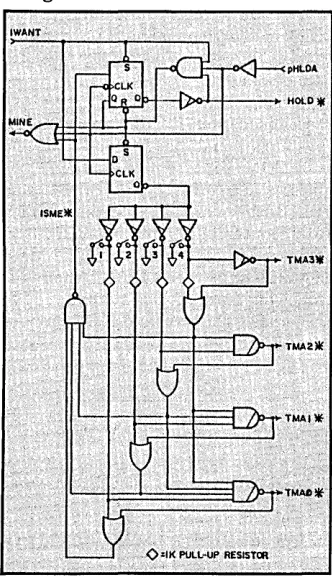
Probably the nicest thing about the 8-100 arbitration scheme is its sim-plicity. Figure 1 shows a bus arbitra-tion circuit (taken from the IEEE-696 specification) that w.ould typically be found on each processor board in a multi-processor TurboDos-based sys-tem.
The 8-100 bus can handle up to 16 temporary bus masters in the same frame. Arbitration among these 16 is controlled by the 8-100 bus' four open-collector TMA (temporary master ar-bitration lines, TMAO - TMA3).
Each temporary master on the bus has a unique priority that it can assert onto these lines whenever it wants to take over control of the bus. The bus arbitration circuitry (which must be present on each temporary master board) will then decide if that board
may have control of the 8-100 bus. If
the bus is busy, the arbitration circui-try will deny access to the bus.
Waiting In Line
In addition,' the arbitration circuitry on each board must also determine if there are other boards that are also
requesting the bus. If others are
requesting access, then the arbitration circuitry must decide which request-ing temporary master has the highest priority, and see that bus control is turned over to that board.
This is easier than you might think. The TMA lines are open collector, so the arbitration circuitry on each board only needs to look at the TMA lines to determine if other boards are request-ing control of the bus.
If any other processors are
request-ing the bus then the signal levels on the TMA lines will not agree with the value that the board's own arbitration circuit is outputting. The circuit can
12
then determine which board has the : highest priority (after removing its own signals from the TMA lines).
Looking At Figure 1
Here's how the arbitration circuit . shown in Figure 1 works: The tempo-. rary master (whose board must in-clude the circuitry in Figure 1) re-quests the bus by asserting the IW ANT (occasionally know as the
GIMMEE) line. If no other processor
already has the bus, the requesting board outputs its priority to the TMA lines and gets control of the bus immediately (the MINE line turns on) by asserting the HOLD* line.
If pHLDA is inactive (the master processor has the bus), or the HOLD* line is active (another master' has the bus), then the requesting board must use the arbitration procedures de-scribed above.
If the bus is being used by lower priority boards, the new board asserts the I8ME* line, which eventually enables the MINE line (saying that the bus request is successful).
When the requesting board has finished using the bus, it turns off the IWANT signal, which causes HOLD* to be released, and resets the MINE. signal. Afterwards, the master proces-sor can release pHLDA and take back the bus.
Figure 1 shows the switch settings for board priority selection. The board has the lowest priority when all the switches are closed; it has the highest priority when all the switches are open.
Simple DJ2D Relocation
Morrow Designs' old DJ2D floppy controller boards can get a new lease on life from this information sent to me by Ken Piggott, a long-time 8-100 enthusiast:
"The problem with most DJ2Ds is that they require' address space from OEOOOH to OE800H, which limits the size of the operating system (usually
736 Notre Dame Grosse Pointe MI 48203
CP/M) to 56K. It would be nice to
relocate the board to the top. of memory (OF800H), but there are two obstacles, an EPROM and a PROM, that must be reprogrammed to do this. Burning a new EPROM is no real problem, since Morrow Designs sup-plied the source for the EPROM. But the PROM programming information is not provided, and PROM updates are no longer available from Morrow Designs for this board.
"The solution is to burn a new EPROM and move a couple of traces to trick the PROM into thinking that the OEOOOH page is being addressed when actually the F800H page is selected. Fortunately, there is an un-used NAND gate available in the DJ2D's vectored interrupt circuit (which is not used by the DJ2D softw~e), which can be used to trick the PROM. Here is how to do the relocation on a DJ2D model B, rev 2.:
"Assemble the EPROM source code for OF800H, bum it into an EPROM, and install it into the DJ2D to take
care of relocating the DJ2D's 110
routines and boot loader software. I
[image:14.613.402.568.246.535.2]This gate was used to drive a vectored interrupt line, but was never used in any Morrow Designs software. 8imi-larly, lift out pins 6 and 7 of the 6301 PROM IC at position 8C. Connect a wire from board position J1A (the output of the 74L838 NAND gate at 8B) to the 6301 PROM's pins 6 and 7.
"Finally, connect the inputs of the 74L838 NAND gate to 8-100 bus lines All and A12 (one wire from 8-100 edge connector pin 85 to Ie 8B pin 12, and one wire from edge connector pin 33 to IC 8B pin 13). That's all there is to it!"
I have used this modification myself on several DJ2Ds and have had no problems at all. However, this modifi-cation only works for DJ2Ds origined at OEODOH, and it disables the DJ2Ds vectored interrupt output (which I don't use either), so use it with some caution if you are not a software wizard.
More Goodies
N ext time, a simple circuit for adding a 32-character type-ahead to a serial I/O port, more IEEE-696, and some reader feedback.
•••
FREE SOFTWARE
FROM THE PUBLIC DOMAIN
User Group Software isn't copyrighted, so no fees to pay! 1000's of CP/M and IBM software programs in .COM and source code to copy your-self! Games, business, utilities! All FREE!
Rent Buy IBMPC-SIG 1-370 Disksldes ... 400, 800. IBMPC-BLUE 1-116 Disksides ... 145. 375. SIG/M UG 1-222 Disksldes ... 130. 625. CP/M UG 1-92 Disksides ... 45. 250. PICO NET 1-34 Disksides ... 25. 100. KAVPRO UG 1-39 Disksldes ... 45. 90. EPSON UG 1-39 Disksides ... 45. 90. Commodore CBM 1-28 Disksldes ... 25. 65.
Public Domain User Group Catalog Disk $5 pp. (payment in advance, please) Rental is for 7 days alter receipt, 3 days grace to
return. Use credit card, no disk deposit. Shipping, handling & insurance $9.50 per library.
(619) 941-0925 Orders & Technical (9 to 5) (619) 727-1015 24 Hr. J Min. Inlo Recording
Have your credit card ready!
National Public Domain Software
•
1 1533 Avohill Dr. ~
, Vista, CA 92083 ~
BBB
S100
The P& T-488 interface package
• can control 15 IEEE-488 devices
• works with 8 operating systems
• works with Pascal, Fortran, Basic, C or assembler • includes sample programs
and GPIB monitor
Call or write:
PICKLES & TROUT® P.O. Box 1206
Goleta, CA 93116 (805) 685·4641
NEW ••• nOPPY DISK
CONTROLLER BOARD
FOR THE
XEROX 820-11
Direct replacement for the standard 820-11 Floppy
Daughter Board. Uses the FDC1793/9229B for reliable
operation. Perfect for surplus 820-11 boards.
Assembled/tested ... s109.95 Complete Kit.. ... s79.95 Bare Board w/9229B _ ... SS9.95 Bare Board w/OOC ... s39.95
Indude $3.00 Shipping VlSA/MC COD Add $1.s0
REPAIR
SERVICE
XEROX 820 1/11 BIG BOARD I
THE DATA MILL
12 Crescent Court Montgomery, IL 60538
312-892-6573
helps compare evaluate and find products. Get answers.
SERVICE: FREE LITERATURE
One free cali covers all programmer's software. Ask for a "Packet" on: "AI", BASIC, C, COBOL, Debuggers, Edi· tors, FORTH, FORTRAN, Libraries, PASCAL, UNIX/PC or 30 "addons" for "C'·.
ARTIFICIAL INTELLIGENCE
ARITY PROLOG - full, debug, to ASM & C, 16 meg use MSDOS $495 EXSYS - Expert System dev't.
Full RAM, serious PCDOS $275 GC LISP - "COMMON LISP", rich,
tutorial, co·routines PCDOS Call PROLOG-86 - Learn' fast,
Stan-dard, tutorials, samples MSDOS Call
C PROGRAMMING
C·terp by Gimpel, full K&R,
.OBJ, ASM inter., 8087. MSDOS $255 INSTANT C - interactive
develop-ment - Edit, Source Debug, run. Edit to Run - 3 Secs. MSDOS $399 "INTRODUCING C" - Interactive
C. 500 page tutorial. PCDOS Call
Recent Discovery
LlSP-86 - "Common" subset, tutorial, editor, PP, trace. Best to learn.
All MSDOS. Only $ 95
FORTRAN PROGRAMMING
Fortran> > C - Fortrix creates main-tainable translations. MSDOS $995 RM/FORTRAN - Full '77, BIG
ARRAYS. 8087, optimize, back
trace, debug MSDOS $459
SUPPORT PRODUCTS
BRIEF Programmer's Editor - undo, windows, reconfigurable, macro programs, powerful PCDOS $195 PLINK - 86 is a program-independent overlay Linker to 32 levels for all MS Languages. C86 and Lattice. $299
PERISCOPE DEBUGGER·