An Error Code Highlighting Function in Java
Programming Learning Assistant System Using
Test-Driven Development Method
Nobuo Funabiki, Yuuki Fukuyama, Yukiko Matsushima, Toru Nakanishi, and Kan Watanabe
Abstract—Recently, the objected-oriented programming lan-guageJavahas been used in many practical systems including enterprise servers, smart phones, and embedded systems due to its high reliability and portability. To enhance effects of Java programming educations, we have developed a Web-based Java Programming Learning Assistant System (JPLAS). JPLAS adopts theTest-Driven Development (TDD) methodfor automatic testing of source codes written by students on the server to assist their self-learning. In JPLAS, a teacher needs to register each Java programming assignment with a statement, a reference source code, and a test code. Then, students should write source codes by referring this statement and the test code so that their source codes can be tested automatically at the server by a testing software tool called JUnit with the test code. Unfortunately, the current JPLAS is not friendly to students who have difficulty in reading the log message fromJUnitthat contains the information on the errors in the source code. In this paper, we implement the error code highlighting function to help such students to find erroneous lines in the code by highlighting them graphically. We evaluate the effectiveness of this function through an experiment for 42 students who are currently taking the Java programming class.
Index Terms—JPLAS, Java programming education, Web system, test-driven development method, error code highlight-ing.
I. INTRODUCTION
R
ECENTLY, with penetrations of the Information and Communication Technology (ICT) into our societies, adverse affects of system failures caused by software bugs have become intolerable. They sometimes have stopped func-tions of railways [1], airlines [2], and large banking systems [3]. Along this trend, the software test has become regarded as the last crucial step to avoid productions of software bugs in systems. In this trend, aTest-Driven Development (TDD) methodhas been focused as an effective software developing method that can avoid bugs by writing and testing source codes at the same time [4]. A test code is a program code to test the correctness of the outputs of the methods that are implemented in the source codeunder the test.Javais a useful and practical objected-oriented program-ming language that has been used in a lot of important practi-cal systems including Web systems, enterprise servers, smart phones, and embedded systems. Thus, a Java programming education in schools has been important in order to foster professional Java programmers into societies.
To enhance effects of the Java programming education by assisting self-studies of students and reducing teaching
The authors are with the Department of Electrical and Communication Engineering, Okayama University, 3-1-1 Tsushimanaka, Okayama, 700-8530, Japan e-mail: [email protected].
loads of teachers, we have proposed and developed a Web-basedJava Programming Learning Assistant System (JPLAS)
[5][6]. JPLAS adopts the TDD method for automatic testing of source codes from students. In JPLAS, a teacher first needs to register each Java programming assignment with a statement, a reference source code, and a test code using a Web browser. Then, students should write source codes by referring the statement and the test code in the assignment so that their source codes can be tested automatically on a testing tool called JUnit [7]. JUnit tests the correctness of the source code using the test code. Every time a source code is submitted to the Web server, it is tested automatically by usingJUnit at the server.
Unfortunately, the current JPLAS is not sufficiently friendly to students who cannot read the log message from
JUnit that contains the information on the errors necessary to fix the problems in the source code. Because JPLAS has been developed to encourage such students to learn the Java programming by themselves, the error message in JPLAS should be improved so that these students can easily find the erroneous lines without helps by a teacher.
In this paper, we newly implement the error code high-lighting function in JPLAS to help such students to find erroneous lines in the source code easily by highlighting them graphically. We evaluate the effectiveness of JPLAS with this function through an experiment to 42 students who are currently taking the Java programming class in our department.
The rest of this paper is organized as follows: Section II introduces the TDD method. Section III reviews our JPLAS. Section IV presents the error code highlighting function. Sec-tion V discusses the evaluaSec-tion result. SecSec-tion VI concludes this paper with some future works.
II. TEST-DRIVENDEVELOPMENTMETHOD
In this section, we introduce the test-driven development method and its features.
A. Outline of TDD Method
In the TDD method, the test code should be written before or when the source code is implemented, so that it can verify whether the source code satisfies the required specifications during its development process. The basic cycle in the TDD method is as follows:
(1) to write the test code to test every required specifica-tion,
(2) to write the source code, and
B. JUnit
In JPLAS, we adoptJUnit as an open-source Java frame-work to support the TDD method. JUnit can assist an automatic unit test of a Java code unit or a class. Because
JUnithas been designed with the Java-user friendly style, its use including the test code programming is basically easy for Java programmers. InJUnit, a test is performed by using a given method whose name starts from ”assert”. This paper adopts the ”assertEquals” method to compare the execution result of the source code with its expected value.
C. Test Code
A test code should be written using libraries in JUnit. Here, by using the followingMyMathclass source code, we explain how to write a test code. MyMath class returns the summation of two integer arguments.
1: public class Math{
2: public int plus(int a, int b){
3: return( a + b );
4: }
5: }
Then, the following test code can test theplusmethod in the MyMathclass.
1: import static org.junit.Assert.*; 2: import org.junit.Test;
3: public class MathTest {
4: @Test
5: public void testPlus(){ 6: Math ma = new Math();
7: int result = ma.plus(1, 4); 8: asserEquals(5, result);
9: }
10:}
The names in the test code should be related to those in the source code so that their correspondence becomes clear:
• The class name is given by the test class name + Test.
• The method name is given by the test + test method name.
The test code imports JUnitpackages containing test meth-ods at lines 1 and 2, and declaresMathTestat line 3. @Test
at line 4 indicates that the succeeding method represents the test method. Then, it describes the test method.
The code test is performed as follows:
(1) to generate an instance for theMyMathclass, (2) to call the method in the instance in (1) using the given
arguments, and
(3) to compare the result with its expected value for the arguments in (2) using theassertEquals method.
D. Features in TDD Method
In the TDD method, the following features can be ob-served:
1) The test code can represent the specifications of the source code, because it must describe any function to be tested in the source code.
2) The test process for a source code becomes efficient, because each function can be tested individually.
3) The refactoring process of a source code becomes easy, because the modified code can be tested instantly. Therefore, to study the TDD method and writing a test code is useful even for students, where the test code is equivalent to the source code specification. Beside, students should experience the software test that has become important in software companies.
III. JAVAPROGRAMMINGLEARNINGASSISTANT SYSTEM(JPLAS)
In this section, we introduce the outline of our Java programming learning systemJPLAS.
A. Server Platform
JPLAS is implemented as a Web application using
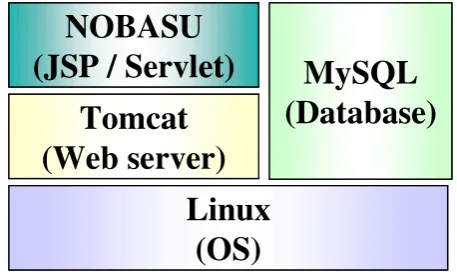
JSP/Servelt. For the server platform, it adopts the operating systemLinux, the Web serverApache, the application server
Tomcat, and the database system MySQL, as shown in Figure 1.
NOBASU
(JSP / Servlet)
Tomcat
(Web server)
MySQL
(Database)
Linux
(OS)
NOBASU
(JSP / Servlet)
[image:2.595.310.539.299.435.2]Tomcat
(Web server)
MySQL
(Database)
Linux
(OS)
Fig. 1. Server platform.
B. Teacher Service Functions
JPLAS has user functions both for teachers and students.
User functions for teachers include the registration of new classes, the registration and management of assignments, and the verification of source codes that are submitted from students. To register a new assignment, a teacher needs to input an assignment title, a problem statement, a model (or reference) source code, and a test code. After the registration, they are disclosed to the students except for the model source code. Note that the test code must be able to test the model code correctly. Using the correspondence between a source code and a test code in Section II-C, JPLAS can automatically generate a template for the test code from the model source code. Then, a teacher only needs to specify concrete numbers for the arguments in each test method to complete the test code.
C. Student Service Functions
User functions to studentsinclude the view of the ments and the submission of source codes for the ments. A student should write a source code for an assign-ment by referring the problem stateassign-ment and the test code. Actually, the student is requested to use the class/method names, the types, and the argument setting specified in the test code. JPLAS implements a Web-based source code editor calledCodePress [8] so that a student can write codes on a Web browser. Any submitted source code is stored in the database at the server so that they can view old ones.
D. Example
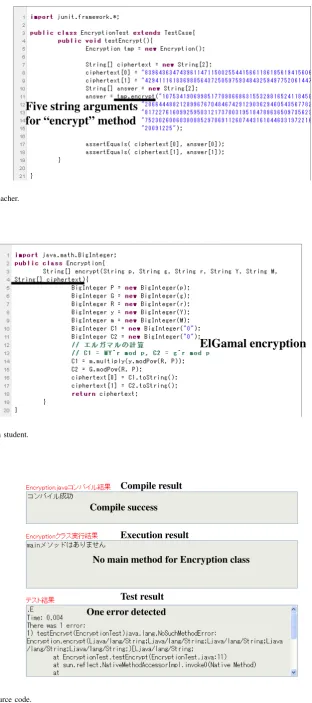
Figures 2 and 3 show the test code and a source code from a student for the ElGamal encryption programming assignment. Figure 4 shows the test result, where one error is detected because the last argument of the ”encrypt” method in the source code is different from the specification given in the test code.
IV. ERRORCODEHIGHLIGHTINGFUNCTION
In this section, we present a newly implementederror code highlighting function in JPLAS to help students who have difficulty in reading the log message from JUnit.
A. Outline
JPLAS provides the output log from JUnit to students to help them to fix the problems in their source codes if there exist. However, this log is usually hard to understand for students who even cannot find the lines that they need to modify in their source codes. To help such students, we newly implement a function of highlighting the lines that contain the error codes found byJUnit. This function actually highlights both the lines in the test code that return errors at the test and the corresponding lines in the source code.
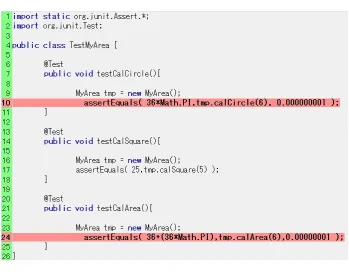
1) Highlighting in Test Code: This function highlights the lines containing the test methods such as assertEquals that return errors in the test code. In our implementation, these lines are extracted from the log of JUnit that contains the erroneous line information. Figure 5 shows an example of a
JUnit output log, where the line framed by a rectangular indicates that the 10th line in the test code returns the error. We note that the 24th line also returns the error, which is omitted in Figure 5 to save space. Figure 6 shows the corresponding interface to students for the test code highlighting.
2) Highlighting in Source Code: Then, the function high-lights the lines in the source code that declare the methods containing error lines found by JUnit. These erroneous methods in the source code are extracted from the codes for the methods that return errors in the test code. Figure 7 shows an example of the source code highlighting corresponding to Figure 6.
V. EVALUATION
In this section, we evaluate the effectiveness of JPLAS with the newly implemented error code highlighting function through its application to students taking a Java programming class in our department.
A. Assignment and Questionnaire for Evaluation
To evaluate the error code highlighting function in JPLAS, we prepared one Java programming assignment in JPLAS to
42sophomore students in our department who are currently taking a Java programming class. This assignment requests them to write a simple Java program of calculating the area of a circle and a rectangle. Actually, we gave them a source code for this assignment that has one error intentionally so that they can fix it for answers, where we asked them to answer this assignment within 15min.. Here, we note that these students have used JPLAS to know how to use it. Then, we asked them to reply to the six questions in Table I with five grades.
TABLE I
QUESTIONS FOR QUESTIONNAIRE.
Question
Q1 Do you think to use the system is easy ? Q2 Do you think this system is helpful in
checking the program functions ?
Q3 Do you think to read the test code is helpful in understanding the assignment specification ? Q4 Do you feel the response time after the source
code submission is long ?
Q5 Do you think the error code highlighting function is helpful in fixing the errors in the code ? Q6 Do you think this system is helpful in
understanding Java programming ?
B. Evaluation Results
Table II shows the replies from the students for the six questions in Table I.
TABLE II
QUESTIONNAIRE RESULTS WITH FIVE GRADES.
1 2 3 4 5 Q1 hard 1 14 13 8 6 easy Q2 useless 0 9 17 9 7 useful Q3 useless 0 9 19 10 4 useful Q4 long 2 5 9 14 12 short Q5 useless 0 2 22 9 9 useful Q6 useless 3 5 22 6 6 useful
For Q1, a similar number of students replied positively (1
or2) or negatively (4or 5). It indicates that the usability of the system is basically acceptable for them. Some students felt that the text form in a Web browser is not convenient as a programming editor if it is compared with an editor on a personal computer. Thus, a more advanced editor on a Web browser should be introduced into JPLAS.
Five string arguments
for “encrypt” method
Fig. 2. Test code from teacher.
ElGamal encryption
Fig. 3. Source code from student.
Compile success
No main method for Encryption class
One error detected Compile result
Execution result
[image:4.595.121.450.153.481.2]Test result
[image:4.595.155.437.405.738.2]JUnit version 4.8.2 .E..E
Time: 0.006
There were 2 failures: 1) testCalCircle(TestMyArea)
java.lang.AssertionError: expected:<113.04> but was:<24.84> at org.junit.Assert.fail(Assert.java:91)
at org.junit.Assert.failNotEquals(Assert.java:645) at org.junit.Assert.assertEquals(Assert.java:441) at org.junit.Assert.assertEquals(Assert.java:510) at TestMyArea.testCalCircle(TestMyArea.java:10)
at sun.reflect.NativeMethodAccessorImpl.invoke0(Native Method)
[image:5.595.99.471.58.577.2]. . .
[image:5.595.123.473.303.579.2]Fig. 5. JUnit log example.
Fig. 6. Test code highlighting example.
[image:5.595.160.440.615.749.2]VI. CONCLUSION
This paper presented the implementation of theerror code highlighting function in the Web-based Java programming learning assistance system JPLAS to help students to find erroneous lines in their source codes by highlighting them graphically. The evaluation in our experiment supports the effectiveness of this function. In future studies, we will improve the user interface by adopting an advanced program-ming editor for a Web browser, and keep evaluations of the effectiveness of JPLAS by applying it for a longer time with various programming assignments to students.
REFERENCES
[1] The Free Library, ”JR East’s automated gate system fails to read data from Suica cards,” http://www.thefreelibrary.com/LEAD%3A +JR+East%27s+automated+gate+system+fails+to+read+data+from +Suica...-a0155493841.
[2] VentureData.org, ”Japan’s All Nippon Airways computer system fail-ure was canceled hundreds of flights,” http://www.ventfail-uredata.org /?i434 Japans-All-Nippon-Airways-computer-system-failure-was -canceled-hundreds-of-flights.
[3] Reuters, ”Mizuho says nearly $1 bln settlements may be disrupted by glitch,” http://www.reuters.com/article/2011/03/18
/mizuho-idUSL3E7EI02L20110318.
[4] K. Beck,Test-driven development: by example, Addison-Wesley, 2002. [5] N. Funabiki, T. Nakanishi, N. Amano, H. Kawano, Y. Fukuyama, and M. Isogai, ”A software architecture and characteristic functions in learning management system ”NOBASU”,” Proc. Annual IEEE/IPSJ Symposium on Applications and Internet (SAINT 2010), pp. 109-112, July 2010.
[6] N. Funabiki, Y. Fukuyama, Y. Matsushima, T. Nakanishi, and K. Watanabe, ” An improved Java programming learning system using test-driven development method,” Proc. Int. MultiConference of En-gineers and Computer Scientists (IMECS 2012), pp. 587-602, March 2012.
[7] JUnit, http://www.junit.org/.