Digitising the Turing Archive: A Pilot Study
Hall W, Hughes GV, Martinez K, Weal MJ, Wills GB. March 2000.
Intelligence Agents Multimedia.
Department of Electronics and Computer Science, University of Southampton.
ISBN 085432714-2
Abstract
Contents
1. ARCHIVE DATABASE DESIGN...4
2. CREATING THE WEB INTERFACE TO THE ARCHIVE MATERIAL...5
3. PRACTICAL ASPECTS OF CAPTURING THE ARCHIVE ...7
3.1 INFORMATIONAUDIT...7
3.2 PRACTICAL POINTS WHEN SCANNING...8
3.3 POST PROCESSING. ...9
3.4 EFFORTTAKEN. ... 11
4. CONCLUSION. ... 14
APPENDIX A SCANNING PROCESS... 16
A-1 TANNER’SCRITERIA... 16
APPENDIX B COSTING... 17
B-1 OVERHEADS... 17
B-2 COST OFEMPLOYMENT... 17
B-3 THEEQUIPMENTCOST... 18
B-4 ADDITIONALPROCESSCOST... 18
B-5 TOTALPROCESSCOSTS. ... 18
APPENDIX C DATABASE DESIGN DETAILS ... 19
C-1 INPUT DATA FOR THE DATABASE... 20
1. Archive Database Design
Information about the digitised images in the electronic archive is stored in a database. The database is used as the foundation for the dynamically created Web pages and for other applications to access the data. The design of the database has been influenced by the nature of the Turing archive and by the desire to use the same model for other archives. This section summarises the design and implementation of the database and the technology used to access the data
The overall database design is implemented as two schema. The information about files consists of 14 tables called MMarch standing for Multimedia Archive. This is a standalone schema built before the project began as part of an effort within the IAM group to build a database capable of storing meta information about any file stored on the Multimedia server. It has a number of fields for describing a multimedia file of any format. These fields are based on the Dublin Core Metadata project. The MMarch schema of the database deliberately has no high level structure built into it so that it can be reused for all archives held on the Multimedia server. The second schema of tables have been designed and written for this project to add structure to the file tables. The Turing schema has 2 layers Items and Folders. Items contain Folders, which in turn contain Files. Files are contained in the MMarch schema. The Items correspond to the items listed in the archive catalogue. Each File entry represents one image in the archive. The layer of Folders gives the database the necessary flexibility to describe how the Files are grouped together within the Items. The seven Turing tables have been designed to be flexible in order to be readily reusable for future archives held on the server. The full Entity Relationship diagram for the database is included in Appendix C.
The system used for the project is the relational database DB2 from IBM. The Web server used is Apache and the dynamic Web page generation is achieved using the PHP language. This language allows Web pages to be written containing SQL queries to the archive database to build the Web pages dynamically. Appendix D contains some information about PHP and includes the PHP code behind the Browse page of the pilot Web site as an example.
2. Creating the Web interface to the Archive Material.
A Turing Archive test site was created consisting of approximately 40 pages. The aim of the website is to provide a clean interface for accessing the archival material.
The interface contains metadata and bibliographical information. The interface is designed to direct users with different backgrounds to appropriate archival material while at the same time not restricting access to the remaining archival material. The on-line archive currently consists of about one third of the available material from the Turing Archive held at King’s College Cambridge.
To identify the potential users, user scenarios were created. The potential users are divided into three broad categories.
The casual user: These people are considered to be interested in general information on
Turing. For example students carrying out a school or college project, or perhaps members of the general public who may have heard about the archive and wish to find out more.
The informed user: These people are considered to be interested in detailed information
from the archive. For example, hobbyists who desire to understand Turing’s work, university students undertaking a project on Turing’s work or perhaps professionals with an interest in applying his theories
The professional researcher: These people require more detailed information from the
archive. Examples of professional researchers would be university PhD students researching Turing’s work.
From the user scenarios, it was possible to identify the type of resources the user might require access to.
The informed user: Published papers on well-known theories, Turing’s fellowship thesis
and radio interview transcripts.
The professional researcher: Previously unpublished transcripts on well-known theories
and Turing’s amended transcripts.
The scenarios and user requirements naturally lead to the interface requirements for each user groups.
The casual user: It can be assumed that the casual user can use the basic functions of a
Web browser i.e. point and click. Beyond this, no assumptions are made. For this reason, the user should only need to follow simple predefined navigational trails.
The informed and professional user: Due to the diverse background of the users, no
assumptions can be made about the competence in regard to using advanced functions of a Web browser. They will, however expect functionality such as searching mechanism, which the casual user might be less inclined to use.
The website consists of a front page that allows the user to choose one of several options.
Facilities exist for browsing and searching the on-line archive. The interface allowing direct access to the archive is perhaps more useful to the professional user but anyone accessing the archive has these facilities available to them. As well as browsing the on-line archive, users are able to view the full catalogue, listing all of the material that is present within the archive held at King’s College Cambridge. Where an on-line version of an item exists, links are supplied to the relevant files. The on-line catalogue pages are dynamically generated, from the information held in the database.
In addition to browsing the catalogue, some example trails have been constructed which are aimed at the different types of users. Two trails were designed to provide users with a general overview of Turing, his life and his works. Material for both trails was obtained from Alan Hodges’ website and a website at Manchester University that gives an overview of the
History of Computing at Manchester. The first is aimed at the casual user and as such each of the pages holds general information and provides links to material of a general nature held in the online archive. In addition, links are included to additional material held on other
Web page is displayed in a new window. The intention of this is to help prevent the user from accidentally leaving the website and being unable to retrace their steps.
More detailed information can be obtained by users by clicking on specially created that expand the current text by inserting additional text and links. These links are by default not underlined in order to try and differentiate them from other links on the Web pages. The additional text was identified with a grey background while the original text had a white background. The user knew that they had not left the trail as the same background colour was used throughout the trial. In addition at the top and bottom of the page was a trial map.
The second overview trail has similar navigational features with a trail map provided at the top and bottom of each page. However, unlike the first trial there is no expanding text, as all the content is displayed on loading the page.
3. Practical aspects of Capturing the Archive
This section of the document summarises a report on the practical lessons learnt whilst digitising a proportion of the Turing Archive [Wills 99], held at King’s College Cambridge.
There are similar documents available on the digitising of material, for example from the Higher Education Digitisation service [Tanner 98] and a project title ‘Scoping the future of the University of Oxford’s Digital Library Collections’ [Lee 99]. The aim of this section of the report is not to repeat the information, but to highlight where the approach taken differs from that already reported.
3.1 Information Audit
An essential aspect of the scanning process is in identification of the material to be digitised, especially if meaningful estimates of the time required are to be obtained. The information audit needs to focus on the type and size of documents, the amount of care required in handling, the type of protective covers used, and whether the document is loose leafed or bound, as these factors will have an impact on the effort required.
selection process of the hardware to be used. For example, in the case of the Turing archive a large percentage of the material was foolscap, therefore a conventional A4 scanner was not sufficient, and an A3 scanner needed to be acquired. The information audit also allowed the size and type of the external storage media to be specified. In this case, an external SCSI hard disk was chosen.
Once the equipment has been purchased, a trial run of the complete process was undertaken. This demonstrated that the procedures used and the effort estimates were realistic. The trial run also allowed potential problems to be identified and solved prior to starting what could be a lengthy run. The file size for each of the captured document leaves could be quite large. For example, a foolscap, loose leaf sheet using 24-bit colour at 300 dpi was approximately 24Mb in size. The size of the captured material came to approximately 11Gb for 786 files. The size of the files had a significant effect on the choice of back-up device.
3.2 Practical points when scanning
One of the basic principles when capturing material for archival purposes is not to interpret the material or try and anticipate the proposed use of the material. Unless the material is an unaltered black and white photocopy or photograph, all scanning should be carried out in colour. This allows the researcher to clearly see the different inks and corrections made to a document. Tanner et al [Tanner 98] point out that this may also produce an additional cost due to factors such as increased storage space required, longer processing times, etc.
The practical lessons learnt can be summarised as :
Normal Health and Safety rules should be adhered to for computer operators. This includes regular breaks from viewing the screen, which will have an impact on the effort estimation.
The setting used for the scanning process was for:
1. Black and white photographs, 8-bit Grey scale at 600 dpi (dots per inch). 2. Unaltered photocopies, 8-bit Grey scale at 300 dpi.
3. All other documents 24-bit colour at 300 dpi
The file format used was TIFF (Tagged Image File Format). To ensure that files are transferred quickly and effectively, two hard disks were used. One was the usual device holding the operating system and the swap file; the other simply held the data. This allowed the scanning software to quickly transfer the temporary file it created on the system device onto the back-up device.
3.3 Post processing.
The digitisation process involves more than just scanning the documents. The following sections discuss some of the post process (scanning) issues.
Viewing images across the Internet. To transmit the full image of the scanned document
across the Internet is impractical with today’s networking. The image files are simply too large to be downloaded with any reasonable speed. However, people often do not need the whole image all the time. In fact, the original scanned document is likely to be at a much higher resolution than they wish to see. Once they have viewed the whole image at a much smaller resolution, they may wish to examine parts of the image more closely. For these reasons, the Turing website uses a process developed by Martinez et al [Martinez 98], that uses a tiled JPEG-in-TIFF image as a method of pyramidal decomposition of the image to provide lossless images suitable for browsing real time on the Web. A representation of a tiled pyramidal image can be seen in Figure 1.
The whole conversion process is automated, and for the 768 files scanned from the Turing archive took approximately 6 hour (an overnight process) to create all the layers.
Sampling. Some studies proposed a fixed percentage of documents to be sampled after
the scanning process has been completed. However, there is risk involved in all sampling, and this must be understood. For this reason, a sampling plan in accordance with a
recognised statistical process, for example BS 6001 [BSI 96], should be used.
Extracting Key Words. The archive catalogue will normally provide the essential
Figure 2 Typical manuscript containing corrections [AMT/C/25/15] 3.4 Effort Taken.
Tanner et al [Tanner 98] presented some prices as a guide, yet supplied no information on how the costs were derived. They point out that the reason for this is that many of the costs relate to internal resources. To estimate the costs it is first necessary to identify the effort required. In order to aid estimation of the effort for scanning documents, a model of the process can be used. Once the effort has been calculated then the cost can be calculated. Within cost accounting there are also a number of methods of allocating cost. Some of the main considerations when allocating costs when digitising material are presented in Appendix B.
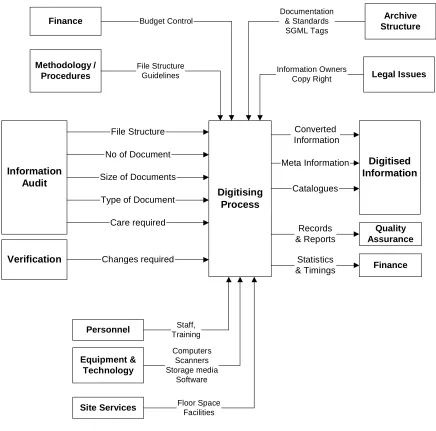
The conceptual process model [BSI 92], see Figure 3, and can be described as having: Inputs: Materials or data that are transformed by the process to create the output.
Outputs: The results of the transformation of the inputs. The output includes material or data that conforms to the requirements, waste and process information.
Controls: Inputs that define, regulate and/or influence the process. This embraces procedures, methods, plans, standards, policy, legislation and strategies.
Digitising Process Personnel Information Audit Verification Digitised Information Quality Assurance Finance No of Document
Care required
Changes required Type of Document Size of Documents
File Structure Statistics & Timings Records & Reports Converted Information Meta Information Catalogues Equipment & Technology Computers Scanners Storage media Software
Site Services Floor SpaceFacilities
[image:12.595.79.515.68.499.2]Finance Archive Structure Methodology / Procedures File Structure Guidelines Budget Control Documentation & Standards SGML Tags Staff, Training Legal Issues Information Owners Copy Right
Figure 3 The Capturing Process Model
Type of document Average (minutes) Tolerance +/- (minutes)
Manuscript Foolscap 1.70 0.930
Manuscript Foolscap Covered 4.65 1.070
Photographs 3.76 0.144
Correspondence 2.54 0.036
[image:13.595.68.478.70.160.2]Booklet 2.81 1.524
Table 1 The time taken to scan documents.
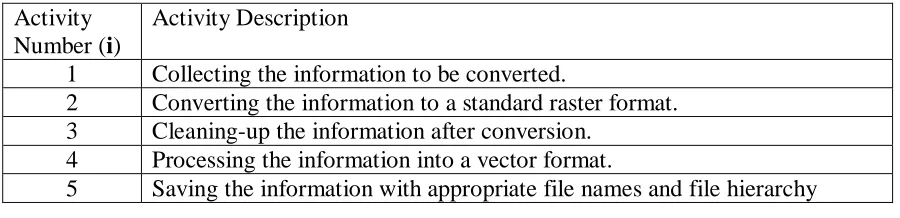
The main effort with existing paper documentation is converting the information into an electronic format. This task can be sub-divided into five main activities, see Table 2. Activity
Number (i)
Activity Description
1 Collecting the information to be converted.
2 Converting the information to a standard raster format. 3 Cleaning-up the information after conversion.
4 Processing the information into a vector format.
5 Saving the information with appropriate file names and file hierarchy
Table 2 List of activities associate with digitising non-electronic media documents
Scanning is suitable for the majority of paper documents. However large paper items, i.e. blueprints, may be best digitally photographed, or photographed by conventional means and the negatives then scanned. There are also equivalent processes for converting microfiche documents.
The effort required to deal with the paper information (E) is the sum of the effort for
gathering, converting, correcting, and processing the paper information. When estimating the time to carry out each process it is assumed that time is included for verifying the work. The individual processes that make up the converting of paper based information to electronic information depend on:
-The number of single A4 sheets of paper to be involved in the activity (Si). For sheets larger than A4 or Foolscap, an equivalent is given, for example an A3 sheet is equivalent to two A4 sheets, an A0 sheet is equivalent to eight A4 sheets, etc.
The average time taken to perform the activity (Ti). The effort is expressed as:
-1
[
]
∑
= =
5 1
*
to Activity i
i i T
[image:13.595.64.514.230.339.2]The effort estimation, person hrs, does not allow for breaks, distraction or other work related activities. For estimation, when converting the person hours to days allow only 6 hours per day, or when converting to weeks use 30 hrs per week.
The timings in Table 1 are average times to scan a document. Hence, there will be a tolerance to each of the tasks and therefore the accumulative tolerance can be quite large. However, by using statistical tolerancing, the overall tolerance for the time to capture is much less (and more realistic) than the arithmetic sum of the tolerance [Burr 76]. When people are first introduced to a task, they frequently take longer to perform that task than when they have repeated the task a number of times. This is known as the learning-curve effect [Drury 96]. The learning curve is based on real world observations and hence the relationships described are empirical [Arnold 90]. The learning curve can be applied to each of the input tasks identified in the process model.
4. Conclusion.
We have discussed the results of a pilot study to create an electronic archive of a portion of the archive of Alan Turing. The design and implementation of the database has been
described including the need for a flexible database architecture for reuse with other archives. Aspects of the importing of data into the archive were covered describing how available material such as the archive catalogue could be utilised. A Web based interface to the on-line archive was described. This made use of technologies such as the dynamic creation of Web pages using PHP and the use of an external link service (the DLS).
The digitising of paper documents by scanning is a complex process that involves a number of considerations. To simplify the task a considerable amount of preparation is required. The preparation requires a thorough information audit and often a trial run. This allows a
comprehensive procedure to put in place that will ensure the whole process is simplified.
Key word extraction by using OCR techniques is not viable for hand written manuscripts and may not be cost effective for hand amended/corrected typed manuscripts.
Acknowledgements
The authors wish to thank the IEE, the BCS and the Department of Electronics and Computer Science, University of Southampton for funding this pilot project. The authors acknowledge the Archive Centre at Kings College Cambridge for assistance and granting access to the Turning Archive. The authors would like to thank Dr. Jonathan Swinton and Dr. Andrew Hodges for the use of some of their Web pages within the trial Web site.
References
[Arnold 90] Arnold J, Hope T. Accounting for Management Decision 2nd edition, Prentice Hall, 1990.
[Burr 76] Burr I.W.Statistical Quality Control Methods. Marcel Dekker Inc. 1976. [Drury 96] Drury C. Management and Cost Accounting 4th edition. Thomson 1996. [Martinez 98 ] Martinez K, Cupitt J, Perry S.T.High resolution colorimetric image
browsing on the Web. 8th International World Wide Web conference, Toronto, Canada, May 11-14, 1999.
[Tanner 98] Tanner S, Robinson B. The refugee Studies Programme Digital Library Feasibility Study, Published by HEDS, University of Hertfordshire 1998. [Lee 99] Lee S.D.Scoping the Future of the University of Oxford’s Digital Library
Collections. Published Oxford University, 1999. Available at http://www.bodley.ox.ac.uk/scoping/
[Moore 98] Moore M. As Useful as ABC? IEE Manufacturing Engineering Vol. 77, No. 2. April 1998. pp 92-94.
[Reynolds 92] Reynolds AJ. The finance of Engineering Companies, An introduction for students and practising Engineers. Edward Arnold, 1992.
[Wills 98] Wills GB, Heath I, Crowder RM, HallW.A Model for Authoring and Costing an Industrial Hypermedia Application. University of Southampton Report No. MM98-6 November 1998. ISBN Number 085432685-5.
Appendix A Scanning process A-1 Tanner’s Criteria
Below are the criteria Tanner et al. [Tanner 1998] set for the scanning process: Condition:The condition of the
original pages in the document.
Good-The paper is in very good condition with the normal
wear of being stored on a Library shelf. The appearance should be as almost new. No tears, yellowing, foxing etc. should be present. The binding of the document is sound or may be removed for processing.
Fair:The paper is in good condition and shows only a small amount of wear, such as slight yellowing, dirt or minor tears.
Acceptable: The paper is generally OK condition but there are some problems. Problems such as extensive yellowing or dirt or fading of text, but where the text is still readable. Included here are good quality photocopies.
Poor: Where the paper is in a generally poor condition, the text being very difficult to read. Possibly to do with dirt, yellowing, foxing, show through or tears, crumpled pages, a general poor paper condition. Coming into this category are smudged text such as found in poor photocopies or where the printing was done to Mimeograph type standards.
Scan Standard: The standard of the output file that could be expected and the levels of post-processing required to the following ratings:
Good: The scan will be very good and require almost no post-processing to achieve a top standard.
Fair: The scan is very good by requires some clean up or other post-processing (e.g. deskewing) to achieve the top standard. May also be used for material where the
scanning is going to be difficult due to handling difficulties or special treatments.
Acceptable: The scan image is below average standard but can be made more acceptable through clean up and other post-processing.
Poor: The scan image is very poor and can only attain acceptable standard whatever the post-processing or other treatments used.
OCR Standard:The expected accuracy standard of the output files should OCR be carried out.
Good: Accuracy at 99.99% with almost no correction required.
Fair: Accuracy at >99% and can be made to 99.99% with small number of corrections.
Appendix B Costing
A detailed cost method is the engineering cost method [Arnold 90], and is used where a product or process is not part of the companies normal business activity. In the engineering method estimates of the total time, labour, materials and capital equipment required to perform the activity. The difficulty comes in estimating the indirect costs of such items as insurance, maintenance and power. However, the engineering cost method leads to a very accurate predication of future costs. In addition, the cost of the Information Audit should be included, the rationale being that the effort required to perform the audit is an integral part of the authoring methodology and has a direct effect on the efficiency of the authoring process. A poor audit will result in a greater effort in the authoring process.
B-1 Overheads.
Overheads are those costs that cannot be directly assigned to the cost object such as product, process, or customer group [Drury 96]. Included in this cost are the cost of services, such as, lighting, heating, building maintenance, rent for floor space and the according proportion of the business rate. The traditional method of allocating these costs is to divide the overhead cost among the various cost centres of the organisation. Each cost centre will then further proportion the cost among each of its activities. This method works well for cost accounting especially where the overheads are small in relation to the direct cost. However, when these overhead cost are greater than the direct costs disparate allocation of overhead costs take place. Hence, a small but increasing number of engineering companies are changing over to activity based costing to allocate the overheads, especially when costing is to be used for management decisions [Moore 98]. Another method commonly used in estimation of costs is to allocate a figure for overhead costs based on a function of the cumulative labour costs i.e. an additional forty percent for example. What is clear is that different companies will use different methods of allocating these costs. However the result is still the same, which is a fixed figure that represents the overhead costs (CO).
B-2 Cost of Employment
and add this to the hourly rate of the workers salary to produce a cost of employment [Drury 96]. Hence, it is necessary to calculate the cost of employment for the different salary scales or bands for the employees involved in the authoring process. In the first instant it may be sufficient to assume that the people employed in the task are paid the same. However, this is rarely the case due to factors such as full or part time employment, length of time served, seniority, etc. Hence, the extent to which these factors are taken into account will be related to the accuracy of the cost estimation required.
B-3 The Equipment Cost
In cost accounting, depreciation is used to spread the cost of equipment over a number of years [Reynolds 92]. The 'life term' of the equipment is chosen based on the nature of the equipment. Relative to the factory process machinery the life term of computer equipment is generally short, that is less than five years. The type of depreciation can be a constant amount that allows for scrap at the end, or a constant fraction of the residual amount, producing larger depreciation values in the early stages. However, for cost forecasting it makes more sense to include the full cost of the equipment (CE), including the cost of maintenance agreements,
shipping, insurance, etc. In addition, the actual cost of purchasing equipment can be spread by the use of lease-purchase agreements, in which the company leases the equipment for a set period. If the company keeps the equipment to the end of the agreement, they will own the equipment, prior to which they can return the equipment as in any other leasing agreement.
B-4 Additional Process Cost
The additional process costs (CP) are variable overhead costs, in that these are overheads
unique to the process itself. These include the cost of managing and supervising the process, the materials and power consumed in the process, the cost of any subcontracted work etc.
B-5 Total Process Costs. The total cost of the process is:
B-1
[
]
∑
=
+ + + =
Activity Effort i
Employment i
p O
E C C E C
C Cost
Appendix C Database Design Details M 1 M (1,1) (0,N) (0,N) (0,N) (1,N) (0,N) (0,N) (0,N) N M N M
1 M 1
C-1 Input data for the database
A major portion of the work for this pilot has been designing the database tables and the fields of those tables. The information that fills the tables has also been designed and created along with tools to manipulate it. There are seven input files used to populate the database. Samples of these are included below.
The archive catalogue has been used to create a file with the following format.
AMT/A/1
Newspaper cuttings, printed obituaries, material relating to inquest,
and tributes. June - Nov. 1954.
Paper, 8 sh. in envelope. Some items also in AMT/K/5. 'Memoir' by
M.H. Newman, Biographical Memoirs of Fellows of the Royal Society: 1, 1955, with book plate for the 'Alan Turing Prize for Science' offered at Sherborne School inside front cover, formerly held in AMT/A/1 missing since 1999.
This main file, an excerpt of which is shown below, lists all of the individual files in the system and also the relationships between them. It gives the structure of the Folders as well as the Hypertext relationships between images such as front and back.
A1/A1.Manchester.Guardian.June.1954.tif|Manchester Guardian. 10 June 1954, 11 June 1954.|
A36/A36.253.tif||Next,A36/A36.254.tif
A36/A36.254.tif||Next,A36/A36.255.tif:Previous,A36/A36.253.tif
A document summarising the copyright status of the archive has been used to add extra information to the main system.
AMT/K/1/40 Description: Autograph letter signed from AMT to Mrs
Turing. 29 May [1936]
Form for scanning: Original letter Provenance: Given by Mrs Turing
Copyright owner: P.N. Furbank, 12 Leverton St, London NW5 2PJ
The tools also generate the linkbase used by the Document Link Service (DLS). There are two types of linkbase generated. One contains a variety of styles of links on the item and file foliation numbers E.g. AMT/A/1. The other linkbase is based on keywords. The starting point for these keywords was the index given in the back of the archive catalogue.
Bletchley Park|AMT/D/2
Appendix D Sample PHP
PHP stands for PHP: Hypertext Pre-processor. It has similarities to Microsoft’s Active server pages. The Web server understands that any files that end with.php3.Are to be given to a special engine on the server. This engine uses the file as a program and produces output that the Web server sends to the browser. Below is the PHP code behind the Browse page of the Turing archive.
<html>
…
<h3>Available Online Items from the Turing Archive</h3>
<?php
require 'odbc_lib.php3'; require 'mmdb_lib.php3';
// Connect to the database.
$connection = db_connect ($odbc_name,$odbc_user,$odbc_pass);
//You can optionally call this with ?category=A etc
if ($category) $query_end = " and i.category like '$category%'";
// Build the SQL query.
$query = "select i.item_id, i.category, description from turing.item i, turing.description d where i.item_id = d.item_id$query_end";
// Call the database with the query. $results = db_query($connection, $query);
// Check to see if we have any results. if( $results)
{
while (list($item_id, $category, description)=db_fetch_row($results)) {
// Write out each record as a link. echo "<a href=catalogue.php3?category=
$category>$category</a><br>$description<br> ";
echo "<br>"; }}
?>
</body></html>
![Figure 2 Typical manuscript containing corrections [AMT/C/25/15]](https://thumb-us.123doks.com/thumbv2/123dok_us/1040813.619663/11.595.74.526.71.263/figure-typical-manuscript-containing-corrections-amt-c.webp)